Traditional Analytics vs Generative AI :
Key Differences
Recommended Learning Path
Traditional Analytics vs Generative AI
Understanding how Traditional Analytics vs Generative AI Works
Traditional Analytics vs Generative AI Analytics: What Changes and What Doesn’t
If you are starting a data career, you have probably wondered whether you should learn SQL and dashboards, or just learn to use AI tools. This guide compares traditional analytics vs generative AI stage by stage, so you can see which skills still matter and where AI actually helps.
Quick Answer
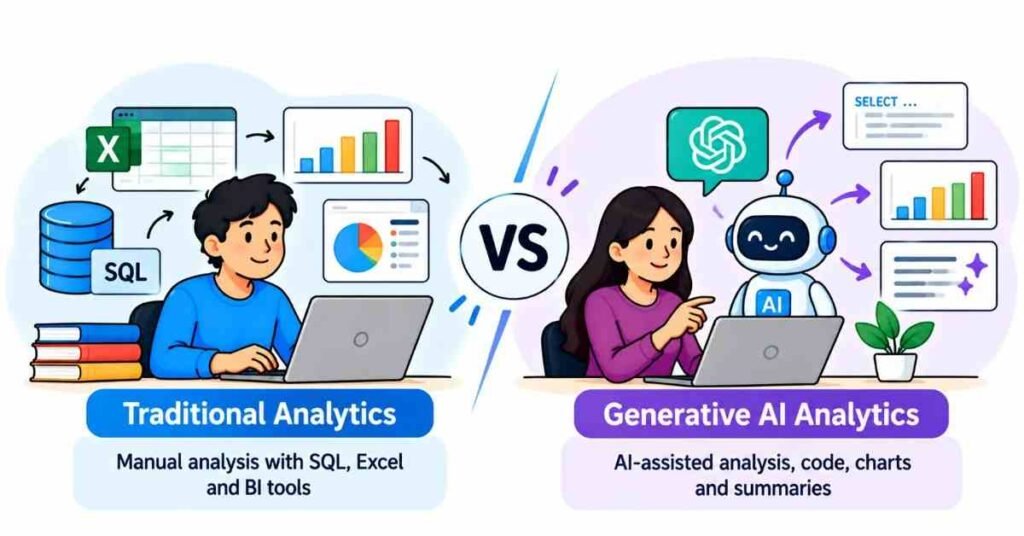
Traditional analytics relies on analysts writing queries, building reports and interpreting results manually. Generative AI analytics uses AI assistants to help with tasks such as drafting SQL, cleaning data, summarising findings and building first-draft charts. AI speeds up many steps, but it does not replace the need to understand data, check results and explain findings to decision-makers. For most learners, the best path is to learn the fundamentals first and add AI tools on top.
What Is Traditional Analytics?
Traditional analytics is the standard workflow most analysts have used for years. An analyst collects data from databases or spreadsheets, cleans it, queries it with SQL, analyses it in Excel or Python, and presents results in a BI tool like Power BI or Tableau. Every step is done by hand, so the analyst controls the logic and understands exactly how each number was produced.
What Is Generative AI Analytics?
Generative AI analytics means using AI models that can produce text, code and summaries to support analysis. You describe a task in plain language, for example “show monthly sales by region and highlight the biggest drop”, and the AI drafts a query, formula, chart or written explanation. The analyst then reviews and refines it.
Think of it as a fast assistant, not an automatic analyst. It produces drafts, and the person using it is responsible for whether they are right.
Comparison: Traditional vs Generative AI Analytics
Workflow stage | Traditional approach | With generative AI assistance |
Understanding the problem | Analyst clarifies the business question | Same. AI can help brainstorm questions but does not know your business |
Data cleaning | Manual rules in Excel, SQL or Python | AI suggests cleaning steps or code; analyst checks them |
Querying data | Analyst writes SQL from scratch | AI drafts SQL from a plain-language request; analyst tests it |
Analysis | Formulas, pivots, scripts | AI suggests approaches and runs routine analysis |
Visualisation | Built manually in a BI tool | AI generates first-draft charts or dashboard suggestions |
Reporting | Analyst writes summaries | AI drafts summaries; analyst edits for accuracy and tone |
Decision support | Analyst explains the findings | Still the analyst. Context and judgement stay human |
How Does Generative AI Change Analytics Workflows?
The biggest change is speed on routine tasks. Work that used to take an hour, such as writing a long query, reformatting a messy column or drafting a summary, can often be started in minutes. Analysts also spend less time on syntax and more on questions like “is this the right metric?”
The second change is access. A beginner can now describe what they want in plain language and get a working starting point. That lowers the entry barrier, but it also makes it easier to accept wrong answers without noticing.
What Remains the Same?
Many things don’t change:
- Business understanding. Someone must decide which question matters and what a good answer looks like.
- Data quality. Poor data gives poor results, whether a person or an AI processes it.
- SQL and BI fundamentals. To check an AI-written query, you must be able to read it. A dashboard still needs sensible metrics and clear design.
- Statistical thinking. Knowing the difference between correlation and causation, or spotting a misleading average, is still your job.
- Communication. Managers act on clear explanations, not raw output.
Where Can AI Assistants Add Value?
AI tools are most useful for:
Drafting SQL and formulas that you then test and correct.
Explaining unfamiliar code or errors in plain language, which helps learners.
Suggesting cleaning steps for messy datasets.
Summarising results into a first-draft report.
Automating repetitive tasks, such as formatting weekly reports.
Brainstorming metrics, hypotheses and chart types.
Where Does AI Still Need Human Review?
AI models can produce confident answers that are wrong. In analytics this shows up as:
- Incorrect SQL logic, such as a wrong join that silently double-counts rows.
- Misread data, for example treating a date column as text.
- Summaries that overstate what the data actually shows.
- Privacy risks, if sensitive company or customer data is uploaded to an external tool.
Each of these can look fine on the surface, so human review is not optional. Before sharing any AI-assisted result, verify the numbers against a known total and check your company’s policy on data sharing.
Practical Example: Monthly Sales Report
Suppose a retail analyst in Hyderabad needs a report on monthly sales by region.
Traditional workflow: Write SQL to join the sales and region tables, clean null values, build a pivot, create a Power BI chart, and write a summary. This might take most of a morning.
AI-assisted workflow: Ask an AI assistant to draft the SQL. Run it, and notice the totals are higher than the finance report. Check the join, find that a region table has duplicate entries, and fix it. Ask the AI to draft a summary, then correct a sentence that claimed a “sharp decline” when the drop was small.
The AI saved time on drafting. The analyst’s knowledge of SQL and the business caught the two errors. Without those skills, the wrong report would have gone out.
Common Mistakes and Misconceptions
- “AI will do the analysis for me.” It drafts. You verify.
- Skipping fundamentals because AI can write code. You can’t check what you can’t read.
- Trusting the first output without testing it on a small sample.
- Uploading confidential data to public AI tools without permission.
- Treating it as either/or. Most real workflows combine both approaches.
FLM Expert Perspective: The “Draft, Verify, Explain” Framework
A practical way to work with AI is to split every task into three steps:
- Draft: Let AI produce the first version of the query, formula or summary.
- Verify: Test it against known numbers, sample data and your own understanding of the business.
- Explain: Present the result in your own words, with the context a decision-maker needs.
AI is strongest at step 1. Steps 2 and 3 are where analysts create value, and they are the skills employers can’t get from a tool. Learners who practise all three build a stronger profile than those who only learn prompts.
A Simple Learning Roadmap
Learn spreadsheet and data basics. Cleaning, pivots, simple charts.
Learn SQL. Select, filter, join, group.
Learn a BI tool. Power BI or Tableau dashboards.
Add AI assistants. Practise drafting queries and summaries, then always verify.
Build projects. Use real-style datasets and document how you checked AI output.
Practise explaining findings. Write short business summaries of your projects.
If you want a structured path, an AI Powered Data Analytics Course can help you learn these fundamentals alongside AI tools through guided, project-based practice.
FAQs
- What is the main difference between traditional analytics and generative AI analytics?
Traditional analytics is done manually by the analyst at each step. Generative AI analytics uses AI assistants to draft parts of the work, with the analyst reviewing the output. - Will generative AI replace data analysts?
AI is changing how analysts work, but the tasks that need business context, verification and communication still need people. Expect the role to shift toward these skills rather than disappear overnight. - Do I still need to learn SQL if AI can write it?
Yes. You need SQL to check whether the AI’s query is correct. Without that, errors go unnoticed. - Is it better to learn traditional analytics or GenAI first?
Start with the fundamentals (data basics, SQL, BI), then add AI tools. This helps you use AI critically instead of blindly. - Can non-IT students learn AI-assisted data analytics?
Yes. Plain-language AI tools can lower the entry barrier, but you still need to learn core concepts step by step. - Is it safe to upload company data to AI tools?
Not always. Check your organisation’s data policy and the tool’s privacy terms before uploading anything sensitive. - What does “human review” mean in AI analytics?
It means checking AI output against known numbers, testing code on sample data and confirming the conclusions are supported before sharing results. - Which tools should I practise with?
Start with Excel, SQL and Power BI or Tableau, then try an AI assistant for drafting. Choose tools based on what employers in your target roles list.