ChatGPT for Data Analysis : Practical Guide for Analysts
Recommended Learning Path
How to use ChatGPT for Data Analysis
Understanding How to use ChatGPT for Data Analysis
What Is ChatGPT and How Can Analysts Use It for Data Work?
An analyst usually spends more time asking questions than simply calculating numbers.
Why did one region fall behind? Which customers changed their behaviour? Is a sudden increase real, or is it caused by a data problem? Which calculation would answer the business question correctly?
ChatGPT can help during that thinking process. It can work with uploaded data, explain unfamiliar concepts, assist with calculations, draft code, and help users explore possible patterns.
For learners building these skills through an AI Data Analytics Course in Telugu, the useful habit is not simply knowing how to ask ChatGPT for an answer. It is learning how to give it enough context, inspect what it does, and decide whether the result deserves to be used.
Quick Answer
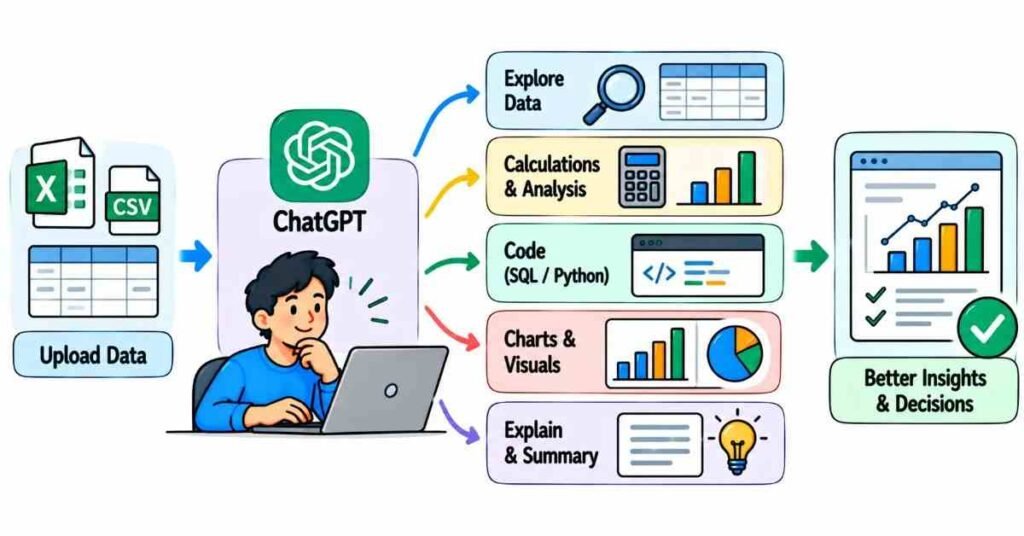
ChatGPT for data analysis can help an analyst explore spreadsheets, calculate metrics, compare groups, create charts, explain code, draft Python or SQL, and turn raw findings into clearer explanations.
A practical workflow looks like this:
Give context → Ask a precise question → Inspect the method → Check the important result → Continue the analysis
ChatGPT is most useful when it helps you investigate data faster while keeping the analyst responsible for the final conclusion.
What Is ChatGPT in an Analyst's Workflow?
ChatGPT is a conversational AI assistant that responds to instructions written in natural language. OpenAI currently supports file-based data analysis, including spreadsheets and CSV files, along with tables, charts, and code-backed analytical work.
For an analyst, this creates a different way to interact with data.
Instead of beginning every task with a formula or script, you can begin with the business question.
For example:
“Compare the average order value of first-time and repeat customers, and show the monthly pattern.”
That request contains three useful pieces of information:
- what should be compared;
- which metric should be used;
- how the result should be broken down.
The quality of the question matters because vague instructions leave more room for unwanted assumptions.
Start by Letting ChatGPT Examine the File
Imagine you receive a spreadsheet with these columns:
Order Date | Customer ID | Product | City | Quantity | Revenue | Status
Before asking for business conclusions, use ChatGPT to understand the file.
Useful first questions could include:
- Which columns contain missing values?
- Are there repeated Order IDs?
- What date period does the file cover?
- Which fields are numeric?
- How many unique cities are present?
- Are there unusual revenue values?
OpenAI recommends structured data with clear column names and one record per row for stronger analysis results.
This first inspection prevents you from jumping directly into a conclusion without understanding the input.
Practice Idea:
Upload a small practice dataset and ask ChatGPT to describe:
Rows → Columns → Missing values → Categories → Numeric fields
Then compare the answer with the file yourself.
Use Questions That Define the Calculation
Consider these two prompts.
Weak prompt:
“Tell me which product is doing well.”
Stronger prompt:
“Using completed orders only, compare total revenue by product for July to September and show the top three products.”
The second prompt defines:
- the records to include;
- the metric;
- the grouping;
- the time period;
- the expected output.
That reduces ambiguity.
For ChatGPT data analysis, useful prompts often include four ingredients:
Data + Metric + Condition + Output
For example:
Data: orders
Metric: average revenue
Condition: completed orders in September
Output: comparison by city
This structure is simple enough for beginners but useful across many analytical tasks.
Ask ChatGPT to Calculate, Then Ask How It Calculated
Suppose the file contains monthly marketing data:
Month | Spend | Leads | Payments |
July | 80,000 | 420 | 42 |
August | 95,000 | 500 | 40 |
September | 90,000 | 460 | 46 |
You could ask:
“Calculate payment conversion from leads for each month and compare the three months.”
The next question is just as important:
“Show me the formula you used.”
Now you have something to verify.
For July:
42 ÷ 420 × 100 = 10%
Checking one or two key calculations helps confirm whether the analysis is using the definition you intended.
Use ChatGPT to Explore Patterns, Not Just Produce Totals
Data analysis becomes more useful when you move beyond “What is the total?”
Suppose course-enquiry data shows that one campaign generated far more leads than another.
You might ask:
“Which campaign has the biggest difference between enquiry volume and payment conversion?”
Then continue:
“Break that result down by course.”
Then:
“Does the same pattern appear every month?”
This conversational follow-up is one of the useful parts of ChatGPT for analysts. You can move from a broad observation into narrower questions without rebuilding the entire analysis from the beginning.
Can ChatGPT Create Charts?
Yes. ChatGPT’s current data-analysis capability can create tables and charts when a structured visual view is useful.
But chart selection still requires judgement.
Imagine you want to compare monthly revenue across six months.
A line chart may help show movement over time.
If you want to compare revenue across six product categories for one month, a bar chart may communicate the difference more clearly.
Instead of saying:
“Create a graph.”
try:
“Create a chart showing monthly revenue from April to September. I want to see the direction of change clearly.”
If the chart does not match the question, ask for another format. OpenAI explicitly notes that ChatGPT may choose a method or chart type that differs from what the user intended.
Can ChatGPT Help with SQL and Python?
Yes, and this is especially useful for learners.
You can provide a requirement such as:
“Write SQL to calculate total completed-order revenue by city for each month.”
Then ask ChatGPT to explain:
- why each table is used;
- what the WHERE condition does;
- why GROUP BY is needed;
- what would happen if NULL values exist.
The same approach works with Python.
Instead of copying generated code directly, use it as a learning object.
Ask:
“Explain this code line by line and tell me what could produce an incorrect result.”
That turns AI assistance into practice rather than dependency.
Practical Example: Finding a Weak Point in a Sales Funnel
Suppose your file contains:
Course | Enquiries | Demo Attendees | Payments
You want to know where potential learners are dropping out.
First question:
“Calculate enquiry-to-demo and demo-to-payment conversion for every course.”
Second question:
“Which course has the largest drop between the two stages?”
Third question:
“Show the underlying numbers used for that conclusion.”
Now manually check the weakest course.
If a course has:
200 demo attendees;
30 payments;
then:
30 ÷ 200 × 100 = 15%
If ChatGPT reports a different percentage, investigate the reason before using the finding.
This is AI data analysis with ChatGPT used properly: faster investigation followed by evidence checking.
The FLM “Question–Method–Evidence” Check
A simple framework for beginners is:
Question → Method → Evidence
Question
What exactly do you want to know?
Example:
Which course has the lowest payment conversion?
Method
How should it be calculated?
Payments ÷ Qualified leads × 100
Evidence
Which source numbers support the result?
If ChatGPT cannot clearly connect the conclusion to the underlying values, the analysis needs another review.
What Should Analysts Verify?
Before copying a ChatGPT result into a dashboard or report, check:
Data scope
Was the correct sheet, period, and group analysed?
Metric definition
Does “conversion,” “revenue,” or “active customer” mean what your organization expects?
Filters
Were cancelled, test, refunded, or incomplete records handled correctly?
Mathematics
Can the important result be reproduced?
Interpretation
Does the conclusion say more than the data actually proves?
These checks matter because an AI-generated answer can appear convincing even when the chosen method is not the one you intended.
Common Mistakes When Using ChatGPT for Data Work
- Asking for “full analysis” without defining a goal
Start with a business question instead. - Uploading messy data and expecting the tool to understand every issue
Inspect column names, dates, missing values, and definitions first. - Accepting a calculated number without seeing the method
Ask how the result was produced. - Copying generated SQL or Python without reading it
Code that runs can still use incorrect logic. - Asking AI to explain a business metric that was never defined
Provide your organization’s definition first. - Using sensitive data without checking policy
Follow company rules before uploading internal, customer, financial, or personal information.
A Beginner Practice Routine
Try this with one small dataset.
- Ask ChatGPT to describe the file.
- Choose one business question.
- Define the metric yourself.
- Ask ChatGPT to perform the analysis.
- Request the calculation or code behind the result.
- Check one important number manually.
- Ask one follow-up question.
- Write the conclusion in your own words.
Repeat this with different datasets.
The goal is not to become faster at prompting.
The goal is to become better at questioning, checking, and explaining data.
FAQs
- How can analysts use ChatGPT for data analysis?
Analysts can use it to inspect structured files, calculate metrics, compare groups, create charts, explore patterns, explain results, and assist with Python or SQL. - Can ChatGPT analyse Excel files?
Yes. OpenAI currently supports common spreadsheet formats including XLS and XLSX for data-analysis tasks. - Can ChatGPT analyse CSV data?
Yes. CSV is supported for file-based analysis, and structured CSV files can be explored through questions, calculations, tables, and charts. - What makes a good ChatGPT prompt for analysts?
State the dataset, metric, conditions, time period, and expected output clearly rather than using a broad instruction such as “analyse this.” - Can ChatGPT generate charts?
Yes. It can create charts from supported data, although users should check whether the chosen visual matches their analytical purpose. - Can ChatGPT help with SQL?
Yes. It can draft and explain SQL. Analysts should still inspect filters, joins, grouping, dates, and calculations before using the query. - Should ChatGPT results be trusted immediately?
No. Important outputs should be checked against the source data, business rules, and independently reproducible calculations. - What is the biggest limitation when using ChatGPT for analysis?
The tool can assist with the analytical process, but it does not automatically know your organization’s definitions, context, or intended method unless you provide them clearly.