
90-Day SAP ABAP Course Roadmap: From Complete Beginner to Industry-Ready Developer
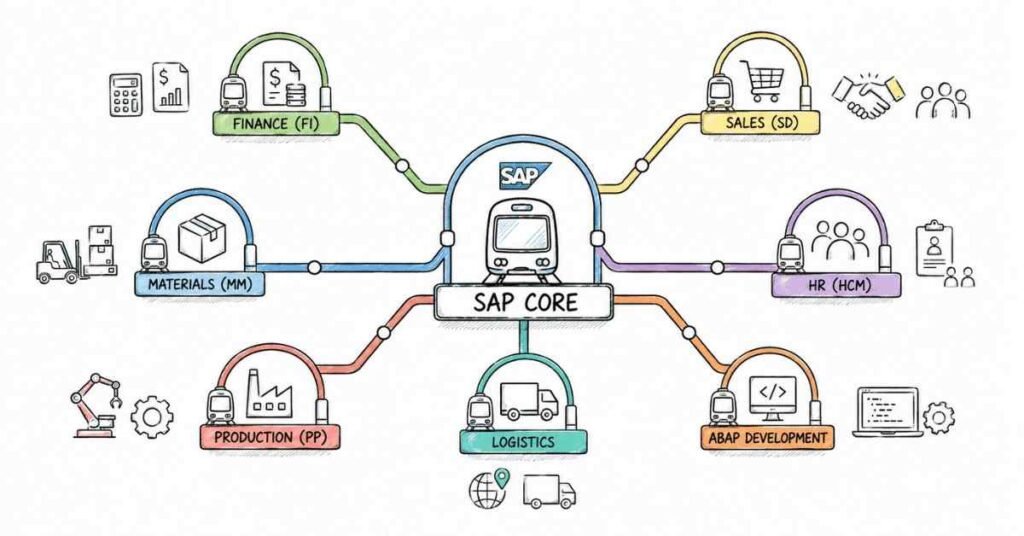
Table of Contents
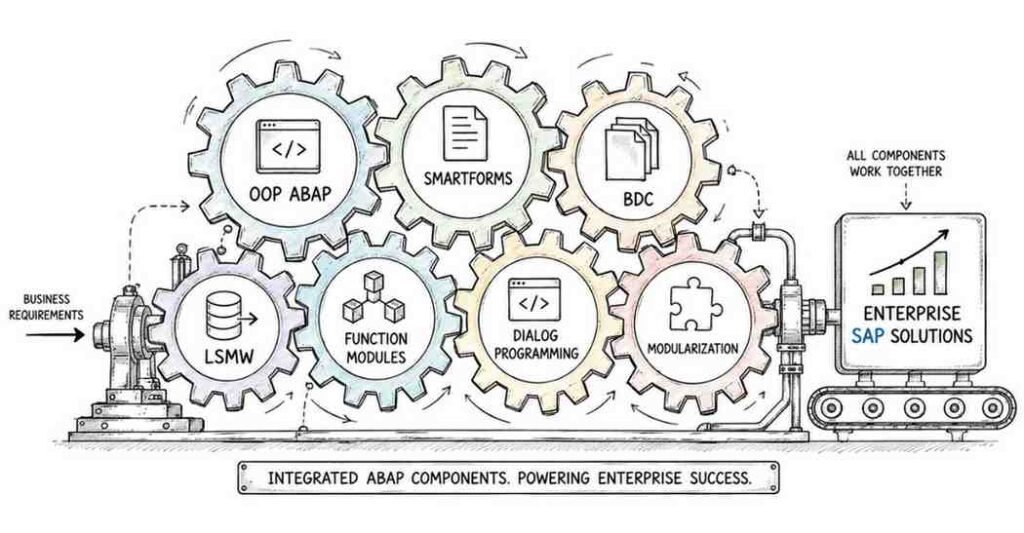
This is a structured, day-by-day 90-day roadmap to become a job-ready SAP ABAP Developer — covering the SAP system landscape, ABAP programming fundamentals, Data Dictionary, classical and ALV reports, modularisation, OOP ABAP, dialog programming, BDC/LSMW data migration, SmartForms, BAPIs, RFCs, ALE, IDocs, BADIs, performance tuning, and modern S/4HANA topics including CDS Views, OData Services, and the RESTful ABAP Programming (RAP) model. Built on Frontlines Edutech’s SAP ABAP course curriculum, this roadmap is designed for engineering graduates, IT professionals, and career switchers across India who want to break into SAP consulting — one of the most stable, highest-paying, and most consistently in-demand specialisations in Indian IT. SAP ABAP Developers in India earn an average of ₹7 LPA, with experienced professionals earning ₹17–46 LPA. Hyderabad is one of India’s top three SAP hiring hubs — and by Day 90, you’ll have the skills to crack technical interviews at TCS, Infosys, Wipro, Accenture, Capgemini, and dedicated SAP consulting firms.
Explore Job-Ready Resources →
Why SAP ABAP Is a Career That Pays Premium for Decades
SAP runs the business operations of over 400,000 companies worldwide — including 99% of the Forbes Global 500. Every one of those companies needs ABAP developers to customise, extend, and maintain their SAP systems.
- SAP is installed in most of India’s largest companies — TCS, Wipro, Infosys, HCL, L&T, Tata Steel, Reliance, and almost every major bank run SAP
- The talent gap is structural — SAP ABAP is technically complex, so trained developers are always in short supply relative to demand
- SAP S/4HANA migration is driving a decade of work — companies worldwide are migrating from ECC to S/4HANA, creating massive demand for ABAP developers who know both systems
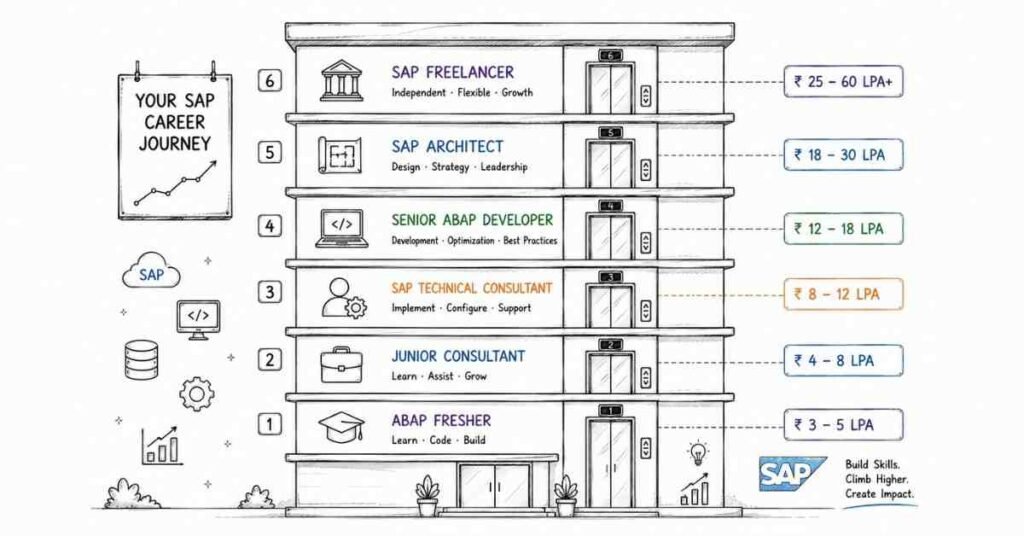
- Premium salaries from Day 1 — freshers earn ₹4–6 LPA; mid-career developers earn ₹8–13 LPA; senior consultants earn ₹17–46 LPA
- Hyderabad is India’s SAP hub — with Wipro, TCS, IBM, Infosys BPM, and dozens of SAP consulting firms actively hiring ABAP developers
The honest truth: SAP ABAP has a steep learning curve that scares most people off — which is exactly why those who commit to it earn premium salaries throughout their careers.
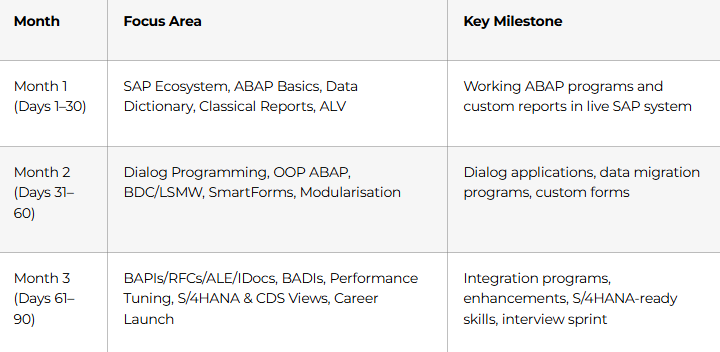
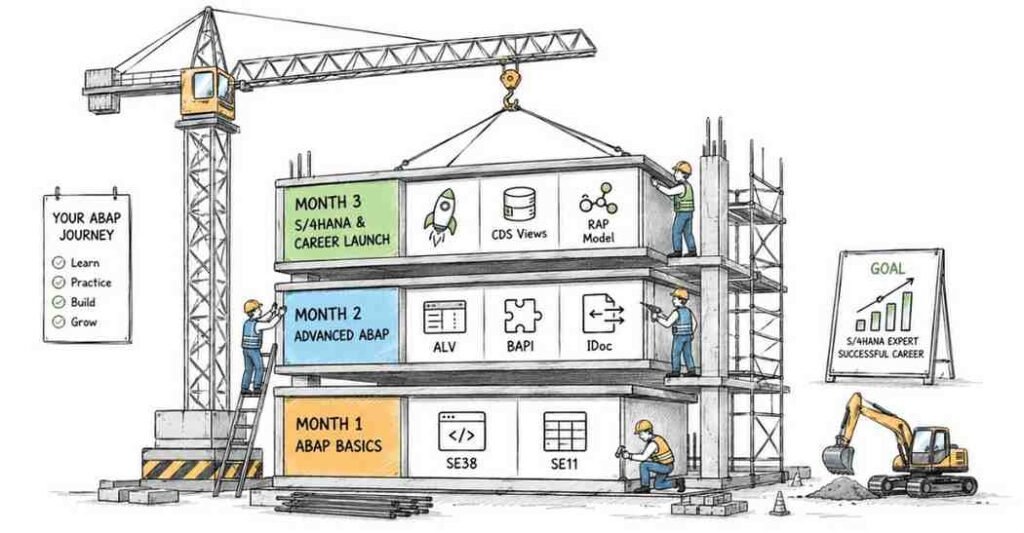
The 3-Month Learning Structure at a Glance
Month 1: SAP Foundations & Core ABAP Programming (Days 1–30)
Month 1 builds the mental model of how SAP works, the tools every ABAP developer uses daily, and the core programming constructs that underpin everything in Months 2 and 3. There are no shortcuts here — understanding the fundamentals deeply is what separates SAP professionals who get promoted from those who stay stuck.
Week 1: The SAP Ecosystem & ABAP Environment (Days 1–7)
Days 1–2: Understanding SAP and the ABAP World
- What is SAP? ERP (Enterprise Resource Planning) — how it manages Finance, HR, Supply Chain, Sales, and Procurement in one integrated system
- SAP product landscape: SAP ECC (legacy), SAP S/4HANA (modern, HANA-based), SAP BTP (cloud platform) — and why this distinction matters for your career
- SAP System Landscape: Development (DEV) → Quality Assurance (QAS) → Production (PRD) — how real SAP projects are structured
- Transport Requests (SE01): how ABAP code moves from DEV to PRD — the change management process every developer lives in
- SAP Modules overview: FI (Finance), CO (Controlling), MM (Materials Management), SD (Sales & Distribution), HR, PP, PM — ABAP developers customise all of them
Days 3–4: Navigation and Core ABAP Transactions
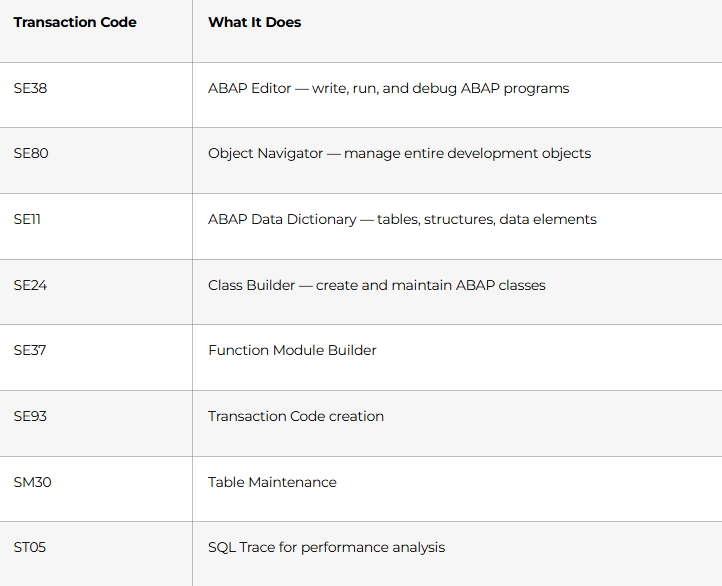
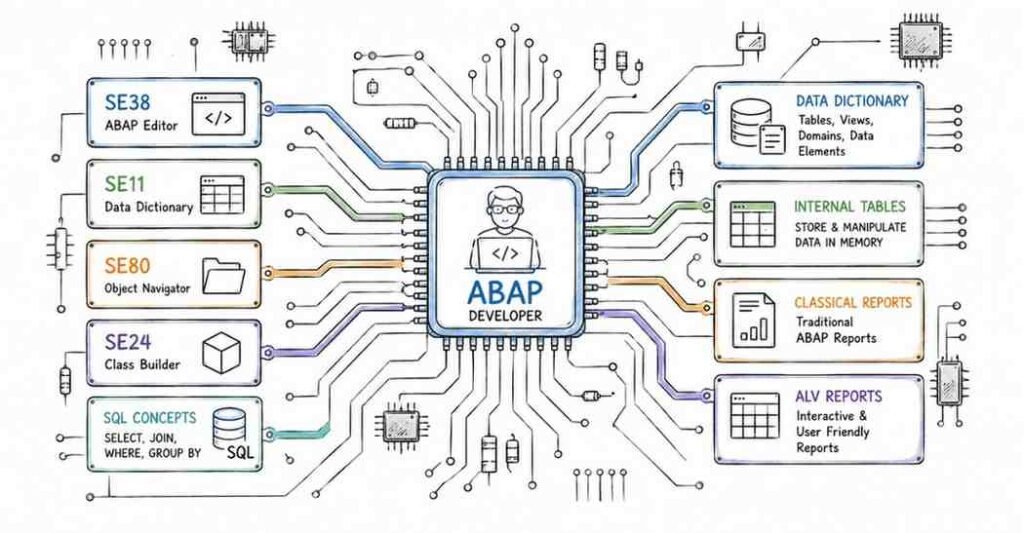
Every SAP ABAP developer uses these transaction codes dozens of times every day:
Days 5–6: ABAP Program Structure and Basic Syntax
- Structure of an ABAP program: REPORT, PROGRAM, FUNCTION-POOL, CLASS-POOL — the different program types
- System variables: SY-SUBRC (return code), SY-UNAME (current user), SY-DATUM (system date), SY-TABIX (table index) — used in every real-world ABAP program
- Data declarations: DATA, CONSTANTS, TYPES — scalar variables with elementary data types (C, N, I, P, F, D, T, X, STRING)
- Operators: arithmetic (+, -, *, /), comparison (EQ, NE, LT, GT, =, <, >), logical (AND, OR, NOT)
- Basic WRITE statements: output formatting, NEW-LINE, SKIP, ULINE, text symbols
Day 7: Week 1 Mini-Project
Write 5 complete ABAP programs covering: data declarations and arithmetic, string operations, date calculations using system variables, and formatted report output with WRITE statements. Execute each in SE38 and screenshot the output.
💡 Fresher Tip: SAP systems require a license to access. Frontlines Edutech provides access to a live SAP training system. If you’re self-studying, SAP offers free trial access through SAP Learning Hub and the SAP BTP trial — but nothing replaces guided hands-on practice in a structured environment.
Week 2: Control Structures & Internal Tables (Days 8–14)
Internal tables are the most important data structure in ABAP. Mastering them in Week 2 is the single biggest productivity multiplier in your entire SAP career.
Days 8–9: Control Flow Statements
- Conditional statements: IF/ELSEIF/ELSE/ENDIF, CASE/WHEN/ENDCASE — when to use each
- Loop statements: DO/ENDDO (count-controlled), WHILE/ENDWHILE (condition-controlled), LOOP AT … ENDLOOP (internal table iteration)
- Loop control: EXIT (leave loop), CONTINUE (skip to next iteration), CHECK (conditional continue)
- String operations: CONCATENATE, SPLIT, REPLACE, CONDENSE, STRLEN, SUBSTRING — string manipulation in ABAP
Days 10–12: Internal Tables — The Heart of ABAP
Internal tables are in-memory data containers — the ABAP equivalent of database tables held in the application layer. Every ABAP report, interface, and form uses them.
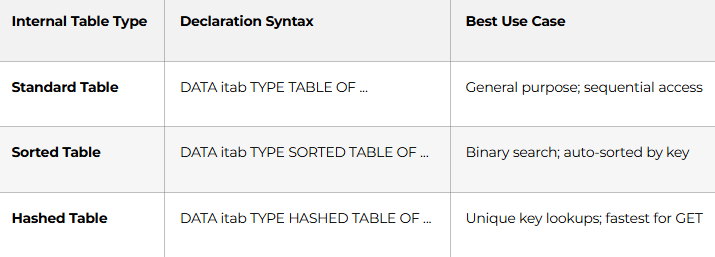
- Work areas (WA): DATA wa TYPE LINE OF itab — the single-row buffer for reading/writing to internal tables
- Key operations: APPEND, INSERT, READ TABLE, MODIFY, DELETE, SORT, LOOP AT, COLLECT
- READ TABLE … WITH KEY: find specific rows efficiently
- LOOP AT itab INTO wa WHERE condition: filtered iteration
Days 13–14: Open SQL — Querying the SAP Database
- SELECT statement in ABAP: SELECT * FROM dbtab INTO TABLE itab WHERE condition
- Single-row vs. multi-row SELECT: SELECT SINGLE vs. SELECT … INTO TABLE
- FOR ALL ENTRIES IN: join internal table data with database SELECT — the most performance-critical ABAP clause
- JOIN in Open SQL: INNER JOIN, LEFT OUTER JOIN between database tables
- COMMIT WORK and ROLLBACK WORK: database consistency management
- Week 2 Project: Write a report that reads employee data from a custom Z-table, filters by department, populates an internal table, and displays formatted output
Week 3: SAP Data Dictionary & Classical Reports (Days 15–21)
The Data Dictionary is where all SAP data structures live. Every ABAP developer works in SE11 every single day.
Days 15–17: ABAP Data Dictionary (SE11) — Complete Coverage
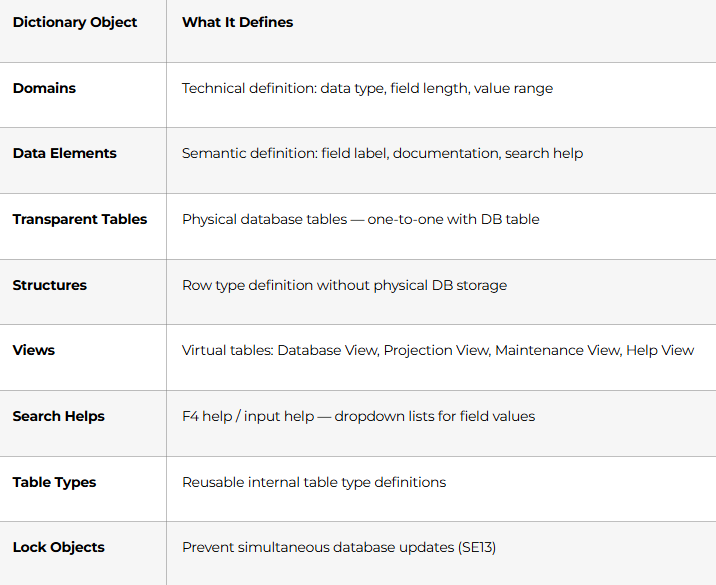
- Create a complete Z-domain → Z-data element → Z-transparent table workflow from scratch
- Append structures: extend standard SAP tables without modifying standard objects (modification-free development)
- Include structures: reuse field definitions across multiple tables
Days 18–20: Classical & Interactive Reports
- Selection screen: PARAMETERS, SELECT-OPTIONS, SELECTION-SCREEN — user input before report execution
- Classical reports: WRITE, ULINE, NEW-LINE, AT LINE-SELECTION, AT USER-COMMAND
- Interactive reports: HIDE (store data per output line), AT LINE-SELECTION (drill-down on click), secondary list creation
- Variants: save selection screen values as reusable named configurations
Day 21: Week 3 Project
Build a complete Customer Ageing Report — Selection screen with customer range and date parameters, reads from customer and billing tables, populates internal tables, calculates ageing buckets (0–30, 31–60, 61–90, 90+ days), and displays formatted interactive output with drill-down to invoice detail.
Week 4: ALV Reports & Debugging (Days 22–30)
ALV (ABAP List Viewer) is the professional standard for SAP output. Every modern SAP report uses ALV.
Days 22–24: ALV Grid Reports
- Why ALV: standard sorting, filtering, column selection, export to Excel — without writing custom code
- Function module-based ALV: REUSE_ALV_GRID_DISPLAY — field catalogue (FIELDCAT), layout (IS_LAYOUT), sort table, filter
- Events in ALV: TOP_OF_PAGE (header), END_OF_PAGE (footer), USER_COMMAND (toolbar buttons), DOUBLE_CLICK
- OO ALV (Class-based): CL_GUI_ALV_GRID — the modern standard; create container → create ALV grid → set table → call display
- ALV with multiple tabs: display different data sets on separate tab strip pages
Days 25–26: ALV Hierarchical and Tree ALV
- Hierarchical Sequential ALV (REUSE_ALV_HIERSEQ_DISPLAY): header-item structures like order headers with line items
- ALV Tree (CL_GUI_ALV_TREE): tree-node structures for org hierarchies and category trees
Days 27–28: ABAP Debugging — The Most Valuable Skill No One Teaches
- Start the debugger: set breakpoints in SE38, watchpoints on variable values, external breakpoints for dialog programs
- Debugger interface: step (F5), step over (F6), return (F7), continue (F8)
- Inspect variables: change variable values at runtime to test edge cases
- Table display: view internal table contents at any point in execution
- SQL trace (ST05): capture all database calls — identify missing WHERE clauses, missing indexes, and FOR ALL ENTRIES performance traps
Days 29–30: Month 1 Capstone — Vendor Payment Report
End-to-end ABAP report: Selection screen for company code, fiscal year, and payment status. Open SQL reads from vendor master and accounting document tables. Internal table processing with sorting and aggregation. ALV Grid output with totals, subtotals, drill-down to document detail, and Excel export. Fully documented in transport request. This is Portfolio Piece #1.
🏆 Month 1 Milestone: You navigate SAP confidently, write professional ABAP programs, build complex Data Dictionary objects, create interactive ALV reports, and debug any program systematically.
Explore the SAP ABAP Career Guide →
Month 2: Advanced ABAP — Modularisation, Forms & Data Migration (Days 31–60)
Month 2 covers the skills that make you genuinely productive on real SAP projects — building reusable code, customising standard forms, migrating legacy data, and writing Dialog applications.
Week 5: Modularisation & Object-Oriented ABAP (Days 31–40)
Code written without modularisation becomes unmaintainable within months. Every senior ABAP developer writes modular, reusable code from Day 1 on the project.
Days 31–33: Modularisation Techniques
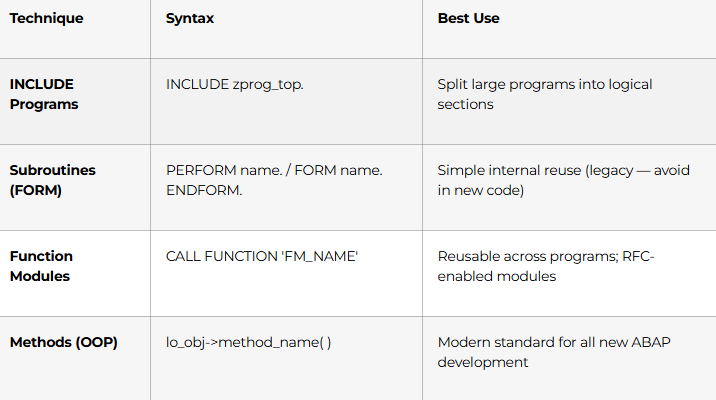
- Function module structure: IMPORTING, EXPORTING, CHANGING, TABLES, EXCEPTIONS parameters
- Function Groups (SE37): the container that holds related function modules
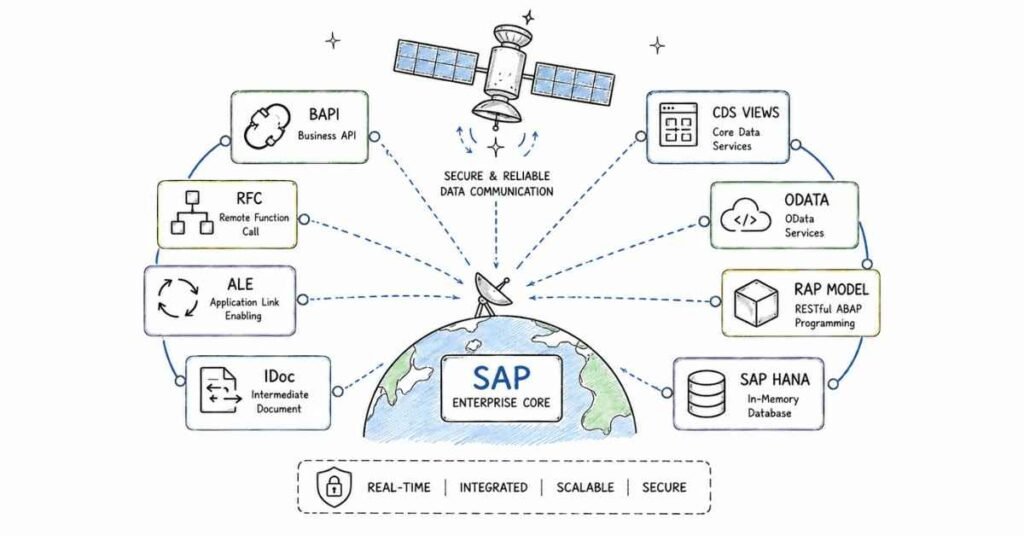
- RFC (Remote Function Call): function modules that can be called from external systems — the foundation of SAP integrations
Days 34–37: Object-Oriented ABAP
OOP ABAP is the mandatory standard for all SAP S/4HANA development. Every modern ABAP program uses classes.
- Classes and Objects: CLASS lcl_vehicle DEFINITION. … ENDCLASS. / CLASS lcl_vehicle IMPLEMENTATION. … ENDCLASS.
- Attributes: instance attributes (DATA) vs. static attributes (CLASS-DATA)
- Methods: instance methods vs. static methods; constructor (CONSTRUCTOR) method
- The four OOP pillars in ABAP:
- Encapsulation — PUBLIC SECTION, PROTECTED SECTION, PRIVATE SECTION
- Inheritance — CLASS lcl_car DEFINITION INHERITING FROM lcl_vehicle
- Polymorphism — method redefinition with REDEFINITION; runtime binding
- Abstraction — abstract classes and abstract methods
- Interfaces: INTERFACE lif_printable. METHODS print. ENDINTERFACE. — define contracts, implement in multiple classes
- Exception classes: CX_ROOT hierarchy — define custom exceptions for professional error handling
- Events in OOP: EVENTS, RAISE EVENT, SET HANDLER — event-driven programming in ABAP
Days 38–40: Week 5 OOP Project
Refactor the Month 1 Vendor Payment Report into a fully object-oriented design — separate classes for data retrieval, data processing, and ALV display. Use interfaces for output flexibility. Implement custom exception handling for all error scenarios.
Week 6: Dialog Programming (Module Pool) (Days 41–47)
Dialog programming creates custom SAP screen-based applications — the same user experience as standard SAP transactions.
Days 41–43: Screen Programming Foundations
- Module Pool programs vs. Report programs: the fundamental architecture difference
- Screen Painter (SE51): visual screen designer — create input/output fields, checkboxes, radio buttons, pushbuttons
- Flow Logic: PROCESS BEFORE OUTPUT (PBO) and PROCESS AFTER INPUT (PAI) — the two-phase screen execution model
- MODULE statements: PBO modules (prepare screen) and PAI modules (handle user input)
- Field-level validations: FIELD … MODULE … ON INPUT — validate individual fields without executing full PAI
Days 44–46: Advanced Dialog Features
- Table Controls: display and maintain multiple rows in one screen — the standard for line-item entry
- Tab Strip Controls: organise complex screens into multiple tabs with TABSTRIP
- Sub-screens: reuse screen areas across multiple screens
- Transaction codes (SE93): assign a transaction code to your dialog program
- Locks (Enqueue/Dequeue): ENQUEUE_* and DEQUEUE_* function modules — prevent data inconsistency when two users edit simultaneously
- OK-codes: handle function key and button presses in PAI
Day 47: Week 6 Project
Build a complete Material Master Maintenance Dialog application — multi-screen with basic data, classification, and storage location screens, table control for stock entries, field validations, lock management, and a custom transaction code.
Week 7: BDC, LSMW & SAP Forms (Days 48–54)
Days 48–50: BDC Programming — Batch Data Communication
BDC is the primary method for migrating large volumes of legacy data into SAP. It’s on every SAP implementation project.
- How BDC works: simulate user keystrokes to drive standard SAP transactions in batch
- BDCDATA structure: populate screen name, field name, and field value for each step
- Session method (BDC_OPEN_GROUP, BDC_INSERT, BDC_CLOSE_GROUP): asynchronous processing with error logging via SM35
- Call Transaction method: synchronous; immediate processing with error handling in program
- BDCMSGCOLL: capture messages from each BDC session run for error reporting
Days 51–52: LSMW — Legacy System Migration Workbench
- LSMW overview: the no-code / low-code alternative to BDC for data migration
- Four migration methods: Direct Input (fastest, program-specific), BAPI (modern standard), IDoc (for ALE-based migration), Recording (flexible, maps to any transaction)
- Step-by-step LSMW process: Define Object → Field Mapping → Read Data → Convert Data → Create Batch Input → Run Migration
- Practical use: migrate vendor master records from Excel into SAP using LSMW BAPI method
Days 53–54: SAP SmartForms & Adobe Forms
- SmartForms (transaction SMARTFORMS): the standard SAP output form tool for invoices, purchase orders, delivery notes
- SmartForm architecture: Form Interface (parameters), Global Definitions (data declarations), Pages and Windows, Nodes (text, table, graphic, conditions)
- Table node: the core of every output form — header, main area, footer with dynamic row looping
- Form Painter and Style Painter: control visual layout and text formatting
- Calling SmartForms from ABAP: generate function module → call with output parameters
- Adobe Forms (FP_FUNCTION_MODULE_ACTIVE): the modern alternative — interactive PDF forms for workflows
Week 8: Month 2 Capstone (Days 55–60)
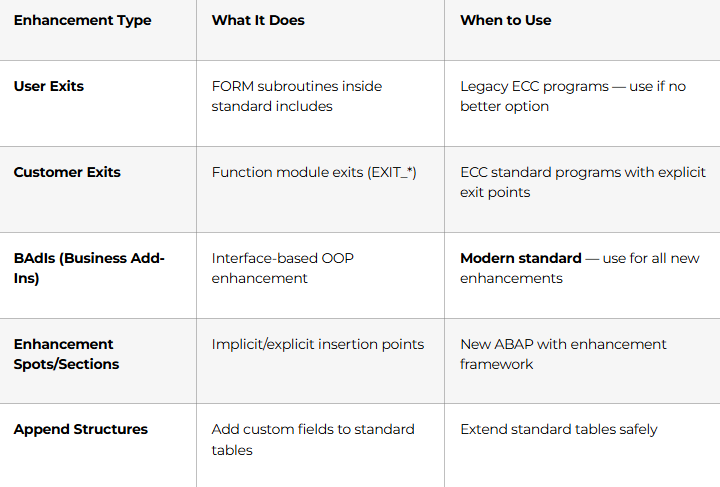
Days 55–57: Enhancements — Extend SAP Without Modifying Standard Code
Understanding enhancements is what separates ABAP developers who can survive an upgrade from those who create disasters.
Month 3: Integration, S/4HANA, Performance & Career Launch (Days 61–90)
The final month covers the integration technologies that connect SAP to the outside world, modern S/4HANA development, performance optimisation, and a complete career launch sprint.
Week 9: BAPIs, RFCs, ALE, IDocs — SAP Integration (Days 61–70)
This is the content that gets you onto SAP project teams doing real integration work.
Days 61–63: BAPIs and Remote Function Calls (RFCs)
- What is a BAPI? Business Application Programming Interface — stable, SAP-certified function modules for external access
- BAPI standards: always use COMMIT WORK after successful BAPI call; always check RETURN table for errors
- Commonly used BAPIs: BAPI_SALESORDER_CREATEFROMDAT2, BAPI_PO_CREATE1, BAPI_EMPLOYEE_GETDATA, BAPI_CUSTOMER_CREATEFROMDATA1
- Finding BAPIs: transaction BAPI, Business Object Browser
- RFC types: synchronous RFC (sRFC), asynchronous RFC (aRFC), transactional RFC (tRFC), queued RFC (qRFC) — when each is appropriate
- Calling RFC from ABAP: CALL FUNCTION ‘FM_NAME’ DESTINATION ‘RFC_DEST’ — cross-system function calls
Days 64–67: ALE and IDocs — The Backbone of SAP-to-SAP Integration
- ALE (Application Link Enabling): framework for distributing data between SAP systems asynchronously
- IDoc (Intermediate Document): the standard SAP message format — like an XML envelope for SAP data
- IDoc structure: Control Record (header) + Data Records (segments) + Status Records (processing log)
- Creating custom IDocs: define message type → define basic type → define segments → link to partner profile
- Outbound IDoc: triggering change pointer → creating IDoc → dispatching to partner
- Inbound IDoc: receiving via RFC → parsing → posting to SAP application
- Monitoring IDocs: transaction WE02, WE05 (IDoc list), BD87 (reprocess failed IDocs)
Days 68–70: Week 9 Project — Customer Master ALE Distribution
Configure ALE distribution for Customer Master records between two SAP systems: create partner profiles, distribution model, message type mapping, write custom inbound function module to post enriched customer data, and IDoc error handling report using ALV.
Week 10: Modern ABAP — S/4HANA, CDS Views & OData (Days 71–80)
Every SAP project in India today either runs on S/4HANA or is migrating to it. These are the skills that future-proof your career.
Days 71–73: ABAP on SAP HANA
- What changed with HANA: in-memory database — billions of rows processed in seconds
- Code pushdown philosophy: move data processing FROM application server INTO the database layer — the opposite of traditional ABAP
- AMDP (ABAP Managed Database Procedures): write HANA SQLScript directly inside ABAP methods for maximum performance
- HANA-specific Open SQL: GROUP BY with expression, string functions, window functions
- Performance in S/4HANA: avoid SELECT *, use FIELDS clause, leverage HANA views
Days 74–76: Core Data Services (CDS Views)
CDS Views are the mandatory development standard for all new S/4HANA analytics and Fiori apps.
- What is a CDS View? SQL-like view defined in ABAP — replaces traditional database views
- Basic CDS View syntax: @AbapCatalog.viewName, associations, joins, expressions
- Annotations: @Analytics.dataCategory, @OData.publish: true, @UI.lineItem — metadata-driven development
- Associations: replace JOINs with lazy-evaluated relationships
- Virtual elements: calculated fields without physical DB storage
- CDS Views for Fiori: the data foundation of every SAP Fiori application
Days 77–79: OData Services & SAP Gateway
- OData protocol: RESTful data access — the standard way web and mobile apps talk to SAP backend
- SAP Gateway (transaction SEGW): create OData service project → define entity types → implement CRUD operations → activate and test
- OData entity sets, navigation properties, and function imports
- Testing OData services: SAP Gateway Client (/IWFND/GW_CLIENT), Postman with SAP authentication
- RAP (RESTful ABAP Programming Model): the modern end-to-end framework for S/4HANA CDS + OData + Fiori in one workflow
Day 80: Fiori and SAP BTP Awareness
- SAP Fiori: the UX layer — understand how Fiori apps consume OData services you build
- SAP BTP (Business Technology Platform): cloud integration, extension apps, SAP Integration Suite
- abapGit: version control for ABAP — push ABAP objects to GitHub repositories
Week 11: Performance Tuning & Interview Preparation (Days 81–87)
- BERT, RoBERTa, T5 — fine-tune on custom data
- GANs (Generative Adversarial Networks) — StyleGAN, CycleGAN, DCGAN
- Diffusion Models — Stable Diffusion, DDPM, text-to-image
- Multimodal LLMs — text + image + audio integration
- Agentic AI — autonomous agents, multi-agent systems, tool-calling
- Day 81 Capstone — Build a customer support AI agent with tool-calling
💡 Career Tip: Record a 2-minute demo video of your GenAI project and post it on LinkedIn. A working app demo gets 10x more engagement than a static code screenshot — and it gets recruiters sliding into your DMs.
Days 81–83: ABAP Performance Optimisation
Performance issues are the #1 cause of escalations on SAP projects. Every developer needs these skills.
- SQL Trace (ST05): record all database calls; identify slow queries, full table scans, missing indexes
- Runtime Analysis (SE30 / SAT): measure program execution time by statement; find the expensive code
- ABAP performance rules every developer must follow:
- SELECT * is banned — always name specific fields
- Never use SELECT inside a LOOP — use FOR ALL ENTRIES or JOIN instead
- Always add WHERE clause to every SELECT — full table scans kill performance
- Use field symbols (FIELD-SYMBOLS) for internal table loops — avoids data copy overhead
- READ TABLE … BINARY SEARCH — always sort before binary search; 10x faster than linear
- Use COLLECT for aggregation instead of manual READ + MODIFY
Days 84–85: SAP Transport System & Project Methodology
- Correction and Transport System (CTS): how development objects travel DEV → QAS → PRD
- Transport requests: workbench requests (objects), customising requests (config), transport of copies
- ASAP Methodology: the SAP project lifecycle — Project Preparation, Business Blueprint, Realisation, Final Preparation, Go-Live
- Technical specification writing: how professional ABAP developers document programs before coding
- Code review and ATC (ABAP Test Cockpit): automated code quality checks
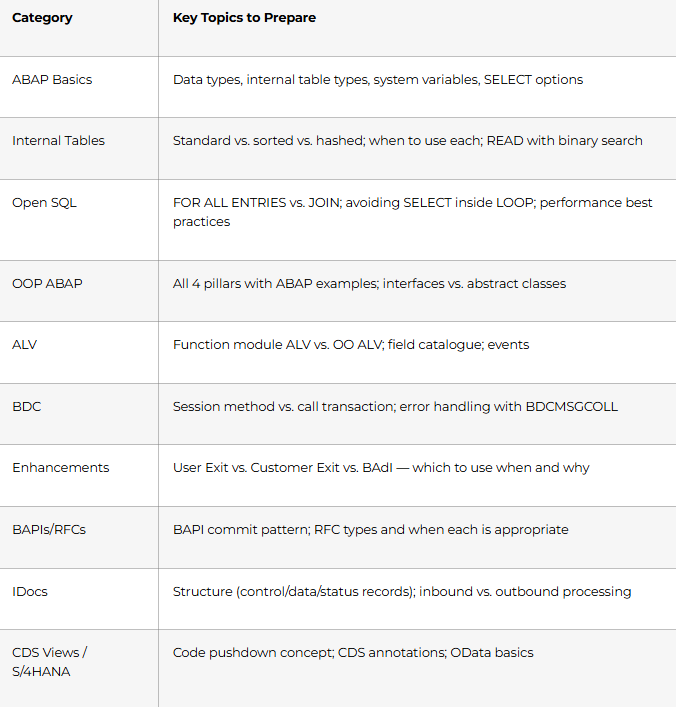
Days 86–87: Interview Preparation Sprint
Most-tested SAP ABAP interview topics at Indian IT companies:
Week 12: Career Launch Sprint (Days 88–90)
Day 88: Build Your SAP Portfolio and Profiles
- GitHub repository with ABAP code samples: ALV report, OOP class hierarchy, BDC program, BAPI wrapper, CDS View — all with technical documentation
- LinkedIn headline: “SAP ABAP Developer | S/4HANA | CDS Views | BAPIs | IDocs | BADIs | Open to Opportunities in Hyderabad”
- SAP Learning Hub profile: complete free certifications to add to LinkedIn (SAP Learning credentials are visible to recruiters)
- Build a technical blog post or case study on LinkedIn: document one complete project you built — this gets noticed by SAP hiring managers
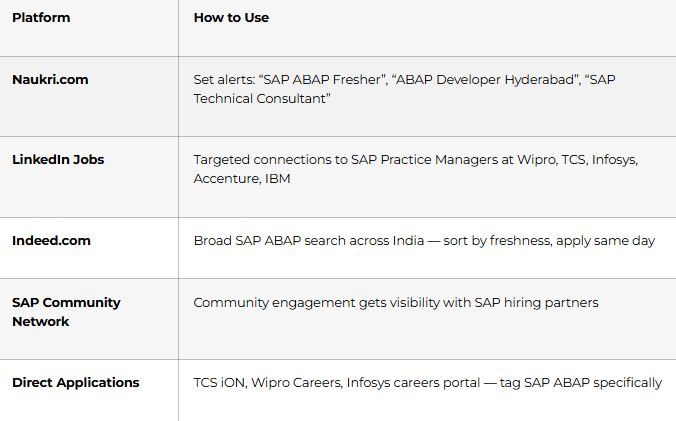
Day 89: Job Search and Application Strategy
Day 90: Mock Interview + Certification Day
Full mock technical interview: 10 ABAP theory questions → live code walkthrough of your ALV report → debugging scenario → BAdI implementation scenario → S/4HANA conceptual question → behavioural round (STAR format for teamwork, meeting deadlines, handling escalations). Frontlines Edutech SAP ABAP course completion certificate issued.
🏆 Day 90 Milestone: You can work on real SAP projects. You understand the full ABAP stack — from syntax to S/4HANA. Your career in SAP consulting begins today.
Master SAP ABAP Interview Prep →
SAP ABAP Career Paths & Salary Guide (India 2026)
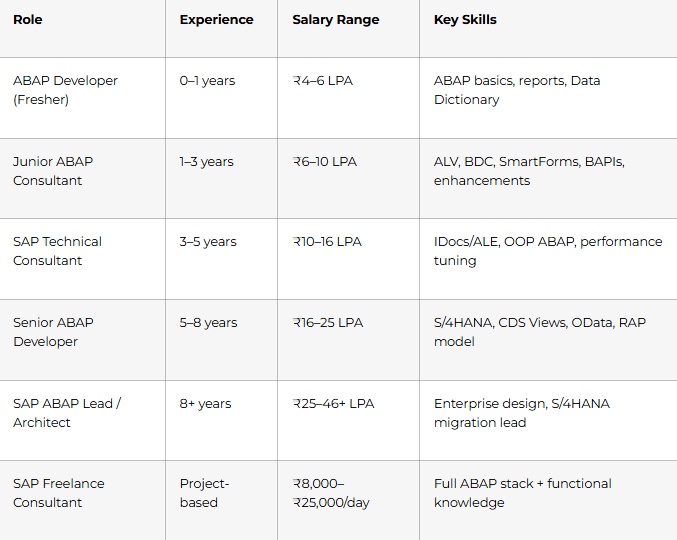
Top hiring cities: Hyderabad, Bangalore, Mumbai, Pune, Chennai, Delhi-NCR, Noida
Active SAP hirers: Wipro, TCS, Infosys, HCL, Accenture, IBM, Capgemini, Cognizant, L&T Infotech, NTT Data, Deloitte, KPMG, and hundreds of dedicated SAP consulting firms and system integrators across India
Why Choose Frontlines Edutech for Your SAP ABAP Course?
Frontlines Edutech is headquartered in Somajiguda, Hyderabad and has helped thousands of students across Telangana and Andhra Pradesh break into SAP careers — including engineering graduates, MCA students, IT professionals switching to SAP, and experienced ABAP developers upgrading to S/4HANA skills.
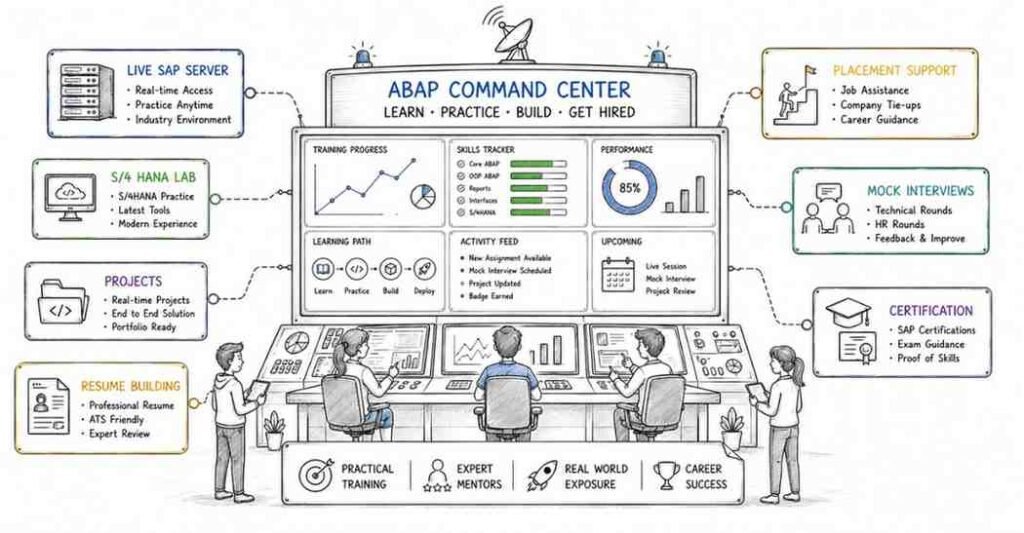
- Live SAP system access — practice every concept in a real SAP training environment, not screenshots or theory
- Complete curriculum from ECC to S/4HANA — covers both traditional ABAP (BDC, BAPIs, IDocs, BADIs) and modern S/4HANA (CDS Views, OData, RAP) in one program
- Telugu-friendly instruction — complex concepts like IDoc structures, BAdI implementation, and CDS view annotations explained in the language you think in
- Industry-experienced faculty — trainers with real SAP project experience at Wipro, TCS, and SAP consulting firms
- Transport system practice — work with real DEV/QAS transport workflows just like on actual SAP projects
- Career support until placed — resume, LinkedIn, technical mock interviews, and placement referrals from SAP hiring partners
Frequently Asked Questions (FAQs)
Q1.Do I need programming experience to learn SAP ABAP?
A.Basic programming awareness is helpful but not mandatory. The roadmap starts from Day 1 with fundamental ABAP syntax, data types, and program structure. Students from engineering (B.Tech/BE/MCA/M.Sc) backgrounds adapt quickly. Non-CS graduates can succeed with extra focus during Weeks 1–2 on control structures and internal tables.
Q2.What is the salary for a SAP ABAP Developer fresher in India?
A.SAP ABAP fresher salaries in India typically range from ₹4–6 LPA in Hyderabad, with the national average for all experience levels at ₹7 LPA. Mid-career developers (3–5 years) earn ₹10–16 LPA, and senior consultants with S/4HANA expertise earn ₹17–46 LPA.
Q3.What is the difference between SAP ECC and SAP S/4HANA?
A.SAP ECC (ERP Central Component) is the legacy SAP ERP system running on traditional databases. SAP S/4HANA is the modern, in-memory HANA-based successor — faster, with a simplified data model and the mandatory use of CDS Views and modern ABAP for new development. Most Indian companies are currently migrating from ECC to S/4HANA, creating massive demand for ABAP developers who know both. This course covers both.
Q4.What is a BAdI in SAP ABAP?
A.A BAdI (Business Add-In) is an object-oriented enhancement technique that allows you to add custom business logic to standard SAP programs without modifying SAP standard code. You create an implementation of a SAP-defined interface, and SAP calls your custom code at the defined enhancement point. BADIs survive SAP upgrades cleanly — unlike user exits — making them the preferred enhancement method for all modern ABAP development.
Q5.Is SAP ABAP still relevant in 2025 with S/4HANA?
A.Very much so. S/4HANA still runs on ABAP — it’s not replaced, it’s evolved. Modern ABAP in S/4HANA uses CDS Views, OData, AMDP, and the RAP model. Companies migrating to S/4HANA need ABAP developers who understand both the traditional stack AND the modern paradigm, making experienced ABAP developers more valuable, not less.
Q6.What is the difference between BDC and BAPI for data migration?
A.BDC (Batch Data Communication) simulates user screen navigation to drive data entry — flexible but dependent on screen layout. BAPI (Business Application Programming Interface) uses stable, certified function module APIs — faster, more reliable, and the preferred modern approach. LSMW supports both methods plus direct input. This course covers all three so you can choose the right approach for each migration scenario.
Q7.Will I get access to a live SAP system during this course?
A.Yes. Frontlines Edutech provides access to a live SAP training system for hands-on practice of every topic — SE38, SE11, SE24, SE37, dialog programming, debugging, ALE/IDoc configuration, and S/4HANA CDS Views. This hands-on access in a real SAP environment is what separates this course from video-only training.
Q8.Does Frontlines Edutech provide placement support after the SAP ABAP course?
A.Yes. Placement support includes technical resume building for SAP roles, LinkedIn and SAP Community Network profile optimisation, mock technical interviews with ABAP scenario questions, and active referrals to Wipro, TCS, Infosys SAP practices, and dedicated SAP consulting firms across Hyderabad. Support continues until you land your first SAP project role.
Published by Frontlines Edutech | blog.frontlinesedutech.com
support@frontlinesedutech.com