
SAP ABAP Interview Preparation Guide
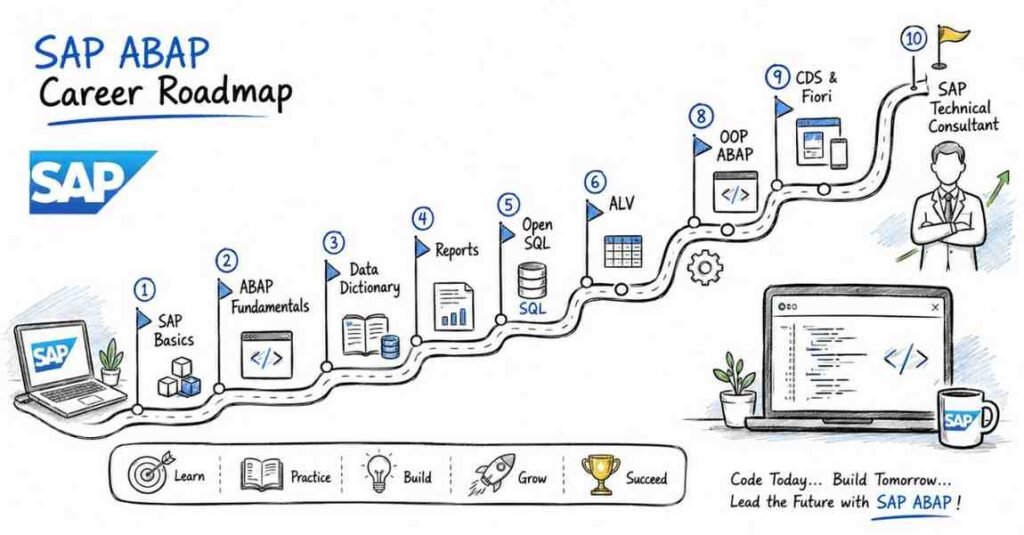
Table of Contents
Part 1: Introduction & 30-Day Study Plan
What This Guide Covers
This guide is designed to help you prepare for SAP ABAP interviews in a structured, interview-focused way. It covers SAP basics, ABAP fundamentals, Data Dictionary, internal tables, reports, Open SQL, performance, ALV, forms, enhancements, BAPIs, OOPs in ABAP, interfaces, and career preparation.
It is built for freshers, junior ABAP developers, support professionals, and career switchers who want a step-by-step path from basic concepts to project-style interview confidence.
Who This Guide Is For
This guide is useful if you are:
- A fresher preparing for your first SAP ABAP role.
- A support professional moving into ABAP development.
- A developer switching from Java, .NET, or database roles into SAP.
- A junior SAP technical consultant preparing for interviews.
- An experienced ABAP professional who wants a cleaner revision structure.
The content starts with fundamentals and gradually moves toward advanced interview topics and real project thinking.
What SAP ABAP Is
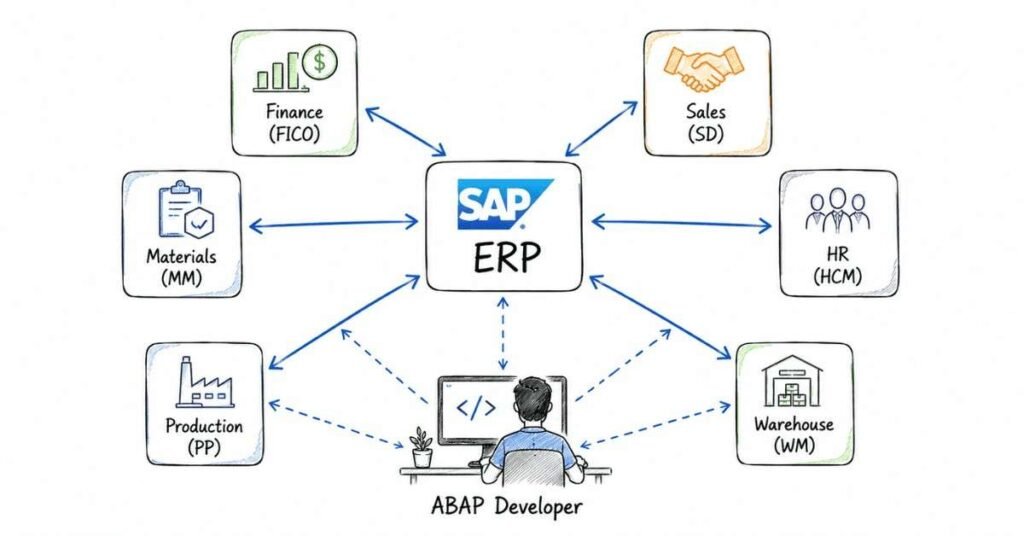
SAP is a major ERP platform used by organizations to manage business processes across finance, sales, procurement, HR, manufacturing, and more. ABAP, which stands for Advanced Business Application Programming, is SAP’s core programming language for developing reports, interfaces, enhancements, forms, and custom business logic. In simple terms, SAP manages business operations, and ABAP helps developers customize how SAP behaves.
Why SAP ABAP Still Matters In 2026
ABAP remains relevant because SAP landscapes still need custom development, enhancements, integrations, reporting, and migration support across ECC and S/4HANA environments. Modern ABAP roles also increasingly touch areas like OOPs, CDS views, ABAP on HANA, Fiori-related backend work, and integration patterns. That means interviewers often expect candidates to know both classic ABAP foundations and at least some awareness of modern SAP direction.
What SAP ABAP Developers Do
SAP ABAP developers usually work on custom reports, internal tables, data processing logic, forms, interfaces, enhancements, conversions, and support for SAP functional processes. Depending on the project, they may also work with performance tuning, BAPIs, RFCs, IDocs, OOPs, and S/4HANA-related backend development.
In real projects, ABAP work is rarely only about writing syntax. It also involves understanding business requirements, working with functional consultants, and building stable technical solutions inside SAP.
SAP Functional Vs Technical Roles
One of the most important basics for interviews is understanding the difference between SAP functional and technical roles.
- Functional consultants focus more on business process configuration in modules like FICO, MM, SD, or HCM.
- Technical consultants or ABAP developers focus on custom programming, reports, enhancements, interfaces, and technical problem-solving.
In many projects, ABAP developers work closely with functional consultants because business requirements usually come from functional process needs.
Career Path In SAP ABAP
A common SAP ABAP path starts with junior developer or trainee roles, then moves into ABAP development with stronger project ownership, and later into senior technical consultant or lead positions. As careers progress, many professionals expand into OOPs ABAP, S/4HANA, CDS, Fiori backend support, integration, or technical architecture.
For many candidates, the strongest long-term growth comes from combining classic ABAP fundamentals with newer SAP development trends.
Why Interviewers Ask Foundational Questions
In SAP ABAP interviews, even basic questions often test more than memory. Interviewers want to see whether you understand how ABAP is used inside the SAP ecosystem, how technical work supports business processes, and whether you can explain concepts clearly.
That is why simple topics like Data Dictionary, internal tables, or Open SQL are very important. They are not “small topics” in SAP interviews. They are the base of everything else.
Common SAP ABAP Interview Types
You will often see a mix of these interview styles:
- Basic conceptual rounds for freshers.
- Technical rounds focused on ABAP syntax and logic.
- Project-based rounds for experienced candidates.
- Scenario-based rounds involving performance, enhancement, or debugging.
- Managerial or behavioral rounds focused on communication and delivery.
Freshers are usually judged more on clarity, fundamentals, and trainability. Experienced candidates are expected to explain project usage, design choices, and optimization thinking.
30-Day Study Plan
Week 1: SAP And ABAP Basics
Focus on SAP overview, ABAP fundamentals, development environment, report events, Data Dictionary, domains, data elements, tables, structures, and search helps. This week should build your vocabulary and system understanding.
Week 2: Internal Tables And Report Logic
Study internal tables, work areas, control statements, loops, modularization, selection screens, and debugging basics. This is where ABAP starts feeling practical.
Week 3: SQL, Performance, ALV, And Forms
Cover Open SQL, joins, performance concepts, ALV reports, Smart Forms, Adobe Forms, and output-related topics. These are very common in technical rounds.
Week 4: Enhancements, Interfaces, OOPs, And Mocks
Study BAPIs, RFCs, IDocs, user exits, BAdIs, OOPs in ABAP, CDS basics, and scenario-based interview questions. End the week with revision and mock interviews.
Daily Study Routine
A simple daily routine works well:
- 45 minutes for concept learning.
- 45 minutes for interview question practice.
- 30 minutes for syntax review or practical examples.
If you have system access or past project experience, spend extra time explaining what you built and why. In SAP interviews, explanation quality matters almost as much as technical correctness.
Core Skills Interviewers Usually Check
Interviewers commonly look for:
- SAP and ABAP fundamentals.
- Data Dictionary understanding.
- Internal table handling.
- Report programming concepts.
- Open SQL and database access.
- Performance awareness.
- ALV and forms knowledge.
- Enhancements and user exits.
- BAPIs, RFCs, and interface basics.
- Debugging and issue analysis.
- OOPs and modern ABAP awareness.
Even entry-level interviews often reward candidates who can connect concepts to a realistic use case instead of only giving textbook definitions.
ECC And S/4HANA Awareness
You do not need to be an S/4HANA expert to clear an ABAP interview, but basic awareness helps. Many organizations still maintain older SAP landscapes while also adopting newer S/4HANA and HANA-based development practices. That is why interviewers may ask about modern topics like CDS, OOPs ABAP, or HANA-related optimization even when the role is still rooted in classic ABAP.
A smart interview approach is to be strong in fundamentals and honest about the level of your modern SAP exposure.
Certifications And Learning Direction
SAP certification can help, especially for freshers who need credibility, but certification alone is usually not enough. Employers still care a lot about practical understanding, syntax comfort, debugging ability, and whether you can explain technical work clearly. A strong candidate uses certification as support, not as a substitute for hands-on knowledge.
Salary Expectations In 2026
Recent salary sources place the average SAP ABAP developer pay in India around ₹7.08 lakh per year on Indeed and about ₹7.27 lakh on PayScale, though experience and city create wide variation. Other 2026 market guides describe freshers around ₹3–5 LPA and experienced developers reaching ₹18+ LPA or more depending on skill depth and project exposure. For interview planning, a practical range looks like this:
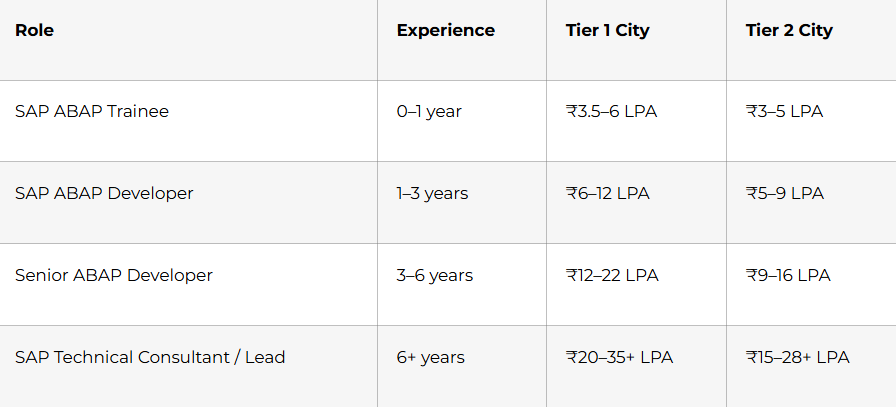
The biggest salary jumps usually come from stronger project ownership, performance skills, enhancement work, S/4HANA exposure, and integration experience.
How To Think During ABAP Interviews
A strong ABAP interview answer usually has three parts:
- What the concept is.
- Where it is used.
- Why that choice matters.
For example, instead of only defining an internal table, explain what type you would use, why, and in what scenario. That makes your answer sound like developer thinking instead of memorized theory.
Part 2: SAP Basics, ABAP Fundamentals & Data Dictionary Questions 1–40
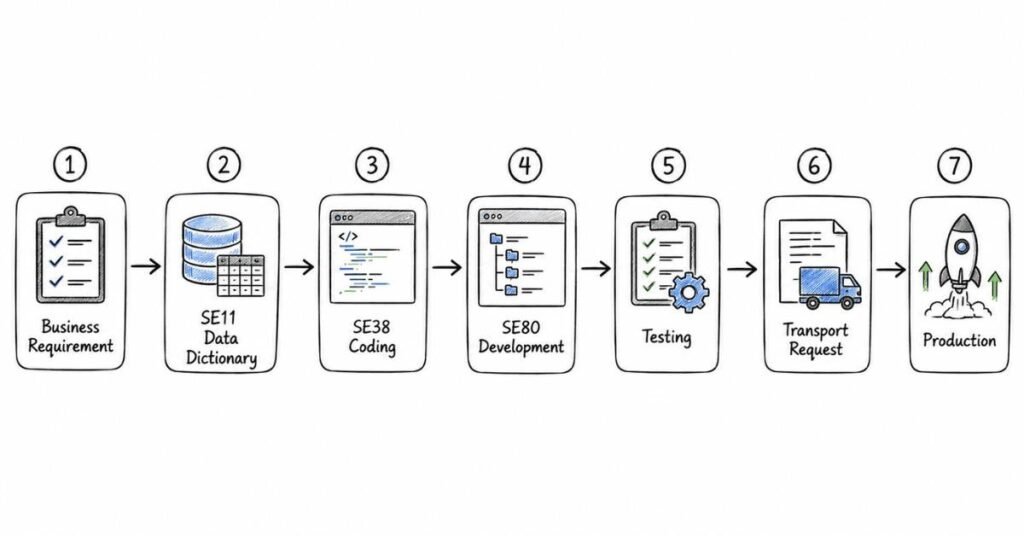
This section gives you 40 interview-style questions with clear answers on SAP basics, ABAP fundamentals, and Data Dictionary. SAP is an enterprise platform for business processes, and ABAP is SAP’s programming language used to build reports, custom logic, interfaces, and enhancements inside that ecosystem.
SAP and ABAP
1) What is SAP?
SAP is an ERP platform used by organizations to manage core business processes such as finance, sales, procurement, manufacturing, and human resources. It helps different business functions work on a common integrated system instead of separate disconnected applications.
2) What is ABAP?
ABAP stands for Advanced Business Application Programming, and it is SAP’s core programming language for technical development inside SAP systems. It is used to create reports, interfaces, forms, enhancements, and custom business logic.
3) Why is ABAP used?
ABAP is used because businesses often need SAP behavior beyond standard configuration, such as custom reports, validations, interfaces, and process-specific enhancements. It allows developers to build these requirements within SAP’s repository and database-driven environment .
4) Is ABAP still relevant in 2026?
Yes, ABAP remains relevant because SAP projects still need custom development, migration support, reporting, and backend logic in both classic and newer landscapes. Modern expectations increasingly include awareness of OOPs ABAP, CDS, ABAP on HANA, and Fiori-related backend work.
5) What is the difference between SAP and ABAP?
SAP is the overall enterprise software platform, while ABAP is the programming language used to develop technical objects inside SAP. A simple way to say it in interviews is that SAP is the business system and ABAP is one of the main tools used to customize and extend it.
6) What are SAP modules?
SAP modules are business-function areas within SAP, such as Finance, Materials Management, Sales and Distribution, and Human Capital Management. They organize SAP around business processes so technical and functional teams can work on defined domains.
7) Name some common SAP modules.
Common SAP modules include FICO, MM, SD, PP, HCM, and WM or EWM depending on landscape scope. In interviews, it is enough to name a few and explain that ABAP developers often support these modules technically through custom development.
8) What is the difference between functional and technical modules?
Functional work focuses on business process configuration and process design, while technical work focuses on programming, interfaces, reports, and enhancements. ABAP belongs to the technical side, though ABAP developers often work closely with functional consultants for requirements and testing.
9) What does an ABAP developer usually do?
An ABAP developer typically creates reports, interfaces, enhancements, forms, data validations, and custom technical solutions in SAP. In many projects, the role also includes debugging, performance analysis, and support for integrations or data processing logic.
10) What is meant by custom development in SAP?
Custom development means building technical objects that are not available in standard SAP or adapting standard behavior to meet business needs . Examples include a custom report, an enhancement in a standard transaction, or an interface to another system .
Development environment
11) Which transaction is commonly used for ABAP development?
The classic transaction most commonly associated with ABAP work is SE38 for programs, while SE80 is used as a broader Object Navigator for repository development in many systems. In interviews, it is safe to say ABAP developers commonly use SE38, SE80, and SE11 depending on the object type.
12) What is SE38?
SE38 is the ABAP Editor transaction used to create, edit, check, activate, and run ABAP programs. It is especially common for executable programs and quick development or testing work.
13) What is SE80?
SE80 is the Object Navigator, a development environment used to work with multiple repository objects such as programs, classes, function groups, screens, and packages. It is useful when development is organized across related objects rather than a single report.
14) What is SE11?
SE11 is the ABAP Dictionary transaction used to define and maintain dictionary objects such as tables, views, data elements, domains, lock objects, and search helps . It is one of the most important transactions for ABAP interviews because Data Dictionary knowledge is foundational .
15) What is the ABAP repository?
The ABAP repository is the central storage area for development objects such as programs, classes, dictionary objects, screens, and other technical definitions . These objects become available to other repository objects after activation, subject to package rules and dependencies .
16) What is activation in ABAP?
Activation makes a repository object’s latest valid definition available for use by other objects in the system . SAP Help notes that dictionary objects must be activated before they can be used, and changed objects keep the previous active version until successful activation of the new one .
17) What is a package in SAP?
A package is a repository container used to organize development objects and control aspects such as transport and visibility through the package concept . In interviews, you can say a package helps group related objects logically and manage them across system landscapes .
18) Why are packages important?
Packages matter because repository objects are accessed in line with the package concept, and they help structure transportable development content cleanly . They also support maintainability by grouping related technical objects in one logical place .
19) What is a program in ABAP?
A program is a repository object that contains ABAP code to execute business logic or reporting behavior. Depending on type, a program may be executable, include-based, or associated with other components like screens or transactions.
20) What are transport requests?
Transport requests are containers used to move development changes from one SAP system to another, such as from development to quality or production. They are basic to SAP landscape management because repository and configuration changes are usually promoted in a controlled path.
Program concepts and events
21) Why are transport requests important?
Transport requests are important because SAP changes are usually not recreated manually in each system; instead, approved changes are transported systematically. This supports traceability, versioned movement, and controlled deployment across the landscape.
22) What are the common types of ABAP programs?
Common program categories include executable programs, module pool programs, include programs, function groups, class pools, and interface pools. For beginner interviews, executable reports and module pools are usually the most asked.
23) What is an executable program?
An executable program is a report-type ABAP program that can be run directly, typically through a transaction like SE38 or via a transaction code. SAP Help states that reporting events occur in executable programs started using SUBMIT, which in general happens implicitly for such programs .
24) What is a module pool program?
A module pool program is used for dialog programming with screens and user interaction. Unlike simple report execution, it is built around screen flow and user commands rather than just list output.
25) What is an include program?
An include program contains reusable code fragments that are inserted into main programs at generation time. It helps organize large programs by separating declarations, forms, or logic into manageable parts.
26) What is the default event in a simple ABAP report?
START-OF-SELECTION is treated as the main processing event in executable reports . If you do not explicitly write event blocks in a simple report, the executable logic is effectively associated with this event behavior .
27) What is INITIALIZATION?
INITIALIZATION is a reporting event used before the selection screen is shown, often to set default values . It is one of the core reporting event keywords documented by SAP Help .
28) What is START-OF-SELECTION?
START-OF-SELECTION is the main event for processing logic in an executable report . SAP Help lists it as a standard reporting event and places it in the predefined event sequence for executable programs .
29) What is END-OF-SELECTION?
END-OF-SELECTION is a reporting event associated mainly with logical database reporting, and SAP Help marks it as obsolete for logical-database-only usage in that context . In interviews, you can say it is less central in modern beginner report design than START-OF-SELECTION .
30) What are selection-screen events?
Selection-screen events are event blocks tied to selection-screen processing, such as screen display changes, validations, or help/value request handling. Community examples list events such as AT SELECTION-SCREEN OUTPUT, AT SELECTION-SCREEN ON field, ON VALUE-REQUEST, and ON HELP-REQUEST in common report practice.
Data Dictionary
31) What is the ABAP Data Dictionary?
The ABAP Dictionary is a persistent repository of type definitions and dictionary objects used across ABAP programs and other repository objects . SAP Help describes it as the place where metadata such as tables, views, data elements, structures, search helps, and lock objects are defined and managed .
32) Why is Data Dictionary important?
It is important because DDIC objects provide reusable global definitions that can be shared across programs, screens, and other repository objects . It also manages database table definitions, input help behavior, and lock/search-help related metadata .
33) What is a domain?
A domain defines the technical attributes of a field, such as data type, length, and possible value range behavior in DDIC design . Fixed values from domains can also contribute to F4 input help behavior on user interfaces .
34) What is a data element?
A data element defines the semantic meaning of a field and sits above the domain in the DDIC design chain. SAP Help notes that if an input field uses a type from the ABAP Dictionary, the documentation of the data element is used implicitly as F1 help .
35) What is the difference between a domain and a data element?
A domain defines technical properties like type and length, while a data element gives business meaning and field documentation behavior . A common interview phrase is “domain is technical, data element is semantic” .
36) What is a transparent table?
A transparent table is a DDIC database table definition that creates a physical table in the database when activated . SAP Help explains that such a table can be used both as a structured type in ABAP and as a database table accessed through ABAP SQL .
37) What is a structure in ABAP Dictionary?
A structure is a DDIC data type made of multiple components but does not store data by itself like a database table . It is used for typing work areas, interface parameters, and grouped field layouts .
38) What is a view in Data Dictionary?
A DDIC view is an application-specific view based on one or more DDIC database tables, often representing a join with statically defined join conditions . SAP Help notes that DDIC views can often be accessed in ABAP SQL like tables, except for special cases such as maintenance views and help views .
39) What are search helps?
Search helps are DDIC objects that provide F4 input help so users can find values without knowing the exact spelling . SAP Help says a search help can search using combinations of structure components, data elements, and check tables, and elementary search helps are created in SE11 with a table or view as selection method.
40) What are lock objects?
Lock objects are DDIC objects used as the basis for SAP locks to coordinate simultaneous access to data records. SAP Help states that lock function modules are generated automatically from the lock object definition, and the tables in a lock object are defined through primary and related tables linked by foreign key relationships.
Part 3: Internal Tables, Work Areas, Field Symbols, Open SQL & Performance
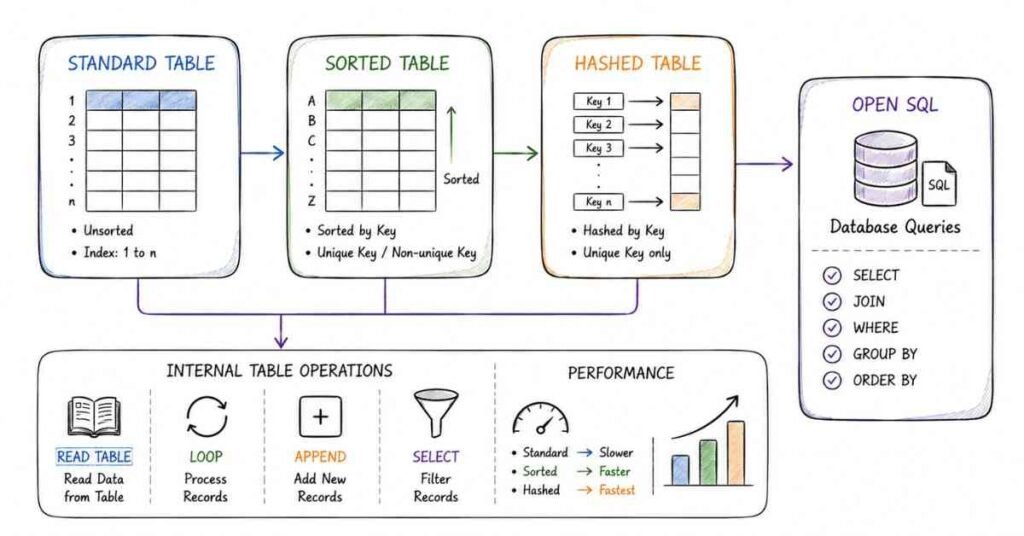
This part covers the next core ABAP interview area: internal tables, data handling, Open SQL, and basic performance thinking. SAP Help defines three internal table categories standard, sorted, and hashed and that distinction drives both syntax choices and runtime behavior in interviews and real projects.
Questions 41–80
41) What is an internal table?
An internal table is a temporary in-memory table used in ABAP programs to store and process multiple rows of data at runtime. It is widely used for report output, intermediate processing, database reads, and data transformations.
42) Why do we use internal tables?
Internal tables are used when data must be processed inside the ABAP application layer after or between database operations. They help with sorting, filtering, looping, aggregation, and passing grouped data through program logic.
43) What are the main types of internal tables?
SAP Help states that the three non-generic internal table categories are standard tables, sorted tables, and hashed tables. These categories differ in storage behavior, key handling, and the primary access pattern they support.
44) What is a standard internal table?
A standard table is managed internally using a primary table index, and new rows are commonly appended or inserted at positions. It is a good default choice when sequential processing or index-based access is common.
45) What is a sorted internal table?
A sorted table is managed with a primary index, but its entries are always kept sorted according to the primary key. SAP Help notes that sorted tables support key-based access efficiently and can have unique or non-unique primary keys.
46) What is a hashed internal table?
A hashed table is managed by a hash algorithm and has no primary table index. Its entries are not stored in order, and access is based on key specification, which makes it suitable for fast key lookups.
47) Which internal table type is best for sequential processing?
A standard table is usually a practical choice for sequential processing because it is naturally used with loops and index access. It is often the first choice when records are appended and then processed in order.
48) Which internal table type is best for sorted key access?
A sorted table is designed for this case because entries remain ordered by the key and SAP Help notes key-based access is aligned with that sorted structure. It is a good fit when you need ordered data and frequent key reads.
49) Which internal table type is best for very fast unique key access?
A hashed table is best when the main need is direct access by unique key because SAP Help says access position is calculated by a hash function and there is no index-based storage order. This makes it a common answer for fast lookup questions.
50) Can a standard table have a unique primary key?
SAP Help states standard tables are managed as standard indexed tables, and uniqueness behavior is not their typical defining strength in interview explanations. In interview practice, the common answer is that standard tables are generally treated as non-unique in contrast to hashed tables, which require unique keys.
51) Can a sorted table have a non-unique key?
Yes, SAP Help explicitly states that sorted tables can support non-unique primary table keys. That is one reason they are flexible for ordered datasets where duplicates may still be valid.
52) Must a hashed table key be unique?
Yes, hashed tables are associated with unique key-based access in ABAP interview practice, and SAP Help describes them as hash-managed tables accessed through key specification rather than index position. In practical terms, you choose hashed tables when the unique key is central to access design.
53) What is a work area?
A work area is a single-row memory structure used to hold one line of data during processing. It is commonly used with LOOP, READ TABLE, SELECT … INTO, and manual assignments.
54) Why is a work area used?
A work area is used when you want to process one row at a time in a controlled variable structure. It improves readability for beginners and is useful when you need to inspect, modify, or move row-level values before writing them elsewhere.
55) What is the difference between an internal table and a work area?
An internal table holds multiple rows, while a work area holds a single row at a time. A simple interview phrase is: internal table is the collection, work area is one record from that collection.
56) What is a field symbol in ABAP?
A field symbol is a dynamic memory reference in ABAP used to point to existing data instead of copying it. SAP Learning specifically describes using field symbols to process internal tables by defining the field symbol with the line type of the internal table.
57) Why are field symbols useful?
Field symbols are useful because they can reduce unnecessary copying and support more flexible processing of internal table rows or referenced data. They are commonly preferred in performance-aware looping and dynamic programming scenarios.
58) What is the difference between a work area and a field symbol?
A work area usually holds a copy-like row structure for processing, while a field symbol points to an existing memory location. In interviews, a compact answer is that work areas store data and field symbols reference data.
59) What does ASSIGN do in ABAP?
ASSIGN links a field symbol to a memory object so the symbol can reference that target dynamically. It is commonly used when dealing with generic processing, dynamic structures, or internal table row references.
60) What is LOOP AT itab INTO wa?
It means the program loops through the internal table row by row and moves each row into the work area for processing. This is one of the most basic internal table patterns in ABAP interviews.
61) What is LOOP AT itab ASSIGNING <fs>?
It means the program loops through the internal table and assigns each current row directly to a field symbol. This avoids copying the row into a separate work area and is often used in more efficient row processing.
62) What is READ TABLE?
READ TABLE is used to access a row from an internal table using an index, key, or other read condition depending on table type. It is one of the most asked statements in ABAP interviews because it shows how table category affects access style.
63) What is the use of SY-SUBRC after READ TABLE?
SY-SUBRC is checked to know whether the read was successful. A value of 0 generally means the row was found, while a nonzero value means it was not found.
64) What is APPEND used for?
APPEND adds a row to the end of an internal table, especially standard tables. It is one of the simplest ways to populate a table during report processing.
65) What is INSERT used for in internal tables?
INSERT adds a row into an internal table according to the rules of that table type. It is especially relevant for sorted tables, where row placement must respect the key order.
66) What is COLLECT?
COLLECT inserts a row into an internal table and combines numeric components when a row with the same key already exists. It is often mentioned in older report-processing interview questions for aggregation-like behavior.
67) What is the DELETE itab?
DELETE removes rows from an internal table. It can be based on index, key, or conditions depending on the table and statement form.
68) What is the MODIFY itab?
MODIFY changes existing rows in an internal table. It is commonly used after a READ or within loop-based row updates.
69) What is the SORT itab?
SORT arranges internal table rows in ascending order by default, or according to specified fields and options. For standard tables, sorting is often done before binary-search style reads.
70) What is BINARY SEARCH in ABAP?
BINARY SEARCH is used with sorted data, usually on standard tables that were sorted first, to improve lookup efficiency compared with a linear scan. It is a common interview topic because it connects algorithm thinking with ABAP table usage.
71) What is Open SQL?
Open SQL is SAP’s database-independent SQL interface used in ABAP to read and manipulate database data. It lets ABAP programs work with database tables through SAP-controlled syntax rather than database-specific SQL.
72) Why is Open SQL preferred in ABAP?
Open SQL is preferred because it supports database independence and integrates with ABAP types, client handling, and SAP application logic. It is the standard way ABAP developers access SAP database tables in day-to-day coding.
73) What is the difference between Open SQL and Native SQL?
Open SQL is SAP-standard and database-independent, while Native SQL is database-specific and tied more directly to the underlying DB engine. In interviews, the safe answer is that Open SQL is the normal preferred choice and Native SQL is used only in special cases.
74) What is SELECT SINGLE?
SELECT SINGLE reads one row from the database that matches the given condition. It is commonly used when the logic expects exactly one relevant record or only the first matching row is needed.
75) What is SELECT … INTO TABLE?
This statement reads database results directly into an internal table. It is widely preferred in reporting because it brings result sets into memory for further ABAP-side processing.
76) What is SELECT … ENDSELECT?
This pattern processes selected database rows one by one in a loop-like manner. Community discussion notes that developers often compare it with FOR ALL ENTRIES and set-based fetching because row-by-row processing can be less efficient in many scenarios.
77) What is FOR ALL ENTRIES?
FOR ALL ENTRIES is used to fetch data from a database table based on values present in an internal table. It is often used as an alternative to nested selects when you need a second query driven by a first result set.
78) What precaution should be taken before FOR ALL ENTRIES?
The driving internal table should not be empty before using FOR ALL ENTRIES. This is a classic interview point because an empty driver can produce unintended database behavior.
79) What is a JOIN in Open SQL?
A JOIN combines rows from multiple tables based on related fields in one SQL statement. It is often preferred over repeated database access when the relationship is clear and the needed columns can be fetched together.
80) What are basic ABAP performance best practices?
A common best-practice set is to reduce database calls, avoid unnecessary nested selects, fetch only required fields, choose the right internal table type, and use set-based logic where possible. Interviewers usually expect you to connect performance not just to syntax, but to access strategy at both the database and internal-table level.
Interview focus
For this part, the highest-value revision topics are internal table types, work area versus field symbol, READ TABLE usage, SELECT patterns, FOR ALL ENTRIES precautions, and basic performance language. These topics appear frequently because they test whether you can think in ABAP processing terms instead of only memorizing definitions.
Part 4: Modularization, Selection Screens, Classical Reports & ALV
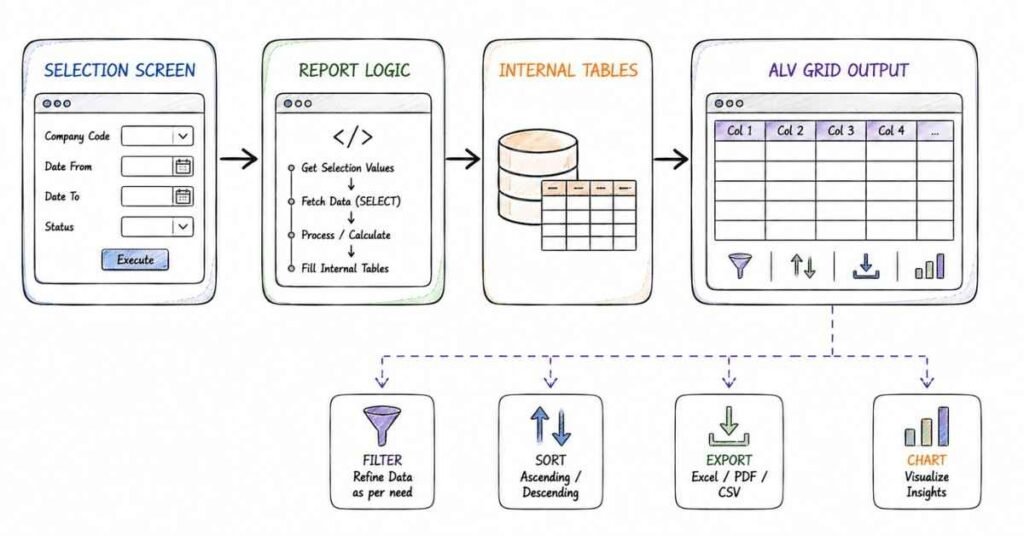
This part covers how ABAP programs are organized, how user input is handled on selection screens, and how report output is built using classical lists or ALV. SAP Help describes ABAP modularization through procedures such as subroutines, function modules, and methods, while selection screens are defined mainly with PARAMETERS, SELECT-OPTIONS, and SELECTION-SCREEN statements.
Questions 81–120
81) What is modularization in ABAP?
Modularization means dividing a program into smaller logical units so the code becomes easier to read, maintain, reuse, and test. SAP Help explicitly says modularization improves readability and maintainability, prevents redundancy, and supports reusability and data encapsulation.
82) Why is modularization important?
It is important because large ABAP programs become difficult to maintain when all logic is written in one place. Modularization helps separate validation, data fetch, processing, and display logic into cleaner units.
83) What are the modularization techniques in ABAP?
SAP Help lists event blocks, dialog modules, subroutines, function modules, methods, macros, and include programs as parts of ABAP modularization concepts. For interviews, the main practical techniques are subroutines, function modules, methods, includes, and macros.
84) What is a subroutine in ABAP?
A subroutine is an internal modularization unit implemented between FORM and ENDFORM. SAP Help says subroutines were originally designed for internal modularization of a program and are called using PERFORM.
85) How is a subroutine called?
A subroutine is called using the PERFORM statement. Parameter passing is generally positional through the FORM interface using additions like USING and CHANGING.
86) What is the drawback of subroutines?
SAP Help notes that most subroutines are now considered obsolete for new programs and should generally be replaced by methods in local classes. In interviews, the practical drawback is weaker modern design compared with object-oriented methods.
87) What is a function module?
A function module is a reusable procedure defined in a function group and available for external calls from ABAP programs. SAP Help says a function module belongs to exactly one function group and has a unique name within the SAP system.
88) How is a function module called?
A function module is called using CALL FUNCTION. SAP Help notes that parameter assignment here is name-based, unlike the positional style common in subroutine calls.
89) What is a function group?
A function group is the container that holds related function modules and shared global data for them. SAP Help compares it conceptually to a kind of abstract final class whose static methods are the function modules.
90) What is the advantage of function modules?
Function modules are good for reusable procedural logic that may be called from different programs, and they are also important for special technical cases like RFC. They provide a formal parameter interface and system-wide naming within the SAP landscape.
91) What is RFC in ABAP?
RFC stands for Remote Function Call, which allows a function module to be called on another application server or another SAP system. SAP Help says the function module must be marked as remote-capable before it can be used this way.
92) What is a method in ABAP?
A method is an ABAP Objects procedure defined in a class and used as the modern replacement for many older procedural modularization patterns. SAP Help’s programming guidance says methods should be preferred in new applications unless a technical reason requires another procedure type.
93) What is an include program?
An include program is a reusable source-code unit inserted into another program. It is often used to separate declarations, form routines, class definitions, or selection-screen code into manageable files.
94) What is a macro in ABAP?
A macro is a reusable block of source code defined locally and expanded at compile or generation time. It is an older modularization technique and is usually less preferred than methods or clear procedural units for maintainable code.
95) What is the difference between subroutine and function module?
A subroutine is mainly for internal program modularization and is called with PERFORM, while a function module is a reusable repository object in a function group and is called with CALL FUNCTION. Function modules also support named parameters and can be remote-enabled for RFC scenarios.
96) What is the difference between function module and method?
A function module belongs to a function group and is procedural, while a method belongs to a class and is object-oriented. SAP Help guidance for modern ABAP says methods should generally be preferred in new development except where technical reasons require function modules.
97) What is a selection screen?
A selection screen is the input screen where users enter report parameters before execution. SAP Help says selection screens are defined in ABAP mainly using PARAMETERS, SELECT-OPTIONS, and SELECTION-SCREEN statements.
98) What is PARAMETERS in ABAP?
PARAMETERS is used to define a single input field on a selection screen. SAP Help identifies it as one of the main statements for defining selection-screen input elements.
99) What is SELECT-OPTIONS in ABAP?
SELECT-OPTIONS is used to define a selection criterion that can hold ranges, multiple values, exclusions, and intervals. SAP Help describes it as the statement used for complex selections on selection screens.
100) What is the difference between PARAMETERS and SELECT-OPTIONS?
PARAMETERS creates a single input field, while SELECT-OPTIONS creates a more powerful range-style selection structure. In interviews, the short answer is “single value versus range or multiple values”.
101) What is SELECTION-SCREEN used for?
SELECTION-SCREEN is used for formatting and structuring selection screens, such as blocks, comments, pushbuttons, and custom layouts. SAP Help also notes it is used to define user-defined selection screens beyond the standard one.
102) What is the standard selection screen number?
SAP Help states that the standard selection screen has number 1000. Custom user-defined selection screens can use other four-digit numbers except 1000.
103) What is a user-defined selection screen?
A user-defined selection screen is a separately defined screen built with SELECTION-SCREEN BEGIN OF SCREEN and END OF SCREEN statements. SAP Help notes these screens can be called with custom numbers and even displayed as modal windows using AS WINDOW.
104) What is AT SELECTION-SCREEN?
AT SELECTION-SCREEN is a selection-screen event raised after all input values are passed to the program for validation. SAP Help says this event is the last one in selection-screen processing and can be used to check all user input.
105) What is AT SELECTION-SCREEN OUTPUT?
This event is raised during the PBO phase of the selection screen and is used to prepare or dynamically modify screen elements. SAP Help says you can use it for assignments to selection parameters and dynamic screen modifications before display.
106) What is AT SELECTION-SCREEN ON field?
This event is used to validate a specific field or selection criterion line after user input is passed to the program. SAP Help notes that warning or error messages here make that field ready for input again.
107) What is AT SELECTION-SCREEN ON BLOCK?
This event validates all fields of a block after their values are passed to the program. If an error or warning is raised, SAP Help says the fields of that block become ready for input again.
108) What is AT SELECTION-SCREEN ON RADIOBUTTON GROUP?
This event is used to validate a radio-button group after user input is passed. SAP Help says a warning or error here makes all radio buttons in that group ready for input again.
109) What is ON VALUE-REQUEST?
ON VALUE-REQUEST handles F4 input help for a parameter or select-option field. SAP Help says it is raised by the selection screen’s POV event and can override Dictionary-defined input help with custom logic.
110) What is ON HELP-REQUEST?
ON HELP-REQUEST handles F1 field help for a parameter or selection field. SAP Help says this event is raised by the POH event and can provide custom help behavior.
111) What is a classical report in ABAP?
A classical report is a traditional list-based executable report that displays output line by line. It is one of the oldest and most basic report styles in ABAP interview preparation.
112) What are the common events in a classical report?
Common events include INITIALIZATION, AT SELECTION-SCREEN, START-OF-SELECTION, END-OF-SELECTION, TOP-OF-PAGE, and line or list-processing events depending on report style. Earlier SAP reporting documentation also places START-OF-SELECTION as the main report-processing event .
113) What is TOP-OF-PAGE?
TOP-OF-PAGE is a report event used to print or display header content at the top of a classical list page. It is often used for titles, date, user, and selection summary information.
114) What is HIDE in classical reporting?
HIDE stores field values for later retrieval during interactive list processing. It is typically mentioned in older interview questions related to drill-down classical reports.
115) What is interactive reporting?
Interactive reporting means the user can click or choose list elements to trigger more detail, navigation, or secondary list output. It is commonly associated with classical report events like AT LINE-SELECTION.
116) What is ALV in ABAP?
ALV stands for ABAP List Viewer, a reporting framework used to display structured tabular output with user-friendly features such as sorting, filtering, totals, and layout handling. It is preferred over plain classical lists for richer report output in many business scenarios.
117) Why is ALV preferred over classical reporting?
ALV is preferred because it provides built-in user functions like sorting, filtering, column handling, totals, and layout control without coding everything manually. That makes reports more consistent, faster to build, and easier for users to work with.
118) What are common types of ALV?
Common interview answers include classical ALV through function modules, ALV Grid Control, and OO-based ALV or SALV-based approaches. In beginner interviews, saying “REUSE ALV function modules, ALV Grid, and SALV” is usually sufficient.
119) What is SALV?
SALV is a simplified object-oriented ALV model used to display tabular output with less code than some older ALV techniques. It is often presented as a cleaner way to build standard read-only ALV reports.
120) What is the difference between classical report and ALV report?
A classical report focuses on manually coded list output, while ALV provides a structured viewer with built-in reporting features. In interview language, classical reporting is basic list output, while ALV is a user-friendly table framework for business reporting.
Revision focus
For this part, revise subroutines versus function modules versus methods, PARAMETERS versus SELECT-OPTIONS, major selection-screen events, and classical reporting versus ALV. These topics are high-frequency because they test both foundational syntax and how you organize real ABAP reporting logic.
Part 5: Enhancements, BAPIs, RFCs, IDocs, Debugging, and Error Handling
This part covers the ABAP topics that separate a basic coder from someone who can work in a real SAP project environment. In interviews, enhancement techniques, integrations, and debugging are often used to test whether you understand how custom ABAP fits into live business processes, not just syntax. The focus here is practical: how SAP extensions work, how systems communicate, and how you identify and fix issues when something breaks.
Questions 121–160
121. What is an enhancement in ABAP?
An enhancement is a way to add custom logic to standard SAP without changing the original code directly. It is used when the business wants extra validation, custom output, or modified behavior in a standard transaction.
122. Why are enhancements important?
Enhancements are important because SAP standard code should usually remain untouched. Custom logic placed through enhancement techniques is easier to manage during upgrades and support.
123. What are the main enhancement techniques in SAP ABAP?
The common enhancement techniques are user exits, customer exits, BADIs, enhancements points, enhancements sections, and implicit or explicit enhancements. Interviewers often expect you to know the difference between older exits and newer enhancement frameworks.
124. What is a user exit?
A user exit is a predefined place in standard SAP where custom code can be added. It is usually implemented through SAP enhancement includes and is often associated with older SAP programs.
125. What is a customer exit?
A customer exit is SAP’s structured enhancement mechanism that allows customer-specific logic to be added without modifying standard code. It is usually implemented through a function module exit or screen exit provided by SAP.
126. What is a BADI?
BADI stands for Business Add-In. It is an object-oriented enhancement technique that allows custom code to be plugged into standard SAP applications at predefined points.
127. Why are BADIs preferred over old exits in many cases?
BADIs are preferred because they are more flexible, more modern, and better aligned with object-oriented ABAP. They also support multiple implementations in many cases, which makes them more scalable than older enhancement styles.
128. What is the difference between user exit and BADI?
A user exit is generally an older, procedural enhancement method, while a BADI is a more modern object-oriented enhancement option. In interviews, the simplest answer is that both add custom logic, but BADIs are newer and more flexible.
129. What is an enhancement spot?
An enhancement spot is a container that groups enhancement options in modern ABAP enhancement frameworks. It helps organize where custom logic can be attached in a controlled way.
130. What is an implicit enhancement?
An implicit enhancement is a predefined enhancement point automatically available at certain places in standard code, such as the start or end of a program block. It lets developers add logic without modifying the original object.
131. What is an explicit enhancement?
An explicit enhancement is a place in standard code where SAP has intentionally created a formal enhancement option. It is more controlled than directly changing standard logic.
132. What is a BAPI?
BAPI stands for Business Application Programming Interface. It is a standard SAP interface used to access business objects and data in a stable, structured way.
133. Why are BAPIs used?
BAPIs are used for integrations and external program access because they provide a standard, supported way to interact with SAP business data and processes. They are preferred over direct table updates.
134. What is the relation between BAPI and RFC?
Many BAPIs are enabled for RFC so they can be called remotely from other systems. In interviews, it is enough to say that BAPIs are standard interfaces and often work through RFC technology.
135. What is RFC?
RFC stands for Remote Function Call. It allows a function module to be called from another SAP system or external application.
136. What is a remote-enabled function module?
A remote-enabled function module is a function module that can be called across systems using RFC. SAP only allows certain restrictions and structures for modules marked this way.
137. What is the use of RFC in real projects?
RFC is used when one system needs to call logic or retrieve data from another system. It is common in system-to-system integration, middleware communication, and remote business processing.
138. What is the difference between synchronous and asynchronous RFC?
Synchronous RFC waits for the remote system to return a response before continuing. Asynchronous RFC does not wait in the same way and is used when immediate response is not required.
139. What is an IDoc?
An IDoc is an intermediate document used for SAP data exchange between systems. It is commonly used in interfaces for ordered, structured business data transfer.
140. Why are IDocs important?
IDocs are important because they support standard SAP integration scenarios for master data, transaction data, and business document exchange. They are one of the most common topics in interface interviews.
141. What are the basic parts of an IDoc?
The main parts of an IDoc are the control record, data records, and status records. The control record contains metadata, the data records contain the actual business content, and the status records show processing history.
142. What is ALE?
ALE stands for Application Link Enabling. It is SAP’s framework for distributing business data and supporting communication between SAP systems.
143. What is the difference between RFC and IDoc?
RFC is usually used for direct function-based communication, while IDoc is used for structured document-based data exchange. RFC is more request-response oriented, while IDocs are more document and process oriented.
144. What is debugging in ABAP?
Debugging is the process of running ABAP code step by step to identify and fix problems. It is one of the most important practical skills for any ABAP developer.
145. Why is debugging important?
Debugging is important because interviewers want to know whether you can independently trace a problem, find the source of an issue, and understand program flow. In real work, debugging is often the fastest way to solve defects.
146. What is a breakpoint?
A breakpoint is a marker placed in the code that stops execution at a specific line during debugging. It helps inspect variables and execution flow at the exact point where a problem may occur.
147. What is the difference between static breakpoint and dynamic breakpoint?
A static breakpoint is placed directly in the code and remains there until removed. A dynamic breakpoint is set during runtime in the debugger and is usually used for temporary investigation.
148. What is single-step debugging?
Single-step debugging means executing the program one line at a time so you can observe how values change. It helps trace logic precisely and is useful when the issue depends on condition flow.
149. What is the use of the watchpoint?
A watchpoint stops execution when a variable reaches a specific value or changes. It is helpful when you do not know where a value gets modified in a long program.
150. What is system debugging?
System debugging is used to debug SAP standard or system code rather than only custom Z programs. It is more advanced and usually requires special authorization.
151. What is exception handling in ABAP?
Exception handling is the process of managing errors so the program does not fail unexpectedly. It allows the developer to catch problems and respond in a controlled way.
152. What is the purpose of TRY…CATCH?
TRY…CATCH is used to handle runtime exceptions in a controlled manner. Code that may fail is placed in the TRY block, and the error is handled in the CATCH block.
153. What is the benefit of exception handling?
Exception handling improves program stability and user experience. Instead of short dumps, the program can show a meaningful message or follow a safe fallback path.
154. What is a short dump?
A short dump is an abrupt runtime termination in SAP caused by an unhandled error. It is usually analyzed using the dump analysis transaction after the failure occurs.
155. What is the role of SY-SUBRC in error handling?
SY-SUBRC tells you whether a statement succeeded or failed. It is commonly checked after operations like READ TABLE, SELECT, or function module calls.
156. What is the role of SY-MSGID, SY-MSGNO, and message variables?
These system fields help identify and build error or informational messages. They are useful when handling messages dynamically in ABAP programs.
157. What is message class in ABAP?
A message class stores reusable messages that can be displayed using message numbers and variables. It helps keep messages consistent and maintainable across programs.
158. Why should messages be externalized into message classes?
Externalized messages are easier to maintain, translate, and reuse. They also support cleaner code because message text is not hardcoded in the program.
159. What is the difference between hard error and soft error?
A hard error usually stops processing because the issue must be fixed before continuing. A soft error gives a warning or informational message and allows the user to continue if appropriate.
160. What is a null or initial check in ABAP?
An initial check verifies whether a field or variable has a value. It is commonly used before processing data to prevent errors or invalid logic paths.
Revision focus
Revise enhancement types, BADI versus user exit, BAPI and RFC basics, IDoc structure, and debugging tools such as breakpoints and watchpoints. These topics are critical because they show whether you understand how ABAP works in live SAP systems, not just in isolated coding exercises.
Part 6: OOPs ABAP, Classes, Objects, Inheritance, Polymorphism, Interfaces & Exceptions
This part covers ABAP Objects, which SAP Help describes as the object-oriented part of ABAP based on encapsulating data and functions in classes, creating objects from those classes, and supporting inheritance and interfaces for polymorphism. These topics matter because modern ABAP interviews often expect at least working knowledge of classes, methods, visibility, and exception handling even for candidates with mostly procedural experience.
Questions 161–200
161) What is ABAP Objects?
ABAP Objects is the object-oriented extension of ABAP that adds classes, objects, inheritance, interfaces, and related OOP concepts to the language. SAP Help says it transformed ABAP from a previously procedural language into one that supports object-oriented programming while remaining largely compatible with the rest of ABAP.
162) What is object-oriented programming?
Object-oriented programming is a style of programming based on encapsulating data and behavior inside classes and creating objects from those classes. SAP Help describes this as the foundation of ABAP Objects.
163) What is a class in ABAP?
A class is a template or blueprint that defines components such as attributes, methods, events, types, and constants. SAP Help states that classes are defined between CLASS and ENDCLASS and consist of a declaration part and an implementation part.
164) What is an object in ABAP?
An object is an instance created from a class. SAP Help says objects are created using CREATE OBJECT or the constructor operator NEW, and object reference variables point to those instances.
165) How do you create an object in ABAP?
SAP Help says an object can be created using CREATE OBJECT oref TYPE class or with the constructor operator NEW class( … ). In interviews, the short answer is that both syntaxes create an instance and assign it to an object reference.
166) What is an attribute in a class?
An attribute is a data component of a class used to store state or values belonging to the object or the class definition. SAP Help includes attributes among the main components of a class.
167) What is a method in a class?
A method is a procedural component of a class that defines behavior or operations for the object. In modern ABAP, methods are the preferred procedural units for new development over many older constructs.
168) What is encapsulation?
Encapsulation means combining data and related behavior in the same class and controlling access to those components through visibility rules. This is one of the core principles behind ABAP Objects.
169) What are the visibility sections in a class?
SAP Help says a class can be split into PUBLIC SECTION, PROTECTED SECTION, and PRIVATE SECTION. These sections control which users or subclasses can access the class components.
170) What is PUBLIC SECTION?
SAP Help states that components in the public visibility section are accessible to all users who know the class, and also within the class and its inheritors. In short, public components form the visible interface of the class.
171) What is PROTECTED SECTION?
SAP Help says protected components are accessible inside the class itself and in all subclasses that inherit from it. This section is useful for exposing components to inheritors without making them public to all users.
172) What is PRIVATE SECTION?
SAP Help says private components are accessible only in the methods of the class itself and are not visible to inheritors. This is used when data or helper behavior should remain strictly internal to the class.
173) What is an instance attribute?
An instance attribute belongs to a specific object and can have a different value for each object created from the same class. It represents object-specific state.
174) What is a static attribute?
A static attribute belongs to the class itself rather than a particular object. It is shared across all instances of that class.
175) What is an instance method?
An instance method works on a specific object instance and can usually access instance attributes directly. It is called through an object reference.
176) What is a static method?
A static method belongs to the class rather than an individual object. It is typically called using the class name and is used for class-level utility or factory-style logic.
177) What is a constructor in ABAP Objects?
A constructor is the special method used during object creation to initialize the instance. SAP Help states that each class has an instance constructor called constructor.
178) What is the purpose of a constructor?
The constructor initializes object state when the object is created. In inheritance scenarios, SAP Help says subclass constructors must ensure superclass constructors are also called using super->constructor.
179) Can constructors be redefined?
SAP Help states that instance constructors of superclasses cannot be redefined in subclasses. This is a standard ABAP Objects rule that often appears in conceptual interviews.
180) What is inheritance in ABAP?
Inheritance is the concept of deriving a new class from an existing class. SAP Help says this is done using INHERITING FROM, where the new class is the subclass and the existing one is the superclass.
181) What is a superclass?
A superclass is the existing parent class from which another class inherits components. It is the more general class in the inheritance relationship.
182) What is a subclass?
A subclass is the derived class that inherits components from a superclass and can add or redefine behavior. SAP Help explains that specialization increases as you move down the inheritance tree.
183) Does ABAP support multiple inheritance for classes?
SAP Help states that ABAP Objects implements single inheritance, meaning a class can have only one direct superclass. A class may have multiple direct subclasses, but not multiple direct superclasses.
184) What is method redefinition?
Method redefinition means a subclass provides its own implementation of an inherited method. SAP Help says methods inherited from the superclass can be redefined in subclasses.
185) What is polymorphism in ABAP?
SAP Help says ABAP supports polymorphism through simple inheritance and interfaces. In interview terms, polymorphism means different classes can be handled through a common superclass or interface reference while behaving according to their own implementation.
186) What is an interface in ABAP?
An interface is a definition-only construct that declares components such as methods, attributes, or events without providing implementation. SAP Help says interfaces are defined between INTERFACE and ENDINTERFACE and do not have visibility sections or an implementation part.
187) How does a class use an interface?
SAP Help says interfaces are included in the public visibility section of a class using the statement INTERFACES. The class then adopts those components and must implement the interface methods.
188) Why are interfaces useful?
SAP Help says interfaces let several different classes be used in a uniform way while separating definition from implementation. They are useful when different classes must expose a common contract.
189) What is the difference between inheritance and interface?
Inheritance creates an “is-a” relationship between classes and allows a subclass to derive from one superclass. An interface defines a contract that classes implement so multiple unrelated classes can behave in a common way.
190) What is an abstract class?
An abstract class is a class intended to serve as a base definition and not as a directly instantiated final business object. SAP Help notes that inheritance can involve abstract as well as final classes.
191) What is a final class?
A final class is a class that cannot be subclassed further. SAP Help notes that inheritance hierarchies depend on whether a class is defined as final or not.
192) What is the me reference in ABAP Objects?
SAP Help states that in instance methods, the predefined reference variable me contains a reference to the current object. It is similar to “this” in some other programming languages.
193) What is an event in a class?
A class event is an object-oriented event declared using the EVENTS statement and triggered in methods using RAISE EVENT. SAP Help explicitly says these OO events are different from the runtime environment events used in classical ABAP reports.
194) What is an event handler method?
SAP Help says the addition FOR EVENT OF is used to declare methods as event handlers for class events. An event handler responds when the relevant event is raised by an object.
195) What is an exception in ABAP Objects?
An exception is an object-based error signal represented by an exception class and handled in ABAP with TRY and CATCH blocks. SAP Help says handleable runtime exceptions are class-based and can be caught between TRY and ENDTRY.
196) What is a class-based exception?
A class-based exception is an exception represented by an exception class, either predefined in the system or self-defined. SAP Help notes that predefined system exception classes often start with the prefix CX_SY_.
197) What is TRY…CATCH in ABAP?
TRY…CATCH is the block used to handle class-based exceptions raised during program execution. SAP Help says handleable exceptions can be caught between TRY and ENDTRY.
198) What is RAISE EXCEPTION?
SAP Help says RAISE EXCEPTION is used to raise a class-based exception programmatically in ABAP. It can raise an exception by type or re-raise an already existing exception object by reference.
199) What is the difference between system-defined and user-defined exceptions?
SAP Help says exceptions may be predefined by the system, such as CX_SY_… runtime exceptions, or created as self-defined exception classes in the program. The main difference is whether the exception class is supplied by SAP or designed by the developer.
200) Why is OOPs ABAP important in interviews?
OOPs ABAP is important because SAP Help positions ABAP Objects as the object-oriented part of ABAP, and modern SAP development increasingly expects candidates to understand classes, interfaces, inheritance, and exception handling. Even when the project contains procedural code, interviewers often use OOP questions to test whether a candidate can work with current ABAP design patterns.
Revision focus
For this part, revise class components, visibility sections, object creation, constructors, inheritance, interfaces, polymorphism, and TRY…CATCH with class-based exceptions. These are the OOP questions most likely to appear in both junior and mid-level ABAP interviews because they connect syntax, design, and modern development expectations.
Part 7: Debugging, Performance Tuning, SQL Optimization & Scenario-Based Questions
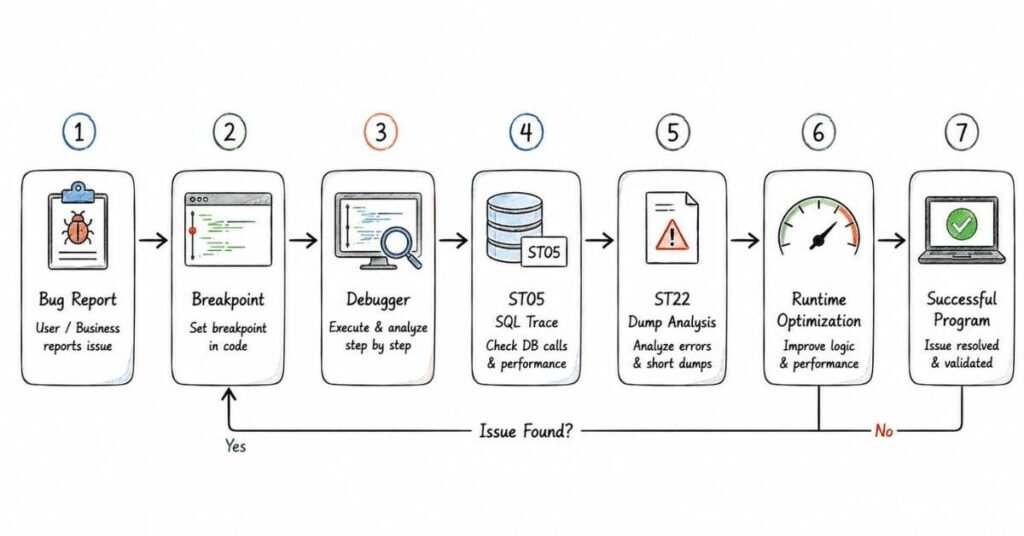
This part covers the analysis and optimization side of ABAP, which interviewers use to test practical thinking. SAP Help defines breakpoints as signals at particular points in a program that tell the ABAP runtime processor to interrupt processing and start the debugger. Debugging and performance are valued highly because they show whether a candidate can work on real SAP systems, not just write isolated code.
Questions 201–240
201) What is the ABAP debugger?
The ABAP debugger is a tool used to interrupt program execution at defined points and inspect variable values, call stacks, and program flow during runtime. SAP Learning says you set a breakpoint and then run the program normally, and when the breakpoint is reached, the system interrupts execution and opens the debugger.
202) What is a breakpoint?
SAP Help defines a breakpoint as a signal at a particular point in a program that tells the ABAP runtime processor to interrupt processing and start the debugger. The system then pauses execution at that point so variables, logic, and program state can be inspected.
203) What are the types of breakpoints?
SAP Help describes static breakpoints, dynamic breakpoints, breakpoints at statements, breakpoints at subroutines, breakpoints at function modules, breakpoints at methods, and breakpoints at exceptions and system exceptions. For interviews, the most important types to mention are static, dynamic, and external breakpoints.
204) What is a static breakpoint?
A static breakpoint is inserted directly in source code using the ABAP keyword BREAK-POINT or BREAK username. SAP Help notes that a non-user-specific static breakpoint is set using the BREAK username form.
205) What is a dynamic breakpoint?
SAP Help says dynamic breakpoints are user-specific and are deleted when you log off from the system. They can be set by double-clicking a line in the editor or the debugger without modifying source code.
206) What is a watchpoint?
SAP Help says a watchpoint is a debugging tool used to track specific ABAP variable values, and the debugger stops as soon as the value of the watched variable changes. Logical conditions can be assigned to watchpoints to stop only when a specific value or condition is met.
207) What is the difference between a breakpoint and a watchpoint?
A breakpoint stops execution at a specific program line, while a watchpoint stops execution when a specific variable’s value changes. In interview language, a breakpoint is location-based and a watchpoint is value-change-based.
208) What is the call stack in debugging?
The call stack shows the sequence of program calls, method calls, and processing blocks that led to the current execution point. SAP Community notes that checking the call stack is a useful part of ABAP debugger analysis.
209) What is a conditional breakpoint?
A conditional breakpoint stops execution only when a specified condition is true, rather than stopping every time that line is reached. SAP Community guidance says you can set breakpoint conditions by editing breakpoint properties in the debugger.
210) What is an external breakpoint?
An external breakpoint is used when debugging programs that run in a browser or external client context rather than through the SAP GUI directly. It allows the same stop-and-inspect behavior for externally triggered program execution.
211) Which transactions are used for debugging?
The standard approach is to use the ABAP debugger invoked via /h in the command field, setting BREAK-POINT or BREAK username in source code, or double-clicking in the editor. In ADT tools, debugging is integrated with breakpoint and watchpoint management features.
212) What is the runtime analysis tool in ABAP?
Runtime analysis, commonly accessed via transaction SAT or the older SE30, measures the actual execution time and resource usage of an ABAP program. It is used to identify which parts of a program consume the most processing time.
213) What is the extended program check?
The extended program check, accessible via transaction SCI or SLIN, performs static code analysis for ABAP programs. It checks for unused variables, potential performance issues, and syntax or semantic concerns beyond what the standard syntax check covers.
214) What is transaction ST05?
ST05 is the SQL trace transaction used to monitor database calls made during program execution. It is especially useful for checking whether too many database reads are happening, whether indexes are being used, and whether performance issues come from Open SQL behavior.
215) What is the ABAP code inspector?
SAP’s Code Inspector (SCI) is a static analysis tool for checking ABAP repository objects against a set of programmable quality checks. SAP Help lists it as part of performance and tuning tooling in ABAP.
216) What is a performance problem in ABAP?
A performance problem in ABAP usually means a program runs too slowly because of excessive or inefficient database access, poor internal-table handling, missing indexes, or redundant processing. It is one of the most common practical interview areas.
217) What is a nested SELECT?
A nested SELECT is a SELECT statement placed inside a loop over another SELECT result. It is widely considered a major performance anti-pattern because it causes repeated database hits per outer row.
218) Why should nested SELECTs be avoided?
Nested SELECTs cause one database round trip per outer record, which becomes expensive as data volumes grow. The interview expectation is that better alternatives exist, such as joins, FOR ALL ENTRIES, or internal table lookups.
219) What is SELECT * and why should it be avoided?
SELECT * fetches all columns of a database table even when only a few are needed. It wastes memory and network transfer between the database and application layer, so only required fields should be named in the SELECT list.
220) What is the difference between SELECT SINGLE and SELECT UP TO 1 ROWS?
SELECT SINGLE expects the full primary key and fetches exactly one row. SELECT UP TO 1 ROWS retrieves only the first row of a potentially larger result, making it safer when the full primary key is not available.
221) What is FOR ALL ENTRIES and what is its main performance risk?
FOR ALL ENTRIES fetches data driven by an internal table’s contents in a set-based manner. The main risk is that if the driving table is empty, the statement may behave unexpectedly, so always check that the internal table is not empty before using it.
222) Why is it better to read into an internal table than use SELECT ENDSELECT?
Reading into an internal table fetches all results in one database call, while SELECT ENDSELECT processes rows one by one with repeated round-trip overhead. SAP Community notes that SELECT ENDSELECT keeps the table locked longer and causes repeated fetches compared with a bulk SELECT INTO TABLE.
223) What is a database index and why does it matter in ABAP?
A database index is a structure on a table that allows faster row lookups based on specific field values. In ABAP interviews, it matters because Open SQL performance depends heavily on whether queries use primary or secondary index fields correctly.
224) What is a secondary index?
A secondary index is a user-defined database index on fields other than the primary key to speed up queries by those fields. In SAP, secondary indexes are created in SE11 and activated to take effect at the database level.
225) What is buffering in SAP?
Buffering allows SAP to keep copies of frequently read table data in application-server memory to reduce repeated database access. It is relevant in interviews because enabling buffering incorrectly on the wrong tables can cause data consistency issues.
226) What are the types of table buffering in SAP?
Common interview types are single-record buffering, generic-area buffering, and full buffering. Full buffering is suitable for small relatively static tables, generic buffering for medium-range key lookups, and single-record for precise key access patterns.
227) What is the BYPASS BUFFER addition in Open SQL?
BYPASS BUFFER is used to force a SELECT to go directly to the database even if the table is buffered. It is used when you need the most current data and cannot tolerate a slightly stale buffer read.
228) What is a dump in ABAP?
A dump is an ABAP runtime error that terminates program execution abnormally. It is recorded in transaction SM21 or viewed in ST22 and usually shows the error type, the line where it occurred, and a snapshot of variables.
229) What is transaction ST22?
ST22 is the ABAP dump analysis transaction used to view runtime errors. Interviewers expect you to mention ST22 when explaining how you investigate a program termination or unexpected crash.
230) What is SY-SUBRC?
SY-SUBRC is an ABAP system field that holds the return code of the last executed operation such as a SELECT, READ TABLE, or CALL FUNCTION. A value of 0 usually means the operation was successful.
231) What is SY-TABIX?
SY-TABIX is a system field that holds the current loop counter or the line number of the last READ TABLE operation. It is especially useful in LOOP AT processing and when checking which row was accessed.
232) What are some common ABAP system fields used in debugging?
Important system fields for interviews include SY-SUBRC for return codes, SY-TABIX for loop indexes, SY-DBCNT for database row counts, SY-UNAME for the current user, SY-DATUM for the current date, and SY-UZEIT for the current time.
233) What is a scenario-based question in ABAP interviews?
A scenario-based question describes a practical situation and asks how you would solve it, such as “a report is running too slowly, what would you do?” or “a dump occurred in production, how would you investigate?” These questions test whether you can apply knowledge practically.
234) Scenario: A report is running slowly. What is your approach?
The standard interview answer covers these steps: first check transaction SM50 or SM66 for active workload, then use ST05 for SQL trace to identify expensive database calls, check for nested SELECTs or missing indexes, use SAT or SE30 for runtime analysis to find CPU-heavy code, and then apply improvements such as SELECT INTO TABLE, FOR ALL ENTRIES with empty check, or secondary indexes.
235) Scenario: A dump occurs. How do you investigate?
First open ST22 to find the dump type, the program, the line, and the variable snapshot at the time of error. Then check the error type common ones include array index out of bounds, authorization check failure, or conversion errors and trace the logic back to find the root cause and apply a fix.
236) Scenario: You need to update a table from a custom report. What precaution do you take?
In interviews, key points include using a lock object to prevent concurrent updates, validating input before any database change, wrapping changes in a proper COMMIT WORK or ROLLBACK WORK structure, and ensuring proper authorization checks before sensitive updates.
237) Scenario: A SELECT using FOR ALL ENTRIES returns unexpected results. What do you check first?
Check whether the driving internal table is empty before the FOR ALL ENTRIES statement. An empty driving table is one of the most classic FOR ALL ENTRIES bugs in ABAP interviews.
238) Scenario: Two programs are updating the same table record simultaneously. How do you handle it?
Use a lock object created in SE11 to serialize access. The generated ENQUEUE function module should be called before the update and the DEQUEUE function module should be called after the commit to release the lock.
239) Scenario: You need to improve the performance of a report fetching from multiple tables. What do you try?
Consider joining tables in a single SELECT if the relationship is clear, using FOR ALL ENTRIES for driven table access, fetching only required fields, checking whether a secondary index exists on the WHERE clause fields, and analyzing whether buffering is appropriate.
240) Scenario: A user reports wrong data in a report output. What is your debugging approach?
Set a breakpoint or watchpoint on the relevant data variable to check when it gets populated with incorrect data. Trace through the SELECT statements using ST05 if needed, check the WHERE conditions and joins, and isolate whether the issue is a data selection problem, a processing logic error, or a display issue.
Revision focus
For this part, revise breakpoints versus watchpoints, static versus dynamic breakpoints, SQL trace with ST05, runtime analysis with SAT, dumps with ST22, FOR ALL ENTRIES precautions, and the six scenario-based answers above. These are very common in technical rounds for junior and mid-level ABAP roles because they test practical judgment, not just syntax recall.
Part 8: CDS Views, ABAP on HANA, Fiori Basics, OData & Modern ABAP Awareness
This part covers the modern SAP topics that increasingly appear in ABAP interviews. SAP Learning describes ABAP CDS as the database-independent CDS implementation for AS ABAP that defines semantic data models and can optimize Open SQL-based applications, especially when the system runs on SAP HANA. SAP Fiori apps rely on OData services, and SAP Gateway provides the infrastructure to activate and expose those services for app consumption.
Questions 241–280
241) What is SAP HANA?
SAP HANA is SAP’s in-memory database platform designed for fast data processing and analytics. In ABAP interview language, it matters because newer SAP application models and performance approaches increasingly assume HANA-style pushdown and optimized data access.
242) What is ABAP on HANA?
ABAP on HANA refers to ABAP development practices optimized for SAP systems running on the HANA database. SAP Learning notes that ABAP CDS can make Open SQL-based applications better optimized, and this becomes especially clear on SAP HANA because its in-memory characteristics can be used effectively.
243) Why is ABAP on HANA important?
It is important because performance strategy shifts from heavy application-server processing toward pushing suitable logic closer to the database. Modern ABAP interviews often test whether you understand this “code pushdown” direction at least conceptually.
244) What is code pushdown?
Code pushdown means moving data-intensive calculations or filtering logic from the ABAP application layer to the database layer so the database does more of the processing. In SAP interviews, this is often linked with HANA, CDS views, and modern SQL-based design.
245) What is CDS?
CDS stands for Core Data Services, a modeling concept used in SAP to define semantically rich data models. In ABAP, ABAP CDS is the database-independent implementation used on AS ABAP.
246) What is an ABAP CDS view?
SAP Learning says a basic CDS defines a view using SQL-like syntax and provides enhanced access functions compared with existing DDIC tables and views. In interviews, a CDS view is commonly described as a semantic data model or database view definition enriched with metadata and associations.
247) How is a CDS view different from a normal database view?
A CDS view carries richer metadata and semantic modeling features such as annotations and associations, whereas a normal database view is more basic and database-structure-oriented. SAP Learning specifically notes that ABAP CDS entities provide enhanced access functions compared with existing database tables and views defined in the ABAP Dictionary.
248) What are annotations in CDS?
SAP Help says a CDS annotation enriches CDS objects with metadata, and that metadata is saved internally when the CDS object is activated. In simple terms, annotations tell consumers and frameworks how the CDS data should be interpreted or used.
249) Why are annotations important in CDS?
Annotations are important because they carry semantic and framework-level instructions for UI, OData exposure, search behavior, labels, and other metadata-driven use cases. SAP Learning says annotations let the consumer of the CDS view know how to use the data from that view.
250) What is an association in CDS?
SAP Learning says an association is a declaration of the relationship between views that can be consumed by the CDS view itself or by consumers of that CDS view. In interviews, it is usually explained as a semantic relationship between entities, somewhat like a join definition that can be consumed lazily.
251) What is the difference between a join and an association in CDS?
A join is an immediate data-combination operation, while an association is a declared relationship that a consumer can navigate or consume when needed. Interviewers usually expect you to say associations are more semantic and reusable than plain joins in CDS modeling.
252) What is the benefit of CDS views?
The benefits include semantic modeling, annotations, associations, reusability, better support for UI and service generation, and improved optimization of Open SQL-based applications. These are exactly the reasons CDS views appear so often in modern SAP interview rounds.
253) Can CDS views be used for OData service generation?
Yes, SAP Help says there are options to generate an OData service based on a CDS view. SAP Learning also notes that annotations such as @OData.publish: true can create an OData service when the CDS view is activated.
254) What does @OData.publish: true do?
SAP Learning states that the ABAP annotation @OData.publish: true ensures that an OData service is created when the CDS view is activated. This is one of the most common beginner interview points around CDS-based service exposure.
255) What are UI annotations in CDS?
UI annotations are metadata annotations used to describe how data should be consumed by UI frameworks such as SAP Fiori elements. SAP Learning gives @UI.lineItem as an example and says it ensures that a column is created.
256) What is SAP Fiori?
SAP Fiori is SAP’s modern user experience approach for business applications, built around role-based, responsive apps and launchpad-driven access. In ABAP interviews, it is enough to say Fiori is the modern UI layer while ABAP often supports it from the backend.
257) Why is Fiori important for ABAP developers?
It is important because SAP Fiori apps need backend services and business data from SAP systems, and many ABAP roles support that backend layer through CDS, OData, authorizations, and service activation. Even when a developer is not building the UI, they often work on the data and service side that Fiori consumes.
258) What is OData?
SAP Help says OData is a standardized protocol for creating and consuming data APIs and that it builds on HTTP and commonly accepted REST-style methodologies. SAP Fiori apps use OData to display data from the backend and update data in the backend.
259) Why is OData used in SAP?
OData is used because it provides a standard way for SAP and non-SAP clients to consume SAP business data and operations. SAP Help says SAP Gateway uses OData to connect devices, environments, and platforms efficiently and securely to SAP systems.
260) What is SAP Gateway?
SAP Help says SAP Gateway provides the infrastructure for the OData services used by SAP Fiori apps and the SAP Fiori launchpad. It is also used to set up and activate OData services that connect backend SAP logic to app consumers.
261) Why is SAP Gateway important?
It is important because OData services are a mandatory component for running SAP Fiori apps, and SAP Gateway is the layer used to activate and manage those services. Without that service infrastructure, Fiori apps cannot retrieve or update backend business data.
262) What is the role of OData in Fiori?
SAP Help says OData services are mandatory for SAP Fiori apps because they retrieve business data from the backend for the apps to use. The same services are also used to send updates from the app back to the backend system.
263) Which transaction is used to activate OData services?
SAP Help says OData services are activated and maintained using transaction /IWFND/MAINT_SERVICE. This is one of the most commonly asked transaction codes in Fiori-support and OData interview questions.
264) What is SEGW?
SEGW is the SAP Gateway Service Builder transaction used to model and generate OData services. SAP Help lists SEGW as one of the tools used for generating OData services based on referenced or mapped data sources.
265) What is the difference between SEGW-based and CDS-based OData service creation?
SAP Help says OData services can be generated from CDS views or through SEGW depending on the use case. CDS-based exposure is simpler for suitable models, while SEGW is used when more manual control, referenced sources, or custom mapping logic is needed.
266) What is a Fiori app technically dependent on?
A Fiori app typically depends on UI components, activated ICF services, and activated OData services in the backend or Gateway landscape. SAP Help specifically notes that OData services and ICF services must be activated during setup for SAP Fiori launchpad scenarios.
267) What is an ICF service?
An ICF service is an Internet Communication Framework service used to expose SAP web-based application endpoints. In Fiori setup discussions, it appears together with OData service activation because both are required for end-to-end availability.
268) What is the difference between embedded and hub deployment in SAP Gateway?
SAP Help says in embedded deployment, OData services are developed, registered, and published in the backend system itself, while in hub deployment, implementation is in the backend and activation is on a separate SAP Gateway server. This is a common architecture-awareness question in Fiori interviews.
269) What is a Fiori Launchpad?
The Fiori Launchpad is the central entry point where users access SAP Fiori apps. In interview language, it is the role-based shell that organizes tiles or spaces and launches apps.
270) Why should ABAP developers know Fiori basics?
They should know Fiori basics because backend ABAP work increasingly supports app data, annotations, OData exposure, service activation, and troubleshooting. Even pure backend candidates are often asked to explain how CDS, Gateway, and OData relate to Fiori.
271) What is the difference between SAP GUI and SAP Fiori?
SAP GUI is the traditional SAP user interface, while SAP Fiori is the modern web-based, role-oriented user experience layer. In interviews, the concise answer is old-style transactional UI versus modern app-based UI.
272) What is a consumption CDS view?
SAP Learning mentions consumption CDS views as views that consume reusable interface views and their associations for specific use cases. In interview language, a consumption view is the CDS layer designed for actual application or UI consumption rather than only reuse.
273) What is a basic CDS view?
SAP Learning says a basic CDS defines a view using SQL-like syntax. In interview usage, it usually means the foundational CDS entity on top of tables or lower-level data sources.
274) What is the role of CDS in Fiori elements?
CDS annotations help describe data and UI behavior for metadata-driven frameworks, and SAP Learning highlights UI annotations such as @UI.lineItem for this purpose. That is why CDS is central in many Fiori elements scenarios.
275) What does modern ABAP mean in interviews?
Modern ABAP usually means awareness of ABAP Objects, CDS, OData, Fiori support, HANA-oriented performance thinking, and cleaner newer syntax patterns. It does not always mean deep expertise, but interviewers expect candidates to know the direction SAP development has taken.
276) Do freshers need deep CDS and Fiori knowledge?
Not always, but basic awareness is increasingly valuable because modern SAP roles increasingly mention CDS, OData, ABAP on HANA, and Fiori backend exposure. A strong fresher answer is to know the concepts clearly even if project exposure is limited.
277) What is the safest way to answer if you know classic ABAP better than modern ABAP?
The safest approach is to be honest that your strength is in core ABAP fundamentals while also showing conceptual awareness of CDS, OData, Fiori, and HANA optimization trends. Interviewers usually respond better to clear honesty plus learning intent than to vague overclaiming.
278) What is a good one-line answer for CDS in interviews?
A good one-line answer is: “CDS is a semantic data-modeling approach in ABAP that defines reusable views with annotations and associations and can support OData and Fiori scenarios”. That answer is short but still aligned with SAP documentation.
279) What is a good one-line answer for OData in interviews?
A good one-line answer is: “OData is a standardized protocol for creating and consuming data APIs, and SAP Fiori apps use it to read and update backend data”. This is directly aligned with SAP Help language.
280) Why do interviewers ask modern ABAP questions even for classic roles?
They ask because SAP landscapes are evolving toward S/4HANA, CDS, OData, and Fiori-backed architectures, so even classic ABAP developers are expected to understand the broader technical direction. These questions help interviewers judge adaptability, not just current project exposure.
Revision focus
For this part, revise CDS views, annotations, associations, @OData.publish: true, SAP Gateway, OData, /IWFND/MAINT_SERVICE, SEGW, and the relationship between Fiori and backend ABAP. These are the modern-awareness topics most likely to appear in current ABAP interviews, especially when the role mentions S/4HANA, Fiori, or ABAP on HANA exposure.
Part 9: Behavioral, Resume, LinkedIn & Career Strategy
This final part shifts from technical preparation to how you present yourself in interviews and in the job market. Current salary sources place average SAP ABAP pay in India around ₹7.09 lakh per year on Indeed and about ₹7.27 lakh on PayScale, while broader 2026 market guides place freshers around ₹3–5 LPA and experienced developers at ₹18+ LPA depending on scope and skill depth.
STAR method
The STAR method means answering behavioral questions using Situation, Task, Action, and Result so your answer sounds structured and credible. It works especially well in SAP ABAP interviews because even technical managers want to hear how you handled a defect, a deadline, a production issue, or a requirement change in a real project context.
Use this ABAP-friendly STAR structure:
- Situation: Brief project or support context.
- Task: What you were responsible for.
- Action: What you did technically and how you coordinated.
- Result: Outcome, learning, or business impact.
Example:
- Situation: A custom report was timing out during month-end processing.
- Task: I had to reduce runtime without changing business output.
- Action: I analyzed the SQL trace, removed nested selects, fetched only required fields, and shifted repeated lookups into internal tables.
- Result: Runtime dropped significantly, users completed month-end processing on time, and the fix was moved through transport after testing.
20 behavioral questions
Below are 20 common behavioral questions with a framework you can use for each answer.
- Tell me about yourself.
Framework: Present → past → why SAP ABAP → current target role. - Why do you want to work in SAP ABAP?
Framework: Interest in enterprise systems → logic/problem solving → long-term SAP growth. - Tell me about a difficult bug you solved.
Framework: Problem symptom → debugging steps → fix → impact. - Describe a time you worked with a functional consultant.
Framework: Requirement gap → clarification approach → final delivery. - Tell me about a production issue you handled.
Framework: Severity → root-cause analysis → containment → permanent fix. - Describe a situation where requirements changed suddenly.
Framework: Original scope → change → reprioritization → stable delivery. - Tell me about a time you missed something important.
Framework: Mistake → ownership → correction → prevention step. - How do you handle pressure during deadlines?
Framework: Prioritization → communication → execution discipline → result. - Describe a time you improved performance.
Framework: Slow program → analysis → optimization → measurable outcome. - Tell me about a disagreement with a teammate.
Framework: Issue → listening → technical reasoning → alignment. - Describe a time you learned a new SAP topic quickly.
Framework: Knowledge gap → learning path → application → result. - Tell me about a time you handled incomplete requirements.
Framework: Ambiguity → questions asked → assumptions documented → delivery. - Describe a time you had multiple tasks at once.
Framework: Priorities → sequencing → stakeholder updates → completion. - Tell me about a time you helped a junior teammate.
Framework: Problem → mentoring action → improvement. - Tell me about a time you received critical feedback.
Framework: Feedback → acceptance → improvement → better result later. - Describe a time you prevented an error before release.
Framework: Risk spotted → check performed → issue prevented. - Tell me about a time you had to explain technical work simply.
Framework: Audience → simplification → decision enabled. - Describe a time you worked independently.
Framework: Task ownership → approach → outcome. - Tell me about a time you failed.
Framework: Honest failure → lesson → changed behavior. - Why should we hire you?
Framework: Fundamentals + reliability + communication + readiness to learn modern SAP topics.
A good rule is to keep each answer around 60–90 seconds unless the interviewer asks for deeper detail.
50 AI self-prep prompts
Use these prompts with an AI tool or for self-practice.
- Ask me SAP ABAP behavioral questions one by one.
- Evaluate my “Tell me about yourself” answer for clarity.
- Rewrite my self-introduction for a fresher SAP ABAP role.
- Rewrite my self-introduction for a 2-year ABAP developer role.
- Conduct a mock HR round for an SAP ABAP interview.
- Conduct a mock technical-manager round for SAP ABAP.
- Ask me scenario questions on ABAP debugging.
- Ask me scenario questions on performance tuning.
- Ask me customer exit and BAdI interview questions.
- Ask me OOPs ABAP questions with follow-ups.
- Turn my project into a STAR answer.
- Improve my resume bullet points for SAP ABAP.
- Convert my support work into development-friendly wording.
- Create a 30-second SAP ABAP elevator pitch.
- Create a 60-second SAP ABAP elevator pitch.
- Ask me difficult follow-up questions after each answer.
- Score my answers on confidence, clarity, and relevance.
- Identify weak points in my interview answers.
- Simulate a panel interview for SAP ABAP.
- Simulate a salary negotiation for SAP ABAP in India.
- Help me explain a project without revealing confidential client details.
- Create recruiter-friendly keywords for my resume.
- Create recruiter-friendly keywords for my LinkedIn headline.
- Improve my LinkedIn About section for SAP ABAP.
- Generate 10 strong SAP ABAP resume headlines.
- Ask me why I am changing jobs.
- Ask me why I want to move into SAP ABAP.
- Ask me questions based on a custom report project.
- Ask me questions based on interface development.
- Ask me questions based on enhancement work.
- Ask me questions based on ALV reporting.
- Ask me questions based on Smart Forms.
- Ask me questions based on CDS and OData basics.
- Ask me questions based on transport management.
- Give me feedback on my grammar and speaking style.
- Make my answers sound more professional but natural.
- Convert long answers into concise interview answers.
- Help me answer “What is your weakness?” honestly.
- Help me answer “Where do you see yourself in 3 years?”
- Create 20 likely HR questions for SAP consulting companies.
- Create 20 likely HR questions for product companies.
- Ask me questions as if I exaggerated my resume.
- Cross-check whether my project claims sound believable.
- Turn my internship into interview-ready achievement points.
- Create a final revision checklist from my weak areas.
- Test me on SAP ABAP salary negotiation lines.
- Create a thank-you email after an SAP interview.
- Create a recruiter outreach message for LinkedIn.
- Create a follow-up email after no response for 5 days.
- Build a 7-day mock interview plan from my resume.
Resume optimization
For SAP ABAP roles, your resume should look technical, specific, and keyword-rich without sounding inflated. Recruiters scan quickly, so titles, summaries, tools, modules, and project bullets should make your ABAP focus obvious within seconds.
Use this structure:
- Name and contact details.
- Resume headline.
- 3–4 line professional summary.
- Technical skills.
- SAP project experience.
- Work experience.
- Education.
- Certifications.
- Projects.
- Optional achievements.
Good SAP ABAP keywords to include naturally:
- ABAP, Data Dictionary, Open SQL, ALV, Smart Forms, SAPscript, BAdI, User Exit, Customer Exit, BAPI, RFC, IDoc, OOPs ABAP, debugging, performance tuning, transport request, SE11, SE38, SE80, S/4HANA, CDS, OData, Fiori basics.
Better bullet style:
- Developed custom ALV reports for sales and inventory reporting using Open SQL and internal tables.
- Created Data Dictionary objects including tables, structures, search helps, and lock objects.
- Implemented enhancements using user exits, customer exits, and BAdIs based on business requirements.
- Debugged production issues and optimized slow database access using SQL trace and code improvements.
- Supported transport movement and defect fixes across development, quality, and production landscapes.
Avoid these common resume mistakes:
- Writing “worked on SAP ABAP” without saying what you built.
- Listing too many topics with no proof of usage.
- Copying project descriptions that sound generic and identical to online templates.
- Using very long paragraphs instead of achievement bullets.
- Claiming CDS, Fiori, or OData expertise if you only know the basics.
Resume summary example
For fresher:
“Entry-level SAP ABAP candidate with strong knowledge of ABAP fundamentals, Data Dictionary, internal tables, Open SQL, ALV, forms, and enhancement concepts. Trained in SAP technical development with hands-on practice in reports, debugging, and modular programming. Seeking an opportunity to contribute as an SAP ABAP developer while continuing to build skills in S/4HANA, CDS, and OData.”
For experienced candidate:
“SAP ABAP developer with experience in custom reports, Data Dictionary objects, enhancements, forms, debugging, and production support. Comfortable working with functional teams to convert business requirements into technical solutions. Strong foundation in classical ABAP with growing exposure to modern SAP topics such as CDS, OData, and S/4HANA-related development.”
LinkedIn profile optimization
LinkedIn optimization in 2026 is heavily driven by searchability, clear keywords, and fast recruiter scanning, and recent guidance stresses using role keywords in the headline, a strong summary, detailed experience bullets, a custom URL, and visible skills or certifications. One 2026 guide also says recruiters scan profiles very quickly, so headline, photo, and top summary lines matter disproportionately.
Use these upgrades:
- Headline: Do not use only your current title.
- About: Write 3 short paragraphs who you are, what you do, what role you want.
- Experience: Match your resume titles and dates accurately.
- Skills: Add at least 10 relevant SAP ABAP skills.
- Certifications: Add SAP or ABAP training programs clearly.
- Projects: Add report, enhancement, interface, or form-based work.
- URL: Use a clean custom LinkedIn URL.
- Open to Work: Turn it on for recruiters.
- Activity: Share one SAP-related learning, note, or post weekly if possible.
Headline examples
Fresher:
- SAP ABAP Trainee | ABAP, Data Dictionary, Open SQL, ALV | Seeking Entry-Level SAP Opportunity
1–3 years:
- SAP ABAP Developer | Reports, Enhancements, ALV, Smart Forms, Debugging | S/4HANA & CDS Learner
Support-to-development switch:
- SAP Technical Professional Transitioning to SAP ABAP | Reports, SQL, Debugging, Enhancements
About section template
“I work in SAP technical development with a focus on ABAP fundamentals, report programming, Data Dictionary objects, debugging, and enhancement concepts. I enjoy turning business requirements into clear technical solutions and improving code quality through structured problem-solving.
My experience and preparation include reports, internal tables, Open SQL, ALV, forms, and support for production issue analysis. I am also building practical knowledge in modern SAP topics such as CDS, OData, and S/4HANA-oriented development.
I am currently targeting SAP ABAP roles where I can contribute strongly in core technical work while continuing to grow into modern SAP development.”
Project and portfolio strategy
For SAP ABAP, a portfolio does not need to be flashy. It needs to be believable, structured, and easy to explain in interviews.
Strong project categories:
- Custom report project with selection screen, Open SQL, internal tables, and ALV.
- Data Dictionary mini-project with custom tables, search help, lock object, and maintenance generator.
- Enhancement project using BAdI or customer exit.
- Form project using Smart Forms with a driver program.
- Interface concept project using BAPI, RFC, or IDoc flow explanation.
- Modern-awareness mini project using CDS and OData basics.
For each project, prepare these six points:
- Business need.
- Your role.
- Objects used.
- Technical design.
- Challenge faced.
- Result or learning.
Good project explanation example:
“I built a custom material stock report where users filtered by plant and material group. I created the selection screen, fetched data with Open SQL, processed it through internal tables, and displayed the result in ALV. I optimized one slow query by reducing fields and changing the data-fetch pattern. The project helped me strengthen report programming, debugging, and performance thinking.”
If you do not have real company projects, create 2–3 practice projects and clearly present them as training or self-built learning projects rather than pretending they were live production work.
Salary guidance in India
Indeed reports an average SAP ABAP developer salary in India of ₹7,08,620 per year as of mid-June 2026, while PayScale reports an average of ₹727,439 and lists entry-level compensation around ₹309,126 with early-career pay around ₹592,591. Another 2026 market guide summarizes fresher salaries around ₹3–5 LPA and experienced developers at ₹18+ LPA depending on experience and specialization.
A practical interview range is:
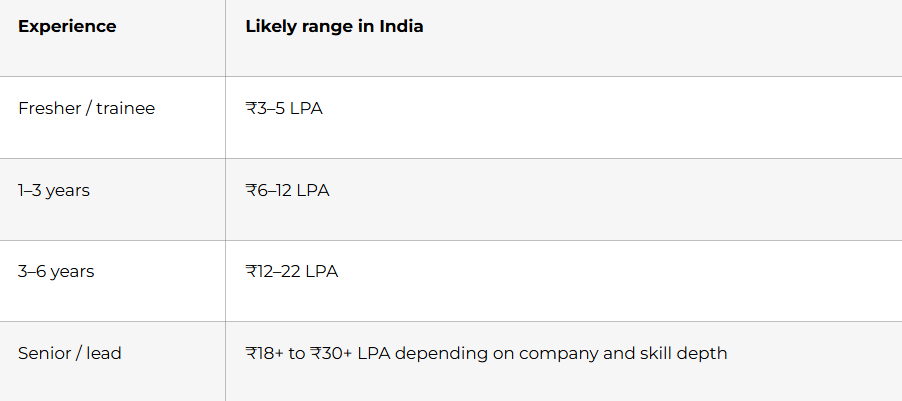
Salary discussion tips:
- Give a range, not one fixed number.
- Anchor using skill scope, city, and current compensation.
- Mention flexibility if the role has strong learning potential.
- Do not underprice yourself if you already have hands-on ABAP work.
- If you are a fresher, frame it as “market-aligned and role-dependent.”
Sample line:
“Based on my current skill level, role expectations, and market trends for SAP ABAP in India, I am looking for a fair opportunity in the range of X to Y LPA, though I’m open to discussing the complete role and growth path.”
Thank-you and follow-up emails
Thank-you email template
Subject: Thank you SAP ABAP interview
Hello [Interviewer Name],
Thank you for taking the time to speak with me today regarding the SAP ABAP role. I enjoyed our discussion, especially the conversation around [reports / enhancements / debugging / modern ABAP topics].
The role aligns well with my experience in [ABAP fundamentals / reports / enhancements / support / debugging], and I am excited about the opportunity to contribute to your team.
Thank you again for your time and consideration.
Best regards,
[Your Name]
[Phone Number]
[Email]
Follow-up email after 4–7 days
Subject: Follow-up on SAP ABAP interview
Hello [Interviewer Name],
I hope you are doing well. I am writing to follow up on the SAP ABAP interview process for the [Role Name] position. I remain very interested in the opportunity and wanted to check whether there are any updates regarding the next steps.
Thank you for your time. I appreciate your consideration.
Best regards,
[Your Name]
Recruiter follow-up after application
Subject: Application for SAP ABAP role
Hello [Recruiter Name],
I recently applied for the SAP ABAP position and wanted to express my interest directly. My background includes [reports / Data Dictionary / Open SQL / enhancements / debugging], and I believe my profile aligns well with the role requirements.
I would be glad to share any additional details if needed.
Best regards,
[Your Name]
Final 30-day checklist
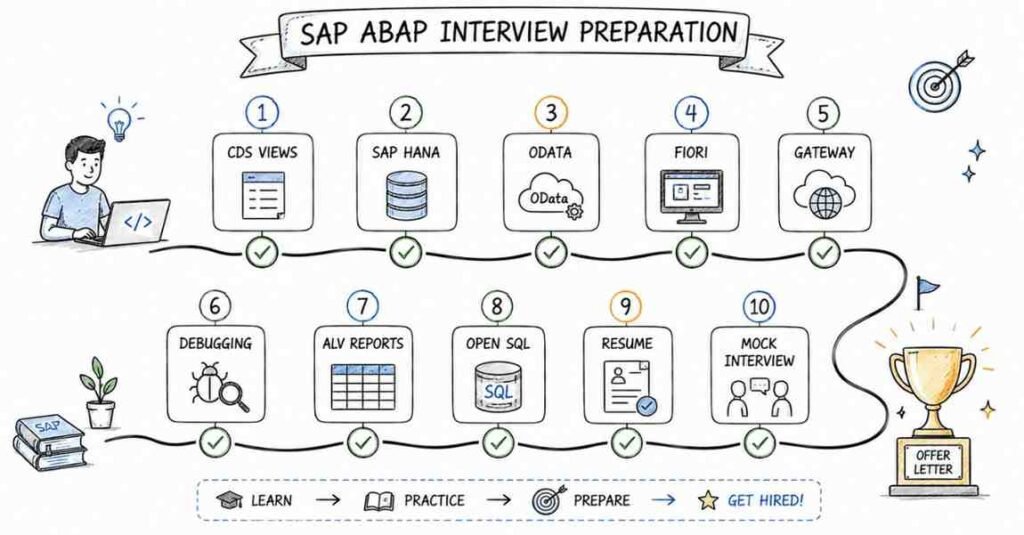
Use this as your last-month execution checklist before interviews.
Week 1
- Review SAP basics, ABAP basics, and Data Dictionary.
- Memorize top transactions: SE11, SE38, SE80, SE37, SMARTFORMS, ST22, ST05, SAT.
- Practice 40 beginner questions aloud.
- Update resume summary and core skills.
Week 2
- Revise internal tables, Open SQL, modularization, ALV, and forms.
- Practice explaining one report project and one enhancement project.
- Prepare 10 STAR stories from your work or training.
- Update LinkedIn headline, About section, and skills.
Week 3
- Revise OOPs ABAP, debugging, performance, BAPI, RFC, IDoc, and enhancements.
- Practice mock interviews with time limits.
- Prepare salary range and job-change answers.
- Draft thank-you and follow-up emails.
Week 4
- Revise CDS, OData, Fiori basics, and modern ABAP awareness.
- Practice full interview flow: self-introduction, technical round, HR round.
- Read your resume line by line and prepare proof for every claim.
- Apply to roles consistently and track responses.
Final 3 days
- Read only your notes, not new material.
- Practice concise answers, not long lectures.
- Sleep properly and keep documents ready.
- Prepare one strong opening introduction and one strong closing statement.