
SAP ABAP 90-Day Course Roadmap: Transform From Beginner to Industry-Ready Developer
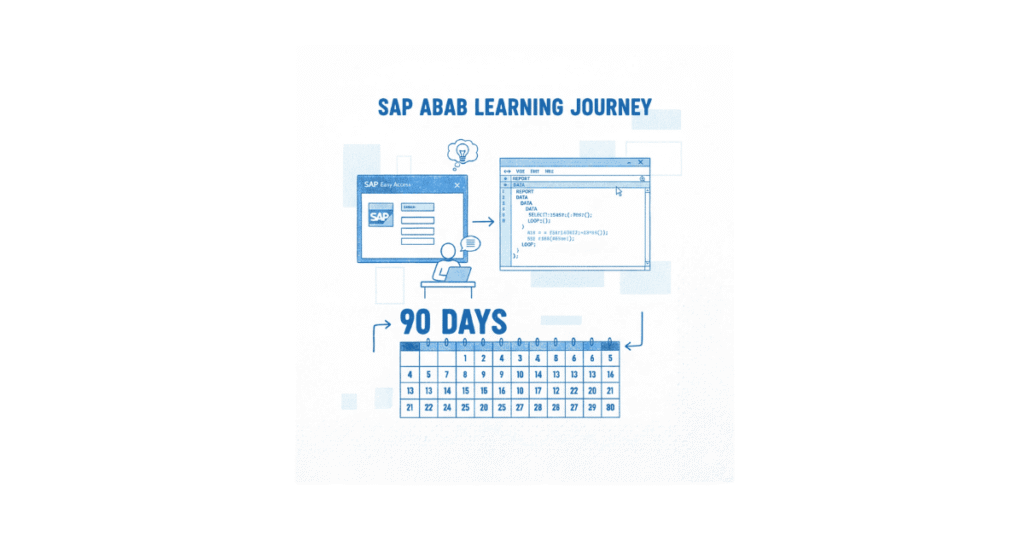
🎓 Start Your SAP ABAP Career the Right Way!
Master SAP ABAP with hands-on IDES access, real projects, and industry-aligned training. Begin your 90-day journey with our SAP ABAP Course.
Starting a career in SAP ABAP opens doors to some of the highest-paying tech roles in 2025, with entry-level developers earning ₹5-8 LPA and experienced professionals commanding ₹20+ LPA in India. This complete 90-day roadmap breaks down exactly what you’ll learn each day to become job-ready in SAP development.
SAP ABAP (Advanced Business Application Programming) powers enterprise resource planning systems used by Fortune 500 companies worldwide, making it one of the most stable and lucrative career choices in technology. Cities like Bangalore, Hyderabad, Pune, Mumbai, and Chennai are actively hiring ABAP developers with competitive salaries and growth opportunities.
Why This 90-Day Roadmap Works
Traditional SAP courses throw concepts at students without a clear progression plan, leaving many confused about what to learn when. This roadmap solves that problem by giving you a day-by-day blueprint that builds your skills systematically from absolute basics to advanced development techniques.
Every topic connects to real-world business scenarios you’ll encounter in actual SAP projects, not just theoretical knowledge that sits unused. The curriculum follows industry standards used by companies like Infosys, TCS, Accenture, Capgemini, Wipro, Cognizant, IBM, and KPMG—the exact organizations actively recruiting SAP ABAP professionals.
Course Structure Overview
The 90-day journey divides into three strategic phases designed to match how professionals actually learn programming. Foundation Phase (Days 1-30) establishes core ABAP syntax, data handling, and SAP system navigation. Development Phase (Days 31-60) advances to reports, forms, interfaces, and modularization techniques used in production environments. Mastery Phase (Days 61-90) covers advanced topics like enhancements, object-oriented programming, and real-world project scenarios.
Each week includes daily assignments, live Q&A sessions, and hands-on practice in SAP IDES systems to reinforce learning through actual coding. The training progresses from simple input/output programs to complex enterprise applications involving multiple modules and integrations.
💡Practice Every Topic with Real Examples
Take your learning beyond theory. Try hands-on tasks from each SAP ABAP phase using our
SAP ABAP How-to Guides.
Month 1: Building Your Foundation (Days 1-30)
Week 1: SAP Fundamentals & ABAP Introduction

Day 1: Understanding Enterprise Systems
The journey begins with understanding why enterprises need ERP systems and how SAP became the global leader in business software. You’ll learn the difference between functional modules (like Finance, Sales, Materials Management) and technical modules (where ABAP sits as the programming backbone).
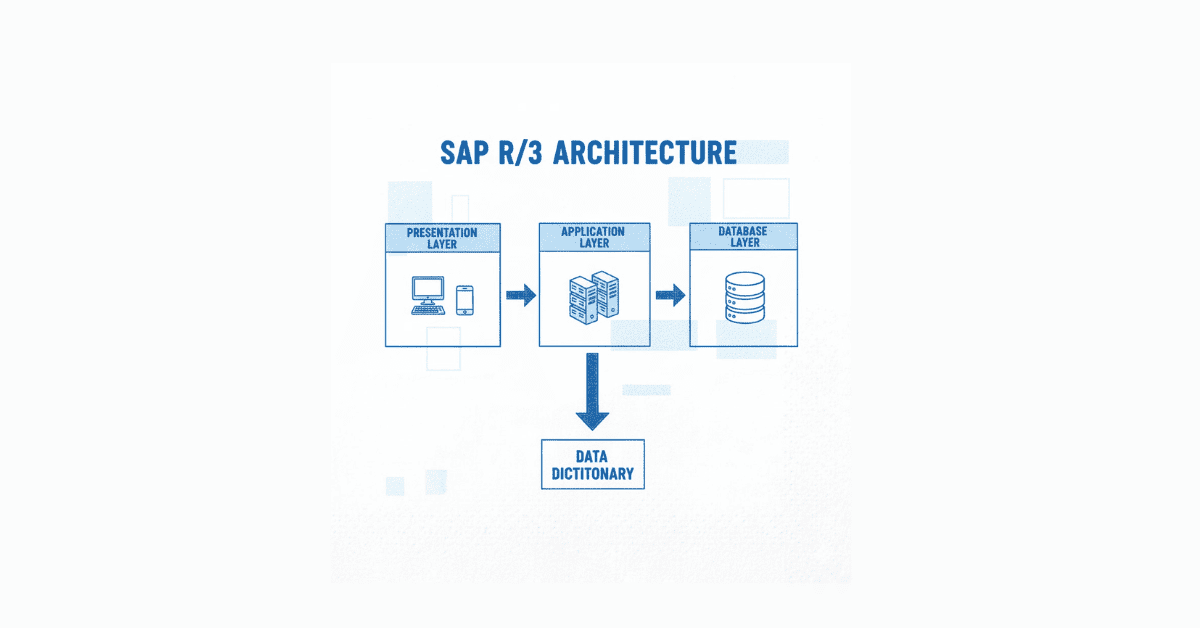
The three-tier SAP R/3 architecture—presentation layer, application layer, and database layer—forms the foundation for everything you’ll build later. Understanding this architecture helps you grasp where your ABAP programs run and how they interact with business data.
Day 2: Navigating SAP IDES Environment
Hands-on training starts immediately as you log into SAP’s practice environment called IDES (Internet Demonstration and Evaluation System). You’ll master the SAP Easy Access screen, which serves as your home base for all development activities.
Transaction codes (T-codes) are shortcuts that experienced developers use constantly, and you’ll learn the most important ones like SE38 for ABAP Editor, SE11 for Data Dictionary, and SE80 for Development Workbench. Creating your first development package establishes proper naming conventions following SAP standards that prevent conflicts in production systems.
Day 3: First ABAP Program
Writing your first lines of ABAP code brings concepts to life through the classic WRITE statement. You’ll create programs that display text on screen using various formatting options like colors, line breaks, and positioning.
Understanding SAP naming conventions prevents major headaches later when working on team projects with strict naming standards. The ABAP Development Workbench (SE80) becomes your primary workspace, and you’ll learn to navigate its menus, toolbars, and debugging features.
Day 4: Data Types & Variables
Programming requires storing information, which means learning ABAP’s elementary data types like CHAR (characters), NUMC (numeric characters), INT (integers), and DATE (dates). Each data type serves specific purposes in business applications—for example, using NUMC for customer numbers that shouldn’t have mathematical operations applied.
Complex data types combine multiple elementary types into structures that represent business entities like customer records or sales orders. The DATA statement declares variables that hold information throughout program execution.
Day 5: Input & Output Operations
Business programs need user input and formatted output, which you’ll practice through PARAMETERS statements that create input fields. Selection screens appear before program execution, allowing users to specify criteria like date ranges or company codes.
WRITE statements can format numbers with thousand separators, dates in various formats, and amounts with currency symbols—all essential for professional business reports. Understanding system fields like SY-DATUM (current date) and SY-UNAME (logged-in user) lets you create dynamic programs that adapt to context.
Days 6-7: Weekend Practice & Review
The first weekend consolidates learning through a mini-project: creating a simple calculator program that takes two numbers as input, performs calculations, and displays formatted results. This exercise combines all week’s concepts—data types, input parameters, processing logic, and formatted output.
Week 2: Control Structures & Looping
Day 8: Conditional Logic with IF Statements
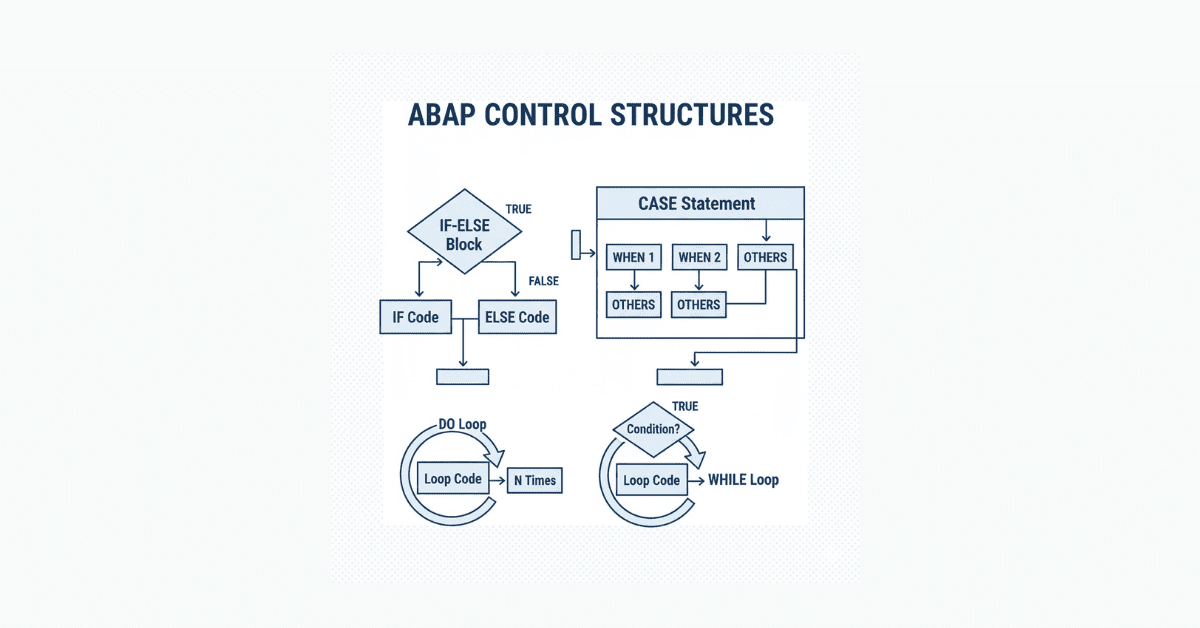
Real business logic requires decision-making, which IF…ENDIF statements provide through conditional branching. You’ll write programs that check conditions like “if amount exceeds credit limit, display warning message”.
Nested IF statements handle complex scenarios with multiple conditions, while ELSE and ELSEIF clauses provide alternative execution paths. Comparison operators (EQ, NE, GT, LT, GE, LE) and logical operators (AND, OR, NOT) combine to create sophisticated business rules.
Day 9: CASE Statements for Multiple Conditions
When checking a single variable against many possible values, CASE…ENDCASE statements provide cleaner code than multiple IF statements. Common uses include processing different transaction types, handling status codes, or routing logic based on user selections.
The WHEN OTHERS clause acts as a catch-all for unexpected values, preventing programs from crashing when encountering data not explicitly handled. You’ll practice converting complex IF-ELSE chains into more maintainable CASE statements.
Day 10: DO Loops for Repetition
Business processes often repeat actions a fixed number of times, which DO…ENDDO loops accomplish efficiently. The SY-INDEX system field tracks the current iteration, useful for numbering output lines or limiting loop executions.
Loop terminators like EXIT (stop immediately), CONTINUE (skip to next iteration), and CHECK (conditional continuation) provide precise control over loop behavior. Understanding when to use each terminator prevents infinite loops and improves program performance.
Day 11: WHILE Loops for Condition-Based Repetition
Unlike DO loops that run a set number of times, WHILE…ENDWHILE loops continue until a condition becomes false. This suits scenarios where you don’t know upfront how many iterations are needed, like processing records until reaching end-of-file.
Combining WHILE loops with counters prevents infinite loops when conditions might never become false due to logic errors. You’ll debug common WHILE loop mistakes that cause programs to hang or timeout.
Day 12: Introduction to System Fields
SAP provides hundreds of system fields (all starting with SY-) that contain runtime information about the current execution context. Critical fields include SY-SUBRC (return code indicating success/failure), SY-DATUM (current date), SY-UZEIT (current time), and SY-UNAME (username).
Checking SY-SUBRC after database operations tells you whether the operation succeeded, which every professional ABAP developer does religiously. System fields make programs dynamic and context-aware without hardcoding values.
Days 13-14: Weekend Project – Grade Calculator
The second weekend project builds a student grade calculator that takes exam scores as input, uses IF statements to assign letter grades, and employs loops to process multiple students. This real-world scenario combines conditional logic, looping, and formatted output into a cohesive application.
🧠 Prepare for SAP ABAP Interviews Early
Get access to 200+ technical questions, coding tasks, and real interview scenarios in our
SAP ABAP Interview Preparation Guide.
Week 3: ABAP Dictionary Fundamentals
Day 15: Introduction to ABAP Dictionary (SE11)
The ABAP Dictionary defines all data structures used in SAP systems, serving as the central metadata repository. Transaction SE11 becomes your second home as you create database tables, structures, data elements, and domains.
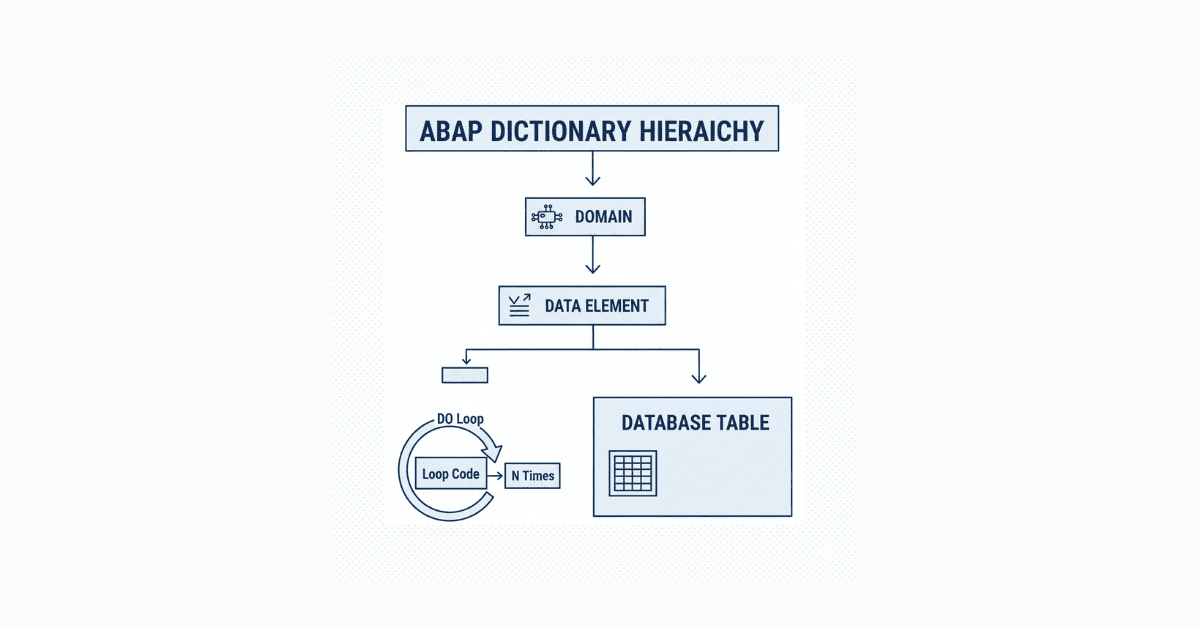
Understanding the relationship between domains (technical characteristics), data elements (semantic meanings), and table fields (actual data storage) forms the foundation of proper data modeling. This three-layer approach enables reusability and consistency across thousands of SAP programs.
Day 16: Creating Database Tables
Transparent tables are the most common table type, with a one-to-one relationship between the ABAP Dictionary definition and the physical database table. You’ll learn to define key fields (which uniquely identify records), data fields (which store business information), and technical settings like table category and delivery class.
Proper primary key design prevents duplicate records and improves query performance when retrieving data. Every table needs activation after creation, which generates the corresponding database table in the underlying database (usually SAP HANA or Oracle).
Day 17: Data Elements & Domains Deep Dive
Domains define the technical characteristics of a field—its data type, length, and valid value ranges. Data elements add business meaning by providing field labels, documentation, and search helps that appear in user interfaces.
The bottom-up approach creates domains first, then data elements, then tables, ensuring reusability across multiple objects. The top-down approach works in reverse, which beginners often find more intuitive but sacrifices some reusability benefits.
Day 18: Special Fields – Currency & Quantity
Business applications constantly deal with monetary amounts and quantities, which require special handling in SAP. Currency fields (CURR type) need a corresponding currency code field (CUKY type), while quantity fields (QUAN type) need a unit of measure field (UNIT type).
This pairing ensures that amounts always display with proper currency symbols and quantities show with correct units like kilograms, pieces, or liters. Foreign key relationships between these field pairs maintain data integrity automatically.
Day 19: Table Maintenance Generator
Rather than writing code to insert, update, or delete table records manually, the Table Maintenance Generator creates a simple user interface automatically. You’ll generate maintenance dialogs that allow functional users to maintain table data without technical knowledge.
Authorization groups control who can maintain specific tables, preventing unauthorized data changes in production systems. Custom programs can call table maintenance transactions programmatically when needed.
Days 20-21: Weekend Project – Custom Master Data Table
This weekend involves designing and creating a complete custom master data table for product information, including fields for product ID, description, price, currency, quantity, and unit. You’ll implement proper data elements, domains, foreign keys, and a maintenance interface.
The project simulates real scenarios where companies need custom tables beyond SAP’s standard ones, which happens frequently in implementation projects.
Week 4: Database Operations & Open SQL
Day 22: Understanding Foreign Key Relationships
Database tables rarely exist in isolation—they connect to each other through foreign keys that maintain data integrity. A foreign key in one table references the primary key of another table, creating parent-child relationships like Customer-to-Orders or Material-to-Stock.
The value table defines valid values for a field, while the check table enforces referential integrity during data entry. When you create a purchase order for material number “12345,” the system automatically checks whether that material exists in the material master table before allowing the entry.
Understanding cardinality (1:1, 1:N, N:M relationships) helps you design proper database schemas that prevent data redundancy. You’ll practice creating foreign key relationships in SE11 that mirror real business scenarios.
Day 23: Working with Transparent Tables (OPEN SQL)
Reading data from database tables happens through Open SQL statements that work consistently regardless of the underlying database. The SELECT statement retrieves records based on WHERE conditions, similar to standard SQL but with ABAP-specific syntax.
Single record retrieval uses SELECT SINGLE, which stops searching after finding the first matching record for better performance. The asterisk (*) retrieves all fields, but specifying only needed fields reduces data transfer and improves program speed.
Work areas act as containers holding one database record at a time during processing. The INTO clause specifies where retrieved data should be placed—either into a work area or directly into an internal table.
Day 24: Inserting & Modifying Database Records
Business applications constantly create and update data, requiring mastery of INSERT and MODIFY statements. INSERT adds new records to tables, while UPDATE changes existing records based on key fields.
The MODIFY statement combines INSERT and UPDATE functionality—if a record with the given key exists, it updates; otherwise, it inserts. Checking SY-SUBRC after these operations tells you whether the operation succeeded (0) or failed (non-zero).
DELETE removes records permanently, so production systems protect this operation through strict authorization controls. You’ll write programs that safely handle all CRUD operations (Create, Read, Update, Delete) with proper error checking.
Day 25: Introduction to Internal Tables
Internal tables are ABAP’s most powerful feature—temporary storage areas that hold multiple records in memory during program execution. Think of them as Excel spreadsheets that exist only while your program runs.
Three types serve different purposes: Standard tables allow duplicate entries and use linear search, Sorted tables maintain sort order automatically, and Hashed tables use key-based access for lightning-fast lookups. Choosing the right type dramatically affects program performance when processing thousands of records.
The header line concept (now deprecated but still seen in legacy code) combines the table definition and work area into one object. Modern ABAP separates these for better code clarity and maintainability.
Day 26: Creating & Populating Internal Tables
Declaring internal tables requires defining their structure using existing database tables, structures, or inline type definitions. The OCCURS 0 clause (legacy syntax) or TYPE STANDARD TABLE OF (modern syntax) creates the table definition.
APPEND adds records to the end of internal tables, while INSERT places them at specific positions. COLLECT aggregates numeric fields when adding records with duplicate keys, useful for summing quantities or amounts.
Populating internal tables from database tables uses SELECT…ENDSELECT loops or SELECT…INTO TABLE statements for bulk loading. Bulk operations are significantly faster than loop-based approaches when handling large datasets.
Days 27-28: Weekend Project – Order Management System
This weekend’s project builds a mini order management system that demonstrates complete database and internal table operations. You’ll create two custom tables (Customers and Orders with foreign key relationship), populate them with test data, and write programs that read, display, and modify records.
The project includes searching for customers by name, displaying all orders for a selected customer, calculating total order values, and updating order statuses. This hands-on exercise mimics real business scenarios you’ll encounter in SAP implementation projects.
💻 Want practical practice for SQL, Internal Tables & Projects? Explore our SAP ABAP How-To Tutorials with real business scenarios.

Week 5: Advanced Internal Tables & SQL Operations
Day 29: Processing Internal Tables
After populating internal tables, you need to process their contents using various statements. The READ statement finds specific records by index number or key fields without looping through the entire table.
LOOP…ENDLOOP iterates through all records, executing code for each entry. Inside loops, you can modify current records, delete them conditionally, or extract data for further processing.
Control break statements like AT FIRST, AT NEW, AT END OF, and AT LAST trigger special processing at group boundaries. These statements are perfect for creating subtotals, group headers, and summary lines in reports.
Day 30: Internal Table Operations
SORT arranges internal table contents by one or more fields in ascending or descending order. Sorting before certain operations dramatically improves performance and enables control break processing.
DELETE removes records from internal tables based on conditions or index positions. CLEAR empties a work area, REFRESH removes all internal table contents while keeping the structure, and FREE releases memory completely.
DESCRIBE returns information about internal tables like number of lines, memory usage, and current index position. Understanding memory management prevents performance issues when programs handle millions of records.
Month 2: Intermediate Mastery with AI (Days 31-60)
Day 31: Advanced SELECT Statements
Real business queries require more than simple SELECT statements. The WHERE clause filters records using comparison operators, logical operators (AND, OR, NOT), and pattern matching with LIKE.
Aggregate functions like SUM, AVG, COUNT, MIN, and MAX perform calculations directly on the database, reducing data transfer to the application server. GROUP BY combines these with grouping logic for powerful reporting capabilities.
ORDER BY sorts results at the database level before returning them to ABAP programs. Proper indexing on ORDER BY fields makes a massive difference in query performance.
Day 32: JOIN Operations
Business data spreads across multiple tables, requiring JOIN operations to combine related information. INNER JOINs return only records with matching entries in both tables—for example, showing only customers who have placed orders.
LEFT OUTER JOINs include all records from the left table plus matching records from the right table, showing customers even if they haven’t ordered yet. The syntax differs slightly from standard SQL but follows the same logical principles.
Understanding when to use JOINs versus FOR ALL ENTRIES affects program performance significantly. JOINs execute as single database operations, while FOR ALL ENTRIES splits into multiple queries with special handling.
Day 33: FOR ALL ENTRIES Technique
The FOR ALL ENTRIES addition allows you to select data based on values in an internal table rather than hardcoded WHERE conditions. This technique retrieves related records across tables without using JOINs.
Critical rules apply: always check that the internal table contains data before using FOR ALL ENTRIES, as an empty table returns all database records. Remove duplicates from the internal table using SORT followed by DELETE ADJACENT DUPLICATES to optimize query execution.
FOR ALL ENTRIES works best when the internal table contains fewer than 10,000 entries due to database limitations. Larger datasets require different approaches like splitting into chunks.
Days 34-35: Weekend Project – Sales Analysis Report
Build a comprehensive sales analysis report that pulls data from multiple tables using JOINs and FOR ALL ENTRIES. The report displays customer names, order details, product information, and sales totals with subtotals by customer and grand totals.
Implement user selection parameters for date ranges, customer numbers, and product categories. Apply performance optimization techniques like field-level SELECT, proper indexing awareness, and efficient internal table operations.

Week 6: Text Elements & Modularization
Day 36: Text Maintenance & Message Classes
Hardcoding text in programs creates maintenance nightmares when requirements change. Text elements externalize all program texts (field labels, column headers, list headers) into translatable resources.
Selection texts customize parameter and select-option labels on selection screens. Text symbols reference reusable text snippets using syntax like TEXT-001 instead of literal strings.
Message classes group related messages (information, success, warning, error, abend, exit) with multilingual support. Creating descriptive messages improves user experience and simplifies troubleshooting when programs encounter problems.
Day 37: Understanding Message Types
ABAP supports six message types that control program flow differently. Information (I) messages display popups requiring user acknowledgment before continuing, Success (S) messages show on status bars, and Warning (W) messages pause execution allowing users to proceed or cancel.
Error (E) messages stop processing and return users to the previous screen, critical in transaction processing. Abend (A) terminates programs immediately, while Exit (X) terminates with short dumps for debugging.
The MESSAGE statement references message class, message number, and up to four placeholder variables for dynamic text construction. Proper message handling makes programs user-friendly and professional.
Day 38: Macros & Include Programs
Modularization techniques prevent code duplication by packaging reusable logic. Macros define small code snippets with parameters, useful for repetitive operations within a single program.
Include programs split large programs into manageable chunks organized by functionality. Standard naming conventions use suffixes like _TOP (global declarations), _F01 (subroutines), _O01 (PBO modules), and _I01 (PAI modules).
While macros and includes solve specific problems, function modules and classes provide superior modularity for enterprise development. Understanding all options helps you work with legacy code and make proper architectural decisions.
Day 39: Introduction to Subroutines
Subroutines (FORM…ENDFORM) encapsulate reusable logic callable from anywhere in the program. Parameters pass data into subroutines (USING) and return results (CHANGING), supporting both pass-by-value and pass-by-reference semantics.
Local variables declared inside subroutines exist only during execution, preventing variable name conflicts. External subroutines stored in separate programs can be called using PERFORM…IN PROGRAM, enabling code sharing across applications.
Although subroutines remain common in existing code, modern development favors function modules and methods for better encapsulation and testability. Learning subroutines ensures you can maintain legacy systems while building new skills.
Day 40: Function Modules (SE37)
Function modules are the cornerstone of SAP modularization, providing centralized, tested logic callable from any ABAP program. Transaction SE37 manages function module creation, testing, and documentation.
Function groups organize related function modules, sharing global data and includes. Each function module defines importing parameters (inputs), exporting parameters (outputs), changing parameters (both), and tables parameters (internal tables).
Exception handling through EXCEPTIONS allows calling programs to handle error conditions gracefully. Testing function modules directly in SE37 without writing caller programs speeds up development cycles significantly.
Day 41: Creating Custom Function Modules
Building your first custom function module involves creating a function group, then adding function modules within it. You’ll define the interface (parameters), implement the logic (source code), and document the functionality (short text and long text).
Passing internal tables between programs and function modules requires TABLE parameters with proper type definitions. Remote-enabled function modules support RFC (Remote Function Call) for system-to-system integration.
SAP delivers thousands of standard function modules for common operations like file upload/download, date conversions, and data validations. Learning to find and reuse these prevents reinventing the wheel.
Days 42: Weekend Project – Reusable Validation Library
Create a function group containing validation function modules that check common business rules. Include functions for email validation, phone number formatting, tax ID verification, date range validation, and numeric range checking.
Build a test program that calls each validation function with both valid and invalid inputs, demonstrating proper exception handling. This project teaches modularization principles you’ll use daily in real SAP development.
Week 7: Classical & Interactive Reports
Day 43: Introduction to SAP Reporting
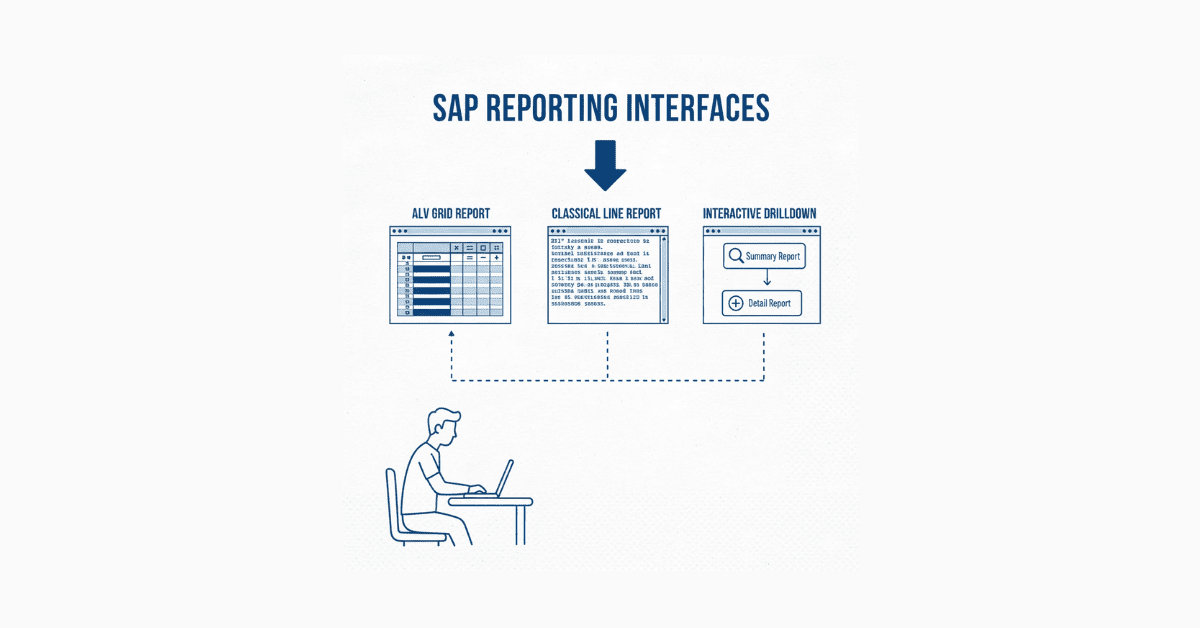
Reports are the lifeblood of SAP systems, presenting business data in user-friendly formats that support decision-making. Three main report types serve different purposes: Classical reports provide static output lists, Interactive reports allow users to drill down into details, and ALV (ABAP List Viewer) reports deliver modern, grid-based displays with built-in features.
Every business user depends on reports for daily operations—sales managers need revenue summaries, warehouse staff require inventory lists, and executives demand financial overviews. Understanding report development makes you immediately valuable in any SAP project.
The three report types differ in complexity and user experience. Classical reports suit simple listing requirements, interactive reports handle scenarios needing hierarchical data exploration, and ALV reports provide professional presentations with sorting, filtering, and export capabilities.
Day 44: Selection Screens & Parameters
Before executing reports, users need to specify what data they want to see through selection screens. PARAMETERS create single input fields for values like company code or fiscal year, while SELECT-OPTIONS provide range selections with operators like “equals,” “between,” “less than,” and “greater than”.
Selection screen design significantly impacts user experience—poorly organized screens frustrate users and lead to incorrect report outputs. Grouping related parameters using SELECTION-SCREEN BEGIN OF BLOCK improves clarity and usability.
Default values pre-populate parameters with sensible choices, reducing user effort for common scenarios. Obligatory parameters force users to provide critical inputs that reports cannot run without, like date ranges or organizational units.
Day 45: Events in Classical Reports
ABAP programs execute in a specific sequence controlled by event keywords. INITIALIZATION runs once when the program loads, perfect for setting default parameter values or performing one-time setup.
AT SELECTION-SCREEN triggers when users execute the report, allowing validation of input parameters before expensive database operations. START-OF-SELECTION contains the main processing logic where database queries and calculations occur.
END-OF-SELECTION handles final processing and output generation after all data retrieval completes. TOP-OF-PAGE creates report headers that appear at the top of each page in printouts.
Understanding event flow prevents common mistakes like trying to access selection screen values before they exist or writing output statements in wrong event blocks. Professional reports leverage all events appropriately for clean, maintainable code.
Day 46: Building Classical Reports
Your first complete report pulls data from database tables based on user selections, processes it, and displays formatted output. The pattern follows: declare data structures, retrieve records using SELECT statements, loop through results, and output using WRITE statements.
Column alignment using WRITE…AT and formatting options like NO-ZERO (hide zero values) or CURRENCY (format monetary amounts) make reports professional and readable. Subtotals, grand totals, and counts provide summary information users expect.
Performance optimization starts with classical reports—selecting only needed fields, using proper WHERE clauses, and minimizing database roundtrips separate competent developers from amateurs. Every extra millisecond multiplies across thousands of report executions daily.
Day 47: Creating Variants & Transactions
Users hate re-entering the same selection screen values daily, which variants solve by saving parameter sets with meaningful names. Creating variants in transaction SE38 allows users to load predefined selections with one click.
Report transactions (created in SE93) give reports their own transaction codes, making them accessible through the SAP Easy Access menu. Professional systems organize reports into logical menu folders matching user roles and responsibilities.
Authorization objects control who can execute which reports with which parameters, preventing unauthorized access to sensitive data. Proper variant and transaction management turns ad-hoc programs into integrated parts of the SAP landscape.
Day 48: Introduction to Interactive Reports
Classical reports show everything at once, overwhelming users with details they don’t need initially. Interactive reports solve this by displaying summary information first, then allowing drill-down into details through double-clicks or menu selections.
AT LINE-SELECTION event triggers when users interact with report output, capturing which line they selected. HIDE statements store key values invisibly behind output lines, enabling retrieval when users drill down.
The SY-LSIND system field tracks drill-down level—0 for initial list, 1 for first detail screen, 2 for second level, and so on. This allows conditional logic that behaves differently at each navigation level.
Day 49: Building Interactive Reports
Creating interactive reports involves designing the information hierarchy—what users see first, what details appear on drill-down, and how many levels deep navigation goes. Common patterns include customer list → customer orders → order items or material groups → materials → stock locations.
ABAP Memory (EXPORT/IMPORT TO MEMORY) and SAP Memory (SET/GET PARAMETER) pass data between drill-down levels without visible transmission. Choosing the right memory type depends on whether values should persist across sessions or only within current report execution.
Interactive reports dramatically improve user productivity by showing relevant information on demand rather than overwhelming users with everything upfront. Mastering this technique makes your reports stand out from typical developers’ work.
Days 50-51: Weekend Project – Customer Analysis Report
Build a three-level interactive report starting with customer list showing name, location, and total orders. Double-clicking a customer displays their order history with dates, amounts, and statuses. Clicking an order shows line items with product details, quantities, and prices.
Implement proper selection screens with customer range, date range, and order status filters. Add subtotals at each level showing aggregate information like total customers, total orders, and total revenue.
This project combines everything learned so far—database operations, internal tables, modularization, formatting, and user interaction—into a comprehensive business application.
Week 8: ALV Reports & Debugging
Day 52: Introduction to ALV Reports
ALV (ABAP List Viewer) revolutionized SAP reporting by providing grid-based displays with features users expect from modern applications. Built-in functionality includes column sorting, filtering, summation, Excel export, print preview, and layout saving.
Three ALV display methods suit different scenarios: simple list ALV for basic grids, hierarchical sequential ALV for parent-child relationships, and ALV grid control for maximum flexibility with OOP. Most business reports use simple list ALV due to its ease of implementation and sufficient capabilities.
Function modules like REUSE_ALV_GRID_DISPLAY handle all complexity, requiring only data in internal tables and field catalog definitions. Users immediately recognize ALV’s professional appearance, associating it with standard SAP quality.
Day 53: Field Catalog & Layout
Field catalogs define how internal table fields map to ALV columns, specifying column names, widths, data types, and formatting rules. Manual creation involves populating a field catalog internal table with one entry per column, tedious but offering complete control.
Automatic field catalog generation using LVC_FIELDCATALOG_MERGE function module extracts definitions from Data Dictionary objects, saving development time. Hybrid approaches start with automatic generation then customize specific columns for special formatting or calculations.
Layout structures control overall ALV appearance including column positioning, color schemes, zebra striping (alternating row colors), and optimization settings. Understanding these options transforms basic grids into polished, user-friendly interfaces.
Day 54: Creating Simple ALV Reports
Your first ALV report follows this pattern: declare internal table for data, populate it from database, build field catalog, set layout options, and call REUSE_ALV_GRID_DISPLAY. The function module handles all user interactions automatically.
Additional features like header text, top-of-page custom content, and status bar messages enhance reports beyond basic grids. Users can save personal layouts, which the system remembers for future executions.
Event handling in ALV enables advanced features like custom buttons, hotspot fields (clickable columns), and user commands. Starting simple and adding sophistication gradually prevents overwhelm while building practical skills.
Day 55: Interactive ALV Reports
ALV supports interactivity through hotspot clicks, double-clicks, and custom toolbar buttons. Hotspot fields become clickable links that trigger processing when selected, useful for navigating to related transactions or detail screens.
The USER_COMMAND event captures button clicks and menu selections, executing custom code based on user actions. Common uses include opening related transactions, refreshing data, or changing display modes.
Combining ALV’s built-in power with custom interactivity creates reports that rival commercial BI tools in functionality and appearance. Business users often request ALV enhancements over classical reports specifically for these capabilities.
Day 56: Customizing ALV Reports
Advanced ALV customization includes conditional formatting (coloring rows or cells based on values), icons in columns, and editable grids for data maintenance. Color codes (C311 for red, C510 for green, etc.) highlight critical information like overdue orders or low stock levels.
Column-specific features like output length, technical field hiding, and column positioning create clean, focused displays. Subtotaling and aggregation functions perform calculations automatically when users apply filters or sort columns.
Professional ALV reports balance functionality with simplicity—too many features confuse users while too few leave them wanting. User feedback during development ensures reports meet actual business needs.
Day 57: SAP Transport Organizer
Development changes must move from development systems through quality assurance to production systems safely. The Transport Organizer (SE09/SE10) manages this lifecycle through transport requests containing all related objects.
Creating customizing requests captures configuration changes while workbench requests package development objects. Every object modification automatically prompts for transport request assignment, preventing untracked changes.
Releasing requests makes them transportable to subsequent systems where basis administrators import them after testing and approval. Understanding transport management prevents catastrophic mistakes like overwriting production code accidentally or losing development work.
Days 58-59: ABAP Troubleshooting & Debugging
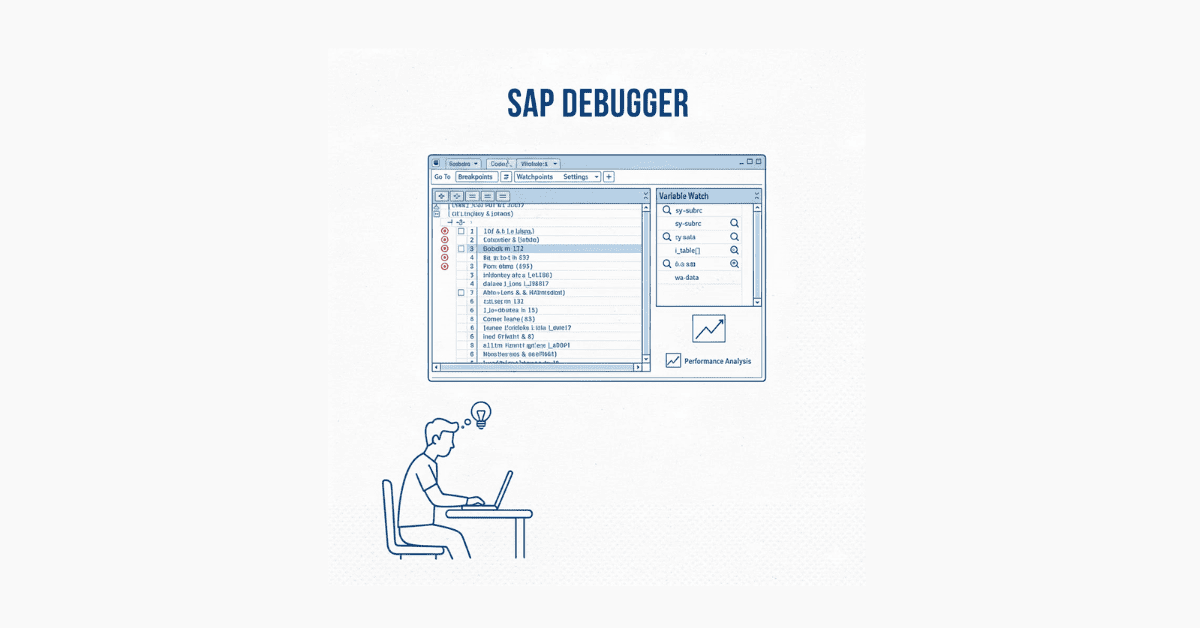
Debugging reveals program execution step-by-step, showing variable values and logic flow. Setting breakpoints pauses execution at specific lines, allowing inspection of current state.
The debugging toolbar controls execution: F5 (single step), F6 (execute line), F7 (return from subroutine), and F8 (continue). Watchpoints monitor when variables change values, critical for tracking down unexpected behavior.
Runtime analysis (transaction SAT) identifies performance bottlenecks by measuring time spent in each program section. SQL trace (ST05) shows database operations, revealing slow queries needing optimization.
Extended program checks (SLIN) catch potential errors like unused variables, missing authority checks, and performance issues before code reaches production. Professional developers run these tools routinely, not just when problems occur.
Weekend Project: Advanced Sales Report with ALV
Create a comprehensive sales analysis ALV report with multiple features. Include hotspot customer names that navigate to customer details, conditional formatting highlighting high-value orders in green and overdue orders in red, and subtotaling by sales region.
Add custom toolbar buttons for exporting to Excel (using ALV’s built-in feature), refreshing data without re-running the entire report, and sending the report via email. Implement user layout saving so each user can customize their view.
This capstone ALV project demonstrates skills employers specifically seek—advanced reporting, user experience focus, and technical depth.
Day 60: Introduction to Dialog Programming
While reports display information, dialog programs (also called module pool programs) allow users to create, modify, and delete data through interactive screens. Every transaction you use in SAP (like VA01 for creating sales orders) is a dialog program.
Dialog programs consist of screens (designed in Screen Painter SE51), flow logic (PBO and PAI events), and ABAP code (module pools). This architecture separates presentation from business logic, enabling maintainability and reusability.
Common business scenarios requiring dialog programs include data entry applications, approval workflows, and configuration tools. Understanding dialog programming opens opportunities for custom transaction development.
🚀 Build Real SAP ABAP Reports & Projects
Get step-by-step training in ALV, Classical Reports, Smartforms & BDC with our
SAP ABAP Developer Course.
Month 3: Advanced Mastery and Career Preparation (Days 61-90)

Week 9: Dialog Programming & Screen Development
Day 61: Screen Painter Basics
Screen Painter (SE51) provides visual design tools for creating user interfaces. The layout editor positions fields, buttons, checkboxes, radio buttons, and other controls.
Each screen element links to an ABAP Dictionary field or program variable, automatically inheriting properties like length, data type, and validation rules. Proper naming conventions (using meaningful prefixes like OK_ for function codes) improve code readability.
Screen attributes control behavior like screen type (normal, subscreen, modal dialog), screen number, and next screen sequencing. Understanding these attributes prevents navigation issues in multi-screen applications.
Day 62: Flow Logic – PBO & PAI
Screen flow logic orchestrates when code executes relative to screen display. PBO (Process Before Output) runs before showing the screen, initializing field values and preparing data.
PAI (Process After Input) executes when users interact with the screen, validating inputs and processing user actions. Field validation, database updates, and navigation logic typically occur in PAI.
MODULE statements in flow logic call ABAP code modules defined in the module pool program. FIELD statements validate specific input fields with automatic error handling.
Day 63: Building Your First Dialog Program
Creating a simple data entry screen demonstrates the dialog programming workflow. Design the screen layout with input fields, create corresponding module pool modules for PBO and PAI processing, and implement business logic for saving data to database tables.
Function codes attached to buttons trigger specific processing in PAI modules. Checking SY-UCOMM identifies which button users pressed, enabling conditional logic execution.
Error handling displays messages and positions cursors on problem fields, guiding users to corrections. Professional dialog programs anticipate user mistakes and provide helpful guidance rather than cryptic errors.
Day 64: Table Controls
Table controls display multiple records in grid format within dialog screens, similar to Excel embedded in SAP. Users can scroll through records, edit cells, and add or delete rows.
Creating table controls requires linking an internal table to screen elements, implementing scrolling logic, and handling cell-level validations. Wizard tools in Screen Painter simplify initial setup, though understanding underlying mechanics helps troubleshooting.
Common uses include line item entry for orders, budget allocation across departments, and batch data maintenance. Table controls bridge the gap between full-screen editors and single-record forms.
Day 65: Tab Strip Controls & Menu Painter
Tab strips organize large forms into manageable sections without overwhelming users with cluttered screens. Each tab activates different subscreens containing related fields.
Menu Painter (SE41) designs application menus and toolbars appearing in dialog programs. Adding custom menu items, function keys, and toolbar buttons creates application-specific interfaces matching user workflows.
GUI status defines which standard toolbar buttons are visible and which function keys are active. Setting appropriate statuses for different screens provides context-sensitive functionality.
Day 66: Creating Report Transactions
Report transactions wrap executable programs with transaction codes, making them accessible through the SAP menu. Transaction SE93 creates three transaction types: dialog transactions (for screens), report transactions (for reports), and parameter transactions (shortcuts with predefined values).
Assigning transactions to IMG (Implementation Guide) nodes or custom menu folders organizes access by role. Authorization objects protect transactions from unauthorized execution.
Professional naming conventions use prefixes identifying development teams or application areas, preventing conflicts in large organizations. Transaction documentation explains purpose and parameters, essential for user training and support.
Days 67-68: Weekend Project – Employee Master Data Maintenance
Build a complete dialog program for maintaining employee records with multiple screens. Create screens for personal data, address information, and qualification history using tab strips for organization.
Implement table control for maintaining multiple qualification records per employee. Add validation for mandatory fields, date consistency checks, and duplicate prevention.
Include custom menu items for searching employees, creating new records, and deleting with confirmation prompts. This comprehensive project demonstrates production-ready dialog programming skills.
Day 69: Review & Catch-Up Day
Use this day to review challenging topics from previous weeks, complete unfinished assignments, and clarify doubts through live Q&A sessions. Revisit debugging techniques, ALV customizations, and dialog programming concepts that need reinforcement.
Week 10: File Handling & Data Migration
Day 70: String Operations & Text Processing
Real-world SAP projects constantly manipulate text data—extracting substrings, concatenating values, replacing characters, and formatting outputs. String functions like CONCATENATE, SPLIT, REPLACE, SHIFT, and TRANSLATE handle these operations efficiently.
Modern ABAP offers enhanced string processing using inline expressions and the pipe operator (|), making code more readable than legacy approaches . Understanding both old and new syntax prepares you for maintaining existing programs while writing modern code .
Common business scenarios include parsing file names, extracting data from fixed-width formats, cleaning user inputs, and formatting addresses for printing. Pattern matching with regular expressions handles complex validation and extraction requirements.
Day 71: Presentation Server File Handling
Uploading Excel files from user desktops into SAP and downloading SAP data to local files are among the most frequent business requirements. Function modules like GUI_UPLOAD and GUI_DOWNLOAD handle presentation server (user’s computer) file operations with various format options.
Tab-delimited files work well for Excel integration, while comma-separated values (CSV) suit most data exchange scenarios. Binary file handling enables processing of non-text formats like images or PDFs.
Error handling catches issues like missing files, access denied errors, and format mismatches before they cause data corruption. Professional upload programs validate data thoroughly before database updates, preventing bad data entry.
Day 72: Application Server File Handling
While presentation server files sit on user computers, application server files reside on SAP system servers. OPEN DATASET, READ DATASET, TRANSFER, and CLOSE DATASET statements manage these server-side files.
Application server processing suits scheduled batch jobs that run without user interaction, like nightly data feeds from external systems. File authorization controls prevent unauthorized access to sensitive server directories.
Transactions CG3Y (download from server to PC) and CG3Z (upload from PC to server) help developers move files between layers during testing. Understanding both file locations and their use cases ensures you choose the right approach for each scenario.
Day 73: Introduction to BDC (Batch Data Communication)
Legacy system migrations, data corrections, and bulk uploads require loading thousands of records into SAP without manual transaction entry. BDC automates data entry by simulating user actions—filling screen fields and clicking buttons programmatically.
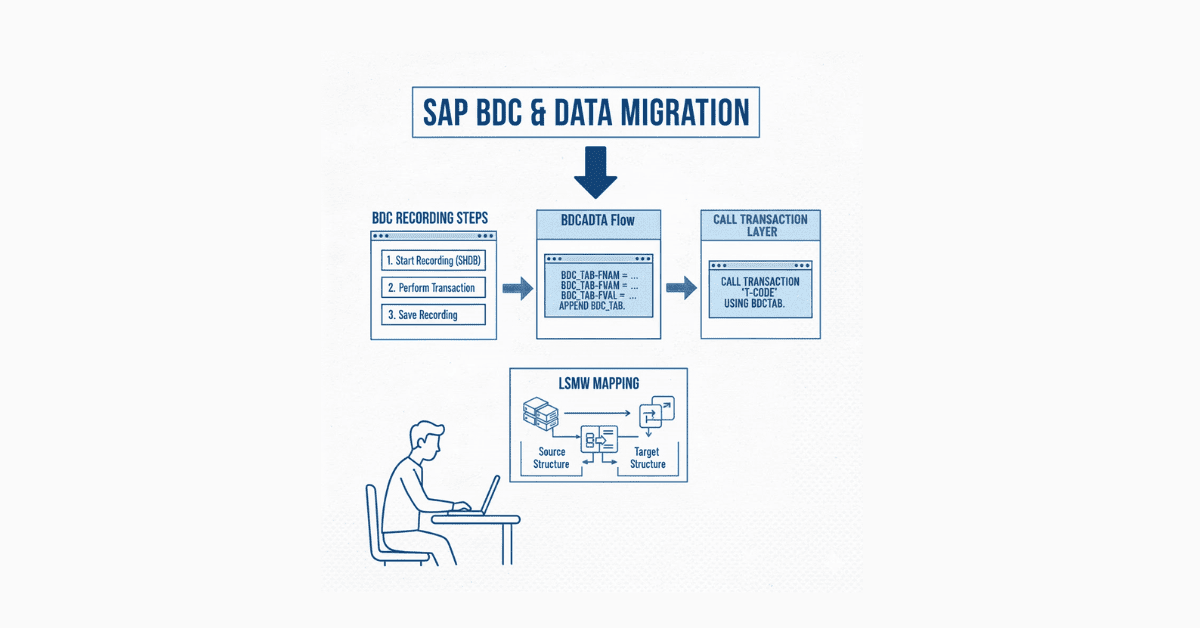
Two BDC methods serve different purposes: CALL TRANSACTION executes immediately with faster processing, while SESSION method creates reusable sessions for later execution with better error handling. Choosing the right method depends on data volume, error frequency, and processing requirements.
Transaction SHDB (Batch Input Recorder) records user actions in standard transactions, generating template code developers customize for bulk processing. This recording approach eliminates guessing screen field names and flow logic.
Day 74: Creating BDC Using CALL TRANSACTION
CALL TRANSACTION method processes records immediately, providing real-time feedback on successes and failures. Building the BDCDATA internal table with screen names, field names, and values recreates user interactions programmatically.
Error handling through return messages captures processing results for each record, enabling detailed logging and retry mechanisms. Display modes (A for foreground, E for error display, N for background) control whether users see transaction screens during processing.
Common use cases include creating customer masters, posting financial documents, and updating material data in bulk. Performance optimization through background processing significantly speeds large data loads.
Day 75: Creating BDC Using SESSIONS Method
SESSION method creates batch input sessions visible in transaction SM35, allowing scheduled execution by administrators. This approach suits scenarios where data requires review before processing or when handling extremely large volumes.
Function modules BDC_OPEN_GROUP, BDC_INSERT, and BDC_CLOSE_GROUP manage session creation. Sessions appear in SM35 where users process them in foreground, background, or error-only display modes.
Error sessions automatically create when processing encounters problems, containing only failed records for correction and reprocessing. This built-in error handling simplifies data migration projects significantly.
Day 76: LSMW (Legacy System Migration Workbench)
LSMW provides a wizard-driven approach to data migration without extensive coding. The tool guides users through defining source files, mapping fields, and generating upload programs automatically.
Recording methods in LSMW mirror BDC approaches but add graphical interfaces for business users with limited technical skills. Direct input methods (for specific objects like materials and customers) offer faster processing than screen simulation.
LSMW projects save all configuration for reuse, valuable during iterative data loads in implementation projects. Documentation within LSMW itself simplifies knowledge transfer between team members.
Days 77-78: Weekend Project – Employee Data Migration
Build a complete data migration solution that reads employee data from Excel files, validates each field, and uploads to SAP using BDC. Implement both CALL TRANSACTION and SESSION methods for comparison.
Create comprehensive error logs showing which records failed, why they failed, and recommended corrections. Include data validation rules checking for duplicate employee IDs, invalid dates, and missing mandatory fields.
Add restart capability so failed loads can resume from the last successful record rather than starting over. This real-world project teaches skills essential for implementation and support roles.
🛣️ Explore Complete SAP Career Paths
Plan your long-term SAP growth with our detailed SAP Career Path— covering skills, projects, and job-focused learning paths

Week 11: Smartforms & Output Management
Day 79: Introduction to Smartforms
Business documents like invoices, purchase orders, delivery notes, and payslips require professional formatting with company logos, signatures, and structured layouts. Smartforms replaced SAP Scripts as the modern form development tool, offering graphical design and improved performance.
Transaction SMARTFORMS (SF) accesses the form designer where developers create reusable output templates. Driver programs call form function modules, passing data that populates form fields.
Smartforms separate presentation (form layout) from logic (data preparation), enabling functional users to modify layouts without developer involvement. This separation accelerates changes during user acceptance testing.
Day 80: Smartform Architecture
Every Smartform consists of global settings, pages, windows, and elements arranged hierarchically. Pages define paper size, orientation, and margins while windows create content areas on pages.
The Main Window allows data expansion across multiple pages, perfect for line item tables that vary in length. Secondary windows position fixed content like headers, footers, logos, and signatures.
Global definitions declare variables, internal tables, and field symbols accessible throughout the form. Form interface parameters define data passed from driver programs to forms.
Day 81: Creating Basic Smartforms
Building your first Smartform involves defining page formats, creating windows, and adding text elements with data fields. The graphical editor uses drag-and-drop for positioning elements.
Text elements support formatting like bold, italic, font sizes, and colors through inline styling. Field symbols (like &COMPANY_NAME&) insert dynamic data that changes with each form execution.
Activation generates a function module with a name like /1BCDWB/SF00000XXX, which driver programs call to render forms. Testing forms directly in transaction SMARTFORMS with sample data speeds development.
Day 82: Tables & Logic in Smartforms
Business forms frequently contain tables showing line items, expense details, or invoice positions. Table elements in Smartforms iterate through internal tables, creating rows automatically.
Conditional logic using IF/ELSE nodes controls element visibility based on data values—showing different text for approved versus rejected documents. Calculation nodes perform arithmetic like summing amounts or computing percentages.
Program lines execute ABAP code within forms for complex data manipulation not achievable through graphical elements. Balancing graphical design with embedded code maintains form maintainability.
Day 83: Styles & Templates
Styles define reusable formatting specifications—fonts, sizes, colors, and paragraph settings—applied consistently across multiple Smartforms. Creating company standard styles ensures brand consistency in all output documents.
Character formats customize specific text portions within paragraphs, like highlighting amounts or emphasizing dates. Paragraph formats control spacing, indentation, and alignment.
Templates provide starting points for new forms with pre-configured pages, windows, and company branding elements. Organizations maintain template libraries for different document types (invoices, orders, reports) that developers copy and customize.
Day 84: Driver Programs for Smartforms
Forms require driver programs that prepare data, call form function modules, and handle output destinations. Driver programs follow patterns: retrieve business data, populate form interface parameters, call form function module, and process results.
Function module SSF_FUNCTION_MODULE_NAME converts Smartform names to generated function module names for calling. Output control parameters specify destination (printer, PDF, email, fax), copies, and print options.
Error handling captures form generation failures, printer issues, and data problems. Professional driver programs log executions for audit trails and troubleshooting.
Days 85-86: Weekend Project – Sales Order Form
Design a complete sales order confirmation Smartform with company letterhead, customer address block, order line items table with descriptions and prices, terms and conditions section, and signature block.
Include conditional logic that displays special terms for international orders versus domestic orders. Add calculations for line totals, subtotals, taxes, and grand totals with proper currency formatting.
Build the driver program that selects order data, prepares internal tables for form consumption, and outputs to PDF for email attachment. This comprehensive project demonstrates skills highly valued in support and enhancement projects.
Week 12: Enhancements, OOABAP & Real-World Projects
Day 87: Enhancement Framework Overview
SAP delivers standard functionality that rarely meets every customer’s unique requirements exactly. Rather than modifying standard code (which upgrades overwrite), enhancements insert custom logic into predefined extension points.
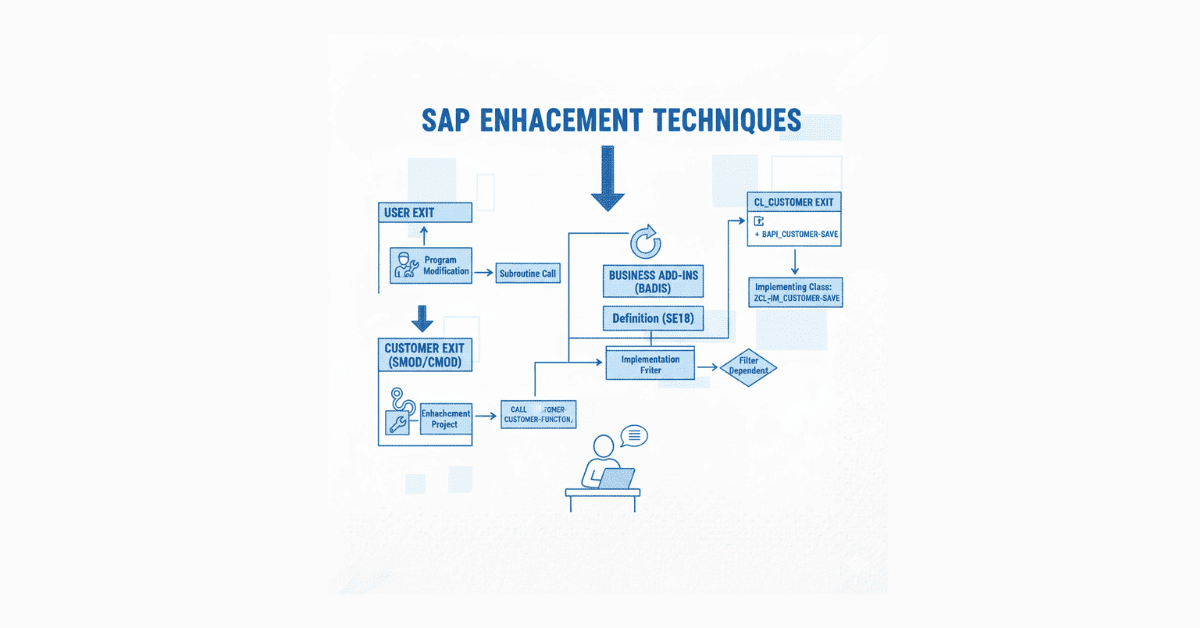
Four enhancement types handle different scenarios: User Exits (older technology with INCLUDE programs), Customer Exits (function module exits), Business Add-Ins (BADIs) (object-oriented enhancement points), and Enhancement Framework (implicit and explicit enhancement spots).
Understanding when to use each enhancement type and how to find available enhancement points separates developers who customize SAP from those who merely configure it. Enhancement experience dramatically increases job opportunities and salary potential.
Day 88: User Exits & Customer Exits
User exits are empty INCLUDE programs within SAP standard code where developers add custom logic. Finding user exits requires examining standard program source code for INCLUDE statements pointing to ZX* or similar naming patterns.
Customer exits provide predefined function modules called at specific points in standard transactions. Transaction SMOD lists available customer exits while CMOD manages their implementations.
Common use cases include additional field validations, data defaulting beyond standard configuration, and triggering external interfaces when standard transactions execute. Documentation describes exactly what data is available at each exit point and what modifications are permitted.
Day 89: Business Add-Ins (BADIs)
BADIs represent SAP’s modern enhancement technology using object-oriented programming principles. Each BADI defines an interface with methods that implementations override with custom logic.
Transaction SE18 manages BADI definitions while SE19 creates implementations. Multiple implementations can exist for single BADIs, with filter values determining which implementations execute in which contexts.
Finding BADIs involves searching SAP documentation, examining standard transaction code, or using tools like BADI_EXIT_FINDER. Enhancement spots in new SAP code provide BADI insertion points throughout the system.
Day 90: Introduction to Object-Oriented ABAP
Modern SAP development increasingly uses object-oriented ABAP (OOABAP) for better code organization, reusability, and maintainability. Classes encapsulate data (attributes) and behavior (methods) into reusable components.
Creating classes in SE24 involves defining attributes, methods, interfaces, and events. Public, protected, and private visibility controls regulate access to class components, enabling encapsulation.
Inheritance allows specialized classes to extend base classes, inheriting and overriding functionality. Interfaces define contracts that implementing classes must fulfill, enabling polymorphism.
While classical ABAP remains common in existing systems, new development projects increasingly mandate OOABAP proficiency. Understanding both paradigms maximizes career options across old and new SAP landscapes.
Days 91-93: Additional Advanced Topics
Workflow & Business Objects: Understanding how SAP routes work items to user inboxes based on organizational roles and approval hierarchies. Transaction SWO1 manages business objects that represent business entities in workflow processes.
ALE & IDOC: Application Link Enabling (ALE) and Intermediate Documents (IDOC) facilitate system-to-system integration for scenarios like sending customer master data from SAP to external CRM systems. Understanding IDOC structure, partner profiles, and message processing enables integration development.
BAPI & RFC: Business Application Programming Interfaces (BAPIs) provide standard methods for creating and modifying business objects programmatically. Remote Function Calls (RFC) enable communication between SAP systems or between SAP and external applications.
New ABAP Syntax (7.5 NetWeaver): Modern ABAP introduces inline declarations, constructor operators, string templates, and new Open SQL syntax that dramatically reduce code verbosity. Learning these enhancements prepares you for S/4HANA environments.
4. Career Preparation Components
LinkedIn Profile Optimization for SAP ABAP Developers
Your LinkedIn profile serves as your digital resume, often viewed by recruiters before they even read your actual CV. Optimizing it for SAP ABAP keywords ensures you appear in recruiter searches for positions at companies like Infosys, TCS, Accenture, and Wipro.
Headline Formula: Instead of generic “SAP ABAP Developer,” use keyword-rich headlines like “SAP ABAP Developer | Smartforms | ALV Reports | BDC | Enhancement Framework | S/4HANA Ready” . This immediately signals your technical depth to viewers .
About Section Strategy: Open with a compelling hook stating your SAP specialty and years of relevant training or experience. Include specific technical skills in paragraph form (not just skills section) like “Proficient in developing Classical Reports, Interactive Reports, and ALV Reports with custom layouts and interactive features”.
Experience Section Optimization: Even for freshers or career changers, list projects completed during training as “experience”. Describe each project with bullet points highlighting technologies used, problems solved, and outcomes achieved. For example: “Developed end-to-end BDC program uploading 5,000+ customer records using CALL TRANSACTION method with comprehensive error handling and logging mechanism”.
Skills Endorsements: Add all relevant technical skills: ABAP/4, ABAP Dictionary (SE11), Smartforms, SAP Scripts, ALV Reports, BDC, LSMW, Dialog Programming, Function Modules, BADIs, User Exits, Enhancement Framework, OOABAP, RFC, BAPI, IDOC, Debugging, Performance Tuning. Ask classmates and instructors to endorse your skills immediately after course completion.
Certifications & Training: List the Frontlines Edutech SAP ABAP certification prominently in your education and licenses/certifications sections. SAP certifications carry significant weight with employers.
Recommendations Strategy: Request recommendations from trainers, project mentors, or peers highlighting specific technical contributions and learning abilities. Quality recommendations from credible sources significantly boost profile credibility.
Activity & Engagement: Regularly share SAP-related content, comment on industry posts, and publish short articles about your learning journey. Active profiles appear higher in search results and demonstrate genuine industry interest.
> Want the complete LinkedIn profile optimization checklist with sample headlines, summaries, and posting calendars? Download our exclusive SAP ABAP LinkedIn Success Guide available to all Frontlines Edutech students.
Job Platforms for SAP ABAP Professionals
Naukri.com remains India’s dominant job portal for SAP positions, with thousands of ABAP developer listings daily. Create detailed profiles with complete skill lists, upload your resume in PDF format optimized for ATS (Applicant Tracking Systems), and set job alerts for “SAP ABAP” in your preferred locations.
LinkedIn Jobs has emerged as the premier platform for corporate hiring, especially for companies like Accenture, Capgemini, and Cognizant. Use advanced search filters for “SAP ABAP Developer,” “ABAP Consultant,” and “SAP Technical Consultant” across Bangalore, Hyderabad, Pune, Mumbai, and Chennai.
Indeed India aggregates postings from company websites and other job boards, often showing opportunities not visible elsewhere. Setting up email alerts ensures you’re among the first applicants, improving response rates significantly.
Company Career Pages: Directly checking careers sections of SAP hiring companies (TCS Careers, Infosys Portal, Wipro Careers, Cognizant Jobs) reveals positions before they hit job boards. Bookmark and check these weekly for new openings.
Consultancy Placement Partners: Frontlines Edutech connects students with placement partners actively hiring for client projects. These consultancies value training institute relationships and often fast-track candidates with proper credentials.
Freelancing Platforms: For building initial experience, platforms like Upwork, Freelancer, and Toptal list SAP ABAP projects paying ₹500-2000/hour for qualified developers. Completing 2-3 freelance projects strengthens resumes before applying to permanent positions.
Interview Preparation Strategy
Technical Question Categories: SAP ABAP interviews assess knowledge across seven key areas:
Category 1 – Fundamentals: Data types, internal tables, system fields, ABAP Dictionary concepts, database tables versus structures. Expect questions like “Explain the difference between APPEND and INCLUDE structures” or “What is the purpose of SY-SUBRC?”.
Category 2 – Database Operations: SELECT statement variations, JOIN types, FOR ALL ENTRIES, INSERT/UPDATE/MODIFY differences, database optimization techniques. Common questions: “How do you optimize a SELECT statement?” or “Explain the difference between SELECT SINGLE and SELECT UP TO 1 ROWS”.
Category 3 – Reporting: Classical versus interactive versus ALV reports, field catalogs, event handling, report variants. Be prepared to explain: “How do you create an interactive ALV report?” or “What are the events in classical reports?”.
Category 4 – Modularization: Function modules, subroutines, includes, macros, parameter passing mechanisms. Typical questions: “What’s the difference between USING and CHANGING parameters?” or “When would you use a function module versus a subroutine?”.
Category 5 – Forms: Smartforms architecture, driver programs, table elements, styles versus templates. Expect: “How do you pass data to Smartforms?” or “Explain the difference between Main Window and Secondary Windows”.
Category 6 – Enhancements: User exits, customer exits, BADIs, enhancement spots, modification versus enhancement philosophy. Questions include: “How do you find available BADIs in a transaction?” or “Explain the difference between modification and enhancement”.
Category 7 – Advanced Topics: BDC methods comparison, LSMW usage, OOABAP basics, RFC/BAPI integration, performance tuning. Common asks: “Explain CALL TRANSACTION versus SESSION method in BDC” or “What is the difference between BAPI and RFC?”.
Behavioral Interview Components: Beyond technical skills, interviewers assess cultural fit and soft skills. Prepare STAR (Situation-Task-Action-Result) stories demonstrating:
- Problem-solving: “Describe a time you debugged a complex ABAP issue”
- Learning agility: “How did you master a new SAP topic quickly?”
- Collaboration: “Give an example of working in a team on a technical project”
- Client interaction: “How would you explain a technical concept to a non-technical stakeholder?”
Practical Coding Assessments: Many companies include live coding exercises or take-home assignments. Practice writing common programs without IDE assistance: simple internal table operations, SELECT statements with different WHERE clauses, basic ALV report skeleton code, and function module creation steps.
Interview Readiness Checklist:
- Resume with specific project details, technologies used, and outcomes
- Portfolio showcasing 3-5 best projects with code samples (GitHub or similar)
- List of 50+ prepared technical questions with answers
- 5-7 STAR stories covering different competency areas
- Questions to ask interviewers about role, team, technologies, and growth opportunities
5. Why Enroll inFrontlines Edutech SAP ABAP Course
Industry-Standard Curriculum Aligned with 2025 Hiring Needs
The 90-day roadmap you’ve just explored isn’t theoretical—it’s battle-tested across hundreds of successful placements in companies actively hiring SAP ABAP developers. Every topic connects directly to skills listed in current job descriptions from Infosys, TCS, Accenture, Capgemini, Wipro, Cognizant, IBM, and KPMG.
Frontlines Edutech updates curriculum quarterly based on actual project requirements shared by corporate partners. You’re learning what companies need today, not outdated concepts from textbooks written years ago.
Real SAP System Access (IDES Environment)
Unlike courses offering only theory or video demonstrations, every student receives personal login credentials to SAP IDES practice systems. You’ll execute actual transactions, write real ABAP code, create database tables, develop reports, and build forms exactly as you would in corporate environments.
This hands-on practice builds muscle memory and confidence that video watching never achieves. Employers specifically ask during interviews: “Have you worked in actual SAP systems?” Your answer will be an confident “Yes”.
Expert Trainers from Top SAP Companies
Course instructors bring 8-15 years of real-world SAP implementation and support experience from companies like Accenture, TCS, and Capgemini. They’ve faced actual project deadlines, debugged production issues at 2 AM, and navigated complex business requirements.
This practical wisdom shows up in every session—they don’t just teach syntax, they explain why certain approaches work better in production environments, how to troubleshoot common errors quickly, and what mistakes to avoid that cost projects time and money.
Comprehensive Career Support Beyond Technical Training
Resume Building: Professional resume writers familiar with SAP hiring practices transform your profile into ATS-friendly documents that pass automated screenings and impress human reviewers. They highlight projects using industry terminology recruiters actually search for.
LinkedIn Optimization: Social media specialists optimize your entire LinkedIn presence—headline, summary, experience descriptions, skills, recommendations, and activity strategy. Students report 3-5x increases in recruiter messages after profile optimization.
Interview Preparation: Mock interviews with real SAP professionals simulate actual hiring scenarios, providing feedback on technical answers, communication style, and behavioral responses. Most students complete 3-5 mock interviews before facing real companies.
Placement Assistance: Dedicated placement teams maintain relationships with 100+ hiring companies, often knowing about openings before public announcements. They match your skill profile with suitable opportunities and facilitate direct introductions to hiring managers.
Flexible Learning Options
Live Online Classes: Attend scheduled sessions with real-time instructor interaction, ask questions immediately, and participate in group discussions. Live classes create accountability and learning momentum.
Recorded Sessions: Every live class is recorded and available within 24 hours for review. Re-watch complex topics, catch up if you miss a session, or reinforce learning before exams.
Self-Paced Practice: Access the SAP IDES system 24/7 for practice beyond class hours. Downloadable resources including code templates, cheat sheets, and project specifications enable independent learning.
Course Completion Certificate with Industry Recognition
The Frontlines Edutech certificate demonstrates completion of rigorous, industry-aligned training that employers recognize and value. Unlike generic online course certificates, this certification carries weight because companies know the quality of training and hands-on requirements.
Add the certificate to LinkedIn, include it in your resume, and mention it during interviews. It signals you’ve gone beyond self-study to complete structured, verified training.
Affordable Investment with High Returns
SAP ABAP developers earn ₹5-8 LPA as freshers, ₹8-15 LPA with 2-3 years experience, and ₹15-25+ LPA as senior developers. The course fee represents less than one month’s salary at entry level, making it one of the highest ROI training investments available.
Flexible payment options including installments make quality SAP training accessible regardless of current financial situation. Consider it an investment in your earning potential, not an expense.
Join Thousands of Successful Alumni
Since inception, Frontlines Edutech has placed thousands of students in SAP roles across Bangalore, Hyderabad, Pune, Mumbai, Chennai, Noida, and other major tech hubs. Alumni work at every major IT services company and many product organizations.
The growing alumni network provides mentorship, referrals, and industry insights to current students. Many alumni return as guest speakers, sharing their career journeys and offering practical advice.
Take the Next Step in Your SAP Career
You’ve seen the complete 90-day roadmap from SAP ABAP beginner to job-ready developer. You understand the topics, the progression, and the career support Frontlines Edutech provides.
The question isn’t whether SAP ABAP offers good career prospects—with average salaries of ₹22 lakhs and consistent demand across all major cities, the opportunity is clear. The real question is: Are you ready to commit 90 days to transforming your career?
Thousands of students have followed this exact roadmap to successful SAP careers. Companies are hiring right now. Your next step determines whether you’re watching others succeed or building your own success story.
Contact Frontlines Edutech today at +91-83330 77727 or email media.frontlines@gmail.com to start your SAP ABAP journey. Limited seats available for the next batch starting soon.
Visit www.frontlinesedutech.com for complete course details, batch schedules, and enrollment information. Your SAP ABAP career begins with one decision—enroll today.
Frontlines Edutech Private Limited – Building Trust & Careers. Success-focused training refining talent and turning learners into highly skilled professionals sought after by top companies.
🎯 Your SAP ABAP Career Starts Today!
Choose your path: Learn, Practice, or Prepare for Interviews — we’ve got everything covered.