
What Is DevOps: Meaning Lifecycle Tools and Beginner Guide
Table of Contents
Recommended Learning Path
What id DevOps ?
Understanding What is DevOps for beginners
Introduction
Have you ever used an app that received a new feature overnight without needing a long shutdown? Behind many reliable software updates is a coordinated process for writing code, testing changes, releasing applications, and monitoring results. DevOps helps teams connect those activities.
For students exploring technology careers, understanding what is DevOps is more useful than immediately memorizing tool names. This guide explains the DevOps meaning, its principles, lifecycle, automation tools, cloud connection, and everyday responsibilities. You will also see a realistic project example and a practical starting path, even if you are new to IT.
Quick Answer: What Is DevOps?
DevOps is a collaborative approach to software development and IT operations that combines people, processes, and technology to deliver and maintain applications more reliably. The name combines development (Dev) and operations (Ops).
Instead of treating coding, testing, deployment, and maintenance as disconnected jobs, DevOps encourages teams to share responsibility, automate repeatable tasks, and improve using feedback. Practices such as continuous integration and continuous delivery (CI/CD), Infrastructure as Code, and monitoring help turn those principles into working systems.
What Does DevOps Mean in Simple Words?
Imagine developers finish an application, then email its files to a separate operations team. The application works on a developer’s laptop but fails on the production server because a configuration is missing. Both teams spend hours finding the difference.
With a DevOps methodology, developers and operations staff agree on deployment requirements early. They store changes in version control, run automated tests, and define repeatable environments. When a release fails, they use logs and shared ownership to investigate it.
DevOps is therefore not a programming language, one software tool, or a cloud provider. It is a way of working supported by technical practices. Organizations may implement it differently depending on their products, regulations, and team size.
Want to become a DevOps Engineer?
Explore our step-by-step How To Become Guide –>
How Is DevOps Different From Traditional Development?
Traditional handoffs are not always wrong, but separate teams can struggle when they discover deployment or reliability problems late. DevOps aims to reduce those gaps through collaboration and earlier feedback.
Aspect | Siloed development approach | DevOps-oriented approach |
Responsibility | Development and operations have separate handoffs | Teams coordinate and share service outcomes |
Testing | Often concentrated near release | Automated checks run throughout development |
Deployment | Many steps may be manual | Repeatable pipelines handle suitable steps |
Feedback | Production issues return slowly to developers | Logs, incidents, and user feedback inform improvements |
Infrastructure | Configured manually in some environments | Frequently defined and reviewed as code |
Neither approach guarantees success. DevOps requires good communication, realistic testing, and sensible release controls—not simply faster deployments.
What Are the Core Principles of DevOps?
Collaboration and shared ownership: Developers, testers, security specialists, and operations teams communicate about the same service. They understand how code changes affect users after release.
Automation: Repetitive builds, tests, environment setup, and deployment steps can run through scripts and pipelines. People still review risky changes and investigate unexpected behavior.
Continuous improvement: Teams use test outcomes, incidents, customer reports, and performance data to improve their processes rather than repeating the same mistakes.
Small, manageable changes: Smaller updates are often easier to review, test, and troubleshoot than a large collection of unrelated modifications.
Security and reliability: Permissions, dependency checks, recovery plans, and monitoring belong throughout delivery, not only at the end. Incorporating security into the workflow is often called DevSecOps.
How Does the DevOps Lifecycle Work?
The DevOps lifecycle is commonly described as a repeating flow, not a one-time sequence. Teams may organize its stages differently, but these activities are widely recognizable:
Stage | What happens | Beginner example |
Plan | Define features and tasks | Write requirements for a login page |
Code | Develop and review changes | Push a Git branch and open a pull request |
Build | Package a runnable version | Compile a Java application with Maven |
Test | Check quality and behavior | Run unit and API tests |
Release/Deploy | Deliver an approved build | Deploy the application to a server |
Operate/Monitor | Keep it healthy and collect feedback | Inspect logs, alerts, and error reports |
After monitoring, findings return to planning. For example, repeated login failures might lead to a bug fix, additional tests, or clearer error messages. That feedback loop is what makes the lifecycle continuous.
Start your journey with our beginner-to-advanced DevOps Roadmap –>
What Is CI/CD in DevOps?
Continuous Integration (CI) means frequently merging code changes into a shared repository and automatically validating them through builds and tests. It helps reveal integration problems before they become harder to diagnose.
Continuous Delivery (CD) keeps tested changes ready for release. A team can retain an approval step before production. Continuous Deployment is different: changes that pass the configured checks go to production automatically, without a separate manual release decision.
Consider a student project stored on GitHub. A push triggers GitHub Actions or Jenkins, which downloads dependencies, compiles the project, and runs tests. If they pass, the pipeline creates a deployable package. A reviewer may then approve release to a test or production environment.
CI/CD does not mean skipping review or testing. Good pipelines make those checks repeatable and visible. See the AWS explanation of continuous delivery for the distinction between delivery and deployment.
Which Tools Are Used in DevOps?
There is no single compulsory toolkit. Each category addresses a different part of software delivery:
Purpose | Common tools | What beginners should understand |
Version control | Git, GitHub, GitLab | Track changes and collaborate |
CI/CD pipelines | Jenkins, GitHub Actions, Azure Pipelines | Automate build, test, and release stages |
Containers | Docker | Package applications and dependencies |
Container orchestration | Kubernetes | Manage container workloads across machines |
Infrastructure as Code | Terraform, CloudFormation, Bicep | Define repeatable cloud resources |
Configuration management | Ansible | Apply configuration to supported systems |
Monitoring | Prometheus, Grafana, CloudWatch, Azure Monitor | Understand application health and alerts |
Learn what problem a tool solves before learning its commands. For example, Docker packages a workload; Kubernetes manages containerized workloads. You do not need Kubernetes to run your first container.
How Do AWS and Azure Fit Into DevOps?
AWS and Microsoft Azure are cloud platforms, not definitions of DevOps. They provide servers, networking, storage, managed services, and automation features that DevOps teams can use.
AWS offers services such as CodePipeline, CodeBuild, Amazon EKS, and CloudWatch. Azure offers infrastructure services and works with Azure Pipelines, Azure Kubernetes Service, and Azure Monitor. Azure DevOps is a separate Microsoft product suite; using Azure does not require adopting every Azure DevOps tool.
The goal of learning AWS and Azure DevOps is to understand transferable practices while recognizing provider-specific permissions, networking, and deployment options. Start with one platform and expand when you can explain a complete release workflow.
Get interview-ready with our DevOps Interview Preparation Guide –>
Practical Example: A College Event Registration App
Suppose students in Hyderabad build a website for a college technical event. The site lets visitors register, while an administrator can view registrations. The team wants to update it safely when the event schedule changes.
Without a repeatable process: One person edits code, another copies files to the server, and a missed configuration causes the registration form to stop working. The team is unsure which version was deployed.
With a basic DevOps workflow:
- The team plans a schedule-update task and assigns responsibility.
- A developer creates a Git branch, makes the change, and requests review.
- A CI pipeline builds the application and runs automated tests.
- The approved application is packaged, potentially as a Docker image.
- A deployment pipeline releases it to an AWS or Azure environment.
- The team checks logs, validates registrations, and rolls back or fixes issues if necessary.
This example is illustrative, not a real FLM deployment. The lesson is that DevOps connects coding decisions with how the application behaves for actual users. A beginner’s portfolio can demonstrate this with a small project instead of a complicated enterprise system.
What Are the Benefits of DevOps?
When implemented thoughtfully, DevOps can help teams deliver smaller updates more consistently, catch problems through automated checks, and spend less effort repeating manual deployment steps. Shared visibility makes it easier to identify who should respond to an incident and what changed before it occurred.
Infrastructure automation can also make test environments easier to reproduce. Monitoring provides evidence about whether releases perform as intended. These are potential DevOps benefits, not automatic guarantees: unreliable tests, weak access controls, or poor communication can still cause serious problems.
The wider aim is better service reliability and learning, not deployment speed at any cost. Google’s DORA DevOps research documentation discusses capabilities linked to software delivery and organizational performance.
What Does a DevOps Engineer Do?
A DevOps engineer often helps teams create and maintain build pipelines, automate infrastructure setup, support cloud deployments, configure monitoring, and investigate production issues. Exact DevOps engineer roles and responsibilities depend on the organization; some teams use titles such as platform engineer, cloud engineer, or site reliability engineer for overlapping work.
A typical day might include repairing a failing pipeline, reviewing an infrastructure change, improving an alert, or helping a developer understand a deployment error. The role requires teamwork and troubleshooting, not just familiarity with cloud dashboards.
Useful foundations include Linux commands, networking, Git, scripting, basic application architecture, and reading logs. You can develop these skills gradually; advanced coding expertise is not a prerequisite for understanding the basics.
FLM Expert Perspective: Learn DevOps Through One Release
For beginners, FLM recommends a practical Explain–Automate–Observe framework:
- Explain: Describe how your application moves from source code to a running service.
- Automate: Replace one error-prone manual step with a repeatable test, build, or deployment workflow.
- Observe: Check logs and results to confirm whether the change actually works.
Repeat this cycle before adding another tool. For instance, demonstrate a working GitHub Actions pipeline for a simple website before attempting a large Kubernetes cluster. This is a recommended learning framework, not a formal industry standard or a claim about FLM’s internal production practices.
Beginner DevOps Learning Roadmap
Step 1 — Understand development basics. Learn how an application runs, what a server does, and why HTTP, DNS, and networking matter.
Step 2 — Practice Linux and Git. Create files, manage permissions, commit code, create branches, and resolve a simple merge conflict.
Step 3 — Build a small CI pipeline. Use a beginner DevOps tutorial to automate tests for a simple Java, Python, or web application.
Step 4 — Learn containers. Build and run a Docker image, expose a port, and inspect application logs.
Step 5 — Explore a cloud platform. Deploy a small project to AWS or Azure with secure access and budget alerts.
Step 6 — Add automation and monitoring. Practice an Infrastructure as Code tool, configure an alert, and document a failed deployment and its fix.
Step 7 — Prepare a portfolio. Share architecture notes, pipeline configuration, a clear README, and troubleshooting lessons. A certificate can complement practice, but it cannot replace the ability to explain your project.
Common DevOps Mistakes Beginners Should Avoid
- Starting with too many tools: Master a simple workflow before adding complex services.
- Thinking DevOps equals cloud: Collaboration and delivery practices also apply outside public clouds.
- Treating CI/CD as deployment only: Testing, review, traceability, and feedback are essential.
- Ignoring security or costs: Protect secrets, restrict permissions, and clean up cloud resources.
- Copying tutorials without understanding errors: Record why a command failed and how you fixed it.
- Expecting instant job readiness: Build demonstrable skills and evaluate roles against actual employer requirements.
Frequently Asked Questions
1. What is DevOps in simple language?
DevOps is a way for software development and operations teams to work together. It uses collaboration, automation, testing, and feedback to improve how applications are delivered and maintained.
2. Is DevOps a tool or a programming language?
Neither. DevOps describes a culture and set of practices. Tools such as Git, Jenkins, Docker, and Terraform support those practices.
3. What is the main purpose of DevOps?
Its purpose is to help teams deliver useful software changes reliably and respond effectively when applications need improvement or troubleshooting.
4. What is the DevOps lifecycle?
It is a continuous sequence of planning, coding, building, testing, delivering, operating, and monitoring applications. Operational feedback informs the next improvement.
5. What is CI/CD in DevOps?
CI automatically builds and tests frequent code changes. Continuous delivery prepares tested changes for release, while continuous deployment can release passing changes automatically.
6. Does DevOps require AWS or Azure?
No. DevOps practices can be used with on-premises servers, private clouds, and other environments. AWS and Azure provide useful infrastructure and automation services.
7. Can non-IT students learn DevOps?
Yes. Start with basic computer concepts, networking, Linux, Git, and simple scripting. Progress gradually to pipelines, containers, and cloud deployments.
8. Is coding necessary to become a DevOps engineer?
Basic scripting and the ability to read code are valuable. You do not need to be an expert application developer before beginning a DevOps guide for beginners.
9. What should I learn first in DevOps?
Start with Linux, Git, and an understanding of how applications run. Next, automate a build and test before learning advanced cloud and container platforms.
Conclusion
Understanding what is DevOps begins with one idea: development and operations should work together to create, release, and maintain reliable software. Automation, CI/CD, infrastructure management, security, and monitoring support that collaboration, but no individual tool defines DevOps.
Beginners should focus on the complete journey of a small application—from a Git change to deployment and feedback. Once that process is clear, AWS, Azure, Docker, Kubernetes, and other technologies become easier to evaluate. The most useful outcome is not a memorized list of tools, but the ability to explain and improve a working software delivery process.
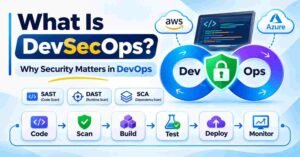
Security in DevOps and CI/CD Guide
What Is DevSecOps and Why Is Security Integrated into DevOps? Table of Contents Recommended Learning Path What Is DevSecOps Explain about the and Why Is
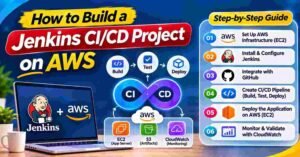
Jenkins AWS Project
How to Build a Jenkins CI/CD Project on AWS Table of Contents Recommended Learning Path Jenkins AWS Project Build a CI/CD Pipeline Step by Step
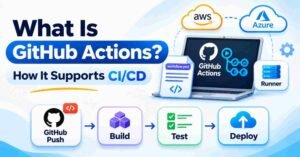
What Is GitHub Actions
What Is GitHub Actions and How Does It Support CI/CD? Table of Contents Recommended Learning Path GitHub Actions CI CD GitHub actions Explained Live Classes

Docker Kubernetes Project: Beginner DevOps Guide
How to Build a Docker and Kubernetes DevOps Project Table of Contents Recommended Learning Path Docker Kubernetes Project Beginner DevOps Guide Live Classes Real Projects

AWS CodePipeline vs Azure Pipelines
AWS CodePipeline vs Azure Pipelines: What Is the Difference? Recommended Learning Path AWS CodePipeline vs Azure Pipelines Understand the difference between the AWS and Azure
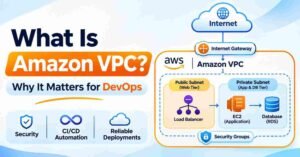
What Is Amazon VPC in DevOps
What Is Amazon VPC and Why Is It Important for DevOps? Table of Contents Recommended Learning Path Amazon VPC DevOps AWS Networking Guide for Beginners