DevOps Interview Preparation Guide

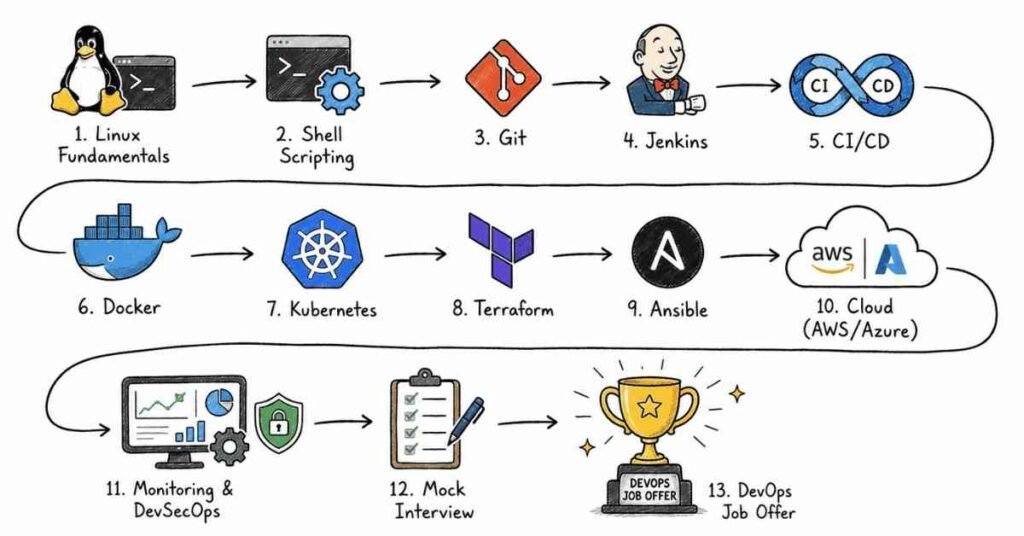
1. 357+ Technical Interview Questions & Answers

  1. Linux & Operating Systems (25 questions)
  2. Version Control – Git (30 questions)
  3. GitHub & Bitbucket (10 questions)
  4. Build Tools – Maven (15 questions)
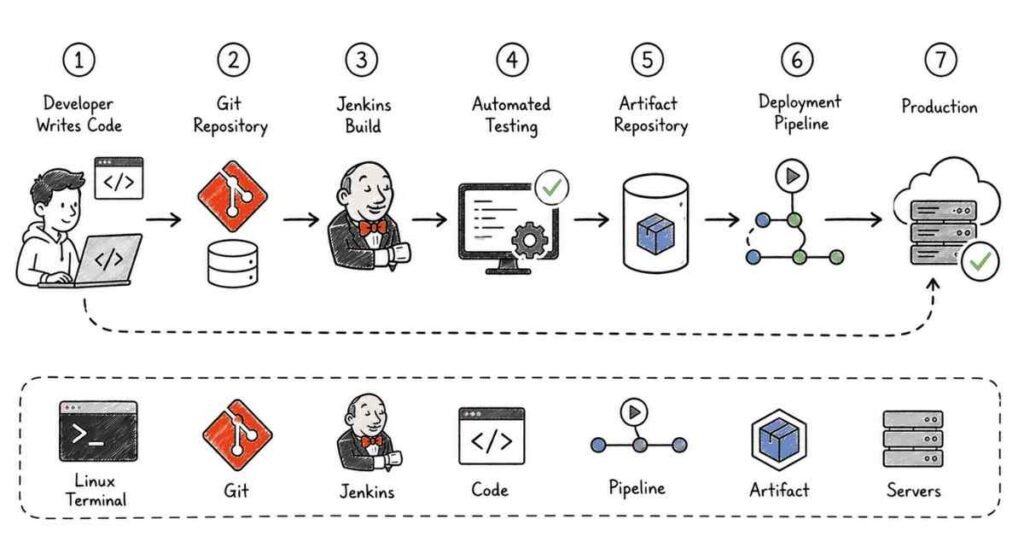
  5. Integration Tool – Jenkins (35 questions)
  6. Containerization – Docker (40 questions)
  7. Container Orchestration – Kubernetes (35 questions)
  8. AWS Cloud Services (35 questions)
  9. Azure Cloud Services (30 questions)
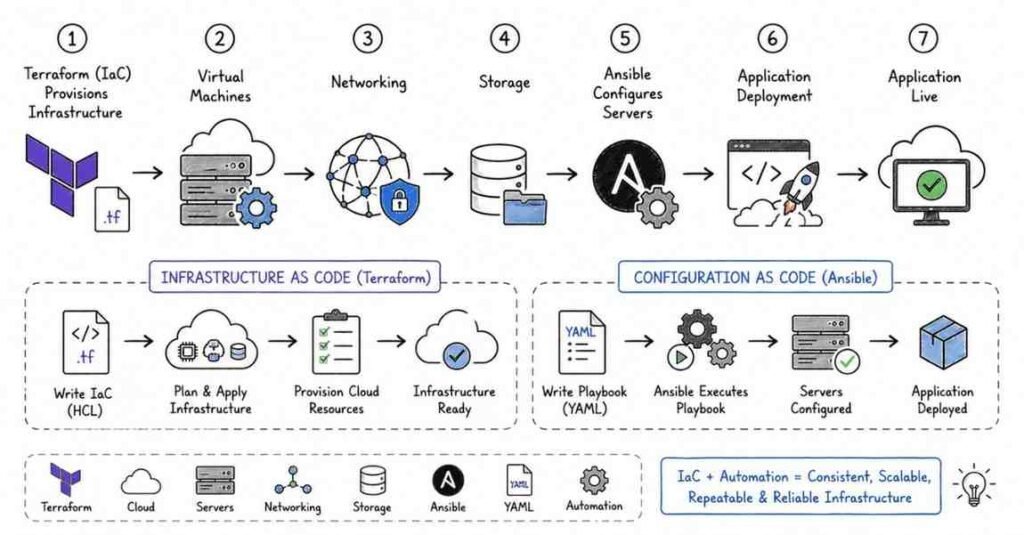
  10. Infrastructure as Code – Terraform (25 questions)
  11. Configuration Management – Ansible (20 questions)
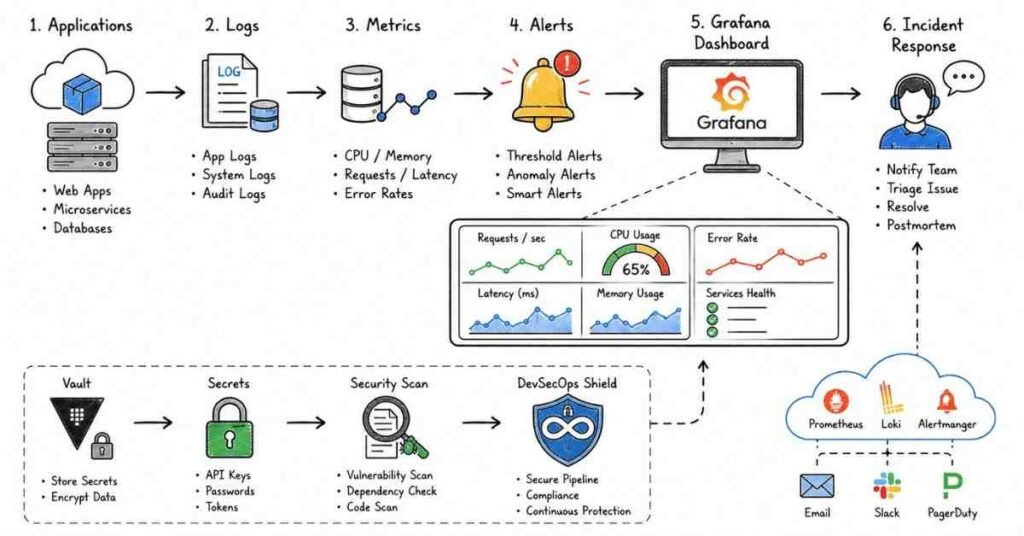
  12. Monitoring & Additional Tools (15 questions)
1 . Linux & Operating Systems (25 Questions)

Basic Linux Commands

Q1. What is Linux and why is it preferred for DevOps environments?
Answer: Linux is an open-source operating system kernel that forms the foundation of various distributions like Ubuntu, CentOS, and Red Hat. DevOps professionals prefer Linux because it offers superior stability, security, command-line flexibility, and extensive automation capabilities through shell scripting. Most cloud servers, containers, and CI/CD pipelines run on Linux due to its lightweight nature and robust performance in production environments.

Q2. Explain the difference between absolute and relative paths in Linux.
Answer: An absolute path specifies the complete directory location starting from the root directory (/), such as /home/user/documents/file.txt. A relative path specifies the location relative to the current working directory, like ../documents/file.txt. Understanding path navigation is essential for writing effective shell scripts and navigating file systems efficiently in DevOps workflows.

Q3. How do you check system hardware information in Linux?
Answer: Several commands provide hardware information: lscpu displays CPU architecture details, free -h shows memory usage in human-readable format, df -h reports disk space utilization, lsblk lists block devices, and dmidecode provides detailed hardware configuration from BIOS. These commands help DevOps engineers monitor system resources and troubleshoot performance issues.

Q4. What are file permissions in Linux and how do you modify them?
Answer: Linux uses a three-tier permission system: owner, group, and others, with read (r=4), write (w=2), and execute (x=1) permissions. The chmod command modifies permissions (e.g., chmod 755 script.sh gives owner full access, others read/execute only). The chown command changes ownership. Proper permission management is critical for security in production environments.

Q5. Explain the purpose of the grep, find, and locate commands.
Answer: grep searches for patterns within file contents using regular expressions (e.g., grep “error” logfile.txt). find searches for files based on criteria like name, size, or modification time (e.g., find /var/log -name “*.log”). locate uses a pre-built database for faster filename searches. These search commands are essential for log analysis and debugging in DevOps operations.

Q6. What is the VIM editor and why is it important for DevOps professionals?
Answer: VIM (Vi Improved) is a powerful text editor available on virtually all Linux systems, making it essential when SSH access is the only option. It operates in different modes: command mode for navigation, insert mode for editing, and visual mode for selection. Mastering VIM enables quick file editing on remote servers without GUI requirements, which is common in production environments.

Q7. How do you check network connectivity and configuration in Linux?
Answer: Key networking commands include: ping to test connectivity, ifconfig or ip addr to view network interfaces and IP addresses, netstat -tuln to display active network connections and listening ports, traceroute to trace packet routes, and ss for socket statistics. These tools help diagnose network issues in distributed systems and cloud infrastructure.

Q8. What is the difference between apt and yum package managers?
Answer: apt (Advanced Package Tool) is used in Debian-based distributions like Ubuntu, while yum (Yellowdog Updater Modified) is used in Red Hat-based systems like CentOS and Fedora. Both manage software installation, updates, and dependencies, but have different syntax and package repositories. Understanding both is valuable since DevOps professionals work across diverse Linux environments.

Q9. Explain process management commands in Linux.
Answer: ps aux displays running processes with details, top or htop provides real-time process monitoring, kill sends signals to terminate processes, killall terminates processes by name, and nice/renice adjust process priorities. Background processes are managed with &, fg, and bg commands. Process management is crucial for troubleshooting performance bottlenecks in production systems.

Q10. What is shell scripting and what shell does the course focus on?
Answer: Shell scripting automates repetitive tasks by writing sequences of commands in a script file. The course focuses on Bash (Bourne Again Shell), the most widely used shell in Linux environments. Bash scripts automate deployments, system monitoring, backup operations, and infrastructure provisioning, making them indispensable for DevOps automation workflows.

Advanced Linux Concepts

Q11. How do you redirect standard output and standard error in Linux?
Answer: Output redirection uses > for stdout (e.g., command > output.txt), 2> for stderr (e.g., command 2> error.txt), and &> for both (e.g., command &> all.txt). Append mode uses >>. Pipes (|) pass output from one command as input to another. Mastering redirection is essential for logging, debugging, and building automated pipelines.

Q12. What are environment variables and how do you set them permanently?
Answer: Environment variables store system-wide or user-specific configuration values. Temporary variables are set with export VAR=value, while permanent variables are added to ~/.bashrc or ~/.bash_profile for user-level, or /etc/environment for system-wide settings. Common variables include PATH, HOME, and USER, which DevOps tools and scripts frequently reference.

Q13. Explain the concept of symbolic links and hard links.
Answer: A symbolic (soft) link is a pointer to another file’s path, created with ln -s target link_name, and breaks if the original is deleted. A hard link is an additional directory entry pointing to the same inode, created with ln target link_name, and persists even if the original filename is removed. Links are used for efficient file organization and version management.

Q14. How do you monitor system logs in real-time?
Answer: The tail -f /var/log/syslog command displays new log entries as they’re written. journalctl -f follows systemd journal logs. less +F logfile allows interactive following with search capabilities. Real-time log monitoring is critical for detecting issues immediately in production environments and responding to incidents quickly.

Q15. What is cron and how do you schedule jobs?
Answer: Cron is a time-based job scheduler in Linux. Jobs are configured in crontab files using five time fields (minute, hour, day, month, weekday) followed by the command. Example: 0 2 * * * /backup.sh runs daily at 2 AM. Cron automates routine tasks like backups, cleanups, and monitoring checks, which is fundamental to DevOps automation.

Q16. Explain SSH and how to set up passwordless authentication.
Answer: SSH (Secure Shell) provides encrypted remote access to servers. Passwordless authentication uses key pairs: generate with ssh-keygen, then copy the public key to the remote server using ssh-copy-id user@host. The private key remains secure on the client. SSH key authentication is more secure than passwords and enables automated scripts to access remote systems.

Q17. How do you compress and extract files in Linux?
Answer: Common compression tools include tar for archiving (tar -czf archive.tar.gz files/ to compress, tar -xzf archive.tar.gz to extract), gzip for single files, zip/unzip for cross-platform compatibility, and bzip2 for higher compression. File compression reduces storage costs and speeds up file transfers in backup and deployment processes.

Q18. What is the purpose of /etc/hosts and /etc/resolv.conf files?
Answer: /etc/hosts maps hostnames to IP addresses locally, overriding DNS queries, useful for testing or custom internal networks. /etc/resolv.conf specifies DNS servers for domain name resolution. Modifying these files helps DevOps engineers configure custom DNS settings, establish internal service discovery, and troubleshoot networking issues.

Q19. How do you check disk I/O performance in Linux?
Answer: iostat displays CPU and disk I/O statistics, iotop shows I/O usage by process, vmstat reports virtual memory statistics including disk I/O, and sar collects and reports system activity. Monitoring disk performance helps identify bottlenecks affecting application performance and guides infrastructure scaling decisions.

Q20. Explain the concept of systemd and how to manage services.
Answer: Systemd is the modern init system and service manager in Linux. Commands include systemctl start service_name to start services, systemctl enable service_name to auto-start on boot, systemctl status service_name to check status, and systemctl restart service_name to restart. Managing services with systemd is essential for deploying and maintaining applications.

Q21. What are Linux runlevels and systemd targets?
Answer: Traditional runlevels (0-6) define system states; systemd uses targets instead: multi-user.target (multi-user mode), graphical.target (GUI mode), and rescue.target (single-user mode). Change targets with systemctl isolate target_name. Understanding system states helps troubleshoot boot issues and configure appropriate server modes.

Q22. How do you monitor memory usage and identify memory leaks?
Answer: free -h shows overall memory usage, top or htop displays per-process memory consumption, vmstat reports virtual memory statistics, and /proc/meminfo provides detailed memory information. The ps aux –sort=-%mem | head command lists top memory-consuming processes. Memory monitoring prevents out-of-memory crashes in production.

Q23. What is SELinux and why is it important for security?
Answer: SELinux (Security-Enhanced Linux) is a mandatory access control security module that restricts programs to minimum required privileges, even if compromised. Modes include enforcing (active), permissive (logs violations), and disabled. Commands like getenforce, setenforce, and ausearch manage SELinux. It provides an additional security layer critical for compliance and production environments.

Q24. How do you troubleshoot “disk space full” issues?
Answer: Use df -h to identify full filesystems, du -sh /* to find large directories, find / -type f -size +100M to locate large files, and lsof +L1 to find deleted files still held by processes. Implementing log rotation with logrotate, clearing package caches, and removing old kernels are common solutions.

Q25. Explain user and group management commands.
Answer: useradd creates users, usermod modifies user attributes, userdel removes users, passwd changes passwords, groupadd creates groups, and usermod -aG group user adds users to groups. The /etc/passwd, /etc/shadow, and /etc/group files store user information. Proper user management ensures secure access control in multi-user DevOps environments.

2 .Version Control – Git (30 Questions)

Git Fundamentals

Q26. What is Version Control System (VCS) and why is it essential in DevOps?
Answer: A Version Control System tracks changes to files over time, enabling collaboration, version history, rollback capabilities, and parallel development. In DevOps, VCS is fundamental for managing infrastructure as code, coordinating team development, maintaining audit trails, and enabling CI/CD pipelines. Git has become the standard VCS due to its distributed architecture and powerful branching capabilities.

Q27. Explain the difference between centralized and distributed version control systems.
Answer: Centralized VCS (like SVN, CVS) have a single central repository; developers must connect to commit changes. Distributed VCS (like Git) give each developer a complete repository copy, enabling offline work, faster operations, and better redundancy. Git’s distributed nature allows flexible workflows and doesn’t have a single point of failure, making it ideal for modern DevOps practices.

Q28. What are the three stages in Git workflow?
Answer: The three Git stages are: (1) Working Directory – where files are modified, (2) Staging Area (Index) – where changes are prepared for commit using git add, and (3) Repository – where committed changes are permanently stored using git commit. This three-stage architecture provides fine-grained control over what gets committed and enables selective change tracking.

Q29. Explain the difference between git pull and git fetch.
Answer: git fetch downloads changes from the remote repository but doesn’t merge them into the current branch, allowing review before integration. git pull performs git fetch followed by git merge, automatically merging remote changes into the current branch. Using git fetch first is safer in production environments as it allows inspection before merging potentially breaking changes.

Q30. What is the difference between git merge and git rebase?
Answer: git merge combines branches by creating a new merge commit that preserves the complete history of both branches, resulting in a non-linear history. git rebase replays commits from one branch onto another, creating a linear history by rewriting commit history. Rebase produces cleaner history but should never be used on public/shared branches to avoid conflicts.

Q31. How do you resolve merge conflicts in Git?
Answer: When conflicts occur, Git marks conflicting sections in files with <<<<<<<, =======, and >>>>>>> markers. To resolve: (1) open conflicting files, (2) manually edit to keep desired changes, (3) remove conflict markers, (4) use git add to stage resolved files, and (5) complete with git commit. Understanding conflict resolution is crucial for team collaboration in DevOps.

Q32. What is git stash and when should it be used?
Answer: git stash temporarily saves uncommitted changes (both staged and unstaged) and reverts the working directory to match the HEAD commit. Use cases include switching branches without committing incomplete work, pulling updates without conflicts, and saving experiments. git stash pop reapplies stashed changes, while git stash list shows all stashes. This enables flexible context switching.

Q33. Explain git cherry-pick and its use cases.
Answer: git cherry-pick <commit-hash> applies a specific commit from one branch to another without merging the entire branch. Common use cases include: applying hotfixes to multiple branches, selectively porting features, and recovering specific commits from abandoned branches. Cherry-picking is valuable for maintaining multiple release versions simultaneously in production environments.

Q34. What is the difference between git reset and git revert?
Answer: git reset moves the branch pointer backward, potentially removing commits from history (dangerous on shared branches). It has three modes: –soft (keeps changes staged), –mixed (default, unstages changes), and –hard (discards all changes). git revert creates a new commit that undoes a previous commit’s changes without rewriting history, making it safer for shared branches.

Q35. How do you configure Git user information?
Answer: Use git config –global user.name “Your Name” and git config –global user.email “your.email@example.com” for global configuration affecting all repositories. Omit –global for repository-specific settings. Configuration is stored in ~/.gitconfig (global) or .git/config (local). Proper configuration ensures commits are correctly attributed, which is important for audit trails and collaboration.

Git Branching and Workflows

Q36. What are Git branching strategies and name common ones?
Answer: Branching strategies define how teams organize development. Common strategies include: Git Flow (master, develop, feature, release, hotfix branches), GitHub Flow (master and feature branches with pull requests), Trunk-Based Development (short-lived branches off main), and GitLab Flow (environment-based branches). Choosing appropriate strategies ensures smooth collaboration and release management in DevOps pipelines.

Q37. How do you create and switch between branches?
Answer: git branch branch_name creates a new branch, git checkout branch_name switches to it, and git checkout -b branch_name creates and switches in one command (or git switch -c branch_name in newer Git versions). git branch -d branch_name deletes merged branches, while -D force-deletes unmerged branches. Branch management is fundamental to parallel development workflows.

Q38. What is a detached HEAD state and how do you fix it?
Answer: Detached HEAD occurs when HEAD points directly to a commit instead of a branch, typically after checking out a specific commit hash. Changes made here aren’t associated with any branch. To fix: create a new branch with git checkout -b new_branch_name to preserve work, or checkout an existing branch with git checkout branch_name to discard detached changes.

Q39. Explain Git tags and their types.
Answer: Tags mark specific points in history, typically for releases. Lightweight tags are simple pointers (git tag v1.0), while annotated tags store additional metadata like author, date, and message (git tag -a v1.0 -m “Release version 1.0”). Push tags with git push –tags. Tags are essential for versioning in CI/CD pipelines and marking production releases.

Q40. How do you ignore files in Git?
Answer: Create a .gitignore file in the repository root listing files/patterns to ignore (e.g., *.log, node_modules/, .env). Already-tracked files must be untracked first using git rm –cached filename. Global ignore patterns can be set with git config –global core.excludesfile ~/.gitignore_global. Ignoring sensitive files and build artifacts prevents accidental commits of secrets or unnecessary files.

Q41. What are Git hooks and how are they used in DevOps?
Answer: Git hooks are scripts that run automatically at specific points in the Git workflow (pre-commit, pre-push, post-merge, etc.), located in .git/hooks/. Use cases include: enforcing code standards (linting), running tests before commits, preventing commits to protected branches, and triggering CI/CD pipelines. Hooks automate quality checks and integrate Git with other DevOps tools.

Q42. How do you view commit history and filter logs?
Answer: git log displays commit history, git log –oneline shows concise format, git log –graph –oneline –all visualizes branch structure, git log -n 5 limits to 5 commits, git log –author=”name” filters by author, and git log –since=”2 weeks ago” filters by date. git show <commit-hash> displays specific commit details. Log analysis helps track changes and debug issues.

Q43. Explain the concept of Git remote repositories.

Answer: Remote repositories are versions of your project hosted elsewhere (GitHub, GitLab, Bitbucket, etc.). `git remote add origin <url>` adds a remote, `git remote -v` lists remotes, `git push origin branch` uploads changes, and `git clone <url>` copies a remote repository locally. Remotes enable distributed collaboration and backup, forming the foundation of team-based DevOps workflows.[^1]

Q44. What is git blame and how is it useful?
Answer: git blame filename shows who last modified each line of a file and when, displaying commit hashes and authors. This helps identify when bugs were introduced, who to consult about specific code sections, and understanding code evolution. git blame -L 10,20 filename limits output to specific line ranges. Blame analysis is valuable for debugging and code reviews.

Q45. How do you undo the last commit without losing changes?
Answer: Use git reset –soft HEAD~1 to undo the last commit while keeping changes staged, or git reset HEAD~1 (mixed mode) to unstage changes but keep them in the working directory. If the commit was already pushed, use git revert HEAD instead to create a new commit that undoes changes, avoiding history rewriting on shared branches.

Git Advanced Concepts

Q46. What is git reflog and when is it useful?
Answer: git reflog shows a history of HEAD movements, including commits that are no longer referenced by any branch (even after resets or deletions). It’s a safety net for recovering “lost” commits after accidental resets or deletions. Each entry has a reference like HEAD@{n} that can be used with git checkout or git reset to restore previous states.

Q47. Explain git submodules and their use cases.

Answer: Submodules allow embedding one Git repository inside another, useful for including shared libraries or components. Commands include `git submodule add <repository> <path>`, `git submodule init`, and `git submodule update`. Submodules maintain independent version control, enabling teams to manage dependencies while keeping repositories separate. They’re common in microservices architectures and shared library management.[^1]

Q48. How do you squash multiple commits into one?
Answer: Interactive rebase allows squashing: git rebase -i HEAD~n (where n is number of commits), then mark commits as “squash” or “s” in the editor. This combines commits into one with a new message. Squashing creates cleaner history before merging feature branches, making code reviews easier and maintaining readable project history.

Q49. What is the difference between origin and upstream in Git?
Answer: “Origin” is the default name for the remote repository you cloned from (typically your fork). “Upstream” conventionally refers to the original repository you forked from. In fork-based workflows: fetch updates from upstream (git fetch upstream), merge into local (git merge upstream/main), then push to origin (git push origin main) to keep your fork synchronized.

Q50. How do you handle large files in Git repositories?
Answer: Git Large File Storage (LFS) replaces large files with text pointers while storing actual files on a remote server. Install Git LFS, run git lfs install, track large files with git lfs track “*.psd”, and commit as normal. This prevents repository bloat from binary files like videos, datasets, or compiled artifacts, maintaining repository performance.

Q51. Explain the difference between git clone, fork, and branch.
Answer: git clone creates a local copy of a remote repository. Fork creates a server-side copy under your account (GitHub/GitLab feature), enabling contributions to repositories without write access. Branch creates a divergent line of development within a repository. Fork is for external contributions, branch for internal team development, and clone for local work.

Q52. What is a bare repository and when is it used?
Answer: A bare repository (created with git init –bare) contains only the version control information without a working directory, making it unsuitable for direct editing but ideal as a central shared repository. Bare repositories are used on servers for team collaboration, acting as the “origin” remote that team members push to and pull from.

Q53. How do you compare differences between commits, branches, or files?
Answer: git diff shows unstaged changes, git diff –staged shows staged changes, git diff branch1..branch2 compares branches, git diff commit1 commit2 compares commits, and git diff HEAD~2 HEAD filename compares specific file across commits. Diff analysis helps review changes before committing and understand differences during merge conflicts.

Q54. What are merge strategies in Git?
Answer: Git supports several merge strategies: recursive (default for two branches), octopus (multiple branches simultaneously), ours (keeps current branch’s version entirely), subtree (merging subdirectories), and theirs (not built-in, prefers incoming changes). Choose strategies based on conflict complexity and desired outcome, with recursive being most common for standard feature merges.

Q55. How do you recover deleted branches?
Answer: Use git reflog to find the commit where the deleted branch pointed, then recreate it with git checkout -b recovered_branch <commit-hash >. Reflog maintains references for approximately 30 days by default. This recovery capability provides a safety net against accidental branch deletions, though prevention through branch protection rules is preferable.

3. GitHub & Bitbucket (10 Questions)

Q56. What is the difference between Git and GitHub?
Answer: Git is the distributed version control system software that runs locally on your machine, managing code versions and history. GitHub is a cloud-based hosting service for Git repositories, adding features like pull requests, issue tracking, wikis, project boards, and collaboration tools. GitHub provides a centralized platform for teams to collaborate, while Git handles the underlying version control mechanics.

Q57. What are GitHub repositories and the difference between public and private?
Answer: A GitHub repository stores project code, documentation, and version history. Public repositories are visible to everyone and can be cloned by anyone, ideal for open-source projects. Private repositories restrict access to authorized collaborators only, suitable for proprietary or sensitive code. Both support the same Git features, differing only in visibility and access controls.

Q58. Explain the pull request workflow in GitHub.
Answer: Pull requests (PRs) propose changes from one branch to another: (1) create a feature branch and commit changes, (2) push to GitHub, (3) open a PR comparing feature branch to target branch, (4) team reviews code and discusses, (5) make requested changes by pushing additional commits, (6) merge when approved. PRs enable code review, discussion, and quality control before integration.

Q59. What is forking and how does it differ from cloning?
Answer: Forking creates a complete copy of a repository under your GitHub account, establishing a connection to the original (upstream) repository. Cloning downloads a repository to your local machine without creating a GitHub copy. Fork to contribute to projects you don’t have write access to, enabling you to make changes and submit pull requests to the original repository.

Q60. How do you handle authentication tokens in GitHub?
Answer: Personal Access Tokens (PATs) authenticate API and command-line operations, replacing passwords. Generate tokens in GitHub Settings > Developer settings > Personal access tokens, selecting required scopes. Store securely in password managers or environment variables, never commit to repositories. Tokens enable secure, revocable access for automation tools and CI/CD pipelines without exposing passwords.

Q61. What is the GitHub compare feature used for?
Answer: The compare feature (repo/compare) visualizes differences between branches, tags, or commits, showing file changes, additions, deletions, and commit history. It’s accessible via “Compare & pull request” button or directly via URL. Comparing before creating pull requests helps review changes, ensure correct branches are targeted, and understand the scope of proposed modifications.

Q62. How do you rename, archive, or delete repositories in GitHub?
Answer: In repository Settings: Rename changes the repository name while preserving Git history and redirecting old URLs. Archive makes repositories read-only, indicating they’re no longer maintained. Transfer ownership moves repositories to another user/organization. Delete permanently removes repositories (in “Danger Zone”). These management options help organize projects through their lifecycle while preserving history.

Q63. What is the purpose of making a public repository private?
Answer: Converting public to private restricts visibility, useful when: open-source projects need temporary privacy for security patches, prototypes become commercial products, or sensitive data was accidentally exposed. The conversion is in Settings > Change visibility. Note that forks remain public, and public data may have been cached or cloned, so treat previously public data as potentially exposed.

Q64. Explain Bitbucket repositories and projects.
Answer: Bitbucket organizes repositories into projects for better structure. Projects group related repositories, apply common permissions, and share settings. Repositories exist within projects (or personally without projects). This hierarchy helps large organizations manage dozens or hundreds of repositories with consistent access controls and workflows. Projects enable better governance in enterprise environments.

Q65. What are the advantages and disadvantages of GitHub compared to Bitbucket?
Answer: GitHub advantages: larger community, extensive integrations, GitHub Actions CI/CD, better discoverability for open source. Disadvantages: fewer free private repositories for teams, higher costs for large teams. Bitbucket advantages: unlimited free private repositories for small teams, native Jira integration, better for Atlassian ecosystem. Disadvantages: smaller community, fewer third-party integrations. Choice depends on team size, existing toolchain, and budget.

4. Build Tools – Maven (15 Questions)

Q66. What is Maven and why is it used in DevOps?
Answer: Maven is a build automation and project management tool primarily for Java projects. It manages dependencies, compiles code, runs tests, packages applications, and deploys artifacts through a standardized build lifecycle. Maven simplifies build processes by convention over configuration, uses centralized dependency repositories, and integrates seamlessly with CI/CD pipelines, making it essential for Java-based DevOps workflows.

Q67. What problems does Maven solve compared to manual builds?
Answer: Without Maven: manually downloading dependencies, managing classpath, compiling with complex commands, version conflicts, inconsistent builds across environments. Maven solves these by: automatically downloading dependencies from central repositories, managing transitive dependencies, providing standardized project structure, ensuring reproducible builds, and simplifying build commands. This automation reduces errors and accelerates development cycles.

Q68. Explain the Maven project structure.
Answer: Maven follows a standardized directory layout: src/main/java for application source code, src/main/resources for configuration files, src/test/java for test code, src/test/resources for test resources, and target for compiled output. pom.xml at the root defines project configuration. This convention enables developers to navigate any Maven project immediately, improving team efficiency.

Q69. What is pom.xml and what are its key components?

Answer: The Project Object Model (pom.xml) is Maven’s configuration file defining: project coordinates (groupId, artifactId, version), dependencies, plugins, build settings, and repositories. Key sections include `<dependencies>` for libraries, `<build>` for build configuration, `<plugins>` for build tools, and `<properties>` for variables. The POM is the single source of truth for project configuration.[^1]

Q70. Explain Maven dependencies and transitive dependencies.
Answer: Dependencies are external libraries required by your project, declared in pom.xml with groupId, artifactId, and version. Transitive dependencies are dependencies of your dependencies, automatically resolved by Maven. For example, if your project depends on Spring, Maven automatically downloads Spring’s dependencies. Dependency scopes (compile, test, provided, runtime) control when dependencies are available.

Q71. What are Maven goals and commonly used ones?
Answer: Goals are specific tasks Maven can execute. Common goals include: clean (deletes target directory), compile (compiles source code), test (runs unit tests), package (creates JAR/WAR), install (installs artifact to local repository), deploy (uploads to remote repository). Goals are executed via mvn goal-name and often chained like mvn clean install.

Q72. Explain the Maven build lifecycle phases.
Answer: Maven has three built-in lifecycles: default (handles project deployment), clean (handles project cleaning), and site (handles documentation). The default lifecycle’s main phases in order are: validate, compile, test, package, verify, install, deploy. Running a phase executes all preceding phases. Understanding lifecycle ensures proper build sequencing in CI/CD pipelines.

Q73. What is Maven architecture and how does it work?
Answer: Maven architecture consists of: (1) Project Object Model (POM), (2) Plugin architecture executing goals, (3) Local repository (~/.m2/repository) caching dependencies, (4) Remote/Central repository (Maven Central) hosting artifacts. When building, Maven reads POM, downloads dependencies to local repository, executes plugins according to lifecycle phases, and produces artifacts. This architecture enables offline builds after initial download.

Q74. How do you generate a JAR file using Maven?

Answer: Run `mvn package` which compiles code, runs tests, and creates a JAR file in the `target` directory. The JAR filename format is `artifactId-version.jar` (e.g., `myapp-1.0.0.jar`). Customize packaging with `<packaging>jar</packaging>` in pom.xml and configure the maven-jar-plugin for specific JAR requirements like manifest entries or included/excluded files.[^1]

Q75. What is the difference between mvn install and mvn deploy?
Answer: mvn install copies the built artifact (JAR/WAR) to the local Maven repository (~/.m2/repository) for use by other local projects. mvn deploy uploads the artifact to a remote repository (Nexus, Artifactory) for sharing across teams or organizations. Install is for local development, deploy is for distribution in collaborative environments and CI/CD pipelines.

Q76. How does Maven compare to Ant?
Answer: Maven provides convention over configuration with standard project structure and declarative pom.xml, while Ant requires explicit procedural build scripts. Maven automatically handles dependencies and transitive dependencies; Ant requires manual management. Maven enforces best practices through lifecycles; Ant offers complete flexibility. Maven is better for standard Java projects; Ant suits custom or non-standard builds requiring maximum control.

Q77. What are Maven plugins and name important ones?
Answer: Plugins provide goals that perform build tasks. Important plugins include: maven-compiler-plugin (compiles Java code), maven-surefire-plugin (runs unit tests), maven-jar-plugin (creates JARs), maven-war-plugin (creates WARs), maven-deploy-plugin (uploads artifacts), and maven-site-plugin (generates documentation). Plugins can be configured in pom.xml to customize build behavior and integrate third-party tools.

Q78. How do you manage multiple Java versions in Maven projects?

Answer: Configure the maven-compiler-plugin in pom.xml specifying source and target versions: `<maven.compiler.source>11</maven.compiler.source>` and `<maven.compiler.target>11</maven.compiler.target>`. Alternatively, use the newer `<release>11</release>` property. This ensures code compiles with specific Java version compatibility, important when developing for different deployment environments or maintaining legacy systems.[^1]

Q79. What are Maven profiles and their use cases?
Answer: Profiles enable customizing builds for different environments (development, testing, production). Defined in pom.xml with <profiles> sections, they can override properties, dependencies, or plugin configurations. Activate with mvn -P profile-name or automatically based on conditions like JDK version or OS. Profiles enable single codebase deployment to multiple environments with different configurations.

Q80. How do you troubleshoot Maven dependency conflicts?

Answer: Use `mvn dependency:tree` to visualize all dependencies and identify conflicts. Maven’s “nearest definition” strategy chooses the dependency version closest to the project in the tree. Explicitly override versions in `<dependencyManagement>` section. Exclude transitive dependencies with `<exclusions>`. Analyze with `mvn dependency:analyze` to find unused or undeclared dependencies. Understanding dependency resolution prevents runtime class conflicts.[^1]

5. Integration Tool – Jenkins (35 Questions)

Jenkins Fundamentals

Q81. What is Jenkins and why is it essential in DevOps?
Answer: Jenkins is an open-source automation server that enables Continuous Integration and Continuous Delivery (CI/CD) pipelines. It automates building, testing, and deploying applications, reducing manual errors and accelerating release cycles. Jenkins integrates with version control systems, build tools, testing frameworks, and deployment platforms, making it the central orchestration hub in DevOps workflows.

Q82. Explain the difference between Continuous Integration, Continuous Delivery, and Continuous Deployment.
Answer: Continuous Integration (CI) automatically builds and tests code whenever changes are committed, catching integration issues early. Continuous Delivery (CD) extends CI by automatically preparing code for release to production, requiring manual approval for final deployment. Continuous Deployment automates the entire process including production deployment without manual intervention. The progression increases automation and deployment frequency.

Q83. What are the prerequisites for Jenkins setup?
Answer: Jenkins requires Java JDK installed (typically Java 11 or 17), sufficient system resources (minimum 256MB RAM, 1GB+ recommended), network connectivity for plugin downloads, and appropriate user permissions. Additionally, integrating with Git requires Git installation, and Maven projects need Maven configured. Proper Java setup is critical as Jenkins runs on the Java Virtual Machine.

Q84. What are the different types of Jenkins jobs?
Answer: Jenkins offers several job types: Freestyle jobs (flexible, GUI-configured for simple tasks), Pipeline jobs (code-based using Jenkinsfile for complex workflows), Maven jobs (optimized for Maven projects with automatic configuration), Multi-configuration jobs (matrix builds across multiple environments), and Multi-branch pipelines (automatically create jobs for each branch). Pipeline jobs are preferred for modern CI/CD implementations.

Q85. Explain Jenkins Freestyle jobs and their use cases.
Answer: Freestyle jobs are the simplest Jenkins job type configured entirely through the GUI. They’re suitable for: simple build and test tasks, legacy projects without pipeline infrastructure, quick prototyping, and teams unfamiliar with pipeline syntax. Configuration includes source control settings, build triggers, build steps (shell commands, Maven goals), and post-build actions. However, pipelines are recommended for production workflows.

Q86. What are Jenkins build parameters and their types?
Answer: Build parameters allow passing values to jobs at runtime, enabling flexible, reusable pipelines. Types include: String Parameter (single-line text), Choice Parameter (dropdown selection), Boolean Parameter (checkbox), File Parameter (file upload), Multi-line String Parameter (text area), and Password Parameter (masked input). Parameters enable building different branches, environments, or configurations from the same job definition.

Q87. What is the difference between Poll SCM and Webhooks?
Answer: Poll SCM periodically checks the repository for changes at scheduled intervals (e.g., every 5 minutes), creating unnecessary load when no changes exist. Webhooks trigger builds immediately when code is pushed, via repository notifications to Jenkins. Webhooks are more efficient, provide instant feedback, and reduce server load, making them the preferred approach for production CI/CD pipelines.

Q88. Explain Jenkins cron job syntax for scheduling builds.
Answer: Jenkins uses cron syntax with five fields: minute (0-59), hour (0-23), day of month (1-31), month (1-12), day of week (0-7). Examples: H ‘/4 ‘ (every 4 hours), H 2 1-5 (2 AM weekdays), 0 0  0 (midnight Sundays). The ‘H’ symbol distributes load to prevent all jobs running simultaneously, which is important in large Jenkins installations.

Q89. What are upstream and downstream projects in Jenkins?
Answer: Upstream projects trigger downstream projects, creating job chains. For example, a compile job (upstream) triggers a test job (downstream) upon successful completion. Configure with “Build other projects” post-build action or “Build after other projects are built” trigger. This enables modular pipelines where specialized jobs handle specific phases like building, testing, security scanning, and deployment.

Q90. Explain Jenkins Master-Slave (Master-Agent) architecture.
Answer: The Master-Slave architecture distributes builds across multiple machines. The Master schedules jobs, monitors slaves, and serves the UI, while Slaves (Agents) execute build jobs. Benefits include: parallel execution, environment-specific builds (Windows/Linux), isolating resource-intensive builds, and scaling capacity. Slaves connect via SSH, JNLP, or cloud plugins, enabling dynamic agent provisioning.

Jenkins Advanced Features

Q91. What are Jenkins environment variables and their types?
Answer: Environment variables store configuration accessible to jobs. Local variables are job-specific, set in job configuration under “This build is parameterized.” Global variables (in Manage Jenkins > Configure System) apply across all jobs. Built-in variables include BUILD_ID, JOB_NAME, WORKSPACE, BUILD_NUMBER, and JENKINS_URL. Custom variables enable environment-specific configurations without hardcoding values in scripts.

Q92. How do you disable and rename Jenkins jobs?
Answer: Disable jobs to temporarily stop execution without deleting configuration by clicking “Disable Project” in job settings. The job appears grayed out and won’t run until re-enabled. Rename jobs via job configuration page or directly in job dropdown menu, which preserves build history and configuration. These operations are useful for maintenance, troubleshooting, or reorganizing projects.

Q93. What is Build Pipeline View and how is it configured?
Answer: Build Pipeline View visualizes job chains, showing upstream/downstream relationships and execution flow. Install the “Build Pipeline Plugin,” create a new view, select “Build Pipeline View,” and specify the initial job. The view displays progress through connected jobs, enabling quick identification of pipeline bottlenecks or failures. This visualization improves pipeline understanding and troubleshooting.

Q94. How do you authenticate external build triggers in Jenkins?
Answer: Remote build triggers use authentication tokens for security. Enable “Trigger builds remotely” in job configuration and set an authentication token. Trigger with URL: JENKINS_URL/job/JOB_NAME/build?token=TOKEN. Additional security includes API tokens (user settings) or Jenkins Crumb (CSRF protection). Authentication prevents unauthorized build execution and integrates Jenkins with external systems.

Q95. What are Jenkins Pipelines and their advantages?
Answer: Pipelines define CI/CD workflows as code (Infrastructure as Code principle) using Groovy-based syntax in Jenkinsfiles. Advantages include: version-controlled pipeline definitions, code review for pipeline changes, reusability through shared libraries, better visualization, complex workflows with conditions and loops, and disaster recovery (pipelines recreated from repository). Pipelines represent modern Jenkins best practices.

Q96. Explain the difference between Scripted and Declarative Pipelines.
Answer: Scripted Pipelines use Groovy syntax offering maximum flexibility and programmatic control, starting with node { } blocks. Declarative Pipelines provide simplified, opinionated syntax with pipeline { } structure including predefined sections (agent, stages, steps, post). Declarative is easier to learn, has better error checking, and is recommended for most use cases. Scripted suits complex logic requiring full programming capabilities.

Q97. What are pipeline stages and how are they structured?
Answer: Stages organize pipeline steps into logical phases (Build, Test, Deploy) appearing as columns in pipeline visualization. Structure: stages { stage(‘Build’) { steps { … } } }. Each stage contains steps (actual commands). Stages enable: parallel execution, stage-specific approvals, granular failure identification, and clear progress tracking. Well-structured stages improve pipeline readability and maintainability.

Q98. How do you define agents in Jenkins Pipelines?
Answer: The agent directive specifies where pipeline executes. agent any uses any available agent, agent { label ‘linux’ } targets specific labeled agents, agent { docker { image ‘maven:3.8’ } } runs in Docker containers, and agent none with stage-level agents provides fine-grained control. Proper agent configuration ensures builds run in appropriate environments with required tools.

Q99. What is Pipeline as Code (PAAC) and its benefits?
Answer: Pipeline as Code stores Jenkinsfiles in source control alongside application code. Benefits include: version history for pipeline changes, branch-specific pipelines (feature branches have custom build processes), peer review for pipeline modifications, disaster recovery (rebuild Jenkins from repositories), and consistency across projects. PAAC is a DevOps best practice treating infrastructure definitions as code.

Q100. How do you use variables in Jenkins Pipelines?
Answer: Define variables in environment blocks: globally (environment { VAR = ‘value’ } in pipeline) or per-stage. Access with ${VAR} or env.VAR. Use credentials with credentials() helper: PASSWORD = credentials(‘password-id’). Dynamic variables use Groovy: script { def var = sh(returnStdout: true, script: ‘command’).trim() }. Variables enable flexible, reusable pipelines.

Q101. Explain input parameters in Jenkins Pipelines.
Answer: The input step pauses pipeline for manual approval or parameter input: input message: ‘Deploy to production?’, parameters: [choice(choices: [‘dev’, ‘prod’], name: ‘ENV’)]. Use cases include: deployment approvals, environment selection, manual testing verification, and compliance gates. Input enables human decision points in automated pipelines, balancing automation with control.

Q102. What are pipeline post-build actions?
Answer: The post section defines actions after stages complete, with conditions: always (runs regardless), success (only on success), failure (only on failure), unstable (tests failed but build succeeded), changed (status differs from previous build). Common actions: notifications, artifact cleanup, status reporting. Post-build actions ensure consistent handling of pipeline outcomes.

Q103. How do you manage Jenkins plugins?
Answer: Manage plugins in “Manage Jenkins > Manage Plugins” with tabs: Updates (plugin updates), Available (install new), Installed (manage existing). Install plugins without restarting when possible. Critical plugins: Git, Pipeline, Blue Ocean, Docker, Credentials. Regular updates address security vulnerabilities, but test updates in non-production first. Plugin management affects Jenkins functionality and security.

Q104. What is Jenkins console output and how is it used?
Answer: Console output displays real-time build execution logs accessible from build page. It shows: command execution, output messages, errors, timestamps. Use for: debugging failed builds, monitoring progress, understanding what commands actually ran. The timestamps plugin adds precise timing. Console output is the primary troubleshooting tool for failed builds and unexpected behavior.

Q105. Explain Jenkins views (List View, Custom View, Build Pipeline View).
Answer: Views organize jobs for better navigation. List View filters jobs by name pattern or regex. Build Pipeline View visualizes job chains. Custom Views combine filters (job status, name, user). Views help teams focus on relevant jobs in large Jenkins installations with hundreds of projects, improving usability and reducing clutter.

Jenkins Integration & Management

Q106. How do you manage build history in Jenkins?
Answer: Build history retains past build results, logs, and artifacts. Configure retention in job settings: discard old builds by number or age. Use “Keep this build forever” for important builds. Build history analysis identifies patterns, regression introduction points, and performance trends. Balance retention for analysis against disk space consumption, especially for artifact-heavy builds.

Q107. What is Jenkins user management and role-based access control?
Answer: User management (in “Manage Jenkins > Manage Users”) creates accounts. Role-Based Access Control (via Role-based Authorization Strategy plugin) assigns permissions by role: admin (full access), developer (build/cancel jobs), viewer (read-only). Matrix-based security provides fine-grained permissions per user/group. Proper access control protects production environments and ensures compliance.

Q108. How do you add and assign roles in Jenkins?
Answer: Install “Role-based Authorization Strategy” plugin, enable in “Configure Global Security,” then in “Manage and Assign Roles”: create roles (global, project, agent) with specific permissions, assign users to roles. Example: “QA-Team” role with build/read permissions for test jobs only. Role management scales user access control in organizations with many users and projects.

Q109. What are Multi-Branch Pipelines?
Answer: Multi-Branch Pipelines automatically discover branches and pull requests in repositories, creating jobs for each with a Jenkinsfile. Benefits: branch-specific builds, automatic PR validation, feature branch testing, and automatic job cleanup when branches are deleted. Configuration specifies repository URL and branch discovery behavior. Multi-branch pipelines support modern Git workflows without manual job creation.

Q110. How do you integrate Git with Jenkins?
Answer: Install “Git Plugin,” configure Git in “Global Tool Configuration,” add repository URL in job “Source Code Management” section, specify credentials if private, and set branch to build. Build triggers include Poll SCM, webhooks, or manual. Git integration enables automatic builds on code changes, forming the foundation of CI pipelines.

Q111. How do you integrate Maven with Jenkins?
Answer: Install “Maven Integration Plugin,” configure Maven in “Global Tool Configuration” (specify installation directory or auto-install), create Maven project job type, specify pom.xml path, and define Maven goals (e.g., “clean install”). Jenkins executes Maven lifecycle phases, captures output, and publishes test results. Maven integration simplifies Java project automation.

Q112. Explain Jenkins Webhooks configuration.
Answer: Webhooks trigger Jenkins builds from Git providers (GitHub, GitLab, Bitbucket). In Jenkins: install relevant plugin (GitHub Plugin), enable “GitHub hook trigger for GITScm polling” in job. In GitHub: add webhook in repository settings pointing to JENKINS_URL/github-webhook/ with push events. Webhooks enable instant build feedback when code is pushed.

Q113. How do you execute shell commands in Jenkins?
Answer: In Freestyle jobs: add “Execute shell” build step. In pipelines: use sh step: sh ‘command’ or multi-line: sh ”’command1; command2”’. For Windows: use bat instead. Capture output with returnStdout: def output = sh(returnStdout: true, script: ‘command’).trim(). Shell execution enables custom build logic beyond standard tools.

Q114. What is Jenkins Pipeline Syntax Generator?
Answer: The Pipeline Syntax tool (available in pipeline job sidebar) generates pipeline code snippets for steps, avoiding syntax memorization. Select step type (e.g., git, sh, mail), configure parameters in UI, click “Generate Pipeline Script,” and copy into Jenkinsfile. The generator accelerates pipeline development and reduces syntax errors.

Q115. How do you create multi-stage pipelines with parallel execution?
Answer: Define multiple stages within stages block for sequential execution. Add parallel within stages for concurrent execution: parallel { stage(‘Test1’) { … } stage(‘Test2’) { … } }. Parallel execution reduces total build time by running independent tasks simultaneously (multiple test suites, multi-platform builds). Requires sufficient agent capacity for concurrent jobs.

6. Containerization – Docker (40 Questions)

Docker Fundamentals

Q116. What is the difference between Monolithic and Microservices architecture?
Answer: Monolithic architecture builds applications as single, tightly-coupled units where all functions run as one process. Changes require redeploying the entire application. Microservices decompose applications into small, independent services communicating via APIs. Benefits include: independent deployment, technology diversity, easier scaling, fault isolation. Microservices suit large, complex applications requiring frequent updates and scaling.

Q117. What are the advantages and limitations of Microservices?
Answer: Advantages: independent service deployment and scaling, technology flexibility per service, fault isolation (failures don’t crash entire system), parallel team development, easier understanding of smaller codebases. Limitations: increased complexity in service coordination, network latency between services, distributed system challenges (eventual consistency), more complex testing, and operational overhead. Microservices require mature DevOps practices.

Q118. What is virtualization and how does it relate to containerization?
Answer: Virtualization creates virtual machines (VMs) that emulate complete hardware, each running a full guest OS. Hypervisors manage VMs. Containerization virtualizes the operating system instead, sharing the host kernel while isolating processes. Containers are lighter, start faster, and consume fewer resources than VMs. Both provide isolation, but containers are more efficient for microservices deployment.

Q119. Explain the difference between Docker, VMs, and bare-metal servers.
Answer: Bare-metal servers run applications directly on physical hardware with maximum performance but no isolation. VMs virtualize hardware, running multiple OS instances with strong isolation but significant overhead. Docker containers virtualize the OS layer, sharing the kernel while providing process isolation with minimal overhead. Containers start in seconds vs minutes for VMs, making them ideal for dynamic, scalable deployments.

Q120. What problems existed before Docker and how does Docker solve them?
Answer: Pre-Docker issues included: “works on my machine” environment inconsistencies, complex dependency management, slow VM provisioning, inefficient resource utilization, and difficult application packaging. Docker solves these through: standardized container images ensuring consistency, dependency bundling with applications, rapid container startup (seconds), efficient resource sharing, and portable images running anywhere Docker is installed.

Q121. What is Docker and its core purpose?
Answer: Docker is a containerization platform that packages applications with dependencies into standardized units called containers. It uses OS-level virtualization to run isolated processes sharing the host kernel. Docker’s purpose is enabling consistent application deployment across environments (development, testing, production), simplifying dependency management, and improving resource efficiency compared to traditional VMs

Q122. Explain Docker architecture and its components.
Answer: Docker uses client-server architecture: (1) Docker Client sends commands to Docker Daemon, (2) Docker Daemon (dockerd) manages containers, images, volumes, and networks, (3) Docker Objects include images (templates), containers (runnable instances), volumes (persistent storage), and networks (container communication). (4) Docker Registry stores images (Docker Hub). Components communicate via REST API.

Q123. What are Docker basic commands?
Answer: Essential commands include: docker run (create and start container), docker ps (list running containers), docker ps -a (all containers), docker images (list images), docker pull (download image), docker build (create image from Dockerfile), docker stop (stop container), docker rm (remove container), docker rmi (remove image), docker exec (execute command in running container).

Q124. What is the difference between docker stop and docker kill?
Answer: docker stop sends SIGTERM signal, allowing the container to gracefully shutdown (save state, close connections) with 10-second timeout before SIGKILL. docker kill immediately sends SIGKILL, forcefully terminating the container without cleanup. Use stop for normal shutdowns and kill only when containers are unresponsive. Graceful shutdowns prevent data corruption.

Q125. Explain the difference between RUN, CMD, and ENTRYPOINT in Dockerfiles.
Answer: RUN executes commands during image build, creating layers (e.g., RUN apt-get update). CMD specifies default command when container starts, easily overridden (e.g., CMD [“nginx”]). ENTRYPOINT defines the executable for container; CMD then provides default arguments. Use ENTRYPOINT for containers as executables, CMD for containers with configurable commands. Combine for flexible container configuration.

Docker Images and Containers

Q126. What is the difference between ADD and COPY in Dockerfiles?
Answer: Both copy files into images. COPY simply copies local files/directories into the image. ADD has additional features: automatically extracts tar archives and supports remote URLs. Best practice: use COPY for transparency and predictability; use ADD only when extraction or URL download is needed. COPY makes Dockerfile behavior clearer.

Q127. Explain the difference between docker run and docker pull.
Answer: docker pull only downloads an image from a registry to local storage without creating containers. docker run creates and starts a container from an image; if the image doesn’t exist locally, it automatically pulls it first. Use pull for pre-downloading images or updating local copies. Run combines pulling, creating, and starting in one command.

Q128. What is docker exec and when is it used?
Answer: docker exec runs commands inside running containers without stopping them: docker exec -it container_name bash opens interactive shell. Common uses: debugging running containers, checking logs in container filesystem, executing maintenance tasks, and inspecting application state. The -it flags provide interactive terminal access. Exec is essential for troubleshooting live containers.

Q129. How do you set resource limits for Docker containers?
Answer: Use flags with docker run: –memory or -m limits RAM (e.g., –memory=”512m”), –cpus limits CPU usage (e.g., –cpus=”1.5″), –memory-swap controls swap usage, and –cpuset-cpus assigns specific CPU cores. Resource limits prevent single containers from consuming all host resources, ensuring fair resource distribution and system stability in multi-container environments.

Q130. What are Docker images and how are they structured?
Answer: Docker images are read-only templates containing application code, runtime, libraries, and dependencies. Images use layered filesystem: each Dockerfile instruction creates a layer. Layers are cached and reused, optimizing build speed and storage. Images are identified by name:tag (e.g., nginx:1.21). Understanding image layers helps optimize Dockerfile for faster builds and smaller image sizes.

Q131. What are Docker containers and their lifecycle?
Answer: Containers are runnable instances of images, providing isolated environments for applications. Lifecycle states: Created (image instantiated), Running (process executing), Paused (process suspended), Stopped (process terminated but container exists), Removed (container deleted). Manage with docker create, start, pause, unpause, stop, rm. Understanding lifecycle enables proper container management.

Q132. What are Docker volumes and why are they important?
Answer: Volumes provide persistent data storage independent of container lifecycle. Without volumes, data is lost when containers are removed. Volumes enable: data persistence across container restarts, sharing data between containers, backing up container data, and better I/O performance than container filesystems. Volumes are essential for databases and stateful applications.

Q133. How do you create and manage Docker volumes?
Answer: Create with docker volume create volume_name. Mount to containers with -v or –mount: docker run -v volume_name:/app/data image_name. List with docker volume ls, inspect with docker volume inspect volume_name, remove with docker volume rm. Anonymous volumes (no name specified) are created automatically. Named volumes provide better management and reusability.

Q134. Explain container-to-container and host-to-container volume sharing.
Answer: Container-to-container: mount same volume to multiple containers: docker run -v shared_data:/data container1 and docker run -v shared_data:/data container2. Host-to-container: bind mount host directory: docker run -v /host/path:/container/path. Use cases include shared configuration, log aggregation, and development workflows where code on host is mounted into containers.

Q135. What is volume mounting and modification?
Answer: Volume mounting attaches storage to containers. Modifications in mounted volumes persist after container removal. Mount volumes at container creation; existing containers can’t add mounts (create new container with volume). Volume modifications by one container are immediately visible to others sharing the volume. This enables real-time data sharing and persistent storage patterns.

Docker Advanced Concepts

Q136. How does Docker port mapping work?
Answer: Port mapping exposes container ports to host, enabling external access: docker run -p host_port:container_port image. Example: -p 8080:80 maps container’s port 80 to host’s 8080. Access via host_ip:8080. Use -P to automatically map all exposed ports. Port mapping is essential for accessing containerized web services from outside the Docker network.

Q137. What is Docker multi-stage build and its benefits?
Answer: Multi-stage builds use multiple FROM statements in a Dockerfile, copying artifacts between stages. First stage builds application with full toolchain; final stage contains only runtime and compiled artifacts. Benefits: dramatically smaller final images (no build tools), improved security (fewer attack vectors), faster deployments. Example: build Java app with Maven in first stage, copy JAR to slim JRE-only final stage.

Q138. How do you create Jenkins using Docker?
Answer: Run Jenkins container: docker run -d -p 8080:8080 -p 50000:50000 -v jenkins_home:/var/jenkins_home jenkins/jenkins:lts. Port 8080 serves web UI, 50000 for agents. Volume persists Jenkins data. Access via http://localhost:8080, retrieve initial password with docker exec container_id cat /var/jenkins_home/secrets/initialAdminPassword. Containerized Jenkins simplifies deployment and ensures consistency.

Q139. What are Docker registries and their types?
Answer: Docker registries store and distribute images. Types: Cloud-based (Docker Hub, Amazon ECR, Google GCR, Azure ACR) offer public/private repositories with features like vulnerability scanning. Local registries (self-hosted Docker Registry, Harbor, Nexus) provide internal image storage for organizations requiring air-gapped environments or private control. Registries enable image sharing across teams and environments.

Q140. How do you work with Docker Hub?
Answer: Create account at hub.docker.com, login via docker login, tag images with docker tag local_image username/repository:tag, push with docker push username/repository:tag. Pull public images with docker pull username/repository:tag. Docker Hub provides automated builds, webhooks, and vulnerability scanning (paid tiers). It’s the default registry for image distribution.

Q141. What is Docker Swarm and its architecture?
Answer: Docker Swarm is Docker’s native container orchestration platform for clustering multiple Docker hosts. Architecture includes Manager nodes (schedule services, maintain cluster state, provide API) and Worker nodes (run containers). Managers use Raft consensus for high availability. Swarm provides service discovery, load balancing, rolling updates, and scaling. Simpler than Kubernetes but less feature-rich.

Q142. Explain Docker Swarm components.
Answer: Key components: Swarm Manager (orchestration and cluster management), Swarm Worker (executes tasks), Services (define desired state of containers), Tasks (individual container instances), and Stack (multi-service application defined in docker-compose.yml). Managers can also run workloads. Internal load balancer distributes traffic across service replicas. Understanding components enables effective swarm deployment.

Q143. What is Docker Portainer and its use cases?
Answer: Portainer is a web-based Docker management UI for managing containers, images, volumes, networks, and Swarm/Kubernetes clusters. Use cases: simplified container management for non-CLI users, visual monitoring of resource usage, template-based deployment, role-based access control, and multi-cluster management. Deploy with docker run -d -p 9000:9000 -v /var/run/docker.sock:/var/run/docker.sock portainer/portainer-ce. Portainer improves Docker accessibility.

Q144. What is Docker Compose and its advantages?
Answer: Docker Compose defines and runs multi-container applications using YAML configuration files (docker-compose.yml). Advantages: single-command application startup (docker-compose up), declarative service configuration, environment-specific configurations via multiple compose files, volume and network management, and simplified development environments. Compose is essential for applications requiring multiple interconnected services.

Q145. How do you install and work with Docker Compose?
Answer: Install via package manager or download binary, verify with docker-compose –version. Create docker-compose.yml defining services, networks, and volumes. Commands: docker-compose up (start services), docker-compose down (stop and remove), docker-compose ps (list services), docker-compose logs (view logs), docker-compose scale service=count (scale services). Compose simplifies multi-container orchestration.

Q146. Explain Docker Compose file structure in YAML format.
Answer: Docker Compose uses YAML with key sections: version (compose file format version), services (define containers with image, ports, volumes, environment), volumes (named volumes), and networks (custom networks). Example: services specify image, ports (– “8080:80”), volumes (– data:/app/data), and environment variables. YAML indentation defines hierarchy. Proper structure ensures correct multi-container deployment.

Q147. How do you define single and multi-service applications in Docker Compose?
Answer: Single service: define one service in services section. Multi-service: define multiple services that can reference each other by service name (automatic DNS). Example: web service connecting to database service. Compose creates a shared network enabling services to communicate. Dependencies are managed with depends_on. Multi-service compose files represent complete application stacks.

Q148. How do you scale services with Docker Compose?
Answer: Use docker-compose up –scale service_name=count to run multiple instances: docker-compose up –scale web=3 runs 3 web containers. Remove port mappings from compose file (incompatible with scaling) and use load balancer for traffic distribution. Scaling increases application capacity and availability. Note: Docker Swarm mode provides better built-in scaling and load balancing.

Q149. What is Docker Stack and how does it differ from Compose?
Answer: Docker Stack deploys multi-service applications to Docker Swarm, using same compose file format with stack-specific features (replicas, rolling updates, constraints). Deploy with docker stack deploy -c docker-compose.yml stack_name. Stack provides production-grade features: built-in load balancing, health checks, rolling updates, secrets management. Compose is for development/single-host; Stack is for production/clustered deployments.

Q150. What are Docker networks and why use them?
Answer: Docker networks enable container communication while providing isolation. Benefits: containers on same network communicate by name (DNS), isolation between networks, custom IP addressing, and connection to external networks. Networks support microservices architecture where services communicate securely within private networks. Proper network configuration enhances security and simplifies service discovery.

Q151. What are the types of Docker networks?
Answer: Docker provides four network types: Bridge (default, isolated network on single host), Host (container uses host network directly, no isolation), None (disables networking), and Overlay (multi-host networking in Swarm mode). Custom bridge networks provide better isolation and DNS than default bridge. Choose network type based on isolation requirements, performance needs, and deployment architecture.

Q152. How do you integrate Docker with ECS (Elastic Container Service)?
Answer: Amazon ECS runs Docker containers on AWS. Push Docker images to ECR (Elastic Container Registry), define ECS Task Definitions (similar to docker run parameters), create ECS Services (maintain desired task count), and configure Load Balancers for traffic distribution. ECS manages container placement, scaling, and health checks. Integration enables running Dockerized applications in production on AWS infrastructure.

Q153. What is the difference between ECS Tasks and Services?
Answer: ECS Task is a running instance of Task Definition (one or more containers). ECS Service maintains desired number of tasks, automatically replacing failed tasks, integrates with load balancers, and enables zero-downtime deployments through rolling updates. Tasks are for one-off jobs; Services are for long-running applications. Services provide production-grade application management.

Q154. How do you optimize Docker images for size and performance?
Answer: Optimization techniques: use minimal base images (Alpine Linux), combine RUN commands to reduce layers, use multi-stage builds, remove package manager caches (rm -rf /var/lib/apt/lists/*), use .dockerignore to exclude unnecessary files, order Dockerfile instructions for layer caching efficiency. Smaller images reduce: storage costs, transfer time, attack surface, and startup time.

Q155. What is the Dockerfile and its key components?
Answer: Dockerfile is a text document containing instructions to build Docker images. Key components: FROM (base image), WORKDIR (sets working directory), COPY/ADD (copy files), RUN (execute commands), ENV (environment variables), EXPOSE (document ports), CMD/ENTRYPOINT (startup command). Each instruction creates a layer. Dockerfiles enable reproducible, version-controlled image builds.

Docker Fundamentals

Q116. What is the difference between Monolithic and Microservices architecture?
Answer: Monolithic architecture builds applications as single, tightly-coupled units where all functions run as one process. Changes require redeploying the entire application. Microservices decompose applications into small, independent services communicating via APIs. Benefits include: independent deployment, technology diversity, easier scaling, fault isolation. Microservices suit large, complex applications requiring frequent updates and scaling.

Q117. What are the advantages and limitations of Microservices?
Answer: Advantages: independent service deployment and scaling, technology flexibility per service, fault isolation (failures don’t crash entire system), parallel team development, easier understanding of smaller codebases. Limitations: increased complexity in service coordination, network latency between services, distributed system challenges (eventual consistency), more complex testing, and operational overhead. Microservices require mature DevOps practices.

Q118. What is virtualization and how does it relate to containerization?
Answer: Virtualization creates virtual machines (VMs) that emulate complete hardware, each running a full guest OS. Hypervisors manage VMs. Containerization virtualizes the operating system instead, sharing the host kernel while isolating processes. Containers are lighter, start faster, and consume fewer resources than VMs. Both provide isolation, but containers are more efficient for microservices deployment.

Q119. Explain the difference between Docker, VMs, and bare-metal servers.
Answer: Bare-metal servers run applications directly on physical hardware with maximum performance but no isolation. VMs virtualize hardware, running multiple OS instances with strong isolation but significant overhead. Docker containers virtualize the OS layer, sharing the kernel while providing process isolation with minimal overhead. Containers start in seconds vs minutes for VMs, making them ideal for dynamic, scalable deployments.

Q120. What problems existed before Docker and how does Docker solve them?
Answer: Pre-Docker issues included: “works on my machine” environment inconsistencies, complex dependency management, slow VM provisioning, inefficient resource utilization, and difficult application packaging. Docker solves these through: standardized container images ensuring consistency, dependency bundling with applications, rapid container startup (seconds), efficient resource sharing, and portable images running anywhere Docker is installed.

Q121. What is Docker and its core purpose?
Answer: Docker is a containerization platform that packages applications with dependencies into standardized units called containers. It uses OS-level virtualization to run isolated processes sharing the host kernel. Docker’s purpose is enabling consistent application deployment across environments (development, testing, production), simplifying dependency management, and improving resource efficiency compared to traditional VMs

Q122. Explain Docker architecture and its components.
Answer: Docker uses client-server architecture: (1) Docker Client sends commands to Docker Daemon, (2) Docker Daemon (dockerd) manages containers, images, volumes, and networks, (3) Docker Objects include images (templates), containers (runnable instances), volumes (persistent storage), and networks (container communication). (4) Docker Registry stores images (Docker Hub). Components communicate via REST API.

Q123. What are Docker basic commands?
Answer: Essential commands include: docker run (create and start container), docker ps (list running containers), docker ps -a (all containers), docker images (list images), docker pull (download image), docker build (create image from Dockerfile), docker stop (stop container), docker rm (remove container), docker rmi (remove image), docker exec (execute command in running container).

Q124. What is the difference between docker stop and docker kill?
Answer: docker stop sends SIGTERM signal, allowing the container to gracefully shutdown (save state, close connections) with 10-second timeout before SIGKILL. docker kill immediately sends SIGKILL, forcefully terminating the container without cleanup. Use stop for normal shutdowns and kill only when containers are unresponsive. Graceful shutdowns prevent data corruption.

Q125. Explain the difference between RUN, CMD, and ENTRYPOINT in Dockerfiles.
Answer: RUN executes commands during image build, creating layers (e.g., RUN apt-get update). CMD specifies default command when container starts, easily overridden (e.g., CMD [“nginx”]). ENTRYPOINT defines the executable for container; CMD then provides default arguments. Use ENTRYPOINT for containers as executables, CMD for containers with configurable commands. Combine for flexible container configuration.

Docker Images and Containers

Q126. What is the difference between ADD and COPY in Dockerfiles?
Answer: Both copy files into images. COPY simply copies local files/directories into the image. ADD has additional features: automatically extracts tar archives and supports remote URLs. Best practice: use COPY for transparency and predictability; use ADD only when extraction or URL download is needed. COPY makes Dockerfile behavior clearer.

Q127. Explain the difference between docker run and docker pull.
Answer: docker pull only downloads an image from a registry to local storage without creating containers. docker run creates and starts a container from an image; if the image doesn’t exist locally, it automatically pulls it first. Use pull for pre-downloading images or updating local copies. Run combines pulling, creating, and starting in one command.

Q128. What is docker exec and when is it used?
Answer: docker exec runs commands inside running containers without stopping them: docker exec -it container_name bash opens interactive shell. Common uses: debugging running containers, checking logs in container filesystem, executing maintenance tasks, and inspecting application state. The -it flags provide interactive terminal access. Exec is essential for troubleshooting live containers.

Q129. How do you set resource limits for Docker containers?
Answer: Use flags with docker run: –memory or -m limits RAM (e.g., –memory=”512m”), –cpus limits CPU usage (e.g., –cpus=”1.5″), –memory-swap controls swap usage, and –cpuset-cpus assigns specific CPU cores. Resource limits prevent single containers from consuming all host resources, ensuring fair resource distribution and system stability in multi-container environments.

Q130. What are Docker images and how are they structured?
Answer: Docker images are read-only templates containing application code, runtime, libraries, and dependencies. Images use layered filesystem: each Dockerfile instruction creates a layer. Layers are cached and reused, optimizing build speed and storage. Images are identified by name:tag (e.g., nginx:1.21). Understanding image layers helps optimize Dockerfile for faster builds and smaller image sizes.

Q131. What are Docker containers and their lifecycle?
Answer: Containers are runnable instances of images, providing isolated environments for applications. Lifecycle states: Created (image instantiated), Running (process executing), Paused (process suspended), Stopped (process terminated but container exists), Removed (container deleted). Manage with docker create, start, pause, unpause, stop, rm. Understanding lifecycle enables proper container management.

Q132. What are Docker volumes and why are they important?
Answer: Volumes provide persistent data storage independent of container lifecycle. Without volumes, data is lost when containers are removed. Volumes enable: data persistence across container restarts, sharing data between containers, backing up container data, and better I/O performance than container filesystems. Volumes are essential for databases and stateful applications.

Q133. How do you create and manage Docker volumes?
Answer: Create with docker volume create volume_name. Mount to containers with -v or –mount: docker run -v volume_name:/app/data image_name. List with docker volume ls, inspect with docker volume inspect volume_name, remove with docker volume rm. Anonymous volumes (no name specified) are created automatically. Named volumes provide better management and reusability.

Q134. Explain container-to-container and host-to-container volume sharing.
Answer: Container-to-container: mount same volume to multiple containers: docker run -v shared_data:/data container1 and docker run -v shared_data:/data container2. Host-to-container: bind mount host directory: docker run -v /host/path:/container/path. Use cases include shared configuration, log aggregation, and development workflows where code on host is mounted into containers.

Q135. What is volume mounting and modification?
Answer: Volume mounting attaches storage to containers. Modifications in mounted volumes persist after container removal. Mount volumes at container creation; existing containers can’t add mounts (create new container with volume). Volume modifications by one container are immediately visible to others sharing the volume. This enables real-time data sharing and persistent storage patterns.

Docker Advanced Concepts

Q136. How does Docker port mapping work?
Answer: Port mapping exposes container ports to host, enabling external access: docker run -p host_port:container_port image. Example: -p 8080:80 maps container’s port 80 to host’s 8080. Access via host_ip:8080. Use -P to automatically map all exposed ports. Port mapping is essential for accessing containerized web services from outside the Docker network.

Q137. What is Docker multi-stage build and its benefits?
Answer: Multi-stage builds use multiple FROM statements in a Docker file, copying artifacts between stages. First stage builds application with full toolchain; final stage contains only runtime and compiled artifacts. Benefits: dramatically smaller final images (no build tools), improved security (fewer attack vectors), faster deployments. Example: build Java app with Maven in first stage, copy JAR to slim JRE-only final stage.

Q138. How do you create Jenkins using Docker?
Answer: Run Jenkins container: docker run -d -p 8080:8080 -p 50000:50000 -v jenkins_home:/var/jenkins_home jenkins/jenkins:lts. Port 8080 serves web UI, 50000 for agents. Volume persists Jenkins data. Access via http://localhost:8080, retrieve initial password with docker exec container_id cat /var/jenkins_home/secrets/initialAdminPassword. Containerized Jenkins simplifies deployment and ensures consistency.

Q139. What are Docker registries and their types?
Answer: Docker registries store and distribute images. Types: Cloud-based (Docker Hub, Amazon ECR, Google GCR, Azure ACR) offer public/private repositories with features like vulnerability scanning. Local registries (self-hosted Docker Registry, Harbor, Nexus) provide internal image storage for organizations requiring air-gapped environments or private control. Registries enable image sharing across teams and environments.

Q140. How do you work with Docker Hub?
Answer: Create account at hub.docker.com, login via docker login, tag images with docker tag local_image username/repository:tag, push with docker push username/repository:tag. Pull public images with docker pull username/repository:tag. Docker Hub provides automated builds, webhooks, and vulnerability scanning (paid tiers). It’s the default registry for image distribution.

Q141. What is Docker Swarm and its architecture?
Answer: Docker Swarm is Docker’s native container orchestration platform for clustering multiple Docker hosts. Architecture includes Manager nodes (schedule services, maintain cluster state, provide API) and Worker nodes (run containers). Managers use Raft consensus for high availability. Swarm provides service discovery, load balancing, rolling updates, and scaling. Simpler than Kubernetes but less feature-rich.

Q142. Explain Docker Swarm components.
Answer: Key components: Swarm Manager (orchestration and cluster management), Swarm Worker (executes tasks), Services (define desired state of containers), Tasks (individual container instances), and Stack (multi-service application defined in docker-compose.yml). Managers can also run workloads. Internal load balancer distributes traffic across service replicas. Understanding components enables effective swarm deployment.

Q143. What is Docker Portainer and its use cases?
Answer: Portainer is a web-based Docker management UI for managing containers, images, volumes, networks, and Swarm/Kubernetes clusters. Use cases: simplified container management for non-CLI users, visual monitoring of resource usage, template-based deployment, role-based access control, and multi-cluster management. Deploy with docker run -d -p 9000:9000 -v /var/run/docker.sock:/var/run/docker.sock portainer/portainer-ce. Portainer improves Docker accessibility.

Q144. What is Docker Compose and its advantages?
Answer: Docker Compose defines and runs multi-container applications using YAML configuration files (docker-compose.yml). Advantages: single-command application startup (docker-compose up), declarative service configuration, environment-specific configurations via multiple compose files, volume and network management, and simplified development environments. Compose is essential for applications requiring multiple interconnected services.

Q145. How do you install and work with Docker Compose?
Answer: Install via package manager or download binary, verify with docker-compose –version. Create docker-compose.yml defining services, networks, and volumes. Commands: docker-compose up (start services), docker-compose down (stop and remove), docker-compose ps (list services), docker-compose logs (view logs), docker-compose scale service=count (scale services). Compose simplifies multi-container orchestration.

Q146. Explain Docker Compose file structure in YAML format.
Answer: Docker Compose uses YAML with key sections: version (compose file format version), services (define containers with image, ports, volumes, environment), volumes (named volumes), and networks (custom networks). Example: services specify image, ports (– “8080:80”), volumes (– data:/app/data), and environment variables. YAML indentation defines hierarchy. Proper structure ensures correct multi-container deployment.

Q147. How do you define single and multi-service applications in Docker Compose?
Answer: Single service: define one service in services section. Multi-service: define multiple services that can reference each other by service name (automatic DNS). Example: web service connecting to database service. Compose creates a shared network enabling services to communicate. Dependencies are managed with depends_on. Multi-service compose files represent complete application stacks.

Q148. How do you scale services with Docker Compose?
Answer: Use docker-compose up –scale service_name=count to run multiple instances: docker-compose up –scale web=3 runs 3 web containers. Remove port mappings from compose file (incompatible with scaling) and use load balancer for traffic distribution. Scaling increases application capacity and availability. Note: Docker Swarm mode provides better built-in scaling and load balancing.

Q149. What is Docker Stack and how does it differ from Compose?
Answer: Docker Stack deploys multi-service applications to Docker Swarm, using same compose file format with stack-specific features (replicas, rolling updates, constraints). Deploy with docker stack deploy -c docker-compose.yml stack_name. Stack provides production-grade features: built-in load balancing, health checks, rolling updates, secrets management. Compose is for development/single-host; Stack is for production/clustered deployments.

Q150. What are Docker networks and why use them?
Answer: Docker networks enable container communication while providing isolation. Benefits: containers on same network communicate by name (DNS), isolation between networks, custom IP addressing, and connection to external networks. Networks support microservices architecture where services communicate securely within private networks. Proper network configuration enhances security and simplifies service discovery.

Q151. What are the types of Docker networks?
Answer: Docker provides four network types: Bridge (default, isolated network on single host), Host (container uses host network directly, no isolation), None (disables networking), and Overlay (multi-host networking in Swarm mode). Custom bridge networks provide better isolation and DNS than default bridge. Choose network type based on isolation requirements, performance needs, and deployment architecture.

Q152. How do you integrate Docker with ECS (Elastic Container Service)?
Answer: Amazon ECS runs Docker containers on AWS. Push Docker images to ECR (Elastic Container Registry), define ECS Task Definitions (similar to docker run parameters), create ECS Services (maintain desired task count), and configure Load Balancers for traffic distribution. ECS manages container placement, scaling, and health checks. Integration enables running Dockerized applications in production on AWS infrastructure.

Q153. What is the difference between ECS Tasks and Services?
Answer: ECS Task is a running instance of Task Definition (one or more containers). ECS Service maintains desired number of tasks, automatically replacing failed tasks, integrates with load balancers, and enables zero-downtime deployments through rolling updates. Tasks are for one-off jobs; Services are for long-running applications. Services provide production-grade application management.

Q154. How do you optimize Docker images for size and performance?
Answer: Optimization techniques: use minimal base images (Alpine Linux), combine RUN commands to reduce layers, use multi-stage builds, remove package manager caches (rm -rf /var/lib/apt/lists/*), use .dockerignore to exclude unnecessary files, order Dockerfile instructions for layer caching efficiency. Smaller images reduce: storage costs, transfer time, attack surface, and startup time.

Q155. What is the Dockerfile and its key components?
Answer: Dockerfile is a text document containing instructions to build Docker images. Key components: FROM (base image), WORKDIR (sets working directory), COPY/ADD (copy files), RUN (execute commands), ENV (environment variables), EXPOSE (document ports), CMD/ENTRYPOINT (startup command). Each instruction creates a layer. Dockerfiles enable reproducible, version-controlled image builds.

7. Container Orchestration – Kubernetes (35 Questions)

Kubernetes Fundamentals

Q156. What is Container Orchestration and why is it needed?
Answer: Container orchestration automates deployment, scaling, networking, and management of containerized applications across multiple hosts. Without orchestration, manually managing hundreds of containers is impractical. Orchestration provides: automatic container placement, self-healing (restarting failed containers), load balancing, rolling updates, auto-scaling, service discovery, and resource optimization. It’s essential for production-grade container deployments.

Q157. What is Kubernetes and its core purpose?
Answer: Kubernetes (K8s) is an open-source container orchestration platform originally developed by Google. It automates deploying, scaling, and managing containerized applications across clusters of hosts. Kubernetes abstracts infrastructure complexity, provides declarative configuration, ensures high availability, and enables portable cloud-native applications. It has become the industry standard for container orchestration.

Q158. Explain Kubernetes architecture and its components.
Answer: Kubernetes uses master-worker architecture. The Control Plane (Master) manages the cluster with components: API Server (entry point for all operations), ETCD (distributed key-value store for cluster state), Scheduler (assigns pods to nodes), and Controller Manager (maintains desired state). Worker Nodes run applications with: Kubelet (agent communicating with master), Container Runtime (Docker/containerd), and Kube-Proxy (network routing).

Q159. What is the role of the Master Node in Kubernetes?
Answer: The Master Node (Control Plane) orchestrates the entire cluster, making global decisions about scheduling, detecting/responding to cluster events, and maintaining desired state. It doesn’t run application containers (best practice). Multiple masters provide high availability. The master exposes the Kubernetes API, which all cluster operations use. Master health is critical for cluster operation.

Q160. Explain the components of the Kubernetes Control Plane.
Answer: Control Plane components include: (1) Kube-API Server – exposes Kubernetes API, processes REST requests, validates them, and updates ETCD; (2) ETCD – consistent, highly-available key-value store for all cluster data; (3) Kube-Scheduler – watches for new pods without assigned nodes and selects optimal nodes based on resources and constraints; (4) Controller Manager – runs controller processes monitoring cluster state and making changes to achieve desired state.

Q161. What is Kube-API Server and its significance?
Answer: Kube-API Server is the front-end of the Kubernetes Control Plane, exposing the Kubernetes API. All cluster operations go through the API Server, which validates and processes requests, updates ETCD, and communicates with other components. It’s stateless and horizontally scalable. The API Server is the central management point making it critical for cluster security and operations.

Q162. What is ETCD and its features in Kubernetes?
Answer: ETCD is a distributed, consistent key-value store that stores all Kubernetes cluster data including configuration, state, and metadata. Features include: strong consistency (Raft consensus), high availability (distributed across multiple nodes), watch functionality (notify clients of changes), and versioning. ETCD is the single source of truth for cluster state; its health directly impacts cluster reliability.

Q163. Explain the role of Kube-Scheduler.
Answer: Kube-Scheduler assigns newly created pods to nodes based on resource requirements, hardware/software constraints, affinity/anti-affinity rules, data locality, and inter-workload interference. It watches for unscheduled pods, evaluates all nodes, scores them, and selects the optimal node. The scheduler doesn’t actually start the pod; it updates the pod’s node assignment, and the node’s Kubelet starts the container.

Q164. What is Controller Manager and its role?
Answer: Controller Manager runs multiple controller processes that watch cluster state and make changes to move current state toward desired state. Key controllers include: Node Controller (monitors node health), Replication Controller (maintains correct pod count), Endpoints Controller (populates endpoint objects), and Service Account/Token Controllers (create default accounts and API access tokens for new namespaces).

Q165. Explain the components of Kubernetes Worker Nodes.
Answer: Worker Node components include: (1) Kubelet – agent running on each node, ensures containers are running in pods as specified, reports node and pod status to master; (2) Container Runtime – software running containers (Docker, containerd, CRI-O); (3) Kube-Proxy – maintains network rules enabling pod communication and load balancing, implements Kubernetes Service abstraction.

Q166. What is Kubelet and its responsibilities?
Answer: Kubelet is the primary node agent running on each worker node. It registers the node with the API server, watches for pod assignments, starts containers via container runtime, monitors container health and resources, reports node and pod status to master, and executes liveness/readiness probes. Kubelet ensures pods are running and healthy on its node.

Q167. What is Container Engine (Container Runtime) in Kubernetes?
Answer: Container Runtime is the software responsible for running containers. Kubernetes supports multiple runtimes implementing the Container Runtime Interface (CRI): Docker (deprecated in newer versions), containerd (now standard), and CRI-O. The runtime pulls images, creates containers, starts/stops containers, and manages container resources. Kubelet communicates with runtime via CRI.

Q168. Explain Kube-Proxy and its functionality.
Answer: Kube-Proxy runs on each node managing network rules for pod communication. It implements Kubernetes Services by maintaining network rules (iptables/IPVS) that forward traffic to appropriate pods, enables load balancing across pod replicas, and handles service discovery. Kube-Proxy ensures network connectivity between pods and external clients without pods knowing about each other’s IP addresses.

Kubernetes Core Objects

Q169. What is a Pod in Kubernetes?
Answer: A Pod is the smallest deployable unit in Kubernetes, representing one or more containers sharing network and storage. Containers in a pod share the same IP address, port space, and volumes, enabling tight coupling. Pods are ephemeral; they’re created, destroyed, and replaced. Each pod gets a unique IP address. Pods typically run a single container, with multi-container pods for tightly coupled helper processes.

Q170. What are the limitations of Pods?
Answer: Pod limitations include: ephemeral nature (no persistent identity), manual scaling (requires creating multiple pods manually), no automatic recovery (deleted pods aren’t recreated), no version management (can’t rollback pod changes), and direct IP dependency issues (pod IPs change on restart). These limitations are why higher-level controllers like Deployments and ReplicaSets manage pods instead of creating pods directly.

Q171. What is a Multi-Container Pod and when should it be used?
Answer: Multi-container pods run multiple containers sharing the same network namespace and volumes. Use cases include: sidecar pattern (logging/monitoring agent alongside app), adapter pattern (standardizing output from main container), and ambassador pattern (proxy for external services). Containers communicate via localhost and share volumes. Use multi-container pods only when containers must be tightly coupled and co-located.

Q172. What is Minikube and its purpose?
Answer: Minikube is a tool creating single-node Kubernetes clusters on local machines for development and testing. It runs Kubernetes inside a VM or container, providing a full Kubernetes environment without cloud costs. Minikube supports all standard Kubernetes features, including DNS, dashboards, and persistent volumes. It’s ideal for learning Kubernetes, local development, and testing configurations before deploying to production clusters.

Q173. What is a ReplicaSet and its purpose?
Answer: ReplicaSet ensures a specified number of pod replicas are running at any time. It monitors pod count and creates/deletes pods to maintain the desired count. ReplicaSet provides: high availability (replaces failed pods), scaling (increase/decrease replicas), and load distribution. However, ReplicaSets lack update capabilities; Deployments (which manage ReplicaSets) are preferred for production applications.

Q174. What are the drawbacks of ReplicaSets?
Answer: ReplicaSet drawbacks include: no rolling update mechanism (replacing pods requires deleting all pods simultaneously causing downtime), no rollback capability, no update history, and no gradual rollout options. These limitations mean ReplicaSets alone are unsuitable for production deployments requiring zero-downtime updates. Deployments solve these issues by managing ReplicaSets and providing advanced update strategies.

Q175. What is a DaemonSet in Kubernetes?
Answer: DaemonSet ensures a copy of a pod runs on all (or selected) nodes in the cluster. When nodes are added, pods are automatically added to them; when nodes are removed, pods are garbage collected. Use cases include: node monitoring agents (Datadog, New Relic), log collection daemons (Fluentd), and cluster storage daemons. DaemonSets are ideal for infrastructure-level services requiring presence on every node.

Q176. What are the drawbacks of DaemonSets?
Answer: DaemonSet limitations include: resource consumption on every node (can overwhelm nodes with limited resources), difficulty scaling specific nodes (runs on all matching nodes), potential network overhead in large clusters, and challenges updating daemons without disrupting all nodes. Despite limitations, DaemonSets remain essential for node-level services requiring cluster-wide presence.

Q177. What are Kubernetes Deployments and why are they important?
Answer: Deployments provide declarative updates for pods and ReplicaSets. They enable: rolling updates (gradual pod replacement with zero downtime), rollback to previous versions, scaling, pause/resume updates, and deployment history tracking. Deployments manage ReplicaSets automatically. They’re the recommended way to manage stateless applications in production, providing reliability and flexibility for application updates.

Q178. What are Labels and Selectors in Kubernetes?
Answer: Labels are key-value pairs attached to Kubernetes objects (pods, services, deployments) for identification and organization. Selectors query objects based on labels. Example: label pods with app=frontend, then service selects them with selector: app=frontend. Labels enable: grouping resources, targeting specific sets for operations, organizing by environment/tier/team, and loose coupling between resources.

Q179. What are Rolling Updates in Kubernetes?
Answer: Rolling Updates gradually replace pods with new versions without downtime. Kubernetes creates new pods with updated configuration, waits for them to become ready, then terminates old pods progressively. Configure with maxSurge (extra pods during update) and maxUnavailable (unavailable pods during update). Rolling updates enable zero-downtime deployments, automatic rollback on failure, and controlled update pace.

Q180. What is Deployment Scaling in Kubernetes?
Answer: Scaling adjusts the number of pod replicas in a deployment. Types include: Manual scaling (kubectl scale deployment name –replicas=5), Horizontal Pod Autoscaling (HPA, automatic based on metrics), and Vertical Pod Autoscaling (adjusts resource requests/limits). Scaling enables handling traffic variations, resource optimization, and high availability. Kubernetes distributes scaled pods across available nodes.

Kubernetes Advanced Concepts

Q181. What is the difference between pausing and unpausing deployments?
Answer: Pausing deployments (kubectl rollout pause deployment name) prevents updates from triggering rollouts, allowing multiple changes to accumulate. Make several changes (image, environment variables, resources), then unpause (kubectl rollout resume deployment name) to trigger a single rollout for all changes. This reduces update frequency, prevents partial updates, and enables batch changes for efficiency.

Q182. Explain Rolling Deployment and Proportional Scaling.
Answer: Rolling Deployment updates pods progressively based on maxSurge and maxUnavailable settings. Proportional Scaling ensures replicas are distributed proportionally across ReplicaSets during updates. For example, with old ReplicaSet at 80% and new at 20%, scaling maintains this ratio until update completes. This ensures gradual traffic shift from old to new versions, supporting canary deployments and controlled rollouts.

Q183. What is Horizontal Pod Autoscaler (HPA)?
Answer: HPA automatically scales pod replicas based on observed metrics (CPU utilization, memory, custom metrics). It periodically queries metrics, calculates desired replica count, and adjusts deployment scale. Example: scale between 2-10 replicas maintaining 70% CPU utilization. HPA requires Metrics Server installed. Benefits include: automatic traffic handling, resource optimization, and cost efficiency by scaling down during low demand.

Q184. What is Kops and its advantages?
Answer: Kops (Kubernetes Operations) is a production-grade tool for creating, upgrading, and managing highly available Kubernetes clusters on AWS, GCE, and other platforms. Advantages include: automated cluster setup, infrastructure as code (stores configuration in Git), production-ready configurations, high availability support, easy upgrades, and cluster lifecycle management. Kops simplifies complex cluster operations enabling teams to focus on applications.

Q185. How do you install and use Kops?
Answer: Kops installation involves: installing Kops binary, installing kubectl, configuring AWS credentials and S3 bucket (for cluster state), generating SSH keys. Create clusters with kops create cluster –name=cluster.k8s.local –state=s3://bucket –zones=us-east-1a. Update with kops update cluster –yes. Validate with kops validate cluster. Kops manages all AWS resources (VPC, subnets, instances) required for Kubernetes.

Q186. What are Kubernetes Services and their purpose?
Answer: Services provide stable network endpoints for accessing pods, abstracting pod IP changes. Services use selectors to target pods by labels, enabling load balancing across pod replicas. Services solve: pod IP instability (pods are ephemeral), load distribution across replicas, service discovery (DNS names), and external access to applications. Services decouple frontend from backend pods.

Q187. What are the types of Kubernetes Services?
Answer: Kubernetes provides four service types: (1) ClusterIP (default) – exposes service internally within cluster only; (2) NodePort – exposes service on each node’s IP at a static port (30000-32767), accessible externally; (3) LoadBalancer – provisions cloud load balancer distributing traffic across nodes; (4) Ingress – HTTP/HTTPS routing with advanced features like SSL termination and path-based routing.

Q188. Explain ClusterIP Service.
Answer: ClusterIP is the default service type, exposing services only within the cluster via an internal IP. Pods within the cluster access the service using ClusterIP or DNS name. Use cases: internal microservices communication, databases accessible only to applications, backend APIs. ClusterIP provides load balancing across pods and service discovery without external exposure, enhancing security.

Q189. What is NodePort Service and when to use it?

Answer: NodePort exposes services on each node’s IP address at a static port (range 30000-32767). External traffic accesses services via `<NodeIP>:<NodePort>`. Kubernetes routes traffic to appropriate pods. Use cases: development/testing external access, applications without load balancer, and legacy systems requiring specific ports. Production typically uses LoadBalancer or Ingress instead for better load distribution.[^1]

Q190. What is LoadBalancer Service?
Answer: LoadBalancer service provisions an external load balancer (from cloud provider) distributing traffic across nodes. Cloud controllers create the load balancer, configure health checks, and assign external IP. Kubernetes automatically updates load balancer targets when nodes/pods change. LoadBalancer provides production-grade external access with high availability, automatic failover, and integrated health checks. It’s the standard for exposing production applications.

Q191. What is Kubernetes Ingress?
Answer: Ingress manages external HTTP/HTTPS access to services, providing: host-based routing (multiple domains to different services), path-based routing (/api to service A, /web to service B), SSL/TLS termination, and load balancing. Ingress requires an Ingress Controller (nginx, Traefik, HAProxy). Ingress consolidates routing rules, reduces LoadBalancers (cost savings), and provides advanced HTTP features unavailable in basic services.

Q192. Compare NodePort vs ClusterIP vs LoadBalancer Services.
Answer: ClusterIP provides internal-only access with no external exposure, suitable for backend services. NodePort exposes services on all nodes at specific ports, good for development but manually managed external access. LoadBalancer provisions cloud load balancers with automatic external IP and health checks, ideal for production. Choose based on: security requirements (ClusterIP most secure), cost (LoadBalancer most expensive), and accessibility needs.

Q193. What are Kubernetes Volumes and their types?
Answer: Volumes provide persistent storage for containers, surviving container restarts. Types include: EmptyDir (temporary storage deleted with pod), HostPath (mounts host node directory), Persistent Volumes (cluster-level storage resources), ConfigMaps (configuration data), and Secrets (sensitive data). Cloud provider volumes (AWS EBS, Azure Disk, GCP Persistent Disk) provide durable storage. Volumes enable stateful applications and data sharing.

Q194. What is EmptyDir Volume?
Answer: EmptyDir creates an empty volume when a pod is assigned to a node, existing as long as the pod runs. All containers in the pod can read/write the same EmptyDir. Use cases: scratch space for temporary data, sharing data between containers in a pod, and caching. Data is deleted when the pod is removed. EmptyDir is ideal for temporary storage needs not requiring persistence.

Q195. What is HostPath Volume?
Answer: HostPath mounts a file or directory from the host node’s filesystem into pods. It provides persistent storage tied to specific nodes. Use cases: accessing Docker internals (/var/lib/docker), node-level monitoring, and single-node testing. Risks include: security concerns (pod accesses host filesystem), pod-to-node binding (pods can only run on nodes with required paths), and data locality issues in multi-node clusters.

Q196. What are Persistent Volumes (PV) and Persistent Volume Claims (PVC)?
Answer: Persistent Volumes are cluster-level storage resources provisioned by admins, independent of pod lifecycle. PVCs are requests for storage by users, binding to available PVs matching requirements (size, access mode, storage class). PV/PVC decouples storage provisioning from consumption. Applications use PVCs without knowing underlying storage details. This abstraction enables portable storage configurations across different clusters.

Q197. What are Kubernetes Probes and their use cases?
Answer: Probes check container health, enabling Kubernetes to manage unhealthy containers. Use cases include: detecting application deadlocks, ensuring containers are ready before receiving traffic, identifying slow startup applications, and restarting frozen processes. Probes improve application reliability through automatic recovery, prevent routing traffic to unhealthy pods, and enable zero-downtime deployments with health verification.

Q198. Explain Readiness Probe.
Answer: Readiness Probe determines if a container is ready to accept traffic. Until the probe succeeds, the pod is removed from service endpoints. Use cases: containers with lengthy startup (loading data, warming caches), applications requiring external dependency availability. Configure with HTTP GET, TCP Socket, or Exec commands. Readiness probes prevent routing traffic to pods not yet ready, improving user experience.

Q199. Explain Liveness Probe.
Answer: Liveness Probe detects if a container is running properly. If the probe fails, Kubernetes kills and restarts the container. Use cases: detecting application deadlocks, restarting frozen processes, and recovering from unresponsive states. Configure similarly to readiness probes. Liveness probes provide automatic recovery from application failures that don’t cause container crashes, improving application availability without manual intervention.

Q200. What is Startup Probe?
Answer: Startup Probe checks container startup completion, disabling liveness/readiness probes until startup succeeds. Use cases: applications with slow initialization (30+ seconds), preventing premature liveness probe failures, and legacy applications with unpredictable startup times. Once startup probe succeeds, liveness/readiness probes take over. Startup probes prevent killing containers during legitimate long startup periods while maintaining responsiveness after startup.

Kubernetes Configuration & Management

Q201. What are ConfigMaps in Kubernetes?
Answer: ConfigMaps store non-sensitive configuration data as key-value pairs, decoupling configuration from container images. Consume as: environment variables, command-line arguments, or configuration files in volumes. Benefits include: environment-specific configurations without rebuilding images, centralized configuration management, and easy configuration updates. ConfigMaps enable the same container image to run in development, testing, and production with different configurations.

Q202. What are Secrets in Kubernetes?
Answer: Secrets store sensitive information (passwords, tokens, keys) in base64-encoded format. Kubernetes provides additional security: encrypting at rest (when configured), limiting access via RBAC, and only sending secrets to nodes running pods that need them. Consume similarly to ConfigMaps but with additional security controls. Secrets centralize sensitive data management while reducing exposure compared to hardcoded credentials.

Q203. What is RBAC (Role-Based Access Control) in Kubernetes?
Answer: RBAC controls access to Kubernetes resources based on roles. Components include: Roles (define permissions within namespaces), ClusterRoles (cluster-wide permissions), RoleBindings (grant role permissions to users/groups in namespaces), and ClusterRoleBindings (cluster-wide). RBAC enables: principle of least privilege, compliance requirements, multi-tenant security, and preventing accidental or malicious resource modifications.

Q204. What are Namespaces in Kubernetes?
Answer: Namespaces provide virtual clusters within physical clusters, isolating resources. Default namespaces include: default (for resources without specified namespace), kube-system (Kubernetes system resources), and kube-public (publicly readable). Use cases: multi-tenant environments, separating development/testing/production, team isolation, and resource quota enforcement. Namespaces enable multiple teams to share clusters without interference.

Q205. What are Resource Quotas in Kubernetes?
Answer: Resource Quotas limit aggregate resource consumption per namespace, preventing single teams/applications from monopolizing cluster resources. Constrain: compute resources (CPU, memory), storage (PVC count, storage class usage), and object counts (pods, services, configmaps). Admins set quotas; Kubernetes rejects resource requests exceeding limits. Resource quotas ensure fair resource distribution and prevent resource exhaustion.

Q206. What is Helm in Kubernetes?
Answer: Helm is a package manager for Kubernetes, simplifying application deployment using charts (pre-configured Kubernetes resource bundles). Benefits include: reusable application templates, versioned releases with rollback capability, dependency management, and simplified complex application deployment. Helm charts parameterize configurations via values files, enabling environment-specific deployments from single charts. Helm accelerates Kubernetes adoption by abstracting complexity.

Q207. What is the difference between Stateful and Stateless Applications?
Answer: Stateless applications don’t store data locally; each request is independent, and any instance can handle any request. They scale easily and are simple to deploy. Stateful applications maintain data across requests, requiring persistent storage and often specific instance identification. Examples: stateless (web frontends, API gateways), stateful (databases, message queues). Architecture choice impacts deployment strategy, scaling, and storage requirements.

Q208. How do you work with Stateful Applications in Kubernetes?
Answer: Use StatefulSets for stateful applications, providing: stable unique network identifiers (ordered pod names like app-0, app-1), stable persistent storage (each pod gets dedicated PVC), ordered deployment and scaling, and ordered rolling updates. StatefulSets are ideal for: databases (MySQL, PostgreSQL), distributed systems requiring unique identities (Kafka, ZooKeeper), and applications requiring stable network identities.

Q209. How do you work with Stateless Applications in Kubernetes?
Answer: Deploy stateless applications using Deployments, which provide: easy scaling (all replicas are interchangeable), rolling updates, automatic pod replacement, and simple load balancing. Stateless apps don’t require persistent storage or stable network identities. Examples include: web servers, API services, and microservices. Stateless architecture simplifies operations, improves scalability, and reduces infrastructure complexity.

Q210. What is Prometheus in Kubernetes?
Answer: Prometheus is an open-source monitoring and alerting toolkit, widely used for Kubernetes monitoring. It collects metrics via pull model (scraping endpoints), stores time-series data, provides powerful query language (PromQL), and integrates with Grafana for visualization. Prometheus monitors: node resources, pod metrics, application-specific metrics, and cluster health. It’s essential for observability in production Kubernetes environments.

Q211. What is Grafana and its integration with Kubernetes?
Answer: Grafana is an analytics and visualization platform creating dashboards from Prometheus and other data sources. In Kubernetes: visualizes cluster metrics, creates alerts based on thresholds, provides pre-built dashboards for Kubernetes components, and enables custom dashboard creation. Grafana dashboards display: node resource usage, pod metrics, application performance, and cluster health, enabling proactive monitoring and troubleshooting.

8. AWS Cloud Services (35 Questions)

AWS Fundamentals & Compute Services

Q212. What is AWS (Amazon Web Services) and its significance in DevOps?
Answer: AWS is Amazon’s comprehensive cloud computing platform offering over 200 services including compute, storage, databases, networking, and developer tools. Its significance in DevOps includes: on-demand infrastructure provisioning, pay-as-you-go pricing, global data center presence, extensive automation capabilities, and deep integration with DevOps tools. AWS enables infrastructure as code, continuous deployment, and scalable architectures essential for modern DevOps practices.

Q213. What is Amazon EC2 (Elastic Compute Cloud)?
Answer: EC2 provides resizable virtual servers (instances) in the cloud with complete control over computing resources. Features include: multiple instance types optimized for different workloads, various operating systems, flexible pricing models (on-demand, reserved, spot), and integration with other AWS services. EC2 eliminates hardware procurement delays, enables rapid scaling, and provides the foundation for most AWS-based applications.

Q214. What are EC2 instance types and their use cases?
Answer: EC2 instance families include: General Purpose (t3, m5) for balanced compute/memory, Compute Optimized (c5) for CPU-intensive applications, Memory Optimized (r5, x1) for databases and caching, Storage Optimized (i3, d2) for high I/O operations, and Accelerated Computing (p3, g4) for GPU workloads. Choosing appropriate instance types optimizes performance and cost for specific workload requirements.

Q215. What are EC2 pricing models?
Answer: EC2 offers four pricing models: On-Demand (pay per hour/second with no commitment), Reserved Instances (1-3 year commitment with up to 75% savings), Spot Instances (bid on spare capacity with up to 90% savings but can be interrupted), and Dedicated Hosts (physical servers for compliance needs). Combining pricing models optimizes costs while maintaining performance and availability requirements.

Q216. What is Amazon Machine Image (AMI)?
Answer: AMI is a template containing software configuration (OS, application server, applications) used to launch EC2 instances. AMIs include: AWS-provided AMIs, Marketplace AMIs (third-party), Community AMIs (user-shared), and Custom AMIs (created from configured instances). AMIs enable: consistent server configuration, rapid instance deployment, backup snapshots, and sharing configurations across accounts. Custom AMIs are essential for standardized DevOps deployments.

Q217. What is EC2 User Data and its purpose?
Answer: User Data is a script that runs automatically when an EC2 instance launches, enabling bootstrap automation. Use cases include: installing software packages, configuring applications, downloading files from S3, registering with configuration management tools, and joining instances to domains. User Data implements infrastructure as code principles, ensuring consistent instance configuration and reducing manual setup time.

Q218. What are Security Groups in AWS?
Answer: Security Groups act as virtual firewalls controlling inbound and outbound traffic for EC2 instances. They operate at instance level with stateful rules (return traffic automatically allowed). Features include: allow rules only (deny by default), protocol/port/source specifications, and multiple security groups per instance. Security Groups are fundamental for network security, implementing least privilege access and protecting resources from unauthorized access.

Q219. What are Key Pairs in AWS EC2?
Answer: Key Pairs consist of public/private key cryptography for secure SSH access to Linux instances or RDP password decryption for Windows instances. AWS stores the public key; users download and protect the private key. Key Pairs provide: password-less authentication, enhanced security over traditional passwords, and integration with automation tools. Proper key management is critical for secure instance access.

AWS Storage Services

Q220. What is Amazon S3 (Simple Storage Service)?
Answer: S3 is object storage service offering virtually unlimited scalable storage with 11 nines (99.999999999%) durability. Features include: flat namespace with buckets and objects, versioning, lifecycle policies, access control, and event notifications. Use cases: static website hosting, backup/archive, data lakes, application data storage. S3’s durability, availability, and integration make it foundational for cloud storage strategies.

Q221. What are S3 Storage Classes?
Answer: S3 offers multiple storage classes optimizing cost vs access patterns: Standard (frequent access), Intelligent-Tiering (automatic cost optimization), Standard-IA (infrequent access), One Zone-IA (lower-cost infrequent access), Glacier (archive with retrieval times), and Glacier Deep Archive (lowest cost, rare access). Lifecycle policies automate transitions between classes, optimizing storage costs based on data age and access patterns.

Q222. What is S3 versioning and its benefits?
Answer: S3 versioning maintains multiple versions of objects in buckets, preserving every version of every object. Benefits include: protection against accidental deletions (deleted objects can be recovered), rollback capability to previous versions, and audit trail of changes. Once enabled, versioning can only be suspended (not disabled). Versioning is essential for compliance, backup strategies, and protecting critical data.

Q223. What is S3 lifecycle management?
Answer: Lifecycle policies automate transitioning objects between storage classes or deleting them based on age. Example: transition to Standard-IA after 30 days, Glacier after 90 days, delete after 365 days. Lifecycle management reduces storage costs by automatically moving infrequently accessed data to cheaper storage tiers, optimizing cost without manual intervention.

Q224. What is Amazon EBS (Elastic Block Store)?
Answer: EBS provides persistent block-level storage volumes for EC2 instances, functioning like virtual hard drives. Features include: multiple volume types (SSD, HDD), snapshots for backup, encryption, and availability zone replication. EBS volumes persist independently of instance lifecycle, enabling data preservation across instance stops/starts. EBS is essential for databases, file systems, and applications requiring persistent storage.

Q225. What are EBS volume types and their use cases?
Answer: EBS volume types include: General Purpose SSD (gp3, gp2) for balanced price/performance, Provisioned IOPS SSD (io2, io1) for mission-critical low-latency workloads, Throughput Optimized HDD (st1) for frequently accessed large sequential workloads, and Cold HDD (sc1) for less frequently accessed data. Selecting appropriate volume types balances performance requirements with cost constraints.

Q226. What are EBS snapshots?
Answer: EBS snapshots are point-in-time backups of EBS volumes stored in S3, incrementally capturing changed blocks. Benefits include: disaster recovery, volume cloning across availability zones, sharing volumes across accounts, and backup automation. Snapshots enable creating new volumes from backups, migrating data, and recovering from failures. Regular snapshot schedules are DevOps best practices for data protection.

Q227. What is Amazon EFS (Elastic File System)?
Answer: EFS provides fully managed, scalable Network File System (NFS) accessible by multiple EC2 instances simultaneously. Features include: automatic scaling (grow/shrink as files are added/removed), high availability across multiple availability zones, and petabyte-scale capacity. Use cases: shared application data, content management systems, development environments. EFS enables shared persistent storage for containerized and distributed applications.

AWS Networking Services

Q228. What is Amazon VPC (Virtual Private Cloud)?
Answer: VPC is an isolated virtual network within AWS where resources are launched, providing complete control over network configuration. Features include: custom IP address ranges, subnets, route tables, network gateways, and security settings. VPC enables: network isolation, hybrid cloud connections, multi-tier architectures, and compliance with network security requirements. Understanding VPC is fundamental for AWS networking.

Q229. What are subnets in AWS VPC?
Answer: Subnets are segments of VPC IP address range residing in specific availability zones. Types include: Public subnets (internet-accessible via Internet Gateway) and Private subnets (no direct internet access). Subnet design enables: multi-tier architectures (web in public, database in private), high availability across AZs, and security through network segregation. Proper subnet architecture is crucial for secure, scalable deployments.

Q230. What is Internet Gateway in AWS?
Answer: Internet Gateway enables communication between VPC resources and the internet, providing a target in route tables for internet-routable traffic. It’s horizontally scaled, redundant, and highly available. Internet Gateways enable: public subnet internet access, NAT for instances with public IPs, and bidirectional communication. One Internet Gateway per VPC provides the primary internet connection point.

Q231. What is NAT Gateway and its purpose?
Answer: NAT Gateway enables instances in private subnets to access the internet while preventing internet-initiated connections to those instances. It provides: managed high-availability NAT service, automatic scaling to 45 Gbps, and simplified management vs NAT instances. Use cases: software updates for private instances, external API calls, and internet downloads without exposing instances publicly. NAT Gateways are essential for secure private subnet internet access.

Q232. What is Route Table in AWS VPC?
Answer: Route Tables contain rules (routes) determining network traffic direction from subnets. Each subnet must associate with a route table (main route table by default). Routes specify destination CIDR and target (Internet Gateway, NAT Gateway, VPC Peering, VPN Gateway). Custom route tables enable: controlling traffic flow, implementing complex routing, and connecting to external networks. Route tables are fundamental for VPC networking architecture.

Q233. What is VPC Peering?
Answer: VPC Peering connects two VPCs enabling traffic routing between them using private IP addresses. VPCs can be in different regions or AWS accounts. Use cases: sharing resources across VPCs, multi-account architectures, and centralized services. Limitations include: non-transitive routing (peered VPCs can’t access each other’s peers) and overlapping CIDR conflicts. VPC Peering enables private network connectivity without internet gateways.

Q234. What is Elastic Load Balancer (ELB) in AWS?
Answer: ELB automatically distributes incoming traffic across multiple targets (EC2 instances, containers, IP addresses) in multiple availability zones. Types include: Application Load Balancer (Layer 7, HTTP/HTTPS), Network Load Balancer (Layer 4, ultra-low latency), and Gateway Load Balancer (third-party appliances). ELB provides: high availability, automatic scaling, health checks, and SSL termination. Load balancing is essential for distributing traffic and ensuring application availability.

Q235. What are the types of Load Balancers in AWS?
Answer: AWS offers three load balancer types: Application Load Balancer (ALB) for HTTP/HTTPS with advanced routing (path-based, host-based), WebSocket support, and container integration; Network Load Balancer (NLB) for TCP/UDP traffic with extreme performance and static IPs; Gateway Load Balancer for deploying third-party virtual appliances. Choose based on: protocol requirements, routing complexity, performance needs, and use case specifics.

Q236. What is Auto Scaling Group (ASG) in AWS?
Answer: ASG automatically adjusts EC2 instance count based on demand, maintaining application availability and optimizing costs. Features include: minimum/maximum/desired capacity settings, scaling policies (target tracking, step, simple), health checks replacing unhealthy instances, and integration with ELB. ASG enables: elastic capacity during traffic spikes, cost optimization during low demand, and automatic failure recovery.

Q237. What are Auto Scaling policies?
Answer: Scaling policies define when and how to scale: Target Tracking (maintain specific metric like CPU at 70%), Step Scaling (add/remove capacity based on metric thresholds), Simple Scaling (single adjustment), and Scheduled Scaling (time-based scaling). Combining policies handles predictable patterns and unexpected spikes. Proper scaling policies balance performance, availability, and cost optimization.

AWS Security & Identity Services

Q238. What is IAM (Identity and Access Management) in AWS?
Answer: IAM manages access to AWS resources, controlling authentication (who) and authorization (what permissions). Components include: Users (individual identities), Groups (collections of users), Roles (temporary credentials for services), and Policies (permission definitions in JSON). IAM enables: least privilege principle, centralized access control, multi-factor authentication, and compliance with security standards. Proper IAM configuration is critical for AWS security.

Q239. What are IAM Users, Groups, and Roles?
Answer: IAM Users represent individual people or services with long-term credentials. Groups are collections of users sharing permission policies, simplifying permission management. Roles provide temporary credentials for AWS services or federated users without permanent access keys. Use roles for: EC2 accessing S3, cross-account access, and federated identity. Roles are more secure than embedding access keys in code.

Q240. What are IAM Policies and their types?
Answer: IAM Policies are JSON documents defining permissions (Allow/Deny actions on resources). Types include: Managed Policies (AWS-managed or customer-managed, reusable), Inline Policies (embedded directly in users/groups/roles), and Resource-based Policies (attached to resources like S3 buckets). Policies use least privilege principle, granting only necessary permissions. Understanding policy structure is essential for secure AWS access management.

Q241. What is the principle of least privilege in IAM?
Answer: Least privilege means granting only minimum permissions required to perform tasks, reducing security risk from compromised credentials or insider threats. Implementation includes: starting with no permissions and adding as needed, using managed policies for common scenarios, regular permission audits, and temporary credentials (roles) over long-term access keys. Least privilege is a fundamental security best practice.

Q242. What is Multi-Factor Authentication (MFA) in AWS?
Answer: MFA adds an extra security layer requiring not only password (something you know) but also authentication code from device (something you have). AWS supports: virtual MFA (smartphone apps), hardware MFA devices, and SMS text messages. MFA significantly reduces unauthorized access risk even if passwords are compromised. Enable MFA for root accounts and privileged IAM users as security best practice.

AWS Database & Container Services

Q243. What is Amazon RDS (Relational Database Service)?
Answer: RDS is a managed relational database service supporting MySQL, PostgreSQL, MariaDB, Oracle, and SQL Server. AWS handles: hardware provisioning, database setup, patching, backups, and high availability. Benefits include: reduced operational overhead, automated backups, point-in-time recovery, read replicas for scaling, and multi-AZ deployments for high availability. RDS enables focus on applications rather than database administration.

Q244. What is RDS Multi-AZ deployment?
Answer: Multi-AZ deployment automatically provisions and maintains a synchronous standby replica in a different availability zone. During failures, RDS automatically fails over to standby (typically 1-2 minutes) without manual intervention. Benefits include: enhanced availability, data durability, automatic failover, and protection against AZ failures. Multi-AZ is essential for production databases requiring high availability.

Q245. What are RDS Read Replicas?
Answer: Read Replicas are asynchronous copies of primary databases used for read-heavy workloads, offloading read traffic from primary instances. Support up to 5 replicas per primary, can be in different regions, and can be promoted to standalone databases. Use cases: analytics queries, reporting, disaster recovery, and geographic distribution. Read Replicas improve application performance by distributing read load.

Q246. What is Amazon ECR (Elastic Container Registry)?
Answer: ECR is a fully managed Docker container registry making it easy to store, manage, and deploy Docker images. Features include: integration with ECS/EKS, image vulnerability scanning, lifecycle policies for image cleanup, and encryption at rest. ECR eliminates need for operating own container registries, providing secure, scalable, and reliable image storage integrated with AWS container services.

Q247. What is Amazon ECS (Elastic Container Service)?
Answer: ECS is AWS’s container orchestration service for running Docker containers. It supports two launch types: EC2 (manage underlying instances) and Fargate (serverless, AWS manages infrastructure). Features include: cluster management, task definitions (container specifications), services (maintain desired task count), and load balancer integration. ECS simplifies container deployment and management on AWS infrastructure.

Q248. What are ECS Tasks and Services?
Answer: ECS Task Definitions are blueprints specifying container configurations (image, CPU, memory, networking, IAM roles). Tasks are running instances of task definitions. Services maintain desired task count, automatically replacing failed tasks, integrating with load balancers, and enabling rolling deployments. Services ensure application availability while tasks represent individual container workload executions.

Q249. What is AWS Fargate?
Answer: Fargate is a serverless compute engine for containers eliminating need to provision and manage servers. Specify and pay for resources per application, AWS handles infrastructure. Benefits include: no server management, improved security isolation, right-sized resources per task, and simplified operations. Fargate is ideal for teams wanting container benefits without infrastructure management overhead.

Q250. What is Amazon EKS (Elastic Kubernetes Service)?
Answer: EKS is managed Kubernetes service running Kubernetes control plane across multiple availability zones. AWS handles: master node management, upgrades, patching, and high availability. Benefits include: standard Kubernetes compatibility, integration with AWS services (IAM, VPC, ELB), managed control plane, and certified Kubernetes conformance. EKS enables running Kubernetes without operational complexity of managing masters.

AWS DevOps & Management Services

Q251. What is AWS CodeBuild?
Answer: CodeBuild is a fully managed build service that compiles source code, runs tests, and produces deployment-ready artifacts. Features include: pay-per-use pricing (no build servers to manage), pre-configured build environments, custom build environments via Docker, and integration with CodePipeline. CodeBuild eliminates build server maintenance, scales automatically, and integrates with DevOps workflows.

Q252. What is AWS CodeDeploy?
Answer: CodeDeploy automates application deployments to EC2, Lambda, ECS, and on-premises servers. Features include: deployment strategies (all-at-once, rolling, blue/green), automatic rollback on failures, deployment monitoring, and integration with CI/CD pipelines. CodeDeploy enables consistent, repeatable deployments across environments, reducing deployment errors and enabling rapid release cycles.

Q253. What is AWS CodePipeline?
Answer: CodePipeline is a continuous delivery service automating build, test, and deploy phases. It orchestrates source control, build (CodeBuild), test, and deployment (CodeDeploy) stages. Features include: visual workflow designer, parallel execution, approval gates, and third-party tool integration (GitHub, Jenkins). CodePipeline enables end-to-end CI/CD automation, accelerating release velocity.

Q254. What is Amazon CloudWatch?
Answer: CloudWatch monitors AWS resources and applications, collecting and tracking metrics, logs, and events. Features include: custom metrics, alarms triggering actions, dashboards for visualization, log aggregation, and insights queries. Use cases: performance monitoring, troubleshooting, resource optimization, and automated responses to operational changes. CloudWatch provides observability essential for managing AWS infrastructure.

Q255. What are CloudWatch Alarms and their use cases?
Answer: CloudWatch Alarms watch single metrics and execute actions when thresholds are breached. Actions include: sending notifications (SNS), Auto Scaling adjustments, EC2 actions (stop, terminate, reboot), and Systems Manager actions. Use cases: CPU utilization alerts, application error monitoring, cost management, and automated remediation. Alarms enable proactive monitoring and automated responses to operational issues.

Q256. What is Amazon Route 53?
Answer: Route 53 is a scalable DNS web service translating domain names to IP addresses. Features include: domain registration, DNS routing, health checks, traffic flow (complex routing), and integration with AWS services. Routing policies: simple, weighted (traffic distribution), latency-based, failover, geolocation, and multi-value. Route 53 provides reliable, cost-effective domain management and global traffic routing.

Q257. What is Amazon SNS (Simple Notification Service)?
Answer: SNS is a fully managed pub/sub messaging service enabling application-to-application and application-to-person notifications. Features include: topics (communication channels), multiple protocols (SMS, email, HTTP, Lambda, SQS), message filtering, and fan-out patterns. Use cases: application alerts, workflow notifications, mobile push notifications, and distributed system coordination. SNS enables decoupled, scalable messaging architectures.

Q258. What is AWS CloudFormation and its purpose?
Answer: CloudFormation provides infrastructure as code, defining AWS resources in templates (JSON/YAML). Benefits include: version-controlled infrastructure, consistent environments, automated provisioning, rollback on failures, and dependency management. Templates describe desired state; CloudFormation handles creation order and resource configuration. CloudFormation is fundamental for automated, repeatable infrastructure deployment in DevOps workflows.

Q259. What are the advantages of using AWS for DevOps?
Answer: AWS DevOps advantages include: comprehensive service portfolio covering all DevOps needs, infrastructure as code capabilities, pay-as-you-go pricing (no upfront costs), global infrastructure for low-latency deployments, extensive automation APIs, strong security/compliance certifications, and mature ecosystem with third-party integrations. AWS enables end-to-end DevOps automation from development through production.

Q260. What is the difference between vertical and horizontal scaling in AWS?
Answer: Vertical scaling (scaling up) increases instance size (more CPU/memory), requiring instance restart and having size limits. Horizontal scaling (scaling out) adds more instances, providing unlimited scaling potential, high availability across failures, and no downtime. Auto Scaling Groups implement horizontal scaling. Most cloud-native applications prefer horizontal scaling for elasticity, though some workloads (databases) benefit from vertical scaling.

9. Azure Cloud Services (30 Questions)

Azure Fundamentals & Compute

Q261. What is Microsoft Azure and its role in multi-cloud DevOps?
Answer: Azure is Microsoft’s comprehensive cloud platform offering computing, storage, networking, databases, AI, and DevOps services. In multi-cloud strategies, Azure provides: enterprise integration (Active Directory, Office 365), hybrid cloud capabilities (Azure Arc, Azure Stack), strong Windows/.NET support, and comprehensive compliance certifications. Multi-cloud expertise including Azure enables workload distribution, vendor diversity, and leveraging best-of-breed services.

Q262. What is Azure Active Directory (Azure AD)?
Answer: Azure AD is Microsoft’s cloud-based identity and access management service providing authentication and authorization for Azure resources and applications. Features include: single sign-on, multi-factor authentication, conditional access policies, B2B/B2C identity management, and integration with on-premises Active Directory. Azure AD is foundational for securing Azure resources and enabling identity-based access control.

Q263. What is the difference between Azure AD and on-premises Active Directory?
Answer: On-premises Active Directory uses Kerberos/NTLM authentication, LDAP directory services, and domain controllers. Azure AD uses REST APIs over HTTP/HTTPS, supports modern authentication protocols (OAuth, SAML, OpenID Connect), and is optimized for internet-based applications. Azure AD Connect synchronizes identities between environments. Understanding differences is critical for hybrid identity architectures.

Q264. What are Azure Virtual Machines (VMs)?
Answer: Azure VMs provide on-demand, scalable computing resources with complete control over operating systems and applications. Features include: multiple VM sizes, Windows/Linux support, custom images, availability sets, and integration with Azure services. VM use cases: lifting-and-shifting on-premises applications, development/test environments, and running applications requiring full OS control. VMs are Azure’s foundational compute service.

Q265. What are Azure VM Scale Sets?
Answer: VM Scale Sets create and manage groups of identical, load-balanced VMs automatically scaling based on demand or schedule. Features include: automatic scaling (up to 1,000 VM instances), load balancer integration, health monitoring, and rolling upgrades. Benefits: high availability across fault domains, automatic instance management, and cost optimization through scaling. Scale Sets are ideal for large-scale services requiring elastic capacity.

Q266. What is the difference between Azure VMs and VM Scale Sets?
Answer: Individual VMs provide granular control with manual management, suitable for specific workload requirements or small deployments. VM Scale Sets manage identical VM groups with automatic scaling, load balancing, and simplified operations, ideal for horizontally scalable applications. Use VMs for unique server configurations; use Scale Sets for web tiers, batch processing, and applications benefiting from auto-scaling.

Azure Networking & Load Balancing

Q267. What is Azure Virtual Network (VNet)?
Answer: Azure VNet is an isolated network in Azure enabling secure communication between Azure resources, internet, and on-premises networks. Features include: custom IP address spaces, subnets, network security groups, VPN gateways, and peering. VNets provide: network isolation, hybrid connectivity, custom routing, and integration with Azure services. Understanding VNets is fundamental for Azure networking architecture.

Q268. What are Network Security Groups (NSGs) in Azure?
Answer: NSGs filter network traffic to and from Azure resources in VNets using security rules. Rules specify: priority, source/destination, protocol, port, and action (allow/deny). NSGs apply at subnet or network interface levels. Use cases: restricting SSH/RDP access, implementing micro-segmentation, and enforcing traffic filtering policies. NSGs are essential for Azure network security.

Q269. What is Azure Load Balancer?
Answer: Azure Load Balancer distributes incoming network traffic across multiple VMs ensuring high availability. Types include: Public Load Balancer (internet-facing, distributes external traffic) and Internal Load Balancer (distributes traffic within VNets). Features: health probes, session persistence, multiple frontend IPs, and zone redundancy. Load Balancer operates at Layer 4 (TCP/UDP), providing high-performance traffic distribution.

Q270. What is the difference between Azure Load Balancer and Application Gateway?
Answer: Azure Load Balancer operates at Layer 4 (transport layer) distributing any TCP/UDP traffic with ultra-low latency and high throughput. Application Gateway operates at Layer 7 (application layer) providing HTTP/HTTPS-specific features: URL-based routing, SSL termination, WAF, and cookie-based session affinity. Use Load Balancer for non-HTTP protocols; use Application Gateway for web applications requiring advanced routing.

Azure Container Services

Q271. What is Azure Container Registry (ACR)?
Answer: ACR is a managed Docker registry service for storing and managing container images and artifacts. Features include: geo-replication for global distribution, vulnerability scanning with security center, Azure AD integration, webhook notifications, and tasks for automated builds. ACR provides secure, scalable image storage integrated with Azure container services (AKS, Container Instances, App Service).

Q272. What is Azure Container Instances (ACI)?
Answer: ACI offers the fastest and simplest way to run containers in Azure without managing virtual machines or orchestrators. Features include: per-second billing, custom sizes, Linux/Windows containers, and persistent storage via Azure Files. Use cases: batch jobs, dev/test environments, task automation, and burst workloads. ACI provides serverless containers for simple, short-lived workloads.

Q273. What is Azure Kubernetes Service (AKS)?
Answer: AKS is Microsoft’s managed Kubernetes service simplifying Kubernetes deployment and operations. Azure handles: control plane management, upgrades, patching, and monitoring. Features include: automatic scaling, Azure AD integration, Azure Monitor integration, virtual nodes (serverless burst to ACI), and DevOps integration. AKS enables production-grade Kubernetes without operational complexity.

Q274. What are the advantages of using AKS over self-managed Kubernetes?
Answer: AKS advantages include: free control plane (pay only for agent nodes), automated upgrades and patches, integrated monitoring with Azure Monitor, Azure AD integration for RBAC, SLA-backed availability, automated node health repair, and simplified networking with Azure VNet integration. AKS reduces operational overhead, improves security posture, and accelerates Kubernetes adoption.

Azure DevOps Services

Q275. What is Azure DevOps and its components?
Answer: Azure DevOps provides comprehensive DevOps tools for planning, developing, delivering, and monitoring applications. Components include: Azure Boards (work tracking), Azure Repos (Git repositories), Azure Pipelines (CI/CD), Azure Test Plans (testing tools), and Azure Artifacts (package management). Azure DevOps integrates seamlessly, supporting end-to-end software delivery workflows.

Q276. What is Azure Pipelines?
Answer: Azure Pipelines automates building, testing, and deploying applications to any platform and cloud. Features include: YAML-based pipeline definitions, parallel job execution, approval gates, deployment strategies (blue/green, canary), and extensive integration ecosystem. Pipelines support: multiple languages, containerized applications, and hybrid deployments. Azure Pipelines enables continuous delivery at enterprise scale.

Q277. What are Azure Pipeline agents?
Answer: Agents execute pipeline jobs, available as: Microsoft-hosted agents (pre-configured, maintained by Microsoft, fresh environment per job) and Self-hosted agents (custom configuration, installed on own infrastructure, persistent environment). Choose Microsoft-hosted for convenience; use self-hosted for: specific tool requirements, network access to internal resources, or cost optimization for high-volume builds.

Q278. What is the difference between build pipelines and release pipelines?
Answer: Build pipelines (CI) compile source code, run tests, and create artifacts. Release pipelines (CD) deploy artifacts to environments with approval gates, deployment strategies, and environment-specific configurations. Modern unified YAML pipelines combine both in single definition using stages. Separation enables: independent management, different permissions, and specialized configurations for build vs deployment phases.

Azure Storage & Database

Q279. What is Azure Blob Storage?
Answer: Azure Blob Storage is object storage for massive amounts of unstructured data (text, binary, images, videos). Features include: three storage tiers (hot, cool, archive), lifecycle management, versioning, and soft delete. Use cases: serving images/documents, storing backups, data lakes for analytics, and distributing files. Blob Storage provides scalable, cost-effective storage for cloud-native applications.

Q280. What are Azure Blob Storage access tiers?
Answer: Azure Blob tiers optimize costs based on access patterns: Hot tier (frequent access, higher storage cost, lower access cost), Cool tier (infrequent access, 30+ day storage, lower storage cost, higher access cost), and Archive tier (rare access, 180+ day storage, lowest storage cost, highest access cost with retrieval latency). Lifecycle policies automate tier transitions, optimizing costs automatically.

Q281. What is Azure Disk Storage?
Answer: Azure Disks provide persistent block storage for Azure VMs, functioning as virtual hard disks. Types include: Ultra Disks (highest performance), Premium SSD (production workloads), Standard SSD (lower-cost SSD), and Standard HDD (backup/infrequent access). Features: snapshots, encryption, and availability zones support. Choose disk types based on performance requirements and cost constraints.

Q282. What is Azure SQL Database?
Answer: Azure SQL Database is a fully managed relational database service based on SQL Server engine. Azure handles: patching, backups, high availability, and scaling. Features include: automatic tuning, threat detection, point-in-time restore, and geo-replication. Deployment models: single database, elastic pools (shared resources), and managed instances (near 100% SQL Server compatibility). SQL Database reduces database administration overhead.

Azure Management & Monitoring

Q283. What is Azure Resource Manager (ARM)?
Answer: ARM is Azure’s deployment and management service providing consistent management layer for creating, updating, and deleting resources. Benefits include: template-based deployment (infrastructure as code), resource grouping, RBAC, tagging, and dependency management. ARM templates (JSON) define infrastructure declaratively, enabling version-controlled, repeatable deployments. ARM is fundamental for Azure automation.

Q284. What are Azure Resource Groups?
Answer: Resource Groups are logical containers grouping related Azure resources. Resources within groups share: lifecycle (deploy/delete together), permissions (RBAC applied at group level), and billing (cost tracking). Use cases: organizing by application, environment, or department. Proper resource group design simplifies management, access control, and cost allocation.

Q285. What is Azure Monitor?
Answer: Azure Monitor collects, analyzes, and acts on telemetry from Azure and on-premises environments. Features include: metrics and logs collection, Application Insights (application monitoring), Log Analytics (query and analyze logs), alerts, and dashboards. Azure Monitor provides comprehensive observability enabling: performance optimization, troubleshooting, and proactive issue detection.

Q286. What is Azure Key Vault?
Answer: Azure Key Vault securely stores and manages secrets (passwords, API keys), encryption keys, and certificates. Features include: hardware security module (HSM) backed keys, access policies, audit logging, and Azure AD integration. Benefits: centralized secret management, removing secrets from code, automatic certificate rotation, and compliance. Key Vault is essential for secure credential management.

Q287. What is Azure CLI?

Answer: Azure CLI is a cross-platform command-line tool for managing Azure resources. Commands follow `az <service> <operation>` syntax (e.g., `az vm create`). Features include: scripting support, JSON output parsing, interactive mode, and extensions. Azure CLI enables: automation scripts, CI/CD integration, and efficient resource management. Essential for DevOps professionals managing Azure infrastructure.[^1]

Azure Integration & Best Practices

Q288. What is Azure Artifacts?
Answer: Azure Artifacts is a package management service hosting Maven, npm, NuGet, and Python packages. Features include: universal packages for any artifact type, upstream sources (proxy public registries), feed permissions, and pipeline integration. Artifacts enable: sharing code across teams, versioned dependency management, and organizational package repositories. Essential for managing internal libraries and dependencies.

Q289. How do you implement CI/CD with Azure Pipelines and AKS?
Answer: CI/CD workflow: source code commits trigger Azure Pipelines, build stage compiles code and creates Docker images, push images to ACR, deploy stage uses kubectl or Helm to deploy to AKS, implement health checks and testing. Strategies include blue/green deployments, canary releases with traffic splitting, and rolling updates. Integration enables automated, reliable Kubernetes deployments.

Q290. What are best practices for Azure resource organization?
Answer: Best practices include: consistent naming conventions, resource grouping by lifecycle and environment, tagging for cost tracking and automation, using subscriptions for billing/security boundaries, implementing RBAC at appropriate levels, resource locks preventing accidental deletion, and policy enforcement for compliance. Proper organization enables: efficient management, cost optimization, and governance at scale.

Q291. What is the difference between AWS and Azure terminology?
Answer: Common mappings: AWS EC2 = Azure VMs, AWS S3 = Azure Blob Storage, AWS VPC = Azure VNet, AWS IAM = Azure AD + RBAC, AWS ECS/EKS = Azure Container Instances/AKS, AWS Lambda = Azure Functions, AWS CloudFormation = Azure ARM Templates. Understanding equivalent services enables translating skills and architectures across platforms in multi-cloud environments.

10. Infrastructure as Code – Terraform (25 Questions)

Terraform Fundamentals

Q292. What is Infrastructure as Code (IaC) and its benefits?
Answer: Infrastructure as Code manages and provisions infrastructure through machine-readable definition files rather than manual processes. Benefits include: version control for infrastructure, consistent environments, rapid provisioning, reduced human errors, documentation through code, disaster recovery, and collaborative infrastructure management. IaC transforms infrastructure management from manual procedures to automated, repeatable processes essential for DevOps.

Q293. What is Terraform and why is it important in DevOps?
Answer: Terraform is an open-source Infrastructure as Code tool by HashiCorp enabling infrastructure provisioning across multiple cloud providers using declarative configuration language (HCL). Key features include: cloud-agnostic approach (AWS, Azure, GCP, etc.), execution plans showing changes before application, resource graph for parallel resource creation, and state management. Terraform enables multi-cloud strategies and standardized infrastructure workflows.

Q294. What are the advantages of Terraform over other IaC tools?
Answer: Terraform advantages include: cloud-agnostic supporting 100+ providers, declarative syntax (describe desired state, not steps), immutable infrastructure approach, modular reusable code, state management for tracking resources, execution plans for change preview, and strong community with extensive modules. Compared to CloudFormation (AWS-only) or ARM templates (Azure-only), Terraform provides unified multi-cloud management.

Q295. How do you install and verify Terraform?
Answer: Install Terraform by downloading binary from terraform.io, adding to system PATH, and verifying with terraform version. Linux installation uses package managers (apt, yum); macOS uses Homebrew; Windows uses Chocolatey or manual download. After installation, initialize working directories with terraform init. Proper installation is foundational for using Terraform in DevOps workflows.

Q296. What is HashiCorp Configuration Language (HCL)?
Answer: HCL is Terraform’s domain-specific language for defining infrastructure. HCL features include: human-readable syntax, declarative approach (what to create, not how), support for variables/functions/expressions, module system for reusability, and JSON compatibility. HCL balances readability for humans with parseability for machines. Example structure includes resource blocks, provider configurations, and variable definitions.

Q297. Explain the basic structure of Terraform configuration files.
Answer: Terraform configurations use .tf files containing blocks: Provider blocks (specify cloud providers), Resource blocks (define infrastructure components), Data blocks (query existing resources), Variable blocks (input parameters), Output blocks (return values), and Module blocks (reusable components). Typical structure: main.tf (resources), variables.tf (inputs), outputs.tf (outputs), and terraform.tfvars (variable values). Organized structure improves maintainability.

Q298. What are Terraform providers and how do they work?
Answer: Providers are plugins enabling Terraform to interact with cloud platforms, SaaS providers, and APIs. Major providers include AWS, Azure, GCP, Kubernetes, Docker, and hundreds more. Providers define resource types and data sources available. Configure in provider blocks specifying authentication credentials and region. Providers translate HCL configurations into API calls to target platforms. Multiple providers enable multi-cloud infrastructure management.

Q299. What are Terraform resources?
Answer: Resources are the fundamental building blocks representing infrastructure components (VMs, networks, storage). Resource syntax: resource “provider_resource_type” “local_name” { arguments }. Example: resource “aws_instance” “web” { ami = “ami-123”, instance_type = “t2.micro” }. Resources have attributes accessible by other resources using interpolation. Understanding resources is core to defining infrastructure with Terraform.

Q300. What are Terraform data sources?
Answer: Data sources allow Terraform to fetch information from existing infrastructure or external sources without managing them. Use cases: reference AMI IDs, query VPC configurations, retrieve availability zones. Syntax: data “provider_data_type” “name” { query_arguments }. Data sources enable: referencing existing resources, dynamic configurations, and separating infrastructure concerns. They complement resources for comprehensive infrastructure definitions.

Terraform Workflow & Commands

Q301. Explain the Terraform workflow (Write, Plan, Apply).
Answer: Terraform workflow consists of three phases: (1) Write – define infrastructure in .tf files using HCL, (2) Plan – run terraform plan to preview changes showing additions, modifications, deletions, (3) Apply – execute terraform apply to provision actual infrastructure. This workflow provides: change visibility before execution, approval opportunity, and predictable outcomes. The workflow ensures safe, controlled infrastructure changes.

Q302. What does terraform init do?
Answer: terraform init initializes a working directory containing Terraform configuration files. It downloads and installs provider plugins, sets up backend for state storage, and prepares the directory for other commands. Always run init first when: cloning new configurations, adding new providers, or changing backend configuration. Init ensures all dependencies are available before infrastructure operations.

Q303. What is terraform plan and why is it important?
Answer: terraform plan creates an execution plan showing what actions Terraform will take to reach desired state defined in configuration. It displays: resources to create (green +), modify (yellow ~), or destroy (red -). Plan enables: reviewing changes before application, identifying unintended modifications, estimating impact, and preventing mistakes. Always review plans carefully before applying in production environments.

Q304. What does terraform apply do?
Answer: terraform apply executes the actions proposed in terraform plan, creating, modifying, or destroying infrastructure to match configuration. It prompts for confirmation (skip with –auto-approve flag), displays progress in real-time, and updates state file upon completion. Apply performs actual infrastructure changes; use cautiously in production. Understanding apply behavior prevents accidental resource modifications or deletions.

Q305. What is terraform destroy?
Answer: terraform destroy terminates all resources defined in Terraform configuration, essentially reversing terraform apply. Use cases: cleaning up test environments, removing infrastructure completely, and cost savings. It prompts for confirmation and displays resources to be destroyed. Destroy is irreversible for most resources; ensure backups exist. Target specific resources with -target flag to avoid destroying entire infrastructure.

Q306. What are Terraform state files and their purpose?
Answer: State files (terraform.tfstate) store mappings between resource configurations and real-world infrastructure. State enables: tracking resource metadata, performance optimization (caching attributes), determining required changes, and dependency management. State files contain sensitive information; never commit to version control without encryption. Understanding state management is critical for team collaboration and preventing conflicts.

Q307. What is remote state in Terraform?
Answer: Remote state stores state files on remote backends (S3, Azure Blob, Terraform Cloud) instead of local filesystem. Benefits include: team collaboration (shared access), locking (prevents concurrent modifications), security (encrypted storage), versioning, and disaster recovery. Configure in backend blocks. Remote state is essential for production environments and team workflows, preventing state file conflicts.

Q308. What is state locking in Terraform?
Answer: State locking prevents multiple users from simultaneously executing Terraform operations that could corrupt state. Supported backends (S3 with DynamoDB, Azure Blob, Terraform Cloud) automatically lock state during operations. Locking prevents: race conditions, state corruption, and conflicting changes. If operations fail, manually unlock with terraform force-unlock. State locking is critical for team environments.

Q309. What are Terraform variables and their types?
Answer: Variables parameterize Terraform configurations for reusability. Types include: string, number, bool, list, map, set, object, and tuple. Define in variable blocks, pass via: command-line flags (-var), variable files (.tfvars), environment variables (TF_VAR_name), or default values. Variables enable: environment-specific configurations, reusable modules, and separating configuration from values. Proper variable usage improves code maintainability.

Q310. What are Terraform outputs?
Answer: Outputs extract and display information from Terraform-managed infrastructure. Use cases: displaying IP addresses, passing values to other configurations, exposing module values, and documentation. Syntax: output “name” { value = resource.attribute }. Outputs appear after apply and are queryable with terraform output. Outputs enable information flow between root modules and child modules.

Terraform Advanced Concepts

Q311. What are Terraform modules?
Answer: Modules are containers for multiple resources used together, enabling code reusability and organization. Root module contains primary configuration; child modules are reusable components. Benefits include: DRY principle (Don’t Repeat Yourself), standardization, simplified management, and versioning. Modules can be local (file paths) or remote (Terraform Registry, Git). Modules are essential for scaling Terraform usage across organizations.

Q312. How do you create and use Terraform modules?
Answer: Create modules by organizing resources in directories with inputs (variables) and outputs. Use modules with: module “name” { source = “./path” or “registry/module”, variables }. Modules can be nested. Best practices include: single responsibility per module, well-documented inputs/outputs, versioning for remote modules, and testing. Modules transform monolithic configurations into maintainable, reusable components.

Q313. What are Terraform workspaces?
Answer: Workspaces enable managing multiple environments (dev, staging, prod) from single configuration. Each workspace has separate state file. Commands: terraform workspace new name, workspace select name, workspace list. Use terraform.workspace variable in configurations. Workspaces suit simple environment variations; complex differences may require separate configurations or modules. Workspaces provide lightweight environment isolation.

Q314. What is the terraform import command?
Answer: terraform import brings existing infrastructure under Terraform management without recreating it. Syntax: terraform import resource.name id. Import adds resources to state but doesn’t generate configuration; write corresponding configuration manually. Use cases: migrating existing infrastructure to Terraform, recovering from state loss, and adopting Terraform incrementally. Import enables gradual Terraform adoption without infrastructure disruption.

Q315. What are Terraform provisioners?
Answer: Provisioners execute scripts on local or remote machines during resource creation or destruction. Types include: local-exec (runs commands locally), remote-exec (runs commands on remote resources), and file (copies files to remote resources). Use cases: configuration management bootstrapping, triggering external systems. Provisioners are last resort; prefer cloud-init, user_data, or configuration management tools. Overusing provisioners contradicts infrastructure as code principles.

Q316. What is terraform taint and terraform untaint?
Answer: terraform taint marks resources for recreation on next apply, useful when resources are in broken state or require fresh deployment. terraform untaint removes taint mark. Tainted resources are destroyed and recreated. Use cases: forcing configuration reapplication, fixing corrupted resources, and testing recreate scenarios. Modern Terraform uses terraform apply -replace instead of taint, providing better workflow integration.

Q317. How do you manage Terraform version constraints?
Answer: Version constraints ensure compatible Terraform and provider versions. Specify in configuration: terraform { required_version = “>= 1.0” } and required_providers { aws = { version = “~> 4.0” } }. Constraint operators: = (exact), != (not equal), >, >=, <, <=, ~> (pessimistic constraint). Version management prevents compatibility issues and ensures reproducible infrastructure deployments.

Q318. What are Terraform backends?
Answer: Backends determine where state is stored and operations are performed. Types include: local (default, filesystem), remote (Terraform Cloud), S3 (AWS with DynamoDB locking), azurerm (Azure Blob), and gcs (Google Cloud Storage). Configure in backend blocks. Backend selection impacts: collaboration capability, security, locking support, and state history. Choose backends based on team size and infrastructure requirements.

Q319. What is Terraform Cloud and Terraform Enterprise?
Answer: Terraform Cloud is HashiCorp’s SaaS platform providing: remote state management, execution environment, version control integration, policy enforcement (Sentinel), private module registry, and team collaboration features. Terraform Enterprise offers same features self-hosted. Benefits include: centralized workflows, audit logging, RBAC, and eliminating local Terraform execution. Both enhance Terraform usage for enterprise teams.

Q320. How do you implement multi-cloud architecture with Terraform?
Answer: Multi-cloud Terraform uses multiple provider blocks in single configuration. Example: AWS provider for compute, Azure provider for databases. Benefits include: vendor diversification, best-of-breed services, geographic distribution, and avoiding vendor lock-in. Challenges include: complexity management, cross-cloud networking, and increased operational overhead. Terraform’s cloud-agnostic approach uniquely enables practical multi-cloud implementations.

Q321. What are Terraform best practices?
Answer: Best practices include: remote state with locking, version control for configurations, modular design with reusable modules, consistent naming conventions, separating environments, using variables for flexibility, output values for visibility, terraform fmt for formatting, terraform validate for syntax checking, and planning before applying. Following practices ensures maintainable, secure, and collaborative infrastructure as code.

Q322. How do you handle secrets in Terraform?
Answer: Secret management approaches: environment variables for provider credentials, secret management services (AWS Secrets Manager, Azure Key Vault), data sources to retrieve secrets at runtime, terraform.tfvars files excluded from version control, and encrypted backends. Never hardcode secrets in .tf files or commit tfstate files. Use separate secret management solutions integrated with Terraform for production security.

11. Configuration Management – Ansible (20 Questions)

Ansible Fundamentals

Q323. What is Configuration Management and its importance in DevOps?
Answer: Configuration Management (CM) automates software provisioning, configuration, and management ensuring systems remain in desired states. CM provides: consistency across environments, rapid deployment, version-controlled configurations, drift detection, and compliance enforcement. In DevOps, CM bridges infrastructure provisioning (Terraform) and application deployment, ensuring servers are properly configured. Ansible, Chef, and Puppet are leading CM tools.

Q324. What is Ansible and its core purpose?
Answer: Ansible is an open-source configuration management and automation tool using agentless architecture. It automates: software provisioning, configuration management, application deployment, and orchestration. Key features include: YAML-based playbooks (human-readable), SSH-based communication (no agents), idempotent operations, and extensive module library. Ansible simplifies automation, making it accessible to non-programmers while powerful enough for complex scenarios.

Q325. What are the advantages of Ansible over other configuration management tools?
Answer: Ansible advantages include: agentless architecture (no software on managed nodes), simple YAML syntax (low learning curve), push-based model (immediate execution), SSH security (standard protocol), idempotent operations (safe re-execution), extensive module ecosystem, and quick setup. Compared to Chef/Puppet requiring agents and Ruby DSL, Ansible’s simplicity accelerates adoption while maintaining enterprise capabilities.

Q326. How do you install Ansible?
Answer: Install Ansible on control node (Linux/macOS) using: package managers (apt install ansible, yum install ansible), pip (pip install ansible), or from source. Requirements include Python 2.7 or 3.5+. No installation needed on managed nodes (requires only SSH and Python). Verify with ansible –version. Windows nodes require additional configuration (WinRM). Control node manages infrastructure; managed nodes receive configurations.

Q327. What is Ansible architecture and its components?
Answer: Ansible architecture includes: Control Node (where Ansible is installed, executes playbooks), Managed Nodes (target systems, no agent required), Inventory (list of managed nodes), Modules (units of work executed on nodes), Playbooks (YAML files defining configurations), and Plugins (extend functionality). Communication uses SSH (Linux) or WinRM (Windows). Understanding architecture clarifies Ansible’s agentless, push-based approach.

Q328. What is an Ansible inventory?
Answer: Inventory defines managed nodes organized into groups. Formats include INI or YAML files. Static inventory lists hosts manually; dynamic inventory queries cloud providers or CMDBs. Inventory can specify: connection variables, host variables, and group variables. Example: [webservers] group containing web server IPs. Proper inventory organization enables targeting specific node groups for configuration tasks.

Q329. What are Ansible ad-hoc commands?

Answer: Ad-hoc commands execute single tasks without playbooks: `ansible <hosts> -m <module> -a <arguments>`. Examples: `ansible all -m ping` (test connectivity), `ansible webservers -m shell -a ‘uptime’` (execute command). Use cases: quick tasks, testing, troubleshooting. Ad-hoc commands suit one-time operations; playbooks suit repeatable configurations. Understanding ad-hoc commands enables rapid operational tasks.[^1]


Q330. What are Ansible modules?
Answer: Modules are reusable, standalone scripts performing specific tasks. Categories include: system modules (user, service, file), packaging modules (apt, yum), files modules (copy, template, synchronize), and cloud modules (AWS, Azure, GCP). Modules are idempotent and provide abstraction over low-level commands. Over 3000 modules available. Custom modules can be written in any language returning JSON.

Ansible Playbooks & Tasks

Q331. What are Ansible playbooks?
Answer: Playbooks are YAML files defining automation workflows containing plays (sets of tasks) executed on hosts. Structure includes: play level (hosts, variables, tasks), task level (module calls), and handlers (triggered tasks). Playbooks enable: orchestration, configuration management, deployment automation, and complex workflows. Playbooks transform ad-hoc commands into repeatable, version-controlled automation scripts.

Q332. What is the structure of an Ansible playbook?
Answer: Playbook structure includes: document start (), plays (list containing name, hosts, tasks), tasks (list of module executions with name and module), variables (vars section), handlers (triggered on changes), and includes/imports (reusable content). YAML indentation determines hierarchy. Example structure: play defines target hosts, tasks define actions. Well-structured playbooks improve readability and maintainability.

Q333. What are Ansible tasks?
Answer: Tasks are units of action within plays, executing modules on managed nodes. Task syntax includes: name (description), module name, module arguments, and optional directives (when, loop, register). Tasks execute sequentially by default. Example: – name: Install nginx, apt: name=nginx state=present. Tasks are building blocks of automation; combining tasks creates comprehensive configurations.

Q334. What are Ansible handlers?
Answer: Handlers are special tasks triggered by notify directive, typically for service restarts. Handlers run once at play end, even if notified multiple times. Use case: restart service only when configuration changes. Example: tasks updating config notify “restart nginx” handler. Handlers optimize operations by consolidating service restarts, reducing downtime, and improving playbook efficiency.

Q335. What are Ansible variables?
Answer: Variables store values for reuse in playbooks. Define in: playbook vars, separate variable files, inventory, command-line (-e), or facts (gathered from systems). Access with {{ variable_name }} syntax. Variable precedence determines which value wins when conflicts occur. Variables enable: parameterized playbooks, environment-specific configurations, and DRY principle. Proper variable usage creates flexible, reusable automation.

Q336. What are Ansible facts?
Answer: Facts are system properties automatically gathered from managed nodes (OS, IP addresses, memory, disks). Access with ansible_facts or legacy ansible_<fact> syntax. Disable gathering with gather_facts: no. Use facts for: conditional logic, dynamic configurations, and inventory reports. Custom facts can be defined. Facts enable playbooks to adapt to different system configurations automatically.

Q337. What are Ansible conditionals (when)?
Answer: Conditionals control task execution based on conditions using when directive. Examples: when: ansible_os_family == “Debian”, when: ansible_memory_mb.real.total > 1024. Supports: comparison operators, logical operators (and, or), variable defined/undefined checks, and registered variable results. Conditionals enable: OS-specific tasks, environment-based logic, and error handling. Essential for flexible, adaptive automation.

Q338. What are Ansible loops?
Answer: Loops iterate over lists executing tasks multiple times. Syntax: loop keyword with list. Example: loop: [nginx, mysql, redis] installs multiple packages. Advanced loops: with_items (simple lists), with_dict (dictionaries), with_file (file contents). Loop variable accessible as item. Loops reduce playbook repetition, enabling concise automation for repetitive tasks.

Q339. What are Ansible roles?
Answer: Roles organize playbook content into reusable, standardized structures. Role directory structure includes: tasks (main.yml), handlers, files, templates, vars, defaults, and meta. Benefits include: code reusability, standardization, sharing via Ansible Galaxy, and simplified playbook organization. Roles transform monolithic playbooks into modular components. Use roles for: service configurations (nginx role, mysql role) and complex applications.

Q340. What is Ansible Vault?
Answer: Ansible Vault encrypts sensitive data (passwords, keys) within playbooks or variable files. Commands include: ansible-vault create/edit/encrypt/decrypt/view. Encrypted files require password for decryption during playbook execution. Use cases: securing credentials, protecting sensitive configurations, and compliance requirements. Vault enables storing encrypted secrets in version control, solving the secret management challenge.

Ansible Advanced Features

Q341. What are Ansible tags?
Answer: Tags enable selective task execution without running entire playbooks. Add tags to tasks or plays: tags: [packages, configuration]. Execute with –tags or skip with –skip-tags. Use cases: running only specific parts during development, executing urgent changes, and testing specific sections. Tags improve development velocity and operational flexibility for large playbooks.

Q342. What is idempotency in Ansible?
Answer: Idempotency means operations produce same result regardless of execution frequency. Ansible modules are idempotent; running playbooks multiple times reaches desired state without unnecessary changes. Benefits include: safe re-execution, predictable results, and minimal system impact. Design playbooks idempotently using: declarative modules, check modes, and avoiding shell commands where possible. Idempotency is foundational for reliable automation.

12. Monitoring & Additional Tools (15 Questions)

Monitoring Tools

Q343. What is monitoring in DevOps and its importance?
Answer: Monitoring continuously observes system and application health, collecting metrics, logs, and traces. Benefits include: proactive issue detection, performance optimization, capacity planning, troubleshooting, and meeting SLAs. DevOps monitoring emphasizes: real-time visibility, automated alerting, and observability across distributed systems. Effective monitoring reduces MTTR (Mean Time To Resolution) and prevents outages.

Q344. What is the difference between monitoring and observability?
Answer: Monitoring tells you when something is wrong by tracking predefined metrics. Observability explains why it’s wrong through comprehensive instrumentation (metrics, logs, traces). Monitoring is reactive; observability is proactive. Modern complex systems require observability for: understanding emergent behaviors, debugging unknown issues, and exploring system state. Both are complementary; monitoring provides dashboards, observability provides insights.

Q345. What is Prometheus and its architecture?
Answer: Prometheus is open-source monitoring system collecting time-series metrics via pull model. Architecture includes: Prometheus server (scrapes and stores metrics), exporters (expose metrics from services), Alertmanager (handles alerts), and data visualization (Grafana integration). Features include: powerful query language (PromQL), multi-dimensional data model, and service discovery. Prometheus is standard for Kubernetes and cloud-native monitoring.

Q346. What is Grafana and its integration with monitoring tools?
Answer: Grafana is visualization and analytics platform creating dashboards from various data sources (Prometheus, InfluxDB, Elasticsearch). Features include: customizable dashboards, alerting, templating, and annotations. Benefits: unified monitoring view across tools, beautiful visualizations, and sharing dashboards. Grafana complements monitoring tools by providing superior visualization capabilities, making complex data accessible.

Q347. What is ELK Stack (Elasticsearch, Logstash, Kibana)?
Answer: ELK Stack provides log aggregation, analysis, and visualization. Elasticsearch stores and indexes logs, Logstash collects and transforms logs, Kibana visualizes and queries logs. Use cases: centralized logging, application debugging, security analysis, and compliance. Benefits include: searching across distributed systems, identifying patterns, and correlating events. ELK enables comprehensive log management for complex infrastructures.

Q348. What is Nagios and its monitoring capabilities?
Answer: Nagios is infrastructure monitoring tool checking host and service availability. Features include: flexible plugin system, alerting via email/SMS, web interface, and performance graphing. Monitors: servers, networks, applications, and services. While mature and widely deployed, newer tools (Prometheus, Datadog) offer better cloud-native integration. Nagios remains relevant for traditional infrastructure monitoring.

Additional DevOps Concepts

Q349. What is GitOps?
Answer: GitOps uses Git as single source of truth for declarative infrastructure and applications. Changes are git commits; automation detects differences and applies updates. Principles include: declarative configurations, version control, automated reconciliation, and continuous synchronization. Benefits: audit trail, rollback capability, collaboration, and consistency. Tools: ArgoCD, Flux. GitOps extends DevOps principles to operations.

Q350. What is Blue-Green Deployment?
Answer: Blue-Green deployment maintains two identical production environments (Blue current, Green new). Deploy to Green, test thoroughly, then switch traffic from Blue to Green. Rollback switches traffic back to Blue instantly. Benefits include: zero-downtime deployments, easy rollback, reduced risk, and testing in production-like environment. Requires: infrastructure capacity for two environments and router/load balancer for traffic switching.

Q351. What is Canary Deployment?
Answer: Canary deployment gradually rolls out changes to small user subset before full deployment. Start with 5% traffic to new version, monitor metrics, increase to 25%, 50%, 100% if successful. Rollback if issues detected. Benefits: reduced risk, early problem detection, and gradual validation. Kubernetes and service meshes (Istio) support canary deployments. Canaries balance innovation speed with stability.

Q352. What is Service Mesh and its role in microservices?
Answer: Service Mesh is infrastructure layer managing service-to-service communication in microservices architectures. Features include: traffic management, load balancing, service discovery, security (mTLS), and observability. Popular meshes: Istio, Linkerd, Consul. Benefits: decoupling network concerns from application code, centralized policy enforcement, and enhanced observability. Service meshes address complexity of microservices networking.

Q353. What is Chaos Engineering?
Answer: Chaos Engineering deliberately introduces failures to test system resilience. Practices include: terminating instances, injecting latency, simulating network issues, and causing resource exhaustion. Tools: Chaos Monkey, Gremlin, Chaos Toolkit. Benefits: identifying weaknesses proactively, validating disaster recovery, and building confidence in system reliability. Chaos Engineering transforms how teams approach reliability, making systems antifragile.

Q354. What is DevSecOps?
Answer: DevSecOps integrates security practices into DevOps workflows, making security everyone’s responsibility from design through deployment. Practices include: security scanning in CI/CD, infrastructure security as code, vulnerability management, compliance automation, and security monitoring. Benefits: earlier vulnerability detection (cheaper fixes), faster compliance, and reduced security incidents. DevSecOps shifts security left, embedding it throughout SDLC.

Q355. What is Site Reliability Engineering (SRE)?
Answer: SRE applies software engineering principles to operations, focusing on system reliability, availability, and performance. SRE concepts include: error budgets (acceptable downtime), service level objectives/indicators/agreements (SLO/SLI/SLA), blameless postmortems, and automation. SRE originated at Google, emphasizing: measuring reliability, balancing innovation with stability, and reducing toil through automation. SRE complements DevOps with reliability focus.

Q356. What are the key DevOps metrics?
Answer: DORA metrics (DevOps Research and Assessment): Deployment Frequency (how often deploying), Lead Time for Changes (commit to production time), Time to Restore Service (MTTR), and Change Failure Rate (deployment success percentage). Additional metrics include: uptime percentage, error rates, resource utilization, and customer satisfaction. Metrics enable: tracking DevOps transformation progress, identifying bottlenecks, and continuous improvement.

Q357. What is the DevOps culture and its pillars?
Answer: DevOps culture emphasizes collaboration, shared responsibility, and continuous improvement. Pillars include: breaking down silos (dev and ops collaboration), automation (reducing manual work), continuous learning (blameless postmortems), customer focus (delivering value quickly), and measurement (data-driven decisions). Cultural transformation is harder than tooling adoption but more impactful. DevOps succeeds when culture, practices, and tools align.

2. 50 Self-Preparation Prompts Using ChatGPT

Introduction to Using ChatGPT for Interview Preparation

This section provides strategic prompts to leverage ChatGPT for comprehensive DevOps interview preparation. These prompts help deepen technical understanding, practice scenario-based problem-solving, and develop articulate responses to common interview questions. Copy these prompts directly into ChatGPT and customize them based on your learning needs.

Section 1: Technical Concept Deep-Dive Prompts (15 Prompts)

Prompt 1: Linux Command Mastery

Act as a Linux system administrator expert. Explain the following Linux command with detailed breakdown: [COMMAND]. Include:
– What the command does
– All available flags and options
– Real-world use cases in DevOps
– Common mistakes to avoid
– Related commands I should know
Then provide 3 practical scenarios where I would use this command in production environments.

Prompt 2: Git Workflow Scenarios

I’m preparing for a DevOps interview and need to understand Git workflows better. Create a complex real-world scenario involving:
– A team of 5 developers working on feature branches
– A merge conflict situation
– Need to rollback changes
– Hotfix deployment to production
Walk me through the exact Git commands and best practices to handle this situation step-by-step.

Prompt 3: Docker Optimization Techniques

Act as a Docker expert. I have a Dockerfile that creates a 2GB image for a Node.js application. Analyze and provide:
– 5 specific optimization techniques to reduce image size
– Security best practices I should implement
– Multi-stage build example
– .dockerignore configuration
– Comparison of before/after optimization
Explain each technique with code examples and reasoning.

Prompt 4: Kubernetes Troubleshooting Guide

Create a comprehensive troubleshooting guide for common Kubernetes issues:
– Pods stuck in Pending state
– CrashLoopBackOff errors
– Service not routing traffic correctly
– Persistent volume claims failing
For each issue, provide: root causes, diagnostic commands, and resolution steps with examples.

Prompt 5: Jenkins Pipeline Construction

Help me build a complete Jenkins declarative pipeline for a Java Spring Boot application that includes:
– Git checkout from multiple branches
– Maven build and test
– Docker image creation and push to registry
– Kubernetes deployment
– Post-build notifications
Explain each stage with comments and best practices for production environments.

Prompt 6: AWS Architecture Design

Act as an AWS Solutions Architect. Design a highly available, scalable architecture for an e-commerce application handling 10,000 concurrent users. Include:
– Compute (EC2/ECS/EKS decisions)
– Database (RDS Multi-AZ setup)
– Storage (S3 configuration)
– Networking (VPC, subnets, security groups)
– Load balancing and auto-scaling
– Cost optimization strategies
Provide architecture diagram description and justification for each component choice.

Prompt 7: Terraform Module Development

Guide me through creating a reusable Terraform module for provisioning a complete AWS environment including:
– VPC with public/private subnets
– EC2 instances with auto-scaling
– RDS database
– S3 buckets
– Security groups
Include: directory structure, variable definitions, outputs, and usage examples with best practices.

Prompt 8: CI/CD Pipeline Comparison

Compare and contrast CI/CD implementation between:
– Jenkins + Docker + Kubernetes
– GitLab CI/CD
– GitHub Actions
– Azure DevOps
For each platform, explain: setup complexity, cost, scalability, integration capabilities, and ideal use cases. Create a decision matrix to help choose the right platform.

Prompt 9: Microservices vs Monolith

Explain the transition strategy from monolithic architecture to microservices for a legacy application. Cover:
– Assessment criteria for breaking down monolith
– Step-by-step migration strategy
– DevOps tooling changes required (Docker, Kubernetes, service mesh)
– Database decomposition approaches
– Common pitfalls and mitigation strategies
– Timeline and resource estimation

Prompt 10: Security in DevOps (DevSecOps)

Create a comprehensive DevSecOps implementation plan covering:
– Secret management (Vault, AWS Secrets Manager)
– Container security scanning
– Infrastructure security scanning (Terraform, CloudFormation)
– Vulnerability management in CI/CD
– Compliance automation
– Security monitoring and incident response
Provide tool recommendations and integration examples for each area.

Prompt 11: Monitoring Stack Implementation

Design a complete monitoring and observability stack for a microservices application deployed on Kubernetes. Include:
– Prometheus setup and configuration
– Grafana dashboard creation
– Log aggregation with ELK/Loki
– Distributed tracing with Jaeger
– Alert configuration and escalation
Provide configuration files, queries, and dashboard examples.

Prompt 12: Multi-Cloud Strategy

Explain how to implement a multi-cloud DevOps strategy using AWS and Azure. Cover:
– When multi-cloud makes sense (and when it doesn’t)
– Tool choices (Terraform, Ansible)
– Networking between clouds
– Identity federation
– Cost management across providers
– Disaster recovery scenarios
Provide practical examples and architectural patterns.

Prompt 13: Ansible Playbook Development

Create a comprehensive Ansible playbook for:
– Setting up LAMP stack on Ubuntu servers
– Configuring firewall rules
– Installing and configuring monitoring agents
– Deploying application from Git repository
– Setting up automated backups
Include: role structure, variables, handlers, error handling, and idempotency considerations.

Prompt 14: Container Orchestration Comparison

Compare Docker Swarm, Kubernetes, and AWS ECS/Fargate for container orchestration. For each platform analyze:
– Learning curve and complexity
– Scalability and performance
– High availability features
– Networking capabilities
– Storage solutions
– Cost implications
– Best use cases
Create a decision framework with real-world scenarios.

Prompt 15: Infrastructure as Code Best Practices

Provide a comprehensive guide to Infrastructure as Code (IaC) best practices covering:
– Terraform vs CloudFormation vs ARM Templates
– State management strategies
– Module design patterns
– Testing approaches (Terratest, Kitchen-Terraform)
– CI/CD integration
– Security considerations
– Documentation standards
Include code examples and organizational guidelines.

Section 2: Scenario-Based Problem Solving (15 Prompts)

Prompt 16: Production Incident Response

Simulate a production incident scenario: “Your Kubernetes cluster is experiencing high memory usage, and pods are being evicted. Application response time increased from 200ms to 5000ms. Users are reporting timeouts.”
Guide me through:
– Immediate diagnostic steps and commands
– Root cause analysis methodology
– Mitigation strategies
– Long-term solutions
– Post-incident review process

Prompt 17: Deployment Rollback Scenario

A new application version was deployed to production using Kubernetes, but it’s causing 500 errors for 30% of requests. Walk me through:
– How to quickly rollback using kubectl
– Analyzing what went wrong using logs and metrics
– Implementing blue-green or canary deployment to prevent this
– Creating rollback automation in CI/CD pipeline
– Post-mortem documentation
Provide exact commands and configuration examples.

Prompt 18: Database Migration Challenge

You need to migrate a 500GB MySQL database from on-premises to AWS RDS with minimal downtime. Create a detailed plan covering:
– Pre-migration assessment and planning
– Migration tools and strategies (DMS, mysqldump, replication)
– Testing approach
– Cutover strategy
– Rollback plan
– Post-migration validation
Include timeline estimation and risk mitigation.

Prompt 19: Cost Optimization Project

Your AWS monthly bill is $50,000 and management wants 30% reduction without impacting performance. Guide me through:
– Cost analysis methodology (Cost Explorer, Trusted Advisor)
– Right-sizing EC2 instances
– Storage optimization (S3 lifecycle, EBS optimization)
– Reserved Instances vs Savings Plans strategy
– Unused resource identification
– Automation for ongoing optimization
Provide actionable recommendations with expected savings.

Prompt 20: Security Breach Response

A developer accidentally committed AWS access keys to a public GitHub repository. The keys were exposed for 2 hours. Create an incident response plan:
– Immediate containment steps
– Impact assessment (CloudTrail analysis)
– Credential rotation process
– Implementing preventive controls
– Team training recommendations
– Automation to prevent recurrence
Include specific AWS CLI commands and tools.

Prompt 21: Scaling Strategy Design

An application currently serves 10,000 users and needs to scale to 1 million users in 6 months. Design a comprehensive scaling strategy covering:
– Application architecture changes (microservices, caching)
– Database scaling (read replicas, sharding)
– Infrastructure scaling (auto-scaling, load balancing)
– CDN implementation
– Performance testing approach
– Phased rollout plan
Include capacity planning calculations.

Prompt 22: Multi-Region Deployment

Design and implement a multi-region deployment strategy for a global application requiring <100ms latency worldwide. Cover:
– AWS/Azure region selection criteria
– Route 53/Azure Traffic Manager configuration
– Database replication strategy
– CI/CD pipeline modifications
– Disaster recovery and failover
– Cost implications
Provide configuration examples and architectural diagrams description.

Prompt 23: Legacy Application Containerization

You’re tasked with containerizing a 10-year-old Java monolithic application. Create a migration plan:
– Assessment and dependency mapping
– Dockerfile creation strategy
– Configuration management (environment variables, secrets)
– Testing approach in containers
– Deployment to Kubernetes
– Monitoring and logging setup
– Gradual migration strategy
Include potential challenges and solutions.

Prompt 24: Network Troubleshooting

Microservices in Kubernetes cannot communicate with each other intermittently. Provide a systematic troubleshooting guide:
– Kubernetes networking diagnostic commands
– Service discovery verification
– Network policy analysis
– DNS resolution testing
– Kube-proxy verification
– CNI plugin troubleshooting
Include example outputs and what to look for in each step.

Prompt 25: Backup and Disaster Recovery

Design a comprehensive backup and disaster recovery strategy for a production environment including:
– RTO (Recovery Time Objective) and RPO (Recovery Point Objective) definitions
– Backup strategies for different data types (databases, files, configurations)
– Automated backup testing
– Multi-region disaster recovery
– Runbook creation for recovery scenarios
– Cost-benefit analysis
Provide implementation examples with AWS/Azure services.

Prompt 26: Pipeline Performance Optimization

Your Jenkins CI/CD pipeline takes 45 minutes to complete. Management wants it under 10 minutes. Analyze and optimize:
– Build parallelization strategies
– Docker layer caching
– Test optimization (parallel execution, selective testing)
– Artifact caching
– Resource allocation
– Pipeline as code improvements
Provide before/after pipeline examples with expected time savings.

Prompt 27: Certificate Management at Scale

Manage SSL/TLS certificates for 200+ domains across multiple environments. Design an automated certificate management solution:
– Let’s Encrypt integration
– AWS Certificate Manager / Azure Key Vault usage
– Automated renewal processes
– Certificate monitoring and alerting
– Rotation automation
– Documentation and runbooks
Include implementation with Terraform/Ansible.

Prompt 28: Configuration Drift Detection

Infrastructure configurations are drifting from Terraform state in production. Create a solution for:
– Detecting configuration drift
– Automated reconciliation strategies
– Preventing manual changes
– Approval workflows for changes
– Audit logging
– Compliance reporting
Provide implementation using Terraform Cloud/Sentinel or other tools.

Prompt 29: Service Mesh Implementation

You need to implement Istio service mesh for 50 microservices. Create an implementation plan:
– Istio installation and configuration
– Gradual service onboarding strategy
– Traffic management setup (canary, blue-green)
– Security policies (mTLS, authorization)
– Observability (tracing, metrics)
– Common issues and troubleshooting
Provide practical configuration examples.

Prompt 30: Zero-Downtime Database Schema Migration

Perform a major database schema change (adding columns, changing data types) on a production database serving 100,000 transactions per hour with zero downtime. Outline:
– Migration strategy (expand/contract pattern)
– Backward compatibility approach
– Testing methodology
– Rollback procedures
– Application code changes coordination
– Monitoring during migration
Include SQL examples and timing considerations.

Section 3: Interview Question Practice (10 Prompts)

Prompt 31: Behavioral Question Preparation

I’m preparing for a DevOps Engineer interview. Generate 10 behavioral questions focusing on:
– Teamwork and collaboration between Dev and Ops
– Handling production incidents under pressure
– Process improvement and automation initiatives
– Conflict resolution scenarios
– Learning from failures
For each question, provide: STAR method structure, key points to emphasize, and sample strong answers.

Prompt 32: Technical Deep-Dive Questions

Act as a senior DevOps interviewer. Ask me progressively difficult questions about [TOPIC: Kubernetes/AWS/Docker/etc.], starting from fundamentals to advanced scenarios. After each answer I provide, give:
– Feedback on my response
– What a strong answer should include
– Follow-up questions an interviewer might ask
– Additional context I should have mentioned

Prompt 33: System Design Interview Prep

Provide a system design interview question for a DevOps role: “Design the infrastructure for a video streaming platform like Netflix.” Guide me on:
– How to approach the problem
– Questions to ask the interviewer
– Components to discuss (CDN, storage, encoding, delivery)
– Scalability considerations
– Cost optimization
– Monitoring and reliability
Include what interviewers look for in responses.

Prompt 34: Troubleshooting Exercise

Create a troubleshooting simulation: “An application deployed on Kubernetes is randomly returning 502 errors.”
Interview format:
– Present initial symptoms
– I ask diagnostic questions
– You provide information based on my questions
– Guide me toward root cause
– Evaluate my troubleshooting methodology
This simulates real interview scenarios.

Prompt 35: Code Review Exercise

Provide a poorly written Dockerfile/Jenkinsfile/Terraform configuration and ask me to review it. After my review, provide:
– Issues I correctly identified
– Issues I missed
– Best practices I should mention
– How to articulate feedback professionally
– What interviewers look for in code review skills

Prompt 36: Architecture Decision Questions

Generate 5 architecture decision scenarios where I must choose between options:
– Docker Swarm vs Kubernetes for a startup
– EC2 vs ECS vs EKS vs Fargate
– Jenkins vs GitLab CI vs CircleCI
– Terraform vs CloudFormation
– Microservices vs Monolith
For each, provide evaluation criteria and help me structure well-reasoned answers.

Prompt 37: Explain to Non-Technical Stakeholders

Practice explaining technical DevOps concepts to non-technical stakeholders. Help me create clear explanations for:
– What is CI/CD and why it matters
– Benefits of containerization
– Infrastructure as Code value proposition
– Cloud cost optimization
– Why monitoring is critical
Provide feedback on clarity, avoiding jargon, and business value articulation.

Prompt 38: Salary Negotiation Preparation

I’m interviewing for a DevOps Engineer position with [X years experience] in [location]. Help me prepare for salary discussion:
– Current market rates research guidance
– How to articulate my value
– Negotiation strategies
– Questions to ask about compensation package
– Red flags to watch for
– How to handle different scenarios (lowball offer, budget constraints)

Prompt 39: Company Research Questions

I’m interviewing at [Company Name]. Help me prepare intelligent questions to ask interviewers about:
– Their DevOps maturity and practices
– Team structure and collaboration
– Technology stack and modernization plans
– Career growth opportunities
– On-call expectations and work-life balance
– Recent challenges and how they were solved
Categorize questions by interviewer role (engineer, manager, HR).

Prompt 40: Mock Interview Simulation

Conduct a full mock interview for a Senior DevOps Engineer position. Include:
– Technical questions (mix of conceptual and practical)
– Behavioral questions using STAR method
– System design problem
– Troubleshooting scenario
– Questions for me to ask
After completion, provide comprehensive feedback on: technical knowledge, communication skills, areas for improvement, and overall assessment.

Section 4: Tool-Specific Mastery (10 Prompts)

Prompt 41: Kubernetes Exam Preparation

I’m preparing for the Certified Kubernetes Administrator (CKA) exam. Create a study plan covering:
– Exam objectives breakdown
– Hands-on lab exercises for each topic
– Time management strategies
– Command-line efficiency tips (aliases, shortcuts)
– Common exam scenarios and solutions
– Practice questions with detailed explanations
– Resource recommendations
Focus on practical, exam-ready knowledge.

Prompt 42: AWS Solutions Architect Practice

Simulate AWS Solutions Architect interview questions and scenarios:
– Design highly available multi-tier application
– Implement hybrid cloud connectivity
– Cost optimization strategies
– Security best practices implementation
– Disaster recovery planning
For each scenario, evaluate my responses against AWS Well-Architected Framework pillars and provide feedback.

Prompt 43: Terraform Advanced Patterns

Teach me advanced Terraform patterns for enterprise environments:
– Module composition and inheritance
– Dynamic blocks and for_each usage
– State management at scale (workspaces vs separate states)
– Testing strategies (Terratest examples)
– Provider configuration best practices
– Handling secrets securely
– CI/CD integration patterns
Include real-world code examples for each pattern.

Prompt 44: Jenkins Expert-Level Topics

Prepare me for expert-level Jenkins questions covering:
– Shared libraries development
– Custom plugin creation
– Pipeline optimization techniques
– Distributed builds at scale
– Security hardening
– Integration with Kubernetes (Jenkins X)
– Groovy scripting best practices
Provide code examples and architectural considerations.

Prompt 45: Docker Security Hardening

Create a comprehensive Docker security checklist and guide covering:
– Image security (scanning, signing, minimal base images)
– Runtime security (AppArmor, SELinux, seccomp profiles)
– Network security (firewall rules, encrypted communication)
– Secrets management
– Resource limits and isolation
– Vulnerability management
– Compliance considerations (CIS benchmarks)
Include practical implementation examples and tools.

Prompt 46: Git Advanced Operations

Teach me advanced Git operations rarely used but critical for DevOps:
– Interactive rebase for complex history rewriting
– Git bisect for bug hunting
– Submodules and subtrees management
– Git hooks for automation
– Reflog for recovery scenarios
– Cherry-picking strategies
– Conflict resolution patterns
Provide practical examples and when to use each technique.

Prompt 47: Ansible Tower/AWX Implementation

Guide me through implementing Ansible Tower/AWX for enterprise automation:
– Installation and initial configuration
– Project and inventory setup
– Role-based access control design
– Workflow creation for complex orchestrations
– Integration with source control and ticketing
– Credential management
– Monitoring and auditing
– Scaling considerations
Include best practices and common pitfalls.

Prompt 48: Prometheus and Grafana Mastery

Develop expertise in Prometheus and Grafana monitoring stack:
– PromQL query language (aggregations, functions, operators)
– Service discovery and scraping configuration
– Recording and alerting rules
– Exporter development for custom metrics
– Grafana dashboard design principles
– High availability setup
– Long-term storage solutions
Provide practical examples for monitoring microservices.

Prompt 49: Azure DevOps End-to-End

Create a comprehensive Azure DevOps implementation guide:
– Repos, Boards, Pipelines integration
– YAML pipeline advanced features
– Release management strategies
– Test Plans integration
– Artifacts and package management
– Security and compliance features
– Cost optimization
Compare with other CI/CD platforms and justify Azure DevOps choice.

Prompt 50: Multi-Tool Integration Architecture

Design a complete DevOps toolchain integrating:
– Git (GitHub/GitLab) for version control
– Jenkins/Azure Pipelines for CI/CD
– Docker/Kubernetes for containerization
– Terraform for infrastructure
– Ansible for configuration management
– Prometheus/Grafana for monitoring
– ELK for logging
Explain: integration points, data flow, authentication/authorization, and maintenance considerations. Provide architecture diagram description.

How to Maximize These Prompts

Best Practices for Using ChatGPT

  1. Start with Context: Begin each conversation with your experience level and specific goals
  2. Ask Follow-Up Questions: Don’t hesitate to ask for clarification or deeper explanations
  3. Request Examples: Always ask for practical, real-world examples and code snippets
  4. Simulate Interviews: Use role-play prompts to practice actual interview scenarios
  5. Iterate and Refine: If an answer isn’t clear, rephrase your question and ask again
  6. Combine Prompts: Use multiple prompts together for comprehensive understanding
  7. Practice Articulation: After getting information, practice explaining it in your own words
  8. Create Your Own Prompts: Modify these templates based on your specific weak areas

Customization Tips

  • Replace [TOPIC], [COMMAND], [Company Name] with your specific needs
  • Add your experience level: “I’m a fresher/3 years experienced/senior professional”
  • Specify your target role: “Junior DevOps Engineer” or “Senior SRE”
  • Include your geographical location for market-relevant advice
  • Mention specific technologies used by target companies

Study Schedule Recommendation

  • Week 1-2: Technical Deep-Dive Prompts (Prompts 1-15)
  • Week 3-4: Scenario-Based Problem Solving (Prompts 16-30)
  • Week 5: Interview Question Practice (Prompts 31-40)
  • Week 6: Tool-Specific Mastery (Prompts 41-50)
  • Week 7-8: Mock interviews and comprehensive review

3. Communication Skills and Behavioral Interview Preparation

Introduction

Technical skills alone don’t guarantee interview success. DevOps professionals must demonstrate strong communication abilities, cultural fit, problem-solving approaches, and soft skills. This section prepares candidates for behavioral questions, communication challenges, and interpersonal scenarios common in DevOps interviews.

Section 1: The STAR Method for Behavioral Questions

Understanding STAR Method

The STAR method structures responses to behavioral questions, providing clear, compelling narratives that demonstrate competencies.

STAR Framework:

  • Situation: Set the context (when, where, what circumstances)
  • Task: Explain your responsibility or challenge
  • Action: Describe specific actions you took
  • Result: Share outcomes, metrics, and lessons learned

Why STAR Method Works

Interviewers evaluate past behavior as predictor of future performance. STAR method provides concrete examples demonstrating skills rather than generic claims. It shows accountability, problem-solving ability, and results orientation essential for DevOps roles.

STAR Method Example

Question: “Describe a time when you resolved a critical production incident.”

Poor Answer: “I’m good at handling pressure. Once we had a server issue and I fixed it quickly. I always stay calm during incidents.”

STAR Answer:

  • Situation: “At my previous company, our e-commerce platform experienced a complete outage during Black Friday sales, affecting 50,000 concurrent users and potentially losing $10,000 per minute.”
  • Task: “As the on-call DevOps engineer, I was responsible for identifying the root cause and restoring service within our 30-minute SLA.”
  • Action: “I immediately checked our monitoring dashboards and identified abnormal database connection pool exhaustion. I scaled up the RDS instance, implemented connection pooling limits, and coordinated with the development team to deploy an emergency patch that optimized database queries.”
  • Result: “Service was restored in 22 minutes. We implemented automated scaling policies to prevent recurrence, and I documented the incident in a post-mortem that became part of our runbook. The company avoided an estimated $220,000 in lost revenue, and management commended the quick response.”

Section 2: Common Behavioral Interview Questions with Sample Answers

Leadership and Teamwork

Question 1: “Describe a situation where you had to collaborate with developers who were resistant to DevOps practices.”

Sample STAR Answer:

  • Situation: “In my previous role, the development team was manually deploying applications to production every two weeks, requiring entire weekends and frequently experiencing failures.”
  • Task: “Management asked me to introduce CI/CD automation, but developers were skeptical, fearing they’d lose control and worried about the learning curve.”
  • Action: “I organized a workshop demonstrating how CI/CD would reduce their weekend work. I created a proof-of-concept pipeline for their least critical application, showing automated testing catching bugs earlier. I provided documentation and paired with developers during implementation, addressing concerns individually. I established a feedback loop incorporating their requirements into the pipeline design.”
  • Result: “Within three months, all applications moved to automated deployments. Deployment failures decreased from 40% to 5%, and weekend work was eliminated. Developers appreciated the rapid feedback from automated tests, and one developer even became the CI/CD champion, training others.”

Question 2: “Tell me about a time when you had to lead a technical initiative without formal authority.”

Sample STAR Answer:

  • Situation: “Our company’s AWS costs were increasing 20% monthly, reaching $80,000, but no one was assigned to address it.”
  • Task: “Though not officially responsible, I recognized the urgency and took initiative to lead cost optimization efforts.”
  • Action: “I conducted comprehensive cost analysis using AWS Cost Explorer, identifying unused resources and oversized instances. I prepared a presentation for management showing potential 35% savings. I then collaborated with team leads across departments, explaining optimization recommendations without mandating changes. I created automated scripts using Lambda to identify and alert on resource waste, making it easy for teams to act.”
  • Result: “Within two months, monthly costs decreased to $52,000, achieving 35% savings ($336,000 annually). Management formalized my role in cloud cost governance, and the automated monitoring system I created continues preventing waste. This initiative demonstrated leadership beyond my job description.”

Problem-Solving and Critical Thinking

Question 3: “Describe a complex technical problem you solved.”

Sample STAR Answer:

  • Situation: “Our Kubernetes cluster experienced random pod crashes with no clear pattern. Application logs showed no errors, and the issue occurred in production but not in staging.”
  • Task: “As the senior DevOps engineer, I was responsible for identifying the root cause and implementing a permanent solution.”
  • Action: “I systematically analyzed differences between environments, examining resource limits, network configurations, and external dependencies. I implemented detailed monitoring with Prometheus and noticed memory usage spikes coinciding with crashes. Further investigation revealed a memory leak in a third-party library that only manifested under production-level concurrent connections. I implemented memory limits and liveness probes as immediate mitigation, then worked with developers to update the problematic library and implement circuit breakers.”
  • Result: “Pod crashes decreased from 15 per day to zero. The monitoring improvements helped identify three other potential issues before they impacted users. I documented the troubleshooting methodology, which became our standard approach for investigating production issues.”

Question 4: “Tell me about a time you made a wrong decision. How did you handle it?”

Sample STAR Answer:

  • Situation: “While migrating applications to containerization, I decided to implement a service mesh (Istio) immediately for all microservices to gain observability and security benefits.”
  • Task: “The goal was improving monitoring and security, but I underestimated the complexity and learning curve.”
  • Action: “Two weeks into implementation, team productivity dropped significantly due to troubleshooting Istio-related issues. I recognized the mistake and called a team meeting to discuss concerns. I proposed rolling back and taking a phased approach: first containerize without service mesh, then gradually introduce Istio to non-critical services while building team expertise.”
  • Result: “The team appreciated my transparency and willingness to change course. We successfully containerized all applications within the original timeline. Six months later, with better preparation and training, we implemented Istio successfully. This experience taught me to validate assumptions with the team and adopt incremental approaches for complex technologies.”

Conflict Resolution

Question 5: “Describe a conflict you had with a colleague and how you resolved it.”

Sample STAR Answer:

  • Situation: “A senior developer and I disagreed about deployment strategy. He wanted direct production deployments for speed, while I advocated for staging environment validation to prevent outages.”
  • Task: “I needed to resolve this professionally while ensuring system stability wasn’t compromised.”
  • Action: “I scheduled a one-on-one conversation to understand his perspective. He was frustrated by slow staging environment performance making testing difficult. Rather than insisting on my approach, I acknowledged his concerns and proposed solutions: upgrading staging to match production performance and implementing automated smoke tests reducing validation time. I also shared metrics showing staging caught 23 bugs in the previous quarter that would have caused production issues.”
  • Result: “We reached a compromise: critical hotfixes could skip staging with extra code review, but standard deployments went through improved staging. The enhanced staging environment increased his testing confidence. Our working relationship improved, and he became an advocate for proper deployment processes.”

Handling Pressure and Stress

Question 6: “Tell me about a time you had to work under significant pressure.”

Sample STAR Answer:

  • Situation: “Our company was undergoing SOC 2 audit, and the auditor identified critical gaps in our logging and access control systems one week before the audit deadline.”
  • Task: “I was responsible for implementing comprehensive audit logging across 50+ AWS accounts and establishing proper IAM policies.”
  • Action: “I prioritized by risk, focusing first on production systems. I used CloudFormation to rapidly deploy CloudTrail and Config across all accounts. I created automated scripts to audit IAM policies and fix common issues. I coordinated with the security team for policy review and maintained daily progress updates to management. I worked extended hours but took care to avoid burnout by breaking work into manageable chunks and delegating appropriate tasks to junior team members.”
  • Result: “We completed all requirements two days before deadline. The auditor commended our logging and access control implementation. The automation I created became our standard for ongoing compliance. This experience taught me effective prioritization and leveraging automation under time constraints.”

Learning and Adaptability

Question 7: “Describe a time when you had to learn a new technology quickly.”

Sample STAR Answer:

  • Situation: “My company decided to migrate from on-premises infrastructure to AWS within three months, but I had minimal cloud experience.”
  • Task: “As part of the DevOps team, I needed to become proficient in AWS services quickly to contribute meaningfully to the migration.”
  • Action: “I created a structured learning plan: completing AWS Solutions Architect Associate certification in one month, building hands-on labs for relevant services (EC2, RDS, S3, VPC), and volunteering for migration proof-of-concept projects. I joined AWS user groups, read documentation daily, and maintained a personal knowledge base documenting learnings. I also found a mentor within the company who had AWS experience.”
  • Result: “I passed the AWS certification in four weeks and successfully led migration of three applications to AWS. My documentation helped other team members accelerate their learning. Within six months, I became the team’s AWS subject matter expert, and management asked me to develop training materials for future hires.”

Question 8: “Tell me about a time you received constructive criticism. How did you respond?”

Sample STAR Answer:

  • Situation: “During a code review, my manager pointed out that my Terraform modules lacked proper documentation and weren’t reusable across projects.”
  • Task: “I needed to improve my infrastructure code quality while managing ongoing project work.”
  • Action: “Rather than being defensive, I asked for specific examples and best practices. I reviewed high-quality open-source modules to understand documentation standards. I refactored existing modules with proper documentation, variable descriptions, and usage examples. I implemented a personal checklist for future work including documentation, testing, and reusability considerations.”
  • Result: “The refactored modules were adopted across five different projects, saving the team significant time. My manager recognized the improvement in my next review. I now proactively seek feedback on my work and view criticism as growth opportunities. This experience improved my technical documentation skills significantly.”

Initiative and Innovation

Question 9: “Give an example of a process improvement you initiated.”

Sample STAR Answer:

  • Situation: “Our team spent approximately 2 hours daily answering repeated questions about deployment procedures, environment access, and troubleshooting common issues.”
  • Task: “Though not formally assigned, I saw an opportunity to improve team efficiency.”
  • Action: “I proposed creating a comprehensive internal wiki and chatbot. I interviewed team members to identify the most frequent questions, documented processes with screenshots and videos, and implemented a Slack bot that answered common questions automatically. I organized content by role (developer, QA, operations) and use case. I also created a feedback mechanism for continuous improvement.”
  • Result: “Within a month, repeated questions decreased by 70%, saving approximately 10 hours weekly across the team. New hires onboarded 40% faster using the documentation. The chatbot answered 200+ questions in the first three months. Management adopted this approach for other departments, and I received a spot bonus for the initiative.”

Question 10: “Describe a situation where you automated a manual process.”

Sample STAR Answer:

  • Situation: “Our application deployment process required manual steps: SSH into servers, stop services, backup configurations, deploy new versions, restart services, and verify. This took 45 minutes per environment with frequent human errors.”
  • Task: “I identified this as a high-value automation opportunity to reduce deployment time and errors.”
  • Action: “I developed an Ansible playbook automating the entire deployment workflow, including pre-deployment checks, automated rollback on failure, and Slack notifications. I added logging for audit purposes and implemented idempotency ensuring safe re-runs. I created comprehensive documentation and trained team members on using the automation. I also implemented a dry-run mode for testing changes safely.”
  • Result: “Deployment time decreased from 45 minutes to 5 minutes, and errors reduced from approximately 2 per week to zero. The automation handled 500+ deployments in the first quarter without issues. Developers could deploy independently without DevOps involvement, reducing bottlenecks. This success led to automating other manual processes, establishing automation-first culture.”

Section 3: Communication Skills for DevOps Professionals

Technical Communication Skills

Explaining Complex Concepts Simply

DevOps professionals must explain technical concepts to non-technical stakeholders (management, clients, business analysts). Practice translating technical jargon into business value.

Example: Explaining CI/CD to Management

Poor Explanation: “We need to implement Jenkins pipelines with automated testing, containerization using Docker, and orchestration with Kubernetes for continuous integration and continuous deployment.”

Effective Explanation: “Currently, releasing new features takes two weeks and requires significant manual work, increasing error risk. I’m proposing an automated system that tests and deploys code changes within hours instead of weeks. This means: customers get new features faster, developers spend more time on innovation rather than repetitive deployment tasks, and we catch bugs earlier when they’re cheaper to fix. Similar to how automated assembly lines revolutionized manufacturing, this automation will improve our software delivery speed and quality.”

Documentation Skills

Strong documentation demonstrates professionalism and benefits entire teams. Practice writing clear, concise technical documentation.

Effective Documentation Components:

  1. Clear Purpose Statement: What the document covers and why it exists
  2. Prerequisites: Required knowledge or setup before proceeding
  3. Step-by-Step Instructions: Numbered, specific, actionable steps
  4. Code Examples: Working examples with explanations
  5. Troubleshooting Section: Common issues and solutions
  6. Visual Aids: Screenshots, diagrams, or videos where appropriate
  7. Maintenance Notes: Last updated date, version compatibility

Presentation Skills

DevOps engineers frequently present technical proposals, incident reviews, and training sessions.

Presentation Best Practices:

  • Start with the Why: Explain business value before technical details
  • Know Your Audience: Adjust technical depth based on audience expertise
  • Use Visuals: Architecture diagrams, charts, before/after comparisons
  • Tell Stories: Use narratives rather than bullet point lists
  • Anticipate Questions: Prepare for likely questions and objections
  • Time Management: Practice to stay within time limits
  • Call to Action: End with clear next steps or decisions needed

Sample Presentation Structure for Technical Proposal:

  1. Problem Statement (2 minutes): Current pain points with metrics
  2. Proposed Solution (3 minutes): High-level approach and benefits
  3. Technical Details (5 minutes): Architecture, tools, implementation plan
  4. Risk Mitigation (2 minutes): Potential challenges and solutions
  5. Timeline and Resources (2 minutes): Effort estimation and requirements
  6. Q&A (6 minutes): Address concerns and questions

Active Listening

Active listening is crucial for understanding requirements, debugging issues, and collaborating effectively.

Active Listening Techniques:

  • Focus Fully: Eliminate distractions, maintain eye contact
  • Don’t Interrupt: Let speakers complete thoughts before responding
  • Paraphrase: “So what you’re saying is…” confirms understanding
  • Ask Clarifying Questions: “Can you elaborate on…” or “What did you mean by…”
  • Acknowledge Emotions: Recognize frustrations or concerns
  • Take Notes: Demonstrates engagement and ensures accurate recall
  • Summarize: Recap key points at conversation end

Example in Interview Context:

Interviewer: “Tell me about your Docker experience.”

Poor Response (jumping ahead): “I’ve used Docker for three years and know all about containers and orchestration.”

Active Listening Response: “I’d be happy to share my Docker experience. To ensure I cover what’s most relevant, are you more interested in my container development work, production deployment experience, or perhaps container orchestration with Kubernetes?”

This demonstrates active listening by seeking clarification before answering.

Asking Questions Effectively

Asking thoughtful questions during interviews demonstrates curiosity, critical thinking, and engagement.

Strong Questions for Different Interview Stages:

Technical Interview Questions:

  • “What does your current CI/CD pipeline look like, and what improvements are planned?”
  • “How does the team balance feature development with technical debt and infrastructure improvements?”
  • “What’s your approach to monitoring and incident management?”
  • “Can you describe the team’s DevOps maturity and where you want to evolve?”
  • “What are the biggest infrastructure challenges you’re currently facing?”

Manager Interview Questions:

  • “How do you measure success for this DevOps role in the first 6-12 months?”
  • “What’s the team culture around automation, experimentation, and learning from failures?”
  • “How does the organization support professional development and learning new technologies?”
  • “What’s the collaboration dynamic between development, operations, and other teams?”
  • “What are the company’s plans for cloud adoption/migration/optimization?”

Cultural Fit Questions:

  • “How does the team handle production incidents and on-call responsibilities?”
  • “What does work-life balance look like for the DevOps team?”
  • “Can you describe a recent team success and how it was achieved?”
  • “How does the company approach remote work and flexibility?”
  • “What’s the typical project lifecycle from idea to production?”

Avoid These Questions:

  • Basic information easily found on company website
  • Salary/benefits in first interview (wait for appropriate time)
  • Overly negative questions (“What do you hate about working here?”)
  • Yes/no questions that don’t promote discussion

Section 4: Body Language and Non-Verbal Communication

Video Interview Best Practices

In the remote work era, video interviews are common. Non-verbal communication remains critical.

Technical Setup:

  • Lighting: Face natural light or lamp; avoid backlighting
  • Camera Position: Eye level, stable placement
  • Background: Clean, professional, minimal distractions
  • Audio: Test microphone; use headphones to prevent echo
  • Internet: Stable connection; close unnecessary applications
  • Dress: Professional attire appropriate for company culture

Body Language on Video:

  • Eye Contact: Look at camera when speaking, screen when listening
  • Posture: Sit upright, lean slightly forward showing engagement
  • Gestures: Natural hand movements visible in frame
  • Facial Expressions: Smile, nod, show active listening
  • Distance: Frame from mid-chest up, not too close or far
  • Movement: Minimal fidgeting; controlled, purposeful movements

In-Person Interview Body Language

Positive Body Language:

  • Handshake: Firm but not crushing, with eye contact and smile
  • Posture: Upright, open (arms uncrossed), leaning slightly forward
  • Eye Contact: Maintain naturally; don’t stare constantly
  • Facial Expression: Smile genuinely, show enthusiasm
  • Gestures: Natural hand movements emphasizing points
  • Mirroring: Subtly match interviewer’s energy level and posture

Body Language to Avoid:

  • Crossing arms (appears defensive)
  • Slouching or leaning back excessively (disengaged)
  • Excessive fidgeting (nervousness)
  • Looking at phone or watch repeatedly (disrespectful)
  • Touching face or hair constantly (anxiety)
  • Invading personal space (uncomfortable proximity)

Section 5: Handling Difficult Interview Scenarios

When You Don’t Know the Answer

Poor Response: “I don’t know” (then silence)

Better Response: “I haven’t worked with that specific technology, but here’s my understanding based on similar tools… Can you clarify what aspect you’re most interested in? I’m eager to learn more about it.”

Best Response Structure:

  1. Acknowledge honestly: “I don’t have direct experience with that”
  2. Connect to related knowledge: “However, I’ve worked with similar technologies…”
  3. Show learning ability: “Can you tell me more about how you use it here? I’d be interested in learning”
  4. Demonstrate problem-solving: “If I needed to solve this problem, I’d approach it by…”

Handling Technical Challenges/Tests

Approach:

  1. Clarify Requirements: “Just to confirm, you want me to…”
  2. Think Aloud: Share your thought process as you work
  3. Ask Questions: Clarify ambiguities rather than making assumptions
  4. Explain Trade-offs: “I could do X which is faster, or Y which is more robust…”
  5. Admit Uncertainty: If stuck, explain where you’re uncertain and what you’d research
  6. Time Management: If timed, mention how you’d prioritize if extended time available

Recovering from Mistakes

If You Give a Wrong Answer:

  • Acknowledge: “Actually, I misspoke. Let me clarify…”
  • Correct: Provide accurate information
  • Move Forward: Don’t dwell on the mistake

If Technical Demo Fails:

  • Stay Calm: Technical issues happen; composure matters
  • Troubleshoot Systematically: Demonstrate problem-solving approach
  • Have Backup: Screen recordings or screenshots of working solutions
  • Explain What Should Happen: Describe expected results if demo won’t cooperate

Addressing Employment Gaps

Frame Positively:

  • Learning Period: “I used that time to complete AWS certifications and build personal projects”
  • Family Obligations: “I took time to care for a family member, which reinforced my time management skills”
  • Career Transition: “I spent that time intentionally transitioning from traditional IT to DevOps through coursework and labs”

Keep It Brief: Don’t over-explain; focus on what you learned or accomplished

Section 6: Salary Negotiation and Offer Discussion

Researching Market Rates

Research Resources:

  • Glassdoor, PayScale, Levels.fyi
  • LinkedIn Salary Insights
  • Industry reports (Stack Overflow Developer Survey, DevOps Salary Reports)
  • Professional network contacts
  • Recruiter insights

Factors Affecting Compensation:

  • Geographic location (adjust for cost of living)
  • Years of experience
  • Specific skills (Kubernetes, AWS, Terraform expertise)
  • Company size and funding stage
  • Industry vertical
  • Remote vs on-site

Discussing Salary Expectations

If Asked Early in Process:
“I’m focusing on finding the right role fit first. Based on my research, positions with similar responsibilities in this area typically range from X to Y. I’m flexible depending on the complete compensation package and growth opportunities.”

When You Have an Offer:
“Thank you for the offer. I’m excited about the opportunity. Based on my research and experience level, I was expecting a range closer to X. Can we discuss the flexibility on base salary?”

Negotiation Tips:

  • Never Give First Number: Deflect politely until you have an offer
  • Consider Total Compensation: Base salary, bonus, equity, benefits, learning budget
  • Be Specific: Research-backed ranges, not arbitrary numbers
  • Stay Professional: Negotiate respectfully; this is a business discussion
  • Have Alternatives: Multiple offers strengthen negotiating position
  • Know Your Walk-Away Point: Minimum acceptable offer

Section 7: Post-Interview Best Practices

Thank You Notes

Send thank-you emails within 24 hours of interviews.

Effective Thank-You Email Structure:

Subject: Thank you – [Your Name] – [Position Title] Interview

Dear [Interviewer Name],

Thank you for taking the time to meet with me today regarding the [Position Title] role.
I enjoyed learning about [specific topic discussed] and [company’s project/initiative].

Our conversation about [specific technical challenge or project] reinforced my interest
in contributing to your team. My experience with [relevant skill] would enable me to
[specific value you can provide].

I appreciate the insights you shared about [team culture/technology/project], and I’m
excited about the possibility of joining [Company Name].

Please let me know if you need any additional information. I look forward to hearing
from you.

Best regards,
[Your Name]
[Phone]
[LinkedIn Profile]

Following Up

Timeline:

  • Immediately After: Thank-you email (within 24 hours)
  • If No Response: Follow up after timeline provided by interviewer
  • If No Timeline Given: Follow up after 5-7 business days
  • After Follow-Up: Wait another week before additional contact

Follow-Up Email Template:

Subject: Following up – [Your Name] – [Position Title]

Dear [Recruiter/Hiring Manager Name],

I wanted to follow up on my interview for the [Position Title] role on [Date].
I remain very interested in the opportunity and would welcome any updates on the
hiring process timeline.

Please let me know if you need any additional information from me.

Thank you for your consideration.

Best regards,
[Your Name]

Handling Rejection Professionally

Response to Rejection:

Subject: Re: [Position Title] Decision

Dear [Hiring Manager Name],

Thank you for informing me of your decision. While I’m disappointed, I appreciate
the time you invested in considering my application.

I enjoyed learning about [Company Name] and remain impressed by [specific aspect].
If you’re open to it, I’d appreciate any feedback on my interview that could help
me improve for future opportunities.

I hope we might work together in the future, and I wish you and the team success
with [mentioned project or initiative].

Best regards,
[Your Name]

Benefits of Gracious Response:

  • Maintains professional reputation
  • Opens doors for future opportunities
  • May lead to constructive feedback
  • Demonstrates maturity and professionalism

Section 8: Building Confidence for Interviews

Thank You Notes

Send thank-you emails within 24 hours of interviews.

Effective Thank-You Email Structure:

Subject: Thank you – [Your Name] – [Position Title] Interview

Dear [Interviewer Name],

Thank you for taking the time to meet with me today regarding the [Position Title] role.
I enjoyed learning about [specific topic discussed] and [company’s project/initiative].

Our conversation about [specific technical challenge or project] reinforced my interest
in contributing to your team. My experience with [relevant skill] would enable me to
[specific value you can provide].

I appreciate the insights you shared about [team culture/technology/project], and I’m
excited about the possibility of joining [Company Name].

Please let me know if you need any additional information. I look forward to hearing
from you.

Best regards,
[Your Name]
[Phone]
[LinkedIn Profile]

Following Up

Timeline:

  • Immediately After: Thank-you email (within 24 hours)
  • If No Response: Follow up after timeline provided by interviewer
  • If No Timeline Given: Follow up after 5-7 business days
  • After Follow-Up: Wait another week before additional contact

Follow-Up Email Template:

Subject: Following up – [Your Name] – [Position Title]

Dear [Recruiter/Hiring Manager Name],

I wanted to follow up on my interview for the [Position Title] role on [Date].
I remain very interested in the opportunity and would welcome any updates on the
hiring process timeline.

Please let me know if you need any additional information from me.

Thank you for your consideration.

Best regards,
[Your Name]

Handling Rejection Professionally

Response to Rejection:

Subject: Re: [Position Title] Decision

Dear [Hiring Manager Name],

Thank you for informing me of your decision. While I’m disappointed, I appreciate
the time you invested in considering my application.

I enjoyed learning about [Company Name] and remain impressed by [specific aspect].
If you’re open to it, I’d appreciate any feedback on my interview that could help
me improve for future opportunities.

I hope we might work together in the future, and I wish you and the team success
with [mentioned project or initiative].

Best regards,
[Your Name]

Benefits of Gracious Response:

  • Maintains professional reputation
  • Opens doors for future opportunities
  • May lead to constructive feedback
  • Demonstrates maturity and professionalism

Section 9: Cultural Fit and Values Alignment

Understanding DevOps Culture

Core DevOps Values:

  • Collaboration: Breaking down silos between development and operations
  • Automation: Reducing manual toil through tooling
  • Continuous Improvement: Learning from failures, iterative enhancement
  • Shared Responsibility: Collective ownership of system reliability
  • Transparency: Open communication about issues and progress
  • Customer Focus: Delivering value quickly and reliably

Assessing Company Culture Fit

Green Flags (Positive Indicators):

  • Blameless post-mortem culture
  • Investment in learning and development
  • Work-life balance respected
  • Clear career progression paths
  • Modern tooling and willingness to adopt new technologies
  • Collaborative cross-functional teams
  • Psychological safety to experiment and fail

Red Flags (Potential Concerns):

  • Blame culture around incidents
  • Resistance to automation or modernization
  • Chronic overwork and burnout
  • No learning budget or time
  • Siloed teams with minimal communication
  • Ancient technology stack with no migration plans
  • High team turnover

4. Additional Preparation Elements

Introduction

This final section covers essential preparation activities beyond technical knowledge and communication skills. It includes resume optimization, company research strategies, portfolio building, certification guidance, and comprehensive interview day checklists.

Section 1: Resume Building for DevOps Professionals

Resume Structure and Format

Optimal Resume Length:

  • 0-3 years experience: 1 page
  • 3-7 years experience: 1-2 pages
  • 7+ years experience: 2 pages maximum

Resume Sections:

  1. Contact Information and Summary
  2. Technical Skills
  3. Professional Experience
  4. Projects (especially for freshers or career changers)
  5. Education
  6. Certifications
  7. Additional (Publications, Speaking, Open Source)

Contact Information Section

Include:

  • Full name
  • Professional email address (firstname.lastname@email.com format)
  • Phone number with country code
  • LinkedIn profile URL (customized)
  • GitHub profile (if active with relevant projects)
  • Location (City, State/Country)
  • Portfolio website (if applicable)

Avoid:

  • Unprofessional email addresses
  • Full street address (city is sufficient)
  • Age, marital status, photograph (unless culturally expected)
  • Multiple phone numbers

Professional Summary

Write a compelling 3-4 line summary highlighting your DevOps expertise, years of experience, key technologies, and value proposition.

Example for Experienced Professional:

DevOps Engineer with 4+ years of experience designing and implementing CI/CD pipelines,
container orchestration, and multi-cloud infrastructure automation. Proven track record
reducing deployment time by 70% and infrastructure costs by 35% through strategic
automation. Expert in Kubernetes, Terraform, AWS, Azure, Jenkins, and Docker with
AWS Solutions Architect and CKA certifications.

Example for Fresher:

Recent graduate with DevOps specialization and hands-on experience through internship
at [Company Name]. Proficient in Linux administration, Docker containerization,
Kubernetes orchestration, CI/CD pipeline development with Jenkins, and Infrastructure
as Code using Terraform. Completed 6 months training at Frontlines Edutech covering
AWS, Azure, and DevOps best practices. Eager to contribute to automation and
infrastructure optimization initiatives.

Technical Skills Section

Organize technical skills into categories for better readability. Use actual technology names, not generic terms.

Sample Technical Skills Format:

Cloud Platforms: Amazon Web Services (AWS), Microsoft Azure, Google Cloud Platform (GCP)
Containers & Orchestration: Docker, Kubernetes, Docker Swarm, Amazon ECS/EKS, Azure AKS
CI/CD Tools: Jenkins, GitLab CI/CD, GitHub Actions, Azure DevOps, CircleCI
Infrastructure as Code: Terraform, AWS CloudFormation, Azure ARM Templates, Pulumi
Configuration Management: Ansible, Chef, Puppet
Version Control: Git, GitHub, GitLab, Bitbucket
Scripting Languages: Bash, Python, PowerShell, Groovy
Operating Systems: Linux (Ubuntu, CentOS, RHEL), Windows Server
Monitoring & Logging: Prometheus, Grafana, ELK Stack, CloudWatch, Azure Monitor, Datadog
Databases: MySQL, PostgreSQL, MongoDB, AWS RDS, Azure SQL Database
Networking: VPC, Security Groups, Load Balancers, VPN, DNS
Build Tools: Maven, Gradle, npm

Professional Experience Section

Use the CAR (Challenge-Action-Result) or STAR method for bullet points.

Formatting Guidelines:

  • Start each bullet with strong action verbs
  • Quantify achievements with metrics wherever possible
  • Focus on impact, not just responsibilities
  • Use present tense for current role, past tense for previous roles
  • 4-6 bullet points per position

Strong Action Verbs for DevOps:

  • Automation: Automated, Streamlined, Orchestrated, Optimized
  • Implementation: Implemented, Deployed, Configured, Established, Architected
  • Improvement: Reduced, Improved, Enhanced, Increased, Accelerated
  • Leadership: Led, Mentored, Collaborated, Coordinated, Facilitated
  • Problem-Solving: Resolved, Troubleshot, Diagnosed, Migrated, Refactored

Example: Professional Experience (Strong Bullet Points):

DevOps Engineer | TechCorp Solutions | Hyderabad, India | Jan 2022 – Present

• Architected and implemented Kubernetes-based microservices infrastructure serving
  500,000+ daily active users, achieving 99.95% uptime SLA with automated scaling
  policies reducing infrastructure costs by 40%

• Developed comprehensive CI/CD pipelines using Jenkins and GitLab CI for 25+
  applications, reducing deployment time from 4 hours to 15 minutes and increasing
  deployment frequency from weekly to daily

• Automated infrastructure provisioning across AWS and Azure using Terraform modules,
  managing 200+ cloud resources and reducing provisioning time from 2 days to 2 hours

• Implemented centralized logging and monitoring solution using ELK Stack and
  Prometheus/Grafana, decreasing mean time to resolution (MTTR) for production
  incidents by 60%

• Led migration of 30+ legacy applications from on-premises data centers to AWS cloud,
  completing project 2 weeks ahead of schedule and achieving $180,000 annual cost savings

• Mentored team of 3 junior DevOps engineers on containerization best practices,
  infrastructure as code, and site reliability engineering principles

Example: Weak Bullet Points to Avoid:

  • Worked with Docker and Kubernetes                          [Too vague, no impact]
    • Responsible for maintaining CI/CD pipelines                [Responsibility, not achievement]
    • Used Terraform for infrastructure                          [No context or results]
    • Helped with AWS migration                                  [“Helped” is weak verb]
    • Attended daily standups and participated in team meetings  [Not accomplishment]

Projects Section (Essential for Freshers)

Project Format:

Project Name | Technologies Used | Month Year

• Brief description of project purpose and your role
• Technical implementation details highlighting DevOps skills
• Quantifiable outcomes or learnings
• Link to GitHub repository (if available)

Example Projects for Freshers:

Multi-Cloud Infrastructure Automation | Terraform, AWS, Azure, GitHub Actions | Mar 2025

• Designed and deployed multi-cloud infrastructure using Terraform modules managing
  VPCs, EC2 instances, Azure VMs, RDS databases, and S3/Blob storage across AWS and Azure
• Implemented GitOps workflow with GitHub Actions for automated infrastructure deployment,
  reducing manual provisioning time by 80%
• Created comprehensive documentation and reusable modules adopted by 3 team members
• Repository: github.com/username/multicloud-terraform

E-Commerce Application CI/CD Pipeline | Jenkins, Docker, Kubernetes, Maven | Jan 2025

• Built end-to-end CI/CD pipeline for Java Spring Boot e-commerce application using
  Jenkins declarative pipeline with automated testing, security scanning, and deployment
• Containerized application with Docker multi-stage builds reducing image size from
  800MB to 200MB and implemented Kubernetes deployment with health checks and auto-scaling
• Achieved 95% code coverage through integrated testing stages and zero-downtime
  deployments using rolling update strategy
• Repository: github.com/username/ecommerce-cicd

Microservices Monitoring Stack | Prometheus, Grafana, ELK, Kubernetes | Feb 2025

• Deployed comprehensive monitoring solution for microservices architecture including
  Prometheus for metrics, Grafana for visualization, and ELK Stack for log aggregation
• Created 8 custom Grafana dashboards tracking application performance, infrastructure
  health, and business metrics with automated alerting via Slack
• Reduced debugging time by 50% through centralized logging and implemented distributed
  tracing with Jaeger for request flow visualization
• Repository: github.com/username/microservices-monitoring

Education Section

Format:

Degree Name | University Name | Location | Graduation Year
Major: [Your Major] | CGPA/Percentage: [If strong – above 7.0/70%]

Relevant Coursework: [Optional – list 4-5 relevant courses]

Example:

Bachelor of Technology in Computer Science Engineering
JNTUH College of Engineering | Hyderabad, India | 2024
CGPA: 8.2/10.0

Relevant Coursework: Cloud Computing, Operating Systems, Computer Networks,
Database Management Systems, Software Engineering

Certifications Section

List certifications in reverse chronological order with credential IDs and validity dates.

Format:

Certification Name | Issuing Organization | Month Year | Credential ID (optional)

Example:

CERTIFICATIONS

AWS Certified Solutions Architect – Associate | Amazon Web Services | March 2025
Certified Kubernetes Administrator (CKA) | Cloud Native Computing Foundation | February 2025
HashiCorp Certified: Terraform Associate | HashiCorp | January 2025
Microsoft Certified: Azure Administrator Associate | Microsoft | December 2024

Resume Optimization Tips

ATS (Applicant Tracking System) Optimization:

  • Use standard section headings (Experience, Education, Skills)
  • Include keywords from job description naturally
  • Avoid tables, text boxes, headers/footers, images
  • Use standard fonts (Arial, Calibri, Times New Roman)
  • Save as PDF and .docx formats
  • Use full technology names alongside acronyms (AWS – Amazon Web Services)

Common Resume Mistakes to Avoid:

  • Spelling and grammatical errors (proofread multiple times)
  • Listing every technology ever touched (focus on relevant skills)
  • Using “I”, “my”, “we” (use implied first person)
  • Including irrelevant work experience
  • Generic objectives instead of specific summaries
  • Inconsistent formatting (fonts, spacing, bullet styles)
  • Outdated or irrelevant information
  • Lies or exaggerations (easily discovered in interviews)

Section 2: Building a Strong DevOps Portfolio

GitHub Profile Optimization

Profile README:
Create a professional GitHub profile README showcasing your skills and projects.

Example README Structure:

Hi, I’m [Your Name] 👋

DevOps Engineer | Cloud Enthusiast | Automation Advocate

🔧 Specializing in CI/CD, Kubernetes, Terraform, and Multi-Cloud Infrastructure

Technologies & Tools
![AWS](https://img.shields.io/badge/AWS-Cloud-orange)
![Kubernetes](https://img.shields.io/badge/Kubernetes-Orchestration-blue)
![Terraform](https://img.shields.io/badge/Terraform-IaC-purple)
![Docker](https://img.shields.io/badge/Docker-Containers-blue)

GitHub Stats
[Include GitHub stats widget]

Featured Projects
– [Project 1 Name](link): Brief description with key technologies
– [Project 2 Name](link): Brief description with key technologies
– [Project 3 Name](link): Brief description with key technologies

Connect With Me
[LinkedIn](your-linkedin) | [Email](your-email) | [Portfolio](your-portfolio)

Project Documentation Best Practices

Every project repository should include:

  1. Comprehensive README.md:
  • Project title and description
  • Architecture diagram or screenshot
  • Prerequisites and dependencies
  • Installation instructions
  • Usage examples
  • Configuration guide
  • Troubleshooting section
  • Contributing guidelines (for open source)
  • License information
  1. Clear Code Structure:
  • Organized directory structure
  • Meaningful file and folder names
  • Comments explaining complex logic
  • Consistent coding style
  1. Documentation Folder:
  • Architecture diagrams
  • Design decisions documentation
  • API documentation
  • Deployment guides

Portfolio Project Ideas

Beginner Level:

  1. Personal website deployed on AWS S3 with CloudFront CDN
  2. Automated server provisioning using Terraform and Ansible
  3. Simple CI/CD pipeline for static website
  4. Docker containerization of multi-tier application
  5. Monitoring dashboard with Prometheus and Grafana

Intermediate Level:
6. Kubernetes cluster setup with microservices application
7. Multi-cloud infrastructure with Terraform (AWS + Azure)
8. Complete CI/CD pipeline with testing, security scanning, deployment
9. Infrastructure automation with GitHub Actions or GitLab CI
10. Service mesh implementation (Istio) with observability

Advanced Level:
11. Multi-region disaster recovery architecture
12. Cost optimization automation tool for cloud resources
13. GitOps workflow implementation with ArgoCD or Flux
14. Custom Kubernetes operator development
15. Chaos engineering experiments framework

Technical Blog Writing

Benefits of Technical Blogging:

  • Demonstrates communication skills
  • Shows depth of knowledge
  • Builds personal brand
  • Helps others and gives back to community
  • Reinforces your own learning

Blog Topic Ideas:

  • “How I Built a CI/CD Pipeline from Scratch”
  • “5 Terraform Best Practices I Learned the Hard Way”
  • “Kubernetes Troubleshooting Guide for Common Errors”
  • “Migrating from Docker Swarm to Kubernetes: Lessons Learned”
  • “AWS Cost Optimization: Reducing Our Bill by 40%”
  • “Setting Up Monitoring for Microservices with Prometheus”
  • “Infrastructure as Code: Terraform vs CloudFormation”

Publishing Platforms:

  • Dev.to
  • Medium
  • Hashnode
  • Personal blog (GitHub Pages, Hugo, Jekyll)
  • LinkedIn Articles

Section 3: Certification Strategy

Essential DevOps Certifications

Cloud Certifications:

AWS Certifications (Recommended Order):

  1. AWS Certified Cloud Practitioner (foundational, optional)
  2. AWS Certified Solutions Architect – Associate (highly valuable)
  3. AWS Certified Developer – Associate (optional)
  4. AWS Certified SysOps Administrator – Associate (DevOps-focused)
  5. AWS Certified DevOps Engineer – Professional (advanced)

Azure Certifications:

  1. Microsoft Certified: Azure Fundamentals (AZ-900) (foundational, optional)
  2. Microsoft Certified: Azure Administrator Associate (AZ-104) (valuable)
  3. Microsoft Certified: Azure DevOps Engineer Expert (AZ-400) (DevOps-focused)

Container & Orchestration:

  1. Certified Kubernetes Administrator (CKA) (highly recommended)
  2. Certified Kubernetes Application Developer (CKAD) (development-focused)
  3. Docker Certified Associate (less critical, Docker skills demonstrated via projects)

Infrastructure as Code:

  1. HashiCorp Certified: Terraform Associate (valuable for Terraform roles)

CI/CD & Automation:

  1. Jenkins Certified Engineer (if Jenkins-heavy environment)
  2. Red Hat Certified Specialist in Ansible Automation (for Ansible expertise)

Certification Preparation Resources

AWS:

  • AWS Training and Certification Portal (free digital training)
  • A Cloud Guru / Pluralsight courses
  • AWS Whitepapers and FAQs
  • Practice exams on Whizlabs, Tutorial Dojo
  • Hands-on labs on AWS Free Tier

Kubernetes (CKA):

  • Kubernetes official documentation
  • Certified Kubernetes Administrator (CKA) course on Linux Foundation
  • Practice environments: Katacoda, Play with Kubernetes
  • killer.sh practice exams (included with registration)

Terraform:

  • HashiCorp Learn platform (free)
  • Terraform documentation
  • Practice labs building actual infrastructure

Study Strategy:

  1. Complete structured course (video-based learning)
  2. Read official documentation for deep understanding
  3. Build hands-on labs and projects
  4. Take practice exams to identify weak areas
  5. Join study groups or forums for support

Certification ROI and Priorities

High Priority for Job Search:

  • AWS Solutions Architect Associate (most requested)
  • Certified Kubernetes Administrator (increasingly demanded)
  • Azure Administrator Associate (for Azure roles)

Medium Priority:

  • Terraform Associate (growing importance)
  • AWS DevOps Professional (for senior roles)
  • Azure DevOps Engineer Expert

Lower Priority (Skill demonstration often sufficient):

  • Cloud Practitioner / Azure Fundamentals
  • Docker Certified Associate
  • Vendor-specific tools (Jenkins, Ansible) unless role-specific

Section 4: Company Research and Preparation

Researching Target Companies

Information to Gather:

  1. Company Basics:
  • Industry and business model
  • Products and services
  • Company size and locations
  • Funding stage (startup) or revenue (established)
  • Recent news and press releases
  1. Technology Stack:
  • Job description hints (technologies mentioned)
  • Engineering blog posts
  • Stack Overflow company page
  • LinkedIn employee profiles
  • Conference talks by engineers
  1. Company Culture:
  • Glassdoor reviews (both positive and negative)
  • Company values on website
  • Social media presence
  • Work-life balance indicators
  • Remote work policy
  1. Growth and Stability:
  • Funding rounds (Crunchbase)
  • Layoff history
  • Product launches
  • Market position
  • Competitor landscape

Research Sources

Primary Sources:

  • Company website (About, Careers, Blog)
  • LinkedIn company page
  • Glassdoor company reviews
  • Crunchbase (funding information)
  • Tech blogs (Medium, Dev.to)

Social Media:

  • Twitter (company and leadership)
  • LinkedIn posts and articles
  • YouTube channel (tech talks, culture videos)
  • GitHub organization (if open source contributions)

News and Media:

  • Google News search
  • Industry publications (TechCrunch, VentureBeat)
  • Podcasts featuring company leaders
  • Conference presentations

Tailoring Application Materials

Customizing Resume:

  • Highlight technologies matching job description
  • Emphasize relevant projects and experiences
  • Use keywords from job posting
  • Quantify achievements relevant to role

Customizing Cover Letter (if required):

  • Address specific company needs mentioned in job posting
  • Explain why you’re interested in THIS company
  • Connect your experience to their challenges
  • Show knowledge of their products/technology
  • Keep to one page, 3-4 paragraphs

Section 5: Interview Day Preparation

Pre-Interview Checklist (24 Hours Before)

Technical Preparation:

  • [ ] Review job description and identify key topics
  • [ ] Revise notes on likely technical areas
  • [ ] Practice coding/scripting problems if applicable
  • [ ] Test technical setup (if virtual interview)
  • [ ] Prepare questions to ask interviewers
  • [ ] Review your resume thoroughly
  • [ ] Prepare examples for behavioral questions

Logistical Preparation:

  • [ ] Confirm interview time, date, and format
  • [ ] Note interviewer names and roles
  • [ ] Plan travel route and timing (in-person)
  • [ ] Test video/audio setup (virtual)
  • [ ] Prepare professional attire
  • [ ] Print extra resume copies (in-person)
  • [ ] Charge all devices fully

Mental Preparation:

  • [ ] Get adequate sleep (7-8 hours)
  • [ ] Eat nutritious breakfast
  • [ ] Exercise or meditate for stress relief
  • [ ] Review positive affirmations
  • [ ] Visualize successful interview

Virtual Interview Setup

Technical Setup:

  • [ ] Stable high-speed internet connection
  • [ ] Backup internet option (mobile hotspot)
  • [ ] Webcam at eye level
  • [ ] Good lighting (natural light or lamp in front)
  • [ ] Quiet, professional background
  • [ ] Headphones with microphone
  • [ ] Fully charged laptop with charger nearby
  • [ ] Close unnecessary applications
  • [ ] Test video platform beforehand (Zoom, Teams, Google Meet)
  • [ ] Have recruiter’s contact number handy

Physical Setup:

  • [ ] Clean, organized desk
  • [ ] Water bottle nearby
  • [ ] Notepad and pen for notes
  • [ ] Copy of resume
  • [ ] List of questions to ask
  • [ ] Do Not Disturb sign on door

In-Person Interview Checklist

Items to Bring:

  • [ ] 3-5 printed resume copies
  • [ ] Portfolio of projects (if applicable)
  • [ ] Notepad and professional pen
  • [ ] Photo ID
  • [ ] Directions to office location
  • [ ] Recruiter/interviewer contact information
  • [ ] Mints or gum (use before, not during)
  • [ ] Minimal portfolio or bag

Professional Appearance:

  • [ ] Clean, pressed business/business casual attire
  • [ ] Professional shoes
  • [ ] Minimal jewelry
  • [ ] Conservative grooming
  • [ ] Fresh breath
  • [ ] Light cologne/perfume (optional, minimal)

During Interview Best Practices

First Impressions:

  • Arrive 10-15 minutes early (not too early)
  • Greet receptionist and interviewers professionally
  • Firm handshake with eye contact and smile
  • Wait to sit until invited
  • Place phone on silent (not vibrate)

During Interview:

  • Maintain positive body language
  • Take notes when appropriate
  • Ask for clarification if questions unclear
  • Think before answering (brief pause is fine)
  • Provide specific examples, not generalities
  • Show enthusiasm and genuine interest
  • Be honest if you don’t know something

Technical Portions:

  • Think aloud to demonstrate problem-solving process
  • Ask clarifying questions before diving in
  • Explain trade-offs in your solutions
  • Test your code/scripts if possible
  • Handle mistakes gracefully

Closing:

  • Ask prepared questions
  • Express genuine interest in role
  • Ask about next steps and timeline
  • Thank interviewers for their time
  • Reiterate your enthusiasm

Section 6: Post-Interview Actions

Immediate Actions (Same Day)

  1. Self-Reflection (within 1 hour):
  • Write down questions asked
  • Note topics where you struggled
  • Identify areas for improvement
  • Record interviewer names and roles
  • Note any commitments you made (sending samples, etc.)
  1. Thank You Email (within 24 hours):
  • Send personalized thank-you to each interviewer
  • Reference specific discussion points
  • Reiterate interest and key qualifications
  • Keep it concise (3-4 paragraphs)
  • Proofread carefully before sending

Follow-Up Timeline

Week 1:

  • Send thank-you emails
  • Fulfill any commitments (sending code samples, references)
  • Continue other job applications (don’t put all eggs in one basket)

Week 2:

  • If no response and no timeline provided, send polite follow-up
  • Continue skill development and interview preparation

Week 3-4:

  • If still no response, consider one final follow-up
  • Begin assuming role may not happen
  • Focus energy on other opportunities

Handling Multiple Offers

Evaluation Criteria:

  1. Role and Responsibilities: Growth potential, interesting work, learning opportunities
  2. Compensation: Salary, bonus, equity, benefits
  3. Company Culture: Values alignment, work-life balance, team dynamics
  4. Career Growth: Advancement opportunities, mentorship, skill development
  5. Company Stability: Funding, market position, leadership
  6. Location and Flexibility: Commute, remote options, office environment
  7. Technology Stack: Modern tools, technical debt, innovation

Decision Matrix:
Create spreadsheet with offers as columns, criteria as rows, weights for importance, and scores for each. This provides objective comparison framework.

Negotiating Timeline:

  • Request reasonable time to decide (typically 1 week)
  • Be transparent about evaluating multiple offers (without naming companies)
  • Don’t use offers as leverage unless genuinely considering both
  • Respond professionally to all offers, even those declined

Section 7: Continuous Improvement Plan

90-Day Interview Preparation Plan

Month 1: Foundation Building

  • Week 1-2: Resume optimization, LinkedIn profile update, portfolio setup
  • Week 3-4: Complete one certification course (AWS/Azure/Kubernetes)
  • Daily: 1 hour technical concepts revision
  • Weekly: 2 behavioral questions practice with STAR method

Month 2: Deep Technical Preparation

  • Week 5-6: Part 1 technical questions (50 questions/week)
  • Week 7-8: Hands-on projects and labs
  • Daily: 1-2 hours coding/scripting practice
  • Weekly: 1 mock interview (technical focus)

Month 3: Interview Readiness

  • Week 9-10: Scenario-based problem solving
  • Week 11: Communication skills and behavioral prep
  • Week 12: Mock interviews and final revision
  • Daily: Company research and applications
  • Weekly: 2-3 complete mock interviews

Daily Practice Routine

Morning (1 hour):

  • Review 5-10 technical questions
  • Practice one scenario-based problem
  • Read one technical article or documentation section

Evening (1 hour):

  • Work on portfolio project or hands-on lab
  • Practice coding/scripting exercises
  • Review and update notes

Weekend (3-4 hours):

  • Complete mock interview
  • Work on certification preparation
  • Build/enhance portfolio projects
  • Write technical blog post

Resources and Learning Materials

Online Learning Platforms:

  • A Cloud Guru / Pluralsight (cloud and DevOps courses)
  • Linux Academy / Kodekloud (hands-on labs)
  • Udemy (specific technology courses)
  • LinkedIn Learning (soft skills and leadership)
  • YouTube (free tutorials and tech talks)

Practice Platforms:

  • LeetCode / HackerRank (coding practice)
  • Katacoda / Play with Kubernetes (containerization labs)
  • AWS/Azure Free Tier (cloud hands-on)
  • GitHub (version control practice)

Community Resources:

  • Stack Overflow (technical questions)
  • Reddit (r/devops, r/kubernetes, r/aws)
  • Discord/Slack DevOps communities
  • Local meetups and user groups
  • LinkedIn groups

Books (Highly Recommended):

  • “The Phoenix Project” by Gene Kim (DevOps philosophy)
  • “The DevOps Handbook” by Gene Kim et al.
  • “Site Reliability Engineering” by Google
  • “Kubernetes Up & Running” by Kelsey Hightower
  • “Terraform: Up & Running” by Yevgeniy Brikman

Section 8: Mental Health and Stress Management

Dealing with Interview Rejection

Healthy Perspective:

  • Rejection is normal and happens to everyone
  • One rejection doesn’t define your worth or abilities
  • Often rejection has nothing to do with you (budget cuts, internal candidates, better fit)
  • Each interview is practice making you better for the next one
  • The right opportunity is still coming

Constructive Response to Rejection:

  1. Allow yourself brief disappointment
  2. Request feedback from recruiter/interviewer (professionally)
  3. Identify specific areas for improvement
  4. Update preparation plan based on feedback
  5. Apply lessons learned to next interview
  6. Don’t take it personally; move forward quickly

Avoiding Burnout During Job Search

Balance Strategies:

  • Set realistic daily/weekly goals (e.g., 5 applications/week)
  • Maintain hobbies and social connections
  • Exercise regularly for stress management
  • Take breaks and practice self-care
  • Celebrate small wins (interview invitations, positive feedback)
  • Maintain work-life balance if currently employed
  • Seek support from friends, family, mentors

When to Take a Break:

  • Feeling overwhelmed or anxious constantly
  • Quality of applications declining
  • Neglecting health and relationships
  • Interview performance suffering due to stress
  • Losing motivation and passion

Take 3-5 days off from job search activities, then return refreshed with renewed focus.

Section 9: Salary and Compensation Guidelines

DevOps Engineer Salary Ranges in India (2025)

Fresher / Entry Level (0-2 years):

  • Tier 1 Cities (Bangalore, Hyderabad, Pune): ₹4-7 LPA
  • Tier 2 Cities: ₹3-5 LPA
  • Service-based companies: ₹3.5-5 LPA
  • Product companies: ₹5-8 LPA
  • Startups with funding: ₹6-10 LPA

Mid-Level (2-5 years):

  • Tier 1 Cities: ₹8-15 LPA
  • Tier 2 Cities: ₹6-10 LPA
  • Service-based companies: ₹7-12 LPA
  • Product companies: ₹12-20 LPA
  • Startups: ₹10-18 LPA

Senior Level (5-8 years):

  • Tier 1 Cities: ₹15-28 LPA
  • Product companies: ₹20-35 LPA
  • Tech giants (FAANG): ₹30-50 LPA

Lead / Principal (8+ years):

  • ₹25-45 LPA (standard companies)
  • ₹40-70 LPA (top product companies)
  • ₹50-100 LPA (FAANG, unicorns)

Total Compensation Components

  1. Base Salary: Fixed monthly/annual amount
    2. Variable/Performance Bonus: 10-20% of base typically
    3. Equity/Stock Options: Significant in startups and product companies
    4. Signing Bonus: One-time joining bonus
    5. Retention Bonus: Paid after certain tenure
    6. Relocation Assistance: For location changes

Benefits to Consider:

  • Health insurance coverage (self and family)
  • Learning and development budget
  • Remote work flexibility
  • Work from home allowance
  • Laptop and equipment quality
  • Leave policy and paid time off
  • Retirement benefits (PF, gratuity)
  • Professional certification reimbursement

Section 10: Final Interview Day Checklist

The Night Before

  • [ ] Review company research notes
  • [ ] Practice elevator pitch (30-60 second introduction)
  • [ ] Prepare outfit and keep ready
  • [ ] Review resume one final time
  • [ ] Prepare questions to ask (minimum 5)
  • [ ] Set multiple alarms
  • [ ] Prepare breakfast/lunch
  • [ ] Positive visualization exercise
  • [ ] Early bedtime (aim for 8 hours sleep)
  • [ ] Avoid alcohol and heavy foods

Interview Morning

  • [ ] Wake up 2 hours before interview
  • [ ] Healthy breakfast
  • [ ] Final hygiene and grooming check
  • [ ] Professional attire
  • [ ] Check weather and adjust accordingly
  • [ ] Leave 30 minutes earlier than needed (in-person)
  • [ ] Log in 15 minutes early (virtual)
  • [ ] Quick breathing exercises
  • [ ] Review key talking points
  • [ ] Positive affirmations

Post-Interview (Same Day)

  • [ ] Jot down interview details while fresh
  • [ ] Note questions asked and your responses
  • [ ] Identify follow-up actions needed
  • [ ] Draft thank-you emails
  • [ ] Update interview tracking spreadsheet
  • [ ] Reward yourself (regardless of outcome)
  • [ ] Reflect on lessons learned
  • [ ] Plan next steps

Conclusion

Congratulations on completing this comprehensive DevOps Interview Preparation Guide! You now have access to:

200+ Technical Questions covering all major DevOps tools and concepts
50 ChatGPT Prompts for deep learning and practice
Communication & Behavioral Skills with STAR method examples
Resume Templates and portfolio building strategies
Interview Day Checklists for thorough preparation
Certification Guidance and study resources
Salary Negotiation tactics and market insights

Key Takeaways

  1. Technical Excellence: Master the fundamentals while building hands-on experience
  2. Communication Matters: Technical skills alone won’t land the job
  3. Preparation is Key: Consistent daily practice beats last-minute cramming
  4. Authentic Presentation: Be honest about strengths and areas for growth
  5. Continuous Learning: DevOps evolves rapidly; stay curious and adaptable
  6. Resilience: Rejection is temporary; persistence leads to success

Next Steps

  1. Start Today: Don’t wait for perfection; begin with one small action
  2. Create Schedule: Block dedicated preparation time daily
  3. Build in Public: Share your learning journey on LinkedIn/GitHub
  4. Seek Feedback: Connect with mentors or join DevOps communities
  5. Apply Consistently: Aim for 5-10 quality applications weekly
  6. Track Progress: Maintain spreadsheet of applications, interviews, learnings

Remember

The DevOps field needs talented professionals like you. The market is growing, opportunities are abundant, and your unique perspective adds value. Trust your preparation, believe in your capabilities, and approach each interview as a learning experience.

Your journey from learning to landing your dream DevOps role starts now. You’ve got this! 🚀