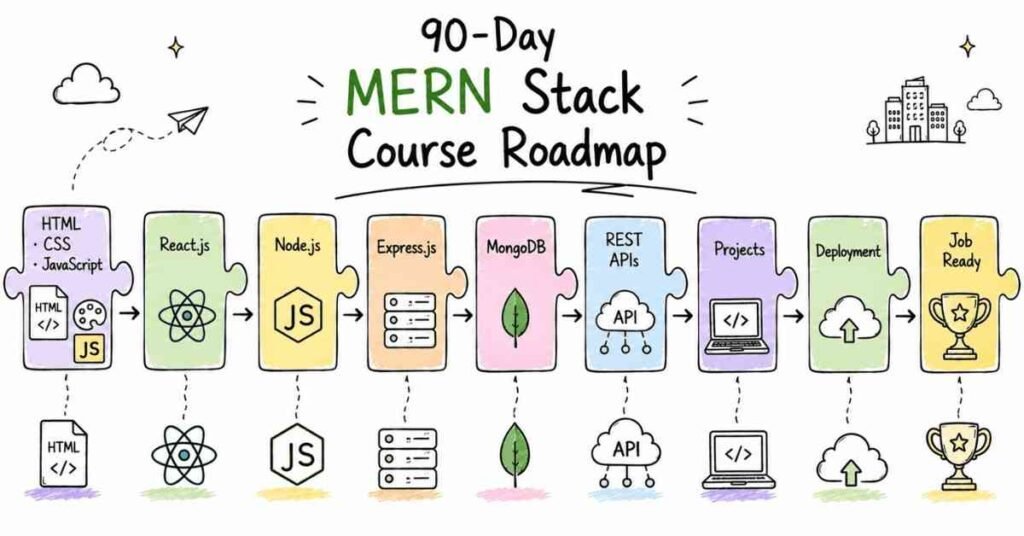
Complete MERN Stack 90-Day Course Roadmap: Your Journey from Beginner to Job-Ready Developer
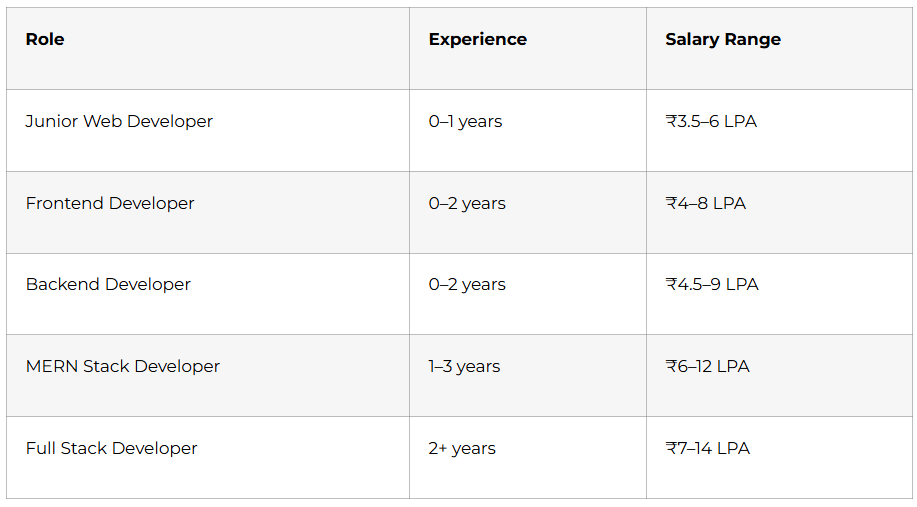
Landing a high-paying tech job in 2025 has become easier for those who master the right skills. MERN Stack development stands out as one of the most sought-after skill sets, with entry-level developers earning between ₹3.5-6 lakhs per annum and experienced professionals commanding packages of ₹12-20 lakhs or more. This comprehensive 90-day roadmap breaks down exactly what you need to learn, when to learn it, and how to position yourself for success in the competitive tech job market.
1. Why MERN Stack in 2025 ?
Companies across India are desperately searching for developers who can build complete web applications from scratch. The MERN Stack (MongoDB, Express.js, React.js, Node.js) gives you this superpower by teaching you both frontend and backend development using just one programming language: JavaScript. This means you can create everything from simple websites to complex e-commerce platforms, social media applications, and enterprise software.
The beauty of this stack lies in its versatility and market demand. Full Stack JavaScript Developers earn anywhere from ₹3-12 lakhs annually, while specialized React.js Developers can command ₹3.5-15 lakhs, and Backend Node.js Developers often earn ₹4-16 lakhs per year. Technical Leads working with MERN Stack can even reach salary packages of ₹8-30 lakhs annually.
What Makes This Roadmap Different?
Unlike generic online tutorials that leave you confused about what to learn next, this roadmap provides a day-by-day plan that takes you from absolute beginner to interview-ready developer in just 90 days. Each day builds upon the previous one, ensuring you develop strong fundamentals before moving to advanced concepts.
The Frontlines Edutech MERN Stack program stands apart because it includes not just technical training, but also LinkedIn profile building, resume preparation, interview guidance, daily assignments, and real placement support. You get access to on-demand video content, downloadable resources, and certification upon completion.
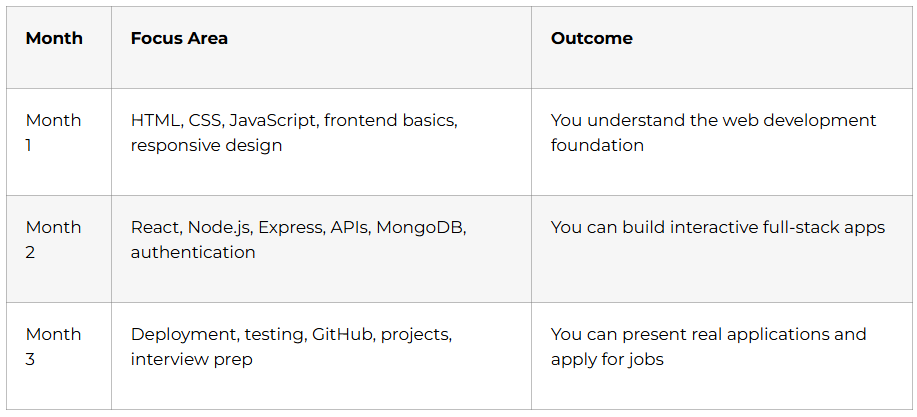
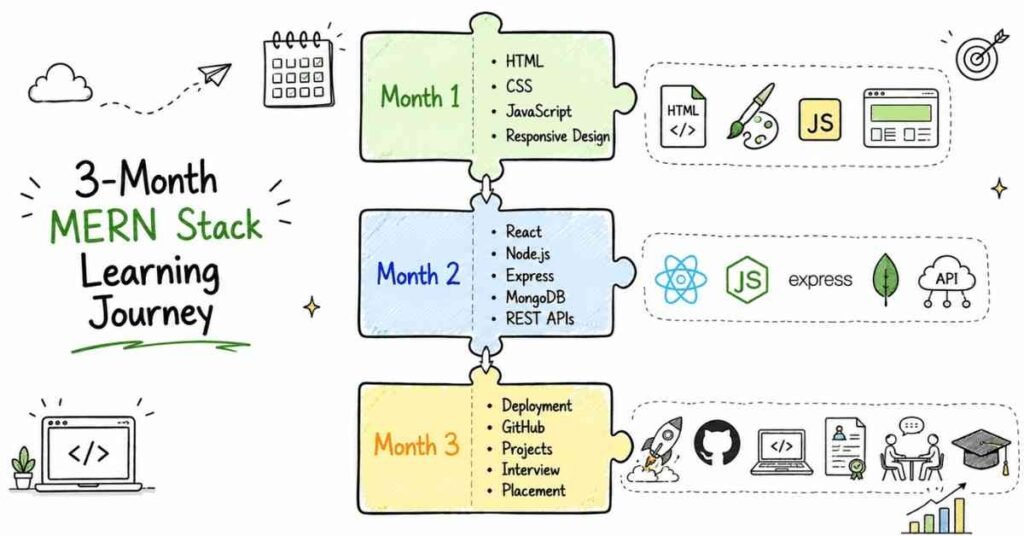
2. Building Your Foundation (Days 1-30)
Week 1: HTML & CSS Mastery (Days 1-7)
Day 1: Understanding Web Structure
Think of HTML as the skeleton of every website you visit. Today, you learn how web pages are structured using basic tags like headings, paragraphs, and divisions. You start by creating your very first webpage that displays text on a browser. The goal is simple: understand how browsers read and display HTML code.
Your first assignment involves creating a basic personal introduction page with your name, photo, and a short bio. This seemingly simple task teaches you the foundation of web development.
Day 2: Working with Images and Attributes
Images bring life to websites. You learn HTML image tags, how to add attributes like width and height, and how to organize images properly in your project folders. You also explore different HTML attributes that control how elements behave and appear on the page.
By day’s end, you create a photo gallery page showcasing multiple images with different sizes and layouts. This practical exercise reinforces your understanding of image management in web development.
Day 3: Forms and User Input
Every website that collects information (login pages, contact forms, registration pages) uses HTML forms. You dive deep into input tags, different input types (text, email, password, checkbox, radio buttons), and form attributes. Understanding forms is crucial because they form the bridge between users and your application’s backend.
Your assignment: create a complete registration form with name, email, password, gender selection, interests checkboxes, and a submit button. This exercise mimics real-world form creation.
Day 4: Lists and Navigation Menus
Professional websites have organized navigation menus and structured content lists. You learn ordered lists, unordered lists, nested lists, and how to structure navigation bars. These concepts might seem basic, but they’re fundamental to creating user-friendly websites.
You build a complete website navigation menu and create a recipe page with ingredient lists and step-by-step instructions using different list types.
Day 5: Meta Tags and SEO Basics
Meta tags are invisible to website visitors but crucial for search engines. You learn how to add meta descriptions, keywords, viewport settings for mobile responsiveness, and Open Graph tags for social media sharing. This knowledge separates amateur developers from professionals who understand web presence.
The day’s project involves adding proper meta tags to all the pages you’ve created so far, making them search-engine friendly and shareable on social media.
Day 6-7: CSS Styling Fundamentals
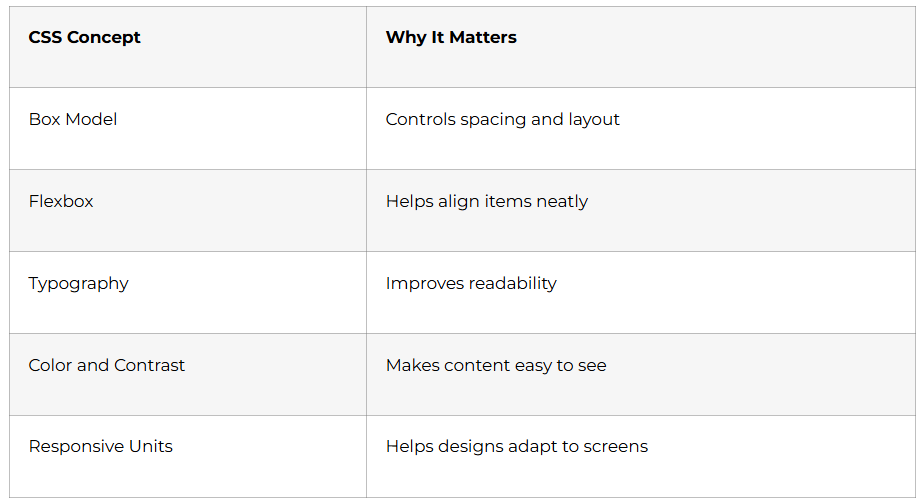
CSS transforms plain HTML into beautiful, engaging websites. Over these two days, you learn CSS styles, the box model (margin, padding, border), different types of selectors (class, id, element), and combinators that target specific elements.
You also understand CSS specificity (which rules take priority when multiple styles conflict) and practice applying colors, fonts, backgrounds, and spacing to your previous HTML projects. By the end of week 1, your projects look professional rather than plain text on white backgrounds.
Week 1 Milestone: You’ve built 4-5 complete webpages with proper styling, understanding the foundational languages of web development.
Week 2: Advanced CSS & Responsive Design (Days 8-14)
Day 8-9: Flexbox Layout System
Flexbox revolutionized web layout design. You learn how to create flexible, responsive layouts that automatically adjust to different screen sizes. Through practical exercises, you master flex containers, flex items, justify-content, align-items, flex-direction, and flex-wrap properties.
Your project: recreate popular website layouts (like Netflix’s movie grid or Instagram’s photo layout) using only Flexbox. This hands-on practice cements your understanding of modern layout techniques.
Day 10-11: CSS Grid System
While Flexbox handles one-dimensional layouts, CSS Grid manages complex two-dimensional layouts with rows and columns. You learn grid-template-columns, grid-template-rows, grid-gap, and how to position elements precisely within grid containers.
The assignment involves building a complete dashboard layout similar to what you see in admin panels or analytics tools. This project challenges you to combine your HTML, CSS, Flexbox, and Grid knowledge.
Day 12: CSS Positions and Units
Understanding position properties (static, relative, absolute, fixed, sticky) is essential for creating interactive elements like dropdown menus, tooltips, and modal windows. You also learn different CSS units (px, em, rem, %, vh, vw) and when to use each one.
Today’s practical work involves creating a fixed navigation bar that stays at the top while scrolling and a “back to top” button that appears only when users scroll down.
Day 13-14: Responsive Design with Media Queries
With over 60% of web traffic coming from mobile devices, responsive design is non-negotiable. You learn media queries to create layouts that look perfect on phones, tablets, and desktops. You practice breakpoints, mobile-first design approach, and testing across different screen sizes.
Your weekend project: convert all your previous projects into fully responsive websites that work flawlessly on any device. You test them on different screen sizes and fix any layout issues.
Week 2 Milestone: You can now create professional, responsive websites that look great on any device.
Week 3: JavaScript Fundamentals (Days 15-21)
Day 15: Variables and Data Types
JavaScript brings interactivity to websites. You start with variables (let, var, const) and understand different data types (strings, numbers, booleans, undefined, null). You learn when to use each variable declaration and why const is preferred for values that don’t change.
Practice involves creating a simple calculator script that stores numbers in variables and performs basic operations.
Day 16: Operators and Expressions
Mathematical operators (+, -, *, /, %), relational operators (>, <, >=, <=), and comparison operators (==, =, !=, !) form the backbone of programming logic. You understand the crucial difference between == (loose equality) and === (strict equality).
Your assignment: write programs that compare numbers, check if a year is a leap year, and calculate discount percentages.
Day 17-18: Conditional Statements and Logical Operators
Real programs make decisions. You learn if-else statements, else-if chains, switch cases, and logical operators (&&, ||, !) . You also master the ternary operator for concise conditional expressions .
Projects include building a grade calculator, a simple login validation system, and a traffic light simulator that changes colors based on conditions.
Day 19-20: Loops and Iterations
Loops let you repeat actions without writing the same code multiple times. You master while loops, for loops, nested loops, and understand when to use each type. Loop concepts are critical for working with arrays and data collections.
Practice exercises include printing patterns (stars, pyramids, number triangles), creating multiplication tables, and solving classic programming problems like FizzBuzz.
Day 21: Arrays and Strings Basics
Arrays store multiple values in a single variable, while strings represent text data. You learn array creation, accessing elements using indices, basic array methods (push, pop, shift, unshift), and string manipulation (concatenation, length, slice).
Your weekend challenge: create a shopping cart array where users can add items, remove items, and display the total number of items.
Week 3 Milestone: You’ve learned the fundamental programming concepts that apply to any programming language.
Week 4: Intermediate JavaScript (Days 22-30)
Day 22-23: Objects in JavaScript
Objects store related data together using key-value pairs. You learn object creation, accessing properties using dot notation and bracket notation, nested objects, and why objects are crucial for organizing code.
You build a student database where each student is an object containing name, age, grades, and contact information. You practice accessing and modifying object properties dynamically.
Day 24-25: Functions and Scope
Functions are reusable blocks of code that perform specific tasks. You master function declarations, function expressions, parameters and arguments, return statements, and the concept of scope (global vs local). You also learn about inbuilt functions like Math.random(), Math.floor(), and Date methods.
Projects include creating a tip calculator function, a temperature converter, and a function that validates email addresses.
Day 26-27: Object Methods and Higher-Order Functions
Object methods are functions stored inside objects. You learn how to create methods, understand the ‘this’ keyword, and explore higher-order functions that take other functions as arguments. You practice with array methods like map, filter, reduce, forEach, find, and some.
These powerful array methods eliminate the need for manual loops in most situations. Your assignment involves filtering a product list by price range, mapping data to new formats, and calculating total values using reduce.
Day 28-29: ES6 Features Part 1
Modern JavaScript (ES6+) introduced powerful features that make code cleaner and more efficient. You learn arrow functions, template literals, destructuring, spread operator, rest parameters, and default parameters.
You refactor all your previous JavaScript code using these modern features, making your code more readable and professional.
Day 30: Version Control with Git and GitHub
Git is the most important tool in every developer’s toolkit. You learn Git basics, creating repositories, making commits, pushing code to GitHub, branching, and merging. Understanding Git is mandatory for working in any development team.
By day’s end, you have a GitHub profile with all your projects properly committed and documented with README files. This becomes the start of your professional portfolio.
Month 1 Milestone: You’ve completed the foundation phase, understanding HTML, CSS, and JavaScript fundamentals. You have a GitHub portfolio with multiple projects.
3. DOM Manipulation and React Mastery (Days 31-60)
Week 5: Advanced JavaScript & DOM Power (Days 31-37)
Day 31-32: DOM Manipulation Fundamentals
The Document Object Model (DOM) is what connects JavaScript to your HTML pages. Think of the DOM as a bridge that lets your JavaScript code talk to and control everything on your webpage. You learn querySelector and querySelectorAll to find elements, innerHTML and innerText to change content, and how to create, modify, and delete elements dynamically.
Your practice project involves creating a dynamic product catalog where clicking buttons adds items to a shopping cart display, updates quantities, and calculates totals—all without refreshing the page. This hands-on work shows you how modern websites feel so interactive and responsive.
Day 33-34: DOM Traversal and Events
DOM traversal lets you navigate between parent elements, child elements, and sibling elements like moving through a family tree. You master parentElement, children, nextElementSibling, and previousElementSibling properties.
Event handling transforms static pages into interactive experiences. You learn addEventListener for clicks, form submissions, keyboard inputs, mouse movements, and touch events. Understanding event handling is crucial because every interactive element on websites—from dropdown menus to image sliders—relies on these concepts.
Your assignment: build an image gallery with previous/next buttons, keyboard navigation, and hover effects that highlight images.
Day 35: DOM Attributes and Local Storage
DOM attributes control how elements behave and appear. You learn to get, set, and remove attributes like src, href, disabled, and data attributes. Local Storage lets you save data in the browser so users don’t lose information when they refresh or close the page.
Today’s practical project involves creating a theme switcher that remembers user preferences (dark mode or light mode) even after closing the browser, and a note-taking app that saves notes locally.
Day 36-37: Sorting, Filtering, and Advanced Array Methods
Real applications constantly need to organize and filter data. You master different sorting techniques (bubble sort, selection sort), understand time complexity basics, and practice sorting objects by different properties. You also deepen your knowledge of filter, map, reduce, and combining these methods for complex data transformations.
Weekend challenge: build a product filtering system where users can sort by price (high to low, low to high), filter by category, search by name, and see results update instantly.
Week 5 Milestone: You can now create fully interactive web pages that respond to user actions and save data locally.
Week 6: Asynchronous JavaScript Mastery (Days 38-44)
Day 38-39: Understanding JavaScript Execution
JavaScript’s asynchronous nature confuses many beginners. You learn the difference between synchronous and asynchronous code, how JavaScript actually works under the hood, the call stack, Web APIs provided by browsers, and the event loop that coordinates everything.
Understanding these concepts separates junior developers who copy code from professionals who understand why code behaves the way it does. You practice with setTimeout, setInterval, and real-world examples showing why asynchronous programming matters.
Day 40-41: Promises and Modern Async Programming
Promises revolutionized JavaScript programming by making asynchronous code more manageable. You learn promise creation, .then() and .catch() methods, promise chaining, Promise.all() for handling multiple async operations, and the modern async/await syntax that makes asynchronous code look synchronous.
Your projects include creating a delayed notification system, fetching multiple APIs simultaneously and combining results, and building an image loader that shows loading states.
Day 42-43: Fetch API and Working with External Data
The Fetch API connects your applications to the entire internet. You learn GET requests to retrieve data, POST requests to send data, PUT and DELETE for updates and deletions, handling JSON data, error handling, and working with API authentication.
Real-world exercise: build a weather application that fetches real-time weather data from OpenWeatherMap API, displays it beautifully, handles loading states, and manages errors gracefully. This project mimics what you’ll do in actual development jobs.
Day 44: ES6 Advanced Features
You continue mastering modern JavaScript features including different loop types (for…of, for…in, forEach), arrow function nuances, object shorthand syntax, the difference between statements and expressions, lexical scope, let vs var vs const behavior, destructuring arrays and objects efficiently, hoisting behavior, Immediately Invoked Function Expressions (IIFE), and the often-confusing ‘this’ keyword.
Practice involves refactoring older JavaScript code using these modern patterns, making your code cleaner, shorter, and more professional.
Week 6 Milestone: You understand asynchronous JavaScript and can fetch and manipulate data from external APIs.
Week 7: JavaScript Prototypes & Advanced Projects (Days 45-51)
Day 45-46: Classical and Prototypal Inheritance
JavaScript’s inheritance system works differently from traditional programming languages. You learn classical inheritance concepts, prototype chains, creating custom prototype chains, Object.assign vs Object.setPrototypeOf, and how to chain methods using functions’ prototype objects.
You explore three ways to create objects: factory functions, constructor functions, and ES6 classes. Understanding these patterns helps you read and work with any JavaScript codebase.
Day 47-48: Advanced Object Creation and the ‘new’ Keyword
You dive deeper into prototypal inheritance using different object creation patterns, understand problems that arise with the ‘new’ keyword, and learn best practices for object-oriented programming in JavaScript. These concepts appear frequently in technical interviews and real-world codebases.
Projects include building a class hierarchy (like Vehicle → Car → ElectricCar) with shared and specific methods, demonstrating inheritance in action.
Day 49-50: DOM CRUD Operations and JWT Authentication
You build a complete application with Create, Read, Update, and Delete operations using DOM manipulation. You also learn about JWT (JSON Web Tokens) for authentication, understanding how modern web applications manage user login sessions securely.
The major project: create a personal diary application where users can add entries, edit existing ones, delete entries, and search through them—with JWT authentication protecting the data.
Day 51: Advanced DOM Concepts and Testing
Event bubbling and capturing determine the order in which events trigger on nested elements. Understanding these concepts prevents common bugs in interactive applications. You also implement pagination for large datasets, breaking information into manageable pages.
Introduction to JEST testing teaches you how professional developers ensure code quality. Writing tests seems tedious initially, but it becomes essential as applications grow complex. You learn basic test writing and understand why testing matters in production codebases.
Week 7 Milestone: You’ve completed JavaScript Level 3 with professional-grade projects showcasing advanced concepts.
Week 8: React.js Fundamentals (Days 52-60)
Day 52-53: React Introduction and Setup
React transformed how developers build user interfaces. You understand what React is, why Facebook created it, how it differs from vanilla JavaScript, and why companies worldwide prefer it. You learn about Babel (the transpiler that converts modern JavaScript), set up your development environment, and create your first React application.
Key concepts include components (reusable UI pieces), props (passing data between components), JSX syntax (writing HTML-like code in JavaScript), and the Virtual DOM (React’s secret to fast performance). Your first project: build a simple component-based layout with header, sidebar, and content sections.
Day 54-55: Conditional Rendering and Lists
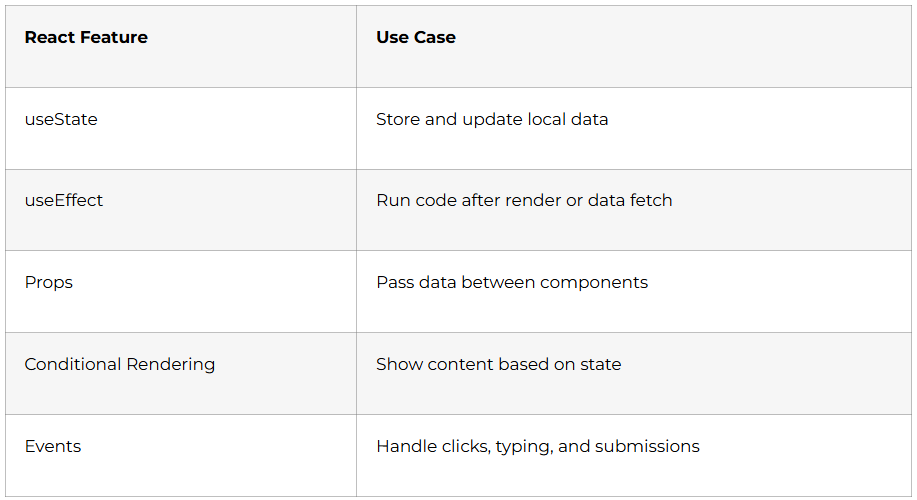
Real applications show different content based on conditions and frequently display lists of data. You master conditional rendering techniques (using if-else, ternary operators, and logical && in JSX), rendering lists with map(), understanding the importance of keys for performance, and creating dynamic component layouts.
Projects include a product showcase that displays different badges (Sale, New, Featured) based on conditions, and a user directory that renders from an array of user objects.
Day 56-57: Component Architecture and Styling
Professional React applications organize components intelligently. You learn import and export patterns (default exports vs named exports), understand Single Page Applications (SPA), discover how the Virtual DOM optimizes performance, and implement both Global CSS and CSS Modules for styling.
Understanding component architecture prevents your codebase from becoming messy and unmaintainable. You practice breaking a complex UI mockup into reusable components.
Day 58-59: State Management and Interactive Components
State is what makes React components dynamic and interactive. You learn the useState hook, understand the difference between props (passed from parent) and state (managed internally), handle synthetic events (React’s cross-browser event system), and build truly interactive components.
Projects include creating a counter with increment/decrement buttons, a form with controlled inputs, and a toggle switch component. These seemingly simple projects teach fundamental patterns you’ll use constantly.
Day 60: API Requests and Component Communication
Components need to share data and communicate with each other. You learn state upliftment (moving state to parent components), component communication patterns, making API requests in React, and displaying fetched data.
Your weekend challenge: build a multi-component application where a search bar in one component filters results displayed in another component, with data fetched from an API.
Month 2 Milestone: You’ve transitioned from vanilla JavaScript to React, understanding component-based architecture and state management.
4. Advanced React, Backend Development & Deployment (Days 61-90)
Week 9: Advanced React Concepts (Days 61-67)
Day 61-62: useEffect Hook and Side Effects
The useEffect hook handles side effects in React components. You learn what side effects are (API calls, subscriptions, timers), understand pure vs impure functions, master the component lifecycle (mounting, updating, unmounting), and control when effects run using dependency arrays.
Common mistakes with useEffect cause infinite loops and memory leaks. Understanding proper usage prevents these issues. Projects include building a live clock, creating a data-fetching component with loading states, and implementing component cleanup.
Day 63-64: Forms, Refs, and Context API
Forms are crucial in web applications. The useRef hook provides direct DOM access without re-rendering, useful for form inputs, auto-focusing fields, and managing uncontrolled components. The Context API solves “props drilling” (passing props through many component levels) by providing global state management.
You build a multi-step form, implement form validation, create a theme context that all components can access, and understand when to use Context vs props.
Day 65-66: React Router for Navigation
Single Page Applications need routing without page refreshes. You learn React Router DOM, BrowserRouter setup, Link and NavLink components for navigation, useParams hook for dynamic routes, useNavigate for programmatic navigation, and useSearchParams for query strings.
Major project: build a multi-page portfolio website with Home, About, Projects, and individual Project Detail pages—all navigating smoothly without page refreshes.
Day 67: Deployment and Environment Variables
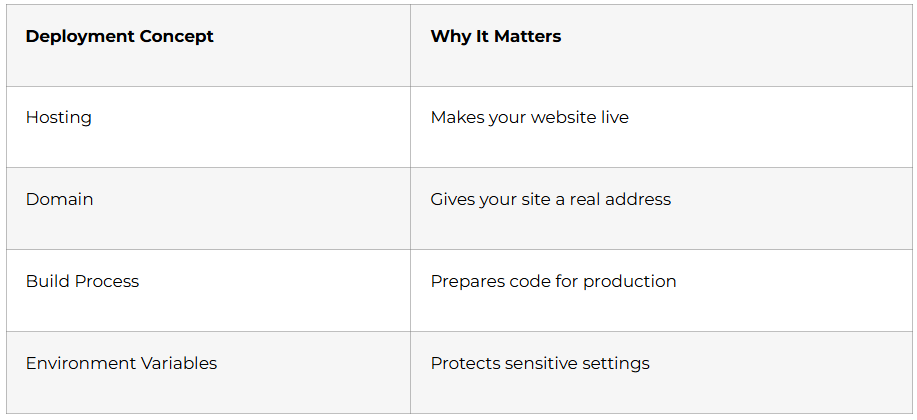
Deploying React applications makes them accessible to the world. You learn about environment variables for managing sensitive data, deploying to Netlify or Vercel, understanding build processes, and configuring custom domains.
By day’s end, your portfolio and projects are live on the internet with proper URLs you can share with potential employers.
Week 9 Milestone: You’ve mastered advanced React patterns used in production applications.
Week 10: State Management & UI Libraries (Days 68-74)
Day 68-69: useReducer and Advanced State Management
Complex state logic becomes difficult with useState. The useReducer hook provides a more structured approach for managing complex state transitions. You compare useState vs useReducer, understand when to use each, and learn about Axios for cleaner API requests.
Projects include building a shopping cart with complex state logic (adding items, removing items, updating quantities, applying discounts) using useReducer.
Day 70-71: Chakra UI Component Library
Building beautiful UIs from scratch takes time. Chakra UI provides pre-built, accessible components that look professional. You learn Chakra’s component system, responsive styling utilities, theme customization, and building forms and layouts quickly.
Your assignment: rebuild previous projects using Chakra UI, experiencing how component libraries accelerate development.
Day 72-73: Custom Hooks
Custom hooks let you extract reusable logic from components. You learn to create custom hooks like useTimer (for countdown timers), useDebounce (for search optimization), and useThrottle (for limiting function calls). You also build a custom OTP component from scratch.
Understanding custom hooks demonstrates advanced React knowledge that impresses interviewers.
Day 74: Redux State Management
Redux is the industry-standard state management library for large applications. You learn MVC and Flux architectures, Redux vs Context API, Redux architecture (actions, reducers, store), useDispatch and useSelector hooks, and shallowEqual for performance optimization.
Introduction project: build a simple counter with Redux to understand the pattern, then add it to your shopping cart application.
Week 10 Milestone: You can build production-grade frontends with professional state management and UI libraries.
Week 11: Backend Development with Node.js (Days 75-81)
Day 75-76: Node.js and Express Fundamentals
Backend development powers the server side of applications. You learn what Node.js is, common CLI commands, external Node modules, HTTP protocol, the 3-way handshake, HTTP verbs (GET, POST, PUT, DELETE), and streams.
Express.js simplifies server creation. You understand Express advantages, create your first server, define routes, and build a simple API that responds to requests.
Day 77-78: Middleware and MongoDB Introduction
Middleware functions process requests before they reach route handlers. You learn TimeLogger middleware, Watchman middleware for authorization, chaining multiple middlewares, and understanding query parameters vs route parameters.
You’re introduced to databases, SQL vs NoSQL differences, MongoDB basics, and why NoSQL databases suit modern web applications. You set up MongoDB Atlas (cloud database) and perform basic CRUD operations.
Day 79-80: Mongoose and Data Relationships
Mongoose provides structure to MongoDB. You learn schemas, models, CRUD operations using Mongoose and Express together, query handling, and data validation. Understanding relationships (one-to-one, one-to-many, many-to-many) lets you model real-world data structures.
Major backend project: create a complete Notes API with user accounts where users can create, read, update, and delete their personal notes.
Day 81: Authentication and Authorization
Security is paramount in web applications. You learn the difference between authentication (who are you?) and authorization (what can you do?), JWT tokens for session management, password hashing with bcrypt, and protecting routes with middleware.
You implement a complete authentication system with user registration, login, and protected routes that require valid tokens.
Week 11 Milestone: You can build secure backend APIs with authentication and database integration.
Week 12: Advanced Backend & Full Stack Integration (Days 82-90)
Day 82-83: Advanced MongoDB and Real-Time Features
Advanced MongoDB queries and aggregations let you perform complex data operations. You learn aggregation pipelines, regex for pattern matching, and socket.io for real-time bidirectional communication between clients and servers.
Projects include building a real-time chat feature and implementing advanced search functionality with filters.
Day 84-85: OAuth, Caching, and Cloud Services
OAuth allows users to log in with existing accounts (Google, Facebook). You learn OAuth implementation, understand setTimeout, setInterval, setImmediate, and process.nextTick() for scheduling tasks.
Caching with Redis improves application performance dramatically. You learn Redis basics, different data structures, and common commands. Introduction to cloud platforms (AWS EC2 for servers, S3 for storage) prepares you for real-world deployment.
Day 86-87: CI/CD and Deployment
Continuous Integration and Continuous Deployment automate testing and deployment. You learn about environment variables, deploying frontend to Netlify/Vercel, deploying backend to Render/Railway, using Postman for API testing, and setting up GitHub Actions workflows.
Your entire application (frontend + backend + database) goes live with proper deployment pipelines.
Day 88-90: Capstone Full Stack Project
The final three days focus on building a complete MERN Stack application integrating everything you’ve learned. Project options include:
- E-commerce Platform: Product listings, shopping cart, user authentication, order management, and admin dashboard.
- Job Board: Users can post jobs, apply to jobs, search and filter listings, with separate interfaces for employers and job seekers.
- Blogging Platform: Users can write posts, comment, like articles, follow authors, with admin moderation capabilities.
You implement proper version control with Git, create comprehensive README documentation, and deploy the complete application with live links. This capstone project becomes the centerpiece of your portfolio, demonstrating full stack capabilities to potential employers.
Month 3 Milestone: You’ve built a complete, deployed MERN Stack application showcasing professional development skills.
5. Profile Optimization for MERN Stack Developers
LinkedIn Profile Mastery
A well-optimized LinkedIn profile dramatically increases job opportunities. MERN Stack developers should craft compelling headlines like “Full Stack MERN Developer | React.js | Node.js | MongoDB | Building Scalable Web Applications” rather than generic titles .
Your About section should tell your story in first person, mentioning specific technologies (React, Node.js, Express, MongoDB), highlighting projects you’ve built, and including keywords recruiters search for. Avoid generic statements like “passionate developer”—instead, demonstrate passion through specific achievements.
The Experience section needs action-oriented descriptions using numbers and results. Instead of “Built web applications,” write “Developed 5+ full-stack web applications using MERN Stack, improving page load times by 40% through React optimization techniques”. Quantify your impact wherever possible.
Skills endorsements matter for LinkedIn’s algorithm. List technical skills prominently: JavaScript, React.js, Node.js, Express.js, MongoDB, Redux, RESTful APIs, Git, HTML5, CSS3, Responsive Design. Ask peers from your training program to endorse your skills.
Include project links in your Featured section, linking to live deployments and GitHub repositories. This allows recruiters to immediately see your work rather than just reading about it. Add screenshots or demo videos to make projects visually appealing.
Use a professional profile photo (clear headshot with good lighting) and a custom background image showcasing your tech stack or personal brand. These visual elements significantly impact first impressions.
Activity and engagement boost visibility. Share learning milestones, comment on tech posts, publish articles about your development journey, and engage with other developers’ content. Consistent activity keeps your profile visible in recruiters’ feeds.
GitHub Portfolio Excellence
Your GitHub profile serves as your developer resume. Create a compelling README profile that introduces you, lists technologies you work with, and showcases recent projects with live demo links. Pin your 6 best repositories, ensuring each has:
- Clear, descriptive repository names (mern-ecommerce-app vs project1)
- Comprehensive README files with project descriptions, features, tech stack, installation instructions, and screenshots
- Live deployment links prominently displayed
- Clean, well-commented code following industry standards
- Meaningful commit messages showing your development process
Consistent commit activity demonstrates dedication. Even small daily contributions show commitment to continuous learning.
Resume Building for MERN Stack Positions
MERN Stack developer resumes should lead with a Technical Skills section listing all relevant technologies: Frontend (React.js, Redux, HTML5, CSS3, JavaScript ES6+, Responsive Design), Backend (Node.js, Express.js, RESTful APIs), Database (MongoDB, Mongoose), Tools (Git, GitHub, Postman, VS Code).
The Projects section carries more weight than education for entry-level developers. For each project include:
- Project name and one-line description
- Technologies used
- Key features implemented (3-4 bullet points)
- Live demo link and GitHub repository link
- Quantifiable achievements where possible
Your Summary statement should immediately communicate your value: “Full Stack MERN Developer with hands-on experience building 8+ web applications using React.js, Node.js, Express, and MongoDB. Skilled in creating responsive user interfaces, RESTful APIs, and implementing authentication systems. Passionate about clean code and user-centric design.”
Use action verbs like developed, implemented, optimized, designed, architected, integrated, deployed. Avoid passive language.
Job Platforms for MERN Stack Developers
Indian Job Platforms
Naukri.com remains the largest platform for tech jobs in India, with thousands of MERN Stack openings. Create a detailed profile with keyword optimization, upload your resume, and apply to 5-10 positions daily. Set up job alerts for “MERN Stack Developer,” “React Developer,” “Full Stack JavaScript Developer,” and “MERN Developer”.
LinkedIn Jobs offers both direct applications and recruiter outreach opportunities. Enable “Open to Work” privately so recruiters can see you’re job hunting without alerting your current employer. Apply through LinkedIn and follow up with personalized connection requests to hiring managers.
Indeed India aggregates jobs from multiple sources. Upload your resume and set up email alerts. Indeed’s one-click applications make high-volume applying efficient.
AngelList (Wellfound) specializes in startup positions. MERN Stack developers find excellent opportunities with growing companies offering competitive packages and learning opportunities. Startups often value potential and projects over years of experience.
Instahyre connects developers directly with startups and established companies. Create a profile highlighting your MERN Stack projects, and companies reach out with relevant opportunities.
International Remote Opportunities
Toptal and Uplers connect Indian developers with global clients paying international rates. MERN Stack developers can earn $30-60 per hour on these platforms. These platforms require passing technical assessments and interviews, making strong projects and communication skills essential.
Remote.co, We Work Remotely, and RemoteOK list remote-first positions where geography doesn’t matter. Many U.S. and European companies hire Indian developers for remote full-time positions.
Freelancing Platforms
Upwork and Freelancer offer project-based work perfect for building experience and earning while job hunting. Create compelling profiles showcasing your MERN Stack skills, start with smaller projects to build reviews, then gradually increase rates.
6. Interview Preparation Strategy
Technical Interview Components
MERN Stack interviews typically include four components:
- JavaScript Fundamentals Assessment
Expect questions on closures, hoisting, prototypes, this keyword, promises, async/await, event loop, and ES6 features. Practice explaining these concepts clearly, as interviewers test both knowledge and communication.
- React.js Deep Dive
Questions cover component lifecycle, hooks (especially useState, useEffect, useReducer), state management, performance optimization (useMemo, useCallback, React.memo), and React Router. Be prepared to explain when to use Context API vs Redux.
- Backend and Database Knowledge
Interviewers ask about RESTful API design, middleware in Express, MongoDB queries, authentication/authorization, JWT tokens, password hashing, and database relationships. Understanding security best practices demonstrates maturity.
- System Design and Architecture
For slightly experienced roles, expect questions about application architecture, scaling considerations, database schema design, and API design patterns. Even entry-level candidates should understand basic architectural concepts.
Coding Challenges
Practice on LeetCode, HackerRank, and CodeSignal. Focus on JavaScript-specific problems, array/string manipulation, and common algorithms. Many companies use these platforms for screening.
Build live coding confidence by solving problems under time pressure, explaining your thought process aloud, and writing clean, readable code.
Behavioral Interview Preparation
Prepare stories using the STAR method (Situation, Task, Action, Result) for common questions:
- “Tell me about a challenging project and how you overcame obstacles”
- “Describe a time you had to learn a new technology quickly”
- “How do you handle tight deadlines and multiple priorities?”
- “Give an example of a bug you debugged and the process you followed”
Behavioral interviews assess cultural fit and communication skills, critical for remote and collaborative work.
Mock Interviews and Practice
Schedule mock interviews with peers from your training program. Practice explaining technical concepts clearly, thinking aloud during coding exercises, and responding confidently to questions. Record yourself to identify areas for improvement
Why Choose Frontlines Edutech for Your MERN Stack Journey?
The difference between learning online and learning effectively lies in structured guidance, mentorship, and accountability. Frontlines Edutech’s ISO 21001:2018 certified MERN Stack program provides exactly that.
Industry-Experienced Instructors
Trainers come from top industries with real-world project experience. They don’t just teach syntax—they share best practices, common pitfalls, and production-ready development approaches.
Daily Assignments and Real-Time Practice
Theory means nothing without practice. Every single day includes hands-on assignments reinforcing concepts learned. This consistent practice builds muscle memory and confidence.
From Scratch to Master Level Training
Whether you’re from an IT or Non-IT background, the program starts from absolute basics. No prior coding experience required—just commitment to learning.
Complete Career Support
Beyond technical training, you receive LinkedIn profile building, resume preparation, interview guidance, and placement updates. The program doesn’t end at skill development—it continues until you land your first job.
Certification and Portfolio
Receive a certification of completion validating your skills to potential employers. More importantly, you build 10+ portfolio projects including a complete capstone application showcasing full stack capabilities.
On-Demand Video Content
Access recorded sessions whenever needed for revision. Learn at your own pace while following the structured 90-day roadmap.
Downloadable Resources and Q&A Sessions
All course materials, code samples, and resources are available for download. Regular Q&A sessions ensure no question goes unanswered.
Proven Track Record
Frontlines Edutech has helped thousands of learners across India transition into high-paying tech careers. The organization has earned trust and recognition by consistently delivering results
7. Your Next Steps
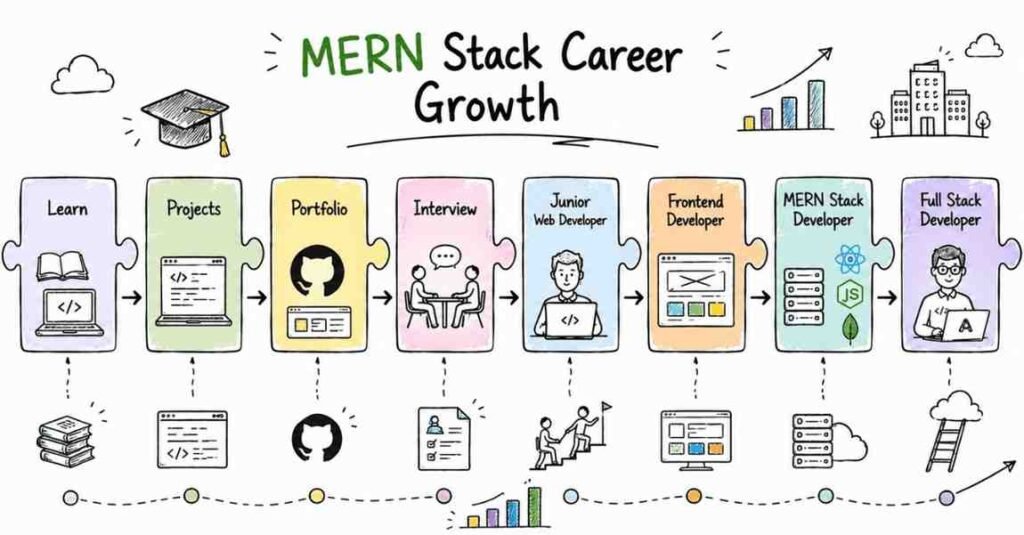
The journey from complete beginner to job-ready MERN Stack developer takes 90 days of focused effort. The roadmap is clear, the resources are available, and the opportunities are abundant. MERN Stack developers earn between ₹3.5 lakhs to ₹20+ lakhs annually depending on experience. The investment in learning today pays dividends throughout your career.
Don’t wait for the “perfect time” to start learning. The tech industry moves fast, and opportunities favor those who take action. Whether you’re a college student, recent graduate, or professional looking to transition into tech, MERN Stack development offers a clear path to a rewarding career.
Frontlines Edutech makes this journey structured, supported, and success-oriented. With expert guidance, daily practice, real projects, and comprehensive career support, you’re not just learning to code—you’re preparing for a successful tech career.
Take the first step today:
📞 Call Frontlines Edutech: +91-83330 77727
🌐 Visit: www.frontlinesedutech.com
📧 Email: media.frontlines@gmail.com
📍 Follow us on:
- Instagram: @frontlines_edutech
- LinkedIn: Frontlines Edutech Private Limited
- YouTube: FrontLines Media
Register now and start your 90-day transformation from beginner to MERN Stack developer. Your dream tech career starts here.