90-Day Azure Mastery Roadmap: Your Complete Journey from Beginner to Job-Ready Professional

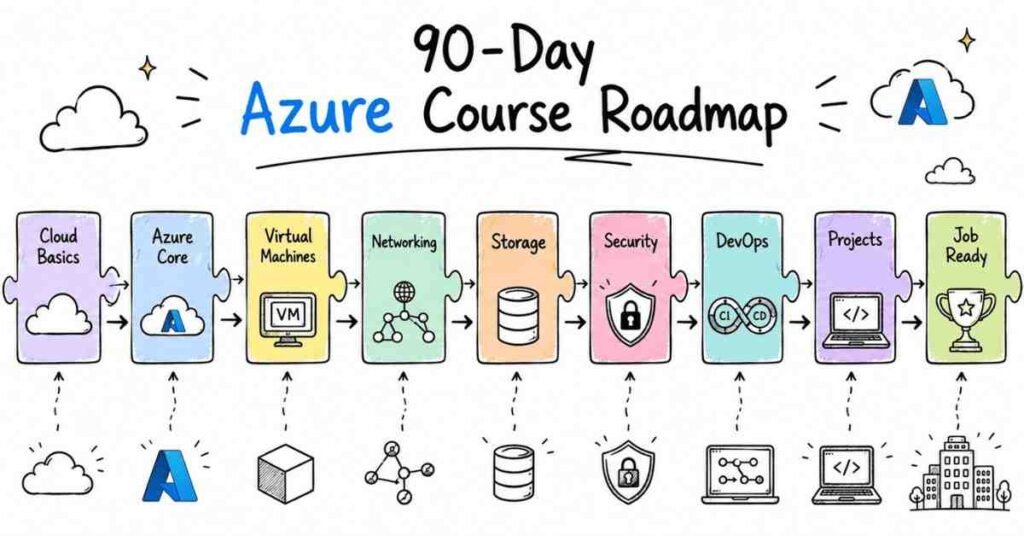
When you think about cloud computing today, Microsoft Azure stands tall as one of the most sought-after skills in the technology industry. Companies across Bangalore, Hyderabad, Pune, and Mumbai are hunting for Azure professionals who can architect, deploy, and manage cloud infrastructure. This roadmap breaks down exactly how you’ll transform from a complete beginner into a confident Azure expert in just three months

1. How This Azure Roadmap Works

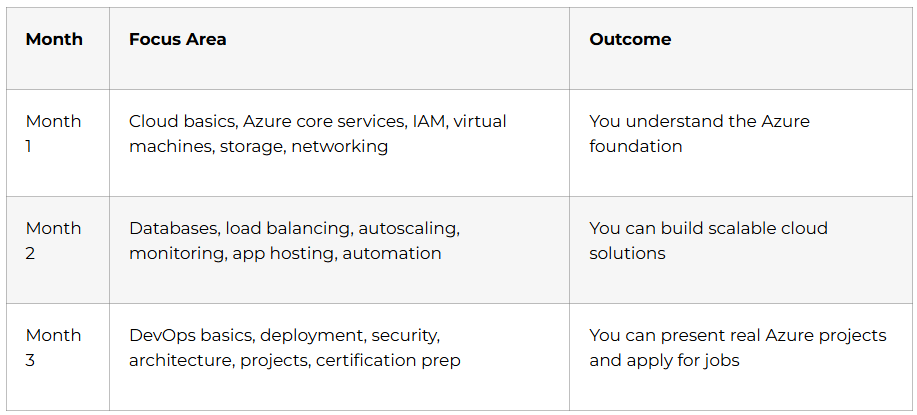
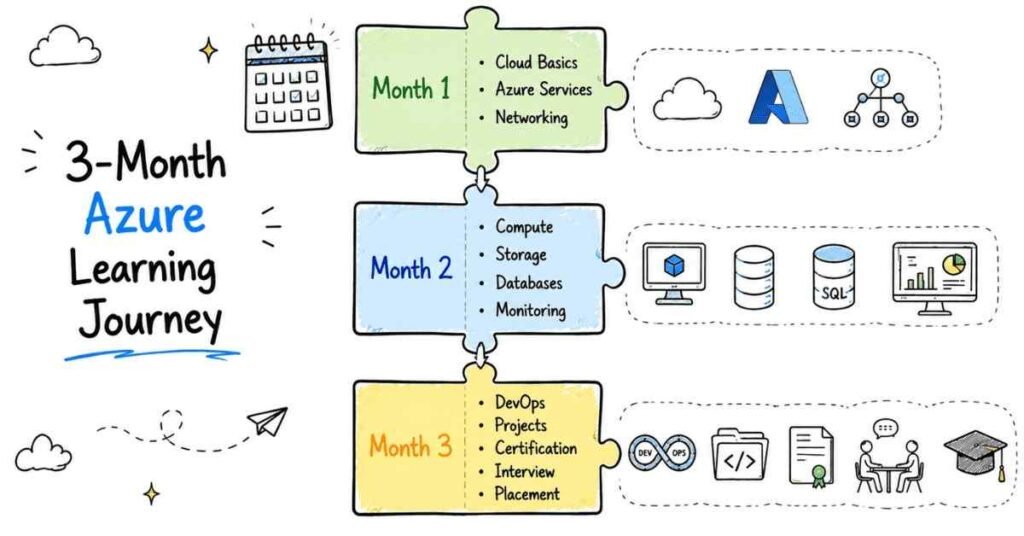
Unlike generic courses that rush through concepts, this structured 90-day plan ensures you absorb each topic through hands-on practice before moving forward. Every week builds upon the previous one, creating a solid foundation that mirrors real-world enterprise environments. By the end of these 90 days, you won’t just know Azure—you’ll have deployable skills that hiring managers actively search for on LinkedIn and job portals.      


2. WEEK 1-2: Foundation Layer – Understanding Cloud & Azure Basics

Day 1-3: Cloud Computing Fundamentals

What You’ll Learn:
Your journey starts with understanding what cloud computing actually means beyond the buzzwords. You’ll explore the three main service models that every Azure professional must know inside-out.   

Daily Breakdown:

Day 1: Introduction to cloud computing concepts, understanding the difference between traditional servers and cloud infrastructure. Learn about Infrastructure as a Service (IaaS), Platform as a Service (PaaS), and Software as a Service (SaaS) with real-world examples from companies you interact with daily.  

Day 2: Dive into deployment models—public cloud, private cloud, hybrid cloud, and multi-cloud strategies. Understand why companies choose Azure over competitors and where Azure fits in the multi-cloud ecosystem.   

Day 3: Explore Azure’s global infrastructure including regions, availability zones, and data centers. Learn about compliance standards and how Azure helps companies meet regulatory requirements.  

Hands-On Practice: Create your first free Azure account, navigate the Azure Portal, and understand the dashboard layout. This free tier gives you access to services without spending money while learning.  

Day 4-7: Azure Active Directory & Identity Management

What You’ll Learn:
Security forms the backbone of every cloud deployment. Azure Active Directory (Azure AD) controls who can access what resources across your entire cloud environment.  

Daily Breakdown:

Day 4: Understanding identity versus access management, learning about Azure AD tenants, users, and groups. Explore how Azure AD differs from traditional Active Directory.  

Day 5: Hands-on creation of user accounts, assigning licenses, and managing user properties. Learn about bulk user operations that save time in enterprise scenarios.   

Day 6: Implementing Multi-Factor Authentication (MFA) and conditional access policies. Understand why MFA prevents most security breaches in cloud environments.  

Day 7: Role-Based Access Control (RBAC) fundamentals—assigning the right permissions to the right people. Practice creating custom roles that match specific job functions.   

Hands-On Practice: Set up a test Azure AD environment, create 10 sample users with different roles, implement MFA, and configure access policies. Document everything you do—this becomes part of your portfolio later.    

Day 8-10: Azure Virtual Machines – Your First Compute Resource

What You’ll Learn:
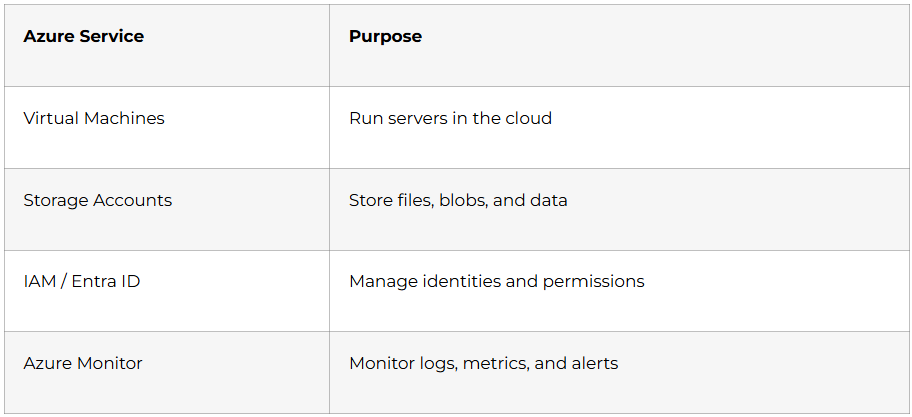
Virtual Machines represent the most fundamental compute service in Azure. Understanding VMs thoroughly prepares you for more advanced services later.   

Daily Breakdown:

Day 8: Learn VM sizing, families (General Purpose, Compute Optimized, Memory Optimized), and how to choose the right VM for different workloads. Understand the pricing model and how to estimate costs.  

Day 9: Deploy your first Linux VM and Windows VM through the Azure Portal. Connect to these VMs using SSH for Linux and RDP for Windows.   

Day 10: Configure VM availability sets, availability zones, and understand high availability concepts. Learn about VM backup and disaster recovery basics.  

Hands-On Practice: Create two VMs (Linux and Windows), install web servers on both (Apache/IIS), and verify connectivity. Take screenshots showing your successful deployments for your portfolio.    

Day 11-14: Azure Networking Essentials

What You’ll Learn:
Networking connects all your Azure resources together securely. Without solid networking knowledge, you can’t build production-ready solutions.   

Daily Breakdown:

Day 11: Virtual Network (VNet) fundamentals—creating VNets, understanding address spaces, and subnet design. Learn CIDR notation and IP address planning.   

Day 12: Network Security Groups (NSGs) and application security groups. Practice creating inbound and outbound security rules that control traffic flow.   

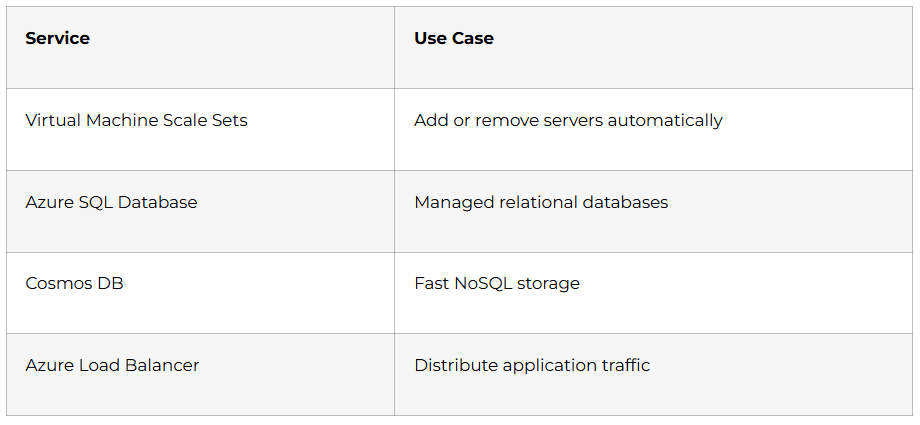
Day 13: Azure Load Balancers—distributing traffic across multiple VMs for high availability. Understand the difference between Layer 4 and Layer 7 load balancing.  

Day 14: VNet peering and connecting multiple virtual networks. Learn about VPN Gateway basics for hybrid connectivity.  

Hands-On Practice: Build a complete network architecture with two VNets, peer them together, deploy VMs in each VNet, and configure NSG rules to control access. Test connectivity between VMs across different VNets.  

3. WEEK 3-4: Storage & Database Services – Managing Data in Azure

Day 15-18: Azure Storage Solutions

What You’ll Learn:
Data storage strategies determine application performance and cost efficiency. Azure offers multiple storage types, each designed for specific scenarios.   

Daily Breakdown:

Day 15: Azure Blob Storage fundamentals—hot, cool, and archive tiers. Understanding when to use each tier based on access patterns.   

Day 16: Creating storage accounts, containers, and uploading objects. Learn about storage replication options (LRS, GRS, RA-GRS).   

Day 17: Azure Managed Disks for VM storage. Understanding the difference between Standard HDD, Standard SSD, Premium SSD, and Ultra Disk.  

Day 18: Azure File Storage for SMB file shares in the cloud. Practice mounting Azure File Shares on Windows and Linux VMs.   

Hands-On Practice: Create a storage account, upload 100 sample files to different blob containers, configure lifecycle management policies to move data between tiers automatically. Attach managed disks to VMs and expand them.  

Day 19-22: Azure Database Services

What You’ll Learn:
Modern applications rely on managed database services that eliminate infrastructure management overhead. Azure provides fully managed databases that scale automatically.   

Daily Breakdown:

Day 19: Azure SQL Database introduction—creating your first SQL database in the cloud. Understanding DTU-based versus vCore-based purchasing models.  

Day 20: Connecting to Azure SQL Database using SQL Server Management Studio (SSMS) and Azure Data Studio. Practice running queries and managing database objects.  

Day 21: NoSQL with Azure Cosmos DB basics—understanding globally distributed databases. Learn about consistency levels and partition keys.  

Day 22: Database backup, restore, and point-in-time recovery. Implement automated backup policies for business continuity.  

Hands-On Practice: Deploy an Azure SQL Database, create tables, insert sample data, and run performance queries. Set up automated backups and perform a test restore.  

Day 23-25: Azure Container Services Fundamentals

What You’ll Learn:
Containers revolutionized how applications deploy and scale. Azure Container Registry and Azure Container Instances provide the foundation for container workloads.   

Daily Breakdown:

Day 23: Introduction to containerization concepts and Docker basics. Understanding container images versus virtual machines.  

Day 24: Azure Container Registry (ACR) setup and pushing Docker images. Learn about image tagging and versioning best practices.  

Day 25: Azure Container Instances (ACI) for running containers without managing servers. Deploy a multi-container group with shared networking.   

Hands-On Practice: Create a simple web application, containerize it using Docker, push the image to ACR, and deploy it using ACI. Verify the application runs successfully.  

Day 26-28: Azure Kubernetes Service (AKS) Introduction

What You’ll Learn:
Kubernetes orchestrates containers at enterprise scale. AKS removes the complexity of managing Kubernetes infrastructure.   

Daily Breakdown:

Day 26: Kubernetes architecture fundamentals—pods, nodes, deployments, and services. Understanding the control plane and worker nodes.  

Day 27: Creating your first AKS cluster through Azure Portal and Azure CLI. Connecting to the cluster using kubectl.   

Day 28: Deploying applications to AKS using YAML manifests. Exposing applications using Kubernetes services (ClusterIP, NodePort, LoadBalancer).   

Hands-On Practice: Deploy a three-tier application (frontend, backend, database) on AKS. Configure scaling and verify high availability.  

4. WEEK 5-6: Azure DevOps & Automation – CI/CD Pipeline Mastery

Day 29-32: Azure Pipelines Fundamentals

What You’ll Learn:
Continuous Integration and Continuous Deployment automate software delivery, reducing manual errors and speeding up releases. Azure Pipelines integrates seamlessly with GitHub, Bitbucket, and Azure Repos.   

Daily Breakdown:

Day 29: Understanding CI/CD concepts, pipeline stages, and deployment strategies. Learn about build agents (Microsoft-hosted versus self-hosted).    

Day 30: Creating your first Azure Pipeline using YAML syntax. Configure triggers for automated builds on code commits.   

Day 31: Implementing build tasks—compiling code, running tests, and creating artifacts. Understanding artifact publishing and consumption.   

Day 32: Release pipelines and deployment stages (Dev, QA, Production). Implementing approval gates and deployment conditions.   

Hands-On Practice: Build a complete CI/CD pipeline that automatically builds, tests, and deploys a web application to Azure App Service whenever code changes. Add automated testing and approval workflows.  

Day 33-36: Infrastructure as Code with Azure

What You’ll Learn:
Managing infrastructure through code ensures consistency, version control, and repeatability. Azure supports multiple IaC tools including ARM templates, Bicep, and Terraform.   

Daily Breakdown:

Day 33: Introduction to Infrastructure as Code principles and benefits. Understanding declarative versus imperative approaches.  

Day 34: Azure Resource Manager (ARM) template basics—structure, parameters, and variables. Creating simple ARM templates for common resources.  

Day 35: Terraform with Azure—provider configuration, resource blocks, and state management. Writing Terraform code to deploy VMs, storage accounts, and networks.   

Day 36: Bicep as a simpler alternative to ARM templates. Converting existing resources to Bicep code.   

Hands-On Practice: Write Terraform code that provisions a complete Azure environment including VNet, VM, storage account, and database. Store Terraform state in Azure Storage for team collaboration.   

Day 37-40: Configuration Management & Automation

What You’ll Learn:
After deploying infrastructure, configuration management ensures consistent software installation and settings across servers. Ansible provides agentless automation for Azure resources.   

Daily Breakdown:

Day 37: Ansible architecture and how it manages Azure resources. Setting up Ansible on a control machine.  

Day 38: Writing Ansible playbooks for Azure—creating VMs, managing storage, and configuring networks. Understanding Ansible modules specific to Azure.  

Day 39: Ansible roles for code organization and reusability. Creating a role library for common Azure tasks.  

Day 40: Integrating Ansible with Azure Pipelines for automated configuration. Using Ansible Vault to secure sensitive information.   

Hands-On Practice: Write Ansible playbooks that deploy multiple Azure VMs, install web servers, configure firewalls, and deploy applications—all without manual intervention. Integrate this into an Azure Pipeline.  

Day 41-42: Monitoring & Logging with Azure

What You’ll Learn:
Production systems require constant monitoring to detect issues before they impact users. Azure provides comprehensive monitoring tools built into every service.   

Daily Breakdown:

Day 41: Azure Monitor fundamentals—metrics, logs, and alerts. Configuring metric alerts for CPU, memory, and disk usage.  

Day 42: Log Analytics workspace and writing Kusto Query Language (KQL) queries. Creating custom dashboards and workbooks.   

Hands-On Practice: Set up comprehensive monitoring for your deployed resources. Create alerts that notify you via email when thresholds exceed limits. Build a dashboard showing real-time metrics.  

 5 .WEEK 7-8: Advanced Azure Services & Security

Day 43-46: Azure Security & Compliance

What You’ll Learn:
Security isn’t optional in cloud computing—it’s the foundation of everything you build. Azure provides multiple layers of security controls that protect data, applications, and infrastructure from modern threats.   

Daily Breakdown:

Day 43: Azure Security Center (now Microsoft Defender for Cloud) fundamentals. Understanding security posture, secure score, and how to interpret security recommendations. Learn about threat detection and security alerts that notify you about suspicious activities.   

Day 44: Network security in depth—implementing Azure Firewall, DDoS Protection, and Web Application Firewall (WAF). Configure network security best practices including micro-segmentation and zero-trust architecture principles.   

Day 45: Azure Key Vault for secrets management. Store passwords, connection strings, API keys, and certificates securely instead of hardcoding them in applications. Practice rotating secrets automatically and integrating Key Vault with applications.    

Day 46: Compliance and governance using Azure Policy and Azure Blueprints. Create policies that enforce organizational standards across all Azure resources automatically. Understand regulatory compliance frameworks like GDPR, HIPAA, and ISO certifications.   

Hands-On Practice: Implement a comprehensive security architecture for a three-tier application. Configure Azure Security Center recommendations, implement network segmentation with NSGs and Azure Firewall, store all secrets in Key Vault, and create Azure Policies that prevent insecure resource deployments. Document your security architecture with diagrams.    

Day 47-50: Cost Management & Optimization

What You’ll Learn:
Cloud costs can spiral out of control without proper management and monitoring. Learning cost optimization early in your Azure journey prevents expensive mistakes later.   

Daily Breakdown:

Day 47: Understanding Azure pricing models—pay-as-you-go, reserved instances, spot instances, and savings plans. Learn how different purchasing options impact total cost of ownership.  

Day 48: Azure Cost Management tools—cost analysis, budgets, and alerts. Create spending budgets with email notifications when costs approach thresholds. Use cost analysis to identify which resources consume the most budget.   

Day 49: Resource optimization strategies—rightsizing VMs, using autoscaling, stopping unused resources, and choosing appropriate storage tiers. Implement tags for cost allocation across departments or projects.   

Day 50: Azure Advisor recommendations for cost savings. Review and implement Advisor suggestions that reduce spending without impacting performance. Learn about Azure Hybrid Benefit for existing Windows Server and SQL Server licenses.  

Hands-On Practice: Conduct a complete cost audit of all resources deployed during the previous 50 days. Tag every resource with cost center information, create monthly budgets with alerts, identify optimization opportunities, and document potential savings. Create a cost optimization report showing current spend versus optimized spend.  

Day 51-54: Advanced Networking & Hybrid Connectivity

What You’ll Learn:
Enterprise environments rarely exist only in the cloud. Hybrid connectivity bridges on-premises infrastructure with Azure resources securely.   

Daily Breakdown:

Day 51: VPN Gateway configuration for site-to-site connectivity. Understand different VPN Gateway SKUs and when to use each one. Configure BGP routing for dynamic route exchange.   

Day 52: Azure ExpressRoute for private, dedicated connectivity to Azure. Learn when ExpressRoute makes sense versus VPN Gateway based on bandwidth and latency requirements.   

Day 53: Azure Front Door and Traffic Manager for global load balancing and routing. Implement geo-distributed applications that route users to the nearest datacenter.   

Day 54: Azure Virtual WAN for simplified wide-area networking. Understand hub-and-spoke network topologies and how Virtual WAN simplifies complex network architectures.   

Hands-On Practice: Design and implement a hybrid network architecture connecting a simulated on-premises environment to Azure using VPN Gateway. Configure custom routing, test failover scenarios, and measure network performance.  

Day 55-56: Azure Backup & Disaster Recovery

What You’ll Learn:
Data loss can destroy businesses overnight. Azure provides comprehensive backup and disaster recovery services that ensure business continuity.   

Daily Breakdown:

Day 55: Azure Backup for protecting VMs, databases, and files. Configure backup policies, retention periods, and recovery objectives (RPO/RTO).   

Day 56: Azure Site Recovery for disaster recovery orchestration. Implement automated failover and failback between Azure regions or from on-premises to Azure.   

Hands-On Practice: Set up automated backup for all VMs and databases in your test environment. Perform test recoveries to verify backup integrity. Configure Site Recovery replication and execute a disaster recovery drill.  

6. WEEK 9-10: Real-World Projects & Specialization

Day 57-63: Capstone Project – Full Application Deployment

What You’ll Build:
Real-world scenarios demonstrate your ability to integrate multiple Azure services into cohesive solutions. This week-long project showcases everything learned over the past 8 weeks.    

Project Requirements:

Deploy a complete three-tier web application with the following components:  

Frontend Layer: Host a responsive web application using Azure App Service or Azure Static Web Apps. Implement Azure CDN for content delivery to global users.  

Application Layer: Build REST APIs using Azure Functions or Azure App Service. Implement authentication using Azure AD. Store application secrets in Azure Key Vault.   

Database Layer: Use Azure SQL Database for structured data and Azure Cosmos DB for unstructured data. Implement automated backups and geo-replication.  

CI/CD Pipeline: Create Azure Pipelines that automatically build, test, and deploy code changes. Implement staging and production environments with approval gates.   

Infrastructure as Code: Write Terraform or Bicep code defining the entire infrastructure. Store IaC code in Git repository with version control.   

Monitoring & Logging: Configure Azure Monitor, Log Analytics, and Application Insights. Create custom dashboards showing application health and performance metrics.   

Security Implementation: Apply network security groups, Azure Firewall rules, and implement Azure Policy for governance. Ensure all compliance requirements are met.  

Cost Management: Tag all resources appropriately, set up cost alerts, and document the monthly spending forecast.  

Daily Focus:

Day 57-58: Plan the architecture, create detailed design documents, and set up the Git repository.  

Day 59-60: Write Infrastructure as Code and deploy all Azure resources.  

Day 61-62: Build and deploy the application, configure CI/CD pipelines.  

Day 63: Implement monitoring, security, documentation, and perform end-to-end testing.  

Deliverables: Complete architecture diagram, Git repository with all code, deployed working application accessible via URL, documentation covering deployment steps, and a video walkthrough explaining your design decisions.  

Day 64-70: Azure Certification Preparation (AZ-104)

What You’ll Learn:
The AZ-104 Azure Administrator certification validates your expertise in implementing, managing, and monitoring Azure environments. This certification significantly boosts your resume when applying for Azure roles.    

Daily Breakdown:

Day 64-65: Review all exam objectives and identify knowledge gaps. Take a diagnostic practice exam to establish baseline knowledge.   

Day 66-67: Deep dive into weak areas identified in the diagnostic exam. Focus heavily on hands-on practice rather than memorization.   

Day 68-69: Complete full-length practice exams under timed conditions. Review all incorrect answers thoroughly and understand why you missed them.   

Day 70: Final review of exam objectives, exam registration, and mental preparation.  

Study Resources: Microsoft Learn platform offers free, comprehensive learning paths for AZ-104. Practice labs provide hands-on experience without consuming your Azure credits. Join Azure study groups on LinkedIn and Discord for peer support.     


7. WEEK 11-12: Career Preparation & Job Readiness

Day 71-74: LinkedIn Profile Optimization for Azure Professionals

What Recruiters Look For:
Your LinkedIn profile serves as your digital resume that recruiters search daily. Optimizing it correctly increases visibility to hiring managers seeking Azure talent.   

Daily Action Plan:

Day 71: Craft a compelling headline that includes keywords recruiters search for  . Instead of “Student” or “Fresher,” write “Azure Cloud Engineer | AZ-104 Certified | DevOps Enthusiast | Terraform | Kubernetes”  . Your headline appears in every search result, making it crucial for discoverability  .

Day 72: Rewrite your About section telling your Azure journey story. Explain what sparked your interest in cloud computing, highlight your hands-on project experience, and describe the types of roles you’re pursuing. Include technical keywords naturally throughout this section without keyword stuffing.   

Day 73: Document all projects completed during the 90-day journey in the Projects section. For each project, include technical architecture, technologies used, problems solved, and measurable outcomes. Add screenshots or diagrams that showcase your work visually.   

Day 74: Add certifications, skills, and request recommendations from mentors or peers. List your AZ-900 and AZ-104 certifications prominently. Endorse connections for their Azure skills to increase reciprocal endorsements.    

Profile Optimization Checklist:

Professional headshot photo with good lighting and plain background. Custom banner image related to Azure or cloud computing (create one using Canva). Featured section highlighting your best projects and GitHub repository. Experience section framed with achievement-oriented bullet points using action verbs. Education section including relevant coursework and academic projects.   

Want the complete LinkedIn Profile Optimization Guide for Azure Professionals? Check out our detailed guide covering headline formulas, keyword research, content posting strategies, and networking tactics that helped 500+ students land Azure interviews. [Link to Full LinkedIn Guide]  

Day 75-78: Job Platform Strategy & Application Process

Where Azure Jobs Hide:
Knowing where to look dramatically increases your job search efficiency. Azure professionals find opportunities across multiple platforms beyond generic job boards.   

Platform-Specific Strategy:

LinkedIn Jobs: Set up job alerts for “Azure Administrator,” “Azure DevOps Engineer,” “Cloud Engineer,” and “Junior Azure Developer”. Apply within 24 hours of job posting when competition remains low. Engage with company content before applying to increase profile visibility.   

Naukri.com: Create a detailed profile emphasizing Azure skills, certifications, and hands-on projects. Upload a keyword-optimized resume that passes ATS (Applicant Tracking Systems). Update your profile weekly to maintain high visibility in recruiter searches.  

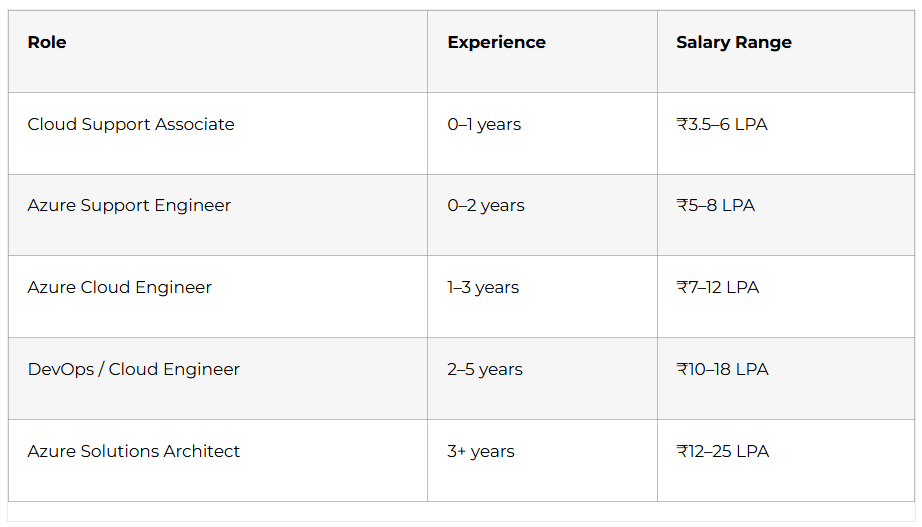
Indeed: Upload your resume and let the platform’s algorithm match you with relevant Azure positions. Set salary expectations realistically based on fresher Azure Administrator salaries (₹3-6 LPA in tier-1 cities).  

AngelList/Wellfound: Target startups that heavily use Azure infrastructure. Startups often hire for attitude and learning ability over years of experience.  

Company Career Pages: Directly apply on company websites of top Azure users—Accenture, TCS, Infosys, Wipro, Capgemini, Cognizant, IBM, and Microsoft India. Many roles get filled before reaching job boards.  

Daily Application Goals:

Day 75-76: Set up profiles on all platforms, configure job alerts, and create platform-specific resumes. Research companies hiring Azure professionals in your target location.   

Day 77-78: Apply to 5-10 positions daily matching your skill level. Track all applications in a spreadsheet with follow-up dates. Join Azure and DevOps communities where job opportunities get shared.    

Resume Optimization Tips:

Start with a strong summary highlighting Azure certifications and hands-on experience. List technical skills in a dedicated section using exact keywords from job descriptions. Quantify achievements wherever possible with metrics and percentages. Include links to GitHub repository, LinkedIn profile, and deployed projects.  

Need a Job-Ready Azure Resume Template? Access our ATS-friendly resume template designed specifically for Azure freshers, including real examples that got interview callbacks from top IT companies. [Link to Resume Template]  

Day 79-84: Interview Preparation – Technical & Behavioral

What Interviewers Actually Ask:
Azure interviews combine technical knowledge assessment with problem-solving scenarios and behavioral questions. Preparation across all three dimensions separates successful candidates from those who struggle.  

Technical Interview Preparation:

Day 79-80: Master the most commonly asked Azure interview questions covering fundamentals. Prepare detailed answers about Virtual Machines, Storage Accounts, Virtual Networks, Azure AD, and Resource Groups. Practice explaining concepts using the Feynman Technique—explaining complex topics in simple language.   

Day 81-82: Dive deeper into scenario-based questions. Interviewers often present real-world problems: “How would you design a highly available web application serving users across multiple countries?” Practice drawing architecture diagrams on paper or whiteboard while explaining your reasoning.   

Day 83: Prepare for hands-on assessments where interviewers ask you to solve problems in the Azure Portal during the interview. Common tasks include creating VMs, configuring networking, troubleshooting connectivity issues, and reviewing ARM templates.   

Common Technical Questions by Category:

Azure Fundamentals: Explain IaaS vs PaaS vs SaaS with examples. What are Azure regions and availability zones? How does Azure pricing work?  

Compute Services: Difference between VM Scale Sets and Availability Sets? When would you use Azure App Service over Virtual Machines?  

Networking: How do Network Security Groups work? Explain VNet peering versus VPN Gateway. What is the difference between public IP and private IP?   

Storage: When should you use Blob Storage versus File Storage? Explain storage replication options. What are storage access tiers?   

Security: How does RBAC work in Azure? What is the purpose of Azure Key Vault? Explain Azure AD authentication flow.   

DevOps: What is CI/CD and why is it important? Explain the difference between Azure Pipelines and GitHub Actions. How does Infrastructure as Code improve deployments?   

Behavioral Interview Preparation:

Day 84: Prepare STAR method (Situation, Task, Action, Result) stories for behavioral questions. Common questions include: “Tell me about a time you solved a difficult technical problem,” “How do you handle learning new technologies quickly,” and “Describe a situation where you worked in a team”.  

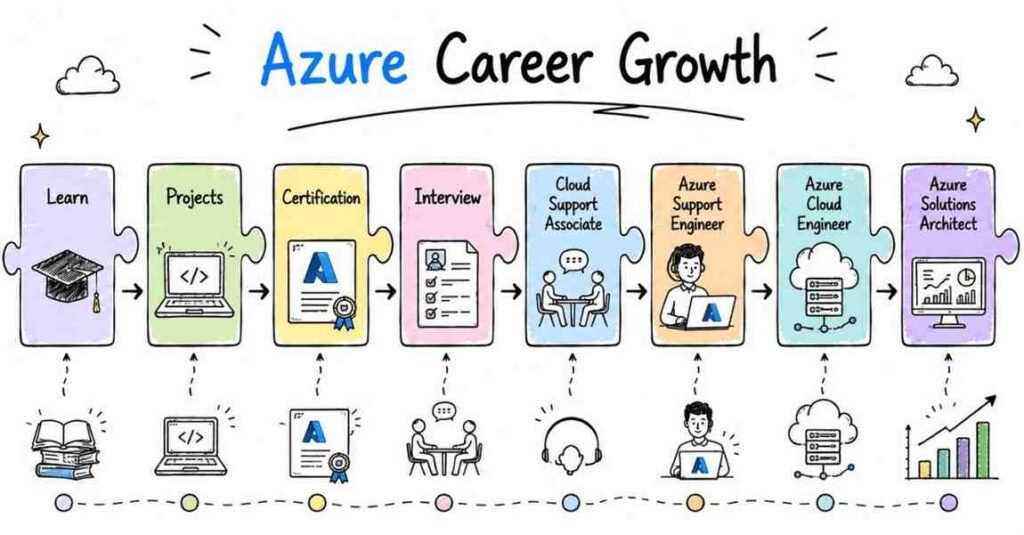
Frame your 90-day Azure learning journey as evidence of self-motivation, discipline, and fast learning ability. Quantify your achievements: “Completed 60+ hands-on labs, deployed 15+ projects, and earned AZ-104 certification in 90 days”.  

Mock Interview Practice:

Record yourself answering technical questions on video. Review the recording to identify filler words, nervous habits, and areas needing improvement. Practice with peers or mentors who can provide constructive feedback.  

Complete Azure Interview Preparation Guide Available:
Access our comprehensive guide with 200+ technical questions, scenario-based problems, architecture design challenges, and mock interview scripts covering behavioral questions specifically for Azure roles. This guide helped 300+ students crack Azure interviews at top companies. [Link to Full Interview Prep Guide]    

Day 85-87: Building Your Personal Brand

Why Personal Branding Matters:
Standing out in a competitive job market requires visibility beyond your resume. Technical professionals who share knowledge online attract more opportunities.   

Daily Action Plan:

Day 85: Create a technical blog documenting your Azure learning journey. Platforms like Medium, Dev.to, or Hashnode host technical content for free. Write your first article: “My 90-Day Journey to Becoming Azure Certified”.   

Day 86: Publish your projects on GitHub with comprehensive README files. Include architecture diagrams, setup instructions, and lessons learned. Contribute to open-source Azure projects to demonstrate collaboration skills.    

Day 87: Start engaging on LinkedIn by posting about Azure concepts, sharing project updates, and commenting on industry content. Consistency matters more than virality—post 2-3 times weekly sharing what you’re learning.   

Content Ideas That Attract Recruiters:

Project walkthroughs with code snippets and architecture diagrams. Step-by-step tutorials solving common Azure problems. Certification journey stories with preparation tips. Azure news commentary showing you stay current with industry trends.     

8. Final Preparations & Next Steps

Consolidation and Planning:

Day 88: Review everything accomplished during the 90-day journey. Create a comprehensive portfolio website showcasing all projects, certifications, and technical skills. Use free platforms like GitHub Pages, Netlify, or Vercel for hosting.    

Day 89: Develop a 30-day action plan post-course completion. Set specific job application goals, continued learning objectives, and networking activities. Consider specializing further in areas that excited you most—Azure DevOps, Azure Security, or Azure Data Engineering.   

Day 90: Celebrate your transformation from Azure beginner to job-ready professional. Reflect on challenges overcome and skills gained. Schedule follow-up interviews with mentors to discuss career progression strategies.    

Why Enroll in Frontlines Edutech's Azure Course

Industry-Aligned Comprehensive Training

Frontlines Edutech designed this Azure course based on real hiring requirements from top companies across Bangalore, Hyderabad, Pune, Mumbai, Chennai, Noida, and Gurugram. Every module directly maps to job responsibilities that Azure Administrators and DevOps Engineers perform daily in production environments.  

The course goes beyond theoretical knowledge by emphasizing hands-on practice that builds muscle memory. Students spend 70% of their learning time working directly in Azure Portal, writing code, troubleshooting errors, and deploying real applications. This practical approach ensures you’re genuinely job-ready rather than just exam-ready.   

Expert Mentorship from Industry Professionals

Learning from trainers who currently work as Azure professionals provides insights that textbooks cannot offer. Frontlines Edutech instructors bring real-world experience from implementing Azure solutions at enterprise scale. They share common pitfalls, optimization techniques, and architectural best practices learned through years of production experience.   

Beyond scheduled classes, mentors remain available for doubt clarification through dedicated Q&A sessions. This accessibility ensures no student gets stuck on problems that block their progress.  

Complete Career Support Ecosystem

Technical skills alone don’t guarantee job placement. Frontlines Edutech provides comprehensive career support including resume building workshops, LinkedIn profile optimization sessions, mock interviews, and direct placement assistance.  

The placement team maintains relationships with hiring managers at top IT companies actively recruiting Azure professionals. Regular placement updates keep students informed about new opportunities matching their skill level. Companies like Infosys, TCS, Accenture, Capgemini, Wipro, Cognizant, IBM, and KPMG regularly hire Frontlines Edutech graduates.  

Flexible Learning Options

Understanding that students and working professionals have different schedules, the course offers both live online sessions and on-demand recorded videos. Missed a live session? Watch the recording at your convenience without falling behind. All resources remain accessible even after course completion, providing lifetime reference material. 

Certification Exam Preparation

The curriculum specifically prepares students for industry-recognized Microsoft Azure certifications including AZ-900 (Azure Fundamentals) and AZ-104 (Azure Administrator). These certifications significantly boost resume visibility and validate your Azure expertise to potential employers.    

Frontlines Edutech provides practice exams, exam tips, and guidance on scheduling certification attempts. Many students earn their certifications while still enrolled in the course, entering the job market with both practical skills and formal credentials.   

Affordable Investment in Your Future

Compared to the lifetime earning potential of Azure professionals (with salaries ranging from ₹4-12 LPA for freshers and ₹8-25 LPA for experienced professionals), the course fee represents a minimal investment with substantial returns. Flexible payment options make quality Azure education accessible to students from diverse economic backgrounds.  

Community and Networking

Joining Frontlines Edutech connects you with fellow learners on similar career journeys. The student community provides peer support, collaboration opportunities on projects, and networking that often leads to job referrals. Alumni working at top companies frequently share job openings in the community before they reach public job boards.   

Success Stories That Inspire

Thousands of Frontlines Edutech graduates successfully transitioned into Azure roles across India and globally. These success stories demonstrate that with proper guidance, dedication, and structured learning, anyone can build a thriving cloud career regardless of their starting point.  

Take Action Today

Your Azure career starts with a single decision—choosing to invest in yourself. This 90-day roadmap provides the blueprint, but transformation requires commitment. Every successful Azure professional you admire started exactly where you are now.   

The cloud industry isn’t slowing down. Companies increasingly migrate workloads to Azure, creating thousands of new positions annually. The question isn’t whether Azure skills are valuable—it’s whether you’ll position yourself to capitalize on this growing demand.    

Frontlines Edutech removes barriers between your current situation and your dream Azure career. Expert instruction, comprehensive curriculum, hands-on projects, career support, and a proven track record combine to maximize your success probability.  

Don’t wait for the “perfect time” to start learning. Perfect time is a myth that keeps talented people stuck in analysis paralysis. The best time to start was yesterday; the second-best time is today. 

Ready to transform your career? Contact Frontlines Edutech at +91-83330 77727 or email support@frontlinesedutech.com to enroll in the Azure course. Join the next batch of successful cloud professionals building careers that combine intellectual challenge, excellent compensation, and continuous growth opportunities.  

Your 90-day journey to Azure mastery begins now.  

ALL THE BEST