
Azure Interview Preparation Guide 2026
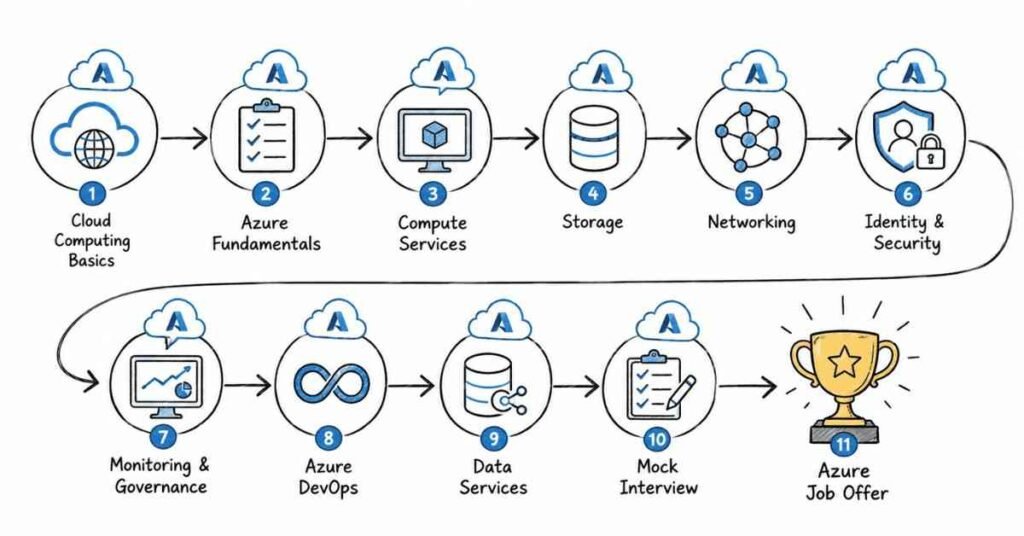
Table of Contents
Part 1: Introduction & 30-Day Study Plan
This first part sets the foundation for Azure interview preparation in a practical, structured way. It explains what Azure interviews usually test, why Azure matters in real cloud careers, and how to build a focused 30-day study plan that improves both conceptual clarity and interview performance.
What this guide covers
This guide is designed to prepare you for Azure interviews in a layered, interview-first format. It begins with cloud and Azure fundamentals, then moves into compute, storage, networking, identity, security, monitoring, DevOps, infrastructure automation, data services, and scenario-based problem solving.
The goal is not just to help you memorize Azure service names. The real goal is to help you explain why a service is used, how Azure components fit together, and how you would solve real cloud scenarios in admin, developer, DevOps, support, or architecture-style interviews.
In Azure interviews, recruiters and hiring managers often care about your clarity of thinking as much as your technical answer. They want to know whether you understand service choice, identity and access, networking, availability, scaling, cost awareness, and operational trade-offs in realistic cloud environments.
Who this guide is for
This guide is useful if you are:
- A fresher preparing for your first Azure or cloud interview.
- A student or job seeker targeting Azure Administrator, Cloud Engineer, DevOps, or developer roles.
- A career switcher moving from infrastructure, support, systems, networking, or development into cloud roles.
- A candidate who knows Azure basics but is not yet confident in interviews.
- An early-career professional who wants structured revision across Azure platform concepts.
The guide is structured to help both beginners and early-career professionals build confidence step by step. It gives you a clear path from cloud basics to practical Azure interview execution while staying highly scannable and role-oriented.
What Azure is and why it matters
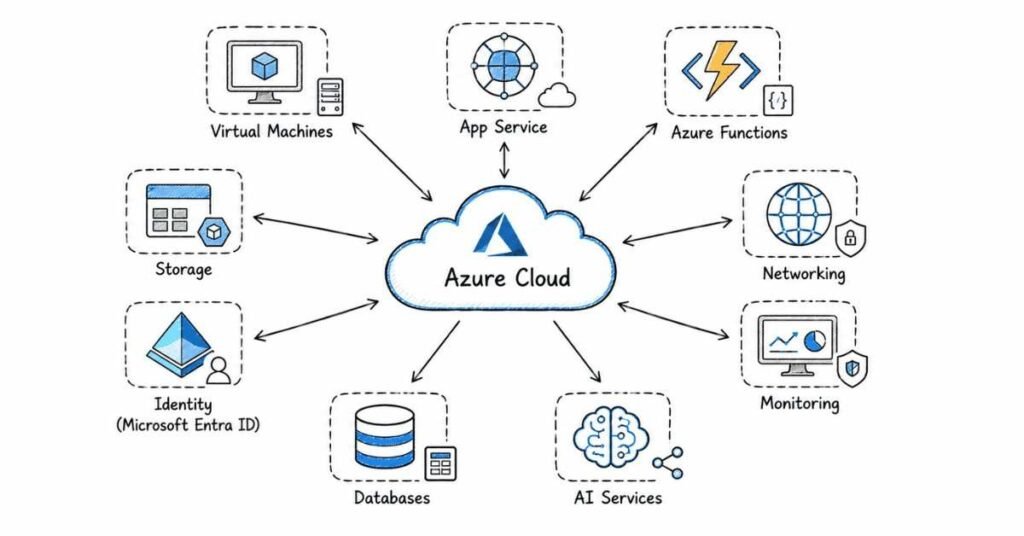
Microsoft Azure is a cloud computing platform that provides services for compute, storage, networking, databases, identity, security, analytics, AI, and application deployment. It supports infrastructure, platform, and managed cloud solutions for organizations of many sizes.
Azure matters because companies use it to build applications, host infrastructure, manage data, secure identities, automate operations, and support hybrid cloud environments. It has become a major platform across enterprise IT, development, DevOps, analytics, and architecture roles.
A simple way to think about Azure is this: it gives organizations cloud building blocks so they can run systems without managing everything manually in on-premises data centers. Strong Azure professionals are valued because they can turn cloud services into reliable, secure, scalable business solutions.
Where Azure fits in real work
In real companies, Azure is used for:
- Hosting virtual machines and enterprise workloads.
- Running web applications and APIs.
- Identity and access management with cloud directory services.
- Storage, backup, disaster recovery, and business continuity.
- Networking across cloud and hybrid environments.
- DevOps pipelines, automation, and infrastructure as code.
- Data platforms, analytics, and integration workloads.
This is why Azure interviews are rarely only about definitions. Interviewers usually want to see whether you understand architecture choices, access control, service trade-offs, cost awareness, and how Azure solves real operational problems.
Common Azure role types
Azure interviews vary depending on role scope. Common role types include:
- Azure Administrator: virtual machines, storage, networking, monitoring, identity, backup, and governance.
- Azure Developer: App Service, Functions, APIs, identity integration, storage access, and cloud-native application design.
- Azure DevOps Engineer: CI/CD, ARM or Bicep, automation, pipelines, environments, and release reliability.
- Cloud Engineer: mixed infrastructure, networking, access, monitoring, and cloud operations work.
- Solutions Architect: service selection, scalability, availability, security, and architecture trade-offs.
- Azure Data Engineer: Data Factory, Synapse, storage, Spark, ingestion pipelines, and performance-oriented data design.
Understanding the target role early helps you prepare better. An admin-focused role may emphasize identity, networking, monitoring, and operations, while a developer or DevOps role may emphasize automation, deployment, service integration, and cloud application design.
Common interview process
A typical Azure interview process often includes:
- Recruiter or HR screening.
- Cloud and Azure fundamentals round.
- Role-specific round such as admin, cloud engineer, developer, or DevOps.
- Scenario-based or troubleshooting round.
- Hiring manager or architecture discussion.
- Behavioral or stakeholder communication round.
In many Azure interviews, the most important part is how clearly you explain a design or troubleshooting scenario. You may be asked how to secure access to storage, choose between VMs and App Service, design high availability, troubleshoot network access, or automate deployments safely.
Core skill areas interviewers usually check
Most Azure interviews evaluate some combination of these areas:
- Cloud computing basics.
- Azure global infrastructure and core architecture concepts.
- Compute services such as VMs, App Service, Functions, and containers.
- Storage services and when to use each type.
- Networking fundamentals such as VNets, subnets, load balancing, and hybrid connectivity.
- Identity and access control using Azure directory and RBAC concepts.
- Monitoring, backup, governance, and operational best practices.
- ARM, Bicep, DevOps, CI/CD, and infrastructure automation.
- Data and integration services for broader cloud roles.
- Scenario-based reasoning, scaling, cost, security, and availability trade-offs.
These areas appear repeatedly because they reflect how Azure is used in actual work. A strong candidate is not just someone who knows service names, but someone who understands why a service is chosen and how it affects reliability, security, cost, and maintainability.
Why identity, networking, and governance matter so much
Three Azure topics come up repeatedly across roles: identity, networking, and governance. Identity matters because cloud access must be controlled properly, networking matters because workloads and services must communicate securely, and governance matters because Azure environments can become expensive or messy without control.
This is also where many candidates struggle in interviews. It is not enough to say you know RBAC, VNets, or Azure Policy. Interviewers often want to hear when you would use them, what problem they solve, and how they support secure and scalable cloud operations.
How to think in Azure interviews
A strong Azure answer usually follows this structure:
- Define the concept clearly.
- Explain where it is used.
- Mention the business or technical reason for choosing it.
- Give a short example or scenario.
- Mention a trade-off, best practice, or caution if relevant.
For example, if asked about Azure App Service versus Virtual Machines, do not only define both. A stronger answer explains that App Service reduces infrastructure management for web apps, while VMs offer deeper control when operating system-level customization is needed.
30-day study plan
A practical 30-day Azure interview preparation plan can look like this:
Week 1: Cloud and Azure foundation
Focus on cloud concepts, Azure basics, IaaS, PaaS, SaaS, public versus private versus hybrid cloud, regions, availability zones, subscriptions, and resource groups. Start speaking out loud about what Azure is and how cloud services differ from on-premises systems.
Study areas for Week 1:
- What Azure is.
- Cloud computing basics.
- IaaS, PaaS, SaaS.
- Public, private, and hybrid cloud.
- Regions, availability zones, subscriptions, and resource groups.
Week 2: Compute, storage, and networking
Move into Azure Virtual Machines, App Service, Azure Functions, storage types, VNets, subnets, NSGs, load balancing, and connectivity basics. This week is important because many Azure interviews test service choice and networking logic early.
Study areas for Week 2:
- Virtual Machines and managed disks.
- App Service and Functions.
- Blob, File, Queue, and Table storage.
- VNets, subnets, and NSGs.
- Load Balancer, Application Gateway, or related traffic services at a basic level.
Week 3: Identity, security, monitoring, and governance
Focus on Azure identity services, RBAC, authentication, authorization, monitoring, alerts, Key Vault, backup, policy, and governance basics. These topics are heavily tested because they affect real production readiness and cloud control.
Study areas for Week 3:
- Azure directory or identity basics.
- RBAC and access control.
- Monitoring and alerts.
- Backup and recovery concepts.
- Policy, tagging, and governance.
Week 4: DevOps, automation, data, and interview practice
If your role is technical beyond basic administration, focus on ARM, Bicep, DevOps pipelines, automation, Azure SQL, Cosmos DB, Data Factory, and scenario-based design thinking. Even for basic Azure roles, this week should include mock interview speaking practice, resume updates, and project explanation.
Study areas for Week 4:
- ARM and Bicep basics.
- CI/CD and Azure DevOps concepts.
- Azure SQL and broader managed data service basics.
- Data Factory, Synapse, or data pipeline basics if relevant to your target role.
- Scenario-based revision and project explanation.
Daily study routine
A practical daily routine can look like this:
- 45 minutes of concept revision.
- 60 minutes of Azure portal or scenario-based practice.
- 30 minutes of spoken mock answers.
- 15 minutes of notes, mistake review, or concept recap.
If you are a fresher, do not skip the speaking part. Many candidates understand Azure topics privately but struggle when asked to explain networking, access, scaling, or service selection clearly in an interview setting.
Salary expectations in India
Azure salary in India varies widely by role, experience, city, and specialization. Some 2026 and late-2025 salary sources show very different ranges, which means salary should be treated as directional context rather than a fixed expectation.
One 2025 source places Azure Administrator salary in India at around 3.5 LPA to 39.1 LPA depending on level, with an average around 7.3 LPA, while another source says Azure Cloud Engineer salaries in India average about ₹7,37,000 per year on Glassdoor. More aggressive aggregator sources report much higher averages and medians, showing that salary data can vary significantly by title definition and sample.
How to prepare effectively
The best way to prepare for Azure interviews is to build from fundamentals into service understanding, identity, networking, security, monitoring, and then role-specific depth such as DevOps, application hosting, or data services. Start simple, then layer complexity so your answers sound practical instead of memorized.
You should also practice answering real scenarios out loud. In Azure interviews, explanation quality often matters as much as service knowledge because the interviewer is testing whether you can design, operate, or troubleshoot cloud systems in a realistic way.
Revision focus
Revise what Azure is, where it is used in real business work, the common Azure role types, the interview process, the core skill areas, the importance of identity, networking, and governance, and the 30-day study plan before moving into cloud and Azure fundamentals.
Part 2: Cloud and Azure Fundamentals
This part builds the base for the rest of the Azure guide. It covers cloud computing concepts, Azure architectural basics, service models, deployment models, and core terminology that interviewers usually expect you to understand before moving into compute, storage, networking, identity, DevOps, and architecture topics.
Questions 1–40
1. What is cloud computing?
Cloud computing is the delivery of computing services such as servers, storage, networking, databases, and software over the internet instead of relying only on local infrastructure. It allows organizations to access resources on demand and scale them as needed.
2. What is Microsoft Azure?
Microsoft Azure is a cloud computing platform that provides services for infrastructure, application hosting, networking, identity, storage, databases, analytics, and many other workloads. It supports organizations that want to build, run, and manage systems in the cloud.
3. Why is Azure important?
Azure is important because it helps businesses run workloads without managing everything in traditional on-premises environments. It supports scalability, global reach, managed services, and hybrid cloud use cases that are common in enterprises.
4. What are the main cloud service models?
The main cloud service models are IaaS, PaaS, and SaaS. These models differ based on how much of the infrastructure and platform the cloud provider manages for you.
5. What is IaaS?
IaaS stands for Infrastructure as a Service. In this model, the cloud provider offers core infrastructure such as virtual machines, storage, and networking, while the customer manages the operating system, applications, and some configurations.
6. What is PaaS?
PaaS stands for Platform as a Service. In this model, the cloud provider manages the infrastructure and platform components, allowing developers to focus more on deploying and running applications rather than managing servers.
7. What is SaaS?
SaaS stands for Software as a Service. It delivers software over the internet so users can consume the application without managing infrastructure or platform layers themselves.
8. What is the difference between IaaS, PaaS, and SaaS?
IaaS gives the most control over infrastructure, PaaS reduces infrastructure management so teams can focus on applications, and SaaS provides a ready-to-use software product. A strong interview answer should also mention that control decreases while provider management increases as you move from IaaS to SaaS.
9. What is public cloud?
Public cloud means cloud services are hosted by a third-party provider and delivered over shared infrastructure to multiple customers. Azure itself is primarily a public cloud platform.
10. What is private cloud?
Private cloud refers to cloud infrastructure dedicated to a single organization. It is often used when isolation, control, or regulatory requirements are especially important.
11. What is hybrid cloud?
Hybrid cloud combines public cloud and private or on-premises infrastructure so that data and workloads can span both environments. It is common in enterprises that cannot move everything to the cloud at once.
12. Why is hybrid cloud important in Azure interviews?
Hybrid cloud is important because many real organizations still run a mix of cloud and on-premises systems. Interviewers often want to see whether you understand Azure as part of a broader enterprise environment, not only as a pure public cloud platform.
13. What are the benefits of cloud computing?
Common benefits include scalability, flexibility, lower upfront infrastructure cost, global reach, faster provisioning, and easier access to managed services. Cloud also supports disaster recovery and operational agility more effectively than many traditional setups.
14. What is scalability in cloud computing?
Scalability is the ability to increase or decrease resources based on workload demand. In interviews, it is useful to explain that cloud platforms make scaling easier than many fixed on-premises environments.
15. What is elasticity in cloud computing?
Elasticity is the ability to automatically or quickly adjust resources as demand changes. It is closely related to scalability but usually emphasizes responsive adjustment to workload variation.
16. What is high availability?
High availability means designing systems so they remain accessible and operational even when some components fail. Azure supports this through features such as availability zones, redundancy, and resilient architecture choices.
17. What is fault tolerance?
Fault tolerance is the ability of a system to continue functioning even when a component fails. In Azure interviews, this often comes up when discussing redundancy, zones, and resilient architecture.
18. What is disaster recovery?
Disaster recovery is the strategy and process for restoring systems and data after a major failure or outage. In Azure, this usually involves backup, secondary regions, replication, and recovery planning.
19. What is CapEx in cloud discussions?
CapEx stands for capital expenditure, which usually refers to upfront spending on physical infrastructure like servers, storage, and networking hardware. Cloud adoption often reduces the need for large CapEx investment.
20. What is OpEx in cloud discussions?
OpEx stands for operational expenditure, where costs are paid over time as services are consumed. Cloud platforms commonly use an operational, pay-as-you-go model instead of large upfront hardware purchases.
21. What is the pay-as-you-go model?
The pay-as-you-go model means you pay for the cloud resources you use rather than buying fixed infrastructure in advance. This is one of the most basic and common Azure interview concepts.
22. What is a region in Azure?
A region is a geographic area that contains one or more Azure data centers. Regions help organizations place workloads closer to users, support compliance, and improve resilience planning.
23. Why are regions important?
Regions are important because they affect latency, service availability, disaster recovery planning, and regulatory considerations such as data residency. Not every Azure service or SKU is available in every region.
24. What is an availability zone in Azure?
An availability zone is a physically separate location within an Azure region, with independent power, cooling, and networking. Deploying across zones improves resilience against data center-level failures.
25. What is a region pair in Azure?
A region pair is a pair of Azure regions within the same geography that are linked for disaster recovery and platform update planning. They are often discussed when designing regional resilience.
26. What is the difference between region and availability zone?
A region is a broader geographic area with one or more data centers, while an availability zone is a fault-isolated physical location inside a region. Zones are for high availability within a region, while multiple regions help with broader disaster recovery.
27. What is Azure global infrastructure?
Azure global infrastructure refers to Microsoft’s worldwide network of regions, data centers, availability zones, and backbone connectivity that support Azure services. It enables global service delivery and region-based architecture choices.
28. What is a subscription in Azure?
A subscription is a logical container used for billing, access management, and service usage boundaries in Azure. Organizations often use multiple subscriptions to separate environments, teams, or cost centers.
29. Why are subscriptions important?
Subscriptions are important because they act as management and billing boundaries. They help organizations separate development and production workloads, control access, and organize spending.
30. What is a resource group in Azure?
A resource group is a logical container that holds related Azure resources for a workload or solution. It helps organize and manage resources together.
31. What is the difference between subscription and resource group?
A subscription is a billing and management boundary, while a resource group is a logical container inside a subscription for related resources. A strong answer should make it clear that they solve different organizational problems.
32. Can a resource group contain resources from different regions?
Yes, a resource group can contain resources from different regions. The resource group itself is a management container and does not force all contained resources to be in the same location.
33. Can one resource belong to multiple resource groups?
No, one resource can belong to only one resource group at a time. This is a common basic Azure interview question.
34. What is a management group in Azure?
A management group is a higher-level container used to organize and manage multiple Azure subscriptions together. It is useful for applying policies, access, and governance across larger environments.
35. What is Azure Resource Manager?
Azure Resource Manager, often called ARM, is the management layer used to deploy, organize, and manage Azure resources. It supports templates, dependency handling, and consistent management across services.
36. Why is ARM important?
ARM is important because most Azure resources are managed through it, and it provides the basis for resource deployment, grouping, tagging, governance, and infrastructure automation. It is a very common Azure fundamentals topic.
37. What is a strong answer for Azure fundamentals questions?
A strong answer defines the concept clearly, explains where it is used, and gives a simple example when relevant. Interviewers usually prefer practical clarity over overly theoretical wording.
38. What is a common beginner mistake in Azure interviews?
A common mistake is memorizing service names without understanding their purpose, such as confusing subscriptions with resource groups or regions with availability zones. Another is giving cloud definitions without connecting them to real use cases.
39. Why do interviewers ask basic Azure questions first?
They want to confirm that your cloud foundation is clear before moving to compute, networking, storage, identity, or architecture topics. Weak fundamentals usually become obvious in later scenario-based rounds.
40. How should you practice Azure fundamentals?
Practice by explaining cloud concepts, Azure hierarchy, and service models out loud in simple language. If you can clearly explain IaaS, PaaS, SaaS, regions, zones, subscriptions, and resource groups, your later Azure answers become much stronger.
Revision focus
Revise cloud computing, Azure, IaaS, PaaS, SaaS, public cloud, private cloud, hybrid cloud, scalability, elasticity, high availability, fault tolerance, disaster recovery, CapEx, OpEx, pay-as-you-go, regions, availability zones, region pairs, subscriptions, resource groups, management groups, and Azure Resource Manager before moving to compute, storage, and core services.
Part 3: Azure Compute, Storage, and Core Services
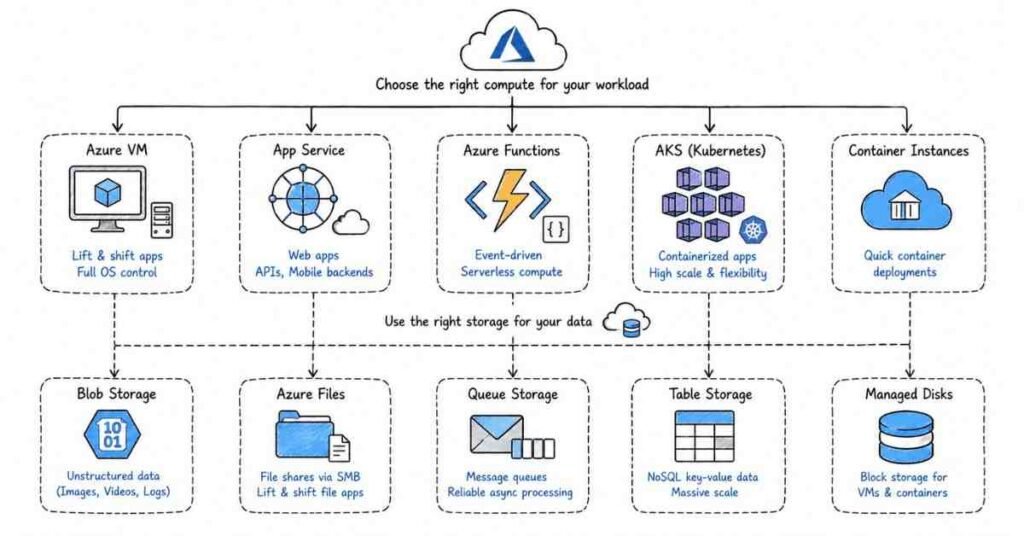
This part covers the service layer that powers most Azure workloads in real projects. It focuses on compute options, storage services, serverless services, containers, and the service-selection questions interviewers often ask to check whether you can choose the right Azure tool for the right workload.
Questions 41–80
41. What is compute in Azure?
Compute in Azure refers to services that run applications, workloads, scripts, or operating systems in the cloud. It includes virtual machines, app hosting platforms, serverless services, and container-based options.
42. Why are compute services important in Azure interviews?
Compute services are important because almost every Azure workload needs a place to run. Interviewers often use compute questions to test whether you understand trade-offs between control, scalability, operational effort, and cost.
43. What is an Azure Virtual Machine?
An Azure Virtual Machine, or VM, is an infrastructure-as-a-service resource that gives you a virtualized server in the cloud. It provides strong control over the operating system, installed software, and system configuration.
44. When should you use an Azure Virtual Machine?
You should use a VM when you need operating system-level control, custom software installation, legacy application support, or administrative access to the environment. It is a strong option when managed platform services do not provide enough flexibility.
45. What is the difference between Azure VM and Azure App Service?
A VM gives you full infrastructure control, while App Service is a managed platform for hosting web apps and APIs. App Service reduces server management, whereas VMs require more administration but offer more flexibility.
46. What is Azure App Service?
Azure App Service is a platform-as-a-service offering for hosting web apps, APIs, and mobile backends. It is designed to simplify deployment, scaling, and management for application workloads.
47. When should you use Azure App Service?
Use Azure App Service when you want to host a web application or API without managing virtual machines directly. It is especially useful when speed of deployment, managed scaling, and reduced operational overhead matter.
48. What are the benefits of Azure App Service?
Common benefits include managed infrastructure, built-in scaling options, integration with CI/CD workflows, support for custom domains, and easier deployment than VM-based hosting. It is often chosen for modern web application scenarios.
49. What is Azure Functions?
Azure Functions is a serverless compute service used to run small units of code in response to events. It is designed for event-driven execution without requiring you to manage server infrastructure directly.
50. When should you use Azure Functions?
Use Azure Functions when you need lightweight, event-driven processing such as HTTP endpoints, queue processing, timers, file processing, or small background tasks. It is a good fit when the workload is not a long-running full application.
51. What is the difference between Azure App Service and Azure Functions?
App Service is better for hosting full web applications and APIs, while Azure Functions is better for small, event-driven, serverless tasks. A strong answer should mention that the choice depends on application shape and execution pattern.
52. What is serverless computing in Azure?
Serverless computing means you focus on code or events while Azure manages the underlying infrastructure, scaling, and runtime environment. Azure Functions is one of the most common examples of serverless in Azure.
53. What is an Azure storage account?
A storage account is a top-level Azure resource that provides access to storage services such as Blob Storage, File Storage, Queue Storage, and Table Storage. It acts as the container for these storage capabilities.
54. Why is storage important in Azure interviews?
Storage is important because nearly every workload needs a place to keep files, data, logs, messages, or disks. Interviewers often ask storage questions to test whether you understand both service purpose and data type suitability.
55. What is Azure Blob Storage?
Azure Blob Storage is an object storage service for large amounts of unstructured data such as images, videos, logs, documents, backups, and binary content. It is one of the most commonly used Azure storage services.
56. When should you use Azure Blob Storage?
You should use Blob Storage when you need scalable storage for unstructured data that does not require a traditional file system or relational database model. It is commonly used for media, data lakes, backups, and archival content.
57. What are common Blob Storage access tiers?
Common Blob Storage access tiers are hot, cool, and archive. These tiers help optimize cost depending on how frequently the data needs to be accessed.
58. What is Azure File Storage?
Azure File Storage, often called Azure Files, is a managed file share service in the cloud. It is useful when applications or systems need shared file access using familiar file protocols.
59. When should you use Azure Files?
Use Azure Files when you need shared file storage for multiple systems or users, especially when traditional file-share behavior is required. It is often used in lift-and-shift or hybrid scenarios.
60. What is Azure Queue Storage?
Azure Queue Storage is a service used to store large numbers of messages for asynchronous processing between application components. It helps decouple workloads.
61. When should you use Azure Queue Storage?
Use Queue Storage when one application component needs to send work to another component without requiring immediate processing. It is useful for background jobs and decoupled architectures.
62. What is Azure Table Storage?
Azure Table Storage is a NoSQL key-value storage service for structured, non-relational data. It is suitable for large-scale, schema-flexible datasets where relational features are not required.
63. When should you use Azure Table Storage?
Use Table Storage when you need inexpensive, scalable storage for structured non-relational data with simple access patterns. It is commonly discussed as a lightweight NoSQL option.
64. What is a managed disk in Azure?
A managed disk is Azure’s managed block storage for virtual machines. It is used as the persistent disk layer for VM operating systems and data storage.
65. Why are managed disks important?
Managed disks simplify disk management for Azure VMs by handling underlying storage infrastructure for you. They are a common compute-storage crossover topic in Azure interviews.
66. What is the difference between Blob Storage and managed disks?
Blob Storage is object storage for unstructured data, while managed disks are block storage designed primarily for virtual machines. The two services support different workload patterns and should not be treated as interchangeable.
67. What is Azure Container Instances?
Azure Container Instances, or ACI, is a service for running containers quickly without managing full orchestration infrastructure. It is useful for simple container workloads that do not need a full Kubernetes platform.
68. When should you use Azure Container Instances?
Use Azure Container Instances when you need a fast, lightweight way to run containers without managing cluster infrastructure. It fits simple or short-lived container tasks better than large orchestrated systems.
69. What is Azure Kubernetes Service?
Azure Kubernetes Service, or AKS, is a managed Kubernetes platform for deploying, scaling, and orchestrating containerized applications. It is used when container workloads need more advanced management than simple standalone containers.
70. When should you use AKS?
Use AKS when you need orchestration for complex containerized applications, such as microservices, scaling across many containers, or production-grade container management. It is more powerful than ACI but also more complex.
71. What is the difference between ACI and AKS?
ACI is simpler and better for lightweight container execution, while AKS is designed for orchestrated, scalable, production-grade container environments. Interviewers often want you to explain not only the difference but the workload reason behind the choice.
72. What is Azure Virtual Desktop?
Azure Virtual Desktop is a service for delivering desktop and application experiences from Azure. It is commonly used for remote work, centralized desktop management, and secure virtualized user environments.
73. What is Azure Marketplace?
Azure Marketplace is a catalog of Microsoft and third-party solutions that can be deployed in Azure. It helps organizations quickly provision prebuilt applications, appliances, and service offerings.
74. What is a core service selection question in Azure interviews?
A core service selection question asks which Azure service you would choose for a given workload and why. These questions are important because they show whether you understand service purpose, trade-offs, and architecture thinking.
75. How do you choose between VM, App Service, and Functions?
Choose a VM when you need deep control, App Service when you need managed web hosting, and Functions when you need event-driven serverless execution. A strong answer should always tie the choice to workload behavior and operational needs.
76. How do you choose between Blob Storage, Azure Files, and managed disks?
Choose Blob Storage for unstructured object data, Azure Files for shared file access, and managed disks for VM block storage. This kind of question tests whether you understand storage purpose, not just names.
77. What is a common mistake in Azure service selection interviews?
A common mistake is choosing services based only on familiarity instead of workload fit. Another is defining a service correctly but failing to explain why it is the best option for the scenario.
78. What is a strong answer for Azure compute questions?
A strong answer explains the service, what level of control it gives, where it is used, and why it is a better fit than another option in that scenario. Interviewers usually prefer decision-making clarity over generic service descriptions.
79. What is a strong answer for Azure storage questions?
A strong answer should explain the type of data being stored, access pattern, scale, and why a specific Azure storage service fits that need. The best answers sound practical rather than memorized.
80. How should you practice this area for interviews?
Practice by taking a workload such as a web app, a background job, a file-share requirement, or a containerized app, and then explain which Azure compute and storage services you would choose and why. If you can justify the choice clearly, your Azure interview answers become much stronger.
Revision focus
Revise compute, Azure Virtual Machines, Azure App Service, Azure Functions, serverless computing, storage accounts, Blob Storage, Azure Files, Queue Storage, Table Storage, managed disks, Azure Container Instances, AKS, Azure Virtual Desktop, Azure Marketplace, and workload-based service selection before moving to networking, identity, and access control.
Part 4: Networking, Identity, and Access Control
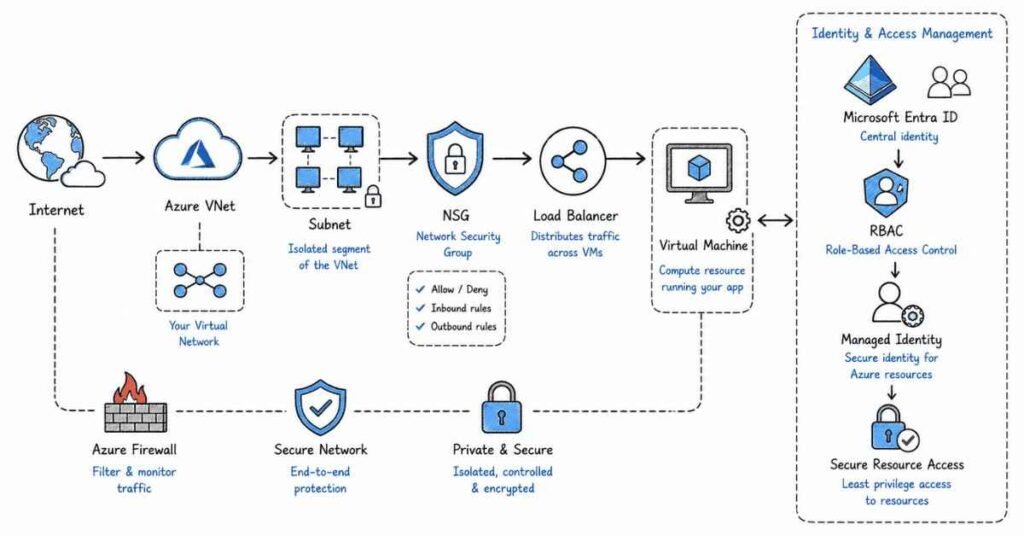
This part covers the Azure layer that decides how resources connect, how traffic is controlled, and who gets access to what. It focuses on VNets, subnets, NSGs, load balancing, hybrid connectivity, Microsoft Entra ID, RBAC, authentication, authorization, managed identities, and the practical access-control scenarios that appear often in Azure administrator, cloud engineer, security, and DevOps interviews.
Questions 81–120
81. What is networking in Azure?
Networking in Azure refers to the services and configurations that allow Azure resources, users, and on-premises systems to communicate securely. It covers traffic flow, connectivity, isolation, routing, and secure access design.
82. Why is networking important in Azure interviews?
Networking is important because many Azure problems involve access, connectivity, traffic control, exposure, or hybrid integration. Interviewers often use networking questions to test whether you understand how cloud systems communicate safely.
83. What is a Virtual Network in Azure?
A Virtual Network, or VNet, is the basic private networking construct in Azure. It allows Azure resources to communicate with each other, with the internet, and with on-premises environments when configured appropriately.
84. What is a subnet in Azure?
A subnet is a segmented range inside a VNet used to organize and isolate resources. Subnets help structure workloads and apply network controls more precisely.
85. What is the difference between a VNet and a subnet?
A VNet is the broader private network boundary, while a subnet is a smaller logical segment inside that VNet. A strong answer should make it clear that subnets are used to organize and isolate resources within the larger network.
86. Why are subnets useful?
Subnets are useful because they help separate workloads, apply security rules, simplify traffic control, and structure network design. They are commonly used to divide web, application, and database tiers.
87. What is a Network Security Group?
A Network Security Group, or NSG, is a set of security rules that controls inbound and outbound traffic for Azure resources at the subnet or network interface level. It is one of the most common Azure networking interview topics.
88. How does an NSG work?
An NSG works by evaluating traffic against ordered allow and deny rules based on source, destination, port, and protocol. It helps control which traffic is permitted or blocked.
89. Are NSGs stateful?
Yes, NSGs are stateful, which means return traffic for an allowed connection is automatically handled. This is a common interview detail in Azure networking rounds.
90. Where can an NSG be applied?
An NSG can be associated with a subnet or a network interface. This gives flexibility in applying security controls at different levels of the network design.
91. What is the difference between NSG and Azure Firewall?
NSG is a basic network traffic filtering mechanism at subnet or NIC level, while Azure Firewall is a more advanced managed network security service with broader inspection and centralized control capabilities. Interviewers often ask this to test your understanding of scope and capability.
92. What is a public IP in Azure?
A public IP is an Azure-assigned internet-routable IP address that allows a resource to be reached from outside Azure, depending on security configuration. It should be used carefully because it increases exposure.
93. What is a private IP in Azure?
A private IP is an IP address used for communication inside a VNet or connected private networks. It is not directly reachable from the public internet.
94. What is Azure Load Balancer?
Azure Load Balancer distributes incoming network traffic across multiple backend resources to improve availability and performance. It is typically used at the network layer.
95. What is the difference between Azure Load Balancer and Application Gateway?
Azure Load Balancer primarily works at the transport or network layer, while Application Gateway is designed for web traffic and supports more application-aware routing features. A strong interview answer should mention that the choice depends on the traffic type and use case.
96. What is Azure Application Gateway?
Azure Application Gateway is a web traffic load balancer designed for HTTP and HTTPS workloads. It is used when more intelligent routing or application-specific traffic handling is needed.
97. What is Azure Front Door?
Azure Front Door is a global entry-point service used to improve performance, availability, and routing for web applications across regions. It is often discussed in architecture and global application scenarios.
98. What is VNet peering?
VNet peering connects two Azure virtual networks so resources in them can communicate privately. It is useful when workloads need connectivity without placing everything into one VNet.
99. What is a VPN Gateway in Azure?
VPN Gateway is an Azure service used to create encrypted connections between Azure VNets and on-premises networks or clients over the public internet. It is commonly used in hybrid cloud connectivity.
100. What is ExpressRoute?
ExpressRoute provides private connectivity between on-premises infrastructure and Microsoft cloud services without using the public internet for the main connection path. It is typically used when higher reliability, consistent performance, or compliance-driven connectivity is required.
101. What is the difference between VPN and ExpressRoute?
VPN uses encrypted traffic over the public internet, while ExpressRoute provides private dedicated connectivity. ExpressRoute is usually chosen for more demanding enterprise connectivity scenarios.
102. What is Microsoft Entra ID?
Microsoft Entra ID, previously called Azure Active Directory, is Microsoft’s cloud-based identity and access management service. It is used to manage users, groups, authentication, application access, and modern identity controls in Azure and Microsoft cloud environments.
103. Why is Entra ID important in Azure interviews?
Entra ID is important because identity is central to secure cloud access. Interviewers often expect you to understand how users, applications, and services authenticate and receive permissions in Azure.
104. What is the difference between authentication and authorization?
Authentication verifies who a user or service is, while authorization determines what that identity is allowed to do. This distinction is very commonly tested in Azure interviews.
105. What is Single Sign-On?
Single Sign-On, or SSO, allows a user to authenticate once and access multiple applications without signing in separately each time. It improves user experience and centralizes identity control.
106. What is Multi-Factor Authentication?
Multi-Factor Authentication, or MFA, requires more than one verification method during sign-in, such as a password plus a phone or authenticator app. It is a core cloud security concept.
107. What is Conditional Access?
Conditional Access is a policy-based access control feature in Entra ID that makes access decisions based on conditions such as user, device, location, risk, or application. It is heavily discussed in modern Azure identity interviews.
108. Why is Conditional Access important?
Conditional Access is important because it helps enforce security policies dynamically rather than treating every sign-in the same way. It supports stronger identity security and Zero Trust approaches.
109. What is RBAC in Azure?
RBAC stands for Role-Based Access Control. It is the Azure authorization model used to assign permissions to users, groups, service principals, or managed identities at different scopes.
110. Why is RBAC important?
RBAC is important because it helps organizations apply least-privilege access and control who can perform actions on Azure resources. It is one of the most common Azure access-control interview topics.
111. What are common RBAC scopes?
Common RBAC scopes include management group, subscription, resource group, and individual resource. These scopes allow organizations to apply permissions at the right level of granularity.
112. What is the principle of least privilege?
The principle of least privilege means giving users or services only the minimum permissions needed to perform their tasks. It is a key best practice in Azure identity and security design.
113. What is a managed identity in Azure?
A managed identity is an automatically managed identity for an Azure resource that can be used to authenticate to other Azure services without storing credentials in code. It is a very important interview topic for secure cloud design.
114. Why are managed identities useful?
Managed identities reduce the need to hardcode secrets, client IDs, or passwords for Azure resources that need to access other services. They improve security and simplify authentication management.
115. What is the difference between system-assigned and user-assigned managed identity?
A system-assigned managed identity is tied directly to a single Azure resource, while a user-assigned managed identity is a separate reusable identity that can be attached to multiple resources. This distinction appears often in developer and security interviews.
116. What is a service principal?
A service principal is the identity used by an application or automation to access resources in a tenant. It is often described as the application’s local identity for access and permission assignment.
117. What is the difference between a service principal and a managed identity?
A service principal is a broader application identity concept that often involves manually managed credentials or certificates, while a managed identity is Azure-managed and designed to reduce secret handling. Managed identities are generally preferred for Azure-to-Azure authentication where supported.
118. What is a strong answer for Azure access-control questions?
A strong answer explains the identity type, the permission model, the scope of access, and the security best practice behind the decision. Interviewers usually want to hear not just what a feature is, but why it supports safer cloud operations.
119. What is a common mistake in Azure identity interviews?
A common mistake is mixing up authentication with authorization or treating Entra ID and RBAC as the same thing. Another is ignoring least privilege and overusing highly privileged roles in explanations.
120. How should you practice this area for interviews?
Practice by explaining how a user signs in, how access is evaluated, how RBAC permissions are assigned, and how networking controls traffic to resources. If you can connect identity, access, and connectivity into one clear explanation, your Azure interview answers become much stronger.
Revision focus
Revise networking, VNet, subnet, NSG, public IP, private IP, Load Balancer, Application Gateway, Front Door, VNet peering, VPN Gateway, ExpressRoute, Microsoft Entra ID, authentication, authorization, SSO, MFA, Conditional Access, RBAC, least privilege, managed identities, and service principals before moving to monitoring, backup, security, and governance.
Part 5: Monitoring, Backup, Security, and Governance
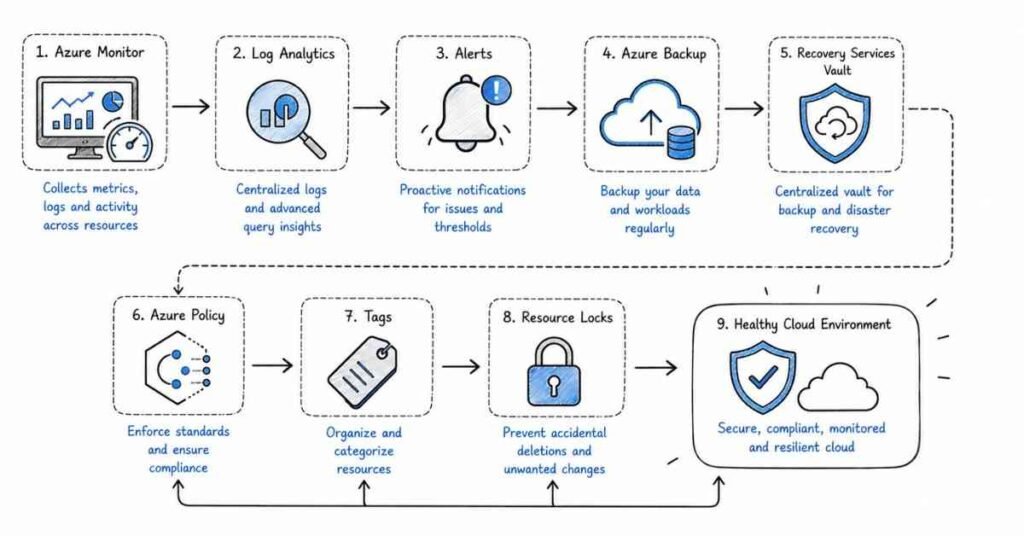
This part covers the operational and control layer of Azure that helps keep cloud environments observable, recoverable, secure, and governed. It focuses on Azure Monitor, Log Analytics, alerts, backup, Key Vault, Microsoft Defender, Azure Policy, tags, locks, and the practical governance and resilience questions that appear often in Azure administrator, DevOps, security, and cloud engineer interviews.
Questions 121–160
121. What is monitoring in Azure?
Monitoring in Azure means collecting, analyzing, and acting on telemetry such as metrics, logs, health signals, and alerts from cloud resources and services. It helps teams understand system behavior and respond to issues faster.
122. Why is monitoring important in Azure interviews?
Monitoring is important because cloud operations depend on visibility into performance, failures, security events, and service health. Interviewers often ask monitoring questions to test whether you understand how to run Azure workloads in production, not just deploy them.
123. What is Azure Monitor?
Azure Monitor is the central Azure service for collecting and analyzing telemetry from Azure resources and other environments. It supports metrics, logs, alerts, and integrations for operational monitoring.
124. What are metrics in Azure Monitor?
Metrics are lightweight numerical measurements collected over time, such as CPU usage, request count, or memory-related values depending on the resource. They are commonly used for near-real-time monitoring and alerting.
125. What are logs in Azure Monitor?
Logs are detailed records of events, operations, and telemetry that can be stored and queried for deeper analysis. They are useful for troubleshooting, auditing, and advanced alerting.
126. What is the difference between metrics and logs?
Metrics are typically time-series numerical data optimized for fast monitoring, while logs are richer records used for deeper investigation and querying. A strong interview answer should mention that both are useful, but they serve different monitoring purposes.
127. What is Log Analytics?
Log Analytics is a feature used to store, query, and analyze log data collected from Azure and connected systems. It is a core part of many Azure monitoring and troubleshooting workflows.
128. What is a Log Analytics workspace?
A Log Analytics workspace is the central data store used for collecting and querying logs in Azure Monitor. Multiple resources can send diagnostic and monitoring data into the same workspace.
129. What are diagnostic settings in Azure?
Diagnostic settings are used to route resource logs and metrics to destinations such as Log Analytics workspaces, storage accounts, or event streams. They are important for enabling observability and retention.
130. What is an alert in Azure?
An alert is a rule-driven notification that triggers when a defined condition is met, such as a metric threshold breach or a log-based event pattern. Alerts help teams detect and respond to problems quickly.
131. What is an Action Group?
An Action Group is a reusable notification and action configuration used by Azure Monitor alerts. It can trigger emails, messages, webhooks, or operational workflows when alerts fire.
132. How do alerts and Action Groups work together?
An alert detects the condition, and the Action Group defines what happens next, such as who gets notified or what automation is triggered. This is a common operational question in Azure interviews.
133. How can you monitor Azure Virtual Machines?
Azure Virtual Machines can be monitored using Azure Monitor metrics, logs, diagnostic settings, and agent-based telemetry collection. A strong answer should also mention alerts and operational visibility for CPU, memory, disk, or backup status where relevant.
134. What is Azure Backup?
Azure Backup is a managed service used to protect and restore data for supported Azure and hybrid workloads. It helps organizations recover from accidental deletion, corruption, or operational failures.
135. Why is backup important in Azure interviews?
Backup is important because interviewers want to know whether you understand recovery, retention, operational resilience, and business continuity. A cloud solution is incomplete if it cannot be recovered after failure.
136. What is a Recovery Services Vault?
A Recovery Services Vault is a management entity used by Azure Backup and other recovery-related services to organize and manage protected items, backup data, and restore operations. It is a common Azure administrator interview topic.
137. What are backup policies in Azure?
Backup policies define when backups occur and how long recovery points are retained. They help standardize backup behavior across protected resources.
138. What are retention policies in Azure Backup?
Retention policies specify how long backup recovery points are kept before they are deleted. They affect both compliance and storage consumption.
139. What is restore in Azure Backup?
Restore is the process of recovering backed-up data or workloads from Azure Backup into a usable state. Interviewers may ask about it to test whether you understand the difference between protecting data and actually recovering it.
140. What is soft delete in Azure Backup?
Soft delete is a protection feature that helps recover backup data after accidental deletion for a limited period. It adds another layer of safety for protected workloads.
141. What is cross-region restore?
Cross-region restore is a capability that allows recovery from backup data in a secondary region when supported conditions are met. It is relevant in more advanced disaster recovery discussions.
142. How do you troubleshoot a failed backup job?
A strong answer includes checking job status, error details, policy configuration, network or agent issues where relevant, vault settings, and monitoring signals. Interviewers usually want a structured troubleshooting flow rather than a vague answer.
143. What is Azure Key Vault?
Azure Key Vault is a service used to securely store and manage secrets, keys, and certificates. It is one of the most important Azure security services discussed in interviews.
144. Why is Azure Key Vault important?
Key Vault is important because applications, pipelines, and services often need sensitive values such as secrets or certificates, and storing them securely is a core cloud security requirement. Interviewers often expect you to mention that secrets should not be hardcoded.
145. What kinds of items can Azure Key Vault store?
Azure Key Vault can store secrets, cryptographic keys, and certificates. These are used by applications and services that need secure access to sensitive material.
146. Why should secrets not be hardcoded?
Hardcoded secrets increase the risk of exposure through code repositories, logs, or configuration leaks. Azure security best practice is to store such values in a secure service like Key Vault instead.
147. What is Microsoft Defender for Cloud?
Microsoft Defender for Cloud is a security service that provides threat protection, security recommendations, and security posture guidance across Azure and some connected environments. Microsoft Learn explicitly identifies it as the monitoring service that can provide threat protection and security recommendations across Azure and on-premises services.
148. Why is Microsoft Defender for Cloud important?
It is important because it helps organizations improve cloud security posture and identify risks or threats across workloads. This makes it relevant in both operations and security-focused Azure interviews.
149. What is Azure Policy?
Azure Policy is a governance service used to create, assign, and manage rules that control or evaluate Azure resource compliance. Microsoft Learn explicitly identifies Azure Policy as the service used to create, assign, and manage policies.
150. Why is Azure Policy useful?
Azure Policy is useful because it helps enforce standards such as required tags, allowed locations, approved SKUs, security configuration expectations, and compliance controls across environments. It is a key governance topic in Azure interviews.
151. What are tags in Azure?
Tags are key-value metadata labels attached to Azure resources for organization, cost tracking, ownership, automation, or governance purposes. They are commonly used to improve visibility and control in larger environments.
152. Why are tags important?
Tags are important because they support cost reporting, environment classification, ownership visibility, and operational governance. Interviewers often expect you to mention them in governance answers.
153. What is a resource lock in Azure?
A resource lock is a control used to help prevent accidental deletion or modification of Azure resources. Microsoft Learn explicitly identifies locks as the tool used to prevent accidental deletion of Azure resources.
154. What is the difference between Azure Policy and locks?
Azure Policy is used to enforce or audit governance rules, while locks are used to protect resources from accidental deletion or unwanted changes. They solve different governance and protection problems.
155. What is governance in Azure?
Governance in Azure means controlling how resources are created, configured, secured, and managed so that environments stay compliant, organized, and cost-aware. It often includes policy, tagging, RBAC, locks, and management structure.
156. Why is governance important in real Azure environments?
Governance is important because cloud environments can grow quickly and become inconsistent, risky, or expensive without clear controls. Interviewers often ask governance questions to test operational maturity.
157. What is a strong answer for Azure monitoring questions?
A strong answer explains what is being observed, where the telemetry goes, how alerts are triggered, and what actions follow. Good answers show that monitoring is not just collection, but also detection and response.
158. What is a strong answer for Azure security questions?
A strong answer explains how access, secrets, security posture, and governance controls work together. Interviewers often prefer layered security thinking instead of a one-service-only explanation.
159. What is a common mistake in Azure governance interviews?
A common mistake is treating governance as only policy creation while ignoring tags, locks, RBAC, and cost control. Another is describing security tools without connecting them to practical operational outcomes.
160. How should you practice this area for interviews?
Practice by explaining how you would monitor a VM, detect a failure, protect a workload with backup, store a secret securely, enforce a tag rule, and protect a production resource from accidental deletion. If you can link monitoring, recovery, security, and governance into one coherent answer, your interview performance improves a lot.
Revision focus
Revise Azure Monitor, metrics, logs, Log Analytics, diagnostic settings, alerts, Action Groups, Azure Backup, Recovery Services Vault, backup policies, retention, restore, soft delete, cross-region restore, Azure Key Vault, Microsoft Defender for Cloud, Azure Policy, tags, locks, governance, and layered operational security before moving to DevOps, ARM, Bicep, automation, and deployment.
Part 6: DevOps, ARM, Bicep, Automation, and Deployment
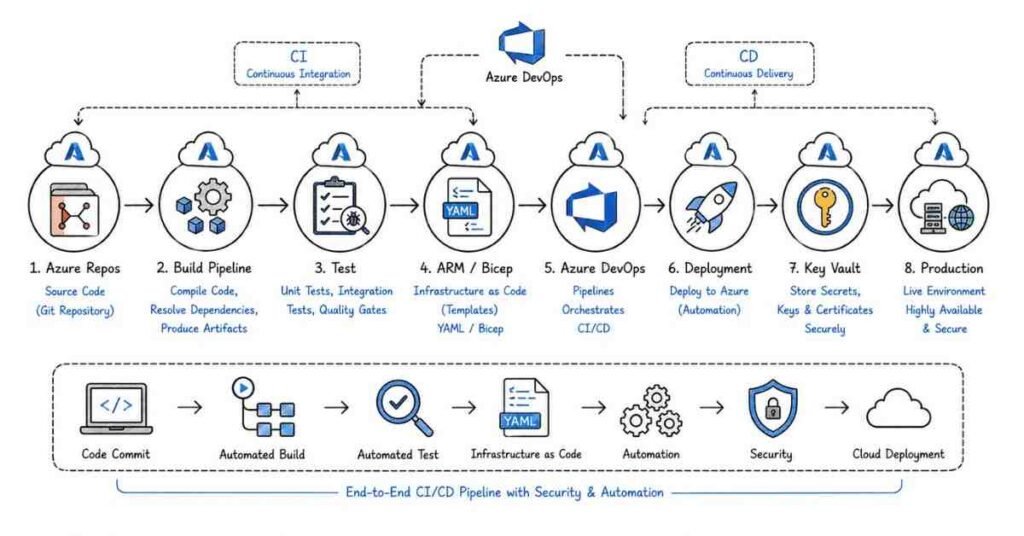
This part covers the delivery and infrastructure-automation layer of Azure that interviewers often test in DevOps, cloud engineering, and platform roles. It focuses on Azure DevOps, CI/CD, ARM templates, Bicep, deployment strategy, environment governance, and the practical questions that show whether you can move from manual cloud work to repeatable automation.
Questions 161–200
161. What is Azure DevOps?
Azure DevOps is a platform that supports source control, CI/CD pipelines, work tracking, artifact management, and release automation. It is widely used to build, test, and deploy applications and infrastructure in a controlled way.
162. Why is Azure DevOps important in interviews?
Azure DevOps is important because many organizations expect cloud professionals to automate releases rather than deploy manually. Interviewers often ask about Azure DevOps to test whether you understand modern delivery practices and team workflows.
163. What is CI/CD?
CI/CD stands for Continuous Integration and Continuous Delivery or Deployment. It is the practice of automatically building, testing, and releasing code or infrastructure changes through a pipeline.
164. Why is CI/CD important?
CI/CD reduces manual effort, speeds up delivery, improves consistency, and helps catch problems earlier in the release cycle. It is one of the most fundamental topics in DevOps interviews.
165. What is a pipeline in Azure DevOps?
A pipeline is an automated workflow used to build, test, and deploy code or infrastructure. It is commonly defined using YAML and can run different stages based on branch, environment, or approval logic.
166. What is the difference between build and release?
A build pipeline compiles and validates code, while a release pipeline or deployment stage pushes the validated output to an environment. Many interviews now discuss these concepts in terms of multi-stage YAML pipelines.
167. What are Azure Repos?
Azure Repos is the source control service in Azure DevOps used to store and manage Git repositories. It helps teams collaborate on code and infrastructure files.
168. What are Azure Boards?
Azure Boards is the work tracking component of Azure DevOps used to manage tasks, bugs, user stories, and project progress. It supports Agile planning and delivery visibility.
169. What are Azure Artifacts?
Azure Artifacts is used to store and share packages such as NuGet, npm, Maven, or Python packages. It helps teams manage dependencies inside their delivery ecosystem.
170. What is Infrastructure as Code?
Infrastructure as Code, or IaC, is the practice of defining infrastructure using code rather than manual portal configuration. It improves repeatability, version control, and deployment consistency.
171. Why is IaC important?
IaC is important because it makes infrastructure changes auditable, repeatable, and easier to automate across environments. Interviewers often expect you to explain why IaC matters beyond just naming the concept.
172. What is ARM?
ARM refers to Azure Resource Manager and, in deployment discussions, often to ARM templates. It is the Azure management and deployment layer used to define resources in a structured way.
173. What is an ARM template?
An ARM template is a JSON-based declarative file used to define and deploy Azure resources consistently. It allows you to express infrastructure in a repeatable, version-controlled format.
174. What is Bicep?
Bicep is a domain-specific language for deploying Azure resources in a simpler and more readable format than ARM JSON. It is commonly discussed as a modern IaC option in Azure interviews.
175. Why is Bicep useful?
Bicep is useful because it improves readability and maintainability while still compiling down to ARM deployments. This makes it a strong choice for Azure-native infrastructure as code.
176. What is the difference between ARM templates and Bicep?
ARM templates use JSON directly, while Bicep offers a cleaner, higher-level syntax that is easier to write and read. Both are used for Azure infrastructure deployment, but Bicep is often preferred for maintainability.
177. How do ARM or Bicep fit into CI/CD?
ARM or Bicep files can be stored in source control and deployed through Azure DevOps pipelines. This makes infrastructure deployment repeatable and consistent across environments.
178. What is a multi-stage pipeline?
A multi-stage pipeline is a pipeline with separate stages such as build, test, deploy to dev, deploy to test, and deploy to production. It is widely used for controlled delivery and environment governance.
179. Why are environment approvals important?
Environment approvals help ensure that sensitive deployments to test or production are reviewed before they proceed. This reduces risk and adds governance to the release process.
180. What is a variable group in Azure DevOps?
A variable group is a reusable way to store shared pipeline variables, including secrets when integrated with secure services. It helps manage values across multiple pipelines.
181. Why are variable groups useful?
They centralize repeated pipeline values and make maintenance easier when the same settings are used across multiple stages or pipelines. Interviewers often ask this in reusability-focused DevOps rounds.
182. What is Azure Key Vault integration in DevOps?
Azure Key Vault integration allows pipelines to securely retrieve secrets, keys, or certificates during execution instead of storing them directly in the pipeline. This is a common secure deployment design pattern.
183. Why should secrets be handled carefully in pipelines?
Secrets can be exposed if stored or logged improperly, so secure secret management is essential in DevOps workflows. Interviewers often expect you to mention Key Vault, role-based access, and approval controls together.
184. What is a deployment strategy?
A deployment strategy is the approach used to roll out application or infrastructure changes safely, such as blue-green, canary, or rolling deployment. It helps reduce downtime and release risk.
185. What is blue-green deployment?
Blue-green deployment uses two environments so the new version can be prepared separately and switched over when ready. It is often used to reduce downtime and simplify rollback.
186. What is canary deployment?
Canary deployment rolls out changes gradually to a small subset of users or instances before broader release. It is useful for reducing risk and detecting issues early.
187. What is the benefit of deployment approvals?
Approvals provide a controlled checkpoint before a pipeline advances to a sensitive stage. They are useful in regulated, production-critical, or multi-team environments.
188. What is pipeline optimization?
Pipeline optimization means improving execution speed, reliability, and maintainability of CI/CD workflows. It may involve parallel jobs, better caching, task reuse, or smarter stage design.
189. What are service hooks in Azure DevOps?
Service hooks connect Azure DevOps events to external systems or workflows. They can trigger notifications or actions when pipeline or repository events occur.
190. What is the difference between YAML pipelines and classic pipelines?
YAML pipelines are code-based and version-controlled, while classic pipelines use a more graphical interface. Many modern Azure DevOps teams prefer YAML for consistency and maintainability.
191. What is a strong answer for IaC interview questions?
A strong answer explains why infrastructure should be code-based, how it is versioned, how it is deployed, and what advantage it gives to reliability and repeatability. Interviewers usually want practical deployment reasoning, not just a definition.
192. What is a strong answer for Azure DevOps interview questions?
A strong answer explains source control, CI/CD flow, environment progression, secrets handling, and deployment governance. The best answers connect pipeline design to business reliability and release safety.
193. What is a common mistake in DevOps interviews?
A common mistake is focusing only on tools instead of process. Interviewers often prefer candidates who can explain why a deployment flow, secret strategy, or IaC design is correct for the scenario.
194. When should you use ARM versus manual portal configuration?
Use ARM or Bicep when you want repeatable, auditable, and automated deployments. Manual portal configuration is acceptable for learning or one-off tasks, but not ideal for production-grade delivery.
195. How do you explain DevOps in simple terms?
DevOps is the practice of combining development and operations so software and infrastructure can be delivered more reliably and repeatedly. In Azure, this often means using pipelines, IaC, source control, and secure deployment practices together.
196. How do you secure a DevOps pipeline?
Secure the pipeline with least-privilege access, secret management through Key Vault or secure variable groups, approval gates, service connections, and restricted permissions. This is a common high-level Azure DevOps interview topic.
197. How do you explain automation in Azure interviews?
Automation means removing repetitive manual work by using pipelines, templates, scripts, or managed workflows. A strong answer should connect automation to consistency, speed, and reduced human error.
198. How should you answer deployment scenario questions?
Explain the environment, the release risk, the approval requirement, the rollback strategy, and the tool or pipeline choice. Scenario-based DevOps questions are usually about process design, not memorizing every tool command.
199. How do you explain Bicep in an interview?
Describe Bicep as a simpler Azure-native infrastructure language that improves readability over raw ARM JSON while still producing ARM-based deployments. This is a very interview-friendly explanation.
200. How should you practice this area for interviews?
Practice by describing a full release flow from source control to build to deployment to production approval, including how infrastructure is defined and how secrets are protected. If you can explain the end-to-end process clearly, your DevOps interview confidence will improve quickly.
Revision focus
Revise Azure DevOps, CI/CD, pipelines, YAML, Azure Repos, Azure Boards, Azure Artifacts, Infrastructure as Code, ARM templates, Bicep, multi-stage deployments, variable groups, Key Vault integration, secrets management, approvals, blue-green and canary deployment, service hooks, and pipeline security before moving to data, integration, and advanced Azure scenarios.
Part 7: Data, Integration, and Advanced Azure Scenarios
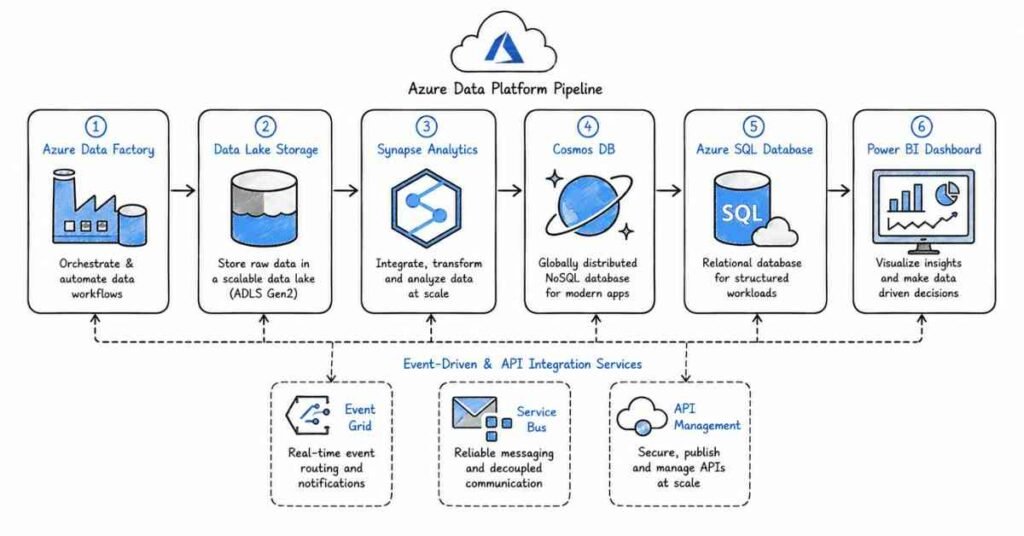
This part covers the services and decision-making patterns that appear in Azure data engineer, integration architect, and advanced cloud interviews. It focuses on Azure SQL, Cosmos DB, Synapse, Data Factory, Service Bus, Event Grid, Event Hubs, API Management, and scenario-based reasoning around pipelines, messaging, and analytics.
Questions 201–240
201. What is Azure SQL Database?
Azure SQL Database is a managed relational database service in Azure. It is used when you want SQL Server-style capabilities without managing the underlying database infrastructure yourself.
202. When should you use Azure SQL Database?
Use Azure SQL Database when you need a managed relational database for applications, reporting, or transactional workloads. It is a strong fit when you want scalability and reduced database administration effort.
203. What is Azure Cosmos DB?
Azure Cosmos DB is a globally distributed NoSQL database service designed for low-latency, scalable, and flexible data access. It is commonly discussed in scenarios that require rapid response and global availability.
204. When should you use Cosmos DB?
Use Cosmos DB when you need global distribution, flexible schema, or very fast data access for modern applications. It is commonly chosen for applications that do not fit a traditional relational model well.
205. What is Azure Data Factory?
Azure Data Factory, or ADF, is a cloud-based data integration service used to move, transform, and orchestrate data pipelines. It is one of the most common topics in Azure data engineering interviews.
206. What are the main parts of Azure Data Factory?
The main parts include pipelines, datasets, linked services, activities, triggers, and integration runtimes. These pieces work together to create and run data workflows.
207. What is a pipeline in ADF?
A pipeline is a logical workflow that defines how data moves or transforms in Azure Data Factory. It can contain one or more activities that execute in sequence or in parallel.
208. What is an activity in ADF?
An activity is a step inside a pipeline, such as copying data, running a stored procedure, or transforming records. It is the individual unit of work inside the data workflow.
209. What is a linked service in ADF?
A linked service defines the connection information used by Azure Data Factory to access data stores or compute services. It is similar to a connection definition.
210. What is a dataset in ADF?
A dataset points to the data structure or location being read from or written to in a pipeline. It tells ADF what data the activity will work with.
211. What is a trigger in ADF?
A trigger starts a pipeline based on a schedule, event, or other condition. It allows data workflows to run automatically.
212. What is an integration runtime?
An integration runtime is the compute infrastructure used by ADF to move and transform data. It is an important concept because it determines where and how the pipeline runs.
213. What is Azure Synapse Analytics?
Azure Synapse Analytics is an analytics service used to query, integrate, and analyze large-scale data. It is commonly discussed in data engineering and analytics interviews.
214. When should you use Synapse Analytics?
Use Synapse Analytics when you need large-scale analytics, data warehousing, or unified querying over data. It is often chosen for analytical workloads rather than transactional applications.
215. What is the difference between Azure SQL Database and Synapse Analytics?
Azure SQL Database is generally used for transactional relational workloads, while Synapse is used for large-scale analytics and data warehousing. A strong answer should connect the service choice to workload purpose.
216. What is Azure Data Lake Storage Gen2?
ADLS Gen2 is a scalable storage service designed for big data and analytics workloads. It is frequently used as a landing zone or data lake for raw and curated data.
217. Why is ADLS Gen2 important in data engineering?
It is important because many Azure data pipelines store raw, staged, or curated data there before further processing or analytics. It supports modern lakehouse-style architectures and large data volume handling.
218. What is Azure Databricks?
Azure Databricks is a managed analytics and Spark-based data platform used for processing large datasets, transformations, and advanced analytics workflows. It is often part of modern Azure data architecture discussions.
219. When should you use Databricks?
Use Databricks when you need Spark processing, advanced transformations, notebook-based data engineering, or large-scale analytics pipelines. It is common in scenarios involving complex data engineering or machine learning preparation.
220. What is Azure Service Bus?
Azure Service Bus is a reliable messaging service used for transactional communication between applications or services. It is ideal when message delivery, ordering, and decoupling matter.
221. When should you use Service Bus?
Use Service Bus when every message matters and you need reliable enterprise messaging with features like dead-lettering, locking, and transactional processing. It is commonly used for order processing, payments, and workflow coordination.
222. What is Azure Event Grid?
Azure Event Grid is a routing service for event-driven architectures and reactive workloads. It is used when you want to respond to changes or notifications across services.
223. When should you use Event Grid?
Use Event Grid when you need event notifications and reactive automation, such as triggering logic when a blob is created or a resource changes. It is designed for event distribution rather than transactional messaging.
224. What is Azure Event Hubs?
Azure Event Hubs is a high-throughput event ingestion service used for streaming telemetry, logs, and massive event volumes. It is suited for scenarios where throughput matters more than transactional message handling.
225. When should you use Event Hubs?
Use Event Hubs for large-scale streaming ingestion, telemetry collection, clickstream data, or log pipelines. It is a good fit when you need to ingest very high event rates.
226. What is the difference between Service Bus, Event Grid, and Event Hubs?
Service Bus is for reliable transactional messaging, Event Grid is for event routing and notifications, and Event Hubs is for high-throughput streaming ingestion. This distinction is a very common Azure integration interview question.
227. What is Azure API Management?
Azure API Management is a service used to publish, secure, manage, and monitor APIs. It helps organizations create a controlled and consistent API layer for consumers.
228. When should you use API Management?
Use API Management when you need policies, throttling, versioning, authentication control, or centralized API governance. It is particularly useful in enterprise integration scenarios.
229. What is a common data pipeline design scenario in Azure?
A common scenario is ingesting data from an operational source into ADF, transforming it, storing it in ADLS or Synapse, and then serving it for reporting or analytics. Interviewers often care more about your design logic than about a single “correct” service.
230. How would you design an incremental load in ADF?
A practical answer is to use a watermark or high-water mark, fetch only new or changed records, load them into the target, and update the watermark after success. This is a very common data engineering interview pattern.
231. How would you design a real-time Azure pipeline?
A common design is Event Hubs for ingestion, processing through streaming compute, and then storing results in an analytics store like ADLS, Synapse, or another serving layer. The right design depends on latency, volume, and transformation complexity.
232. What is a slowly changing dimension?
A slowly changing dimension is a data warehousing concept used to manage changes in dimension data over time while preserving history when needed. It is a classic data engineering interview topic.
233. How do you troubleshoot a slow data pipeline?
Check source and target performance, partitioning, data volume, integration runtime, transformation complexity, and downstream bottlenecks. Good answers show a performance-thinking approach rather than only a tool list.
234. How do security and identity apply in Azure data solutions?
Data services often need Azure identity control, managed access, and secret protection to keep source and target systems secure. Interviewers may expect you to mention access control and Key Vault where appropriate.
235. What is a strong answer for data integration questions?
A strong answer should explain the source, target, movement pattern, transformation layer, orchestration method, and operational concerns like retries or monitoring. This shows end-to-end data thinking.
236. What is a strong answer for messaging questions?
A strong answer should match the service to the workload: Service Bus for reliable transactions, Event Grid for event notifications, and Event Hubs for high-volume streaming. That distinction often matters more than naming the services.
237. What is a common mistake in Azure data interviews?
A common mistake is confusing transactional databases, analytical systems, and event streaming services. Another is picking a service without explaining why its delivery model fits the scenario.
238. What is a common mistake in integration interviews?
A common mistake is treating all messaging services as interchangeable. Interviewers usually expect you to explain reliability, throughput, ordering, dead-lettering, and event-routing behavior.
239. How do you explain a data platform design in an interview?
Describe where the data comes from, how it moves, where it lands, how it is transformed, and where it is consumed. Then explain why the chosen Azure services fit the pipeline.
240. How should you practice this area for interviews?
Practice by designing one batch data pipeline, one real-time event pipeline, and one API-based integration flow. If you can explain the service choices and trade-offs clearly, your Azure data and integration answers become much stronger.
Revision focus
Revise Azure SQL Database, Cosmos DB, Data Factory, pipelines, datasets, linked services, triggers, integration runtime, Synapse Analytics, ADLS Gen2, Databricks, Service Bus, Event Grid, Event Hubs, API Management, incremental loading, real-time architecture, and performance troubleshooting before moving to the Azure interview Q&A bank.
Part 8: Azure Interview Q&A Bank
This part is a mixed question bank designed to cover the most common Azure topics across admin, cloud engineer, DevOps, and data-oriented interviews. It combines fundamentals, scenario-based questions, service selection, troubleshooting, and interview-ready explanations so you can practice clear, practical answers rather than only memorized definitions.
Questions 241–280
241. What is Microsoft Azure?
Microsoft Azure is Microsoft’s cloud platform that provides compute, storage, networking, identity, security, DevOps, database, and analytics services. It is used to build, deploy, and manage applications and infrastructure at scale.
242. Why do companies use Azure?
Companies use Azure for scalability, managed services, global reach, hybrid connectivity, faster delivery, and operational flexibility. Azure helps teams reduce manual infrastructure work and focus more on applications and business value.
243. What is cloud computing?
Cloud computing is the delivery of computing services over the internet instead of relying entirely on local infrastructure. It lets organizations consume resources on demand and scale them based on need.
244. What are IaaS, PaaS, and SaaS?
IaaS provides infrastructure like VMs and networking, PaaS provides managed platforms for apps and APIs, and SaaS provides ready-to-use software. A good interview answer should explain the control-versus-management trade-off between them.
245. What is the difference between a region and an availability zone?
A region is a geographic area that contains Azure data centers, while an availability zone is a physically separate fault-isolated location within a region. Zones are used to improve resilience inside a region.
246. What is a resource group?
A resource group is a logical container used to organize related Azure resources. It helps with management, lifecycle control, and project organization.
247. What is Azure Resource Manager?
Azure Resource Manager is the deployment and management layer for Azure resources. It handles resource organization, dependencies, and declarative deployments through templates and tools.
248. What is Azure Virtual Machine?
An Azure Virtual Machine is a cloud-based server that gives you operating system-level control. It is commonly used when you need flexibility, legacy support, or deep customization.
249. What is Azure App Service?
Azure App Service is a managed platform for hosting web apps and APIs. It is a good choice when you want to reduce server management and deploy applications faster.
250. What is Azure Functions?
Azure Functions is a serverless service used to run code in response to events without managing servers directly. It is ideal for event-driven, lightweight background tasks.
251. What is Blob Storage?
Blob Storage is Azure’s object storage service for unstructured data such as files, images, videos, logs, and backups. It is one of the most common storage services in Azure interviews.
252. What is the difference between Blob Storage and Azure Files?
Blob Storage is used for object storage, while Azure Files provides managed shared file shares with traditional file access patterns. The right choice depends on whether the workload needs file-share behavior or object storage.
253. What is Azure SQL Database?
Azure SQL Database is a managed relational database service. It is used when you need SQL-style transactional storage without managing the full database infrastructure yourself.
254. What is Azure Cosmos DB?
Azure Cosmos DB is a globally distributed NoSQL database designed for low latency and flexible schema scenarios. It is commonly used for modern distributed applications.
255. What is Azure Data Factory?
Azure Data Factory is a cloud data integration service used to move and transform data across systems. It is widely used in Azure data engineering and integration pipelines.
256. What is Azure Synapse Analytics?
Azure Synapse Analytics is an analytics platform for large-scale querying, warehousing, and data analysis. It is usually associated with analytical rather than transactional workloads.
257. What is Azure Monitor?
Azure Monitor is the central service for collecting telemetry, metrics, and logs from Azure resources and other systems. It helps teams monitor performance and troubleshoot issues.
258. What is Azure Backup?
Azure Backup is a managed service used to protect and restore data for supported Azure and hybrid workloads. It is important for recovery, retention, and business continuity.
259. What is Azure Key Vault?
Azure Key Vault is used to securely store secrets, keys, and certificates. It prevents sensitive data from being hardcoded or exposed in application code or pipelines.
260. What is Microsoft Defender for Cloud?
Microsoft Defender for Cloud helps improve cloud security posture and identify threats across Azure resources. It provides security recommendations and threat protection capabilities.
261. What is Azure Policy?
Azure Policy is a governance service that creates and manages rules for Azure resource compliance. It helps enforce standards such as allowed regions, required tags, or configuration rules.
262. What is RBAC?
RBAC stands for Role-Based Access Control. It is the Azure permission model used to assign access at different scopes such as management group, subscription, resource group, or resource.
263. What is Microsoft Entra ID?
Microsoft Entra ID is Microsoft’s cloud identity and access management service, formerly Azure Active Directory. It handles identity, authentication, and application access in Azure.
264. What is the difference between authentication and authorization?
Authentication confirms who the user or service is, while authorization determines what that identity can do. This is a basic but very important Azure interview distinction.
265. What is Conditional Access?
Conditional Access is a policy system in Entra ID that controls access based on conditions such as user, device, location, or risk. It is a core modern identity security feature.
266. What is MFA?
MFA, or Multi-Factor Authentication, requires more than one verification method at sign-in. It strengthens access security by reducing the risk of password-only compromise.
267. What is a managed identity?
A managed identity is an Azure-managed identity for a resource that allows secure authentication to other Azure services without handling credentials manually. It is a key secure automation topic.
268. What is Azure DevOps?
Azure DevOps is a platform for source control, pipelines, work tracking, artifacts, and release automation. It is commonly used to support CI/CD and infrastructure delivery.
269. What is CI/CD?
CI/CD is Continuous Integration and Continuous Delivery or Deployment. It automates building, testing, and deploying code or infrastructure.
270. What is Infrastructure as Code?
Infrastructure as Code is the practice of defining infrastructure through code so it can be versioned, reused, and deployed consistently. In Azure, ARM templates and Bicep are common IaC tools.
271. What is Bicep?
Bicep is a simpler, more readable Azure-native IaC language that compiles to ARM deployments. It is often preferred over raw ARM JSON for maintainability.
272. What is a common Azure scenario interview question?
A common scenario question asks which Azure service you would use for a workload and why, such as choosing between VM, App Service, or Functions. Interviewers want to see reasoning, not just terminology.
273. How do you choose between VM, App Service, and Functions?
Choose a VM when you need deep OS-level control, App Service when you want managed web hosting, and Functions when you need event-driven serverless execution. The best choice depends on workload shape and operational needs.
274. How do you choose between Service Bus, Event Grid, and Event Hubs?
Use Service Bus for reliable transactional messaging, Event Grid for event routing and notifications, and Event Hubs for high-volume streaming ingestion. These services solve different integration problems.
275. How would you troubleshoot a resource that is unreachable?
Check NSGs, route paths, public versus private IP access, DNS, load balancing, subnet design, and whether the correct ports and service endpoints are configured. A strong answer shows layered troubleshooting.
276. How would you handle a backup failure?
Review the job status, error message, vault settings, policy configuration, retention configuration, and any network or agent issues. Troubleshooting should follow the actual Azure backup workflow.
277. How would you secure secrets in an Azure application?
Store secrets in Azure Key Vault and use managed identities or secure pipeline integration to access them. Hardcoding secrets should be avoided.
278. How would you prepare for an Azure interview?
Build a strong foundation in cloud basics, then practice compute, storage, networking, identity, security, DevOps, and scenario-based questions. Speaking answers out loud is just as important as reading notes.
279. What should a strong Azure candidate be able to explain?
A strong candidate should be able to explain service selection, access control, monitoring, deployment automation, and troubleshooting in clear business language. Interviewers usually value practical reasoning more than memorized definitions.
280. How should you practice this question bank?
Practice one concept at a time, then combine them into scenarios such as hosting an app, securing access, automating deployment, or troubleshooting an outage. If you can explain your choices clearly, you will sound much more confident in the interview.
Revision focus
Revise cloud computing, Azure basics, regions, availability zones, resource groups, Azure Resource Manager, VMs, App Service, Functions, storage services, Azure SQL, Cosmos DB, Data Factory, Synapse, monitoring, backup, Key Vault, Defender, Policy, RBAC, Entra ID, Conditional Access, MFA, managed identities, Azure DevOps, CI/CD, IaC, Bicep, and scenario-based service selection before moving to behavioral preparation, resume optimization, and career strategy.
Part 9: Behavioral, Resume, LinkedIn, and Career Strategy
This final part helps turn Azure preparation into interview success. It covers the STAR method, behavioral questions, mock-interview prompts, resume and LinkedIn optimization, salary framing in India, follow-up emails, and a practical closing checklist for job search execution.
STAR method
The STAR method stands for Situation, Task, Action, and Result. It is one of the best ways to answer behavioral interview questions because it keeps your answer structured, specific, and outcome-focused.
Use STAR like this:
- Situation: Explain the context.
- Task: Explain your responsibility.
- Action: Describe what you did.
- Result: Share the outcome, impact, or learning.
A good behavioral answer should sound calm, honest, and clear. Interviewers usually respond well when you show ownership and explain what changed because of your work.
20 behavioral questions
- Tell me about a time you solved a difficult Azure issue.
- Tell me about a time you handled a production incident.
- Describe a time you worked with a difficult stakeholder.
- Tell me about a time you improved a process using Azure.
- Describe a time you made a mistake and fixed it.
- Tell me about a time you explained a technical issue to a non-technical person.
- Describe a time you worked under pressure.
- Tell me about a time you had multiple tasks and had to prioritize.
- Describe a time you handled an access or security problem.
- Tell me about a time you improved monitoring or alerting.
- Describe a time you automated a manual task.
- Tell me about a time you worked with multiple teams.
- Describe a time requirements were unclear.
- Tell me about a time you received feedback and improved.
- Describe a time you managed a change request.
- Tell me about a time you influenced a decision without authority.
- Describe a time you resolved a user issue quickly.
- Tell me about a time you improved reporting or visibility.
- Describe a time you learned a new Azure concept quickly.
- Tell me about a time you balanced business need and technical trade-offs.
50 AI self-preparation prompts
Use these prompts with AI tools to rehearse interviews, refine your answers, and tighten your project storytelling.
- Act as an Azure interviewer and ask me 10 questions.
- Act as an Azure Administrator interviewer and ask me 10 questions.
- Act as an Azure DevOps interviewer and ask me 10 questions.
- Ask me behavioral Azure questions using STAR.
- Improve my answer to “Tell me about yourself” for an Azure role.
- Help me explain my Azure project in under 2 minutes.
- Help me explain my Azure project in under 5 minutes.
- Turn my project notes into an interview-ready STAR answer.
- Ask me scenario-based Azure questions one by one.
- Challenge my answer to a networking troubleshooting scenario.
- Challenge my answer to an identity or RBAC scenario.
- Challenge my answer to a monitoring scenario.
- Challenge my answer to a backup scenario.
- Challenge my answer to a DevOps pipeline scenario.
- Help me explain Azure regions, zones, and subscriptions simply.
- Help me explain VM versus App Service clearly.
- Help me explain Functions versus App Service clearly.
- Help me explain Blob Storage versus Azure Files clearly.
- Help me explain RBAC and Entra ID simply.
- Help me explain authentication versus authorization.
- Ask me Azure compute interview questions.
- Ask me Azure storage interview questions.
- Ask me Azure networking interview questions.
- Ask me Azure security interview questions.
- Ask me Azure monitoring interview questions.
- Ask me Azure Backup and Key Vault questions.
- Ask me Azure DevOps and IaC questions.
- Ask me Azure data and integration questions.
- Ask follow-up questions after I explain a project.
- Tell me where my project explanation is weak.
- Rewrite my answer to sound more professional and concise.
- Help me write stronger Azure resume bullets.
- Suggest better Azure keywords for my resume.
- Help me write a LinkedIn headline for an Azure Admin role.
- Help me write a LinkedIn headline for an Azure DevOps role.
- Help me write my LinkedIn About section for Azure jobs.
- Ask me 20 rapid-fire Azure fundamentals questions.
- Ask me 10 identity and access scenario questions.
- Ask me 10 networking scenario questions.
- Ask me 10 monitoring and backup scenario questions.
- Ask me 10 DevOps scenario questions.
- Score my answers for clarity and confidence.
- Convert my weak answer into a strong answer format.
- Help me answer “Why should we hire you?” for Azure.
- Help me answer “Why Azure?” convincingly.
- Help me write a thank-you email after an Azure interview.
- Help me write a follow-up email after no response.
- Create a 7-day mock interview plan for Azure.
- Create a 30-day Azure interview revision plan.
- Build a complete mock interview using my resume and project details.
Resume optimization
A strong Azure resume should show practical cloud work, problem-solving, and measurable outcomes. It should not read like a generic list of tools.
Useful Azure keywords
- Microsoft Azure
- Azure Administrator
- Azure Cloud Engineer
- Azure DevOps
- Cloud Infrastructure
- Virtual Machines
- App Service
- Azure Functions
- Azure Storage
- Blob Storage
- Azure Files
- Azure SQL Database
- Cosmos DB
- Azure Data Factory
- Azure Synapse Analytics
- Azure Monitor
- Log Analytics
- Azure Backup
- Azure Key Vault
- Microsoft Defender for Cloud
- Azure Policy
- RBAC
- Microsoft Entra ID
- Conditional Access
- Managed Identity
- Azure DevOps Pipelines
- ARM Templates
- Bicep
- CI/CD
- Networking
- VNets
- NSGs
- Load Balancer
- ExpressRoute
- Troubleshooting
- Cost Optimization
Resume bullet examples
- Configured Azure virtual machines, storage, and networking resources to support cloud-based workloads.
- Implemented Azure Monitor alerts and log collection to improve operational visibility.
- Secured sensitive values by integrating applications and pipelines with Azure Key Vault.
- Managed role-based access control and identity configurations using Microsoft Entra ID.
- Built CI/CD pipelines in Azure DevOps to automate deployment across environments.
- Used ARM templates and Bicep to deploy infrastructure consistently and reduce manual effort.
- Supported backup, recovery, and governance controls for Azure workloads.
- Worked with stakeholders to translate business requirements into Azure solutions.
Resume summary example
Azure professional with hands-on experience in cloud infrastructure, compute, storage, networking, identity, monitoring, security, and DevOps. Strong interest in delivering secure and scalable Azure solutions, automating cloud operations, and supporting reliable platform outcomes through clear technical execution.
LinkedIn optimization
LinkedIn should clearly position you for the Azure role you want. It should match your resume, projects, certifications, and target title.
Headline examples
Azure Administrator | Cloud Infrastructure, Networking, Monitoring, Security
Azure Cloud Engineer | Compute, Storage, Identity, Automation
Azure DevOps Engineer | CI/CD, ARM, Bicep, Pipelines, Key Vault
Azure Professional | Cloud Operations, Governance, Security, Automation
About section example
Azure professional focused on cloud infrastructure, compute, storage, networking, identity, monitoring, security, and automation. I enjoy solving practical cloud problems, improving operational reliability, and translating business requirements into secure and scalable Azure solutions. My strengths include structured troubleshooting, clear communication, and continuous learning through hands-on practice and project work.
LinkedIn checklist
- Use a clear Azure role title in the headline.
- Add certifications, project highlights, and relevant tools.
- Keep the About section focused on strengths and target role.
- Keep resume and LinkedIn keywords aligned.
- Highlight real Azure work, labs, or deployment projects.
Project strategy
Azure interviews often depend heavily on how well you explain your project work. Even if your project is a lab, practice setup, internship project, or self-built solution, present it professionally and clearly.
What a strong project explanation should include
- Business problem.
- Azure services used.
- Networking and access design.
- Monitoring and security approach.
- Automation or deployment method.
- Challenges faced.
- Your specific contribution.
- Outcome, learning, or improvement delivered.
Project explanation structure
Use this flow in interviews:
- What was the problem?
- Which Azure services were used?
- What did you personally do?
- What challenges came up?
- What was the result?
Salary guidance in India 2026
Azure salary in India varies by role, city, company type, experience, and specialization. Salary data sources differ a lot, so use them as directional guidance rather than exact truth.
One source shows Azure-related salaries in India often clustering between ₹18 lakhs and ₹94 lakhs for a broader set of Azure roles, while more focused role sources show much lower averages for early-career and mid-level Azure positions. Another source notes Azure Administrator salary ranges in India can start around 3 LPA and go much higher depending on experience and role scope.
Directional ranges
- Fresher / entry level: around 3–6 LPA in many market listings.
- Mid-level: often around 7–18 LPA depending on role and company.
- Senior / specialized roles: can go substantially higher, especially for DevOps, security, data, or architect-oriented profiles.
Thank-you email templates
A thank-you email should usually be sent within 24 hours and should be short, personalized, and professional. Sources on follow-up etiquette consistently recommend sending a timely thank-you note and referencing something specific from the interview.
Template 1: After interview
Subject: Thank you for your time
Hi [Interviewer Name],
Thank you for taking the time to speak with me today about the [Role Name] position. I appreciated learning more about the team and the Azure challenges you are working on.
Our conversation increased my interest in the opportunity, especially around [specific topic discussed]. I believe my experience in [relevant strength] would help me contribute effectively.
Thank you again for your time and consideration.
Best regards,
[Your Name]
Template 2: After final round
Subject: Thank you for the discussion
Hi [Interviewer Name],
Thank you again for the opportunity to meet with the team. I enjoyed learning more about the role, the environment, and the business goals behind the position.
The discussion reinforced my interest in the opportunity, and I would be glad to contribute with my experience in [relevant strength].
Best regards,
[Your Name]
Follow-up email template
If you have not heard back after the expected timeline, a short and polite follow-up is appropriate. Follow-up guidance in 2026 emphasizes being brief, professional, and patient.
Subject: Following up on the [Role Name] interview
Hi [Interviewer Name],
I hope you are doing well. I wanted to follow up regarding the [Role Name] interview and thank you again for the opportunity to speak with the team. I remain very interested in the role.
If there are any updates on the hiring timeline, I would appreciate them.
Best regards,
[Your Name]
Rejection feedback email template
If you are not selected, you can still ask for feedback politely.
Subject: Thank you and feedback request
Hi [Interviewer Name],
Thank you for letting me know about the decision. I appreciate the chance to interview and learn more about your team.
If you are able to share any feedback on my interview performance or areas I could improve, I would sincerely appreciate it. I value the opportunity to learn and grow for future roles.
Best regards,
[Your Name]
Final 30-day checklist
Use this checklist in the last month before Azure interviews:
- Finalize 1 to 3 Azure projects you can explain clearly.
- Prepare a 60-second and 2-minute self-introduction.
- Practice at least 20 behavioral questions using STAR.
- Review cloud fundamentals, compute, storage, networking, identity, monitoring, security, and DevOps.
- Practice speaking answers out loud, not just reading notes.
- Review service selection scenarios such as VM versus App Service and Service Bus versus Event Grid.
- Update resume with Azure keywords and impact-focused bullets.
- Update LinkedIn headline, About section, certifications, and project highlights.
- Prepare salary expectations using India 2026 directional guidance.
- Draft thank-you and follow-up emails before interviews begin.
- Do at least 3 mock interviews with spoken answers.
- Practice explaining one project in business language, not only technical language.
Revision focus
Revise the STAR method, behavioral questions, AI mock interview prompts, Azure resume keywords, impact-based bullet writing, LinkedIn positioning, project storytelling, salary framing for India in 2026, thank-you emails, follow-up messages, and the final 30-day checklist before publishing the full Azure interview guide.