
AWS vs Azure for DevOps Key Differences for Beginners
Table of Contents
Recommended Learning Path
AWS vs Azure for DevOps
Understanding AWS vs Azure for DevOps Key Differences
Introduction
Choosing between Amazon Web Services (AWS) and Microsoft Azure is a common challenge for people learning DevOps. Both cloud platforms can host applications, automate deployments, manage containers, and monitor infrastructure. However, the services they provide, the terminology they use, and the way teams combine their tools are different.
Understanding AWS vs Azure for DevOps helps beginners select a learning path and helps working professionals make better technical decisions. This comparison explains the tools behind each platform, shows how a real deployment works, and identifies the skills that transfer between them. You do not need previous cloud experience to follow the examples.
Quick Answer
AWS and Azure both support the complete DevOps lifecycle, including continuous integration, delivery, infrastructure automation, security, and monitoring. AWS offers services such as CodePipeline, CodeBuild, CloudFormation, and Elastic Kubernetes Service (EKS). Azure offers services such as Azure Kubernetes Service (AKS), Azure Monitor, and the separate Azure DevOps suite, which includes Azure Pipelines, Boards, and Repos.
The best choice depends on your existing systems, application requirements, team experience, and budget—not on a universal ranking. The underlying DevOps practices are valuable on either platform.
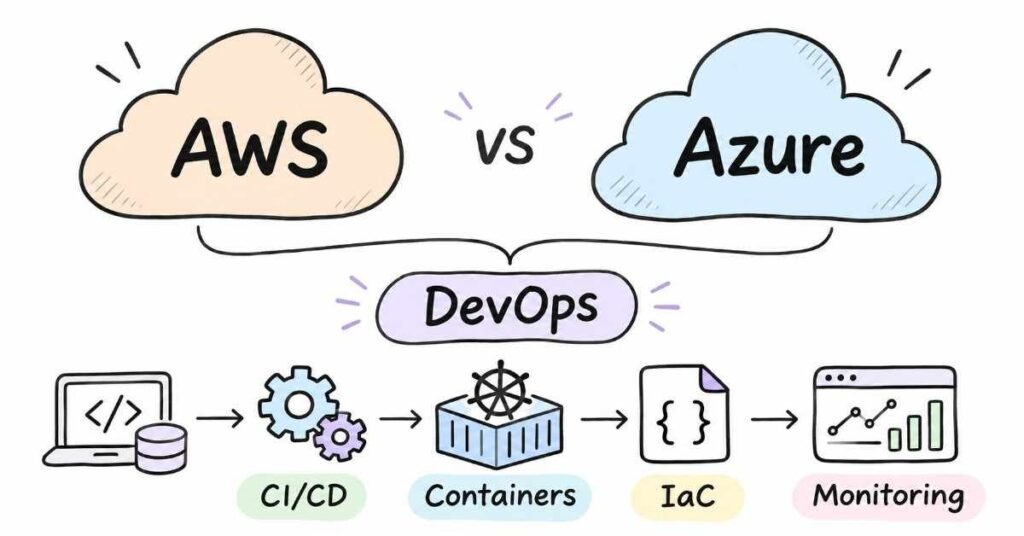
What Are AWS, Azure, and Azure DevOps?
AWS is Amazon’s cloud platform for running computing, storage, networking, databases, and applications. Teams build deployment workflows by connecting AWS services with tools such as GitHub, Jenkins, and Terraform.
Microsoft Azure is Microsoft’s cloud platform, offering comparable infrastructure and managed application services. Azure DevOps, despite its name, is not the entire Azure cloud. It is a separate collection of services for tracking work, managing repositories, testing, and automating software releases. An organization can use Azure DevOps while deploying to AWS, or use GitHub Actions while deploying to Azure.
That distinction matters: comparing AWS with Azure is a cloud-platform comparison, while comparing AWS CodePipeline with Azure Pipelines is a tooling comparison.
Want to become a DevOps Engineer?
Explore our step-by-step How To Become Guide –>
AWS vs Azure for DevOps: Comparison Table
DevOps requirement | AWS examples | Azure examples |
CI/CD automation | CodePipeline, CodeBuild | Azure Pipelines, GitHub Actions |
Virtual servers | Amazon EC2 | Azure Virtual Machines |
Serverless applications | AWS Lambda | Azure Functions |
Container image storage | Amazon ECR | Azure Container Registry |
Managed Kubernetes | Amazon EKS | Azure Kubernetes Service (AKS) |
Other container hosting | Amazon ECS | Azure Container Apps |
Infrastructure as Code | CloudFormation, Terraform | Bicep, ARM templates, Terraform |
Monitoring and logs | Amazon CloudWatch | Azure Monitor |
Identity and permissions | AWS IAM | Microsoft Entra ID, Azure RBAC |
These are representative options, not exact one-to-one equivalents. Both platforms also integrate with external CI/CD and observability tools.
1. How Do CI/CD Pipelines Differ?
Continuous integration (CI) automatically builds and tests changes when developers update code. Continuous delivery (CD) prepares a tested version for release; continuous deployment goes further by releasing approved changes automatically without a manual production decision.
CI/CD on AWS:
A possible AWS workflow uses GitHub for source code, AWS CodePipeline to coordinate stages, and AWS CodeBuild to run commands and tests. The pipeline might publish a container image to Amazon ECR and deploy it to Amazon ECS or EKS. Teams can add approvals, security checks, and rollback procedures. AWS does not require this exact combination: Jenkins and GitHub Actions can also deploy to AWS.
CI/CD on Azure:
Azure Pipelines can build and deploy applications written in multiple languages. Teams may store code in Azure Repos or GitHub, organize tasks in Azure Boards, and deploy to AKS or another hosting service. Azure Pipelines also supports deployments outside Azure, including AWS. GitHub Actions is another option for Azure-hosted applications.
Key takeaway: Both automate software delivery. The practical difference is how your team connects pipeline services, repositories, approvals, and deployment destinations.
2. Cloud Infrastructure and Networking
Before deploying an application, a DevOps engineer must choose where it runs and how it connects to users and databases.
AWS offers Amazon EC2 for virtual machines, Amazon VPC for private networking, and Elastic Load Balancing to distribute traffic. Azure offers Azure Virtual Machines, Azure Virtual Network, and Azure Load Balancer or Application Gateway for related needs. Service configuration and feature details differ, even when the design goal is similar.
For example, a small Java application may need a server, a database, inbound HTTPS access, and restricted administrative access. You can build this architecture on either platform. The skill is understanding network boundaries, firewall rules, DNS, and availability before choosing console settings.
Beginners should learn these cloud concepts once, then practice how each provider implements them.
Start your journey with our beginner-to-advanced DevOps Roadmap –>
3. Containers, Docker, and Kubernetes
Docker packages software and its dependencies into portable container images. Kubernetes manages deployment, scaling, and recovery for containerized applications.
AWS provides Amazon Elastic Container Service (ECS) for container orchestration and Amazon EKS for managed Kubernetes. Azure offers Azure Container Apps for some managed container workloads and AKS for managed Kubernetes. Both provide private registries to store container images.
Imagine an application with a frontend and a backend. A team can build two images, store them in ECR or Azure Container Registry, and deploy them to the chosen service. The commands, networking configuration, access policies, and monitoring setup change between cloud providers.
Kubernetes is useful, but it is not mandatory for every student project. A simple managed application service may be easier to operate and cheaper for a small demonstration.
4. Infrastructure as Code: CloudFormation, Bicep, and Terraform
Infrastructure as Code (IaC) means describing infrastructure in configuration files that can be reviewed, versioned, and reused. It reduces the need to create every resource manually through a cloud dashboard.
AWS provides CloudFormation, which provisions resources from templates. Azure provides Bicep and Azure Resource Manager (ARM) templates. Terraform supports both platforms through provider-specific integrations and gives teams a consistent workflow for planning infrastructure changes.
However, Terraform does not make AWS and Azure identical. An AWS virtual network and an Azure virtual network have different resource definitions and configuration requirements. Teams must also manage state securely, review planned changes, and avoid committing credentials.
For a practical exercise, define a small test environment as code, deploy it, modify one resource, review the changes, and destroy the environment afterward. That demonstrates more understanding than copying an infrastructure template without knowing what it creates.
5. Monitoring, Security, and Cost Management
A deployment is not finished when the application starts. Teams must verify that it remains available, responsive, and secure.
Amazon CloudWatch collects AWS-related metrics, logs, and alerts. Azure Monitor provides monitoring and observability for Azure resources and other supported workloads. Both can help teams investigate failed releases, rising error rates, and unusual resource behavior. Third-party tools such as Prometheus and Grafana may complement the native services.
For access control, AWS uses IAM policies and roles. Azure uses Microsoft Entra identities and Azure role-based access control (RBAC) for Azure-resource permissions. Use least-privilege access, avoid hardcoded passwords, and prefer supported workload identities over long-lived credentials.
Cost comparisons need context. A virtual machine’s price alone does not reveal the total bill. Storage, network transfer, Kubernetes operations, monitoring data, regions, and idle environments also matter. Before experimenting, check current pricing calculators, create budget alerts, and delete unused resources. Neither cloud is always the cheaper choice.
Get interview-ready with our DevOps Interview Preparation Guide –>
6. Practical Example: Deploy the Same App on Both Clouds
Suppose a student in Vijayawada builds a basic event-registration application with a frontend, REST API, and database. The goal is to release a tested update whenever a change is merged into the main Git branch.
AWS approach:
- Keep the code in GitHub and configure a pipeline trigger.
- Use CodeBuild to install dependencies and run automated tests.
- Build a Docker image and publish it to Amazon ECR.
- Deploy the application through ECS or EKS with suitable networking.
- View application logs and alerts in CloudWatch.
Azure approach:
- Keep the same code in GitHub or Azure Repos.
- Use Azure Pipelines to build, test, and create the image.
- Push the image to Azure Container Registry.
- Deploy it to AKS or a suitable Azure container service.
- Review health information and alerts through Azure Monitor.
These are illustrative workflows; the database, secrets, permissions, and production safeguards also require configuration. Compare the time needed to troubleshoot each version, not just whether it deploys successfully. A strong project portfolio should explain failures encountered and why particular services were selected.
7. AWS or Azure: Which Should Beginners Learn First?
Start with AWS when your project, training environment, or target organization mainly uses AWS services. Start with Azure when you need Microsoft-oriented development workflows or plan to work with Azure-hosted systems.
If you are a fresher or non-IT learner, do not attempt to memorize dozens of services on day one. Learn Linux, Git, basic networking, and CI/CD first. Then choose one cloud for an end-to-end project before recreating a smaller version on the other.
Working professionals should consider existing company systems, authentication requirements, compliance obligations, team skills, and migration costs. The best platform is often the one that fits the operational environment rather than the one with the longest feature list.
FLM Expert Perspective: Compare Workflows, Not Logos
For beginners, FLM recommends using a four-question Build–Deploy–Operate–Improve framework:
- Build: Can your pipeline test and package a code change reliably?
- Deploy: Can you release the application safely and repeatably?
- Operate: Can you find logs, set alerts, and restrict access?
- Improve: Can you explain a failure and automate its prevention?
Apply these questions to AWS and Azure using the same small project. This approach develops transferable reasoning instead of treating DevOps as a list of vendor certifications. It is a suggested learning framework, not an official standard from either provider.
Beginner Roadmap for AWS and Azure DevOps
- Foundations: Practice Linux commands, Git branches, pull requests, and basic networking.
- Automation: Create a pipeline that builds and tests a simple application.
- Containers: Write a Dockerfile, run the image locally, and inspect logs.
- First cloud: Deploy on AWS or Azure, with permissions and monitoring configured.
- Infrastructure: Recreate supporting resources using Terraform or native IaC.
- Second cloud: Repeat the deployment, recording service-name and configuration differences.
- Portfolio: Publish a clear architecture diagram, README, costs, troubleshooting notes, and cleanup instructions.
For a broader sequence, use the 90-Day DevOps Course Roadmap as a companion DevOps guide.
Common Mistakes When Comparing AWS and Azure
- Confusing Azure DevOps with Azure: The delivery-tool suite is not the complete cloud platform.
- Assuming CI/CD requires one provider’s tools: Cross-cloud pipelines are possible.
- Choosing Kubernetes for every app: Simpler hosting may be more appropriate.
- Ignoring permissions and charges: Secure access and cost controls belong in beginner projects.
- Learning terminology without troubleshooting: Understanding failed deployments matters more than memorizing service names.
- Calling every setup multi-cloud: Two unrelated deployments are not automatically an integrated multi-cloud architecture.
Frequently Asked Questions
1. Is AWS better than Azure for DevOps?
Neither is universally better. Compare the application’s requirements, available services, team experience, security needs, and operational costs before deciding.
2. Is Azure DevOps the same as Microsoft Azure?
No. Microsoft Azure is the cloud platform; Azure DevOps provides services such as Boards, Repos, and Pipelines for managing software development and delivery.
3. Can Azure Pipelines deploy applications to AWS?
Yes. Azure Pipelines can deploy to external destinations, including AWS, when the necessary connections, credentials, and permissions are configured.
4. Do AWS and Azure support Docker and Kubernetes?
Yes. Both can run container workloads. AWS provides ECS and EKS, while Azure provides services including Azure Container Apps and AKS.
5. Is Terraform useful for multi-cloud DevOps?
Yes. Terraform supports infrastructure provisioning on AWS and Azure, but teams still need to understand the different resource types, networking models, and permissions.
6. Does learning DevOps require advanced programming?
Not initially. Basic scripting, Git, command-line skills, and the ability to read configuration files are helpful. Programming knowledge becomes more valuable as workflows grow complex.
7. Which cloud is cheaper for a beginner project?
It depends on the services, region, usage, and available offers. Compare current pricing and monitor consumption rather than assuming one provider is cheaper.
8. Can non-IT students learn AWS and Azure DevOps?
Yes. Begin with operating systems, networking, Git, and basic cloud concepts. Progress to pipelines, Docker, and deployments through small practical exercises.
9. Should I learn both AWS and Azure at the same time?
Usually, learn one well first. Once you can build, deploy, monitor, and troubleshoot a working application, transfer those skills to the second cloud.
Conclusion
The central difference in AWS vs Azure for DevOps is how their cloud services and delivery tools are organized. Both support CI/CD, containers, infrastructure automation, monitoring, and secure application operations. AWS offers cloud-native building blocks such as CodePipeline and EKS, while Azure combines its cloud services with options such as Azure Pipelines and AKS.
If you are beginning your DevOps journey, focus on completing one reliable deployment before comparing advanced services. The ability to automate, investigate failures, and explain trade-offs will remain useful whether your next project runs on AWS, Azure, or both.
Security in DevOps and CI/CD Guide
What Is DevSecOps and Why Is Security Integrated into DevOps? Table of Contents Recommended Learning Path What Is DevSecOps Explain about the and Why Is
Jenkins AWS Project
How to Build a Jenkins CI/CD Project on AWS Table of Contents Recommended Learning Path Jenkins AWS Project Build a CI/CD Pipeline Step by Step
What Is GitHub Actions
What Is GitHub Actions and How Does It Support CI/CD? Table of Contents Recommended Learning Path GitHub Actions CI CD GitHub actions Explained Live Classes

Docker Kubernetes Project: Beginner DevOps Guide
How to Build a Docker and Kubernetes DevOps Project Table of Contents Recommended Learning Path Docker Kubernetes Project Beginner DevOps Guide Live Classes Real Projects

AWS CodePipeline vs Azure Pipelines
AWS CodePipeline vs Azure Pipelines: What Is the Difference? Recommended Learning Path AWS CodePipeline vs Azure Pipelines Understand the difference between the AWS and Azure
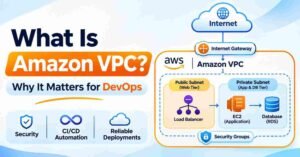
What Is Amazon VPC in DevOps
What Is Amazon VPC and Why Is It Important for DevOps? Table of Contents Recommended Learning Path Amazon VPC DevOps AWS Networking Guide for Beginners