
90-Day SQL Course Roadmap: From Complete Beginner to Job-Ready Developer
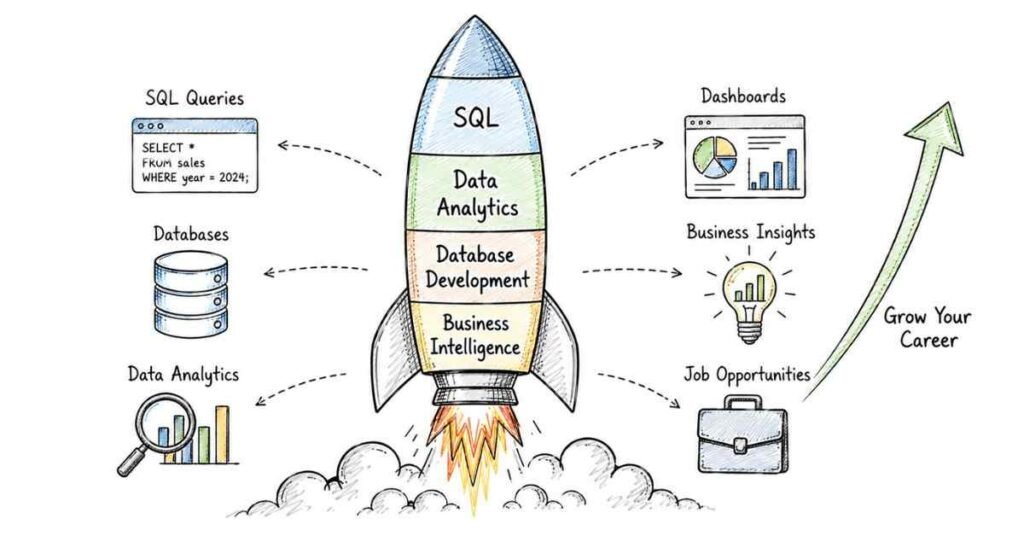
Table of Contents
This is a structured, day-by-day 90-day roadmap to become a job-ready SQL Developer or Data Analyst — covering SQL fundamentals, MySQL setup, advanced querying, JOINs, subqueries, window functions, CTEs, stored procedures, performance optimisation, database design, and real-world project builds. Built on Frontlines Edutech’s SQL Developer course curriculum, this plan is designed for students and freshers across India who want to break into data analytics, database development, or backend roles — even with zero prior coding experience. SQL is the #1 queried skill in Indian data job postings — it appears in requirements for Data Analysts, Backend Developers, Business Intelligence professionals, and even ML Engineers. SQL Developer freshers in India earn ₹3.5–6 LPA, with experienced professionals reaching ₹12–18 LPA. By Day 90, you’ll have a portfolio of real-world database projects, documented query case studies, and the interview confidence to crack roles at TCS, Infosys, Wipro, Cognizant, and data-first companies across Hyderabad and beyond.
Why SQL Is the Most Valuable Skill in Indian Tech Right Now
Every company — from a three-person startup to a 300,000-employee enterprise — stores data. Someone has to query it, manage it, and extract insights from it. That someone is you, after 90 days.
- SQL is required in over 70% of data and tech job postings in India — it’s not optional, it’s table stakes
- You can learn it without a computer science degree — SQL has English-like syntax that anyone can learn
- It unlocks multiple career paths — Data Analyst, SQL Developer, Database Administrator, BI Developer, Backend Developer, and ML Data Engineer all require it
- Demand is massively outpacing supply — 1,600+ SQL developer openings on Indeed India alone, with positions starting at ₹3.3 LPA for freshers
- It pairs with everything — Python, Power BI, Tableau, Excel, Java, and cloud platforms all become more powerful with SQL underneath
The bottom line: 90 focused days of SQL gives you a skill that appears in job postings across every sector in India.
Explore SQL All Resources →
The 3-Month Learning Structure at a Glance
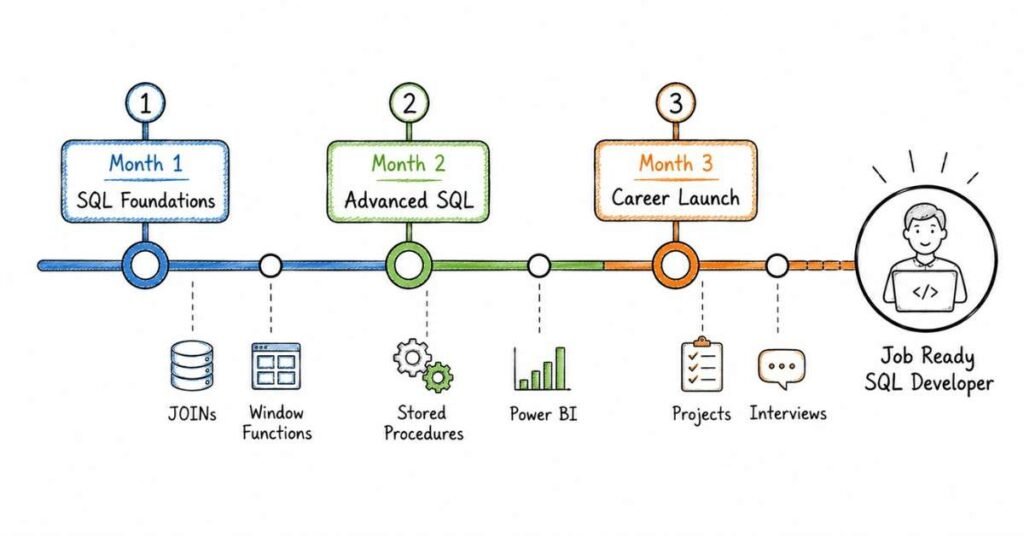
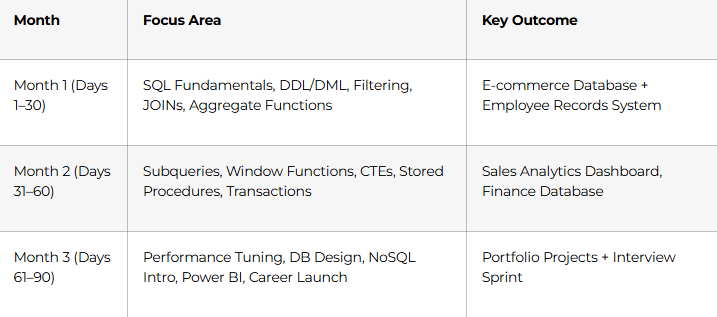
Month 1: SQL Foundations — Learn to Speak the Language of Data (Days 1–30)
SQL has English-like syntax that reads almost like a sentence. Once you understand the logic, everything flows naturally. Don’t rush Month 1 — every query pattern you learn here gets reused thousands of times in your career.
Week 1: Database Fundamentals & First Queries (Days 1–7)
Days 1–2: What Is SQL and Why Does It Matter?
- What a database is, what a RDBMS (Relational Database Management System) is, and why SQL is the universal language for talking to one
- Difference between MySQL, PostgreSQL, SQL Server, and Oracle — and why we use MySQL as our primary learning tool
- Install MySQL + MySQL Workbench; create your first database; understand the interface
- How data is stored: tables, rows, columns, data types (INT, VARCHAR, DATE, DECIMAL, BOOLEAN)
Days 3–4: Your First Queries — SELECT, FROM, WHERE
These three keywords cover 80% of what SQL developers write every day.
sql
SELECT first_name, salary
FROM employees
WHERE department = ‘Sales’ AND salary > 50000;
- SELECT: choose which columns to show
- FROM: choose which table to pull from
- WHERE: filter rows by condition (AND, OR, NOT, BETWEEN, IN, LIKE)
- ORDER BY: sort results ascending or descending
- LIMIT / TOP: return only the first N rows
Days 5–6: Data Manipulation — INSERT, UPDATE, DELETE
- INSERT INTO: add new rows to a table
- UPDATE: modify existing rows based on conditions
- DELETE: remove rows — with and without WHERE clause (and why the WHERE clause matters!)
- TRUNCATE vs. DELETE: the difference that interviewers test
Day 7: DDL Commands — Create and Manage Tables
- CREATE TABLE: define table structure with correct data types and constraints
- ALTER TABLE: add, modify, or drop columns after creation
- DROP TABLE: permanently delete a table
- Constraints: PRIMARY KEY, NOT NULL, UNIQUE, DEFAULT, CHECK
💡 Pro Habit: From Day 1, write every query in a saved .sql file with comments explaining what it does. By Day 90, this is your project portfolio.
Week 2: JOINs — The Most Important SQL Skill (Days 8–14)
JOINs connect data across multiple tables. They are tested in every single SQL interview in India. Master them here.
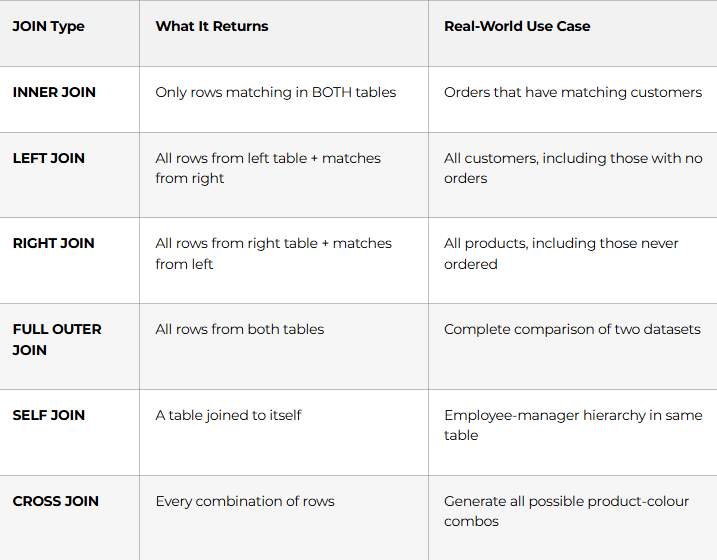
- Days 8–9 — INNER JOIN and LEFT JOIN with real examples: customers + orders, employees + departments
- Day 10 — RIGHT JOIN, FULL OUTER JOIN, and CROSS JOIN — when each is appropriate
- Day 11 — SELF JOIN: employee-manager relationships, finding duplicate records
- Days 12–13 — Multi-table JOINs: joining 3–4 tables in a single query; aliasing tables for readability
- Day 14 — Week 2 Project: Employee Management System — 4 tables (Employees, Departments, Projects, Salaries), 10 queries using every JOIN type, exported as documented .sql file
Week 3: Aggregate Functions & Grouping (Days 15–21)
This is where SQL transforms from a data retrieval tool into a data analysis tool.
Days 15–16: The Core Aggregate Functions
- COUNT(): total number of rows or non-null values
- SUM(): total of a numeric column
- AVG(): average value
- MIN() / MAX(): smallest and largest values
- ROUND(): format decimal output for reports
Days 17–18: GROUP BY and HAVING
sql
SELECT department, COUNT(*) AS headcount, AVG(salary) AS avg_salary
FROM employees
GROUP BY department
HAVING AVG(salary) > 60000
ORDER BY avg_salary DESC;
- GROUP BY: aggregate data by category (by department, by city, by month)
- HAVING: filter after grouping — different from WHERE, which filters before
- Combining WHERE + GROUP BY + HAVING in complex analytical queries
Days 19–20: String, Date, and Numeric Functions
- String functions: CONCAT(), UPPER(), LOWER(), SUBSTRING(), TRIM(), REPLACE(), LENGTH()
- Date functions: NOW(), CURDATE(), DATE_FORMAT(), DATEDIFF(), YEAR(), MONTH(), DAY()
- Numeric functions: ROUND(), CEIL(), FLOOR(), MOD(), ABS()
Day 21: Week 3 Project — Sales Analytics Report
Build a complete sales analysis: total revenue by region, top 5 products by quantity sold, month-over-month growth, customers with zero purchases — all in one documented query set.
Week 4: Subqueries, CASE Statements & Month 1 Consolidation (Days 22–30)
Days 22–24: Subqueries
- Single-row subqueries: find employees earning more than the company average
- Multi-row subqueries with IN, ANY, ALL operators
- Correlated subqueries: reference the outer query row-by-row (slower but powerful)
- EXISTS / NOT EXISTS: check whether a related record exists
sql
SELECT name, salary
FROM employees
WHERE salary > (SELECT AVG(salary) FROM employees);
Days 25–26: CASE Statements Conditional Logic in SQL
- Simple CASE: map specific values to labels (“Bronze”, “Silver”, “Gold” customer tiers)
- Searched CASE: apply range-based conditions (salary brackets, performance ratings)
- Using CASE inside GROUP BY, ORDER BY, and aggregate functions
Days 27–28: UNION, INTERSECT, EXCEPT
- UNION vs. UNION ALL: combine results from multiple queries — why UNION ALL is faster
- INTERSECT: find data that exists in both result sets
- EXCEPT / MINUS: find data in first set but not in second
Days 29–30: Month 1 Capstone — E-Commerce Database
Design and populate a 6-table e-commerce database (Customers, Products, Categories, Orders, OrderItems, Payments). Write 20 analytical queries covering all Month 1 skills. Document everything in a GitHub repository. This is Portfolio Project #1.
🏆 Month 1 Milestone: You can write complex multi-table queries, aggregate and group data professionally, and deliver analytical reports that companies actually need. You are an SQL practitioner.
Explore the SQL Career Guide →
Month 2: Advanced SQL — The Skills That Get You Hired (Days 31–60)
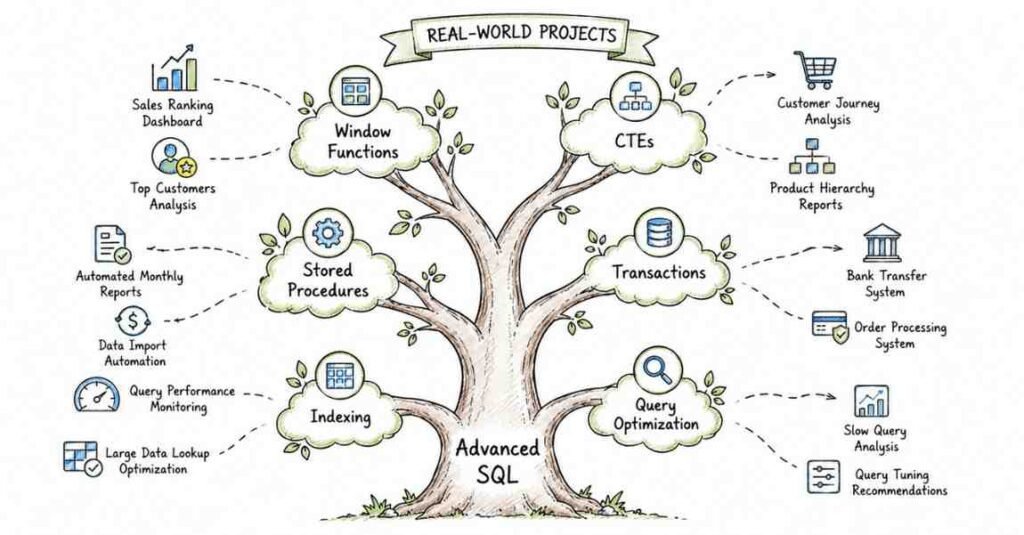
Month 2 covers the techniques that appear in every mid-level and senior SQL interview. These are the skills that separate candidates who get shortlisted from those who don’t.
Week 5: Window Functions — A Complete Game-Changer (Days 31–37)
Window functions are one of the most powerful and most tested SQL features. They let you run calculations across a set of rows without collapsing them with GROUP BY.
Days 31–32: ROW_NUMBER, RANK, DENSE_RANK
sql
SELECT name, department, salary,
RANK() OVER (PARTITION BY department ORDER BY salary DESC) AS dept_rank
FROM employees;
- ROW_NUMBER(): unique sequential number for each row within a partition
- RANK(): same values get the same rank, with gaps (1, 1, 3, 4)
- DENSE_RANK(): same values get same rank, no gaps (1, 1, 2, 3)
- NTILE(n): divide rows into n equal buckets (quartiles, deciles)
Days 33–34: Aggregate Window Functions
- SUM() OVER, AVG() OVER, COUNT() OVER: running totals, moving averages — without destroying row detail
- PARTITION BY: calculate separately for each group (like GROUP BY, but keeping all rows)
- ORDER BY inside OVER: for running calculations along a sorted sequence
Days 35–36: LAG and LEAD — Time-Series Analysis
- LAG(): access previous row’s value — compare this month’s sales to last month’s
- LEAD(): access next row’s value — calculate days until next event
- FIRST_VALUE() and LAST_VALUE(): get the first or last value in a window frame
Day 37: Week 5 Project — HR Analytics Dashboard Query Set
Monthly headcount trends, top 3 earners per department, running total payroll by month, employee tenure buckets using NTILE. All queries documented with business context.
Week 6: CTEs, Views & Temporary Tables (Days 38–44)
Days 38–40: CTEs (Common Table Expressions)
CTEs make complex queries readable and maintainable — a must-have in any professional codebase.
sql
WITH high_earners AS (
SELECT department, AVG(salary) AS avg_sal
FROM employees
GROUP BY department
HAVING AVG(salary) > 70000
)
SELECT e.name, e.salary, h.avg_sal
FROM employees e
JOIN high_earners h ON e.department = h.department;
- Simple CTEs: replace deeply nested subqueries with readable named blocks
- Recursive CTEs: generate sequences, traverse hierarchical data (org charts, category trees)
- Multiple CTEs in one query: chain them for multi-step transformations
Days 41–42: Views
- CREATE VIEW: save a complex query as a virtual table
- Updatable views vs. read-only views
- Using views for security: expose only permitted columns to specific users
- Materialized views (PostgreSQL): store query results physically for performance
Days 43–44: Temporary Tables and Table Variables
- CREATE TEMPORARY TABLE: persist intermediate results within a session
- When to use temp tables vs. CTEs: large datasets, multi-step ETL processes
- Week 6 Mini-Project: Rewrite the Month 1 E-commerce capstone queries using CTEs — compare readability before and after
Week 7: Stored Procedures, Functions & Triggers (Days 45–51)
Days 45–47: Stored Procedures
Stored procedures are pre-compiled SQL blocks stored in the database — the foundation of database-driven applications.
sql
CREATE PROCEDURE GetDepartmentReport(IN dept_name VARCHAR(50))
BEGIN
SELECT name, salary, hire_date
FROM employees
WHERE department = dept_name
ORDER BY salary DESC;
END;
- IN, OUT, INOUT parameters: pass data into and out of procedures
- Control flow: IF-ELSE, CASE, WHILE loops, REPEAT, LOOP inside procedures
- Error handling: DECLARE HANDLER, SIGNAL SQLSTATE for custom error messages
- Calling stored procedures from applications (Java, Python, Node.js)
Days 48–49: User-Defined Functions (UDFs)
- Scalar functions: return a single value (calculate age from birthdate, format a currency)
- Difference between functions and stored procedures: when to use which
- Creating reusable business logic: a tax calculation function, a working-days counter
Days 50–51: Triggers
- BEFORE and AFTER triggers: fire automatically on INSERT, UPDATE, DELETE
- Audit log trigger: automatically record every change to a sensitive table
- Prevent invalid data entry: trigger that rejects negative salary updates
- Week 7 Project: Finance Database with 3 stored procedures, 2 UDFs, and an audit log trigger
Week 8: Transactions, ACID Properties & Indexes (Days 52–60)
Days 52–54: Transactions & ACID
Transactions are how databases guarantee data integrity when multiple operations must all succeed or all fail. This is heavily tested at every SQL interview.
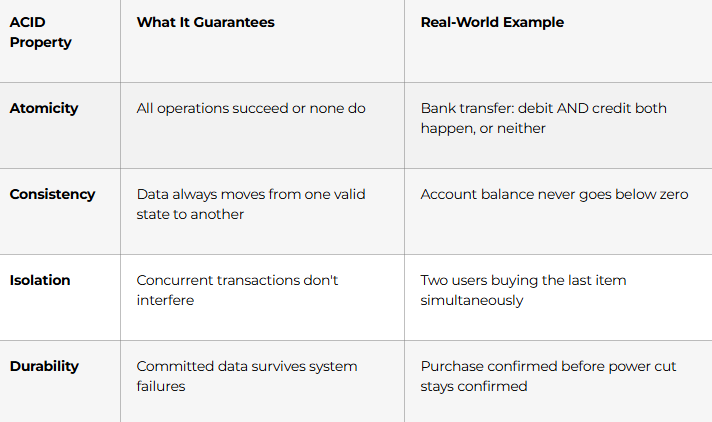
- BEGIN / COMMIT / ROLLBACK: manual transaction control
- SAVEPOINT: partial rollback to a checkpoint within a transaction
- Transaction isolation levels: READ UNCOMMITTED, READ COMMITTED, REPEATABLE READ, SERIALISABLE
Days 55–57: Indexes & Query Performance Optimisation
Performance questions appear in almost every senior SQL interview.
- Clustered vs. Non-Clustered Indexes: what the difference actually means for query speed
- CREATE INDEX: when to add indexes and on which columns (WHERE clause columns, JOIN keys, ORDER BY columns)
- EXPLAIN / EXPLAIN ANALYZE: read query execution plans — find where your query is slow
- Slow query optimisation checklist:
- Avoid SELECT * — name only the columns you need
- Use indexes on WHERE and JOIN columns
- Avoid functions on indexed columns in WHERE clauses (breaks index usage)
- Use JOIN instead of correlated subqueries for large datasets
- Partition large tables by date or region
- Use LIMIT to paginate results instead of loading millions of rows
Days 58–60: Month 2 Capstone — Hospital Management System
Design a fully normalised hospital database (Patients, Doctors, Appointments, Prescriptions, Billing, Ward). Write: 15 analytical queries using window functions + CTEs, 3 stored procedures (admit patient, generate invoice, doctor availability), an audit trigger for prescription changes, and an index strategy report. Document as Portfolio Project #2 on GitHub.
🏆 Month 2 Milestone: You write professional-grade SQL — window functions, CTEs, stored procedures, transactions, and optimised queries. This is the level companies actually hire at.
Master SQL Interview Prep →
Month 3: Real-World Projects, Database Design & Career Launch (Days 61–90)
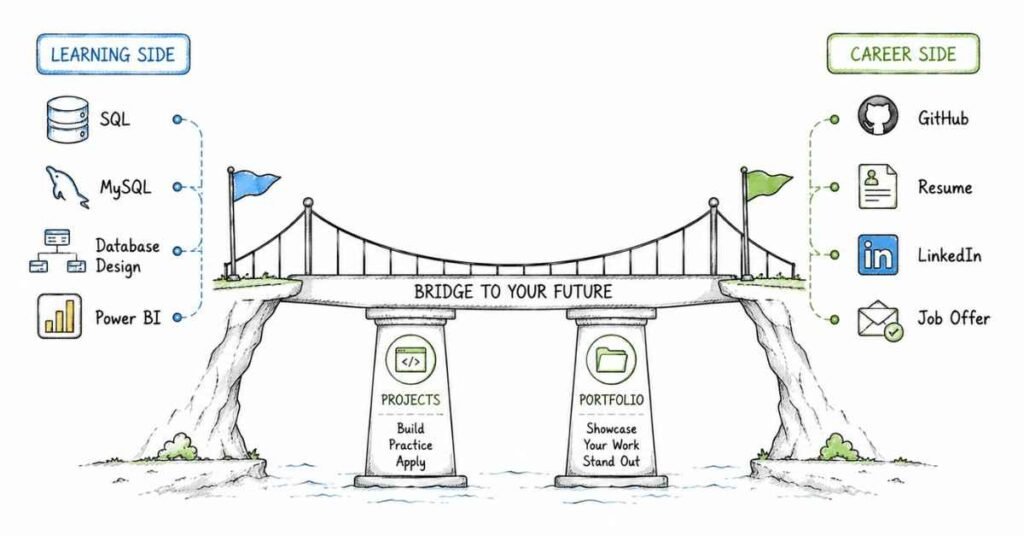
The final month is about building the portfolio, mastering database design, exploring NoSQL, integrating with BI tools, and launching your career with full interview preparation.
Week 9: Advanced Database Design & Normalisation (Days 61–67)
Days 61–63: Normalisation — Design Databases That Last
Good database design prevents data duplication, update anomalies, and performance nightmares. Every DBA and SQL developer interview includes normalisation questions.
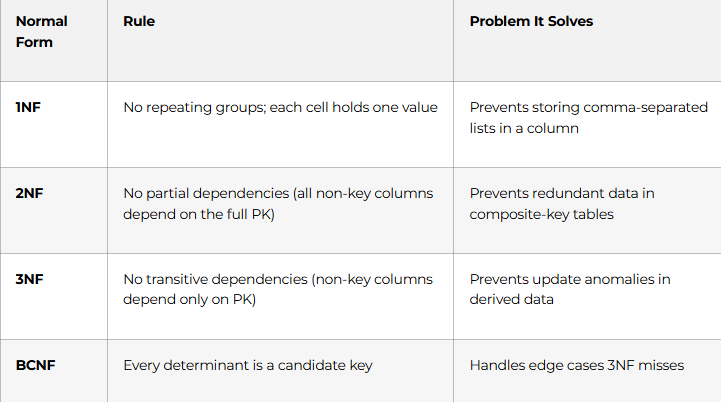
- Entity-Relationship (ER) Diagrams: design before you code
- Identifying entities, attributes, and relationships
- One-to-one, one-to-many, many-to-many: translating ER diagrams into tables with proper foreign keys
- Denormalisation: when and why you intentionally break normal form for performance
Days 64–65: Constraints, Foreign Keys & Referential Integrity
- Foreign key constraints: enforce relationships at the database level
- ON DELETE CASCADE vs. RESTRICT vs. SET NULL: choose the right behaviour for your use case
- Composite keys: when a primary key needs more than one column
Days 66–67: Week 9 Project — Complete ER Design Challenge
Given a real business scenario (a university course registration system), design the full ER diagram, normalise to 3NF, create all tables with proper constraints, and seed with sample data. Document design decisions with written rationale.
Week 10: NoSQL Introduction & SQL + BI Integration (Days 68–74)
Days 68–70: Introduction to NoSQL with MongoDB
SQL professionals who understand NoSQL are more employable — most modern companies use both.
- Document databases vs. relational databases: when NoSQL wins (unstructured data, high-velocity writes, flexible schemas)
- MongoDB basics: collections, documents, CRUD operations in MongoDB syntax
- Comparing SQL vs. NoSQL for the same use case: when to recommend which
- When NOT to use NoSQL: financial systems, anything requiring ACID transactions
Days 71–73: SQL + Power BI Integration
SQL and Power BI together is the most in-demand analyst skill combination in Indian job postings today.
- Connect Power BI Desktop to MySQL database directly
- Write SQL queries that Power BI uses as data sources — optimising for BI consumption
- Build a live sales dashboard: revenue by region, monthly trends, product performance — powered by your SQL queries
- DirectQuery vs. Import mode: performance and refresh trade-offs
Day 74: Advanced SQL Topics — Partitioning & Replication Concepts
- Table partitioning: split billion-row tables by date range for query performance
- Database replication concepts: master-slave replication, read replicas — how large applications scale SQL
Week 11: Advanced GenAI & Multimodal Models (Days 75–81)
- BERT, RoBERTa, T5 — fine-tune on custom data
- GANs (Generative Adversarial Networks) — StyleGAN, CycleGAN, DCGAN
- Diffusion Models — Stable Diffusion, DDPM, text-to-image
- Multimodal LLMs — text + image + audio integration
- Agentic AI — autonomous agents, multi-agent systems, tool-calling
- Day 81 Capstone — Build a customer support AI agent with tool-calling
💡 Career Tip: Record a 2-minute demo video of your GenAI project and post it on LinkedIn. A working app demo gets 10x more engagement than a static code screenshot — and it gets recruiters sliding into your DMs.
Week 11: Portfolio Projects & Interview Preparation (Days 75–84)
Days 75–79: Capstone Projects Sprint
Complete two final portfolio projects that demonstrate your complete SQL skillset:
Portfolio Project #3: Retail Business Intelligence Database
Build a full data warehouse schema (star schema) for a retail business — Fact table (Sales), dimension tables (Date, Product, Customer, Store). Write analytical queries: YTD sales, same-store growth, customer lifetime value, top-performing products by quarter. Connect to Power BI and build a 3-page dashboard. Document on GitHub with README and SQL files.
Portfolio Project #4: Real-Time Banking Transaction System
Design a banking database with accounts, transactions, loans, and branches. Implement: stored procedures for fund transfers (with transaction + rollback on failure), fraud detection query (flag transactions 3x above customer average), audit triggers for every account modification, and index optimisation report. Document with EXPLAIN output before and after indexing.
Days 80–84: SQL Interview Preparation Sprint
The most commonly tested SQL interview topics — mastered in one week:
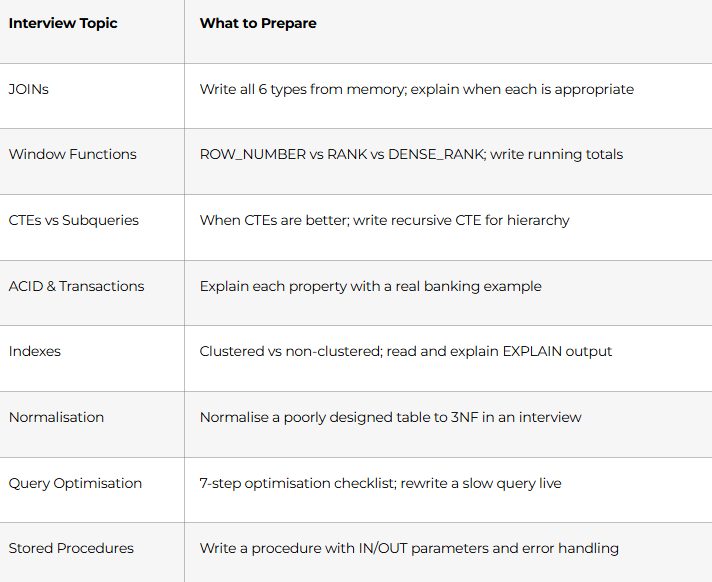
💡 Interview Tip: Practice writing SQL by hand on paper or a whiteboard. Many Hyderabad interviews — especially at TCS, Infosys, and Wipro — still test SQL on pen and paper or a basic text editor without autocomplete.
Week 12: Career Launch Sprint (Days 85–90)
- Day 85 — GitHub portfolio: 4 well-documented SQL project repositories with README (problem statement, ER diagram, key queries, results, business insights)
- Day 86 — LinkedIn optimisation: headline “SQL Developer | MySQL | Data Analytics | Power BI | Open to Opportunities in Hyderabad” — add portfolio links to featured section; keyword-optimise Skills section
- Day 87 — ATS-ready resume: structure (Summary → Technical Skills → Projects → Certifications → Education); quantify everything (“Optimised query reducing execution time from 14s to 0.8s using index strategy”)
- Day 88 — Job platform strategy: Naukri.com (set alerts for “SQL Developer Fresher”, “Data Analyst SQL”), LinkedIn Jobs, Instahyre, direct applications to TCS, Infosys, Cognizant, Wipro, HDFC, ICICI, and Hyderabad analytics firms
- Day 89 — Mock technical interview: 10 live SQL query questions, 5 theory/concept questions, 2 schema design questions — timed and scored
- Day 90 — Certification & Career Launch: Frontlines Edutech course completion certificate, final career coaching session, 30-day job search action plan
🏆 Day 90 Milestone: 4 portfolio projects live on GitHub. LinkedIn active. Resume submitted. Interview-ready. SQL career begins.
SQL Career Paths & Salary Guide (India 2026)
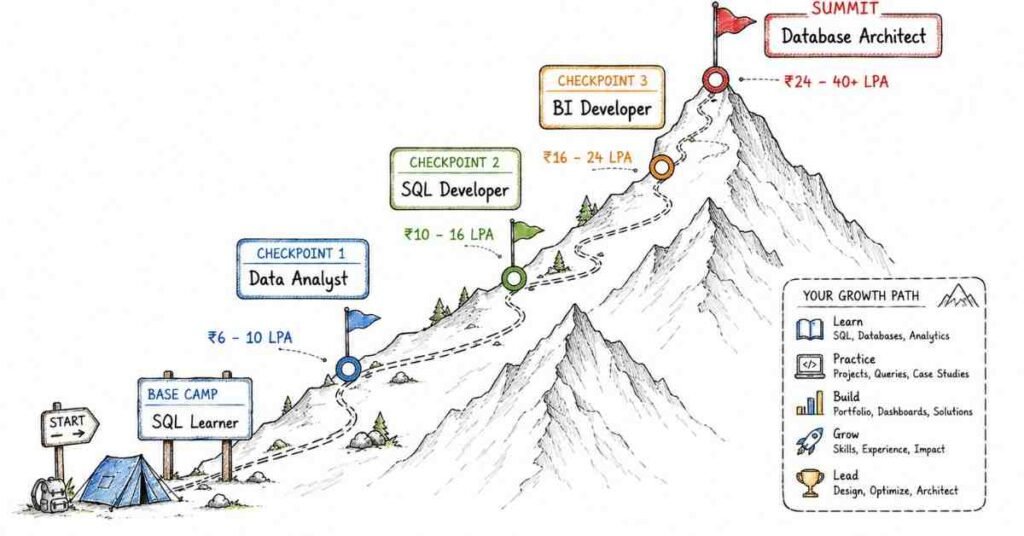
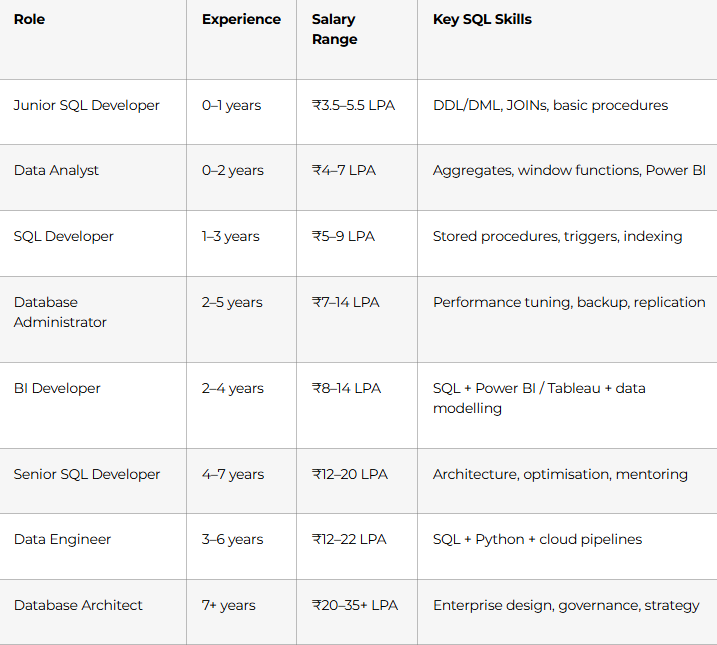
Top hiring cities: Hyderabad, Bangalore, Mumbai, Pune, Chennai, Delhi-NCR, Noida
Active hirers: TCS, Infosys, Wipro, Cognizant, HCL, Accenture, Capgemini, IBM, all major BFSI companies (HDFC, ICICI, SBI, Axis Bank), and hundreds of analytics and product companies
Why Choose Frontlines Edutech for Your SQL Course?
Frontlines Edutech is headquartered in Somajiguda, Hyderabad and has helped thousands of students across the Telugu states launch technology careers — including freshers, B.Com graduates, IT professionals upgrading skills, and career switchers from non-tech backgrounds.
- Curriculum aligned to real job requirements — built from what TCS, Infosys, and analytics firms actually test
- 4 real portfolio projects included — not toy datasets, but business-realistic databases with documented queries
- Telugu-friendly teaching — complex concepts like window functions, ACID properties, and query execution plans explained in the language you think in
- Power BI integration — SQL + BI is the most in-demand analyst combo in Indian job postings right now
- Interview preparation built in — 50+ practice questions, live mock interviews, and whiteboard SQL sessions
- Career support until you’re placed — resume, LinkedIn, job referrals, and placement updates from 200+ hiring partners
Frequently Asked Questions (FAQs)
Q1.Do I need programming experience to learn SQL?
A.No. SQL uses plain English-like syntax and is widely considered one of the easiest technical skills to start learning. This course begins from Day 1 with installation and your very first SELECT query. No prior coding, mathematics, or IT background is required.
Q2.What is the salary for a SQL Developer fresher in India?
A.SQL Developer and Data Analyst freshers in India typically earn ₹3.5–5.5 LPA. With a strong portfolio of real-world projects and skills in advanced SQL + Power BI, candidates frequently land ₹5–7 LPA at their first role. Hyderabad, Bangalore, and Mumbai offer the most competitive fresher packages.
Q3.Which database does this SQL course focus on?
A.The primary database is MySQL — the most widely used relational database in India for both learning and production use. The course also covers PostgreSQL concepts and provides a MongoDB introduction for NoSQL awareness. All skills transfer directly to SQL Server and Oracle used at large companies.
Q4.What are the most important SQL topics for interviews?
A.Based on real interview patterns at Indian IT companies, the most tested topics are: JOINs (all types), window functions (RANK, ROW_NUMBER, LAG/LEAD), CTEs vs. subqueries, ACID properties and transactions, stored procedures, index strategy and query optimisation using EXPLAIN, and normalisation to 3NF. All of these are covered in depth in this roadmap.
Q5.What is the difference between SQL and MySQL?
A.SQL (Structured Query Language) is the standard language for querying relational databases. MySQL is a specific database management system that uses SQL. Learning MySQL means learning SQL — the core query syntax is nearly identical across MySQL, PostgreSQL, and SQL Server, with minor differences in functions and syntax.
Q6.Will I build real projects in this SQL course?
A.Yes. This roadmap includes 4 complete portfolio projects: an E-Commerce Database (Month 1 capstone), an HR Analytics query set (Month 2 mid-point), a Hospital Management System (Month 2 capstone), and a Retail BI Database with Power BI dashboard (Month 3). All projects are documented on GitHub.
Q7.Does Frontlines Edutech provide placement support after the SQL course?
A.Yes. Placement support includes resume building, LinkedIn profile optimisation, mock technical interviews, and active job leads from 200+ partner companies. The team provides support until you land your first role — not just for a fixed period after course completion.
Q9.Can a non-IT student learn SQL and get a job?
A.Absolutely. Many of Frontlines Edutech’s most successful SQL alumni came from B.Com, BBA, arts, and science backgrounds. SQL is one of the most accessible technical skills available, and companies explicitly hire Data Analysts and Junior SQL Developers from non-IT backgrounds when they can demonstrate strong query skills and a real project portfolio.
Published by Frontlines Edutech | blog.frontlinesedutech.com
support@frontlinesedutech.com