
SQL Interview Preparation Guide 2026
Table of Contents
Part 1: Introduction & 30-Day Study Plan
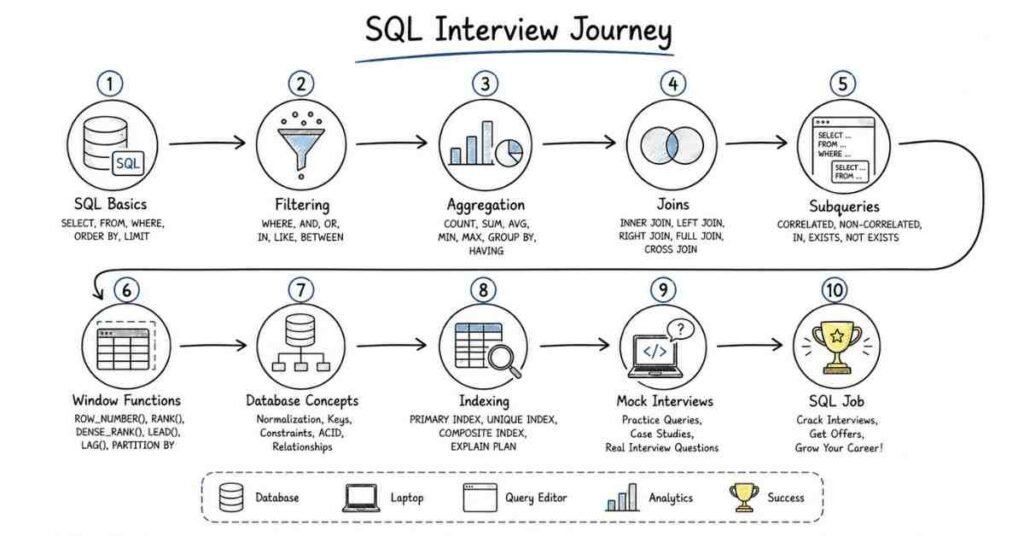
This first part sets the foundation for your SQL interview preparation. It explains what SQL interviews test, where SQL is used in real work, and how to build a practical 30-day study plan that makes you interview-ready.
What this guide covers
This guide is designed to prepare you for SQL interviews in a structured, layered way. It starts with query basics and moves into filtering, aggregation, joins, subqueries, window functions, performance tuning, and career strategy.
The goal is not just to help you memorize syntax, but to help you think clearly while solving SQL problems. Interviewers usually care more about how you reason through data than whether you can recite definitions.
Who this guide is for
This guide is useful if you are:
- A fresher preparing for your first SQL interview.
- A student targeting data analyst, business analyst, or support roles.
- A developer who wants stronger database and query skills.
- A working professional preparing for data, product, reporting, or backend interviews.
- A candidate who knows basic SQL but is not yet confident solving interview questions under pressure.
The structure is meant to help both beginners and experienced candidates build confidence step by step. It gives you a clean path from fundamentals to advanced SQL interview execution.
What SQL is and why it matters
SQL stands for Structured Query Language. It is used to store, retrieve, update, and analyze data in relational databases.
SQL matters because almost every company works with data in some form. Whether you are in analytics, product, operations, marketing, finance, or engineering, SQL helps you answer business questions quickly and accurately.
A simple way to think about SQL is this: it is the language you use to ask questions from a database. If you can write strong SQL, you can turn raw data into useful decisions.
Where SQL fits in real work
In real companies, SQL is used for reporting, dashboards, product analysis, data cleaning, customer segmentation, and backend data access. Common tasks include:
- Pulling records from tables.
- Joining data from multiple sources.
- Creating reports for stakeholders.
- Measuring performance metrics.
- Investigating trends, gaps, and anomalies.
- Supporting application logic through database queries.
This is why SQL interviews test more than syntax. Interviewers often want to see whether you can solve practical business problems using tables, filters, joins, and aggregates.
Join the Advanced SQL Course →
Common SQL-related roles
SQL interviews vary depending on the role. Common role types include:
- Data Analyst: reporting, aggregation, trends, dashboards.
- Business Analyst: business metrics, operational reporting, ad hoc analysis.
- Data Engineer: query logic, pipelines, performance, database structure.
- Backend Developer: SQL usage in applications, joins, constraints, optimization.
- Product Analyst: user behavior, funnels, retention, cohort-style queries.
- MIS/Reporting Analyst: structured reporting and recurring business reports.
Understanding the role early helps you focus your preparation. A data analyst interview may focus more on business queries, while a backend interview may include schema design and performance basics.
Common interview process
A typical SQL interview process often includes:
- Online test or coding round.
- Basic query round.
- Joins and grouping round.
- Advanced SQL round with subqueries or window functions.
- Database concepts round.
- Scenario-based business questions.
- Behavioral or hiring manager round.
In many interviews, SQL questions are mixed with practical reasoning. You may be asked to write a query, explain the logic, and describe how you would improve it for large data.
Core skill areas interviewers usually check
Most SQL interviews evaluate some combination of:
- Query writing accuracy.
- Filtering and sorting.
- Aggregation and grouping.
- Join logic and table relationships.
- Subqueries and CTEs.
- Window functions.
- NULL handling.
- Data modification statements.
- Indexing and performance basics.
- Normalization and database fundamentals.
These areas appear repeatedly because they reflect real database work. If you are comfortable with these topics, you can handle most interview rounds with confidence.
Why SQL is important in interviews
SQL is one of the easiest skills to test and one of the most useful skills in real work. Interviewers use SQL because it shows whether you can think logically, work with data structures, and solve problems step by step.
A strong SQL candidate does not just write a query. They understand why the query works, how it behaves with missing data, and what happens when the dataset gets larger.
How to think in SQL interviews
A strong SQL answer usually follows this structure:
- Understand the question clearly.
- Identify the tables and columns needed.
- Decide the filtering condition.
- Choose the correct join or aggregation logic.
- Write the query step by step.
- Check edge cases like duplicates and NULL values.
For example, if asked to find the second highest salary, do not jump straight into memorized syntax. First identify whether duplicates matter, whether NULLs exist, and whether the answer should return one row or many rows. That kind of reasoning is what interviewers look for.
You should be comfortable explaining when to use a List versus a Set versus a Map, and why choices like HashMap versus TreeMap matter for performance and ordering.
30-day study plan
A practical 30-day SQL study plan looks like this:
Explore the Advanced SQL Roadmap →
Week 1: SQL basics and query fundamentals
Focus on database basics, tables, rows, columns, SELECT, WHERE, ORDER BY, DISTINCT, LIMIT, comparison operators, logical operators, NULL handling, and simple filtering practice.
Week 2: Aggregation and joins
Study COUNT, SUM, AVG, MIN, MAX, GROUP BY, HAVING, INNER JOIN, LEFT JOIN, RIGHT JOIN, FULL OUTER JOIN, and basic join-based query practice.
Week 3: Subqueries, CTEs, and window functions
Move into nested queries, correlated subqueries, common table expressions, UNION, UNION ALL, ROW_NUMBER, RANK, DENSE_RANK, LAG, LEAD, running totals, and analytical query patterns.
Week 4: Database concepts, optimization, and mock interviews
Revise constraints, normalization, transactions, indexing basics, execution plans, performance tuning, and full SQL mock interview practice using mixed question sets.
Daily study routine
A practical daily routine looks like this:
- 45 minutes of concept revision.
- 60 minutes of SQL query practice.
- 30 minutes of solving timed interview questions.
- 15 minutes of notes, flashcards, or review of mistakes.
If you are a fresher, do not skip writing queries manually. Many candidates understand concepts in theory but struggle when they have to write the query on the spot.
Salary expectations in India
SQL salary expectations vary by role, company type, and domain. Fresher and early-career SQL-heavy roles often appear in analytics, reporting, support, and backend-related positions, while stronger SQL plus business analysis or data engineering skills can improve compensation significantly.
A practical approach is to treat salary numbers as directional context rather than guaranteed outcomes. In interviews, your SQL skill level, project quality, and overall communication often matter as much as the title itself.
How to prepare effectively
The best way to prepare for SQL interviews is to build from simple to complex. Start with basic querying, then move to grouping, joins, and subqueries, and only after that spend serious time on window functions and optimization.
You should also practice explaining your logic out loud. In many interviews, the explanation matters almost as much as the final query.
Revision focus
Revise what SQL is, where it is used, the common SQL roles, the usual interview format, the key skill areas, and the 30-day study plan before moving to query fundamentals.
Part 2: SQL Fundamentals & Query Basics — Questions 1–40
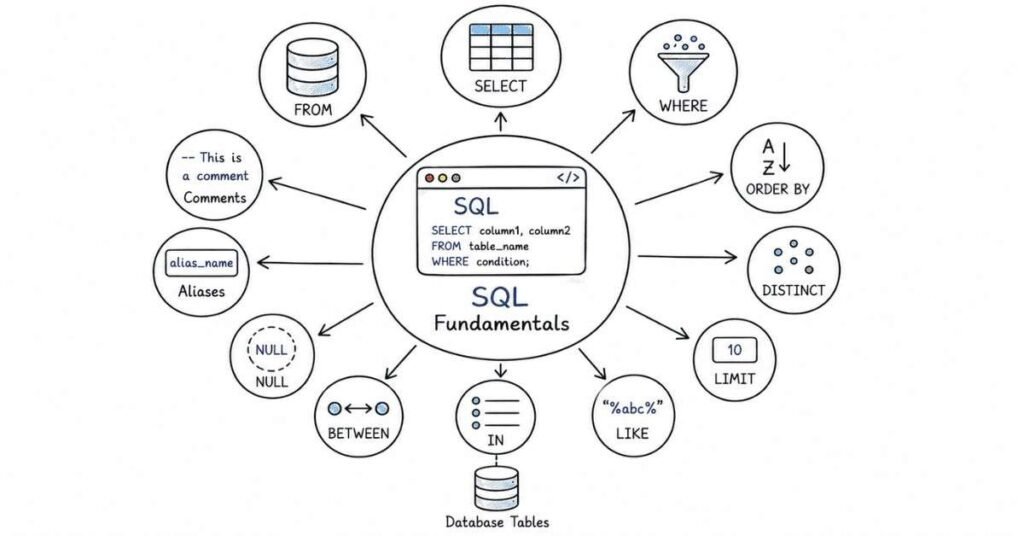
This part builds the foundation for the rest of the SQL guide. It covers databases, tables, rows, columns, and the basic query operations you will use in almost every SQL interview.
Questions 1–40
1) What is SQL?
SQL stands for Structured Query Language. It is used to store, retrieve, update, and manage data in relational databases.
2) Why is SQL important?
SQL is important because it lets you work with data directly. It is one of the most widely used skills in analytics, reporting, backend development, and business decision-making.
3) What is a database?
A database is an organized collection of data stored electronically. It helps applications store, manage, and retrieve information efficiently.
4) What is a relational database?
A relational database stores data in tables that are connected through relationships. Each table contains rows and columns, and related data can be linked using keys.
5) What is a table in SQL?
A table is a structured way of storing data in rows and columns. Each table usually represents one entity, such as employees, customers, or orders.
6) What is a row in a table?
A row represents a single record in a table. For example, one row in an employee table may represent one employee.
7) What is a column in a table?
A column represents a specific attribute of the data. For example, a customer table may have columns like customer_id, name, email, and city.
8) What is a field?
A field is the value stored at the intersection of a row and a column. It represents one piece of data in the table.
9) What is the difference between a row and a column?
A row is a horizontal record, while a column is a vertical attribute. Rows represent individual entities, and columns represent the properties of those entities.
10) What does SELECT do?
SELECT is used to choose which columns or expressions you want to retrieve from a table. It is the most common SQL command used for reading data.
11) What does FROM do?
FROM tells SQL which table or tables the data should be selected from. It identifies the source of the data.
12) What does WHERE do?
WHERE filters rows based on a condition. It returns only the records that match the specified criteria.
13) What is the use of DISTINCT?
DISTINCT removes duplicate values from the result set. It is used when you want only unique records or values.
14) What does ORDER BY do?
ORDER BY sorts the result set in ascending or descending order. It is often used to organize data by date, name, score, or salary.
15) What does LIMIT do?
LIMIT restricts the number of rows returned by a query. It is commonly used when you want only the top few results.
16) What is the difference between ORDER BY and LIMIT?
ORDER BY sorts the data, while LIMIT controls how many rows are shown. They are often used together in top-N queries.
17) What are comparison operators in SQL?
Comparison operators are used to compare values in a query. Common operators include =, <, >, <=, >=, and <> or !=.
18) What are logical operators in SQL?
Logical operators combine multiple conditions in a query. The most common ones are AND, OR, and NOT.
19) What is the difference between AND and OR?
AND requires all conditions to be true, while OR requires at least one condition to be true. This difference is very important when filtering data correctly.
20) What does NOT do?
NOT reverses a condition. It is used when you want to exclude certain rows from the result.
21) What is the IN operator?
IN checks whether a value matches any value in a list. It is a cleaner alternative to writing multiple OR conditions.
22) What is the BETWEEN operator?
BETWEEN is used to filter values within a range. It includes both the starting and ending values.
23) What is the LIKE operator?
LIKE is used for pattern matching in text values. It is often used with wildcards such as % and _.
24) What does the % wildcard mean?
The % wildcard matches any sequence of characters, including an empty sequence. It is useful for searching text patterns.
25) What does the _ wildcard mean?
The _ wildcard matches exactly one character. It is useful when you want to match text with a fixed character pattern.
26) What is NULL in SQL?
NULL means the value is unknown, missing, or not applicable. It is not the same as zero or an empty string.
27) Why is NULL important?
NULL handling is important because missing values can affect filters, comparisons, aggregations, and joins. Many SQL mistakes happen because candidates treat NULL like a normal value.
28) Can you compare NULL with =?
No, NULL cannot be compared using = in the usual way. SQL uses special handling for NULL values, so you must use IS NULL or IS NOT NULL.
29) What does IS NULL do?
IS NULL checks whether a value is missing or unknown. It is the correct way to test for NULL values in SQL.
30) What does IS NOT NULL do?
IS NOT NULL checks whether a value contains actual data. It returns rows where the column is not NULL.
31) What is an alias in SQL?
An alias is a temporary name given to a column or table. It helps make queries shorter and easier to read.
32) Why are aliases useful?
Aliases make queries clearer, especially when working with long table names or calculated columns. They also improve readability in joins and subqueries.
33) What is the difference between single quotes and double quotes in SQL?
Single quotes are usually used for string values, while double quotes may be used for identifiers in some SQL dialects. The exact behavior depends on the database system.
34) What is a comment in SQL?
A comment is text in a query that is ignored by the database engine. It is used to explain logic or temporarily disable parts of a query.
35) What is the purpose of SQL comments?
Comments help document queries and improve readability. They are useful when queries become long or complex.
36) What is a simple SQL query?
A simple SQL query is a basic statement that retrieves data from one table using SELECT and possibly WHERE, ORDER BY, or LIMIT. It usually does not involve joins or advanced logic.
37) What is the difference between SQL and MySQL?
SQL is the language, while MySQL is one database system that uses SQL. SQL is the concept, and MySQL is one implementation.
38) What is the difference between a database and a table?
A database is a container that holds multiple tables. A table stores actual records for a specific entity.
39) Why should you understand basic SQL syntax well?
Because most interview questions build on these fundamentals. If your basics are weak, advanced topics like joins and window functions become harder to learn.
40) What is the best way to practice SQL basics?
The best way is to write small queries every day. Focus on SELECT, WHERE, ORDER BY, DISTINCT, LIMIT, NULL handling, and text filtering until they feel natural.
Revision focus
Revise SELECT, FROM, WHERE, DISTINCT, ORDER BY, LIMIT, comparison operators, logical operators, LIKE, IN, BETWEEN, NULL handling, and aliases before moving to aggregation and grouping.
Part 3: Filtering, Aggregation & Grouping — Questions 41–80
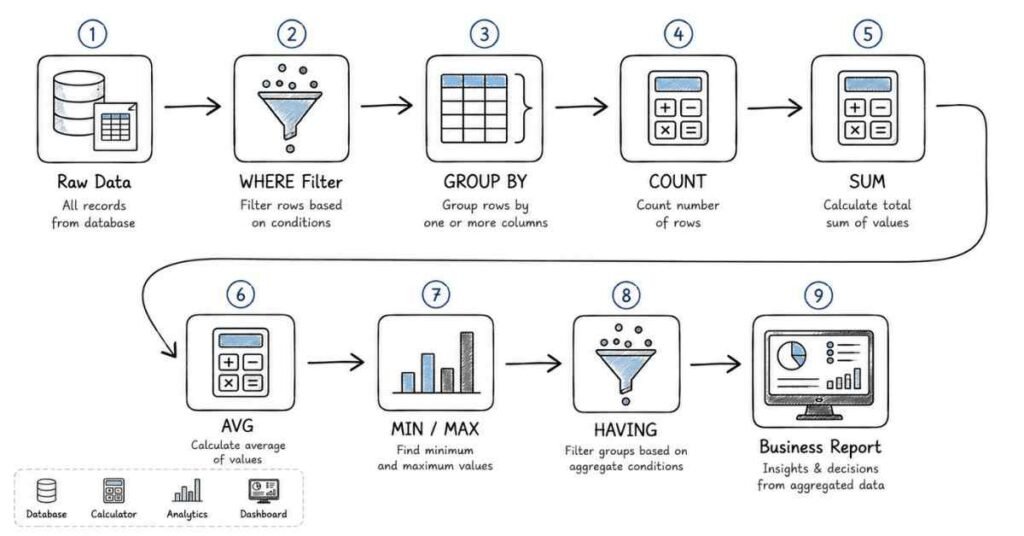
This part focuses on the SQL patterns used most often in interviews and real reporting work. It covers aggregate functions, grouping, HAVING, and the logic behind summarizing data correctly.
Questions 41–80
41) What is aggregation in SQL?
Aggregation is the process of summarizing multiple rows into a single result. It is commonly used to calculate totals, averages, counts, minimums, and maximums.
42) Why is aggregation important?
Aggregation is important because most business questions are about summaries rather than individual rows. For example, interviewers may ask for total sales, average salary, or number of customers by city.
43) What is the COUNT function?
COUNT returns the number of rows or values in a result set. It is one of the most commonly used aggregate functions in SQL.
44) What is the difference between COUNT(*) and COUNT(column)?
COUNT(*) counts all rows, including rows with NULLs in any column, while COUNT(column) counts only non-NULL values in that specific column. This difference is very important in interview questions.
45) What does SUM do?
SUM adds numeric values across rows. It is used to calculate totals such as total sales, total salary, or total revenue.
46) What does AVG do?
AVG calculates the average value of a numeric column. It is commonly used for metrics like average marks, average salary, or average order value.
47) What do MIN and MAX do?
MIN returns the smallest value in a column, and MAX returns the largest value. They are often used for dates, salaries, prices, and scores.
48) What is GROUP BY?
GROUP BY groups rows that have the same value in one or more columns. It is used with aggregate functions to summarize data by category.
49) Why is GROUP BY used?
GROUP BY is used when you want results broken down by category. For example, you may want total sales by region or average salary by department.
50) What happens if you use an aggregate function without GROUP BY?
If no GROUP BY is used, the aggregate function applies to the entire result set. The result is a single summary row.
51) What is the HAVING clause?
HAVING filters groups after aggregation. It is used when you want to apply conditions to summarized results.
52) What is the difference between WHERE and HAVING?
WHERE filters rows before grouping, while HAVING filters groups after grouping. This is one of the most common SQL interview comparisons.
53) Can WHERE be used with aggregate functions?
No, WHERE is not used to filter aggregated results directly. For that, HAVING is the correct clause.
54) Can HAVING be used without GROUP BY?
Yes, but it is usually used with GROUP BY. Without GROUP BY, it can still filter aggregated output in some cases.
55) What is the order of execution in SQL for grouping queries?
SQL generally processes FROM, WHERE, GROUP BY, HAVING, SELECT, ORDER BY, and LIMIT in that logical order. Understanding this helps explain why some conditions belong in WHERE and others in HAVING.
56) What is a grouped result set?
A grouped result set is the output after rows are combined into categories. Each group usually has one row in the final result.
57) What is count distinct?
COUNT DISTINCT counts the number of unique non-NULL values in a column. It is used when you want to know how many different values exist.
58) What is conditional aggregation?
Conditional aggregation means applying conditions inside aggregate logic, usually using CASE expressions. It is useful for counting or summing specific subsets of data.
59) Why is conditional aggregation useful?
It lets you create multiple metrics in a single query. For example, you can count active users and inactive users in one result.
60) What is the difference between SUM and COUNT?
SUM adds numeric values, while COUNT measures how many rows or values exist. They solve different reporting problems.
61) What is the difference between AVG and SUM?
AVG gives the average of values, while SUM gives the total of values. AVG is essentially SUM divided by the number of non-NULL rows.
62) What is the difference between MIN and MAX?
MIN gives the smallest value in a column, while MAX gives the largest value. They are often used to find extremes in a dataset.
63) Can aggregate functions work with NULL values?
Yes, but most aggregate functions ignore NULL values except COUNT(*), which counts rows regardless of NULLs. This is a very common interview detail.
64) Why do SQL candidates often make mistakes with COUNT?
Because they confuse COUNT(*), COUNT(column), and COUNT(DISTINCT column). These behave differently, especially when NULL values are present.
65) What is grouping by multiple columns?
Grouping by multiple columns means creating groups based on combinations of values. For example, you may group sales by region and product category.
66) Why would you group by more than one column?
You use multiple columns when one category is not enough to answer the business question. It helps create more detailed summaries.
67) What is the result of GROUP BY with multiple columns?
Each unique combination of grouped columns becomes one group. The output shows one summary row per combination.
68) What is an example of a real-world aggregation query?
An example is finding total revenue by month or average salary by department. These are common reporting questions in interviews and business work.
69) What is a common mistake with GROUP BY?
A common mistake is selecting columns that are neither aggregated nor included in the GROUP BY clause. This usually causes errors or incorrect results.
70) Why must selected columns match GROUP BY rules?
Because SQL needs to know how to summarize non-aggregated columns. Every column in the SELECT list must either be grouped or aggregated.
71) What is the use of ORDER BY with aggregation?
ORDER BY is used to sort grouped results after aggregation. For example, you can sort departments by total salary in descending order.
72) Can you use HAVING without aggregate functions?
In practice, HAVING is mainly used with aggregates, but some SQL systems allow it in other situations. Interview answers should emphasize its main use with grouped results.
73) What is bucket-style grouping?
Bucket-style grouping means grouping data into ranges or categories, such as age groups or salary bands. This is usually done with CASE inside GROUP BY or SELECT.
74) What is a summary query?
A summary query is a SQL query that returns aggregated information rather than raw row-level data. Most reporting questions are summary queries.
75) What is the difference between detail data and summary data?
Detail data shows individual records, while summary data combines multiple records into higher-level results. Both are useful, but interviews often focus on summary logic.
76) Why is logical thinking important in aggregation questions?
Because the same result can often be written in more than one way. Interviewers want to see whether you understand the business meaning of the output.
77) What is a running total?
A running total is a cumulative sum across rows in a specific order. It is often handled with window functions, but the concept is often introduced after aggregation basics.
78) What is a pivot-style report?
A pivot-style report rearranges data so categories appear as columns instead of rows. SQL can build such reports using CASE-based aggregation.
79) Why are aggregation questions common in interviews?
Because they test both SQL syntax and business reasoning. Many real tasks involve counts, averages, totals, and grouped reports.
80) What is a strong answer for aggregation questions?
A strong answer is to identify the grouping column first, then choose the right aggregate function, then apply the correct filter using WHERE or HAVING. That shows clear and structured thinking.
Revision focus
Revise COUNT, SUM, AVG, MIN, MAX, GROUP BY, HAVING, WHERE versus HAVING, count distinct, and conditional aggregation before moving to joins and table relationships.
Part 4: Joins & Table Relationships — Questions 81–120
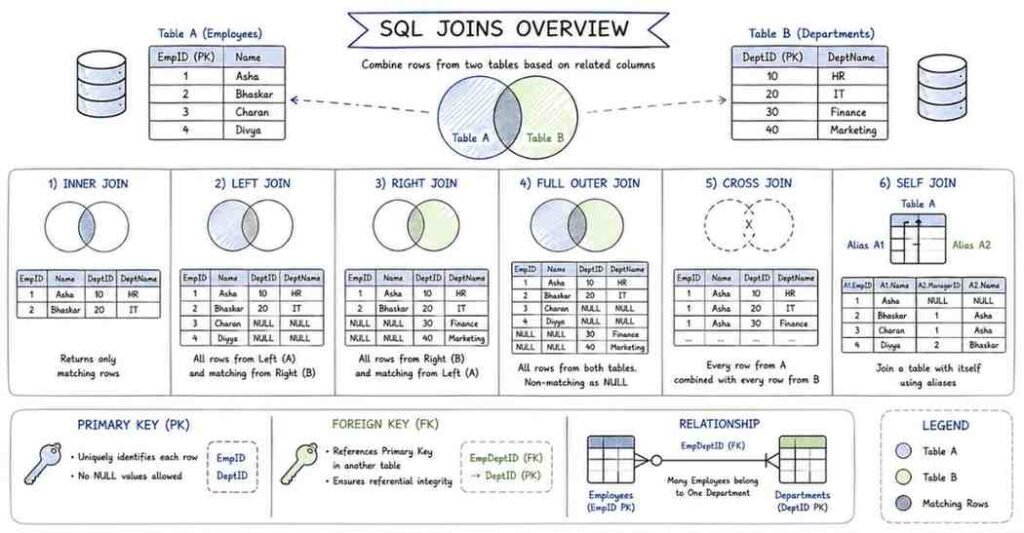
This part explains how SQL connects data across multiple tables, which is one of the most important topics in SQL interviews. It covers keys, join types, match logic, and the common mistakes candidates make when combining tables.
Questions 81–120
81) What is a join in SQL?
A join is used to combine rows from two or more tables based on a related column. It allows you to retrieve connected data in a single query.
82) Why are joins important?
Joins are important because real-world data is usually spread across multiple tables. For example, customer details may be in one table and order details in another.
83) What is a primary key?
A primary key is a column or combination of columns that uniquely identifies each row in a table. It must be unique and cannot contain NULL values.
84) What is a foreign key?
A foreign key is a column in one table that refers to the primary key of another table. It creates a relationship between two tables.
85) Why are primary and foreign keys important?
They help maintain data integrity and make relationships between tables clear. Interviewers often expect you to understand how these keys support joins.
86) What is an INNER JOIN?
An INNER JOIN returns only the rows that have matching values in both tables. If there is no match, the row is excluded.
87) When should you use INNER JOIN?
Use INNER JOIN when you only want records that exist in both tables. It is the most common join type in SQL interviews and real queries.
88) What is a LEFT JOIN?
A LEFT JOIN returns all rows from the left table and matching rows from the right table. If there is no match in the right table, the result contains NULLs for the right-side columns.
89) When should you use LEFT JOIN?
Use LEFT JOIN when you want all records from the main table even if related data is missing in the other table. It is useful for finding unmatched or incomplete records.
90) What is a RIGHT JOIN?
A RIGHT JOIN returns all rows from the right table and matching rows from the left table. It is the reverse of a LEFT JOIN.
91) Is RIGHT JOIN commonly used?
It is less commonly used because most queries can be rewritten as a LEFT JOIN by switching table order. Many interviewers prefer LEFT JOIN because it is easier to read.
92) What is a FULL OUTER JOIN?
A FULL OUTER JOIN returns all rows from both tables, matched where possible. If a row has no match in the other table, NULLs appear for the missing side.
93) When should you use FULL OUTER JOIN?
Use it when you want to see all records from both tables, including unmatched rows from each side. It is useful for comparison and reconciliation queries.
94) What is a CROSS JOIN?
A CROSS JOIN returns the Cartesian product of two tables. Every row from the first table is paired with every row from the second table.
95) When is CROSS JOIN used?
It is used when you need every possible combination of rows. In interviews, it is often discussed as a join that should be used carefully because it can create very large result sets.
96) What is a SELF JOIN?
A SELF JOIN joins a table to itself. It is used when rows within the same table are related to each other.
97) When would you use a SELF JOIN?
Use it for hierarchical or comparison problems, such as employees and managers in the same table. It is a common interview question because it tests table relationship thinking.
98) What is a join condition?
A join condition defines how rows from two tables should be matched. It is usually written using ON and one or more related columns.
99) Why is the ON clause important?
The ON clause tells SQL which rows belong together. Without the correct join condition, the result may be incorrect or excessively large.
100) What is the difference between ON and WHERE in a join query?
ON defines how tables are matched, while WHERE filters the result after the join. This difference matters especially in LEFT JOIN queries.
101) Why can WHERE change the behavior of a LEFT JOIN?
Because a WHERE condition on the right table can remove NULL-extended rows and effectively turn the result into an INNER JOIN. Interviewers often ask this to test deeper join understanding.
102) What happens if you join without a proper condition?
You may get a Cartesian product or incorrect matches. This can make the result set much larger than expected.
103) What is join cardinality?
Join cardinality refers to how many rows the join produces based on matches between tables. It depends on whether the relationship is one-to-one, one-to-many, or many-to-many.
104) What is a one-to-many relationship?
A one-to-many relationship means one row in one table can relate to many rows in another table. For example, one customer can have many orders.
105) What is a many-to-many relationship?
A many-to-many relationship means multiple rows in one table can relate to multiple rows in another table. It is usually handled using a bridge or junction table.
106) Why does join duplication happen?
Join duplication happens when one row in one table matches multiple rows in another table. This is normal in one-to-many relationships but must be understood carefully.
107) What is the difference between join and subquery?
A join combines tables side by side, while a subquery nests one query inside another. Both can solve similar problems, but they are structured differently.
108) When should you prefer a join over a subquery?
Use a join when you want to combine related tables directly and clearly. Joins are often easier to read for relationship-based queries.
109) When should you prefer a subquery?
Use a subquery when you need an intermediate result before the final query. It can make some logic easier to understand.
110) What is an alias in join queries?
An alias is a short name given to a table or column. It makes join queries shorter and easier to read.
111) Why are table aliases useful in joins?
They help avoid confusion when multiple tables have columns with the same name. Aliases also make long queries cleaner.
112) What is a common join mistake with column names?
A common mistake is not qualifying columns with the table name or alias when both tables have the same column name. This can cause ambiguity errors.
113) What is a common mistake with INNER JOIN?
A common mistake is expecting rows with no matches to appear in the result. INNER JOIN only returns matched rows.
114) What is a common mistake with LEFT JOIN?
A common mistake is putting conditions on the right table in the WHERE clause instead of the ON clause. This can remove rows you intended to preserve.
115) What is a common mistake with FULL OUTER JOIN?
A common mistake is assuming all databases support it in the same way. Some SQL systems require alternative approaches if FULL OUTER JOIN is not available.
116) What is an anti-join?
An anti-join is a query pattern used to find rows in one table that do not have matching rows in another table. It is often built using LEFT JOIN with NULL checks.
117) What is a semi-join?
A semi-join returns rows from one table only when matching rows exist in another table, but it does not return the matched table’s columns. It is often implemented using EXISTS or IN.
118) Why are anti-joins and semi-joins useful?
They are useful for finding missing records or checking existence. These patterns appear often in real data analysis and interview problems.
119) What is a natural join?
A natural join automatically joins tables using columns with the same name. It is generally used less in interviews because it can be less explicit and more error-prone.
120) What is a strong answer for join questions?
A strong answer is to explain the join type, the matching logic, and how unmatched rows behave. You should also mention whether the result preserves all rows from one table or only matched rows.
Revision focus
Revise primary key, foreign key, INNER JOIN, LEFT JOIN, RIGHT JOIN, FULL OUTER JOIN, SELF JOIN, ON versus WHERE, and common join mistakes before moving to subqueries and CTEs.
Part 5: Subqueries, CTEs & Set Operations — Questions 121–160
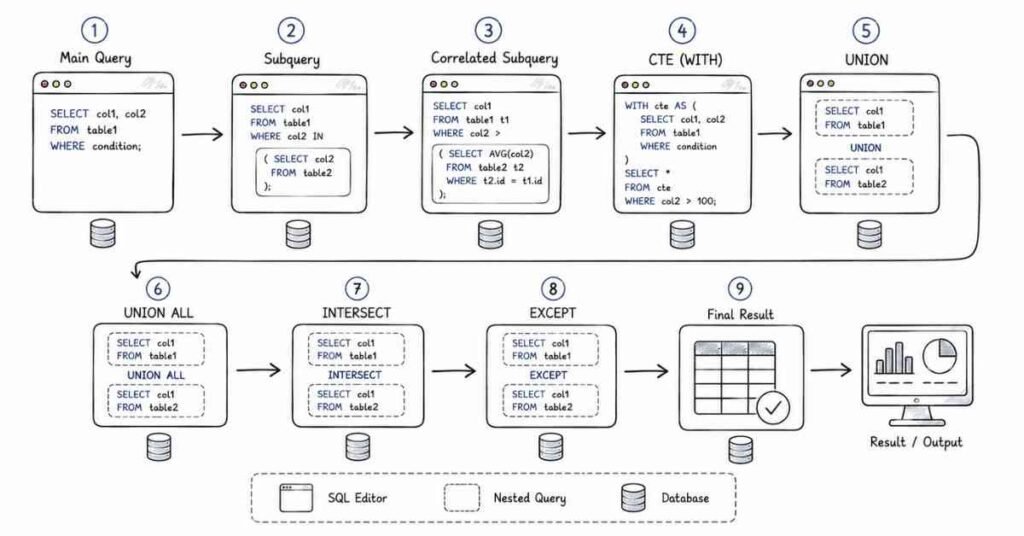
This part covers more advanced SQL query techniques that are commonly used in interviews and real analysis work. It focuses on nested logic, reusable query blocks, and ways to combine result sets.
Questions 121–160
121) What is a subquery in SQL?
A subquery is a query written inside another query. It is used to break a complex problem into smaller parts.
122) Why are subqueries useful?
Subqueries are useful because they let you calculate intermediate results before applying the final logic. They are helpful when one query depends on the output of another.
123) What is a nested query?
A nested query is another name for a subquery. It simply means one query is placed inside another.
124) Where can a subquery be used?
A subquery can be used in the SELECT clause, the FROM clause, the WHERE clause, or sometimes inside HAVING. The exact position depends on the SQL problem.
125) What is a subquery in the WHERE clause?
It is a subquery used to filter rows based on a computed or derived result. This is one of the most common subquery patterns in interviews.
126) What is a subquery in the SELECT clause?
It is a subquery used to return a calculated value for each row or group. It is less common than WHERE-based subqueries but still useful.
127) What is a subquery in the FROM clause?
It is a subquery used as a temporary table or derived table. It helps when you want to build an intermediate result before the final query.
128) What is a correlated subquery?
A correlated subquery is a subquery that depends on the outer query for its values. It is executed in relation to each row of the outer query.
129) What is the difference between a correlated and non-correlated subquery?
A non-correlated subquery can run independently of the outer query, while a correlated subquery depends on the outer query. This is a common interview comparison.
130) When are correlated subqueries useful?
They are useful when you need row-by-row comparison against grouped or related values. However, they may be slower than joins in some cases.
131) What is the EXISTS operator?
EXISTS checks whether a subquery returns any rows. It is often used when you only care about whether a match exists, not the actual values.
132) What is the difference between EXISTS and IN?
EXISTS checks for the existence of rows, while IN checks whether a value appears in a list returned by a subquery or set. They can sometimes produce similar results but behave differently in some cases.
133) When should you use EXISTS?
Use EXISTS when you need to test whether related rows are present. It is often a good choice for semi-join logic.
134) What is a derived table?
A derived table is a subquery in the FROM clause that behaves like a temporary table. It exists only for the duration of the query.
135) What is a Common Table Expression?
A Common Table Expression, or CTE, is a named temporary result set defined using the WITH clause. It improves readability and helps organize complex queries.
136) Why are CTEs useful?
CTEs make queries easier to read, debug, and reuse. They are especially helpful when a query has multiple steps.
137) What is the basic syntax of a CTE?
A CTE starts with WITH, followed by a temporary name and a query definition. The main query then uses that named result.
138) What is the difference between a CTE and a subquery?
A CTE is usually more readable and reusable, while a subquery is embedded directly inside another statement. Both can solve similar problems.
139) Can you use multiple CTEs in one query?
Yes, SQL allows multiple CTEs in a single query. This is useful when one intermediate result depends on another.
140) What is a recursive CTE?
A recursive CTE is a CTE that references itself. It is commonly used for hierarchical data such as org charts or tree structures.
141) When is a recursive CTE used?
It is used for problems like parent-child relationships, hierarchical paths, and repeated expansion of related rows. It is more advanced but sometimes asked in interviews.
142) What is UNION?
UNION combines the results of two queries and removes duplicate rows. It is used when you want a single distinct result set from multiple queries.
143) What is UNION ALL?
UNION ALL combines the results of two queries without removing duplicates. It is usually faster than UNION because it does not perform duplicate elimination.
144) What is the difference between UNION and UNION ALL?
UNION removes duplicates, while UNION ALL keeps all rows. This is a very common SQL interview comparison.
145) When should you use UNION ALL?
Use UNION ALL when duplicates are acceptable or when you want better performance. It is often the preferred choice if you do not need uniqueness.
146) What is INTERSECT?
INTERSECT returns only the rows that appear in both query result sets. It is used to find common data.
147) What is EXCEPT?
EXCEPT returns rows from the first query that do not appear in the second query. It is used to find differences between result sets.
148) How do set operations help in SQL?
Set operations help combine or compare result sets in a simple and structured way. They are useful when working with multiple similar queries.
149) What is the main rule for UNION-based queries?
The queries combined by UNION, UNION ALL, INTERSECT, or EXCEPT must have the same number of columns and compatible data types. This is essential for the set operation to work correctly.
150) Why is column compatibility important in set operations?
Because SQL needs to line up the rows from each query correctly. If the structures are not compatible, the database cannot combine them.
151) What is a common use case for a subquery?
A common use case is filtering records based on aggregate logic. For example, finding employees whose salary is above the average salary.
152) What is a common use case for a CTE?
A common use case is breaking a multi-step transformation into readable stages. This is especially helpful in reporting and analytics queries.
153) What is a common use case for UNION ALL?
A common use case is combining data from multiple similar sources, such as monthly tables or regional tables, without removing duplicates.
154) What is a common mistake with subqueries?
A common mistake is writing a subquery that returns more rows or columns than the outer query expects. Another common issue is using the wrong comparison operator.
155) What is a common mistake with CTEs?
A common mistake is overusing them when a simple query would be easier. Another is misunderstanding that CTEs help readability but do not automatically guarantee faster performance.
156) What is a common mistake with UNION?
A common mistake is forgetting that UNION removes duplicates, which can change the expected result. Another mistake is not aligning the column order correctly.
157) What is a good way to choose between subquery and join?
Choose a join when you are combining related tables directly. Choose a subquery when you need an intermediate calculation or a simpler breakdown of logic.
158) What is a good way to choose between UNION and UNION ALL?
Choose UNION when you want distinct combined results. Choose UNION ALL when duplicates are fine and speed matters.
159) Why do interviewers ask about these topics?
Because they test whether you can build structured logic instead of only writing simple filters. These concepts show how well you can organize a query.
160) What is a strong answer for subquery and CTE questions?
A strong answer explains the purpose of the intermediate result, then shows how the outer query uses it. It should also mention readability, reusability, and the difference between duplicate-preserving and duplicate-removing set operations.
Revision focus
Revise subqueries, correlated subqueries, EXISTS, CTEs, recursive CTEs, UNION, UNION ALL, INTERSECT, and EXCEPT before moving to window functions and analytical SQL.
Part 6: Window Functions & Analytical SQL — Questions 161–200
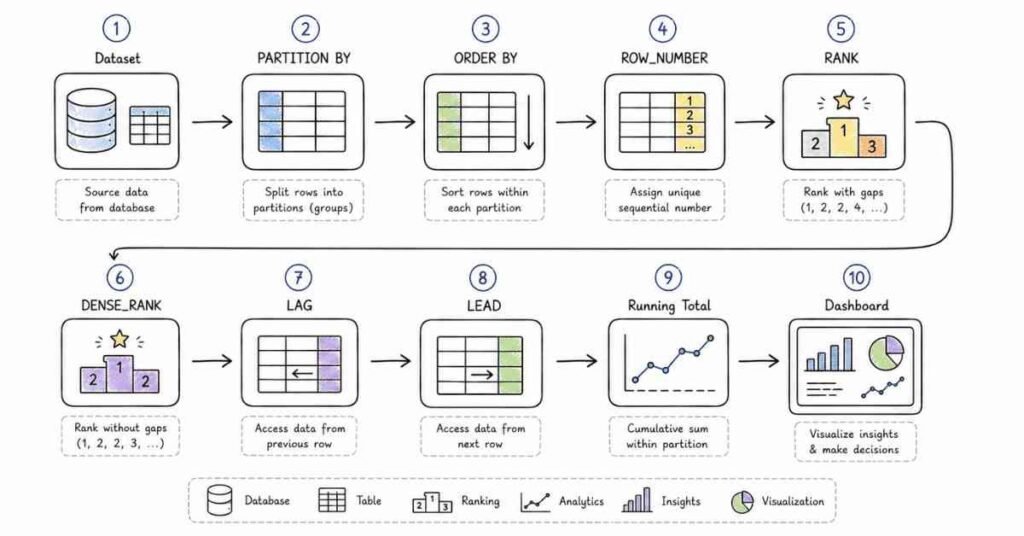
This part covers advanced SQL techniques used for rankings, running totals, moving calculations, and row-level analytics. These topics are very common in interviews for data analyst, product analyst, and advanced SQL roles.
Questions 161–200
161) What is a window function in SQL?
A window function performs a calculation across a set of rows related to the current row without collapsing the result into a single row. It lets you keep row-level detail while adding analytical output.
162) Why are window functions useful?
They are useful because they let you calculate rankings, cumulative totals, and comparisons across rows without using GROUP BY. This makes them very powerful for analytics queries.
163) What is the OVER clause?
The OVER clause defines the window over which the function is applied. It tells SQL which rows should be considered for the calculation.
164) What is PARTITION BY in window functions?
PARTITION BY divides the result set into groups and applies the window function separately within each group. It is similar to GROUP BY in concept, but it does not reduce row count.
165) What is the difference between GROUP BY and PARTITION BY?
GROUP BY collapses rows into summary output, while PARTITION BY keeps each row and adds analytical calculations beside it. This is one of the most important window function distinctions.
166) What does ORDER BY do inside a window function?
ORDER BY defines the order of rows within each partition for the window calculation. It is essential for ranking and running total queries.
167) What is ROW_NUMBER?
ROW_NUMBER assigns a unique sequential number to each row within a partition or result set. Even if values are the same, each row gets a different number.
168) What is RANK?
RANK assigns the same rank to tied values and leaves gaps in the ranking sequence. It is useful when you want competition-style ranking.
169) What is DENSE_RANK?
DENSE_RANK assigns the same rank to tied values but does not leave gaps. It gives consecutive ranking numbers even when ties occur.
170) What is the difference between ROW_NUMBER, RANK, and DENSE_RANK?
ROW_NUMBER gives unique row positions, RANK allows ties with gaps, and DENSE_RANK allows ties without gaps. This is one of the most frequently asked window function comparisons.
171) When should you use ROW_NUMBER?
Use ROW_NUMBER when you need a unique row index, such as selecting the latest record per group. It is also helpful for deduplication logic.
172) When should you use RANK?
Use RANK when tied values should share the same position and the next position should skip numbers. It is often used in score-based ranking.
173) When should you use DENSE_RANK?
Use DENSE_RANK when tied values should share the same rank but the next rank should not skip numbers. It is useful when you want compact ranking output.
174) What is LAG?
LAG returns the value from a previous row in the ordered window. It helps compare the current row with earlier rows.
175) What is LEAD?
LEAD returns the value from a following row in the ordered window. It helps compare the current row with later rows.
176) Why are LAG and LEAD useful?
They are useful for trend analysis, period-over-period comparison, and finding differences between adjacent rows. They are common in business and analytics interviews.
177) What is a running total?
A running total is a cumulative sum that increases as you move through rows in a specific order. It is often used for revenue, balances, or activity tracking.
178) How is a running total calculated?
A running total is usually calculated using a SUM window function with an appropriate ordering clause. The calculation grows row by row.
179) What is a moving average?
A moving average calculates the average over a sliding window of rows. It is often used to smooth trends over time.
180) Why is a moving average useful?
It helps reduce noise and show trends more clearly. It is common in sales analysis, financial analysis, and time-series reporting.
181) What is the difference between ranking and aggregation?
Ranking compares rows within a set, while aggregation summarizes rows into fewer results. Window functions allow ranking without losing row-level detail.
182) What is a top-N query?
A top-N query returns the highest or lowest N records based on a sort order. Window functions are often used to solve these problems cleanly.
183) How do window functions help with top-N per group?
They let you rank rows within each partition and then filter based on the rank. This makes it easy to find top performers in each category.
184) What is the purpose of frame clauses in window functions?
Frame clauses define which rows around the current row should be included in the calculation. They are important for running totals and moving averages.
185) What is the difference between partition and frame?
Partition defines the full group of rows being considered, while frame defines the smaller subset used for each calculation. This distinction matters in advanced analytics queries.
186) Why do window functions not reduce row count?
Because they add information to each row instead of grouping rows together. This is what makes them different from GROUP BY.
187) What is a common use case for ROW_NUMBER?
A common use case is removing duplicates while keeping only the latest or first record in each group. This is a very common interview pattern.
188) What is a common use case for RANK and DENSE_RANK?
A common use case is leaderboard-style ranking, where ties must be handled correctly. Interviewers often use sales, scores, or employee performance examples.
189) What is a common use case for LAG?
A common use case is comparing current month sales with previous month sales. It helps measure change over time.
190) What is a common use case for LEAD?
A common use case is comparing the current row with the next row in a sequence. It is useful for event and time-based analysis.
191) What is a partitioned ranking query?
It is a ranking query that assigns ranks separately within each group. For example, you may rank employees within each department.
192) Why is ORDER BY important in window functions?
Because many window calculations depend on row sequence. Without ordering, functions like ROW_NUMBER, LAG, LEAD, and running totals may not behave meaningfully.
193) Can window functions be used with WHERE directly?
Usually not in the same SELECT phase, because window functions are evaluated after WHERE. In practice, you often wrap them in a subquery or CTE first.
194) Why are window functions sometimes wrapped in a CTE?
Because it makes it easier to filter or reuse the analytical result. A CTE can hold the window output before the final query applies conditions.
195) What is the difference between ranking and numbering?
Numbering assigns a unique sequence, while ranking assigns positions based on value order and may handle ties. ROW_NUMBER is numbering; RANK and DENSE_RANK are ranking.
196) What is a cumulative metric?
A cumulative metric is a running total or accumulation over time or sequence. It is often used in dashboards and trend analysis.
197) Why do analysts use window functions so often?
Because they solve many business questions without needing complicated joins or nested aggregations. They are especially valuable when working with time-based or grouped data.
198) What is a strong answer for window function questions?
A strong answer explains whether the function ranks, compares, or accumulates rows, then describes the role of PARTITION BY and ORDER BY. That shows both syntax knowledge and analytical thinking.
199) What is a common mistake with window functions?
A common mistake is confusing GROUP BY output with window output. Another is forgetting that ORDER BY inside the window affects the calculation order.
200) Why are window functions considered advanced SQL?
Because they combine row-level detail with analytical calculations and require a clear understanding of row order, partitioning, and framing. They are often the difference between basic SQL and interview-ready SQL.
Revision focus
Revise OVER, PARTITION BY, ORDER BY inside windows, ROW_NUMBER, RANK, DENSE_RANK, LAG, LEAD, running totals, moving averages, and top-N per group patterns before moving to data modification and database concepts.
Part 7: Data Modification & Database Concepts — Questions 201–240
This part covers the SQL statements used to insert, update, and remove data, along with the core database concepts that often appear alongside SQL interview questions. It connects query writing with how databases behave in real applications.
Questions 201–240
201) What is INSERT in SQL?
INSERT is used to add new rows into a table. It is the standard way to create new records in a database.
202) What is UPDATE in SQL?
UPDATE is used to modify existing rows in a table. It changes values in one or more columns based on a condition.
203) What is DELETE in SQL?
DELETE is used to remove rows from a table. It can remove one row, multiple rows, or all rows depending on the condition.
204) What is TRUNCATE in SQL?
TRUNCATE removes all rows from a table quickly. It is usually faster than DELETE when you want to clear the entire table.
205) What is DROP in SQL?
DROP removes the table itself from the database. It deletes both the data and the table structure.
206) What is the difference between DELETE, TRUNCATE, and DROP?
DELETE removes selected rows, TRUNCATE removes all rows, and DROP removes the whole table. This is one of the most common SQL interview comparisons.
207) Is DELETE a DML statement?
Yes, DELETE is a Data Manipulation Language statement. It changes data inside a table.
208) Is TRUNCATE a DML or DDL statement?
TRUNCATE is usually treated as a DDL-style operation in many databases because it behaves more like a structural operation than a row-by-row delete. Interview answers should mention that behavior may vary by database system.
209) What is ALTER in SQL?
ALTER is used to modify the structure of an existing table. It can add, remove, or change columns and constraints.
210) What is a constraint in SQL?
A constraint is a rule applied to a table or column to control what data can be stored. It helps maintain data quality and integrity.
211) What is NOT NULL?
NOT NULL ensures that a column cannot contain NULL values. It is used when a field must always have a value.
212) What is UNIQUE?
UNIQUE ensures that all values in a column, or combination of columns, are different. It prevents duplicate entries.
213) What is CHECK?
CHECK ensures that values in a column satisfy a condition. For example, a salary column may be restricted to positive values.
214) What is DEFAULT?
DEFAULT provides a value automatically if no value is supplied during insert. It helps reduce missing data for common fields.
215) What is PRIMARY KEY as a constraint?
PRIMARY KEY uniquely identifies each row in a table. It combines uniqueness and non-null behavior.
216) What is FOREIGN KEY as a constraint?
FOREIGN KEY enforces a relationship between two tables. It helps ensure that related data remains valid.
217) Why are constraints important?
Constraints protect data quality and prevent invalid records from entering the database. They are a major part of database design and interview discussion.
218) What is normalization?
Normalization is the process of organizing data to reduce redundancy and improve consistency. It usually involves splitting data into related tables.
219) Why is normalization useful?
It helps avoid duplicate data and update anomalies. It also improves maintainability and data integrity.
220) What is denormalization?
Denormalization is the process of combining data or intentionally storing some redundancy to improve query performance or reporting convenience.
221) When is denormalization useful?
It is useful in analytics, reporting, and performance-sensitive systems where faster reads matter more than minimal redundancy.
222) What is ACID in databases?
ACID stands for Atomicity, Consistency, Isolation, and Durability. These are the core properties that make transactions reliable.
223) What is Atomicity?
Atomicity means a transaction is all or nothing. Either all steps succeed, or none do.
224) What is Consistency?
Consistency means a transaction takes the database from one valid state to another valid state. It ensures rules and constraints are preserved.
225) What is Isolation?
Isolation means one transaction should not interfere with another in an unsafe way. It helps prevent concurrency problems.
226) What is Durability?
Durability means once a transaction is committed, its changes are permanently saved. Even a crash should not lose committed data.
227) What is a transaction?
A transaction is a group of database operations treated as one unit. It is used when multiple steps must succeed together.
228) What is COMMIT?
COMMIT permanently saves the changes made in a transaction. After commit, the changes become visible to others.
229) What is ROLLBACK?
ROLLBACK undoes changes made in the current transaction. It is used when something goes wrong and the changes should not be saved.
230) What is SAVEPOINT?
SAVEPOINT marks a point inside a transaction to which you can roll back partially. It gives more control during complex transactions.
231) What is data integrity?
Data integrity means the data remains accurate, valid, and consistent over time. Constraints, keys, and transactions help maintain it.
232) What is a schema in SQL?
A schema is the logical structure that defines how database objects are organized. It often refers to tables, relationships, and other database objects.
233) What is a database table schema?
A table schema defines the columns, data types, constraints, and structure of a table. It describes how the table is built.
234) What is a data type in SQL?
A data type defines the kind of value a column can store, such as integer, text, date, or decimal. Choosing the right data type is important for accuracy and performance.
235) Why are data types important?
They control what values are allowed and how much storage is used. They also affect query behavior and performance.
236) What is a surrogate key?
A surrogate key is an artificial key created to uniquely identify rows, usually an auto-incremented ID. It is often used instead of a business key.
237) What is a natural key?
A natural key is a real-world value that uniquely identifies a record, such as email or employee number. It comes from the business domain itself.
238) What is the difference between a surrogate key and a natural key?
A surrogate key is generated by the system, while a natural key comes from business data. Surrogate keys are often easier to manage in database design.
239) Why are transactions and constraints often asked together?
Because they both protect database correctness. Constraints protect individual rows, while transactions protect groups of changes.
240) What is a strong answer for data modification questions?
A strong answer explains what each statement does, how it affects data or structure, and how it relates to transactions and constraints. That shows both syntax knowledge and database thinking.
Revision focus
Revise INSERT, UPDATE, DELETE, TRUNCATE, DROP, ALTER, constraints, normalization, denormalization, ACID, and transactions before moving to indexing and performance tuning.
Part 8: Indexing, Performance & Query Optimization — Questions 241–280
This part focuses on the SQL topics that matter most when queries need to scale. It covers indexes, execution behavior, and the practical habits that help you write faster, cleaner SQL.
Questions 241–280
241) What is an index in SQL?
An index is a database structure that helps speed up data retrieval. It works like a lookup structure that makes searching faster.
242) Why are indexes important?
Indexes are important because they can significantly improve query performance on large tables. They help the database find rows more quickly instead of scanning every record.
243) How do indexes work?
An index stores a sorted or structured reference to data values and their locations. This allows the database to locate rows faster when filtering or joining.
244) What is the trade-off of using indexes?
Indexes improve read performance but can slow down insert, update, and delete operations. They also consume extra storage space.
245) What is a clustered index?
A clustered index defines the physical or logical order of rows in a table in many database systems. Usually, a table can have only one clustered index.
246) What is a non-clustered index?
A non-clustered index is a separate structure from the table data. It stores references to rows rather than controlling the table’s physical order.
247) What is the difference between clustered and non-clustered indexes?
A clustered index affects how data is stored or ordered, while a non-clustered index is a separate lookup structure. This is a common interview comparison.
248) Can a table have multiple indexes?
Yes, a table can have multiple indexes. However, too many indexes can slow down write operations and increase storage usage.
249) When should you add an index?
You should add an index when a column is frequently used in WHERE, JOIN, ORDER BY, or GROUP BY conditions. These are common query patterns that benefit from faster lookups.
250) When should you avoid adding too many indexes?
Avoid too many indexes when the table has heavy write activity or when the indexed columns are rarely used in queries. Unnecessary indexes can hurt performance more than they help.
251) What is an execution plan?
An execution plan shows how the database intends to run a query. It reveals which indexes are used, how tables are joined, and where the cost lies.
252) Why is an execution plan useful?
It helps you understand why a query is slow or inefficient. Interviewers often expect candidates to know that performance tuning starts with analyzing the plan.
253) What is EXPLAIN in SQL?
EXPLAIN is a command used to inspect how a query will be executed. It is commonly used for query optimization and troubleshooting.
254) What does a full table scan mean?
A full table scan means the database reads every row in a table. This can be slow for large tables, especially when an index could have been used.
255) Why is full table scan sometimes unavoidable?
Sometimes the query condition is not selective enough or no suitable index exists. In such cases, the database may choose a scan because it is the best available option.
256) What is query optimization?
Query optimization is the process of improving SQL performance while preserving correct results. It involves better query structure, indexing, and execution planning.
257) Why is SELECT * often discouraged?
SELECT * retrieves all columns, even those you may not need. This can increase I/O, use more memory, and make queries less efficient.
258) What is a selective filter?
A selective filter is a condition that reduces the number of rows significantly. Highly selective filters often benefit more from indexes.
259) Why is filtering early helpful?
Filtering early reduces the amount of data processed in later steps. This can improve join and aggregation performance.
260) What is the impact of joining large tables?
Joining large tables can be expensive because the database must compare many rows. Good indexing and correct join conditions help reduce the cost.
261) What is the impact of grouping large datasets?
Grouping large datasets can be slow because the database must sort or combine many rows. Filtering before grouping can improve performance.
262) What is index fragmentation?
Index fragmentation happens when the index structure becomes less efficient over time. It can reduce performance if the database has to work harder to navigate the index.
263) What is a covering index?
A covering index is an index that contains all the columns needed by a query. If the database can answer the query using only the index, performance may improve.
264) Why is a covering index useful?
It reduces the need to access the main table data. This can make reads faster, especially for frequent reporting queries.
265) What is the difference between indexing a single column and multiple columns?
A single-column index helps with one column, while a composite index helps with combinations of columns. The query pattern should guide the choice.
266) What is a composite index?
A composite index is an index built on more than one column. It is useful when queries filter or sort using those columns together.
267) Why is index column order important?
Because the order affects which queries can use the index effectively. The most selective or most frequently filtered column is often placed first, depending on query patterns.
268) What is a slow query?
A slow query is a SQL statement that takes too long to execute. It may be slow because of missing indexes, poor joins, large scans, or inefficient logic.
269) How do you improve a slow query?
You can improve it by checking the execution plan, adding or adjusting indexes, reducing unnecessary columns, filtering earlier, and rewriting inefficient joins or subqueries.
270) Why does data distribution matter in performance?
Because some values may appear much more frequently than others. The database uses data distribution to decide whether an index will be helpful.
271) What is the role of statistics in query optimization?
Statistics help the optimizer estimate row counts and choose a good execution strategy. If statistics are outdated, the optimizer may make poor choices.
272) What is the difference between scanning and seeking?
Scanning reads many rows sequentially, while seeking uses an index to jump directly to matching data. Seeking is generally faster when the filter is selective.
273) Why do interviewers ask about indexes?
Because indexes are central to real database performance. They test whether you understand both query speed and write trade-offs.
274) What is the best practice for performance tuning?
Start with the query logic, then inspect the execution plan, then check indexing and table size. This gives you a structured way to identify the bottleneck.
275) What is a common indexing mistake?
A common mistake is adding indexes everywhere without understanding the query patterns. Another mistake is assuming every index will automatically speed up every query.
276) What is the relationship between indexing and joins?
Indexes can help the database match rows faster during joins. This is especially important when joining large tables on key columns.
277) What is the relationship between indexing and ORDER BY?
Indexes can reduce sorting work when the ORDER BY columns are indexed. This can make result ordering faster.
278) What is the relationship between indexing and GROUP BY?
Indexes can sometimes help grouping, especially when the grouped columns match the index structure. However, the benefit depends on the query and database engine.
279) Why should you avoid unnecessary functions on indexed columns?
Because applying a function can prevent the database from using the index efficiently. This may force a full scan instead of a faster lookup.
280) What is a strong answer for performance questions?
A strong answer explains the balance between read speed, write cost, and storage usage. It should also mention execution plans, selective filters, and how query structure affects optimization.
Revision focus
Revise indexes, clustered versus non-clustered indexes, composite indexes, execution plans, full table scans, filtering early, and the trade-offs between read and write performance before moving to the final career strategy section.
Part 9: Behavioral, Resume, LinkedIn & Career Strategy — SQL Interview Preparation Guide
This final part focuses on presenting yourself well for SQL-related roles, not just answering technical questions. Strong SQL candidates need to explain their projects clearly, sound structured in interviews, and present a resume and LinkedIn profile that reflect real database and reporting skills.
STAR method
The STAR method means answering behavioral questions with:
- Situation.
- Task.
- Action.
- Result.
This works especially well for SQL interviews because many behavioral questions are really trying to understand how you handled reporting issues, data mismatches, missing records, broken dashboards, unclear requests, deadline pressure, or database-related mistakes.
Use this SQL-friendly STAR approach:
- Situation: A reporting issue, data mismatch, query problem, dashboard bug, or analysis challenge.
- Task: What you were responsible for.
- Action: What you analyzed, queried, cleaned, validated, or communicated.
- Result: What improved, what was fixed, or what you learned.
Example:
Situation: A monthly sales report was showing different totals in two dashboards.
Task: I had to find the source of mismatch before the report was shared with management.
Action: I compared query logic, checked joins and filters, validated date conditions, and found that one dashboard was excluding cancelled orders.
Result: The report was corrected, totals matched, and the team avoided sending inaccurate numbers.
20 behavioral questions
Below are 20 common behavioral questions with answer direction.
- Tell me about yourself.
Framework: background → SQL skills → role target. - Why do you want to work in a data or SQL-related role?
Framework: interest in data/problem-solving → SQL usefulness → long-term fit. - Tell me about a challenging data issue you solved.
Framework: problem → analysis → fix → result. - Describe a time you worked with messy or incomplete data.
Framework: issue → cleanup/validation → outcome. - Tell me about a time you nearly missed a deadline.
Framework: pressure → prioritization → communication → outcome. - Describe a time you found an error in a report or dashboard.
Framework: issue → investigation → correction. - Tell me about a project you are proud of.
Framework: project goal → tools used → your contribution → impact. - Describe a time you explained data insights to a non-technical person.
Framework: complexity → simplification → decision/result. - Tell me about a mistake you made while working with SQL or data.
Framework: mistake → ownership → fix → lesson. - Describe a disagreement with a teammate about data logic or reporting.
Framework: disagreement → reasoning → collaboration → resolution. - Tell me about a time you improved query or report performance.
Framework: bottleneck → approach → measurable improvement. - Describe a time you had to learn a new tool or database quickly.
Framework: gap → learning → delivery. - Tell me about a time you handled pressure from stakeholders.
Framework: issue → communication → stabilization → follow-up. - Describe a time feedback changed your approach.
Framework: feedback → adjustment → learning. - Tell me about a repetitive task you automated or streamlined.
Framework: repetitive issue → script/process → benefit. - Describe a time you handled unclear requirements.
Framework: ambiguity → clarification → implementation. - Tell me about a failure in testing, reporting, or deployment.
Framework: failure → diagnosis → prevention. - Describe a time you worked across teams.
Framework: communication → dependency → result. - Why should we hire you for this SQL or data role?
Framework: SQL fundamentals + accuracy + problem-solving + reliability. - Where do you see yourself in 3 years?
Framework: deeper analytics/backend ownership + stronger data reasoning + business impact.
Keep answers specific and realistic. For freshers, academic projects, internships, or personal data projects are acceptable if you explain them honestly.
50 AI self-preparation prompts
Use these prompts with an AI assistant or for self-practice.
- Ask me SQL behavioral questions one by one.
- Evaluate my “Tell me about yourself” answer for a SQL role.
- Rewrite my introduction for a data analyst role.
- Rewrite my introduction for a business analyst role.
- Conduct a mock HR interview for a SQL role.
- Conduct a mock technical interview for SQL basics.
- Ask me SQL fundamentals questions one by one.
- Ask me filtering and aggregation questions one by one.
- Ask me join interview questions.
- Ask me subquery interview questions.
- Ask me window function interview questions.
- Ask me indexing and optimization questions.
- Ask me transaction and ACID questions.
- Ask me database design questions.
- Turn my SQL project into a STAR answer.
- Improve my resume bullet points for a SQL role.
- Convert my internship work into data analyst resume language.
- Create a 30-second data analyst elevator pitch.
- Create a 60-second SQL role elevator pitch.
- Ask follow-up questions after every answer I give.
- Score my answers for clarity and confidence.
- Find weak spots in my SQL interview preparation.
- Simulate a SQL query round.
- Simulate a business case interview for analytics.
- Simulate a debugging interview for SQL reports.
- Simulate a performance tuning round.
- Simulate a basic database design round.
- Improve my LinkedIn headline for SQL-related roles.
- Improve my LinkedIn About section for data roles.
- Ask me why I chose SQL.
- Ask me why I want to move into data or analytics.
- Ask me why I am changing jobs.
- Ask me how joins work in simple terms.
- Ask me how I would explain transactions in an interview.
- Help me explain a dashboard project clearly.
- Help me explain a SQL reporting project clearly.
- Make my SQL interview answers sound more natural.
- Shorten my long answers into interview-ready versions.
- Help me answer “What is your weakness?” for a SQL role.
- Help me answer “Why this company?” for a data role.
- Create 20 likely HR questions for SQL freshers.
- Create 20 likely HR questions for data analyst roles.
- Cross-examine my resume like an interviewer.
- Check whether my project claims sound realistic.
- Turn my college project into an industry-style data project summary.
- Build a 7-day SQL mock interview plan.
- Create a thank-you email after a SQL interview.
- Create a recruiter outreach message for SQL/data roles.
- Create a no-response follow-up after 5 days.
- Create a final revision checklist from my weak SQL areas.
Resume optimization
Current ATS-focused resume guidance for SQL roles stresses that exact technology and skill names matter, especially SQL, MySQL, PostgreSQL, Oracle, joins, aggregations, window functions, Excel, Power BI, Tableau, Python, ETL, reporting, data validation, and query optimization. Recruiters often scan for these as distinct keywords rather than assuming they are implied by “data experience.”
Use this structure:
- Name and contact details.
- Resume headline.
- 3–4 line summary.
- Technical skills.
- Experience or projects.
- Education.
- Certifications.
- GitHub, portfolio, or dashboard links if relevant.
Useful keywords to include naturally:
- SQL, relational databases, MySQL, PostgreSQL, Oracle, joins, subqueries, CTEs, window functions, aggregations, filtering, grouping, data validation, query optimization, indexing, transactions, ACID, normalization, Excel, Power BI, Tableau, Python, ETL, reporting, business analysis, data analysis.
Current ATS advice also emphasizes showing real usage context, such as report volume, dashboard accuracy, query performance, reconciliation work, or business impact, instead of just listing buzzwords.
Better bullet style:
- Wrote SQL queries to extract, clean, and analyze business data for monthly reporting.
- Built reporting logic using joins, aggregations, and window functions for operational dashboards.
- Validated database outputs and resolved data mismatches across reports and source tables.
- Optimized SQL queries by refining filters, joins, and grouping logic for better performance.
- Used Excel and SQL together to support data analysis and stakeholder reporting.
- Created reusable query logic for recurring business metrics and trend analysis.
- Documented reporting assumptions and helped improve data accuracy across teams.
- Supported database-backed analysis using structured query workflows and validation checks.
Avoid these mistakes:
- Writing only “worked on SQL project.”
- Listing database tools without explaining what you used them for.
- Claiming optimization or analytics skills without project evidence.
- Listing too many tools with no clear use case.
- Skipping validation, reporting, or business impact in your project bullets.
Resume summary example
For fresher:
“Entry-level data and SQL professional with strong foundations in SQL, joins, aggregations, subqueries, window functions, and relational database concepts. Hands-on project experience in querying, reporting, and data validation. Seeking an opportunity to contribute to analytics, reporting, or data operations while growing in business analysis and database-driven problem solving.”
For experienced candidate:
“SQL and data professional with experience building reports, analyzing datasets, and improving query efficiency using SQL, relational databases, and analytical tools. Comfortable with end-to-end reporting workflows, data validation, and stakeholder communication. Interested in roles that combine accurate data handling with business insight and performance-aware query design.”
LinkedIn profile optimization
For SQL roles, your LinkedIn profile should quickly show your data identity, tools, and project depth. Recruiters usually scan your headline, About section, recent experience, and listed technologies before deciding whether to contact you.
Use these upgrades:
- Headline: include role target plus stack keywords.
- About: 3 short paragraphs with background, technical stack, and role focus.
- Experience: use action-based, technical bullets.
- Featured: add GitHub, dashboard screenshots, project links, or notebooks if available.
- Skills: list SQL, databases, reporting tools, and analytics concepts.
- URL: customize it.
- Open to Work: enable it if relevant.
Headline examples:
- General data: SQL Developer | MySQL, PostgreSQL, Joins, Window Functions, Reporting | Data Analytics
- Fresher: Aspiring SQL Analyst | SQL, Excel, Data Cleaning, Reporting, Dashboard Support
- Experienced: SQL/Data Analyst | Query Optimization, Reporting, Power BI, Data Validation, ETL
About section template:
“I work with data using SQL and related tools to build reports, analyze business metrics, and support decision-making. My core skills include SQL querying, joins, aggregations, subqueries, window functions, and database concepts such as normalization, transactions, and indexing.
My projects and experience include data extraction, reporting, validation, and performance-aware query writing. I am especially interested in roles where accurate data handling, analytical thinking, and business communication are important.
I am currently targeting opportunities in SQL, data analytics, reporting, or business analysis where I can contribute to reliable data workflows and practical business insights.”
Project and portfolio strategy
Projects are extremely important for SQL candidates because they give interviewers something concrete to question. A strong SQL project does not need to be huge, but it should show query logic, reporting, validation, and practical business use.
Strong project categories:
- Sales reporting dashboard data model.
- E-commerce order analysis project.
- Employee attendance or payroll reporting system.
- Customer segmentation analysis.
- Loan or banking data analysis project.
- Inventory and stock tracking report.
- Support ticket analytics project.
- Sales funnel or conversion analysis project.
- Data quality and reconciliation project.
- KPI reporting project with monthly trends.
For each project, prepare these six points:
- Problem statement.
- Dataset or source used.
- Query approach.
- Your contribution.
- Key technical challenges.
- Result and next step.
Example explanation:
“I built a SQL-based sales reporting project using relational tables for orders, customers, and products. I wrote queries for joins, grouping, and monthly trend analysis, and I validated totals across different reports to make sure the numbers matched. I also used window functions to identify top-performing products and compared revenue across time periods.”
Salary guidance in India
SQL salary data in India varies significantly by role, company type, and whether the role is focused on analytics, reporting, backend support, or data engineering. Fresher and early-career SQL-heavy roles often appear in analytics, MIS, reporting, and support functions, while stronger SQL plus BI or data engineering skills can improve compensation significantly.
A practical planning range is:
- Fresher: ₹3–5 LPA.
- 1–3 years: ₹5–9 LPA.
- 3–6 years: ₹9–18 LPA.
- Senior / specialized roles: ₹15–25+ LPA depending on stack depth and business impact.
Use salary discussions carefully and base expectations on your actual profile, because SQL pay changes a lot depending on company type, analytics depth, reporting ownership, and tool exposure.
Sample line:
“Based on my SQL, reporting, and data analysis experience, and the current market range for similar roles in India, I am looking for a fair opportunity in the range of X to Y LPA, while also considering the role scope and growth path.”
Thank-you and follow-up emails
Thank-you email template
Subject: Thank you SQL/Data Analyst interview
Hello [Interviewer Name],
Thank you for taking the time to speak with me today regarding the SQL/Data Analyst role. I enjoyed our discussion, especially the conversation around [joins / reporting / query optimization / window functions / data validation].
The role aligns strongly with my background in SQL, reporting, and problem solving, and I would be excited about the opportunity to contribute.
Thank you again for your time and consideration.
Best regards,
[Your Name]
[Phone Number]
[Email]
Follow-up email after 4–7 days
Subject: Follow-up on SQL/Data Analyst interview
Hello [Interviewer Name],
I hope you are doing well. I wanted to follow up on the interview process for the SQL/Data Analyst position. I remain very interested in the role and wanted to check whether there are any updates regarding the next steps.
Thank you for your time and consideration.
Best regards,
[Your Name]
Final 30-day checklist
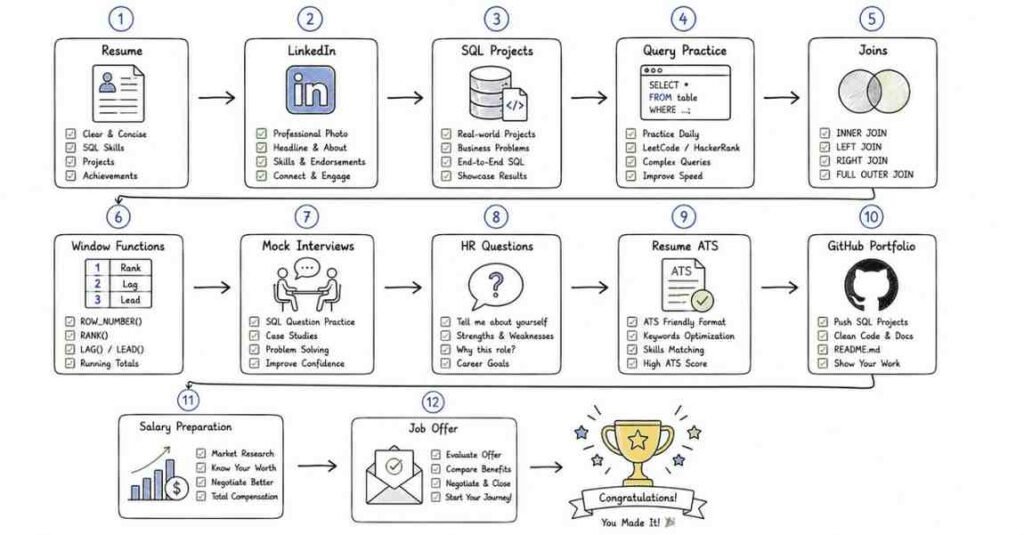
Week 1
- Revise SQL basics, filtering, sorting, NULL handling, and text operations.
- Practice writing short queries daily.
- Finalize 2 project stories.
- Update resume summary and skills.
Week 2
- Revise aggregation, GROUP BY, HAVING, and join types.
- Solve small SQL query problems daily.
- Strengthen one reporting or analytics project explanation.
- Update LinkedIn headline and About section.
Week 3
- Revise subqueries, CTEs, window functions, and database concepts.
- Practice scenario-based interview questions.
- Prepare answers around transactions, indexing, and performance basics.
- Practice explaining query logic aloud.
Week 4
- Revise DML, constraints, normalization, indexing, and optimization.
- Do full mock interviews: HR, SQL basics, joins, advanced SQL, and project round.
- Review salary range and recruiter communication.
- Apply consistently and track responses.
Final 3 days
- Review only your condensed notes and project summaries.
- Practice concise spoken answers.
- Keep resume, GitHub, project links, and documents ready.
- Focus on clarity, calmness, and consistency.