
How to Build a Jenkins Deployment Pipeline Step by Step
Table of Contents
Recommended Learning Path
How to Deploy Jenkins
Understanding How to Deploy Jenkins pipeline
Introduction
A developer finishes a feature, pushes code to GitHub, and wants the updated application to reach a testing environment without copying files manually. A Jenkins deployment pipeline can connect those activities: it retrieves code, runs automated checks, packages an application, and performs a controlled deployment.
For beginners, the challenge is understanding how the stages fit together, not memorizing Groovy syntax. This guide shows how to prepare Jenkins, write a Jenkinsfile, deploy a sample Java application using Docker in an isolated lab, verify the result, and investigate failures. It also explains which safeguards a production pipeline would need.
Quick Answer: How Do You Build a Jenkins Deployment Pipeline?
To create a Jenkins CI/CD pipeline, install Jenkins, configure a suitable build agent, connect a Git repository, and store a Jenkinsfile alongside the application. Define stages for checkout, testing, packaging, and deployment. Configure a trigger, run the pipeline, inspect the logs, and confirm the released application works.
Jenkins orchestrates the workflow; it does not automatically supply the application server, Docker engine, cloud permissions, or deployment credentials. Those components must be set up separately.
What Is a Jenkins Pipeline?
Jenkins is an automation server commonly used to coordinate continuous integration and delivery. A Pipeline represents a sequence of related jobs defined as code. Instead of clicking through separate manual tasks after every change, a team stores a repeatable workflow in a version-controlled file.
A pipeline generally runs on an agent, the machine or execution environment assigned to perform its steps. The Jenkins controller coordinates jobs, credentials, and scheduling. For safer operation, build tasks should run on agents rather than the controller itself.
Declarative Pipeline uses structured blocks such as pipeline, agent, stages, steps, and post. Scripted Pipeline offers greater programming flexibility, but Declarative syntax is usually a clearer starting point for learners.
Want to become a DevOps Engineer?
Explore our step-by-step How To Become Guide –>
What Should You Prepare Before Building a Pipeline?
Our practical example assumes a small Java Spring Boot project with a /actuator/health endpoint, a Maven wrapper, a Dockerfile, and a GitHub repository. The deployment target is an isolated, disposable Linux lab agent, not a public production server.
Prepare these components:
- A Jenkins controller with required Pipeline, Git, and GitHub integration plugins installed and maintained.
- A dedicated build agent labelled docker-lab, with Git, a compatible JDK, Docker, and curl available.
- A repository containing a working Maven project, executable mvnw, tests, and a Dockerfile.
- Permission for the agent to use an isolated lab Docker daemon, with no access to sensitive workloads.
- A configured Multibranch Pipeline pointing to the repository and discovering the main branch.
Docker daemon access is highly privileged. Do not grant it to arbitrary repositories or shared untrusted agents. For production, prefer an isolated builder and a separate deployment mechanism.
What Are the Main Jenkins Pipeline Stages?
Stage | Purpose | Evidence of success |
Checkout | Fetch the intended repository revision | Correct commit appears in logs |
Test | Execute automated checks | Tests pass and reports are recorded |
Package | Produce a deployable application | Versioned JAR exists |
Build image | Create a container image from the application | Docker build succeeds |
Deploy | Replace the application in a lab environment | New container starts |
Verify | Check the running application | Health endpoint responds successfully |
The stages should stop when a necessary check fails. A deployment should not proceed merely because a build command produced a file.
Step 1: Connect Jenkins to GitHub
Create a repository containing the project and a root-level file named Jenkinsfile. In Jenkins, create a Multibranch Pipeline, add the GitHub repository as its branch source, and configure authorized repository access. Jenkins can discover branches that contain a Jenkinsfile.
Configure supported GitHub webhooks or another appropriate change-detection method so a branch update can schedule a build. The exact plugin permissions and webhook configuration depend on your Jenkins installation. Protect the main branch with review requirements before allowing deployments.
The Jenkins GitHub integration is responsible for identifying code changes; it does not decide whether the resulting application is healthy.
Start your journey with our beginner-to-advanced DevOps Roadmap –>
Step 2: Write a Jenkinsfile for Application Deployment
The following Jenkins Declarative Pipeline demonstrates the full flow on a dedicated lab agent. It assumes a Spring Boot Maven project configured to produce exactly one runnable target/*.jar, a compatible Dockerfile, and an Actuator health endpoint. The when { branch ‘main’ } condition requires a Multibranch Pipeline.
pipeline {
agent { label ‘docker-lab’ }
options {
timestamps()
disableConcurrentBuilds()
}
stages {
stage(‘Checkout’) {
steps { checkout scm }
}
stage(‘Test’) {
steps { sh ‘./mvnw -B test’ }
}
stage(‘Package’) {
steps { sh ‘./mvnw -B -DskipTests package’ }
}
stage(‘Build Image’) {
steps {
sh ‘docker build -t student-demo:${BUILD_NUMBER} .’
}
}
stage(‘Deploy to Lab’) {
when { branch ‘main’ }
steps {
sh ”’
docker rm -f student-demo 2>/dev/null || true
docker run -d –name student-demo \
-p 127.0.0.1:8080:8080 \
student-demo:${BUILD_NUMBER}
”’
}
}
stage(‘Verify’) {
when { branch ‘main’ }
steps {
sh ‘curl –fail –retry 5 –retry-delay 2 –retry-connrefused http://127.0.0.1:8080/actuator/health’
}
}
}
post {
always {
junit allowEmptyResults: true, testResults: ‘target/surefire-reports/*.xml’
}
failure {
echo ‘Pipeline failed: review logs and restore the last healthy release if required.’
}
}
}
A minimal Dockerfile for the already-packaged JAR is:
FROM eclipse-temurin:21-jre
WORKDIR /app
COPY target/*.jar app.jar
EXPOSE 8080
ENTRYPOINT [“java”, “-jar”, “app.jar”]
This example deliberately binds the container port to 127.0.0.1 so it is not exposed publicly by the Docker publish option. The Verify step checks the endpoint on the same lab host. If the application needs external access, design networking and authentication explicitly rather than changing exposure casually.
Step 3: Understand What Each Jenkinsfile Section Does
The agent directive assigns work to a labelled node. disableConcurrentBuilds() avoids overlapping runs of this specific job against its single lab container. The Checkout stage retrieves the revision selected by Jenkins.
The Test stage runs Maven tests before the Package stage builds a runnable JAR. The Docker build creates an image tagged with the Jenkins build number, making the lab version easier to identify. The Deploy stage removes the existing demonstration container and launches the new image.
The post section publishes available JUnit reports and displays a failure message. It does not automatically roll back a failed deployment. The pipeline is intentionally simple: production designs should preserve the previous image and use tested rollback or safer replacement mechanisms.
Step 4: Run and Validate the Pipeline
Commit the Jenkinsfile and Dockerfile, then push to a feature branch. Confirm that Jenkins discovers the branch and runs checkout, tests, packaging, and image building. Because the sample limits deployment to main, feature branches should not replace the lab application.
After code review, merge to main and inspect the build’s stage view and console output. Check that the container starts and the health endpoint returns a successful response. Test one application feature as well; an HTTP health response is not proof that every function works.
If the pipeline fails, identify the first failed stage rather than rerunning everything repeatedly. Save screenshots or sanitized logs as project evidence, without exposing tokens or private server information.
Get interview-ready with our DevOps Interview Preparation Guide –>
How Should Credentials and Deployment Security Work?
Jenkins Credentials can store secrets and supported SSH keys, and Pipeline steps can make them available for a limited scope. Avoid committing passwords, cloud access keys, or tokens to Git. Do not interpolate secret values into Groovy strings or print credentials in logs.
For AWS or Azure deployment, configure narrowly scoped cloud identities and use short-lived authentication where supported. Separate build and deployment permissions. Protect production branches, review pipeline changes, and require an approval where the risk justifies it.
Because this lab uses direct Docker access on an agent, it must remain isolated. Jenkins recommends avoiding builds on the controller. A real deployment should also consider vulnerability scanning, deployment history, notifications, monitoring, and recovery procedures.
Can Jenkins Deploy Applications to AWS and Azure?
Yes. A Jenkins application deployment can target cloud virtual machines, managed container services, or Kubernetes clusters using suitable plugins, command-line tools, and credentials. On AWS, a workflow might build an image and deploy it to Amazon ECS or EKS. On Azure, it might target Azure Kubernetes Service or Azure Virtual Machines.
AWS Azure DevOps learning does not require two Jenkins installations. A pipeline can coordinate different environments, but each provider has its own identity, network, and service configuration. Terraform may provision infrastructure before Jenkins delivers an application. Jenkins is the workflow coordinator; Terraform is primarily an Infrastructure as Code tool.
Common Jenkins Deployment Problems and Fixes
Problem | Likely cause | Check first |
Agent remains queued | Label mismatch or agent offline | Node status and label |
Checkout fails | Repository permissions or URL | Git credentials and branch source |
Tests fail | Application defect or missing dependency | Test reports and build logs |
Docker build fails | Dockerfile, daemon, or missing JAR | Agent tools and artifact path |
Container fails to start | Port conflict or application startup error | docker logs and port usage |
Health check fails | Slow startup or incorrect endpoint | Application logs and Actuator configuration |
Do not silence test failures simply to make the dashboard green. A failed pipeline is useful feedback when it prevents a broken release.
FLM Expert Perspective: Build, Prove, Release
For a practical DevOps tutorial, FLM recommends the Build–Prove–Release framework:
- Build: Create a repeatable artifact from a known Git commit.
- Prove: Run automated tests, inspect reports, and check deployment readiness.
- Release: Deploy to a controlled environment and validate the actual running service.
This is a suggested learner framework, not a claim about FLM’s internal production system. Apply it to a small project before adding Kubernetes, multicloud deployments, or complex approval chains.
Beginner Jenkins Learning Roadmap
Stage 1 — Foundations: Learn Git, Linux commands, HTTP, Java application packaging, and the difference between CI and CD.
Stage 2 — Jenkins basics: Explore the controller, build agents, jobs, credentials, and console logs. Run a simple Pipeline with an echo step.
Stage 3 — Jenkinsfile: Add Checkout, Test, Package, and post-build reporting. Learn why each stage can fail.
Stage 4 — Deployment: Use a dedicated lab agent to build and run one Dockerized application. Verify it with a health endpoint.
Stage 5 — Security and cloud: Practice restricted credentials, branch protection, deployment approvals, and an AWS or Azure target.
Stage 6 — Portfolio: Document architecture, pipeline stages, test results, a failure you fixed, and a recovery procedure. This DevOps guide is a learning sequence, not a guaranteed hiring timeline.
Common Mistakes to Avoid
- Deploying every branch: Use branch rules and approvals so feature changes do not overwrite shared environments.
- Running builds on the controller: Use isolated, appropriately managed agents.
- Giving broad Docker or cloud access: Restrict powerful permissions and separate trust boundaries.
- Skipping tests or verification: A completed build does not prove a healthy deployment.
- Ignoring rollback: Keep identifiable previous releases and practice recovery.
- Copying a Jenkinsfile blindly: Match the commands, ports, plugins, and deployment method to your actual project.
Frequently Asked Questions
1. What is a Jenkins deployment pipeline?
It is an automated workflow that retrieves code, runs necessary checks, packages software, and releases an approved build to a target environment.
2. Is Jenkins free to learn?
Jenkins is open-source software, but servers, cloud services, storage, and build infrastructure may have separate costs.
3. What is a Jenkinsfile?
A Jenkinsfile is a text file stored with application code that defines Pipeline stages and steps, usually using Declarative or Scripted syntax.
4. Can Jenkins connect to GitHub?
Yes. Jenkins supports Git repositories and GitHub integration for source checkout, change detection, and build status reporting.
5. Can Jenkins deploy Docker applications?
Yes. With a properly configured agent and Docker access, Jenkins can build images and coordinate container deployments.
6. Does a Jenkins pipeline need AWS or Azure?
No. It can deploy to a local lab, an on-premises server, or supported cloud environments.
7. Can non-IT beginners learn Jenkins?
Yes. Start with Git, Linux, basic scripting, and build concepts before attempting cloud deployment automation.
8. Does Jenkins automatically roll back a failed release?
No. Rollback requires an explicitly designed recovery process or deployment platform that supports it.
9. What should I test before production deployment?
Check code quality, unit and integration tests, artifact integrity, credentials, security requirements, deployment health, and a tested recovery plan.
Conclusion
A Jenkins deployment pipeline connects development and operations through repeatable steps: checkout, build, test, package, deploy, and verify. The Jenkinsfile makes the workflow visible in Git, while agents execute its tasks and logs help teams diagnose failures.
For beginners, a small application deployed to an isolated lab is a useful first project. Understand each stage, keep access secure, and verify the running application before extending the workflow to AWS, Azure, or production systems. Reliable deployment depends on the complete process, not on one successful Jenkins build.
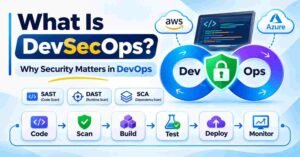
Security in DevOps and CI/CD Guide
What Is DevSecOps and Why Is Security Integrated into DevOps? Table of Contents Recommended Learning Path What Is DevSecOps Explain about the and Why Is
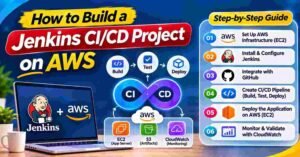
Jenkins AWS Project
How to Build a Jenkins CI/CD Project on AWS Table of Contents Recommended Learning Path Jenkins AWS Project Build a CI/CD Pipeline Step by Step
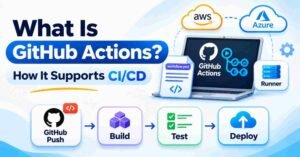
What Is GitHub Actions
What Is GitHub Actions and How Does It Support CI/CD? Table of Contents Recommended Learning Path GitHub Actions CI CD GitHub actions Explained Live Classes

Docker Kubernetes Project: Beginner DevOps Guide
How to Build a Docker and Kubernetes DevOps Project Table of Contents Recommended Learning Path Docker Kubernetes Project Beginner DevOps Guide Live Classes Real Projects

AWS CodePipeline vs Azure Pipelines
AWS CodePipeline vs Azure Pipelines: What Is the Difference? Recommended Learning Path AWS CodePipeline vs Azure Pipelines Understand the difference between the AWS and Azure
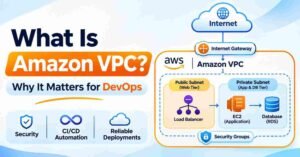
What Is Amazon VPC in DevOps
What Is Amazon VPC and Why Is It Important for DevOps? Table of Contents Recommended Learning Path Amazon VPC DevOps AWS Networking Guide for Beginners