
Why Is SQL Important for Data Analytics?
Table of Contents
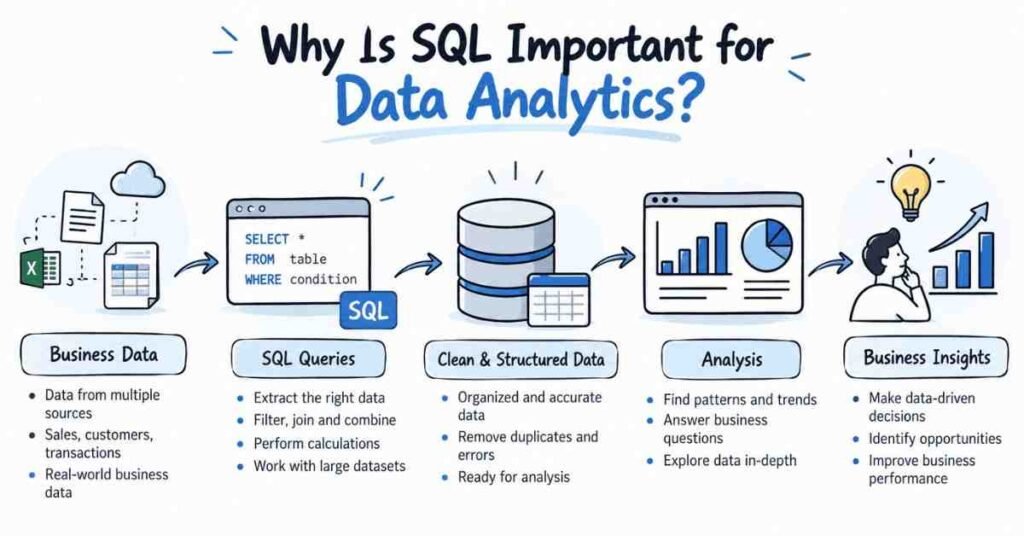
A business may collect thousands or even millions of records, but those records are useful only when someone can retrieve the right information and make sense of it. This is where SQL for data analytics becomes important.
SQL, or Structured Query Language, allows analysts to work directly with data stored in relational databases. Instead of depending entirely on exported spreadsheets, they can retrieve selected records, filter information, connect related tables, calculate totals, and prepare datasets for reporting or deeper analysis.
For students learning data analytics, SQL is therefore not simply another technical subject. It is the link between a business question and the data needed to answer it.
Quick Answer: What Should You Learn First in Data Analytics?
Data analysts use SQL to retrieve, filter, combine, group, and summarise information stored in databases.
For example, an analyst may need to find which cities generated the highest sales, how many customers purchased more than once, or which product category produced the most revenue. SQL allows these questions to be translated into structured database queries.
Microsoft’s current SQL documentation includes core query clauses such as FROM, WHERE, GROUP BY, HAVING, and ORDER BY, which form the basis of many analytical queries.
Start Your Data Analytics Journey
Learn Excel, SQL, Power BI, Python & AI with practical projects.
👉 Join Now
Why SQL Becomes Important When Business Data Grows
A small dataset may fit comfortably into Excel. Business data, however, is often spread across several related tables.
An e-commerce company might store customer information in one table, orders in another, products in a third, and payment information somewhere else.Suppose the company wants to know which customer segment generated the highest revenue.
The answer may require information from both the customer and order tables. Manually combining exported files would be inefficient and could introduce errors. SQL can connect the tables using a common field such as customer_id.
This ability to work directly with structured database data is one of the most useful SQL skills for data analysts.
What Can a Data Analyst Do with SQL?
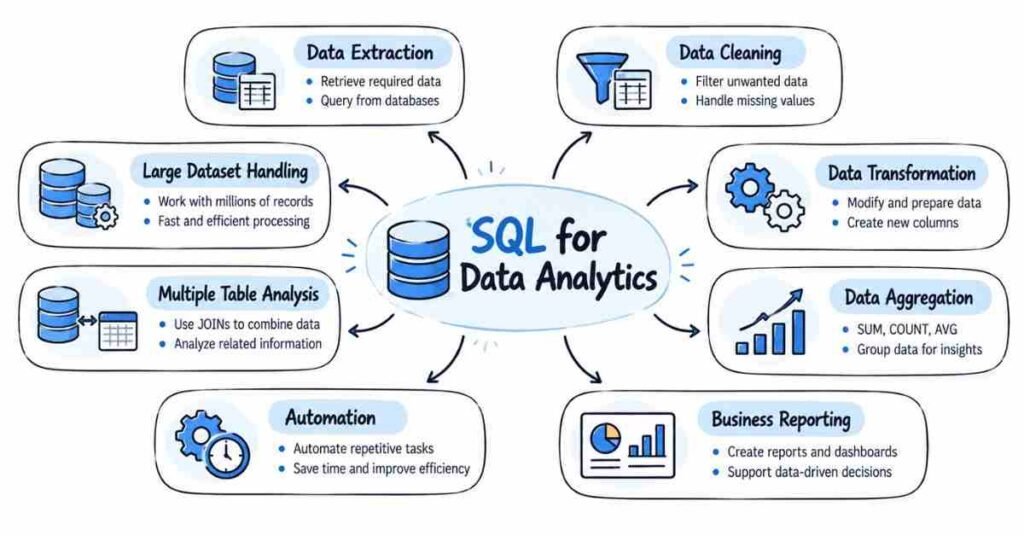
SQL helps analysts move from raw records to business-ready information.
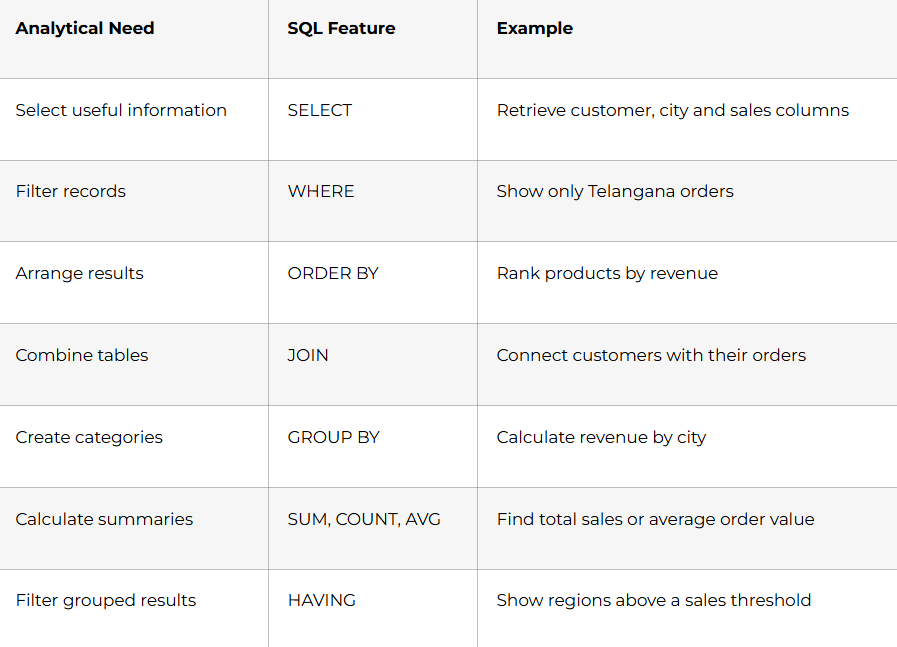
PostgreSQL documentation describes joins as a way to derive a table from two other tables according to a join condition. Its aggregate-function documentation also defines operations such as COUNT, SUM, AVG, MIN, and MAX as calculations across sets of rows.
Which SQL Concepts Matter Most for Data Analysts?
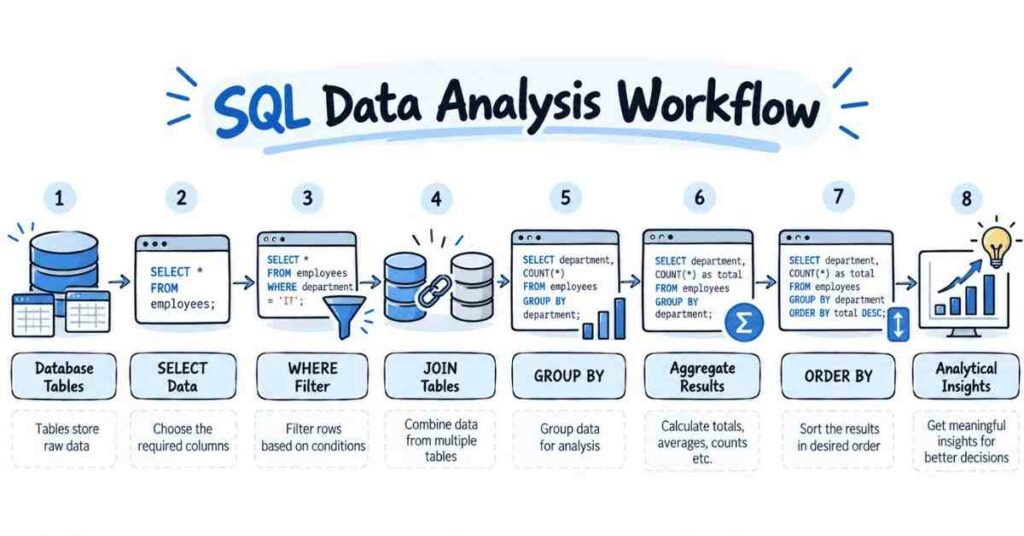
Beginners do not need every SQL feature before they can perform useful analysis. A few concepts provide most of the foundation.
SELECT: Choosing the Data You Need
SELECT determines which columns appear in a query result.
A sales table may contain twenty fields, while an analyst only needs the order date, product, quantity, and revenue. Selecting only relevant fields keeps the analysis focused and easier to understand.
WHERE: Filtering Records
WHERE helps analysts focus on a particular part of the data.
It can be used to study one region, one product category, a specific date range, or transactions above a chosen value.
Filtering is especially useful when the database contains much more information than the analysis requires.
GROUP BY and Aggregation: Creating Business Summaries
Individual transactions often need to be converted into summaries.
An analyst may want total revenue by city, average order value by customer group, or number of purchases by month.
GROUP BY creates the required categories, while functions such as SUM, COUNT, and AVG calculate the result for each group.
JOIN: Connecting Related Business Information
JOINs are among the most important SQL concepts for analytics because information is commonly spread across different tables.
Suppose an orders table contains:
order_id, customer_id, amount
while a customers table contains:
customer_id, customer_name, city
If the analyst wants sales by city, the two tables need to be connected through customer_id.
An INNER JOIN returns matching records from the related tables. A LEFT JOIN can retain all records from the first table even when no matching row exists in the second.
How SQL Is Used in a Real Analytics Task
Consider an online retailer that wants to understand sales performance by city.
The business question is:
Which cities generated the highest revenue this year?
The analyst needs customer location information from one table and order information from another.
A simplified query could be:
SELECT
c.city,
COUNT(o.order_id) AS total_orders,
SUM(o.order_value) AS total_revenue
FROM customers c
JOIN orders o
ON c.customer_id = o.customer_id
GROUP BY c.city
ORDER BY total_revenue DESC;
Several analytical actions happen inside one query. The tables are connected, orders are counted, revenue is added, results are grouped by city, and the final output is sorted.
The important skill is not memorising this query. It is understanding how a business question becomes a sequence of logical operations.
Where SQL Fits with Excel and Power BI
SQL does not replace Excel or Power BI. Each tool has a different role.
SQL is especially useful when information is stored inside a database. Excel is practical for quick calculations, smaller working datasets, and manual validation. Power BI is useful for data modelling, visualisation, dashboards, and interactive reporting.
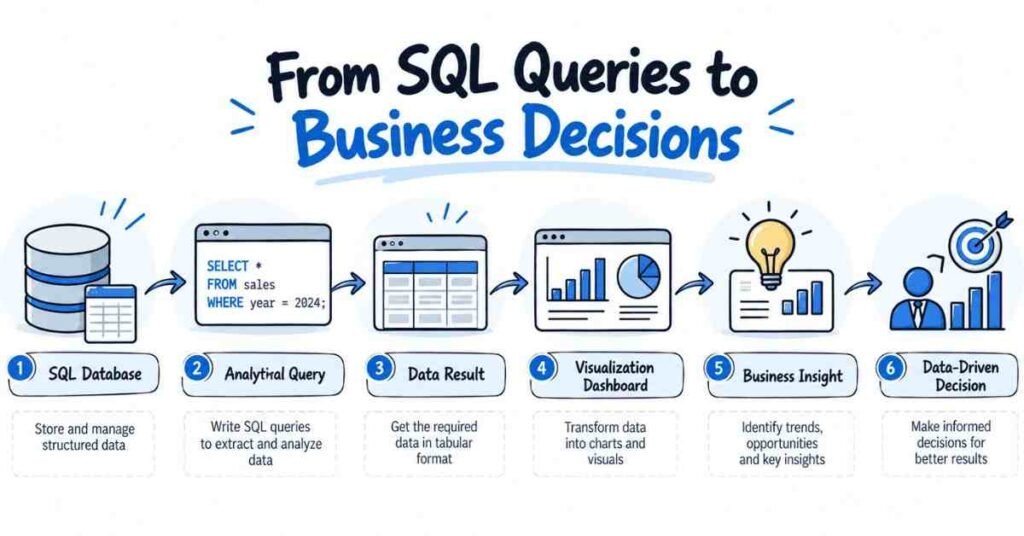
A practical workflow may look like this:
Database → SQL → Prepared Data → Power BI → Dashboard → Business Insight
This is why learning SQL often makes other analytics tools more useful. Instead of waiting for someone to provide a perfect file, the analyst can retrieve and prepare relevant information directly.
Does AI Make SQL Less Important?
AI tools can generate SQL queries, explain errors, and help beginners understand unfamiliar syntax.
That does not remove the need to understand SQL.
A generated query can run successfully and still answer the wrong question. An incorrect JOIN may duplicate records. A filter may remove information that should have been included. An aggregation may calculate the wrong metric.
An analyst therefore needs enough SQL knowledge to review the logic of AI-generated queries.
FLM’s current Data Analytics syllabus reflects this combination by covering traditional SQL concepts alongside AI-assisted query generation.
Common SQL Mistakes Beginners Should Avoid
Beginners often focus too heavily on memorising commands. SQL becomes more useful when each query is connected to a genuine question.
Another mistake is moving into complex SQL before understanding filtering, grouping, and JOINs properly. Strong fundamentals are more useful than knowing several advanced keywords without being able to explain the result.
Learners should also pay attention to data quality. Duplicate rows, NULL values, incorrect JOIN conditions, and inconsistent categories can change the final result even when the SQL syntax is correct.
Finally, query output should not be confused with insight. SQL produces information. The analyst still needs to interpret what that information means.
A Practical SQL Roadmap for Data Analytics
A useful learning sequence is:
- Understand tables, rows, columns, primary keys, and foreign keys.
- Learn SELECT, DISTINCT, WHERE, and ORDER BY.
- Practise COUNT, SUM, AVG, GROUP BY, and HAVING.
- Become comfortable with INNER JOIN and LEFT JOIN.
- Move into CASE, subqueries, and CTEs.
- Learn date functions and window functions after the foundation is strong.
- Practise by answering business questions rather than solving syntax-only exercises.
For an entry-level learner, being able to filter information, combine tables, calculate metrics, and explain the query clearly is a stronger foundation than trying to learn every advanced database feature.
FLM Perspective: Learn SQL from Question to Query
A practical way to learn SQL in analytics is to use a simple framework:
Question → Tables → Logic → Result
Start with the business question. Identify which tables contain the information. Decide which filters, joins, and calculations are needed. Then check whether the final result actually answers the original question.
This approach makes SQL easier to understand because every command has a purpose.
For Telugu-speaking learners who want to study SQL as part of a broader analytics pathway, Data Analytics training in Telugu covers SQL together with Excel, Power BI, Python, statistics, and AI-assisted analytics.
Conclusion
SQL is important for data analytics because analysts need direct access to the information behind reports and dashboards.
It allows them to retrieve specific records, connect related tables, calculate meaningful metrics, and prepare data for further analysis.
For beginners, the goal should not be to memorise SQL. Focus first on understanding SELECT, filtering, aggregation, GROUP BY, and JOINs. Once these concepts are comfortable, more advanced topics become easier to learn.
Strong SQL skills give analysts greater independence: they can move from a business question to the required data without relying entirely on manually prepared files.
Frequently Asked Questions
Is SQL necessary for data analytics?
SQL is highly useful when analysts work with relational databases. It allows them to retrieve, filter, combine, and summarise information efficiently.
Why do data analysts use SQL?
Analysts use SQL to access database information, prepare datasets, calculate business metrics, and answer questions using structured data.
Which SQL concepts should beginners learn first?
Start with SELECT, WHERE, ORDER BY, aggregate functions, GROUP BY, HAVING, and JOINs.
Is SQL difficult for non-IT students?
SQL can be learned gradually. Beginners usually understand it more easily when queries are connected to practical datasets and business questions.
Is SQL better than Excel for data analytics?
Neither replaces the other. SQL is useful for querying databases, while Excel is useful for spreadsheet analysis and quick calculations.
Do Power BI users need SQL?
SQL is not required for every Power BI task, but it can help analysts retrieve, understand, and prepare database data before building reports.
Can AI generate SQL queries?
Yes, AI tools can assist with SQL generation and explanation. Analysts should still verify the query logic and output.
How should beginners practise SQL?
Use datasets with related tables and answer practical questions involving customers, orders, products, revenue, or campaigns.
Related Career Guides
- Data Analytics Roadmap for Beginners
- Can Non-IT Students Learn AI-Powered Data Analytics?
- How to Build a Data Analytics Portfolio
- Power BI Skills Every Data Analyst Should Learn
- SQL Interview Questions for Data Analysts
Ready to Become a Data Analyst
Build real-world skills and prepare for your analytics career.
👉 Join Our Data Analytics Program