
Software Testing Interview Preparation Guide 2026
Table of Contents
Part 1: Introduction & 30-Day Study Plan
This first part sets the direction for software testing interview preparation. It explains what interviewers usually test, where testing fits in real work, and how to build a practical 30-day plan that makes you interview-ready.
What this guide covers
This guide is designed to prepare you for software testing interviews in a structured way. It starts with testing basics and moves into SDLC, STLC, test levels, test types, test cases, bug reporting, manual testing, automation basics, API testing, SQL, CI/CD, and interview strategy. The goal is not just to help you memorize terms, but to help you explain how and why testing is done in real projects.
Interviewers usually care as much about your reasoning and bug-finding approach as they do about definitions. A strong candidate can explain a test scenario, a defect, or a quality decision clearly and confidently.
Who this guide is for
This guide is useful if you are a fresher preparing for your first software testing interview. It also helps students, manual testers, QA engineers, automation beginners, and professionals moving into testing roles who want a clearer interview structure.
It is especially helpful if you already know the basics but are not fully confident discussing test cases, bug life cycle, severity versus priority, Agile testing, tools, or automation concepts. The structure is meant to help both beginners and job seekers build confidence step by step.
What software testing is
Software testing is the process of checking whether a software product works as expected and meets quality requirements. It helps find defects, verify functionality, and improve reliability before release.
A simple way to think about software testing is this: it helps make sure the product behaves correctly, safely, and consistently for the user. If you understand how testing fits into the development cycle, interview questions become much easier to answer.
Where software testing fits in real work
In real companies, software testing is used across web apps, mobile apps, APIs, enterprise systems, and backend services. Common tasks include understanding requirements, writing test cases, executing manual tests, reporting bugs, performing regression testing, validating releases, and supporting automation where needed.
This is why testing interviews test more than just theory. Interviewers often want to see whether you can think like a QA professional, identify risks, communicate defects clearly, and work with developers and product teams.
Common testing-related roles
Software testing interviews vary depending on the role. Common role types include manual tester, QA engineer, automation tester, SDET, test analyst, API tester, and performance tester.
A manual testing role may focus more on test cases, defect reporting, exploratory testing, and functional validation. An automation or SDET role may focus more on frameworks, scripting, Selenium, API testing, and CI/CD integration. Understanding the role early helps you focus your preparation.
Common interview process
A typical software testing interview process often includes HR screening, testing fundamentals, manual testing concepts, test case writing, bug life cycle, Agile or Scrum, automation basics, tools, scenario-based questions, and behavioral interview rounds.
In many interviews, testing questions are mixed with practical reasoning. You may be asked to write test cases, explain a defect, test a login page, compare manual and automation testing, or describe how you would validate a release. That is why practical understanding matters more than memorized theory alone.
Core skill areas interviewers usually check
Most software testing interviews evaluate some combination of these areas:
- SDLC and STLC.
- Test levels and test types.
- Test case design.
- Bug life cycle.
- Severity and priority.
- Manual testing execution.
- Agile and Scrum basics.
- Automation fundamentals.
- API testing.
- SQL and backend validation.
- CI/CD and release support.
- Communication and defect reporting.
These topics appear often because they reflect real QA work. If you are comfortable with them, you can handle most interview rounds with more confidence.
Why project understanding matters
Software testing interviews often depend heavily on how well you explain your projects. Even if your project is from a lab, internship, training, or practice environment, present it clearly and professionally.
A strong project explanation should include:
- What the application does.
- What you tested.
- What test cases you wrote.
- Which defects you found.
- How you reported or tracked bugs.
- Whether you worked manually, with tools, or with automation.
- What you learned from the project.
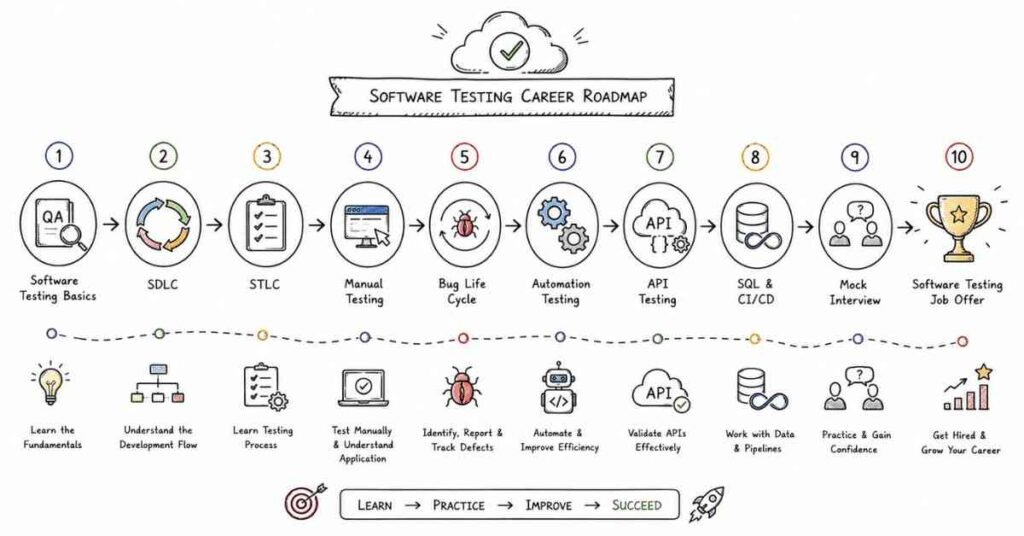
30-day study plan
A practical 30-day software testing study plan looks like this:
Week 1: Testing basics and process
Focus on what testing is, SDLC, STLC, test levels, test types, static versus dynamic testing, test planning, and the tester’s role in software quality.
Week 2: Manual testing and defect handling
Study test cases, test scenarios, bug life cycle, severity versus priority, smoke testing, sanity testing, regression testing, and exploratory testing. Practice writing and reviewing test cases.
Week 3: Agile, tools, and validation
Move into Agile and Scrum, requirement analysis, test estimation, test documentation, SQL basics, API testing basics, and defect tracking tools. Continue practicing real-world scenarios.
Week 4: Automation basics, interview practice, and mock rounds
Focus on automation concepts, Selenium basics, framework awareness, CI/CD awareness, project explanation, resume review, and behavioral questions. Spend the rest of the week on mock interviews and revision.
Daily study routine
A practical daily routine looks like this:
- 45 minutes of concept revision.
- 60 minutes of test case writing or tool practice.
- 30 minutes of spoken explanation or mock interview practice.
- 15 minutes of notes, review, or scenario work.
If you are a fresher, do not skip speaking practice. Many candidates understand testing privately but freeze when asked to explain a defect or a test case in real time.
How to prepare effectively
The best way to prepare for software testing interviews is to build from testing basics to manual testing, then move into Agile, APIs, SQL, and automation. Start simple, then layer complexity gradually.
You should also practice explaining your work out loud. In many interviews, the explanation matters almost as much as the technical answer.
Revision focus
Revise what software testing is, where it is used, the common role types, the usual interview format, the core skill areas, and the 30-day study plan before moving to testing fundamentals, SDLC, STLC, and test levels.
Part 2: Testing Fundamentals, SDLC, STLC, and Test Levels
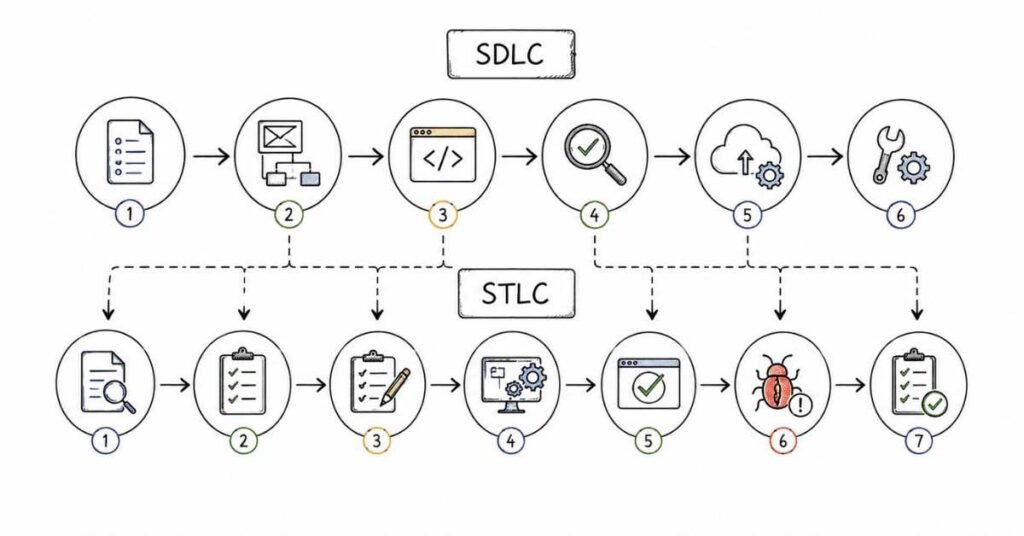
This part builds the foundation for the rest of the software testing guide. It covers the basic testing concepts, process models, and terminology interviewers expect you to understand before moving into test cases, defects, automation, and tools.
Questions 1–40
1. What is software testing?
Software testing is the process of verifying and validating that a software application works as expected. It helps find defects and improve product quality.
2. Why is software testing important?
Software testing is important because it reduces the chance of bugs reaching users. It helps ensure the software is reliable, usable, and fit for purpose.
3. What is quality assurance?
Quality assurance is the process of preventing defects by improving development and testing practices. It focuses on the overall quality process.
4. What is quality control?
Quality control is the process of checking the final product for defects. It focuses more on identifying issues in the product itself.
5. What is the difference between QA and testing?
QA is broader and focuses on process improvement, while testing is the actual activity of finding defects in the product. Testing is one part of quality assurance work.
6. What is verification?
Verification checks whether the product is being built correctly according to requirements and design. It answers the question, “Are we building the product right?”
7. What is validation?
Validation checks whether the product meets user needs and business expectations. It answers the question, “Are we building the right product?”
8. What is the difference between verification and validation?
Verification focuses on documents, design, and process, while validation focuses on the actual software behavior. Both are important in testing.
9. What is SDLC?
SDLC stands for Software Development Life Cycle. It is the process used to plan, build, test, deploy, and maintain software.
10. Why is SDLC important?
SDLC is important because it provides structure to software development. It helps teams deliver software in an organized and controlled way.
11. What are the main phases of SDLC?
The main phases are requirement gathering, design, development, testing, deployment, and maintenance. Different companies may describe the phases slightly differently.
12. Where does testing fit in SDLC?
Testing usually happens after development, but in modern workflows it can start earlier through reviews and shift-left practices. Testing supports quality throughout the lifecycle.
13. What is STLC?
STLC stands for Software Testing Life Cycle. It is the process testers follow from understanding requirements to test closure.
14. Why is STLC important?
STLC is important because it defines a structured testing process. It helps ensure test activities are planned, executed, and tracked properly.
15. What are the phases of STLC?
The phases are requirement analysis, test planning, test case development, test environment setup, test execution, defect reporting, and test closure. These steps may vary by team.
16. What happens in requirement analysis?
In requirement analysis, testers review requirements to identify what needs to be tested. They also look for gaps, risks, and ambiguities.
17. What happens in test planning?
In test planning, the testing scope, approach, resources, tools, schedule, and risks are defined. It is the roadmap for the testing effort.
18. What happens in test case development?
In test case development, testers write test cases and test data based on requirements and scenarios. This helps prepare for execution.
19. What happens in test environment setup?
In test environment setup, the team prepares the system, tools, data, and access needed for testing. A stable environment is necessary for reliable results.
20. What happens in test execution?
In test execution, testers run the test cases and compare actual results with expected results. Defects are logged if behavior is different from expectation.
21. What happens in test closure?
In test closure, the team reviews test results, documents lessons learned, and finalizes testing artifacts. It marks the end of the testing cycle.
22. What is a test case?
A test case is a set of conditions, steps, and expected results used to verify a feature or function. It helps testers check whether the software behaves correctly.
23. Why are test cases important?
Test cases provide repeatable and traceable testing steps. They help ensure important scenarios are not missed.
24. What is a test scenario?
A test scenario is a high-level situation that needs to be tested. It usually describes what should be tested, not every detailed step.
25. What is the difference between a test case and a test scenario?
A test scenario is broad and describes a condition or flow, while a test case is detailed and includes steps and expected results. Test cases are usually derived from test scenarios.
26. What is a test plan?
A test plan is a document that describes the overall testing approach. It includes scope, objectives, resources, schedule, risks, and deliverables.
27. Why is a test plan important?
A test plan helps the team stay organized and aligned on testing goals. It also clarifies responsibilities and expectations.
28. What is a test strategy?
A test strategy is the high-level approach for testing a project or organization. It defines how testing will be done across projects or releases.
29. What is the difference between a test plan and a test strategy?
A test strategy is broader and more long-term, while a test plan is usually project-specific and more detailed. The strategy guides the plan.
30. What is the test environment?
The test environment is the setup where testing is performed. It may include hardware, software, data, network, and access configuration.
31. Why is a stable test environment important?
A stable environment helps ensure test results are accurate and repeatable. Unstable environments can create false failures.
32. What is a defect?
A defect is a bug or flaw in the software that causes it to behave incorrectly. It is found when actual results differ from expected results.
33. What is the difference between a defect, bug, and error?
In practice, these words are often used interchangeably, but an error usually refers to a human mistake, a defect is the flaw in the software, and a bug is the common term for that flaw.
34. What is a test objective?
A test objective is the goal of testing, such as finding defects, validating requirements, or confirming quality. It explains why testing is being done.
35. What is smoke testing?
Smoke testing is a quick check to see whether the main features of a build are working. It helps decide whether deeper testing can continue.
36. What is sanity testing?
Sanity testing is a focused check of a specific area after a small change or fix. It verifies whether the changed functionality works correctly.
37. What is regression testing?
Regression testing checks whether new changes have broken existing features. It is done to make sure the old functionality still works.
38. Why is regression testing important?
It protects the system from unintended side effects after updates. It is one of the most common testing activities in real projects.
39. What is a strong answer for testing fundamentals questions?
A strong answer explains the concept clearly and connects it to real testing work. Interviewers want practical understanding, not only definitions.
40. How should you practice testing fundamentals?
Practice by drawing SDLC and STLC flows, explaining each phase, and connecting them to a sample application. Repeating the flow helps these concepts become natural.
Revision focus
Revise software testing, QA versus QC, verification versus validation, SDLC, STLC, test planning, test strategy, test scenarios, test cases, test environment, defects, smoke testing, sanity testing, and regression testing before moving to testing types, techniques, bug lifecycle, priority, and severity.
Part 3: Testing Types, Techniques, Bug Lifecycle, Priority, and Severity
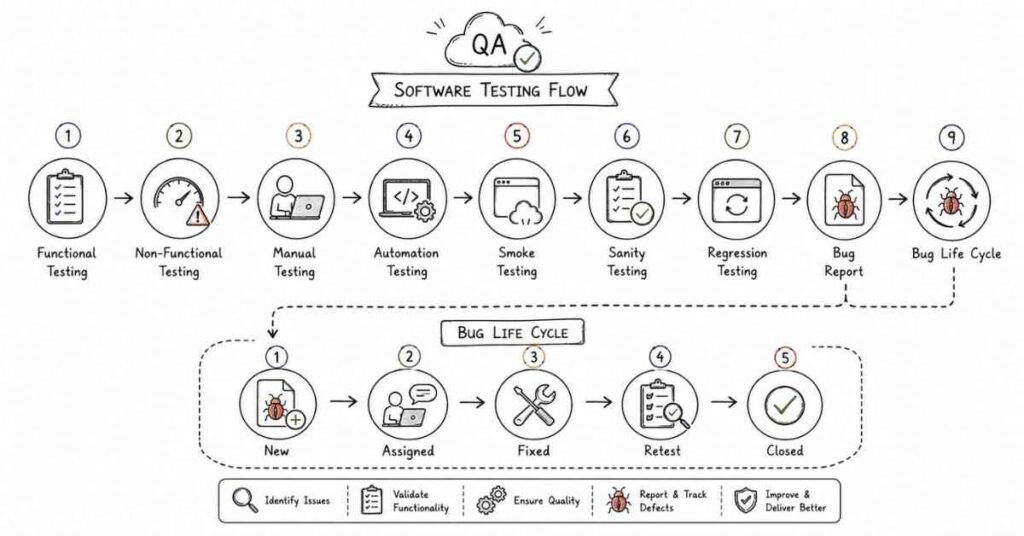
This part covers the practical testing concepts that interviewers ask very often. It focuses on testing types, test design techniques, defect tracking, and the ideas behind priority and severity.
Questions 41–80
41. What are the main types of software testing?
The main types include functional testing, non-functional testing, manual testing, automation testing, and maintenance testing. Each type serves a different purpose in quality assurance.
42. What is functional testing?
Functional testing checks whether the software works according to the required functions. It focuses on what the system does.
43. What is non-functional testing?
Non-functional testing checks qualities like performance, usability, security, and reliability. It focuses on how the system behaves.
44. What is manual testing?
Manual testing is performed by a tester without using automation scripts. The tester executes test cases and checks results manually.
45. What is automation testing?
Automation testing uses scripts or tools to run tests automatically. It is useful for repetitive and large-scale testing.
46. What is the difference between manual and automation testing?
Manual testing is done by humans and is useful for exploration and usability, while automation testing is faster and better for repeated checks. Both are important in practice.
47. What is black-box testing?
Black-box testing checks the software without looking at the internal code structure. The tester focuses on inputs and outputs.
48. What is white-box testing?
White-box testing checks the internal logic, code, and structure of the software. It is usually done by developers or technically skilled testers.
49. What is gray-box testing?
Gray-box testing is a mix of black-box and white-box approaches. The tester has partial knowledge of the internal system.
50. What is positive testing?
Positive testing checks whether the system works with valid inputs and expected conditions. It verifies normal behavior.
51. What is negative testing?
Negative testing checks how the system handles invalid inputs or unexpected conditions. It helps find errors and validation gaps.
52. What is boundary value analysis?
Boundary value analysis is a test design technique that focuses on values at the edges of input ranges. Bugs often appear near boundaries.
53. Why is boundary value analysis important?
It helps find defects that occur at minimum, maximum, or just-outside-limit values. It is a very effective testing technique.
54. What is equivalence partitioning?
Equivalence partitioning divides input data into groups that should behave similarly. One representative value from each group is tested.
55. Why is equivalence partitioning useful?
It reduces the number of test cases while still covering important input categories. It saves time and effort.
56. What is decision table testing?
Decision table testing is used when different conditions lead to different outcomes. It helps organize combinations of rules and results.
57. What is use case testing?
Use case testing checks the software based on real user interactions and business flows. It focuses on end-to-end behavior.
58. What is exploratory testing?
Exploratory testing is an unscripted approach where the tester explores the application and learns while testing. It is useful for finding unexpected issues.
59. What is ad hoc testing?
Ad hoc testing is informal testing without documented test cases. It relies on tester intuition and experience.
60. What is retesting?
Retesting means running the same test again after a defect has been fixed. It confirms that the issue was resolved.
61. What is regression testing?
Regression testing checks whether new changes have broken existing functionality. It protects the software from side effects.
62. What is smoke testing?
Smoke testing is a quick check of core features to see whether the build is stable enough for deeper testing. It is often done after a new build is deployed.
63. What is sanity testing?
Sanity testing is a focused check of a specific area after a small change or fix. It verifies whether the changed functionality behaves as expected.
64. What is system testing?
System testing checks the complete integrated system as a whole. It validates end-to-end behavior against requirements.
65. What is integration testing?
Integration testing checks whether different modules or services work together correctly. It focuses on interfaces and data flow.
66. What is unit testing?
Unit testing checks individual units or small pieces of code. It is usually done by developers during development.
67. What is acceptance testing?
Acceptance testing checks whether the system is ready for business use. It is often done from the user or client perspective.
68. What is user acceptance testing?
User acceptance testing, or UAT, is the final validation done by business users or client representatives. It confirms the software meets business needs.
69. What is static testing?
Static testing checks documents, requirements, and code without actually running the software. Reviews and inspections are examples of static testing.
70. What is dynamic testing?
Dynamic testing involves executing the software and observing results. Most practical testing activities fall into this category.
71. What is a bug life cycle?
The bug life cycle is the process a defect goes through from discovery to closure. It includes states like new, assigned, fixed, retest, and closed.
72. What are common bug states?
Common states include new, open, assigned, fixed, retest, verified, reopened, and closed. Teams may use slightly different names.
73. What is severity?
Severity indicates how serious the defect is in terms of system impact. It describes the technical effect of the bug.
74. What is priority?
Priority indicates how quickly the defect should be fixed. It reflects business urgency.
75. What is the difference between severity and priority?
Severity is about impact, while priority is about urgency. A high-severity bug may not always have high priority, and vice versa.
76. Can a low-severity bug have high priority?
Yes. For example, a small typo on a homepage may have low severity but high priority if it affects a critical business page.
77. Can a high-severity bug have low priority?
Yes. For example, a failure in a rarely used internal feature may be serious technically but not urgent for immediate release.
78. What is a defect report?
A defect report is a document or ticket that describes a bug, its steps to reproduce, expected result, actual result, and other details. It helps developers fix the issue.
79. What is a strong answer for testing types and bug questions?
A strong answer explains the concept clearly and connects it to real testing work. Interviewers want to hear practical examples, not only definitions.
80. How should you practice these topics?
Practice by writing test cases for a login page, classifying bugs by severity and priority, and explaining different testing types with examples. Repetition helps these concepts become natural.
Revision focus
Revise functional versus non-functional testing, manual versus automation testing, black-box versus white-box versus gray-box testing, positive and negative testing, boundary value analysis, equivalence partitioning, decision table testing, exploratory testing, smoke testing, sanity testing, regression testing, system testing, integration testing, unit testing, acceptance testing, bug life cycle, severity, priority, and defect reports before moving to Agile, Scrum, requirements, test planning, and estimation.
Part 4: Agile, Scrum, Requirements, Test Planning, and Estimation
This part covers the teamwork and planning layer of software testing. It focuses on Agile practices, Scrum roles, requirement analysis, test planning, and estimation concepts that interviewers often ask before moving into manual testing execution and tools.
Questions 81–120
81. What is Agile?
Agile is a software development approach that delivers work in small, iterative increments. It emphasizes flexibility, collaboration, and continuous feedback.
82. Why is Agile important in testing?
Agile is important because testing happens continuously, not only at the end. Testers work closely with developers and product teams throughout the sprint.
83. What is Scrum?
Scrum is an Agile framework used to manage product development in short iterations called sprints. It provides structure through roles, events, and artifacts.
84. What is a sprint?
A sprint is a fixed-length iteration in Scrum, usually one to four weeks. The team works to complete planned items during that time.
85. What is a user story?
A user story is a short requirement written from the user’s perspective. It usually describes what the user wants and why.
86. Why are user stories important?
User stories help teams focus on user needs and business value. They also make requirements easier to understand.
87. What is acceptance criteria?
Acceptance criteria are the conditions that must be met for a user story to be considered complete. They help define the expected behavior clearly.
88. Why are acceptance criteria important?
They make requirements testable and reduce ambiguity. Testers use them to create test cases and confirm expected behavior.
89. What is a product backlog?
The product backlog is a prioritized list of features, enhancements, and fixes. It is managed by the product owner.
90. What is a sprint backlog?
The sprint backlog contains the work selected for the current sprint. The team commits to completing these items during the sprint.
91. What is a product owner?
The product owner represents business needs and manages the product backlog. They help define priorities and requirements.
92. What is a Scrum master?
The Scrum master helps the team follow Scrum practices and removes obstacles. They support the process but do not direct the team like a manager.
93. What is the development team in Scrum?
The development team builds the product and works on the sprint backlog. In testing contexts, testers are often part of the broader delivery team.
94. What is a daily stand-up?
A daily stand-up is a short team meeting where members share progress, plans, and blockers. It helps keep the team aligned.
95. Why are Agile ceremonies useful?
They improve communication, visibility, and coordination. They help testing stay aligned with development progress.
96. What is requirement analysis?
Requirement analysis is the process of reviewing requirements to understand what needs to be tested. It helps identify gaps, risks, and ambiguities.
97. Why is requirement analysis important for testers?
It helps testers understand the scope and prepare effective test cases. Clear requirements lead to better testing.
98. What is requirement traceability?
Requirement traceability is the ability to map requirements to test cases and defects. It helps ensure coverage and accountability.
99. What is a traceability matrix?
A traceability matrix is a document that maps requirements to test cases. It helps track whether all requirements are tested.
100. Why is a traceability matrix useful?
It helps ensure no requirement is missed. It also supports impact analysis when requirements change.
101. What is a test scenario?
A test scenario is a high-level situation that should be tested. It describes what to test without detailed steps.
102. What is a test case?
A test case is a detailed set of steps, inputs, and expected results. It is used to verify a specific behavior.
103. What is test data?
Test data is the input used while executing test cases. It may include valid, invalid, boundary, or special values.
104. Why is test data important?
Good test data helps uncover real issues and ensures meaningful validation. Poor test data can hide defects.
105. What is test estimation?
Test estimation is the process of predicting how much time and effort testing will require. It helps planning and resource allocation.
106. Why is test estimation important?
It helps teams plan work realistically and avoid delays. It also improves scheduling and communication.
107. What factors affect testing effort?
Factors include requirement complexity, number of test cases, environment readiness, automation scope, risk level, and available resources.
108. What is risk-based testing?
Risk-based testing focuses more effort on high-risk or high-impact areas. It helps use testing time effectively.
109. Why is risk-based testing useful?
It helps prioritize important scenarios when time is limited. It improves test coverage where it matters most.
110. What is a test plan in Agile?
An Agile test plan is usually lighter and more flexible than a traditional one. It focuses on sprint goals, scope, risks, and team practices.
111. What is a test strategy in Agile?
An Agile test strategy defines the overall approach to quality in an iterative environment. It may include automation, CI/CD, exploratory testing, and regression practices.
112. What is shift-left testing?
Shift-left testing means testing earlier in the development process. It helps find defects sooner and reduce cost.
113. Why is shift-left testing important?
It improves quality and reduces late-stage surprises. Early testing is usually cheaper and faster to fix.
114. What is continuous testing?
Continuous testing means running tests throughout the delivery pipeline. It supports rapid feedback in Agile and CI/CD environments.
115. What is a blocker in Scrum?
A blocker is an issue that prevents progress on a task. It should be raised quickly so the team can respond.
116. What is the role of a tester in Agile?
A tester collaborates early, writes test cases, validates stories, finds defects, and supports continuous feedback. The role is more integrated than in traditional models.
117. What is a strong answer for Agile and planning questions?
A strong answer explains the Agile concept clearly and connects it to testing activities. Interviewers want to see team awareness and practical planning logic.
118. What is a common beginner mistake in Agile interviews?
A common mistake is treating testing as a separate final phase instead of part of the sprint. Another is not knowing the Scrum roles and ceremonies.
119. How should you practice Agile testing concepts?
Practice by mapping a user story to test scenarios, acceptance criteria, and test cases. Also explain how you would test within a sprint.
120. What should you remember before moving on?
Remember the basic Agile terms, Scrum roles, requirement analysis, acceptance criteria, traceability, test data, estimation, risk-based testing, shift-left testing, and the tester’s role in a sprint.
Revision focus
Revise Agile, Scrum, sprint, user story, acceptance criteria, product backlog, sprint backlog, product owner, Scrum master, daily stand-up, requirement analysis, traceability matrix, test scenarios, test cases, test data, estimation, risk-based testing, shift-left testing, and continuous testing before moving to manual testing workflows, test design, and execution.
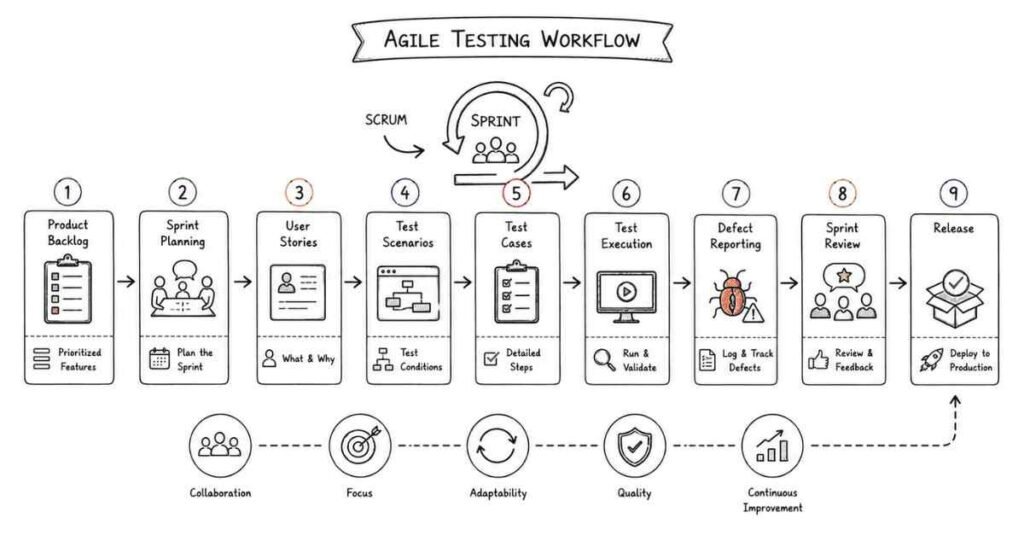
Part 5: Manual Testing Workflows, Test Design, and Execution
This part covers the hands-on testing work that most software testing interviews focus on. It explains how testers write test cases, execute them, report issues, and validate functionality in a real project.
Questions 121–160
121. What is manual testing?
Manual testing is the process of testing software without using automation scripts. The tester executes test cases step by step and checks the actual result.
122. Why is manual testing important?
Manual testing is important because it helps testers understand the application like a user. It is useful for exploratory checks, usability, and early validation.
123. What is a test case?
A test case is a documented set of steps, input data, and expected results used to verify a feature or function. It helps testers check whether the software behaves correctly.
124. What is a test scenario?
A test scenario is a high-level condition or flow that should be tested. It gives the broad testing idea before detailed test cases are written.
125. What is the difference between a test scenario and a test case?
A test scenario is broad and describes what should be tested, while a test case is detailed and includes exact steps and expected outcomes. Test cases are usually created from test scenarios.
126. What are the main parts of a test case?
A test case usually includes test case ID, title, preconditions, test steps, test data, expected result, and actual result. Some teams may include additional fields.
127. Why are preconditions important in a test case?
Preconditions describe what must already be true before the test starts. They help ensure the test can be executed correctly.
128. What is test data?
Test data is the input used while running test cases. It can be valid, invalid, boundary, or special input values.
129. Why is test data important?
Good test data helps reveal real issues and ensures meaningful results. Poor test data can hide defects or give false confidence.
130. What is a test suite?
A test suite is a collection of related test cases grouped together. It helps organize testing by feature, module, or release.
131. What is test execution?
Test execution is the process of running test cases and comparing actual results with expected results. Defects are logged when results differ.
132. What is expected result?
The expected result is the behavior or output that should happen according to the requirement. It is used as the benchmark during testing.
133. What is actual result?
The actual result is what happens when the test is executed. It is compared against the expected result.
134. What is a defect?
A defect is a problem in the software that causes it to behave incorrectly. It is the issue found during testing.
135. What is defect reporting?
Defect reporting is the process of documenting a bug with details so developers can reproduce and fix it. A clear defect report is very important.
136. What should a good defect report include?
A good defect report should include title, steps to reproduce, actual result, expected result, severity, priority, environment, and any supporting evidence. The description should be clear and concise.
137. Why is bug reproducibility important?
A reproducible bug can be verified and fixed more easily. If a bug cannot be reproduced, it becomes difficult to resolve.
138. What is bug tracking?
Bug tracking is the process of recording, managing, and following defects until they are closed. It helps teams monitor quality work.
139. What is a bug life cycle?
The bug life cycle is the path a defect follows from creation to closure. Typical states include new, assigned, fixed, retest, verified, reopened, and closed.
140. What happens after a defect is fixed?
The tester retests the bug to confirm the fix. If the issue is resolved, the bug can be verified and closed.
141. What is retesting?
Retesting means checking the specific defect again after it has been fixed. It confirms that the reported issue is no longer present.
142. What is regression testing?
Regression testing checks whether new changes have broken existing functionality. It ensures old features still work after updates.
143. Why is regression testing important?
New code can introduce side effects in other parts of the application. Regression testing helps protect the system from these unexpected issues.
144. What is smoke testing?
Smoke testing is a quick check of the main features of a build to see whether it is stable enough for deeper testing. It is often performed after a new build is deployed.
145. What is sanity testing?
Sanity testing is a focused check of a specific area after a small change or fix. It verifies whether the related function works correctly.
146. What is exploratory testing?
Exploratory testing is unscripted testing where the tester explores the application while learning it. It helps find unexpected or unclear issues.
147. Why is exploratory testing useful?
It is useful when requirements are not fully clear or when the tester wants to look for hidden defects. It complements formal test cases.
148. What is ad hoc testing?
Ad hoc testing is informal testing without detailed planning or documentation. It relies on tester intuition and experience.
149. What is positive testing?
Positive testing checks the software with valid inputs and expected conditions. It verifies normal behavior.
150. What is negative testing?
Negative testing checks how the software behaves with invalid inputs or unexpected conditions. It helps find validation gaps.
151. What is boundary value analysis?
Boundary value analysis is a technique that tests values at the edges of input ranges. Bugs often appear near minimum, maximum, or edge values.
152. Why is boundary value analysis effective?
It helps find defects that happen at or near limits. It is a simple but powerful test design technique.
153. What is equivalence partitioning?
Equivalence partitioning divides input data into groups that are expected to behave similarly. One value from each group is tested.
154. Why is equivalence partitioning useful?
It reduces the number of test cases while still covering important input categories. It saves time without losing much coverage.
155. What is a test case review?
A test case review is the process of checking test cases for correctness, completeness, and clarity. It helps improve quality before execution.
156. Why are test case reviews important?
They catch missing scenarios, duplicate steps, and unclear wording early. Better test cases lead to better testing.
157. What is a strong answer for manual testing questions?
A strong answer explains the process clearly and connects it to a real application flow. Interviewers want practical testing judgment, not only definitions.
158. What is a common beginner mistake in manual testing interviews?
A common mistake is explaining test cases in theory but not showing how to design them for real features. Another is forgetting expected results and defect details.
159. How should you practice manual testing?
Practice by writing test cases for login, registration, search, and checkout flows. Then explain how you would execute, report, retest, and validate the bugs.
160. What should you remember before moving on?
Remember the full manual testing flow: test scenarios, test cases, test data, execution, defect reporting, bug life cycle, retesting, regression testing, smoke testing, sanity testing, exploratory testing, and basic test design techniques.
Revision focus
Revise manual testing, test cases, test scenarios, test suite, preconditions, test data, execution, expected and actual results, defect reporting, bug tracking, bug life cycle, retesting, regression testing, smoke testing, sanity testing, exploratory testing, ad hoc testing, positive and negative testing, boundary value analysis, and equivalence partitioning before moving to automation basics, Selenium, TestNG, Cucumber, and framework concepts.
Part 6: Automation Basics, Selenium, TestNG, Cucumber, and Framework Concepts
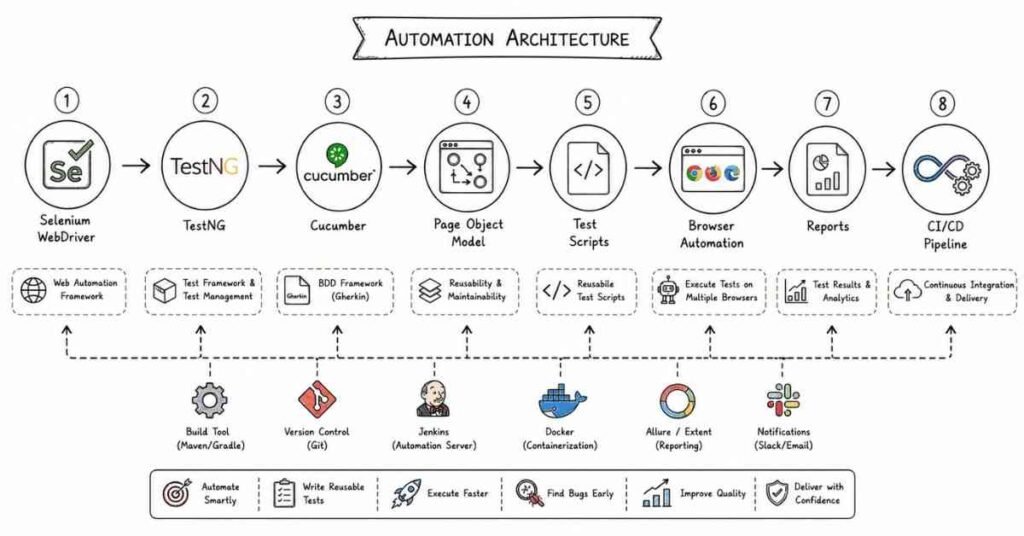
This part covers the automation layer that many software testing interviews focus on after manual testing basics are clear. It explains how automation works, where Selenium fits, and the framework concepts interviewers expect before moving into API testing, SQL, CI/CD, and defect tools.
Questions 161–200
161. What is test automation?
Test automation is the use of scripts or tools to run tests automatically. It helps reduce repetitive manual work and improves speed and consistency.
162. Why is test automation important?
It is important because repetitive test cases can be executed faster and more reliably. It also supports regression testing in continuous delivery environments.
163. When should you automate test cases?
You should automate stable, repetitive, and high-value test cases. It is usually not worth automating highly changing or purely exploratory tests.
164. What should not usually be automated?
Tests that change frequently, need human judgment, or require exploratory thinking are usually better kept manual. Automation works best for predictable checks.
165. What is Selenium?
Selenium is a popular open-source automation tool used for testing web applications. It is widely used for browser-based automation.
166. Why is Selenium popular?
Selenium is popular because it supports multiple browsers, languages, and platforms. It is a common tool in automation interviews.
167. What are the main components of Selenium?
The main components are Selenium WebDriver, Selenium IDE, and Selenium Grid. WebDriver is the most commonly used part in real automation work.
168. What is Selenium WebDriver?
Selenium WebDriver is the core API used to control browsers and automate user actions. It is used to write automation scripts.
169. What is Selenium IDE?
Selenium IDE is a record-and-playback tool for creating simple test scripts. It is useful for quick demos and learning.
170. What is Selenium Grid?
Selenium Grid allows tests to run on multiple machines or browsers in parallel. It helps with cross-browser and parallel execution.
171. What is a locator in Selenium?
A locator is a way to identify a web element on the page. Common locators include id, name, class name, XPath, CSS selector, and link text.
172. Why are locators important?
Automation scripts depend on locators to interact with elements. Strong locators make tests more stable and maintainable.
173. What is XPath?
XPath is a syntax used to locate elements in an HTML or XML document. It is often used when other locators are not enough.
174. What is CSS selector in automation?
A CSS selector is a pattern used to identify elements in the DOM. It is often faster and cleaner than complex XPath in many cases.
175. What is the Page Object Model?
The Page Object Model is a design pattern in which each page or screen is represented by a class. It improves code reuse and maintainability.
176. Why is the Page Object Model useful?
It separates test logic from page structure. This makes automation code cleaner and easier to update.
177. What is a test framework?
A test framework is a structured way to organize automation scripts, data, utilities, and reporting. It helps standardize test automation.
178. Why are frameworks important?
Frameworks make automation easier to scale, maintain, and debug. They also improve team collaboration.
179. What is TestNG?
TestNG is a Java testing framework often used with Selenium. It provides test execution control, annotations, grouping, and reporting.
180. Why is TestNG useful?
It helps manage test setup, teardown, execution order, and grouping. It is widely used in automation projects.
181. What are annotations in TestNG?
Annotations are special markers that control test execution behavior. Common examples include @BeforeMethod, @AfterMethod, and @Test.
182. What is the purpose of @Test in TestNG?
@Test marks a method as a test case. It tells TestNG to execute that method as part of the test run.
183. What is Cucumber?
Cucumber is a Behavior-Driven Development, or BDD, tool used to write tests in a readable format. It allows business-readable scenarios.
184. Why is Cucumber useful?
It helps bridge communication between testers, developers, and business teams. It is useful when readable test scenarios are needed.
185. What is a feature file in Cucumber?
A feature file contains scenarios written in Gherkin syntax. It describes application behavior in plain language.
186. What is Gherkin?
Gherkin is the language used to write Cucumber scenarios. It uses keywords like Given, When, Then, and And.
187. What are step definitions?
Step definitions connect Gherkin steps to actual automation code. They implement the logic behind the readable scenario steps.
188. What is BDD?
BDD stands for Behavior-Driven Development. It focuses on describing expected behavior in a business-friendly way before implementation.
189. What is data-driven testing?
Data-driven testing means running the same test with multiple sets of input data. It helps increase coverage without rewriting the test logic.
190. What is keyword-driven testing?
Keyword-driven testing separates test steps into reusable keywords and actions. It helps create more modular automation.
191. What is the difference between functional and non-functional automation?
Functional automation validates application behavior, while non-functional automation focuses on performance, security, or load-related checks. They serve different testing goals.
192. What is a hybrid framework?
A hybrid framework combines multiple automation approaches, such as data-driven, keyword-driven, and page object patterns. It is common in real automation projects.
193. Why is framework design important?
A good framework reduces maintenance effort and supports scalability. Poor framework design makes automation hard to manage.
194. What is a reusable utility in automation?
A reusable utility is a common function or helper used across multiple tests. It reduces duplication and improves readability.
195. What is synchronization in Selenium?
Synchronization is the process of making automation wait properly for elements or conditions. It helps avoid timing issues.
196. Why is synchronization important?
Web applications often load dynamically, and tests can fail if they act too early. Proper waiting makes scripts more stable.
197. What is a strong answer for automation questions?
A strong answer explains when to automate, why a tool or framework is used, and how test maintainability is handled. Interviewers want practical automation thinking.
198. What is a common beginner mistake in automation interviews?
A common mistake is focusing only on tool names without explaining framework design, locators, or test stability. Another is not knowing when manual testing is better.
199. How should you practice automation topics?
Practice by automating a login or form flow, using locators, writing reusable methods, and organizing tests with a framework. Explaining the structure is as important as writing code.
200. What should you remember before moving on?
Remember the purpose of automation, Selenium components, locators, XPath, CSS selectors, Page Object Model, TestNG, annotations, Cucumber, Gherkin, BDD, data-driven testing, keyword-driven testing, hybrid frameworks, utilities, and synchronization before moving to API testing, Postman, SQL, CI/CD, and defect tracking tools.
Revision focus
Revise test automation, when to automate, Selenium, WebDriver, Selenium IDE, Selenium Grid, locators, XPath, CSS selectors, Page Object Model, TestNG, annotations, Cucumber, Gherkin, feature files, step definitions, BDD, data-driven testing, keyword-driven testing, hybrid frameworks, reusable utilities, and synchronization before moving to API testing, Postman, SQL, CI/CD, and defect tracking tools.
Part 7: API Testing, Postman, SQL, CI/CD, and Defect Tracking Tools
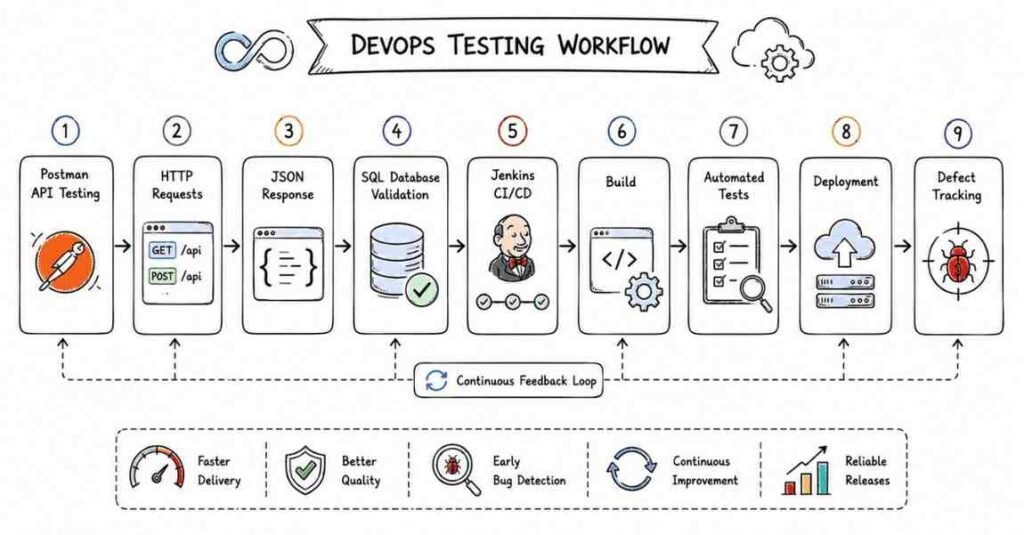
This part covers the tool and integration layer that testing interviews often focus on after automation basics are clear. It explains API testing, Postman, SQL validation, CI/CD awareness, and defect-tracking concepts that interviewers expect before moving into scenario-based testing and debugging mindset.
Questions 201–240
201. What is API testing?
API testing is the process of verifying that an application programming interface works correctly. It checks requests, responses, status codes, data, and error handling.
202. Why is API testing important?
API testing is important because APIs connect frontend, backend, and external systems. If the API fails, the application can fail even if the UI looks fine.
203. What is REST API testing?
REST API testing checks RESTful services that use HTTP methods like GET, POST, PUT, PATCH, and DELETE. It validates request and response behavior.
204. What is the purpose of Postman?
Postman is a popular tool used to send API requests, inspect responses, and organize API test collections. It is widely used for manual and automated API testing.
205. Why is Postman useful?
Postman makes it easy to test APIs without writing code first. It is useful for debugging, sharing requests, and validating endpoints.
206. What are request and response in API testing?
A request is sent to the API to ask for data or perform an action, and a response is what the server sends back. Testing checks whether both are correct.
207. What is a status code?
A status code is a number returned by the server to show the result of a request. Common examples are 200, 201, 400, 401, 403, 404, and 500.
208. What does 200 mean in API testing?
200 means the request was successful. It usually indicates the server returned the expected result.
209. What does 201 mean?
201 means a new resource was created successfully. It is often returned after a successful POST request.
210. What does 400 mean?
400 means a bad request. It usually indicates that the client sent invalid data or an incorrect request.
211. What does 401 mean?
401 means unauthorized. It usually indicates missing or invalid authentication.
212. What does 403 mean?
403 means forbidden. It means the user is authenticated but not allowed to access the resource.
213. What does 404 mean?
404 means the requested resource was not found. It often appears when the endpoint or data does not exist.
214. What does 500 mean?
500 means the server encountered an internal error. It indicates a problem on the server side.
215. What is JSON in API testing?
JSON is a lightweight data format commonly used in API requests and responses. It is easy to read and works well with web applications.
216. What is request body?
The request body contains the data sent to the server, usually in POST or PUT requests. It often carries JSON data.
217. What are request headers?
Headers provide metadata about the request, such as content type, authorization, or accepted format. They help the server process the request correctly.
218. What is an endpoint?
An endpoint is a specific URL where an API can be accessed. Each endpoint usually performs a particular function.
219. What is authentication in API testing?
Authentication verifies who the user or client is. API tests often check whether valid credentials are required and handled correctly.
220. What is authorization in API testing?
Authorization checks what the authenticated user is allowed to do. It ensures access is restricted correctly.
221. Why is SQL important for testers?
SQL is important because testers often need to validate backend data after UI or API actions. It helps confirm that data is stored, updated, or deleted correctly.
222. What is a database query?
A database query is a request to retrieve or change data in a database. SQL is the language commonly used for this.
223. What is SELECT used for?
SELECT is used to retrieve data from a database. It is one of the most common SQL commands in testing.
224. Why is SELECT useful in testing?
It helps verify whether frontend actions or API calls affected the correct data in the backend. It is useful for validation.
225. What is WHERE used for?
WHERE filters rows based on conditions. It helps testers check specific records.
226. What is JOIN used for?
JOIN combines data from multiple tables based on related columns. It helps validate data across related entities.
227. Why are JOINs useful for testers?
They help confirm relationships and data consistency across tables. Many application flows require checking related records.
228. What is COUNT used for?
COUNT returns the number of rows that match a condition. It is useful for validating record totals.
229. What is GROUP BY used for?
GROUP BY groups rows that share common values and often works with aggregate functions. It is useful for summary validation.
230. What is ORDER BY used for?
ORDER BY sorts query results in ascending or descending order. It helps review data in a structured way.
231. What is CI/CD?
CI/CD stands for Continuous Integration and Continuous Delivery or Deployment. It automates building, testing, and releasing software.
232. Why should testers understand CI/CD?
Testers should understand CI/CD because testing often runs as part of the delivery pipeline. It helps them know when and how validation happens.
233. What is continuous integration?
Continuous integration means developers regularly merge code into a shared repository, and automated checks run frequently. It helps detect issues early.
234. What is continuous delivery?
Continuous delivery means code is always kept in a deployable state and can be released with approval. It supports controlled releases.
235. What is continuous deployment?
Continuous deployment means code changes are automatically deployed after passing checks. It removes manual release steps.
236. What is a defect tracking tool?
A defect tracking tool is used to record, manage, and follow bugs through their life cycle. It helps teams monitor quality issues.
237. Why are defect tracking tools important?
They give visibility into bug status, ownership, and resolution progress. They also improve communication between testers and developers.
238. What information should a defect ticket include?
A defect ticket should include title, steps to reproduce, expected result, actual result, severity, priority, environment, and evidence. Clear detail helps developers fix the issue faster.
239. What is a strong answer for API, SQL, and tool questions?
A strong answer explains the concept clearly and connects it to validation work. Interviewers want practical examples of how you would test, check data, and track defects.
240. How should you practice these topics?
Practice by testing a sample API in Postman, writing SQL queries to validate data, and creating defect tickets with clear reproduction steps. Repetition makes the workflow feel natural.
Revision focus
Revise API testing, REST APIs, Postman, request and response, headers, body, endpoints, status codes, JSON, authentication, authorization, SQL basics, SELECT, WHERE, JOIN, COUNT, GROUP BY, ORDER BY, CI/CD, continuous integration, continuous delivery, continuous deployment, defect tracking tools, and defect ticket details before moving to scenario-based testing, interview problem solving, and debugging mindset.
Part 8: Scenario-Based Testing, Problem Solving, and Debugging Mindset
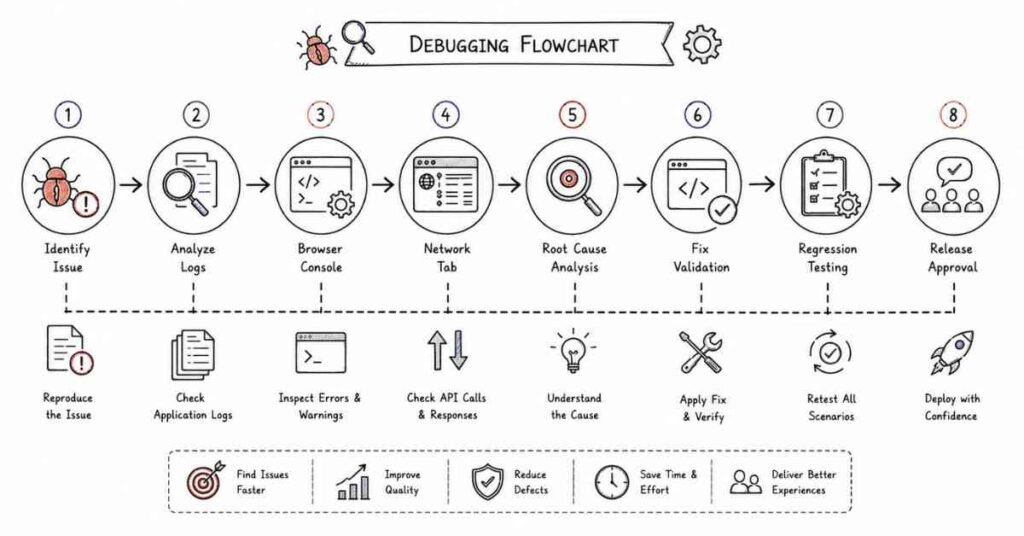
This part focuses on how to think in real interviews. It covers common testing scenarios, troubleshooting approach, reasoning patterns, and practical problem solving that help interviewers judge your hands-on understanding.
Questions 241–280
241. What is a scenario-based interview question?
A scenario-based question asks how you would handle a real testing problem. It checks your reasoning, not just your memory.
242. Why are scenario questions important?
They show whether you can apply testing knowledge in practical situations. Real testing work is full of bug investigations, unclear requirements, and release validation.
243. How should you answer scenario-based questions?
Start by understanding the problem, then explain your thought process, mention likely causes, and describe how you would test or verify the issue. A clear step-by-step answer works best.
244. What would you do if a login feature is not working?
Check the input values, validation rules, backend response, error messages, and whether the issue is in the UI or server side. Then verify logs and reproduce the problem consistently.
245. What would you do if a page loads slowly?
Check image sizes, scripts, backend response time, unnecessary calls, and browser behavior. Performance issues often come from multiple small causes.
246. What if a button click is not responding?
Check whether the element is enabled, whether an event is attached, and whether another overlay or script is blocking the action. Also inspect the console for errors.
247. What if a defect cannot be reproduced?
Recheck the steps, environment, test data, browser or device, and any hidden conditions. If needed, ask for more details and observe closely.
248. What if a bug appears only sometimes?
Treat it as an intermittent issue. Check timing, race conditions, test environment stability, data dependencies, and logs.
249. What if a test case passes on one browser but fails on another?
Compare browser versions, CSS behavior, JavaScript support, and rendering differences. Cross-browser issues are common in web testing.
250. What if a release build fails smoke testing?
Report the failure, block further testing if needed, and identify whether the issue is critical. Smoke test failures usually mean the build is not stable enough for deeper testing.
251. What is debugging?
Debugging is the process of finding and fixing problems in software. It involves observing behavior, isolating causes, and validating the fix.
252. Why is debugging important for testers?
Testers often help identify where a defect occurs and how to reproduce it. Good debugging saves time and improves communication with developers.
253. What tools help in debugging?
Common tools include browser developer tools, console logs, network inspection, server logs, screenshots, and defect trackers. These help trace what happened.
254. What is the browser console used for?
The browser console shows logs, warnings, and errors. It is often the first place to check when something fails in the UI.
255. What is the network tab used for?
The network tab shows requests, responses, timings, and status codes. It helps trace API and page-load problems.
256. What is a test environment issue?
A test environment issue is a problem caused by the setup rather than the software itself. It may involve configuration, data, access, or unstable systems.
257. What is a blocker?
A blocker is an issue that prevents testing or progress. It must be raised quickly so the team can act.
258. What is risk-based testing?
Risk-based testing means giving more attention to high-risk or high-impact areas. It helps use testing effort effectively.
259. Why is risk-based testing useful?
It helps prioritize important scenarios when time is limited. It improves test coverage where it matters most.
260. What is a boundary case?
A boundary case is a test at the edge of allowed input values or conditions. Bugs often appear near limits.
261. Why are edge cases important?
Edge cases reveal unusual behavior that normal testing may miss. They help improve product robustness.
262. What is exploratory testing in scenario handling?
Exploratory testing means learning and testing at the same time to uncover hidden issues. It is useful when requirements are incomplete or unclear.
263. What is root cause analysis?
Root cause analysis is the process of finding the underlying reason a defect happened. It helps prevent repeated issues.
264. Why is root cause analysis useful?
It improves the product and the process by addressing the real problem, not just the symptom. It supports continuous improvement.
265. What is a test failure?
A test failure means the actual result did not match the expected result. It may indicate a bug, environment issue, or test data problem.
266. What is a false positive in testing?
A false positive is when a test suggests a problem even though the application is working correctly. It can happen because of test issues or environment problems.
267. What is a false negative in testing?
A false negative is when a test passes even though a real defect exists. It means the test did not catch the issue.
268. What is a strong answer for scenario-based questions?
A strong answer is calm, structured, and practical. It should show how you investigate, isolate, and validate the issue.
269. What is a strong answer for debugging questions?
A strong answer explains your steps and the tools you would use. Interviewers want a logical method, not guesswork.
270. What is a strong answer for problem-solving questions?
A strong answer connects the symptom to likely causes and then explains how you would narrow them down. It should sound systematic.
271. What is a common beginner mistake in these rounds?
A common mistake is jumping straight to a fix without explaining how you identified the problem. Interviewers want to hear your reasoning process.
272. How should you think during an interview?
Think aloud in a structured way, stay practical, and connect your answer to the UI, API, data, or environment. That approach makes your answers sound more confident and professional.
273. Why does testing judgment matter?
Because testing is not only about running scripts. Good testers know what to test first, what to retest, and what risks matter most.
274. What should you do when requirements are unclear?
Ask clarifying questions, review acceptance criteria, look for examples, and test likely edge cases. Never assume too much.
275. What should you do when a defect is fixed?
Retest the exact issue to confirm the fix, then run related regression checks. This ensures the change did not break other behavior.
276. What should you do when a bug keeps reopening?
Check whether the fix truly addressed the root cause, whether the reproduction steps were complete, and whether different environments behave differently. Reopened bugs need deeper validation.
277. What should your answer always include?
Your answer should include the issue, the likely area involved, the checks you would perform, and the expected fix or testing action.
278. Why is practical reasoning important?
Because software testing is about finding and preventing real issues in real systems. Practical reasoning shows you understand that responsibility.
279. What is the best way to practice scenario questions?
Practice by taking sample defects, login failures, UI issues, and release problems, then explain how you would investigate them. Speaking the solution out loud helps build confidence.
280. What should you remember before the final part?
Remember that testing interviews evaluate both knowledge and judgment. If you can explain how you investigate, validate, and communicate issues clearly, you will answer more confidently.
Revision focus
Revise scenario-based questions, login failures, performance issues, button response issues, defect reproducibility, intermittent bugs, cross-browser issues, smoke test failures, debugging tools, console, network tab, environment issues, blockers, risk-based testing, boundary cases, exploratory testing, root cause analysis, false positives, false negatives, and structured problem solving before moving to behavioral, resume, LinkedIn, and career strategy.
Part 9: Behavioral, Resume, LinkedIn, and Career Strategy
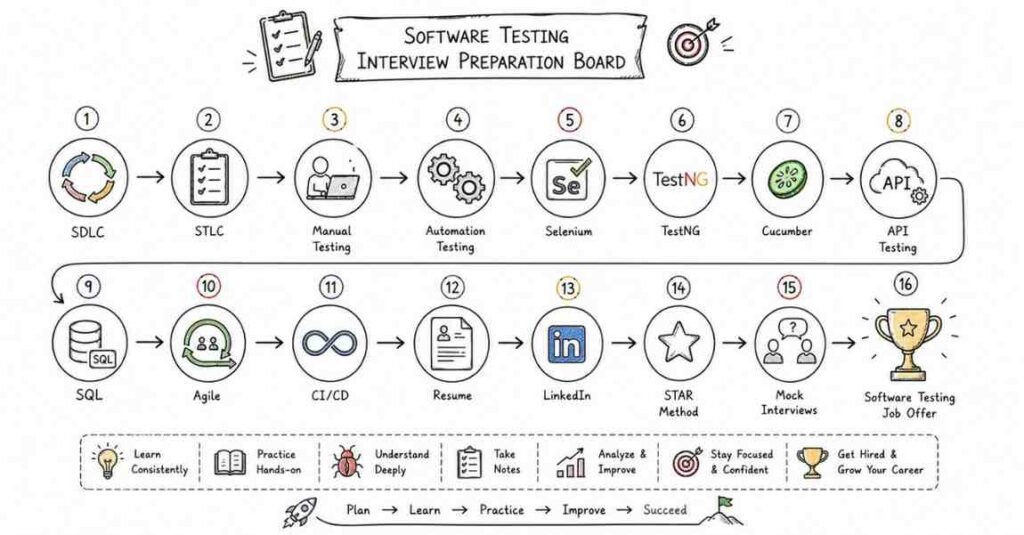
This final part helps turn software testing preparation into interview success. It covers the STAR method, behavioral questions, mock-interview prompts, resume and LinkedIn optimization, salary framing in India, follow-up emails, and a practical closing checklist for job search execution.
STAR method
The STAR method stands for Situation, Task, Action, and Result. It is one of the best ways to answer behavioral interview questions because it keeps your answer structured, specific, and outcome-focused.
Use STAR like this:
- Situation: Explain the context.
- Task: Explain your responsibility.
- Action: Describe what you did.
- Result: Share the outcome, impact, or learning.
A good behavioral answer should sound calm, honest, and clear. Interviewers usually respond well when you show ownership and explain what changed because of your work.
20 behavioral questions
- Tell me about a time you found a critical bug.
- Tell me about a time you worked under pressure.
- Describe a time you worked with a difficult developer or teammate.
- Tell me about a time you improved a test process.
- Describe a time you made a mistake and fixed it.
- Tell me about a time you explained a defect to a non-technical person.
- Describe a time you had multiple testing tasks and had to prioritize.
- Tell me about a time you handled a release issue.
- Describe a time you worked on a tight deadline.
- Tell me about a time you improved test coverage.
- Describe a time you handled feedback.
- Tell me about a time you found a requirement gap.
- Describe a time requirements were unclear.
- Tell me about a time you learned a new testing tool quickly.
- Describe a time you managed a change in scope.
- Tell me about a time you influenced a decision without authority.
- Describe a time you resolved a user issue quickly.
- Tell me about a time you improved regression testing.
- Describe a time you balanced quality and speed.
- Tell me about a time you turned a test challenge into a learning opportunity.
50 AI self-preparation prompts
Use these prompts with AI tools to rehearse interviews, refine your answers, and tighten your project storytelling.
- Act as a software testing interviewer and ask me 10 questions.
- Act as a QA interviewer and ask me 10 questions.
- Ask me behavioral testing questions using STAR.
- Improve my answer to “Tell me about yourself” for a QA role.
- Help me explain my testing project in under 2 minutes.
- Help me explain my testing project in under 5 minutes.
- Turn my project notes into an interview-ready STAR answer.
- Ask me scenario-based testing questions one by one.
- Challenge my answer to a bug reporting scenario.
- Challenge my answer to a severity and priority scenario.
- Challenge my answer to a test case design scenario.
- Challenge my answer to a regression testing scenario.
- Challenge my answer to a smoke testing scenario.
- Challenge my answer to an automation decision scenario.
- Challenge my answer to an API testing scenario.
- Challenge my answer to a SQL validation scenario.
- Challenge my answer to a CI/CD testing scenario.
- Challenge my answer to a release failure scenario.
- Ask me software testing fundamentals questions.
- Ask me SDLC and STLC questions.
- Ask me test design technique questions.
- Ask me bug life cycle questions.
- Ask me Agile and Scrum questions.
- Ask me manual testing questions.
- Ask me Selenium and automation questions.
- Ask me API testing and Postman questions.
- Ask me SQL testing questions.
- Ask me defect tracking questions.
- Ask me debugging and scenario questions.
- Tell me where my project explanation is weak.
- Rewrite my answer to sound more professional and concise.
- Help me write stronger QA resume bullets.
- Suggest better testing keywords for my resume.
- Help me write a LinkedIn headline for a QA role.
- Help me write a LinkedIn headline for an automation tester role.
- Help me write my LinkedIn About section for testing jobs.
- Ask me 20 rapid-fire testing fundamentals questions.
- Ask me 10 manual testing scenario questions.
- Ask me 10 automation testing scenario questions.
- Ask me 10 API testing scenario questions.
- Ask me 10 SQL validation scenario questions.
- Ask me 10 defect and release scenario questions.
- Score my answers for clarity and confidence.
- Convert my weak answer into a strong answer format.
- Help me answer “Why should we hire you?” for testing.
- Help me answer “Why software testing?” convincingly.
- Help me write a thank-you email after a testing interview.
- Help me write a follow-up email after no response.
- Create a 7-day mock interview plan for software testing.
- Create a 30-day software testing interview revision plan.
Resume optimization
A strong software testing resume should show practical QA work, defect thinking, and tool familiarity. It should not read like a generic list of terms.
Useful testing keywords
- Software Testing
- Manual Testing
- Automation Testing
- QA Engineer
- Test Case Design
- Test Execution
- Bug Reporting
- Bug Life Cycle
- Severity
- Priority
- SDLC
- STLC
- Regression Testing
- Smoke Testing
- Sanity Testing
- Exploratory Testing
- Selenium
- TestNG
- Cucumber
- API Testing
- Postman
- SQL
- CI/CD
- Defect Tracking
- Agile
- Scrum
- UAT
- Test Planning
Resume bullet examples
- Designed and executed test cases for functional validation of web application features.
- Reported and tracked defects with clear reproduction steps, severity, and priority.
- Performed regression, smoke, and sanity testing before release validation.
- Validated backend data using SQL queries to ensure application correctness.
- Tested REST APIs using Postman and verified request and response behavior.
- Supported Agile testing activities by participating in sprint planning and requirement review.
- Automated stable test flows using Selenium and TestNG.
- Collaborated with developers and product teams to improve quality and release confidence.
Resume summary example
Software testing professional with hands-on experience in manual testing, defect reporting, test case design, API validation, SQL, and automation basics. Strong interest in quality assurance, release validation, and improving application reliability through structured testing practices and clear communication.
LinkedIn profile optimization
LinkedIn should clearly position you for the testing role you want. It should match your resume, projects, certifications, and target title.
Headline examples
Software Tester | Manual Testing, Test Cases, Bug Reporting, SQL
QA Engineer | Selenium, Postman, TestNG, Agile Testing
Automation Tester | Selenium, Cucumber, TestNG, API Testing
QA Analyst | Manual and Automation Testing, Defect Tracking, Agile
About section example
- Use a clear QA role title in the headline.
- Add certifications, project highlights, and relevant tools.
- Keep the About section focused on strengths and target role.
- Keep resume and LinkedIn keywords aligned.
- Highlight real testing projects, labs, or internship work.
Project strategy
Software testing interviews often depend heavily on how well you explain your projects. Even if your project is from training, practice, internship, or a sample application, present it clearly and professionally.
What a strong project explanation should include
- Application or module tested.
- Testing scope.
- Test cases created.
- Defects found.
- Tools used.
- How you validated fixes.
- Automation or API testing, if applicable.
- Result, learning, or improvement delivered.
Project explanation structure
Use this flow in interviews:
- What was the application or feature?
- What did you test?
- Which tools or techniques did you use?
- What defects or challenges came up?
- What was the result?
Salary guidance in India 2026
Software testing salary in India varies by role, company type, city, tool depth, and automation skill level. Salary data sources differ a lot, so use them as directional guidance rather than exact truth.
Directional ranges
- Fresher or entry level: around 3–5 LPA in many market listings.
- Mid-level: often around 5–12 LPA depending on role and company.
- Senior or specialized roles: can go significantly higher, especially with automation, API testing, or test leadership experience.
The exact number depends on your practical QA skills, automation exposure, project depth, and interview performance. Strong defect analysis and tool knowledge usually improve compensation.
Thank-you email templates
A thank-you email should usually be sent within 24 hours and should be short, personalized, and professional.
Template 1: After interview
Subject: Thank you for your time
Hi [Interviewer Name],
Thank you for taking the time to speak with me today about the [Role Name] position. I appreciated learning more about the team and the testing work you are doing.
Our conversation increased my interest in the opportunity, especially around [specific topic discussed]. I believe my experience in [relevant strength] would help me contribute effectively.
Thank you again for your time and consideration.
Best regards,
[Your Name]
Template 2: After final round
Subject: Thank you for the discussion
Hi [Interviewer Name],
Thank you again for the opportunity to meet with the team. I enjoyed learning more about the role, the environment, and the goals behind the position.
The discussion reinforced my interest in the opportunity, and I would be glad to contribute with my experience in [relevant strength].
Best regards,
[Your Name]
Follow-up email template
If you have not heard back after the expected timeline, a short and polite follow-up is appropriate.
Subject: Following up on the [Role Name] interview
Hi [Interviewer Name],
I hope you are doing well. I wanted to follow up regarding the [Role Name] interview and thank you again for the opportunity to speak with the team. I remain very interested in the role.
If there are any updates on the hiring timeline, I would appreciate them.
Best regards,
[Your Name]
Rejection feedback email template
If you are not selected, you can still ask for feedback politely.
Subject: Thank you and feedback request
Hi [Interviewer Name],
Thank you for letting me know about the decision. I appreciate the chance to interview and learn more about your team.
If you are able to share any feedback on my interview performance or areas I could improve, I would sincerely appreciate it. I value the opportunity to learn and grow for future roles.
Best regards,
[Your Name]
Final 30-day checklist
Use this checklist in the last month before software testing interviews:
- Finalize 1 to 3 testing projects you can explain clearly.
- Prepare a 60-second and 2-minute self-introduction.
- Practice at least 20 behavioral questions using STAR.
- Review SDLC, STLC, test types, test design, defect lifecycle, Agile, automation, API testing, and SQL.
- Practice speaking answers out loud, not just reading notes.
- Review scenario questions such as bug reporting, severity and priority, test failures, and debugging.
- Update resume with QA keywords and impact-focused bullets.
- Update LinkedIn headline, About section, certifications, and project highlights.
- Prepare salary expectations using India 2026 directional guidance.
- Draft thank-you and follow-up emails before interviews begin.
- Do at least 3 mock interviews with spoken answers.
- Practice explaining one project in business language, not only technical language.
Revision focus
Revise the STAR method, behavioral questions, AI mock interview prompts, testing resume keywords, impact-based bullet writing, LinkedIn positioning, project storytelling, salary framing for India in 2026, thank-you emails, follow-up messages, and the final 30-day checklist before publishing the full software testing interview guide.