
ServiceNow vs Salesforce: What Is the Difference?
Table of Contents
Recommended Learning Path
ServiceNow vs Salesforce: What Is the Difference?
understanding the difference between ServiceNow vs Salesforce
Introduction
ServiceNow and Salesforce are both major enterprise cloud platforms, but they were built around different business problems.
ServiceNow has traditionally been strongly associated with IT service management and enterprise workflows, while Salesforce is primarily known for customer relationship management, sales, service, and customer-facing business processes.
Today, both platforms have expanded far beyond those original areas, which is why beginners often find the comparison confusing.
Understanding the difference between ServiceNow vs Salesforce is easier when you compare their primary purpose, users, workflows, technical skills, and learning paths.
🚀 Want to Become a ServiceNow Specialist? Follow Our Step-by-Step Guide to Build Your ServiceNow Career!
Quick Answer: ServiceNow vs Salesforce
The simplest distinction is:
ServiceNow mainly focuses on managing enterprise work, services, workflows, and operational processes.
Salesforce mainly focuses on managing customers, sales, service, marketing, and customer-related business processes.
For example:
ServiceNow scenario:
Employee raises an IT issue → Incident created → Support team investigates → Issue resolved.
Salesforce scenario:
Potential customer submits an enquiry → Lead created → Sales representative follows up → Opportunity progresses → Deal closes.
Both platforms support automation, applications, integrations, data, AI, and customer service, so this is a starting distinction rather than an absolute boundary.
What Is ServiceNow?
ServiceNow provides a cloud-based enterprise platform for managing workflows and operational processes across departments.
A beginner commonly encounters ServiceNow through IT Service Management (ITSM).
Typical ServiceNow processes include:
- Incident Management
- Problem Management
- Change Management
- Service Requests
- Knowledge Management
- CMDB
- IT operations
- Employee workflows
- Customer service
- Security and risk workflows
- Application development
For example, if an employee’s laptop stops working, ServiceNow can help manage the issue from ticket creation through assignment, troubleshooting, resolution, and reporting.
What Is Salesforce?
Salesforce is primarily a Customer Relationship Management (CRM) platform.
It helps organizations manage relationships and interactions with prospects and customers.
Typical Salesforce use cases include:
- Lead management
- Account and contact management
- Opportunities
- Sales pipelines
- Customer service
- Marketing
- Commerce
- Customer data
- Reporting and analytics
- Process automation
For example, when someone submits a product enquiry, Salesforce can store the lead, assign it to a salesperson, track follow-ups, convert the lead into an opportunity, and maintain customer information throughout the relationship.
ServiceNow vs Salesforce: Key Differences
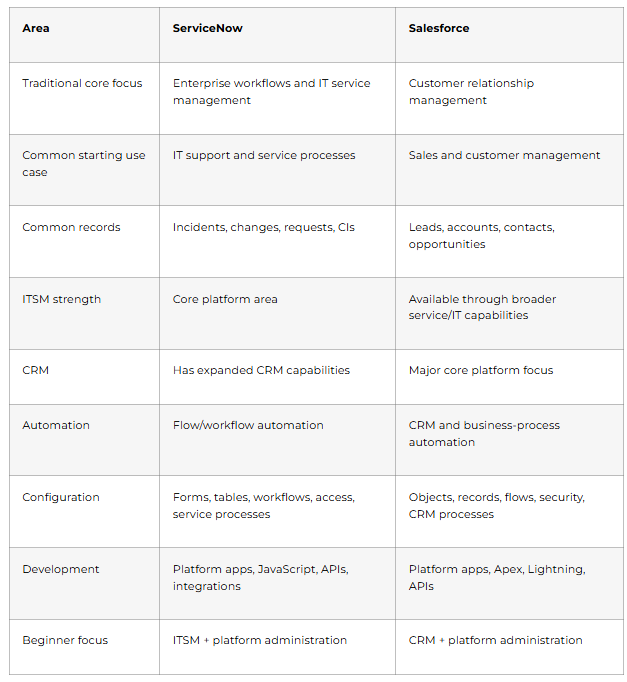
This table simplifies two broad platforms. Both now cover many overlapping enterprise use cases.
How Do Their Main Use Cases Differ?
Consider one company using both platforms.
ServiceNow Example
An employee cannot connect to the corporate VPN.
The organization might use ServiceNow to:
Employee reports issue → Incident created → Network team assigned → CI checked → Issue resolved → Incident closed
This is mainly an internal operational/service workflow.
Salesforce Example
🎯 Preparing for ServiceNow Interviews? Follow Our Step-by-Step ServiceNow Interview Guide →
A company receives an enquiry from a prospective customer.
Salesforce might handle:
Lead created → Sales rep assigned → Qualification → Opportunity → Proposal → Customer
This workflow is mainly centered on the customer relationship and revenue process.
That difference in business context is more useful than simply saying one platform is “IT” and the other is “CRM.”
ServiceNow Administrator vs Salesforce Administrator
Both platforms have administrator roles, but their day-to-day business context can differ.
ServiceNow Administrator
A ServiceNow administrator may work with:
- Users and groups
- Roles and permissions
- Forms and lists
- ITSM configuration
- Notifications
- Service Catalog
- Flow Designer
- Reports
- CMDB-related configuration
- Platform troubleshooting
ServiceNow University currently describes its system-administrator path around managing access, platform health, workflows, automation, and troubleshooting.
Salesforce Administrator
A Salesforce administrator commonly works with:
- Users and permissions
- Objects and fields
- CRM data
- Reports and dashboards
- Business-process automation
- Data management
- Security
- Sales and service processes
Salesforce’s official career guidance describes administrators as people who configure and automate Salesforce, manage data and security, support users, and build reports and dashboards.
So both require configuration and problem-solving skills, but the business processes being configured are often different.
ServiceNow Developer vs Salesforce Developer
Developers on both platforms extend standard functionality.
ServiceNow Developer Skills
Common areas include:
- JavaScript
- Business Rules
- Client Scripts
- Script Includes
- Glide APIs
- Flow Designer
- REST APIs
- integrations
- application development
ServiceNow currently identifies JavaScript, application creation, interface development, processes, and integrations among important application-developer skills.
Salesforce Developer Skills
A Salesforce developer typically progresses into:
- Apex
- SOQL
- Lightning Web Components
- Salesforce APIs
- automation
- data modelling
- integrations
Therefore, choosing between developer paths should also consider which technology ecosystem and business problems you enjoy working with.
Which Is Better for Beginners?
Neither platform is automatically “better.”
The better choice depends on what you want to learn.
Consider ServiceNow if you are interested in:
- IT service management
- IT support processes
- enterprise workflow automation
- CMDB and IT operations
- platform administration
- service-delivery processes
Consider Salesforce if you are interested in:
- CRM
- sales processes
- customer management
- sales automation
- customer service
- marketing/customer-data workflows
Both platforms allow learners to begin with configuration before progressing into deeper development.
FLM Choice Framework: P-R-S-T
Use four questions before selecting a path:
P — Process: Which business processes interest you?
R — Role: Administrator, developer, consultant, or analyst?
S — Skills: Do you prefer configuration, scripting, IT operations, or CRM?
T — Technology: Which platform’s tools and data model do you want to work with?
Choose based on the answers rather than simply asking which platform is more popular.
Can ServiceNow and Salesforce Work Together?
Yes.
These platforms do not necessarily compete inside every organization.
A company might use Salesforce for customer and sales processes while using ServiceNow for IT operations or other enterprise workflows.
ServiceNow also states that its platform can connect with external enterprise systems, including Salesforce.
Integration can allow information to move between systems when a business process requires both platforms.
For example:
Customer case in Salesforce → Technical issue requires ServiceNow workflow → Resolution information returned
The actual integration design depends on the organization’s systems and requirements.
Common Misconceptions
“ServiceNow is only a ticketing tool”
Incorrect.
IT ticketing is an important use case, but the platform now covers IT, employee workflows, customer workflows, security, application development, AI, and other enterprise processes.
“Salesforce is only for salespeople”
Also incorrect.
Salesforce includes customer service, marketing, commerce, data, application development, AI, and other capabilities in addition to sales.
“ServiceNow and Salesforce are the same because both have CRM”
Their capabilities increasingly overlap, but their platform histories, primary ecosystems, data models, and common implementation use cases remain different.
“One platform always pays more”
Salary varies by role, skills, location, experience, employer, specialization, and market conditions. A responsible comparison should not choose a platform based on a generic salary claim.
Beginner Learning Paths
ServiceNow
A useful path is:
Platform Basics → ITSM → Tables/Records → Users/Roles → Flow Designer → CMDB → Admin or Development → Projects
Salesforce
A beginner might follow:
CRM Basics → Objects/Records → Security → Reports → Automation → Admin or Development → Projects
Salesforce’s official Trailhead currently provides separate beginner-to-advanced paths for administrators and developers.
ServiceNow University similarly provides role-based career journeys for administrators, developers, implementers, process analysts, and other roles.
Frequently Asked Questions
Is ServiceNow the same as Salesforce?
No. They are different enterprise platforms with different traditional core areas, although their capabilities overlap in some areas.
Is ServiceNow a CRM?
ServiceNow now offers CRM-related capabilities, but the platform has historically been strongly centered on enterprise workflows and service management.
Is Salesforce an ITSM platform?
Salesforce includes service and IT-related capabilities, but CRM remains its primary platform positioning.
Which is easier to learn?
That depends on your background. Someone familiar with IT support may understand ServiceNow processes faster, while someone familiar with sales or CRM may find Salesforce concepts more intuitive.
Does ServiceNow require coding?
Not for all administration tasks. Advanced development commonly involves JavaScript and ServiceNow APIs.
Does Salesforce require coding?
Many administration tasks are declarative. Development paths commonly introduce Apex and Lightning technologies.
Which is better for non-IT beginners?
Both are possible. Non-IT learners should first understand the relevant business processes—ITSM for ServiceNow or CRM for Salesforce.
Can ServiceNow integrate with Salesforce?
Yes. Organizations can integrate the platforms where workflows or data need to move between them.
Should I choose based only on certification?
No. Certifications should support practical platform skills, not replace hands-on learning.
Conclusion
The main difference between ServiceNow vs Salesforce is the business context each platform has traditionally emphasized.
ServiceNow is strongly associated with enterprise workflows, ITSM, operational service processes, and platform automation.
Salesforce is primarily centered on CRM, sales, customer service, marketing, and customer-related processes.
Both platforms now extend into AI, automation, development, integrations, and broader enterprise use cases.
Instead of asking only “Which is better?”, beginners should ask:
Which processes do I want to solve, which role do I want to perform, and which technical skills do I want to develop?
Learners interested specifically in ITSM, workflow automation, CMDB, and ServiceNow platform administration can explore a structured ServiceNow online course in Telugu alongside practical platform exercises and projects.