
90-Day ServiceNow Course Roadmap: From Beginner to Job-Ready Developer
Table of Contents
This 90-day ServiceNow roadmap is designed to take you from absolute beginner to job-ready developer with a clear, practical learning path. You will start with ServiceNow basics, then move into ITSM, CMDB, scripting, workflows, and integrations before finishing with real projects and interview preparation. The goal is simple: help students in Hyderabad, Telangana, Andhra Pradesh, and across India build skills that employers actually ask for. ServiceNow roles are in demand because companies need people who can automate service processes, manage incidents, and build business apps on the platform. By the end of 90 days, you should be ready for entry-level ServiceNow jobs with a solid portfolio and confidence.
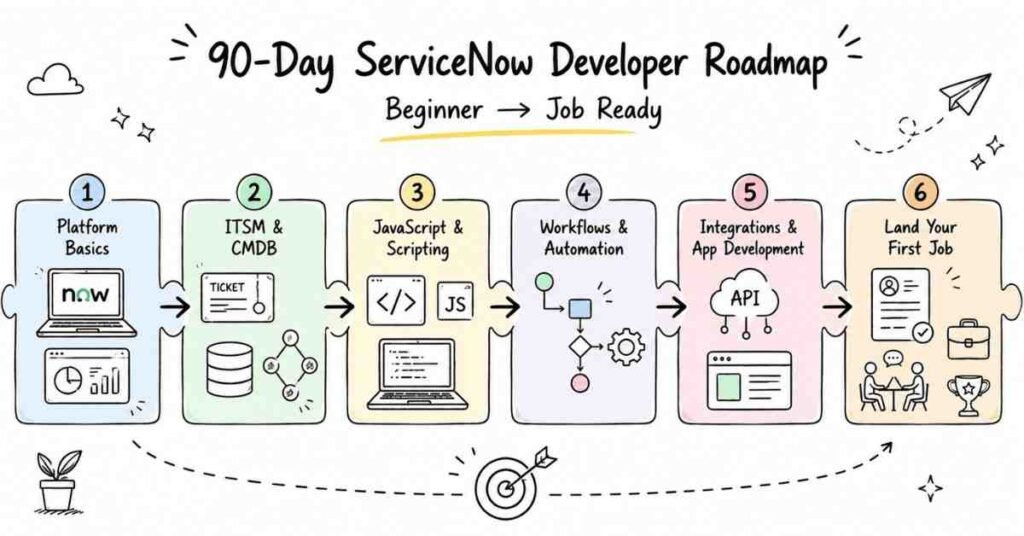
Why ServiceNow Is a Strong Career Choice
ServiceNow is one of the most practical career paths for students who want a fast entry into enterprise IT. It is widely used for IT service management, workflow automation, HR service delivery, and business process apps, which means skilled professionals are needed across many industries. In India, companies in IT services, banking, consulting, telecom, and shared services regularly hire ServiceNow developers and administrators. A structured roadmap matters because ServiceNow can feel confusing at first if you jump straight into advanced modules without understanding the platform flow. That is why this 90-day plan starts with fundamentals and gradually builds toward app development and integrations.
- ServiceNow is used for ticketing, workflow automation, and enterprise operations.
- The platform is valuable in IT services, BFSI, telecom, and consulting.
- Beginners can enter through admin, support, or developer roles.
- Strong ServiceNow skills can lead to stable, high-growth careers.
- The platform rewards hands-on practice more than theory.
Explore All ServiceNow & IT Courses →
90-Day Learning Plan
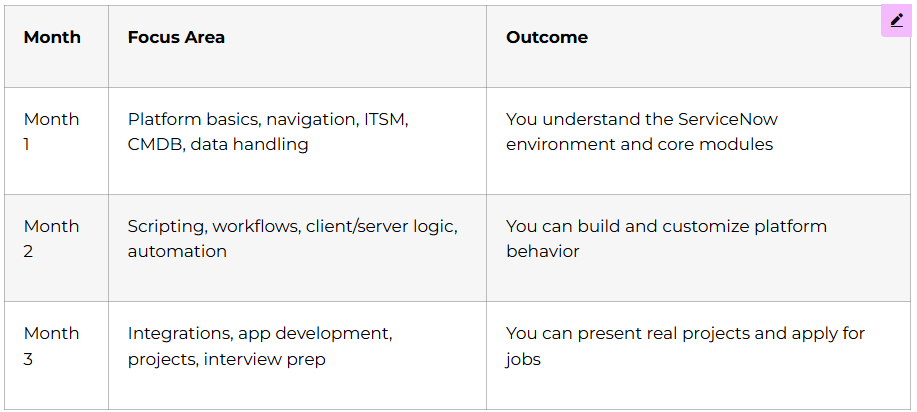
Month 1: ServiceNow Foundations
Month 1 is all about building confidence inside the platform. You need to understand how ServiceNow is structured, what each module does, and how data moves through the system. Once the basics are clear, advanced concepts become much easier to learn.
Week 1: Platform Basics and Navigation
In the first week, focus on understanding the ServiceNow interface and how users work inside it. Learn about the application navigator, modules, lists, forms, filters, and the service catalog. Also understand roles, users, and groups so you know how access works. Students often try to learn scripting too early, but in ServiceNow, platform awareness comes first.
- Log in and explore the ServiceNow interface.
- Learn list views, form views, and record navigation.
- Understand roles, groups, and user access.
- Explore the application navigator and module structure.
- Practice searching and filtering records.
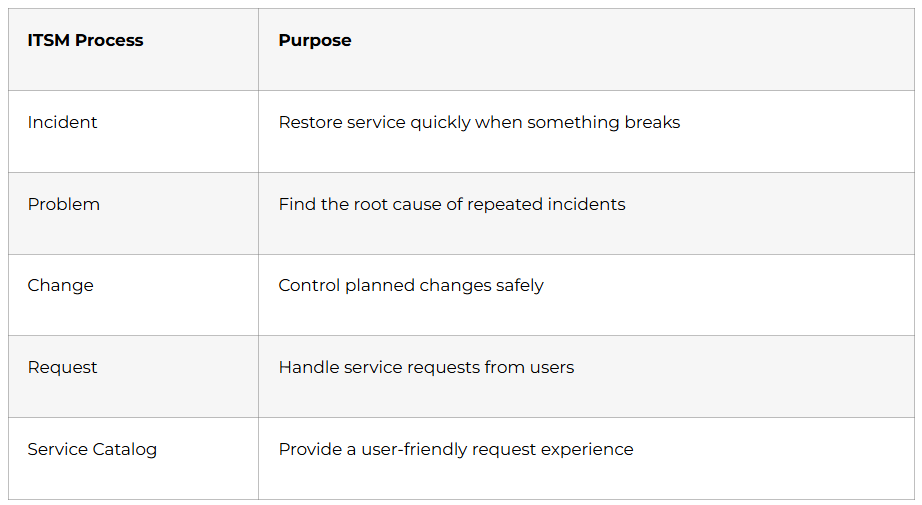
Week 2: ITSM Essentials
ITSM is the foundation of most ServiceNow implementations. This week focuses on Incident, Problem, Change, Request, and Service Catalog concepts. These are the core processes that companies use every day to manage work and support users. If you understand ITSM well, you will understand the business purpose behind the platform.
Week 3: CMDB and Core Data Handling
The CMDB is one of the most important parts of ServiceNow because it stores configuration item relationships. Learn what a CI is, how records connect, and why accurate data matters. Also practice tables, fields, reference fields, choice fields, and records. Students who understand CMDB early usually find platform architecture easier later.
- Learn what the CMDB stores.
- Understand configuration items and relationships.
- Practice table structures and field types.
- Learn reference fields and choice lists.
- Explore data integrity and record relationships.
Week 4: Reporting and Admin Basics
The fourth week should focus on reporting, dashboards, and basic admin tasks. Learn how to create simple reports, use filters, and understand KPIs. Also study user administration, group management, and simple security concepts. By the end of Month 1, you should be able to explain how the platform works in simple terms.
Month 2: Scripting and Automation
Month 2 is where you begin writing logic inside ServiceNow. This is the stage that turns you from a platform user into a developer. The goal is to understand how ServiceNow reacts to user actions and how to automate work using scripts and workflows.
Week 5: JavaScript for ServiceNow
ServiceNow development is strongly based on JavaScript, so this week is important. Learn variables, functions, loops, arrays, objects, and conditionals. You do not need to become a JavaScript expert, but you do need to be comfortable reading and writing platform scripts. This becomes the base for client scripts, business rules, and script includes.
- Learn JavaScript variables and data types.
- Understand functions and return values.
- Practice loops and conditionals.
- Work with arrays and objects.
- Write small logic exercises daily.
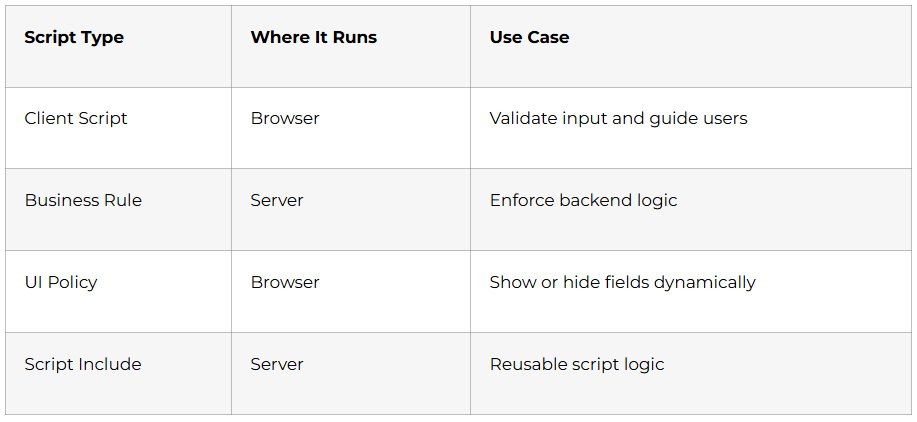
Week 6: Business Rules and Client Scripts
Business Rules run on the server, while Client Scripts run in the browser. This difference is important because it affects when and how your logic executes. Learn when to use onLoad, onChange, onSubmit, and onCellEdit client scripts. Also practice before, after, and async business rules.
Week 7: UI Policies, Data Policies, and Notifications
This week helps you control form behavior and automate communication. UI Policies let you change form fields dynamically without heavy scripting. Data Policies help enforce rules even when records are imported or created through different channels. Notifications are useful for emails and alerts when something changes in the system.
- Learn UI Policies for form behavior.
- Practice Data Policies for backend validation.
- Create email notifications.
- Understand notification triggers and conditions.
- Explore templates and message formatting.
Week 8: Workflows and Flow Designer
Workflows and Flow Designer are used to automate business processes. Learn how triggers, actions, approvals, and conditions work. Practice building simple flows for requests, approvals, and notifications. This is one of the most useful skills in ServiceNow because companies care about automation that saves time.
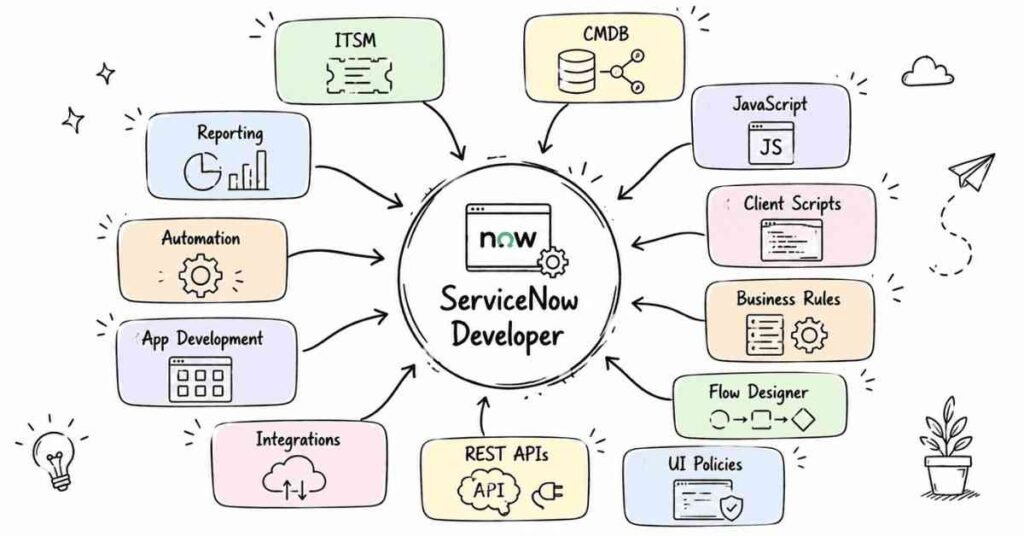
Month 3: Integrations, App Development, and Projects
Month 3 focuses on the topics that make your profile more job-ready. You will learn integrations, app development, and how to present your work as real projects. This is the month where your learning turns into portfolio value.
Week 9: Integrations and REST APIs
Integrations are a major part of modern ServiceNow work. Learn REST concepts, JSON, API basics, and how systems exchange data. Understand inbound and outbound integrations, authentication, and simple API testing. This helps you talk confidently about connecting ServiceNow with other enterprise tools.
- Learn REST basics and JSON format.
- Understand inbound and outbound integrations.
- Practice API testing and response handling.
- Explore authentication concepts.
- Learn how ServiceNow connects with external systems.
Week 10: App Development Basics
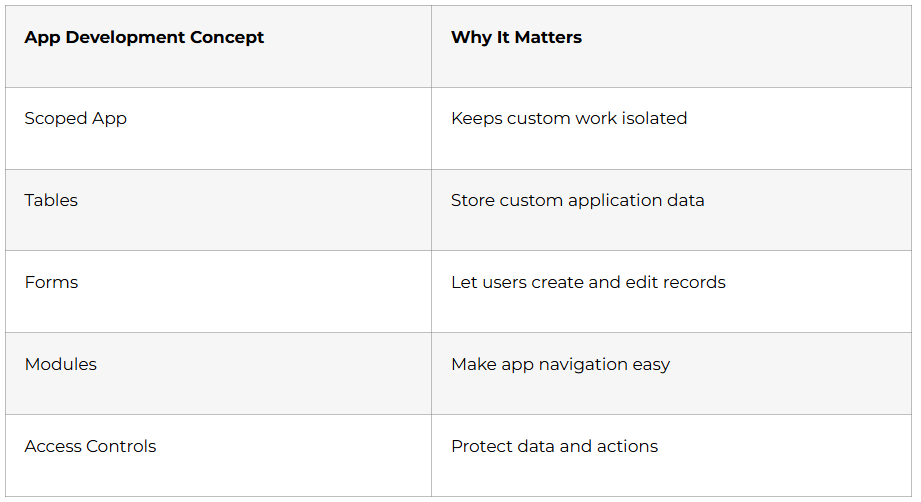
This week is about building applications on the platform. Learn scoped applications, tables, forms, modules, and access controls. Understand how custom apps differ from standard modules and why companies build internal business apps on ServiceNow. Keep your focus on simple, functional apps rather than overly complex builds.
Week 11: Real Project Practice
Use this week to build two or three practical mini-projects. For example, create an employee onboarding app, a leave request app, or a simple asset management workflow. These projects help you show employers that you can build business solutions, not just study features. The best portfolios are simple, clear, and well documented.
Week 12: Interview Prep and Job Launch
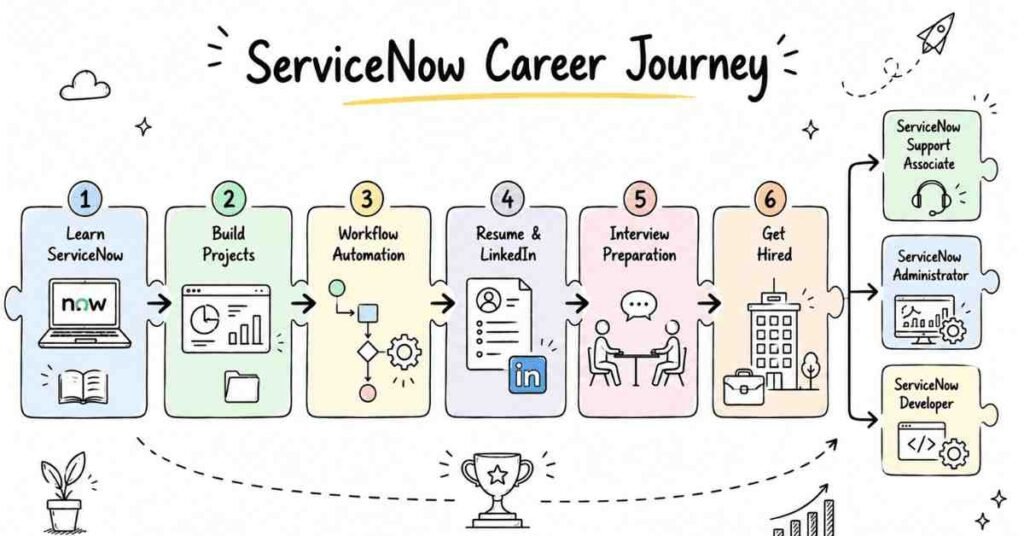
The final week should be used for interview preparation and profile building. Revise all major topics, practice common ServiceNow questions, and prepare a simple explanation of your projects. Update your resume, LinkedIn profile, and GitHub or portfolio page. This is also the right time to apply for internships and entry-level jobs.
Getting Ready for ServiceNow Interviews?
ServiceNow Career Paths and Salary Guide
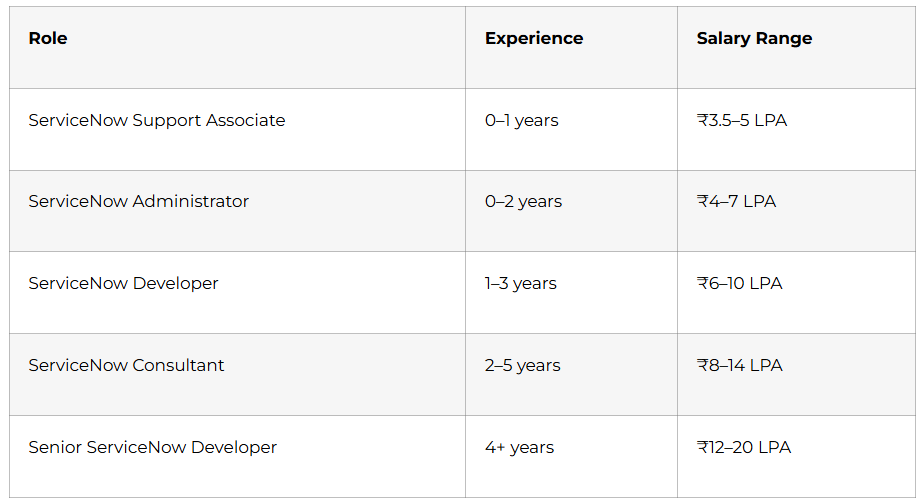
ServiceNow salaries vary by company, city, and skill depth, but the platform generally offers strong growth for freshers who build real project experience. Hyderabad, Bangalore, Pune, Chennai, and Gurgaon are among the most active hiring locations. Many companies prefer candidates who understand both platform administration and basic scripting.
Why Choose Frontlines Edutech
Frontlines Edutech helps students learn practical, job-focused skills in a way that feels clear and achievable. The training is designed for beginners who want real platform understanding, not just theory. Students also benefit from guided learning, interview support, and a roadmap that matches current industry needs.
- Hands-on learning with real platform practice.
- Beginner-friendly explanations for complex topics.
- Job-focused curriculum with project-based learning.
- Support for resumes, interviews, and career preparation.
- Training aligned with Indian hiring expectations.
Frequently Asked Questions
Q1: Do I need coding experience to learn ServiceNow?
No, you do not need advanced coding experience to start. Basic computer knowledge is enough for the first month, and JavaScript is introduced gradually in the scripting stage.
Q2: What is the salary for a ServiceNow fresher in India?
A ServiceNow fresher in India can typically expect around ₹3.5 to ₹5 LPA, depending on the role, company, and skill level. Candidates with scripting and project experience can earn more.
Q3: Is ServiceNow a good career for beginners?
Yes, ServiceNow is a strong career option for beginners because the platform is widely used in enterprise companies. It offers good demand, structured roles, and clear growth paths.
Q4: What will I learn in this 90-day ServiceNow roadmap?
You will learn platform basics, ITSM, CMDB, scripting, workflows, integrations, and app development. You will also work on practical projects and interview preparation.
Q5: Can I get a job after learning ServiceNow in 90 days?
Yes, you can become job-ready in 90 days if you practice regularly and build projects. A strong portfolio and interview preparation are important for getting shortlisted.
Q6: Does ServiceNow use JavaScript?
Yes, ServiceNow development uses JavaScript extensively for client scripts, business rules, and reusable server-side logic. That is why scripting is a major part of the roadmap.
Q7: What kind of jobs can I apply for after this course?
You can apply for ServiceNow support, admin, and junior developer roles. With more scripting and project experience, you can also target consultant and implementation support roles.
Q7: Is ServiceNow used in real companies?
Yes, ServiceNow is used by large enterprises for IT service management, workflow automation, HR requests, and business process apps. That is what makes it such a practical career path.
Published by Frontlines Edutech | blog.frontlinesedutech.com
For enrollments: +91-83330 77727 | support@frontlinesedutech.com