
90-Day .NET Core with Microservices Roadmap: Beginner to Job-Ready
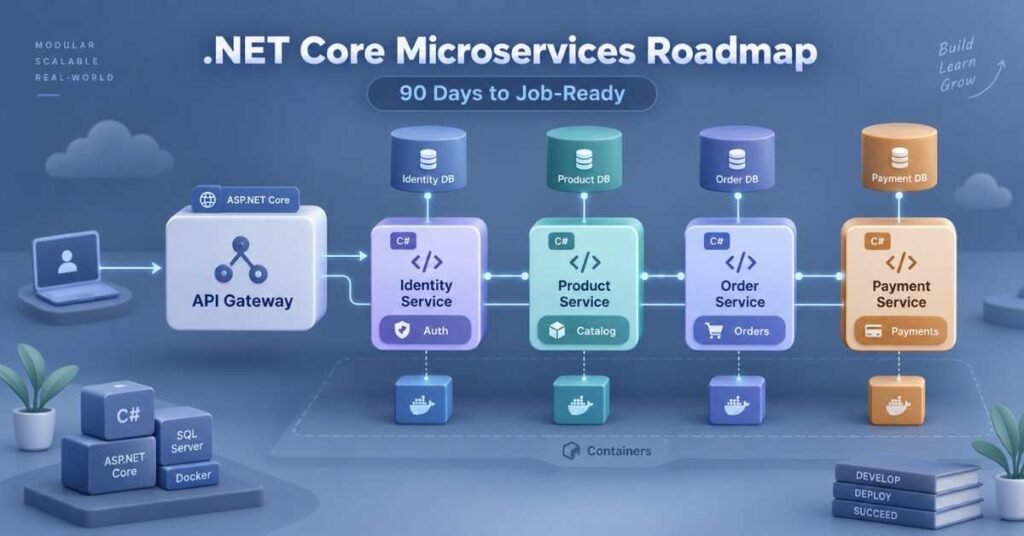
Table of Contents
Many modern applications must serve thousands of users, process data securely and release new features without affecting the entire system. Companies use ASP.NET Core and Microservices to build applications that can meet these requirements.
ASP.NET Core is a modern framework for creating web applications and REST APIs using C#. Microservices architecture divides a large application into smaller services. Each service handles a specific business responsibility and can be developed or deployed separately.
For example, an e-commerce application can contain separate services for users, products, orders and payments. If the development team updates the Product Service, it may not need to deploy the complete application again.
A structured .NET Core With Microservices Course in Telugu can make these concepts easier to understand through Telugu explanations, practical coding and real-time project scenarios.
What Will You Learn?
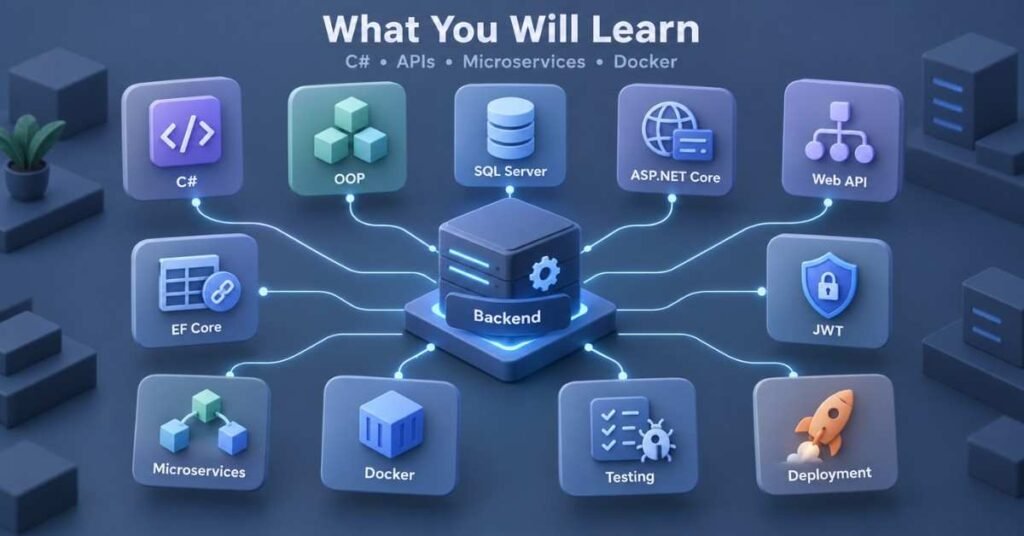
By following this roadmap, you will learn:
- C# programming fundamentals
- Object-Oriented Programming
- Collections, LINQ and asynchronous programming
- SQL Server
- ASP.NET Core
- RESTful Web APIs
- Entity Framework Core
- JWT authentication
- Microservices architecture
- API Gateway
- Docker and messaging
- Testing, logging and deployment
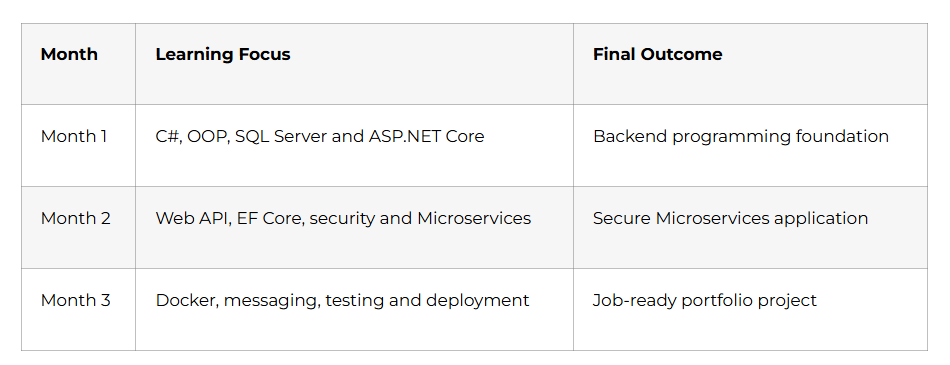
3Month Learning Plan
Build Scalable Backend Applications – Discover the .NET Core with Microservices Course
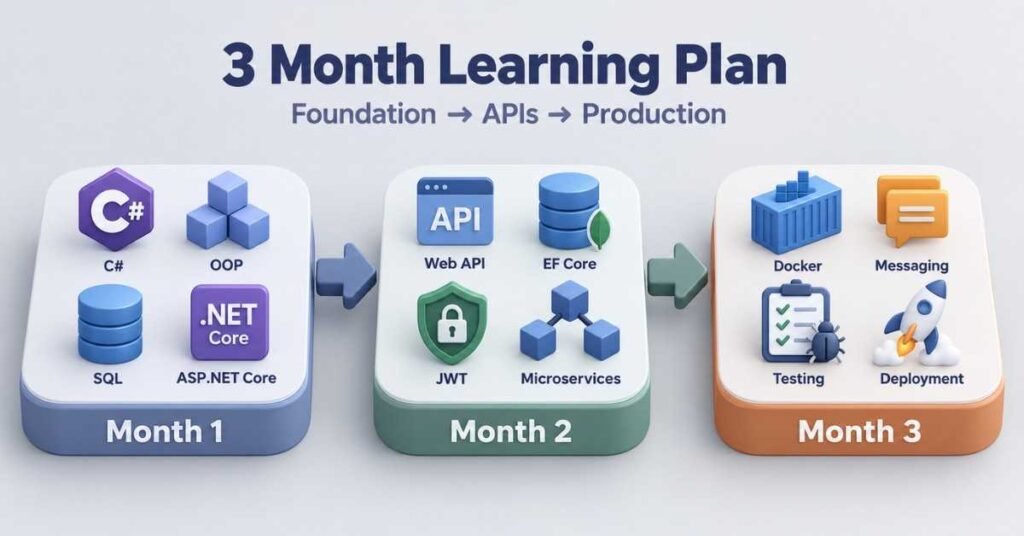
Month 1: Build a Strong .NET Foundation
During the first month, focus on programming and database concepts. Do not move directly to Microservices without understanding C#, OOP and APIs.
Week 1: C# Fundamentals: Days 1–7
Start by installing the .NET SDK, Visual Studio or another suitable development environment.
Learn how a C# program is structured and practise:
- Variables and data types
- Operators
- Input and output
- Conditions
- Loops
- Arrays
- Methods
- Type conversion
- Nullable types
Do not limit your learning to syntax. Write small programs for every concept.
Practice Tasks
- Simple calculator
- Student-grade calculator
- Number validation
- Employee salary calculator
- Basic menu-based application
Week 1 Outcome
You should be able to write, run and debug a basic C# console application without copying the complete solution.
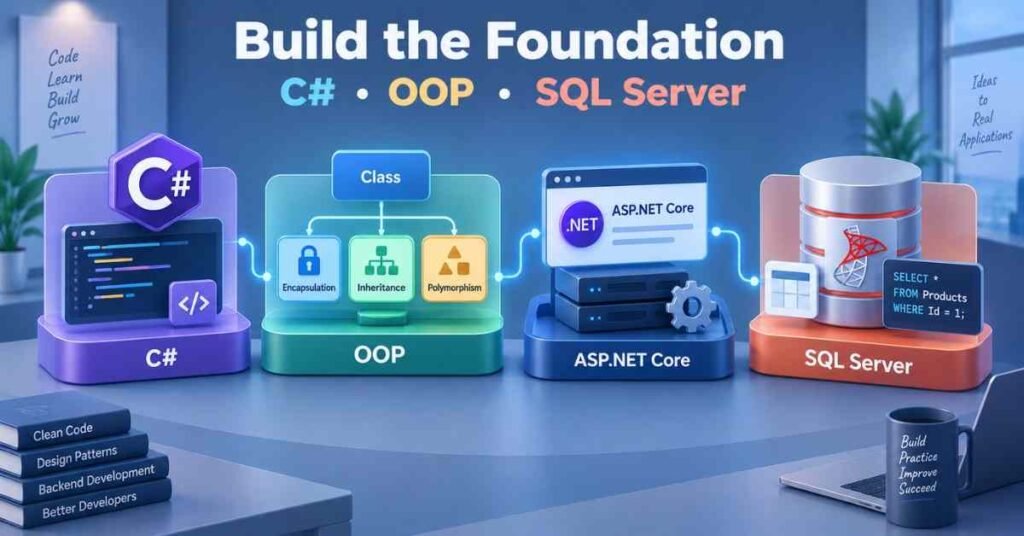
Week 2: Object-Oriented Programming: Days 8–14
Object-Oriented Programming helps developers divide a large problem into clear and reusable components.
Learn:
- Classes and objects
- Constructors
- Properties
- Encapsulation
- Inheritance
- Polymorphism
- Abstraction
- Interfaces
- Access modifiers
For example, a banking system may contain Customer, Account and Transaction classes. SavingsAccount and CurrentAccount can share common behaviour while maintaining their own rules.
Practice Project
Build a console-based banking application that allows users to:
- Create an account
- Deposit money
- Withdraw money
- Check the balance
- View transactions
Week 2 Outcome
You should be able to design classes, define their responsibilities and connect them without placing the complete application logic in one file.
Week 3: Collections, LINQ and Async Programming: Days 15–21
Real applications manage groups of users, products, orders and payments. C# collections help developers store and process such information.
Learn:
- List
- Dictionary
- Queue
- Stack
- Generics
- Lambda expressions
- LINQ
- Exception handling
- Async and await
Use LINQ to filter, sort, group and transform data. Learn asynchronous programming because backend applications regularly wait for databases, files and external APIs.
Practice Project
Create an inventory application that can add, update, search and remove products. Use LINQ to display low-stock items and arrange products by price.
Week 3 Outcome
You should be able to manage collections, query data using LINQ and handle application errors properly.
Week 4: SQL Server and ASP.NET Core: Days 22–30
Backend developers must understand how application data is stored.
Learn these SQL concepts:
- Tables
- Primary and foreign keys
- INSERT, SELECT, UPDATE and DELETE
- WHERE and ORDER BY
- GROUP BY
- JOIN
- Views
- Indexes
- Transactions
After learning SQL, create your first ASP.NET Core project. Understand the purpose of Program.cs, configuration files, middleware, controllers and Dependency Injection.
Month 1 Project
Create an Employee Management application that stores employee, department and salary information in SQL Server.
Month 1 Milestone: You can write C# programs, use OOP, query SQL Server and understand the basic structure of an ASP.NET Core application.
Month 2: Build Secure APIs and Microservices
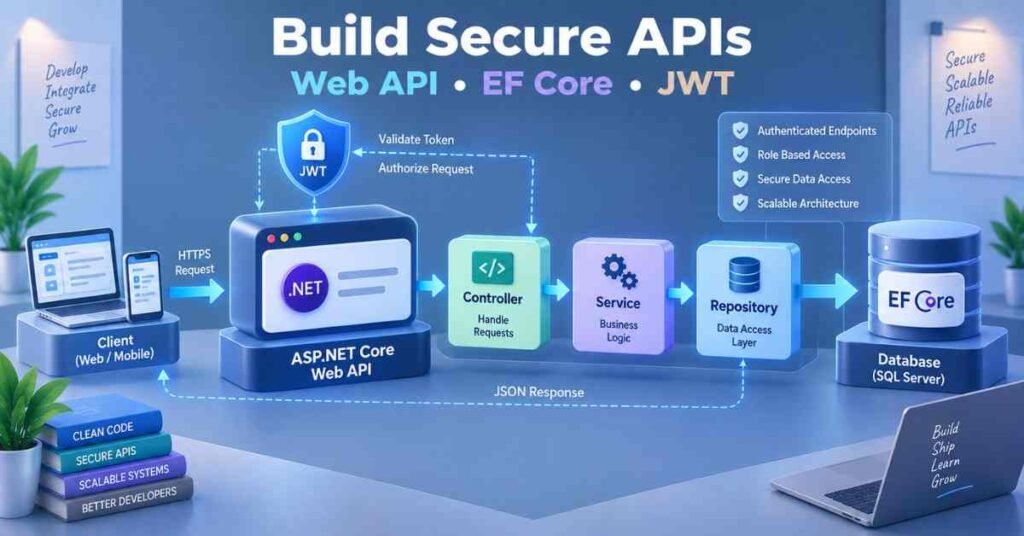
In Month 2, you will move from console applications to backend services that other applications can access.
Advance Your Backend Development Career – .NET Core with Microservices Career Guide
Week 5: ASP.NET Core Web API: Days 31–37
A Web API allows frontend, mobile and external applications to communicate with the backend through HTTP.
Learn:
- Controllers
- Routes
- HTTP methods
- Request and response models
- Model binding
- Data validation
- Status codes
- Swagger
- Postman
Understand how to use GET, POST, PUT, PATCH and DELETE correctly.
A successful creation should not return the same response as an invalid request or missing record. Use meaningful HTTP status codes.
Practice Project
Build a Product Management API with operations to create, view, update and delete products.
Week 5 Outcome
You should be able to create and test REST API endpoints independently.
Week 6: Entity Framework Core: Days 38–44
Entity Framework Core connects C# applications with relational databases.
Learn:
- Entity classes
- DbContext and DbSet
- Code First approach
- Migrations
- Relationships
- LINQ queries
- Tracking and no-tracking queries
- Eager loading
- Repository pattern basics
Create one-to-many relationships such as Category and Products or Customer and Orders.
Practice Project
Connect the Product Management API to SQL Server using Entity Framework Core. Add categories and products with a proper database relationship.
Week 6 Outcome
You should be able to store, retrieve and update application data without writing SQL for every operation.
Week 7: Authentication and Clean Application Design: Days 45–52
Security is required when an API contains user or business information.
Learn:
- Authentication and authorization
- JWT access tokens
- Claims
- Roles
- Password hashing
- Protected endpoints
- Global exception handling
- Logging
- SOLID principles
Organise the application into separate responsibilities. Controllers should receive requests, services should handle business logic and repositories should manage data access.
Practice Project
Add registration and login to the Product API. Create separate permissions for Admin and Customer roles.
Week 7 Outcome
You should be able to build a secure API with clean responsibilities and centralised error handling.
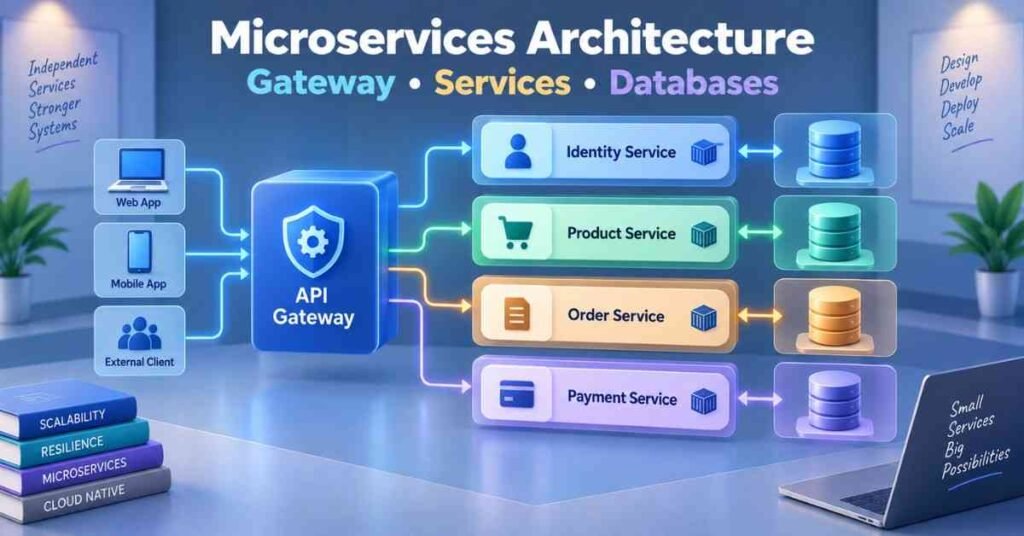
Week 8: Microservices Architecture: Days 53–60
A monolithic application stores many business modules inside one deployable system. Microservices divide the application into smaller services.
For an e-commerce system, you can create:
- Identity Service
- Product Service
- Order Service
- Payment Service
Each service should own a specific business responsibility. Avoid creating many small services without a clear reason.
Learn:
- Service boundaries
- Independent deployment
- Database per service
- Loose coupling
- Service communication
- Distributed-system challenges
Month 2 Project
Create Product and Order Microservices with separate APIs and databases. The Order Service should store product reference information without directly sharing the Product database.
Month 2 Milestone: You can create secure Web APIs and divide a business application into well-defined services.
Month 3: Build Production-Ready Microservices
Week 9: Communication and API Gateway: Days 61–67
Microservices often need information from other services.
Learn two communication styles:
- Synchronous communication: One service directly requests another service and waits for a response.
- Asynchronous communication: One service publishes a message that another service processes separately.
An API Gateway provides a common entry point for client applications. It can route requests to the correct Microservice.
Also study:
- Timeouts
- Retry policies
- Circuit breaker pattern
- Failure handling
Week 9 Project
Add an API Gateway to the Product and Order services. Route external requests through the gateway.
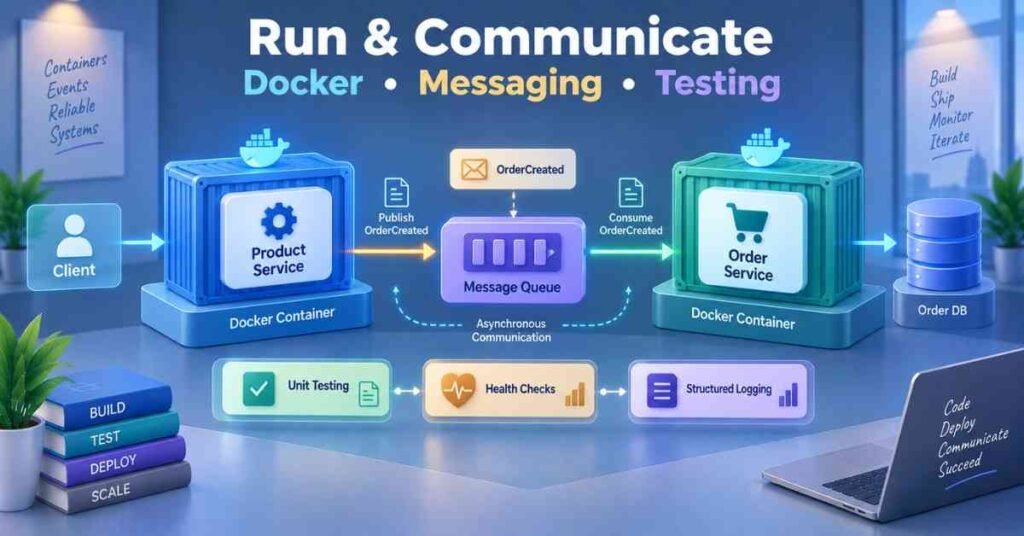
Week 10: Docker and Messaging: Days 68–74
Docker packages an application with its required environment so that it behaves consistently on different systems.
Learn:
- Docker images
- Containers
- Dockerfile
- Ports
- Environment variables
- Container networks
- Volumes
- Docker Compose
Study messaging fundamentals using a message broker. For example, the Order Service can publish an OrderCreated event, which another service can process independently.
Week 10 Project
Containerise the Product and Order services. Add an asynchronous order event and confirm that the receiving service processes it.
Week 11: Testing, Logging and Monitoring: Days 75–83
A production application must be testable and observable.
Learn:
- Unit testing
- Integration testing
- Mocking
- API testing
- Health checks
- Structured logging
- Correlation IDs
- Metrics
- Distributed tracing basics
A correlation ID helps developers trace one request as it travels through multiple services.
Never include passwords, access tokens or sensitive customer information in application logs.
Week 11 Project
Add unit tests, integration tests, health checks and structured logging to the Microservices project.
Week 12: Deployment and Career Preparation Days 84–90
Understand how applications move from development to production.
Learn the purpose of:
- Git and version control
- CI/CD pipelines
- Container registries
- Environment-based configuration
- Secret management
- Cloud deployment
- Kubernetes fundamentals
Prepare a professional README containing the architecture, service responsibilities, technologies, setup instructions and API details.
Day 90 Final Assessment
Complete:
- One C# coding test
- One SQL assignment
- One Web API task
- One Microservices design activity
- One project presentation
- One mock interview
Day 90 Milestone: You can design, develop, secure, test and containerise a complete Microservices-based .NET application.
Prepare for Modern .NET Developer Roles – .NET Core with Microservices Interview Guide
Final Portfolio Project: E-Commerce Microservices
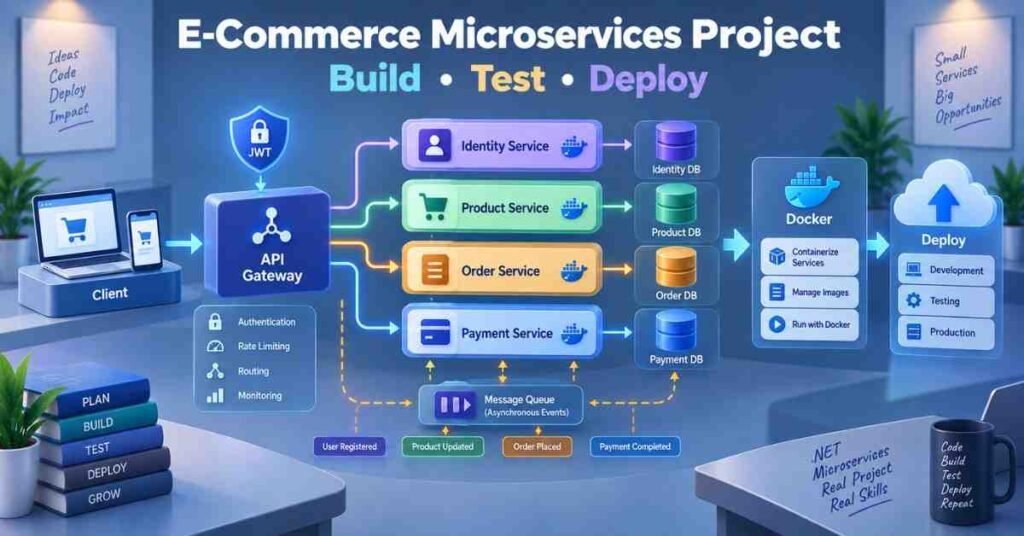
Build an application containing:
Service | Responsibility |
Identity Service | Registration, login and roles |
Product Service | Products, categories and stock |
Order Service | Orders and order status |
Payment Service | Payment request and result |
API Gateway | Routing external requests |
The project should also include:
- Separate databases
- JWT authentication
- API communication
- Asynchronous events
- Docker configuration
- Unit and integration tests
- Logging and health checks
Career Paths After Learning .NET Microservices
Role | Primary Skills |
Junior .NET Developer | C#, SQL and ASP.NET Core |
ASP.NET Core Developer | Web API and EF Core |
Backend Developer | APIs, databases and security |
Microservices Developer | Docker, messaging and design patterns |
Cloud .NET Developer | Containers, CI/CD and cloud deployment |
Why Choose Frontlines Edutech?
A .NET Core With Microservices Course in Telugu can help beginners understand backend concepts through clear Telugu explanations and guided implementation.
The learning experience can cover C#, OOP, SQL Server, ASP.NET Core, Web API, EF Core, JWT, Microservices, Docker, messaging, testing and deployment.
Learners should complete the course with a working project instead of only theoretical knowledge.
Frequently Asked Questions
1. Is .NET Core still used?
The current platform is called .NET, while ASP.NET Core continues to be used for modern web applications and APIs.
2. Should I learn C# before Microservices?
Yes. C#, OOP, collections, LINQ and asynchronous programming create the required foundation.
3. Can freshers learn .NET Microservices?
Yes. Freshers should first build small C# and Web API projects before developing distributed applications.
4. Is SQL Server compulsory?
SQL Server is commonly used with .NET. Relational database knowledge is important even when another database is selected.
5. What is ASP.NET Core Web API?
It is a framework for creating HTTP services that can be accessed by web, mobile and other applications.
6. Why is Entity Framework Core used?
It allows developers to access relational databases through C# classes and LINQ queries.
7. What is an API Gateway?
It provides a common entry point and routes client requests to the correct Microservice.
8. Why do Microservices use separate databases?
Separate ownership reduces direct dependency and allows services to evolve independently.
9. Why is Docker required?
Docker creates consistent environments for developing, testing and deploying services.
10. How does a .NET Core With Microservices Course in Telugu help?
It makes C#, APIs and distributed-system concepts easier to understand through Telugu teaching and practical projects.