Dot Net Developer Interview Preparation Guide
1. 220+ Technical Interview Questions & Answers
- Basics of .NET Framework (Questions 1-5)
- Data Types and Variables (Questions 6-12)
- Object-Oriented Programming Concepts (Questions 13-30)
- Advanced C# Concepts (Questions 31-50)
- Multithreading and Asynchronous Programming (Questions 51-60)
- File Handling and Serialization (Questions 61-65)
- SQL Basics and Database Concepts (Questions 66-90)
- ADO.NET & Data Access (Questions 91-101)
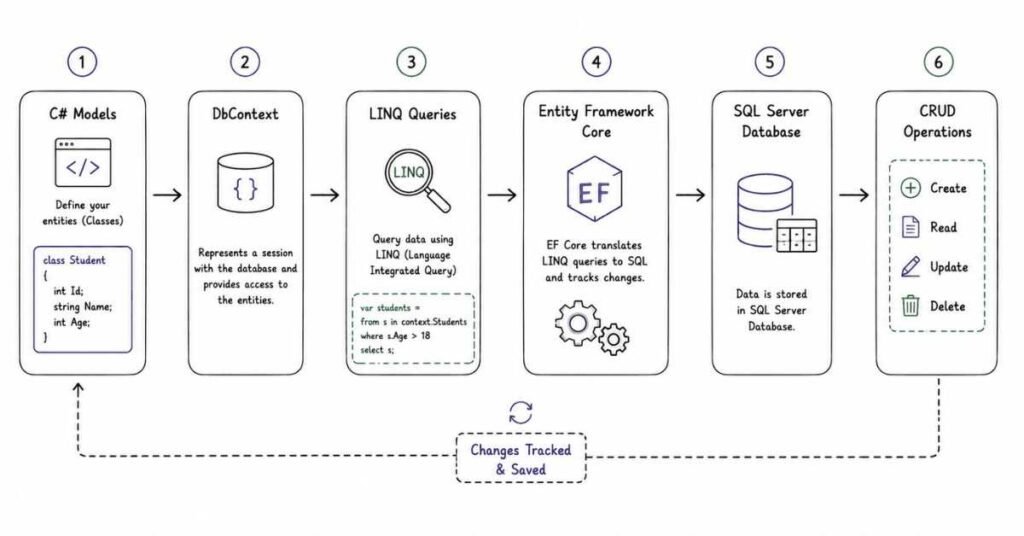
- LINQ (Language Integrated Query) (Questions 102-115)
- HTML Fundamentals (Questions 116-120)
- CSS Fundamentals (Questions 121-130)
- JavaScript Fundamentals (Questions 131-145)
- ASP.NET Web Forms (Questions 146-150)
- ASP.NET MVC (Questions 151-165)
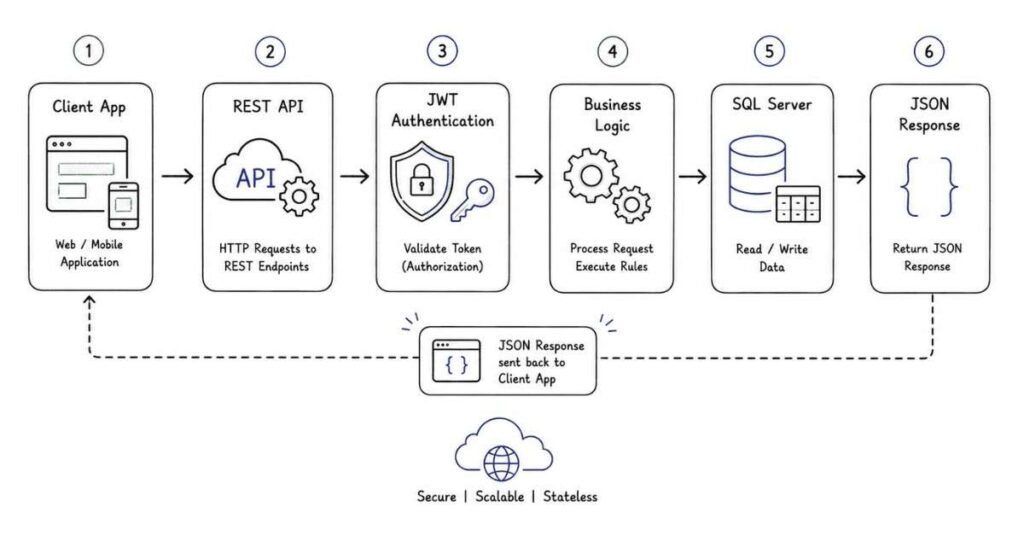
- ASP.NET CORE & WEB API (Questions 166-180)
- TYPESCRIPT & ANGULAR (Questions 181-195)
- MICROSERVICES, DOCKER & AZURE (Questions 196-205)
- REAL-TIME SKILLS (SDLC, AGILE, GIT, JIRA) (Questions 206-220)
1: C# PROGRAMMING FUNDAMENTALS
Basics of .NET Framework
Q1: What is the .NET Framework?
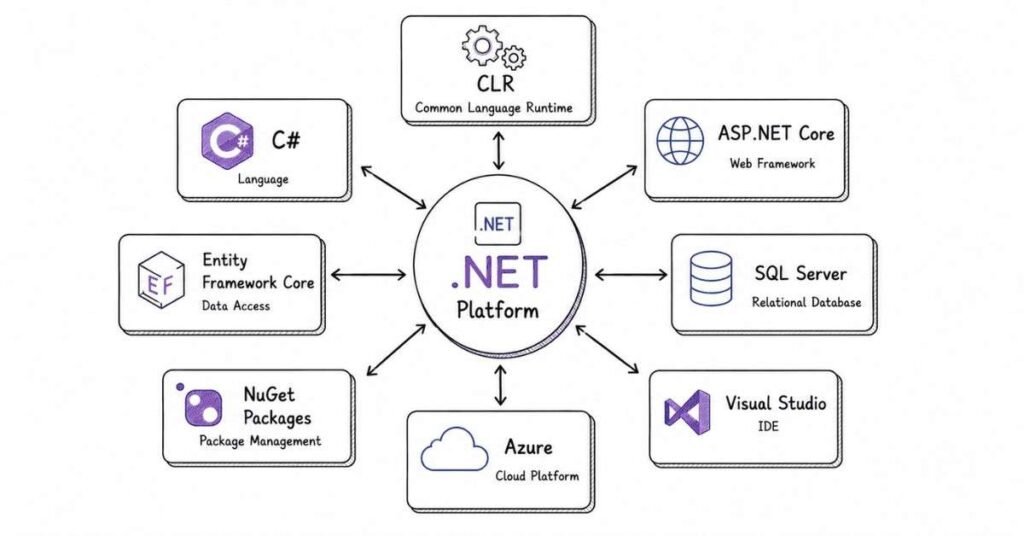
The .NET Framework is a software development platform created by Microsoft that helps developers build various types of applications like web apps, desktop programs, and mobile apps. Think of it as a toolbox that gives you everything you need to create software that runs on Windows.
Q2: What’s the difference between .NET Framework and .NET Core?
.NET Framework works only on Windows and is heavier in size, while .NET Core is lightweight, works on Windows, Mac, and Linux, and is more modern. .NET Core is like the updated, flexible version that companies prefer nowadays because it can run anywhere.
Q3: What does CLR stand for and what does it do?
CLR means Common Language Runtime. It’s the engine that actually runs your .NET programs. When you write code, CLR converts it into machine language that computers understand, manages memory, handles errors, and keeps your application secure. Basically, it’s the brain behind your program.
Q4: What is FCL in .NET?
FCL stands for Framework Class Library. It’s a huge collection of pre-written code that Microsoft provides for common tasks like working with files, connecting to databases, creating user interfaces, and much more. Instead of writing everything from scratch, you can use these ready-made tools.
Q5: Why do we use C# for .NET development?
C# is the primary language for .NET because it’s powerful yet easy to learn, object-oriented, type-safe, and specifically designed to work perfectly with the .NET ecosystem. It has clean syntax that makes code readable and maintainable.
Data Types and Variables
Q6: What are the different data types in C#?
C# has value types like int for whole numbers, float and double for decimals, bool for true/false, char for single characters, and reference types like string for text, arrays, and classes. Choosing the right data type helps save memory and makes your code efficient.
Q7: What’s the difference between int and float?
Int stores whole numbers without decimals like 10, 100, -50. Float stores decimal numbers like 10.5, 3.14, -2.75. Use int when you don’t need decimal points, like counting items. Use float when you need precision, like calculating prices.
Q8: What is a nullable type in C#?
Nullable types let you assign null to value types that normally can’t be null. For example, int? allows you to store numbers or null. This is helpful when working with databases where some values might be missing.
Q9: Explain static variables versus instance variables.
Static variables belong to the class itself and are shared across all objects. Instance variables belong to individual objects, so each object has its own copy. Think of static as one shared locker for everyone, and instance as personal lockers for each person.
Q10: What is the var keyword in C#?
The var keyword lets you declare variables without explicitly specifying the type. The compiler figures out the type automatically based on the value you assign. For example, var name = “John” automatically makes name a string. It’s convenient but can reduce code clarity if overused.
Q11: What’s the difference between const and readonly?
Const values must be assigned when you declare them and can never change. Readonly values can be assigned either when declared or in the constructor, and they stay constant after that. Use const for values that truly never change like pi, and readonly when you need flexibility in initialization.
Q12: What are dynamic types in C#?
Dynamic types bypass compile-time type checking. The type is resolved at runtime instead. This is useful when working with external data sources or COM objects, but use it carefully because you lose type safety and can get runtime errors.
Object-Oriented Programming Concepts
Q13: What is a class in C#?
A class is a blueprint for creating objects. It defines what properties and behaviors objects will have. For example, a Car class might have properties like color and model, and methods like Start and Stop. The class is the design, the object is the actual car built from that design.
Q14: What is an object?
An object is an instance of a class. When you create an object from a class, you’re bringing the blueprint to life. For example, if Car is the class, then myCar would be an object with specific values like red color and Honda model.
Q15: Explain constructors and their types.
Constructors are special methods that run automatically when you create an object. They initialize the object’s properties. Default constructors take no parameters. Parameterized constructors accept values to set properties during creation. Static constructors initialize static members and run only once.
Q16: What is a destructor?
A destructor is a method that runs when an object is destroyed or garbage collected. It’s used to clean up resources like closing file connections or database connections. In C#, you rarely need to write destructors because garbage collection handles most cleanup automatically.
Q17: What are the four pillars of OOP?
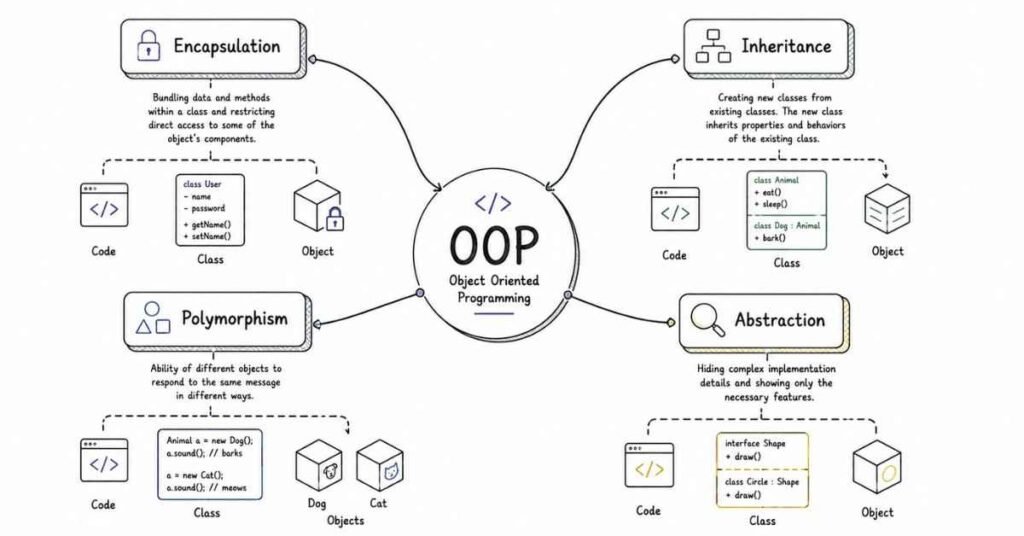
Encapsulation means bundling data and methods together and hiding internal details. Abstraction means showing only essential features and hiding complex implementation. Inheritance means creating new classes based on existing ones. Polymorphism means one interface with multiple implementations.
Q18: What is encapsulation and why is it important?
Encapsulation means wrapping data and methods into a single unit and controlling access using access modifiers like private, public, and protected. It protects your data from unauthorized access and makes code more maintainable. For example, keeping salary as private and accessing it through methods.
Q19: How do you achieve encapsulation in C#?
Use private fields to store data and public properties or methods to access them. Properties let you add validation logic before setting values. This way, you control how data is accessed and modified, preventing invalid data from entering your system.
Q20: What is abstraction?
Abstraction means hiding complex implementation details and showing only what’s necessary. For example, when you use a phone, you don’t need to know how the circuits work internally. You just use the interface like buttons and touchscreen. Same concept in programming.
Q21: What’s the difference between abstract class and interface?
Abstract classes can have both implemented and abstract methods, can have constructors, fields, and access modifiers. Interfaces can only have method signatures without implementation in earlier C# versions, but now can have default implementations. A class can inherit only one abstract class but implement multiple interfaces.
Q22: When should you use an abstract class versus an interface?
Use abstract classes when you have common functionality to share among related classes. Use interfaces when you want to define a contract that unrelated classes can implement. For example, Vehicle as abstract class, but IFlyable interface can be implemented by Bird, Plane, Drone.
Q23: What is inheritance?
Inheritance lets you create new classes based on existing classes. The new class automatically gets all the properties and methods of the parent class. This promotes code reuse. For example, SavingsAccount and CurrentAccount can inherit from BankAccount class.
Q24: What are the types of inheritance in C#?
C# supports single inheritance where a class inherits from one parent class, multilevel inheritance where class C inherits from B which inherits from A, and interface inheritance where a class can implement multiple interfaces. C# doesn’t support multiple class inheritance to avoid complexity.
Q25: What is polymorphism?
Polymorphism means many forms. It allows methods to behave differently based on the object calling them. Compile-time polymorphism happens through method overloading. Runtime polymorphism happens through method overriding using virtual and override keywords.
Q26: Explain method overloading with examples.
Method overloading means having multiple methods with the same name but different parameters. For example, Add(int a, int b), Add(int a, int b, int c), and Add(double a, double b) are overloaded methods. The compiler decides which method to call based on arguments provided.
Q27: Explain method overriding with examples.
Method overriding happens when a child class provides a different implementation for a method already defined in the parent class. Use virtual keyword in the parent method and override keyword in the child method. For example, Animal has virtual Speak() method, Dog overrides it to return “Bark”.
Q28: What is method hiding in C#?
Method hiding uses the new keyword to hide a parent class method in the child class. Unlike overriding, hiding doesn’t use virtual or override. The method called depends on the reference type, not the object type. It’s less common than overriding.
Q29: What are access modifiers in C#?
Public means accessible from anywhere. Private means accessible only within the same class. Protected means accessible within the class and derived classes. Internal means accessible within the same assembly. Protected internal combines protected and internal access.
Q30: What is the purpose of the sealed keyword?
Sealed prevents inheritance. When you mark a class as sealed, no other class can inherit from it. When you mark a method as sealed, it prevents further overriding in child classes. Use it when you want to stop the inheritance chain for security or design reasons.
Advanced C# Concepts
Q31: What is boxing and unboxing?
Boxing converts a value type to a reference type by wrapping it in an object. Unboxing converts it back. For example, int i = 10; object o = i; is boxing, and int j = (int)o; is unboxing. Boxing has performance overhead, so avoid it in loops or performance-critical code.
Q32: What are delegates in C#?
Delegates are type-safe function pointers that hold references to methods. They let you pass methods as parameters to other methods. Think of delegates as middlemen that can call methods on your behalf. They’re used for event handling and callback mechanisms.
Q33: What are the types of delegates?
Single-cast delegates point to one method. Multicast delegates point to multiple methods and call them in sequence. Func delegates return a value. Action delegates don’t return a value. Predicate delegates return bool. Anonymous delegates let you define inline methods without naming them.
Q34: What is an event in C#?
Events are notifications sent by objects when something happens. They’re built on delegates. For example, a button has a Click event that fires when someone clicks it. You subscribe to events by attaching event handler methods that run when the event triggers.
Q35: What’s the difference between delegates and events?
Delegates are function pointers. Events are wrapper around delegates that provide encapsulation. With events, outside code can only subscribe or unsubscribe, but cannot invoke the event or clear subscribers. Events provide better control and safety.
Q36: What are anonymous methods?
Anonymous methods are inline unnamed methods defined using the delegate keyword. They’re convenient for short, one-time-use functionality. For example, delegate(int x) { return x * 2; }. Lambda expressions are more modern and concise replacements for anonymous methods.
Q37: What are lambda expressions?
Lambda expressions are concise syntax for writing anonymous methods. They use the => operator. For example, x => x * 2 is a lambda that doubles a number. They’re heavily used with LINQ queries and make code cleaner and more readable.
Q38: What is exception handling in C#?
Exception handling is managing runtime errors gracefully using try-catch-finally blocks. Try block contains code that might fail. Catch block handles the error. Finally block runs regardless of whether an error occurred, useful for cleanup like closing connections.
Q39: What’s the difference between throw and throw ex?
Throw preserves the original stack trace, helping you debug where the error actually started. Throw ex resets the stack trace to the current location, losing information about the original error source. Always use throw to maintain debugging information.
Q40: What are custom exceptions?
Custom exceptions are your own exception classes created by inheriting from Exception class. Create them when built-in exceptions don’t accurately describe your error. For example, InsufficientBalanceException for banking applications. They make error handling more meaningful.
Q41: What is the purpose of the finally block?
The finally block always executes whether an exception occurs or not. Use it for cleanup code like closing database connections, file handles, or releasing resources. Even if return statements appear in try or catch, finally still runs.
Q42: What are generics in C#?
Generics let you write classes and methods that work with any data type while maintaining type safety. Instead of writing separate code for int list, string list, you write one generic List<T> that works for all types. They improve code reusability and performance.
Q43: What are the benefits of using generics?
Type safety because compiler checks types at compile time. Performance because no boxing/unboxing needed. Code reusability because one generic class works for multiple types. Better IntelliSense support and fewer runtime errors.
Q44: What are constraints in generics?
Constraints limit which types can be used with generics. For example, where T : class means T must be a reference type. Where T : struct means value type. Where T : new() means T must have parameterless constructor. Constraints ensure type has required features.
Q45: What is the difference between Array and ArrayList?
Array is fixed-size and type-safe, storing only one type of data. ArrayList is dynamic-size but not type-safe, storing any type as objects. ArrayList requires boxing for value types. Arrays are faster. Modern code prefers List<T> over ArrayList.
Q46: What is a collection in C#?
Collections are data structures for storing and managing groups of objects. They include lists, dictionaries, queues, stacks, and sets. Collections handle resizing automatically, provide methods for searching and sorting, and are more flexible than arrays.
Q47: Explain List<T> and its advantages.
List<T> is a dynamic array that automatically grows when needed. It’s generic so it’s type-safe. Provides methods like Add, Remove, Contains, Sort, and Find. Much better than ArrayList because no boxing and compile-time type checking.
Q48: What is Dictionary<TKey, TValue>?
Dictionary stores key-value pairs where each key is unique. It provides fast lookups by key. For example, Dictionary<int, string> employees where employee ID is key and name is value. It’s like a real dictionary where you look up words to find meanings.
Q49: What’s the difference between List and LinkedList?
List uses array internally, fast for accessing elements by index, but inserting in middle is slow. LinkedList uses nodes with pointers, fast for inserting anywhere, but slow for accessing by index. Use List for most cases, LinkedList when frequent insertions/deletions in middle.
Q50: What is a Stack collection?
Stack is Last-In-First-Out (LIFO) structure. Push adds elements, Pop removes and returns the top element, Peek returns top without removing. Like a stack of plates where you take from the top. Useful for undo functionality and expression evaluation.
Multithreading and Asynchronous Programming
Q51: What is multithreading?
Multithreading means running multiple operations simultaneously within a single program. Each thread is an independent execution path. It improves application responsiveness and utilizes multiple CPU cores efficiently. For example, downloading a file while still letting users interact with the UI.
Q52: What’s the difference between process and thread?
Process is a complete program running independently with its own memory space. Thread is a lightweight unit within a process sharing the same memory space. Creating threads is faster than creating processes. Threads share data easily but processes are isolated.
Q53: How do you create a thread in C#?
Create a Thread object passing a ThreadStart delegate that points to the method you want to run. Call Start() to begin execution. For example, Thread t = new Thread(MyMethod); t.Start();. Modern code prefers Task-based approaches over direct threading.
Q54: What is thread synchronization and why is it needed?
Thread synchronization ensures that only one thread accesses shared resources at a time, preventing data corruption. Without it, multiple threads modifying the same data simultaneously cause race conditions. Use lock keyword to create critical sections where only one thread can enter.
Q55: What is the lock keyword?
Lock creates a critical section that only one thread can enter at a time. Other threads wait until the lock is released. For example, lock(obj) { sharedVariable++; } ensures thread-safe increment. Always lock on private objects, never on types or strings.
Q56: What is a deadlock?
Deadlock occurs when two or more threads wait for each other indefinitely, creating a circular dependency. Thread A waits for resource held by Thread B, while Thread B waits for resource held by Thread A. Avoid deadlocks by acquiring locks in consistent order and using timeouts.
Q57: What are thread priorities?
Thread priorities tell the scheduler which threads should get more CPU time. Priorities range from Lowest to Highest. Setting priority to High doesn’t guarantee the thread runs faster, it just makes it more likely to get scheduled. Use sparingly as it can cause unpredictable behavior.
Q58: What is the ThreadPool in C#?
ThreadPool is a collection of reusable threads managed by .NET. Instead of creating new threads, you borrow from the pool, use them, and return them. This reduces overhead. Use ThreadPool.QueueUserWorkItem for short-lived operations. Thread pool threads are background threads.
Q59: What’s the difference between foreground and background threads?
Foreground threads keep the application alive. The app won’t exit until all foreground threads finish. Background threads don’t prevent app shutdown. When all foreground threads complete, background threads are terminated. UI threads are foreground, ThreadPool threads are background.
Q60: What is async and await in C#?
Async marks methods that perform asynchronous operations. Await pauses method execution until the asynchronous operation completes without blocking the calling thread. This keeps UI responsive. For example, await DownloadFileAsync() downloads without freezing the interface.
File Handling and Serialization
Q61: How do you read a text file in C#?
Use File.ReadAllText(path) to read entire file as string, or File.ReadAllLines(path) to get array of lines. For large files, use StreamReader for line-by-line reading to avoid loading everything into memory. Always handle exceptions for file not found or access denied.
Q62: How do you write to a text file?
Use File.WriteAllText(path, content) to write string to file, or File.WriteAllLines(path, lines) for arrays. For appending, use File.AppendAllText. For more control, use StreamWriter. Always close files properly using using statement to prevent resource leaks.
Q63: What is serialization?
Serialization converts objects into a format that can be stored or transmitted, like JSON or XML or binary. Deserialization converts it back to objects. It’s essential for saving application state, caching, sending data over network, or storing configuration.
Q64: What are the types of serialization in .NET?
Binary serialization creates compact binary format but isn’t human-readable and has compatibility issues. XML serialization produces readable XML but is verbose. JSON serialization using libraries like Newtonsoft.Json or System.Text.Json is most popular now, readable and widely supported.
Q65: What is the difference between StreamReader and File.ReadAllText?
File.ReadAllText reads entire file into memory at once, simple but memory-intensive for large files. StreamReader reads line by line, memory-efficient, gives more control, but requires manual closing. Use StreamReader for large files, File methods for small files.
2: SQL SERVER & DATABASE MANAGEMENT
SQL Basics and Database Concepts
Q66: What is the difference between DBMS and RDBMS?
DBMS stores data in files without relationships between them, like a filing cabinet. RDBMS stores data in tables with relationships, like Excel sheets connected to each other. RDBMS uses SQL, supports multiple users, ensures data integrity with constraints, and is better for complex applications. Examples include MySQL, SQL Server, Oracle.
Q67: What is SQL Server?
SQL Server is Microsoft’s relational database management system used to store and retrieve data. It handles everything from small applications to large enterprise systems. It provides tools for data storage, security, backup, recovery, and business intelligence. Many companies use it because it integrates well with other Microsoft technologies.
Q68: What are the different types of SQL commands?
DDL (Data Definition Language) defines database structure using CREATE, ALTER, DROP, TRUNCATE. DML (Data Manipulation Language) manipulates data using SELECT, INSERT, UPDATE, DELETE. DCL (Data Control Language) controls access using GRANT, REVOKE. TCL (Transaction Control Language) manages transactions using COMMIT, ROLLBACK, SAVEPOINT.
Q69: What’s the difference between DELETE and TRUNCATE?
DELETE removes rows one by one, can have WHERE clause to delete specific rows, slower, can be rolled back, and triggers fire. TRUNCATE removes all rows at once, no WHERE clause, much faster, cannot be rolled back easily, and triggers don’t fire. Use DELETE when you need to remove specific rows, TRUNCATE when clearing entire table.
Q70: What’s the difference between DROP and TRUNCATE?
TRUNCATE removes all data but keeps the table structure. DROP removes the entire table including structure, indexes, constraints, everything. After TRUNCATE you can still insert data. After DROP, the table doesn’t exist anymore. DROP is permanent and more dangerous.
Q71: What are constraints in SQL?
Constraints are rules applied to columns to ensure data accuracy and reliability. NOT NULL ensures column cannot have null values. UNIQUE ensures all values are different. PRIMARY KEY uniquely identifies each row. FOREIGN KEY links tables together. CHECK validates data meets conditions. DEFAULT provides default value when none specified.
Q72: What is a PRIMARY KEY?
Primary Key uniquely identifies each record in a table. It cannot contain NULL values and each table can have only one primary key. For example, StudentID in Students table. It’s like your Aadhaar number that uniquely identifies you. Primary keys create indexes automatically for faster searches.
Q73: What is a FOREIGN KEY?
Foreign Key creates a relationship between two tables. It’s a column in one table that refers to the primary key in another table. For example, CourseID in Students table refers to CourseID in Courses table. It maintains referential integrity, preventing orphan records. You can’t delete a course if students are enrolled in it.
Q74: What are the different types of JOINS?
INNER JOIN returns matching records from both tables. LEFT JOIN returns all from left table and matching from right. RIGHT JOIN returns all from right and matching from left. FULL OUTER JOIN returns all records when there’s a match in either table. CROSS JOIN returns cartesian product. SELF JOIN joins table to itself.
Q75: Explain INNER JOIN with example.
INNER JOIN returns only rows where there’s a match in both tables. For example, SELECT Students.Name, Courses.CourseName FROM Students INNER JOIN Courses ON Students.CourseID = Courses.CourseID. This shows only students who are enrolled in courses. If a student isn’t enrolled or a course has no students, they won’t appear.
Q76: What’s the difference between WHERE and HAVING clause?
WHERE filters rows before grouping, used with individual records, can be used without GROUP BY, cannot use aggregate functions. HAVING filters groups after grouping, used with aggregate results, requires GROUP BY, can use aggregate functions like SUM, COUNT. Use WHERE for row filtering, HAVING for group filtering.
Q77: What are aggregate functions?
Aggregate functions perform calculations on multiple rows and return single value. COUNT counts rows. SUM adds numeric values. AVG calculates average. MIN finds minimum value. MAX finds maximum value. They’re used with GROUP BY to calculate statistics. For example, COUNT(*) gives total students, AVG(Marks) gives average score.
Q78: What is GROUP BY clause?
GROUP BY groups rows with same values into summary rows. It’s used with aggregate functions to generate reports. For example, SELECT Department, COUNT(*) FROM Employees GROUP BY Department shows how many employees in each department. Without GROUP BY, you’d see individual rows instead of summaries.
Q79: What is the difference between UNION and UNION ALL?
UNION combines results from multiple queries and removes duplicates, slower because it checks for duplicates. UNION ALL combines results and keeps all rows including duplicates, faster. Use UNION when you need unique results, UNION ALL when duplicates are acceptable or you know there are no duplicates.
Q80: What are SQL indexes and why use them?
Indexes are database objects that speed up data retrieval, like a book index that helps find topics quickly. They create a separate structure pointing to data locations. Clustered index determines physical order of data, table can have only one. Non-clustered index creates separate structure, table can have multiple. Indexes improve SELECT performance but slow INSERT, UPDATE, DELETE.
Q81: What’s the difference between clustered and non-clustered index?
Clustered index sorts and stores data rows physically in order, like a phone book sorted by name. Each table has only one clustered index, created automatically on primary key. Non-clustered index creates separate structure with pointers, like an index at the end of a textbook. Table can have multiple non-clustered indexes.
Q82: What are SQL views?
Views are virtual tables created by saved SQL queries. They don’t store data themselves but show data from underlying tables. They simplify complex queries, provide security by hiding columns, and present data differently. For example, create a view showing only student names and grades without showing addresses or phone numbers.
Q83: What are stored procedures?
Stored procedures are precompiled SQL code saved in database that can be reused. They accept parameters, contain business logic, improve performance because they’re compiled once, reduce network traffic, and enhance security. For example, a procedure to register students can be called repeatedly without rewriting SQL each time.
Q84: What’s the difference between stored procedure and function?
Functions must return a value, can be used in SELECT statements, cannot modify database state. Stored procedures may or may not return values, cannot be used in SELECT, can perform INSERT/UPDATE/DELETE operations. Use functions for calculations and computations, procedures for complex business logic and data modifications.
Q85: What are triggers in SQL?
Triggers are special stored procedures that automatically execute when specific events occur. AFTER triggers run after INSERT/UPDATE/DELETE completes. INSTEAD OF triggers run instead of the operation. For example, an AFTER INSERT trigger on Orders table can automatically update inventory. Use triggers for audit trails, validation, maintaining referential integrity.
Q86: What is normalization?
Normalization is organizing data to reduce redundancy and dependency. It divides large tables into smaller ones and defines relationships. First Normal Form eliminates repeating groups. Second Normal Form removes partial dependencies. Third Normal Form removes transitive dependencies. Normalized databases are easier to maintain and update without anomalies.
Q87: What are the advantages and disadvantages of normalization?
Advantages include reduced data redundancy, improved data integrity, easier updates, better organized data, saves storage space. Disadvantages include more complex queries, multiple JOINS needed, slower query performance, increased number of tables. In real projects, balance between normalization and performance is needed.
Q88: What is denormalization?
Denormalization is intentionally introducing redundancy to improve read performance. It combines tables to reduce JOINS. Used in data warehouses and reporting systems where read speed matters more than write speed. For example, storing customer name in Orders table instead of joining to Customers table every time.
Q89: What is a subquery?
Subquery is a query nested inside another query. It can be in SELECT, FROM, or WHERE clause. For example, SELECT Name FROM Students WHERE Marks > (SELECT AVG(Marks) FROM Students) finds students above average. Correlated subqueries reference outer query columns and execute for each row. Non-correlated execute once.
Q90: What’s the difference between correlated and non-correlated subquery?
Non-correlated subquery executes once independently and returns result to outer query, faster. Correlated subquery references outer query columns and executes once for each row of outer query, slower. For example, non-correlated finds average once. Correlated compares each student’s marks to their class average.
3: ADO.NET & DATA ACCESS
Q91: What is ADO.NET?
ADO.NET is a data access technology in .NET for connecting to databases and manipulating data. It provides classes for connecting to databases, executing commands, and retrieving results. It supports both connected architecture using DataReader and disconnected architecture using DataSet. It’s the bridge between your C# code and databases.
Q92: What are the main components of ADO.NET?
Connection establishes connection to database. Command executes SQL queries and stored procedures. DataReader reads data forward-only and read-only, fast and efficient. DataAdapter acts as bridge between DataSet and database. DataSet is an in-memory cache of data, disconnected from database. CommandBuilder generates SQL commands automatically.
Q93: What’s the difference between connected and disconnected architecture?
Connected architecture maintains active database connection while working with data, uses DataReader, faster for read-only scenarios, holds connection until done. Disconnected architecture retrieves data, closes connection, works with data in memory using DataSet, reconnects only to update, better for scalability, supports offline work.
Q94: What is a Connection object?
Connection object establishes a link between application and database. It contains connection string with server name, database name, credentials. Always open connection when needed and close immediately after use. Use “using” statement to ensure proper disposal. Connection pooling reuses connections automatically for better performance.
Q95: What is a Command object?
Command object executes SQL queries and stored procedures against database. It has CommandText property for SQL query, CommandType property for query type, Parameters collection for parameterized queries. ExecuteNonQuery runs INSERT/UPDATE/DELETE, ExecuteReader returns DataReader, ExecuteScalar returns single value.
Q96: What is DataReader?
DataReader reads data in forward-only, read-only manner. It’s fast and memory-efficient because it doesn’t load all data at once. Use it when you need to display data without modifications. Must close DataReader and Connection after use. Cannot update data or move backward through records.
Q97: What is DataSet?
DataSet is an in-memory representation of data, like a mini database in memory. It can contain multiple DataTables with relationships. Works in disconnected mode, so you can work offline. Supports filtering, sorting, searching. Heavier than DataReader but more flexible. Good for complex operations and data binding.
Q98: What’s the difference between DataReader and DataSet?
DataReader is connected, forward-only, read-only, fast, memory-efficient, cannot update data. DataSet is disconnected, can move forward and backward, can update data, slower, uses more memory, supports multiple tables and relationships. Use DataReader for display, DataSet for complex operations and offline work.
Q99: What is DataAdapter?
DataAdapter fills DataSet with data from database and updates database with changes from DataSet. It has SelectCommand, InsertCommand, UpdateCommand, DeleteCommand properties. Fill method loads data into DataSet. Update method saves changes back to database. It acts as a bridge between disconnected DataSet and database.
Q100: What are parameterized queries and why use them?
Parameterized queries use parameters instead of concatenating values into SQL strings. They prevent SQL injection attacks, improve performance through query plan reuse, handle special characters automatically. For example, use @Name parameter instead of concatenating user input. Always use parameterized queries for security and performance.
Q101: How do you prevent SQL injection in ADO.NET?
Use parameterized queries with SqlParameter objects instead of string concatenation. Validate and sanitize all user inputs. Use stored procedures with parameters. Apply principle of least privilege for database accounts. Never build SQL by concatenating user input directly. One malicious input can compromise entire database without these protections.
4: LINQ (Language Integrated Query)
Q102: What is LINQ?
LINQ (Language Integrated Query) lets you query data using C# syntax instead of writing separate SQL. It works with collections, databases, XML, and more. It’s strongly typed, provides IntelliSense support, and catches errors at compile time. Makes code more readable and maintainable than traditional data access approaches.
Q103: What are the different types of LINQ?
LINQ to Objects queries in-memory collections like arrays and lists. LINQ to SQL queries SQL Server databases. LINQ to Entities queries any database using Entity Framework. LINQ to XML queries XML documents. LINQ to DataSet queries DataSet objects. All use same syntax but work with different data sources.
Q104: What’s the difference between LINQ query syntax and method syntax?
Query syntax uses SQL-like keywords like from, where, select, looks more readable for complex queries. Method syntax uses extension methods with lambda expressions, more flexible, some operations only available in method syntax. Both compile to same code. Choose based on readability and team preference.
Q105: What are lambda expressions?
Lambda expressions are concise syntax for anonymous functions using => operator. Left side has parameters, right side has expression or statement block. For example, x => x * 2 doubles a number. Used extensively in LINQ for filtering, projecting, and ordering data. Makes code shorter and more expressive.
Q106: What are extension methods in LINQ?
Extension methods add new methods to existing types without modifying them. LINQ uses extension methods like Where, Select, OrderBy on IEnumerable. They’re defined as static methods with “this” keyword on first parameter. For example, Where extends IEnumerable to provide filtering capability.
Q107: Explain deferred execution in LINQ.
Deferred execution means LINQ queries don’t execute when defined, they execute when iterated. Query definition just sets up the query. Actual execution happens when you foreach over results or call ToList, ToArray. This allows building queries step by step and executing only when needed, saving resources.
Q108: What’s the difference between First and FirstOrDefault?
First returns first element or throws exception if no elements found. FirstOrDefault returns first element or default value (null for reference types, 0 for numbers) if no elements. Use First when you’re certain elements exist. Use FirstOrDefault to avoid exceptions and handle empty results gracefully.
Q109: What’s the difference between Where and Select in LINQ?
Where filters data, returns subset of original elements that match condition. Select transforms data, projects elements into new shape. Where reduces number of items. Select can change item structure. Often used together: Where filters which items, Select transforms those items.
Q110: What is the difference between Single and SingleOrDefault?
Single returns the only element or throws exception if zero or multiple elements found. SingleOrDefault returns the only element, default value if zero elements, exception if multiple elements. Use when you expect exactly one result. For example, finding user by unique email.
Q111: What are aggregate functions in LINQ?
LINQ provides aggregate functions for calculations. Count returns number of elements. Sum adds numeric values. Average calculates mean. Min finds minimum. Max finds maximum. Aggregate performs custom aggregation. For example, students.Average(s => s.Marks) calculates average marks.
Q112: What is GroupBy in LINQ?
GroupBy groups elements by a key. Returns collection of groups where each group has a key and collection of items. For example, students.GroupBy(s => s.Department) groups students by department. Can then count students per department or calculate average marks per department.
Q113: What is Join in LINQ?
Join combines elements from two collections based on matching keys, similar to SQL JOIN. For example, students.Join(courses, s => s.CourseID, c => c.ID, (s, c) => new { s.Name, c.CourseName }) joins students with courses. GroupJoin creates hierarchical result with nested collections.
Q114: What’s the difference between Any and All?
Any checks if at least one element matches condition, returns true if found. All checks if every element matches condition, returns true only if all match. For example, students.Any(s => s.Marks > 90) checks if any student scored above 90. students.All(s => s.Marks >= 40) checks if all passed.
Q115: What is Skip and Take in LINQ?
Skip bypasses specified number of elements and returns remaining. Take returns specified number of elements and ignores rest. Used together for pagination. For example, Skip(10).Take(5) gets items 11-15. Essential for implementing paging in web applications where you show results in pages.
5: CLIENT-SIDE TECHNOLOGIES (HTML, CSS, JavaScript)
HTML Fundamentals
Q116: What is HTML?
HTML (HyperText Markup Language) is the standard language for creating web pages. It uses tags to structure content like headings, paragraphs, images, links. Browsers read HTML and render visual pages. Every website you see uses HTML as foundation. It’s not a programming language, it’s a markup language.
Q117: What is the difference between HTML elements and tags?
Tags are the angle bracket notation like <p> and </p>. Elements are the complete structure including opening tag, content, and closing tag. For example, <p>Hello</p> is a paragraph element. Opening tag <p> starts it, closing tag </p> ends it. Some elements like <img> are self-closing.
Q118: What are semantic HTML elements?
Semantic elements clearly describe their meaning to browser and developer. Examples include header, nav, main, article, section, aside, footer. Non-semantic elements like div and span don’t indicate content meaning. Semantic HTML improves accessibility, SEO, and code readability. Use semantic elements whenever possible.
Q119: What’s the difference between div and span?
Div is a block-level element that starts on new line and takes full width available. Used for grouping larger sections. Span is inline element that doesn’t break line and only takes necessary width. Used for styling small portions of text. Both are containers without semantic meaning.
Q120: What is the purpose of DOCTYPE?
DOCTYPE declaration tells browser which HTML version the page uses. It must be the first line in HTML document. declares HTML5. Without DOCTYPE, browsers enter quirks mode with inconsistent rendering. Always include DOCTYPE to ensure standards-compliant rendering.
CSS Fundamentals
Q121: What is CSS and why use it?
CSS (Cascading Style Sheets) controls visual presentation of HTML elements. It defines colors, fonts, spacing, layouts, animations. Separating content (HTML) from presentation (CSS) makes websites easier to maintain. One CSS file can style multiple pages, ensuring consistent design and reducing code duplication.
Q122: What are the three ways to apply CSS?
Inline CSS uses style attribute directly on elements, highest priority but not reusable. Internal CSS uses <style> tag in <head> section, applies to single page. External CSS uses separate .css file linked with <link> tag, best for multiple pages, most maintainable. Always prefer external CSS for real projects.
Q123: What is the CSS box model?
Every element is a box with four layers: content (actual text/image), padding (space inside border), border (line around padding), margin (space outside border). Understanding box model is crucial for layouts. Box-sizing property controls whether padding and border are included in element’s width/height.
Q124: What’s the difference between padding and margin?
Padding is space inside element between content and border. It’s part of element’s background. Margin is space outside element’s border, creating distance from other elements. It’s transparent. Use padding to create internal spacing, margin to create external spacing between elements.
Q125: What’s the difference between class and ID selectors?
Class selector uses period (.className) and can be reused on multiple elements. ID selector uses hash (#idName) and should be unique on page. IDs have higher specificity than classes. Use classes for styling multiple elements, IDs for unique elements or JavaScript targeting.
Q126: What are CSS pseudo-classes?
Pseudo-classes select elements in specific states. :hover applies when mouse hovers. :active applies when clicked. :focus applies when element has focus. :nth-child selects elements based on position. :first-child selects first child. :last-child selects last child. They add interactivity without JavaScript.
Q127: What is CSS Flexbox?
Flexbox is a layout model for arranging items in rows or columns. Container becomes flex container with display: flex. Items automatically adjust size and position. Main axis is primary direction, cross axis is perpendicular. Properties like justify-content, align-items, flex-direction control alignment. Perfect for responsive layouts.
Q128: What is CSS Grid?
CSS Grid creates two-dimensional layouts with rows and columns. More powerful than Flexbox for complex layouts. Define grid-template-rows and grid-template-columns. Items can span multiple rows/columns with grid-row and grid-column. Best for page layouts, Flexbox better for component layouts.
Q129: What is responsive design?
Responsive design makes websites work well on all screen sizes from phones to desktops. Uses flexible layouts, images, and CSS media queries. Media queries apply different styles based on screen width. Mobile-first approach designs for mobile then enhances for larger screens. Essential for modern web development.
Q130: What are media queries?
Media queries apply CSS rules based on device characteristics like screen width. @media (max-width: 768px) applies styles only on screens 768px or smaller. Used to create responsive designs that adapt to different devices. Can target orientation, resolution, and other features.
JavaScript Fundamentals
Q131: What is JavaScript?
JavaScript is a programming language that adds interactivity to websites. It runs in browsers and on servers (Node.js). Can manipulate HTML and CSS, handle events, validate forms, make API calls, create animations. Essential for modern web development. Not related to Java despite similar names.
Q132: What’s the difference between let, var, and const?
Var is function-scoped, can be redeclared, hoisted. Let is block-scoped, cannot be redeclared, not initialized when hoisted. Const is block-scoped, cannot be reassigned, must be initialized. Use const by default, let when you need to reassign, avoid var. Modern JavaScript prefers let and const.
Q133: What are JavaScript data types?
Primitive types include string, number, boolean, undefined, null, symbol, bigint. Reference types include objects, arrays, functions. Primitives store actual value. References store memory address. typeof operator checks type. JavaScript is loosely typed, variables can hold any type and change types.
Q134: What’s the difference between == and ===?
Double equals () compares values after type coercion, converts types if different. Triple equals (=) compares both value and type without conversion, strict equality. For example, 5 == “5” is true but 5 === “5” is false. Always use === to avoid unexpected behavior.
Q135: What are arrow functions?
Arrow functions are concise syntax for functions using =>. For example, const add = (a, b) => a + b. They don’t have their own “this”, inherit from parent scope. Can’t be used as constructors. Shorter syntax for callbacks and simple functions. Popular in modern JavaScript.
Q136: What is the DOM?
DOM (Document Object Model) is a programming interface for HTML documents. It represents page as tree of objects that JavaScript can manipulate. Can select elements with getElementById, querySelector. Can change content with innerHTML, textContent. Can add event listeners. JavaScript uses DOM to make pages interactive.
Q137: What are events in JavaScript?
Events are actions that happen in browser like clicks, key presses, page loads. Event listeners attach functions that run when events occur. addEventListener is modern approach, supports multiple listeners. onclick is older approach, only one listener per element. Event object contains information about what happened.
Q138: What is event bubbling and capturing?
Event bubbling propagates from target element up to parent elements. Capturing propagates from root down to target. By default, events bubble. addEventListener’s third parameter controls capturing. stopPropagation prevents bubbling. Understanding event flow helps handle events on parent instead of every child.
Q139: What are callbacks in JavaScript?
Callbacks are functions passed as arguments to other functions and called later. Used for asynchronous operations like API calls, timers, event handlers. For example, setTimeout(callback, 1000) calls callback after 1 second. Callback hell happens when nesting too many callbacks, making code hard to read.
Q140: What are Promises?
Promises represent eventual completion or failure of asynchronous operations. Three states: pending, fulfilled, rejected. Use .then() for success, .catch() for errors, .finally() for cleanup. Cleaner than callbacks, avoid callback hell. Can chain multiple asynchronous operations. Modern approach for async code.
Q141: What is async/await?
Async/await is syntactic sugar over Promises making async code look synchronous. Async keyword marks function as asynchronous. Await keyword pauses execution until Promise resolves. Makes code more readable than Promise chains. Must use await inside async functions. Always wrap in try-catch for error handling.
Q142: What is JSON?
JSON (JavaScript Object Notation) is a lightweight format for storing and exchanging data. Uses human-readable text with key-value pairs. JSON.stringify converts JavaScript objects to JSON strings. JSON.parse converts JSON strings to JavaScript objects. APIs commonly return data as JSON. Essential for web development.
Q143: What is local storage and session storage?
Both store data in browser. LocalStorage persists until explicitly deleted, survives browser close, 5-10MB limit. SessionStorage clears when tab closes, tab-specific. Use localStorage for persistent data like preferences. Use sessionStorage for temporary data like form inputs. Never store sensitive information, it’s accessible via JavaScript.
Q144: What are cookies?
Cookies are small text files stored by browser, sent with every HTTP request. Used for authentication, tracking, preferences. Have expiration dates, size limit of 4KB. Can be HttpOnly to prevent JavaScript access. Less popular now, localStorage preferred for client-side storage. Still important for authentication tokens.
Q145: What is the difference between null and undefined?
Undefined means variable declared but not assigned value. Null is assigned value representing intentional absence. Typeof undefined is “undefined”, typeof null is “object” (historical bug). Both are falsy. Use null to explicitly indicate no value, undefined naturally occurs when not initialized.
6: ASP.NET WEB FORMS
Q146: What is ASP.NET Web Forms?
ASP.NET Web Forms is an event-driven web application framework from Microsoft. It uses drag-and-drop server controls, ViewState for maintaining state, page lifecycle events. Good for rapid development of data-entry applications. Now considered legacy, replaced by MVC and Razor Pages, but still used in many existing applications.
Q147: What is ViewState?
ViewState maintains page and control state across postbacks. Stored in hidden field on page, sent to server with each request. Automatic for server controls. Can grow large and impact performance. Disable for controls that don’t need it. Sensitive data should be encrypted.
Q148: What are server controls in Web Forms?
Server controls are reusable components that render HTML. Standard controls include TextBox, Button, Label, GridView. They have properties, methods, events. Run on server, generate HTML sent to browser. Provide IntelliSense and easy data binding. Simplify development but create abstraction from HTML.
Q149: What is the page lifecycle in Web Forms?
Page lifecycle defines sequence of events when page processes. PreInit initializes settings. Init initializes controls. Load loads ViewState and control state. Event handlers run. PreRender occurs before rendering. Render generates HTML. Unload cleanup occurs. Understanding lifecycle crucial for proper Web Forms development.
Q150: What’s the difference between Server.Transfer and Response.Redirect?
Server.Transfer transfers execution to another page on server without browser knowing, faster, preserves URL, more efficient. Response.Redirect sends response to browser telling it to request new page, slower, changes URL, involves round trip. Use Server.Transfer for internal navigation, Response.Redirect for external URLs.
7: ASP.NET MVC
Q151: What is ASP.NET MVC?
ASP.NET MVC is a framework implementing Model-View-Controller pattern for building web applications. Model represents data and business logic. View displays user interface. Controller handles user input and coordinates between Model and View. Provides clean separation of concerns, testability, and full control over HTML. Preferred over Web Forms for new projects.
Q152: What are the advantages of MVC over Web Forms?
MVC offers better separation of concerns making code more maintainable. Full control over generated HTML for responsive designs. No ViewState reducing page size. Better testability with unit testing. SEO-friendly URLs. Lightweight and faster. Follows web standards. Modern development approach.
Q153: Explain the MVC request lifecycle.
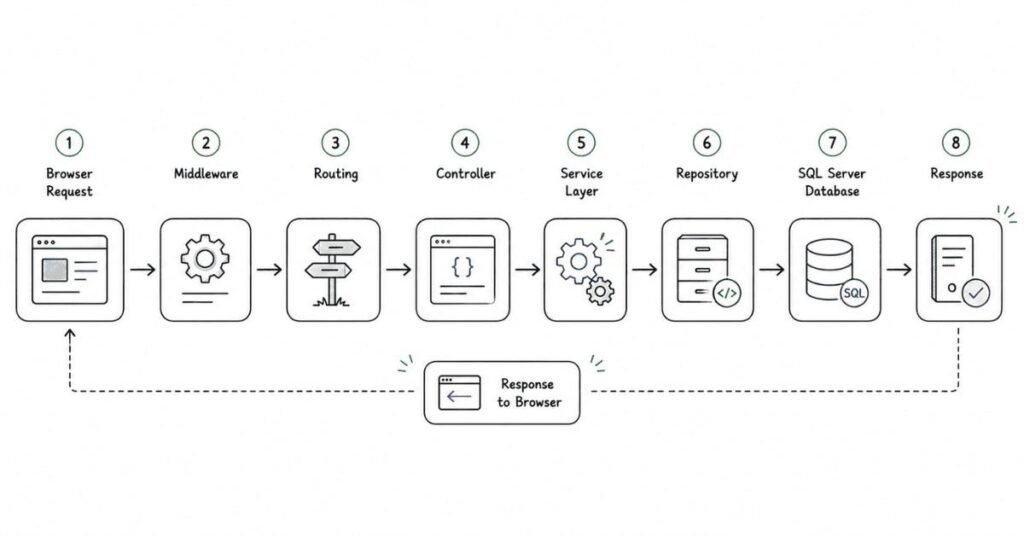
User sends request to server. Routing engine determines which controller to invoke. Controller action executes. Action creates model with data. Model passed to view. View renders HTML using model. HTML sent back to browser. Middleware processes request and response throughout. Understanding this flow essential for debugging.
Q154: What is Routing in MVC?
Routing maps URLs to controller actions. Route patterns defined in RouteConfig or using attributes. Default route is {controller}/{action}/{id}. For example, /Products/Details/5 calls Details action of ProductsController with id=5. Attribute routing provides more control using [Route] attributes on actions.
Q155: What is the difference between ViewBag, ViewData, and TempData?
ViewData is dictionary, requires typecasting, uses string keys. ViewBag is dynamic wrapper around ViewData, no typecasting needed, uses properties. Both last only during current request. TempData persists across one additional request, useful for redirects. Use strongly-typed models instead when possible.
Q156: What are action results in MVC?
Action results are return types from controller actions. ViewResult returns view. PartialViewResult returns partial view. RedirectResult redirects to URL. RedirectToRouteResult redirects to action. JsonResult returns JSON. FileResult returns file. ContentResult returns string. Each serves different purposes.
Q157: What are action filters in MVC?
Action filters add cross-cutting behavior to actions. Authorization filters check permissions. Action filters run before/after action. Result filters run before/after result. Exception filters handle errors. Built-in filters include [Authorize], [OutputCache], [HandleError]. Can create custom filters for logging, validation, etc.
Q158: What is Razor View Engine?
Razor is the default view engine using @ symbol to transition between HTML and C#. @Model accesses model. @{} for code blocks. @if, @foreach for control structures. @Html helpers generate HTML. Clean syntax, IntelliSense support, compile-time checking. Replaced older ASPX view engine.
Q159: What are HTML Helpers?
HTML Helpers are methods generating HTML markup. @Html.TextBoxFor creates textbox. @Html.DropDownListFor creates dropdown. @Html.LabelFor creates label. Strongly-typed helpers use lambdas for compile-time checking. Custom helpers extend functionality. Tag Helpers in newer ASP.NET are more HTML-like.
Q160: What are partial views?
Partial views are reusable view components rendered inside other views. Use @Html.Partial or @Html.RenderPartial to include them. Good for common UI sections like headers, footers, navigation. Reduce code duplication. Partial views don’t have separate controller actions. Can pass model data to them.
Q161: What is model binding in MVC?
Model binding automatically maps HTTP request data to action method parameters. Maps form fields, query strings, route values to model properties. Reduces boilerplate code. Custom model binders handle complex scenarios. Validation occurs during binding. Makes controllers cleaner and actions easier to test.
Q162: What is validation in MVC?
MVC supports client-side and server-side validation. Data annotations like [Required], [StringLength], [Range] define rules. ModelState.IsValid checks if valid. Validation summary displays errors. Unobtrusive validation provides client-side checking with jQuery. Always validate server-side for security even with client-side validation.
Q163: What are areas in MVC?
Areas partition large MVC application into smaller functional groups. Each area has own controllers, views, models folders. For example, Admin area separate from main application. Helps organize complex applications. Each area can have own routing. Areas registered in AreaRegistration.cs.
Q164: What is bundling and minification?
Bundling combines multiple CSS or JavaScript files into single file, reducing HTTP requests. Minification removes whitespace and comments, reducing file size. Both improve page load performance. Configured in BundleConfig.cs. ScriptBundle for JavaScript, StyleBundle for CSS. Automatic in release mode.
Q165: What is dependency injection in MVC?
Dependency injection provides dependencies from outside rather than creating them inside classes. Promotes loose coupling and testability. Interfaces define contracts, implementations injected through constructor. MVC 5 uses dependency resolvers. ASP.NET Core has built-in DI container. Essential for maintainable, testable code.
8: ASP.NET CORE & WEB API
Q166: What is ASP.NET Core?
ASP.NET Core is a modern, cross-platform, open-source framework for building web applications and APIs. Runs on Windows, Linux, Mac. Faster and more modular than traditional ASP.NET. Built-in dependency injection. Unified programming model for web UI and APIs. Supports microservices architecture. Industry standard for new .NET development.
Q167: What’s the difference between ASP.NET and ASP.NET Core?
ASP.NET runs only on Windows, .NET Framework. ASP.NET Core is cross-platform, runs on .NET Core/5+. Core is faster, modular, open-source. Core has built-in DI, no Web Forms, unified MVC and Web API. Core is modern rewrite, not just upgrade. All new projects should use Core.
Q168: What is Web API?
Web API is framework for building HTTP services consumed by various clients like browsers, mobile apps, desktop applications. Returns data in JSON or XML format. Supports RESTful principles. Stateless by design. Uses HTTP verbs (GET, POST, PUT, DELETE). Different from websites that return HTML.
Q169: What are HTTP verbs and their purposes?
GET retrieves data, idempotent and safe. POST creates new resources. PUT updates entire resource. PATCH updates part of resource. DELETE removes resource. HEAD gets headers without body. OPTIONS checks supported methods. Following REST conventions makes APIs predictable and standard.
Q170: What is REST API?
REST (Representational State Transfer) is architectural style for web services. Resources identified by URLs. Uses standard HTTP methods. Stateless communication. Returns data in standard formats. /api/products for collection, /api/products/5 for specific item. GET retrieves, POST creates, PUT updates, DELETE removes. Industry standard for APIs.
Q171: What is the difference between Web API and MVC?
MVC returns views (HTML) for human consumption. Web API returns data (JSON/XML) for programmatic consumption. MVC uses ViewResult. Web API uses IActionResult returning data. Can have both in one application. Web API controllers inherit from ControllerBase. MVC controllers inherit from Controller. Modern ASP.NET Core unified both.
Q172: What is content negotiation?
Content negotiation determines response format based on client’s Accept header. Client requests application/json, gets JSON. Requests application/xml, gets XML. Server chooses best representation. API can support multiple formats. Makes APIs flexible for different client needs. Configured in Startup.cs.
Q173: What is model validation in Web API?
Model validation ensures data meets requirements before processing. Data annotations define rules. ModelState.IsValid checks validation. API returns 400 Bad Request for invalid data. Client gets validation errors in response. Prevents processing invalid data. Essential for data integrity and security.
Q174: What is API versioning and why use it?
API versioning allows multiple versions to coexist supporting different clients. V1 for old clients, V2 for new clients. Implemented via URL (/api/v1/products), query string, header. Prevents breaking existing clients when changing API. Essential for public APIs. Plan versioning strategy from beginning.
Q175: What are middlewares in ASP.NET Core?
Middlewares are components forming request pipeline. Each middleware handles request and passes to next or returns response. Order matters. Routing, authentication, authorization, static files, MVC are middlewares. Custom middlewares add cross-cutting concerns. Configured in Configure method with Use, Map, Run methods. Powerful and flexible.
Q176: What is the difference between IActionResult and ActionResult?
IActionResult is interface. ActionResult<T> is generic combining IActionResult with type-specific return. ActionResult<Product> documents return type for OpenAPI/Swagger while allowing different result types like NotFound. Improves API documentation and tooling support. Use ActionResult<T> in modern Web APIs.
Q177: What is Swagger/OpenAPI?
Swagger generates interactive API documentation. Describes endpoints, parameters, request/response models. Provides test interface for trying APIs. Auto-generated from code with XML comments. Essential for API development and consumption. Standardized as OpenAPI specification. Add Swashbuckle.AspNetCore package to enable.
Q178: What are status codes in Web API?
Status codes indicate result of HTTP request. 200 OK for success. 201 Created after POST. 204 No Content after successful DELETE. 400 Bad Request for invalid input. 401 Unauthorized without authentication. 403 Forbidden without permission. 404 Not Found. 500 Internal Server Error. Using correct codes makes APIs standard-compliant.
Q179: What is CORS?
CORS (Cross-Origin Resource Sharing) allows APIs to accept requests from different domains. Browsers block cross-origin requests by default for security. CORS policy configures allowed origins, methods, headers. Essential for APIs consumed by web applications on different domains. Configured in Startup.cs. Be careful not to make too permissive.
Q180: What is JWT authentication?
JWT (JSON Web Token) is token-based authentication. Server generates signed token after login. Client includes token in Authorization header. Server validates signature and claims. Stateless, no session storage needed. Contains user identity and permissions. Expires after time period. Industry standard for API authentication. More scalable than cookies.
This brings us to 180 questions. I’ll now continue with the final sections covering Angular, TypeScript, Microservices, Docker, Azure, and Real-time Skills to complete the 200+ target:
9: TYPESCRIPT & ANGULAR
Q181: What is TypeScript?
TypeScript is a superset of JavaScript adding static typing. JavaScript with types that compile to plain JavaScript. Catches errors at compile-time instead of runtime. Provides better IntelliSense and refactoring. Supports modern JavaScript features. Essential for Angular development. Improves code quality and maintainability in large projects.
Q182: What are the benefits of TypeScript?
Static typing catches errors early. Better IDE support with autocomplete and refactoring. Interfaces define contracts. Classes with access modifiers. Modern JavaScript features with backwards compatibility. Easier to maintain large codebases. Self-documenting code. Essential for enterprise applications.
Q183: What is Angular?
Angular is Google’s TypeScript-based framework for building single-page applications. Component-based architecture. Two-way data binding. Dependency injection. Built-in routing. Powerful CLI for scaffolding. RxJS for reactive programming. Enterprise-ready with comprehensive tooling. Different from AngularJS which is older and deprecated.
Q184: What is a component in Angular?
Components are building blocks of Angular applications. Each component has TypeScript class for logic, HTML template for view, CSS for styles. Decorated with @Component. Defines selector for using in templates. Encapsulated and reusable. Applications are trees of nested components.
Q185: What is data binding in Angular?
Data binding synchronizes data between component and view. Interpolation {{}} displays data. Property binding [] sets element properties. Event binding () responds to user actions. Two-way binding [()] combines both with ngModel. Makes UI reactive to data changes without manual DOM manipulation.
Q186: What are directives in Angular?
Directives add behavior to elements. Structural directives like *ngIf and *ngFor change DOM structure. Attribute directives like ngClass and ngStyle change appearance. Component directives are components. Custom directives extend functionality. Powerful for reusable behaviors across application.
Q187: What are services in Angular?
Services provide business logic, data access, and shared functionality. Injectable classes decorated with @Injectable. Singleton by default when provided in root. Injected into components via dependency injection. Keep components lean focusing only on view logic. Services handle API calls, authentication, state management.
Q188: What is dependency injection in Angular?
Dependency injection is design pattern where dependencies are provided from outside. Angular’s built-in DI system manages service instances. Providers register services. Injected via constructor. Promotes loose coupling and testability. Services are singletons by default. Hierarchical injector creates dependency tree.
Q189: What is routing in Angular?
Angular Router enables navigation between views. Routes map URLs to components. RouterModule configures routes. RouterLink directive creates navigation links. Router outlet displays routed components. Supports nested routes, lazy loading, route guards. Essential for single-page applications with multiple views.
Q190: What are route guards in Angular?
Route guards control navigation. CanActivate prevents unauthorized access. CanDeactivate warns before leaving unsaved changes. CanLoad prevents lazy loading unauthorized modules. Resolve pre-fetches data before navigation. Implement guard interfaces and add to route configuration. Essential for authentication and authorization.
Q191: What is lazy loading in Angular?
Lazy loading loads modules only when needed, not at startup. Improves initial load time for large applications. Use loadChildren in routes. Modules have own routing. Creates separate bundles. User downloads code for features they actually use. Essential for scalable applications.
Q192: What are observables in Angular?
Observables handle asynchronous data streams. Part of RxJS library. Lazy evaluation until subscribed. Can emit multiple values over time. Operators transform and combine streams. Unsubscribe to prevent memory leaks. Angular uses observables for HTTP, forms, routing. More powerful than promises for complex async scenarios.
Q193: What is HttpClient in Angular?
HttpClient makes HTTP requests in Angular. Returns observables. Methods include get, post, put, delete. Supports request/response interception. Type-safe with generics. Handles JSON automatically. Used for communicating with APIs. Import HttpClientModule to use. Essential for data-driven applications.
Q194: What are interceptors in Angular?
Interceptors intercept HTTP requests and responses. Add authentication tokens to requests. Log requests and responses. Handle errors globally. Transform requests and responses. Implement HttpInterceptor interface. Register in providers. Powerful for cross-cutting concerns like auth, logging, error handling.
Q195: What is RxJS?
RxJS is Reactive Extensions for JavaScript. Library for reactive programming using observables. Provides operators for transforming, filtering, combining streams. Map transforms values. Filter selects values. MergeMap flattens nested observables. Used heavily in Angular. Powerful but has learning curve.
10: MICROSERVICES, DOCKER & AZURE
Q196: What are microservices?
Microservices architecture splits application into small, independent services. Each service handles specific business capability. Services communicate via APIs. Independently deployable and scalable. Can use different technologies per service. Contrasts with monolithic architecture. Benefits include scalability, flexibility, resilience. Drawbacks include complexity and distributed system challenges.
Q197: What’s the difference between monolithic and microservices architecture?
Monolithic is single codebase deployed as one unit. Tightly coupled. All features in one application. Scale entire application together. Simple to develop initially but harder to maintain as grows. Microservices split into multiple services. Loosely coupled. Scale services independently. More complex initially but easier to maintain long-term.
Q198: What is Docker?
Docker is platform for containerization. Containers package applications with all dependencies. Consistent environment across development, testing, production. Lightweight compared to virtual machines. Images are templates. Containers are running instances. Dockerfile defines how to build image. Essential for microservices and cloud deployments.
Q199: What’s the difference between Docker image and container?
Image is read-only template containing application and dependencies. Built from Dockerfile. Stored in registries. Container is running instance of image. Multiple containers can run from same image. Containers are writable. Image is the blueprint, container is the running application. Stop container, it’s gone. Image remains.
Q200: What is Docker Compose?
Docker Compose orchestrates multi-container applications. Define services in docker-compose.yml file. One command starts all services. Manages networks and volumes. Useful for development environments. Production uses orchestrators like Kubernetes. Simpler than managing containers individually. Great for running databases, APIs, UI together.
Q201: What is Kubernetes?
Kubernetes orchestrates containerized applications at scale. Manages deployment, scaling, networking. Pods are smallest units containing containers. Services provide networking. Deployments manage replicas. Auto-scaling based on load. Self-healing replaces failed containers. Industry standard for container orchestration. Steep learning curve but powerful.
Q202: What is Azure?
Azure is Microsoft’s cloud platform. Provides IaaS, PaaS, SaaS offerings. App Services host web applications. Azure SQL for databases. Virtual Machines for compute. Storage for files and blobs. Azure Functions for serverless. DevOps for CI/CD. Integrates well with .NET ecosystem. Competes with AWS and Google Cloud.
Q203: What is API Gateway pattern?
API Gateway is single entry point for microservices. Routes requests to appropriate services. Handles cross-cutting concerns like authentication, rate limiting, logging. Aggregates responses from multiple services. Simplifies client code. Examples include Azure API Management, AWS API Gateway, Ocelot. Essential for microservices architecture.
Q204: What is CQRS pattern?
CQRS (Command Query Responsibility Segregation) separates read and write operations. Commands modify data. Queries retrieve data. Different models for reading and writing. Allows independent scaling. Optimizes each for its purpose. More complex but powerful for high-scale applications. Often used with Event Sourcing.
Q205: What is Event Sourcing?
Event Sourcing stores all changes as sequence of events rather than current state. Events are immutable. Can replay events to rebuild state. Provides complete audit trail. Enables temporal queries. More complex than traditional CRUD. Used in financial and auditing systems. Pairs well with CQRS.
11: REAL-TIME SKILLS (SDLC, AGILE, GIT, JIRA)
Q206: What is SDLC?
SDLC (Software Development Life Cycle) is process for developing software. Phases include requirements gathering, design, development, testing, deployment, maintenance. Common models are Waterfall, Agile, Spiral. Ensures systematic development with quality. Understanding SDLC essential for professional development.
Q207: What is Agile methodology?
Agile is iterative development approach. Short iterations called sprints typically 2-4 weeks. Delivers working software frequently. Embraces changing requirements. Daily standups keep team synchronized. Retrospectives improve process. Values individuals over processes, working software over documentation. Most popular methodology today.
Q208: What is Scrum?
Scrum is Agile framework with defined roles and ceremonies. Product Owner manages backlog. Scrum Master facilitates process. Development Team builds product. Sprint Planning starts sprint. Daily Standups sync team. Sprint Review demonstrates work. Retrospective improves process. Most widely adopted Agile framework.
Q209: What is a user story?
User story describes feature from user perspective. Format: “As a [role], I want [feature], so that [benefit]”. Includes acceptance criteria defining done. Estimated in story points. Sized to complete in one sprint. Lives in product backlog. Foundation of Agile requirements.
Q210: What is Git?
Git is distributed version control system. Tracks code changes over time. Each developer has full repository copy. Supports branching and merging. Essential for team collaboration. Most popular version control system. Hosts include GitHub, GitLab, Bitbucket. Every developer must know Git.
Q211: What are Git branches?
Branches are parallel versions of repository. Master/main branch is production code. Feature branches isolate new development. Bugfix branches isolate fixes. Merge branches when complete. Prevents conflicts and enables parallel work. Delete branches after merging. Essential Git concept.
Q212: What is Git merge vs rebase?
Merge combines branches preserving history. Creates merge commit. Shows complete history including merges. Rebase moves branch to new base, rewriting history. Creates linear history. Looks cleaner but changes commits. Use merge for feature branches. Rebase for keeping feature branch updated.
Q213: What is pull request/merge request?
Pull request proposes merging changes from one branch to another. Enables code review before merging. Teammates comment and approve. CI/CD runs automated tests. Prevents direct commits to main branch. Essential for quality and knowledge sharing. Called merge request in GitLab.
Q214: What is JIRA?
JIRA is project management tool from Atlassian. Tracks issues, stories, bugs, tasks. Organizes work into sprints. Visualizes work with boards and burndown charts. Supports Agile and Scrum workflows. Generates reports. Integrates with development tools. Industry standard for software teams.
Q215: What are different types of JIRA tickets?
Epic is large body of work spanning multiple sprints. Story is user-facing feature completable in sprint. Task is technical work not user-facing. Bug is defect needing fix. Subtask breaks stories into smaller pieces. Different types help organize and prioritize work.
Q216: What is continuous integration/continuous deployment (CI/CD)?
CI automatically builds and tests code when committed. Catches integration issues early. CD automatically deploys passing builds to environments. Reduces manual work and errors. Enables frequent releases. Tools include Azure DevOps, Jenkins, GitHub Actions. Essential for modern development teams. Improves quality and velocity.
Q217: What is code review and why is it important?
Code review is examining code written by teammates before merging. Catches bugs and security issues. Ensures code quality and standards. Shares knowledge across team. Improves designs through discussion. Essential for team collaboration. Done via pull requests. Every team should do code reviews.
Q218: What are design patterns?
Design patterns are reusable solutions to common software problems. Singleton ensures one instance. Factory creates objects without specifying class. Repository abstracts data access. Observer notifies dependents of changes. Strategy encapsulates algorithms. Learning patterns improves code quality. Essential for senior developers.
Q219: What is the SOLID principles?
SOLID is five principles for object-oriented design. Single Responsibility: class has one reason to change. Open/Closed: open for extension, closed for modification. Liskov Substitution: derived classes substitutable for base. Interface Segregation: many specific interfaces better than one general. Dependency Inversion: depend on abstractions not concretions. Following SOLID improves maintainability.
Q220: What is technical debt?
Technical debt is future cost of choosing quick solution over better approach. Shortcuts taken to meet deadlines. Accumulates like financial debt. Slows future development. Requires refactoring to pay down. Should be tracked and managed. Balance speed with quality. Some debt acceptable but must be intentional.
2. 50 Self-Preparation Prompts Using ChatGPT
How to Use These Prompts
Copy any prompt below and paste it into ChatGPT. Replace the text in square brackets with your specific details. These prompts are designed to help you practice, learn concepts deeply, and prepare thoroughly for your .NET Full Stack Developer interviews. Use them daily for maximum benefit.
CATEGORY 1: UNDERSTANDING CORE CONCEPTS
C# and .NET Fundamentals
Prompt 1: Concept Deep Dive
“Explain [concept name like delegates, LINQ, async-await] to me as if I’m a beginner. Use real-world examples and analogies. Then give me 3 interview questions about this topic with detailed answers.”
Prompt 2: Compare and Contrast
“What’s the difference between [concept A] and [concept B] in C#? Give me a comparison table, use cases for each, and explain when to use which one in real projects.”
Prompt 3: Code Example Generator
“Write a simple C# code example demonstrating [concept like polymorphism, delegates, generics]. Explain each line of code in simple terms. Then show me how this would be asked in an interview.”
Prompt 4: Real-World Application
“I’m learning about [C# concept]. Can you explain how this is actually used in real-world .NET projects? Give me 3 practical scenarios where developers use this daily.”
Prompt 5: Error Explanation
“I’m getting confused about [specific topic like boxing/unboxing, async/await]. Can you break it down step-by-step with diagrams described in text? Also explain common mistakes beginners make.”
CATEGORY 2: DATABASE AND SQL MASTERY
SQL Server Practice
Prompt 6: SQL Query Practice
“Create a database scenario with 3 tables [like Students, Courses, Enrollments]. Give me 10 SQL query challenges from basic to advanced level. Include questions about joins, subqueries, and aggregate functions.”
Prompt 7: Query Optimization
“I have this SQL query: [paste your query]. Can you explain if it’s optimized? Suggest improvements and explain why your version is better. Also explain how indexes would help.”
Prompt 8: Interview SQL Questions
“Generate 15 SQL interview questions specifically for .NET Full Stack Developer roles. Include questions about stored procedures, triggers, views, and transactions. Provide detailed answers for each.”
Prompt 9: Normalization Practice
“Give me a denormalized table example and ask me to normalize it to 3NF. Then explain the correct solution step-by-step and tell me how interviewers typically ask this question.”
Prompt 10: ADO.NET Scenarios
“Create 5 real-world scenarios where I need to choose between DataReader and DataSet. Explain which one to use and why. Include code examples.”
CATEGORY 3: WEB DEVELOPMENT TECHNOLOGIES
HTML, CSS, JavaScript
Prompt 11: Frontend Challenges
“Give me 5 HTML/CSS/JavaScript coding challenges that are commonly asked in .NET Full Stack interviews. Include responsive design and DOM manipulation tasks. Provide solutions with explanations.”
Prompt 12: JavaScript Concept Clarity
“Explain [JavaScript concept like closures, promises, event loop] with 3 different examples. Then create interview questions about this topic that might confuse candidates and explain the tricky parts.”
Prompt 13: CSS Layout Problems
“I’m struggling with [Flexbox/Grid/Positioning]. Give me 3 common layout problems and their solutions. Explain each solution like you’re teaching a friend.”
Prompt 14: Bootstrap Implementation
“Give me a scenario where I need to create a responsive web page. Ask me which Bootstrap components to use and why. Then show me the best implementation with code.”
Prompt 15: jQuery to Modern JavaScript
“Show me common jQuery code snippets and their equivalent modern JavaScript (vanilla JS). Explain why companies are moving away from jQuery.”
CATEGORY 4: ASP.NET MVC DEEP DIVE
MVC Architecture and Patterns
Prompt 16: MVC Architecture Questions
“Generate 10 scenario-based MVC interview questions. For example, ‘How would you handle file uploads in MVC?’ or ‘How would you implement authentication?’ Give detailed answers with code examples.”
Prompt 17: Routing Scenarios
“Create 5 complex routing scenarios in ASP.NET MVC. Include attribute routing, custom routes, and route constraints. Explain how each works and when to use them.”
Prompt 18: Action Filter Practice
“Explain all types of action filters in MVC with real-world use cases. Then give me a coding challenge to create a custom authorization filter. Provide the solution with explanation.”
Prompt 19: MVC vs Web API
“Interview question: When would you use MVC and when would you use Web API? Give me 5 scenarios for each with justifications. Include project structure differences.”
Prompt 20: Razor Syntax Mastery
“Give me 10 Razor syntax challenges progressing from basic to advanced. Include loops, conditionals, helpers, and sections. Provide solutions with best practices.”
CATEGORY 5: WEB API AND REST PRINCIPLES
API Development
Prompt 21: RESTful API Design
“I need to design a RESTful API for [a system like e-commerce, library management]. Ask me design questions and evaluate my answers. Then show me the correct API structure with all HTTP methods.”
Prompt 22: Web API Security
“Explain JWT authentication in Web API as if I’m implementing it for the first time. Give me step-by-step implementation guide, code examples, and common interview questions about JWT.”
Prompt 23: API Best Practices
“Generate 10 interview questions about Web API best practices covering error handling, versioning, documentation, status codes, and security. Provide detailed answers for each.”
Prompt 24: Swagger Documentation
“Explain how to implement Swagger in ASP.NET Core Web API. Give me a practical example with XML comments and show me what interviewers typically ask about API documentation.”
Prompt 25: CORS Issues
“Explain CORS like I’m new to web development. Give me common scenarios where CORS errors happen and how to fix them. Include interview questions about CORS.”
CATEGORY 6: ANGULAR AND FRONTEND FRAMEWORKS
Angular Mastery
Prompt 26: Angular Components Practice
“Create a practical Angular component challenge like building a product listing with filtering. Give me requirements, then show me the component code with explanation of decorators, lifecycle hooks, and data binding.”
Prompt 27: Services and Dependency Injection
“Explain Angular services and DI with a real project example like a shopping cart application. Show me how data flows between components using services. Include interview questions.”
Prompt 28: Routing and Guards
“Give me scenarios where I need different types of route guards in Angular. For each scenario, show me implementation and explain why that guard type is chosen.”
Prompt 29: Observables and RxJS
“I find RxJS operators confusing. Explain map, filter, switchMap, mergeMap, and combineLatest with real-world Angular examples. Create interview questions about observables.”
Prompt 30: Angular Forms
“Compare template-driven and reactive forms in Angular with code examples. Give me a complex form scenario and ask me to implement it. Then show the best solution.”
CATEGORY 7: MICROSERVICES AND CLOUD
Architecture and Design
Prompt 31: Microservices Architecture
“Explain microservices architecture to someone who only knows monolithic applications. Use a real-world example like an e-commerce platform. Then generate interview questions about microservices challenges.”
Prompt 32: Docker Basics
“I need to understand Docker for my interview. Explain images, containers, Dockerfile, and docker-compose with a practical .NET Core application example. Include common interview questions.”
Prompt 33: Azure Services
“Generate 10 interview questions about Azure services used in .NET applications like App Service, Azure SQL, Storage, Functions. Provide detailed answers explaining when to use each service.”
Prompt 34: API Gateway Pattern
“Explain API Gateway pattern with a practical example. Show me how to implement it using Ocelot in .NET. Create scenario-based interview questions about this pattern.”
Prompt 35: CQRS and Event Sourcing
“Break down CQRS and Event Sourcing patterns in simple terms. Give me use cases where these patterns are beneficial. Generate interview questions that test deep understanding.”
CATEGORY 8: VERSION CONTROL AND DEVOPS
Git and Team Collaboration
Prompt 36: Git Workflow Scenarios
“Create 5 real-world Git scenarios like merge conflicts, rebasing, cherry-picking. For each scenario, explain the problem and solution. Include commands and best practices.”
Prompt 37: Git Interview Questions
“Generate 15 Git interview questions from basic to advanced. Include questions about branching strategies, resolving conflicts, and team collaboration. Provide detailed answers.”
Prompt 38: CI/CD Pipeline
“Explain CI/CD pipeline for a .NET application deployed to Azure. Show me what happens at each stage. Generate interview questions about continuous integration and deployment.”
Prompt 39: Code Review Process
“I’m reviewing code for the first time. Give me a checklist of what to look for in C# code reviews. Create scenarios where I need to provide feedback on code quality.”
Prompt 40: Agile and Scrum
“Generate 10 interview questions about Agile methodologies, Scrum ceremonies, and working in sprints. Explain how developers participate in each Scrum event.”
CATEGORY 9: PROBLEM-SOLVING AND CODING
Algorithmic Thinking
Prompt 41: Coding Challenges
“Give me 5 coding problems commonly asked in .NET developer interviews. Start with easy and progress to medium difficulty. Problems should involve arrays, strings, and collections. Provide solutions in C#.”
Prompt 42: System Design
“I have an interview tomorrow where they’ll ask system design questions. Give me 3 system design scenarios for .NET applications. Teach me how to approach these questions with diagrams described in text.”
Prompt 43: Design Patterns
“Explain [Singleton/Factory/Repository/Observer] design pattern with C# code examples. Show me real-world usage in .NET applications. Create interview questions testing pattern knowledge.”
Prompt 44: SOLID Principles Practice
“Give me code examples that violate each SOLID principle. Then show me refactored code following the principles. Explain how this makes code better and include interview questions.”
Prompt 45: Performance Optimization
“Create scenarios where .NET application performance is poor. For each scenario, ask me to identify the problem and solution. Then explain best practices for performance optimization.”
CATEGORY 10: BEHAVIORAL AND SITUATIONAL
Soft Skills and Communication
Prompt 46: Project Explanation Practice
“Help me explain my [project name] effectively in an interview. Ask me questions about the project one by one like architecture, technologies used, challenges faced, and my contributions. Then give me feedback on my explanations.”
Prompt 47: Behavioral Questions
“Generate 15 behavioral interview questions for software developers like ‘Tell me about a time you debugged a difficult issue’ or ‘Describe a conflict with a team member.’ Provide framework for answering each using STAR method.”
Prompt 48: Weakness to Strength
“I want to answer ‘What’s your biggest weakness?’ for a .NET developer role. Give me 5 example answers that are honest but show self-awareness and improvement. Explain why each answer works.”
Prompt 49: Salary Negotiation
“I’m expecting questions about salary expectations for a .NET Full Stack Developer role with [X years] experience in [city/country]. Help me prepare answers and negotiation strategies. What’s the market range?”
Prompt 50: Questions to Ask Interviewer
“Generate 20 intelligent questions I should ask the interviewer about the role, team, technologies, growth opportunities, and company culture. Categorize them by topic and explain when to ask each question.”
BONUS: COMPREHENSIVE PREPARATION PROMPTS
Prompt 51: Mock Interview Simulation
“Act as an interviewer for a .NET Full Stack Developer position. Ask me 10 questions covering C#, SQL, MVC, Web API, and Angular one at a time. Wait for my answer before moving to the next question. At the end, evaluate my performance and give improvement suggestions.”
Prompt 52: Week-by-Week Study Plan
“Create a 4-week interview preparation plan for .NET Full Stack Developer role. I can study 3 hours daily. Include daily topics, practice exercises, and revision schedule. Make it realistic and progressive.”
Prompt 53: Company Research
“I have an interview with [company name] for .NET developer role. Help me research the company’s tech stack, culture, recent projects, and interview process. Generate specific questions they might ask based on their technology choices.”
Prompt 54: Resume Project Deep Dive
“I mentioned [project name] on my resume. Interview me about this project. Ask detailed questions about architecture, design decisions, challenges, team size, my specific role, and technologies. Help me prepare thorough answers.”
Prompt 55: Pre-Interview Confidence Builder
“My interview is tomorrow and I’m nervous. Give me a final checklist covering technical revision topics, documents to carry, common mistakes to avoid, confidence-building tips, and a quick 30-minute last-minute revision plan.”
HOW TO MAXIMIZE THESE PROMPTS
Daily Practice Routine
Morning Session: Pick 2-3 concept understanding prompts. Deep dive into topics you find difficult.
Afternoon Session: Practice coding challenges and SQL queries. Use prompts 41-45 for hands-on practice.
Evening Session: Work on behavioral questions and project explanations using prompts 46-50.
Weekend: Use comprehensive prompts for mock interviews and study plan reviews.
Pro Tips for Using ChatGPT
Be Specific: The more details you provide in your prompt, the better the response. Include your experience level, specific confusion areas, and learning goals.
Follow-Up Questions: Don’t stop at the first response. Ask ChatGPT to elaborate, provide more examples, or explain differently if you don’t understand.
Practice Out Loud: After getting answers from ChatGPT, practice explaining concepts out loud as if you’re in an actual interview.
Create Your Own Variations: Modify these prompts based on your weak areas. If you’re struggling with LINQ, create multiple LINQ-focused prompts.
Track Your Progress: Maintain a document with topics you’ve covered using these prompts. Revisit difficult topics weekly.
Combine Multiple Prompts: Use coding challenge prompts, then use the mock interview prompt to test yourself on those challenges.
Real Project Context: Replace generic examples with your actual project scenarios for more relevant practice.
3. Communication Skills and Behavioural Preparation
INTRODUCTION: WHY BEHAVIORAL SKILLS MATTER
Technical knowledge alone won’t land you the job. Companies hire people they can work with, not just people who can code. Behavioral interviews assess your soft skills, problem-solving approach, teamwork ability, and cultural fit. Many candidates fail interviews not because they lack technical skills, but because they can’t communicate effectively or demonstrate the right attitude.
This section prepares you for the human side of interviews. You’ll learn how to present yourself confidently, answer behavioral questions using proven frameworks, handle tough situations, and leave lasting positive impressions.
SECTION 1: MASTERING THE STAR METHOD
What is the STAR Method?
STAR is a structured approach for answering behavioral questions. It ensures your answers are clear, complete, and compelling.
S – Situation: Set the context. Where and when did this happen?
T – Task: What was your responsibility or challenge?
A – Action: What specific steps did you take? Focus on YOUR actions.
R – Result: What was the outcome? Quantify if possible.
Why Interviewers Love STAR Answers
Interviewers ask behavioral questions to predict future performance based on past behavior. STAR format gives them exactly what they need: concrete examples proving you have the skills they’re looking for. It prevents rambling, keeps you focused, and demonstrates clear thinking.
How to Practice STAR
Write down 8-10 stories from your experience covering different situations like challenges, teamwork, leadership, failures, and achievements. Practice telling these stories out loud until they flow naturally. Each story should take 2-3 minutes to tell. Prepare stories you can adapt to multiple questions.
SECTION 2: COMMON BEHAVIORAL QUESTIONS WITH MODEL ANSWERS
Tell Me About Yourself
What They’re Really Asking: Can you communicate clearly? Do you understand what’s relevant? Are you professional?
How to Structure Your Answer:
Start with your current role or education. Mention 2-3 relevant accomplishments. Connect your experience to why you’re interested in this role. Keep it under 2 minutes. Don’t recite your entire resume.
Example Answer:
“I’m a .NET Full Stack Developer with two years of experience building web applications. Currently, I work at XYZ Company where I developed a customer portal using ASP.NET Core and Angular that serves over 5,000 users daily. My technical skills include C#, SQL Server, Web API, and Azure.
Before this, I completed my engineering degree and did an internship where I learned the fundamentals of full-stack development. I’m particularly passionate about building scalable applications and writing clean, maintainable code.
I’m excited about this opportunity because your company works on enterprise solutions that challenge developers to grow, and I’m ready to contribute to complex projects while continuing to learn from experienced team members.”
Key Elements:
- Current situation mentioned first
- Quantified achievements when possible
- Relevant technical skills highlighted
- Clear connection to the role
- Enthusiasm demonstrated
Describe a Challenging Technical Problem You Solved
What They’re Really Asking: Can you handle difficult situations? How do you approach problem-solving? Do you give up easily?
STAR Example Answer:
Situation: “In my previous project, we had a web application experiencing severe performance issues. Page load times exceeded 10 seconds, and users were complaining frequently.”
Task: “As the backend developer, I was responsible for identifying and fixing these performance bottlenecks. The challenge was that the application had been live for months, and we couldn’t take it offline for long.”
Action: “First, I used SQL Profiler to identify slow database queries. I discovered several queries without proper indexes and some N+1 query problems in our Entity Framework code. I created missing indexes, optimized LINQ queries, and implemented caching for frequently accessed data using Redis. I also enabled application insights to monitor performance continuously. I worked late evenings to implement these changes in phases, testing thoroughly after each phase.”
Result: “Page load times dropped from 10+ seconds to under 2 seconds. User complaints decreased by 80%, and my manager appreciated my systematic approach. This experience taught me the importance of performance monitoring from day one of development.”
Why This Answer Works:
- Specific problem described
- Clear ownership of the solution
- Technical details demonstrate expertise
- Measurable results provided
- Learning outcome mentioned
Tell Me About a Time You Worked in a Team
What They’re Really Asking: Are you a team player? Can you collaborate? How do you handle different opinions?
STAR Example Answer:
Situation: “During my final year project, I was part of a four-member team building an e-commerce application using .NET technologies.”
Task: “I was responsible for the backend API development while others handled frontend, database design, and testing. We had only two months to complete the project.”
Action: “I set up daily standup meetings where each member shared progress and blockers. When our database designer fell sick for a week, I stepped in to help complete the database schema so the project stayed on track. I also created clear API documentation using Swagger so the frontend team could work parallelly without waiting for me. When we had disagreements about technology choices, I encouraged everyone to present their viewpoints and we made decisions based on project requirements rather than personal preferences.”
Result: “We completed the project on time and received the highest grade in our batch. More importantly, I learned that clear communication and flexibility are keys to successful teamwork. We’re still friends and occasionally collaborate on freelance projects.”
Why This Answer Works:
- Demonstrates collaboration skills
- Shows initiative and flexibility
- Communication skills highlighted
- Conflict resolution mentioned
- Positive outcome with lasting impact
Describe a Mistake You Made and How You Handled It
What They’re Really Asking: Do you take responsibility? Can you learn from failures? Are you honest?
STAR Example Answer:
Situation: “In one of my early projects, I was tasked with implementing a user registration feature with email verification.”
Task: “I needed to send verification emails to users after registration. The deadline was tight, and I was eager to complete it quickly.”
Action: “I implemented the feature and tested it with my own email address. Everything worked fine, so I pushed it to production without comprehensive testing. Unfortunately, I had hardcoded the SMTP configuration instead of using environment variables. When the application moved to production, emails failed to send because the production server had different SMTP settings. Users couldn’t complete registration.
I immediately informed my team lead about the issue. I worked overnight to fix it by moving SMTP configuration to app settings and implementing proper error logging. I also created a testing checklist for future deployments to prevent similar mistakes.”
Result: “The fix was deployed within 12 hours. My team lead appreciated my honesty and proactive approach to fixing the issue. Since then, I always follow a proper testing checklist and never hardcode configuration values. This mistake made me a more careful and thorough developer.”
Why This Answer Works:
- Admits mistake honestly
- Shows accountability
- Quick action to fix the problem
- Implemented preventive measures
- Demonstrates learning and growth
How Do You Handle Tight Deadlines and Pressure?
What They’re Really Asking: Can you work under pressure? Do you panic or stay organized? Are you reliable?
Example Answer:
“I actually perform well under pressure because I stay organized and prioritize effectively. When facing tight deadlines, I first break down the work into smaller tasks and estimate time for each. I identify what’s critical versus what’s nice-to-have and communicate with stakeholders if scope needs adjustment.
For example, last month we had to deliver a payment integration feature three days earlier than planned because the client advanced their launch date. I created a focused plan, eliminated distractions, and worked extra hours those three days. I also communicated daily progress to my manager so there were no surprises.
I delivered the core functionality on time, and we added the additional features in the next release. The client was happy, and I learned that clear prioritization and communication are essential under pressure. I also make sure to maintain work-life balance during normal times so I have energy reserves for such situations.”
Why Do You Want to Work Here?
What They’re Really Asking: Did you research our company? Are you genuinely interested or just sending applications everywhere? Will you stay?
How to Answer:
Research the company before the interview. Mention specific things that attract you like their products, technology stack, culture, growth opportunities, or values. Connect your goals to what the company offers. Be genuine and enthusiastic.
Example Answer:
“I’m excited about this opportunity for three main reasons. First, I’ve been following your company’s products, and I’m impressed by how you’re using modern .NET technologies to solve real business problems. I particularly like your cloud-based solutions using Azure and microservices architecture.
Second, I’ve read employee reviews mentioning strong mentorship and learning culture here. As someone early in my career, working with experienced developers and learning best practices is very important to me.
Third, your company’s focus on work-life balance and employee growth aligns with my values. I want to build a long-term career, not just take a job, and your company seems like the right place for that. I’m eager to contribute my skills to your team while growing as a developer.”
Where Do You See Yourself in 5 Years?
What They’re Really Asking: Are you ambitious? Are your goals realistic? Will you stay with us or jump ship quickly?
Example Answer:
“In five years, I see myself as a senior .NET developer with deep expertise in full-stack development and cloud technologies. I want to master architectural patterns, lead technical decisions, and mentor junior developers.
I’m not someone who changes jobs frequently. I prefer growing within an organization, taking on increasing responsibilities as I develop my skills. I’d like to contribute to significant projects, maybe lead a small team, and become someone colleagues trust for solving complex technical challenges.
Of course, this depends on opportunities for growth and learning. That’s why I’m interested in your company, because from what I’ve learned, you promote internal growth and provide opportunities for developers to expand their skills. I’m committed to continuous learning through certifications, keeping up with new technologies, and contributing to the team’s success.”
Tell Me About a Disagreement with a Colleague
What They’re Really Asking: How do you handle conflicts? Are you difficult to work with? Can you maintain professionalism?
STAR Example Answer:
Situation: “In a recent project, my teammate and I disagreed about whether to use stored procedures or Entity Framework for data access.”
Task: “We needed to make a decision quickly as it affected the entire architecture. He strongly preferred stored procedures for performance, while I advocated for Entity Framework for maintainability.”
Action: “Instead of arguing, I suggested we both research and present our cases with evidence. We created a comparison document listing pros and cons of each approach. We discussed specific requirements of our project like performance needs, team expertise, and maintenance considerations. I listened to his concerns about performance and suggested we could use raw SQL within Entity Framework for critical queries. He appreciated that I wasn’t dismissing his concerns.”
Result: “We agreed on a hybrid approach using Entity Framework as primary ORM with raw SQL for performance-critical operations. Our tech lead approved this decision. The project succeeded, and my colleague and I developed mutual respect. I learned that most disagreements can be resolved through objective discussion and willingness to find middle ground.”
What is Your Greatest Weakness?
What They’re Really Asking: Are you self-aware? Are you working on improving? Is this weakness a deal-breaker for the role?
How to Answer:
Choose a real weakness but not one that’s critical for the job. Show you’re aware of it and actively working on improvement. Demonstrate growth mindset. Never say you have no weaknesses or give fake weaknesses like “I work too hard.”
Example Answer:
“My biggest weakness is public speaking. As a developer, I’m comfortable with code but presenting to large groups makes me nervous. I realized this was limiting my growth when I struggled presenting my project to stakeholders last year.
Since then, I’ve been actively working on it. I joined a local tech meetup where I volunteer to give short technical talks. I started with 5-minute presentations and gradually increased the duration. I also practice presenting to my team during sprint reviews.
I’m definitely improving. I’m more confident now, and I focus on preparing thoroughly which reduces nervousness. I know communication is important for senior roles, and I’m committed to getting better at this. While it’s still not my strongest skill, I’m no longer avoiding presentation opportunities.”
Alternative Weakness Examples:
- “I sometimes get too focused on perfecting code when good enough would work for the deadline”
- “I’m still building my experience with DevOps tools and CI/CD pipelines”
- “I tend to take on too much work and need to get better at delegating”
SECTION 3: COMMUNICATION SKILLS EXCELLENCE
Speaking Clearly and Confidently
Pace Your Speech: Don’t rush. Nervous candidates speak too fast. Pause between thoughts. It’s okay to take a second to think before answering. Rushing makes you seem unprepared.
Use Simple Language: Avoid jargon unless necessary. Explain technical concepts simply. If interviewer looks confused, offer to elaborate. Being understood is more important than sounding smart.
Structure Your Answers: Beginning, middle, end. Introduction, explanation, conclusion. Problem, solution, result. Structured answers are easier to follow and make you seem organized.
Avoid Filler Words: Minimize “um,” “uh,” “like,” and “you know.” They make you sound unsure. Practice speaking clearly by recording yourself and listening back.
Volume and Tone: Speak loud enough to be heard clearly but not too loud. Vary your tone to show enthusiasm. Monotone delivery makes even great content boring.
Active Listening
Don’t Interrupt: Let the interviewer finish their question completely. If you start answering too quickly, you might miss important details.
Clarify When Needed: If a question is unclear, ask for clarification. “Just to make sure I understand, are you asking about…” This shows you want to give relevant answers.
Take Notes: If interviewer explains a complex scenario or project details, write down key points. It shows you’re engaged and helps you remember details.
Acknowledge and Respond: Show you’re listening through nods and verbal cues like “I see,” “That makes sense,” or “Good question.” Then provide thoughtful responses.
Explaining Technical Concepts Simply
Use Analogies: Compare technical concepts to everyday things. “A database index is like a book’s index, helping you find information quickly without reading every page.”
Build Up Complexity: Start with simple explanation, then add details. “LINQ lets you query data in C#. Instead of writing loops and conditions, you write queries similar to SQL, which makes code more readable.”
Provide Examples: Abstract explanations are hard to follow. Give concrete examples. “For instance, if I want to filter a list of students by marks greater than 75, I can use students.Where(s => s.Marks > 75).”
Check for Understanding: After explaining something complex, ask “Does that make sense?” or “Would you like me to elaborate on any part?”
Whiteboard Effectively: If given a whiteboard, use it to draw diagrams. Visual explanations help interviewer follow your thinking. Label everything clearly. Explain while you draw.
SECTION 4: BODY LANGUAGE AND PRESENCE
Speaking Clearly and Confidently
Pace Your Speech: Don’t rush. Nervous candidates speak too fast. Pause between thoughts. It’s okay to take a second to think before answering. Rushing makes you seem unprepared.
Use Simple Language: Avoid jargon unless necessary. Explain technical concepts simply. If interviewer looks confused, offer to elaborate. Being understood is more important than sounding smart.
Structure Your Answers: Beginning, middle, end. Introduction, explanation, conclusion. Problem, solution, result. Structured answers are easier to follow and make you seem organized.
Avoid Filler Words: Minimize “um,” “uh,” “like,” and “you know.” They make you sound unsure. Practice speaking clearly by recording yourself and listening back.
Volume and Tone: Speak loud enough to be heard clearly but not too loud. Vary your tone to show enthusiasm. Monotone delivery makes even great content boring.
Active Listening
Don’t Interrupt: Let the interviewer finish their question completely. If you start answering too quickly, you might miss important details.
Clarify When Needed: If a question is unclear, ask for clarification. “Just to make sure I understand, are you asking about…” This shows you want to give relevant answers.
Take Notes: If interviewer explains a complex scenario or project details, write down key points. It shows you’re engaged and helps you remember details.
Acknowledge and Respond: Show you’re listening through nods and verbal cues like “I see,” “That makes sense,” or “Good question.” Then provide thoughtful responses.
Explaining Technical Concepts Simply
Use Analogies: Compare technical concepts to everyday things. “A database index is like a book’s index, helping you find information quickly without reading every page.”
Build Up Complexity: Start with simple explanation, then add details. “LINQ lets you query data in C#. Instead of writing loops and conditions, you write queries similar to SQL, which makes code more readable.”
Provide Examples: Abstract explanations are hard to follow. Give concrete examples. “For instance, if I want to filter a list of students by marks greater than 75, I can use students.Where(s => s.Marks > 75).”
Check for Understanding: After explaining something complex, ask “Does that make sense?” or “Would you like me to elaborate on any part?”
Whiteboard Effectively: If given a whiteboard, use it to draw diagrams. Visual explanations help interviewer follow your thinking. Label everything clearly. Explain while you draw.
SECTION 4: BODY LANGUAGE AND PRESENCE
First Impressions
Dress Appropriately: For tech interviews, business casual is usually safe. Clean, well-fitted clothes. Avoid overly casual or overly formal attire unless you know the company culture. When in doubt, slightly overdressed is better than underdressed.
Grooming: Be well-groomed. Clean hair, trimmed nails, fresh breath. These details matter more than you think. They show you care about making a good impression.
Arrive Early: For in-person interviews, arrive 10-15 minutes early. For online interviews, log in 5 minutes early to test audio and video. Rushing in late creates negative first impression.
Greeting: Offer a firm handshake (for in-person), smile genuinely, make eye contact, and greet by name if you know it. “Good morning, Mr. Kumar. Thank you for meeting with me.”
During the Interview
Posture: Sit up straight but not rigid. Lean slightly forward to show engagement. Don’t slouch or cross arms, which can seem defensive or disinterested.
Eye Contact: Maintain natural eye contact. Not staring, not avoiding. In virtual interviews, look at the camera when speaking to create eye contact effect. Look at screen when listening.
Hand Gestures: Natural, controlled hand gestures emphasize points and show confidence. But don’t overdo it or make distracting movements. Keep hands visible, not under the table or in pockets.
Facial Expressions: Smile when appropriate. Show you’re engaged through facial reactions. Looking bored or stone-faced makes interviewers uncomfortable even if you’re just concentrating.
Nervous Habits: Avoid fidgeting, pen clicking, hair touching, or foot tapping. These distract interviewer and broadcast nervousness. If nervous, place hands on table or in lap.
Phone Off: Turn phone completely off, not just silent. Vibrations are distracting, and checking phone during interview is extremely unprofessional.
Virtual Interview Specifics
Technical Setup: Test camera, microphone, and internet connection beforehand. Use good lighting, preferably natural light from front. Neutral background without distractions.
Camera Position: Position camera at eye level. Looking up or down creates unflattering angle and seems unprofessional. Sit at proper distance so head and shoulders are visible.
Minimize Distractions: Close unnecessary browser tabs and applications. Silence notifications. Inform family members you’re in an interview. Choose a quiet room.
Look Professional: Even though it’s virtual, dress professionally from head to toe. It affects your mindset and you might need to stand up unexpectedly.
Engage Actively: Virtual interviews can feel disconnected. Nod more frequently, use hand gestures, and provide verbal acknowledgments to show you’re engaged.
SECTION 5: HANDLING DIFFICULT SITUATIONS
When You Don’t Know the Answer
Be Honest: Don’t bluff or make up answers. Interviewers can tell, and it destroys trust. Saying “I’m not familiar with that specific technology” is far better than faking knowledge.
Show Your Thought Process: “I haven’t worked with microservices directly, but based on my understanding of distributed systems, I would approach it by…” This shows problem-solving ability.
Relate to What You Know: “I haven’t used Azure Functions, but I’ve worked with AWS Lambda, which is similar. Both are serverless computing platforms…”
Express Willingness to Learn: “That’s something I haven’t worked with yet, but I’m very interested in learning. Could you tell me more about how your team uses it?”
Turn It Positive: “I don’t have production experience with Kubernetes yet, but I’ve been studying it through online courses and setting up local clusters for practice.”
When You Need Time to Think
Don’t Feel Pressured to Answer Immediately: It’s okay to pause. Say “That’s an interesting question. Let me think for a moment.” This shows you’re thoughtful, not stumped.
Repeat the Question: “So you’re asking about the difference between IEnumerable and IQueryable…” This buys you thinking time and ensures you understood correctly.
Ask Clarifying Questions: “Are you asking about performance considerations or usage scenarios?” This helps you formulate a better answer and shows analytical thinking.
Work Through It Out Loud: For coding or problem-solving questions, talk through your thinking process. Interviewers want to see how you think, not just the final answer.
When Interviewer Seems Unengaged
Don’t Take It Personally: Some interviewers aren’t expressive. They might be taking notes, had a long day, or just have reserved personalities. Focus on giving good answers regardless.
Check Your Pace: Maybe you’re losing them. Try asking “Is this the level of detail you’re looking for?” or “Would you like me to explain any part more specifically?”
Engage Them: Ask their opinion. “In your experience, what approach works best for…” This gets them talking and breaks the monotony.
Stay Professional: Even if interviewer seems disinterested, maintain your energy and professionalism. You never know what’s happening on their end.
When You’re Asked About Salary Expectations
Research First: Know the market rate for the role in your location with your experience level. Check Glassdoor, Ambitionbox, salary surveys.
Provide a Range: “Based on my research and experience level, I’m looking for something in the range of X to Y lakhs per annum.” This shows flexibility.
Emphasize Value: “While compensation is important, I’m more focused on finding the right role where I can contribute and grow. I’m open to discussing a fair package based on the full benefits and responsibilities.”
Don’t Name First If Possible: If asked early, you can say “I’d like to learn more about the role and responsibilities before discussing compensation. What’s the budget range for this position?”
Be Honest About Current Salary: If asked, be truthful. Lying is unethical and can lead to offer withdrawal if discovered. If current salary is low, explain: “My current salary is X, but I’m looking for growth commensurate with market rates and increased responsibilities.”
SECTION 6: ASKING INTELLIGENT QUESTIONS
Why Your Questions Matter
Asking questions shows you’re serious about the role, thinking critically about fit, and treating the interview as a two-way conversation. No questions suggests lack of interest or preparation. Always prepare 8-10 questions and ask at least 3-4.
Questions About the Role
- “Can you describe what a typical day looks like for this position?”
- “What are the most immediate priorities for this role in the first 90 days?”
- “What does success look like for this position after six months and one year?”
- “What are the biggest challenges someone in this role would face?”
- “How does this role contribute to the team’s and company’s goals?”
- “What’s the expected split between frontend and backend work?”
Questions About the Team
- “Can you tell me about the team I’d be working with?”
- “What’s the team structure and how many developers are there?”
- “How does the team handle code reviews and knowledge sharing?”
- “What’s the collaboration style between developers, QA, and product managers?”
- “How are decisions made within the team?”
- “What’s the experience level mix of the team?”
Questions About Technology
- “What’s the current technology stack and are there plans to upgrade or change?”
- “What development tools and IDEs does the team use?”
- “Can you walk me through your development workflow from feature request to deployment?”
- “How do you handle testing, both automated and manual?”
- “What’s your approach to technical debt?”
- “Do you use Agile methodologies? Which flavor—Scrum, Kanban?”
Questions About Growth
- “What learning and development opportunities are available?”
- “How does the company support professional growth and skill development?”
- “Is there a mentorship program or senior developers who guide junior team members?”
- “What’s the typical career path for someone in this role?”
- “Does the company sponsor certifications or training courses?”
- “How often are performance reviews conducted and what do they cover?”
Questions About Culture
- “How would you describe the company culture?”
- “What do you enjoy most about working here?”
- “How does the company maintain work-life balance?”
- “What’s the typical work schedule and is there flexibility?”
- “How does remote work factor into the team’s operations?”
- “What makes someone successful at this company beyond technical skills?”
Questions to Avoid
Don’t Ask About:
- Salary and benefits in first interview (unless they bring it up)
- Vacation time or holidays initially
- When you can expect promotion
- Easy, googleable questions about the company
- Negative questions like “What’s the worst thing about working here?”
- Questions that make you seem lazy or entitled
When to Ask Questions
Usually interviewer will ask “Do you have any questions for me?” at the end. Sometimes you can ask questions naturally during conversation. If interviewer is rushed or says they’re out of time, ask one or two most important questions or ask if you can email questions later.
SECTION 7: POST-INTERVIEW ETIQUETTE
Thank You Email
Send Within 24 Hours: Email interviewer(s) thanking them for their time. This shows professionalism and keeps you top of mind.
Keep It Brief: Three short paragraphs maximum. Thank them, reiterate interest, mention something specific from the conversation.
Sample Thank You Email:
Subject: Thank You – .NET Developer Interview
Dear Mr. Sharma,
Thank you for taking the time to meet with me yesterday to discuss the .NET Full Stack Developer position. I enjoyed learning about the exciting projects your team is working on, particularly the microservices migration initiative.
Our conversation reinforced my enthusiasm for this opportunity. The emphasis on clean code and continuous learning aligns perfectly with my professional values, and I’m excited about the possibility of contributing to your team.
Please let me know if you need any additional information from my end. I look forward to hearing about the next steps.
Best regards,
[Your Name]
Following Up
Respect Their Timeline: If they said you’ll hear back in a week, wait a week before following up. Don’t email daily asking for updates.
Professional Follow-Up: After appropriate time passes, send a polite email: “I wanted to follow up on my interview for the .NET Developer position. I remain very interested in the opportunity and would appreciate any updates on the hiring timeline.”
Stay Positive: Even if you’re anxious, keep follow-up messages professional and positive, not desperate or demanding.
Handling Rejection
Respond Professionally: If rejected, thank them for the opportunity and ask for feedback. “Thank you for considering me. I’d appreciate any feedback that could help me in future interviews.”
Keep Doors Open: Don’t burn bridges. “I hope we can stay connected. I’d be interested in future opportunities with your company.”
Learn and Move Forward: Every rejection is a learning opportunity. Analyze what went well and what didn’t. Improve and keep applying.
Handling Multiple Offers
Be Honest: If you have other interviews ongoing, it’s okay to mention you’re in process with other companies when asked. Don’t use it as leverage threateningly.
Ask for Time: If you need time to decide between offers, politely request it. “I’m very interested in this offer. Would it be possible to have until [date] to respond as I’d like to make a thoughtful decision?”
Compare Fairly: Consider salary, learning opportunities, work-life balance, commute, company stability, team culture, and growth potential. Highest salary isn’t always the best choice.
SECTION 8: CONFIDENCE BUILDING STRATEGIES
Before the Interview
Prepare Thoroughly: Nothing builds confidence like preparation. Know your resume inside out. Practice common questions. Research the company. The more prepared you are, the less nervous you’ll be.
Practice Mock Interviews: Do practice interviews with friends, mentors, or even record yourself. Getting comfortable with the interview format reduces anxiety.
Visualize Success: Spend a few minutes visualizing the interview going well. Mental rehearsal helps your brain treat the actual situation as familiar rather than threatening.
Physical Exercise: Exercise the morning of your interview. Physical activity reduces stress hormones and boosts confidence.
Positive Self-Talk: Replace “I’m going to fail” with “I’m prepared and capable.” Your internal dialogue affects your performance.
Sleep Well: Get good sleep the night before. Being well-rested massively improves cognitive performance and emotional regulation.
Managing Interview Anxiety
Breathing Technique: Before interview, practice deep breathing. Inhale for 4 counts, hold for 4, exhale for 4, hold for 4. Repeat 5 times. This activates your parasympathetic nervous system and calms you down.
Power Posing: Spend 2 minutes before interview in a “power pose” (standing tall, hands on hips or raised). Research suggests this can increase confidence hormones.
Reframe Nervousness: Tell yourself “I’m excited” instead of “I’m nervous.” Both feelings create similar physical sensations, but excitement is positive energy you can channel.
Focus on Conversation: Think of interview as conversation, not interrogation. You’re also evaluating if this company is right for you. This mental shift reduces pressure.
Remember Perspective: This is one interview, not your entire career. Even if it doesn’t work out, there will be other opportunities. Taking pressure off helps you perform better.
Developing Long-Term Confidence
Build Real Skills: Confidence without competence is arrogance. Keep learning and building projects. Real skills create genuine confidence.
Celebrate Small Wins: Acknowledge every successful interview, even if you don’t get the job. You’re improving each time.
Learn from Rejection: Don’t internalize rejection as personal failure. Every successful person has been rejected countless times. It’s part of the process.
Join Developer Communities: Engage with other developers through meetups, online forums, or study groups. Realizing everyone struggles at times normalizes your experience.
Maintain Perspective: You’re early in your career. No one expects you to know everything. Honesty about what you’re still learning is refreshing, not a weakness.
FINAL WORDS: YOUR INTERVIEW SUCCESS CHECKLIST
One Week Before:
- Research company thoroughly
- Review technical concepts from syllabus
- Prepare 8-10 STAR stories
- List questions to ask interviewer
- Plan your outfit
- Ensure your tech setup works (for virtual)
Day Before:
- Review your resume
- Practice answers to common questions
- Get documents ready (resume copies, certificates, ID)
- Plan your route or test video call setup
- Get good sleep
Day Of Interview:
- Eat a good meal
- Arrive early or log in early
- Do breathing exercises
- Review key points one last time
- Stay positive and confident
During Interview:
- Listen carefully
- Use STAR method for behavioral questions
- Be honest about what you don’t know
- Show enthusiasm
- Ask thoughtful questions
- Maintain good body language
After Interview:
- Send thank you email within 24 hours
- Reflect on what went well and what to improve
- Follow up appropriately
- Stay positive regardless of outcome
4. Additional Preparation Elements
SECTION 1: CRAFTING A WINNING RESUME
Resume Fundamentals
Your resume is your first impression before you even enter the interview room. Most recruiters spend only 6-10 seconds scanning a resume initially. If yours doesn’t grab attention immediately, it goes to the reject pile. Let’s make sure yours stands out for the right reasons.
Resume Format and Structure
Keep It to 1-2 Pages: Fresh graduates and candidates with up to 3 years experience should stick to one page. More experienced developers can use two pages, but never more. Recruiters won’t read lengthy resumes.
Use Clear Sections: Your resume should have distinct sections that are easy to scan:
- Contact Information
- Professional Summary
- Technical Skills
- Work Experience / Projects
- Education
- Certifications
- Additional Skills (optional)
Choose Professional Formatting: Use a clean, professional template. Avoid fancy graphics, colors, or creative designs for technical roles. Stick to traditional fonts like Arial, Calibri, or Times New Roman in 10-12 point size. Use consistent formatting throughout.
Make It ATS-Friendly: Many companies use Applicant Tracking Systems to scan resumes. Use standard section headings, avoid tables or text boxes, save as PDF or Word format, and include relevant keywords from job descriptions.
Writing Each Section Effectively
Contact Information
Place at the top with your full name in slightly larger font. Include phone number, professional email address, LinkedIn profile URL, GitHub profile (if you have projects), and city (full address not necessary). Make sure your email sounds professional, not something like coolboy123@email.com.
Professional Summary
This 3-4 line paragraph appears right after contact information. It’s your elevator pitch summarizing who you are, your experience, key skills, and what you bring to the table.
Example for Fresher:
“Recent engineering graduate with comprehensive training in .NET Full Stack Development. Proficient in C#, ASP.NET Core, SQL Server, Angular, and Azure. Built 5+ projects including an e-commerce platform and student management system. Eager to contribute to innovative software solutions while growing technical expertise in a collaborative environment.”
Example for Experienced (1-2 years):
“.NET Full Stack Developer with 2 years of experience building scalable web applications using ASP.NET Core, Web API, Angular, and Azure. Successfully delivered 8+ projects serving 10,000+ users. Skilled in microservices architecture, RESTful APIs, and agile methodologies. Proven ability to optimize application performance and collaborate effectively in cross-functional teams.”
Key Elements: Experience level, key technologies, quantified achievements, what you’re seeking.
Technical Skills Section
Organize skills by category for easy scanning. Don’t just list everything you’ve ever touched. Focus on what you’re genuinely comfortable discussing in interviews.
Example Structure:
Programming Languages: C#, JavaScript, TypeScript, SQL
Frameworks & Technologies: ASP.NET Core, ASP.NET MVC, Entity Framework Core, LINQ, ADO.NET
Frontend Technologies: Angular, HTML5, CSS3, Bootstrap, jQuery, Razor
Database Management: SQL Server, T-SQL, Stored Procedures, Database Design
Web Services: RESTful APIs, Web API, JSON, Swagger/OpenAPI
Cloud & DevOps: Azure (App Service, Functions, SQL Database), Docker, CI/CD, Git
Tools & IDEs: Visual Studio, VS Code, SQL Server Management Studio, Postman, JIRA
Methodologies: Agile/Scrum, Object-Oriented Programming, Design Patterns, Microservices
Pro Tips:
- List skills you can confidently discuss
- Put strongest skills first in each category
- Match skills mentioned in job description
- Update this section for each application
- Don’t rate yourself (like 8/10 in C#) – it looks unprofessional
Work Experience / Project Section
This is the most important section. Even if you don’t have professional experience, your academic projects, internships, or freelance work counts.
For Each Experience, Include:
- Job title / Project name
- Company name or “Academic Project”
- Duration (MM/YYYY to MM/YYYY)
- 3-5 bullet points describing your responsibilities and achievements
Writing Effective Bullet Points:
Use the CAR formula (Challenge-Action-Result):
- Start with action verbs (Developed, Implemented, Designed, Optimized, Created, Collaborated)
- Describe what you did specifically
- Quantify results when possible
- Focus on impact and outcomes
Poor Example:
“Worked on web application using .NET technologies”
Better Example:
“Developed a customer management web application using ASP.NET Core MVC and SQL Server, serving 500+ daily active users with 99.5% uptime”
Even Better Example:
“Designed and implemented RESTful APIs using ASP.NET Core Web API for inventory management system, reducing data retrieval time by 40% through query optimization and caching strategies, resulting in improved user experience for 2,000+ warehouse staff”
More Examples:
“Created responsive Angular-based UI components integrated with .NET Core backend APIs, improving page load time by 35% through lazy loading and efficient state management”
“Implemented JWT-based authentication and role-based authorization system, securing 15+ API endpoints and protecting sensitive customer data for e-commerce platform”
“Collaborated with 5-member agile team to deliver hospital management system, participating in daily standups, sprint planning, and code reviews, completing all 8 sprints on schedule”
“Optimized database queries and added appropriate indexes in SQL Server, reducing report generation time from 45 seconds to 8 seconds, enhancing user satisfaction scores by 25%”
“Migrated monolithic application to microservices architecture using Docker containers and Azure services, improving deployment frequency from monthly to weekly releases”
Academic Projects (For Students/Freshers)
If you lack professional experience, strong project descriptions are crucial. Choose your 2-3 best projects and describe them thoroughly.
Project Structure:
Project Name: E-Commerce Platform
Technologies: ASP.NET Core, Web API, Angular, SQL Server, Azure
Duration: 3 months
Description:
- Developed full-stack e-commerce application supporting product catalog, shopping cart, and payment integration with 15+ RESTful API endpoints
- Implemented secure user authentication using JWT tokens and role-based access control for admin and customer functionalities
- Designed normalized database schema with 12 tables, stored procedures, and triggers for data integrity
- Created responsive Angular frontend with lazy loading, form validation, and real-time inventory updates
- Deployed application to Azure App Service with Azure SQL Database, implementing CI/CD pipeline using GitHub Actions
Key Points:
- Describe the project’s purpose
- Mention your specific contributions
- List technologies used
- Highlight challenges overcome
- Quantify scope (number of features, users, API endpoints, database tables)
Education Section
Keep this straightforward but complete.
Format:
Bachelor of Technology in Computer Science
University Name, City
Graduation Year: 2024
CGPA: 8.5/10 (or percentage)
Relevant Coursework: Data Structures, Database Management Systems, Web Technologies, Software Engineering
If you have strong academics (above 75%), mention it. If not, just write the degree without percentages. List relevant coursework if it strengthens your profile for the role.
Certifications
List relevant certifications that add value. Online course completion certificates matter less than recognized certifications, but include them if you have space.
Examples:
- Microsoft Certified: Azure Fundamentals (AZ-900)
- Microsoft Certified: .NET Developer Associate
- .NET Full Stack Development – Frontlines Edutech (2024)
- Angular Complete Course – Udemy
- Git and GitHub Essentials
Pro Tip: If you’re pursuing a certification, write “Expected: Month Year” to show you’re actively learning.
Resume Don'ts - Common Mistakes to Avoid
Don’t Lie or Exaggerate: Never claim skills you don’t have. Interviewers will catch you, and it destroys credibility instantly. If asked about something on your resume you can’t explain, you’re done.
Don’t Use Unprofessional Email Addresses: Create a professional email like firstname.lastname@email.com if your current email is informal.
Don’t Include Irrelevant Information: Your hobbies like cricket or cooking aren’t relevant unless they demonstrate leadership or unique skills. Your 10th standard marks don’t matter anymore. Keep it focused.
Don’t Use Generic Objective Statements: “Seeking a challenging position in a reputed organization” is outdated and meaningless. Replace with a strong professional summary or skip it entirely.
Don’t Have Spelling or Grammar Errors: Proofread multiple times. Use spell check. Ask someone else to review. Even one typo suggests carelessness.
Don’t Make It Too Dense: Use white space effectively. Recruiters won’t read walls of text. Use bullet points and short paragraphs.
Don’t Include Salary Information: Never mention current or expected salary on resume unless specifically requested.
Don’t Use First Person: Avoid “I developed” or “My responsibilities.” Start bullet points with action verbs directly.
Tailoring Your Resume for Each Application
Don’t send the same resume to every company. Spend 10 minutes customizing it:
Match Keywords: Read the job description carefully and incorporate exact terms they use. If they mention “microservices architecture,” use that exact phrase if you have the experience.
Prioritize Relevant Skills: Reorder your skills section to put the most relevant technologies first.
Highlight Relevant Projects: If applying for a role heavy in Angular, emphasize your Angular projects over others.
Adjust Summary: Tweak your professional summary to align with what they’re seeking.
This extra effort significantly improves your chances of passing initial screening.
SECTION 2: OPTIMIZING YOUR LINKEDIN PROFILE
Why LinkedIn Matters
Recruiters actively search LinkedIn for candidates. Many job opportunities come through LinkedIn connections and InMail. A strong LinkedIn profile makes you discoverable, builds your professional brand, and can bring opportunities to you without applying.
Profile Photo and Banner
Professional Photo: Use a clear, recent photo in professional attire with neutral background. Smile naturally. Face should occupy 60% of frame. No selfies, group photos, or casual pictures. First impressions matter.
Custom Banner: Use a banner that reflects your profession. Simple tech-themed banners or minimalist designs work well. Canva offers free LinkedIn banner templates.
Headline - Make It Count
Your headline appears everywhere your name appears. Don’t waste it on just your job title.
Poor Headline: “Software Developer”
Better Headline: “.NET Full Stack Developer | ASP.NET Core, Angular, SQL Server | Building Scalable Web Applications”
Even Better: “.NET Full Stack Developer | ASP.NET Core – Angular – Azure – Microservices | Passionate About Clean Code & Cloud Solutions”
Tips: Include key technologies, mention what you build, add personality, use symbols (- , |, →) for visual appeal, keep under 120 characters.
About Section - Tell Your Story
This is your chance to go beyond the resume. Write in first person. Make it conversational yet professional. 3-4 short paragraphs work best.
Sample About Section:
“I’m a passionate .NET Full Stack Developer who loves building web applications that solve real problems. Over the past two years, I’ve specialized in creating scalable applications using ASP.NET Core, Web API, Angular, and Azure.
What drives me is the satisfaction of turning complex business requirements into clean, efficient code. I’m particularly interested in microservices architecture and cloud technologies. Recently, I successfully migrated a monolithic application to microservices, improving deployment frequency and system reliability.
My technical toolkit includes C#, SQL Server, Entity Framework, Angular, Docker, and Azure services. I follow agile methodologies and believe in continuous learning – currently exploring Kubernetes and advanced design patterns.
I’m always eager to connect with fellow developers and tech enthusiasts. Feel free to reach out if you’d like to discuss .NET technologies, career opportunities, or just exchange ideas about software development.”
Key Elements: Opening hook, experience summary, what motivates you, specific technologies, current learning, call-to-action.
Experience Section
Mirror your resume but can be slightly more detailed since space isn’t as constrained. Use the same strong bullet points. Add rich media when possible – link to live projects, attach screenshots, embed videos.
Pro Tip: LinkedIn allows you to add multiple positions at the same company. If your role changed or expanded, create separate entries showing progression.
Skills Section
Add all relevant skills. LinkedIn allows 50 skills. Add them strategically:
Top 3 Skills: These appear on your profile prominently. Choose your strongest skills like “ASP.NET Core,” “C#,” “SQL Server.”
Get Endorsements: Connect with colleagues, classmates, mentors and ask them to endorse your top skills. More endorsements improve profile credibility.
Take Skill Assessments: LinkedIn offers skill quizzes. Passing displays a badge on your profile. Take assessments for C#, JavaScript, SQL, and relevant technologies.
Recommendations
Request recommendations from managers, team leads, professors, or colleagues you’ve worked closely with. Quality matters more than quantity. 2-3 strong recommendations are better than 10 generic ones.
How to Request: Send a personalized message. Remind them of specific projects you worked on together. Make it easy by suggesting what aspects they could highlight.
Example Request:
“Hi [Name], I hope you’re doing well! I’m updating my LinkedIn profile and would greatly appreciate if you could write a brief recommendation about our work together on the XYZ project. Specifically, any comments about my technical skills, problem-solving approach, or collaboration would be valuable. Please let me know if I can return the favor. Thank you!”
Activity and Content Strategy
Post Regularly: Share insights about .NET technologies, comment on industry news, write short articles about what you’re learning. Posting 2-3 times per week keeps you visible.
Engage Meaningfully: Comment thoughtfully on others’ posts. Don’t just say “Great post” – add value with your perspective.
Share Projects: When you complete a project or learn something new, write a brief post about it. “Just completed a microservices project using .NET Core and Docker. Here’s what I learned…”
Follow Industry Leaders: Follow Microsoft engineers, .NET influencers, tech companies you admire. Engage with their content.
Active profiles get more visibility in recruiter searches and demonstrate your genuine interest in the field.
SECTION 3: SALARY NEGOTIATION STRATEGIES
Understanding .NET Developer Salary Ranges in India (2025)
Before negotiating, know the market rates. Based on current data:
Fresher (0-1 year):
- Small companies: ₹3 – 4.5 LPA
- Mid-size companies: ₹4.5 – 6 LPA
- Large companies/MNCs: ₹5 – 8 LPA
Junior Developer (1-3 years):
- ₹6 – 10 LPA depending on skills and company
Mid-Level Developer (3-5 years):
- ₹10 – 16 LPA
Senior Developer (5+ years):
- ₹16 – 25 LPA
Lead/Architect (8+ years):
- ₹25 – 40+ LPA
Factors Affecting Salary:
- City (Bangalore, Pune, Hyderabad pay more)
- Company size and funding
- Skill set (Angular, Azure, microservices command premium)
- Education from tier-1 institutions
- Previous company pedigree
- Certifications
Researching Your Market Value
Use Multiple Sources:
- Glassdoor salary reports
- AmbitionBox company reviews
- 6figr.com salary data
- LinkedIn salary insights
- PayScale India
- Connect with people in similar roles
Consider Total Compensation:
- Base salary
- Performance bonuses (10-30% of base)
- Equity/stock options (startups)
- Health insurance
- Provident fund
- Learning and development budget
- Work from home allowance
- Joining bonus
Don’t focus solely on base salary. Evaluate the complete package.
When to Discuss Salary
First Interview: If asked about expectations, try deflecting politely: “I’d like to learn more about the role and responsibilities first. What’s the budget range for this position?”
After Technical Rounds: Once they’re interested, you have more leverage. You’ve proven your value.
When They Make an Offer: Best time to negotiate. They’ve decided they want you, invested time in interviews, and won’t walk away over reasonable negotiation.
Pro Tip: Never discuss salary expectations in the first five minutes. Build value first.
Negotiation Strategies
Know Your Walk-Away Number: Before any negotiation, decide the minimum acceptable offer. Below this, you’ll decline. Having this clarity prevents emotional decision-making.
Let Them State First: Whoever names a number first loses some advantage. Try to get them to state their range first.
Provide a Range, Not a Number: If you must state first, give a range where your target is at the lower end. “Based on my skills and market research, I’m looking at ₹8-10 LPA.” This lets them offer anywhere in that range.
Justify Your Ask: Don’t just demand more. Explain why: “Based on my experience with Angular and Azure, plus certifications and the market rate for these skills in Bangalore, I was expecting around ₹X LPA.”
Consider the Entire Package: If base salary is fixed, negotiate other components: joining bonus, earlier performance review, additional training budget, work-from-home days, flexible hours.
Be Prepared to Walk Away: If the offer doesn’t meet your minimum and they won’t budge, be ready to decline professionally. Sometimes this brings them back with a better offer.
Negotiation Script Example:
Recruiter: “We’d like to offer you ₹6 LPA.”
You: “Thank you for the offer. I’m excited about the opportunity. I was expecting something closer to ₹7.5-8 LPA based on my skills in .NET Core, Angular, and Azure, plus the market rate for this role in Pune. Is there flexibility in the budget?”
Recruiter: “Our budget is quite tight. We can do ₹6.5 LPA.”
You: “I appreciate that. Could we consider a joining bonus to bridge the gap? Alternatively, would an earlier performance review at 6 months instead of 12 months be possible?”
Stay Professional: Never get emotional or aggressive. Negotiation should be collaborative, not confrontational. Use phrases like “I’d love to find a solution that works for both of us.”
Express Gratitude: Regardless of outcome, thank them for considering your request. If they can’t meet your ask and you decline, maintain the relationship. “I really appreciate your time and the opportunity. Unfortunately, I need to decline at this compensation level, but I’d love to stay connected for future opportunities.”
SECTION 4: INDUSTRY INSIGHTS AND MARKET TRENDS
Current Demand for .NET Developers
The .NET ecosystem is thriving in 2025. With .NET’s evolution into a modern, cross-platform framework, demand continues to grow. Here’s what’s driving the market:
Enterprise Adoption: Large organizations continue relying on .NET for mission-critical applications. Banks, insurance, healthcare, and manufacturing sectors heavily use .NET technologies.
Cloud Migration: Companies migrating legacy applications to Azure cloud need .NET developers skilled in cloud-native development.
Microservices Trend: Organizations breaking monoliths into microservices need developers who understand distributed systems, Docker, Kubernetes.
Full-Stack Demand: Companies prefer developers who can handle both frontend and backend, reducing team size and improving collaboration.
Hot Skills That Command Premium
High-Demand Technologies in 2025:
ASP.NET Core: Modern, cross-platform framework. Essential for all new development.
Microservices Architecture: Understanding how to design, build, and deploy microservices.
Azure Cloud Services: Azure App Service, Functions, SQL Database, Storage, DevOps.
Docker & Kubernetes: Containerization and orchestration for scalable deployments.
Angular (latest versions): Still dominant frontend framework for enterprise applications.
Web API & REST: Building scalable, stateless APIs.
CI/CD Pipelines: Azure DevOps, GitHub Actions, Jenkins for automated deployments.
Design Patterns: SOLID principles, repository pattern, CQRS, event sourcing.
Focus Your Learning: If you have these skills, highlight them prominently. If you lack them, prioritize learning these technologies.
Companies Hiring .NET Developers
Large MNCs:
- Microsoft, TCS, Infosys, Wipro, Cognizant, Accenture, Capgemini, IBM, Tech Mahindra
Product Companies:
- Microsoft India, Adobe, Oracle, SAP, Cisco, Dell
Startups and Mid-Size:
- Thousands of startups and product companies across Bangalore, Pune, Hyderabad, Chennai, NCR
Service-Based vs Product-Based:
Service Companies: Work on client projects, more variety, structured training programs, good for freshers to gain diverse experience. Work-life balance varies by project.
Product Companies: Build and maintain company’s own products, deeper expertise in specific domain, better work-life balance generally, often better pay and culture.
Choose Based On: Career stage, learning preferences, work-life balance priorities, compensation needs.
Remote Work Opportunities
Post-pandemic, remote and hybrid work models are common. Many companies offer:
- Fully remote positions
- Hybrid (2-3 days office, rest remote)
- Remote-first with occasional team meetings
This expands job opportunities beyond your city. You can work for Bangalore-based companies while living anywhere in India, though salary might adjust for location.
Remote Work Skills: Strong communication, self-discipline, time management, proactive collaboration become even more critical.
SECTION 5: COMPANY RESEARCH STRATEGIES
Research Before Applying
Company Website: Read about their products, services, mission, values, recent news. Understanding what they do helps you tailor your application and discuss intelligently in interviews.
Glassdoor/AmbitionBox: Read employee reviews. Look for patterns in reviews about work culture, management, learning opportunities, work-life balance. One negative review doesn’t mean much, but consistent themes matter.
LinkedIn: Check company page for culture posts, employee testimonials, technology stack. Look up employees in similar roles to understand team structure and backgrounds.
Tech Stack: Try to find what technologies they use. Check their job postings, engineering blogs, GitHub repositories, Stack Overflow discussions. This helps you prepare for technical discussions.
Recent News: Google the company for recent news. Funding rounds, new product launches, acquisitions, or leadership changes give you conversation topics and show genuine interest.
Interview Reviews: Websites like Glassdoor and AmbitionBox often have interview experiences. Read these to understand their interview format, types of questions asked, and difficulty level.
Preparing for Company-Specific Interviews
Startups: Expect broad roles, fast-paced environment, possibly longer hours, more responsibility earlier, equity compensation, less structure. Show adaptability, entrepreneurial mindset, willingness to wear multiple hats.
Large MNCs: Expect structured processes, defined roles, emphasis on methodologies and documentation, standard work hours, comprehensive benefits. Show process orientation, teamwork, ability to work in large organizations.
Product Companies: Deep technical questions, system design discussions, focus on code quality and scalability. Show problem-solving skills, passion for the product domain, long-term thinking.
Adjust Your Approach: Tailor your answers and examples to fit what each company type values most.
SECTION 6: BUILDING YOUR DEVELOPER PORTFOLIO
Why You Need a Portfolio
Especially for freshers, a portfolio demonstrating your skills is powerful. Talking about projects is good, showing them is better.
What to Include
GitHub Profile: Host your project code on GitHub. Write good README files explaining project purpose, technologies used, setup instructions. Regular commits show consistent work.
Live Deployments: Deploy 2-3 projects to free hosting (Azure free tier, Heroku, Netlify for frontend). Nothing beats being able to say “Here’s the link, you can try it.”
Personal Website: Consider creating a simple portfolio website listing your skills, projects, resume, and contact information. Can be built with simple HTML/CSS or use templates.
Project Variety: Include different types of projects: CRUD application, API project, microservices demo, frontend showcase. Shows versatility.
Portfolio Project Ideas
For Beginners:
- Task management application with user authentication
- Blog platform with CRUD operations
- E-commerce product catalog with cart functionality
- Student management system
Intermediate:
- REST API for a specific domain with complete CRUD, authentication, documentation
- Real-time chat application using SignalR
- Microservices-based application with 2-3 services
- Angular application consuming third-party APIs
Advanced:
- Complete e-commerce platform with payment integration
- Social media application with posts, comments, likes, followers
- Multi-tenant SaaS application
- Distributed system with event-driven architecture
Quality Over Quantity: Two well-built, polished projects are better than five half-finished ones. Focus on clean code, proper architecture, good UI/UX, comprehensive README.
SECTION 7: CONTINUOUS LEARNING PATH
Learning Resources
Official Documentation: Microsoft’s official .NET documentation is excellent. Always start here for accurate, up-to-date information.
Online Courses:
- Microsoft Learn (free official training)
- Pluralsight for .NET and Azure
- Udemy for practical courses
- YouTube channels: Kudvenkat, Tim Corey, Nick Chapsas, IAmTimCorey
Books:
- “C# in Depth” by Jon Skeet
- “CLR via C#” by Jeffrey Richter
- “Dependency Injection in .NET” by Mark Seemann
- “Clean Code” by Robert Martin
Practice Platforms:
- LeetCode for algorithmic problems
- HackerRank for coding challenges
- GitHub for contributing to open source
Communities:
- Stack Overflow for questions
- Reddit r/dotnet and r/csharp
- .NET user groups in your city
- Dev.to for articles and discussions
Certification Path
Entry Level:
- Microsoft Certified: Azure Fundamentals (AZ-900)
- Builds basic cloud knowledge
Associate Level:
- Microsoft Certified: Azure Developer Associate (AZ-204)
- Focuses on developing Azure solutions
Specialized:
- Azure Solutions Architect
- Azure DevOps Engineer
Value of Certifications: They’re not mandatory but helpful for freshers to demonstrate commitment and knowledge. Experienced developers rely more on portfolio and experience. Some companies value certifications, others don’t care.
When to Pursue: After gaining 6-12 months practical experience. You’ll understand concepts better and pass more easily.
Staying Current
Technology evolves rapidly. Staying current is essential:
Follow .NET Blog: Official Microsoft .NET blog announces new features and releases.
Subscribe to Newsletters: .NET Weekly, ASP.NET Community Standup.
Attend Conferences: .NET Conf (free online annually), local tech meetups.
Experiment: Try new features when they release. Build small projects with new technology.
Read Code: Read open-source projects to see how experienced developers structure code.
SECTION 8: COMMON MISTAKES TO AVOID
Before the Interview
Not Researching the Company: Walking in knowing nothing about the company screams lack of interest.
Ignoring Job Description: Not preparing for specific technologies mentioned in the job posting.
Poor Time Management: Arriving late or joining video calls late creates terrible first impression.
Not Testing Technology: For virtual interviews, not testing camera, microphone, internet beforehand.
Bringing Wrong Documents: Forgetting resume copies, certificates, or ID proof for in-person interviews.
During the Interview
Talking Too Much or Too Little: Balance is key. Answer completely but concisely. Don’t ramble but don’t give yes/no answers either.
Badmouthing Previous Employer: Never speak negatively about past companies, managers, or colleagues. Shows poor professionalism.
Lying About Skills: Claiming knowledge you don’t have. Interviewers always catch this.
Being Overly Casual: Maintaining professionalism doesn’t mean being stiff, but avoid slang, excessive informality, or inappropriate humor.
Not Asking Questions: Shows lack of interest. Always have questions prepared.
Checking Phone: Never look at your phone during interview. Turn it completely off.
Poor Body Language: Slouching, avoiding eye contact, fidgeting, crossed arms all send negative signals.
After the Interview
Not Following Up: Forgetting to send thank you email loses easy opportunity to reinforce interest.
Being Too Aggressive: Emailing daily asking about status. Respect their timeline.
Accepting First Offer Without Thought: Taking an offer without evaluating fully or negotiating reasonably.
Burning Bridges: Responding rudely to rejection or ghosting companies.
SECTION 9: FINAL SUCCESS STRATEGIES
The 30-Day Interview Preparation Plan
Week 1: Foundation Building
- Review all C# and OOP concepts
- Practice 20 basic SQL queries daily
- Revise .NET framework architecture
- Update resume and LinkedIn
- Identify target companies
Week 2: Deep Technical Prep
- Study ASP.NET MVC and Web API thoroughly
- Practice LINQ queries
- Learn Entity Framework concepts
- Build one small API project
- Prepare project explanations
Week 3: Advanced Topics and Practice
- Study Angular components and services
- Learn about microservices and Docker basics
- Practice system design questions
- Do mock technical interviews with friends
- Prepare STAR stories for behavioral questions
Week 4: Final Polish
- Review design patterns and SOLID principles
- Practice explaining technical concepts simply
- Prepare questions to ask interviewers
- Review common interview questions
- Do full mock interviews including behavioral
- Rest well, build confidence
Day-of-Interview Final Checklist
Night Before:
- Lay out professional clothes
- Charge all devices
- Review key points (don’t cram new topics)
- Get 7-8 hours sleep
- Set multiple alarms
Morning Of:
- Eat a good breakfast
- Arrive 15 minutes early (in-person) or login 5 minutes early (virtual)
- Bring multiple resume copies, certificates, ID, notepad, pen
- Review company information one last time
- Practice power posing for confidence
- Do breathing exercises if nervous
During Interview:
- Smile and greet warmly
- Listen carefully before answering
- Think before you speak
- Be honest about what you don’t know
- Show enthusiasm for the role
- Take notes during the interview
- Ask thoughtful questions
- Thank interviewer sincerely
Building Long-Term Career Success
First Job Success: Your first .NET developer role is about learning, not earning. Prioritize companies with good mentorship, learning opportunities, and exposure to diverse projects. Salary will grow as skills grow.
Continuous Skill Building: Technology changes constantly. Dedicate time weekly to learning. Read technical blogs, take courses, build side projects, contribute to open source.
Network Building: Connect with other developers. Attend meetups, join online communities, maintain LinkedIn presence. Many opportunities come through networking.
Asking for Help: Don’t hesitate to ask questions when stuck. Senior developers appreciate curiosity and willingness to learn. Staying stuck for hours on googleable problems wastes time.
Code Quality Matters: From day one, focus on writing clean, maintainable code. Follow naming conventions, write comments, structure projects properly. Good habits formed early last a career.
Understanding Business: Technical skills alone aren’t enough. Understand the business context of what you’re building. Why does this feature matter? Who are the users? This perspective makes you valuable beyond just coding.
Work-Life Balance: Tech careers can be demanding. Set boundaries early. Working 16-hour days as a fresher to prove yourself burns you out. Work smart, not just hard.
When Things Don’t Go as Planned
Handling Rejection: You’ll face rejection. Everyone does. Each rejection is practice for the next interview. Ask for feedback, learn from it, improve, and keep applying. One “yes” is all you need.
Dealing with Imposter Syndrome: Feeling like you’re not good enough is common, especially starting out. Remember everyone starts somewhere. Focus on consistent learning and improvement, not comparing yourself to senior developers.
Taking Breaks: If you’re getting burned out from interview preparation or job search, take a day off. Mental health matters. Come back refreshed and refocused.
Seeking Support: Talk to mentors, friends, family when stressed. Join student communities where others are going through similar challenges. You’re not alone in this journey.
CONCLUSION: YOUR SUCCESS STARTS NOW
You’ve now completed all four parts of the comprehensive .NET Full Stack Developer Interview Preparation Guide. You have:
Part 1: 220+ technical questions covering every aspect of the .NET Full Stack syllabus
Part 2: 50+ ChatGPT prompts for self-directed learning and practice
Part 3: Complete communication and behavioral interview strategies
Part 4: Resume building, salary negotiation, industry insights, and career success strategies
This guide gives you everything needed to confidently approach .NET Full Stack Developer interviews. But reading alone won’t get you the job. Implementation will.
Your Action Plan:
- Start with updating your resume today using the templates provided
- Optimize your LinkedIn profile this week
- Begin daily technical review using Part 1 questions
- Use ChatGPT prompts from Part 2 for deep understanding
- Practice behavioral questions with friends or record yourself
- Apply to companies systematically while continuing preparation
- Learn from each interview experience and improve continuously
Remember: Every expert developer started where you are now. Every successful professional faced rejections, struggled with concepts, and felt nervous in interviews. What separated them was persistence, continuous learning, and refusing to give up.
You’ve invested time in comprehensive preparation. Trust in your preparation, believe in your abilities, and approach each interview as a learning opportunity rather than a life-or-death situation.
Your dream .NET Full Stack Developer role is waiting for you. Go get it!
Best of luck for your interviews!