How to Become a UI/UX Designer: Complete Career Guide [₹8L Average Salary]

Master user experience UI/UX design and create digital products that users love

UI/UX designers are experiencing explosive demand as organizations recognize that exceptional user experience drives business success, with average salaries ranging from ₹4-18 LPA in India and senior design leaders earning ₹25+ LPA. As digital products become central to business strategy, the ability to create intuitive, engaging, and user-centered designs has become one of the most valuable and creative skills in technology.

Whether you’re a graphic designer transitioning to digital products, a developer seeking design skills, or a fresh graduate entering the UX field, this comprehensive guide provides the proven roadmap to building a successful UI/UX design career. Having trained over 280 UI/UX professionals at Frontlines EduTech with an 85% job placement rate, I’ll share the strategies that consistently deliver results in the competitive design landscape.

What you’ll master in this guide:

  • Complete UI/UX design learning pathway from beginner to expert
  • Essential design tools and user research methodologies
  • Portfolio projects that showcase real design impact
  • Job search strategies tailored for design roles
  • Career advancement opportunities in product design and design leadership
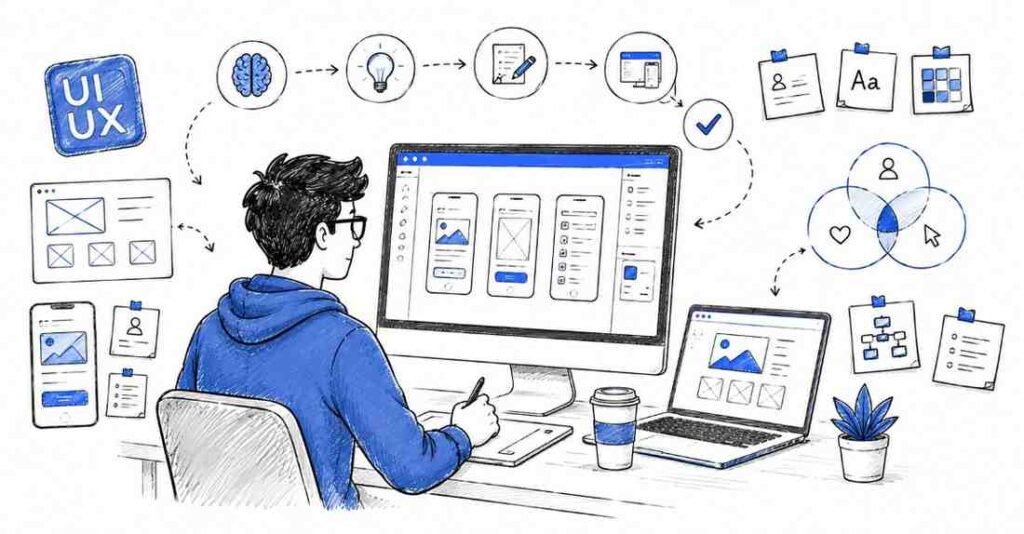
how to UIUX designer
⚡ Become a Job-Ready UI/UX Designer
Master UI, UX, research & portfolio building with our  UI/UX Design Course.

1. What is UI/UX Design?

UI/UX design encompasses the complete process of creating digital products that are both visually appealing and functionally effective. User Interface (UI) design focuses on the visual elements users interact with, while User Experience (UX) design concentrates on the overall journey and satisfaction users have when using a product. Modern UI/UX designers combine aesthetic sensibility with analytical thinking to solve complex user problems.

Core Responsibilities of UI/UX Designers:

User Experience (UX) Design:

  • User Research – Conduct interviews, surveys, and usability testing to understand user needs
  • Information Architecture – Organize content and features in logical, intuitive structures
  • User Journey Mapping – Design comprehensive user flows and interaction pathways
  • Wireframing and Prototyping – Create low and high-fidelity representations of design solutions
 

User Interface (UI) Design:

  • Visual Design – Typography, color theory, layout, and visual hierarchy implementation
  • Design Systems – Create consistent, scalable design languages across products
  • Interactive Design – Design animations, micro-interactions, and responsive behaviors
  • Design Handoff – Collaborate with developers to ensure accurate implementation
 

Research and Strategy:

  • Usability Testing – Validate design decisions through user feedback and behavior analysis
  • Competitive Analysis – Research market trends and competitor strategies
  • Design Thinking – Apply human-centered design methodologies to solve complex problems
  • Accessibility Design – Ensure products are usable by people with diverse abilities
 

UI vs UX: Understanding the Distinction

User Interface (UI) Design Focus:

  • Visual aesthetics and brand consistency
  • Typography, color schemes, and layout design
  • Interactive elements like buttons, forms, and navigation
  • Design system creation and maintenance
  • Pixel-perfect implementation and design specifications
 

User Experience (UX) Design Focus:

  • User research and persona development
  • Information architecture and user flow optimization
  • Problem-solving and strategic thinking
  • Usability testing and iterative improvement
  • Business goals alignment with user needs
 

Modern Product Designer Role:
Many organizations now seek “Product Designers” who combine both UI and UX skills with business acumen and technical understanding, representing the evolution of design roles in technology companies.

2. Why Choose UI/UX Design in 2025?

why choose uiux

Unprecedented Market Growth and Digital Transformation

According to Adobe’s Design Report 2025, companies with strong design cultures outperform competitors by 200% in stock price over 10 years. In India specifically, the design industry is experiencing remarkable growth:

Digital-First Business Models:

  • E-commerce Platforms – Flipkart, Amazon India, Myntra investing heavily in user experience optimization
  • Fintech Revolution – Paytm, Phone Pe, CRED focusing on intuitive financial product design
  • Healthcare Technology – 1mg, Practo, Apollo 24/7 prioritizing patient experience design
  • Education Technology – BYJU’S, Unacademy, Vedantu emphasizing engaging learning experiences
 

Government and Public Sector Design:

  • Digital India Initiatives – UX design for government services and citizen portals
  • Smart City Projects – Urban planning and digital infrastructure user experience
  • Public Transportation – Metro apps, bus tracking systems, and mobility solutions
 

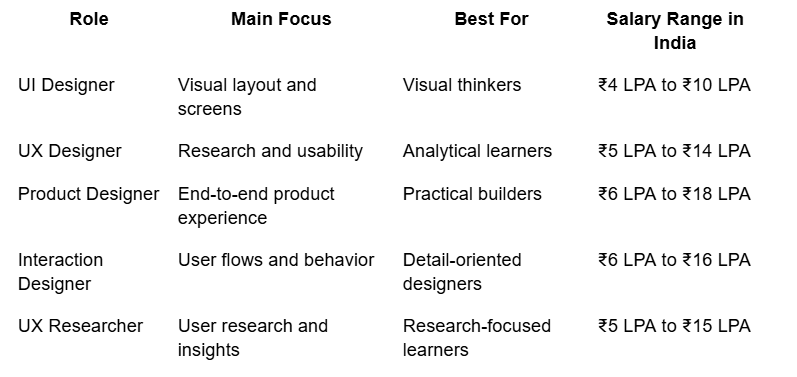
Competitive Salary Packages and Creative Satisfaction

UI/UX designers enjoy both financial rewards and creative fulfillment:

uiux

Source: PayScale India 2025, Glassdoor Design Salaries

Creative and Analytical Balance

UI/UX design offers unique appeal for professionals seeking both creativity and analytical challenge:

  • Creative Expression – Visual design, storytelling, and brand development
  • Problem Solving – Complex user problems requiring innovative solutions
  • Data-Driven Decisions – Analytics, A/B testing, and user behavior analysis
  • Cross-Functional Collaboration – Work with engineering, product management, and business teams
 

UI/UX Remote Work and Global Opportunities

Design work is highly suited for remote collaboration:

  • Global Design Teams – Work with international companies and clients
  • Freelance Flexibility – High demand for project-based design work
  • Digital Nomad Lifestyle – Location independence with stable income potential
 

Startup Ecosystem – Early-stage company equity and growth opportunities

3. Complete Learning Roadmap (5-7 Months)

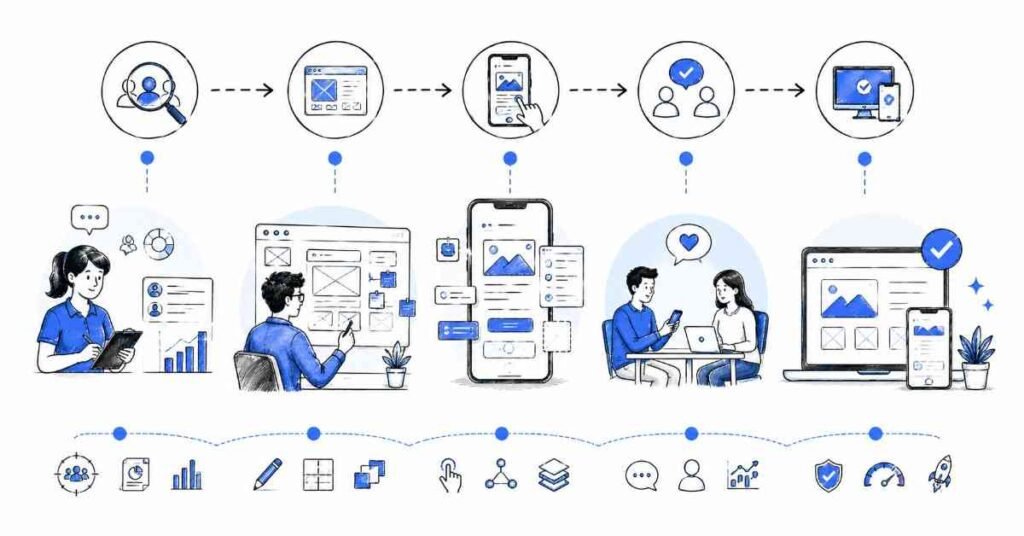
UIUX designer Roadmap

 Phase 1: UI/UX Design Fundamentals and Visual Principles (Months 1-2)

Design Theory and Principles (3-4 weeks)
Building strong theoretical foundation is crucial before diving into tools:

  • Visual Design Principles – Balance, contrast, emphasis, movement, proportion, unity
  • Color Theory – Color psychology, harmony, accessibility, brand applications
  • Typography – Font selection, hierarchy, readability, responsive typography
  • Layout and Composition – Grid systems, spacing, alignment, visual flow
 

User-Centered Design Thinking (2-3 weeks)

  • Design Thinking Process – Empathize, define, ideate, prototype, test methodology
  • Human Psychology – Cognitive load, attention patterns, decision-making processes
  • Accessibility Principles – WCAG guidelines, inclusive design, assistive technologies
  • Business Context – Understanding ROI of design, stakeholder management
 

Tool Introduction and Basic Skills (2-3 weeks)

  • Figma Basics – Interface navigation, basic shapes, text, and organization
  • Adobe Creative Suite – Photoshop and Illustrator fundamentals for design
  • Sketch Fundamentals – Mac-based design tool proficiency
  • Prototyping Basics – Interactive prototype creation and user flow design
 

Foundation Projects:

  1. Visual Design Challenge – Redesign existing app screens applying design principles
  2. Typography Project – Create type system for hypothetical brand
  3. Color Palette Development – Design accessible color schemes for different use cases
 

Phase 2: User Experience Research and Strategy (Months 2-3)

User Research Methodologies (4-5 weeks)

  • Qualitative Research – User interviews, contextual inquiry, diary studies
  • Quantitative Research – Surveys, analytics analysis, A/B testing interpretation
  • Persona Development – Data-driven user persona creation and validation
  • Empathy Mapping – Understanding user emotions, thoughts, and pain points
 

Information Architecture and User Flows (3-4 weeks)

  • Information Architecture – Site maps, content organization, navigation design
  • User Journey Mapping – End-to-end experience visualization and optimization
  • Task Flow Creation – Specific user task completion pathways
  • Wire-framing – Low-fidelity structure and layout design
 

UX Strategy and Planning (2-3 weeks)

  • Product Strategy – Aligning design goals with business objectives
  • Competitive Analysis – Market research and feature comparison
  • Design Requirements – Translating business needs into design specifications
  • Success Metrics – Defining and measuring design impact
 

Research and Strategy Projects:

  1. User Research Study – Complete research project with interviews, personas, and insights
  2. Information Architecture Project – Redesign complex website navigation and structure
  3. User Journey Optimization – Analyze and improve existing product experience
 

Phase 3: Advanced UI Design and Design Systems (Months 3-5)

Advanced Visual Design (4-5 weeks)

  • Advanced Layout Techniques – Complex grid systems, responsive design principles
  • Micro-interactions – Subtle animations and feedback mechanisms
  • Iconography – Custom icon design and icon system development
  • Brand Application – Translating brand guidelines into digital experiences
 

Design Systems and Component Libraries (3-4 weeks)

  • Atomic Design – Component-based design methodology
  • Design Token Management – Systematic approach to design variables
  • Component Documentation – Creating guidelines for design system usage
  • Scalable Design – Designing for multiple platforms and screen sizes
 

Responsive and Multi-Platform Design (3-4 weeks)

  • Responsive Web Design – Mobile-first design approach and breakpoint strategy
  • Mobile App Design – iOS and Android design guidelines and patterns
  • Cross-Platform Consistency – Maintaining brand coherence across platforms
  • Progressive Web Apps – Designing for modern web application experiences
 

Advanced UI Projects:

  1. Complete Design System – Comprehensive component library with documentation
  2. Responsive Web Application – Full website design across all device sizes
  3. Mobile App Design – iOS and Android app with platform-specific considerations
 

Phase 4: Prototyping and User Testing (Months 5-6)

Advanced Prototyping (3-4 weeks)

  • Interactive Prototypes – High-fidelity, clickable prototype creation
  • Animation and Transitions – Meaningful motion design for user guidance
  • Prototyping Tools Mastery – Figma, Principle, Framer, or Adobe XD advanced features
  • Developer Handoff – Specifications, assets, and implementation guidance
 

Usability Testing and Validation (3-4 week)

  • Test Planning – Usability test design and participant recruitment
  • Moderation Techniques – Conducting effective usability sessions
  • Data Analysis – Interpreting user feedback and behavioural data
  • Iterative Design – Implementing improvements based on testing results
 

Collaboration and Process (2-3 weeks)

  • Design Critique – Giving and receiving constructive design feedback
  • Stakeholder Presentation – Communicating design decisions and rationale
  • Agile/Scrum Integration – Working within development sprint cycles
  • Design Documentation – Creating specifications and design rationale documents
 

Prototyping and Testing Projects:

  1. Usability Testing Study – Complete testing project with analysis and recommendations
  2. Interactive Prototype – High-fidelity prototype with complex interactions
  3. Design Process Documentation – Case study showing complete design methodology
 

Phase 5: Specialization and Portfolio Development (Months 6-7)

Choose Specialization Track:

Visual/Brand Design Focus:

  • Advanced typography and layout design
  • Brand identity systems and applications
  • Marketing design and conversion optimization
  • Creative direction and visual storytelling
 

UX Research and Strategy Focus:

  • Advanced research methodologies
  • Service design and customer experience
  • UX writing and content strategy
  • Analytics and optimization
 

Product Design Focus:

  • Product strategy and roadmap planning
  • Cross-functional team leadership
  • Technical understanding and feasibility
  • Growth design and experimentation
 

Portfolio Development and Professional Presentation:

  • Case Study Creation – Detailed documentation of design process and impact
  • Portfolio Website – Professional presentation of work and capabilities
  • Personal Branding – Consistent online presence and thought leadership
 

Industry Networking – Design community engagement and relationship building

🗺️ Follow the Complete UI/UX Learning Roadmap
Beginner → Research → UI Design → Prototyping → Portfolio Open Roadmap →

4. Essential Tools and Software

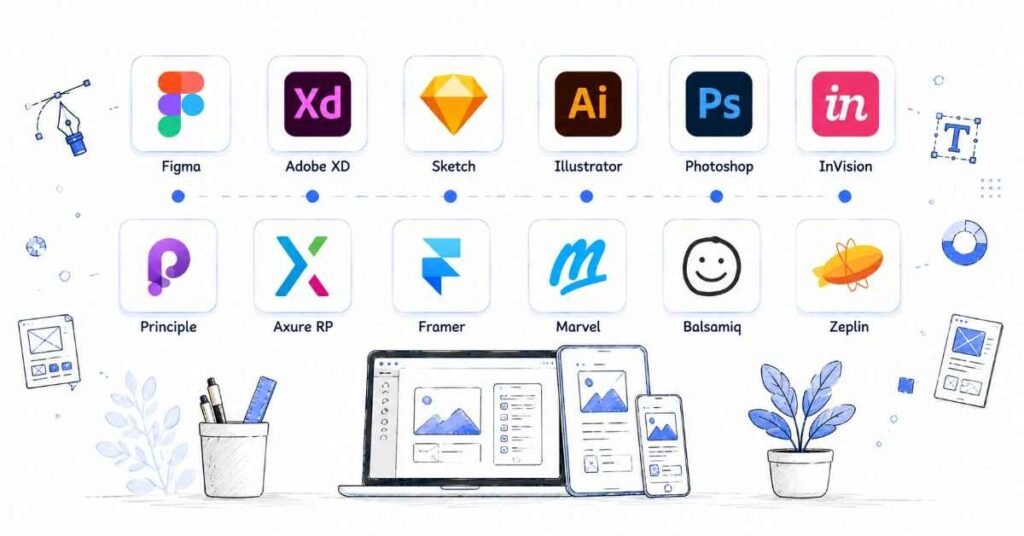
why choose UIUX designer

Core Design Tools

Figma (Industry Standard):

  • Collaborative Design – Real-time collaboration with team members and stakeholders
  • Component Systems – Reusable design components and design system management
  • Prototyping – Interactive prototypes with advanced animation capabilities
  • Developer Handoff – Automated specs, code snippets, and asset export
  • Cross-Platform – Works on Mac, Windows, and web browsers
 

Adobe Creative Suite:

  • Adobe XD – UI/UX design and prototyping with Creative Cloud integration
  • Photoshop – Image editing, visual design, and digital artwork creation
  • Illustrator – Vector graphics, icon design, and illustration work
  • After Effects – Motion graphics and advanced animation for design
 

Sketch (Mac Only):

  • Vector-Based Design – Precise design tool optimized for digital products
  • Plugin Ecosystem – Extensive third-party plugins for enhanced functionality
  • Symbol Management – Component-based design with nested symbols
  • Developer Integration – Seamless handoff with development tools
 

Prototyping and Animation Tools

Advanced Prototyping:

  • Principle – Timeline-based animation and interaction design
  • Framer – Code-based prototyping with React components
  • InVision – Collaborative prototyping and design workflow management
  • Marvel – Simple prototyping with user testing integration
 

Motion Design:

  • Lottie – Lightweight animations for web and mobile applications
  • Rive – Interactive animations and state-based motion graphics
  • Adobe After Effects – Professional motion graphics and video editing
  • Spine – 2D skeletal animation software for interactive content
 

User Research and Testing Tools

Research and Analytics:

  • Hotjar – User behavior analytics, heatmaps, and session recordings
  • Google Analytics – User behavior data and conversion funnel analysis
  • Mixpanel – Event tracking and user journey analytics
  • Amplitude – Product analytics and user behavior insights
 

User Testing Platforms:

  • UserTesting – Remote user testing with video feedback
  • Maze – Unmoderated user testing and prototype validation
  • Lookback – Live user research sessions and interview recording
  • Optimal Workshop – Card sorting, tree testing, and information architecture
 

Collaboration and Documentation

Design Collaboration:

  • Figma/FigJam – Collaborative whiteboarding and brainstorming
  • Miro – Digital whiteboard for workshops and ideation
  • Notion – Documentation, project management, and knowledge base
  • Slack – Team communication with design tool integrations
 

Version Control and Assets:

  • Abstract – Design version control and collaboration (for Sketch)
  • Plant – Version control for design files and collaboration
  • Zeplin – Design handoff and developer collaboration platform
  • Avocode – Design-to-code collaboration and asset management

5.Building Your Design Portfolio

uiux portfolio

Portfolio Strategy and Structure

Portfolio Objectives:

  1. Demonstrate Design Process – Show problem-solving methodology, not just final designs
  2. Showcase Versatility – Include different project types, industries, and design challenges
  3. Highlight Impact – Quantify results and business outcomes where possible
  4. Reflect Personality – Let your design philosophy and approach shine through
 

Essential Portfolio Components:

  • Case Studies (3-5 projects) – Detailed process documentation with outcomes
  • Visual Design Samples – UI components, illustrations, branding work
  • Process Artifacts – Sketches, wireframes, user research insights
  • About Section – Personal story, design philosophy, and career goals
  • Contact Information – Professional contact details and social links
 

Foundation Level Projects (Months 1-3)

  1. Mobile App Redesign
  • Challenge: Take an existing app with poor UX and redesign the core user experience
  • Process: User research, competitive analysis, wireframing, visual design, prototyping
  • Deliverables: Before/after comparison, user journey maps, high-fidelity designs, interactive prototype
  • Skills Demonstrated: Problem identification, user-centered design, visual design execution
  • Documentation: Complete case study showing research insights and design decisions
 
  1. Website Design for Local Business
  • Challenge: Create modern, responsive website for real or fictional local business
  • Process: Stakeholder interviews, content strategy, information architecture, responsive design
  • Deliverables: Site map, wireframes, visual designs for desktop/tablet/mobile, style guide
  • Skills Demonstrated: Business understanding, responsive design, brand application
  • Business Impact: Focus on conversion optimization and user engagement metrics
 

Intermediate Level Projects (Months 3-5)

  1. E-commerce User Experience Optimization
  • Challenge: Improve conversion rates and user satisfaction for online shopping experience
  • Research: User testing, analytics analysis, conversion funnel optimization
  • Design Solutions: Checkout flow redesign, product discovery improvements, personalization features
  • Validation: A/B testing recommendations, usability testing results
  • Business Case: Projected impact on conversion rates, average order value, user retention
 

Case Study Structure Example:

Project Title: E-commerce Checkout Optimization

1. Project Overview
  – Business challenge and goals
  – My role and responsibilities
  – Timeline and constraints

2. Research and Discovery
  – User interviews and survey results
  – Analytics data analysis
  – Competitive benchmarking
  – Key insights and opportunities

3. Problem Definition
  – User pain points identification
  – Business requirements alignment
  – Success metrics definition
  – Design constraints and considerations

4. Design Process
  – Ideation and concept development
  – Wireframing and information architecture
  – Visual design exploration
  – Prototype development

5. Solution and Testing
  – Final design presentation
  – Usability testing results
  – Iteration and refinement
  – Developer collaboration

6. Results and Impact
  – Key performance metrics
  – User feedback and satisfaction
  – Business impact measurement
  – Lessons learned and next steps

  1. Design System Creation
  • Challenge: Create comprehensive design system for hypothetical or existing product
  • Components: Typography, color system, iconography, UI components, patterns
  • Documentation: Usage guidelines, do’s and don’ts, implementation notes
  • Tools: Figma component library with proper organization and naming
  • Collaboration: Developer handoff specifications and implementation guidelines
 

Advanced Level Projects (Months 5-7)

  1. Cross-Platform Product Design
  • Scope: Complete product ecosystem including web application, mobile apps, and admin interfaces
  • Complexity: Multi-user types, complex workflows, integration requirements
  • Research: Comprehensive user research with multiple personas and use cases
  • Design Strategy: Information architecture, user flows, interaction design
  • Innovation: Novel design patterns, cutting-edge interaction techniques
  1. Service Design and Customer Experience
  • Challenge: Design complete service experience beyond digital touchpoints
  • Methodology: Service design thinking, customer journey mapping, stakeholder ecosystem
  • Deliverables: Service blueprints, touchpoint design, employee experience design
  • Impact: End-to-end experience optimization with measurable business outcomes
  • Presentation: Comprehensive strategy presentation suitable for executive audiences
 

Portfolio Presentation Best Practices

Online Portfolio Requirements:

  • Custom Domain – Professional URL reflecting your name or brand
  • Fast Loading – Optimized images and clean, efficient code
  • Mobile Responsive – Excellent experience across all device types
  • SEO Optimized – Discoverable through search engines and professional networks
  • Analytics Tracking – Understanding visitor behavior and engagement
 

Case Study Documentation:

# Project Case Study Template

 Hero Section
– Project title and one-line description
– Hero image showcasing final design
– Project type, timeline, and my role

 Challenge
– Business problem or user need
– Project constraints and requirements
– Success criteria and goals

 Process
 Research & Discovery
– User research methodologies
– Key insights and findings
– Persona development

 Design & Iteration
– Ideation and concept exploration
– Wireframing and prototyping
– Visual design development
– Usability testing and refinement

Solution
– Final design presentation
– Key features and innovations
– Design system components

 Impact & Results
– Quantified outcomes and metrics
– User feedback and testimonials
– Business impact and ROI
– Personal learnings and growth

Professional Photography and Presentation:

  • High-Quality Mock ups – Professional device mock ups and environmental shots
  • Consistent Visual Style – Cohesive presentation aesthetic across all projects
  • Process Documentation – Behind-the-scenes photos, sketches, workshop images
  • Video Walkthroughs – Interactive prototypes and animation demonstrations

Live Demonstration Portfolio:

  • Interactive Dashboards – Real-time demonstrations with scenario testing
  • Data Manipulation – Live problem-solving with complex datasets
  • VBA Applications – Custom tools and automation demonstrations
  • Presentation Skills – Executive-level communication and storytelling with data
🧠 Crack UI/UX Interviews Faster
Get real case-study questions, whiteboarding tasks & portfolio evaluation tips Open Interview Guide →

6. Job Search Strategy

uiux jobs

Resume Optimization for Design Roles

Design Resume Best Practices:

  • Visual Appeal – Clean, professional design that reflects your design sensibilities
  • Scannable Format – Clear hierarchy, appropriate white space, readable typography
  • ATS Compatibility – Include keywords from job descriptions, avoid complex graphics
  • Quantified Impact – Specific metrics and outcomes from design projects
 

Technical Skills Section:

Design Skills:
• User Experience: User Research, Persona Development, Journey Mapping, Usability Testing
• User Interface: Visual Design, Typography, Color Theory, Layout, Responsive Design
• Design Tools: Figma, Sketch, Adobe Creative Suite (Photoshop, Illustrator, XD)
• Prototyping: Interactive Prototypes, Micro-interactions, Animation, User Flow Design
• Research: User Interviews, Survey Design, Analytics Analysis, A/B Testing
• Collaboration: Design Systems, Developer Handoff, Stakeholder Presentation

Project Experience Examples:

E-commerce Mobile App Redesign

  • Challenge: 67% cart abandonment rate and poor user ratings (2.1/5) for existing shopping app
  • Solution: Conducted user research with 25 participants, redesigned checkout flow and product discovery experience
  • Process: User interviews, competitive analysis, iterative design, usability testing with 5 rounds of feedback
  • Impact: Increased conversion rate by 34%, improved app store rating to 4.2/5, reduced support tickets by 28%

SaaS Dashboard UX Optimization

  • Challenge: Complex enterprise software with steep learning curve causing high user churn
  • Solution: Simplified information architecture, created guided onboarding, redesigned core workflows
  • Research: Stakeholder interviews, user journey mapping, task analysis, comparative usability study
  • Results: Reduced time-to-value by 45%, decreased support requests by 52%, improved user retention by 23%

Design Job Market Landscape

High-Demand Role Categories:

  1. Product Designer (All Levels)
  • Salary Range: ₹6-35 LPA
  • Open Positions: 3,800+ across India
  • Key Skills: End-to-end product design, user research, prototyping, design systems
  • Growth Path: Senior Product Designer → Principal Designer → Design Director
 
  1. UX Researcher (Specialized)
  • Salary Range: ₹8-25 LPA
  • Open Positions: 1,200+ across India
  • Key Skills: Research methodologies, data analysis, behavioral insights, testing
  • Growth Path: Senior UX Researcher → Research Lead → Head of User Research
 
  1. UI Designer/Visual Designer (Visual Focus)
  • Salary Range: ₹4-20 LPA
  • Open Positions: 2,500+ across India
  • Key Skills: Visual design, branding, design systems, front-end collaboration
  • Growth Path: Senior UI Designer → Art Director → Creative Director
 
  1. Design System Designer (Emerging Specialty)
  • Salary Range: ₹10-30 LPA
  • Open Positions: 800+ across India
  • Key Skills: Component design, documentation, developer collaboration, scalability
  • Growth Path: Senior Design Systems Designer → Design Infrastructure Lead
 

Top Hiring Companies and Opportunities

Technology Product Companies:

  • Google India – Search, Android, Cloud product design teams
  • Microsoft India – Office, Teams, Azure user experience design
  • Adobe India – Creative Cloud, Document Cloud, Experience Cloud design
  • Amazon India – E-commerce, Prime Video, Alexa product design
 

Indian Product Companies:

  • Flipkart – E-commerce platform, seller tools, logistics experience design
  • Zomato – Food delivery, restaurant discovery, merchant platform design
  • Swiggy – Food delivery, hyperlocal commerce, B2B platform design
  • Paytm – Payment platform, financial services, merchant tools design
 

Design Agencies and Consultancies:

  • Fractal Ink Design Studio – Product design consultancy for startups and enterprises
  • Thinking Design – Strategic design consultancy with Fortune 500 clients
  • Happy Creative Services – Digital design agency with global client base
  • Monsoon Fish – Branding and digital design studio
 

Startup Ecosystem:

  • CRED – Credit card management and lifestyle platform
  • Dream11 – Fantasy sports platform with millions of users
  • Razorpay – Payment gateway and financial services design
  • Freshworks – Business software suite user experience
 

Interview Preparation Framework

Portfolio Presentation Structure:

  1. Project Selection and Storytelling
  • Choose 2-3 Best Projects – Quality over quantity, diverse problem types
  • 30-60-90 Second Summaries – Brief project overviews for different time constraints
  • Deep Dive Preparation – Detailed process explanation for 15-20 minute presentations
  • Question Anticipation – Prepare for specific methodology and decision-making questions
 
  1. Design Process Communication

Project Presentation Template:

Introduction (2 minutes):
– Project context and business challenge
– My role and team collaboration
– Timeline and constraints

Problem Discovery (3-4 minutes):
– User research findings and insights
– Key problems and opportunities identified
– Success metrics and goals defined

Design Process (8-10 minutes):
– Ideation and concept exploration
– Design iterations and rationale
– Collaboration with stakeholders
– Testing and validation approach

Solution Presentation (5-6 minutes):
– Final design walkthrough
– Key features and innovations
– Design system components
– Implementation considerations

Impact and Learning (2-3 minutes):
– Quantified results and outcomes
– User feedback and business impact
– Personal learnings and growth
– Next steps and future opportunities

Common Design Interview Questions:

Process and Methodology:

  1. “Walk me through your design process for this project”
    • Emphasize user-centered approach, iteration, and validation
    • Show flexibility in methodology based on project constraints
    • Highlight collaboration and stakeholder management
  2. “How do you handle conflicting feedback from stakeholders?”
    • Demonstrate diplomacy and user advocacy
    • Show process for prioritizing feedback
    • Explain how you build consensus around design decisions
 

Problem-Solving and Creativity:


3. “Design a mobile app for [specific user group/problem]”

  • Ask clarifying questions about users, constraints, and goals
  • Walk through structured problem-solving approach
  • Create rough sketches or wireframes during discussion
  1. “How would you improve the user experience of [existing product]?”
    • Identify specific user pain points and business opportunities
    • Propose research approach to validate assumptions
    • Suggest measurable improvements and success criteria
 

Technical and Collaboration:


4. “How do you ensure your designs are implemented accurately?”

  • Discuss design system creation and documentation
  • Explain collaboration techniques with developers
  • Show understanding of technical constraints and possibilities
  1. “Describe a time when user research changed your design direction”
    • Demonstrate openness to feedback and iteration
    • Show impact of research on design decisions
    • Explain how you validated new direction
 

Salary Negotiation and Career Advancement

Design-Specific Negotiation Factors:

  • Portfolio Quality – Strong case studies can justify 15-25% salary premiums
  • Skill Combination – UI + UX + Research skills command higher compensation
  • Industry Experience – Fintech, healthcare, enterprise SaaS offer premium rates
  • Design Leadership – Team management and mentoring experience significantly increases value
 

Total Compensation Considerations:

Design Role Compensation Package:
Base Salary: ₹X LPA (Fixed annual amount)
Performance Bonus: X% of base (Design impact metrics, project completion)
Stock Options: X shares (Especially valuable in growth-stage startups)
Learning Budget: ₹30,000-75,000 annually (Design conferences, courses, tools)
Creative Benefits: Design tool subscriptions, conference attendance, portfolio development time
Flexible Work: Remote work options, creative time allocation, sabbatical opportunities

Value Proposition for Salary Negotiation:

  1. User Impact Metrics – Demonstrate measurable improvements in user satisfaction, conversion rates
  2. Business Outcomes – Show revenue impact, cost savings, or market differentiation from design work
  3. Process Innovation – Highlight improvements to design process, team efficiency, or collaboration
  4. Cross-Functional Value – Emphasize ability to work with engineering, product, marketing teams
  5. Continuous Learning – Show commitment to staying current with design trends and methodologies

7. Salary Expectations and Career Growth

uiux Career & salary growth

2025 Compensation Benchmarks by Specialization

UI Designer Track:

  • Junior UI Designer (0-2 years): ₹4-8 LPA
  • UI Designer (2-5 years): ₹8-16 LPA
  • Senior UI Designer (5-8 years): ₹16-25 LPA
  • Principal UI Designer (8+ years): ₹25-35 LPA
 

UX Designer Track:

  • Junior UX Designer (0-2 years): ₹5-10 LPA
  • UX Designer (2-5 years): ₹10-20 LPA
  • Senior UX Designer (5-8 years): ₹20-30 LPA
  • Principal UX Designer (8+ years): ₹30-45 LPA
 

Product Designer Track:

  • Associate Product Designer (0-2 years): ₹6-12 LPA
  • Product Designer (2-5 years): ₹12-24 LPA
  • Senior Product Designer (5-8 years): ₹25-40 LPA
  • Staff Product Designer (8+ years): ₹35-55 LPA
 

Design Leadership Track:

  • Design Lead (5-8 years): ₹25-35 LPA
  • Design Manager (7-12 years): ₹30-45 LPA
  • Design Director (10-15 years): ₹40-65 LPA
  • VP Design/Chief Design Officer (12+ years): ₹55-85 LPA
 

Industry and Company Size Variations

High-Paying Industries:

  • Technology/Product Companies – 20-30% premium over service companies
  • Financial Services/Fintech – 15-25% premium for complex UX challenges
  • Healthcare Technology – 10-20% premium for regulatory and accessibility expertise
  • Enterprise Software – 15-25% premium for B2B UX specialization
 

Company Size Impact:

  • Large Tech Companies (1000+ employees) – Highest base salaries, comprehensive benefits
  • Mid-Stage Startups (100-1000 employees) – Competitive salaries with equity upside
  • Early-Stage Startups (<100 employees) – Lower base but significant equity potential
  • Design Agencies – Project variety but often 10-20% lower than product companies
 

Geographic Salary Distribution:

  • Bangalore – Highest design job concentration, 15-20% above national average
  • Mumbai – Financial services and advertising design hub, 12-18% above average
  • Delhi/NCR – Government and enterprise design opportunities, 8-15% above average
  • Pune – Growing design scene with automotive and IT companies, 5-12% above average
 

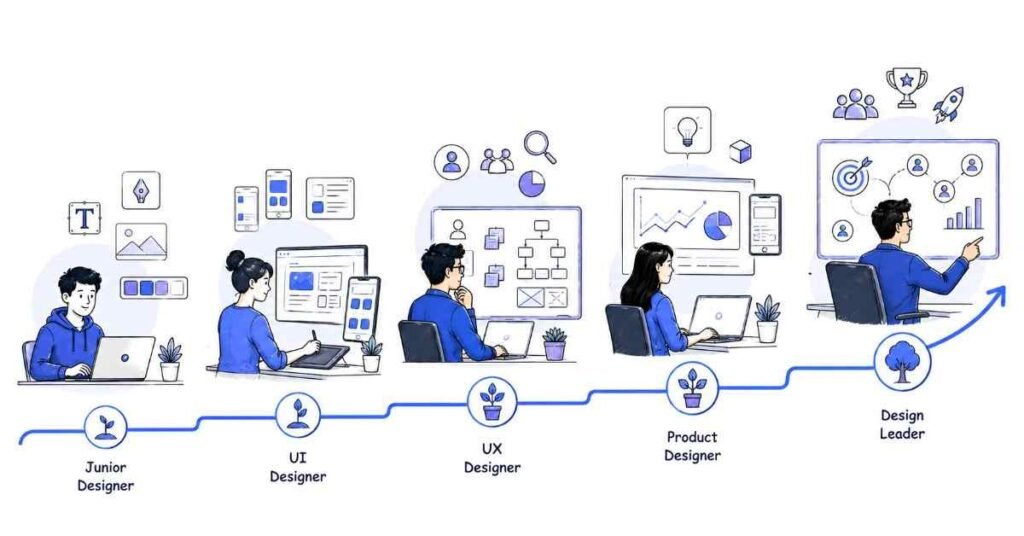
Career Progression Pathways

Individual Contributor Track:

Junior Designer (0-2 years)
    ↓
Designer (2-5 years)
    ↓
Senior Designer (5-8 years)
    ↓
Staff/Principal Designer (8-12 years)
    ↓
Distinguished Designer (12+ years)

Management Track:

Senior Designer (4-7 years)
    ↓
Design Lead (6-10 years)
    ↓
Design Manager (8-15 years)
    ↓
Design Director (12-20 years)
    ↓
VP Design/CDO (15+ years)

Specialization Tracks:

Design Systems Track:
Designer → Design Systems Designer → Principal Design Systems Designer → Design Infrastructure Lead

Research Track: 
UX Designer → UX Researcher → Senior UX Researcher → Research Lead → Head of Research

Strategy Track:
Product Designer → Strategy Designer → Design Strategy Lead → VP Design Strategy

Skills for Accelerated Career Growth

Technical Mastery (Years 1-3):

  • Design Tool Expertise – Advanced proficiency in Figma, prototyping, animation tools
  • User Research Skills – Qualitative and quantitative research methodologies
  • Design System Creation – Component libraries, documentation, scalable design
  • Cross-Platform Design – Web, mobile, and emerging interface design
 

Strategic Thinking (Years 3-6):

  • Business Acumen – Understanding of business metrics, market dynamics, competitive landscape
  • Product Strategy – Roadmap planning, feature prioritization, user journey optimization
  • Data Analysis – Analytics interpretation, A/B testing, conversion optimization
  • Stakeholder Management – Executive communication, cross-functional collaboration
 

Leadership and Vision (Years 6+):

  • Design Leadership – Team building, culture development, design critique facilitation
  • Design Strategy – Organizational design vision, process improvement, tool evaluation
  • Innovation Leadership – Emerging technology adoption, design trend forecasting
  • Industry Influence – Thought leadership, conference speaking, design community contribution
 

Emerging Opportunities and Future Trends

High-Growth Design Specializations:

  • Voice and Conversational UI – Alexa, Google Assistant, chatbot interface design
  • AR/VR Experience Design – Immersive interface design for spatial computing
  • AI/ML Product Design – Designing interfaces for AI-powered products and services
  • Accessibility and Inclusive Design – Specialized expertise in universal design principles
  • Service Design – End-to-end customer experience design beyond digital touchpoints
 

Market Trends Creating New Opportunities:

  • Remote-First Design – Distributed team collaboration and asynchronous design processes
  • No-Code/Low-Code Platforms – Designing tools that empower non-technical users
  • Sustainable Design – Environmental consciousness in digital product design
  • Ethical Design – Privacy-first design, digital wellbeing, responsible AI interfaces

8. Success Stories from Our Students

Aditi Sharma – From Graphic Designer to Product Design Lead

Background: 4 years as graphic designer in advertising agency with print and branding focus
Challenge: Transitioning from static design to interactive digital products and user experience
Strategic Approach: Systematic learning of UX methodologies while leveraging visual design strengths
Timeline: 14 months from course enrollment to product design leadership role
Current Position: Senior Product Designer at CRED
Salary Progression: ₹6.5 LPA → ₹11.2 LPA → ₹18.8 LPA → ₹28.5 LPA (over 30 months)

Aditi’s Transformation Strategy:

  • Skill Bridge Building – Connected graphic design expertise to UI design and visual systems
  • UX Foundation – Dedicated 4 months to user research, information architecture, and usability testing
  • Portfolio Pivot – Redesigned portfolio to showcase process thinking rather than just visual output
  • Industry Networking – Joined Bangalore design community, attended UX conferences and meetups
 

Key Success Factors:

  • Process Documentation – “I learned that design thinking process is as important as visual output. My case studies now show the ‘why’ behind every design decision.”
  • User Empathy Development – “Coming from advertising, I had to shift from brand-focused to user-focused thinking. User research completely changed how I approach problems.”
  • Cross-Functional Collaboration – “Learning to work with product managers and engineers was crucial. Understanding technical constraints helped me design better solutions.”
 

Current Impact: Leading design for CRED’s credit management platform used by 8+ million users, responsible for design strategy affecting ₹500+ crore transaction volume, mentoring team of 6 junior designers.

Rohit Agarwal – From Developer to UX Research Lead

Background: 6 years as frontend developer with strong technical background but limited design exposure
Challenge: Career transition from implementation to strategy and user advocacy
Unique Path: Leveraged technical understanding to bridge design and engineering teams
Timeline: 18 months from career pivot to UX research leadership position
Career Trajectory: Frontend Developer → Product Designer → UX Researcher → UX Research Lead
Current Role: Head of UX Research at PhonePe

Compensation and Impact Growth:

  • Pre-transition: ₹12.8 LPA (Senior Frontend Developer)
  • Year 1: ₹16.5 LPA (Product Designer at fintech startup)
  • Year 2: ₹24.2 LPA (UX Researcher at mid-size company)
  • Current: ₹35.8 LPA + equity (Head of UX Research at PhonePe)
 

Rohit’s Research Specialization:

  • Technical Research Focus – Usability testing for complex financial products, API design research
  • Quantitative Analysis – Advanced data analysis skills applied to user behavior research
  • Developer Collaboration – Unique ability to translate research insights into technical requirements
  • Scale and Impact – Research insights affecting product decisions for 400+ million users
 

Research Innovation and Leadership:

  • Research Operations – Built UX research infrastructure and methodology frameworks
  • Cross-Platform Studies – Led research for web, mobile, and emerging platform experiences
  • Business Impact – Research recommendations driving ₹100+ crore revenue optimization
  • Team Development – Established UX research practice, hired and trained 8 researchers
 

Success Philosophy: “My technical background gave me credibility with engineering teams and helped me design more feasible research studies. Understanding implementation constraints made my research recommendations more actionable and impactful.”

Priya Gupta – From Fresher to Design System Lead

Background: Recent design graduate with strong visual design skills but no industry experience
Challenge: Breaking into competitive design job market and establishing specialization quickly
Strategic Focus: Design systems specialization to differentiate from general UI/UX candidates
Timeline: 22 months from graduation to design systems leadership role
Career Evolution: Design Intern → UI Designer → Design Systems Designer → Design Systems Lead
Current Position: Principal Design Systems Designer at Razorpay

Rapid Career Acceleration:

  • Months 1-6: ₹4.5 LPA (Design Intern converting to full-time UI Designer)
  • Months 7-12: ₹8.8 LPA (UI Designer with design systems focus)
  • Months 13-18: ₹16.5 LPA (Design Systems Designer)
  • Current: ₹28.2 LPA + equity (Principal Design Systems Designer)
 

Priya’s Specialization Strategy:

  • Early Niche Focus – Recognized design systems as emerging specialization with high demand
  • Technical Learning – Developed understanding of component libraries, design tokens, documentation
  • Open Source Contribution – Created and maintained design system resources for design community
  • Cross-Functional Skills – Learned to collaborate closely with frontend engineering teams
 

Design Systems Impact:

  • Scale Achievement – Design system supporting 15+ product teams across multiple platforms
  • Efficiency Gains – Reduced design-to-development handoff time by 65%
  • Consistency Improvement – Achieved 95% design consistency across all Razorpay products
  • Developer Adoption – 90%+ developer satisfaction with design system implementation
 

Community Leadership:

  • Design Systems Community – Co-organizer of Mumbai Design Systems meetup with 500+ members
  • Knowledge Sharing – Speaker at 8 design conferences, published design systems best practices
  • Mentorship Program – Guided 12 junior designers through design systems specialization
  • Industry Recognition – Featured in design publications as emerging design systems leader
 

Career Insights: “Design systems sit at the intersection of design, engineering, and product strategy. By specializing early and building both design and technical skills, I created a unique value proposition that companies desperately needed but few designers could provide.”

✨ Follow Your UI/UX Learning Path
Choose your track — UI, UX Research, Product Design, or Design Systems View Learning Path →
9. Common Challenges and How to Overcome Them

uiux challenges

Challenge 1: Building Credible Design Portfolio Without Professional Experience

Problem: Entry-level designers struggle to create compelling portfolios without real client work or business impact
Impact: Difficulty securing interviews, perception of inexperience, weak case study presentations
Symptoms: Generic redesign projects, lack of process documentation, no measurable outcomes

Portfolio Development Strategy for Beginners:

Create Realistic Project Contexts:

  • Partner with Local Businesses – Offer pro bono design work for real business challenges
  • Volunteer for Non-Profits – Design solutions for meaningful causes with genuine constraints
  • Join Hackathons and Design Challenges – Participate in time-constrained, brief-based projects
  • Design Daily Challenges – 30-day UI challenges, design prompts from design communities
 

Process Over Polish Strategy:

Case Study Development Framework:

1. Problem Identification (25% of case study)
  – Real user research or realistic problem scenarios
  – Clear problem statement with user impact
  – Business context and constraints
  – Success criteria definition

2. Design Process Documentation (50% of case study)
  – Research methodology and insights
  – Ideation techniques and concept exploration
  – Iteration cycles with rationale for changes
  – Collaboration and feedback integration

3. Solution Presentation (20% of case study)
  – Final design with clear functionality
  – Design system components and patterns
  – Accessibility and responsive considerations
  – Implementation feasibility assessment

4. Impact and Learning (5% of case study)
  – Projected or actual impact metrics
  – Personal learning and skill development
  – Next steps and future opportunities
  – Reflection on process improvements

Skill-Building Project Ideas:

  • App Store Optimization – Redesign app store listings for better conversion
  • Accessibility Audit – Evaluate and improve accessibility for existing websites
  • Design System Creation – Build component library for hypothetical or existing brand
  • User Research Study – Conduct genuine research study with family/friends as participants
 

Challenge 2: Transitioning from Visual Design to User Experience Design

Problem: Graphic designers struggle to shift from aesthetic focus to user-centered problem solving
Challenge: Different mindset, new methodologies, unfamiliar tools and processes
Solution: Structured learning approach that builds on existing visual design strengths

Mindset Transition Framework:

Phase 1: Foundation Shift (4-6 weeks)

  • User-Centered Thinking – Practice identifying user needs before aesthetic considerations
  • Problem-Solution Mapping – Learn to frame visual choices as solutions to user problems
  • Research Integration – Incorporate user feedback into design iteration cycles
  • Metrics Understanding – Connect design decisions to measurable user outcomes
 

Phase 2: Methodology Learning (6-8 weeks)

  • Research Methods – Start with observational research, surveys, basic usability testing
  • Information Architecture – Practice organizing content based on user mental models
  • Interaction Design – Learn principles of intuitive interface behavior and feedback
  • Prototype Thinking – Shift from static compositions to interactive experiences
 

Bridge-Building Exercises:

Week-by-Week Transition Plan:

Week 1-2: Visual Analysis with User Intent
– Analyze existing designs for user goals served
– Identify visual hierarchy supporting user tasks
– Practice explaining visual choices in user-benefit terms

Week 3-4: Simple User Research
– Conduct 5 user interviews about existing app experiences 
– Create user personas based on research insights
– Map user journeys for common task completion

Week 5-6: Information Architecture Practice
– Card sorting exercises with real users
– Site map creation based on user mental models
– Navigation design prioritizing user goals over visual appeal

Week 7-8: Basic Prototyping and Testing
– Create clickable prototypes for user task flows
– Conduct simple usability tests with 3-5 participants
– Iterate designs based on user feedback and behavior

Challenge 3: Keeping Up with Rapidly Evolving Design Tools and Trends

Problem: UI/UX Design tools and methodologies evolve rapidly, creating continuous learning pressure
Challenge: Tool proliferation, trend fatigue, time management for skill development
Solution: Strategic tool adoption and trend evaluation framework

Tool Learning Prioritization Matrix:

High Impact, Low Learning Curve:
– Figma components and auto-layout
– Basic prototyping and animation
– Design system organization
– Collaboration features

High Impact, High Learning Curve:
– Advanced prototyping (Principle, Framer)
– User research platforms and analysis
– Design-to-code workflows
– Analytics and optimization tools

Low Impact, Low Learning Curve:
– Design inspiration and mood boarding tools
– Basic image editing and manipulation
– Simple productivity and organization apps

Low Impact, High Learning Curve:
– Highly specialized or niche design tools
– Complex animation and motion graphics
– Advanced data visualization tools

Continuous Learning Strategy:

  • Core Tool Mastery (70% effort) – Deep expertise in primary tools (Figma, research methods)
  • Emerging Tool Exploration (20% effort) – Experiment with new tools and workflows
  • Trend Monitoring (10% effort) – Stay informed about design trends without constantly adopting
 

Learning Time Management:

  • Daily (15 minutes) – Design inspiration browsing, tool tip learning
  • Weekly (2 hours) – Deep dive into one new feature or technique
  • Monthly (4 hours) – Evaluate new tools, update skill development plan
  • Quarterly (8 hours) – Major tool updates, workflow optimization, portfolio refresh
 

Challenge 4: Communicating Design Value to Non-Design Stakeholders

Problem: Difficulty explaining design decisions and ROI to business stakeholders and developers
Impact: Design decisions being overruled, limited design input in strategic decisions
Solution: Business-focused communication and metrics-driven design advocacy

Stakeholder Communication Framework:

Executive Communication (C-Level, VPs):

  • Business Impact Language – Revenue, conversion rates, customer satisfaction, market differentiation
  • Competitive Advantage – How design creates sustainable business benefits
  • Risk Mitigation – Cost of poor design, customer churn prevention
  • Strategic Alignment – Design decisions supporting business objectives
 

Product Management Communication:

  • User Story Integration – Frame design work within product requirements and user stories
  • Feature Prioritization – Design input on feature importance based on user research
  • Success Metrics – Shared KPIs and measurement approaches
  • Timeline Alignment – Realistic design timeline integration with development sprints
 

Engineering Team Communication:

  • Technical Feasibility – Understanding implementation constraints and possibilities
  • Component Thinking – Design systems approach that aligns with development architecture
  • Specification Clarity – Detailed, implementable design documentation
  • Iteration Collaboration – Agile-friendly design process with developer feedback integration
 

Communication Tools and Templates:

Design Decision Template:

Problem Statement:
– User pain point or business challenge
– Impact of current solution or lack thereof
– Opportunity for improvement

Design Solution:
– Proposed approach with rationale
– Alternative options considered
– Implementation requirements and timeline

Expected Impact:
– User experience improvements (qualitative)
– Business metrics impact (quantitative)
– Risk mitigation and long-term benefits
– Success measurement approach

Resource Requirements:
– Design effort and timeline
– Development effort estimation
– Additional tools or research needed
– Stakeholder involvement required

💰 Ready for High-Paying UI/UX Roles?
Become a professional designer with our UI/UX Design Course.

10. Your Next Steps

uiux next steps

Week 1: Foundation and Tool Setup

Day 1-2: Design Environment Setup

  1. Download Design Tools – Install Figma (free), create Adobe Creative Cloud trial account
  2. Create Learning Accounts – Dribbble, Behance for inspiration, Coursera/Udemy for courses
  3. Join Design Communities – Designer Hangout Slack, Reddit r/userexperience, local design groups
  4. Set Up Workspace – Organize digital workspace, create folder structure for learning projects
 

Day 3-4: Design Fundamentals Exploration

  1. Study Design Principles – Read about color theory, typography, layout principles
  2. Analyze Existing Designs – Critique 10 apps/websites using design principles
  3. Practice Basic Tools – Create simple designs in Figma, explore interface and basic features
  4. Create Inspiration Collection – Curate design examples that resonate with your aesthetic preferences
 

Day 5-7: Learning Path Planning and Goal Setting

  1. Assess Current Skills – Evaluate existing design, technical, and business skills
  2. Choose Specialization Direction – UI focus, UX research focus, or balanced product design approach
  3. Create Learning Schedule – Allocate daily study time and weekend project work
  4. Join Local Design Community – Find design meetups, user groups, or coworking spaces in your city
 

Month 1: Design Fundamentals and Visual Skills

Week 1-2: Visual Design Foundation

  • Color Theory Application – Practice color palette creation for different brand personalities
  • Typography Mastery – Learn font pairing, hierarchy, readability across different contexts
  • Layout and Composition – Grid systems, alignment, spacing, visual balance
  • Design Tool Proficiency – Advanced Figma features, component creation, auto-layout
 

Week 3-4: Digital Design Principles

  • Responsive Design Concepts – Mobile-first thinking, breakpoints, flexible layouts
  • Interface Design Patterns – Common UI components, navigation patterns, form design
  • Accessibility Basics – Color contrast, keyboard navigation, screen reader compatibility
  • Brand Application – Translating brand guidelines into digital interface design
 

Month-End Project: “Mobile App Visual Design”

  • Choose existing app with poor visual design
  • Create improved visual design maintaining same functionality
  • Document design decisions and principle applications
  • Present before/after comparison with rationale
 

Month 2: User Experience and Research Introduction

Week 1-2: UX Methodology Foundation

  • Design Thinking Process – Empathize, define, ideate, prototype, test methodology
  • User Research BasicsInterview techniques, survey design, observational research
  • Persona Development – Data-driven persona creation from research insights
  • User Journey Mapping – Current state analysis, future state design, touchpoint optimization
 

Week 3-4: Information Architecture and User Flows

  • Information Architecture – Site maps, content organization, navigation design
  • User Flow Creation – Task flow design, decision trees, error state handling
  • Wireframing – Low-fidelity structure design, content prioritization
  • Usability Principles – Nielsen’s heuristics, cognitive load, user mental models
 

Research Practice Projects:

  • User Interview Study – Conduct 5 interviews about app usage patterns
  • Competitive Analysis – Compare 3 similar products across multiple dimensions
  • Information Architecture Exercise – Redesign complex website navigation structure
 

Month 3: Advanced Design Skills and Prototyping

Week 1-2: High-Fidelity Design and Systems

  • Advanced Visual Design – Micro-interactions, animation principles, advanced layouts
  • Component Systems – Design system creation, component documentation, scalability
  • Design Handoff – Developer collaboration, specification creation, asset organization
  • Cross-Platform Design – iOS and Android guidelines, web vs mobile considerations
 

Week 3-4: Prototyping and Validation

  • Interactive Prototyping – Advanced Figma prototyping, micro-interactions, animation
  • Usability Testing – Test planning, moderation, analysis, iteration recommendations
  • A/B Testing Concepts – Hypothesis creation, variant design, success metrics
  • Analytics Integration – Understanding user behavior data, conversion funnel analysis
 

Advanced Learning Goals:

  • Complete Design System – Comprehensive component library with documentation
  • Usability Testing Study – End-to-end research project with actionable insights
  • Interactive Prototype – High-fidelity, clickable prototype demonstrating complex interactions
  • Portfolio Development – Professional case study documentation and presentation
 

Long-Term Milestones (6-12 Months)

Professional Portfolio Development:

  • 3-5 Comprehensive Case Studies – Detailed process documentation with business impact
  • Specialization Projects – Deep expertise demonstration in chosen focus area
  • Professional Online Presence – Portfolio website, LinkedIn optimization, design community participation
  • Design Process Mastery – Confident execution of end-to-end design projects
 

Industry Knowledge and Networking:

  • Design Community Engagement – Regular meetup attendance, online community participation
  • Industry Trend Awareness – Stay current with design trends, tool developments, best practices
  • Cross-Functional Understanding – Learn about product management, engineering, business strategy
  • Mentorship and Learning – Find design mentors, peer learning groups, senior designer relationships
 

Career Transition Preparation:

  • Resume and Portfolio Optimization – Professional presentation of skills and experience
  • Interview Preparation – Portfolio presentation skills, design challenge practice, storytelling
  • Salary Research and Negotiation – Market rate understanding, value proposition development
 

Job Search Strategy – Target company research, application approach, networking utilization

Conclusion

uiux

UI/UX design represents one of the most creatively fulfilling and intellectually challenging career paths in technology, offering the unique opportunity to directly impact how millions of people interact with digital products daily. As organizations increasingly recognize design as a competitive advantage and business differentiator, skilled designers enjoy strong job security, competitive compensation, and the satisfaction of solving complex human problems.

The journey from design beginner to professional typically UI/UX Design requires 5-7 months of dedicated learning and portfolio development, but the investment delivers both immediate creative satisfaction and long-term career growth potential. Unlike many technology roles that focus purely on technical implementation, design combines analytical problem-solving with creative expression, making it appealing to professionals with diverse backgrounds and interests.

Critical Success Factors for Design Career Excellence:

  • User-Centered Mindset – Always prioritize user needs and business goals over personal aesthetic preferences
  • Process-Driven Approach – Develop systematic methodologies for research, ideation, and validation
  • Continuous Learning – Stay current with design trends, tools, and methodologies in rapidly evolving field
  • Cross-Functional Collaboration – Build strong relationships with product managers, engineers, and business stakeholders
  • Business Impact Focus – Connect design decisions to measurable business outcomes and user satisfaction

The most successful designers combine creative vision with analytical rigor and strategic thinking. As products become increasingly complex and user expectations continue to rise, designers who can navigate ambiguity, synthesize complex requirements, and create elegant solutions will be most valued by organizations.

Whether you choose visual design specialization, UX research focus, or comprehensive product design, design skills provide a foundation for diverse career opportunities including design leadership, product management, and entrepreneurship in the creative economy.

Ready to launch your UI/UX design career and create digital experiences that users love?

Explore our comprehensive UI/UX Design Program designed for career changers and aspiring design professionals:

  • 5-month intensive curriculum covering visual design, user research, prototyping, and design systems
  • Industry-standard tools training including Figma, Adobe Creative Suite, and prototyping platforms
  • Real-world portfolio projects with comprehensive case study development and presentation training
  • User research methodology including interview techniques, usability testing, and analytics interpretation
  • Job placement assistance with portfolio review, interview coaching, and employer connections
  • Design mentorship from experienced product designers and design leaders at major tech companies
  • Lifetime learning support including design trend updates, tool training, and career advancement guidance

Unsure which design specialization aligns with your interests and career goals? Schedule a free design career consultation with our experienced design mentors to receive personalized guidance and a customized learning roadmap.

Connect with our design community: Join our UI/UX Designers WhatsApp Group with 260+ students, alumni, and working design professionals for daily inspiration, project feedback, and job referrals.

🎯 Start Your UI/UX Design Journey Today
Learn the skills → Build your portfolio → Crack interviews → Get hired.