90-Day UI/UX Design Course Roadmap: From Beginner to Job-Ready Designer
Table of Contents
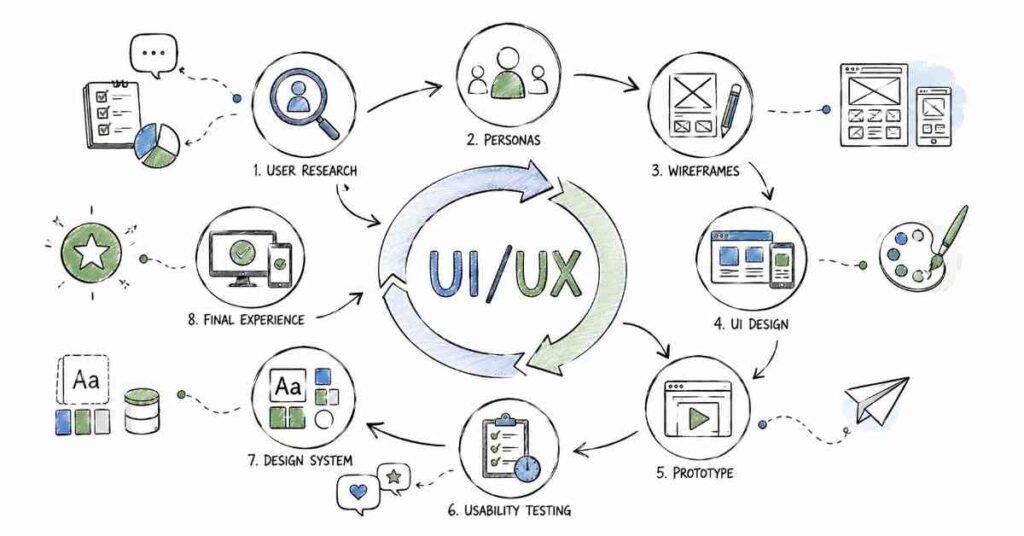
This 90-day UI/UX roadmap is designed to take you from absolute beginner to job-ready designer with a clear, practical learning path. You will start with user research and design fundamentals, then move into wireframing, information architecture, interaction design, visual design, and usability testing before finishing with portfolio building and interview preparation. The goal is simple: help students in Hyderabad, Telangana, Andhra Pradesh, and across India build the skills that employers actually expect from a UI/UX designer. UI/UX roles are in demand because businesses want digital products that are simple, attractive, and easy to use. By the end of 90 days, you should be ready for entry-level design roles with a strong portfolio and confidence.
Why UI/UX Design Is a Strong Career Choice
UI/UX design has become one of the most exciting career paths in tech because every business now needs better digital experiences. Companies do not just want apps and websites that work; they want products that feel intuitive, reduce user frustration, and convert visitors into customers. That means skilled UI/UX designers are needed in product companies, startups, agencies, fintech, healthcare, education, and e-commerce.
This is also a field where creativity and problem-solving matter more than a specific degree. If you can understand users, organize screens clearly, and design interfaces that are easy to use, you already have the foundation. That is why this roadmap focuses on practical work from the very beginning.
- UI/UX improves usability, clarity, and user satisfaction.
- It is used across product companies, startups, agencies, and service firms.
- Entry-level candidates can grow quickly with the right project work.
- The skill set is useful for both freshers and working professionals.
- UI/UX knowledge often leads to strong long-term career growth.
🎨 Start Your UI/UX Design Journey
Become a professional UI/UX Designer in 90 days with hands-on projects, Figma training, and portfolio building. Begin today with our UI/UX Design Course.
90-Day Learning Plan
Month | Focus Area | Outcome |
Month 1 | Design thinking, user research, wireframing, Figma basics | You understand the foundation of UI/UX |
Month 2 | Prototyping, information architecture, interaction design, visual design | You can create polished product screens |
Month 3 | Usability testing, portfolios, accessibility, interview prep | You can present real projects and apply for jobs |
Month 1: UI/UX Foundations
Month 1 is about building the base. If you skip the basics, the advanced tools will feel confusing later. Linux, Git, and shell scripting are the everyday language of DevOps, so this month gives you the confidence to work in real environments.
Week 1: UI/UX Basics
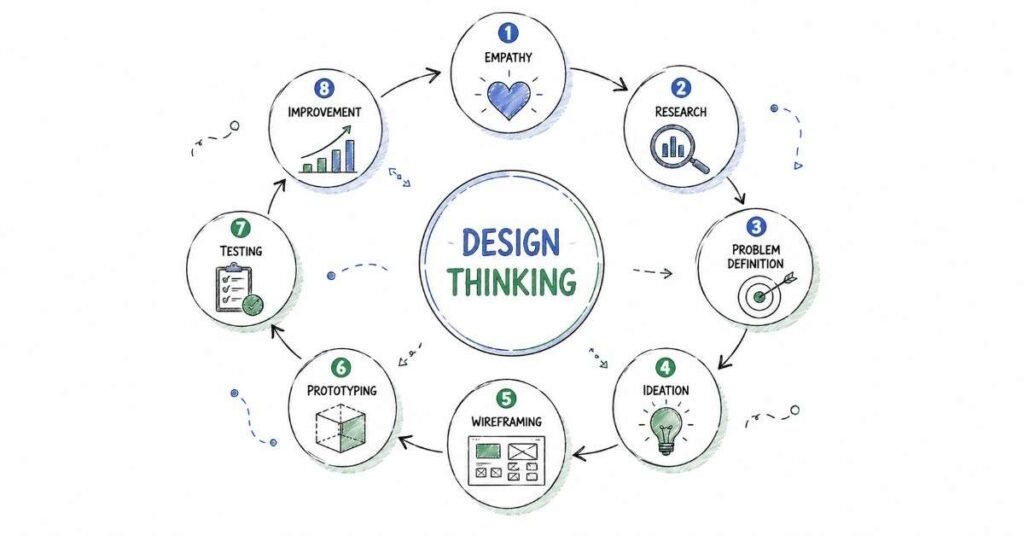
UI/UX is about solving problems for real people. The first week helps you understand the difference between UI and UX, the stages of the design process, and the role of a designer in a product team. You should also learn about user-centered design, empathy, and why design decisions must be based on user needs rather than personal preference.
- Learn the difference between UI and UX.
- Understand design thinking and the design process.
- Explore the role of a UI/UX designer.
- Study user-centered design and empathy.
- Practice identifying good and bad interfaces.
Week 2: User Research
User research is the starting point of every good product. Before you design anything, you need to know who your users are, what problems they face, and what goals they want to achieve. Learn research methods like interviews, surveys, observation, and competitive analysis. This week also helps you understand personas and user journeys.
Research Method | Purpose |
Interviews | Learn user goals and pain points directly |
Surveys | Gather feedback from many users quickly |
Observation | See how users behave in real situations |
Competitive analysis | Compare how other products solve the same problem |
Week 3: Information Architecture and Wireframing
Information architecture is the structure behind a product. It helps users find what they need without confusion. Wireframes turn that structure into simple screen layouts. Start with low-fidelity sketches, then move into digital wireframes. Keep your focus on layout, hierarchy, and user flow instead of colors and visual polish.
- Learn card sorting and sitemap basics.
- Understand navigation structure.
- Create low-fidelity sketches.
- Build wireframes in Figma.
- Practice designing simple user flows.
Week 4: Figma Basics and Month 1 Review
Figma is one of the most important tools in UI/UX design. In this week, learn the workspace, frames, shapes, text, alignment, components, and basic sharing features. Also practice creating simple interface screens and exporting your work. By the end of Month 1, you should feel comfortable turning ideas into clean wireframes.
💡 How To Become a UIUX Designer
learned with practical, step-by-step tutorials inside our UI/UX Guide
Month 2: Prototyping and Visual Design
Month 2 is where your work starts to look like a real product. You move from structure to interaction and from rough layouts to polished screens. This is the stage where most students begin to enjoy the process because they can finally see the design come
Week 5: Prototyping
Prototypes help teams test how a product feels before it is built. Learn how to connect screens, create interactions, and show transitions in Figma. Prototyping is important because it helps you and your stakeholders understand the user flow before development starts.
- Create clickable prototypes.
- Link screens with interactions.
- Practice hover and transition effects.
- Understand user flow through prototypes.
- Share prototypes for feedback.
Week 6: Visual Design Fundamentals
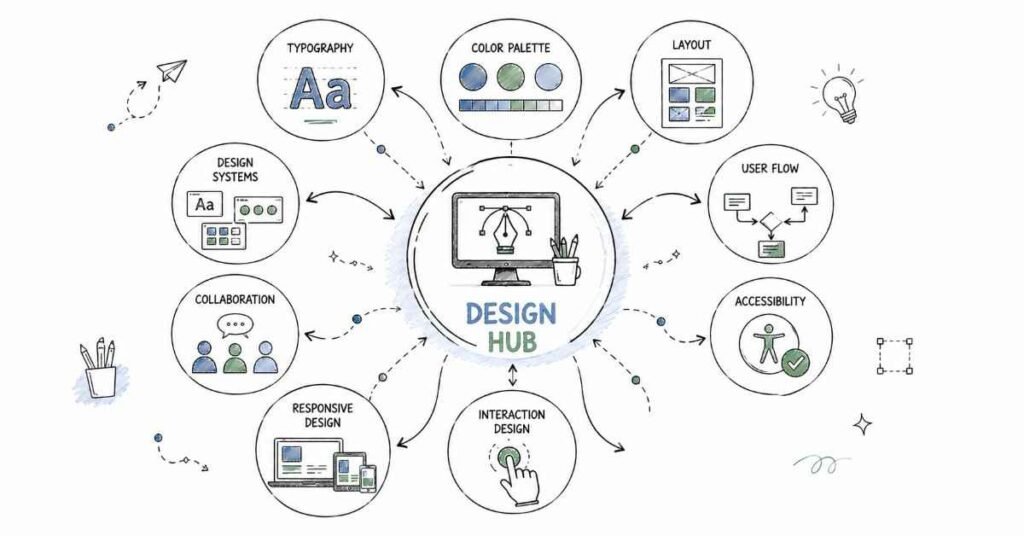
Visual design gives your interface clarity and polish. Learn typography, color theory, spacing, alignment, and contrast. Good visual design should not just look pretty; it should help the user scan the screen and understand what matters first. This is where your layouts become professional.
Visual Design Element | Why It Matters |
Typography | Improves readability and hierarchy |
Color | Guides attention and builds brand identity |
Spacing | Makes interfaces feel clean and balanced |
Contrast | Helps important elements stand out |
Week 7: Components and Design Systems
Design systems help teams keep products consistent. Learn how to build reusable buttons, input fields, cards, and navigation elements. Understand components, variants, styles, and auto layout in Figma. This week is important because real product teams depend on consistency to save time and reduce mistakes.
Week 8: Accessibility and Mobile Design
Accessibility ensures that more people can use your product easily. Learn about contrast ratios, readable font sizes, keyboard-friendly design, and inclusive thinking. Also study mobile-first design because most users now experience products on their phones. By the end of Month 2, you should be able to design screens that are visually strong and usable.
Month 3: Testing, Portfolio, and Career Launch
Month 3 focuses on real-world operations and career readiness. By now, you should know the main tools. This month helps you combine them into projects that look impressive on your resume and GitHub.
Week 9: Usability Testing
Usability testing helps you find out whether users can actually complete tasks in your design. Learn how to run simple tests, observe behavior, and note pain points. Testing helps you improve your design based on evidence, not guesses.
- Learn the purpose of usability testing.
- Observe users completing real tasks.
- Note errors, confusion, and delays.
- Improve screens based on feedback.
- Understand iterative design.
Week 10: Advanced Figma and Collaboration
Real design work happens in teams. This week helps you practice sharing files, leaving comments, working with developers, and organizing design assets. Learn version control in Figma, export settings, and handoff basics. Communication matters just as much as design skills in a professional environment.
Collaboration Skill | Why It Matters |
File sharing | Makes team reviews easy |
Comments | Helps collect feedback clearly |
Handoff | Supports developers during build |
Versioning | Keeps design progress organized |
Week 11: Portfolio Projects
Use this week to build portfolio projects that show your thinking, not just your screens. A strong UI/UX portfolio should include the problem, research, wireframes, prototypes, and final designs. Choose projects that solve realistic problems such as a food app, e-commerce checkout, or student dashboard.
Week 12: Interview Prep and Job Launch
The final week should be used for resume building, LinkedIn updates, and interview preparation. Practice explaining your design choices, research process, and prototype decisions. Update your portfolio links and prepare to apply for internships and entry-level jobs.
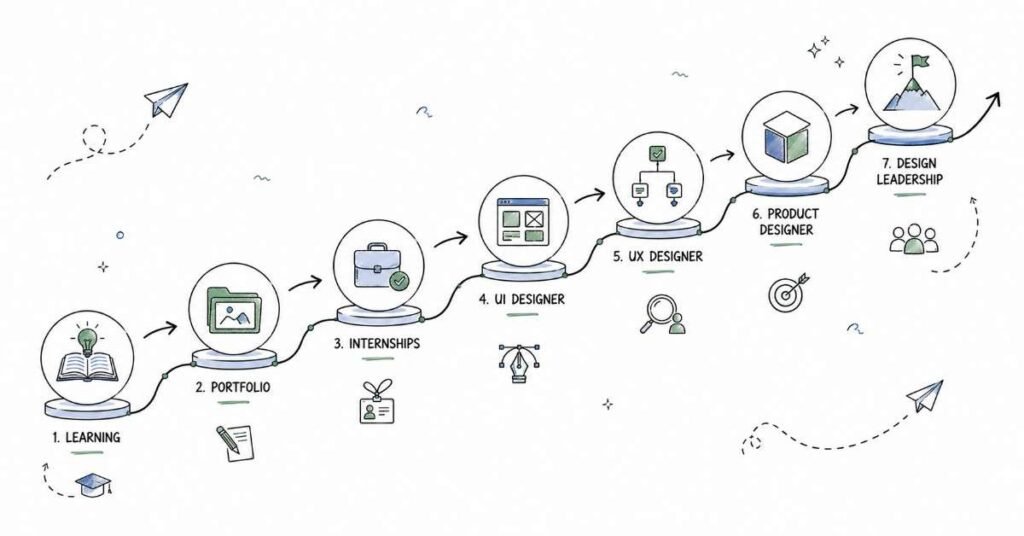
UI/UX Career Paths and Salary Guide
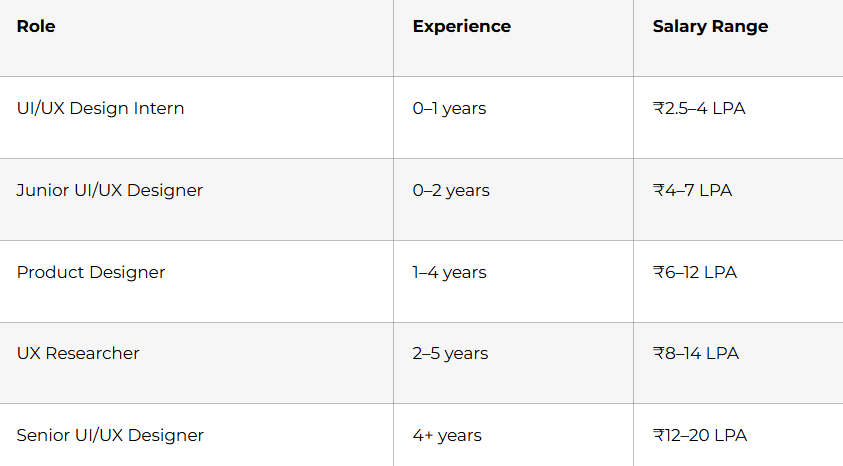
UI/UX salaries vary by company, city, and portfolio quality, but the field is known for strong growth. Hyderabad, Bangalore, Pune, Chennai, and Gurgaon are among the active hiring locations. Candidates who know Figma, research, prototyping, and accessibility usually have a better chance of getting shortlisted.
Why Choose Frontlines Edutech
Frontlines Edutech helps students learn practical, job-focused skills in a way that feels clear and achievable. The training is designed for beginners who want real design understanding, not just theory. Students also benefit from guided learning, interview support, and a roadmap that matches current industry needs.
- Hands-on learning with real tools and projects.
- Beginner-friendly explanations for complex topics.
- Job-focused curriculum with practical outcomes.
- Support for resumes, interviews, and career preparation.
- Training aligned with Indian hiring expectations.
Frequently Asked Questions
🧠 Prepare for UIUX Interviews More Than 200+ real interview questions in our
UIUX Interview Preparation Guide
Q1. Do I need drawing skills to learn UI/UX design?
No, you do not need strong drawing skills to start. UI/UX is more about understanding users, organizing screens, and creating clear digital experiences than sketching art.
Q2. What is the salary for a UI/UX fresher in India?
A UI/UX fresher in India can typically expect around ₹4 to ₹7 LPA, depending on the role, company, and portfolio quality. Candidates with strong Figma and project work can earn more.
Q3. Is UI/UX a good career for beginners?
Yes, UI/UX is a strong career option for beginners because businesses need better user experiences. It offers good demand, creative work, and clear growth paths.
Q4. What will I learn in this 90-day UI/UX roadmap?
You will learn user research, wireframing, Figma, prototyping, visual design, accessibility, and usability testing. You will also work on practical portfolio projects and interview preparation.
Q5. Can I get a job after learning UI/UX in 90 days?
Yes, you can become job-ready in 90 days if you practice regularly and build projects. A strong portfolio and interview preparation are important for getting shortlisted.
Q6. Does UI/UX use Figma?
Yes, Figma is one of the most widely used tools in UI/UX design. It is used for wireframes, prototypes, design systems, and collaboration.
Q7. What kind of jobs can I apply for after this course?
You can apply for UI/UX design internships, junior designer roles, product design support roles, and UX research assistant positions. With experience, you can grow into senior design roles.
Q8. Is UI/UX used in real companies?
Yes, UI/UX is used by product companies, startups, agencies, and large enterprises to improve digital products. That is what makes it such a practical career path.
Published by Frontlines Edutech | blog.frontlinesedutech.com
support@frontlinesedutech.com