
90-Day Python Full Stack Developer Roadmap: From Zero to Job-Ready
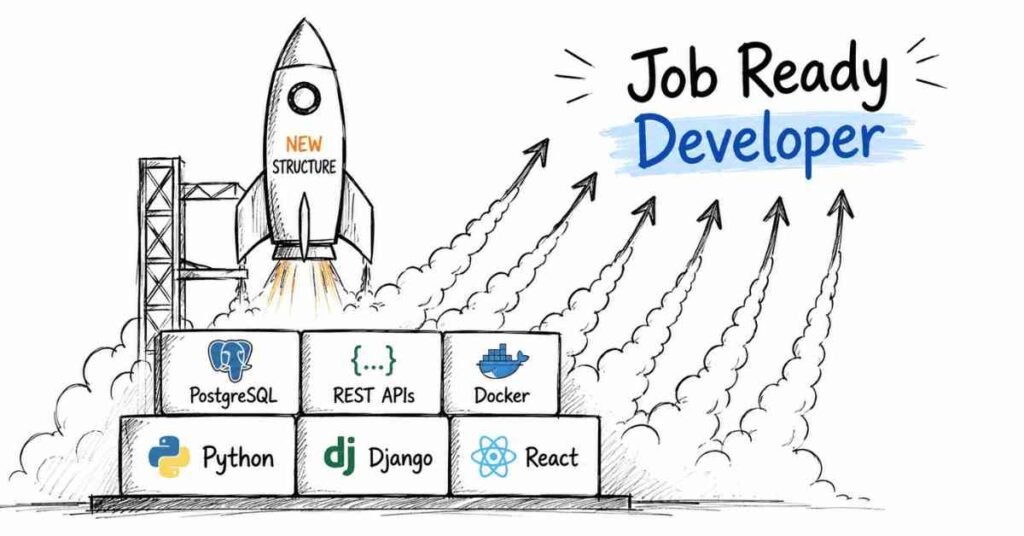
Table of Contents
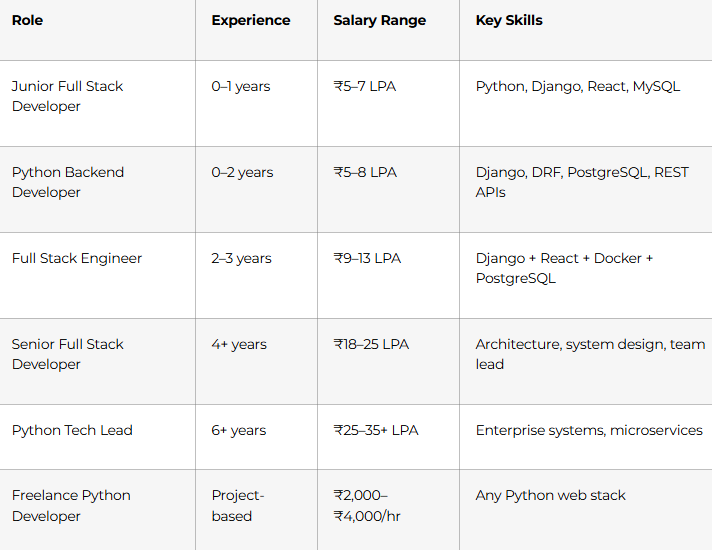
This is a structured, day-by-day 90-day roadmap to become a job-ready Python Full Stack Developer — covering Core Python, OOP, HTML/CSS/JavaScript, React, Django, Django REST Framework, PostgreSQL, JWT authentication, Docker, and cloud deployment. Built on Frontlines Edutech’s Python Full Stack course curriculum, this plan is designed for students, freshers, and career switchers across India who want to build complete web applications and land developer roles — even with zero prior coding experience. Python Full Stack freshers in India earn ₹5–7 LPA, mid-level developers earn ₹9–13 LPA, and senior professionals in Hyderabad and Bangalore command ₹20–28 LPA. By Day 90, you’ll have deployed multiple full-stack applications, a professional GitHub portfolio, and the interview confidence to crack roles at TCS, Infosys, Wipro, and fast-growing startups across India’s booming tech ecosystem.
Explore Python Full stack All Resources →
Why Python Full Stack Development Is the Smartest Career Choice in 2026
Python is the most popular programming language in the world for the fourth consecutive year — and companies across India need developers who can use it to build complete web applications, not just scripts.
- Python powers everything — web apps, REST APIs, AI/ML pipelines, automation, data analytics — one language, unlimited roles
- Full Stack means double the value — you can build the frontend users see AND the backend that makes it work, making you hireable for twice the roles
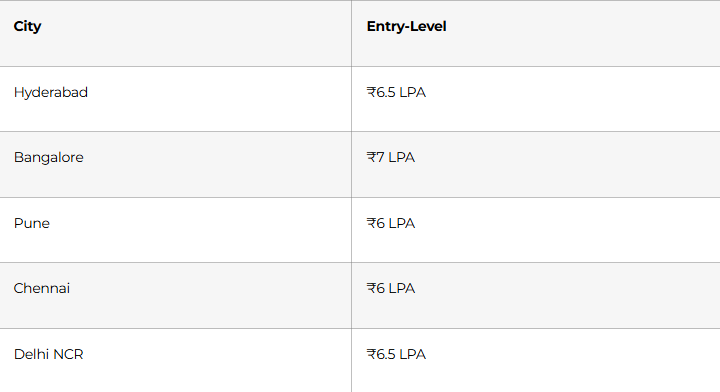
- Freshers earn ₹5–7 LPA to start — with Hyderabad entry-level roles averaging ₹6.5 LPA
- Django is the most in-demand Python web framework in Indian job postings — TCS, Infosys, Wipro, and thousands of startups all use it
- Cities like Hyderabad, Bangalore, Pune, Mumbai, and Chennai post thousands of Python developer openings every month
The bottom line: Python Full Stack development gives you the fastest path from zero coding experience to a ₹6 LPA+ offer letter — faster than Java Full Stack, and with more flexibility than any other tech stack.
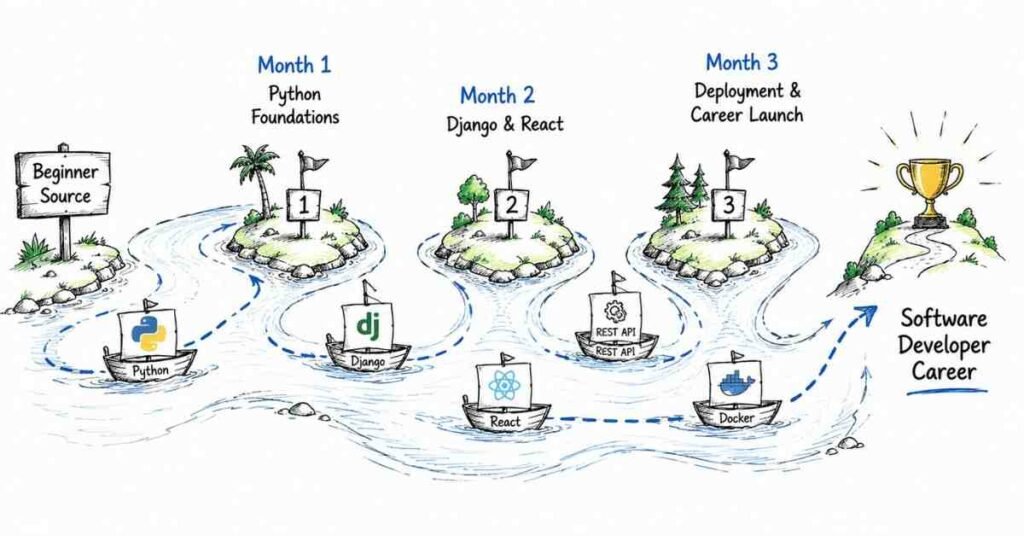
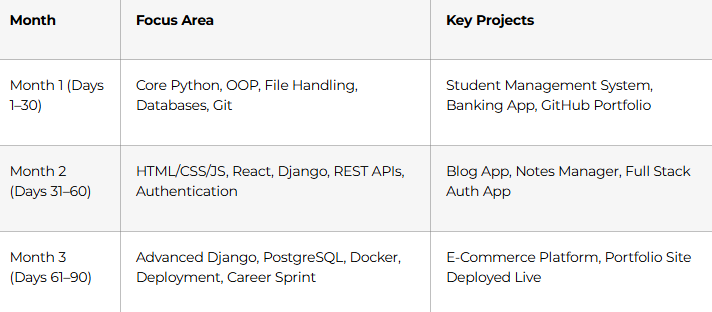
The 3-Month Learning Structure at a Glance
Month 1: Core Python & Programming Foundations (Days 1–30)
Every Python developer — junior or senior — uses the fundamentals you build in Month 1 every single day. Get these right and everything in Months 2 and 3 will feel natural.
Week 1: Python Essentials (Days 1–7)
Day 1–2: Getting Started with Python
- Install Python 3.x and VS Code / PyCharm; understand the REPL
- Variables, data types (int, float, str, bool), type conversion, input/output
- Comments, naming conventions, Python philosophy
- Write your first programs: age calculator, temperature converter, simple quiz
Day 3–4: Control Flow & Functions
- Conditional statements: if, elif, else — nested conditions, ternary expressions
- Loops: for, while, break, continue, pass — when to use each
- Functions: defining, parameters, return values, default arguments, keyword arguments
- Scope: local vs. global variables; the LEGB rule
Day 5–6: Python Data Structures
- Lists: indexing, slicing, list methods, list comprehensions
- Tuples: immutability and when to use them over lists
- Dictionaries: key-value pairs, nested dicts, dict comprehensions
- Sets: unique values, set operations (union, intersection, difference)
Day 7: Week 1 Project
Build a Command-Line Quiz Application — loads questions from a dictionary, tracks score, handles invalid inputs with error messages, and displays a final result.
💡 Study Habit: Write every exercise in a saved .py file with a comment explaining the logic. By Day 90, these files become your learning diary and interview prep material.
Week 2: Object-Oriented Programming (Days 8–14)
OOP is the foundation of every Django model, every REST API view, and every Python framework you’ll use. Take this week seriously.
- Days 8–9 — Classes and Objects: constructors (__init__), instance attributes, instance methods; create a BankAccount class with deposit and withdrawal
- Days 10–11 — The four OOP pillars:
- Encapsulation — private attributes with getters/setters
- Inheritance — Employee base class with Manager and Developer subclasses
- Polymorphism — method overriding; same method name, different behaviour
- Abstraction — abstract base classes using the abc module
- Day 12 — Magic/dunder methods: __str__, __repr__, __len__, __eq__ — make your objects behave like built-in types
- Day 13 — Decorators and properties: @property, @staticmethod, @classmethod — when and why each is used
- Day 14 — Week 2 Project: Object-Oriented Student Management System — classes for Student, Instructor, and Course; inheritance hierarchy; store and retrieve records
Week 3: Advanced Python Concepts (Days 15–21)
Days 15–16: Exception Handling & File Operations
- try / except / else / finally blocks; handling specific exception types
- Raising custom exceptions with meaningful messages
- File I/O: open, read, write, append; context managers (with statement)
- Working with JSON files: json.load() and json.dump() — persist data between program runs
Days 17–18: Modules, Packages & Standard Library
- Importing modules: import, from…import, aliasing with as
- Useful standard library modules: os, sys, datetime, random, math, collections, itertools
- Creating your own modules and packages with __init__.py
- Installing third-party packages with pip; understanding requirements.txt
Days 19–20: Advanced Python Features
- Lambda functions: anonymous one-liners for map, filter, sorted
- Generators and iterators: yield keyword, lazy evaluation for memory efficiency
- List, dict, and set comprehensions: write Pythonic one-liners
- *args and **kwargs: flexible function signatures
Day 21: Week 3 Mini-Project
File-Based Inventory Management System — products stored in JSON, CRUD operations through CLI menu, custom exceptions for invalid stock operations.
Week 4: Databases, SQL + Git (Days 22–30)
Days 22–25: SQL with Python (SQLite + MySQL Connector)
- SQLite for development: CREATE TABLE, INSERT, SELECT, UPDATE, DELETE
- Connecting Python to MySQL using mysql-connector-python
- Parameterised queries to prevent SQL injection
- Fetching results: fetchone(), fetchall(), fetchmany()
- Basic transactions: commit and rollback
Days 26–27: Git & GitHub
- Git fundamentals: init, add, commit, push, pull, clone
- Branching: git branch, git checkout, git merge — feature branch workflow
- Resolving merge conflicts
- GitHub: creating repositories, writing professional READMEs, adding .gitignore
Days 28–30: Month 1 Capstone
Banking Application — OOP design with Account, Transaction, and User classes; MySQL database for persistent storage; exception handling for invalid operations; CLI menu interface. Document on GitHub as Portfolio Project #1.
🏆 Month 1 Milestone: You write clean, structured Python. You understand OOP. You can persist data to a database. You use Git like a professional.
Master Full Stack Interviews →
Month 2: Web Development — Frontend + Django Backend (Days 31–60)
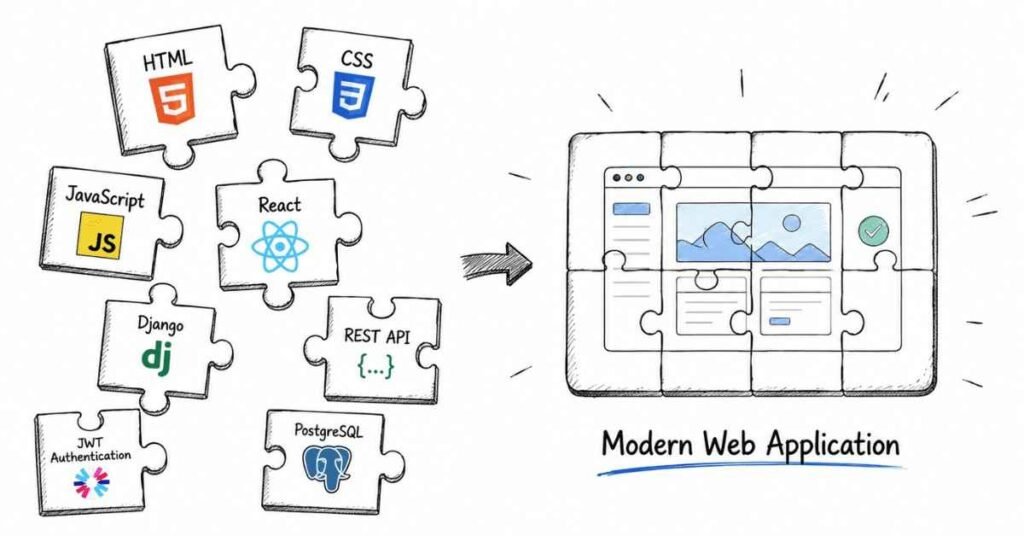
Month 2 is the transformation. You go from writing Python scripts to building complete web applications that users can interact with through a browser. This is where you become a developer.
Week 5: Frontend Foundations — HTML, CSS & JavaScript (Days 31–37)
You don’t need to be a frontend specialist. You need to be fluent enough to build clean, working interfaces for your Django backends.
Days 31–32: HTML5 & CSS3
- HTML: semantic structure (header, nav, section, article, footer), forms, input types, tables
- CSS: selectors, box model (margin, padding, border), display properties, positioning
- Flexbox layout: align and distribute elements in one dimension
- CSS Grid: two-dimensional layouts for complex page structures
- Responsive design: media queries, mobile-first approach
Days 33–34: Bootstrap for Rapid UI
- Bootstrap grid system: 12-column layout with responsive breakpoints
- Pre-built components: navbar, cards, buttons, forms, modals, alerts
- Utility classes: spacing, typography, colours — build professional UIs without writing CSS from scratch
Days 35–36: JavaScript Essentials for Django Developers
- Variables (let, const), data types, operators, conditionals, loops
- Functions, arrow functions, array methods (map, filter, reduce)
- DOM manipulation: selecting elements, changing content, adding event listeners
- Fetch API: making AJAX requests to Django REST endpoints without page reloads
Day 37: Week 5 Project
Personal Portfolio Website — responsive multi-section layout (About, Skills, Projects, Contact) built with HTML, CSS, Bootstrap, and JavaScript smooth-scroll interactions.
Week 6: Django — The Most Powerful Python Web Framework (Days 38–44)
Django is what takes you from writing scripts to building production applications. It handles routing, templating, database ORM, authentication, and admin — all out of the box.
Days 38–39: Django Core Concepts
- Install Django, create a project and apps: understanding the project vs. app distinction
- MVT Architecture (Model–View–Template): Django’s version of MVC
- Model: Python class → database table (via ORM)
- View: function or class that handles request and returns response
- Template: HTML file with Django template language for dynamic content
- URL routing: urls.py, path(), include(), named URL patterns
- Django settings: SECRET_KEY, INSTALLED_APPS, DATABASES, STATIC_FILES
Days 40–41: Django Models & ORM
- Define models: fields (CharField, IntegerField, DateField, ForeignKey, ManyToManyField)
- makemigrations and migrate: how Django turns Python classes into database tables
- Django ORM queries: Model.objects.all(), .filter(), .get(), .create(), .update(), .delete()
- Django Admin: register models, auto-generated management interface in minutes
- Relationships: ForeignKey, OneToOneField, ManyToManyField with related_name
Days 42–43: Django Views, Templates & Forms
- Function-Based Views (FBVs) vs. Class-Based Views (CBVs) — when to use each
- Django template language: variables {{ }}, tags {% %}, filters, template inheritance with {% extends %} and {% block %}
- Django forms: forms.Form vs. forms.ModelForm, validation, rendering in templates
- Handling GET and POST requests; CSRF protection
Day 44: Week 6 Project
Blog Application — full CRUD with Django: create/read/update/delete posts, categories as ForeignKey, Django admin for content management, Bootstrap-styled templates.
Week 7: Django REST Framework & React Frontend (Days 45–54)
This is the most in-demand skillset in Python web development in India right now.
Days 45–47: Django REST Framework (DRF)
- Install DRF; understand the difference between traditional Django views and API views
- Serializers: ModelSerializer — convert Python objects to JSON and back
- APIView and ViewSets: handle GET, POST, PUT, PATCH, DELETE with clean code
- Routers: automatically generate URL patterns for ViewSets
- Postman: test every endpoint before connecting to the frontend
Days 48–50: React Fundamentals for Django Developers
- Set up React with Node.js + npm, Vite; understand project structure
- JSX syntax, functional components, props, state with useState hook
- useEffect hook: fetch data from Django API on component mount
- React Router: multi-page SPA navigation without full page reloads
- Axios for API calls: GET, POST, PUT, DELETE with async/await
Days 51–53: Connecting React + Django — Full Stack Integration
- Configure CORS in Django: django-cors-headers for allowing React frontend requests
- Manage API base URL in React: environment variables with .env
- Handle loading states, error states, and empty states in React components
- Form submissions from React to Django: POST data with Axios, handle validation errors
- Full Stack Notes Application: React frontend (list, create, delete notes) + Django REST backend + SQLite database
Day 54: Authentication with JWT
- Install djangorestframework-simplejwt
- Token-based auth flow: POST credentials → receive access + refresh tokens → store in localStorage → send in Authorization header
- @permission_classes([IsAuthenticated]): protect API endpoints
- React login/logout flow: conditional rendering based on auth state
Week 8: Advanced Django + Database (Days 55–60)
Days 55–56: PostgreSQL — Production-Grade Database
- Install PostgreSQL and connect to Django via psycopg2
- Why switch from SQLite to PostgreSQL: concurrent users, advanced queries, production reliability
- Database migrations on PostgreSQL: same Django ORM, different engine
- Useful PostgreSQL features: jsonb fields, full-text search, array fields
Days 57–58: Django Signals, Middleware & Caching
- Django signals: post_save, pre_delete — trigger actions automatically (send email on user registration, log every model change)
- Custom middleware: log all requests, add security headers, measure response time
- Django caching: per-view caching, low-level cache API with Redis — speed up repeated database queries
Days 59–60: Month 2 Capstone
Full Stack Task Management Application — React frontend + Django REST Framework backend + PostgreSQL database + JWT authentication + user-specific task lists + due date filtering. Deployed locally with all services running. Document as Portfolio Project #2 on GitHub.
🏆 Month 2 Milestone: You build full-stack web applications with React frontends, Django REST backends, PostgreSQL databases, and JWT authentication. This is production-level development.
Explore the Python Career Guide →
Month 3: Deployment, Advanced Projects & Career Launch (Days 61–90)
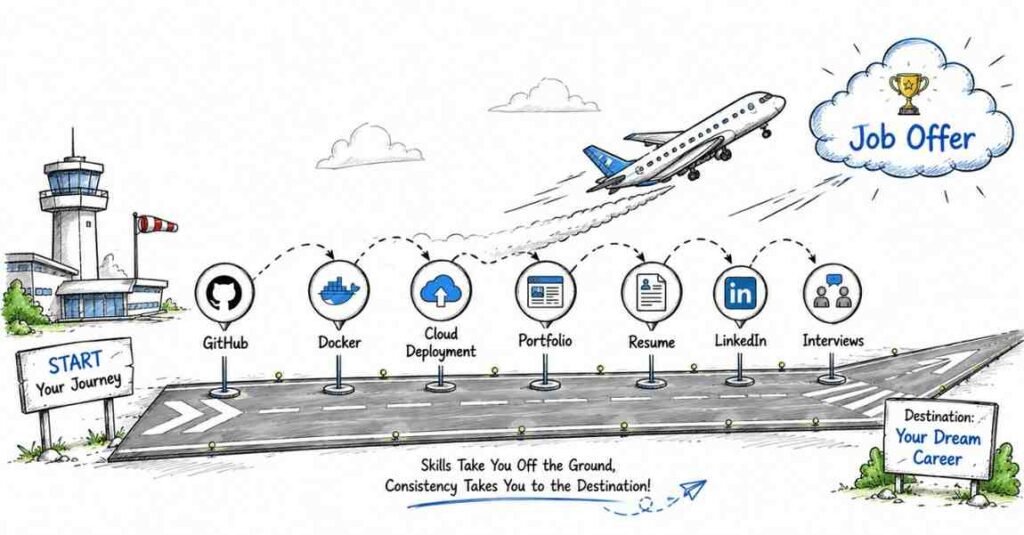
The final month makes you deployable — in both senses. You ship real applications to the internet, and you ship yourself into a job.
Week 9: Docker & Cloud Deployment (Days 61–67)
Days 61–63: Docker — Containerise Your Applications
- What Docker solves: “works on my machine” — package your app with all its dependencies
- Core concepts: Images, Containers, Dockerfile, docker-compose
- Write a Dockerfile for your Django application
- docker-compose.yml: run Django + PostgreSQL + Redis as linked services with one command
- Push Docker images to Docker Hub
Days 64–66: Cloud Deployment
Deploy your applications to real servers that anyone on the internet can access:
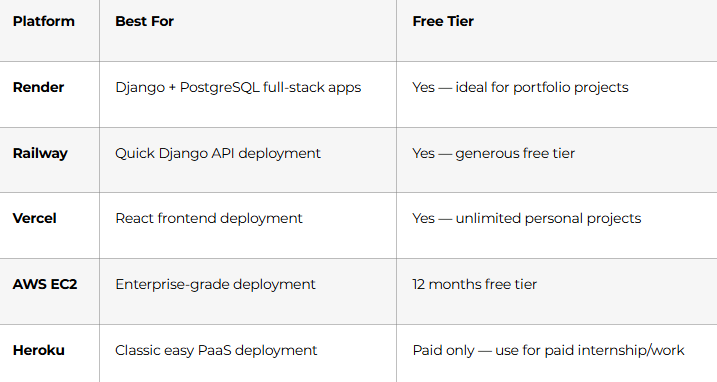
- Environment variables: never hardcode SECRET_KEY, database passwords, or API keys — use .env and platform secret managers
- Static files in production: whitenoise for Django, or AWS S3 for media uploads
- Custom domain: connect your deployed app to a .in or .com domain
Day 67: Week 9 Project
Deploy the Month 2 Task Management App — React on Vercel, Django API on Render, PostgreSQL on Render managed database. Share the live URL in your GitHub README and LinkedIn profile.
Week 10: Advanced Features & Capstone Project (Days 68–79)
Days 68–70: Advanced Django Features
- Celery + Redis: background task queues for sending emails, processing uploads, scheduled jobs
- Django Channels: WebSockets for real-time features (live notifications, chat)
- Django REST Framework advanced: pagination, filtering with django-filter, throttling, API versioning
Days 71–73: Testing
- Unit testing with Python’s unittest and Django’s TestCase
- Testing models, views, serializers, and URL routing
- pytest-django: cleaner test syntax, fixtures, parametrize
- Test coverage reports: identify untested code paths
Days 74–79: Month 3 Capstone — E-Commerce Platform
Build a production-quality e-commerce application — your most impressive portfolio piece:
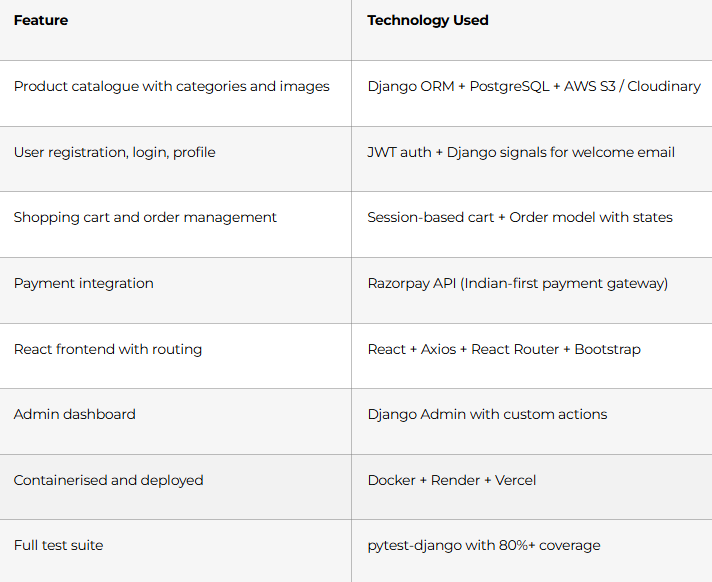
Document as Portfolio Project #3 on GitHub with: live demo URL, screenshots, README with architecture diagram, and instructions to run locally.
Week 11–12: Career Launch Sprint (Days 80–90)
Days 80–82: GitHub Portfolio Polish
- 3 pinned repositories (Blog App, Task Manager, E-Commerce) — each with professional README
- README must include: problem statement, tech stack, features list, screenshots, live demo link, local setup instructions
- Clean commit history: meaningful messages, feature branches, no pushed passwords or secrets
- Add contribution graph activity — consistent daily pushes are noticed by recruiters
Days 83–84: LinkedIn + Resume
- LinkedIn Headline: “Python Full Stack Developer | Django | React | REST APIs | PostgreSQL | Open to Opportunities in Hyderabad”
- Featured section: link all three deployed projects with screenshots
- ATS-ready resume structure: Summary → Skills → Projects → Education → Certifications
- Quantify every project: “Built REST API serving 15 endpoints with JWT auth; tested with pytest achieving 83% coverage”
- Skills section: Python, Django, DRF, React.js, PostgreSQL, MySQL, Docker, Git, REST APIs, HTML/CSS/Bootstrap
Days 85–86: Job Search Strategy
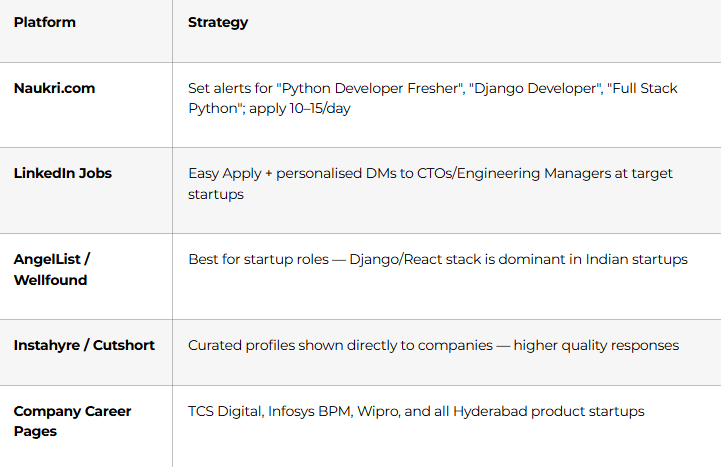
Days 87–88: Interview Preparation Sprint
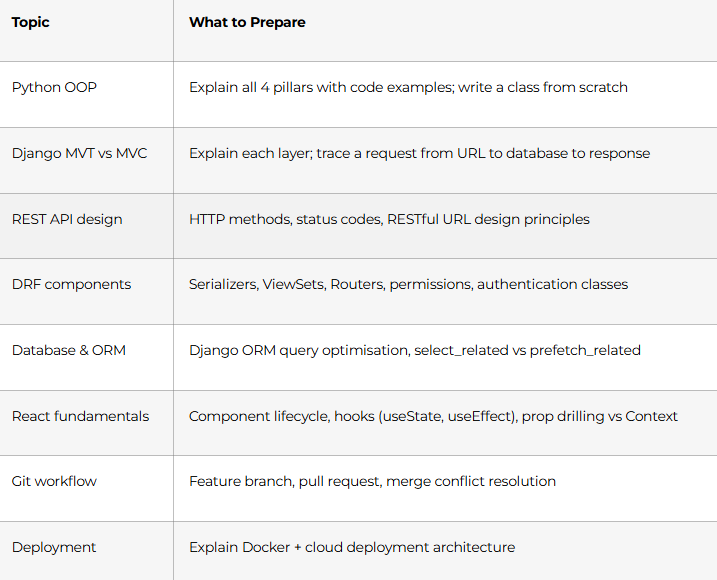
Most-tested Python Full Stack interview topics:
Days 89–90: Mock Interviews + Certification Day
Full mock interview: 20-minute Python/Django technical round → 15-minute React question set → 10-minute system design (design a URL shortener using Django) → 10-minute behavioural (STAR format). Recorded for self-review. Receive Frontlines Edutech course completion certificate.
🏆 Day 90 Milestone: 3 deployed full-stack applications. Professional GitHub. LinkedIn active. Resume submitted. Python Full Stack career begins.
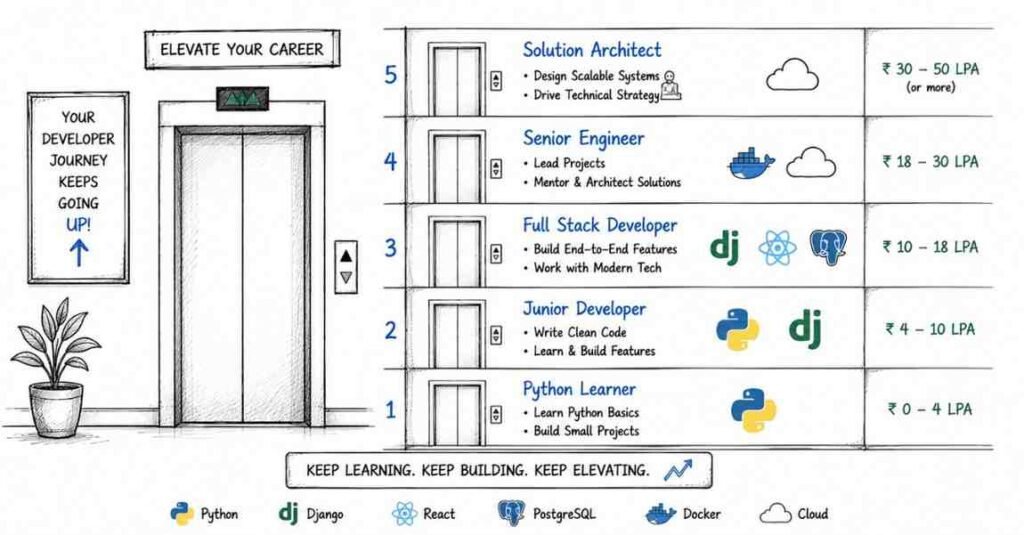
Python Full Stack Career Paths & Salary Guide (India 2026)
City-specific fresher salaries:
Top hiring companies: TCS, Infosys, Wipro, HCL, Accenture, Cognizant, IBM, and hundreds of product startups across Hyderabad, Bangalore, and Mumbai in fintech, edtech, healthtech, and e-commerce.
Why Choose Frontlines Edutech for Your Python Full Stack Course?
Frontlines Edutech is headquartered in Somajiguda, Hyderabad and has helped thousands of students across the Telugu states launch technology careers — including freshers, B.Sc graduates, IT professionals switching stacks, and non-technical candidates pivoting to development.
- Complete full-stack coverage — Python + Django + React + PostgreSQL + Docker + Deployment, all in one structured program
- 3 deployed portfolio projects — real applications live on the internet, not just local demos
- Telugu-friendly teaching — Django ORM, JWT auth, React hooks, and deployment explained in the language you think in
- Industry-aligned curriculum — built from what TCS Digital, Wipro, and Hyderabad product companies actually interview for
- Razorpay integration — you build with Indian payment infrastructure, not placeholder code
- Career support until you’re placed — resume, LinkedIn, mock interviews, and placement referrals from 200+ hiring partners
Frequently Asked Questions (FAQs)
Q1.Do I need prior programming experience to start this Python Full Stack course?
A.No. This roadmap starts from absolute basics — Python installation, variables, and your first program on Day 1. It is designed for complete beginners, non-IT graduates, and career switchers. Students from B.Com, BBA, B.Sc, and arts backgrounds regularly complete this course and land developer roles.
Q2.What is the salary for a Python Full Stack Developer fresher in India?
A.Python Full Stack Developer freshers in India earn ₹5–7 LPA. In Hyderabad, the typical starting salary is ₹6.5 LPA, with Bangalore offering up to ₹7 LPA for strong candidates with deployed projects. Candidates with a live portfolio of 3+ projects consistently land offers at the higher end.
Q3.What is the tech stack covered in this Python Full Stack roadmap?
A.The complete stack: Python 3, Django (MTV architecture), Django REST Framework, React.js, PostgreSQL, MySQL, SQLite (dev), JWT authentication, Docker, Git/GitHub, Bootstrap, Axios, and deployment on Render/Vercel. Bonus modules cover Celery, Redis, Razorpay integration, and pytest.
Q4.What is the difference between Django and Flask?
A.Django is a full-featured, “batteries-included” framework — it comes with ORM, admin panel, authentication, forms, and routing built in. Flask is a lightweight microframework where you add components as needed. Django is better for production web applications and is more commonly required in Indian job postings; Flask is popular for microservices and APIs. This course focuses on Django.
Q5.Will I build and deploy real applications in this course?
A.Yes. You’ll build and deploy 3 complete full-stack applications: a Blog App (Django + Bootstrap), a Task Manager (React + Django REST + PostgreSQL + JWT), and an E-Commerce Platform (React + Django + PostgreSQL + Razorpay + Docker + Cloud). All three will be live on the internet with your own URLs.
Q6.Is React covered in this Python Full Stack course?
A.Yes. React is covered in depth during Week 7 (Days 48–50) — including JSX, functional components, props, useState, useEffect, React Router, Axios for API calls, and connecting React to your Django REST backend with proper CORS and JWT token handling.
Q7.How is Python Full Stack different from Java Full Stack?
A.Both cover frontend + backend + database. Python Full Stack uses Python + Django + React; Java Full Stack uses Java + Spring Boot + React. Python has a gentler learning curve, faster prototyping speed, and is the dominant language in AI/ML adjacent roles. Java is preferred at large IT firms (TCS, Infosys) for enterprise systems. Both are excellent career choices — the right one depends on the company type you want to work at.
Q8.Does Frontlines Edutech provide placement support after the Python Full Stack course?
A.Yes. Placement support includes resume building, LinkedIn and GitHub profile optimisation, mock technical interviews, and active job referrals from 200+ partner companies. The placement team supports you until you land your first role — not just for a fixed window after course completion.
Published by Frontlines Edutech | blog.frontlinesedutech.com
support@frontlinesedutech.com