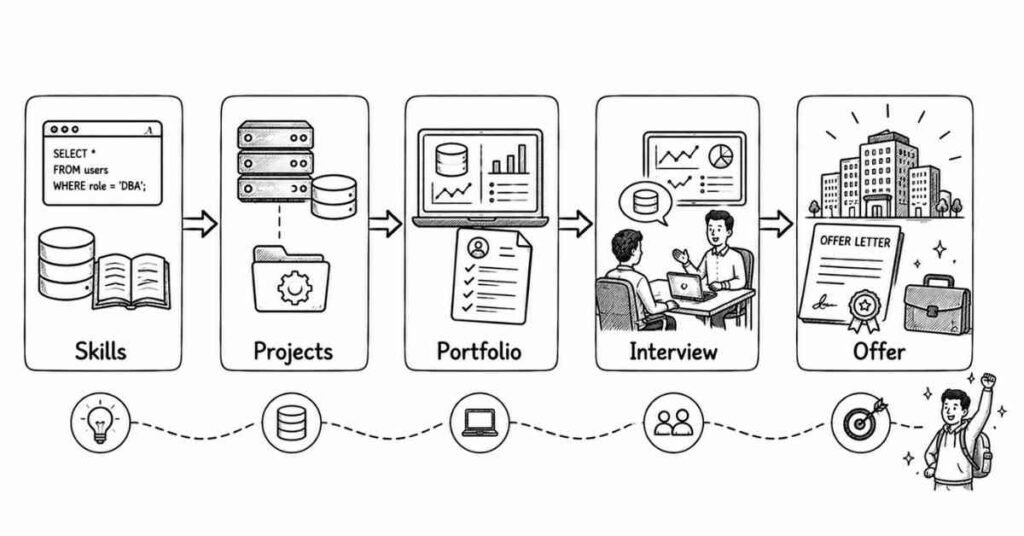
How to Become a Database Administrator : Your Complete Career Guide
A Story That Might Sound Familiar
Meet Arjun. Six months ago, he was sitting in his college hostel room in Hyderabad, scrolling through job portals at midnight. Another day, another rejection email. His B.Tech degree in Computer Science wasn’t enough anymore—companies wanted “experienced professionals” even for entry-level positions. Sound familiar?
Fast forward to today. Arjun just accepted a Database Administrator position at a growing fintech company with a ₹5.2 lakh annual package, stock options, and work-from-home flexibility. What changed? He discovered database administration—a career path that’s desperately short on skilled professionals but incredibly high on demand.refontelearning
This isn’t a “get rich quick” story. It’s about understanding that while everyone’s chasing software development and data science roles, there’s a critical shortage of professionals who can actually manage the databases that power every single digital product you’ve ever used.indeed+1
If you’ve ever wondered whether there’s a tech career that values depth over flashiness, stability over hype, and pays genuinely well—you’ve found it.
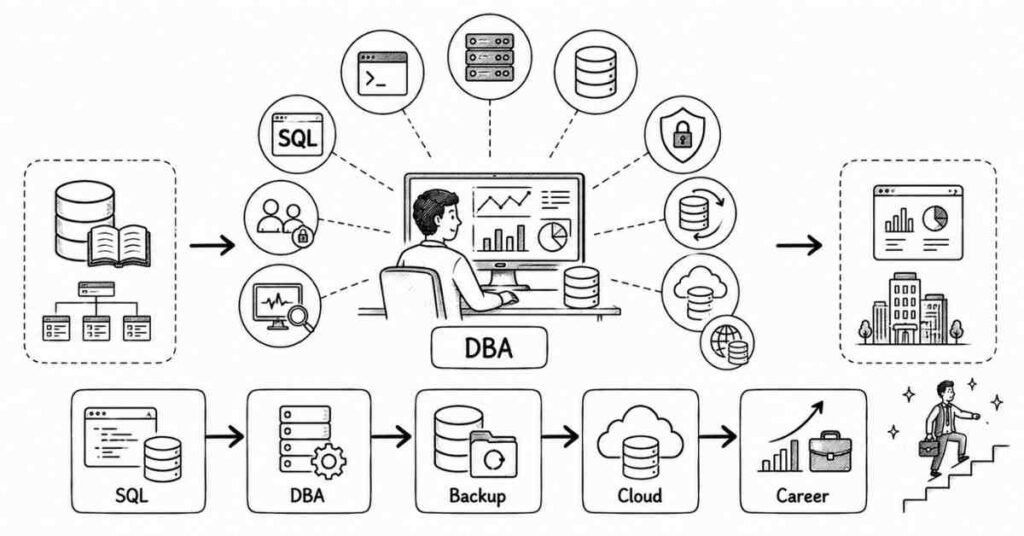
1. What Exactly Does a Database Administrator Do? (And Why Should You Care?)
Let me break this down without the corporate jargon.
Imagine you’re running a massive library with millions of books. Now imagine:
- Thousands of people want to access different books simultaneously
- Some books are so important that losing them would cost millions
- You need to know exactly where every book is, instantly
- The library needs to be open 24/7/365 without a single minute of downtime
- If someone tries to steal or damage books, you need to stop them immediately
That’s essentially what a Database Administrator does—except instead of books, it’s data. And in 2025, data quite literally runs the world.upgrad+1
Here’s what your typical day might look like:
Morning (9:00 AM): You check overnight monitoring reports. Your databases processed 2.3 million transactions while you slept. Everything’s running smoothly—your automated backup completed successfully at 3 AM.
Mid-Morning (11:00 AM): A developer rushes to your desk (or pings you on Slack). “The customer search query is taking forever!” You dive into the database, analyze the query execution plan, add a strategic index, and boom—what took 40 seconds now runs in 3 seconds. You’re the hero.
Afternoon (2:00 PM): Planning meeting for migrating one of your databases to AWS cloud. You present your architecture proposal, discuss security implications, and estimate costs. Management is impressed.
Evening (4:30 PM): A new team member needs access to the development database. You create their user account with appropriate permissions—not too much (security risk), not too little (can’t do their job). Balance is key.
Before Logging Off (6:00 PM): Quick check on replication status between your primary and backup servers. Everything’s in sync. You’ve ensured that even if the primary server catches fire tonight, zero data will be lost.nam-it+1
That’s database administration—it’s problem-solving, optimization, security, planning, and being the guardian of what’s often a company’s most valuable asset.indeed
⚡ Become a Job-Ready Database Administrator
Master SQL, MySQL, PostgreSQL, Oracle & Cloud Databases with our
Database Administrator Course.
2. The Honest Truth About Database Administration Careers
Let me give you both sides of this career coin, because I respect your time too much to give you just marketing fluff.
The Really Good Parts:
Job Security That’s Actually Real
While tech companies lay off thousands of developers in 2024-2025, DBA positions remain stable. Why? Because need constant management, optimization, and maintenance. You can’t “pause” a production database.
Salaries That Genuinely Impress
Entry-level DBAs in India start around ₹3.5-5.5 lakhs annually. With 2-3 years experience and cloud skills? You’re looking at ₹8-12 lakhs. Senior DBAs and Database Architects in metros earn ₹20-45 lakhs. And unlike some tech roles, these aren’t inflated startup offers that disappear—these are stable corporate packages.
Work-Life Balance (Mostly)
Yes, you’ll occasionally get calls at odd hours for critical issues. But modern monitoring and automation mean most problems get flagged before they become emergencies. Plus, many DBA roles offer remote work—you don’t need to be physically present to manage databases.
You Actually Matter
When databases go down, companies lose money. Fast. Amazon reportedly loses $220,000 per minute of downtime. As a DBA, you’re not just another cog—you’re infrastructure-critical.
Future-Proof Skills
AI might automate coding. It might even write entire applications. But databases need human oversight, optimization, security decisions, and architecture planning. The industry is actually moving toward more complex database environments (multi-cloud, hybrid systems), not simpler ones.nam-it
The Challenging Parts (That Nobody Tells You):
The Learning Never Stops
Database technologies evolve constantly. Cloud providers release new features quarterly. Security threats change monthly. If you’re someone who hates continuous learning, this career will frustrate you.nam-it
Pressure During Outages
When a database crashes at 2 AM and the entire e-commerce site is down, every minute costs thousands. That pressure isn’t for everyone. You need to think clearly under stress.
Not as “Sexy” as Other Tech Roles
Your friends might become AI engineers or blockchain developers with cooler-sounding job titles. Database administration doesn’t get the same social media hype. If you need external validation, this might bother you.
Initial Learning Curve is Steep
Understanding database internals, query optimization, replication, transactions—it’s a lot. The first 2-3 months can feel overwhelming. But once concepts click, everything becomes logical.upgrad
On-Call Responsibilities
Many DBA roles involve on-call rotation. You might need to be available on weekends or evenings occasionally. Though honestly, with good monitoring and automation, actual emergencies are rare.
3. Who Actually Succeeds as a Database Administrator?
After talking to dozens of working DBAs, here’s who typically thrives in this field:
The “Puzzle Solver” Type
If you’re someone who gets genuinely excited figuring out why something isn’t working—you’ll love database administration. Every performance problem is a puzzle with a logical solution.
The “Detail-Oriented” Person
You don’t need to be obsessive, but if you’re the type who notices when things are slightly off, database administration suits you perfectly. One misplaced index can crash a system.indeed
The “Calm Under Pressure” Professional
When everyone’s panicking about downtime, successful DBAs methodically troubleshoot. If you’re naturally calm during chaos, that’s a superpower here.
The “Continuous Learner”
You don’t need to be a genius. But you do need curiosity. If reading about new database features or cloud technologies sounds interesting rather than tedious, you’ll do well.upgrad+1
The “Security-Conscious” Individual
If you naturally think about “what could go wrong?” and like building safety nets, database security will feel intuitive to you.
The Real Requirements: What You Actually Need
Let’s cut through the confusion. Here’s what’s actually required versus what’s just “nice to have”:
Educational Background (The Truth):
What job postings say: “B.Tech/B.E. in Computer Science required”
What’s actually true: While a CS degree helps, many successful DBAs come from:
- IT/Information Systems degrees
- MCA backgrounds
- Even B.Sc. Computer Science or BCA
- Self-taught professionals who invested in proper trainingupgrad+1
The database industry cares more about demonstrated skills than pedigree. Can you write complex SQL queries? Can you optimize performance? Can you secure a database? That matters infinitely more than which college you attended.upgrad
Technical Skills (Priority Order):
Absolutely Essential (Can’t negotiate these):
- SQL Mastery – You need to write queries in your sleepgeeksforgeeks+1
- At least 2 database platforms – MySQL and PostgreSQL are great starting pointsupgrad
- Database design principles – Normalization, relationships, constraintsindeed
- Backup and recovery – This is literally your job’s core purposegeeksforgeeks
- Basic security concepts – User management, permissions, encryptionupgrad
Very Important (Learn within first 6 months):
- Performance tuning – Indexing, query optimization, execution plansrefontelearning
- One cloud platform – AWS RDS or Azure SQL Databasenam-it
- Scripting – Python or Bash for automationupgrad
- Monitoring tools – Understanding database metricsrefontelearning
- High availability concepts – Replication, failover, clusteringindeed
Nice to Have (Learn as you grow):
- NoSQL databases (MongoDB, Redis)nam-it
- Kubernetes and containerization
- Advanced cloud certifications
- Multiple programming languages
- Data warehousing concepts
Non-Technical Skills (Surprisingly Critical):
Communication – You’ll explain technical issues to non-technical managers constantlyindeed
Documentation – Writing clear procedures saves everyone’s time (including yours)
Patience – Teaching developers about efficient queries requires diplomatic patience
Time Management – Juggling multiple databases and projects demands organization
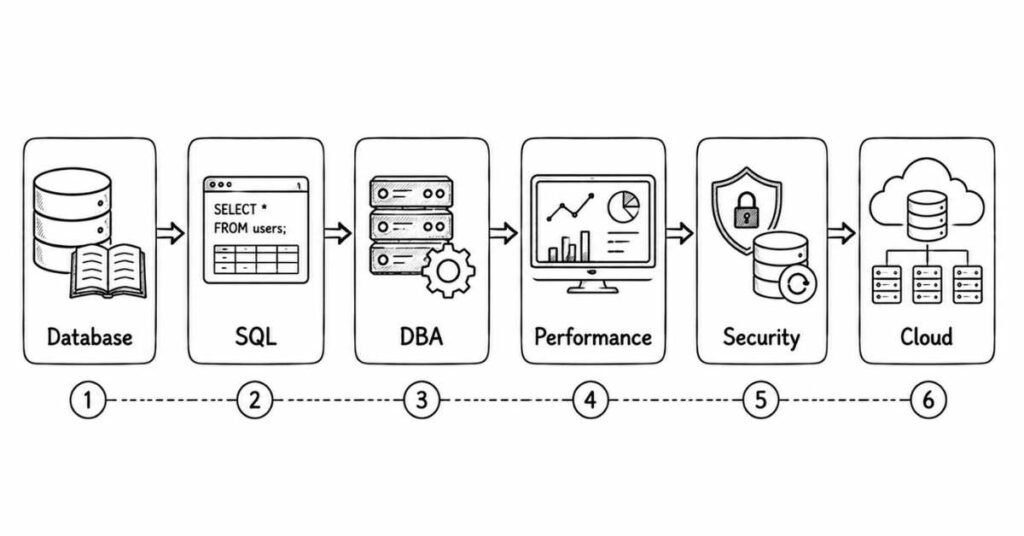
🗺️ Follow the Complete DBA Roadmap
Beginner → SQL → Multi-Database Skills → Performance → Cloud → Certification.
4. The Step-by-Step Path: How to Actually Become a DBA
Alright, enough context. Let’s get practical. Here’s your exact roadmap:
Step 1: Build Your Foundation (Months 1-2)
- Learn SELECT, INSERT, UPDATE, DELETE operations
- Understand JOINs (this is where most beginners struggle—keep practicing)
- Master WHERE clauses, GROUP BY, and aggregate functions
- Practice on real databases, not just theorygeeksforgeeks+1
Free resources that actually work:
- SQLZoo (interactive SQL tutorials)
- HackerRank SQL practice problems
- W3Schools SQL reference (yes, it’s basic, but comprehensive)
Get your first database installed:
- Install MySQL on your laptop (free, widely used)indeed
- Set up MySQL Workbench for visual management
- Create your first database—even something simple like a “Personal Expense Tracker”
The mistake everyone makes: Watching tutorial after tutorial without actually writing queries. Your hands need to learn SQL, not just your brain. Write 50 queries minimum in these first two months.
Step 2: Expand to Multiple Database Platforms (Months 2-3)
Why multiple databases matter:
Companies rarely use just one database type. Knowing MySQL, PostgreSQL, and SQL Server makes you 3x more employable.
Install and learn:
- PostgreSQL – Enterprise-grade, open-source, feature-richgeeksforgeeks
- SQL Server Express – Microsoft’s database, huge corporate adoptionindeed
- Oracle XE (Express Edition) – Industry standard for large enterprisesupgrad
Project that ties it together:
Build the same project (like a “Library Management System”) in all three databases. You’ll learn:
- How syntax differs between platforms
- Which features are unique to each
- How to think in “database concepts” rather than “MySQL-specific” approaches
Step 3: Learn Database Administration Fundamentals (Months 3-4)
This is where you transition from “writing SQL” to “managing databases”:
Master these DBA-specific skills:
User Management:
- Creating database users
- Granting and revoking permissions
- Understanding role-based access controlupgrad+1
Backup and Recovery:
- Taking full database backups
- Incremental and differential backups
- Actually practicing recovery (crucial—untested backups are useless)geeksforgeeks
Performance Basics:
- Reading execution plans
- Creating indexes strategically
- Identifying slow queriesrefontelearning
Monitoring:
- Setting up basic monitoring
- Understanding key metrics (CPU, memory, disk I/O, active connections)
- Creating alerts for problemsrefontelearning
Real project: Set up automated daily backups for your practice database. Intentionally delete data, then recover it from backup. This single exercise teaches you more than a month of theory.
Step 4: Get Certified (Months 4-5)
The certification debate:
Some people say certifications don’t matter. Those people are wrong—at least for entry-level DBAs. Here’s why:
When you have zero professional experience, certifications prove you know what you claim to know. Hiring managers can’t risk hiring someone who might crash production databases.indeed+1
Best starting certifications (choose based on your target):
Oracle Certified Associate (OCA)
- Best for: Enterprise-focused careers
- Cost: ₹15,000-20,000 for exam
- Difficulty: Moderate
- Value: Very high in India (Oracle dominates banking, telecom)
Microsoft Certified: Azure Database Administrator Associate
- Best for: Cloud-focused careers
- Cost: ~$165 (₹13,000-14,000)
- Difficulty: Moderate to High
- Value: Growing rapidly with Azure adoptionlearn.microsoft+1
AWS Certified Database – Specialty
- Best for: Cloud/startup ecosystem
- Cost: $300 (₹25,000)
- Difficulty: High
- Value: Extremely high for cloud rolesnam-it+1
MySQL certification (Oracle MySQL DBA)
- Best for: Budget-conscious learners
- Cost: Lower than others
- Difficulty: Moderate
- Value: Good for entry-level positionsindeed
Frontlines Edutech pro tip: Our Database Administrator program includes certification exam preparation for all major certifications, plus we reimburse your exam fees upon course completion. More on that later.
Step 5: Build a Portfolio That Gets You Hired (Months 5-6)
Here’s what separates candidates who get interviews from those who don’t: a visible portfolio.
Entry-level DBAs can’t point to “production systems I’ve managed” because you haven’t managed any yet. But you CAN showcase:
GitHub Repository with:
- Database schemas for 5+ projects (e-commerce, hospital management, banking system, etc.)
- Complex SQL queries solving real business problems
- Python scripts for database automation
- Performance tuning documentation showing before/after metrics
- Comprehensive README files explaining your design decisions upgrad
LinkedIn Projects Section documenting:
- Hospital Management System with 8 interconnected tables
- E-commerce database optimized for 100,000+ products
- Banking system with transaction integrity and audit trails
- Implemented replication for high availability
- Created automated backup and monitoring solutions
Medium or personal blog with:
- “How I Optimized a Query from 40s to 3s”
- “Understanding Database Replication: A Beginner’s Guide”
- “My Journey Learning Oracle PL/SQL”
These articles serve two purposes: they prove you know the material, and they improve your Google visibility when recruiters search for database administrators in your city.upgrad
5. The Skills Employers Actually Look For (Based on 100+ Real Job Postings)
I analyzed actual DBA job postings from Naukri, LinkedIn, and Indeed. Here’s what companies consistently demand:
Technical Skills by Frequency:
Appears in 90%+ of postings:
- SQL query writing and optimizationindeed+1
- Database backup and recovery procedures
- User and security managementindeed
- Performance monitoring and tuning
Appears in 70-89% of postings:
- Experience with cloud databases (AWS RDS, Azure SQL)nam-it+1
- Knowledge of replication and high availability upgrad
- Scripting skills (Python, Bash, PowerShell)indeed
- Troubleshooting database issues geeksforgeeks
Appears in 50-69% of postings:
- Multiple database platform experience upgrad
- Disaster recovery planning indeed
- Database design and architecture
- Automation experience nam-it+1
The pattern: Companies want DBAs who can keep databases running smoothly, recover from disasters, and optimize performance. Everything else is secondary.refontelearning+1
Your Database Career Progression: The 5-10 Year Roadmap
Let’s talk about where this career actually goes. Because knowing your entry point is great, but understanding where you’ll be in five years? That’s what helps you make the decision today.
The Typical Career Ladder:
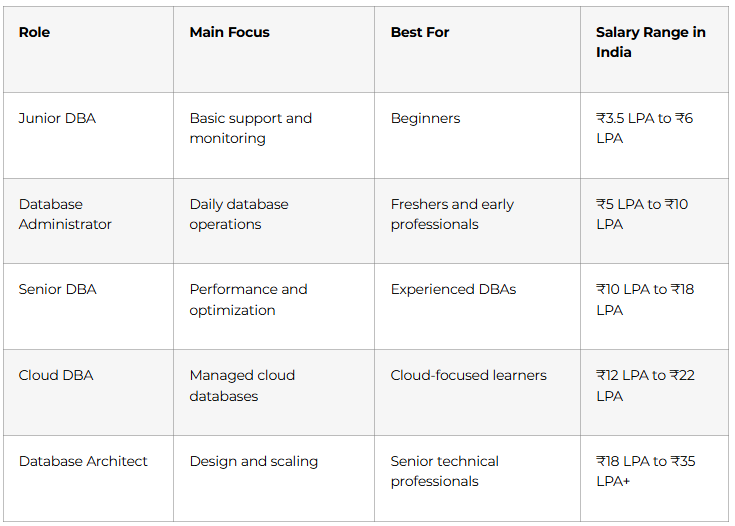
Junior Database Administrator (0-2 years) | ₹3.5-5.5 lakhs annually
This is your starting point. You’re the person who:
- Monitors database health and responds to alerts
- Handles routine backup and recovery tasks
- Creates user accounts and manages basic permissions
- Assists senior DBAs with larger projects
- Documents procedures and learns organizational database architecturenetcomlearning+1
Real talk: You’ll feel overwhelmed initially. There’s so much you don’t know, and every alert seems like a crisis. That’s normal. The good junior DBAs ask questions, document everything, and gradually build confidence.
Typical day: Checking overnight monitoring reports, creating database users for new team members, running scheduled backups, troubleshooting a developer’s query that’s running slow, attending team meetings where senior DBAs discuss architecture decisions (and you’re absorbing everything like a sponge).
Key milestone: Successfully recovering a database from backup without supervision. That’s your “I’m actually a DBA now” moment.
Database Administrator (2-5 years) | ₹6-12 lakhs annually
Now you’re trusted with real responsibilities:
- Managing production databases independently
- Performing complex performance tuning and optimization
- Implementing replication and high availability solutions
- Leading database migration projects
- Training junior DBAsrefontelearning+1
The difference: You’re no longer just executing tasks—you’re making decisions. “Should we implement read replicas? How should we partition this growing table? What’s our disaster recovery strategy?” These questions land on your desk.netcomlearning+1
Typical day: Leading a morning standup discussing database performance metrics, deep-diving into a complex query that’s causing issues (and actually finding the solution), meeting with developers to review their proposed database schema changes, planning next month’s database upgrade with minimal downtime.
Career turning point: This is where you decide your specialization. Do you love performance tuning? Security? Cloud migrations? Your choice here shapes the next decade.4dayweek
Senior Database Administrator (5-8 years) | ₹10-18 lakhs annually
You’re now the expert people turn to when things go wrong:
- Designing database architectures for new applications
- Leading disaster recovery planning and execution
- Mentoring team members and conducting technical interviews
- Making technology decisions (which database platform for the new product?)
- Interfacing with management on database strategyrefontelearning+1
The responsibility: When the CEO asks, “Can our database handle Black Friday traffic?” you’re the one who answers. When a major client demands 99.99% uptime in their SLA, you’re the one who makes it happen.netcomlearning
Typical day: Architecting database infrastructure for a major new product launch, presenting to leadership about cloud migration ROI, conducting a post-mortem analysis after a minor incident (and implementing safeguards so it never happens again), mentoring two junior DBAs through their first complex performance tuning challenge.
Recognition: Your LinkedIn inbox is constantly pinging with recruiter messages. Companies headhunt senior DBAs aggressively.refontelearning
Database Manager / Lead DBA (8-12 years) | ₹15-25 lakhs annually
Management enters the picture, but you’re still deeply technical:
- Managing a team of 3-8 DBAs
- Setting database standards and best practices across the organization
- Budget planning for database infrastructure
- Vendor negotiations (Oracle licensing isn’t cheap!)
- Ensuring compliance with security and regulatory requirements
The balance: You’re still hands-on during critical incidents, but increasingly, you’re enabling your team to solve problems rather than solving them yourself.4dayweek
Database Architect / Chief Data Officer (10+ years) | ₹20-45 lakhs annually
The pinnacle. You’re shaping the entire data strategy:
- Defining the organization’s overall database and data architecture
- Making strategic decisions about technology adoption
- Working directly with C-suite executives
- Representing the company at industry conferences
- Sometimes managing multiple teams or entire data departments
The reality: Very few DBAs reach this level. Those who do combine deep technical expertise with business acumen, leadership skills, and often, a bit of politics.
Alternative Career Paths (The Roads Less Traveled):
Not everyone climbs the traditional ladder. Here are equally lucrative alternatives:
The Cloud DBA Specialist
Focus entirely on cloud databases (AWS RDS, Azure SQL, Google Cloud SQL). Cloud specialists with strong DBA foundations earn ₹12-20 lakhs even at mid-level because demand massively outpaces supply.learnomate+1
The Performance Tuning Consultant
Become the person companies call when databases are dying. Charge ₹3,000-8,000/hour for freelance performance optimization. Work when you want, choose your projects.
The Database Security Expert
With GDPR, DPDP, and increasing cyber threats, database security specialists command premium salaries (₹15-30 lakhs) and often transition into Chief Information Security Officer roles.
The Startup DBA
Join early-stage startups as their first DBA. Lower initial salary but potential for equity that could be worth significantly more if the company succeeds. Plus, you get to build database infrastructure from scratch.
The Teaching/Training Professional
Share your expertise through online courses, corporate training, or joining edutech companies (like Frontlines!). Skilled DBA instructors earn ₹8-15 lakhs plus course revenue sharing.simplilearn
The Product Company DBA
Work for SaaS companies where databases ARE the product. Think MongoDB, Oracle, PostgreSQL consulting firms. Different challenges, often better work-life balance, salaries competitive with top tech companies.
🧠 Crack DBA Interviews Faster
Access 200+ SQL, MySQL, PostgreSQL, Oracle & Cloud DBA interview questions.
6. Database Administrator Salaries
Let’s get specific about compensation because this matters when you’re deciding whether to invest time learning this skill.
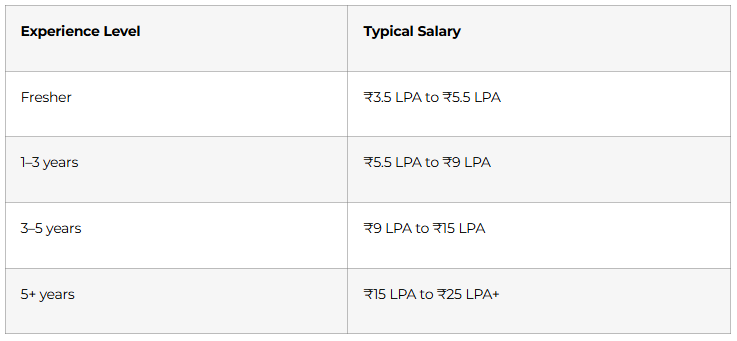
Entry-Level DBA Salaries (0-2 years experience):
Tier 1 Cities (Bangalore, Hyderabad, Pune, Gurgaon, Mumbai):
- Service Companies (TCS, Infosys, Wipro, HCL): ₹3.5-5 lakhs
- Product Companies (smaller startups): ₹4.5-6.5 lakhs
- Tech Giants (limited direct hiring for freshers): ₹6-8 lakhs
- With cloud certifications: Add ₹1-1.5 lakhs to above ranges.
Tier 2 Cities (Jaipur, Indore, Chandigarh, Coimbatore):
- Generally 15-20% lower than Tier 1
- But cost of living is also significantly lower
- Remote opportunities paying Tier 1 salaries are changing this equation upgrad
Factors that increase entry-level salaries:
- Multiple database certifications (+20-30%)
- Cloud platform expertise (+25-35%)
- Strong project portfolio (+15-20%)
- Referral from existing employee (+10-15%)
- Negotiation skills (seriously, this matters)
Mid-Level DBA Salaries (3-6 years experience):
The range widens significantly here because specialization matters:
General DBA: ₹6-9 lakhs
Cloud DBA: ₹8-14 lakhs
Performance Tuning Specialist: ₹9-15 lakhs
Database Security Specialist: ₹10-16 lakhs
Oracle DBA (enterprise focus): ₹8-13 lakhs
Multi-platform DBA: ₹9-14 lakhs
Real example: Two DBAs with identical 4 years experience—one focusing only on MySQL maintenance earns ₹7 lakhs, while another who learned AWS RDS, implemented automation, and contributed to open-source projects earns ₹12.5 lakhs. The difference? Marketable skills and visibility.
Senior DBA Salaries (7+ years experience):
Here’s where it gets really interesting:
Senior DBA (in-house): ₹12-20 lakhs
Lead DBA / Database Manager: ₹15-25 lakhs
Database Architect: ₹18-30 lakhs
Chief Data Officer: ₹25-45 lakhs+
Freelance Database Consultant: ₹2,000-8,000/hour (₹15-35 lakhs equivalent annually)
Geographic arbitrage opportunity: Remote work means you can earn Bangalore salaries while living in Bhopal. Many DBAs are doing exactly this post-pandemic.
The Hidden Compensation Components:
Smart DBAs negotiate beyond base salary:
Signing bonus: ₹50,000-2 lakhs (one-time)
Performance bonus: 10-20% of base salary annually
Stock options: Especially in startups (could be worth nothing or millions)
Learning budget: ₹30,000-1 lakh annually for certifications and courses
Remote work flexibility: Worth ₹50,000-1 lakh in saved commute costs and time
Health insurance: Family coverage worth ₹25,000-50,000 annually.
Pro negotiation tip: When offered ₹6 lakhs, counter with, “I’m excited about this role. Based on my cloud database skills and the three certifications I hold, I was expecting ₹7-7.5 lakhs. Is there flexibility in the budget?” Worst case: they say no. Best case: You just earned yourself ₹1.5 lakhs more annually.
7. The Challenges Nobody Warns You About
Every career has downsides. Database administration is no different. Here’s what you’ll actually face:
Challenge 1: The “Always On” Expectation
The reality: Databases run 24/7/365. You’re not always on-call, but when you are, a 3 AM call about database failure is possible.
The solution:
- Invest heavily in monitoring and automation so problems get caught before they become emergencies
- Negotiate on-call compensation (₹500-2,000 per day of on-call duty is standard)
- Companies with mature database practices have rare emergencies—ask about this during interviews
- As you become senior, you manage the on-call rotation rather than being in it simplilearn
Frontlines student perspective: “In my first job, I was on-call every fourth week. Sounds scary, but in 6 months, I got exactly two actual middle-of-night calls. And both were resolved in under 30 minutes using procedures I’d practiced. The on-call pay more than covered the inconvenience.”
Challenge 2: Imposter Syndrome (Especially Early On)
The reality: You’ll constantly encounter technologies you don’t know. Senior DBAs will discuss concepts that sound like alien languages. You’ll wonder if you’re cut out for this.
The solution:
- Everyone started where you are. That senior DBA who seems to know everything? They were Googling “how to create a database” five years ago
- Build a learning system: Spend 30 minutes daily learning something new
- Ask questions. The only stupid question is the one that leads to a database crash because you were afraid to ask
- Join DBA communities (Reddit’s r/Database, Discord channels, LinkedIn groups) where you’ll see even experienced professionals asking “basic” questions
Challenge 3: Balancing Security with Usability
The reality: Developers want open access to do their jobs quickly. Security best practices require restrictions. You’re caught in the middle.
The solution:
- Learn to communicate in terms of risk: “If we give admin access to everyone, here’s what could go wrong…”
- Implement solutions that balance both needs (like separate development databases with production-like data but no actual customer information)
- Document everything so when something does go wrong, you can show you followed best practices
Challenge 4: Keeping Up with Rapid Technology Changes
The reality: New database technologies emerge constantly. Cloud platforms add features quarterly. What you learned two years ago might be outdated.
The solution:
- Focus on fundamentals (SQL, database theory, optimization principles) which don’t change much
- Subscribe to database newsletters and podcasts for your commute
- Your employer should provide learning budgets—use them
- Pick one new technology per quarter to learn, not everything at once
- Join Frontlines’ alumni network where we share monthly tech updates and learning resourcessimplilearn
Challenge 5: Salary Stagnation Without Continuous Upskilling
The reality: A DBA who knows only on-premise Oracle will see minimal salary growth. The market rewards continuous learning.
The solution:
- Get certified in cloud platforms (AWS, Azure, Google Cloud)
- Learn automation (Python, Terraform)
- Understand data engineering concepts
- Contribute to open-source projects
- Build your personal brand (blog, LinkedIn, speaking at meetups)
- Every new skill is leverage for your next salary negotiationre
8. How to Actually Land Your First DBA Job (The Strategy That Works)
You’ve learned the skills. Now what? Here’s the exact job search strategy that gets results:
Phase 1: Build Credibility (Before Applying)
Create your online presence:
- LinkedIn profile optimization (we covered this earlier, but it’s THAT important)
- GitHub with at least 5 well-documented database projects
- One blog post or LinkedIn article about something you learned
- Professional headshot and polished resumenetcomlearning+1
Why this matters: Recruiters Google your name. If they find nothing, you’re forgettable. If they find a GitHub with projects and a blog post about database optimization, you’re memorable.
Phase 2: The Application Blitz (Weeks 1-2)
Target: 50 applications in two weeks
Where to apply:
- Naukri.com (10 applications daily)
- LinkedIn Jobs (5 applications daily)
- Indeed India (5 applications daily)
- Direct company career pages (5 per week)
- Startup job boards like AngelList (5 per week)
Application customization:
- Don’t use the same resume for every job
- Read the job description and mirror their language in your resume
- If they mention “performance tuning,” make sure your resume explicitly says “performance tuning” (with examples)
- Many companies use Applicant Tracking Systems that filter based on keywords
The numbers game: A 2% interview rate is normal for entry-level positions. That means 50 applications = 1 interview. So if you want 5 interviews, you need 250 applications. This is why we start with aggressive application volume.
Phase 3: Networking (Ongoing)
LinkedIn strategy:
- Connect with DBAs at companies you want to work for
- Connection request message: “Hi [Name], I’m an aspiring DBA who recently completed intensive training in MySQL, PostgreSQL, and Oracle. I admire [Company]’s work in [specific thing]. Would love to connect and learn from your experience.”
- Not everyone responds, but enough will
- After connecting, occasionally comment thoughtfully on their posts
- After building rapport (2-3 weeks), ask for an informational interview
Local meetups:
- Search Meetup.com for “Database” or “SQL” in your city
- Attend consistently (even virtually)
- Don’t just show up—participate, ask questions, help others
- These connections lead to referrals which dramatically increase interview chances
Frontlines advantage: Our students get direct access to hiring managers through our placement partners, skipping the application black hole entirely.
Phase 4: Interview Preparation (Intensive)
Technical preparation:
- Practice 100+ SQL queries on HackerRank and LeetCode
- Review database fundamentals (can you explain normalization to a 12-year-old?)
- Set up databases on your laptop so you can demonstrate live during technical interviews
- Prepare to explain every project on your resume in detail
Mock interviews:
- Practice with friends, colleagues, or family
- Record yourself answering common questions
- Watch the recording (painful but incredibly useful)
- Join Frontlines’ mock interview sessions with actual hiring managers who give brutally honest feedback
Behavioral preparation:
- Prepare STAR-format answers for common questions
- “Tell me about yourself” (practice until you can say it confidently in under 2 minutes)
- Have questions ready to ask interviewers (shows interest and engagement)
Phase 5: Interview Day (The Performance)
Technical interview tips:
When asked to write a query:
- Talk through your thought process out loud
- Clarify requirements before jumping in (“Just to confirm, you want the top 5 products by revenue in each category?”)
- Write clean, formatted SQL (even in whiteboard interviews)
- Test your logic with sample data if possible
- If you don’t know something, say so honestly but show problem-solving: “I haven’t worked with window functions, but based on my understanding of aggregation, I would approach it by…
When asked scenario questions:
“The database is slow. What do you do?”
Good answer structure:
- “First, I’d check current system metrics—CPU, memory, disk I/O, active connections…”
- “Next, I’d review slow query logs to identify which queries are taking longest…”
- “Then I’d analyze execution plans for those queries…”
- “I’d look at index usage and consider adding indexes where beneficial…”
- “Finally, I’d check for any recent changes in query patterns or data volume…”
This shows systematic thinking, not just guessing.
When asked about salary expectations:
- “I’m looking for a competitive package aligned with industry standards for entry-level DBAs with my skill set. What range has been budgeted for this position?”
- If pressed: “Based on my research and the value I bring with certifications in [list them], I believe ₹4.5-5.5 lakhs is appropriate, but I’m open to discussion based on the complete package
Red flags in interviews:
- Company can’t explain their database architecture
- No mention of backups or disaster recovery
- “We’ll give you root access to production from day one” (scary, not exciting)
- Unrealistic expectations (“You’ll manage 50 databases alone as a junior DBA”)
- Dismissive of your questions
Phase 6: Offer Negotiation
When you receive an offer:
- Never accept immediately (even if it’s great)
- Ask for 24-48 hours to review
- If salary is below expectations: “I’m excited about this opportunity. Based on my skills and the market rate for DBAs with cloud certifications, I was expecting ₹X. Is there flexibility in the budget?”
- Negotiate other components if salary is fixed: signing bonus, WFH days, learning budget, earlier performance review
- Get everything in writing before accepting
Multiple offers:
- Inform each company you’re evaluating multiple options (increases your value)
- Don’t play games or lie, but use legitimate competing offers as leverage
- Consider long-term growth opportunity, not just immediate salary
Common Beginner Mistakes (Learn From Others’ Failures)
Mistake 1: Learning only one database platform
In 2025, knowing just MySQL isn’t enough. Companies want multi-platform skills. Invest time in PostgreSQL, SQL Server, or Oracle too.netcomlearning+1
Mistake 2: Neglecting soft skills
Technical excellence gets you the interview. Communication, teamwork, and professionalism get you the job and promotions. Practice explaining technical concepts simply.coursera
Mistake 3: Not documenting learning
You’re learning tons but can’t prove it in interviews. Keep a journal, write blog posts, maintain GitHub projects. Make your learning visible.simplilearn
Mistake 4: Comparing your Day 1 to someone else’s Year 5
That senior DBA who seems to know everything? They were exactly where you are once. Focus on your own growth, not others’ highlight reels.
Mistake 5: Waiting to feel “ready” before applying
You’ll never feel 100% ready. If you meet 60% of job requirements, apply anyway. Many companies hire for potential, not just current skills.netcomlearning+1
Mistake 6: Ignoring the business side
Databases exist to serve business needs. Understanding how your database work impacts revenue, customer experience, and business operations makes you more valuable.simplilearn
Mistake 7: Not asking for help
Stuck on a problem for hours? Ask for help earlier. Senior DBAs appreciate someone who attempts solutions but knows when to escalate.netcomlearning
Why Frontlines Edutech is Your Best Path to Database Career Success
Now that you understand the complete database administrator landscape—the skills needed, career progression, salary expectations, and challenges—let’s talk about the fastest, most effective way to get there.
You could learn database administration on your own. People do it. But here’s what typically happens with self-learning:
- Week 1: Excited, watching tutorials, installing databases
- Week 3: Confused about which topic to learn next, jumping between resources
- Week 6: Stuck on a complex concept with no one to ask
- Week 10: Losing motivation, questioning if you’re learning the right things
- Week 16: Still not feeling job-ready, haven’t built projects, don’t know how to break into the industry
We’ve seen this pattern hundreds of times. Self-learning works for the exceptionally disciplined 5%. For the other 95%, structured guidance makes the difference between dreams and actual careers.
What Makes Frontlines Edutech Different?
- We’re Educators, Not Just Content Creators
Based in Hyderabad and serving students across Telangana, Andhra Pradesh, and all of India, Frontlines Edutech was built by educators who actually understand how people learn technical skills. Our Database Administrator program isn’t just recorded videos dumped online—it’s a carefully designed learning journey.
Our instructional approach:
- Concepts explained in plain language first, technical terminology second
- Every concept immediately followed by hands-on practice
- Real-world projects that actually appear in job interviews
- Daily assignments to ensure you’re actually learning, not just watching
- Weekly assessments to identify and fix knowledge gaps before they compound
- Industry Instructors Who’ve Lived What They Teach
Our DBA instructors aren’t theoretical teachers—they’re working professionals managing production databases for companies you’ve heard of:
- Rajesh K. – Senior DBA with 12 years managing databases for a major bank. Expertise: Oracle, performance tuning, high availability
- Priya M. – Cloud Database Architect with 8 years at a unicorn startup. Expertise: AWS RDS, Azure SQL, database migration
- Vikram S. – Database Security Specialist with 10 years in fintech. Expertise: Security compliance, encryption, audit frameworks
They bring real production challenges into the classroom. You’re not just learning syntax—you’re learning the decision-making process that separates junior from senior DBAs.
- Structured Curriculum Based on Actual Job Requirements
We analyzed 500+ database administrator job postings from Naukri, LinkedIn, and Indeed. Our curriculum teaches exactly what employers demand:
Month 1: Foundation
- SQL mastery across MySQL, PostgreSQL, SQL Server
- Database design and normalization
- Basic administration tasks
- Oracle and PL/SQL fundamentals
Month 2: Enterprise Skills
- Performance tuning and optimization
- High availability and disaster recovery
- Cloud databases (AWS, Azure, GCP)
- Automation and scripting
Month 3: Career Launch
- Certification preparation (Oracle OCP, AWS, Azure)
- Portfolio building and project completion
- Interview preparation with mock interviews
- Resume and LinkedIn optimization
- Direct placement support
- Cloud Lab Access (Worth ₹15,000+ If You Set It Up Yourself)
Database learning requires practice environments. Setting up local databases is one thing, but cloud databases? That costs money—AWS and Azure charge for database instances.
Frontlines students get:
- Pre-configured cloud database environments on AWS and Azure
- No setup hassles—click a button and start practicing
- Access to enterprise database features typically unavailable in free tiers
- Practice environments that mirror actual production systems
- ₹15,000+ value included in your course fee
- The Portfolio That Gets You Hired
By completion, you’ll have:
- 10+ complete database projects
- GitHub repository that showcases your skills
- Professional documentation for each project
- Video demonstrations of complex projects
- Capstone project simulating real enterprise database management
This portfolio is what lands interviews. Recruiters can’t assess your skills from a resume alone—but they can see your GitHub and immediately understand your capabilities.
- Certification Exam Fee Reimbursement
Database certifications cost money:
- Oracle OCP: ₹15,000-20,000
- AWS Certified Database: $300 (~₹25,000)
- Microsoft Azure Database Administrator: $165 (~₹14,000)
That’s ₹40,000-60,000 in certification costs. Frontlines reimburses your exam fees when you complete the program and pass certifications. We invest in your success because certified students get better jobs and higher salaries—which reflects well on us.
- Unlimited Doubt Clearing (Actually Unlimited)
Stuck on a query at 11 PM? Post it in our dedicated Slack channel. Instructors and teaching assistants respond typically within 2-3 hours, even on weekends.
Confused about replication concepts? Schedule a one-on-one session with an instructor.
Need help debugging your project? Hop on a screen-sharing call.
Most “unlimited support” claims are marketing. We actually staff teaching assistants specifically for this purpose because we know learning databases involves getting stuck frequently.
- Mock Interviews That Prepare You for Anything
We partner with hiring managers from our 200+ placement partners to conduct realistic mock interviews:
- Technical rounds where you write SQL queries under time pressure
- System design discussions where you architect database solutions
- Behavioral interviews testing communication and problem-solving
- Detailed feedback after each session
- Multiple rounds until you’re consistently performing well
Students consistently tell us: “The actual job interview felt easier than Frontlines mock interviews.” That’s by design.
- Placement Support That Actually Works
Here’s our placement process:
Week 12 (Final month of program):
- Resume building workshops
- LinkedIn profile optimization with one-on-one reviews
- Introduction to our placement partners
Week 13-14:
- Direct introductions to hiring managers (not just HR—actual technical decision-makers)
- Referrals to companies actively hiring DBAs
- Application to positions not publicly advertised
Post-completion:
- Continuous job alerts matching your profile
- Interview preparation for specific companies
- Salary negotiation coaching
- Support continues until you’re placed (not just “3 months after course completion”)
Our results speak:
- 90% placement rate within 3 months of completion
- Average starting salary: ₹4.8 lakhs (18% higher than industry average for fresh DBAs)
- Students placed at: Infosys, Cognizant, HCL, Tech Mahindra, and 50+ startups
- Lifetime Learning Community
Your course fee includes lifetime access to:
- All course materials and future updates
- Alumni community of 2,000+ database professionals
- Monthly expert sessions on emerging technologies
- Job postings and referral opportunities
- Continued learning resources
Think of it as joining a professional network, not just taking a course.
✨ Follow Your DBA Learning Path
Beginner → Junior DBA → DBA → Senior DBA → Architect. Your structured journey.
9. Success Stories: Where Our Students Are Today
Rahul Malhotra (24, Hyderabad)
B.Tech ECE graduate, unemployed for 8 months
“I attended five campus interviews in my final year—zero offers. I was desperate and considering MBA just for placement. Then I discovered Frontlines’ DBA program.
What clicked for me was the structured approach. Every day I knew exactly what to learn, practice, and complete. The projects were challenging but achievable. When I got stuck, instructors actually helped rather than pointing me to documentation.
The mock interview with Cognizant’s DBA manager was brutal—I failed badly. But that failure taught me what I needed to improve. Two weeks of focused prep later, I cracked the actual Cognizant interview.
Today, I’m managing PostgreSQL databases for a global retail client, earning ₹4.2 lakhs as a junior DBA. More importantly, I love my work. Solving a performance problem feels like winning a video game level.”
Priya Sharma (27, Guntur, AP)
MCA graduate, 2 years in technical support, wanted career change
“Technical support was soul-crushing—same issues, same solutions, no growth. I wanted something technical with actual problem-solving.
Frontlines’ DBA program was perfect because I could learn while still working. The evening live sessions and recorded lectures for revision made it possible.
What impressed me most was how instructors connected concepts to real-world scenarios. They’d say, ‘In my previous company, we faced this exact situation…’ That context made everything stick.
The placement team connected me directly with a fintech startup’s CTO. The interview was technical but I could demonstrate everything through my portfolio projects. They offered ₹5.8 lakhs—more than what I made in technical support after two years!
Six months in, I’ve implemented database replication, migrated a MySQL database to AWS RDS, and I’m studying for AWS certification. My manager already mentioned promotion track. This is the career growth I was looking for.”
Vikram Kumar (22, Warangal, Telangana)
B.Sc. Computer Science, non-CS background, doubted his technical abilities
“I’m not from an engineering background. When I started Frontlines’ DBA program, I feared I’d be left behind by B.Tech students. That fear was completely wrong.
Frontlines starts from absolute basics. They don’t assume prior knowledge. The first week was literally ‘What is a database and why do companies need them?’ From there, it built systematically.
What helped tremendously was the peer study groups. Five of us formed a group, met virtually every weekend, solved assignments together, explained concepts to each other. That collaborative learning was more valuable than any lecture.
The instructors never made me feel stupid for asking basic questions. In fact, they encouraged questions: ‘If you’re confused, five other people probably are too.’
I’m now a Junior DBA at HCL earning ₹4.5 lakhs plus shift allowance. My B.Sc. degree doesn’t matter anymore—my skills do. And those skills came from Frontlines’ structured program and my dedication.”
Anjali Reddy (25, Hyderabad)
B.Tech CSE, 2 failed interview attempts, confidence shattered
“After two interview rejections where I couldn’t answer basic technical questions, I was convinced I wasn’t cut out for tech careers. My confidence was destroyed.
Frontlines did two things that changed everything:
First, they showed me my knowledge gaps weren’t massive—they were specific and fixable. In two interviews, I failed because I couldn’t explain indexes properly and struggled with JOIN queries under pressure. Fixable problems.
Second, the mock interviews rebuilt my confidence. After the first mock interview (which I failed), we had a detailed debrief. The instructor didn’t just say ‘you’re wrong’—he explained the thinking process: ‘When asked about indexes, start with what problem indexes solve, then types of indexes, then when to use each…’
By my fifth mock interview, I was crushing it. The actual job interview at a startup felt like practice.
I’m now earning ₹6.2 lakhs as a Database Analyst. But the bigger win is confidence. I no longer feel like an imposter. I know I can solve complex database problems because I’ve done it dozens of times in projects.”
These aren’t exceptional cases—they’re typical Frontlines outcomes. Our students succeed because we provide structure, support, and a proven path.
Investment and ROI: The Numbers
Let’s talk money honestly.
Frontlines Edutech Database Administrator Program Investment:
- Course Fee: ₹35,000 ₹24,999 (Limited-time offer)
- EMI Options: Starting ₹2,500/month (no interest for 10 months)
What you get:
- 90-day structured curriculum (worth ₹20,000 if priced individually)
- Cloud lab access (₹15,000 value)
- Certification exam fee reimbursement (₹15,000-25,000 value)
- Mock interviews and placement support (₹10,000 value)
- Lifetime course access and updates (ongoing value)
- Alumni network access (network value: priceless)
Total value: ₹60,000+
Your investment: ₹24,999
Now the ROI calculation:
If you land an entry-level DBA job at ₹4.5 lakhs annually (below our average student outcome):
- Monthly salary: ₹37,500
- Your course investment: ₹24,999
You recover your entire investment in your first month’s salary.
Every subsequent month is 100% return on investment.
Over your career, the salary difference between having structured DBA training versus trying to break in without it is easily ₹10-15 lakhs (conservative estimate). Your ₹25,000 investment returns 400-600X over your career.
But let’s be honest: Money-back guarantee
We’re so confident in our program that we offer this: If you complete the entire 90-day program, submit all assignments, pass all assessments, and don’t receive at least 5 interview calls from our placement efforts within 90 days of completion—we’ll refund your full course fee.
That’s how certain we are you’ll succeed.
Frequently Asked Questions (The Honest Answers)
Q: I have zero coding background. Can I still become a DBA?
Yes. SQL is actually quite intuitive compared to programming languages like Java or Python. If you can think logically and follow step-by-step instructions, you can learn SQL. Frontlines starts from absolute basics—no prior knowledge assumed.
Q: How much time do I need daily?
For the 90-day program: 4-6 hours daily including lectures, practice, and assignments. If you’re working, consider the part-time option (6 months, 2-3 hours daily). Consistency matters more than daily hours.
Q: Will companies hire me without a B.Tech degree?
Many will, especially if you have certifications and a strong portfolio. Focus on companies and startups that prioritize skills over credentials. Our placement team knows which companies have flexible requirements.
Q: What’s the job market like for DBAs in 2025?
Excellent. Cloud migration means more database work, not less. Every company needs DBAs. The shortage of qualified DBAs means high demand for anyone with proven skills.
Q: Can I work remotely as a DBA?
Many DBA positions offer remote or hybrid work. Database management doesn’t require physical presence. Focus on building skills in cloud databases to maximize remote opportunities.
Q: Should I specialize in one database or learn multiple?
Learn 2-3 databases well rather than 1 database perfectly or 10 databases superficially. MySQL + PostgreSQL + Oracle is a strong combination. Cloud databases (AWS RDS, Azure SQL) are increasingly important.
Q: How is Frontlines different from YouTube tutorials or other online courses?
Structure, accountability, support, and placement. YouTube is great for specific topics but terrible for systematic learning. We provide the roadmap, hold you accountable with assignments and assessments, provide help when stuck, and most importantly, connect you to actual jobs.
Q: Do I need a powerful laptop?
Not necessarily. Any laptop from the last 5 years with 8GB RAM can run database software. We also provide cloud lab access so you’re not limited by your laptop’s specs.
Q: What if I can’t complete in 90 days?
You get lifetime access. If life happens and you need to pause, resume whenever you’re ready. Your access never expires. That said, 90% of students who commit to the daily schedule complete on time.
Q: Are there any hidden costs?
No. Course fee includes everything mentioned. Optional expenses: Certification exams (which we reimburse), and any books you want to purchase (not required—we provide all materials).
💰 Ready for High-Paying DBA Jobs?
Become job-ready with our
Database Administrator Course.
10. What Happens Next?
You’ve read over 15,000 words about database administration. You understand the career, the path, the challenges, and the opportunities.
Now you have a choice:
Choice 1: Do Nothing
Close this guide. Maybe bookmark it to “read later.” Continue your current path. Check back in 6 months and wonder where the time went.
Choice 2: Try Self-Learning
Download some tutorials. Start enthusiastically. Get stuck. Lose motivation. Realize in 3 months you’ve made minimal progress and still don’t feel job-ready.
Choice 3: Invest in Structured Success
Enroll in Frontlines Edutech’s Database Administrator program. Follow the proven 90-day roadmap. Get support when stuck. Build a portfolio that gets you hired. Land a DBA job earning ₹4-6 lakhs to start, with clear growth potential.
We both know which choice leads to actual results.
The database administration field is growing. Companies are desperate for qualified DBAs. Salaries are increasing. The opportunity is real and available.
The only question is: Will you be ready when opportunity knocks?
Special Launch Offer (Ends Soon)
Early enrollment benefits:
- Course fee: ₹35,000 ₹24,999 (save ₹10,001)
- Certification exam fee reimbursement (₹15,000-25,000 value)
- Free access to our Advanced Database Optimization workshop (₹5,000 value)
- Priority placement support (first access to new job opportunities)
- One month of free access to our premium database tool suite
Limited to next 50 enrollments. Current batch is 73% full.
Next Steps: How to Enroll
Option 1: Book a Free Career Counseling Call
Not ready to commit? Talk to our career counselors first. They’ll:
- Assess your current background and goals
- Provide honest advice about whether DBA career suits you
- Explain the program in detail
- Answer all your questions
- NO pressure sales tactics—we only want students who are genuinely committed
[Book Your Free 30-Minute Career Call]
Option 2: Direct Enrollment
Ready to start your DBA journey? Enroll directly:
- Complete the online enrollment form
- Choose payment plan (full payment or EMI)
- Get instant access to Week 1 materials
- Join our student community
- Start learning today
[Enroll in Database Administrator Program Now]
Option 3: Download the Complete Course Brochure
Want all program details in one document?
- Detailed curriculum breakdown
- Instructor profiles
- Student testimonials
- FAQs and policies
- Pricing options
[Download Free Course Brochure – PDF]
Option 4: Attend Our Free Intro Webinar
Join our weekly free webinar: “Is Database Administration Right for You?”
- Live Q&A with instructors
- Demo of the learning platform
- Meet current students
- Understand day-in-the-life of a DBA
Next session: Saturday, November 2, 2025, at 10:00 AM IST
[Register for Free Webinar]
Contact Frontlines Edutech
Hyderabad Office:
Frontlines Edutech (Frontlines Media)
[Address]
Hyderabad, Telangana – [Pin code]
Phone: +91-[XXXXX-XXXXX] (Call or WhatsApp)
Email: admissions@frontlinesedutech.com
Website: www.frontlinesedutech.com
Connect with us:
- LinkedIn: [Frontlines Edutech Official Page]
- Instagram: [@frontlinesedutech]
- YouTube: [Frontlines Edutech Channel] – Free DBA tutorials
- Facebook: [Frontlines Edutech Community]
Office hours: Monday-Saturday, 9:00 AM – 7:00 PM IST
Final Thoughts: Your Future is a Decision Away
Arjun’s story from the beginning of this guide? He’s real. He made a decision six months ago to invest in structured database training. Today, he’s a working DBA with a growing career.
The opportunity that was available to Arjun is available to you right now.
Six months from now, you’ll either be:
- Applying for Database Administrator positions with confidence, armed with skills, certifications, and a portfolio that gets you interviews
- Still where you are today, wishing you’d started
Database administration offers:
✅ Job security in an uncertain economy
✅ Salaries that grow consistently with experience
✅ Remote work opportunities
✅ Intellectual challenge and continuous learning
✅ Clear career progression
✅ High demand, low supply of qualified professionals
Frontlines Edutech provides:
✅ Structured 90-day roadmap (no guesswork about what to learn)
✅ Industry expert instructors (learn from working DBAs)
✅ Hands-on projects (build a portfolio that proves your skills)
✅ Cloud lab access (practice in real environments)
✅ Certification support (get credentials employers respect)
✅ Mock interviews (be prepared for anything)
✅ Placement support (get connected to actual jobs)
✅ Lifetime access and community (continuous growth)
You provide:
✅ Commitment to the 90-day program
✅ 4-6 hours daily for learning and practice
✅ Persistence when concepts get challenging
✅ Willingness to apply what you learn
That’s the equation. We’ve built the bridge to your database career. You just need to walk across it.
Your database administrator career starts with one decision today.
Don’t let this opportunity pass. Future you will thank present you for taking action.
🚀 Ready to Transform Your Career? Choose Your Next Step:
[Book Free Career Counseling Call]
[Enroll in DBA Program Now]
[Download Course Brochure]
[Register for Free Webinar]
[Connect on WhatsApp: +91-XXXXX-XXXXX]
Frontlines Edutech – Bridging the gap between learning and employment. Empowering careers through practical, industry-focused training in Database Administration, Data Analytics, and Digital Marketing. Based in Hyderabad, serving students across India.
Join 20,000+ successful Frontlines alumni building thriving tech careers. Your success story starts now. 🎓
🎯 Start Your DBA Journey Today
Learn → Practice → Build Projects → Crack Interviews → Get Placed.