
Database Admin Interview Preparation Guide
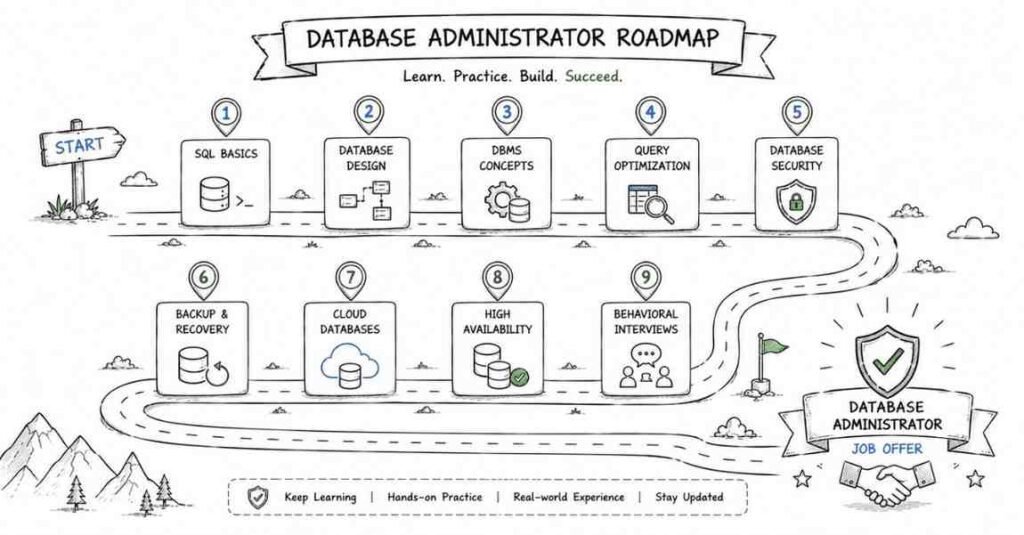
Table of Contents
Part 1: Introduction & 30-Day Study Plan
What This Guide Covers
This guide is designed to help you prepare for Database Administrator interviews in a structured, practical way. It covers SQL, database design, DBMS concepts, administration, security, backup and recovery, cloud databases, and behavioral interviews.
You can use it whether you are a fresher, a SQL developer moving into DBA work, or someone preparing for a cloud database role.
Who This Guide Is For
This guide is useful if you are:
- A fresher preparing for your first database job.
- A SQL developer aiming to become a DBA.
- A system or support engineer moving into database administration.
- A candidate preparing for Oracle, MySQL, PostgreSQL, SQL Server, or cloud database interviews.
The guide starts simple and becomes more advanced as you move through the parts. That makes it easier to build confidence step by step.
What A DBA Does
A Database Administrator keeps databases available, secure, fast, and recoverable. In simple terms, a DBA is responsible for making sure data is stored properly, accessed safely, and protected from loss.
Common DBA responsibilities include user access management, backups, performance tuning, index maintenance, monitoring, patching, and recovery planning. A good DBA thinks like a mechanic, security guard, and emergency planner all at once.
Career Path In 2026
A DBA career often grows in stages:
- Junior DBA: Learns basic SQL, backups, monitoring, and user management.
- DBA / Associate DBA: Handles tuning, troubleshooting, and routine maintenance.
- Senior DBA: Manages high availability, recovery, optimization, and design decisions.
- Cloud DBA: Works with managed platforms like AWS RDS, Azure SQL, and Google Cloud SQL.
- Database Architect: Designs larger data systems and long-term database strategy.
The best path depends on the databases and platforms you want to specialize in. Many interviewers expect you to understand both on-premise and cloud concepts by 2026.
How To Use The Guide
Read the guide in order if you are starting from scratch. If you already know SQL basics, you can move faster through Parts 2 and 3 and spend more time on administration, recovery, and cloud topics.
A practical approach is:
- Learn the concept.
- Practice the interview questions.
- Rewrite answers in your own words.
- Review weak areas after each part.
- Do mock interviews at the end.
This method works better than memorizing answers without understanding them.
30-Day Study Plan
Week 1: SQL Basics
Focus on SELECT, WHERE, JOINs, GROUP BY, HAVING, subqueries, NULL handling, and basic functions. Practice writing queries every day instead of only reading theory.
Week 2: Database Design And DBMS
Study normalization, keys, relationships, ACID properties, transactions, isolation levels, and indexing basics. Try to connect each concept to how it affects real systems.
Week 3: DBA Operations
Learn backups, recovery, replication, security, monitoring, permissions, and performance tuning. This is the part that makes you sound like a real DBA in interviews.
Week 4: Cloud, Practice, And Mock Interviews
Cover AWS RDS, Azure SQL, PostgreSQL, MySQL, MongoDB, and migration concepts. End the week with mock interviews and behavioral practice.
Daily Study Routine
A simple daily routine can keep you consistent:
- 45 minutes of concept study.
- 45 minutes of query practice or note writing.
- 30 minutes of revision or mock questions.
If you have less time, even 60–90 focused minutes per day can still work well. Consistency matters more than long one-time study sessions.
Tools You Should Know
You do not need to master every tool, but you should recognize the major ones:
- MySQL.
- PostgreSQL.
- Oracle Database.
- Microsoft SQL Server.
- MongoDB.
- AWS RDS.
- Azure SQL Database.
- Google Cloud SQL.
- Snowflake and BigQuery for modern cloud data stacks.
If possible, practice at least one relational database hands-on while reading this guide. That makes the interview answers much stronger.
Common Interview Focus Areas
Most DBA interviews test these areas:
- SQL query writing.
- Indexes and execution plans.
- Normalization and schema design.
- Transactions and isolation.
- Backup and recovery.
- Replication and high availability.
- Security and access control.
- Cloud database basics.
- Real troubleshooting scenarios.
Interviewers often want to know not just what a feature is, but when to use it and what trade-offs it creates.
Salary Expectations In 2026
Salary varies by company, city, database platform, and experience level. Here is a general India-focused view for planning purposes:
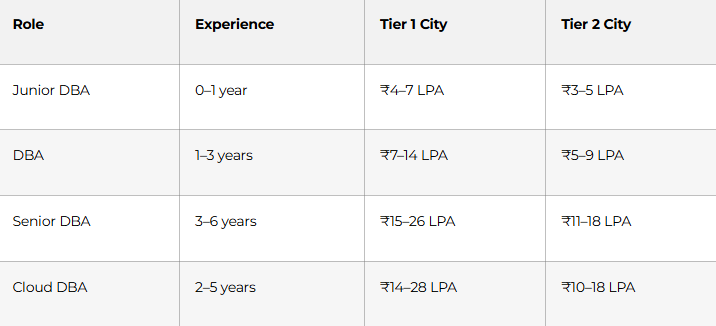
Specialized skills in performance tuning, Oracle, PostgreSQL, SQL Server, or cloud platforms can push compensation higher. Companies also pay more when a DBA can support production systems confidently.
What Strong Answers Look Like
Good DBA interview answers are:
- Clear and practical.
- Based on real systems or realistic examples.
- Focused on performance, reliability, and safety.
- Able to explain trade-offs.
- Easy to understand, even when the topic is technical.
For example, instead of saying “I know indexing,” it is stronger to say, “I know when an index helps, when it hurts write performance, and how to check whether the optimizer is actually using it.”
How To Think Like A DBA
A DBA does not only answer SQL questions. A DBA thinks about uptime, recovery, access control, speed, and future growth.
That means you should always ask:
- What happens if this database fails?
- How do we restore it?
- Who can access it?
- Will this query scale?
- Will this design stay maintainable later?
This mindset will help you answer interview questions more naturally and confidently.
Part 2: SQL Fundamentals & Query Writing
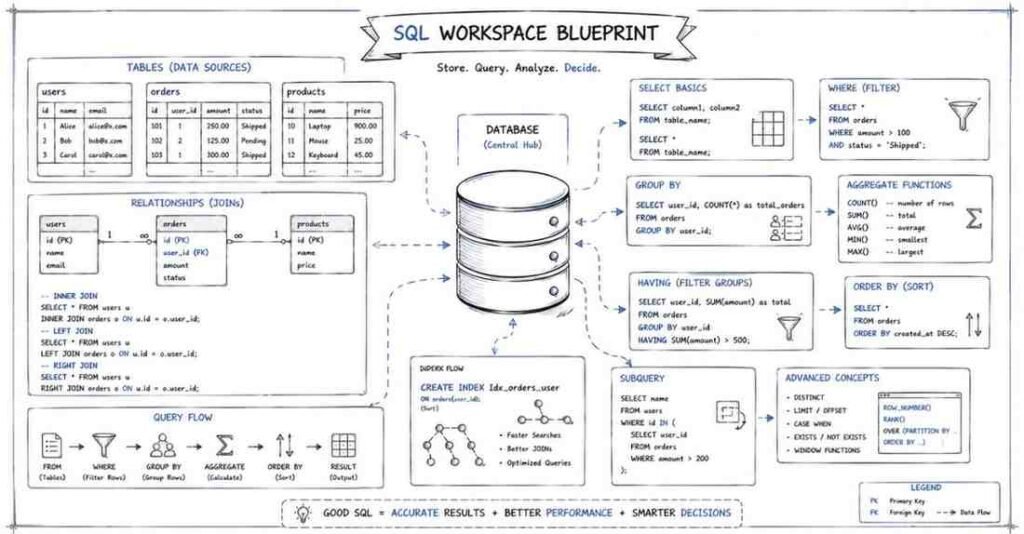
SQL Fundamentals (Questions 1–40)
Q1. What is SQL and why is it important for database administrators?
SQL stands for Structured Query Language. It is the standard language used to talk to relational databases, which means you use it to read data, insert data, update records, delete rows, and control access. For a DBA, SQL is like the steering wheel of a car without it, you cannot properly control the database.
Q2. What is the difference between a database and a DBMS?
A database is the actual collection of organized data, like customer records, orders, or employee details. A DBMS, or Database Management System, is the software used to create, store, manage, and retrieve that data. Think of the database as the library and the DBMS as the librarian who keeps everything organized.
Q3. What is an RDBMS?
An RDBMS is a Relational Database Management System. It stores data in tables made of rows and columns, and those tables can be related to each other using keys. Examples include MySQL, PostgreSQL, Oracle, and SQL Server.
Q4. Why do companies prefer relational databases?
Companies prefer relational databases because they organize data clearly and support reliable transactions, relationships, and structured querying. They are strong when data consistency matters, like in banking, HR, e-commerce, and ERP systems. In simple terms, they are good at keeping business data clean and dependable.
Q5. What is a table in SQL?
A table is the basic storage structure in a relational database. It stores data in rows and columns, where each row represents one record and each column represents one type of information. For example, an Employees table may contain employee_id, name, department, and salary columns.
SQL Command Types
Q6. What are the main categories of SQL commands?
SQL commands are usually divided into DDL, DML, DCL, and TCL. DDL manages structure, DML manages data, DCL manages permissions, and TCL manages transactions. This classification helps you understand whether you are changing the database design, changing the data, managing security, or controlling transaction flow.
Q7. What is DDL in SQL?
DDL stands for Data Definition Language. It is used to create or modify database objects like tables, schemas, indexes, and views. Common DDL commands include CREATE, ALTER, DROP, and TRUNCATE.
Q8. What is DML in SQL?
DML stands for Data Manipulation Language. It is used to work with the data inside tables rather than the structure of the tables themselves. The most common DML commands are INSERT, UPDATE, DELETE, and SELECT in practical interview discussions.
Q9. What is DCL in SQL?
DCL stands for Data Control Language. It is used to manage permissions and access rights in the database. The two most common DCL commands are GRANT and REVOKE.
Q10. What is TCL in SQL?
TCL stands for Transaction Control Language. It is used to control transactions so you can save changes permanently or undo them when needed. Common TCL commands are COMMIT, ROLLBACK, and SAVEPOINT.
Basic Query Writing
Q11. What does the SELECT statement do?
The SELECT statement is used to retrieve data from one or more tables. It allows you to choose which columns you want to see in the result. You can think of it as asking the database, “Show me this information.”
Q12. What is the purpose of the FROM clause?
The FROM clause tells SQL which table or tables to read the data from. Without FROM, the database does not know where to look. It is like giving an address before asking someone to deliver a package.
Q13. What does the WHERE clause do?
The WHERE clause filters rows before they are returned in the result. It only shows the records that match a given condition. For example, you can use it to find employees whose salary is greater than 50000.
Q14. What is the difference between WHERE and HAVING?
WHERE filters individual rows before grouping happens. HAVING filters grouped results after aggregation is done. A simple way to remember it is: WHERE works on raw rows, HAVING works on summarized groups.
Q15. What does ORDER BY do?
ORDER BY sorts the result set based on one or more columns. By default, sorting is ascending, but you can also use DESC for descending order. It is useful when you want results arranged by salary, name, date, or any other field.
Q16. What is DISTINCT used for?
DISTINCT removes duplicate values from the result set. If many rows contain the same department name, DISTINCT will return each department only once. It is useful when you want unique values instead of repeated entries.
Q17. What does LIMIT do?
LIMIT restricts the number of rows returned by a query in databases like MySQL and PostgreSQL. It is helpful when you want only the first few records, such as the top 10 rows. In SQL Server, similar behavior is often achieved using TOP.
Q18. What is an alias in SQL?
An alias is a temporary name given to a column or table in a query. It makes results easier to read and SQL statements shorter. For example, writing salary AS monthly_salary makes the output more meaningful.
Q19. Why is SELECT * discouraged in interviews and real systems?
SELECT * returns all columns, even the ones you do not need. This can slow queries, increase network usage, and make code less clear. Strong candidates usually select only the columns they actually need.
Q20. What is the logical order of a SQL query?
Even though we write SELECT first, the database logically processes parts of the query in a different order. A simple mental model is: FROM, WHERE, GROUP BY, HAVING, SELECT, ORDER BY. This helps explain why you cannot use aggregate filters in WHERE and why grouping changes what columns are valid later in the query.
Filtering And Conditions
Q21. What comparison operators are commonly used in SQL?
Common comparison operators include =, !=, <>, >, <, >=, and <=. These are used in conditions to compare values in columns. They help SQL decide which rows should be included or excluded.
Q22. What is the IN operator?
IN checks whether a value matches any value in a list. It is useful when you want to filter multiple possible values without writing many OR conditions. For example, you can search for employees in HR, Finance, or IT using one condition.
Q23. What does BETWEEN do?
BETWEEN checks whether a value falls within a range, usually inclusive of both ends. It is often used with numbers, salaries, dates, or marks. For example, salary BETWEEN 30000 AND 50000 includes both 30000 and 50000.
Q24. What is the LIKE operator?
LIKE is used for pattern matching in text columns. It is often paired with wildcard characters such as % and _. For example, name LIKE ‘A%’ finds names starting with the letter A.
Q25. What is the difference between % and _ in LIKE?
The % wildcard matches zero or more characters. The _ wildcard matches exactly one character. So A% can match any text starting with A, while A_ only matches two-character values starting with A.
Q26. What does IS NULL mean?
IS NULL checks whether a column has a missing or unknown value. You cannot use = NULL because NULL does not behave like a normal value. In SQL, NULL means the value is absent or undefined.
Q27. What is the NOT operator used for?
NOT reverses a condition. If a condition would normally return true, NOT makes it false, and vice versa. It is useful with IN, LIKE, BETWEEN, and NULL checks.
Q28. What is the difference between AND and OR?
AND means all listed conditions must be true. OR means at least one condition must be true. AND narrows results, while OR broadens them.
Aggregate Functions
Q29. What are aggregate functions in SQL?
Aggregate functions perform calculations on multiple rows and return a single result. They are commonly used for totals, averages, counts, minimums, and maximums. These functions help summarize data rather than show every row.
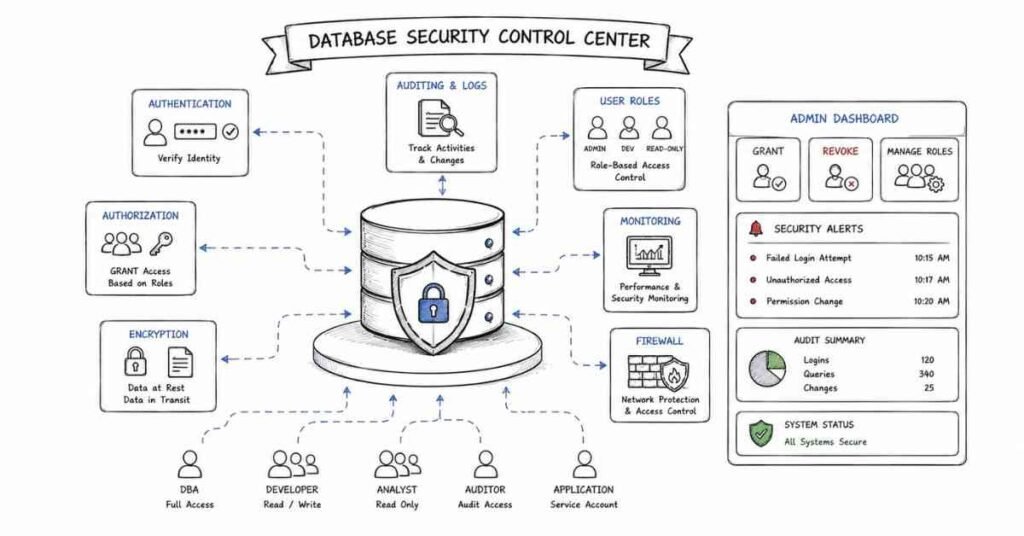
Q30. What does COUNT() do?
COUNT() returns the number of rows that match a condition or the number of non-null values in a column. COUNT(*) counts rows, while COUNT(column_name) ignores NULL values in that column. It is one of the most common functions in reporting queries.
Q31. What is the difference between COUNT(*) and COUNT(column)?
COUNT(*) counts all rows, regardless of NULL values. COUNT(column) counts only the rows where that specific column is not NULL. This difference becomes important when some records have missing values.
Q32. What does SUM() do?
SUM() adds the numeric values in a column. It is commonly used for total sales, total salary, or total quantity. It works only on numeric data.
Q33. What does AVG() do?
AVG() calculates the average value of a numeric column. It is often used to find average salary, average marks, or average sales. Like most aggregates, it ignores NULL values.
Q34. What do MIN() and MAX() do?
MIN() returns the smallest value in a column, while MAX() returns the largest. They can work with numbers, dates, and even text depending on the database. These functions are useful for finding earliest dates, lowest salary, or highest price.
GROUP BY And HAVING
Q35. What does GROUP BY do?
GROUP BY groups rows that have the same value in one or more columns. It is usually used with aggregate functions like COUNT(), SUM(), or AVG(). You can think of it as creating mini-buckets of similar data before doing calculations.
Q36. Why do we use HAVING with GROUP BY?
HAVING is used to filter grouped results after aggregation. For example, if you want only departments with more than 10 employees, HAVING is the correct choice. WHERE cannot do this because it works before the grouping step.
Q37. Can you use GROUP BY without aggregate functions?
Yes, you can, although it is less common. In such cases, GROUP BY behaves somewhat like DISTINCT by returning unique combinations of grouped columns. However, it is usually used together with aggregates for meaningful summaries.
Joins And Subqueries
Q38. What is a JOIN in SQL?
A JOIN combines rows from two or more tables based on a related column. It allows you to connect data that is stored separately, such as employees in one table and departments in another. Joins are one of the most important SQL topics in DBA interviews.
Q39. What is the difference between INNER JOIN and LEFT JOIN?
INNER JOIN returns only the matching rows from both tables. LEFT JOIN returns all rows from the left table and the matching rows from the right table, filling unmatched right-side values with NULL. In simple terms, INNER JOIN keeps only common matches, while LEFT JOIN keeps everything from the left side too.
Q40. What is a subquery?
A subquery is a query written inside another query. It can be used inside SELECT, FROM, WHERE, or HAVING depending on the need. You can think of it as using the result of one question as the input to another question.
Part 3: Advanced SQL & Query Optimization
Advanced SQL & Query Optimization (Questions 41–80)
Q41. What is a window function in SQL?
A window function performs a calculation across a set of rows related to the current row, without collapsing those rows into a single output row. This is different from GROUP BY, which combines rows into one summary row per group. Window functions are powerful because they let you keep detail and add analysis at the same time.
Q42. What is the difference between GROUP BY and window functions?
GROUP BY reduces multiple rows into fewer summary rows. Window functions keep all original rows and add calculated values alongside them. Think of GROUP BY as compressing a file, while window functions add notes without deleting anything.
Q43. What does ROW_NUMBER() do?
ROW_NUMBER() assigns a unique sequential number to each row within a partition or result set. It is commonly used to rank rows, paginate results, or remove duplicates. Even if two rows have the same value, ROW_NUMBER() still gives them different row numbers.
Q44. What is the difference between ROW_NUMBER(), RANK(), and DENSE_RANK()?
ROW_NUMBER() gives every row a unique number with no ties. RANK() gives the same rank to tied values but skips the next rank number. DENSE_RANK() also gives the same rank to ties, but it does not skip numbers afterward.
Q45. What does PARTITION BY do in a window function?
PARTITION BY divides the result set into smaller groups before the window function runs. The function then works separately inside each group. It is like saying, “Do this calculation again for each department, region, or category.”
Q46. What is the purpose of ORDER BY inside a window function?
ORDER BY inside the OVER clause defines the order in which the window function processes rows. This matters for functions like ROW_NUMBER(), RANK(), LEAD(), and LAG(). Without a meaningful order, the result may not match the business logic you want.
Q47. What do LEAD() and LAG() do?
LEAD() lets you look at the next row’s value, while LAG() lets you look at the previous row’s value. They are useful for comparing current and past records without using self-joins. For example, you can compare today’s sales with yesterday’s sales in the same query.
Q48. What is NTILE() used for?
NTILE() divides rows into a specified number of groups as evenly as possible. It is often used for quartiles, deciles, or other ranking buckets. For example, NTILE(4) can divide customers into four spending segments.
CTEs And Query Structure
Q49. What is a CTE in SQL?
CTE stands for Common Table Expression. It is a temporary named result set defined with the WITH clause and used inside a larger query. It makes complex SQL easier to read and organize.
Q50. Why use a CTE instead of a subquery?
A CTE improves readability, especially when the same logic is reused or when a query becomes too nested. It also helps you break a complex query into logical steps. In interviews, using a CTE often makes your thought process look cleaner and more structured.
Q51. Can a CTE be referenced multiple times in a query?
Yes, a CTE can be referenced multiple times in the statement that follows it. This can make the query easier to maintain than repeating the same subquery several times. However, performance depends on the database engine and query optimizer.
Q52. What is a recursive CTE?
A recursive CTE is a CTE that refers to itself. It is used to work with hierarchical or tree-like data, such as employee-manager structures or category-parent relationships. It starts with a base result and keeps expanding until no more matching rows are found.
Q53. When should you use a recursive CTE?
Use a recursive CTE when you need to traverse levels of related data. This is common in organization charts, folder paths, bill-of-material structures, or dependency trees. It is useful when the number of levels is not fixed in advance.
Indexing Fundamentals
Q54. What is an index in a database?
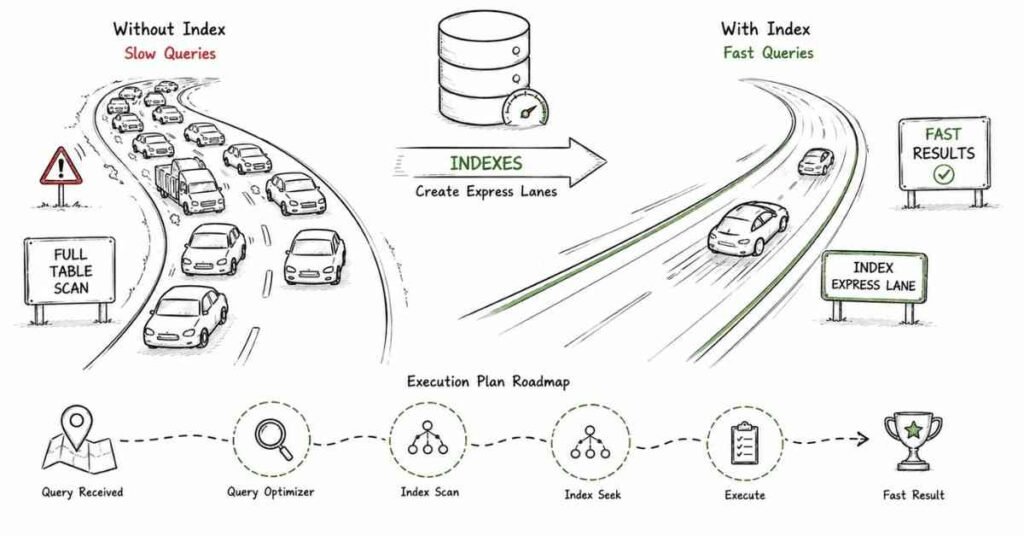
An index is a data structure that helps the database find rows faster. Without an index, the database may need to scan the whole table to find matching records. You can think of an index like the index page in a textbook it helps you jump directly to what you need.
Q55. Why do indexes improve query performance?
Indexes reduce the amount of data the database must scan. This makes searches, joins, and sorting operations faster when the indexed columns are used properly. However, indexes also add overhead to INSERT, UPDATE, and DELETE operations because the index must be maintained.
Q56. What is the difference between clustered and non-clustered indexes?
A clustered index determines the physical order of data in the table. A non-clustered index is a separate structure that points to the actual data rows. A table usually has only one clustered index because data can only be physically ordered one way.
Q57. What is a composite index?
A composite index is an index built on more than one column. It is useful when queries commonly filter or sort using the same column combination. The column order inside the composite index matters a lot for performance.
Q58. What is a covering index?
A covering index contains all the columns needed by a query, either in the index key or included columns depending on the database. This means the database may answer the query directly from the index without looking up the full table row. That can reduce disk reads and speed up performance.
Q59. What is a full table scan?
A full table scan happens when the database reads every row in a table to find matches. This can be slow on large tables, especially when only a small number of rows is needed. Sometimes it is unavoidable, but often it means indexing or query design can be improved.
Q60. Can too many indexes be a problem?
Yes, too many indexes can slow down writes and take extra storage. Every insert, update, or delete must also update the related indexes. A strong DBA balances read performance with maintenance cost instead of creating indexes everywhere.
Execution Plans And Optimization
Q61. What is an execution plan?
An execution plan shows how the database intends to run a query. It explains whether the database will scan tables, use indexes, sort data, join tables, or apply filters in certain ways. It is one of the most important tools for understanding slow queries.
Q62. Why should a DBA read execution plans?
Execution plans help you find bottlenecks instead of guessing. They show which step takes the most work and whether the optimizer is using indexes efficiently. A DBA uses them to make decisions about query rewrites, indexing, statistics, and schema changes.
Q63. What is EXPLAIN or EXPLAIN ANALYZE?
EXPLAIN shows the planned execution path of a query before or without fully running it, depending on the database. EXPLAIN ANALYZE usually runs the query and shows actual runtime details. The second one is especially useful because estimated cost and real behavior do not always match.
Q64. What are common signs of a poorly optimized query?
Common signs include full table scans on large tables, expensive sorts, repeated nested loops on huge datasets, and filters applied too late. Another clue is when a query returns quickly on small data but slows badly as data grows. High CPU, high I/O, or long wait times are also warning signs.
Q65. Why is selecting only needed columns a good practice?
Selecting only the required columns reduces data transfer, memory usage, and sometimes disk reads. It also makes your query clearer and safer when table structures change. This is one reason why experienced DBAs avoid SELECT * in production queries.
Q66. How can WHERE clauses improve performance?
A good WHERE clause filters rows early, so the database processes less data in later steps. This can reduce joins, sorting, grouping, and memory usage. It is like removing unwanted luggage before loading a truck instead of after arriving.
Q67. Why can functions on indexed columns hurt performance?
When you apply a function to an indexed column, the optimizer may not be able to use the index efficiently. For example, wrapping a date column in a function can force a scan instead of a seek. It is often better to rewrite the condition so the raw column remains searchable.
Q68. What is the difference between EXISTS and IN?
IN checks whether a value appears in a list or subquery result. EXISTS checks whether at least one matching row exists. In many practical cases they can return the same result, but performance may differ depending on data size, indexing, and the optimizer.
Q69. When is EXISTS often preferred?
EXISTS is often preferred when checking for the presence of related rows, especially in correlated subqueries on large datasets. It can stop searching as soon as one match is found. That makes it conceptually efficient for existence checks.
Q70. How do joins affect query performance?
Joins are essential, but they can become expensive when tables are large or join columns are not indexed well. The order of joins, join type, filtering, and row counts all affect cost. A DBA pays close attention to join conditions because poor joins can turn fast queries into slow ones.
Stored Procedures, Functions, And Triggers
Q71. What is a stored procedure?
A stored procedure is a saved set of SQL statements that can be executed by name. It can accept parameters and contain logic such as conditions or loops depending on the database. Stored procedures help centralize database-side logic and reduce repeated SQL code.
Q72. What are the advantages of stored procedures?
Stored procedures can improve code reuse, security, and maintainability. They also let you keep important logic close to the data. In some systems, they can reduce network traffic because the application sends one call instead of many SQL statements.
Q73. What is the difference between a stored procedure and a function?
A function usually returns a value and is often used inside SQL expressions. A stored procedure is usually executed as a separate action and can perform broader tasks such as inserts, updates, or multiple result operations. The exact behavior varies by database platform, but that is the usual interview-level distinction.
Q74. What is a trigger?
A trigger is a special database object that runs automatically when a specified event happens, such as INSERT, UPDATE, or DELETE. It is often used for auditing, validation, or enforcing certain rules. Unlike a stored procedure, you do not call a trigger directly.
Q75. Why should triggers be used carefully?
Triggers can be powerful, but they can also hide logic and make debugging harder. They may affect performance because they run automatically in response to data changes. A strong DBA uses triggers when they solve a clear problem, not just because they are available.
Views And Cursors
Q76. What is a view in SQL?
A view is a virtual table based on a query. It does not usually store data itself, but instead shows data from underlying tables when queried. Views can simplify complex queries and restrict access to certain columns or rows.
Q77. What is a materialized view?
A materialized view stores the result of a query physically, unlike a normal view which runs the query each time. This can improve performance for expensive reporting queries. The trade-off is that the stored result must be refreshed to stay current.
Q78. When should you use a view?
Use a view when you want to simplify repeated query logic, improve consistency, or limit what users can see. For example, you may expose a business-friendly view instead of letting users query multiple raw tables directly. Views are especially useful in reporting and controlled access scenarios.
Q79. What is a cursor in SQL?
A cursor is a database object that processes query results row by row. It is useful in some procedural situations, but it is generally slower than set-based SQL operations. That is why DBAs usually prefer set-based solutions whenever possible.
Q80. Why are cursors often avoided?
Cursors can consume more time and resources because they handle rows one at a time. SQL databases are optimized for set-based operations, where many rows are processed together. A cursor is like moving bricks one by one instead of using a forklift.
Part 4: Database Design & Normalization
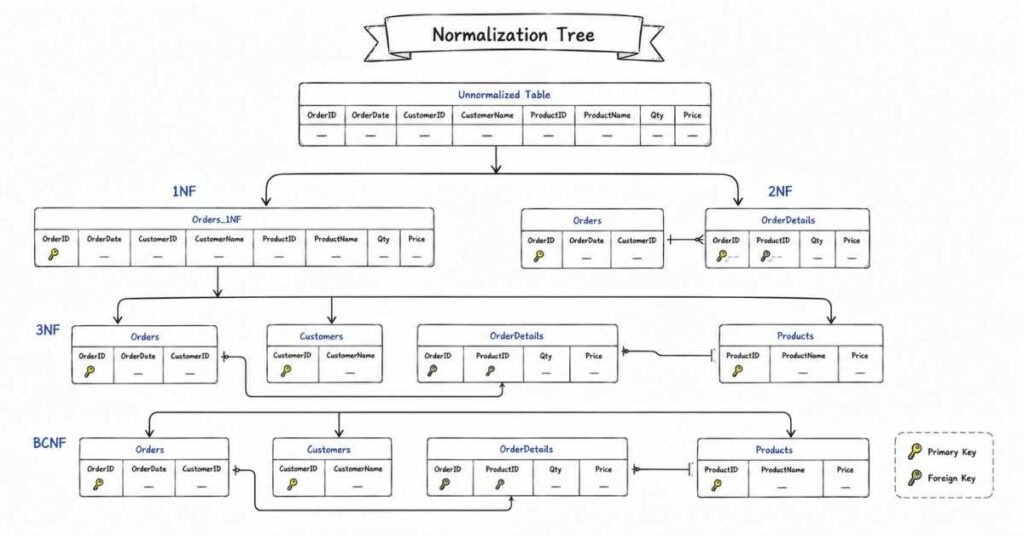
Database Design & Normalization (Questions 81–115)
Q81. What is database design?
Database design is the process of planning how data will be stored, organized, and related inside a database. A good design makes data easy to store, retrieve, update, and protect. In simple terms, it is like designing the blueprint of a building before construction starts.
Q82. Why is good database design important?
Good design reduces redundancy, improves consistency, and makes the system easier to maintain. It also helps performance, security, and future scalability. A poorly designed database may work at first but become messy and fragile as data grows.
Q83. What is data redundancy?
Data redundancy means storing the same piece of data in multiple places unnecessarily. This wastes space and increases the chance of inconsistencies when one copy is updated and another is not. Good normalization reduces unnecessary redundancy.
Q84. What is data integrity?
Data integrity means the data remains accurate, consistent, and trustworthy over time. It ensures relationships are valid, values are correct, and updates do not break the system. For a DBA, protecting integrity is one of the most important responsibilities.
ER Modeling
Q85. What is an ER model?
An ER model, or Entity-Relationship model, is a visual way to represent data and how different pieces of data relate to each other. It helps designers understand the structure before building the actual database. It is often the first step in designing a relational system.
Q86. What is an entity in database design?
An entity is a real-world object or concept that you want to store data about. Examples include Student, Employee, Product, or Order. In the actual database, entities usually become tables.
Q87. What is an attribute?
An attribute is a property or detail about an entity. For example, an Employee entity may have attributes like employee_id, name, department, and salary. In table terms, attributes usually become columns.
Q88. What is a relationship in an ER model?
A relationship shows how two entities are connected. For example, a Customer places an Order, or a Student enrolls in a Course. Relationships help define how tables will link together in the final schema.
Keys In Database Design
Q89. What is a primary key?
A primary key is a column or combination of columns that uniquely identifies each row in a table. It cannot contain duplicate values and usually should not be NULL. It is like a unique ID card for every record.
Q90. What is a foreign key?
A foreign key is a column in one table that refers to the primary key in another table. It creates a relationship between the two tables and helps enforce referential integrity. For example, department_id in an Employees table may refer to department_id in a Departments table.
Q91. What is a candidate key?
A candidate key is any column or set of columns that can uniquely identify a row. A table may have multiple candidate keys, but only one is chosen as the primary key. The others remain possible unique identifiers.
Q92. What is an alternate key?
An alternate key is a candidate key that was not chosen as the primary key. It still uniquely identifies rows, but it is not the main identifier. For example, employee_id may be the primary key while email may act as an alternate key.
Q93. What is a composite key?
A composite key is a key made from more than one column. It is used when a single column is not enough to uniquely identify a row. For example, student_id and course_id together may uniquely identify a row in an Enrollments table.
Q94. What is a unique key?
A unique key ensures that values in a column or combination of columns are not duplicated. It is similar to a primary key, but databases usually allow one primary key and may allow multiple unique keys. Depending on the system, NULL handling may differ.
Relationships
Q95. What is a one-to-one relationship?
A one-to-one relationship means one row in Table A matches one row in Table B. This is less common, but it is useful when you want to split sensitive or optional information into a separate table. For example, an Employee table may have a one-to-one relationship with an EmployeePassport table.
Q96. What is a one-to-many relationship?
A one-to-many relationship means one row in one table can match many rows in another table. This is one of the most common relationships in relational databases. For example, one Department can have many Employees.
Q97. What is a many-to-many relationship?
A many-to-many relationship means many rows in one table can relate to many rows in another table. This is usually implemented using a junction table. For example, many Students can enroll in many Courses, so an Enrollments table connects them.
Q98. What is a junction table?
A junction table is a table used to break a many-to-many relationship into two one-to-many relationships. It usually contains foreign keys from both related tables. It may also include extra attributes like enrollment_date or quantity.
Normalization Basics
Q99. What is normalization?
Normalization is the process of organizing data to reduce redundancy and improve consistency. It splits data into logical tables and defines relationships between them. The goal is to make updates safer and reduce repeated data.
Q100. Why is normalization important?
Normalization helps prevent anomalies during insert, update, and delete operations. It improves data integrity and makes the design cleaner and easier to manage. In short, it keeps the database from becoming cluttered and inconsistent.
Q101. What is the first normal form (1NF)?
A table is in 1NF when it has atomic values, meaning each cell contains only one value and there are no repeating groups. Every row should also be uniquely identifiable. In simple words, one box should hold one piece of information.
Q102. What is the second normal form (2NF)?
A table is in 2NF when it is already in 1NF and all non-key columns depend on the whole primary key, not just part of it. This matters mainly when the table has a composite key. It removes partial dependency.
Q103. What is partial dependency?
Partial dependency happens when a non-key column depends on only part of a composite primary key instead of the full key. This creates redundancy and can lead to inconsistencies. Removing partial dependency is the main goal of 2NF.
Q104. What is the third normal form (3NF)?
A table is in 3NF when it is already in 2NF and non-key columns depend only on the key, not on other non-key columns. This removes transitive dependency. It helps keep data facts stored in the right place.
Q105. What is transitive dependency?
Transitive dependency happens when a non-key column depends on another non-key column instead of directly on the primary key. For example, if employee_id determines department_id and department_id determines department_name, then department_name is transitively dependent on employee_id. This is a sign the design may need to be split into separate tables.
Q106. What is BCNF?
BCNF stands for Boyce-Codd Normal Form. It is a stricter version of 3NF that handles some edge cases where 3NF is not enough. In BCNF, every determinant must be a candidate key.
Q107. Is BCNF always required in practical systems?
No, BCNF is not always required in every real-world system. Sometimes 3NF is good enough, especially when performance, simplicity, or business constraints matter more. Interviewers usually care that you understand the concept and trade-offs rather than forcing BCNF everywhere.
Denormalization
Q108. What is denormalization?
Denormalization is the process of intentionally adding some redundancy back into a database design. It is usually done to improve read performance or simplify complex queries. In other words, you trade a little duplication for faster access.
Q109. When should denormalization be used?
Denormalization should be used when performance needs justify it, especially in reporting systems, analytics, or very heavy read workloads. It should be a conscious decision, not a shortcut for poor design. A DBA should always understand the maintenance cost before choosing it.
Q110. What are the risks of denormalization?
Denormalization increases redundancy, which can create update inconsistencies if not managed carefully. It can also make write operations more complex. The main trade-off is speed versus data cleanliness.
Constraints And Referential Integrity
Q111. What is a constraint in SQL?
A constraint is a rule applied to a table or column to control what data can be stored. Constraints help protect data quality and consistency automatically. Common examples include PRIMARY KEY, FOREIGN KEY, NOT NULL, UNIQUE, CHECK, and DEFAULT.
Q112. What is a NOT NULL constraint?
NOT NULL ensures that a column cannot store missing values. It is useful for fields that must always be filled, such as employee_id or order_date. This prevents incomplete records from entering the table.
Q113. What is a CHECK constraint?
A CHECK constraint ensures that data meets a specific condition before being stored. For example, salary must be greater than zero or age must be between 18 and 60. It acts like a built-in quality control rule.
Q114. What is referential integrity?
Referential integrity ensures that relationships between tables stay valid. If a foreign key points to a primary key, the referenced row must exist. This prevents orphan records and keeps related data trustworthy.
Q115. What are cascading actions in foreign keys?
Cascading actions define what happens to child rows when the parent row is updated or deleted. Common options include CASCADE, SET NULL, and RESTRICT. These rules help databases handle related changes in a controlled way.
Part 5: DBMS Concepts & Architecture
DBMS Concepts & Architecture (Questions 116–150)
Q116. What is a transaction in a DBMS?
A transaction is a group of one or more database operations treated as a single unit of work. Either all the operations succeed together or none of them are applied. This is important because partial updates can leave data in a broken state.
Q117. What are ACID properties?
ACID stands for Atomicity, Consistency, Isolation, and Durability. These are the core properties that make transactions reliable in a database system. They ensure data stays correct even when many users work at the same time or when failures happen.
Q118. What is Atomicity?
Atomicity means a transaction is all-or-nothing. If any part of the transaction fails, the whole transaction is rolled back. It is like transferring money you cannot allow the amount to be deducted from one account without being added to the other.
Q119. What is Consistency?
Consistency means a transaction takes the database from one valid state to another valid state. It must follow all rules, constraints, and relationships defined in the system. If the rules say salary cannot be negative, a consistent transaction cannot leave negative salary behind.
Q120. What is Isolation?
Isolation means transactions should not interfere with each other while running concurrently. One transaction should not see the half-finished work of another. This helps avoid confusing situations where users read temporary or conflicting data.
Q121. What is Durability?
Durability means once a transaction is committed, its changes should survive crashes, power failures, or restarts. The database ensures committed data is safely stored. In simple words, once the system says “saved,” it should really stay saved.
Transaction Control
Q122. What is COMMIT?
COMMIT permanently saves all changes made in the current transaction. After a commit, those changes become visible as completed work and are not undone by a normal rollback. It is the final “yes, make it official” step.
Q123. What is ROLLBACK?
ROLLBACK undoes the changes made in the current transaction since the last commit. It is used when something goes wrong and you want to return the database to its previous stable state. This is one of the main protections behind safe transaction handling.
Q124. What is SAVEPOINT?
A SAVEPOINT creates a marker inside a transaction. It lets you roll back only part of the transaction instead of undoing everything. It is useful when a large transaction has multiple steps and only one section fails.
Q125. Why are transactions important for DBAs?
Transactions protect the database from incomplete or conflicting updates. They are essential in finance, inventory, orders, healthcare, and any system where correctness matters. A DBA must understand them because many performance and concurrency issues begin at the transaction level.
Concurrency Control
Q126. What is concurrency control?
Concurrency control is the set of techniques used to manage multiple transactions running at the same time. Its goal is to keep data correct while still allowing good performance. Without it, simultaneous updates could corrupt data or create confusing results.
Q127. Why is concurrency control needed?
It is needed because databases are shared systems. Many users or applications may read and write the same data at the same time. Concurrency control prevents conflicts like dirty reads, lost updates, and inconsistent results.
Q128. What is a lock in DBMS?
A lock is a mechanism that controls access to data while a transaction is using it. It prevents unsafe simultaneous operations on the same resource. You can think of it as putting a “busy” sign on data until the current work is complete.
Q129. What is a shared lock?
A shared lock allows multiple transactions to read the same data at the same time. However, it usually prevents writing while those reads are active. This is useful when many users need to view data without changing it.
Q130. What is an exclusive lock?
An exclusive lock allows one transaction to modify a piece of data while blocking other reads or writes that would conflict. It is used for updates, deletes, and inserts where data must not be changed by someone else at the same moment. This protects data from overlapping writes.
Q131. What is two-phase locking?
Two-phase locking, often called 2PL, is a locking protocol with a growing phase and a shrinking phase. In the growing phase, a transaction acquires locks; in the shrinking phase, it releases them and cannot acquire new ones. This helps maintain serializable behavior.
Q132. What is strict two-phase locking?
Strict two-phase locking is a stronger version of 2PL. It holds write locks until the transaction commits or rolls back. This helps prevent dirty reads and makes recovery safer.
Deadlocks And Waiting
Q133. What is a deadlock?
A deadlock happens when two or more transactions wait for each other in a cycle and none of them can move forward. For example, Transaction A holds one lock and wants another, while Transaction B holds the second lock and wants the first. Both are stuck.
Q134. How does a DBMS handle deadlocks?
A DBMS may detect deadlocks automatically and choose one transaction as a victim to roll back. This breaks the cycle and lets the other transaction continue. Some systems also use timeouts or prevention strategies.
Q135. How can DBAs reduce deadlocks?
DBAs can reduce deadlocks by keeping transactions short, accessing tables in a consistent order, indexing properly, and avoiding unnecessary locks. Good query design also helps. Deadlocks are often not random they usually reveal patterns in application behavior.
Isolation Levels
Q136. What is an isolation level?
An isolation level defines how much one transaction can see of another transaction’s work. Higher isolation gives stronger correctness but may reduce concurrency and performance. Lower isolation gives more speed but allows more anomalies.
Q137. What is READ UNCOMMITTED?
READ UNCOMMITTED is the weakest isolation level. A transaction can read changes made by another transaction even if they are not yet committed. This can lead to dirty reads, which is why it is rarely used in systems where correctness matters.
Q138. What is READ COMMITTED?
READ COMMITTED allows a transaction to read only committed data. It prevents dirty reads but still allows non-repeatable reads and phantoms in many systems. It is a common default level because it balances safety and performance.
Q139. What is REPEATABLE READ?
REPEATABLE READ ensures that if a transaction reads the same row twice, it will get the same result both times during that transaction. It prevents dirty reads and non-repeatable reads, though phantom behavior depends on the database implementation. It gives stronger consistency than READ COMMITTED.
Q140. What is SERIALIZABLE?
SERIALIZABLE is the strongest standard isolation level. It makes concurrent transactions behave as if they were executed one after another in sequence. It gives the highest consistency but can reduce throughput because it is more restrictive.
Q141. What is a dirty read?
A dirty read happens when one transaction reads data written by another transaction that has not yet committed. If the second transaction rolls back, the first transaction has read something that never really existed in the final database state. This is one reason weak isolation can be dangerous.
Q142. What is a non-repeatable read?
A non-repeatable read happens when a transaction reads the same row twice and gets different values because another transaction changed and committed that row in between. The row is the same, but its contents changed during the transaction. This can cause unstable results in business logic.
Q143. What is a phantom read?
A phantom read happens when a transaction reruns a query and finds new or missing rows because another transaction inserted or deleted matching rows. The problem is not a changed row, but a changed set of rows. This often appears in range queries.
MVCC And Modern Concurrency
Q144. What is MVCC?
MVCC stands for Multi-Version Concurrency Control. Instead of forcing readers and writers to block each other as much, the database keeps multiple versions of data so transactions can see a consistent snapshot. This improves concurrency in many modern database engines.
Q145. Why is MVCC useful?
MVCC allows readers to continue reading older committed versions while writers make changes. This reduces blocking and often improves overall performance. It is especially useful in systems with many concurrent reads and writes.
Q146. How is MVCC different from pure locking?
Pure locking mainly controls access by blocking conflicting operations. MVCC reduces some blocking by using different row versions for readers and writers. In simple terms, locking is like waiting in line for one copy of a file, while MVCC is like letting readers see a safe earlier copy.
Architecture And Database Types
Q147. What is database architecture?
Database architecture describes how the database system is structured and how components interact. It includes layers such as storage, query processing, transaction management, and client access. Understanding architecture helps DBAs troubleshoot performance and design issues more effectively.
Q148. What is the difference between one-tier, two-tier, and three-tier architecture?
In one-tier architecture, the user, application, and database are closely combined, often on the same system. In two-tier architecture, the client talks directly to the database server. In three-tier architecture, the client talks to an application server, which then talks to the database, improving scalability and control.
Q149. What is the difference between DBMS, RDBMS, and NoSQL?
A DBMS is a general system for storing and managing data. An RDBMS is a type of DBMS that stores data in related tables using structured schemas and SQL. NoSQL databases use other models like document, key-value, column-family, or graph, and they are often chosen for flexibility or massive scale.
Q150. What is the CAP theorem in simple terms?
The CAP theorem says a distributed system cannot fully guarantee consistency, availability, and partition tolerance all at the same time. During a network partition, the system must choose between staying fully consistent or staying fully available. For interviews, the key point is understanding that distributed database design always involves trade-offs.
Part 6: Database Administration & Security
Database Administration & Security (Questions 151–185)
Q151. What are the main responsibilities of a DBA?
A DBA is responsible for keeping databases available, secure, fast, and recoverable. This includes installation, configuration, backups, monitoring, tuning, patching, security, and troubleshooting. In simple terms, a DBA makes sure the database stays healthy and ready for business use.
Q152. What is database installation and configuration?
Installation means setting up the database software on a server or environment. Configuration means adjusting settings such as memory, storage paths, ports, authentication, and connection limits based on workload needs. A good setup at the beginning prevents many performance and security issues later.
Q153. Why is database patching important?
Patching applies updates and fixes released by the vendor. These updates may close security vulnerabilities, fix bugs, improve stability, or enhance performance. Skipping patches can leave the database exposed or unreliable.
Q154. What is database maintenance?
Database maintenance includes routine tasks that keep the database performing well over time. Examples include checking logs, updating statistics, rebuilding indexes, verifying backups, monitoring storage growth, and reviewing security settings. It is like regular servicing for a vehicle.
User Management And Access Control
Q155. What is user management in a database?
User management is the process of creating, modifying, disabling, and deleting database users and accounts. It also includes assigning passwords, roles, and permissions. A DBA uses user management to control who can access what inside the database.
Q156. What is the principle of least privilege?
The principle of least privilege means giving users only the minimum access they need to do their work. If someone only needs to read data, they should not receive update or delete rights. This reduces risk and limits damage if an account is misused.
Q157. What is a role in database security?
A role is a collection of permissions grouped together under one name. Instead of granting many permissions one by one to each user, a DBA can assign a role. This makes access management cleaner and easier to maintain.
Q158. Why should DBAs prefer roles over direct permission assignment?
Roles simplify administration and reduce mistakes. If many users need the same access, the DBA can update the role once instead of editing every individual account. It also makes audits and reviews easier.
Q159. What does GRANT do in SQL?
GRANT gives a user or role permission to perform certain actions on database objects. For example, it can allow SELECT on a table or EXECUTE on a procedure. It is one of the core commands used for access control.
Q160. What does REVOKE do in SQL?
REVOKE removes previously granted permissions from a user or role. It is used when access is no longer needed or when security rules change. A DBA should review and revoke unnecessary access regularly.
Q161. What is the difference between authentication and authorization?
Authentication checks who a user is, usually with a username, password, token, or certificate. Authorization decides what that user is allowed to do after logging in. In simple terms, authentication is identity, authorization is permission.
Security Fundamentals
Q162. Why is database security important?
Databases often hold sensitive information such as customer details, financial records, employee data, or intellectual property. If security is weak, data can be stolen, altered, or deleted. For a DBA, security is not an extra feature it is a core responsibility.
Q163. What are common database security risks?
Common risks include weak passwords, excessive permissions, unpatched systems, SQL injection, insider misuse, exposed backups, and lack of encryption. Misconfiguration is also a major risk because even strong systems can become unsafe if set up badly. Security problems often come from simple oversights.
Q164. What is encryption in databases?
Encryption converts readable data into a protected format that requires a key to read. It helps protect sensitive data at rest and in transit. Even if someone gets access to the raw files or traffic, encrypted data is much harder to misuse.
Q165. What is the difference between encryption at rest and encryption in transit?
Encryption at rest protects stored data, such as database files, backup files, or disk volumes. Encryption in transit protects data while it moves between clients, applications, and database servers. Both matter because data can be attacked while stored or while traveling.
Q166. What is column-level encryption?
Column-level encryption protects specific sensitive columns such as PAN, Aadhaar, salary, or card numbers. This is more targeted than encrypting the whole database or disk. It is useful when only certain fields need extra protection.
Q167. What is SQL injection?
SQL injection is a security attack where malicious input is used to alter the SQL query being executed. This can allow attackers to read, change, or delete data improperly. It usually happens when applications build SQL statements unsafely from user input.
Q168. How can SQL injection be prevented?
SQL injection can be reduced by using parameterized queries, prepared statements, input validation, least privilege, and secure coding practices. Avoiding direct string concatenation in SQL is especially important. A DBA also supports prevention by limiting permissions and monitoring suspicious activity.
Auditing And Compliance
Q169. What is database auditing?
Database auditing means tracking important actions inside the database. This can include logins, failed logins, schema changes, privilege changes, and sensitive data access. Auditing helps with security investigations, compliance, and accountability.
Q170. Why are audit logs useful?
Audit logs create a historical record of what happened, who did it, and when. If there is a breach, accidental deletion, or suspicious change, logs help trace the source. They are like the security camera footage of the database world.
Q171. What should a DBA monitor in audit logs?
A DBA should monitor failed login attempts, privilege escalations, unusual access patterns, schema modifications, large deletions, and access to sensitive tables. The exact priorities depend on the environment and compliance needs. The goal is to notice risky behavior early.
Monitoring And Performance Administration
Q172. What is database monitoring?
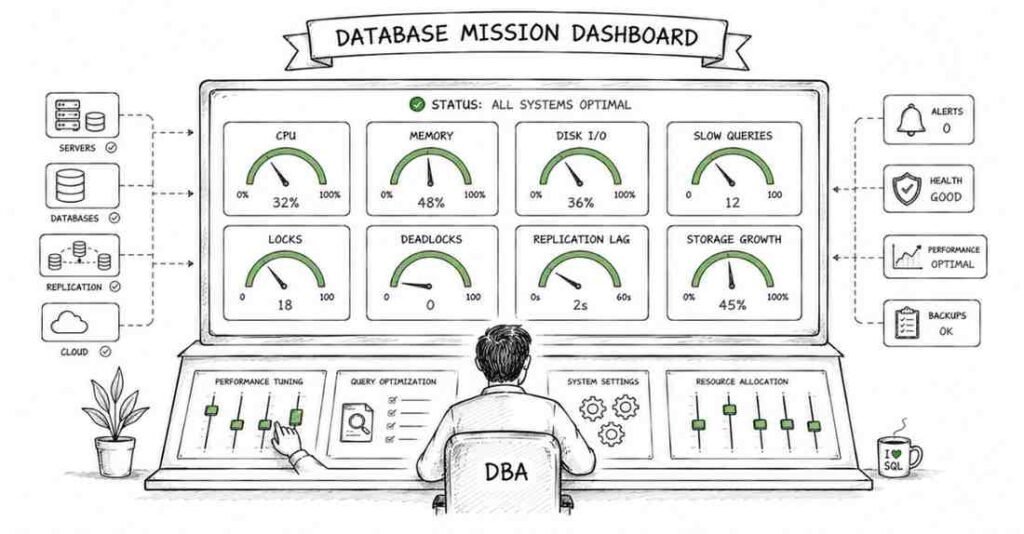
Database monitoring means continuously checking the health and performance of the database system. This includes tracking CPU, memory, disk I/O, connections, locks, query performance, and storage usage. Good monitoring helps a DBA catch issues before users start complaining.
Q173. What are slow query logs?
Slow query logs record SQL queries that take longer than a defined threshold to run. They help identify inefficient queries that may need tuning, indexing, or rewriting. This is one of the most practical tools for everyday DBA performance work.
Q174. Why is baseline monitoring important?
A baseline is a record of what normal system behavior looks like. If the database suddenly behaves differently from the baseline, a DBA can detect anomalies faster. Without a baseline, it is harder to tell whether high load is normal or a sign of trouble.
Q175. What are important database performance metrics?
Important metrics include CPU usage, memory usage, disk I/O, query latency, lock waits, deadlocks, connection count, cache hit ratio, replication lag, and storage growth. The most important metric depends on the problem being investigated. A DBA uses these signals together rather than relying on one number.
Capacity Planning And Storage
Q176. What is capacity planning in database administration?
Capacity planning means predicting future resource needs so the database can keep performing well as usage grows. This includes storage, memory, CPU, network, and backup requirements. It helps prevent sudden outages caused by running out of space or power.
Q177. Why is storage management important for DBAs?
Databases can grow quietly until they hit dangerous limits. Good storage management ensures there is enough room for data files, logs, indexes, temp space, and backups. Running out of storage can stop transactions or even bring applications down.
Q178. What are common storage-related DBA concerns?
Common concerns include rapid table growth, oversized transaction logs, fragmented data files, backup file accumulation, insufficient temp space, and slow disks. Storage is not just about size speed and layout matter too. A database on poor storage can feel slow even if the queries are written well.
Index Maintenance And Fragmentation
Q179. What is index fragmentation?
Index fragmentation happens when the logical order of index pages no longer matches their physical order efficiently, or when pages contain too much empty space after many data changes. This can increase I/O and reduce performance. It is more common in write-heavy systems.
Q180. Why does index fragmentation matter?
Fragmented indexes may force the database to do more work when reading data. This can slow query performance, especially for range scans and larger tables. It is one reason why DBA maintenance plans often include index review tasks.
Q181. What is the difference between index rebuild and index reorganize?
Index rebuild usually recreates the index from scratch, which can remove fragmentation more completely but may use more resources. Index reorganize is usually a lighter, incremental cleanup process. The right choice depends on fragmentation level, workload, downtime tolerance, and platform behavior.
Partitioning
Q182. What is partitioning in databases?
Partitioning means splitting a large table or index into smaller logical pieces while still treating it like one object in many queries. This helps with performance, maintenance, and manageability. It is useful when tables become very large.
Q183. What is horizontal partitioning?
Horizontal partitioning splits rows across partitions, usually based on ranges or categories such as date, region, or customer group. For example, orders from each year may be stored in separate partitions. The table keeps the same columns, but rows are divided.
Q184. What is vertical partitioning?
Vertical partitioning splits columns into separate structures. For example, frequently used columns may stay in one table while rarely used large text columns move to another. This can reduce I/O for common queries.
Q185. What are common types of partitioning?
Common types include range partitioning, list partitioning, hash partitioning, and sometimes composite partitioning. Range is good for time-based data, list is good for known categories, and hash helps distribute data evenly. A DBA chooses based on workload and access patterns.
Part 7: Backup, Recovery & High Availability
Backup, Recovery & High Availability (Questions 186–215)
Q186. Why are backups important in database administration?
Backups protect the database from data loss caused by hardware failure, software bugs, accidental deletion, corruption, ransomware, or disaster. Without reliable backups, even a strong production system can become helpless during failure. A DBA is judged not just by uptime, but by how well data can be restored when something goes wrong.
Q187. What is a database backup?
A database backup is a copy of data and sometimes related logs or metadata that can be used to restore the database later. It acts like an insurance policy for the system. The point of a backup is not just to create it, but to be able to restore from it successfully.
Q188. What is a full backup?
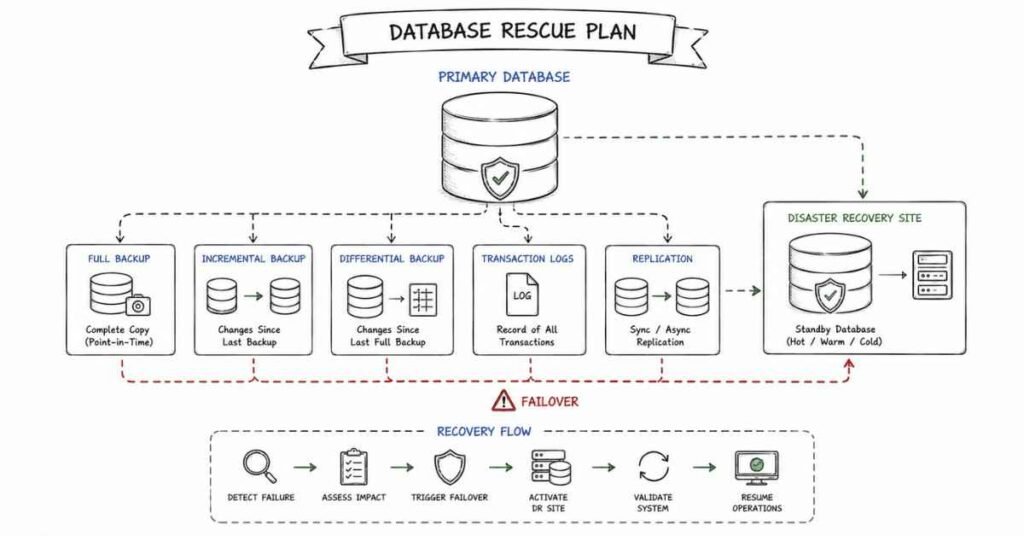
A full backup copies the entire database. It is the most complete and straightforward type of backup. Restoring from a full backup is usually simpler, but creating it can take more time and storage.
Q189. What is an incremental backup?
An incremental backup stores only the changes made since the last backup of any type, depending on the platform. This saves storage and backup time. However, restore can be more complex because you may need the full backup plus multiple incremental backups.
Q190. What is a differential backup?
A differential backup stores all changes made since the last full backup. It is usually larger than an incremental backup over time, but simpler to restore because you often need only the last full backup and the latest differential backup. It is a middle ground between speed and simplicity.
Q191. What is a transaction log backup?
A transaction log backup captures the changes recorded in the transaction log. It is essential for fine-grained recovery in systems that support it, such as point-in-time restore. It helps reduce data loss between full backups.
Recovery Models And Restore Concepts
Q192. What is a recovery model?
A recovery model defines how transaction logs are managed and what types of restore operations are possible. Different models balance log usage, performance, and recovery flexibility. For example, some models support point-in-time recovery while others do not.
Q193. What is point-in-time recovery?
Point-in-time recovery means restoring the database to a specific moment, often just before a failure or mistake happened. This is useful if someone deleted data at 2:15 PM and you want to recover the database to 2:14 PM. It is one of the most valuable capabilities in production recovery planning.
Q194. What is WAL in PostgreSQL?
WAL stands for Write-Ahead Log. It records changes before they are applied to the main data files, which helps with durability and recovery. WAL is central to backup, crash recovery, and replication in PostgreSQL.
Q195. Why is the transaction log important in recovery?
The transaction log records the sequence of changes made to the database. During recovery, it helps the database replay committed changes and undo incomplete ones. In simple terms, it is the black box recorder of the database.
Q196. What is crash recovery?
Crash recovery is the process the database uses after an unexpected shutdown to return to a consistent state. It typically redoes committed work and undoes incomplete transactions. This allows the database to recover safely without manual repair in many cases.
Backup Strategy And Objectives
Q197. What is RPO?
RPO stands for Recovery Point Objective. It defines the maximum acceptable amount of data loss measured in time. For example, an RPO of 15 minutes means the business can tolerate losing up to 15 minutes of data.
Q198. What is RTO?
RTO stands for Recovery Time Objective. It defines the maximum acceptable time to restore service after a failure. For example, an RTO of 1 hour means the database should be back up within one hour of an outage.
Q199. What is the difference between RPO and RTO?
RPO is about how much data you can afford to lose. RTO is about how long you can afford to be down. One measures data loss tolerance, the other measures downtime tolerance.
Q200. What is the 3-2-1 backup rule?
The 3-2-1 rule means keeping at least 3 copies of data, on 2 different types of storage, with 1 copy kept offsite. This reduces the risk of losing everything from a single failure or location-based disaster. It is a simple but strong backup principle.
Q201. Why should backups be tested regularly?
A backup that has never been tested is only a hope, not proof. Restore testing verifies that backup files are complete, readable, and usable under real conditions. Many organizations discover backup problems only during emergencies, which is too late.
Replication
Q202. What is database replication?
Replication is the process of copying data from one database server to another. It is used for high availability, disaster recovery, load distribution, or reporting. Replication helps create redundancy so one server is not the only source of truth in practice.
Q203. What is the difference between synchronous and asynchronous replication?
Synchronous replication waits for the secondary system to confirm the change before the transaction is considered complete. Asynchronous replication allows the primary to continue without waiting for immediate confirmation. Synchronous gives stronger consistency, while asynchronous usually gives lower latency and better distance flexibility.
Q204. What is master-slave replication?
Master-slave replication means one primary server handles writes and one or more secondary servers receive copied changes. The secondaries are often used for reads, standby, or disaster recovery. The exact naming differs across platforms, but the concept is common.
Q205. What is master-master replication?
Master-master replication means more than one server can accept writes and keep data synchronized. This can improve availability, but it also adds complexity such as conflict resolution. It is more powerful, but harder to manage correctly.
High Availability
Q206. What is high availability in databases?
High availability means designing the database environment so service stays available even when certain failures occur. The goal is to minimize downtime for users and applications. It focuses on keeping the system running rather than only restoring it after failure.
Q207. What is failover?
Failover is the process of switching database service from a failed or unhealthy primary server to a standby or secondary server. It can be automatic or manual depending on the setup. A good failover process reduces downtime and keeps applications working.
Q208. What is failback?
Failback is the process of returning service to the original primary server after it has been repaired or stabilized. This usually happens after failover and requires careful coordination. A DBA must ensure data stays consistent during the move back.
Q209. What is the difference between high availability and disaster recovery?
High availability focuses on surviving smaller or local failures with minimal interruption. Disaster recovery focuses on recovering from major events like data center loss, regional outage, or major corruption. A simple way to remember it is that HA keeps you running, while DR helps you come back after a larger failure.
Q210. What is a standby server?
A standby server is a secondary system prepared to take over if the primary fails. It may be hot, warm, or cold depending on how up-to-date and ready it is. The closer it is to real-time readiness, the faster the recovery usually becomes.
HA Technologies And Scenarios
Q211. What is a hot standby?
A hot standby is a secondary server that is continuously updated and ready to take over quickly. It usually supports a much lower downtime target than a cold standby. This makes it valuable for critical production systems.
Q212. What is a warm standby?
A warm standby is partially ready and usually updated regularly, but it may require some additional steps before taking over. It is slower than hot standby but faster than cold standby. It balances cost and readiness.
Q213. What is a cold standby?
A cold standby is a backup system that is not actively running as a live replica. It may require startup, restore, or manual preparation before it can serve traffic. It is cheaper but slower during recovery.
Q214. What is disaster recovery planning?
Disaster recovery planning means defining how the database and related systems will be restored after a major failure. It includes roles, runbooks, communication, backups, standby systems, recovery steps, and testing. A strong DR plan is documented, practiced, and realistic.
Q215. What should a DBA include in a recovery plan?
A recovery plan should include backup locations, restore steps, contact lists, roles and responsibilities, RPO/RTO targets, failover procedures, validation steps, and testing schedules. It should also clearly explain who decides when to fail over or restore. A recovery plan is useful only if people can follow it under pressure.
Part 8: Cloud Databases & Modern Data Stacks
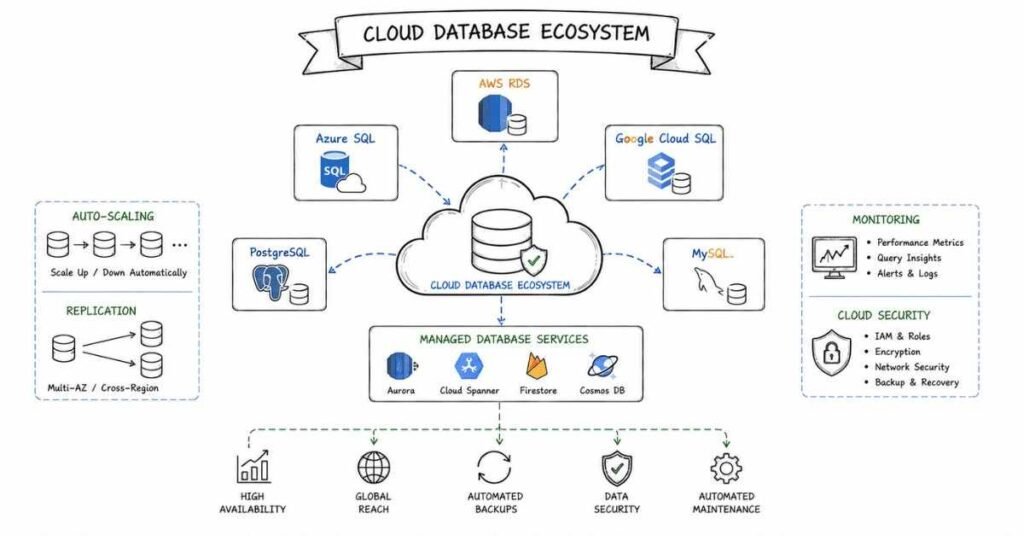
Cloud Databases & Modern Data Stacks (Questions 216–245)
Q216. What is a cloud database?
A cloud database is a database that runs on cloud infrastructure instead of traditional on-premise hardware. It may be fully managed by a cloud provider or self-managed on virtual machines. The main idea is that storage, compute, scaling, and availability are handled through cloud platforms.
Q217. What are the advantages of cloud databases?
Cloud databases offer easier scaling, faster provisioning, managed backups, high availability options, and reduced infrastructure maintenance. They also let teams pay based on usage instead of buying all hardware upfront. In simple terms, cloud databases reduce a lot of manual setup work.
Q218. What is the difference between on-premise and cloud databases?
On-premise databases run on servers owned and maintained directly by the organization. Cloud databases run in environments provided by platforms like AWS, Azure, or Google Cloud. The main difference is who manages the infrastructure and how easily it scales.
Q219. What is a managed database service?
A managed database service is a cloud offering where the provider handles many operational tasks such as backups, patching, failover, and infrastructure maintenance. The customer focuses more on schema, performance, security, and usage. This reduces DBA effort, but it does not remove the need for DBA knowledge.
Major Cloud Database Platforms
Q220. What is AWS RDS?
AWS RDS stands for Amazon Relational Database Service. It is a managed service for relational databases such as MySQL, PostgreSQL, MariaDB, Oracle, and SQL Server. It automates many tasks like provisioning, backups, patching, and monitoring.
Q221. What is Amazon Aurora?
Amazon Aurora is a cloud-native relational database service built by AWS and designed for high performance and availability. It is compatible with MySQL and PostgreSQL, but it uses a different underlying architecture from standard RDS engines. In many interviews, the key point is that Aurora is managed, scalable, and optimized for cloud workloads.
Q222. What is Azure SQL Database?
Azure SQL Database is Microsoft’s managed relational database service in Azure. It offers built-in features such as scaling, backups, high availability, and security controls. It is commonly used by organizations already working in the Microsoft ecosystem.
Q223. What is Google Cloud SQL?
Google Cloud SQL is Google Cloud’s managed database service for engines like MySQL, PostgreSQL, and SQL Server. It handles infrastructure tasks such as backups, patching, replication, and failover support. It is useful for teams that want relational databases without full server administration.
Q224. What is the difference between RDS and running a database on a virtual machine?
With RDS or similar managed services, the provider handles many infrastructure tasks automatically. On a virtual machine, you have more control, but you are also responsible for installation, patching, backups, tuning, and failover design. Managed services reduce work, while self-managed systems give deeper control.
Q225. When should a company choose a managed cloud database?
A company should choose a managed service when it wants faster setup, easier maintenance, built-in HA features, and less infrastructure overhead. It is especially useful for teams that want to focus more on applications and less on server operations. However, special compliance, customization, or low-level tuning needs may still push some teams toward self-managed setups.
Scaling And Modern Architectures
Q226. What is vertical scaling in databases?
Vertical scaling means increasing the resources of one database server, such as CPU, RAM, or storage. It is simple to understand and often easy to apply at first. However, it has limits because a single machine can only grow so much.
Q227. What is horizontal scaling in databases?
Horizontal scaling means adding more servers or nodes instead of making one server bigger. This can improve capacity and availability for distributed systems. It is more complex than vertical scaling, but usually more flexible in cloud environments.
Q228. What is serverless database computing?
Serverless database computing means the cloud provider handles much of the infrastructure scaling automatically and charges based on usage. The user focuses more on database use than on server size management. It is helpful for variable workloads, but not always ideal for every performance pattern.
Q229. What is sharding?
Sharding is the process of splitting data across multiple database instances or nodes. Each shard holds a subset of the total data. This helps distribute load and scale large systems, but it adds complexity in routing, joins, and consistency management.
Q230. What is multi-region replication in cloud databases?
Multi-region replication means keeping copies of data in different geographic regions. This improves disaster recovery, availability, and sometimes read performance for global applications. The trade-off is more complexity, cost, and possible replication lag depending on the setup.
NoSQL And Non-Relational Systems
Q231. What is NoSQL?
NoSQL refers to non-relational database systems designed for flexible schemas, distributed scale, or specialized access patterns. These systems may store document, key-value, wide-column, or graph data instead of traditional relational tables. NoSQL does not mean “no SQL forever,” but rather “not only relational SQL.”
Q232. What are the main types of NoSQL databases?
The main types are key-value stores, document databases, column-family databases, and graph databases. Each type is designed for different use cases. For example, Redis is often used as key-value storage, MongoDB as a document store, and Cassandra as a wide-column database.
Q233. When should NoSQL be used instead of a relational database?
NoSQL is often chosen when the data model is flexible, the scale is very large, or the application needs very fast distributed access. It is common in content systems, event data, caching, recommendation engines, and some large-scale web platforms. Relational databases are still better when strong consistency, structured relationships, and complex joins are central.
Q234. What is eventual consistency?
Eventual consistency means that after a write happens, all copies of the data may not become identical immediately, but they should become consistent over time. This model is common in distributed NoSQL systems. It trades immediate consistency for higher availability or better performance in some designs.
Q235. What is the difference between relational and document databases?
Relational databases store data in structured tables with fixed relationships and strong schema rules. Document databases store data in flexible document structures, often using JSON-like formats. Relational systems are stronger for complex joins and strict consistency, while document systems are often easier for evolving application data models.
Data Warehouses And Pipelines
Q236. What is a data warehouse?
A data warehouse is a system designed for analytics and reporting rather than everyday transaction processing. It stores large volumes of historical, structured data for business intelligence and decision-making. In simple terms, OLTP databases run the business, while warehouses help analyze the business.
Q237. What is Snowflake?
Snowflake is a cloud-based data warehouse platform designed for scalable analytics. It separates storage and compute, which allows flexible performance tuning and workload isolation. It is popular for modern analytics teams because it is managed and easy to scale.
Q238. What is BigQuery?
BigQuery is Google Cloud’s serverless data warehouse for large-scale analytical queries. It is designed to process very large datasets quickly with minimal infrastructure management. It is especially useful for organizations already using the Google Cloud ecosystem.
Q239. What is Amazon Redshift?
Amazon Redshift is AWS’s cloud data warehouse service for analytics workloads. It is optimized for large-scale reporting and business intelligence rather than transactional row-by-row processing. It is part of many modern AWS-based data stacks.
Q240. What is the difference between OLTP and OLAP?
OLTP systems are designed for frequent, small, transactional operations such as inserts, updates, and real-time application activity. OLAP systems are designed for analytical queries across large datasets, often with aggregations and historical analysis. A transaction database is like a cashier, while an analytical warehouse is like an accountant.
ETL, ELT, And Database DevOps
Q241. What is ETL?
ETL stands for Extract, Transform, Load. Data is first extracted from source systems, then transformed into the needed format, and then loaded into the target system. This was the classic pattern used in many warehouse pipelines.
Q242. What is ELT?
ELT stands for Extract, Load, Transform. Data is loaded into the target platform first, and the transformation happens there later. This is common in modern cloud warehouses because they can process large transformations efficiently inside the platform.
Q243. What is the difference between ETL and ELT?
The main difference is where the transformation step happens. ETL transforms before loading, while ELT loads first and transforms later in the target system. ELT is popular in cloud analytics because modern warehouses are powerful enough to handle large transformations directly.
Q244. What is database DevOps?
Database DevOps applies version control, automation, testing, and release discipline to database changes. Instead of making manual production changes casually, teams manage schema updates in a controlled pipeline. This reduces risk and improves reliability in modern engineering environments.
Q245. What are Flyway and Liquibase?
Flyway and Liquibase are popular tools for managing database schema changes through versioned migrations. They help teams track, apply, and audit structural changes consistently across environments. In interviews, the key point is that they bring repeatability and control to database deployment workflows.
Part 9: Behavioral, Communication & Career Strategy
The STAR Method: Your Framework for Behavioral Questions
The STAR method is the most reliable way to answer behavioral interview questions clearly and confidently. Every good behavioral answer should follow this structure:
- S — Situation: Explain the context. What system, team, or production environment were you working in?
- T — Task: Describe the responsibility or problem you had to handle.
- A — Action: Explain what you personally did. Focus on your decisions, communication, and technical steps.
- R — Result: Show the outcome. Use measurable results if possible, such as reduced downtime, faster query performance, successful recovery, or improved security posture.
Keep each answer around 90 to 120 seconds when spoken. That is usually enough detail without sounding too long.
20 Behavioral Questions with STAR Frameworks
Q1. Tell me about yourself.
This is not a behavioral question, but it opens most interviews. A strong answer should cover your current role or background, your database skills, one strong project or responsibility, and why you are interested in this specific DBA role. Keep it professional, structured, and under 90 seconds.
Q2. Tell me about a time you handled a production database issue.
STAR Framework:
- S: Describe the issue, such as slow queries, connection failures, or storage exhaustion.
- T: Explain your responsibility in diagnosing and restoring service.
- A: Mention the checks you performed, logs reviewed, monitoring used, and the action you took to stabilize the system.
- R: State how quickly service was restored and what was done to prevent repeat issues.
Q3. Describe a time you improved database performance.
STAR Framework:
- S: A slow application, report, or query problem affecting users or operations.
- T: Your goal was to reduce response time or resource usage.
- A: Explain how you identified bottlenecks, reviewed execution plans, added indexes, rewrote queries, or tuned configuration.
- R: Share measurable improvements such as reduced runtime, lower CPU, or better user experience.
Q4. Tell me about a time you had to recover from a failed change.
STAR Framework:
- S: A deployment, configuration update, schema change, or patch caused a problem.
- T: You had to contain impact and restore stability quickly.
- A: Explain how you validated the issue, rolled back safely, communicated with the team, and documented the root cause.
- R: Mention how service was restored and what process improvement was introduced afterward.
Q5. Describe a time you handled a backup or recovery situation.
STAR Framework:
- S: A data loss incident, accidental deletion, corruption, or restore test scenario.
- T: You needed to recover data with minimal loss and downtime.
- A: Walk through how you selected the right backup, used logs if needed, verified integrity, and communicated status.
- R: State whether recovery met the target RPO and RTO and what you learned from the event.
Q6. Tell me about a time you explained a technical issue to a non-technical stakeholder.
STAR Framework:
- S: A manager, business user, or client needed to understand a database problem or risk.
- T: Your job was to explain it clearly without overwhelming them with jargon.
- A: Show how you simplified the issue, focused on business impact, and gave realistic options or timelines.
- R: The stakeholder understood the situation and made a better decision or supported your recommendation.
Q7. Describe a time you worked under pressure during an outage.
STAR Framework:
- S: A live production outage, replication failure, or database crash.
- T: You had to respond quickly while keeping actions controlled.
- A: Explain how you prioritized diagnosis, coordinated with other teams, and avoided panic-driven mistakes.
- R: Share the resolution, recovery time, and lessons from the incident.
Q8. Tell me about a time you improved database security.
STAR Framework:
- S: A system had weak permissions, outdated authentication, exposed backups, or audit gaps.
- T: You needed to reduce risk without disrupting operations.
- A: Mention access reviews, role cleanup, encryption, auditing, patching, or policy changes.
- R: Describe the security improvement and any compliance or audit benefit.
Q9. Describe a time you disagreed with a developer or team member.
STAR Framework:
- S: A disagreement over indexing, schema design, release timing, or query approach.
- T: You believed a different database decision was safer or more effective.
- A: Explain how you presented evidence, listened to their side, and worked toward a practical resolution.
- R: Show the outcome and how the relationship remained professional.
Q10. Tell me about a time you automated a manual DBA task.
STAR Framework:
- S: A repeated task such as backups, health checks, cleanup, or report generation was consuming time.
- T: You wanted to reduce manual effort and error risk.
- A: Explain what you automated, what tools or scripts you used, and how you validated it.
- R: Quantify time saved, error reduction, or faster incident response.
Q11. Describe a time you dealt with ambiguous requirements.
STAR Framework:
- S: A request came in without clear success criteria, scope, or technical detail.
- T: You had to move the work forward without making unsafe assumptions.
- A: Show how you asked clarifying questions, documented assumptions, and created a safe first step or proof of concept.
- R: The task moved forward with better clarity and lower risk.
Q12. Tell me about a time you managed multiple priorities at once.
STAR Framework:
- S: You were handling incidents, maintenance, user requests, and project work at the same time.
- T: You had to prioritize without dropping critical responsibilities.
- A: Explain how you ranked work based on business impact, urgency, dependencies, and risk.
- R: Show how you met key deadlines or avoided larger issues.
Q13. Tell me about a time you prevented a problem before it happened.
STAR Framework:
- S: You noticed abnormal growth, risky permissions, failing jobs, or capacity issues before a failure occurred.
- T: Your goal was to act early and avoid a production incident.
- A: Explain what signals you saw, how you verified them, and what preventive action you took.
- R: Describe the outage, risk, or downtime that was avoided.
Q14. Describe a time you worked with application or infrastructure teams.
STAR Framework:
- S: A shared project like migration, release, environment setup, or troubleshooting effort.
- T: You needed cross-team coordination to succeed.
- A: Explain how you shared requirements, aligned timelines, communicated dependencies, and handled blockers.
- R: Show the project outcome and what made the collaboration effective.
Q15. Tell me about a time a monitoring alert led to an important discovery.
STAR Framework:
- S: A monitoring alert triggered on storage, CPU, connections, replication lag, or error rates.
- T: You had to determine whether it was noise or a real issue.
- A: Explain the investigation steps and how you confirmed the root cause.
- R: Share the fix and the value of catching the issue early.
Q16. Why do you want to work at this company?
A strong answer should mention a specific reason tied to the company’s environment, scale, domain, cloud adoption, or engineering maturity. Link that to your own strengths and career direction. Avoid generic lines like “I just want to grow” without showing why this company specifically fits.
Q17. What is your greatest strength as a DBA?
Choose one real strength and support it with an example. Good options include troubleshooting under pressure, performance tuning, backup and recovery discipline, security awareness, or cross-team communication. The key is to prove the strength, not just name it.
Q18. What is your greatest weakness?
Pick a real weakness that is not fatal to the role, and show what you are doing to improve it. For example, you might say you used to spend too long optimizing before sharing progress, and now you use earlier checkpoints with stakeholders. This shows self-awareness and growth.
Q19. Where do you see yourself in 3 years?
A strong answer should be specific and realistic. You might want to become a senior DBA, cloud database specialist, or database reliability engineer with deeper ownership of high-availability systems. Tie your answer to learning, impact, and the kind of systems you want to support.
Q20. Do you have any questions for us?
Always ask thoughtful questions. Good examples include:
- What are the biggest database reliability challenges your team is facing?
- How are backups, restore testing, and failover drills handled today?
- What monitoring and alerting stack does the team use?
- How are schema changes reviewed before production release?
- What would success look like in the first 90 days for this role?
50 AI Self-Preparation Prompts
Use these prompts with ChatGPT, Claude, Gemini, or similar tools to practice interviews more effectively.
Technical Practice Prompts (1–20)
- Ask me 10 SQL interview questions for a DBA role, one at a time, and grade each answer.
- Give me 5 JOIN questions that become progressively harder.
- Quiz me on normalization from 1NF to BCNF with examples.
- Ask me 10 indexing and query optimization questions.
- Give me a slow query scenario and ask how I would investigate it.
- Ask me to explain ACID properties like I am speaking to a hiring manager.
- Create a mock DBA interview focused on transactions, locks, and isolation levels.
- Give me 5 questions on backup, restore, and disaster recovery.
- Ask me to compare synchronous and asynchronous replication with use cases.
- Give me a production outage scenario involving a failed database server.
- Ask me cloud DBA interview questions about AWS RDS, Aurora, Azure SQL, and Cloud SQL.
- Quiz me on user roles, GRANT, REVOKE, and least privilege.
- Give me a database design case and ask me to normalize it.
- Ask me to explain execution plans in plain language.
- Give me 5 scenario-based questions on deadlocks and locking.
- Ask me to compare OLTP, OLAP, ETL, and ELT in simple words.
- Give me a replication lag troubleshooting scenario.
- Ask me to design a backup strategy for a critical production system.
- Give me 5 NoSQL interview questions relevant to modern DBA roles.
- Ask me to explain partitioning, sharding, and their trade-offs.
Behavioral Practice Prompts (21–35)
- answer.
- I will give you my “Tell me about yourself” answer. Improve it for a DBA interview.
- Role-play a production outage interview round for a database administrator.
- Help me turn my real backup recovery story into a strong STAR answer.
- Ask me a question about handling conflict with developers over schema changes.
- Help me answer “What is your greatest strength as a DBA?” with a realistic example.
- Help me answer “Tell me about a time you prevented a production issue.”
- Ask me 5 difficult stakeholder communication questions for a DBA interview.
- Review my answer to “Why do you want to work here?” for a cloud DBA role.
- Ask me a behavioral question about working under pressure during an outage.
- Tell me whether my STAR answer uses “I” clearly enough instead of hiding behind “we.”
- Help me prepare an honest answer for “What is your greatest weakness?”
- Role-play a full 20-minute behavioral interview for a mid-level DBA role.
- Give me 5 thoughtful questions to ask a hiring manager at the end of a DBA interview.
- Review my answer about handling ambiguous requirements in a migration project.
Career Strategy Prompts (36–50)
- Rewrite this DBA resume bullet to be more impact-focused and measurable: [paste bullet].
- Write a LinkedIn headline for a fresher preparing for database administrator roles.
- Help me write a 3-line professional summary for a DBA resume.
- What keywords should I include in a DBA resume for ATS in 2026?
- Give me a template for a cold outreach message to a DBA or database engineer on LinkedIn.
- Help me write a post-interview thank-you email for a database administrator role.
- What are the biggest mistakes candidates make on DBA resumes?
- Review my project description and make it stronger for a database interview.
- Suggest 5 portfolio ideas for someone preparing for DBA roles.
- Help me write a GitHub README for a SQL tuning or database automation project.
- Help me compare two DBA job offers beyond just salary.
- Give me a salary negotiation script for a DBA offer.
- What should I include in the featured section of my LinkedIn profile as a DBA candidate?
- Help me explain a career transition from SQL developer to DBA in interviews.
- Build a 2-week final revision plan before my DBA interview.
Post-Interview Follow-Up Templates
Thank You Email (send within 2 hours of interview):
Subject: Thank You Data Scientist Interview [Your Name]
Hi [Interviewer Name],
Thank you for taking the time to speak with me today about the Data Scientist role at [Company]. I enjoyed our conversation about [specific topic discussed e.g., your approach to model monitoring or the churn prediction challenge].
Our discussion reinforced my excitement about this opportunity, particularly [one specific aspect of the role or team]. I am confident that my experience in [relevant skill] would allow me to contribute meaningfully from day one.
Please feel free to reach out if you need any additional information. I look forward to hearing about the next steps.
Warm regards,
[Your Name] | [Phone] | [LinkedIn URL]
Follow-Up Email (if no response after 5–7 business days):
Subject: Following Up Data Scientist Application [Your Name]
Hi [Recruiter/Interviewer Name],
I hope you are doing well. I wanted to follow up on my interview for the Data Scientist role on [date]. I remain very interested in the opportunity and would love to know if there are any updates on the timeline.
Thank you for your time and consideration.
Best regards,
[Your Name]
Resume Optimization for DBAs in 2026
The 6 Resume Sections That Matter
- Headline / Title
Use your target role clearly, such as: Database Administrator | SQL | MySQL | PostgreSQL | Backup & Recovery | Cloud Databases - Professional Summary
Keep it to 2 or 3 lines:
- Who you are.
- Your strongest database skills.
- The kind of role or systems you want to work on.
Example:
“Database Administrator with 2 years of experience in SQL Server and PostgreSQL environments. Skilled in backup and recovery, query tuning, user management, and monitoring production workloads. Seeking a role focused on reliability, performance, and cloud database operations.”
- Skills Section
Group your skills clearly:
- Databases: MySQL, PostgreSQL, Oracle, SQL Server, MongoDB
- SQL & Design: SQL, joins, indexing, normalization, query tuning
- Administration: backup and recovery, replication, monitoring, patching, security
- Cloud: AWS RDS, Aurora, Azure SQL, Google Cloud SQL
- Tools: pgAdmin, SSMS, Oracle SQL Developer, DBeaver, Grafana, Prometheus
- Automation: Shell scripting, PowerShell, Python, cron, CI/CD basics
- Experience / Projects
Every bullet should follow this pattern:
Action verb + What you did + Tool / method + Result
Examples:
- Improved a reporting query by adding composite indexes and rewriting joins, reducing runtime from 18 minutes to 2 minutes.
- Managed daily backup verification for production databases and supported recovery drills that met RPO and RTO targets.
- Created role-based access controls that reduced excessive privilege exposure across multiple application users.
- Education
Include degree, institution, year, and strong certifications if relevant. Useful examples include vendor database certifications, cloud certifications, and SQL administration courses. - Projects
This matters especially for freshers or career switchers. Good projects include:
- Database design for an e-commerce system.
- Backup and restore simulation project.
- SQL query optimization case study.
- Monitoring dashboard for database metrics.
- Cloud migration proof-of-concept.
LinkedIn Profile Optimization
Headline:
Do not write “Looking for opportunities” as your main headline. Use something stronger like:
Database Administrator | SQL | PostgreSQL | Backup & Recovery | Cloud DBA Aspirant
About Section:
Use 3 short paragraphs:
- Who you are and what databases you work with.
- Your strongest responsibilities or skills.
- What kind of role or challenges you are looking for.
Featured Section:
Add your best GitHub project, SQL scripts, schema design case study, blog post, certification, or portfolio work. This helps recruiters see proof instead of only claims.
Experience Section:
Use the same achievement-based bullets as your resume. Numbers make a big difference.
Skills Section:
Add at least 10 relevant skills such as SQL, MySQL, PostgreSQL, Backup & Recovery, Performance Tuning, Replication, Database Security, AWS RDS, Query Optimization, and Monitoring.
GitHub / Portfolio Strategy
A DBA portfolio does not need 30 repositories. It needs a few clear, practical projects.
Good portfolio ideas
- SQL query tuning examples with before-and-after results.
- Database schema design project with ER diagrams.
- Backup and restore automation scripts.
- Role and permission setup examples for a sample system.
- Monitoring dashboard setup for database metrics.
- Cloud database migration notes or proof-of-concept project.
Each project README should include
- What problem the project solves.
- Database platform used.
- Setup steps.
- Core scripts or queries.
- Key learning or measurable result.
- Screenshots, diagrams, or output where useful.
Avoid empty repositories, copied tutorial code without explanation, or projects with no real-world purpose.
Salary Negotiation in 2026
Before negotiating, know the market range for your city, skill set, and database platform. Specialized experience in Oracle, PostgreSQL, SQL Server, performance tuning, HA/DR, or cloud-managed databases can improve your position.
Approximate salary ranges in India (2026)
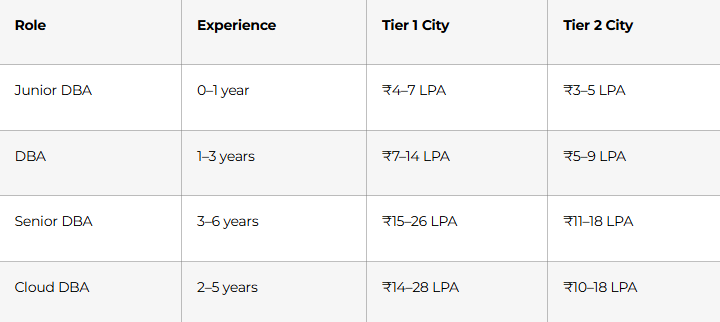
Negotiation script
“Thank you for the offer. I’m genuinely excited about the role and the kind of database environment the team is working on. Based on my experience with [mention relevant skills], and the market range for similar roles, I was expecting something closer to [target number]. Is there flexibility there?”
After that, stop and wait. The silence matters.
What else to negotiate
- Joining bonus
- Shift allowance if applicable
- On-call compensation
- Learning budget or certification support
- Remote flexibility
- Early review cycle
Job-Ready with Expert DBA Training
Post-Interview Follow-Up Templates
Thank-you email
Subject: Thank You Database Administrator Interview [Your Name]
Hi [Interviewer Name],
Thank you for taking the time to speak with me today about the Database Administrator role at [Company]. I enjoyed our discussion, especially around [specific topic such as backup strategy, monitoring, migration, or performance tuning].
Our conversation increased my interest in the role, particularly because of [one specific reason related to team, systems, or challenges]. I believe my experience in [relevant skill] would allow me to contribute meaningfully to the team.
Thank you again for your time and consideration.
Best regards,
[Your Name]
Follow-up email after 5–7 business days
Subject: Following Up Database Administrator Interview [Your Name]
Hi [Recruiter or Interviewer Name],
I hope you are doing well. I wanted to follow up regarding my interview for the Database Administrator role on [date]. I remain very interested in the opportunity and would appreciate any update you can share on the next steps or timeline.
Thank you for your time and consideration.
Best regards,
[Your Name]
Final 30-Day Checklist Before Interview Day
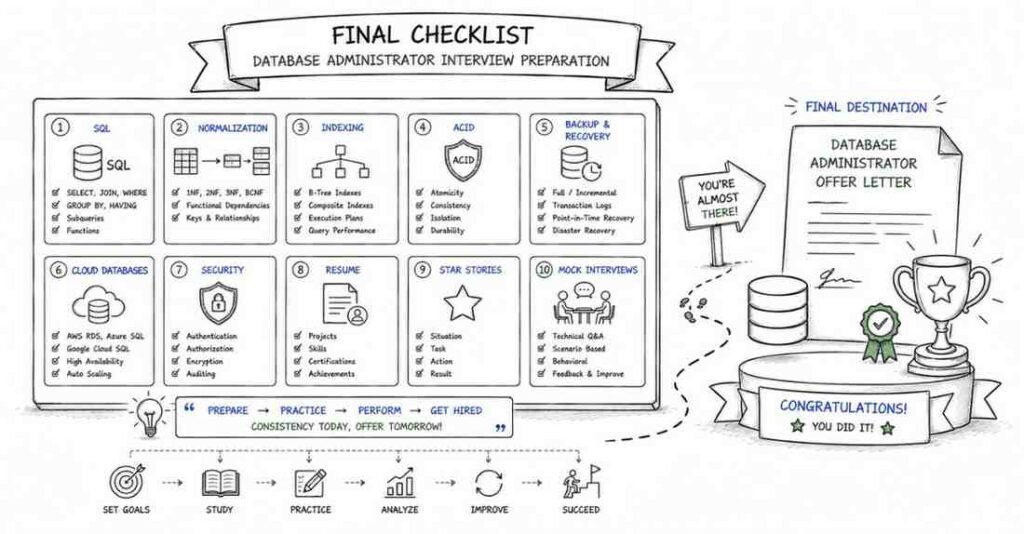
Technical readiness
- ☐ Completed all 9 parts of this guide
- ☐ Practiced SQL queries daily
- ☐ Reviewed indexing, execution plans, and normalization
- ☐ Can explain ACID, isolation levels, replication, and backups clearly
- ☐ Practiced cloud database basics
- ☐ Completed at least 2 mock interviews
Behavioral readiness
- ☐ Prepared 8 to 10 STAR stories
- ☐ Practiced “Tell me about yourself”
- ☐ Prepared answers for strength, weakness, conflict, outage, and recovery stories
- ☐ Prepared 3 thoughtful questions to ask the interviewer
Profile readiness
- ☐ Updated resume for the target role
- ☐ Updated LinkedIn headline, about section, and featured section
- ☐ Cleaned up GitHub or portfolio projects
- ☐ Know your target salary range and negotiation number
Day before interview
- ☐ Confirmed time, format, and interviewer details
- ☐ Checked laptop, internet, audio, and camera
- ☐ Kept your resume, notes, and project explanations ready
- ☐ Slept well instead of last-minute cramming