PEGA Interview Preparation Guide
💼 Preparing for PEGA interviews?
Access expert-curated guides for Java, Python & more!
1. 200+ Technical Interview Questions & Answers
- Foundation & Core Concepts (20 questions)
- Application Development & Wizard (12 questions)
- Class Structure & Inheritance (52 questions)
- User Interface & Design (56 questions)
- Business Logic & Processing (44 questions)
- Data Management (42 questions)
- Advanced Features (36 questions)
- Integration & Services (52 questions)
- Case Management (18 questions)
- Administration & Deployment (78 questions)
- Additional Advanced Topics (40 questions)
🚀 Want to go from interview prep to mastery? Learn PEGA from industry experts. → [Explore PEGA Course]
Section 1: Foundation & Core Concepts (20 questions)
PEGA Platform Basics
Q1. What is PEGA and how does it work?
PEGA is a software platform that helps companies build business applications without writing too much code. Think of it like building with blocks instead of creating everything from scratch. It works by using something called a “rule-based” approach where you define rules for how your application should behave, and PEGA follows those rules to process work automatically.
Q2. What makes PEGA different from traditional programming languages like Java or Python?
Traditional programming requires you to write thousands of lines of code to create an application. PEGA uses a low-code approach where you drag and drop components, configure rules, and define workflows visually. While Java developers spend weeks coding, PEGA developers can build similar applications in days by reusing pre-built components and rules.
Q3. What is PRPC and why is it important?
PRPC stands for PegaRULES Process Commander. It’s the main engine that runs PEGA applications. Think of it as the brain of PEGA that reads all your rules, processes cases, manages workflows, and handles all the business logic you’ve configured.
Q4. What are the main components of a PEGA application?
A PEGA application has several key parts: Cases (the work you’re processing), Flows (the steps to complete that work), Data (information you store and use), User Interface (screens users interact with), Rules (logic that controls behavior), and Integrations (connections to other systems).
Q5. Can you explain what a Case is in PEGA?
A Case represents a unit of work that needs to be completed. For example, if you’re processing a loan application, that entire application from start to finish is a Case. It has a beginning (when someone applies), middle steps (verification, approval), and an end (loan approved or rejected).
Q6. What is Case Management in PEGA?
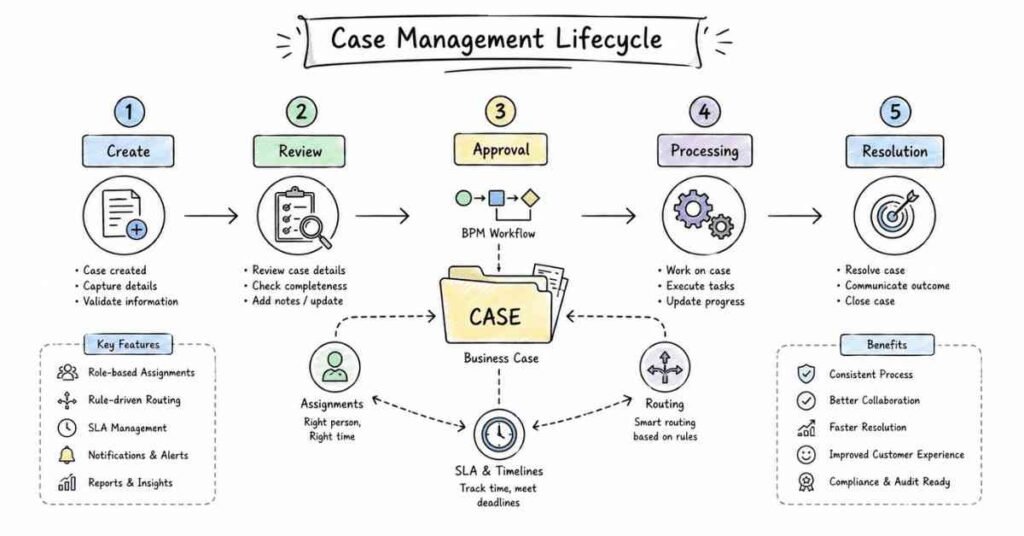
Case Management is PEGA’s way of tracking and managing work from start to finish. It helps you define what steps need to happen, who should do them, when they should be done, and what happens if something goes wrong. It’s like having a project manager built into your application.
Q7. What are the different types of studios in PEGA?
PEGA offers four main studios: App Studio (for business users to design applications), Dev Studio (for developers to build technical components), Admin Studio (for administrators to manage the system), and Prediction Studio (for data scientists to work with AI and analytics). Each studio is designed for different roles.
Q8. What is the purpose of Dev Studio?
Dev Studio is where developers build the technical parts of PEGA applications. Here you create rules, design data models, build integrations, configure security, and handle all the complex technical work that makes applications run smoothly.
Q9. What does IDE stand for in PEGA context?
IDE means Integrated Development Environment. In PEGA, it refers to the complete workspace where developers can create, test, debug, and deploy applications. It includes all the tools you need in one place to build PEGA solutions.
Q10. What is an Operator in PEGA?
An Operator is simply a user who works in the PEGA system. Every person who logs into PEGA, whether they’re processing cases, building applications, or managing the system, is called an Operator. Each Operator has their own login credentials and specific permissions.
Q11. What is the difference between an Operator and an Access Group?
An Operator is an individual user, while an Access Group defines what that user can do. Think of it this way: you are the Operator, and your Access Group is like your job description that lists what applications you can access and what actions you’re allowed to perform.
Q12. What is a Work Object in PEGA?
A Work Object is the digital representation of a case as it moves through your system. Every time someone starts a new case, PEGA creates a Work Object that contains all the information about that case, tracks its progress, and stores everything until the work is completed.
Q13. What is the clipboard in PEGA?
The clipboard is like PEGA’s temporary memory where it stores all the data while processing a case. Imagine it as a notepad where PEGA writes down everything it’s working on. Developers use the clipboard tool to see what data is available at any moment and troubleshoot issues.
Q14. What is pyWorkPage?
pyWorkPage is a special page on the clipboard that holds all the main information about the current work object you’re processing. It’s the primary page that contains properties related to the case, like case ID, status, urgency, and all the data associated with that specific piece of work.
Q15. What does the “Where Am I?” feature do?
“Where Am I?” is a debugging tool that shows you exactly where you are in your PEGA application structure. It displays the current class, ruleset version, and hierarchy so you can understand the context of what you’re viewing or working on.
Q16. What is Direct Capture of Objectives or DCO?
DCO is PEGA’s methodology for rapid application development. It means capturing business requirements directly and turning them into working applications quickly. Instead of spending months gathering requirements, you work with business users to build and refine the application as you go.
Q17. What is a Tracer in PEGA?
Tracer is a powerful debugging tool that records every action PEGA takes when processing your application. It shows you which rules executed, what data changed, any errors that occurred, and how long each step took. It’s like watching a replay of exactly what happened inside your application.
Q18. How does PEGA handle security?
PEGA implements security through multiple layers: authentication (verifying who you are), authorization (determining what you can access), Access Roles (defining permissions), and encryption (protecting data). It also supports integration with external authentication systems like LDAP and SSO.
Q19. What is Build for Change in PEGA?
Build for Change is PEGA’s design philosophy that applications should be easy to modify as business needs evolve. Instead of hardcoding everything, you create flexible rules and configurations that business users can update without developer involvement, making changes faster and cheaper.
Q20. What versions of PEGA are commonly used in the industry?
The most commonly used versions include PEGA 7.x, PEGA 8.x series (8.1, 8.2, 8.3, 8.4, 8.5, 8.6, 8.7), and the latest PEGA Infinity series. Each version brings improvements in user experience, performance, AI capabilities, and cloud deployment options.
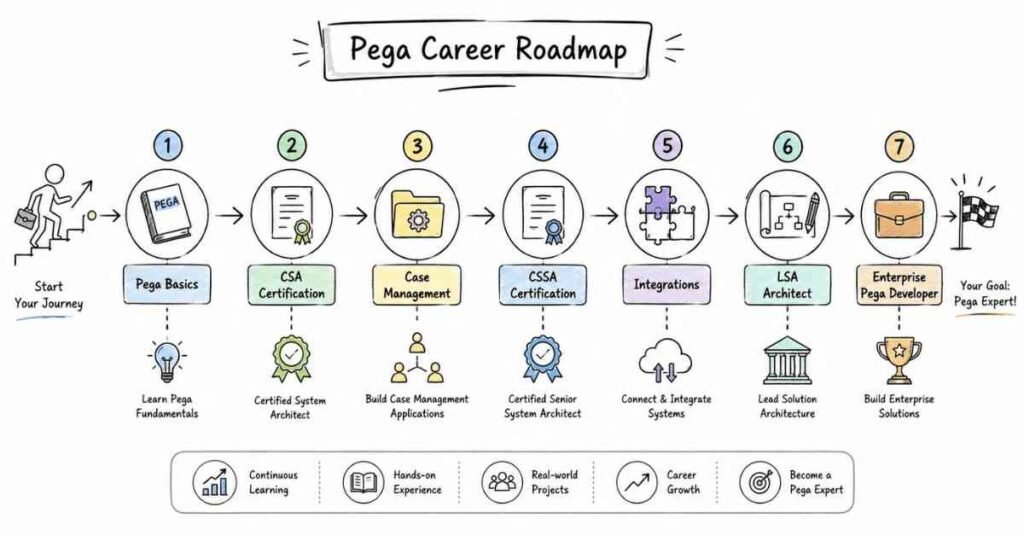
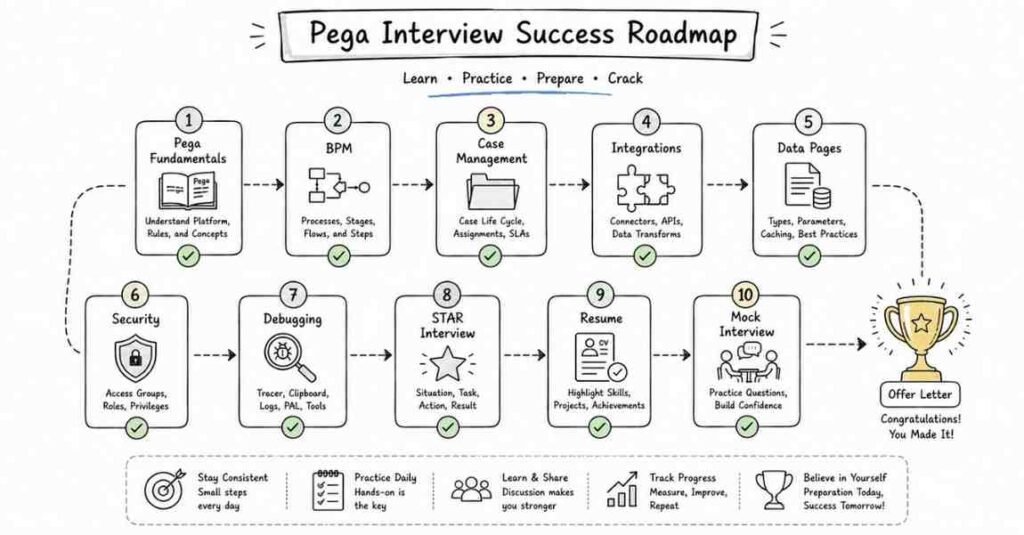
🧭 Need direction in your PEGA journey? Follow our expert-designed PEGA Roadmap. → [View Roadmap]
Section 2: Application Development & Wizard (12 questions)
Q21. How do you create a new application in PEGA?
You create a new application using the Application Wizard in Dev Studio. You simply provide a name for your application, define the organizational structure, specify the starting ruleset, and PEGA automatically creates all the necessary framework components like classes, data model, and basic structure.
Q22. What is an Application Wizard?
The Application Wizard is a guided tool that walks you through creating a new PEGA application step by step. It asks you questions about your application’s purpose, structure, and requirements, then automatically generates the foundational elements you need to start building.
Q23. What is an Application Rule?
An Application Rule defines the boundaries and components of your PEGA application. It specifies which rulesets belong to the application, version information, access groups, and configuration settings. Think of it as the master container that holds everything related to your application.
Q24. What is the purpose of the Built-on Application field?
The Built-on Application field specifies which existing PEGA framework your application is built upon. Most applications are built on top of standard PEGA frameworks to reuse common functionality rather than building everything from scratch.
Q25. Can you create an application without using the wizard?
Technically yes, but it’s not recommended. The wizard ensures you follow best practices and creates all necessary components correctly. Creating an application manually requires extensive PEGA knowledge and increases the risk of mistakes that could cause problems later.
Q26. What are the key decisions you make when creating an application?
You decide on the application name, organizational hierarchy (organization, division, unit), class structure, initial rulesets, work class naming, case types you’ll need, and whether you’ll build on existing frameworks or start fresh.
Q27. What is application versioning?
Application versioning helps you manage different releases of your application. Each version has a unique identifier (like 01-01-01) that tracks major releases, minor updates, and patches. This ensures you can maintain multiple versions simultaneously and roll back if needed.
Q28. What happens after you complete the Application Wizard?
PEGA creates the basic application structure including work classes, data classes, organizational classes, default rulesets, basic data model, standard flows, and user interface components. You then customize these components to meet your specific business requirements.
Q29. What is the difference between Application and Framework?
An Application is built to solve specific business problems for end users. A Framework contains reusable components and rules that multiple applications can use. Frameworks are more generic and abstract, while applications are specific and concrete.
Q30. How do you delete an application in PEGA?
You cannot directly delete an application from the user interface. You must use database scripts to remove application-related rules and data. However, this is rarely done in production environments. Instead, applications are marked as inactive or archived.
Q31. What is an application profile?
An application profile contains settings and configurations specific to your application, including default skin, portal layout, notification preferences, and other customization options that control how users experience the application.
Q32. Can multiple applications share the same database?
Yes, multiple PEGA applications can share the same database. PEGA uses schemas and class mapping to separate data between applications. However, careful design is needed to avoid conflicts and maintain data integrity across applications.
🧠 Don’t just prepare — practice! Check our step-by-step → PEGA How-to Guides.
Section 3: Class Structure & Inheritance (52 questions)
Class Groups and Predefined Classes
Q33. What is a Class in PEGA?
A Class in PEGA is like a template or blueprint that defines the structure and behavior of objects. Just like in real life where “Car” is a class that defines what all cars have in common, in PEGA, classes define properties, rules, and behaviors for your cases and data.
Q34. What is a Class Group?
A Class Group is a logical grouping of related classes that work together. It’s represented by the first part of a class name before the hyphen. For example, in “MyOrg-HR-Work”, “MyOrg” is the class group. It helps organize your application structure.
Q35. Why are Class Groups important?
Class Groups are crucial because they define the boundary for rule inheritance and data isolation. Rules and data within one class group cannot directly access another class group’s resources, which provides security and prevents conflicts between different parts of your system.
Q36. What are Predefined Classes in PEGA?
Predefined Classes are classes that PEGA provides out-of-the-box. These include Work-, Data-, Rule-, Assign-, History-, and many others. They contain standard functionality that PEGA applications need, so you don’t have to build everything from scratch.
Q37. What is the Work- class?
Work- (Work hyphen) is the parent class for all work objects in PEGA. Every case you create in PEGA inherits from this class. It provides standard properties like status, urgency, assignment information, and methods for processing work.
Q38. What is the Data- class?
Data- (Data hyphen) is the parent class for all data objects that don’t represent work. This includes reference data, lookup tables, external system data, and any information that supports your cases but isn’t a case itself.
Q39. What does “Does not belong to Class Group” mean?
Some classes in PEGA are marked as “Does not belong to Class Group,” meaning they exist outside the normal class group structure. These are typically system classes that need to be accessible across all applications, like Data-Admin classes.
Q40. What is the difference between Abstract and Concrete classes?
Abstract classes end with a hyphen (like Work-) and serve as templates that you cannot directly create instances from. Concrete classes don’t end with a hyphen (like MyOrg-HR-Work-Leave) and can have actual instances created. Abstract classes define common structure, while concrete classes do the actual work.
Q41. Can you give examples of Abstract classes?
Common abstract classes include Work- (for all work types), Data- (for all data types), Assign- (for assignments), Rule- (for all rules), and Embed- (for embedded pages). These provide structure but you cannot create work objects directly from them.
Q42. Can you give examples of Concrete classes?
Concrete classes are specific, like MyOrg-HR-Work-Leave (for leave requests), MyOrg-Sales-Work-Order (for sales orders), or Data-Customer-Info (for customer information). You create actual work objects or data instances from these classes.
Q43. What is the @baseclass in PEGA?
@baseclass is the ultimate parent class in PEGA from which everything else inherits. It’s at the very top of the inheritance hierarchy and contains the most fundamental properties and methods that all PEGA objects need.
Q44. What is a Work Type?
A Work Type is another name for a concrete work class that represents a specific type of case in your application. For example, if you’re building a loan application system, “Loan Application” would be a work type with its own class structure.
Q45. How do you create a new class?
You create a new class through Dev Studio by clicking on Create > Organization & Security > Class. You specify the class name, parent class, class group, whether it’s abstract or concrete, and its purpose. PEGA then creates the class structure for you.
Q46. What is the naming convention for classes?
PEGA classes follow the pattern: Organization-Division-WorkType for work classes (like TechCorp-Sales-Work-Order) or Data-Category-Type for data classes (like Data-Customer-Info). This hierarchical naming ensures organization and prevents conflicts.
Q47. What is a Directed Class?
A Directed Class is one that directly inherits from another class without going through pattern inheritance. The inheritance relationship is explicitly defined, making it clear which class the child inherits from.
Q48. What is the Class structure in PEGA applications?
The typical structure has multiple layers: at the top is @baseclass, then framework classes (Work-, Data-), then organization classes (MyOrg-), division classes (MyOrg-Division-), and finally implementation classes (MyOrg-Division-Work-SpecificCase). This creates a hierarchy of inheritance.
Q49. What is the purpose of having multiple class layers?
Multiple layers allow you to organize rules efficiently and promote reusability. Common rules go in higher layers and are inherited by lower layers. This means you write rules once in a parent class and all child classes automatically get that functionality.
Q50. How does class inheritance help in rule reusability?
When a class inherits from a parent class, it automatically gets all the properties, rules, and behaviors of the parent. This means if you define a rule in Work-, all your work classes can use it without creating separate copies, saving time and ensuring consistency.
Inheritance Types and Patterns
Q51. What is Inheritance in PEGA?
Inheritance is the mechanism by which one class can inherit properties, rules, and behaviors from another class. It’s like how children inherit traits from their parents. In PEGA, child classes automatically get everything their parent classes have, plus they can add their own unique features.
Q52. Why is Inheritance important in PEGA?
Inheritance promotes reusability and maintainability. Instead of copying the same rule into every class, you create it once in a parent class and all children automatically get it. When you need to change that rule, you update it in one place and the change applies everywhere.
Q53. What are the types of Inheritance in PEGA?
PEGA supports two main types of inheritance: Direct Inheritance (also called Directed Inheritance) and Pattern Inheritance. Each serves a different purpose in how classes inherit rules and properties from parent classes.
Q54. What is Direct Inheritance?
Direct Inheritance is when a class explicitly specifies its parent class. The relationship is clear and straightforward – you define exactly which class you want to inherit from. For example, if MyOrg-HR-Work directly inherits from Work-, that’s direct inheritance.
Q55. What is Pattern Inheritance?
Pattern Inheritance is based on naming patterns rather than explicit definitions. PEGA automatically determines the inheritance chain based on the class name structure. For example, MyOrg-HR-Work-Leave automatically inherits from MyOrg-HR-Work, which inherits from MyOrg-HR-, and so on up the chain.
Q56. Can you explain Pattern Inheritance with an example?
Consider the class MyCompany-Sales-Work-Order. Through pattern inheritance, it automatically inherits from: MyCompany-Sales-Work (division level) → MyCompany-Sales (division) → MyCompany (organization) → Work- (framework) → @baseclass (base). PEGA figures this out automatically from the name pattern.
Q57. Which is more commonly used – Direct or Pattern Inheritance?
Pattern Inheritance is more commonly used because it’s automatic and follows PEGA best practices. When you follow proper naming conventions, PEGA handles the inheritance chain automatically. Direct inheritance is used in special cases where you need to break from the standard pattern.
Q58. What is the advantage of Pattern Inheritance?
Pattern Inheritance makes your application structure cleaner and easier to understand. You don’t need to explicitly define parent classes everywhere. Just by following naming conventions, the inheritance chain is automatically established and maintained.
Q59. Can a class have multiple parent classes?
No, PEGA doesn’t support multiple inheritance where one class directly inherits from multiple parents. However, through the inheritance chain, a class indirectly inherits from multiple ancestors (grandparent, great-grandparent, etc.).
Q60. What is the inheritance order in PEGA?
PEGA follows a specific order when looking for rules: first it checks the current class, then the parent class, then the grandparent, and continues up the hierarchy until it reaches @baseclass. This is called the inheritance chain or class hierarchy.
Q61. What happens if the same rule exists in both parent and child classes?
When the same rule exists in multiple levels of the hierarchy, PEGA uses the most specific version (the one closest to the child class). This is called “overriding” – the child class version overrides the parent class version.
Q62. What is rule specialization?
Rule specialization is when you create a more specific version of a rule in a child class while keeping the general version in the parent class. The child class’s specialized version will be used for that specific case type, while other case types use the parent’s general version.
Q63. How does inheritance affect performance?
If inheritance chains are too deep, PEGA must search through many class levels to find rules, which can slow performance. That’s why best practice recommends keeping inheritance hierarchies reasonably shallow, typically 5-7 levels maximum.
Q64. What is the Class Hierarchy in PEGA?
Class Hierarchy is the tree-like structure showing how classes inherit from each other. At the root is @baseclass, with framework classes below it, then organizational classes, and finally implementation classes at the bottom. This structure is visible in the Class Explorer tool.
Q65. How do you view the Class Hierarchy?
In Dev Studio, go to Designer Studio > Classes & Properties > Class Explorer. This tool shows you a visual tree of all classes and their inheritance relationships, making it easy to understand how your application is structured.
Q66. What is the Parent Class field in a class rule?
The Parent Class field in a class rule form explicitly specifies which class this class inherits from. For pattern inheritance classes, this field is often empty because the parent is determined automatically by the naming pattern.
Q67. Can you change a class’s inheritance after creating work objects?
Technically yes, but it’s extremely risky and not recommended. Changing inheritance can break existing functionality and make existing work objects unstable. Such changes should only be made in development environments and require extensive testing.
Q68. What is the impact of inheritance on data tables?
Each concrete class typically maps to its own database table. However, common properties inherited from parent classes might be stored in parent tables. PEGA handles the database mapping automatically based on the class structure.
Class Hierarchy and Framework
Q69. What is the Framework Layer in PEGA?
The Framework Layer contains the foundational PEGA platform rules and classes (like Work-, Data-, Rule-) that provide core functionality. These are built and maintained by Pegasystems and serve as the foundation for all PEGA applications.
Q70. What is the Implementation Layer?
The Implementation Layer contains the classes and rules specific to your application. This is where you build your actual business logic, case types, user interfaces, and integrations. It sits on top of the framework layer and uses framework capabilities.
Q71. What is the Organization Layer?
The Organization Layer represents your organization at the highest level in your class structure. It’s named after your organization (like TechCorp-) and contains rules and configurations common across all divisions and applications in your enterprise.
Q72. What is the Division Layer?
The Division Layer represents business units or divisions within your organization (like TechCorp-Sales- or TechCorp-HR-). It contains rules specific to that division but common across all applications within that division.
Q73. What is the Integration Layer?
The Integration Layer (sometimes called the Enterprise Layer) sits between the Framework and Implementation layers. It contains reusable components that multiple applications can share, like common integrations, shared data models, or enterprise-wide business rules.
Q74. What is the Data Layer in the context of class hierarchy?
The Data Layer refers to classes that start with Data- and handle reference information, lookup tables, and external system data. These classes don’t represent work but provide supporting information that work objects need to function properly.
Q75. Why is layering important in PEGA applications?
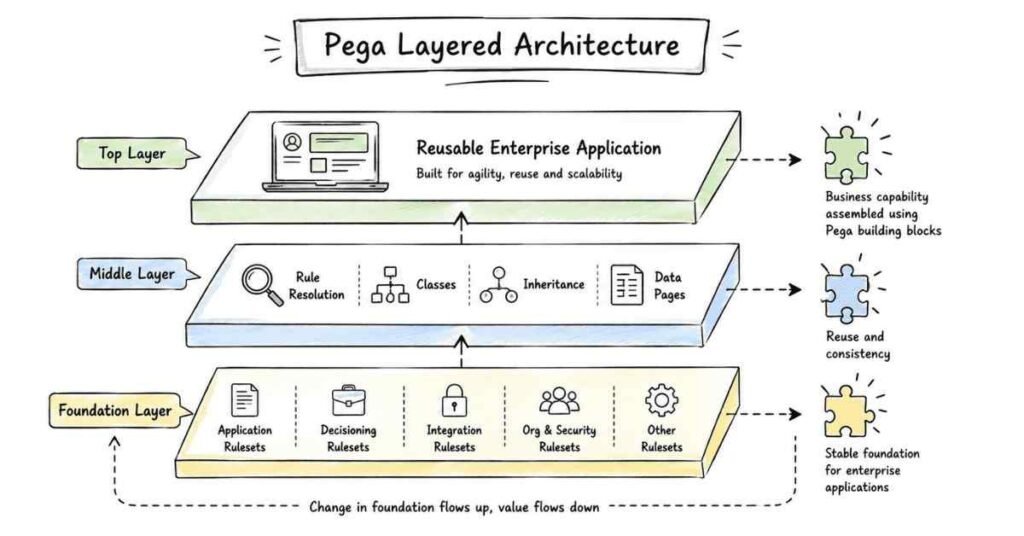
Layering creates a clean separation of concerns. Framework rules stay separate from business logic, organization-wide rules are separate from division-specific rules, and so on. This makes applications easier to maintain, upgrade, and scale.
Q76. What is Enterprise Class Structure?
Enterprise Class Structure (ECS) is PEGA’s recommended best practice for organizing classes in a multi-division, multi-application environment. It defines standards for naming, layering, and structuring classes to promote reusability and maintainability.
Q77. How many layers should a typical PEGA application have?
A typical enterprise PEGA application has 5-6 layers: Framework Layer (PEGA platform), Integration/Enterprise Layer (shared components), Organization Layer (enterprise-wide), Division Layer (business unit), Implementation Layer (specific application), and sometimes a Work Layer (individual case types).
Q78. What is a Framework Application?
A Framework Application contains reusable components, rules, and patterns that multiple implementation applications can use. Instead of each application building common functionality separately, they all build on top of the framework, promoting consistency and reducing duplicate effort.
Q79. What is the difference between Organization and Division?
Organization represents your entire enterprise at the top level, while Division represents specific business units within that organization. For example, TechCorp is the organization, while TechCorp-Sales and TechCorp-HR are divisions.
Q80. How do you decide what rules go in which layer?
Rules that apply across your entire enterprise go in the Organization layer. Rules specific to a business unit go in the Division layer. Rules unique to a specific application go in the Implementation layer. The goal is to place rules at the highest level where they’ll be reused.
Q81. What is the impact of proper layering on upgrades?
Proper layering makes PEGA upgrades much easier. Your custom code is cleanly separated from framework code. When PEGA releases updates to the framework layer, your implementation layer remains untouched, reducing upgrade time and risk.
Q82. Can classes in different class groups inherit from each other?
No, classes in different class groups cannot inherit from each other directly. Inheritance only works within a class group hierarchy. To share functionality across class groups, you must use other mechanisms like shared libraries or service integrations.
Q83. What is a Class Instance?
A Class Instance is an individual object created from a class template. If “Customer” is a class, then each specific customer (like “John Smith” or “Acme Corporation”) is an instance of that class. Instances contain actual data while classes define structure.
Q84. How does PEGA determine which class to use for a work object?
When creating a work object, PEGA uses the work class defined in your case type or flow action. The class determines what properties are available, which rules apply, and how the work object behaves throughout its lifecycle.
Section 4: User Interface & Design (56 questions)
Properties and Property Rules
Q85. What is a Property in PEGA?
A Property is a field that stores data in your application. Think of it like a blank space on a form where you write information. For example, “Customer Name,” “Email Address,” and “Order Amount” are all properties that hold specific pieces of information.
Q86. What are the different types of Properties in PEGA?
PEGA has several property types: Single Value (holds one piece of data), Value List (holds multiple values of the same type), Value Group (holds related values together), Page (holds complex data structures), and Page List (holds multiple pages of the same type).
Q87. What is a Single Value property?
A Single Value property stores just one piece of information, like a person’s age, a phone number, or a yes/no answer. It’s the simplest property type and most commonly used for basic data fields.
Q88. What is a Value List property?
A Value List stores multiple values of the same type in an ordered list. For example, a list of phone numbers or a list of order items. Each value in the list is the same data type but there can be many of them.
Q89. What is a Value Group property?
A Value Group stores several related pieces of information together as a set. For example, an address might be a value group containing street, city, state, and zip code. These pieces of information are related and make sense grouped together.
Q90. What is a Page property?
A Page property is like a container that holds multiple properties together in a structured way. It’s similar to having a sub-form within your main form. For example, a “Customer” page might contain properties for name, address, email, and phone number.
Q91. What is a Page List property?
A Page List is a collection of multiple pages of the same structure. For example, an order might have a page list of line items, where each item is a page containing product name, quantity, and price. You can have many items in the list.
Q92. What is the difference between Value List and Page List?
A Value List stores simple values (like a list of numbers or text strings), while a Page List stores complex structures where each item is a page containing multiple properties. Page Lists are for complex data, Value Lists are for simple repeating values.
Q93. What are Property Modes?
Property Modes define the rules for how a property can be accessed and used. The main modes are: Single Value, Value List, Value Group, Page, Page List, Page Group, and Java Object. The mode determines how data is structured and accessed.
Q94. What is a Local property?
A Local property is defined within a specific class and is available only to that class and its subclasses. It’s stored in the class rule and doesn’t exist independently. Local properties are simpler but less flexible than properties defined as separate rules.
Q95. What is a Property Rule?
A Property Rule is a full rule definition for a property that exists independently. It provides more configuration options than local properties, including validation rules, calculations, visibility conditions, and detailed control over behavior. Property rules are more powerful and flexible.
Q96. When should you use a Local property vs a Property Rule?
Use local properties for simple fields that don’t need special behavior and are specific to one class. Use property rules when you need validation, calculations, when conditions, or when the property will be reused across multiple classes.
Q97. What are System Properties?
System Properties are pre-built properties that PEGA provides and automatically includes in work objects. These include properties like pyID (case identifier), pyStatusWork (case status), pyUrgency (urgency value), and pxCreateDateTime (creation date). They’re maintained by PEGA and handle standard functionality.
Q98. Can you modify System Properties?
Generally, you should not modify system properties as they’re critical to PEGA’s internal functioning. However, you can sometimes extend their behavior through declarative rules or activities. Changing system properties directly can cause serious system problems.
Q99. What is Property Optimization?
Property Optimization is a technique where you configure how and when properties are loaded into memory. For large data structures or rarely-used properties, you can optimize loading to improve performance by loading only when needed rather than automatically.
Q100. What is Property History?
Property History is a feature that tracks changes to property values over time. When enabled, PEGA automatically records the old value, new value, date, time, and operator who made the change. This creates an audit trail for compliance and troubleshooting.
Q101. How do you create a new property?
In Dev Studio, go to Create > Data Model > Property. Specify the property name, type (text, number, date, etc.), mode (single value, page, list, etc.), class where it belongs, and any validation or behavior rules. PEGA then creates the property for use in your application.
Q102. What is the Property Name convention?
Property names should be meaningful and follow camelCase (starting with lowercase, capitalizing each new word). For example: customerName, orderAmount, shippingAddress. System properties start with “py” or “px” to indicate they’re system-maintained.
Q103. What property types are available for data input?
Common property types include: Text (for names and descriptions), Integer (whole numbers), Decimal (numbers with decimals), Date (calendar dates), DateTime (date and time), Boolean (true/false), and Identifier (unique IDs). Each type has specific validation and formatting rules.
Q104. What is a Reference Property?
A Reference Property stores a reference (pointer) to data in another class rather than copying the data. It’s like writing “See Customer ABC’s record” instead of copying all the customer details. This saves space and ensures data consistency.
Sections and Layouts
Q105. What is a Section in PEGA?
A Section is a reusable piece of user interface that displays information and collects input from users. Think of it like a building block of your screen. You might have a “Customer Information” section, an “Address” section, or an “Order Details” section that you can use in multiple places.
Q106. Why are Sections important?
Sections promote reusability – you create them once and use them in multiple places. They also make maintenance easier because updating a section automatically updates everywhere it’s used. Plus, they help organize your interface into logical, manageable pieces.
Q107. What is a Layout in PEGA?
A Layout is the structure that defines how fields and sections are arranged on the screen. It’s like the blueprint for organizing content. Different layout types give you different ways to position elements – some in rows and columns, others in more flexible arrangements.
Q108. What are the different types of Layouts?
PEGA offers several layout types: Dynamic Layout (flexible and responsive), Column Layout (fixed columns), Free Form Layout (absolute positioning), Repeating Dynamic Layout (repeating groups), and Layout Groups (containers for organizing other layouts).
Q109. What is Dynamic Layout?
Dynamic Layout is the most modern and recommended layout type. It automatically adjusts to different screen sizes (desktop, tablet, mobile), making your application responsive. You define how many columns you want and how content should flow, and it handles the rest automatically.
Q110. What is Free Form Layout?
Free Form Layout gives you complete control over exactly where each element appears using pixel-perfect positioning. While it offers precise control, it doesn’t automatically adjust to different screen sizes, so it’s not ideal for responsive applications.
Q111. What is Column Layout?
Column Layout arranges content in a fixed number of columns (typically 1, 2, or 3). Each column has a set width, and you place fields and sections into these columns. It’s simple but less flexible than Dynamic Layout.
Q112. What is Repeating Dynamic Layout?
Repeating Dynamic Layout displays multiple instances of the same structure, like showing a list of order items where each item has the same fields. It automatically creates as many rows as needed based on your data, with each row using the same layout structure.
Q113. What is a Layout Group?
A Layout Group is a container that holds other layouts and provides organization and styling. You can use it to create bordered boxes, collapsible sections, or simply to group related content visually on the screen.
Q114. How do you create a Section?
In Dev Studio, go to Create > User Interface > Section. Give it a name, specify which class it belongs to, and then use the Layout tab to add fields, labels, buttons, and other UI elements. You arrange these elements using layouts to create the desired appearance.
Q115. What is the difference between Include and Embedded sections?
An Included section is referenced from another section, maintaining its own identity and formatting. Changes to the included section affect everywhere it’s used. An Embedded section becomes part of the parent section, and you can override its formatting in each place it’s used.
Q116. What is Section Include?
Section Include is a way to place one section inside another section. Instead of recreating the same UI elements in multiple sections, you include the existing section. This promotes reusability and makes updates easier.
Q117. When should you use multiple layouts in a section?
Use multiple layouts when different parts of your section need different arrangements. For example, you might use a dynamic layout for the main content, a column layout for address fields, and a repeating layout for line items – all within the same section.
Q118. What is the visibility condition in sections?
Visibility conditions control whether a section appears on screen based on certain criteria. For example, you might show the “Manager Approval” section only when the order amount exceeds $10,000. This makes your interface dynamic and relevant to each situation.
Q119. What are Read-Only sections?
Read-Only sections display information but don’t allow users to edit it. They’re useful for showing reference information, confirmation screens, or data that users need to see but shouldn’t change. You can make entire sections or individual fields read-only.
Q120. How do you make a section responsive?
Use Dynamic Layouts instead of fixed layouts, avoid hard-coded pixel widths, use percentage-based widths, and test your section on different screen sizes. PEGA’s Dynamic Layouts automatically handle most responsiveness, but you should verify the results.
Q121. What is the Edit Input Template in sections?
Edit Input Template defines how each property should be displayed – as a text box, dropdown, checkbox, radio button, etc. Each property has a default display method based on its type, but you can customize this using the cell’s edit input template setting.
Q122. What is Cell properties in Layout?
Cell properties control individual cells within your layout, including width, alignment, display format, visibility, and whether the field is required or read-only. Each cell can have its own settings independent of other cells.
Q123. What is Container format?
Container format controls styling for layout groups, including borders, background colors, spacing, and headers. It helps you create visual organization and hierarchy in your user interface.
Q124. How do you add validation to fields in a section?
Validation happens at the property level through validation rules, edit validate rules, or when conditions. While you configure the UI in sections, the actual validation logic is defined in property rules or separate validation rules that check data when users enter it.
Harness Types and Customization
Q125. What is a Harness in PEGA?
A Harness is the main container that defines the overall structure and appearance of your application screens. Think of it as the frame of your application – it provides the header, footer, navigation, and containers where sections are displayed. Everything users see appears within a harness.
Q126. What are the different types of Harnesses?
PEGA provides several standard harness types: New Harness (for creating new cases), Perform Harness (for working on assignments), Confirm Harness (for confirmation screens), Review Harness (for viewing case information), and Custom Harnesses (that you design for specific needs).
Q127. What is a New Harness?
The New Harness is used when creating new cases. It typically displays a form where users enter initial information to start a new case. For example, when someone starts a new loan application, they see the New Harness which collects their basic details.
Q128. What is a Perform Harness?
The Perform Harness is used when users work on assignments. It displays the sections relevant to completing the current task, along with action buttons like Submit, Approve, or Reject. This is the harness users see most often when processing work.
Q129. What is a Review Harness?
The Review Harness displays case information in read-only mode for viewing purposes. Users can see all details about a case but cannot edit anything. It’s useful for supervisors reviewing work, auditors checking compliance, or anyone who needs to view but not modify cases.
Q130. What is a Confirm Harness?
The Confirm Harness shows confirmation messages after actions are completed. For example, after submitting an application, users might see “Your application has been successfully submitted” with a summary of what they entered.
Q131. How do you customize a Harness?
You can customize harnesses by modifying their layout, adding or removing sections, changing button configurations, adjusting styles and formatting, adding custom headers or footers, and configuring which sections appear in which areas of the harness.
Q132. What are Harness Sections?
Harness Sections are the specific areas within a harness where content appears. Common harness sections include the main content area (where primary sections display), action area (where buttons appear), header area, and sidebar areas for additional information.
Q133. What is pyActionArea?
pyActionArea is a standard PEGA section that contains action buttons like Submit, Cancel, Save, etc. It’s commonly included in harnesses to provide consistent button placement and behavior across your application.
Q134. What is pzActionAreaButtons?
pzActionAreaButtons is the section that specifically displays the action buttons within pyActionArea. It controls the layout and appearance of buttons that users click to perform actions on their cases.
Q135. How do you hide the Submit button in a harness?
You can hide the Submit button by customizing the harness or flow action, using visibility conditions based on when rules, modifying the pyActionArea or pzActionAreaButtons sections, or by overriding button configurations in your flow action.
Q136. What is the difference between Harness and Section?
A Harness is the overall container that provides the application structure, while a Section is a smaller, reusable piece of UI that goes inside the harness. The harness is like the house, and sections are like the rooms inside it.
Q137. Can you use multiple harnesses in an application?
Yes, most applications use multiple harnesses for different purposes – one for creating cases, another for processing work, one for mobile devices, etc. You can create as many custom harnesses as needed for different user experiences.
Q138. What is a Template Harness?
A Template Harness defines the standard layout and structure that other harnesses can inherit from. It promotes consistency by ensuring all harnesses in your application have the same basic structure, branding, and navigation elements.
Q139. How do you configure which harness to use?
Harnesses are configured in several places: in flow actions (for work processing), in case types (for new case creation), in access groups (for portal configuration), and in application settings for default harnesses.
Q140. What is Portal customization?
Portal customization involves configuring the user interface that operators see when they log in, including the harness used, navigation menus, header and footer branding, themes and styling, and which work queues and reports are available.
Flow Actions and Local Actions
Q141. What is a Flow Action in PEGA?
A Flow Action is a step where a user performs an action on a case. It defines what form the user sees, what information they enter or review, and what buttons they can click (like Submit, Approve, or Reject). Every assignment where someone needs to do something uses a flow action.
Q142. What are the types of Flow Actions?
There are several types: Standard Flow Actions (configured manually), Connector Flow Actions (for transitions between steps), Local Actions (available at any time), and Smart Actions (dynamic actions that appear based on conditions).
Q143. What is a Standard Flow Action?
A Standard Flow Action is the most common type where you manually configure everything – which sections to display, which buttons to show, pre-processing and post-processing activities, and what happens when each button is clicked.
Q144. What is a Connector Flow Action?
Connector Flow Actions are automatically generated when you create connectors in flows. They handle transitions from one shape to another without user interaction. Users don’t see these flow actions – they happen in the background.
Q145. What is a Local Action?
A Local Action is an action that users can perform at any time while working on a case, regardless of which step they’re on. Examples include “Add Comment,” “Add Attachment,” or “Transfer to Supervisor.” They’re always available rather than tied to specific flow steps.
Q146. How do you create a Local Action?
Create a flow action in Dev Studio and mark it as “Local Action” in the settings. Then reference it in your harness or section so it appears as a button or link that users can click at any time while viewing the case.
Q147. What is a Flow-Wide Local Action?
A Flow-Wide Local Action is available throughout an entire flow rather than just in specific flow actions. When you configure a local action as flow-wide, PEGA automatically makes it available at every step in that flow.
Q148. What is the difference between Flow Action and Local Action?
Flow Actions are tied to specific steps in your workflow and appear when users reach that step. Local Actions are available anytime and from anywhere in the case, independent of which step is active. Flow Actions drive the process forward; Local Actions provide supporting functionality.
Q149. What are Pre-Processing and Post-Processing in Flow Actions?
Pre-Processing runs activities before the user sees the flow action screen – useful for loading data or setting default values. Post-Processing runs activities after the user clicks a button – useful for validation, data transformation, or additional processing before moving forward.
Q150. How do you add buttons to a Flow Action?
In the Flow Action rule, go to the Action tab where you can add buttons. For each button, configure the label (what users see), tooltip text, whether it’s the primary action, and which flow connector it should trigger when clicked.
Q151. Can you have multiple buttons in a Flow Action?
Yes, you can have multiple buttons like “Approve and Continue,” “Reject,” “Save for Later,” “Request More Information,” etc. Each button can trigger different processing and route the case to different paths in your flow.
Q152. What is Submit mode in Flow Actions?
Submit mode determines how PEGA processes the flow action when a button is clicked. Options include “Update and Continue” (saves data and moves to next step), “Only Execute Flow Action” (doesn’t progress the flow), and “Do Not Persist” (doesn’t save any changes).
Q153. How do you customize buttons in Flow Actions?
You can customize button labels, order, styling, visibility (show/hide based on conditions), whether they’re mandatory or optional, confirmation messages before clicking, and which actions execute when clicked.
Q154. What is the purpose of Refresh sections in Flow Actions?
Refresh sections allow you to reload specific parts of the screen without refreshing the entire page. This is useful when one field’s value affects what should appear in other fields, providing a dynamic user experience without page reloads.
Q155. Can Flow Actions call activities?
Yes, Flow Actions can call activities in their pre-processing (before displaying the form), post-processing (after button click), or data transforms (for data manipulation). This allows complex business logic to execute as part of the user interaction.
Q156. What is a Local Action as Pop-up?
When configured to display as a pop-up, Local Actions open in a modal dialog box over the current screen instead of navigating to a new page. This is useful for quick actions like adding comments or selecting from a list without leaving the current context.
🚀 Want to go from interview prep to mastery? Learn PEGA from industry experts. → [Explore PEGA Course]
Section 5: Business Logic & Processing (44 questions)
Activities and Methods
Q157. What is an Activity in PEGA?
An Activity is a series of steps that execute business logic and process data in PEGA. Think of it like a recipe – it’s a sequence of instructions that PEGA follows to accomplish a task, like calculating values, manipulating data, calling external systems, or making decisions.
Q158. When should you use Activities?
Use activities when you need to perform procedural logic that can’t be handled by declarative rules. Common uses include complex data manipulation, integration with external systems, database operations, conditional processing based on multiple factors, and generating or transforming data structures.
Q159. What are Activity Steps?
Activity Steps are the individual instructions within an activity. Each step performs one specific action, like setting a property value, calling another rule, opening a database record, or making a decision. An activity typically contains multiple steps that execute in sequence.
Q160. What are the different Activity Step Methods?
Common step methods include: Property-Set (sets a property value), Page-New (creates a new page), Page-Remove (deletes a page), Call (invokes another activity), Apply-DataTransform (runs a data transform), Obj-Save (saves to database), and Show-Page (displays page content – useful for debugging).
Q161. What is Property-Set method?
Property-Set sets a property to a specific value. You specify which property to update and what value to assign. It’s one of the most basic and commonly used methods for manipulating data in activities.
Q162. What is Page-New method?
Page-New creates a new page on the clipboard with the structure defined by its class. Think of it like creating a new blank form. After creating the page, you can populate its properties with data using Property-Set or other methods.
Q163. What is Page-Remove method?
Page-Remove deletes a page from the clipboard, freeing up memory. It’s good practice to remove pages you no longer need, especially in long-running activities, to keep the clipboard clean and prevent memory issues.
Q164. What is Show-Page method?
Show-Page displays the contents of a page in the activity results. It’s primarily used for debugging – you can see exactly what data exists on a page at any point in the activity. In production, these steps are typically removed or disabled.
Q165. What is the Call method?
Call invokes another activity and waits for it to complete before continuing. Control returns to the calling activity after the called activity finishes. This allows you to break complex logic into smaller, reusable activities.
Q166. What is the Branch method?
Branch is similar to Call, but it doesn’t return to the calling activity. Instead, processing continues in the branched activity, and the original activity ends. It’s like switching tracks permanently rather than taking a temporary detour.
Q167. What’s the difference between Call and Branch?
Call returns control back to the original activity after completion – you can continue with more steps. Branch permanently transfers control to another activity – the original activity ends. Use Call when you need to come back, Branch when you’re done with the original activity.
Q168. What is Exit-Activity method?
Exit-Activity immediately stops the current activity and returns to whatever called it. Any steps after Exit-Activity won’t execute. It’s useful for ending an activity early when certain conditions are met.
Q169. What is End-Activity method?
End-Activity is similar to Exit-Activity but is typically placed at the very end of an activity as a clean way to signal the activity is complete. While not always required (activities automatically end after the last step), it makes the activity’s termination explicit.
Q170. What’s the difference between Exit-Activity and End-Activity?
Exit-Activity can be used anywhere in an activity to stop execution early, while End-Activity is conventionally used at the natural conclusion of an activity. Functionally they’re similar, but Exit-Activity implies early termination while End-Activity implies normal completion.
Q171. How do you call a Flow from an Activity?
Use the Start-Flow method in your activity, specifying which flow to start. You can also use Property-Set-Messages to show messages to users before the flow starts, or pass parameters to initialize the flow with specific data.
Q172. What are Parameters in Activities?
Parameters allow you to pass data into and out of activities. Input parameters receive values when the activity is called. Output parameters return values back to the caller. This makes activities flexible and reusable with different data.
Q173. How do you pass parameters between activities?
Define parameters in the activity rule’s Parameters tab. When calling the activity, specify values for input parameters. The called activity can access these values through the parameter page (typically called “Param”). Output parameters automatically return values to the caller.
Q174. What is the parameter page in Tracer?
The parameter page in Tracer shows all input and output parameters for the current activity. It’s visible as “Param” on the clipboard and displays the values passed in and returned, helping you debug parameter-related issues.
Q175. What is Precondition in Activities?
Precondition is a when rule that determines whether an activity step should execute. If the precondition evaluates to false, the step is skipped. This allows conditional execution of steps based on property values or other conditions.
Q176. What is Transition in Activities?
Transition determines where execution should go after a step completes. You can jump to a different step based on conditions, skip to a label, or exit the activity. This creates branching logic within your activity.
Q177. What is Step Status in Activities?
Step Status indicates whether a step succeeded or failed. Status values include Good (success), Fail (error occurred), Warn (warning but continued), and Ignore (step was skipped). You can use step status in transitions to handle errors or branch based on outcomes.
Q178. What are StepStatusGood and StepStatusFail when rules?
StepStatusGood and StepStatusFail are pre-built when rules that check if the previous step succeeded or failed. They’re commonly used in transition conditions to handle errors – if a step fails, transition to error handling steps; if it succeeds, continue normally.
Q179. How do you handle errors in Activities?
Use preconditions to prevent errors, check step status after critical operations, use transitions to branch to error handling steps when failures occur, set property values to indicate errors, and use Property-Set-Messages to display error messages to users.
Q180. What is the Activity Rule form?
The Activity Rule form is where you configure activities in Dev Studio. It includes the Steps tab (where you define each step), Parameters tab (for input/output parameters), Security tab (for access control), and Pages & Classes tab (for declaring pages the activity will use).
Data Transforms
Q181. What is a Data Transform in PEGA?
A Data Transform is a rule that copies, maps, or manipulates data from one place to another in a declarative way. Instead of writing procedural steps like in an activity, you simply define what data should go where, and PEGA handles the execution. It’s faster and simpler than activities for data manipulation.
Q182. When should you use Data Transforms instead of Activities?
Use Data Transforms when you’re simply moving or transforming data without complex procedural logic. They’re better for setting default values, copying data between pages, mapping integration data, and simple calculations. Use Activities only when you need complex conditional logic or procedural processing.
Q183. How do you create a Data Transform?
In Dev Studio, go to Create > Data Model > Data Transform. Specify the name and class, then add actions that define how data should be transformed. Each action sets a target property using either a constant value, source property, or expression.
Q184. What are Data Transform Actions?
Actions in a Data Transform specify what data operations to perform. Common actions include Set (assign a value to a property), Append (add to a page list), Update Page (apply another data transform), and Remove (delete from a page list).
Q185. What is the Set action in Data Transforms?
The Set action assigns a value to a target property. You specify which property to set and where the value comes from – it could be a constant, another property, an expression, or a complex calculation. It’s the most common Data Transform action.
Q186. What is the Append action?
Append adds a new item to a page list or value list. For example, if you’re building a shopping cart, you’d use Append to add each new item to the order items list. It doesn’t replace existing items, it adds to them.
Q187. What is the Update Page action?
Update Page applies another Data Transform to a page. This allows you to break complex transformations into smaller, reusable pieces. You might have one Data Transform for address formatting and call it from multiple other Data Transforms.
Q188. What is pyDefault Data Transform?
pyDefault is a special PEGA-provided Data Transform that automatically runs when a new case is created or when certain pages are created. You can customize it to set default values that should apply whenever new instances are created.
Q189. How do you customize pyDefault?
Create a copy of pyDefault in your application class, then add your own actions to set default values. Your customized version will run instead of the base version due to rule resolution. Be careful to maintain essential default behaviors while adding your customizations.
Q190. What is the difference between Activity and Data Transform?
Activities use procedural step-by-step logic and can perform complex operations but run slower. Data Transforms use declarative mapping and focus on data transformation only but run faster and are easier to maintain. Use Data Transforms when possible for performance and simplicity.
Q191. Can Data Transforms call Activities?
Yes, you can call an activity from a Data Transform using the Apply action with the activity method. However, this somewhat defeats the performance benefit of Data Transforms. It’s better to do everything declaratively when possible.
Q192. How do you use Data Transforms to set default values?
In your pyDefault Data Transform, add Set actions for each property where you want a default value. Use constants, expressions, or functions to determine the default values. These run automatically when creating new instances.
Q193. How do you copy data from one page to another?
Create a Data Transform where the source context is one page and the target is the other page. Add Set actions for each property you want to copy, mapping source properties to corresponding target properties.
Q194. What is mapping in Data Transforms?
Mapping refers to defining relationships between source data and target data. You specify where each piece of data comes from and where it should go. For example, mapping “CustomerInfo.FirstName” to “ContactDetails.FirstName”.
Q195. Can Data Transforms handle conditional logic?
Yes, each action in a Data Transform can have a When condition that controls whether it executes. This allows conditional data transformation based on property values, though complex conditions are better handled in Activities.
Q196. What is the Apply-DataTransform method?
Apply-DataTransform is an activity method that executes a Data Transform. You specify which Data Transform to run and what page to apply it to. This allows you to invoke Data Transforms from activities when needed.
Q197. How do Data Transforms improve performance?
Data Transforms are optimized by PEGA and run directly in the rules engine without Java interpretation, making them faster than activities. They also promote cleaner code that’s easier for PEGA to optimize, and they use less memory than equivalent activities.
Q198. Can you chain multiple Data Transforms together?
Yes, one Data Transform can call others using the Update Page action. This allows you to build complex transformations from simpler, reusable pieces. Each Data Transform handles one specific aspect of the overall transformation.
Q199. What happens if a Data Transform fails?
If an action in a Data Transform fails (for example, due to a validation error or invalid data), PEGA stops executing the Data Transform and reports the error. You can handle errors through preconditions or validate data before applying the transform.
Q200. How do you test Data Transforms?
Use the Actions > Run option in the Data Transform rule to test it with sample data. You can also trace its execution using the Tracer tool to see exactly what values were set and any errors that occurred. Test with various data scenarios to ensure it handles all cases.
Flow Development
Q201. What is a Flow in PEGA?
A Flow is a visual diagram that defines the sequence of steps needed to complete a business process. It shows who does what, when they do it, and what happens next. Flows automate your business processes by routing work to the right people and ensuring steps happen in the correct order.
Q202. What are the types of Flows in PEGA?
PEGA has three main flow types: Process Flows (define the main case lifecycle), Screen Flows (define a series of user forms without creating assignments), and Subflows (reusable pieces of flow that can be called from other flows).
Q203. What is a Process Flow?
A Process Flow orchestrates the entire lifecycle of a case from creation to resolution. It includes assignments (where users perform work), automations, decisions, integrations with other systems, and can span days, weeks, or months to complete.
Q204. What is a Screen Flow?
A Screen Flow presents a series of forms to collect information from users in a single session, similar to a wizard. Each screen collects different information, and at the end, all data is saved together. Users can’t save progress midway – they must complete all screens or cancel.
Q205. What is a Subflow?
A Subflow is a reusable flow segment that performs a specific task. You create it once and can call it from multiple parent flows. For example, a “Credit Check” subflow might be used in loan applications, credit card applications, and mortgage applications.
Q206. When should you use Screen Flow vs Process Flow?
Use Screen Flows when you need to collect information through multiple screens in one sitting without creating assignments (like a registration wizard). Use Process Flows for business processes that involve assignments, multiple people, and may take time to complete with work saved between steps.
Q207. What is a Flow Shape?
Flow Shapes are the building blocks of flows – the boxes, diamonds, and connectors you see in the flow diagram. Each shape type serves a specific purpose: Assignment shapes represent work, Decision shapes create branches, Utility shapes perform automated tasks, etc.
Q208. What is an Assignment Shape?
An Assignment Shape represents a task that a user must complete. When the flow reaches an assignment shape, it creates an assignment in someone’s worklist, displays a form through a flow action, and waits for the user to complete the task before continuing.
Q209. What is a Decision Shape?
A Decision Shape creates branches in your flow based on conditions. It evaluates rules (decision tables, decision trees, when rules, or activities) and routes the case down different paths depending on the result. For example, routing applications differently based on amount or risk level.
Q210. What is a Utility Shape?
Utility Shapes perform automated processing without user interaction. Examples include running activities, executing integrations, waiting for a period of time, or performing calculations. They handle system tasks that don’t require human input.
Q211. What is a Subprocess Shape?
A Subprocess Shape calls another flow (a subflow). When reached, it starts the subflow and waits for it to complete before continuing. This allows you to reuse common processes across multiple flows and keep your main flow clean and understandable.
Q212. What is the difference between Subprocess and Split-Join?
A Subprocess calls one subflow sequentially – start it, wait for completion, then continue. Split-Join can start multiple subflows (or any child flows) in parallel and optionally wait for all, any, or a specific number to complete before continuing the main flow.
Q213. What is Spin-Off in PEGA?
Spin-Off creates a new child case that runs independently from the parent case. Unlike a subprocess, the parent flow doesn’t wait for the spin-off to complete – it continues immediately. This is useful when you need to start a related task that can happen in parallel, like sending a notification case while processing the main application.
Q214. What is Split-Join in PEGA?
Split-Join allows you to process multiple paths in parallel and then wait for them all to complete before continuing. For example, in a loan application, you might simultaneously check credit history, verify employment, and assess property value, then wait for all three to finish before making a decision.
Q215. What is Split-For-Each?
Split-For-Each processes each item in a list in parallel by creating separate child cases for each item. For example, if you have 10 orders to fulfill, Split-For-Each creates 10 child cases running simultaneously, speeding up processing time significantly.
Q216. What are the routing options after an assignment?
After an assignment, you can route to: the next step in the flow (using connectors), back to a previous step (for rework), to a specific operator’s worklist, to a work queue, to the same operator who completed the previous step, or conditionally based on properties or decisions.
Q217. What is Likelihood in PEGA flows?
Likelihood is a setting on flow connectors that indicates the probability that path will be taken. It’s used for simulation purposes to model how often different paths are expected to execute, helping you identify bottlenecks and optimize your process before deployment.
Q218. What is Rule Availability?
Rule Availability determines which rules are loaded into memory. Options include: Available (always loaded), Withdrawn (deprecated but still accessible), Blocked (cannot be used), Final (cannot be modified), and Not Available (not loaded). This affects performance and controls rule usage.
Q219. What is the “Save on Last Step” option in Screen Flows?
When enabled, this option means data is only saved to the database when users complete the final screen of the screen flow. If they cancel partway through, no data is saved. This prevents incomplete data from being stored but means users can’t save progress midway.
Section 6: Data Management (42 questions)
Data Storage and Data Tables
Q220. What are Data Storage Rules in PEGA?
Data Storage Rules define where and how data is stored in your database. They include Data Classes (structure), Database Tables (physical storage), and mapping between PEGA classes and database tables. They control data persistence, retrieval, and management.
Q221. What is a Data Table in PEGA?
A Data Table is a structured storage for reference data that your application needs but doesn’t represent work. Examples include product catalogs, state and city lists, tax rates, or configuration settings. Data Tables make it easy to maintain and access reference information.
Q222. How do you create a Data Table?
In Dev Studio, go to Create > Data Model > Data Type. After creating the data class, you can populate the data table by importing from Excel, manually entering records, or loading from external databases. The data table provides a simple interface for managing reference data.
Q223. What is the difference between Work Layer and Data Layer?
Work Layer contains classes that represent cases and workflow (classes inheriting from Work-). Data Layer contains reference information and supporting data (classes inheriting from Data-). Work objects track processes; data objects store information that supports those processes.
Q224. What are Obj-Methods in PEGA?
Obj-Methods are activity methods for interacting with work objects in the database. Common ones include Obj-Save (save), Obj-Open (retrieve), Obj-Delete (delete), Obj-Browse (search), and Obj-Refresh (reload). These methods handle standard database operations for work objects.
Q225. What is Obj-Save method?
Obj-Save commits the current work object to the database. You specify whether to write immediately or add to a queue, whether to run validation rules, and what happens if errors occur. It’s the primary method for persisting work object data.
Q226. What is the “Write Now” checkbox in Obj-Save?
Write Now forces immediate database write instead of queuing the save for later. Use it when you must ensure data is saved immediately (for example, before calling an external system), but it’s slower than queued saves. Only use when necessary.
Q227. What is the Commit method?
Commit forces all queued database operations to execute immediately and permanently. Any saves, updates, or deletes that were queued are written to the database. Use it at transaction boundaries where you need to ensure all changes are persisted.
Q228. What’s the difference between Write Now and Commit?
Write Now affects only the specific Obj-Save being executed, writing that one object immediately. Commit affects all pending database operations, forcing everything queued to write. Write Now is object-specific; Commit is transaction-wide.
Q229. What is Obj-Open method?
Obj-Open retrieves a work object from the database using its primary key. You specify the key value, and PEGA loads that specific object onto the clipboard. If the object doesn’t exist, the method fails.
Q230. What is Obj-Open-By-Handle?
Obj-Open-By-Handle retrieves a work object using its pzInsKey (instance key) instead of the primary key. The pzInsKey is a unique internal identifier that PEGA assigns to every object. This method is useful when you have the pzInsKey but not the business key.
Q231. What’s the difference between Obj-Open and Obj-Open-By-Handle?
Obj-Open uses the business key (primary key) defined for your class, like a customer ID or order number. Obj-Open-By-Handle uses the internal system key (pzInsKey). Use Obj-Open when you have the business identifier; use Obj-Open-By-Handle when working with system-generated references.
Q232. What is Obj-Browse method?
Obj-Browse searches for and retrieves multiple work objects that match specified criteria. You define search conditions (like status = “Open” and amount > 1000), and it returns a list of matching objects. It’s used for retrieving multiple records based on filters.
Q233. What is Obj-Delete method?
Obj-Delete removes a work object from the database. Use it carefully, as deleted data is usually unrecoverable. In many applications, instead of deleting, you mark objects as inactive or archived to maintain audit trails.
Q234. What is Obj-Refresh method?
Obj-Refresh reloads a work object from the database, discarding any uncommitted changes on the clipboard. Use it when you need the most current database version, perhaps after another process has modified the object.
Q235. What is Obj-Save-Cancel?
Obj-Save-Cancel abandons all changes to the current work object, removing it from the clipboard without saving. It’s like clicking a Cancel button – all changes since the last save are discarded.
Q236. What is the Rollback method?
Rollback undoes all database changes made during the current transaction, reverting the database to its state before the transaction began. It’s used in error handling to ensure failed operations don’t leave partial or inconsistent data.
Q237. What’s the difference between Obj-Save-Cancel and Rollback?
Obj-Save-Cancel discards clipboard changes for one object without affecting the database. Rollback reverses database changes across the entire transaction. Obj-Save-Cancel is clipboard-only; Rollback affects committed database operations.
Q238. What is pzInsKey?
pzInsKey is PEGA’s internal unique identifier for every object stored in the database. It’s automatically generated and guaranteed to be unique. While primary keys are business-defined and might change, pzInsKey remains constant, making it reliable for system-level references.
Q239. What is the Primary Key in PEGA?
The Primary Key is the business identifier that uniquely identifies a work object, like CustomerID, OrderNumber, or ApplicationID. You define it when creating your class. PEGA uses it to store and retrieve specific objects from the database.
Q240. How do you generate Primary Keys?
You can generate primary keys using: Expression Builder (formulas like “APP-” + pxCreateDateTime), Data Transforms (concatenating values), Activities (custom logic), or database sequences. Use a method that guarantees uniqueness across all instances.
Q241. What is the Physical PR Table?
The Physical PR Table is the actual database table where PEGA stores work objects. Each concrete work class maps to one or more database tables. The table name usually follows the pattern pc_[Organization]_[Division]Work[Type], like pc_TechCorp_Sales_Work_Order.
Q242. What is the Test Connection feature in Class rules?
Test Connection verifies that the database mapping for a class is correctly configured and that PEGA can connect to and access the database table. It confirms the table exists, has required columns, and is accessible with current permissions.
Q243. What are RDB-Methods?
RDB-Methods are activity methods for working with external relational databases. They include RDB-Open (retrieve), RDB-Save (insert/update), RDB-Delete (remove), and RDB-List (search). Use these when working with data in external systems rather than PEGA’s database.
Q244. What’s the difference between Obj-Methods and RDB-Methods?
Obj-Methods work with PEGA’s own database tables and understand PEGA’s internal structure. RDB-Methods work with external databases and require explicit SQL-like configurations. Use Obj-Methods for work objects; use RDB-Methods for external data.
Q245. What is RDB-Open?
RDB-Open retrieves a record from an external database table into a PEGA page. You specify the table, key values, and which PEGA page to populate. It’s like Obj-Open but for external data sources.
Q246. What is RDB-Save?
RDB-Save inserts or updates a record in an external database table using data from a PEGA page. You map PEGA properties to database columns, and PEGA generates and executes the appropriate SQL.
Q247. What is RDB-List?
RDB-List retrieves multiple records from an external database based on search criteria, populating a page list in PEGA. It’s like Obj-Browse but for external databases, allowing you to search and retrieve external data.
Q248. What is RDB-Delete?
RDB-Delete removes a record from an external database table. Like Obj-Delete, use it carefully as deletion is typically permanent. You specify the table and key values for the record to delete.
Clipboard and Work Pages
Q249. What is the Clipboard tool used for?
The Clipboard tool shows all data currently in memory during processing. It displays pages, properties, and values so you can see exactly what data your application is working with at any moment. It’s essential for debugging and understanding data flow.
Q250. How do you access the Clipboard?
While working in a case or testing a rule, click on the Clipboard icon in the toolbar, or press Ctrl+Alt+C. This opens a window showing all pages and their properties with current values.
Q251. What are User Pages on the clipboard?
User Pages are pages created explicitly by your application to hold data. They don’t exist by default – you create them using Page-New or through data transforms. They’re named by you and contain whatever structure you define.
Q252. What are System Pages on the clipboard?
System Pages are automatically created by PEGA to support standard functionality. Examples include pyWorkPage (current work object), pxRequestor (current user session), pxThread (thread information), and OperatorID (current operator details).
Q253. What is the pxRequestor page?
pxRequestor contains information about the current user session, including the operator’s details, access group, application, and session-specific settings. It’s available throughout the session and provides context about who is using the system.
Q254. What is the pxThread page?
pxThread contains information about the current processing thread, including thread number, processing context, and temporary data specific to this execution thread. It’s useful for debugging and understanding execution context.
Q255. What is the OperatorID page?
OperatorID contains details about the current operator (logged-in user), including their name, organization, access permissions, work queues they can access, and preferences. Applications use this to personalize behavior and control access.
Q256. What is a Page in PEGA?
A Page is a container on the clipboard that holds related properties together in a structured way. Think of it like a record or object in programming – it groups related fields. For example, a Customer page holds name, address, email, and phone properties together.
Q257. What is an Embedded Page?
An Embedded Page is a page contained within another page, creating a nested structure. For example, a Customer page might have an embedded Address page, which itself contains street, city, state, and zip properties. This creates hierarchical data structures.
Q258. What is a Page List?
A Page List is a collection of pages, all with the same structure. For example, an Order page might contain a LineItems page list where each item has product, quantity, and price. Page lists handle repeating groups of data.
Q259. What is the difference between Page and Page List?
A Page holds one instance of a structure (one customer, one address). A Page List holds multiple instances of the same structure (multiple order items, multiple phone numbers). Use Page for singular data; Page List for collections.
Q260. How do you reference properties on the clipboard?
Use dot notation to reference properties. For example: pyWorkPage.CustomerName, Customer.Address.City, or LineItems(1).ProductName. The notation navigates through the page structure to reach the specific property you need.
Section 7: Advanced Features (36 questions)
Declarative Rules
Q261. What are Declarative Rules in PEGA?
Declarative Rules define what should be true about your data, and PEGA automatically maintains that truth. Instead of writing procedural code that says “when X happens, do Y,” you declare “Y should always equal X * 2,” and PEGA keeps it current. They include Declare Expressions, Constraints, OnChange, Triggers, Pages, and Indexes.
Q262. Why are Declarative Rules important?
Declarative Rules simplify development because you define the goal rather than the steps. PEGA handles the execution automatically, including when to run, dependency tracking, and optimization. They’re also self-maintaining – if inputs change, outputs update automatically.
Q263. What is a Declare Expression?
Declare Expression automatically calculates and maintains a property’s value based on other properties. For example, TotalPrice = Quantity * UnitPrice. Whenever Quantity or UnitPrice changes, TotalPrice is automatically recalculated. You don’t need to write code to update it everywhere.
Q264. What is Forward Chaining?
Forward Chaining means the declare expression automatically recalculates whenever any input property changes. If TotalPrice depends on Quantity and UnitPrice, changing either one immediately recalculates TotalPrice. It “pushes” changes forward to dependent properties.
Q265. What is Backward Chaining?
Backward Chaining means the declare expression calculates only when the result property is needed. Instead of recalculating every time inputs change, it waits until something requests TotalPrice, then calculates it at that moment. It “pulls” the calculation when needed.
Q266. What’s the difference between Forward and Backward Chaining?
Forward Chaining updates immediately when inputs change – it’s proactive and keeps results always current. Backward Chaining waits until the result is needed – it’s reactive and calculates on demand. Forward is faster to read but slower to update; Backward is faster to update but slower to read.
Q267. When should you use Forward vs Backward Chaining?
Use Forward Chaining when the result is frequently read and rarely changes, or when you need the value immediately available. Use Backward Chaining when the result is rarely needed or inputs change frequently. For example, use Forward for TotalPrice (always displayed); use Backward for complex calculations (rarely needed).
Q268. What is a Declare Constraint?
Declare Constraint validates that a property meets specific criteria and prevents invalid values. For example, “Age must be between 18 and 100” or “Email must contain @”. If users enter invalid data, PEGA displays an error message and won’t allow them to proceed.
Q269. What’s the difference between Declare Expression and Declare Constraint?
Declare Expression calculates property values automatically. Declare Constraint validates that property values meet rules. Expressions set values; Constraints check values. Use Expressions for calculations; use Constraints for validation.
Q270. What is Declare OnChange?
Declare OnChange triggers an activity whenever specified properties change. For example, when OrderStatus changes to “Shipped,” automatically send a notification email. It watches properties and takes action when they change.
Q271. What is the difference between Declare OnChange and Declare Expression?
Declare Expression calculates and sets property values. Declare OnChange executes activities when properties change but doesn’t necessarily set values. Expressions are for calculations; OnChange is for triggering actions like sending emails or calling services.
Q272. What is Declare Trigger?
Declare Trigger monitors database changes and automatically executes activities when matching records are inserted, updated, or deleted. Unlike OnChange which monitors clipboard changes, Trigger monitors database changes and can react to changes made outside your current session.
Q273. What’s the difference between Declare OnChange and Declare Trigger?
Declare OnChange monitors clipboard changes during the current session. Declare Trigger monitors database changes from any source including other sessions, batch jobs, or external systems. OnChange is session-specific; Trigger is database-level.
Q274. What is Declare Pages?
Declare Pages automatically loads reference data from a database or service into memory at a specified scope (thread, requestor, or node). For example, loading a country list when the user session starts. The data is available throughout the scope without manually loading it each time.
Q275. What are the scopes of Declare Pages?
The scopes are: Thread (available only in current thread, created/destroyed frequently), Requestor (available throughout user’s session), and Node (shared across all users on the server node). Choose based on how widely the data needs to be shared and how often it changes.
Q276. What is Declare Index?
Declare Index defines a database index on specific properties to improve search performance. When you frequently search by certain properties, declaring an index speeds up those queries. PEGA creates database indexes to optimize data retrieval.
Q277. When should you use Declare Index?
Use Declare Index on properties frequently used in search filters, reports, or Browse rules. For example, if you often search orders by CustomerID or OrderDate, index those properties. Don’t over-index – too many indexes slow down inserts and updates.
Q278. Can Declarative Rules call Activities?
Declare OnChange and Declare Trigger can execute activities when conditions are met. Declare Expressions cannot call activities – they can only use expressions and functions. This limitation ensures Expressions remain efficient and side-effect-free.
Q279. What is the Performance impact of Declarative Rules?
Declarative Rules are optimized by PEGA and generally perform well. However, complex dependency chains (A depends on B depends on C…) can impact performance. Forward Chaining can cause cascading recalculations. Design declarative networks carefully and use Backward Chaining for expensive calculations.
Q280. How do you debug Declarative Rules?
Use the Tracer tool to see when declarative rules execute, what values they compute, and their dependencies. The Clipboard shows current calculated values. Declare Expression trace events show execution details including chaining type and calculation time.
Routing and Work Management
Q281. What is Routing in PEGA?
Routing determines which user or team receives an assignment. PEGA automatically routes work based on rules you define, ensuring assignments reach the right people with the right skills at the right time. This distributes workload and ensures efficient processing.
Q282. What are the types of Routing in PEGA?
Main routing types include: Route to Worklist (assign to specific operator), Route to Workbasket (assign to team queue), Use business logic (route based on conditions like amount or region), and Custom routing (activity-based routing with complex logic).
Q283. What is a Worklist?
A Worklist is an individual operator’s personal queue of assignments. Each operator has their own worklist containing work assigned specifically to them. Think of it as your personal inbox of tasks you need to complete.
Q284. What is a Workbasket?
A Workbasket (also called Work Queue) is a shared team queue where any team member can pick up and work on assignments. Unlike worklists which are personal, workbaskets are shared. Think of it as a team inbox where anyone can take tasks.
Q285. What’s the difference between Worklist and Workbasket?
Worklist is personal to one operator – only they can see and work their assignments. Workbasket is shared among a team – any team member can take assignments. Use worklists for work assigned to specific people; use workbaskets for team-shared work.
Q286. What is a Work Group?
A Work Group represents a team of operators who perform similar work. It defines the team membership and can have multiple workbaskets for different types of work. For example, a “Loan Processing” work group might include all loan processors.
Q287. How do you create a Work Group?
In Dev Studio, go to Create > Organization & Security > Work Group. Specify the group name, manager, and members. Configure which workbaskets belong to the group and what access rules apply. Work groups organize your team structure.
Q288. How do you create a Workbasket?
In Dev Studio, go to Create > Organization & Security > Workbasket. Name it descriptively, assign it to a work group, and configure settings like capacity limits and urgency thresholds. Workbaskets then appear in the work group’s available queues.
Q289. How do you give operators access to Workbaskets?
Add operators to the work group that owns the workbasket. Operators automatically see all workbaskets belonging to work groups they’re members of. You can also grant access through access roles for more granular control.
Q290. What is Conditional Routing?
Conditional Routing routes assignments to different destinations based on property values or business logic. For example, route high-value orders to senior processors, route regional work to regional teams, or route urgent work to a priority queue. It ensures work goes to the most appropriate person or team.
Q291. How do you implement conditional routing?
In the assignment shape, choose “Use business logic” routing. Create when rules or decision tables that evaluate conditions and return the appropriate routing destination (operator ID, workbasket name, or work group). PEGA evaluates the logic and routes accordingly.
Q292. What is Get Next Work?
Get Next Work is a feature that automatically presents the next highest-priority assignment to operators when they complete their current task. Instead of manually browsing worklists, operators click one button and PEGA intelligently selects the most important work for them.
Q293. How does Get Next Work determine priority?
Get Next Work considers urgency, assignment age, service level agreement deadlines, skills matching, and configurable business priorities. You can customize the algorithm to match your business rules for what constitutes “next most important work.”
Q294. What is Work Status in PEGA?
Work Status indicates the current state of a case throughout its lifecycle. Common statuses include New, Open, Pending, Resolved, and Cancelled. Status changes as the case progresses through your workflow, providing visibility into where each case stands.
Q295. What is the pyStatusWork property?
pyStatusWork is the system property that stores the current status of a work object. It’s automatically maintained by PEGA as the case flows through different stages. You can use it in reports, filters, and routing logic to make decisions based on case status.
Q296. How does status change in flows?
Status changes through assignment shapes (sets to “Open” or specific values), Utility shapes (can set custom status), and resolution processes (sets to “Resolved-Completed” or similar). You configure status changes in flow shapes to track case progression.
🚀 Want to go from interview prep to mastery? Learn PEGA from industry experts. → [Explore PEGA Course]
Service Level Agreements (SLA)
Q297. What is SLA in PEGA?
SLA (Service Level Agreement) defines time commitments for completing work. It tracks how long assignments remain open and triggers actions if deadlines are approaching or exceeded. SLAs ensure work completes on time and flag delays for management attention.
Q298. What are the types of SLAs in PEGA?
There are two types: Assignment-level SLA (tracks individual assignment completion time) and Case-level SLA (tracks entire case lifecycle from creation to resolution). Use assignment-level for specific tasks; use case-level for overall process time.
Q299. What are SLA time intervals?
SLA intervals include: Start (when tracking begins), Goal (target completion time), Deadline (latest acceptable time), and Passed Deadline (time after deadline expires). Each interval can trigger different actions like notifications or escalations.
Q300. What happens at each SLA interval?
At Start, tracking begins. Approaching Goal, you might notify the assignee. At Goal, you might notify supervisors. Approaching Deadline, send urgent notifications. Past Deadline, escalate to management or reassign. Each interval runs configured escalation activities.
Q301. What is an Escalation Activity in SLA?
An Escalation Activity runs automatically when an SLA interval is reached. Common actions include sending notifications, changing urgency, reassigning work, or alerting managers. You configure which activity runs at each interval.
Q302. What is Urgency in PEGA?
Urgency is a numeric value (0-100) indicating how important a case is. Higher urgency means higher priority. Urgency can be set initially and modified by SLAs (increasing as deadlines approach), business rules, or manually. It affects work prioritization.
Q303. How does SLA affect Urgency?
As SLA time intervals are reached, PEGA can automatically increase case urgency. For example, urgency might be 10 at start, increase to 30 at goal, 50 at deadline, and 80 past deadline. This ensures overdue work gets attention.
Q304. What is the pySLAName property?
pySLAName identifies which SLA rule is tracking a particular assignment or case. It’s set automatically based on your SLA configuration and allows PEGA to apply the correct timing and escalation rules.
Q305. Where do you configure SLAs?
Configure SLAs in the Case Type designer or Process Modeler by editing stages and steps. You can set goal and deadline times, choose units (minutes, hours, days), and configure escalation activities for each interval.
Q306. Can you have multiple SLAs on one case?
Yes, you can have different SLAs for different stages or steps of a case. For example, a 2-hour SLA for initial review, a 1-day SLA for investigation, and a 4-hour SLA for final approval. Each tracks its specific segment.
Q307. How do you test SLAs?
Use time-accelerated testing where you configure shorter time intervals (seconds instead of hours) to simulate SLA behavior. Test that notifications send, urgency increases, and escalation activities execute at the right times. The Tracer shows SLA evaluations.
Q308. What is SLA pause and resume?
SLA pause stops time tracking temporarily (for example, while waiting for customer information), and resume restarts it. This prevents unfair SLA violations for delays outside your control. Use pause/resume activities in your flow.
Integration & Services
SOAP and REST Services
Q309. What is SOAP in PEGA?
SOAP (Simple Object Access Protocol) is a standard for exchanging structured information between systems using XML over HTTP. PEGA can consume external SOAP services (call other systems) and expose SOAP services (allow other systems to call PEGA).
Q310. What is REST in PEGA?
REST (Representational State Transfer) is an architectural style for web services using standard HTTP methods (GET, POST, PUT, DELETE) and typically JSON data format. PEGA supports REST integration for modern, lightweight system communication.
Q311. What’s the difference between SOAP and REST?
SOAP uses XML, has strict standards, includes built-in error handling, and is more heavyweight. REST uses JSON (usually), is simpler, more flexible, and lighter weight. Use SOAP for enterprise systems requiring strict contracts; use REST for modern, fast, flexible integrations.
Q312. What is a Connect SOAP rule?
Connect SOAP is a rule that defines how to call an external SOAP web service from PEGA. You specify the service URL, methods available, request/response structure, and mapping between PEGA properties and SOAP message elements.
Q313. How do you create a Connect SOAP service?
Use the Integration Designer or manually create the Connect SOAP rule. Provide the WSDL URL (service definition), and PEGA imports available operations. Configure request/response mapping, authentication, timeout settings, and error handling.
Q314. What is a Connect REST rule?
Connect REST defines how to call an external REST API from PEGA. You configure the endpoint URL, HTTP method (GET, POST, etc.), request parameters, request body structure, response parsing, and error handling.
Q315. What is a Service SOAP rule?
Service SOAP exposes PEGA functionality as a SOAP web service that external systems can call. You define which activities or data transforms to expose, what input parameters they need, and what output they return.
Q316. What is a Service REST rule?
Service REST exposes PEGA functionality as a REST API. You define endpoints (URLs), HTTP methods, input parameters, processing logic, and response structure. External systems call these endpoints to interact with PEGA.
Q317. What is XML Stream?
XML Stream is a rule that defines how to convert PEGA clipboard data into XML format. It specifies which properties to include, XML element structure, namespaces, and formatting. Use it when generating XML for integrations.
Q318. What is Parse XML?
Parse XML is a rule that defines how to convert incoming XML into PEGA clipboard structure. It maps XML elements to PEGA properties, handling hierarchical structures and repeating elements. Use it when receiving XML from external systems.
Q319. What is the Apply-Parse-XML method?
Apply-Parse-XML is an activity method that executes a Parse XML rule to convert XML text into PEGA pages and properties. You provide the XML content and the Parse XML rule to use, and it populates the clipboard with the parsed data.
Q320. What are Integration Activities?
Integration Activities are specialized activities that call external systems, handle requests and responses, manage authentication, process errors, and transform data between PEGA and external formats. They orchestrate the integration process.
Q321. What is pySOAPError property?
pySOAPError contains error information when a SOAP service call fails. It includes error codes, messages, and technical details about what went wrong. Check this property after service calls to detect and handle errors.
Q322. What is pyStatusMessage property?
pyStatusMessage contains human-readable status messages from service calls, whether successful or failed. It provides context about what happened during integration, useful for logging and displaying to users.
Q323. What is pyStatus property?
pyStatus indicates whether an integration succeeded or failed. It’s typically set to “GOOD” for success or “FAIL” for failure. Check pyStatus after service calls to branch your logic based on success or failure.
Q324. How do you handle errors in SOAP integrations?
Check pyStatus after the service call, use transitions to branch to error handling when pyStatus is “FAIL”, examine pySOAPError for details, log errors, set user-friendly error messages, and either retry the operation or handle the failure gracefully.
Q325. What is an Error Handler Flow?
Error Handler Flow is a special flow that executes when errors occur in integrations or other operations. It handles the error condition, logs information, notifies appropriate people, and determines what to do next (retry, escalate, or mark as failed).
Q326. What is Exception Handling in Activities?
Exception Handling uses Preconditions and Transitions to manage errors. Set preconditions to prevent errors, check step status after risky operations, use transitions to jump to error handling steps when failures occur, and use StepStatusFail conditions to detect problems.
Q327. What is a Simulation in PEGA integrations?
Simulation allows testing integration logic without calling real external systems. You configure simulated responses that PEGA returns instead of making actual service calls. This enables testing when external systems are unavailable or for specific error scenarios.
Q328. How do you configure authentication for services?
Configure authentication in the service rule’s Security tab. Options include Basic Authentication (username/password), OAuth (token-based), API Keys, certificates, and custom authentication. Match the method required by the external system.
External Database Integration
Q329. What is External Database Integration?
External Database Integration allows PEGA to read from and write to databases outside PEGA’s own database. This connects PEGA applications with existing systems and data sources, enabling data sharing and reducing duplication.
Q330. How do you integrate with an external database?
Create a Database rule defining connection details (server, database name, credentials). Create Classes mapped to external tables using the “Database Table” class mapping. Use RDB-Methods in activities to read, write, update, and delete external data.
Q331. What is a Database rule?
A Database rule defines connection information for an external database including server name, port, database name, type (Oracle, SQL Server, etc.), authentication details, and connection pooling settings. It establishes the connection PEGA uses to access external data.
Q332. What is Connect SQL rule?
Connect SQL defines a specific SQL query to execute against an external database. You write the SQL statement, define input parameters, and map result columns to PEGA properties. It allows custom queries beyond standard RDB-Methods.
Q333. When should you use RDB-Methods vs Connect SQL?
Use RDB-Methods for standard database operations (select by key, insert, update, delete) – they’re simpler and PEGA handles SQL generation. Use Connect SQL for complex queries involving joins, aggregations, or specific database features that RDB-Methods can’t handle.
Q334. What is RDB-List?
RDB-List retrieves multiple records from an external table based on search criteria. You specify the table, filter conditions, sort order, and which PEGA page list to populate with results. It’s for searching external data.
Q335. How do you create external database tables?
Create tables in the external database using that database’s tools (SQL Management Studio, Oracle SQL Developer, etc.). Define the table structure, columns, data types, keys, and indexes according to your requirements and that database’s syntax.
Q336. How do you test external database connections?
Use the Test Connection feature in the Database rule to verify connectivity. Test your Connect SQL rules using the Run option. Use Tracer to see executed SQL statements and results. Test with various data scenarios to ensure proper functionality.
File Listeners and Service Packages
Q337. What is a File Listener?
A File Listener monitors a file system directory for new files, automatically processes them when they arrive, parses their content into PEGA, and triggers workflows. It enables automated batch processing of files from external systems.
Q338. What is a Service File rule?
Service File defines what to do with incoming files – how to parse them (CSV, XML, JSON, fixed-width), what data to extract, which PEGA class to create instances in, and what processing to trigger for each record.
Q339. What is a Service Package?
Service Package groups related service rules together (Service File, File Listeners, email services, etc.) for organization and deployment. It’s a container that makes managing multiple related services easier.
Q340. How does File Listener processing work?
The File Listener checks its directory on a schedule, finds new files, reads them according to the Service File configuration, parses each record creating PEGA objects, and triggers configured activities or flows to process each object. Files are archived or deleted after processing.
Q341. What is Parse Key in File Listeners?
Parse Key extracts a unique identifier from each record in the file to create or update the corresponding PEGA object. For example, extracting CustomerID from each row to create or update customer records. It ensures correct data matching.
Q342. What file formats can File Listeners process?
File Listeners can process CSV (comma-separated values), XML, JSON, fixed-width text files, and custom formats. You configure the parsing rules in the Service File to match the incoming file format.
Q343. What is Listener Activity?
Listener Activity is the activity that executes for each record processed by the File Listener. It receives the parsed data, performs any transformations or validations, creates or updates work objects, and triggers workflows. It orchestrates the processing logic.
Q344. How do you handle File Listener errors?
Implement error handling in your Listener Activity, log errors to dedicated tables or files, configure retry logic for transient errors, move problem files to an error directory for manual review, and send notifications when errors occur.
Section 9: Case Management (18 questions)
Case Types and Stages
Q345. What is a Case Type in PEGA?
A Case Type defines a category of work your application handles. Examples include Loan Application, Customer Service Request, or Employee Onboarding. Each case type has its own lifecycle, stages, processes, and data model defining how that type of work flows through your system.
Q346. What is pyDefault in Case Types?
pyDefault is the default case type that PEGA creates when you build a new application. It provides the basic case structure that you can customize or use as a template. Most applications create additional, specific case types rather than using pyDefault directly.
Q347. What are Stages in Case Management?
Stages are high-level phases in a case’s lifecycle that represent major milestones. For example, a loan application might have stages like Application, Verification, Underwriting, and Closing. Stages provide structure and show progress through the overall process.
Q348. What are Steps in Case Management?
Steps are individual tasks within a stage. Each step represents a specific action that must be completed. For example, the Verification stage might have steps like Verify Identity, Check Credit, and Verify Employment. Steps are where actual work happens.
Q349. What’s the difference between Stages and Steps?
Stages are large, high-level phases grouping related work. Steps are specific tasks within stages. Stages represent “what phase are we in?” Steps represent “what needs to be done?” Stages provide structure; steps provide detail.
Q350. What is Case Instantiation?
Case Instantiation is the process of creating a new case. When a user starts a new loan application or customer request, PEGA creates (instantiates) a new case object, assigns it an ID, sets default values, and begins the lifecycle. It’s the birth of a case.
Q351. What is Primary Case?
The Primary Case is the main case in a parent-child relationship. It’s the top-level case that may contain child cases. For example, a Home Loan Application might be the primary case with child cases for Property Appraisal and Insurance Setup.
Q352. What are Child Cases?
Child Cases are cases created by and associated with a primary (parent) case. They handle specific subtasks while the parent coordinates the overall process. Child cases can be processed independently but are tracked as part of the parent.
Q353. What is Parent-Child Case relationship?
Parent-Child relationship links cases in a hierarchy where one primary case spawns one or more child cases. The parent tracks overall progress while children handle specific tasks. This breaks complex processes into manageable pieces while maintaining the relationship.
Q354. How do you create Child Cases?
Use the Create Case smart shape in your process flow, specifying which case type to create as a child. Configure whether to wait for the child to complete before continuing and what data to pass from parent to child.
Q355. What is Data Propagation in cases?
Data Propagation automatically copies data from parent cases to child cases when they’re created. For example, copying customer information from a parent loan application to child credit check and property appraisal cases. It avoids redundant data entry.
Q356. How do you configure Data Propagation?
In the child case type configuration, specify which properties should be copied from the parent. Create Data Transforms that map parent properties to child properties. PEGA automatically applies this mapping when creating child cases.
Q357. What is Locking in Case Management?
Locking prevents multiple users from simultaneously editing the same case, which could cause data conflicts. When a user opens a case, PEGA can lock it so others must wait until it’s released. This ensures data consistency.
Q358. What is Default Locking?
Default Locking automatically locks a case when a user opens it and releases the lock when they finish. It’s simple and prevents conflicts but can be inconvenient if someone opens a case and walks away, blocking others.
Q359. What is Optimistic Locking?
Optimistic Locking doesn’t lock the case when opened. Multiple users can work on it simultaneously. When saving, PEGA checks if anyone else modified it meanwhile. If so, it alerts the user and merges changes or requests resolution. It’s more flexible but requires conflict handling.
Q360. What’s the difference between Default and Optimistic Locking?
Default Locking prevents conflicts by blocking simultaneous access – only one person at a time. Optimistic Locking allows simultaneous access but detects conflicts when saving. Use Default for cases where conflicts are unacceptable; use Optimistic where collaboration is more important than prevention.
Q361. What is pxCoveredInsKey?
pxCoveredInsKey stores the instance keys (pzInsKey values) of all child cases associated with a parent case. It’s a list property that PEGA maintains automatically, allowing the parent to track all its children.
Q362. What is pxCoveredCount?
pxCoveredCount contains the number of child cases associated with the parent case. PEGA updates it automatically as children are created or resolved. It provides a quick count without having to examine the entire pxCoveredInsKey list.
Section 10: Administration & Deployment (78 questions)
Rule Resolution and Versioning
Q363. What is Rule Resolution?
Rule Resolution is PEGA’s process for finding and selecting which rule to use when multiple versions exist. It searches through classes, rulesets, and versions based on specific criteria to find the most appropriate, specific, and current rule.
Q364. What are Rules in PEGA?
Rules are the building blocks of PEGA applications – they define behavior, appearance, data structure, and processes. Everything you configure (activities, flows, sections, properties, etc.) is stored as a rule. Rules are reusable and follow inheritance and resolution.
Q365. What is a RuleSet?
A RuleSet is a container that groups related rules together. Think of it like a folder organizing rules for a specific application, module, or version. RuleSets help organize rules, control access, and manage versions across development lifecycle.
Q366. What is RuleSet Versioning?
RuleSet Versioning allows you to maintain multiple versions of your rules simultaneously. Versions follow the pattern major.minor.patch (like 01-02-03). This enables development of new features while maintaining production systems, and supports upgrade paths.
Q367. How do you create a new RuleSet version?
In Dev Studio, go to Configure > Application > RuleSet > Create Version. Specify the new version number (typically incrementing the minor version). PEGA creates the new version, and future changes go there while the previous version remains unchanged.
Q368. What is RuleSet Locking?
RuleSet Locking prevents changes to a specific RuleSet version. Once locked, no one can modify rules in that version. This protects production versions from accidental changes and ensures stability after deployment.
Q369. How do you lock a RuleSet version?
Open the RuleSet Versions rule for your RuleSet, find the specific version, and set its availability to “Locked.” After locking, all changes must go into newer versions, protecting the locked version from modification.
Q370. What is Bulk Check-in?
Bulk Check-in checks multiple rules into the RuleSet at once rather than individually. When you’ve made many changes, bulk check-in processes them all together, saving time and ensuring related rules are versioned together.
Q371. What are RuleSet Prerequisites?
RuleSet Prerequisites define which other RuleSets your RuleSet depends on. For example, your application RuleSet might require framework RuleSets. Prerequisites ensure necessary rules are available and controls the order PEGA searches RuleSets during rule resolution.
Q372. How do prerequisites affect Rule Resolution?
During rule resolution, PEGA searches RuleSets in a specific order based on prerequisites. It searches your application RuleSet first, then prerequisite RuleSets in defined order. This ensures your custom rules override framework rules while framework functionality remains available.
Q373. What is Rule Availability?
Rule Availability indicates a rule’s status and usability. Options include: Available (normal use), Final (can be used but not copied/customized), Withdrawn (deprecated, still works but discouraged), Blocked (cannot be used), and Not Available (excluded from load).
Q374. What does “Final” rule availability mean?
Final rules can be used but cannot be copied, specialized, or customized in child classes. This protects critical rules from modification. PEGA framework rules are often marked Final to prevent breaking changes.
Q375. What does “Withdrawn” mean?
Withdrawn rules are deprecated – they still work to maintain backward compatibility, but developers are discouraged from using them. New development should use replacement rules. Withdrawn status signals “use the new way instead.”
Q376. What does “Blocked” mean?
Blocked rules cannot be used at all. If rule resolution finds a blocked rule, it’s skipped as if it doesn’t exist. Blocking prevents specific rules from executing without deleting them, useful for temporarily disabling functionality.
Q377. What is Rule Delegation?
Rule Delegation allows business users (non-developers) to modify specific rules without accessing Dev Studio. You configure which rules can be delegated and what changes are allowed. Delegated rules appear in portals where business users can safely customize behavior.
Q378. What types of rules can be delegated?
Commonly delegated rules include Decision Tables, Decision Trees, Correspondence (email templates), UI rules (sections, flow actions), and Data Transforms. These allow business users to update business logic, messaging, and interfaces without developer involvement.
Q379. What is Skimming in PEGA?
Skimming copies rules from one RuleSet version to another, updating version numbers. It’s used to move rules between versions or create new releases. Major skimming creates a new major version; minor skimming creates a minor version.
Q380. What is Major Skimming?
Major Skimming creates a new major version by copying rules forward. For example, skimming from 01-05-10 to 02-01-01. It’s used for major releases with significant changes. All rules are copied with the new major version number.
Q381. What is Minor Skimming?
Minor Skimming creates a new minor version, typically copying only changed rules. For example, skimming from 01-05-10 to 01-06-01. It’s used for smaller updates and patches. Only modified rules are copied forward, keeping the new version lean.
Q382. What is Merging RuleSet versions?
Merging combines rules from two development branches into one. When multiple teams work on different features simultaneously in different versions, merging brings their work together. PEGA provides tools to identify conflicts and resolve them.
Agents and Schedulers
Q383. What is an Agent in PEGA?
An Agent is a background process that runs automatically on a schedule without user interaction. Agents perform recurring tasks like sending scheduled emails, cleaning up old data, processing queues, synchronizing with external systems, or monitoring for specific conditions.
Q384. What are the types of Agents?
There are two main types: Standard Agents (run activities on a schedule) and Advanced Agents (process items from a queue). Standard agents execute periodically; Advanced agents process queued items continuously.
Q385. What is a Standard Agent?
A Standard Agent runs one or more activities on a fixed schedule (every 5 minutes, hourly, daily, etc.). It’s simple and used for regular maintenance tasks, scheduled processing, or periodic checks. You configure which activities to run and how often.
Q386. What is an Advanced Agent?
An Advanced Agent processes items from an agent queue continuously. As items are added to the queue, the agent picks them up and processes them. It’s used for asynchronous processing where work items are queued at various times and processed as capacity allows.
Q387. What’s the difference between Standard and Advanced Agents?
Standard Agents run on a fixed schedule regardless of work volume – they execute at set times. Advanced Agents process queued work items continuously as they’re added – they respond to work demand. Use Standard for scheduled tasks; use Advanced for queue processing.
Q388. What are Agent Time Intervals?
Agent Time Intervals define when and how often the agent runs. For Standard Agents, you specify frequency (every X minutes/hours) and time windows (only during business hours). This controls resource usage and ensures agents run when appropriate.
Q389. What are Agent Modes?
Agent Modes include: Disabled (agent doesn’t run), Standard (runs on all enabled nodes), and Advanced (queue processing). The mode determines how the agent behaves and what type of work it performs.
Q390. How do you create an Agent?
In Dev Studio, go to Create > Process > Agent. Name it, specify the schedule, configure activities to run (for Standard) or queue processing settings (for Advanced), set the access group it runs under, and enable it on appropriate nodes.
Q391. What is Agent Queue?
Agent Queue is a list of work items waiting for an Advanced Agent to process them. Your application adds items to the queue using the Queue-For-Agent method, and the agent continuously processes them. It enables asynchronous, queued processing.
Q392. What is the Queue-For-Agent method?
Queue-For-Agent adds an item to an agent queue for processing by an Advanced Agent. You specify which agent queue, what data to pass, and priority. The agent picks up the item when ready and processes it according to its configured activity.
Q393. What is the QueueForAgent activity?
QueueForAgent is an out-of-the-box activity that calls the Queue-For-Agent method. It’s a convenient way to queue items without writing custom code. You call this activity, pass parameters, and it handles adding the item to the appropriate agent queue.
Q394. When should you use Standard vs Advanced Agents?
Use Standard Agents for time-based tasks that should run on a schedule (nightly cleanup, hourly synchronization, weekly reports). Use Advanced Agents for volume-based processing where work items arrive unpredictably and should be processed asynchronously (email sending, integration requests, batch processing).
Q395. What is Agent Access Group?
Agent Access Group determines what permissions and application context the agent runs under. The agent has the same access as an operator with that access group, determining which rules it can execute and what data it can access.
Q396. How do you monitor Agent performance?
Use the System Management Application (SMA) to view agent status, execution history, errors, and performance metrics. Check agent logs (PegaRULES.log) for detailed execution information. Monitor queue depths to ensure agents are keeping up with work volume.
Q397. What happens if an Agent fails?
The failure is logged, and depending on configuration, the agent may retry on the next cycle or the specific queue item may be marked as failed. Implement error handling in agent activities to manage failures gracefully, log issues, and alert administrators.
Job Scheduler and Queue Processor
Q398. What is Job Scheduler in PEGA?
Job Scheduler schedules one-time or recurring jobs to run at specific times. Unlike agents which run continuously on intervals, Job Scheduler is for tasks that need precise timing (run daily at 2 AM, monthly on the 1st, etc.). It provides more scheduling flexibility than agents.
Q399. When should you use Job Scheduler vs Agents?
Use Job Scheduler for tasks requiring precise timing or complex schedules (specific dates, times, recurrence patterns). Use Agents for simple interval-based execution or queue processing. Job Scheduler is more powerful for scheduling; Agents are simpler for continuous processing.
Q400. What is Queue Processor?
Queue Processor manages and monitors agent queues for Advanced Agents. It ensures queues are processed efficiently, balances load across nodes, handles failures, and provides visibility into queue status and processing performance.
Q401. How does Queue Processor improve reliability?
Queue Processor monitors queue item status, retries failed items according to retry policies, prevents lost items if nodes fail, distributes work across available nodes for load balancing, and provides reporting on queue health and performance.
Real-Time Implementation & Enterprise Architecture
Enterprise Application Architecture
Q402. What is Enterprise Application Architecture in PEGA?
Enterprise Application Architecture refers to designing PEGA applications for large-scale organizations with multiple divisions, applications, and environments. It includes framework design, class structure planning, ruleset organization, integration architecture, and deployment strategies that support complexity and scale.
Q403. What is Application Development Methodology in PEGA?
PEGA recommends Agile methodologies combined with Direct Capture of Objectives (DCO). You work iteratively with business stakeholders, build incrementally, demonstrate working software frequently, and refine based on feedback. This delivers value quickly and adapts to changing requirements.
Q404. What is Project Process in PEGA?
Project Process includes phases like Discovery (understanding requirements), Design (creating solution architecture), Build (developing the application), Test (validating functionality), Deploy (moving to production), and Maintain (supporting and enhancing). Each phase has specific activities and deliverables.
Q405. How does an application get triggered in Production?
In production, applications are accessed through URLs pointing to the PEGA server. Users navigate to the portal URL, authenticate, and access their work through the configured portal. Internal systems can call PEGA services via APIs. Scheduled agents and jobs trigger automatically.
Q406. What are Dev, Integration, UAT, and Production servers?
Dev (Development) is where developers build and test changes. Integration is where multiple developers’ changes are combined and tested together. UAT (User Acceptance Testing) is where business users validate functionality. Production is the live environment serving actual users. Changes flow through this pipeline.
Q407. What is the purpose of each server environment?
Dev allows experimentation and development without affecting anyone. Integration tests that different changes work together. UAT validates that business requirements are met before production. Production serves real users with stable, tested functionality. This progression ensures quality.
Q408. What are Intermediate Servers in PEGA?
Intermediate Servers sit between users and PEGA servers, providing load balancing, security, SSL termination, and routing. They distribute requests across multiple PEGA nodes, improving performance and reliability. Common options include Apache, IIS, and dedicated load balancers.
Q409. What is LDAP in PEGA?
LDAP (Lightweight Directory Access Protocol) is a standard protocol for accessing corporate directory services. PEGA integrates with LDAP to authenticate users against your company’s existing user directory (Active Directory, etc.), avoiding duplicate user management.
Q410. What is SSO (Single Sign-On) in PEGA?
SSO allows users to log in once to your corporate network and automatically access PEGA without separate authentication. PEGA supports various SSO protocols (SAML, OAuth, etc.), improving user experience and security by centralizing authentication.
Q411. What is web.xml in PEGA?
web.xml is the configuration file for the PEGA web application running on the application server (Tomcat, WebSphere, etc.). It defines servlet mappings, security settings, initialization parameters, and other web application configurations. It’s part of the Java web application standard.
Q412. What is prweb in PEGA context?
prweb is the standard web application name for PEGA runtime. URLs to access PEGA typically include /prweb/ (like https://server.com/prweb/). It’s the context root where the PEGA application is deployed on the application server.
Q413. What is PRServlet?
PRServlet is the main servlet that handles HTTP requests to PEGA applications. It’s the entry point for web traffic – when users access PEGA, their requests go to PRServlet which routes them to the appropriate PEGA processing. It’s defined in web.xml.
Q414. What is Authentication in PEGA?
Authentication verifies who the user is – it confirms their identity through credentials (username/password, SSO, certificates, etc.). PEGA supports various authentication methods and can integrate with enterprise authentication systems.
Q415. What is Authorization in PEGA?
Authorization determines what an authenticated user can do – which applications they can access, what data they can see, what actions they can perform. PEGA implements authorization through Access Groups, Access Roles, and Privileges.
Q416. What is Authentication Service?
Authentication Service is a rule that defines how PEGA authenticates users. It specifies the authentication method (PEGA database, LDAP, custom service), connection details, and processing logic. Different services can be configured for different user populations.
Q417. What is Auth Activity?
Auth Activity is an activity that runs after successful authentication to set up the user’s session. It can load user preferences, set defaults, log the login, or perform other initialization. It customizes the user experience based on who logged in.
Q418. What is Operator Access Verification?
Operator Access Verification checks whether an operator has permission to perform a specific action. PEGA evaluates the operator’s Access Group, Access Roles, and Privileges against the security requirements of the rule or data being accessed, allowing or denying the operation.
Real-Time Project Process
Q419. What is Real-Time Training in PEGA?
Real-Time Training refers to learning PEGA in the context of actual project work. Instead of just theory, you work on real scenarios, requirements, and solutions similar to what you’ll encounter in actual jobs, preparing you for practical work situations.
Q420. What is the typical PEGA project team structure?
Teams typically include: Project Manager (overall coordination), Business Analyst (requirements gathering), Lead System Architect (technical design), System Architects (development), Senior System Architects (complex components), QA Testers (quality assurance), and Deployment Engineers (release management).
Q421. What is Requirement Gathering in PEGA projects?
Requirement Gathering involves meeting with business stakeholders to understand what the application needs to do. Business Analysts document business processes, rules, data requirements, integration needs, and user expectations. This forms the foundation for development.
Q422. What tools are used for Requirement Gathering?
Common tools include: JIRA or Azure DevOps (tracking requirements), Confluence (documentation), Microsoft Teams/Slack (communication), Visio or Lucidchart (process diagrams), and PEGA’s own Directly Capture Objectives tools for collaborative design.
Q423. What is the Deployment Process in PEGA?
Deployment moves applications from development through testing environments to production. It includes exporting rules as RAP files or using product rules, importing to target environments, running database scripts if needed, testing, and activating the new version.
Q424. What tools are used for Deployment?
Deployment tools include: PEGA’s Export/Import wizards, Jenkins or Azure DevOps (CI/CD automation), Deployment Manager (PEGA’s built-in tool for continuous delivery), database management tools for schema updates, and version control systems for code management.
Q425. What are the approval processes in PEGA projects?
Approvals typically include: Business Analyst approval of requirements, Lead Architect approval of technical designs, QA approval of testing completion, User Acceptance Testing sign-off from business stakeholders, Change Advisory Board approval for production deployment, and management approval for major releases.
Section 11: Additional Advanced Topics (40 questions)
Data Pages
Q426. What is a Data Page in PEGA?
A Data Page is a cached, reusable data source that loads reference data once and makes it available throughout your application. Instead of querying the database repeatedly, you query it once into a Data Page, and all parts of your application access that cached data, improving performance.
Q427. What are the sources of Data Pages?
Data Pages can source data from: Database tables (using Obj-Browse or Report Definitions), Data Transforms (computed or transformed data), Activities (custom logic), Connectors (external systems via REST/SOAP), Lookup (simple key-value lists), or other Data Pages.
Q428. What are the scopes of Data Pages?
Data Page scopes include: Thread (available only in current processing thread, very short-lived), Requestor (available throughout user’s session), and Node (shared across all users on the server node). Scope determines how widely data is shared and how long it persists.
Q429. What is Thread-level Data Page?
Thread-level Data Pages exist only during current processing and are destroyed after. They’re the most short-lived scope, used when data is needed briefly for specific processing. Each execution creates a new instance.
Q430. What is Requestor-level Data Page?
Requestor-level Data Pages exist throughout a user’s session. The data is loaded once when first accessed and remains available until the user logs out. It’s user-specific and not shared across users, useful for user-specific reference data.
Q431. What is Node-level Data Page?
Node-level Data Pages are shared across all users on a server node. Data is loaded once and all users access the same instance, dramatically improving performance for common reference data like country lists, product catalogs, or configuration settings.
Q432. What is an Editable Data Page?
An Editable Data Page allows users to modify the cached data. Changes are saved back to the source (database, service, etc.). It’s useful for reference data that users need to maintain, like configuration settings or lookup values.
Q433. What is a Read-Only Data Page?
A Read-Only Data Page doesn’t allow modifications to the cached data. Users can read and display the information but cannot change it. This is the most common type, used for reference data like country lists, product catalogs, or configuration values that shouldn’t be modified by users.
Q434. What is “Refer in UI” for Data Pages?
“Refer in UI” means the data page can be directly referenced in user interface rules like sections. You can bind UI controls directly to properties on the data page, making it easy to display reference data without additional processing.
Q435. What is Refresh Strategy for Data Pages?
Refresh Strategy determines when cached data is reloaded. Options include: Reload once per session (never refreshes), Reload if older than X minutes (time-based refresh), Reload only if conditions met (conditional refresh), or Always reload (no caching). Choose based on how often source data changes.
Q436. What are parameterized Data Pages?
Parameterized Data Pages accept input parameters to customize what data is loaded. For example, a “Products by Category” data page might accept CategoryID as a parameter, loading only products in that category. This creates flexible, reusable data sources.
Q437. How do Data Pages improve performance?
Data Pages eliminate redundant database queries by caching data in memory. Instead of querying the database hundreds of times, you query once and all subsequent accesses use the cached copy. This dramatically reduces database load and improves response time.
Email Listener and Circumstance
Q438. What is Email Listener?
Email Listener monitors an email inbox for incoming emails, automatically processes them when they arrive, extracts information from the email, and creates or updates cases based on the content. It enables email-driven automation like support ticket creation from customer emails.
Q439. How does Email Listener work?
Email Listener connects to an email account via IMAP or POP3, checks for new emails on a schedule, parses email content (subject, body, attachments) according to configured rules, creates cases or triggers workflows based on the parsed data, and optionally sends automatic replies.
Q440. What is Circumstance in PEGA?
Circumstance creates specialized versions of rules that apply only when specific conditions are met. For example, you might have a standard approval process but a circumstanced version for high-value orders that requires additional approvers. Circumstancing provides conditional behavior without duplicating rules.
Q441. When should you use Circumstance?
Use Circumstance when you need variations of a rule based on specific situations (geography, customer type, amount ranges, dates, etc.) but want to maintain a single base rule. It’s cleaner than creating completely separate rules and allows the base rule to evolve while circumstances maintain their specializations.
Q442. What are the types of Circumstance?
There are two types: Property-Based Circumstance (applies when specific property values match) and Date-Based Circumstance (applies during specific time periods). Property-based is more common, used for regional variations, customer segments, etc.
Q443. How do you create a Circumstanced rule?
Open an existing rule and click “Save As” then “Circumstance.” Define the circumstance conditions (property values or date ranges). Modify the rule for this circumstanced scenario. PEGA will automatically use the circumstanced version when conditions match, otherwise use the base rule.
Q444. What is the impact of Circumstance on Rule Resolution?
During rule resolution, PEGA first checks if any circumstanced versions match current conditions. If a matching circumstance exists, it’s used. If not, the base (non-circumstanced) version is used. Circumstanced rules have higher priority than base rules when their conditions are met.
Admin Studio and Requestor Types
Q445. What is Admin Studio?
Admin Studio is the workspace for system administrators to manage PEGA systems. It provides tools for monitoring performance, managing security, configuring systems, viewing logs and alerts, managing nodes and agents, and maintaining overall system health.
Q446. What are Requestor Types in PEGA?
Requestors represent user sessions or system processes. Types include: Browser (users accessing through web browsers), Portal (users in portals), Batch (background batch processing), Service (external systems calling PEGA services), and Agent (agent processing). Each type has different characteristics and resource usage.
Q447. What is a Browser Requestor?
Browser Requestor represents a user accessing PEGA through a web browser. Each browser tab or window typically has its own requestor. Browser requestors are interactive and tied to user sessions, ending when users log out or close the browser.
Q448. What is a Service Requestor?
Service Requestor represents an external system calling PEGA services (SOAP, REST, etc.). When an external system makes a service call, PEGA creates a service requestor to process the request, then ends it after sending the response. These are short-lived and automated.
Q449. What is a Batch Requestor?
Batch Requestor runs batch processing jobs like large data imports, bulk updates, or report generation. These are typically long-running processes that handle high volumes of work without user interaction. They’re often scheduled during off-peak hours.
Q450. Why is it important to monitor Requestor Types?
Different requestor types consume system resources differently. Too many active requestors can overload the system. Monitoring helps you understand usage patterns, identify resource bottlenecks, detect stuck sessions, and optimize system capacity and performance.
Reports and Performance
Q451. What is a Report Definition in PEGA?
Report Definition is a rule that creates reports by querying data from the database. You define which properties to display, filter criteria, sorting, grouping, and formatting. Reports provide business intelligence and operational visibility into your case data.
Q452. What are the types of joins in Report Definitions?
PEGA supports three join types: Class Joins (join related classes based on inheritance), Index Joins (join based on declared indexes), and Association Joins (join based on explicit associations between classes). Joins allow reports to combine data from multiple sources.
Q453. What is a Class Join?
Class Join retrieves data from related classes in the inheritance hierarchy. For example, joining a work class with its parent class to access inherited properties. It uses PEGA’s understanding of class relationships to automatically join related data.
Q454. What is an Index Join?
Index Join uses declared indexes to join data. You define an index on a property that references another class, then use that index to join and retrieve related data. It’s more flexible than class joins and doesn’t require inheritance relationships.
Q455. What is an Association Join?
Association Join explicitly defines relationships between two classes that don’t have inheritance connections. You specify which properties in each class should match to join the data. It’s the most flexible join type but requires explicit configuration.
Q456. How do you optimize Report performance?
Optimize reports by: using appropriate indexes on frequently filtered properties, limiting the number of columns, using filters to reduce data volume, avoiding unnecessary joins, scheduling large reports during off-peak hours, and caching results when possible.
Q457. What is PAL (Performance Analyzer)?
PAL (Performance Analyzer) is a tool that captures detailed metrics about rule execution, database queries, and system resource usage. It helps identify performance bottlenecks by showing exactly which rules are slow and why, enabling targeted optimization.
Q458. What is PLA (Pega Log Analyzer)?
PLA analyzes PEGA log files to identify errors, warnings, performance issues, and patterns. It provides insights into system health, helps troubleshoot production issues, and recommends improvements based on detected problems.
Q459. What is DB Query Inspector?
DB Query Inspector shows all database queries executed during a request, including SQL statements, execution time, and data volume. It helps identify slow queries, missing indexes, and inefficient database access patterns that impact performance.
Q460. What are best practices for PEGA performance?
Key practices include: using Data Pages instead of repeated database queries, optimizing database indexes, using declarative rules over activities, minimizing complex inheritance chains, implementing proper caching strategies, and regularly monitoring performance metrics.
Additional Advanced Topics
Circumstancing and Advanced Configuration
Q461. What is Base Circumstancing?
Base Circumstancing is the default, non-circumstanced version of a rule. When no circumstance conditions match, PEGA uses the base version. The base rule provides default behavior while circumstanced versions provide variations for specific situations.
Q462. Can you have multiple Circumstances for the same rule?
Yes, you can create multiple circumstanced versions of the same rule with different conditions. For example, one circumstance for USA customers, another for European customers, and another for Asian customers. PEGA evaluates them in order and uses the first matching circumstance.
Q463. What is Circumstance Template?
Circumstance Template defines which properties can be used for circumstancing in your application. It standardizes circumstancing by limiting which properties are available for circumstancing, ensuring consistent use across your application and preventing circumstancing on inappropriate properties.
Decision Management
Q464. What is a Decision Table?
Decision Table is a rule that evaluates conditions in rows and returns results when conditions match. Each row contains conditions and results. It’s like an if-else-if structure but in tabular format, making it easier to understand and maintain complex conditional logic.
Q465. What is a Decision Tree?
Decision Tree is a hierarchical structure for making decisions. You define questions (branches), possible answers, and what to do for each answer (including asking more questions or returning results). It’s intuitive for complex, nested decision logic.
Q466. When should you use Decision Table vs Decision Tree?
Use Decision Tables when you have multiple independent conditions to evaluate (like eligibility criteria). Use Decision Trees when decisions are sequential and hierarchical (like troubleshooting guides where each answer leads to the next question). Tables are better for flat logic; Trees for nested logic.
Q467. What is Map Value?
Map Value is a simple lookup rule that maps input values to output values. For example, mapping state codes (CA, NY, TX) to state names (California, New York, Texas). It’s the simplest decision rule for straightforward value translation.
Q468. When should you use Map Value?
Use Map Value for simple, direct value translations without complex conditions. When you just need to convert one value to another (like codes to names, abbreviations to full text), Map Value is simpler and more efficient than Decision Tables or Trees.
Access Control
Q469. What is an Access Role?
Access Role defines a set of permissions that can be granted to operators. It specifies which objects (cases, work queues, reports) an operator can access and what operations (read, update, delete) they can perform. Access Roles implement role-based access control.
Q470. What is the difference between Access Group and Access Role?
Access Group defines which applications and rulesets an operator can access – it’s about what you can work with. Access Role defines what data and operations you can access within those applications – it’s about what you can do with the data. Groups define scope; Roles define permissions.
Q471. What are Privileges in PEGA?
Privileges are specific permissions for operations like running reports, accessing administration functions, deleting work objects, or managing rules. They’re fine-grained permissions assigned to Access Roles to control exactly what operators can do.
Q472. What is Access When?
Access When is a when rule that dynamically determines if an operator should have access to something. Instead of static role assignments, Access When evaluates conditions (like time of day, operator properties, case values) to grant or deny access dynamically.
Q473. What is Access Deny rule?
Access Deny explicitly prohibits access to specific objects or operations. Even if an operator’s Access Roles would normally grant permission, Access Deny takes precedence and blocks access. It’s used to enforce strict security requirements.
Versioning and Migration
Q474. What is a Product Rule?
Product Rule packages your application for deployment, specifying which rulesets and versions to include, required database changes, patch information, and deployment documentation. It’s the unit of deployment that moves through environments.
Q475. How do you create a Product Rule?
In Dev Studio, create a Product rule, specify the application, add RuleSet versions to include, configure patches if needed, document changes and requirements, and generate the product for export. The product becomes a deployable package.
Q476. What is RAP file?
RAP (Rules Application Package) file is an archive containing exported rules for deployment. It’s generated from a Product Rule and contains all selected RuleSet versions, database changes, and deployment metadata. Import the RAP file to deploy to other environments.
Q477. What is the Import/Export process?
Export creates RAP files from Product Rules in the source environment. Transfer RAP files to the target environment. Import the RAP file, which adds the rules and applies database changes. Test the imported application to verify successful deployment.
Q478. What is Deployment Manager?
Deployment Manager is PEGA’s continuous delivery tool that automates the deployment pipeline. It orchestrates moving applications through environments, runs tests, manages approvals, and provides visibility into deployment status and history, enabling DevOps practices.
Q479. What are the advantages of Deployment Manager?
Deployment Manager provides: automated deployment pipelines, consistent deployment process across environments, integrated testing, approval workflows, deployment history and audit trails, rollback capabilities, and reduced manual errors through automation.
Troubleshooting and Debugging
Q480. What debugging tools are available in PEGA?
Key tools include: Tracer (rule execution tracking), Clipboard (data inspection), PAL (performance analysis), Database Trace (SQL query inspection), Alerts (system monitoring), Log Files (error investigation), and Event Monitor (real-time system monitoring).
Q481. How do you use Tracer effectively?
Configure Tracer to appropriate detail level (Rule Execution is common), apply filters to focus on relevant events (specific rules or operations), analyze the execution sequence, check for errors or warnings, review data values at each step, and examine execution times for performance issues.
Q482. What are Break Events in Tracer?
Break Events pause Tracer execution when specific conditions occur, like when a specific rule executes, an error occurs, or a property reaches a certain value. They’re like debugging breakpoints, helping you examine exactly what’s happening at critical moments.
Q483. How do you troubleshoot performance issues?
Use PAL to identify slow rules, examine Database Trace for inefficient queries, check for missing indexes, review Tracer for excessive iterations or rule executions, analyze Data Pages for improper caching, and monitor requestor count and system resources.
Q484. What are common causes of PEGA performance problems?
Common causes include: missing database indexes, inefficient SQL queries, poor Data Page configuration, deep inheritance hierarchies, inefficient activities with loops, memory leaks from unclosed pages, excessive agent frequency, and inadequate system resources.
Q485. How do you handle memory leaks?
Identify memory leaks through system monitoring and heap dumps, find pages not being removed properly, ensure activities clean up temporary pages with Page-Remove, check for circular references, review agent memory usage, and implement proper page lifecycle management.
Integration Patterns
Q486. What is Request-Response integration pattern?
Request-Response is synchronous integration where PEGA sends a request to an external system and waits for an immediate response. The flow pauses until the response arrives. Use for operations that need immediate results, like credit checks or address validation.
Q487. What is Fire-and-Forget integration pattern?
Fire-and-Forget is asynchronous integration where PEGA sends a message to an external system without waiting for a response. The flow continues immediately. Use for notifications, logging, or triggering background processes where you don’t need to wait for results.
Q488. What is Batch integration pattern?
Batch integration exchanges large volumes of data at scheduled intervals through file transfers or batch APIs. PEGA exports data to files or external systems, and imports data from external files. Use for high-volume data synchronization where real-time sync isn’t required.
Q489. What is Event-Driven integration?
Event-Driven integration reacts to events from external systems. External systems notify PEGA when something happens, and PEGA processes the event. Use for scenarios where external systems control the timing, like processing inventory updates or payment notifications.
Best Practices and Real-World Application
Q490. What is Single Responsibility Principle in PEGA?
Each rule should have one clear purpose. Don’t create activities that do everything – break them into focused activities each handling one responsibility. This makes rules easier to understand, test, maintain, and reuse.
Q491. What is DRY (Don’t Repeat Yourself) in PEGA?
Don’t duplicate logic across multiple rules. Instead, create reusable rules (activities, data transforms, sections) and call them from multiple places. This reduces maintenance burden and ensures consistency – fix once and it’s fixed everywhere.
Q492. What is the importance of naming conventions?
Consistent naming makes applications understandable. Use descriptive names that convey purpose. Follow PEGA naming patterns for classes, properties, and rules. Good naming reduces confusion, speeds development, and makes maintenance easier, especially in large teams.
Q493. What is documentation best practice in PEGA?
Document rule purposes, business logic, integration details, and configuration decisions. Use rule descriptions, comments in activities, and application documentation. Good documentation helps team members understand the system and maintains knowledge when people leave.
Q494. What is Unit Testing in PEGA?
Unit Testing validates individual rules work correctly in isolation. Create test cases for activities, data transforms, and decision rules using PEGA’s test tools. Automated unit tests catch regressions early and ensure changes don’t break existing functionality.
Q495. What is the importance of error handling?
Proper error handling prevents system crashes, provides meaningful messages to users, enables graceful degradation, logs issues for investigation, and maintains data integrity. Every integration, activity, and flow should handle potential errors appropriately.
Q496. What is Code Review best practice?
Have experienced developers review rule changes before deployment. Reviews catch bugs, ensure standards compliance, share knowledge across the team, and improve code quality. Use PEGA’s built-in rule review features to track and document reviews.
Q497. How do you ensure scalability in PEGA applications?
Design for growth: use efficient data structures, implement proper indexing, leverage caching with Data Pages, avoid performance anti-patterns, design for distributed processing, monitor performance continuously, and plan capacity based on expected load.
Q498. What is Technical Debt in PEGA?
Technical Debt is accumulated shortcuts and suboptimal solutions that create future maintenance burden. Examples include duplicated rules, skipped testing, poor naming, or workarounds instead of proper fixes. Manage debt by prioritizing refactoring and following best practices.
Q499. How do you handle requirement changes in PEGA projects?
PEGA’s low-code approach supports agile adaptation. Assess change impact, update affected rules, test thoroughly, communicate with stakeholders, update documentation, and leverage PEGA’s versioning to maintain multiple versions if needed. Iterative development minimizes change disruption.
Q500. What questions should you ask in PEGA interviews?
Ask about: the application domain and business processes, team structure and your role, development methodology (Agile, Waterfall), PEGA version and patterns used, deployment frequency, testing practices, code review process, training opportunities, and the project’s technical challenges.
2. SELF-PREPARATION PROMPTS (50 Prompts Total)
This section provides 50 powerful prompts that you can use with ChatGPT to deepen your understanding of PEGA concepts, practice real-world scenarios, and prepare for technical interviews. These prompts are designed to help you learn actively, test your knowledge, and build confidence before your interview.
How to use these prompts:
- Copy the prompt and paste it into ChatGPT
- Read the response carefully and take notes
- Ask follow-up questions to clarify concepts
- Practice explaining the concepts in your own words
- Use the prompts multiple times with different variations
🎓 Liked this guide? Download the full PEGA All Resources & stay updated!
Understanding Core Concepts (10 Prompts)
Prompt 1: Explain PEGA Fundamentals
I’m preparing for a PEGA interview and need to understand the platform from scratch. Please explain:
1. What is PEGA and how it differs from traditional programming
2. What makes it a low-code platform
3. Real-world business problems it solves
4. Key components of a PEGA application
Please use simple language with examples.
Purpose: This helps you build a strong foundation by understanding PEGA’s core purpose and value proposition. Interviewers often start with “What is PEGA?” and expect clear, confident answers.
Prompt 2: Understand Class Hierarchy
I’m confused about PEGA’s class structure. Can you explain:
1. What is a class in PEGA with real-world analogies
2. The difference between abstract and concrete classes
3. How inheritance works in PEGA (direct and pattern)
4. The complete class hierarchy from @baseclass to implementation classes
5. Why proper class structure matters
Include examples like a loan application or customer service system.
Purpose: Class structure is fundamental to PEGA development. This prompt helps you visualize and understand how classes organize your application.
Prompt 3: Master Rule Resolution
Explain PEGA’s rule resolution process step-by-step as if I’m new to this concept:
1. What is rule resolution and why is it important
2. The dimensions PEGA checks (class, ruleset, version, circumstance, etc.)
3. Walk me through an example with multiple versions of the same rule
4. How does inheritance affect rule resolution
5. Common mistakes developers make with rule resolution
Purpose: Rule resolution determines which rules execute. Understanding this is critical for debugging and preventing issues in your applications.
Prompt 4: Understand Work Objects and Cases
I need clarity on PEGA cases and work objects. Please explain:
1. What is a case in PEGA with real-world examples
2. What is a work object and how it relates to a case
3. The lifecycle of a case from creation to resolution
4. What information is stored in a work object
5. How PEGA tracks and manages work
Use examples like loan processing or complaint management.
Purpose: Cases are central to PEGA applications. This helps you articulate how PEGA manages business processes.
Prompt 5: Data Storage and Database Concepts
Explain how PEGA stores and retrieves data:
1. How work objects are saved to database tables
2. What is the clipboard and how it relates to the database
3. The difference between clipboard data and database data
4. When data is written to the database
5. Methods for saving and retrieving data (Obj-Save, Obj-Open, etc.)
Include simple diagrams or step-by-step flows if possible.
Purpose: Understanding data persistence is essential for debugging and building reliable applications.
Prompt 6: Flow Processing Fundamentals
I want to understand PEGA flows completely. Explain:
1. What is a flow and its purpose in PEGA
2. Different types of flows (process, screen, sub)
3. Common flow shapes and their purposes
4. How work moves through a flow
5. The difference between automated steps and user assignments
Provide an example flow for an employee onboarding process.
Purpose: Flows define your business process. This prompt helps you understand workflow automation.
Prompt 7: Activities vs Data Transforms
I’m confused about when to use activities versus data transforms. Help me understand:
1. What is an activity and when to use it
2. What is a data transform and when to use it
3. Key differences between them
4. Performance implications of each
5. Best practices for choosing between them
Provide 3 scenarios and explain which to use for each.
Purpose: This is a common interview question. Understanding the distinction shows you know PEGA best practices.
Prompt 8: Declarative Rules Explained
Explain PEGA’s declarative rules as if teaching a beginner:
1. What does “declarative” mean in PEGA context
2. Types of declarative rules (expressions, constraints, etc.)
3. How they differ from procedural activities
4. Forward vs backward chaining with simple examples
5. When and why to use declarative rules
6. Real-world use cases in business applications
Purpose: Declarative rules are a powerful PEGA feature. This helps you understand their automation benefits.
Prompt 9: User Interface Components
Help me understand PEGA’s UI structure:
1. What is a harness and what does it contain
2. What are sections and how they’re used
3. Different layout types and when to use each
4. How flow actions display user forms
5. The relationship between harness, sections, and flow actions
Create a visual explanation for a simple loan application form.
Purpose: UI is what users see. Understanding the structure helps you discuss front-end development in interviews.
Prompt 10: Integration Concepts
Explain PEGA integration capabilities simply:
1. Why applications need to integrate with external systems
2. What are SOAP and REST services
3. How PEGA calls external services (Connect rules)
4. How PEGA exposes its services to other systems (Service rules)
5. Basic integration patterns (request-response, fire-and-forget)
Provide examples like integrating with a payment gateway or email service.
Purpose: Integration is critical in enterprise applications. This prepares you for integration-related questions.
Hands-on Practice Scenarios (10 Prompts)
Prompt 11: Build a Simple Application Walkthrough
Walk me through building a simple PEGA application step-by-step for a library book borrowing system:
1. How to create the application using App Wizard
2. Defining the case type and data model
3. Creating a simple flow with 2-3 steps
4. Designing forms for user input
5. Basic routing to a work queue
Explain each step in detail so I can visualize the process.
Purpose: This helps you understand the end-to-end application development process.
Prompt 12: Debugging Common Issues
I’m learning PEGA debugging. Create 5 common error scenarios and explain how to debug each:
1. A property isn’t showing the expected value
2. A flow is stuck at a certain step
3. Data isn’t saving to the database
4. A rule isn’t being found (rule resolution issue)
5. An integration is failing
For each, explain what tools to use (Tracer, Clipboard, etc.) and the debugging steps.
Purpose: Debugging skills demonstrate practical experience. This prepares you for troubleshooting questions.
Prompt 13: Create Activity Step-by-Step
Teach me to create an activity for calculating loan eligibility:
1. How to create the activity rule
2. What steps to add for the calculation logic
3. How to access and set property values
4. How to add conditional logic (if/then)
5. How to call this activity from a flow
Provide the actual step configuration with methods and parameters.
Purpose: Activities are fundamental. This gives you hands-on knowledge of building business logic.
Prompt 14: Practice Data Transform Creation
Guide me through creating a data transform for customer data:
1. Scenario: Copying customer information from a registration form to a customer profile
2. How to create the data transform rule
3. Adding actions to map properties
4. Setting default values
5. Calling the data transform from different places
Include 5-6 properties to map with different data types.
Purpose: Data transforms are used frequently. This builds practical configuration knowledge.
Prompt 15: Design a Decision Table
Help me create a decision table for loan approval:
Conditions: Credit Score, Income, Loan Amount
Results: Approved, Rejected, Manual Review
1. How to structure the decision table
2. Adding condition columns
3. Adding result columns
4. Creating 8-10 decision rules covering different scenarios
5. How to test the decision table
Explain the logic behind each decision rule.
Purpose: Decision rules are common in business applications. This teaches you business logic implementation.
Prompt 16: Configure Routing Scenarios
Explain how to configure routing for these 3 scenarios:
Scenario 1: Route all applications to a team queue for any agent to pick up
Scenario 2: Route high-value orders (>$10,000) to senior processors, others to general processors
Scenario 3: Route applications based on region (North, South, East, West) to respective regional teams
For each, explain the configuration steps and rules needed.
Purpose: Routing is essential for work distribution. This gives you practical routing knowledge.
Prompt 17: Build SLA Configuration
Walk me through configuring an SLA for a customer service case:
Requirements:
– Goal: Respond within 2 hours
– Deadline: Resolve within 24 hours
– Actions: Send notification at goal, escalate at deadline
1. How to create the SLA rule
2. Configuring intervals and times
3. Setting up escalation activities
4. Testing that SLA works correctly
5. How urgency increases over time
Purpose: SLAs ensure timely work completion. This teaches you time-based process management.
Prompt 18: Design Parent-Child Cases
Help me design a parent-child case structure for a home loan application:
Parent Case: Home Loan Application
Child Cases: Credit Check, Property Valuation, Insurance Setup
1. How to structure the case types
2. Creating child cases from the parent flow
3. Configuring data propagation from parent to children
4. How the parent tracks child case completion
5. When to use this pattern vs. other approaches
Explain the configuration for each part.
Purpose: Complex processes use case hierarchies. This prepares you for advanced case management questions.
Prompt 19: Practice Integration Setup
Guide me through setting up a SOAP service integration:
Scenario: Calling an external credit check service
1. What information you need before starting
2. Creating the Connect SOAP rule
3. Configuring request and response mapping
4. Handling authentication
5. Error handling if the service fails
6. Testing the integration
Provide step-by-step configuration details.
Purpose: Integration is critical in enterprise environments. This gives you practical integration experience.
Prompt 20: Configure Reports
Teach me to create a report showing all open cases by status and assigned user:
1. Creating a report definition rule
2. Selecting columns to display
3. Adding filter criteria
4. Configuring sorting and grouping
5. Making the report accessible to users
6. Optimizing report performance
Include example data and expected output.
Purpose: Reports provide business visibility. This teaches you data retrieval and presentation.
Real-World Implementation (10 Prompts)
Prompt 21: Banking Application Design
Design a PEGA application for credit card application processing:
1. Identify main case types and their purpose
2. Define the workflow stages (Application, Verification, Approval, Fulfillment)
3. Key integrations needed (credit bureau, income verification)
4. User roles involved and their responsibilities
5. Critical business rules (eligibility criteria, approval limits)
6. SLAs for different stages
Explain how PEGA features support each requirement.
Purpose: Industry scenarios show practical application. This prepares you for solution design discussions.
Prompt 22: Healthcare Patient Management
Explain how to build a patient appointment scheduling system in PEGA:
1. Case types needed (Appointment Request, Patient Registration)
2. Integration with hospital systems (patient records, doctor schedules)
3. Notification workflows (confirmations, reminders)
4. Work routing to different departments
5. Reporting needs (appointment statistics, wait times)
Describe the PEGA implementation approach for each component.
Purpose: Healthcare is a major PEGA domain. This shows versatility in different industries.
Prompt 23: Insurance Claims Processing
Design an insurance claims processing application:
1. Claims intake and registration process
2. Automated eligibility validation
3. Document management for claim evidence
4. Adjuster assignment routing
5. Approval workflow based on claim amount
6. Payment processing integration
7. Fraud detection considerations
Explain which PEGA features you’d use for each requirement.
Purpose: Insurance is a core PEGA industry. This demonstrates domain knowledge.
Prompt 24: E-commerce Order Management
Help me design an order management system for an e-commerce company:
1. Order creation and validation process
2. Inventory checking integration
3. Payment processing
4. Fulfillment workflow (picking, packing, shipping)
5. Customer notifications at each stage
6. Return and refund processing
Explain the case structure, flows, and key integrations needed.
Purpose: E-commerce scenarios show understanding of high-volume transaction processing.
Prompt 25: Employee Onboarding System
Design a complete employee onboarding application:
1. HR initiates onboarding case with new hire details
2. Parallel processes: IT setup, facility access, benefits enrollment
3. Document collection (signed policies, tax forms)
4. Manager and buddy assignment
5. Onboarding checklist tracking
6. 90-day review reminder
Explain the case structure, use of parallel processing, and automation opportunities.
Purpose: HR processes are common PEGA use cases. This shows business process understanding.
Prompt 26: Troubleshooting Production Issues
Create 5 realistic production issue scenarios and explain the troubleshooting approach:
1. Users report that cases are not being assigned correctly
2. System performance has degraded significantly
3. Integration with external system is intermittently failing
4. Some users cannot access certain features
5. Data is not appearing correctly on reports
For each, explain diagnostic steps, tools to use, and likely solutions.
Purpose: Production support is part of PEGA roles. This shows problem-solving skills.
Prompt 27: Migration and Deployment Strategy
Explain the complete process of moving a PEGA application from development to production:
1. Environment setup (Dev, QA, UAT, Prod)
2. Creating deployment packages (product rules)
3. Testing approach in each environment
4. Approval and sign-off process
5. Database changes handling
6. Rollback strategy if issues occur
7. Post-deployment validation
Describe best practices and common pitfalls.
Purpose: Deployment is critical for releases. This shows understanding of the full development lifecycle.
Prompt 28: Performance Optimization Project
I have a PEGA application with performance issues. Guide me through optimization:
1. How to identify performance bottlenecks
2. Database query optimization techniques
3. Proper use of Data Pages for caching
4. Activity vs Data Transform performance
5. Report optimization strategies
6. System-level tuning considerations
Provide specific examples and measurement approaches.
Purpose: Performance is crucial in production. This demonstrates technical depth.
Prompt 29: Multi-Region Application Design
Design a PEGA application that serves multiple countries with different regulations:
1. How to structure classes for regional variations
2. Using circumstancing for country-specific rules
3. Multi-language support approach
4. Timezone handling for SLAs
5. Regional data storage compliance
6. Country-specific integrations
Explain the architecture and key design decisions.
Purpose: Enterprise applications serve multiple regions. This shows scalability thinking.
Prompt 30: Legacy System Modernization
A company wants to replace their old system with PEGA. Explain the approach:
1. Assessment: What information to gather about the legacy system
2. Data migration strategy from old system to PEGA
3. Phased vs big-bang implementation approach
4. Running both systems in parallel during transition
5. User training and change management
6. Risk mitigation strategies
Provide a realistic project timeline and milestones.
Purpose: Modernization projects are common. This shows strategic thinking beyond just development.
Interview Simulation (10 Prompts)
Prompt 31: Mock Technical Interview
Conduct a mock PEGA technical interview for a System Architect role. Ask me:
1. 5 fundamental concept questions
2. 3 scenario-based design questions
3. 2 troubleshooting questions
4. Evaluate my responses and provide improvement suggestions
Make it realistic with follow-up questions based on my answers.
Purpose: Practice makes perfect. This simulates actual interview pressure.
Prompt 32: Explain Complex Concepts Simply
Help me practice explaining complex PEGA concepts to non-technical people:
1. How would you explain rule resolution to a business stakeholder
2. Explaining class inheritance to a project manager
3. Describing integration to an executive
4. Explaining performance optimization to a business analyst
For each, provide the explanation and then critique it for clarity.
Purpose: Communication skills matter. Interviewers assess how well you explain technical concepts.
Prompt 33: Handle Difficult Questions
Prepare me for challenging interview questions:
1. “Explain a time when your PEGA application failed in production and how you resolved it”
2. “How would you design a system to handle 1 million transactions per day”
3. “What would you do if a business user insists on a solution that violates PEGA best practices”
4. “Describe your biggest mistake in a PEGA project”
5. “How do you stay updated with PEGA platform changes”
Provide framework for answering each type of question.
Purpose: Difficult questions test depth and honesty. Preparation helps you respond confidently.
Prompt 34: Architecture Discussion Prep
Prepare me for an architecture discussion with a lead architect:
Scenario: Designing a loan origination system for a bank
Help me think through:
1. High-level architecture components
2. Class structure design
3. Integration points and strategies
4. Security considerations
5. Scalability approach
6. Technology stack decisions
Guide me on how to present and defend my design choices.
Purpose: Senior roles involve architecture discussions. This builds strategic thinking.
Prompt 35: Code Review Simulation
Simulate a code review session. Present me with:
1. An activity with problematic code/logic
2. A poorly designed data model
3. Inefficient report configuration
4. Insecure integration setup
For each, help me identify issues and suggest improvements as I would in a real code review.
Purpose: Code reviews are part of development. This teaches you to spot and fix issues.
Prompt 36: Requirements Gathering Practice
Practice gathering requirements as if I’m meeting with a business stakeholder:
Scenario: They want an expense approval system but haven’t thought through details
1. What questions should I ask to understand requirements
2. How to probe for edge cases and exceptions
3. What assumptions to validate
4. How to translate business language to technical requirements
5. How to manage conflicting requirements
Simulate the conversation with follow-up based on my questions.
Purpose: Requirements gathering is critical for success. This develops consulting skills.
Prompt 37: Estimate and Plan Project
Practice project estimation for a PEGA implementation:
Scenario: Customer service ticket management system for a mid-size company
1. How to break down the project into components
2. Estimating effort for each component
3. Identifying risks and dependencies
4. Creating a realistic timeline
5. Resource planning
6. Communicating estimates to stakeholders
Provide a structured approach to estimation.
Purpose: Estimation is part of project planning. This builds project management awareness.
Prompt 38: Handle Technical Debate
Prepare me for technical debates with team members:
Scenario 1: Should we use activities or data transforms for complex data manipulation
Scenario 2: Is it better to have one large flow or multiple smaller flows
Scenario 3: Should we use parent-child cases or a single case with subprocesses
For each, help me:
1. Understand both sides of the argument
2. Present my viewpoint with supporting evidence
3. Handle objections professionally
4. Reach a constructive conclusion
Purpose: Team discussions require diplomacy and technical knowledge. This builds both.
Prompt 39: Present Solution to Stakeholders
Help me prepare a presentation for stakeholders on a PEGA solution:
Audience: Mix of technical and business people
Topic: New customer onboarding system
Structure my presentation:
1. Business problem statement
2. Proposed solution overview
3. Key features and benefits
4. Technical approach (simplified for non-technical audience)
5. Timeline and milestones
6. Success metrics
Guide me on what to emphasize for different audience members.
Purpose: Presentation skills are valuable. This prepares you for stakeholder interaction.
Prompt 40: Answer Behavioral Questions with Technical Context
Help me answer behavioral questions with PEGA context:
1. “Tell me about a time you had to learn a new technology quickly”
2. “Describe a conflict with a team member about technical approach”
3. “Give an example of how you improved a process or system”
4. “Tell me about a project that didn’t go as planned”
5. “Describe your greatest achievement in PEGA development”
For each, provide the STAR method framework (Situation, Task, Action, Result) and example structure.
Purpose: Behavioral questions assess soft skills. Technical examples make responses stronger.
Advanced Topics Deep Dive (10 Prompts)
Prompt 41: Advanced Declarative Rules
Dive deep into advanced declarative rule scenarios:
1. Complex declare expression with multiple dependencies
2. Declare OnChange triggering workflows
3. Declare Trigger for database-level monitoring
4. Declare Pages with different scopes and refresh strategies
5. Declare Index for performance optimization
For each, provide complex real-world scenarios and implementation details including when chaining is appropriate.
Purpose: Advanced features show expertise. This deepens your technical knowledge.
Prompt 42: Enterprise Integration Patterns
Explain enterprise integration patterns in PEGA:
1. Request-Reply pattern with timeout handling
2. Publish-Subscribe pattern for event-driven architecture
3. Message Queue integration for asynchronous processing
4. Batch integration with large data volumes
5. API Gateway pattern for service orchestration
6. Error handling and retry strategies
Provide detailed implementation approaches for each pattern.
Purpose: Enterprise integrations are complex. This prepares you for integration architect discussions.
Prompt 43: Advanced Case Management
Explore advanced case management techniques:
1. Designing case hierarchies with multiple levels
2. Case dependencies and parallel case processing
3. Dynamic case resolution strategies
4. Case locking strategies for high-concurrency scenarios
5. Case versioning and history tracking
6. Bulk case processing techniques
Provide implementation details and best practices for each.
Purpose: Advanced case management shows mastery. This differentiates you in interviews.
Prompt 44: PEGA Cloud and DevOps
Explain PEGA Cloud deployment and DevOps practices:
1. Differences between on-premise and PEGA Cloud
2. CI/CD pipeline setup for PEGA applications
3. Automated testing strategies (unit, integration, UAT)
4. Deployment Manager configuration and usage
5. Monitoring and alerting in production
6. Zero-downtime deployment approaches
Provide modern DevOps practices specific to PEGA.
Purpose: Cloud and DevOps are increasingly important. This shows modern development knowledge.
Prompt 45: Security and Compliance
Deep dive into PEGA security and compliance:
1. Authentication mechanisms (LDAP, SSO, OAuth)
2. Authorization with access roles and privileges
3. Data encryption in transit and at rest
4. Audit trail configuration for compliance
5. GDPR and data privacy considerations
6. Security testing and vulnerability management
Explain implementation approaches for enterprise-grade security.
Purpose: Security is critical in enterprise applications. This shows awareness of compliance requirements.
Prompt 46: Performance Tuning Deep Dive
Advanced performance tuning techniques:
1. Database connection pool optimization
2. JVM memory tuning for PEGA applications
3. Rule cache optimization strategies
4. Async processing for background tasks
5. Load balancing and clustering configuration
6. Performance monitoring and profiling tools
Provide specific tuning parameters and their impacts.
Purpose: Performance tuning requires deep technical knowledge. This shows system-level understanding.
Prompt 47: AI and Machine Learning in PEGA
Explain AI/ML capabilities in PEGA:
1. Predictive analytics for decision-making
2. Next-Best-Action strategies
3. Adaptive models that learn from outcomes
4. Text analytics and sentiment analysis
5. Robotic automation integration
6. AI-powered chatbots in customer service
Describe how to implement and when to use each capability.
Purpose: AI/ML are differentiators. This shows knowledge of cutting-edge PEGA features.
Prompt 48: Mobile Application Development
Explain mobile app development in PEGA:
1. Responsive UI design for mobile devices
2. Offline mobile capabilities
3. Mobile-specific user experience considerations
4. Push notifications implementation
5. Mobile app deployment strategies
6. Performance optimization for mobile
Provide mobile-first design principles for PEGA applications.
Purpose: Mobile is increasingly important. This shows full-stack development knowledge.
Prompt 49: Upgrade and Migration Strategies
Explain PEGA platform upgrade approaches:
1. Assessing upgrade readiness and impact
2. Upgrade path planning (version jumping vs incremental)
3. Testing strategy for upgrades
4. Handling deprecated features
5. Post-upgrade optimization
6. Rollback planning
Provide a comprehensive upgrade project plan template.
Purpose: Upgrades are risky but necessary. This shows project management and technical depth.
Prompt 50: Architecting for Scale
Design a PEGA application for enterprise scale:
Requirements: 10,000+ users, 1M+ cases annually, 99.9% uptime
1. Multi-node clustering architecture
2. Database partitioning strategies
3. Caching layers for performance
4. Disaster recovery and business continuity
5. Geographic distribution for global users
6. Monitoring and auto-scaling approaches
Provide detailed architecture with rationale for each decision.
Purpose: Enterprise scale requires architectural expertise. This prepares you for lead/principal architect roles.
How to Use These Prompts Effectively
Daily Practice Routine
- Week 1-2: Focus on Understanding Core Concepts (Prompts 1-10)
- Week 3-4: Work through Hands-on Practice Scenarios (Prompts 11-20)
- Week 5-6: Explore Real-World Implementation (Prompts 21-30)
- Week 7: Practice Interview Simulation (Prompts 31-40)
- Week 8: Master Advanced Topics (Prompts 41-50)
Tips for Maximum Benefit
- Don’t just read responses – Practice explaining concepts out loud
- Take notes – Write down key points in your own words
- Ask follow-up questions – Dig deeper when something isn’t clear
- Practice variations – Modify prompts to explore related concepts
- Test yourself – After learning, try to explain without looking at notes
- Combine with Part 1 – Use these prompts to understand questions from Part 1 better
Progress Tracking
Create a checklist and mark each prompt as:
- ☐ Not Started
- 🔄 In Progress
- ✅ Completed and Understood
- ⭐ Mastered (Can explain to others)
Conclusion
These 50 prompts provide a structured learning path from basic concepts to advanced enterprise scenarios. By working through them systematically, you’ll develop:
✅ Deep conceptual understanding of PEGA architecture
✅ Practical problem-solving skills for real-world scenarios
✅ Interview confidence through simulation and practice
✅ Advanced expertise in enterprise PEGA development
Remember: The goal isn’t just to memorize answers, but to truly understand concepts so you can discuss them confidently in any interview situation.
3.Communication Skills and Behavioural Interview Preparation
Introduction
Technical skills get you noticed, but communication and behavioral skills get you hired. This section prepares you for the non-technical aspects of PEGA interviews, including how to present yourself, answer behavioral questions, handle situational challenges, and demonstrate that you’re not just a skilled developer but also a great team member and professional.
What This Section Covers:
- How to introduce yourself effectively
- Behavioral interview questions with the STAR method
- Situational scenarios you might face
- Communication strategies for technical roles
- Cultural fit questions
- Salary negotiation tips
Section 1: Introduction and Self-Presentation
Tell Me About Yourself (PEGA-Focused)
This is usually the first question in any interview. Your answer should be concise, compelling, and tailored to PEGA roles.
Structure Your Answer (2-3 Minutes):
Opening: Brief background and education
Middle: PEGA experience and key skills
Recent Work: Current role and achievements
Closing: Why you’re interested in this opportunity
Sample Answer for Fresher:
“Thank you for the opportunity to introduce myself. I recently completed my degree in Computer Science from XYZ University where I developed a strong foundation in software development and business process management. During my final year, I took specialized training in PEGA from Frontlines Edutech where I learned the complete PEGA development lifecycle including case management, flow design, integration, and deployment.
During my training, I worked on several projects including building a loan application system and customer service management application. I gained hands-on experience with activities, data transforms, decision rules, and integrations. I’m particularly passionate about how PEGA enables rapid application development while maintaining quality and scalability.
I’m excited about starting my career in PEGA development because it combines my technical skills with business process understanding. I’m particularly drawn to your company because of your focus on banking solutions, and I’m eager to contribute to real-world projects while continuing to learn and grow.”
Sample Answer for Experienced Professional (2-3 Years):
“I’m a PEGA System Architect with three years of hands-on experience developing enterprise applications in the financial services domain. I started my PEGA journey after completing my certification as a Certified System Architect and have since worked on multiple end-to-end implementations.
In my current role at ABC Company, I’ve been part of a team that developed a comprehensive loan origination system handling over 10,000 applications monthly. My responsibilities include designing case structures, building integrations with credit bureaus and banking systems, implementing complex business rules, and mentoring junior developers. I’m particularly proud of optimizing our application’s performance by 40 percent through proper use of data pages and declarative rules.
I’m proficient in all aspects of PEGA development including case management, UI design, integration patterns, and deployment processes. I’m looking for new challenges where I can leverage my experience while continuing to grow technically, which is why I’m excited about the opportunity to work with your team on larger, more complex enterprise solutions.”
Key Points to Remember:
- Keep it professional but personable
- Focus on PEGA-relevant experience
- Mention specific technical skills
- Show enthusiasm for the role
- Connect your background to their needs
Why Do You Want to Work in PEGA?
Sample Answer:
“I’m drawn to PEGA for several reasons. First, as a low-code platform, PEGA allows me to deliver business value quickly while still working with sophisticated technical concepts. I enjoy the balance between visual development and the ability to dive deep into technical challenges when needed.
Second, PEGA’s focus on case management and business process automation means I’m always solving real business problems, not just writing code. I find it rewarding to see how my work directly impacts business efficiency and customer experience.
Third, the PEGA ecosystem is constantly evolving with new features like AI-powered decisioning and robotic automation. This keeps the work interesting and ensures I’m always learning cutting-edge technologies.
Finally, PEGA skills are in high demand across industries. Working in PEGA opens doors to exciting opportunities in banking, insurance, healthcare, and other sectors, giving me career growth potential.”
What Are Your Strengths?
Sample Answer with PEGA Context:
“My key strengths are problem-solving, attention to detail, and continuous learning.
In terms of problem-solving, I enjoy analyzing complex business requirements and translating them into efficient PEGA solutions. For example, in my recent project, I designed a conditional routing system that automatically assigns cases based on multiple criteria, which reduced processing time by 30 percent.
Attention to detail is critical in PEGA development. Whether it’s ensuring proper rule resolution, optimizing database queries, or thoroughly testing integrations, I’m meticulous about quality. This has helped me catch and prevent issues before they reach production.
Finally, I’m committed to continuous learning. PEGA evolves rapidly, and I stay current through regular training, community forums, and experimenting with new features. I recently completed training on PEGA’s AI and machine learning capabilities to expand my skill set.
These strengths enable me to deliver high-quality PEGA solutions while constantly improving my capabilities.”
What Are Your Weaknesses?
How to Answer: Be honest but strategic. Mention a real weakness, explain how you’re addressing it, and show growth.
Sample Answer:
“One area I’ve been working to improve is public speaking and presentation skills. While I’m confident discussing technical topics one-on-one or in small groups, presenting to larger audiences or senior stakeholders initially made me nervous.
I recognized this was important for my career growth, so I’ve been actively addressing it. I volunteered to present demo sessions to clients during sprint reviews, and I’ve been practicing explaining technical PEGA concepts in business terms that non-technical stakeholders can understand. I’ve also joined a local Toastmasters club to build general presentation confidence.
I’ve seen significant improvement over the past year. Recently, I successfully presented our application architecture to a group of 20 business users and stakeholders, and I received positive feedback. While I still have room to grow, I’m much more comfortable with presentations now and continue to seek opportunities to improve.
This experience taught me that discomfort is often where growth happens, and I’m committed to turning weaknesses into strengths through deliberate practice.”
Alternative Weakness Examples:
- Initially struggled with estimating project timelines (learning through experience)
- Tendency to focus too much on perfection (learning to balance quality with deadlines)
- Limited exposure to certain PEGA features like robotics (actively learning through training)
Why Should We Hire You?
Sample Answer:
“You should hire me because I bring a combination of strong technical PEGA skills, genuine enthusiasm for the platform, and a collaborative approach to development.
Technically, I have solid experience across all key PEGA areas including case management, integration, UI design, and deployment. I understand not just how to use PEGA features, but when and why to use them. My applications follow best practices, perform well, and are maintainable.
Beyond technical skills, I’m a strong communicator who can work effectively with both technical teams and business stakeholders. I’ve learned that successful PEGA projects require understanding business needs, not just coding, and I excel at bridging that gap.
I’m also genuinely passionate about PEGA development. I stay current with platform updates, participate in community forums, and continuously look for ways to improve my skills. This isn’t just a job for me, it’s a career I’m invested in.
Finally, I’m a team player who shares knowledge, mentors others when I can, and contributes to a positive team culture. I believe the best results come from collaboration, and I’m committed to helping the entire team succeed.
In short, I’ll bring technical expertise, strong communication, genuine passion, and a collaborative spirit to your team, making me an asset from day one.”
Section 2: Behavioral Interview Questions (25 Questions)
Behavioral questions assess how you’ve handled situations in the past to predict future behavior. Use the STAR Method to structure your answers:
- Situation: Set the context
- Task: Explain your responsibility
- Action: Describe what you did
- Result: Share the outcome
Teamwork and Collaboration
Q1. Tell me about a time when you worked as part of a team on a PEGA project.
Sample Answer:
Situation: In my previous role, I was part of a five-person team developing a customer onboarding application for a banking client. The project had a tight three-month deadline.
Task: My responsibility was to develop the integration layer connecting with external systems for credit checks and identity verification, while other team members handled case management and UI.
Action: I coordinated closely with the team through daily standups and regular code reviews. When I noticed that our approach to error handling wasn’t consistent across components, I proposed a team meeting to establish common error handling patterns. I created reusable error handler flows that the entire team could use, ensuring consistency. I also proactively shared my integration documentation with the team so they understood how to invoke the services correctly.
Result: The project was delivered on time with all integrations working smoothly. The client specifically praised the robust error handling and logging. More importantly, the team appreciated the collaboration and we’ve since reused the error handling patterns in other projects. This experience reinforced for me that great solutions come from effective teamwork, not just individual effort.
Q2. Describe a situation where you had to help a colleague who was struggling with a PEGA concept.
Sample Answer:
Situation: A junior developer on my team was struggling with understanding rule resolution and kept getting unexpected results in his flows.
Task: As a more experienced team member, I wanted to help him understand the concept rather than just fixing his immediate problem.
Action: I scheduled a one-hour session where I explained rule resolution using visual diagrams. I walked through his specific issue, showing him how PEGA searches through classes and rulesets. Then I showed him how to use the Rule Inspector tool to see which rules are being resolved. We practiced together with a few examples until he felt comfortable. I also shared some documentation and encouraged him to reach out anytime he needed help.
Result: He quickly gained confidence and started resolving similar issues independently. A month later, I saw him explaining rule resolution to another new team member, which showed he’d truly mastered it. This experience reminded me how rewarding it is to help others grow, and it actually strengthened my own understanding by forcing me to explain concepts clearly.
Q3. Tell me about a time when you disagreed with a team member about a technical approach.
Sample Answer:
Situation: During a project kickoff, my colleague suggested using activities for all data manipulation, while I believed data transforms would be more appropriate for most scenarios.
Task: I needed to express my perspective constructively without creating conflict.
Action: I requested a brief technical discussion with the team lead and my colleague. I calmly explained my reasoning, citing performance benefits and maintainability of data transforms. I used specific examples from our requirements. Rather than insisting I was right, I asked questions to understand his reasoning. It turned out he was more familiar with activities and concerned about the learning curve for data transforms. I offered to pair program on the first few data transforms to help him get comfortable with them, and we agreed to use activities only where procedural logic was truly needed.
Result: We reached a compromise where we used data transforms for simple data mapping and activities for complex logic. This hybrid approach worked well, and my colleague became proficient with data transforms through our pair programming sessions. The application performed well, and we both learned from each other. This taught me that disagreements can lead to better solutions when handled respectfully and collaboratively.
Problem-Solving Scenarios
Q4. Describe a challenging technical problem you faced in PEGA and how you solved it.
Sample Answer:
Situation: In production, users reported that a report was timing out and not displaying results. This was critical because managers relied on this report for daily operations.
Task: I was assigned to identify the root cause and fix the performance issue quickly.
Action: I started by using the Database Trace tool to examine the SQL queries being generated. I discovered that the report was doing a full table scan on a large work table because there was no index on the properties being filtered. I created a Declare Index on the commonly filtered properties. I also optimized the report definition by removing unnecessary columns and adding more specific filter criteria. Finally, I tested the report with production-like data volumes to verify the improvement.
Result: The report execution time dropped from over 2 minutes (which caused timeouts) to under 10 seconds. Users were able to access the information they needed without delays. I documented the issue and solution and shared it with the team so they’d know to consider indexing when creating reports. This experience taught me the importance of performance considerations from the start, not just functionality.
Q5. Tell me about a time when you had to learn a new PEGA feature or technology quickly.
Sample Answer:
Situation: Midway through a project, the client requested integration with an external REST API, but I had only worked with SOAP integrations before.
Task: I needed to quickly learn REST integration in PEGA to implement this requirement without delaying the project.
Action: I started by reviewing PEGA documentation on Connect REST rules. I watched training videos and worked through examples in my personal development environment. I also reached out to a colleague who had REST integration experience for advice. Within two days, I had a working prototype. I shared my learnings with the team through a brief knowledge-sharing session.
Result: The integration was successfully implemented within the sprint, meeting the client’s requirements. The client was impressed by how quickly we adapted to their changing needs. This experience reinforced my ability to learn quickly and my practice of leveraging multiple learning resources including documentation, videos, and peer knowledge.
Q6. Describe a situation where you identified and prevented a potential issue before it became a problem.
Sample Answer:
Situation: During code review, I noticed that we were using a node-level data page for user-specific information, which could cause data to be incorrectly shared across users.
Task: I needed to flag this issue before it reached testing or production where it would cause serious problems.
Action: I immediately brought this to the developer’s attention and explained why node-level data pages shouldn’t be used for user-specific data. I suggested changing it to requestor-level. I also recommended we add this scenario to our code review checklist to prevent similar issues. We tested the corrected version thoroughly to ensure it worked as expected.
Result: We caught and fixed a critical bug before it reached any testing environment. The developer thanked me for catching it and learned an important lesson about data page scopes. We updated our code review checklist and conducted a team knowledge session on data pages. This prevented similar issues on future projects and reinforced the value of thorough code reviews.
Conflict Resolution
Q7. Tell me about a time when you had to deal with a difficult stakeholder or team member.
Sample Answer:
Situation: A business stakeholder was insisting on a custom-built solution for a requirement that PEGA already handled out-of-the-box with case stages. She was adamant because that’s how it worked in their previous system.
Task: I needed to help her understand the PEGA way without making her feel like her input wasn’t valued.
Action: Instead of immediately saying no, I first listened carefully to understand her exact needs. I scheduled a demo session where I showed her how PEGA’s case stages could achieve exactly what she wanted, explaining the benefits like automatic tracking, reporting, and easier maintenance. I also showed how it would actually provide more flexibility than custom code. I involved her in configuring a prototype so she felt ownership of the solution.
Result: Once she saw how the standard functionality met her needs and actually provided additional benefits, she became enthusiastic about using it. She even became an advocate for leveraging PEGA’s built-in features in other areas. This taught me that resistance often comes from lack of understanding, and patient education with concrete examples can turn skeptics into advocates.
Q8. Describe a situation where you received critical feedback about your work.
Sample Answer:
Situation: During a code review, my team lead pointed out that my activity was overly complex with too many steps and nested conditions, making it hard to maintain.
Task: I needed to take the feedback constructively and improve my code quality.
Action: Rather than being defensive, I asked for specific suggestions on how to improve. My lead explained how to break the activity into smaller, focused activities and use more declarative rules. I spent time refactoring the code following his guidance. I also asked him to review common patterns in our existing codebase so I could learn the team’s standards. Going forward, I made an effort to write simpler, more maintainable code and always considered “Would someone else understand this easily?”
Result: The refactored code was much cleaner and easier to understand. My lead appreciated my receptiveness to feedback. More importantly, my coding improved significantly, and in future reviews, I received positive comments about code quality. This experience taught me that feedback is a gift that helps me grow, and being open to it is essential for professional development.
Time Management and Priorities
Q9. Tell me about a time when you had to manage multiple tasks with competing deadlines.
Sample Answer:
Situation: During a sprint, I was assigned three high-priority tasks: fixing a production bug, completing a new feature for the current sprint, and documenting our integration architecture for compliance requirements.
Task: I needed to prioritize effectively to ensure critical items were handled first while not dropping anything.
Action: I first assessed urgency and impact. The production bug was affecting users, so I tackled that immediately and fixed it within two hours. For the remaining tasks, I communicated with my project manager about the situation. We agreed that I’d focus on completing the sprint feature since it was committed work, and I’d handle the documentation over the next two days after sprint commitments were met. I also set aside focused time blocks for each task to minimize context switching. I kept stakeholders informed of my progress daily.
Result: The bug was fixed quickly, the sprint feature was completed on time, and the documentation was delivered with one day to spare. My manager appreciated my communication and prioritization approach. This experience reinforced the importance of honest communication, clear prioritization, and stakeholder management when juggling multiple responsibilities.
Q10. Describe how you handled a situation where project requirements changed late in the development cycle.
Sample Answer:
Situation: Two weeks before go-live, the client requested a significant change to the approval workflow, adding two additional approval levels that we hadn’t planned for.
Task: I needed to assess the impact, communicate risks, and implement the change without compromising quality or missing the deadline.
Action: I immediately analyzed the impact on our existing design, database, integrations, and testing. I documented what would need to change and estimated it would take 3-4 days plus testing. I presented this to the project manager with two options: implement the change and push the deadline by one week, or implement it in the next release. I explained the risks of rushing it. The client decided the change was critical and agreed to extend the deadline. I then worked efficiently, leveraged existing components where possible, and worked closely with QA to ensure thorough testing.
Result: The change was successfully implemented and tested within four days, and the extended go-live date was met without issues. The client appreciated our transparency about timelines and our ability to adapt. This taught me the importance of impact analysis, honest communication about constraints, and the ability to deliver quality work even when requirements change.
Leadership and Initiative
Q11. Tell me about a time when you took initiative on a project without being asked.
Sample Answer:
Situation: I noticed that our team didn’t have standardized naming conventions for rules, which was making the application harder to navigate and maintain.
Task: Though this wasn’t assigned to me, I saw an opportunity to improve team efficiency.
Action: I researched PEGA best practices for naming conventions and created a draft guideline document. I socialized it with a few team members for feedback, refined it based on their input, and then presented it to the team lead. I offered to conduct a quick training session for the team and volunteered to review new rules to ensure consistency initially.
Result: The team adopted the naming conventions, and our application became more organized and easier to work with. New team members particularly appreciated having clear guidelines. The team lead commended my initiative and asked me to lead other process improvement efforts. This experience showed me that you don’t always need to wait for permission to make positive changes, and small improvements can have significant impact.
Q12. Describe a situation where you mentored or trained someone.
Sample Answer:
Situation: A new developer joined our team with Java background but no PEGA experience. He was assigned to work on my project.
Task: While not officially assigned as his mentor, I wanted to help him become productive quickly.
Action: I created a two-week onboarding plan for him, starting with fundamental PEGA concepts and gradually moving to more complex topics. I paired with him on his first few tasks, explaining the rationale behind design decisions. I shared useful resources and encouraged him to ask questions anytime. I also gave him small, well-defined tasks initially to build confidence before moving to complex assignments.
Result: Within three weeks, he was contributing productively to the project. He became one of our strongest developers and later thanked me for the structured onboarding. The experience was rewarding for me as well because teaching others deepened my own understanding. It also established a mentoring culture in our team where experienced members actively help new ones.
Q13. Tell me about a time when you improved a process or made something more efficient.
Sample Answer:
Situation: Our deployment process was manual and error-prone, taking 2-3 hours and occasionally causing production issues due to missed steps.
Task: I saw an opportunity to automate and standardize the process.
Action: I researched PEGA’s Deployment Manager tool and discussed with our DevOps team. I created a detailed deployment checklist documenting every step. I then configured Deployment Manager to automate the export, transfer, and import process. I created documentation and trained team members on the new process. I also established a rollback procedure in case of issues.
Result: Deployment time reduced from 2-3 hours to 30 minutes, and deployment errors decreased significantly. The automated process was more consistent and reliable. Management appreciated the initiative, and the same approach was adopted for other projects. This taught me that investing time in automation pays dividends in efficiency and quality.
Handling Pressure and Stress
Q14. Describe a time when you worked under significant pressure or tight deadlines.
Sample Answer:
Situation: A critical production issue occurred on Friday evening that prevented users from submitting applications. It needed to be fixed before Monday morning when business resumed.
Task: I was the developer on-call and needed to identify and fix the issue quickly under pressure.
Action: I stayed calm and followed a systematic approach. I first gathered information from users about the exact error. I used Tracer and logs to identify that a recent deployment had inadvertently changed a flow connector causing the issue. I fixed the flow in production (following our emergency change process), tested thoroughly in our test environment, and then carefully deployed the fix. I documented everything I did and communicated status updates to management throughout.
Result: The issue was resolved by 10 PM Friday, and applications resumed normally Monday morning without user impact. Management appreciated my quick response and systematic approach under pressure. I learned the importance of remaining calm in crises, following a methodical debugging process, and clear communication with stakeholders during incidents.
Q15. Tell me about a time when a project didn’t go as planned.
Sample Answer:
Situation: We were developing a customer portal with a six-month timeline, but three months in, a key team member left the company unexpectedly.
Task: As one of the senior developers, I needed to help keep the project on track despite losing critical knowledge and capacity.
Action: I volunteered to take over some of the departing developer’s critical modules. I reviewed all his work and documentation to understand his design decisions. I also suggested we adjust the scope, deferring some nice-to-have features to phase two to focus on core functionality. I worked extra hours to learn his components and keep development moving. I also proactively communicated risks and progress to stakeholders weekly.
Result: Through team effort and scope adjustment, we delivered the core functionality only two weeks later than originally planned. The client was understanding given the circumstances and appreciated our transparency and commitment. This taught me the importance of adaptability, teamwork, and honest stakeholder communication when projects face setbacks.
Customer Focus
Q16. Tell me about a time when you went above and beyond for a client or end user.
Sample Answer:
Situation: A business user was struggling to generate a complex report they needed for a board presentation the next day. The standard report didn’t quite meet their needs.
Task: Though it was late in the day and not technically my assigned task, I wanted to help.
Action: I spent two hours after my normal work hours understanding exactly what they needed. I modified the report definition to include the specific columns and filters they required. I also created a simple filter UI so they could adjust date ranges easily. I tested it thoroughly and sent them documentation on how to use it.
Result: The user was extremely grateful and successfully presented to the board. They sent a thank-you email to my manager highlighting my helpfulness. More importantly, the modified report became useful for others and is still used regularly. This reinforced for me that going the extra mile creates lasting positive impact and builds strong client relationships.
Q17. Describe a situation where you had to explain a complex technical concept to a non-technical person.
Sample Answer:
Situation: A business stakeholder was confused about why her requested feature would take two weeks to implement when it seemed simple to her.
Task: I needed to explain the technical complexity in a way she could understand without being condescending.
Action: Instead of diving into technical jargon, I used an analogy. I explained it was like remodeling a room in a house—what you see might seem simple, but there’s electrical work, plumbing, structural considerations behind the walls that you don’t see. Similarly, her feature required updates to multiple integrated systems, database changes, testing, and coordination with other features. I drew a simple diagram showing the various components involved and why each was necessary. I also validated that her need was important and we’d deliver quality work.
Result: She understood the effort required and appreciated the clear explanation. She even shared the diagram with other stakeholders to help them understand development complexity. Going forward, she asked better questions and had more realistic expectations. This taught me that good communication bridges the technical-business gap and builds trust.
Adaptability and Learning
Q18. Tell me about a time when you had to adapt to a significant change at work.
Sample Answer:
Situation: My company decided to transition from waterfall to agile methodology for all PEGA projects, which significantly changed how we worked.
Task: I needed to adapt to new ways of working including daily standups, sprint planning, and iterative development.
Action: I embraced the change rather than resisting it. I took a short course on agile principles to understand the philosophy behind it. I actively participated in retrospectives to help the team improve. I adjusted my work style to focus on delivering small increments rather than waiting to complete large features. I also helped teammates who were struggling with the transition by sharing what I learned.
Result: I adapted quickly and actually found the agile approach more enjoyable and productive. Our team velocity improved, and stakeholder satisfaction increased because they saw working software more frequently. I became an agile advocate and helped other teams transition. This taught me that being open to change rather than resisting it often leads to positive outcomes.
Q19. Describe a situation where you made a mistake. What did you learn from it?
Sample Answer:
Situation: Early in my PEGA career, I deployed a change to production without thoroughly testing the integration with an external system. The integration failed, affecting business operations for several hours.
Task: I needed to fix the issue immediately and learn from the mistake to prevent recurrence.
Action: I immediately informed my manager and worked with the team to identify the issue. We rolled back the change and properly tested the fix before redeploying. After resolving the issue, I took ownership of the mistake rather than making excuses. I worked with the team to strengthen our deployment checklist, adding specific integration testing requirements. I also personally created automated integration tests to catch such issues earlier.
Result: We implemented stronger testing processes that prevented similar issues. While the mistake was costly, my honest acknowledgment and constructive response earned respect from management. More importantly, I learned invaluable lessons about the importance of thorough testing, especially for integrations, and about owning mistakes rather than hiding them. I’ve never made that particular mistake again.
Q20. Tell me about a time when you successfully worked with a challenging client or stakeholder.
Sample Answer:
Situation: A client stakeholder was frequently changing requirements mid-sprint, disrupting our workflow and causing frustration in the team.
Task: I needed to find a way to accommodate the client’s needs while maintaining team productivity.
Action: I scheduled a meeting with the stakeholder to understand the root cause of the frequent changes. I discovered they felt excluded from the development process and panicked when they saw features that didn’t match their mental model. I proposed involving them in sprint planning and showing them working prototypes early and frequently. I also explained how late changes impacted the team and proposed a process where new requests could be captured for the next sprint unless truly urgent.
Result: The stakeholder felt more involved and confident, and the frequency of mid-sprint changes dropped dramatically. The collaborative approach improved the relationship, and the project was delivered successfully. This taught me that difficult situations often stem from misalignment or miscommunication, and addressing the root cause rather than symptoms leads to lasting solutions.
Work Ethics and Professionalism
Q21. Tell me about a time when you had to maintain confidentiality or handle sensitive information.
Sample Answer:
Situation: I was working on a banking application that handled customer financial data and personally identifiable information.
Task: I needed to ensure I followed all security and privacy protocols while developing and testing the application.
Action: I strictly followed data handling policies, never copying production data to personal devices or sharing screen recordings that might contain sensitive information. When testing required real-like data, I worked with the team to create properly anonymized test datasets. I also completed all required security training and stayed informed about compliance requirements like GDPR and PCI-DSS.
Result: Our application passed all security audits without issues. I maintained the trust placed in me by the organization and clients. This reinforced that ethical handling of data isn’t optional—it’s a fundamental professional responsibility that I take seriously.
Q22. Describe a situation where you showed persistence in solving a problem.
Sample Answer:
Situation: An intermittent bug was occurring in production where cases occasionally got stuck in a particular flow step, but we couldn’t reproduce it in our test environment.
Task: I was determined to find the root cause even though it was elusive.
Action: I analyzed production logs extensively, looking for patterns. I set up enhanced logging to capture more details when the issue occurred. I reviewed the code multiple times and discussed it with colleagues. After a week of investigation, I discovered it was a race condition that only happened under specific timing scenarios with concurrent users. I modified the code to add proper locking mechanisms.
Result: The issue was completely resolved after the fix. Management appreciated my persistence, as the bug had been annoying users for months. This taught me that difficult problems require patience, systematic investigation, and sometimes creative thinking to solve.
Q23. Tell me about a time when you balanced quality with speed in your work.
Sample Answer:
Situation: A client needed a feature urgently for a demo to their executive team in three days, but properly building and testing it would normally take a week.
Task: I needed to deliver something functional quickly without sacrificing too much quality.
Action: I had an honest conversation with stakeholders about what could realistically be delivered in three days. We agreed on a minimum viable version focusing on the core functionality they needed for the demo, with plans to enhance it later. I worked efficiently, leveraging existing components where possible, and focused testing on the demo scenarios. I documented what was MVP and what would be enhanced later.
Result: The demo was successful with the MVP version. After the demo, we properly enhanced and fully tested the feature before production deployment. The client appreciated our transparency and ability to deliver what they needed when they needed it. This taught me that sometimes “good enough for now” with a clear improvement path is better than “perfect but late,” as long as stakeholders understand the tradeoffs.
Q24. Describe how you handle constructive criticism.
Sample Answer:
Situation: During a presentation to stakeholders, a senior architect questioned my architectural approach, suggesting a different pattern would be more scalable.
Task: I needed to respond professionally and evaluate the feedback objectively.
Action: Instead of being defensive, I asked clarifying questions to understand his concerns fully. I acknowledged that his perspective was valid and asked if we could schedule time to discuss both approaches in detail. In that follow-up discussion, I explained my rationale while being open to his alternative. After evaluating both approaches objectively, we agreed his suggestion was indeed better for long-term scalability. I thanked him for the input and modified my design.
Result: The final solution was better because of his feedback. He appreciated my receptiveness, and we developed a good professional relationship. This reinforced that criticism, when constructive, is valuable feedback that makes my work better, and responding with openness rather than defensiveness leads to better outcomes.
Q25. Tell me about a time when you demonstrated strong work ethics.
Sample Answer:
Situation: I discovered a shortcut in my code that would save me several hours but would make future maintenance more difficult for whoever touched it later.
Task: I had to decide between short-term personal convenience and long-term code quality.
Action: I chose to do it the right way even though it took longer. I refactored the code properly, added clear comments, and created documentation explaining the approach. I believed that quality work and thinking about the next developer were more important than saving a few hours.
Result: A few months later, another developer needed to modify that section and thanked me for the clear, well-structured code. This reinforced that professional ethics mean doing the right thing even when no one’s watching, because quality and integrity matter more than shortcuts.
💬 Ace your interviews with confidence! Learn proven soft skills and communication techniques.
Section 3: Situational Questions (20 Questions)
Situational questions present hypothetical scenarios to assess how you’d handle them. Use the same STAR approach, but frame it as “I would…” rather than “I did…”
Client Handling Situations
Q26. What would you do if a client requested a feature that goes against PEGA best practices?
Sample Answer:
I would first ensure I fully understand their requirement and the business problem they’re trying to solve, as sometimes what they’re asking for is how they think it should be done, not necessarily what they actually need.
I’d then explain why the requested approach goes against best practices, using concrete examples of potential issues like performance problems, maintenance difficulties, or upgrade complications. I’d propose an alternative approach that follows best practices while still solving their business problem, possibly demonstrating it with a quick prototype.
If they still insist on their approach after understanding the risks, I’d document the discussion, the risks explained, and their decision to proceed anyway. I’d also involve my project manager or technical lead in the conversation to ensure everyone’s aligned. Ultimately, while I’d strongly advocate for the right approach, I recognize that clients make final decisions for their applications, and my job is to make sure they’re making informed decisions.
Q27. How would you handle a situation where a client is unhappy with the delivered solution?
Sample Answer:
First, I would listen carefully to understand specifically what aspects they’re unhappy with, without becoming defensive. Often dissatisfaction comes from misaligned expectations or misunderstood requirements.
I’d acknowledge their concerns and take responsibility for understanding where we missed the mark, whether it was in requirements gathering, communication, or delivery. I’d ask specific questions to understand what they expected versus what they received.
Then I’d assess whether this is a genuine gap in our delivery or a misunderstanding of requirements. If it’s the former, I’d propose a plan to address the issues with realistic timelines. If it’s the latter, I’d clarify what was originally agreed upon while remaining empathetic and solution-focused.
Throughout, I’d maintain professional communication, keep stakeholders informed, and focus on finding a path forward that meets their needs. The goal is to turn an unhappy client into a satisfied one through responsive action and clear communication.
Q28. What would you do if you discovered a bug in production that you introduced?
Sample Answer:
I would immediately inform my team lead and assess the severity and impact of the bug. If it’s critical and affecting users, fixing it would be the top priority.
I’d follow the established incident management process, documenting the issue clearly. I’d quickly identify the root cause and develop a fix. Before deploying, I’d test thoroughly to ensure the fix works and doesn’t introduce new issues.
After resolving the issue, I’d conduct a post-mortem analysis to understand how the bug got through our testing process. I’d identify what I could have done differently and what process improvements could prevent similar issues. I’d share these learnings with the team so everyone benefits.
Taking ownership of mistakes rather than hiding them builds trust with the team and organization. I’d view it as a learning opportunity to improve my own practices and contribute to better team processes.
Project Deadline Pressure
Q29. How would you handle a situation where you realize you can’t meet a committed deadline?
Sample Answer:
As soon as I realize the deadline is at risk, I would immediately communicate this to my project manager rather than waiting until the last minute. I’d come prepared with specific information: how much work remains, what’s causing the delay, and realistic estimates for completion.
I’d propose options such as adjusting scope to deliver core functionality on time while deferring nice-to-have features, bringing in additional resources if available, or negotiating a revised timeline. I’d be honest about trade-offs—for example, if rushing would compromise quality or create technical debt.
I’d also reflect on why the estimate was wrong—did requirements change, were there unforeseen technical challenges, or was my original estimate optimistic? This helps improve future estimates.
Throughout, I’d maintain transparency with stakeholders while demonstrating accountability and a problem-solving mindset focused on finding the best path forward given the constraints.
Q30. What would you do if you were assigned more work than you could handle?
Sample Answer:
I would first assess all my current commitments and their priorities. Then I’d have an honest conversation with my manager, clearly outlining my current workload, the new request, and realistic timelines for each if I take everything on.
I’d ask for help prioritizing—what’s most critical and what could potentially be deferred, reassigned, or descoped. I believe in being honest about capacity rather than over-committing and under-delivering.
If everything is truly urgent, I’d discuss options like bringing in another team member to share the load, working some additional hours temporarily, or adjusting timelines. I’d also look for efficiencies like reusing existing components or simplifying approaches where appropriate.
The key is open communication rather than silently struggling or burning out. Good managers want to know when resources are constrained so they can make informed decisions about priorities and resourcing.
Technical Challenges
Q31. How would you approach debugging a complex issue that you’re struggling to understand?
Sample Answer:
I’d start with a systematic approach: first, clearly defining what the expected behavior is versus what’s actually happening. Then I’d gather information using PEGA’s debugging tools—Tracer to see rule execution, Clipboard to examine data, and logs for any errors or warnings.
If the issue remains elusive, I’d try to narrow down where the problem occurs by testing smaller parts of the system in isolation. I’d also try to reproduce it in a controlled environment where I can experiment.
If I’m still stuck after exhausting my own debugging efforts, I’d leverage team resources. I’d prepare a clear summary of the issue, what I’ve tried, and what I’ve learned, then ask a colleague for a fresh perspective. Sometimes explaining the problem to someone else helps me see what I’ve missed.
I’d also search PEGA community forums and documentation, as others may have encountered similar issues. Throughout, I’d document my findings so that when I eventually solve it, we have a record for future reference.
Q32. What would you do if you inherited a poorly designed PEGA application?
Sample Answer:
First, I’d invest time in thoroughly understanding the existing application before making changes. I’d review the design, talk to original developers if possible, and understand why decisions were made—sometimes there are valid reasons that aren’t immediately obvious.
I’d identify the most critical issues affecting maintainability, performance, or functionality. Rather than trying to fix everything at once, I’d prioritize improvements that deliver the most value.
For new features, I’d implement them using best practices even if the surrounding code doesn’t follow them, gradually improving the codebase. For existing issues, I’d propose refactoring during natural opportunities like when fixing bugs or adding features in those areas.
I’d document areas that need improvement and work with management to allocate time for technical debt reduction alongside feature development. I’d also share knowledge with the team about better approaches to prevent similar issues going forward.
The key is balancing improvement with pragmatism—perfection isn’t achievable, but consistent improvement is.
Team Disagreements
Q33. How would you handle a situation where the team is divided on a technical decision?
Sample Answer:
I’d facilitate a structured discussion where everyone can present their viewpoints with supporting evidence. I’d encourage focusing on objective criteria like performance, maintainability, scalability, and alignment with requirements rather than personal preferences.
If the decision isn’t clear after discussion, I’d suggest doing a small proof-of-concept of the top approaches to see which works better in practice. Sometimes hands-on experimentation reveals insights that theoretical discussions don’t.
If time doesn’t allow for experimentation and consensus isn’t reached, I’d defer to the technical lead or architect to make the final call. It’s important to disagree and commit—once a decision is made, the team should unite behind it rather than continuing to second-guess.
I’d also ensure that the rationale for the decision is documented so it’s clear why we chose that approach, which is helpful for future reference and for new team members.
Q34. What would you do if a team member wasn’t pulling their weight on the project?
Sample Answer:
I’d first try to understand if there’s a reason for the performance issue. They might be struggling with concepts, facing personal challenges, or unclear on expectations. I’d offer help if it’s a skills issue, suggesting resources or offering to pair program.
If it’s a motivation or work ethic issue, I’d have a direct but respectful conversation about how their contribution affects the team. Sometimes people don’t realize the impact they’re having.
If the situation doesn’t improve and is significantly affecting the team, I’d bring it to the team lead’s attention. While I want to be supportive of colleagues, I also have a responsibility to the team’s success and to other members who are carrying extra load.
Throughout, I’d maintain professionalism and focus on behaviors and impact rather than personal attacks. The goal is to help the person improve, not to create conflict.
Priority Management
Q35. How would you handle competing priorities from different stakeholders?
Sample Answer:
I would first document all the requests and their stated priorities from each stakeholder. Then I’d have a conversation with my immediate manager to align on which priorities should take precedence based on business impact, urgency, and strategic importance.
If stakeholders have conflicting expectations, I’d facilitate a meeting where all parties can discuss priorities together, helping them understand the trade-offs. Sometimes stakeholders aren’t aware they’re competing for the same resource.
I’d provide transparent timelines showing when each priority can be addressed based on current capacity. This gives stakeholders realistic expectations rather than everyone expecting immediate attention.
Throughout, I’d communicate progress regularly so stakeholders know where their requests stand. The key is not trying to please everyone by over-committing, but rather being honest about what’s possible and ensuring decisions are made with full information.
Q36. What would you do if asked to cut corners to meet a deadline?
Sample Answer:
I would express my concerns about the potential consequences of cutting corners, such as technical debt, future maintenance problems, or potential bugs. I’d quantify the risks where possible.
I’d propose alternatives like adjusting scope to deliver core functionality properly rather than trying to do everything poorly, or negotiating a slightly extended timeline if possible.
However, I recognize that sometimes business needs dictate imperfect solutions. In such cases, I’d ask for explicit acknowledgment of what we’re deferring or doing suboptimally, and ensure we have a plan to address it later. I’d document the technical debt created and advocate for time to fix it in subsequent releases.
What I wouldn’t do is silently compromise quality and hope nobody notices. Transparency about tradeoffs allows stakeholders to make informed decisions.
Learning and Growth
Q37. How would you handle working with a technology or PEGA feature you’ve never used before?
Sample Answer:
I’d approach it as a learning opportunity with a structured plan. First, I’d review official PEGA documentation and training resources to understand the fundamentals. I’d watch relevant videos or tutorials for practical demonstrations.
I’d experiment in a personal development environment to get hands-on experience before implementing in the actual project. I’d also reach out to colleagues who have experience with that feature to learn from their insights and avoid common pitfalls.
If available, I’d look for examples in our existing applications to see how it’s been implemented before. I’d also search PEGA community forums for best practices and common questions.
Throughout, I’d ask questions when stuck rather than struggling silently. I’d document what I learn so others can benefit. I believe every project is an opportunity to expand skills, and I’m comfortable working with new technologies because I have confidence in my ability to learn.
Q38. What would you do if you felt your skills were becoming outdated?
Sample Answer:
I’d take proactive steps to update my skills rather than waiting for the gap to become critical. I’d identify which PEGA features or trends are emerging as most important—things like AI-powered decisioning, cloud deployment, DevOps practices, or mobile development.
I’d create a personal development plan, allocating regular time for learning. This might include taking PEGA Academy courses, pursuing additional certifications, participating in webinars, or building sample applications to practice new features.
I’d also seek opportunities within my current role to work with newer technologies, volunteering for projects that use features I want to learn. I’d engage with the PEGA community through forums and user groups to stay informed about industry trends.
I view continuous learning as part of being a professional in technology. The field evolves rapidly, and staying current isn’t optional—it’s a career investment.
Q39. How would you handle a situation where you’re the only PEGA developer on a team?
Sample Answer:
While this presents challenges, it’s also an opportunity to be a subject matter expert and shape the technical direction. I’d ensure I have access to support through PEGA Community forums, support channels, and possibly external consultants for complex issues.
I’d prioritize documentation even more since there’s no one else to transfer knowledge to or from. I’d document architectural decisions, design patterns used, and complex logic so the organization isn’t completely dependent on my knowledge.
I’d also advocate for either training another team member in PEGA or planning to grow the team, as single points of failure are risky for the organization. Meanwhile, I’d network with PEGA professionals outside the organization through user groups and online communities to have peers for technical discussions.
I’d take extra care with code quality and best practices since there’s no peer review safety net. I might also arrange periodic reviews with external PEGA experts to validate my approaches.
Q40. What would you do if you disagreed with your manager about a technical approach?
Sample Answer:
I would respectfully present my concerns with supporting evidence such as performance implications, maintenance issues, or alignment with PEGA best practices. I’d come prepared with data or examples rather than just opinions.
I’d try to understand their reasoning—there might be business context or constraints I’m not aware of that drive their decision. I’d ask questions to understand their perspective fully.
If after discussion we still disagree, I’d suggest getting input from a peer or senior technical resource to provide an objective view. Sometimes a third perspective helps resolve the disagreement.
Ultimately, if they’re the decision-maker and they’ve heard my concerns, I’d respect their authority to make the final call and commit to implementing it well. However, if I felt the approach would cause serious problems, I’d document my concerns as a CYA measure while still executing professionally.
The key is disagreeing respectfully and knowing when you’ve made your case and it’s time to move forward.
Cultural Fit Questions
Q41. What type of work environment do you thrive in?
Sample Answer:
I thrive in collaborative environments where team members actively share knowledge and help each other grow. I appreciate teams that value both technical excellence and mutual support rather than cutthroat competition.
I work well in environments with clear communication and manageable work-life balance. While I’m willing to work extra hours when genuinely needed, I’m most productive in teams that plan realistically and don’t rely on constant overtime.
I prefer environments where continuous learning is encouraged and where asking questions is seen as strength rather than weakness. I like working with modern PEGA practices and where there’s openness to improvement suggestions.
Finally, I value diversity of thought and inclusive teams where different perspectives are welcomed. Innovation comes from diverse teams, and I appreciate environments where everyone’s contributions are valued regardless of their background or experience level.
Q42. Why do you want to work for this company specifically?
Answer Strategy:
Research the company beforehand and mention specific aspects:
- Their projects or clients (especially if in an industry you’re interested in)
- Their reputation for PEGA excellence or innovation
- Their company culture or values
- Growth opportunities or learning environment
- Specific PEGA technologies or methodologies they use
Sample Framework:
“I’m excited about this opportunity for several reasons. First, your focus on [specific industry/domain] aligns with my interest in [related interest]. I’m particularly impressed by [specific project or achievement you researched]. Second, I’ve heard excellent things about your company’s commitment to [culture aspect like learning, innovation, work-life balance]. Finally, the role offers opportunities to work with [specific PEGA features or scale] which would challenge me and help me grow as a PEGA professional. I believe my skills in [specific areas] would allow me to contribute meaningfully to your team while developing further in areas like [growth areas].”
Q43. Where do you see yourself in 5 years?
Sample Answer:
In five years, I see myself as a senior PEGA professional, possibly in a lead or architect role, designing complex enterprise solutions and mentoring junior developers. I want to deepen my technical expertise in areas like AI-powered decisioning, cloud architecture, and enterprise integration patterns.
I’m interested in gradually taking on more responsibility—not just coding but also solution architecture, technical leadership, and perhaps some client-facing responsibilities. I’d like to be someone that both technical teams and business stakeholders trust for guidance.
I’m also committed to continuous learning and likely pursuing advanced PEGA certifications like CSSA or LSA. I want to stay hands-on technically while expanding into strategic aspects of application design.
Ideally, this growth happens here at your company if there are opportunities for advancement. I’m looking for a long-term home where I can grow my career while delivering increasing value to the organization.
Q44. What motivates you in your work?
Sample Answer:
I’m motivated by several things. First, solving challenging technical problems gives me satisfaction. I enjoy the puzzle-solving aspect of debugging complex issues or designing elegant solutions to difficult requirements.
Second, I’m motivated by seeing the business impact of my work. Knowing that applications I build help people do their jobs better, serve customers more effectively, or automate tedious processes makes the work meaningful. It’s not just code—it’s enabling business success.
Third, I’m motivated by continuous learning and growth. Technology evolves rapidly, and I enjoy staying current and expanding my capabilities. Working on new challenges and learning new features keeps work interesting.
Finally, I’m motivated by working with talented colleagues. I enjoy being part of a team where we challenge and support each other to do our best work. Collaboration and shared success are important to me.
Q45. How do you handle work-life balance?
Sample Answer:
I believe work-life balance is important for sustained productivity and well-being. I’m fully committed during work hours—focused, productive, and available to my team. I don’t hesitate to put in extra effort when projects genuinely need it for critical deadlines.
However, I also believe that consistently working excessive hours is usually a sign of poor planning or unrealistic expectations rather than dedication. I advocate for realistic schedules and sustainable pace.
Outside work, I maintain interests and relationships that recharge me. Whether it’s [personal hobbies/activities], spending time with family, or pursuing continuing education, these activities make me more effective at work because I return refreshed.
I manage balance through good time management, clear communication about capacity and deadlines, and setting boundaries when necessary. I believe the best work comes from people who are well-rested, healthy, and balanced, not burned out.
Section 4: Salary Negotiation & Offer Discussion
How to Handle Salary Questions
Q46. What are your salary expectations?
Strategy:
- Research typical salaries for PEGA roles in your location and experience level
- Consider total compensation, not just base salary
- Provide a range rather than a specific number
- Anchor high but reasonably
Sample Answer:
“Based on my research of PEGA System Architect roles in this region, my understanding of the responsibilities of this position, and my X years of experience with specific expertise in [key skills], I’m looking for compensation in the range of [X to Y] annually. However, I’m flexible and would like to understand the complete compensation package including benefits, bonuses, and growth opportunities. I’m most interested in finding the right mutual fit, and I’m confident we can reach an agreement that reflects the value I’ll bring to the team.”
For Freshers:
“As someone starting their PEGA career, I’ve researched that entry-level PEGA developers in this area typically earn [range]. Given my training from Frontlines Edutech, my academic background, and my eagerness to contribute and learn, I believe that range is appropriate. However, I’m most focused on joining a company where I can grow and develop my skills, and I’m open to discussing what you feel is fair given the complete opportunity.”
Q47. Why are you looking to leave your current job?
Strategy:
- Be honest but positive
- Focus on what you’re moving toward, not what you’re running from
- Never badmouth your current employer
Sample Answer:
“I’ve learned a great deal in my current role and I’m grateful for the experience. However, I’m looking for new challenges and opportunities to grow. Specifically, I’m interested in [working on larger-scale projects / diving deeper into integration architecture / working in a different industry / taking on more responsibility]. Your company offers those opportunities, and that’s what attracted me to this position.
My current company has been good to me, but I’ve reached a point where I’m ready for the next step in my career, and I believe this role aligns well with where I want to go professionally.”
Final Tips for Behavioral Interviews
Preparation Checklist
✅ Prepare 5-7 strong stories from your experience covering different competencies
✅ Practice the STAR method until it feels natural
✅ Research the company thoroughly before the interview
✅ Prepare questions to ask the interviewer (shows engagement)
✅ Have examples ready for both successes and failures
✅ Be authentic – don’t try to give perfect answers, be genuine
✅ Show enthusiasm for PEGA and the role
✅ Demonstrate growth mindset – talk about learning from experiences
During the Interview
✅ Listen carefully to the full question before answering
✅ Take a moment to think before responding
✅ Be specific with examples rather than general statements
✅ Keep answers concise (2-3 minutes per STAR response)
✅ Show self-awareness in discussing weaknesses and failures
✅ Ask clarifying questions if you don’t understand what they’re asking
✅ Connect your answers to the role you’re applying for
✅ Be positive even when discussing challenges
Questions to Ask the Interviewer
Asking good questions shows genuine interest and helps you evaluate if the role is right for you:
About the Role:
- What does a typical day look like in this role?
- What are the immediate priorities for the first 3-6 months?
- What PEGA version and features are you currently using?
- What’s the team structure and who would I be working with?
About Growth:
- What opportunities are there for professional development and learning?
- How do you support PEGA certification and training?
- What does career progression look like for someone in this role?
About the Company:
- What are the company’s goals for the next year?
- How would you describe the company culture?
- What do you enjoy most about working here?
About the Project:
- Can you tell me about the current projects the team is working on?
- What are the biggest technical challenges the team is facing?
- How does the team handle work-life balance, especially during critical project phases?
🎯 Ready to land your dream PEGA job? Join our certified PEGA training program now!
Conclusion
Communication and behavioral skills are just as important as technical expertise in landing a PEGA role. By preparing thoughtful responses using the STAR method, demonstrating self-awareness, and showing genuine enthusiasm for both PEGA and the opportunity, you’ll present yourself as a well-rounded candidate who can contribute not just technically but as a valued team member.
Remember: Interviewers are looking for people they’d enjoy working with, not just technical experts. Show your personality, be authentic, and let your passion for PEGA development shine through.
4. ADDITIONAL PREPARATION ELEMENTS
Introduction
This final section covers everything beyond technical knowledge and interview questions to ensure you’re completely prepared for your PEGA job search and interview process. From crafting an impressive resume to negotiating your salary, from optimizing your LinkedIn profile to navigating post-interview follow-ups, this comprehensive guide equips you with all the practical tools you need to land your ideal PEGA role.
Resume Building for PEGA Professionals
Resume Structure for PEGA Roles
Your resume is your first impression. For PEGA roles, it should highlight both technical skills and business process understanding.
Optimal Resume Structure:
- Header (Name, Contact, LinkedIn, Portfolio)
- Professional Summary (3-4 impactful lines)
- Technical Skills (PEGA-specific and general)
- Professional Experience (Achievement-focused)
- Education & Certifications
- Projects (Academic or personal PEGA projects for freshers)
Key Skills to Highlight
PEGA-Specific Technical Skills:
- PEGA Platform Version (8.x, Infinity)
- Case Management & Case Types
- Flow Design (Process, Screen, Subflows)
- UI Development (Sections, Harness, Layouts)
- Business Logic (Activities, Data Transforms, Decision Rules)
- Integration (SOAP, REST, Connect/Service Rules)
- Data Management (Data Pages, Obj-Methods, RDB-Methods)
- Declarative Rules (Expressions, Constraints, OnChange)
- Deployment & Version Control
- Performance Tuning & Optimization
Complementary Technical Skills:
- Java/JavaScript (for advanced customizations)
- SQL & Database Concepts
- HTML/CSS for UI customization
- XML/JSON for integrations
- Agile/Scrum Methodologies
- Version Control (Git)
- CI/CD Tools (Jenkins, Deployment Manager)
Soft Skills:
- Business Process Analysis
- Client Communication
- Problem-Solving
- Team Collaboration
- Documentation
- Adaptability
Professional Summary Examples
For Freshers:
“Recently graduated Computer Science professional with specialized training in PEGA from Frontlines Edutech. Hands-on experience building case management applications including loan processing and customer service systems. Proficient in flow design, UI development, integration patterns, and deployment processes. Strong foundation in business process automation and rapid application development. Eager to contribute technical skills and enthusiasm to a dynamic PEGA development team while continuing to learn and grow.”
For Experienced (2-3 Years):
“Results-driven PEGA System Architect with 3 years of experience developing enterprise applications in banking and financial services. Proven expertise in end-to-end PEGA development including case design, complex integrations with external systems, and performance optimization. Successfully delivered 5+ production applications serving 10,000+ users. Skilled in mentoring junior developers and collaborating with business stakeholders. Certified System Architect committed to leveraging PEGA best practices to deliver scalable, maintainable solutions.”
Project Descriptions - How to Write Them
Bad Example (Vague):
“Worked on a loan application system. Responsible for development and testing.”
Good Example (Specific & Achievement-Focused):
Loan Origination System | ABC Bank | June 2023 – Present
- Designed and developed a comprehensive loan application system processing 5,000+ applications monthly
- Built integration layer connecting with 3 external systems (credit bureau, income verification, property valuation) using REST APIs with 99.9% uptime
- Implemented complex approval workflows with multi-level decision routing based on loan amount, risk score, and customer segment
- Optimized application performance by 40% through strategic use of data pages and declarative rules
- Mentored 2 junior developers on PEGA best practices and conducted code reviews
- Technologies: PEGA 8.6, SOAP/REST Integration, Decision Tables, SLA Management
- Achievement: Reduced average loan processing time from 5 days to 2 days
Formula for Strong Project Descriptions:
- Context: What was the project and business domain
- Responsibilities: What specifically did you build/design
- Technologies: What PEGA features and tools you used
- Impact: Quantifiable results or business outcomes
- Team Contribution: Collaboration or leadership aspects
Achievement Metrics - Quantify Your Impact
Use numbers to demonstrate impact:
Performance:
- “Improved application response time by 35%”
- “Reduced deployment time from 3 hours to 30 minutes”
- “Optimized report execution from 2 minutes to 10 seconds”
Business Impact:
- “Automated process handling 10,000+ cases monthly”
- “Reduced manual processing time by 60%”
- “Increased customer satisfaction score from 3.2 to 4.5 out of 5”
Development Efficiency:
- “Delivered 15+ user stories per sprint consistently”
- “Reduced production defects by 45% through comprehensive testing”
- “Created reusable component library used across 3 projects”
Team Impact:
- “Mentored 4 junior developers to productivity within 2 months”
- “Conducted 20+ knowledge sharing sessions for the team”
- “Established code review process adopted organization-wide”
Certifications Placement
Place certifications prominently on your resume:
Certification Section Format:
PEGA Certifications:
- Certified System Architect (CSA) – Pega Platform 8.x | Certificate ID: XXXXX | Valid: 2024-2027
- Certified Senior System Architect (CSSA) [If applicable]
- Certified Lead System Architect (LSA) [If applicable]
Other Relevant Certifications:
- Agile Scrum Master Certification
- AWS Certified Solutions Architect [If pursuing cloud PEGA]
- ITIL Foundation [For enterprise roles]
Certification Tip: Always include certificate IDs and validity dates to demonstrate authenticity.
Resume Formatting Best Practices
Do’s:
✅ Keep it to 1-2 pages (1 page for freshers, 2 pages for experienced)
✅ Use clean, professional fonts (Arial, Calibri, Times New Roman)
✅ Maintain consistent formatting throughout
✅ Use bullet points for easy scanning
✅ Include keywords from job descriptions (for ATS systems)
✅ Save as PDF to preserve formatting
✅ Proofread multiple times for errors
Don’ts:
❌ Use fancy graphics or unusual fonts
❌ Include personal photos (unless culturally required)
❌ List outdated technologies unless relevant
❌ Use first person (“I did this…”)
❌ Include salary information
❌ Add references (“Available upon request” is outdated)
❌ Exceed 2 pages
Tailoring Resume for Each Application
Generic vs. Tailored Approach:
Read the job description carefully and customize:
- Adjust Professional Summary to match role requirements
- Reorder Skills to prioritize what they’re seeking
- Highlight Relevant Projects that match their industry/domain
- Use Their Keywords (if they mention “case lifecycle,” use that term)
- Emphasize Matching Experience Level they’re seeking
Example:
If the job emphasizes integration experience, make your integration projects more prominent and detailed.
LinkedIn Profile Optimization
LinkedIn is essential for PEGA professionals. Many recruiters search LinkedIn first.
Headline Creation
Your headline appears in search results and determines whether recruiters click on your profile.
Bad Headlines:
- “Software Developer”
- “Looking for opportunities”
- “PEGA Developer at XYZ Company”
Good Headlines:
For Freshers:
“PEGA System Architect | Certified in PEGA 8.x | Specializing in Case Management & Integration | Seeking Entry-Level Opportunities”
For Experienced:
“Senior PEGA System Architect | 5+ Years in Financial Services | Expert in Case Management, Integration & Performance Optimization | CSA & CSSA Certified”
Formula: Role + Specialization + Key Skills + Certification/Experience Level
Summary Writing
Your LinkedIn summary should be conversational and keyword-rich.
Example Summary:
“I’m a passionate PEGA System Architect with 3 years of hands-on experience building enterprise applications that transform business processes.
My journey in PEGA began with my fascination for how technology can automate complex workflows and deliver real business value. Since then, I’ve specialized in designing and developing scalable case management solutions, particularly in the banking and financial services sector.
What I Bring:
✓ End-to-end PEGA development from requirements to deployment
✓ Complex integration expertise (SOAP, REST, external databases)
✓ Performance optimization and troubleshooting
✓ Business process analysis and solution design
✓ Mentoring and knowledge sharing
Recent Achievements:
- Developed a loan origination system processing 10K+ applications monthly
- Reduced application processing time by 40% through optimization
- Led integration with 5+ external systems with 99.9% uptime
- Mentored 3 junior developers to productivity
Technical Expertise:
PEGA 8.x, Case Management, Flow Design, UI Development, Integration (SOAP/REST), Decision Rules, Data Management, Performance Tuning, Deployment Manager
I’m always eager to connect with fellow PEGA professionals, share knowledge, and explore opportunities where I can contribute to meaningful projects. Let’s connect!”
Priority Skills to List (in order):
- PEGA Platform
- PEGA PRPC
- Case Management
- Business Process Management (BPM)
- PEGA Development
- Integration (SOA, REST, SOAP)
- Business Analysis
- Agile Methodologies
- SQL
- Java
How to Get Endorsements:
- Endorse your colleagues’ skills (they often reciprocate)
- Ask mentors or team leads to endorse your key skills
- Join PEGA groups and be active (credibility leads to endorsements)
- Focus on getting endorsements for your top 5-7 skills
Project Showcasing on LinkedIn
Add projects to your profile under “Projects” section:
Project Format:
Project Name: Enterprise Loan Origination System
Associated With: ABC Bank (or Frontlines Edutech for training projects)
Duration: June 2023 – December 2023
Project Description:
Comprehensive loan processing application built on PEGA 8.6, handling personal, auto, and home loans with automated decisioning, multi-channel integration, and compliance reporting.
Key Contributions:
- Designed case hierarchy for multiple loan types
- Developed integration layer with credit bureau and banking systems
- Implemented complex approval workflows with SLA management
- Built responsive UI for mobile and desktop access
Technologies: PEGA 8.6, REST/SOAP Integration, Decision Tables, Data Pages, Deployment Manager
Project URL: [If you have demo videos or documentation]
Recommendations Strategy
LinkedIn recommendations from colleagues, managers, or clients add credibility.
How to Request:
- Write a polite, personalized message
- Suggest what aspects they could highlight
- Offer to write one for them in return
Sample Request Message:
“Hi [Name],
I hope you’re doing well! I’m updating my LinkedIn profile and would greatly appreciate if you could write a brief recommendation highlighting our work together on the [Project Name].
Specifically, if you could mention aspects like my technical contributions, problem-solving abilities, or collaboration skills, that would be wonderful.
I’d be happy to return the favor and write a recommendation for you as well.
Thank you for considering this!
Best regards,
[Your Name]”
LinkedIn Activity – Building Your Presence
Regular Activities to Boost Visibility:
- Share PEGA Content:
- New PEGA features or updates
- Your learnings or tips
- Industry articles with your commentary
- Engage with Others:
- Comment thoughtfully on posts from PEGA community
- Congratulate connections on achievements
- Answer questions in your area of expertise
- Write Articles:
- “5 Things I Learned in My First Year as a PEGA Developer”
- “Common PEGA Performance Issues and How to Fix Them”
- “Comparing PEGA 8.x Features for Case Management”
- Join and Participate in Groups:
- PEGA Developers Network
- Business Process Management Groups
- Low-Code/No-Code Platform Communities
Posting Frequency: 2-3 times per week is ideal for staying visible without overwhelming your network.
Job Search Strategy
Best Platforms for PEGA Jobs
Primary Job Boards:
- LinkedIn Jobs – Best for PEGA roles, use filters effectively
- Naukri.com (India) – Largest job portal with many PEGA listings
- Indeed.com – Aggregates from multiple sources
- Monster.com – Good for experienced professionals
- Dice.com – Tech-focused, popular in US
PEGA-Specific Resources:
6. Pega Marketplace & Career Center – Direct from Pegasystems
7. Pega Community Forums – Job postings and networking
8. Company Career Pages – Major PEGA users (banks, insurance, consulting firms)
Staffing/Consulting Firms:
9. TCS, Infosys, Wipro, Cognizant – Mass hirers for PEGA roles
10. Specialized PEGA Consulting firms – Pega-centric boutique consultancies
Company Research Techniques
Before applying or interviewing, research thoroughly:
What to Research:
- Company Overview:
- Industry and market position
- Size and global presence
- Recent news or developments
- PEGA Usage:
- What PEGA applications they use
- Scale of PEGA implementation
- PEGA version they’re on
- Culture & Values:
- Glassdoor reviews from employees
- Company’s LinkedIn posts and culture content
- Work-life balance reputation
- Interview Process:
- Glassdoor interview reviews
- Number of interview rounds
- Typical questions asked
Where to Research:
- Company website (especially “About Us” and “Careers”)
- LinkedIn company page
- Glassdoor company reviews
- Recent news articles
- Pega Community (for PEGA-specific insights)
Application Tracking Methods
Managing multiple applications requires organization:
Create a Job Application Tracker (Excel/Google Sheets):
🎓 Liked this guide? Download the full PEGA All Resources & stay updated!
Application Tracking Methods
Managing multiple applications requires organization:
Create a Job Application Tracker (Excel/Google Sheets):
Track These Details:
- Company name and position
- Date applied
- Application method (LinkedIn, company site, referral)
- Current status (Applied, Screening, Interview, Offer, Rejected)
- Recruiter/hiring manager contact
- Interview dates and rounds
- Follow-up dates
- Notes (salary range, key requirements, feedback)
Benefits:
- Stay organized with multiple applications
- Know when to follow up
- Track which approaches work best
- Prepare appropriately before interviews
Networking for PEGA Opportunities
Online Networking:
- Join PEGA LinkedIn groups and participate actively
- Connect with PEGA professionals in your target companies
- Engage with content from PEGA thought leaders
- Attend virtual PEGA webinars and events (PegaWorld)
Offline Networking:
5. Attend local PEGA user group meetups
6. Participate in technology conferences
7. Join alumni networks from your training institute (Frontlines Edutech)
Informational Interviews:
Reach out to PEGA professionals for 15-minute informal chats to learn about their company/role. This builds relationships and often leads to referrals.
Referrals:
Employee referrals significantly increase your chances. Once you’ve built rapport with someone at a target company, politely ask if they could refer you for open positions.
Interview Day Preparation
What to Carry Checklist
For In-Person Interviews:
✅ Multiple copies of your resume (5-6 copies)
✅ Copies of certificates (PEGA certification, degrees)
✅ ID proof (for security/registration)
✅ Notepad and pen for taking notes
✅ Portfolio (if you have project demos or documentation)
✅ List of references (if requested)
✅ Company research notes
✅ Prepared questions for the interviewer
For Virtual Interviews:
✅ Resume and certificates open on second screen or printed
✅ Company research notes nearby
✅ Glass of water within reach
✅ Backup device ready (in case of technical issues)
✅ Interviewer’s contact information handy
Dress Code Guidance
In-Person Interview Dress Code:
For Corporate Offices (Banks, Insurance, Large Enterprises):
- Men: Business formal – Full suit or dress pants with formal shirt and tie
- Women: Business formal – Pantsuit, formal dress, or blouse with dress pants/skirt
For Tech Companies/Startups:
- Men: Business casual – Dress pants/chinos with collared shirt (tie optional)
- Women: Business casual – Blouse with dress pants, skirt, or professional dress
General Rules:
- Err on the side of overdressed rather than underdressed
- Ensure clothes are clean, ironed, and well-fitted
- Keep jewelry and accessories minimal and professional
- Shoes should be formal and polished
- Avoid strong perfumes or colognes
- Hair should be neat and professional
Virtual Interview Dress Code:
- Dress professionally from waist up (camera view)
- Avoid bright colors or busy patterns that may distract on camera
- Wear solid colors (blue, grey, white work well on video)
- Still dress fully professional – it affects your confidence and mindset
Virtual Interview Setup
Technical Setup:
- Test Technology in Advance:
- Test video conferencing software (Zoom, Teams, Google Meet)
- Check camera, microphone, and speakers 30 minutes before
- Have phone number for interviewer in case of tech issues
- Internet Connection:
- Use wired connection if possible (more stable than WiFi)
- Close other applications using bandwidth
- Have mobile hotspot as backup
- Lighting & Background:
- Face a window or lamp for good lighting on your face
- Avoid backlighting (window behind you)
- Use plain, uncluttered background
- Virtual backgrounds are acceptable if professional
Environment Setup:
4. Quiet Space:
- Find a quiet room with no interruptions
- Inform family members about your interview
- Silence phone and notifications
- Put a “Do Not Disturb” sign on your door
- Camera Position:
- Position camera at eye level (not looking up or down)
- Frame yourself from chest up
- Ensure you’re centered in the frame
- Maintain eye contact by looking at camera, not screen
Body Language Tips
For In-Person Interviews:
✅ Handshake: Firm but not crushing, make eye contact
✅ Posture: Sit upright, lean slightly forward (shows engagement)
✅ Eye Contact: Maintain 60-70% eye contact (not staring)
✅ Hand Gestures: Natural hand movements while speaking (not excessive)
✅ Avoid: Crossing arms, fidgeting, looking at phone, slouching
For Virtual Interviews:
✅ Look at Camera: When speaking, look at camera not screen
✅ Nod Occasionally: Shows you’re listening and engaged
✅ Smile: Be warm and personable
✅ Hand Gestures: Keep within frame, use naturally
✅ Avoid: Looking away frequently, multitasking, poor posture
Universal Tips:
- Mirror the interviewer’s energy level (professional matching)
- Take brief pauses before answering to collect thoughts
- Show enthusiasm through facial expressions
- Stay engaged even during awkward pauses
Common Mistakes to Avoid
Technical Interview Pitfalls
Mistake 1: Claiming Expertise You Don’t Have
- Why It’s Bad: Interviewers will dig deeper and expose gaps
- What to Do Instead: Be honest about your experience level. Say “I have working knowledge of X” or “I’m familiar with the concept but haven’t implemented it yet”
Mistake 2: Not Asking Clarifying Questions
- Why It’s Bad: You might answer the wrong question or miss important context
- What to Do Instead: Ask “Just to clarify, are you asking about…” or “Could you elaborate on what scenario you’re considering?”
Mistake 3: Going Too Deep Into Technical Jargon
- Why It’s Bad: You might lose non-technical interviewers or seem like you’re deflecting
- What to Do Instead: Start with simple explanation, then ask “Would you like me to go into more technical detail?”
Mistake 4: Not Admitting When You Don’t Know
- Why It’s Bad: Trying to fake knowledge is obvious and damages credibility
- What to Do Instead: Say “I’m not familiar with that specific feature, but based on my understanding of similar concepts, I would approach it like…” Shows thought process even without specific knowledge
Mistake 5: Badmouthing PEGA or Previous Solutions
- Why It’s Bad: Comes across as negative and unprofessional
- What to Do Instead: Frame challenges objectively: “The previous approach had limitations such as… which we addressed by…”
Communication Errors
Mistake 6: Rambling Answers
- Why It’s Bad: Loses interviewer’s attention, seems disorganized
- What to Do Instead: Use structured answers (STAR method), aim for 2-3 minute responses
Mistake 7: Interrupting the Interviewer
- Why It’s Bad: Appears disrespectful and overeager
- What to Do Instead: Let them finish completely, pause briefly, then respond
Mistake 8: Using Filler Words Excessively
- Why It’s Bad: “Um, like, you know” makes you seem uncertain
- What to Do Instead: Practice pausing silently instead of using fillers. Brief pauses are better than filler words
Mistake 9: Not Listening Carefully
- Why It’s Bad: You might miss nuances in questions
- What to Do Instead: Take brief notes, repeat question back if needed, focus fully on interviewer
Mistake 10: Being Overly Modest or Overly Boastful
- Why It’s Bad: Underselling yourself or seeming arrogant both hurt
- What to Do Instead: State accomplishments factually with evidence: “I successfully delivered…” rather than “I’m the best at…”
Resume Red Flags
Red Flag 1: Typos and Grammatical Errors
- Shows lack of attention to detail
- Fix: Proofread 3+ times, use spell check, have someone else review
Red Flag 2: Job Hopping (Multiple Short Stints)
- Raises concerns about commitment
- Fix: If you have short stints, explain in interview (learning opportunities, contract roles, company closures)
Red Flag 3: Employment Gaps Without Explanation
- Makes recruiters wonder what you were doing
- Fix: Address briefly in resume or cover letter (career break for education, family, health – no need for details)
Red Flag 4: Inconsistent Dates or Information
- Raises honesty concerns
- Fix: Ensure all dates are accurate and consistent with LinkedIn
Red Flag 5: Generic, Non-Specific Descriptions
- Doesn’t demonstrate actual skills
- Fix: Use specific examples, technologies, and quantifiable achievements
Red Flag 6: Listing Irrelevant Experience
- Wastes valuable space
- Fix: Focus on relevant experience, keep older/irrelevant work brief or omit
Post-Interview Follow-up
Thank You Email Templates
Send thank you emails within 24 hours of your interview.
Template 1: After Technical Interview
Subject: Thank you – PEGA System Architect Interview
Dear [Interviewer Name],
Thank you for taking the time to meet with me yesterday to discuss the PEGA System Architect position at [Company Name]. I enjoyed learning more about the team’s current projects and the exciting challenges you’re working to solve.
Our conversation about [specific topic discussed] was particularly interesting, and it reinforced my enthusiasm for the role. I’m confident that my experience with [relevant experience discussed] would enable me to contribute meaningfully to your team from day one.
I’m very excited about the opportunity to join [Company Name] and contribute to [specific project or goal mentioned]. Please don’t hesitate to reach out if you need any additional information from me.
Thank you again for your time and consideration. I look forward to hearing from you.
Best regards,
[Your Name]
[Phone Number]
[LinkedIn Profile]
Template 2: After Final Round Interview
Subject: Thank you – Following up on our conversation
Dear [Interviewer Name],
I wanted to express my sincere thanks for the opportunity to meet with you and the team yesterday. The discussions about [Company Name]’s PEGA implementation strategy and future roadmap were incredibly insightful.
After our conversation, I’m even more enthusiastic about the possibility of joining your team. The challenge of [specific challenge discussed] aligns perfectly with my experience in [relevant experience], and I’m excited about the potential to contribute to [specific goal].
I was particularly impressed by [something specific about company/team/culture], and I believe it would be a great environment for both contributing my skills and continuing to grow professionally.
Please let me know if there’s any additional information I can provide to support your decision-making process. I’m happy to provide references, additional work samples, or answer any follow-up questions.
Thank you again for this opportunity. I’m looking forward to the possibility of working together.
Warm regards,
[Your Name]
Status Inquiry Approach
If you haven’t heard back within the timeframe they indicated (or 1-2 weeks if no timeframe given):
Email Template for Following Up:
Subject: Following up – PEGA System Architect Position
Dear [Recruiter/Hiring Manager Name],
I hope this email finds you well. I wanted to follow up on my interview for the PEGA System Architect position on [Date]. I remain very interested in this opportunity and excited about the possibility of contributing to [Company Name].
I understand that hiring decisions take time, and I appreciate your consideration. If there are any updates you can share regarding the timeline or next steps, I would greatly appreciate it.
Please let me know if you need any additional information from me.
Thank you for your time and consideration.
Best regards,
[Your Name]
When to Follow Up:
- First follow-up: 1-2 weeks after interview (or after their stated timeline)
- Second follow-up: 1 week after first follow-up if no response
- After that: Consider the opportunity closed unless they reach out
Offer Evaluation Checklist
When you receive a job offer, evaluate beyond just salary:
Compensation Package:
✅ Base salary
✅ Signing bonus
✅ Performance bonuses/variable pay
✅ Stock options or equity (if applicable)
✅ Annual increments and review process
Benefits:
✅ Health insurance (coverage for family?)
✅ Retirement benefits (PF, pension, 401k)
✅ Paid time off (vacation, sick leave, holidays)
✅ Parental leave policies
✅ Life and disability insurance
Professional Development:
✅ PEGA certification support and funding
✅ Training budget or continuing education
✅ Conference attendance opportunities
✅ Mentorship programs
✅ Career growth path
Work Environment:
✅ Work location and commute
✅ Remote work flexibility
✅ Work hours and overtime expectations
✅ Team size and structure
✅ Tools and technology provided
Role Specifics:
✅ Job responsibilities and expectations
✅ Reporting structure
✅ Project types and clients
✅ Technologies and PEGA versions used
✅ Opportunity for varied work
Company Stability:
✅ Company financial health
✅ Market position and reputation
✅ Employee retention rates
✅ Glassdoor reviews from current employees
Compare Multiple Offers:
Create a simple scoring system (1-10) for each category to compare offers objectively rather than emotionally.
PEGA Certification Guidance
Certification Paths
Entry Level:
Certified System Architect (CSA)
- Prerequisites: None (recommended: basic PEGA training)
- Focus: Core PEGA development skills
- Duration: 2-3 months preparation
- Exam: 60 questions, 90 minutes
- This is ESSENTIAL for PEGA careers
Intermediate Level:
Certified Senior System Architect (CSSA)
- Prerequisites: CSA certification + 3 years experience
- Focus: Advanced features, architecture, best practices
- Duration: 3-4 months preparation
- More complex scenarios and design questions
Advanced Level:
Certified Lead System Architect (LSA)
- Prerequisites: CSSA + 5+ years experience
- Focus: Enterprise architecture, solution design, team leadership
- Most prestigious PEGA certification
Specialized Certifications:
- Decisioning Consultant
- Robotics System Architect
- Business Architect
Preparation Resources
Official Resources (Best):
- Pega Academy – Free official training
- System Architect Essentials course
- Practice exams and quizzes
- Hands-on missions and challenges
- Pega Community
- Study groups and discussion forums
- Tips from certified professionals
- Sample questions (not actual exam questions)
Supplementary Resources:
3. YouTube Tutorials
- Various trainers offer concept explanations
- Real-world scenario walkthroughs
- Udemy/Pluralsight Courses
- Structured video courses
- Often include practice tests
- Study Groups
- Join or form study groups with peers
- Discuss concepts and quiz each other
Hands-On Practice:
6. Personal Pega Instance
- Request free Pega Cloud account for learning
- Build practice applications
- Experiment with different features
Exam Tips and Tricks
Before the Exam:
✅ Complete all Pega Academy modules
✅ Score 80%+ on practice exams consistently
✅ Build at least 2-3 complete applications
✅ Understand “why” not just “how” for each concept
✅ Rest well the night before
During the Exam:
✅ Read questions carefully (tricky wording is common)
✅ Flag difficult questions and return to them
✅ Answer all questions (no penalty for wrong answers)
✅ Look for “best” answer among multiple correct options
✅ Manage time (60 questions in 90 minutes = 1.5 min per question)
✅ Don’t second-guess too much (first instinct often correct)
Common Exam Topics:
- Case lifecycle and design
- Data model and properties
- User interface rules
- Flow processing
- Decision rules
- Integration
- Reports and dashboards
- Security and access
- Application development process
- Deployment
Passing Score: Typically 70% (42 out of 60 questions)
Freelancing Opportunities in PEGA
Platforms to Explore
International Platforms:
- Upwork – Largest freelance marketplace
- Freelancer.com – Global platform with PEGA projects
- Toptal – For top-tier freelancers (selective)
- Guru – Professional services marketplace
- PeoplePerHour – Project-based work
For Indian Market:
6. Naukri JobSpeak – Freelance projects
7. Truelancer – Indian freelance platform
PEGA-Specific:
8. Pega Community – Occasional project postings
9. LinkedIn – Direct client connections
10. Consulting Firms – Part-time/contract opportunities
Profile Building for Freelancing
Strong Freelance Profile Includes:
- Compelling Title
- “Certified PEGA System Architect | 3+ Years Experience in Banking & Insurance Apps”
- Not just “PEGA Developer” – be specific
- Detailed Overview
- Your PEGA expertise and specializations
- Years of experience and certifications
- Industries you’ve worked in
- What makes you unique
- Call to action (invite to discuss their project)
- Comprehensive Skills List
- List all PEGA skills individually (better for search)
- Include related skills (Java, SQL, REST APIs, etc.)
- Portfolio
- Case studies of past projects (anonymized if confidential)
- Screenshots or video demos
- Problem-solution-result format
- Client Reviews
- Start with smaller projects to build reviews
- Deliver exceptional quality to earn 5-star ratings
- Ask satisfied clients for detailed testimonials
Pricing Strategies
For Beginners:
- Start with competitive (slightly lower) rates to build portfolio
- Typical: $15-25/hour or project-based pricing
- Focus on getting 5-10 excellent reviews first
For Intermediate (2-3 Years):
- Market rate: $30-50/hour
- Consider value-based pricing for complex projects
- Offer package deals (design + development + deployment)
For Experienced (5+ Years):
- Premium rate: $60-100+/hour
- Focus on high-value projects and consulting
- Retainer arrangements for ongoing clients
Pricing Factors:
- Project complexity and scope
- Timeline urgency
- Your expertise level in specific PEGA features
- Client budget and long-term potential
- Market rates in client’s geography
Pro Tip: Never compete solely on price. Compete on quality, reliability, and expertise. Clients paying for expertise value results over lowest cost.
Client Communication
Initial Proposal Template:
“Hello [Client Name],
I reviewed your project requirements for [Project Description] and I’m confident I can deliver an excellent solution for you.
Why I’m a Great Fit:
- [X] years of PEGA development experience
- Certified System Architect with expertise in [relevant area]
- Successfully delivered [similar project type] for [industry]
- Strong track record with [X] 5-star reviews on this platform
My Approach:
- [Brief outline of how you’d approach their project]
- [Key deliverables]
- [Timeline estimate]
What You’ll Get:
- High-quality, maintainable PEGA application
- Comprehensive documentation
- Post-delivery support for [X] days
- Regular progress updates
I’m available to start immediately and can deliver this within [timeline]. I’d love to discuss your specific requirements in more detail.
Let’s schedule a brief call to ensure I fully understand your needs.
Best regards,
[Your Name]”
During Projects:
- Provide regular updates (daily/weekly depending on project length)
- Be responsive to client questions
- Document everything clearly
- Deliver on or before deadlines
- Under promise and overdeliver
Continuous Learning Resources
Official PEGA Documentation
Primary Resources:
- Pega Academy (academy.pega.com)
- Free structured courses
- Certifications preparation
- Missions (hands-on exercises)
- Latest updates and features
- Pega Documentation (docs.pega.com)
- Comprehensive technical documentation
- API references
- Best practices guides
- Version-specific information
- Pega Community (community.pega.com)
- Discussion forums
- Knowledge articles
- Questions and answers
- Collaboration spaces
Community Forums
Active PEGA Communities:
- Pega Community Forum
- Ask technical questions
- Share knowledge
- Learn from experts
- Network with professionals
- LinkedIn PEGA Groups
- PEGA Developers Network
- PEGA Professionals
- Business Process Management groups
- Industry-specific PEGA groups
- Stack Overflow
- Search for PEGA-tagged questions
- Answer questions to build reputation
- Learn from solutions to common problems
- Reddit
- r/pega (smaller but active community)
- r/lowcode
- Technology and career advice subreddits
Practice Projects
Build These Projects to Strengthen Skills:
- Personal Finance Manager
- Case Type: Expense Tracking
- Features: Budget management, category tracking, reporting
- Skills: Case management, decision rules, reports
- Employee Leave Management
- Case Type: Leave Request
- Features: Approval workflow, balance tracking, notifications
- Skills: Routing, SLA, email integration
- Customer Support Ticketing
- Case Type: Support Ticket
- Features: Priority-based routing, SLA, knowledge base
- Skills: Work queues, search, categorization
- Order Management System
- Case Type: Customer Order
- Features: Inventory check, payment integration, fulfillment
- Skills: Integration, parent-child cases, reporting
- Survey Management
- Case Type: Survey Campaign
- Features: Dynamic forms, analytics, responses tracking
- Skills: Dynamic UI, data aggregation, visualization
Benefits of Practice Projects:
- Hands-on experience with end-to-end development
- Portfolio pieces for interviews
- Safe environment to experiment
- Understanding of complete application lifecycle
YouTube Channels and Blogs
Recommended YouTube Channels:
- Pega Official Channel – Product updates, demos, webinars
- Pega Academy – Training content
- Various PEGA Trainers – Search for “PEGA tutorial” for concept-specific content
PEGA Blogs to Follow:
- Pega Blog (pega.com/insights) – Official product updates
- Individual PEGA Architect Blogs – Personal experiences and tips
- Medium – Search “PEGA” for developer articles
- LinkedIn Pulse – PEGA thought leaders share insights
Learning Strategy:
- Subscribe to 2-3 key channels/blogs
- Spend 30 minutes daily on learning
- Take notes and practice what you learn
- Follow along with tutorials in your own environment
Success Stories and Motivation
Career Growth Paths
Typical PEGA Career Progression:
Year 0-2: Junior System Architect / PEGA Developer
- Learn core PEGA features
- Work on specific components under guidance
- Build 2-3 applications
- Earn CSA certification
- Salary Range: ₹3.5-6 LPA (India) / $60-80K (US)
Year 2-4: System Architect
- Handle complete modules independently
- Design solutions for requirements
- Mentor junior developers
- Work on integrations and complex flows
- Target CSSA certification
- Salary Range: ₹6-12 LPA (India) / $80-110K (US)
Year 4-7: Senior System Architect
- Lead technical design
- Handle architecture decisions
- Manage small teams
- Client-facing responsibilities
- Complex problem-solving
- Salary Range: ₹12-20 LPA (India) / $110-140K (US)
Year 7-10: Lead System Architect
- Enterprise architecture
- Multiple project oversight
- Strategic technical decisions
- Pre-sales and solution design
- LSA certification
- Salary Range: ₹20-35 LPA (India) / $140-180K (US)
Year 10+: Principal Architect / Consultant
- Strategic consulting
- Organizational PEGA initiatives
- Training and mentoring programs
- Thought leadership
- Salary Range: ₹35-60+ LPA (India) / $180-250K+ (US)
Salary Progression
Factors Affecting Salary:
- Years of experience
- Certifications (CSA, CSSA, LSA)
- Industry domain (Banking/Insurance pay more)
- Company type (Product companies vs. service companies)
- Location (Metro cities vs. tier-2 cities)
- Skills beyond PEGA (Java, cloud, AI)
- Client-facing skills and communication
Maximizing Salary Growth:
✅ Pursue certifications regularly
✅ Gain diverse industry experience
✅ Develop client-facing skills
✅ Learn complementary technologies
✅ Build strong portfolio
✅ Network actively
✅ Consider job switches strategically (every 2-3 years)
Industry Demand Insights
High-Demand Sectors for PEGA:
- Banking & Financial Services (40%)
- Loan origination
- Customer onboarding
- Fraud detection
- Account management
- Insurance (25%)
- Claims processing
- Policy administration
- Underwriting automation
- Customer service
- Healthcare (15%)
- Patient management
- Claims adjudication
- Provider networks
- Compliance tracking
- Telecommunications (10%)
- Order management
- Customer service
- Network operations
- Billing systems
- Government & Public Sector (5%)
- Case management
- Citizen services
- License and permit processing
- Others (5%)
- Retail, Manufacturing, Utilities
Geographic Demand:
- India: Bangalore, Hyderabad, Pune, Chennai, Mumbai
- US: New York, Dallas, Charlotte, Boston, San Francisco
- Europe: London, Amsterdam, Frankfurt
- Growing: Southeast Asia, Middle East
Why PEGA is In-Demand:
- Digital transformation initiatives
- Business process automation needs
- Low-code platform advantages
- Enterprise adoption growing
- Skills gap (more demand than supply)
Final Interview Preparation Checklist
One Week Before Interview
✅ Research:
- Study company thoroughly (website, news, Glassdoor)
- Understand their industry and challenges
- Review job description multiple times
- Identify your matching skills and experiences
✅ Technical Preparation:
- Review Part 1 (200+ Technical Questions)
- Practice explaining concepts out loud
- Refresh knowledge on weak areas
- Review your own project work
✅ Behavioral Preparation:
- Prepare 7-10 STAR stories
- Practice with Part 3 behavioral questions
- Prepare questions to ask interviewer
- Review company culture fit
✅ Logistics:
- Confirm interview date, time, and format
- Save contact information for interviewers
- Test technology if virtual interview
- Plan route if in-person interview
Day Before Interview
✅ Final Review:
- Quick review of key concepts (don’t cram)
- Review your resume thoroughly
- Prepare copies to bring/have available
- Review your prepared stories
✅ Preparation:
- Choose and prepare outfit
- Gather all materials (resume, certificates, ID)
- Charge all devices
- Get good night’s sleep (7-8 hours)
✅ Mental Preparation:
- Visualize successful interview
- Practice positive self-talk
- Relax and avoid excessive studying
- Prepare breakfast/lunch for next day
Day of Interview
✅ Morning:
- Eat a good breakfast
- Arrive early (15 minutes for in-person, 5 minutes for virtual)
- Final tech check for virtual interviews
- Review key points briefly
✅ Just Before:
- Visit restroom
- Check appearance
- Take few deep breaths to calm nerves
- Remind yourself of your value and preparation
✅ During Interview:
- Be present and engaged
- Listen carefully before answering
- Use STAR method for behavioral questions
- Ask thoughtful questions
- Show enthusiasm
- Take notes if appropriate
✅ After Interview:
- Send thank you email within 24 hours
- Note down questions asked for future reference
- Reflect on what went well and areas to improve
- Follow up appropriately if you don’t hear back
Mindset for Success
Confidence Building
Remember:
- You’ve prepared thoroughly
- You have valuable skills to offer
- Interviews are two-way evaluations
- Rejection doesn’t define your worth
- Each interview is practice for the next
Confidence Techniques:
- Power posing before interview (stand tall, shoulders back)
- Positive visualization
- Breathing exercises to calm nerves
- Affirmations (“I am prepared and capable”)
- Focus on conversation, not interrogation
Handling Nervousness
Normal Nervousness is OK:
- Shows you care about the opportunity
- Keeps you alert and focused
- Interviewers understand and expect some nervousness
Managing Nervousness:
- Preparation reduces anxiety – The more prepared, the less nervous
- Breathing exercises – Deep breaths before and during interview
- Reframe nervousness as excitement
- Focus on the conversation, not the outcome
- Remember it’s just a conversation about mutual fit
- Have backup opportunities – Don’t put all hopes on one interview
Growth Mindset
View Every Interview as:
- Learning opportunity (even if you don’t get the job)
- Practice for communication skills
- Chance to understand industry expectations
- Networking opportunity
- Market research (understanding what companies seek)
After Rejections:
- Don’t take it personally
- Ask for feedback if possible
- Identify areas to improve
- Keep improving and applying
- Remember: It’s often about fit, not just skills
Success Factors Beyond Skills:
- Persistence (keep applying and improving)
- Continuous learning
- Networking and relationships
- Communication skills
- Positive attitude
30-Day Interview Preparation Plan
Week 1: Foundation Building
- Day 1-2: Complete resume and LinkedIn optimization
- Day 3-4: Study core PEGA concepts (Part 1, Questions 1-100)
- Day 5-6: Practice explaining concepts out loud
- Day 7: Review and self-assessment
Week 2: Deep Dive
- Day 8-10: Study advanced topics (Part 1, Questions 101-200)
- Day 11-12: Work through ChatGPT prompts (Part 2, Prompts 1-25)
- Day 13-14: Build or review a practice project
Week 3: Behavioral Preparation
- Day 15-16: Prepare STAR stories (Part 3)
- Day 17-18: Practice behavioral questions with friend
- Day 19-20: Work through ChatGPT prompts (Part 2, Prompts 26-50)
- Day 21: Mock interview practice
Week 4: Polish and Practice
- Day 22-23: Company research and application submissions
- Day 24-25: Review weak areas from Parts 1-3
- Day 26-27: Final mock interviews
- Day 28-29: Relaxation and light review
- Day 30: Ready for interviews!
Daily Throughout:
- Spend 15 minutes on LinkedIn (networking, engaging)
- Read one PEGA article or watch one video
- Apply to 2-3 relevant positions
- Practice explaining one concept to someone
Emergency Preparation (1 Week to Interview)
If you have an interview in just one week:
Day 1:
- Review job description thoroughly
- Identify top 10 topics likely to be asked
- Research company extensively
Day 2:
- Focus on those 10 topics in Part 1
- Prepare 5 core STAR stories
Day 3:
- Review your resume and be able to explain everything
- Practice common questions
Day 4:
- Mock interview with friend
- Review company culture and recent news
Day 5:
- Light review of concepts
- Prepare questions to ask interviewer
Day 6:
- Final preparations (outfit, materials, logistics)
- Relaxation and confidence building
Day 7:
- Interview day – You’ve got this!
🎓 Liked this guide? Download the full PEGA Interview Roadmap & stay updated!
Conclusion and Final Words
Congratulations on completing this comprehensive PEGA Interview Preparation Guide! You now have:
✅ 450+ Technical Questions and Answers covering every PEGA concept
✅ 50 Self-Preparation Prompts for deep learning with ChatGPT
✅ 45+ Behavioral Questions with STAR method examples
✅ Complete Career Toolkit from resume to negotiation
Remember These Key Points:
- Preparation is Key – The time you invest in preparation directly correlates with interview success
- Technical + Soft Skills – Both matter equally. Be technically strong AND communicative
- Authenticity Wins – Be yourself. Companies want real people, not rehearsed robots
- Continuous Learning – PEGA evolves constantly. Stay current and curious
- Resilience Matters – Rejections happen. Learn, improve, and keep going
- Network Actively – Relationships open doors. Engage with the PEGA community
- Value Yourself – Know your worth and negotiate confidently
Your PEGA Journey Starts Now:
Whether you’re a fresher starting your career or an experienced professional looking for the next opportunity, this guide has equipped you with everything you need to succeed. The PEGA field offers excellent career prospects, continuous learning opportunities, and the satisfaction of solving real business problems.
Action Steps After This Guide:
- Save this guide for reference
- Create your 30-day preparation plan
- Update your resume and LinkedIn today
- Start applying to positions
- Begin working through the preparation systematically
- Join PEGA communities and network
- Stay positive and persistent
You’ve Got This!
Your training from Frontlines Edutech combined with this comprehensive preparation guide positions you strongly for PEGA interview success. Trust in your preparation, believe in your abilities, and approach each interview as an opportunity to showcase your skills and passion for PEGA development.
The PEGA industry needs talented professionals like you. Go confidently into your interviews knowing you’re well-prepared, skilled, and ready to contribute meaningfully to any organization.
Best wishes for your PEGA career journey!
✅ Continue your learning journey:
🔹 [All Resources] 🔹 [PEGA Course] 🔹 [Roadmaps] 🔹 [How-to Guides]