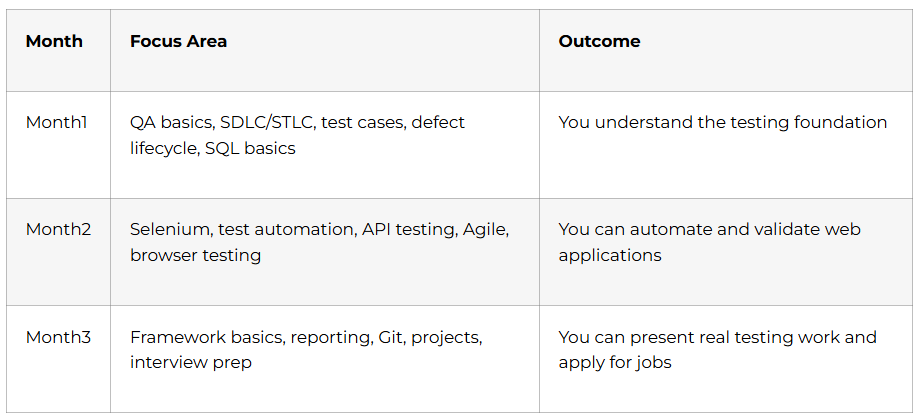
Full Stack Testing: Your Complete 90-Day Career Transformation Roadmap
The software testing industry is experiencing unprecedented growth, with companies across Bangalore, Hyderabad, Pune, Mumbai, Chennai, and Noida actively hiring skilled QA professionals. As applications become more complex and user expectations soar, organizations need testing experts who can ensure flawless software delivery. This comprehensive roadmap transforms beginners into job-ready Full Stack Testing professionals in just 90 days.
Why Full Stack Testing is Your Gateway to a Thriving IT Career
Modern QA testers are no longer just bug hunters. They participate early in design discussions, perform both manual and automation testing, analyze user journeys, advocate for usability, and collaborate with developers and product managers. The role has evolved into a technical partnership that ensures quality throughout the software lifecycle.
Companies like Infosys, TCS, Accenture, Capgemini, Wipro, Cognizant, IBM, and KPMG are actively recruiting testing professionals who understand the complete testing ecosystem. With the right training and practical exposure, you can secure positions in technology sectors, data analytics companies, AI/ML organizations, media houses, and innovative startups.
What Makes This Roadmap Different
Unlike generic courses that focus solely on theory, this 90-day journey combines foundational concepts with hands-on practice, real-world projects, and industry-standard tools. Every week builds upon the previous one, ensuring you gain both breadth and depth in manual testing, automation frameworks, API testing, and DevOps integration. By the end, you’ll have a portfolio showcasing live projects, automated test suites, and API validation frameworks that impress recruiters.
Start Your Software Testing Career Today
Learn Manual Testing, Automation Testing, API Testing, Selenium, and frameworks through our
Software Testing Course.
Month 1:Building Your Foundation(Days 1-14)
Week 1: Understanding Software Testing Fundamentals
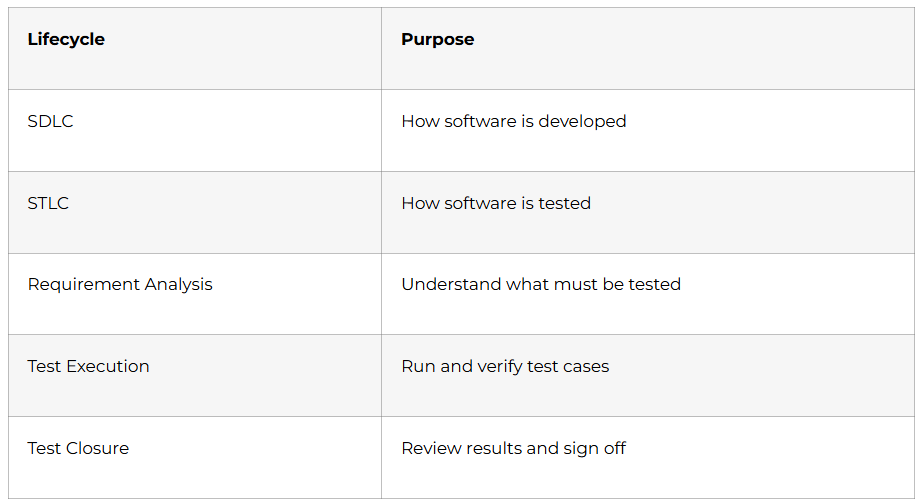
Day 1-2: Introduction to Software Testing & SDLC
Your journey begins with understanding why software testing exists and how it fits into the development lifecycle. Learn the Software Development Life Cycle (SDLC) phases including requirement analysis, design, development, testing, deployment, and maintenance. Understand how testers collaborate with business analysts, developers, and project managers to ensure quality at every stage.
Topics Covered: Software testing fundamentals, SDLC models (Waterfall, Agile, V-Model, Spiral), roles and responsibilities of QA testers, quality assurance versus quality control.
Practical Exercise: Analyze a simple mobile app and identify potential testing scenarios. Document what could go wrong from a user perspective.
Day 3-4: Types of Testing – The Complete Landscape
Dive into the diverse testing methodologies that form the backbone of quality assurance. Understand the difference between white box testing (testing internal code structure), black box testing (testing functionality without code knowledge), and gray box testing (combination of both).
Topics Covered: Unit testing, integration testing, system testing, acceptance testing, static testing, reviews and walkthroughs.
Practical Exercise: Create a testing type classification chart. For a banking application, identify which testing types apply at different stages.
Day 5-7: Functional Testing Deep Dive
Master the art of functional testing where you verify that software behaves exactly as specified. Learn smoke testing (quick verification that critical features work), sanity testing (focused testing after bug fixes), regression testing (ensuring new changes don’t break existing functionality), and exploratory testing (unscripted creative testing).
Topics Covered: Smoke testing, sanity testing, formal testing, ad-hoc testing, retesting, regression testing, system integration testing, end-to-end testing, exploratory testing, monkey testing.
Hands-On Project: Test a demo e-commerce website. Perform smoke testing on checkout flow, then conduct exploratory testing to discover edge cases.
Day 8-10: Non-Functional Testing Essentials
Move beyond functionality to test how well software performs under various conditions. Non-functional testing examines user interface quality, usability, security vulnerabilities, compatibility across devices, load handling capacity, overall performance, and recovery from failures.
Topics Covered: UI testing, usability testing, security testing basics, compatibility testing across browsers and devices, load testing fundamentals, performance testing, globalization and localization testing, recovery testing.
Practical Exercise: Test a website across Chrome, Firefox, and Edge browsers. Document compatibility issues and performance differences.
Day 11-14: Manual Testing & STLC Mastery
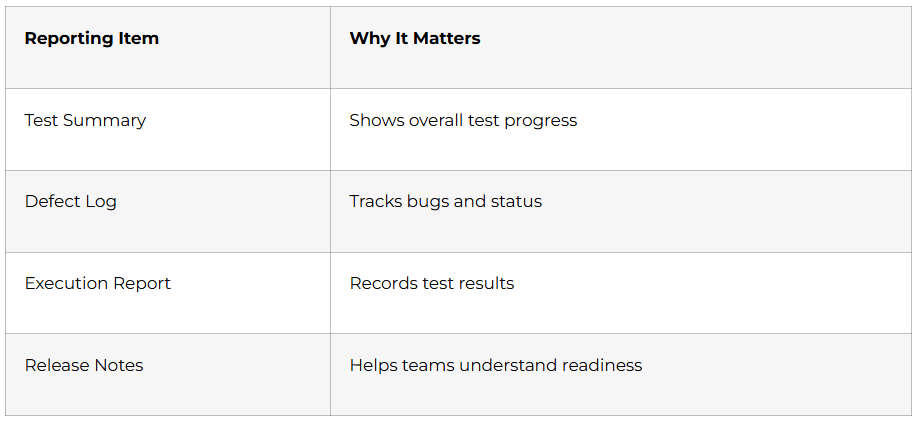
Understand the Software Testing Life Cycle (STLC) which guides how testing activities are planned, designed, executed, and closed. Learn to create comprehensive test plans that outline testing scope and resources, analyze requirements to identify testable scenarios, design effective test cases, prepare relevant test data, execute tests systematically, report defects clearly, and close testing cycles with proper documentation.
Topics Covered: STLC phases, test plan creation, requirement analysis (SRS/FRS documents), test scenario writing, test case design with preconditions and expected results, test data preparation, Requirements Traceability Matrix (RTM), test execution strategies, defect reporting with severity and priority, defect lifecycle, defect management, test closure activities.
Hands-On Project: Create a complete test plan for a simple login functionality. Write 20+ test cases covering positive, negative, and boundary scenarios. Track them in an Excel sheet with execution status.
Week 1-2 Milestone: You now understand the testing ecosystem, different testing types, and can create structured test plans with comprehensive test cases.
Week 2: Agile Testing & Tool Integration
Day 15-17: Agile Methodology Using Scrum
Modern software teams work in Agile environments where testing happens continuously throughout development. Learn how Scrum framework structures work into sprints (typically 2-week cycles), how testers participate in sprint planning, daily standups, and retrospectives, and how quality is built into every iteration.
Topics Covered: Agile testing principles, Scrum introduction and framework, release planning versus sprint planning, product backlog management, concept of epics (large features) and user stories (specific requirements), writing epics with examples, creating user stories with acceptance criteria, defining tasks for user stories, starting and monitoring sprints, completing sprints with demo and retrospective.
Practical Exercise: Convert a traditional requirement document into Agile format. Break down a project into epics, then into user stories with acceptance criteria.
Day 18-21: JIRA – Project Management Tool
JIRA is the industry-standard tool for Agile project management and defect tracking used by thousands of organizations globally. Master creating projects, managing user stories, tracking bugs, and collaborating with development teams.
Topics Covered: JIRA introduction and installation, JIRA features overview, creating Scrum projects in JIRA, adding users to accounts, understanding JIRA issue types (story, task, bug, epic), workflow configuration for projects, creating product backlogs in JIRA, creating and managing epics, writing user stories in JIRA, starting sprints, writing and executing test cases directly from JIRA, adding bugs with detailed descriptions, attaching screenshots and logs to defects.
Hands-On Project: Create a dummy Scrum project in JIRA for a food delivery app. Add 5 epics, 15 user stories, execute test cases, and log 10 sample defects with proper severity and priority tags.
Week 2 Achievement: You’re now comfortable working in Agile environments and can effectively use JIRA for test management and defect tracking.
WEEK 3-4: Advanced Manual Testing & Database Skills (Days 15-28)
Week 3: Test Management with Cucumber Studio
Day 22-24: Behaviour-Driven Development (BDD) Fundamentals
BDD bridges the gap between technical and non-technical team members by expressing requirements in plain English. Learn how BDD frameworks help create living documentation that serves as both requirements and automated tests.
Topics Covered: What is Behaviour-Driven Development, advantages of BDD in Agile environments, overview of Cucumber framework and Gherkin syntax (Given-When-Then format), comparison with traditional testing frameworks.
Practical Exercise: Write BDD scenarios for user registration flow using Gherkin syntax. Focus on making scenarios readable by non-technical stakeholders.
Day 25-28: Cucumber Studio Mastery
Cucumber Studio is a collaborative test management platform that helps teams design, organize, and track BDD scenarios. Master creating test cases using natural language, organizing features and scenarios, generating test reports, and maintaining living documentation.
Topics Covered: Creating SmartBear account, navigating Cucumber Studio interface, creating and organizing projects, understanding test cases and folder structures, executing test runs, generating test reports, leveraging living documentation for traceability, understanding feature and scenario status indicators.
Hands-On Project: Create a complete BDD test suite in Cucumber Studio for an online banking application. Document 25+ scenarios covering account creation, transactions, and statement generation.
Practice Manual Testing with Real Examples
Learn test case writing, bug reporting, and real testing scenarios using our
Software Testing How-to Guides.
Week 4: SQL for Database Testing
Day 29-32: Database Testing Fundamentals
Backend data validation is crucial for application integrity. Learn why database testing ensures data accuracy, validates business logic at the database level, checks data integrity across tables, and verifies data migration success.
Topics Covered: What is database testing and why it’s necessary, SQL overview and database concepts, creating databases and tables, SELECT queries to retrieve data, WHERE clause for filtering, SELECT DISTINCT for unique values, GROUP BY for aggregation, HAVING clause for filtered aggregations, ORDER BY for sorting results.
Practical Exercise: Set up a MySQL database with sample employee and department tables. Practice writing SELECT queries with different filters and sorting options.
Day 33-35: Advanced SQL Operations
Master data manipulation and complex queries that enable thorough backend testing. Learn to use LIKE operator for pattern matching, IN operator for multiple value conditions, BETWEEN for range queries, AND & OR for combining conditions, aggregate functions (COUNT, SUM, AVG, MAX, MIN), INSERT for adding records, UPDATE for modifying data, DELETE for removing records.
Topics Covered: LIKE operator with wildcards, IN operator usage, BETWEEN for ranges, logical operators (AND, OR, NOT), aggregate functions with examples, INSERT statements with single and multiple rows, UPDATE statements with conditions, DELETE operations with safety considerations, TRUNCATE versus DELETE, ALTER table structure commands, DROP statements.
Practical Exercise: Populate database with 50+ records. Perform INSERT, UPDATE, DELETE operations. Use aggregate functions to generate reports.
Day 36-38: SQL JOINS & Subqueries
Learn advanced SQL techniques that enable complex data validation scenarios. Master different types of joins to combine data from multiple tables and subqueries to create nested query logic.
Topics Covered: Understanding SQL JOINS (INNER JOIN, LEFT JOIN, RIGHT JOIN, FULL OUTER JOIN), cross joins and self joins, SQL subqueries and nested queries, correlated subqueries, using subqueries in WHERE, FROM, and SELECT clauses.
Hands-On Project: Create a database for an e-commerce system with tables for customers, orders, products, and payments. Write complex JOIN queries to generate sales reports. Create subqueries to find top customers and most-selling products.
Week 3-4 Milestone: You can now manage BDD test scenarios in Cucumber Studio and perform comprehensive database testing using advanced SQL queries.
Month 2: Automation Testing Foundation (Days 39-49)
Week 5: Core Java for Automation
Day 39-42: Java Programming Basics
Java is the most widely used programming language for test automation. Build a solid programming foundation that enables you to write automation scripts effectively.
Topics Covered: Java history and features, setting up Eclipse IDE, installing Java JDK, creating projects in Eclipse, writing and executing first Java program, debugging using Eclipse, understanding Java syntax, keywords and identifiers, classes and objects, data types (primitive and reference), variables and constants, type casting.
Practical Exercise: Create a Java class representing a Banking Account with properties (account number, balance, account holder name) and methods (deposit, withdraw, check balance).
Day 43-45: Control Structures & Arrays
Learn to control program flow and manage collections of data. Master decision-making statements and looping constructs essential for test automation logic.
Topics Covered: Conditional statements (if-else, nested if-else, switch case), loop statements (while, do-while, for, foreach), break and continue keywords, understanding arrays and their advantages, working with single and multi-dimensional arrays, foreach loop for array iteration, array manipulation examples.
Practical Exercise: Write a program that stores test case names in an array, iterates through them, and prints execution status (Pass/Fail) based on conditions.
Day 46-49: Object-Oriented Programming (OOP)
OOP concepts form the backbone of modern test automation frameworks. Master these principles to write clean, reusable, and maintainable automation code.
Topics Covered: Creating packages and organizing code, defining classes and objects, understanding methods and types of methods, writing user-defined methods with parameters and return types, inheritance (what it is, advantages, types with examples), polymorphism (method overloading and method overriding with examples), encapsulation (concept and implementation), abstraction (abstract classes and methods with step-by-step examples), interfaces (implementing interfaces, difference between abstraction and interfaces, implements versus extends keyword).
Hands-On Project: Create a test automation framework structure using OOP concepts. Build a base class for common test operations, create child classes for different test types, implement interfaces for test reporting.
Week 5 Achievement: You now possess core Java programming skills required to write automation scripts and understand framework architecture.
WEEK 6-7: Selenium WebDriver Mastery (Days 50-63)
Week 6: Selenium Fundamentals & Web Element Handling
Day 50-52: Introduction to Selenium & WebDriver Architecture
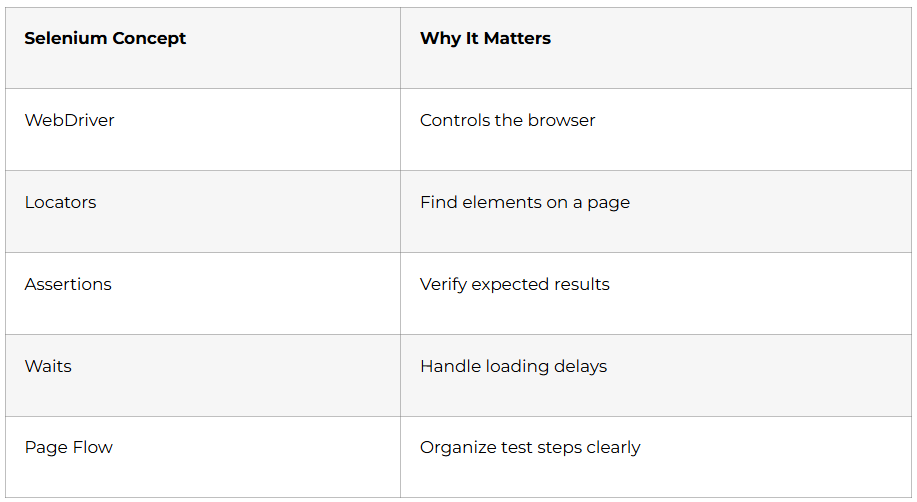
Selenium WebDriver has revolutionized web automation testing by enabling testers to interact with browsers programmatically. Unlike its predecessor Selenium RC, WebDriver communicates directly with browsers using their native support for automation, making tests faster and more reliable.
Topics Covered: Introduction to Selenium and its evolution, advantages of Selenium WebDriver over other tools, Selenium WebDriver versus Selenium RC comparison, understanding Selenium WebDriver architecture (language bindings, JSON wire protocol, browser drivers, browsers), configuring Selenium with Eclipse by adding JAR files, working with different browser drivers (ChromeDriver, GeckoDriver for Firefox, EdgeDriver, IEDriver).
Practical Exercise: Install Selenium WebDriver, configure it with Eclipse, and write your first automation script that opens a browser, navigates to a website, and verifies the page title.
Day 53-56: Locators & Web Element Interaction
Locating web elements accurately is the foundation of successful test automation. Master all locator strategies to handle even the most complex web applications with dynamic content.
Topics Covered: Working with WebDriver on different browsers (Firefox, Chrome, IE, Edge), creating first WebDriver script with detailed explanation, navigate methods in WebDriver (to, back, forward, refresh), comprehensive locators in Selenium (ID, Name, ClassName, TagName, LinkText, PartialLinkText, CSS selectors, XPath), mastering XPath with axes (self, child, parent, following, preceding, ancestor, descendant), difference between absolute and relative XPath.
Hands-On Project: Create automation scripts for a demo e-commerce website. Practice locating elements using different strategies. Create a test that searches for products, adds items to cart, and verifies cart contents.
Day 57-59: Handling Dynamic Elements
Modern web applications contain dynamic dropdowns, checkboxes, radio buttons, and elements that appear or disappear based on user actions. Learn synchronization techniques that make your scripts robust and reliable.
Topics Covered: Handling static and dynamic dropdowns using Select class, working with checkboxes and radio buttons, synchronization concepts in Selenium, wait methods (Thread.sleep, Implicit Wait, Explicit Wait, Fluent Wait), when to use which wait mechanism, handling AJAX events and auto-suggestions, dealing with different Selenium exceptions (NoSuchElementException, TimeoutException, StaleElementReferenceException).
Practical Exercise: Automate a flight booking website that has dynamic dropdowns for departure and arrival cities. Implement proper wait mechanisms to handle page load times.
Day 60-63: Advanced Selenium Techniques
Handle complex web scenarios including alerts, popups, frames, multiple windows, and JavaScript interactions. These advanced techniques separate proficient automation engineers from beginners.
Topics Covered: Handling JavaScript alerts (accept, dismiss, getText, sendKeys), working with frames and iframes (switching context), handling multiple windows and popups using WindowHandles, switching between windows programmatically, working with WebTables (reading data, validating table content), using JavaScriptExecutor for scenarios where WebDriver falls short, capturing screenshots on test failures for debugging, file upload and download automation using Selenium.
Hands-On Project: Create a comprehensive test suite for a web application that includes form submission with file uploads, handling confirmation alerts, switching between multiple browser windows, and extracting data from tables.
Week 7: Working with Excel Data & Advanced Interactions
Day 64-66: Apache POI for Data-Driven Testing
Reading test data from Excel files enables data-driven testing where the same test script executes with multiple data sets. This dramatically increases test coverage without duplicating code.
Topics Covered: Introduction to Apache POI library for Excel operations, adding Apache POI dependencies to project, reading data from Excel files (.xls and .xlsx formats), writing test results back to Excel, creating data-driven testing framework using Excel as data source, parameterizing test scripts with external data.
Practical Exercise: Create an Excel sheet with 20 different user credentials. Write a Selenium script that reads credentials from Excel, performs login operations, validates results, and writes pass/fail status back to Excel.
Day 67-70: Robot Class & Actions Class
Some web interactions require simulating keyboard and mouse actions that go beyond standard WebDriver methods. Master advanced interaction techniques for comprehensive test automation.
Topics Covered: Using Robot class for keyboard and mouse events, handling Windows popups using Robot class (since WebDriver cannot interact with OS-level dialogs), working with Action class for complex mouse operations, mouse hover actions, drag and drop functionality, double-click operations, right-click (context click) operations, combining multiple actions in a sequence.
Hands-On Project: Automate a website with drag-and-drop functionality. Create scripts that perform mouse hover to reveal hidden menus, right-click to access context menus, and use Robot class to handle file upload dialogs.
Week 6-7 Achievement: You now possess advanced Selenium WebDriver skills to automate complex web applications with dynamic content, multiple windows, and intricate user interactions.
Prepare for Software Testing Interviews
Get 200+ interview questions on Manual Testing, Selenium, API Testing & QA Tools in our
Software Testing Interview Guide.
WEEK 8-9: Testing Frameworks & Best Practices (Days 71-84)
Week 8: TestNG Framework Mastery
Day 71-73: TestNG Fundamentals
TestNG (Test Next Generation) is the industry-standard testing framework for Java that provides powerful features like annotations, parallel execution, test configuration, and comprehensive reporting. Companies expect automation engineers to be proficient with TestNG.
Topics Covered: Introduction to TestNG and its advantages over JUnit, key TestNG features (annotations, grouping, parameterization, parallel execution), configuring TestNG with Eclipse IDE, writing Selenium test scripts using TestNG structure, running TestNG tests and analyzing reports, understanding TestNG annotations (@Test, @BeforeMethod, @AfterMethod, @BeforeClass, @AfterClass, @BeforeTest, @AfterTest, @BeforeSuite, @AfterSuite), execution order of annotations.
Practical Exercise: Convert your existing Selenium scripts into TestNG format. Create a test class with multiple test methods using appropriate annotations. Execute tests and examine the generated HTML reports.
Day 74-77: TestNG Advanced Features
Leverage TestNG’s powerful capabilities for test organization, parameterization, assertions, and execution control. These features enable scalable test automation suitable for enterprise applications.
Topics Covered: TestNG tags and attributes (enabled for skipping tests, dependsOnMethods for test dependencies, priority for execution order), assertions in TestNG (soft assertions that don’t stop execution, hard assertions that halt on failure), data providers for parameterization using @DataProvider annotation, passing different data sets to same test method, TestNG listeners (implementing ITestListener for custom logging, ISuiteListener for suite-level events), generating comprehensive TestNG reports (HTML, XML formats).
Hands-On Project: Create a data-driven login test using @DataProvider with 10 different credential combinations. Implement custom listeners to log test execution details. Use assertions to validate login outcomes.
Day 78-81: TestNG Test Suites & Parallel Execution
Organizing tests into suites and running them in parallel dramatically reduces overall test execution time. Learn to create robust test suites using TestNG XML configuration files.
Topics Covered: Creating and running test suites using testng.xml, organizing tests into logical groups, skipping tests programmatically, setting priority for test execution order, executing different test types (regression, sanity, smoke) using groups, test grouping strategies and running specific groups, parallel test execution concepts, configuring parallel execution in TestNG XML (at test, class, or method level), dependency tests using dependsOnMethods and dependsOnGroups, execution order management, thread safety in parallel execution, advanced concepts including custom report generation, running parallel and distributed tests across machines.
Hands-On Project: Create a complete test suite with 30+ test cases organized into groups (smoke, sanity, regression). Configure testng.xml to run smoke tests first, then regression tests in parallel across 3 threads. Generate consolidated reports.
Week 8 Achievement: You can now create professional-grade automation frameworks using TestNG with advanced features like parameterization, parallel execution, and custom reporting.
Week 9: Cucumber BDD Framework
Day 82-85: Cucumber Framework Implementation
Cucumber enables Behavior-Driven Development where tests are written in plain English using Gherkin syntax, making them understandable by non-technical stakeholders. This bridges the communication gap between business and technical teams.
Topics Covered: Introduction to Cucumber framework, what is Behavior-Driven Development (BDD) and its benefits, why use Cucumber for automation testing, comparison with traditional testing frameworks like JUnit and TestNG, benefits of BDD in Agile environments, difference between Cucumber and other automation tools, setting up Cucumber in Eclipse/IntelliJ IDEA, configuring Maven or Gradle with Cucumber dependencies.
Practical Exercise: Install Cucumber plugin in Eclipse. Create a simple Maven project with Cucumber dependencies. Set up folder structure for features, step definitions, and runners.
Day 86-88: Gherkin Syntax & Feature Files
Gherkin provides a business-readable domain-specific language that describes software behavior without detailing implementation. Master writing clear, reusable feature files that serve as living documentation.
Topics Covered: What is Gherkin and its role in BDD, Gherkin syntax and structure, writing feature files with Feature, Scenario, Given, When, Then keywords, understanding Gherkin keywords (And, But, Scenario Outline for multiple data sets, Examples tables), using data tables for complex data structures, adding comments in Gherkin for documentation, handling complex data scenarios with tables.
Practical Exercise: Write feature files for an e-commerce application covering user registration, product search, add to cart, and checkout scenarios. Use Scenario Outline to test multiple payment methods.
Day 89-91: Step Definitions & Cucumber-Selenium Integration
Connect Gherkin scenarios to actual automation code through step definitions. Integrate Cucumber with Selenium WebDriver to create executable test automation.
Topics Covered: What are step definitions and their purpose, mapping Gherkin steps to Java code, writing step definitions using @Given, @When, @Then annotations, using regular expressions in step definitions for flexible matching, passing parameters and data between steps, hooks in Cucumber using @Before and @After annotations for setup and teardown, integrating Cucumber with Selenium WebDriver, preparing feature files for realistic test scenarios, writing runner class in Cucumber to execute tests, proper usage of Given, When, Then, And, But in practical scenarios.
Hands-On Project: Create a complete BDD framework for testing a banking application. Write feature files for account operations, create corresponding step definitions with Selenium code, implement hooks for browser setup/teardown, and create a runner class with reporting configuration.
Week 9 Milestone: You’ve mastered BDD methodology and can create Cucumber frameworks that enable collaboration between technical and non-technical team members.
Month 3: Framework Development & Version Control (Days 92-105)
WEEK 10-11: Framework Development & Version Control (Days 92-105)
Week 10: Building Professional Test Automation Frameworks
Day 92-95: Page Object Model (POM) Design Pattern
Page Object Model is the industry-standard design pattern for organizing automation code. It separates page structure from test logic, making tests maintainable and reusable.
Topics Covered: Understanding Page Object Model (POM) concept and benefits, creating page classes that represent web pages, separating locators from test scripts, implementing Page Factory for lazy initialization of elements, recommended folder structure for automation framework (pages, tests, utilities, configurations), creating utility classes for common operations (screenshot capture, Excel operations, date handling), report creation in Selenium frameworks, implementing data-driven framework using external data sources, implementing keyword-driven framework for non-programmers.
Hands-On Project: Refactor your existing Selenium tests into POM structure. Create separate page classes for login, home, product listing, and checkout pages. Implement utility classes for WebDriver initialization, waits, and Excel operations. Create base test class with setup and teardown methods.
Day 96-98: Maven Build Management
Maven simplifies project management by handling dependencies, building projects, and running tests through standardized configurations. Understanding Maven is essential for professional automation engineering.
Topics Covered: What is Maven and why it’s used in automation projects, understanding the pom.xml file structure, setting up Maven project in Eclipse, building and running Selenium Maven projects, adding dependencies in pom.xml (Selenium, TestNG, Cucumber, Apache POI), updating project dependencies using Maven, Maven lifecycle phases (clean, compile, test, package), running tests using Maven commands, integrating TestNG with Maven for test execution.
Practical Exercise: Create a Maven project from scratch. Configure pom.xml with all required dependencies for Selenium, TestNG, and reporting libraries. Run tests using Maven commands (mvn clean test). Generate reports using Maven plugins.
Day 99-105: Git Version Control System
Version control is mandatory in professional development environments. Git enables team collaboration, code versioning, and maintains complete history of project changes.
Topics Covered: Understanding version control concepts, introduction to Git and its importance, starting a Git repository using git init, checking Git status with git status command, understanding file states (untracked, modified, staged, committed), staging files using git add command, committing changes with meaningful messages using git commit, viewing commit history with git log, branching strategies for parallel development, merging branches and resolving conflicts, working with remote repositories (GitHub, GitLab, Bitbucket), cloning repositories, pushing changes to remote, pulling updates from remote, creating pull requests for code review.
Hands-On Project: Initialize Git repository for your automation framework. Create meaningful commits as you develop features. Create a remote repository on GitHub. Push your complete framework. Practice branching by creating a feature branch for new test cases.
Week 10 Achievement: You now have skills to build enterprise-grade automation frameworks using design patterns, build tools, and version control systems.
Become an Automation Tester
Master Selenium, WebDriver, Automation Frameworks & CI/CD workflows inside our
Software Testing Certification Course.
Week 11: CI/CD & Third-Party Tool Integration
Day 106-108: Jenkins CI/CD Integration
Continuous Integration and Continuous Deployment pipelines automatically execute tests whenever code changes, providing immediate feedback to developers. Jenkins is the most widely used CI/CD tool in the industry.
Topics Covered: What is Jenkins and why it’s essential for automation, understanding CI/CD concepts and benefits, installing Jenkins locally or on server, configuring Jenkins for first use, steps to integrate Jenkins with Selenium, creating Jenkins jobs to run automation scripts, configuring source code management in Jenkins (Git integration), scheduling Jenkins jobs (build triggers, cron expressions), running Selenium scripts via Jenkins, configuring email notifications for test results, creating and executing batch files for test execution, generating and archiving test reports.
Practical Exercise: Install Jenkins, create a freestyle job that pulls your automation framework from GitHub, execute TestNG tests, and send email notifications with test results. Schedule the job to run daily at specific times.
Day 109-112: Log4j for Logging
Proper logging helps debug test failures and provides execution trail for audit purposes. Log4j is the standard logging framework used across Java projects.
Topics Covered: Introduction to Log4j and its importance in automation, understanding different log levels (DEBUG, INFO, WARN, ERROR, FATAL), usage of Logger class for logging messages, adding Log4j JAR files or Maven dependencies, configuring log4j.properties or log4j.xml file, integrating Log4j in Selenium framework, logging test execution steps, logging errors and exceptions, configuring log file output locations.
Hands-On Project: Integrate Log4j into your existing framework. Add logging statements at key points (test start, test end, before clicking elements, after validations). Configure log files to rotate daily. Review logs to debug intentional failures.
Week 11 Milestone: Your automation framework now includes professional features like CI/CD integration and comprehensive logging mechanisms.
WEEK 12-13: API Testing & Advanced Automation (Days 113-126)
Week 12: API Testing with Postman
Day 113-116: Introduction to APIs & Web Services
Modern applications rely heavily on APIs for communication between frontend, backend, and third-party services. API testing validates this communication layer, often catching issues before UI testing.
Topics Covered: What is API and its importance, what is web service and types (REST vs SOAP), understanding backend architecture, REST API fundamentals, what are CRUD operations with examples (Create, Read, Update, Delete), different HTTP methods (GET for retrieving data, POST for creating data, PUT for updating data, DELETE for removing data, PATCH for partial updates, HEAD for headers only, OPTIONS for allowed methods), understanding HTTP status response codes (1xx informational, 2xx success, 3xx redirection, 4xx client errors, 5xx server errors), real-world API examples from different domains.
Practical Exercise: Use browser developer tools to observe API calls when browsing popular websites. Identify GET, POST, PUT, DELETE requests. Note down response codes and understand what they mean.
Day 117-120: Postman Manual Testing
Postman is the industry-standard tool for API testing and development. Master manual API testing before moving to automation.
Topics Covered: Postman introduction and installation, how to call REST APIs in Postman, how to pass path parameters in requests, how to pass query parameters in requests, how to set headers in Postman, how to pass JSON/XML payloads in request body, how to check response status codes, how to validate JSON/XML response messages, understanding response headers, using header presets for reusability, viewing API history in Postman, creating and using Postman environment variables for different environments (dev, staging, production), creating collections and organizing requests, creating collections from API specifications.
Hands-On Project: Test a public API like JSONPlaceholder or ReqRes. Create a collection with requests for all CRUD operations. Use environment variables for base URL. Write tests in Postman to validate response status, headers, and body content.
Day 121-126: Advanced Postman & Newman
Automate API testing and integrate with CI/CD pipelines using Newman command-line tool. Create comprehensive API test suites with automated reporting.
Topics Covered: Running automated test cases in Postman collections, generating test results and reports, introduction to Newman (command-line runner for Postman), Newman installation and setup, running collections from Newman command line, Newman command-line options and parameters, generating HTML test reports using Newman, understanding test scripts in Postman, writing pre-request scripts for setup, using code snippets in Postman for common validations, API monitoring for production APIs, creating API documentation, publishing documentation for team access, setup environment variables (local and global), using collection runner for batch execution, viewing collection test summary, creating team workspace and individual workspace, import/export functionality in Postman.
Hands-On Project: Create a complete API test suite for a REST API service. Write test scripts to validate status codes, response time, data accuracy, and schema validation. Run the collection using Newman and generate HTML reports. Schedule execution using Jenkins.
Week 12 Achievement: You can now perform comprehensive manual and automated API testing using Postman and Newman.
Week 13: API Test Automation with Rest Assured
Day 127-130: Rest Assured Fundamentals
Rest Assured is the most popular Java library for API test automation. It provides BDD-style syntax making API tests readable and maintainable.
Topics Covered: Introduction to Rest Assured library, Rest Assured methods for all HTTP verbs (GET, POST, PUT, DELETE, PATCH), handling different payloads using POJO classes, handling requests with simple JSON format, managing complex nested JSON structures, handling authentication mechanisms (Basic Auth, Pre-emptive Auth, Digestive Auth, Bearer Token, Authorization Token, Client ID and Secret, API Key and Secret, OAuth1 and OAuth2, JWT Token).
Practical Exercise: Set up Rest Assured in Maven project. Write simple GET and POST requests using Rest Assured. Practice different authentication methods using public APIs that require authentication.
Day 131-133: Rest Assured Core Features
Master all essential Rest Assured capabilities for building robust API automation frameworks. Learn BDD approach, assertions, parameterization, and response extraction techniques.
Topics Covered: GET/POST/PUT/DELETE using inbuilt BDD approach (Given-When-Then), understanding GIVEN, WHEN, THEN, AND methods, using LOG and ALL methods for debugging, how to assert in Rest Assured, verifying status code, response body, and headers, using query parameters and path parameters, understanding ResponseSpecBuilder and RequestSpecification concepts, working with JsonPath and XmlPath, creating JsonPath to extract data from complex JSON responses using Jayway JsonPath library, creating XmlPath for XML responses, using EXTRACT method for response data, sending POST calls with JSON string, JSON file, and Java POJO class, understanding serialization (Java object to JSON) and deserialization (JSON to Java object), using Hamcrest assertion library for readable assertions, GET/POST/PUT/DELETE using non-BDD approaches.
Hands-On Project: Create a Rest Assured framework with reusable specification builders. Implement POJO classes for request and response. Write tests for complete CRUD operations on a REST API. Use JsonPath to validate nested response data. Implement assertions using Hamcrest matchers.
Day 134-140: Advanced API Testing Topics
Explore cutting-edge API testing concepts including mocking, GraphQL, and testing real-world APIs with complex authentication. These advanced skills distinguish expert API testers from beginners.
Topics Covered: Mocking APIs using WireMock library, defining dummy APIs for isolated testing, defining API mock behavior for all HTTP methods, calling mocking APIs in your framework, integrating API mocking in test automation, GraphQL APIs introduction, how GraphQL differs from REST APIs, calling GraphQL APIs in Postman and GraphQL Playground, understanding Query and Mutation in GraphQL, real-time GraphQL API examples, GraphQL API automation with Rest Assured library, real-time API testing examples (GoRest APIs with authentication, ReqRes.in, Booker APIs, Weather APIs, IMDB APIs, Weather/Forecast APIs, OAuth APIs including OAuth1 and OAuth2, GitHub APIs, APIs with Swagger documentation).
Hands-On Project: Create a WireMock server to mock external API dependencies. Write tests that use mocked responses. Explore GitHub API – authenticate using personal access token, create repositories, fetch user data, and validate responses. Test a GraphQL API by writing queries and mutations in Rest Assured.
Week 13 Achievement: You’ve mastered comprehensive API testing including manual testing with Postman, automation with Rest Assured, and advanced concepts like mocking and GraphQL.
WEEK 14: Career Readiness & Job Preparation (Days 141-150)
Profile Optimization & Personal Branding
Day 141-143: LinkedIn Profile Optimization
Your LinkedIn profile is often the first impression recruiters have of you. A well-optimized profile significantly increases visibility and job opportunities in the competitive testing market.
Topics Covered: Crafting attention-grabbing headline (Example: “Full Stack QA Engineer | Selenium | API Testing | CI/CD”), writing compelling summary highlighting your testing journey, skills, and passion for quality, showcasing projects in featured section with screenshots and GitHub links, adding relevant skills (prioritize Selenium, TestNG, Rest Assured, JIRA, Jenkins, Java), requesting recommendations from trainers or peers, optimizing profile for recruiter searches using keywords, joining QA and testing groups for networking, engaging with industry content regularly .
Action Step: Update your LinkedIn profile with professional photo, detailed experience from training projects, skills section with all technologies learned, and publish one post about your testing journey using #SoftwareTesting #QAEngineering #TestAutomation hashtags.
👉 For comprehensive LinkedIn optimization strategies, check out our complete guide: “LinkedIn Profile Optimization for QA Engineers – From Profile to Interview Calls”
Day 144-146: Resume Building for Testing Roles
Your resume must pass Applicant Tracking Systems (ATS) while showcasing your testing expertise effectively. Tailor your resume specifically for QA positions highlighting both manual and automation skills.
Resume Structure: Professional summary highlighting years of training/experience in Full Stack Testing, core competencies section listing tools and technologies, detailed project descriptions using STAR method (Situation, Task, Action, Result), technical skills organized by category (Test Management, Automation Tools, Programming, Databases, CI/CD, API Testing), certifications and training details.
Key Points: Quantify achievements wherever possible (automated 150+ test cases, reduced testing time by 40%), use action verbs (designed, implemented, automated, validated, integrated), include keywords from job descriptions, keep format clean and ATS-friendly, limit to 1-2 pages.
Action Step: Create 2-3 project descriptions from your training demonstrating end-to-end automation framework development, API testing implementation, and CI/CD integration.
👉 Download our detailed guide: “QA Engineer Resume Templates with Real Project Examples – ATS Optimized”
Job Search Platforms & Application Strategy
Day 147-148: Navigating Job Platforms Effectively
Strategic job searching across multiple platforms increases your chances of landing interviews. Each platform has unique features and opportunities for QA professionals.
Top Platforms for Testing Jobs: Naukri.com (largest database of testing jobs in India, create detailed profile, set job alerts for “Selenium Automation Tester”, “QA Engineer”, “SDET”), LinkedIn Jobs (apply with optimized profile, use “Easy Apply” feature, connect with recruiters from target companies), Indeed (upload resume, set email alerts, research company reviews), Glassdoor (check salary insights, read interview experiences before applying), Instahyre and Cutshort (curated opportunities for tech roles, direct contact with hiring managers), company career pages (apply directly to Infosys, TCS, Accenture, Wipro, Cognizant careers portals).
Application Strategy: Apply to 10-15 jobs daily targeting entry-level positions like “Junior QA Engineer”, “Associate Test Engineer”, “Fresher – Automation Testing”, customize resume for each application aligning with job requirements, write personalized cover letters mentioning specific company projects or values, follow up after one week if no response, maintain application tracker spreadsheet (company, position, date applied, status).
Action Step: Create accounts on all major job platforms. Set up 5 different job alerts targeting variations of QA Engineer roles. Apply to your first 10 positions.
👉 Access our comprehensive resource: “Complete Job Search Strategy for QA Engineers – Platform-wise Application Guide”
Explore the Complete Software Testing Career Path
Plan your journey — from Manual Tester → Automation Engineer → QA Analyst → SDET using our
Software Testing Career Path
Interview Preparation & Success
Day 149-150: Technical & Behavioral Interview Mastery
Interview preparation distinguishes candidates who get offers from those who don’t. Prepare for both technical assessments and behavioral questions that evaluate cultural fit.
Technical Interview Preparation: Review all testing fundamentals (SDLC, STLC, testing types), practice explaining your automation framework architecture, prepare to write code on whiteboard or shared screen, review Selenium WebDriver methods and best practices, understand TestNG annotations and their execution order, explain Rest Assured framework and API testing approach, know SQL queries for database testing scenarios, be ready to debug code snippets and identify issues, prepare questions about company’s tech stack and testing processes.
Common Technical Questions: Explain the difference between Selenium RC and WebDriver, how do you handle dynamic elements in Selenium, what are different types of waits and when to use each, explain Page Object Model with example, difference between @BeforeMethod and @BeforeClass in TestNG, how to achieve parallel execution in TestNG, explain your framework architecture, how do you perform API authentication in Rest Assured, difference between PUT and PATCH methods, how to handle test data in automation framework.
Behavioral Interview Preparation: Prepare STAR method responses for common questions, describe challenging testing scenario you faced and how you resolved it, explain how you prioritize testing when time is limited, discuss how you communicate defects to developers diplomatically, share example of when you found critical bug that others missed, explain how you stay updated with latest testing tools and technologies, demonstrate your collaboration skills with examples from training projects.
Mock Interview Practice: Practice with peers explaining your projects, record yourself answering questions to improve communication, research the company thoroughly before interviews, prepare 5-6 intelligent questions to ask interviewers, dress professionally even for video interviews, test your internet connection and interview setup in advance.
Action Step: Prepare detailed explanation of your 2 best projects covering framework architecture, challenges faced, and solutions implemented. Practice delivering this in 5 minutes.
👉 For in-depth preparation, access: “Complete Full Stack Testing Interview Guide – 200+ Questions with Detailed Answers Covering Manual, Automation, API Testing & Behavioral Skills”
4.Why Choose Frontlines Edutech for Your Testing Journey
Industry-Standard Training That Transforms Careers
Frontlines Edutech Private Limited has earned recognition from thousands of learners across India by delivering practical, hands-on training that bridges the gap between academic knowledge and industry requirements. The focus goes beyond theoretical concepts to ensure you gain real-world skills that employers actively seek.
What Sets Frontlines Edutech Apart: Expert trainers from top companies who bring real industry experience to every session, comprehensive curriculum covering manual testing, automation frameworks, API testing, and DevOps integration, hands-on projects that simulate actual workplace scenarios, personalized resume building and LinkedIn profile optimization support, dedicated interview guidance with mock sessions and feedback, placement assistance connecting you with hiring companies, course completion certificate recognized by industry, affordable fee structure with transparent pricing, ongoing support even after course completion.
Complete Learning Ecosystem
Training Deliverables You Receive: From-scratch to master-level training covering all 19 modules, resume building workshops with personalized feedback, daily assignments reinforcing each concept, LinkedIn profile building guidance for maximum visibility, interview preparation sessions with commonly asked questions, course completion certificate for your credentials, placement updates from hiring partners, dedicated Q&A sessions for doubt resolution, on-demand video access for revision, downloadable resources including cheat sheets and templates.
Real Success Stories
Thousands of students have successfully transitioned into testing careers after completing training at Frontlines Edutech. The comprehensive approach ensures that even non-IT graduates can master Full Stack Testing and secure positions at companies like Infosys, TCS, Accenture, Capgemini, Wipro, Cognizant, IBM, and KPMG.
Strategic Location Advantage
With testing job demand highest in Bangalore, Hyderabad, Pune, Mumbai, Chennai, and Noida, Frontlines Edutech positions you perfectly for these opportunities. The curriculum aligns with requirements from technology companies, data science firms, AI/ML organizations, media houses, and innovative startups actively hiring in these cities.
Your Next Steps to a Thriving Testing Career
The 90-day roadmap you’ve explored is not just theoretical planning – it represents a proven path that transforms complete beginners into job-ready Full Stack Testing professionals. Every day builds upon the previous one, ensuring comprehensive skill development across manual testing fundamentals, automation framework creation, API testing expertise, and professional career preparation.
What Happens After Day 90: You’ll possess a complete GitHub portfolio showcasing automation frameworks, API test suites, and CI/CD integration that impresses recruiters. Your LinkedIn profile will position you as a skilled QA professional ready for industry challenges. Your resume will highlight concrete projects demonstrating expertise in Selenium, TestNG, Cucumber, Rest Assured, JIRA, and Jenkins.
The Testing Industry Awaits You: With applications becoming increasingly complex and quality expectations rising, skilled testing professionals are in high demand across all industry sectors. Companies need QA engineers who understand both manual and automation testing, can validate APIs effectively, and integrate testing into CI/CD pipelines. This 90-day journey equips you with exactly these capabilities.
Ready to Begin Your Transformation?: Frontlines Edutech provides the expert guidance, hands-on practice, industry-standard curriculum, and career support that turns this roadmap into your reality. Don’t let another day pass watching opportunities go to others – your testing career starts with the decision to invest in yourself today.
Take Action Now: Contact Frontlines Edutech at +91-83330 77727 or visit www.frontlinesedutech.com to enroll in the Full Stack Testing course. Email media.frontlines@gmail.com for detailed course information, batch timings, and fee structure. Follow Frontlines Edutech on LinkedIn, Instagram, and YouTube for daily testing tips, career guidance, and success stories.
The testing industry doesn’t wait for anyone, and neither should you. Your 90-day transformation journey to becoming a Full Stack Testing professional starts now.
Connect With Frontlines Edutech:
📞 Phone: +91-83330 77727
🌐 Website: www.frontlinesedutech.com
📧 Email: media.frontlines@gmail.com
💼 LinkedIn: Frontlines Edutech | Frontlines Media
📸 Instagram: @frontlinesmedia
🎥 YouTube: Frontlines Skill Academy
This comprehensive roadmap is designed specifically for aspiring QA professionals who are serious about building successful testing careers. Every module, timeline, and resource recommendation comes from extensive industry research and proven training methodologies that have helped thousands of students secure their first testing jobs.
Your Software Testing Career Starts Now
Continue your journey with structured learning and hands-on practice