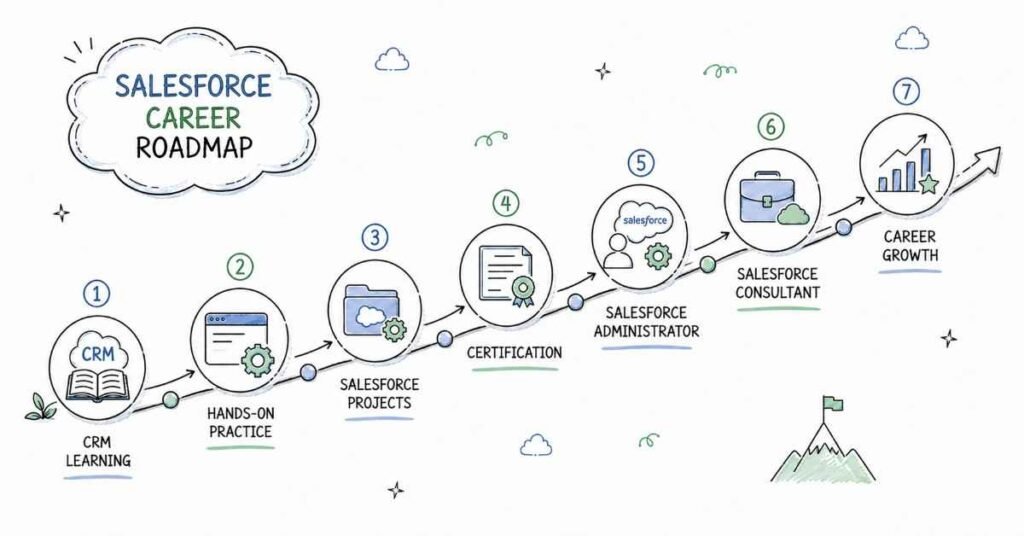
Your Complete 90-Day Salesforce Mastery Roadmap: From Zero to Job-Ready Professional
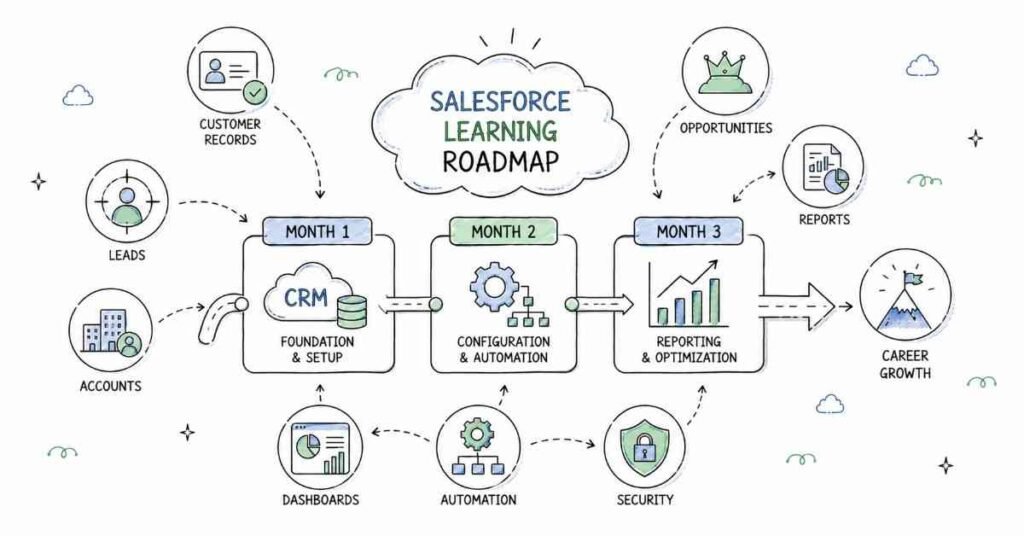
Starting a career in Salesforce can feel overwhelming when you’re staring at terms like “Apex,” “Lightning Web Components,” and “SOQL” without knowing where to begin. But here’s the truth: thousands of students just like you have transformed from complete beginners to confident Salesforce professionals in just three months. This roadmap breaks down exactly how you’ll do the same, one day at a time.
The Salesforce ecosystem is booming in 2025, with companies across technology, healthcare, finance, e-commerce, and education desperately searching for qualified professionals. Cities like Bangalore, Hyderabad, Pune, Mumbai, and Chennai are hiring Salesforce talent faster than training programs can produce them. Your timing couldn’t be better.
Understanding Your Learning Journey
This isn’t just another course syllabus. This is your personal transformation plan designed by industry experts who understand exactly what employers want. Every single day of these 90 days has been carefully structured to build your skills progressively, ensuring you never feel lost or overwhelmed.
Think of this roadmap as your GPS to a successful Salesforce career. Just as a GPS doesn’t show you the entire route at once but guides you turn-by-turn, this roadmap takes you through manageable daily goals that compound into professional expertise. By the end, you won’t just have certificates—you’ll have real skills that companies are willing to pay premium salaries for.
🚀 Kickstart your Salesforce journey—Explore more structured tech Course to choose your perfect path.
PHASE 1: Foundation Building (Days 1-30)
Week 1: Cloud Computing & CRM Fundamentals (Days 1-7)
Day 1: Welcome to Cloud Computing
You’ll start by understanding what cloud computing actually means in simple terms—no technical jargon, just clear explanations. Learn how cloud computing evolved from traditional computing methods and why companies worldwide are making this shift. By day’s end, you’ll understand the three critical service models: Software as a Service (SaaS), Platform as a Service (PaaS), and Infrastructure as a Service (IaaS).
Day 2: Introduction to Salesforce Ecosystem
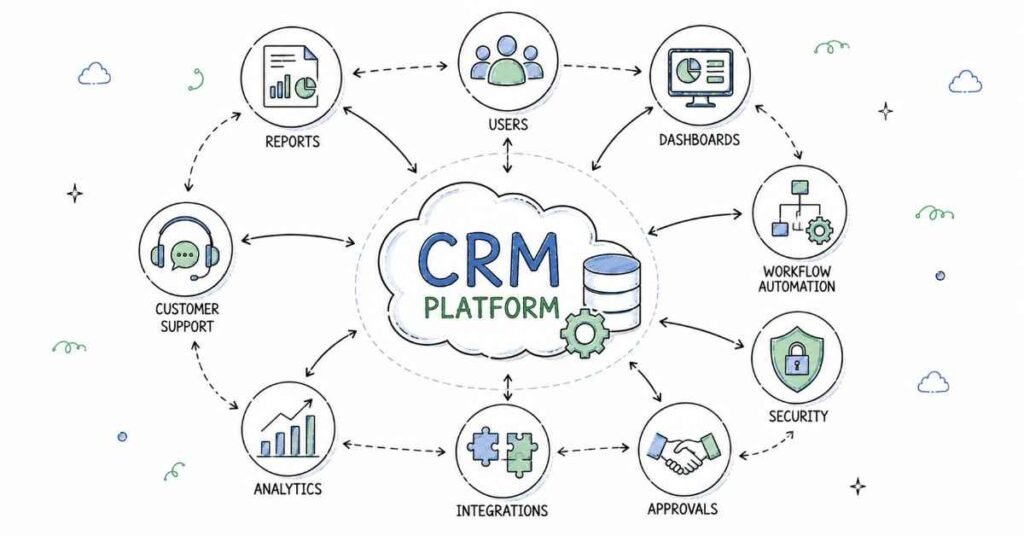
Discover what makes Salesforce the world’s number one CRM platform. You’ll explore different Salesforce editions, understand which companies use what products, and learn about the massive career opportunities waiting for you. Today you’ll also create your very first Salesforce Developer Account—your personal playground for the next 90 days.
Day 3: Understanding CRM Concepts
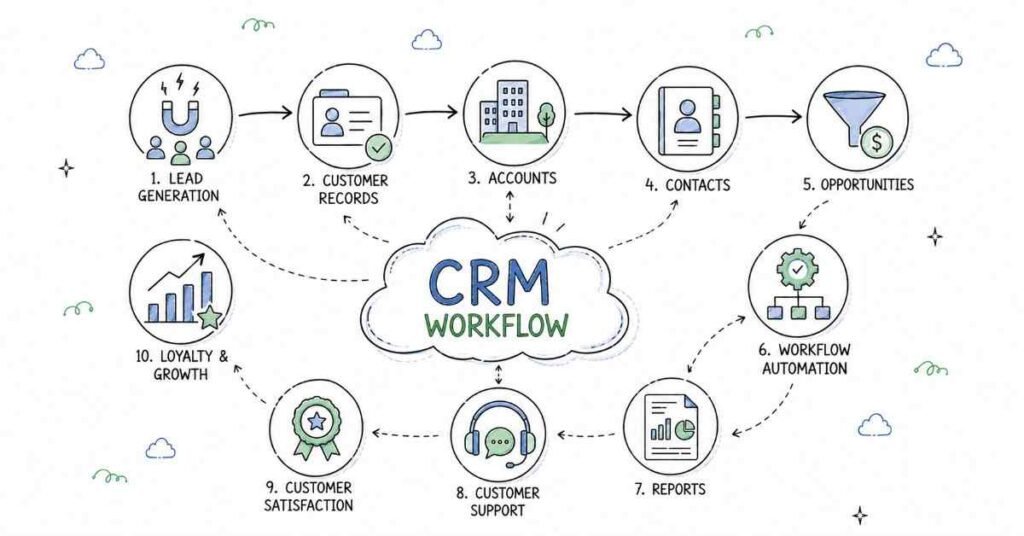
Customer Relationship Management isn’t just software—it’s a business philosophy. Learn how companies track potential customers (leads), convert them into opportunities, and manage ongoing relationships. You’ll understand the complete lead conversion process that sales teams use daily.
Day 4: User Management Basics
Dive into how Salesforce handles users, profiles, and roles. This might sound administrative, but understanding user management is crucial because every Salesforce professional needs to know how permissions and access work. You’ll learn the difference between roles and profiles—a concept that confuses many beginners but is actually straightforward.
Day 5: Building Your First Application
This is where things get exciting. You’ll create your first Salesforce application using both Classic and Lightning interfaces. This hands-on practice helps you understand the Application Manager and gives you confidence that you can actually build things in Salesforce.
Day 6: Object Management Fundamentals
Everything in Salesforce revolves around objects—think of them as organized containers for information. Learn the difference between Standard Objects (pre-built by Salesforce) and Custom Objects (ones you create). Practice creating, editing, and deleting records.
Day 7: Weekly Review & Mini Project
Consolidate everything you learned this week by building a simple application from scratch. This review day ensures concepts stick and you’re not just passively watching videos. Complete your first assignment that tests your understanding of cloud computing and basic Salesforce navigation.
💡 New to Salesforce? Learn fundamentals like CRM, users, objects & apps with beginner-friendly How-to Guides.
Week 2: Deep Dive into Objects & Fields (Days 8-14)
Day 8: Creating Custom Fields
Fields are where actual data lives inside objects. Today you’ll master creating different types of fields—text fields, number fields, date fields, picklists, and more. Each field type serves specific purposes, and knowing when to use which type is a skill you’ll develop today.
Day 9: Field Dependencies & Validation
Learn how to make your data smarter by creating field dependencies—where one field’s value determines what options appear in another field. You’ll also implement data validation rules to ensure only clean, accurate data enters your system.
Day 10: Field History Tracking
Discover how to track changes made to important fields over time. This feature is invaluable for compliance, auditing, and understanding how data evolves. Practice enabling history tracking and generating audit reports.
Day 11: Case Management
Cases are how companies track customer service issues and inquiries. Learn the complete case lifecycle from creation to resolution. Set up Web-to-Case functionality that automatically creates cases when customers submit online forms.
Day 12: Lead Management
Master the lead management process that sales teams rely on daily. Implement Web-to-Lead forms, configure lead assignment rules that automatically route leads to the right salespeople, and set up auto-response rules.
Day 13: Case Escalation & Auto-Response
Not all customer issues are equal—some need urgent attention. Learn how to configure case escalation rules that automatically flag urgent cases. Set up auto-response rules that send immediate acknowledgment emails to customers.
Day 14: Week 2 Review & Integration Project
Build a complete customer service system that includes case management, lead tracking, and automated workflows. This project brings together everything from Week 2 and gives you a portfolio piece you can showcase.
📘 Download practice datasets, forms, service workflows & starter admin resources.
Week 3: Advanced Functionality & Page Layouts (Days 15-21)
Day 15: Formula Fields Mastery
Formula fields are like Excel formulas inside Salesforce—they automatically calculate values based on other fields. Learn to create text formulas, number calculations, and date formulas. This skill separates beginners from intermediate users.
Day 16: Page Layouts & Record Types
Control exactly what users see on their screens by customizing page layouts. Learn how record types let you show different page layouts to different users for the same object. This customization is crucial for user experience.
Day 17: Custom Buttons & Actions
Create custom buttons that perform specific actions with one click. These buttons can send emails, update records, or redirect users to different pages. You’ll feel like a developer when you see your custom buttons working.
Day 18: Understanding Relationships – Part 1
Relationships connect different objects together, just like relationships between database tables. Start with Lookup relationships—the simplest type that creates loose connections between objects. Practice creating lookup relationships between standard and custom objects.
Day 19: Understanding Relationships – Part 2
Master Master-Detail relationships, which create tighter connections where child records can’t exist without parent records. Learn about hierarchical relationships used specifically for User objects. Understand external lookup relationships for connecting to data outside Salesforce.
Day 20: Cascading Relationships
Discover how relationships can cascade through multiple levels, creating sophisticated data models. Practice creating three-object relationship chains and understand when cascading deletes apply.
Day 21: Week 3 Capstone Project
Build a complete business application with multiple custom objects, complex relationships, formula fields, and customized page layouts. This project demonstrates your growing mastery of Salesforce administration.
🧩 Master core admin skills—Access formulas, validation & relationship How-to guides.
Week 4: Data Management & Automation (Days 22-30)
Day 22: Data Import Wizard
Learn the easiest way to import hundreds or thousands of records into Salesforce using the Data Import Wizard. Practice preparing CSV files, mapping fields correctly, and handling import errors.
Day 23: Data Loader Mastery
Data Loader is the professional’s tool for importing, exporting, updating, and deleting millions of records. Install and configure Data Loader, then practice bulk operations. This tool is essential for data migration projects.
Day 24: Workbench & Salesforce Inspector
Discover powerful third-party tools that Salesforce professionals use daily. Workbench lets you execute SOQL queries and perform bulk operations through a web interface. Salesforce Inspector is a browser extension that saves hours of clicking.
Day 25: Approval Process Basics
Many business processes require multiple levels of approval before actions complete. Learn to design and implement multi-step approval processes with automatic email notifications. Practice creating approval steps, rejection actions, and final approval actions.
Day 26: Introduction to Flows
Flows are visual automation tools that replace complex code with drag-and-drop simplicity. Start with screen flows that guide users through multi-step processes. This introduction prepares you for advanced automation.
Day 27: Building Record-Triggered Flows
Create flows that automatically execute when records are created, updated, or deleted. These flows can update related records, send emails, and perform complex logic without writing code.
Day 28: Security – Organization-Wide Defaults
Security is critical in Salesforce. Learn how Organization-Wide Defaults (OWD) establish baseline access levels for all objects. Understand the difference between Public Read/Write, Public Read Only, Private, and Controlled by Parent.
Day 29: Advanced Security – Sharing Rules & Hierarchy
Sometimes OWD settings are too restrictive. Learn how sharing rules grant additional access to specific groups. Understand how role hierarchy automatically grants access to managers. Configure field-level security, record-level security, and object-level security.
Day 30: Phase 1 Mega Project & Assessment
Celebrate completing your first month by building a comprehensive application that includes data imports, automated approval processes, flows, and sophisticated security settings. Take your Phase 1 assessment to gauge your progress. By now, you’re no longer a beginner—you’re an emerging Salesforce Administrator.
🎯 Preparing for your first Salesforce job? Start with real interview questions & admin scenarios.
PHASE 2: Development Skills (Days 31-60)
Week 5: Programming Foundations (Days 31-37)
Day 31: Introduction to Salesforce Development
Transition from administrator to developer by understanding Salesforce’s multi-tenant architecture. Learn why this architecture matters and how it affects development. Get introduced to Apex—Salesforce’s proprietary programming language similar to Java.
Day 32: Development Tools Setup
Set up your development environment including Visual Studio Code with Salesforce extensions. Learn to use Developer Console and understand when to use which tool. Configure your scratch org for testing.
Day 33: Apex Basics – Data Types & Variables
Start writing your first Apex code by learning about data types (Integer, String, Boolean, Date, etc.). Practice declaring variables and understanding variable scope. Write simple programs that demonstrate basic data manipulation.
Day 34: Object-Oriented Programming in Apex
Apex follows object-oriented programming principles. Learn about classes and objects, access specifiers (public, private, global), and encapsulation. Create your first custom class with methods and properties.
Day 35: Collections – Lists
Collections store multiple values in single variables. Master Lists—ordered collections that can contain duplicate values. Practice adding, removing, and iterating through list elements. Understand when lists are the right choice.
Day 36: Collections – Sets & Maps
Sets store unique values without duplicates, perfect for eliminating redundancy. Maps store key-value pairs, enabling quick lookups. Practice using both collection types and understand their performance characteristics.
Day 37: Week 5 Review – Building Collection-Based Programs
Create programs that demonstrate practical use of all collection types. Build a simple application that processes bulk data using lists, removes duplicates with sets, and performs quick lookups with maps.
Week 6: Query Languages & DML (Days 38-44)
Day 38: SOQL Fundamentals
Salesforce Object Query Language (SOQL) retrieves data from your Salesforce database. Learn SOQL syntax, practice writing SELECT statements, and understand how WHERE clauses filter results. Execute queries in Developer Console.
Day 39: Advanced SOQL
Master relationship queries that traverse parent-child relationships. Learn aggregate functions (SUM, COUNT, AVG), GROUP BY clauses, and HAVING filters. Practice ORDER BY and LIMIT clauses for controlling query results.
Day 40: SOSL – Salesforce Object Search Language
SOSL searches across multiple objects simultaneously. Learn when SOSL is better than SOQL and practice writing FIND clauses. Understand SOSL limitations and best practices.
Day 41: DML Operations – Insert & Update
Data Manipulation Language (DML) modifies database records. Practice inserting new records and updating existing ones. Learn about DML exceptions and error handling. Understand bulkification principles.
Day 42: DML Operations – Delete & Upsert
Master deleting records and recovering them from the Recycle Bin. Learn about Upsert—a powerful operation that either inserts or updates records based on whether they exist. Practice using external IDs with upsert.
Day 43: Loops in Apex
Loops let you repeat operations multiple times. Master while loops, do-while loops, traditional for loops, for-each loops, and the special SOQL for loop. Understand when each loop type is most appropriate.
Day 44: Week 6 Integration Project
Build a complete program that queries data using SOQL, processes it with loops and collections, and updates records using DML. This project demonstrates your growing development skills.
🔥 Level up your development skills—Download Apex cheat sheets, SOQL query packs & coding templates.
Week 7: Triggers & Advanced Logic (Days 45-51)
Day 45: Introduction to Triggers
Triggers are code that automatically executes before or after records are inserted, updated, or deleted. Learn trigger syntax and understand the seven trigger events. Write your first simple trigger.
Day 46: Trigger Context Variables
Trigger context variables provide crucial information about the triggering transaction. Master Trigger.new, Trigger.old, Trigger.newMap, Trigger.oldMap, and boolean variables like isInsert, isUpdate, isDelete. Practice accessing old and new values.
Day 47: Trigger Execution Order
Understanding execution order prevents mysterious bugs. Learn the complete sequence: validation rules, before triggers, after triggers, workflow rules, and processes. Understand how this order affects your code design.
Day 48: Trigger Best Practices & Handler Pattern
One trigger per object is the golden rule. Learn the trigger handler pattern that keeps code organized and maintainable. Practice creating handler classes that separate logic from trigger context. Understand bulkification and governor limits.
Day 49: Asynchronous Apex – Future Methods
Some operations take too long for synchronous execution. Learn future methods that run asynchronously. Understand when to use @future annotation and its limitations. Practice callouts to external systems.
Day 50: Queueable Apex
Queueable Apex offers more flexibility than future methods. Learn to implement the Queueable interface and chain jobs. Understand monitoring and governor limits for queueable jobs.
Day 51: Week 7 Advanced Project
Build a sophisticated trigger framework with handler classes, implement both synchronous and asynchronous logic, and demonstrate proper bulkification. This project showcases professional-level development skills.
Week 8: Batch & Scheduled Apex (Days 52-60)
Day 52: Introduction to Batch Apex
Process millions of records without hitting governor limits using Batch Apex. Learn the three required methods: start, execute, and finish. Understand batch size and scope.
Day 53: Building Complex Batch Jobs
Practice creating batch classes that query large datasets, process them in chunks, and perform follow-up actions. Learn error handling strategies for batch processing. Monitor batch job status.
Day 54: Scheduled Apex
Automate recurring tasks by scheduling Apex classes to run at specific times. Master cron expressions that define execution schedules. Practice scheduling batch jobs to run nightly or weekly.
Day 55: Tracking Scheduled Jobs
Learn to monitor scheduled jobs through the user interface and programmatically. Understand job IDs and how to abort scheduled jobs if needed. Practice rescheduling and updating schedules.
Day 56: Governor Limits Deep Dive
Salesforce enforces strict resource limits to ensure platform stability. Master the critical limits: SOQL queries (100), DML statements (150), heap size (6MB synchronous, 12MB asynchronous), and CPU time. Learn strategies to work within these limits.
Day 57: Test Classes – Introduction
Every line of Apex code must have test coverage before deploying to production. Learn unit testing fundamentals, @isTest annotation, and Test.startTest/Test.stopTest methods. Write your first test class.
Day 58: Advanced Testing Techniques
Master test data creation, understand @testSetup methods, and learn to test both positive and negative scenarios. Practice testing triggers, batch classes, and scheduled jobs. Achieve 100% code coverage.
Day 59: Integration Basics – REST & SOAP APIs
Connect Salesforce to external systems using APIs. Understand the difference between REST and SOAP. Learn about endpoints, authentication, and HTTP methods (GET, POST, PUT, DELETE).
Day 60: Phase 2 Comprehensive Project
Build a complete integrated system that includes triggers with handlers, batch processing, scheduled jobs, comprehensive test coverage, and API integration. This capstone project demonstrates production-ready development skills.
⚙️ Learn advanced automation fast—Explore How-to guides for triggers, async Apex & handler patterns.
Week 9: Web Technology Foundations (Days 61-67)
Day 61: HTML Fundamentals for LWC
Lightning Web Components require solid HTML knowledge. Learn HTML5 semantic elements, form controls, and structure. Understand how HTML in LWC differs slightly from standard HTML. Practice creating component templates with proper markup.
Day 62: CSS Styling for Components
Master CSS fundamentals including selectors, specificity, flexbox, and grid layouts. Learn how CSS works within the Shadow DOM of Lightning Web Components. Practice creating responsive designs that work across devices.
Day 63: JavaScript Basics for LWC
Modern JavaScript is the backbone of Lightning Web Components. Learn ES6+ features including let/const, arrow functions, template literals, and destructuring. Understand the difference between var, let, and const.
Day 64: Advanced JavaScript Concepts
Master the spread operator for array and object manipulation. Learn string interpolation for dynamic content creation. Practice essential string methods and understand when to use objects versus arrays.
Day 65: JavaScript Functions & Modules
Functions are reusable blocks of code—learn function declarations, expressions, and arrow functions. Master import and export modules for organizing code. Understand named exports versus default exports.
Day 66: JavaScript Events
Events drive interactivity in web applications. Learn event handling, event listeners, and event propagation (bubbling and capturing). Practice creating custom events and handling user interactions.
Day 67: Week 9 Web Technology Project
Build a complete interactive web page using HTML5, modern CSS, and ES6+ JavaScript. This project consolidates your web technology foundation before diving into Lightning Web Components.
Week 10: Lightning Web Components Core (Days 68-74)
Day 68: Introduction to Lightning Web Components
Lightning Web Components (LWC) is Salesforce’s modern UI framework built on web standards. Learn why LWC replaced older frameworks and understand its performance advantages. Set up your development environment with Visual Studio Code and Salesforce Extensions.
Day 69: Setting Up Dev Org & Scratch Org
Developer Orgs are permanent sandboxes, while Scratch Orgs are temporary environments for development. Learn to create both, understand their differences, and know when to use each. Configure source tracking and deployment pipelines.
Day 70: Creating Your First LWC
Create, deploy, and test your first Lightning Web Component. Understand component structure: HTML template, JavaScript class, and metadata XML. Learn the naming conventions and file organization requirements.
Day 71: Data Binding & Reactive Properties
Data binding connects your JavaScript to your HTML template. Learn one-way and two-way data binding patterns. Master the @track decorator for making properties reactive to changes.
Day 72: Getters & Conditional Rendering
Getters compute values dynamically based on other properties. Learn when getters are better than stored properties. Master conditional rendering using if:true and if:false directives to show/hide content.
Day 73: Looping & Dynamic Lists
Display lists of data using the for:each and iterator directives. Understand the importance of the key attribute for performance. Practice rendering dynamic tables, cards, and lists.
Day 74: CSS in Lightning Web Components
LWC supports three types of CSS: component-specific, shared via static resources, and Salesforce Lightning Design System (SLDS). Learn SLDS design tokens for consistent styling. Practice creating professional interfaces that match Salesforce standards.
Week 11: Advanced LWC Concepts (Days 75-81)
Day 75: Component Lifecycle Hooks
Lifecycle hooks let you execute code at specific moments in a component’s existence. Master constructor(), connectedCallback(), renderedCallback(), and disconnectedCallback(). Understand the mounting, rendering, and unmounting phases.
Day 76: Error Handling & Render Method
Learn the errorCallback() hook for gracefully handling component errors. Override the render() method for conditional template rendering. Practice implementing error boundaries and user-friendly error messages.
Day 77: Static Resources & Content Assets
Static resources store files like images, JavaScript libraries, and CSS stylesheets. Learn to upload, reference, and use static resources in components. Understand content asset files for marketing content.
Day 78: Toast Notifications & Custom Carousel
Toast notifications provide user feedback for actions. Learn to display success, error, warning, and info messages. Build a custom image carousel component demonstrating advanced LWC techniques.
Day 79: Navigation Services
Lightning Navigation Service enables programmatic navigation throughout Salesforce. Learn to navigate to home pages, Chatter feeds, record pages (view/edit mode), custom tabs, and external websites. Practice building navigation menus and action buttons.
Day 80: Base Lightning Components
Salesforce provides pre-built base components for common UI patterns. Master lightning-record-form for simple create/edit/view forms. Learn lightning-record-view-form and lightning-record-edit-form for more control. Practice resetting and programmatically editing forms.
Day 81: Week 11 Advanced Project
Build a complete multi-component application with navigation, forms, notifications, and dynamic content. This project demonstrates professional-level LWC development skills.
🎨 Build professional Salesforce UI—Access LWC component templates, SLDS resources & UI starter kits.
Week 12: Wire Service & Integration (Days 82-90)
Day 82: Introduction to Wire Service
The @wire decorator connects components to Salesforce data reactively. Learn how wire adapters automatically update components when data changes. Understand wire service benefits for performance and code simplicity.
Day 83: Wiring User Interface API
Practice using @wire with getRecord, getFieldValue, and other User Interface API methods. Fetch and display Salesforce data without writing Apex code. Understand how wire services handle loading states and errors.
Day 84: Understanding Wire Reactivity
Wire adapters automatically refresh when parameters change. Learn to pass reactive parameters to wire services. Practice building components that update dynamically based on user input.
Day 85: Importing Apex Methods
Connect your LWC to custom Apex code by importing methods. Learn the @AuraEnabled(cacheable=true) annotation. Understand when to use imperative Apex versus wire Apex.
Day 86: Wire Apex Methods
Use @wire to call Apex methods declaratively. Handle loading states, data, and errors from wire adapters. Practice building data-driven components connected to custom business logic.
Day 87: Wire Apex with Parameters
Pass dynamic parameters to wire Apex methods. Learn how parameter changes trigger automatic refreshes. Build search components and filtered lists using parameterized wire services.
Day 88: Imperative Apex Calls
Some scenarios require imperative (manual) Apex calls instead of wire services. Learn when to use each approach and how to handle promises. Practice async/await patterns for cleaner asynchronous code.
Day 89: Final Integration Project
Build a comprehensive application combining everything you’ve learned: admin configuration, Apex development, triggers, batch processing, and Lightning Web Components. This capstone project showcases your complete Salesforce skillset.
Day 90: Course Completion & Certification Preparation
Celebrate completing your 90-day journey! Review all concepts, identify areas needing reinforcement, and begin preparing for your Salesforce Administrator or Platform Developer I certification. You’re now a job-ready Salesforce professional.
🧠 Ace Salesforce interviews—Access 200+ admin, developer & LWC interview questions with model answers.
PHASE 4:Beyond Technical Skills: Your Career Launch Toolkit
LinkedIn Profile Optimization for Salesforce Professionals
Your LinkedIn profile is often the first impression recruiters have of you. An optimized profile can mean the difference between being overlooked and landing interviews.
Headline That Commands Attention
Don’t settle for “Salesforce Developer” or “Seeking Opportunities” . Craft a headline that showcases your value: “Salesforce Developer | Lightning Web Components Specialist | 5x Certified | Helping Businesses Automate Sales Processes” . Include relevant keywords that recruiters search for .
Summary That Tells Your Story
Your summary should go beyond listing skills. Tell your transformation story—how you went from knowing nothing about Salesforce to building complex applications in 90 days. Highlight specific projects you built during training, mention your Frontlines Edutech experience, and include certifications earned. End with a call-to-action inviting connections or opportunities.
Experience Section That Proves Competence
Even without professional Salesforce experience, you have projects. List each major project from your 90-day journey as a separate entry under “Projects”. Describe the business problem, your solution, technologies used (Apex, LWC, Flows), and results achieved. Quantify whenever possible: “Built automated approval process reducing manual processing time by 75%”.
Skills & Endorsements Strategy
Add all relevant Salesforce skills: Salesforce Administration, Apex, Lightning Web Components, SOQL, Salesforce Flows, Data Loader, VS Code, etc. Ask fellow trainees and instructors to endorse your skills. Aim for 50+ connections before actively job searching—quality matters more than quantity.
Certifications Front and Center
Add every Salesforce certification and Superbadge to your certifications section. Include your course completion certificate from Frontlines Edutech. These validate your skills to recruiters scanning profiles.
Custom LinkedIn URL
Change your generic LinkedIn URL to linkedin.com/in/yourname-salesforce-developer. This looks professional on resumes and business cards. It also improves search visibility.
Ready to transform your LinkedIn profile and attract opportunities? Check out our Complete LinkedIn Optimization Guide for Salesforce Professionals → [Link to full guide]
Top Job Platforms for Salesforce Careers
Landing your first Salesforce role requires knowing where opportunities hide. Here are the most effective platforms specifically for Salesforce professionals.
Salesforce-Specific Platforms
Salesforce Talent Community – This is Salesforce’s official job board where companies post roles specifically for Salesforce professionals. Create a profile highlighting your certifications and skills. Many roles posted here come directly from Salesforce partners and customers.
Salesforce Ben Job Board – One of the most popular Salesforce community job boards featuring administrator, developer, consultant, and architect roles. Jobs are curated and relevant to various experience levels including entry-level positions.
General Tech Job Platforms
LinkedIn Jobs – Use filters to search “Salesforce Administrator,” “Salesforce Developer,” or “Junior Salesforce” in your target cities. Set up job alerts to receive notifications for new postings. Apply within the first 24 hours for best response rates.
Naukri.com – India’s leading job portal with extensive Salesforce opportunities, especially in Bangalore, Hyderabad, Pune, Mumbai, and Chennai. Upload your resume and set alerts for Salesforce keywords.
Indeed India – Search “Salesforce” combined with your city. Read company reviews before applying to understand work culture. Apply directly through Indeed or via company websites.
Consulting Firm Websites
Major Salesforce consulting partners actively hire: Accenture, Deloitte, Wipro, TCS, Infosys, Capgemini, Cognizant, and IBM all have dedicated Salesforce practices. Visit their career pages directly and filter by “Salesforce” and “Entry Level”.
Startup Job Boards
AngelList and Cutshort feature startup opportunities where you can wear multiple hats and gain diverse experience quickly. Startups often value skills and potential over years of experience.
Networking Approach
The hidden job market exists—many positions never get publicly posted. Join Salesforce user groups in your city, attend virtual meetups, and engage in the Trailblazer Community. Connect with Salesforce professionals on LinkedIn and ask for informational interviews. Leverage your Frontlines Edutech alumni network for referrals.
Application Strategy
Quality beats quantity. Rather than applying to 100 jobs with a generic resume, carefully apply to 20-30 highly relevant positions with customized applications. Each application should address the specific job requirements and demonstrate how your projects align with the role.
Want the complete job search strategy including application templates, email outreach scripts, and interview preparation? Access our Full Salesforce Job Hunting Guide → [Link to full guide]
Interview Preparation: From Nervous to Confident
Technical interviews can feel intimidating, but preparation transforms anxiety into confidence. Here’s what you need to know.
Interview Format Expectations
Most Salesforce interviews follow a three-round structure. Round one is typically a phone screening with HR covering basic qualifications and communication skills. Round two involves technical assessment—either written questions, hands-on exercises, or scenario-based problem solving. Round three is usually a panel interview with team members assessing cultural fit and deeper technical knowledge.
Technical Questions You’ll Face
Expect questions covering Salesforce fundamentals, security models, automation tools, and development concepts. Common questions include: “Explain the difference between roles and profiles,” “When would you use a trigger versus a flow?” “How do you handle governor limits?” “Describe the order of execution in Salesforce”.
For developer roles, be prepared for live coding challenges. You might write Apex code to solve specific problems, create triggers with proper bulkification, or build simple Lightning Web Components. Practice these scenarios in your developer org beforehand.
Behavioral Questions Matter Too
Technical skills alone won’t land the job. Prepare for behavioral questions using the STAR method (Situation, Task, Action, Result). Common questions include: “Tell me about a challenging project,” “How do you handle conflicting priorities?” “Describe a time you learned a new technology quickly”.
Demonstrating Your Projects
Your 90-day journey gave you real projects to discuss. When asked “Tell me about a project you’re proud of,” walk through one of your capstone projects from this roadmap. Explain the business requirement, your design decisions, technical implementation, challenges faced, and results achieved. This demonstrates practical application of knowledge beyond theory.
Questions You Should Ask
Interviews are two-way conversations. Prepare thoughtful questions showing genuine interest: “What does a typical day look like for this role?” “What Salesforce products does your team primarily work with?” “How does your team stay updated with Salesforce’s three annual releases?” “What opportunities exist for professional development and certification?”.
The Follow-Up
Send thank-you emails within 24 hours of each interview round. Reference specific conversation points and reiterate your interest in the position. This professionalism sets you apart from other candidates.
Feeling nervous about interviews? Our Comprehensive Salesforce Interview Preparation Guide covers 200+ technical questions, sample answers, mock interview scenarios, and confidence-building techniques → [Link to full guide]
PHASE 5:Why Frontlines Edutech Is Your Perfect Training Partner
Choosing where to invest your time and money for Salesforce training is a critical decision. You’ve seen countless options—online videos, bootcamps, certifications. But here’s what makes Frontlines Edutech different and why thousands of learners trust us with their career transformations.
Industry-Standard Curriculum Taught by Working Professionals
Theory is useless without practical application. Frontlines Edutech’s curriculum isn’t designed by academics in ivory towers—it’s created and taught by industry experts currently working in top companies. They know exactly what skills employers demand because they’re the ones doing the hiring, leading projects, and solving real business problems daily.
The 90-day Salesforce roadmap you’ve just explored isn’t theoretical—it’s the exact progression that transforms complete beginners into job-ready professionals. Every module has been tested, refined, and proven effective across hundreds of successful student placements.
Hands-On Learning That Builds Real Skills
Watching videos and reading documentation doesn’t make you job-ready. Frontlines Edutech emphasizes hands-on practice from day one. You’ll build actual applications, solve real business problems, and create a portfolio of projects that impress interviewers.
Daily assignments ensure you’re not just passively consuming content but actively applying concepts. This repetition creates muscle memory—when you’re in an interview or on the job, solutions come naturally because you’ve already solved similar problems multiple times.
From Resume Building to Interview Success
Technical skills alone don’t land jobs. Frontlines Edutech provides comprehensive career support including professional resume building, LinkedIn profile optimization, interview guidance, and placement updates. We don’t just teach Salesforce—we prepare you for the entire job search process.
You’ll receive personalized resume reviews ensuring your accomplishments are presented compellingly. LinkedIn profile building sessions teach you to position yourself as a competitive candidate. Mock interviews with industry professionals prepare you for real interview situations.
Flexible Learning That Fits Your Life
Life doesn’t stop because you’re learning a new skill. Frontlines Edutech understands that students have jobs, families, and commitments. The course offers live sessions, recorded content available on-demand, and downloadable resources you can review anytime.
Missed a live session? No problem—watch the recording at your convenience. Need to revisit a complex topic? Access the materials as many times as needed. This flexibility ensures nothing stands between you and your Salesforce career.
Active Q&A Sessions and Doubt Resolution
Questions are inevitable when learning something new. Unlike pre-recorded courses where you’re on your own, Frontlines Edutech provides dedicated Q&A sessions where you can ask anything. Instructors clarify concepts, debug your code, and provide personalized guidance.
This interactive learning environment accelerates your progress dramatically. Instead of spending hours googling error messages, you get expert answers in minutes. This support system ensures no one gets left behind.
Course Completion Certificate with Industry Recognition
Upon completing the 90-day program, you’ll receive a Frontlines Edutech Course Completion Certificate. This credential, combined with your Salesforce certifications and project portfolio, demonstrates your commitment and capabilities to potential employers.
Frontlines Edutech has earned trust and recognition from thousands of learners across the state. Our reputation with hiring managers means your certificate carries weight in the job market.
Placement Support and Career Guidance
Training ends, but our support doesn’t. Frontlines Edutech provides ongoing placement updates connecting you with opportunities at top companies like Infosys, TCS, Accenture, Wipro, Cognizant, Capgemini, IBM, and KPMG.
We maintain relationships with hiring managers across technology, e-commerce, healthcare, finance, education, and other sectors actively recruiting Salesforce talent. Your success is our success—we’re invested in seeing you land the career you deserve.
Affordable Investment in Your Future
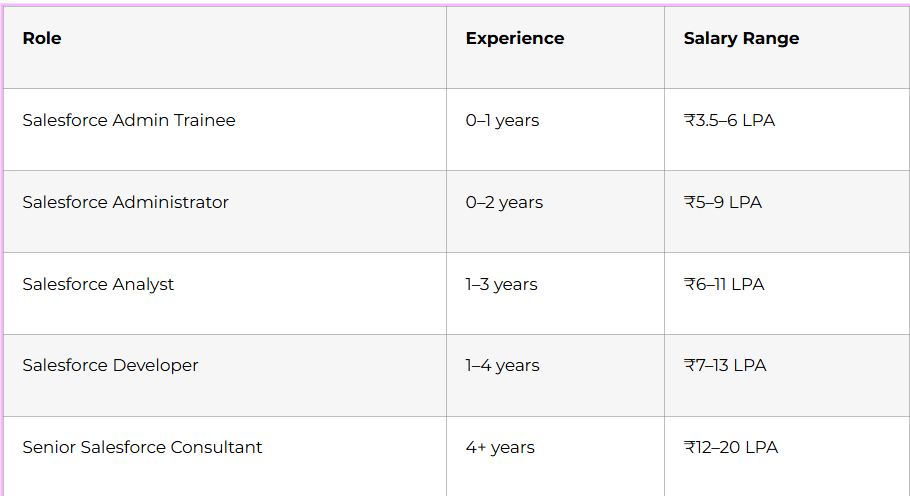
Quality education shouldn’t require going into debt. Frontlines Edutech offers industry-leading training at affordable rates. When you consider the average Salesforce developer salary in India ranges from ₹4.5 lakhs to ₹12 lakhs annually, this 90-day investment pays for itself many times over in your first year of employment.
Beginner-Friendly Approach That Works
Perhaps you’re worried: “I’m not from an IT background—can I really learn this?” Absolutely. Frontlines Edutech specializes in taking complete beginners and transforming them into confident professionals. We take special care of non-IT students, explaining concepts in layman’s terms without overwhelming technical jargon.
The course covers basics to advanced concepts systematically, ensuring you build a rock-solid foundation before tackling complex topics. Thousands of students just like you—arts graduates, commerce students, non-technical professionals—have successfully completed this program and launched thriving Salesforce careers.
Your Future Starts with a Single Decision
You’ve now seen the complete 90-day roadmap from absolute beginner to job-ready Salesforce professional. You understand what you’ll learn each day, how skills build progressively, and why Salesforce offers incredible career opportunities in 2025.
The question isn’t whether Salesforce is a good career choice—the demand is undeniable. Companies across technology, healthcare, finance, e-commerce, and education are desperately seeking qualified Salesforce talent in Bangalore, Hyderabad, Pune, Mumbai, Chennai, and beyond.
The question is: will you take action?
Every Salesforce professional you admire started exactly where you are now—at the beginning, uncertain but curious. The difference between them and those still dreaming is one thing: they started.
Frontlines Edutech has successfully trained thousands of learners, turning unemployment into opportunity and uncertainty into confidence. We’ve seen students from all backgrounds—arts, commerce, IT, non-IT—transform their lives in 90 days.
This could be your transformation story:
Imagine three months from now. You’re confidently building Salesforce applications, writing Apex code, creating Lightning Web Components, and solving real business problems. Your LinkedIn profile attracts recruiter messages. Your resume showcases impressive projects. You’re walking into interviews prepared, answering technical questions competently, and receiving job offers.
That future is closer than you think—just 90 days away.
Ready to Start Your Journey?
Enroll in Frontlines Edutech’s Salesforce Course Today
Don’t let another day pass wishing you had started. Join the thousands who trusted Frontlines Edutech with their career transformation and are now thriving Salesforce professionals.
Contact Frontlines Edutech:
- Phone: +(91)-83330 77727
- Email: media.frontlines@gmail.com
- Website: www.frontlinesedutech.com
Follow us for daily tips, success stories, and Salesforce insights:
- LinkedIn: Frontlines Edutech
- YouTube: Frontlines Media
- Instagram: @frontlinesedutech
Your 90-day transformation starts with a single phone call or email. Reach out today, and let’s build your Salesforce career together.
Remember: The best time to start was yesterday. The second-best time is now. Your future in Salesforce awaits—let Frontlines Edutech guide you there.