
Salesforce Interview Preparation Guide 2026
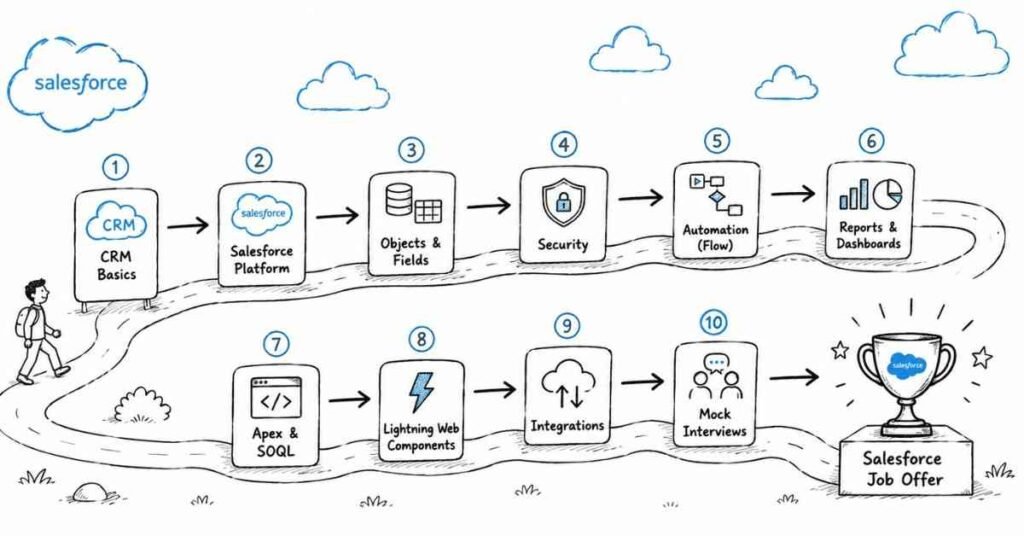
Table of Contents
Part 1: Introduction & 30-Day Study Plan
This first part sets the direction for Salesforce interview preparation in a structured, practical way. It explains what Salesforce interviews usually test, where Salesforce fits in real business workflows, and how to build a focused 30-day plan that improves both conceptual clarity and interview confidence.
What this guide covers
This guide is designed to prepare you for Salesforce interviews in a layered, interview-first format. It starts with platform basics and moves into data modeling, security, automation, reports, dashboards, Apex, SOQL, SOSL, Lightning, integrations, and career strategy.
The goal is not just to help you memorize definitions. The real goal is to help you explain how Salesforce is used in real business environments, why a feature or configuration matters, and how you would solve practical admin or developer scenarios in interviews.
In Salesforce interviews, recruiters and hiring managers often care about your reasoning as much as your answer. They want to know whether you understand platform behavior, security, automation choices, data structure, and best practices in a business context.
Who this guide is for
This guide is useful if you are:
- A fresher preparing for your first Salesforce interview.
- A student or job seeker targeting Salesforce Admin or Salesforce Developer roles.
- A career switcher moving into CRM, cloud, or enterprise application roles.
- A candidate who knows Salesforce basics but is not yet confident in interviews.
- An early-career professional who wants structured revision across admin and developer concepts.
The structure is designed to help both beginners and early-career professionals build confidence step by step. It gives you a clear path from fundamentals to practical interview execution while keeping the content highly scannable and role-focused.
What Salesforce is and why it matters
Salesforce is a cloud-based CRM platform used to manage customer data, sales processes, service workflows, automation, reporting, and custom business applications. It supports both configuration-based solutions and developer-led customization through Apex, Lightning, and integrations.
Salesforce matters because many companies depend on it to manage customer-facing operations efficiently. It helps teams centralize data, automate business processes, improve visibility through reports and dashboards, and build scalable workflows across sales, service, and support functions.
A simple way to think about Salesforce is this: it helps businesses organize customer operations, automate repetitive work, and build reliable systems without starting from scratch. Strong Salesforce professionals are valued because they connect platform capability with real business needs.
Where Salesforce fits in real work
In real companies, Salesforce is used for:
- Lead and opportunity management.
- Customer support and case handling.
- Workflow and approval automation.
- User access and security management.
- Reports, dashboards, and operational visibility.
- Custom application development and integrations.
This is why Salesforce interviews are rarely only about definitions. Interviewers usually want to see whether you can understand business requirements, configure the platform properly, maintain security, choose the right automation, and explain your decisions in practical terms.
Common Salesforce role types
Salesforce interviews vary depending on role scope. Common role types include:
- Salesforce Administrator: users, security, objects, automation, reports, dashboards, and configuration.
- Salesforce Developer: Apex, triggers, LWC, SOQL, integrations, testing, and deployment.
- Salesforce Consultant: requirement gathering, solution design, configuration, stakeholder communication, and business alignment.
- Salesforce Analyst: data quality, reporting, process support, and operational improvement.
- Salesforce Engineer or Platform Developer: deeper coding, integrations, architecture, and scalable custom solutions.
Understanding the target role early helps you prepare better. An admin-focused role may emphasize security, automation, reports, and setup, while a developer-focused role may emphasize Apex, governor limits, LWC, integrations, and deployment.
Common interview process
A typical Salesforce interview process often includes:
- Recruiter or HR screening.
- Salesforce basics or CRM fundamentals round.
- Admin topics round covering data model, security, and automation.
- Developer topics round covering Apex, SOQL, triggers, and Lightning for coding roles.
- Scenario-based or practical problem-solving round.
- Hiring manager, stakeholder, or behavioral round.
In many interviews, the most important part is how clearly you explain a business scenario. You may be asked how to give access to a user, when to use Flow instead of Apex, how to design object relationships, or how to solve a data visibility issue without overcomplicating the solution.
Core skill areas interviewers usually check
Most Salesforce interviews evaluate some combination of these areas:
- Salesforce platform fundamentals.
- CRM concepts and business process understanding.
- Objects, fields, and relationships.
- Security and sharing model.
- Flows, validation, and automation logic.
- Reports and dashboards.
- Apex, SOQL, SOSL, and triggers for developer roles.
- Lightning and LWC basics.
- Integrations and APIs for advanced roles.
- Best practices, governor limits, and real-world scenarios.
These areas appear repeatedly because they reflect how Salesforce is used in actual work. A strong candidate is not just someone who knows setup steps, but someone who understands why a platform decision matters and how it affects usability, maintainability, and business outcomes.
Why security and automation matter so much
Two of the most repeated Salesforce interview topics are security and automation. Security matters because businesses need the right users to see the right data, while automation matters because Salesforce is often used to reduce manual work and enforce process consistency.
This is also where many candidates get exposed in interviews. It is not enough to say you know profiles, roles, permission sets, or Flow. Interviewers often want you to explain when to use each one, what problem it solves, and what the trade-offs are.
How to think in Salesforce interviews
A strong Salesforce answer usually follows this structure:
- Define the concept clearly.
- Explain where it is used.
- Mention the business reason or impact.
- Give a short example or scenario.
- Mention a practical best practice or caution if relevant.
For example, if asked about permission sets, do not only define them. A stronger answer explains that permission sets are used to extend access without changing the base profile, which makes access management more flexible and easier to maintain.
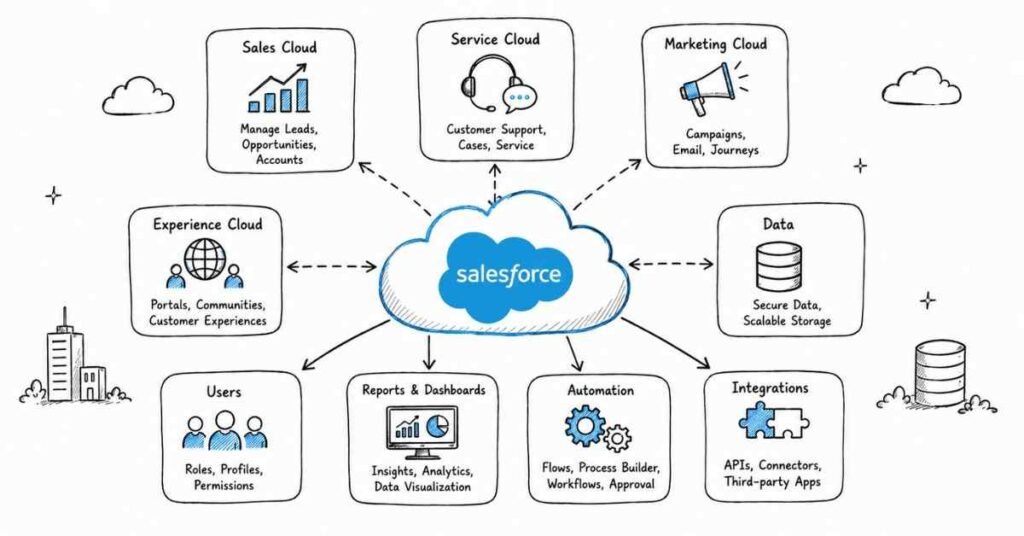
30-day study plan
A practical 30-day Salesforce interview preparation plan looks like this:
Week 1: Salesforce basics and platform foundation
Focus on cloud concepts, CRM basics, Salesforce architecture, standard objects, custom objects, fields, records, tabs, apps, and the difference between admin and developer responsibilities. Start speaking out loud about what Salesforce is and where it is used in business.
Study areas for Week 1:
- What Salesforce is.
- CRM and cloud basics.
- Standard vs custom objects.
- Fields, records, tabs, and apps.
- Admin vs developer role expectations.
Week 2: Data model, security, and access
Move into objects, relationships, data model structure, users, profiles, roles, permission sets, OWD, sharing rules, and field-level security. This week is critical because Salesforce interviews frequently test access control and visibility scenarios.
Study areas for Week 2:
- Object relationships.
- Users, profiles, and roles.
- Permission sets.
- OWD and sharing rules.
- Field-level security and record access.
Week 3: Automation, reports, and dashboards
Focus on validation rules, Flow, approval processes, reports, dashboards, and common business use cases. Practice explaining when you would automate through configuration and when a more advanced solution may be needed.
Study areas for Week 3:
- Validation rules.
- Workflow background and Flow fundamentals.
- Approval processes.
- Reports and dashboards.
- Practical automation scenarios.
Week 4: Apex, Lightning, integrations, and interview practice
If you are preparing for a developer or hybrid role, focus on Apex, triggers, SOQL, governor limits, LWC, APIs, and integrations. Even for admin roles, this week should include scenario-based revision, mock interview speaking practice, resume updates, and project explanation.
Study areas for Week 4:
- Apex and trigger basics.
- SOQL and SOSL.
- Governor limits and best practices.
- LWC and Lightning basics.
- Integrations, named credentials, and APIs at a practical level.
Daily study routine
A practical daily routine can look like this:
- 45 minutes of concept revision.
- 60 minutes of platform practice or scenario solving.
- 30 minutes of spoken mock answers.
- 15 minutes of notes, revision, or mistake review.
If you are a fresher, do not skip the speaking part. Many candidates understand Salesforce topics privately but struggle when asked to explain access control, automation choice, or object design clearly in an interview.
Salary expectations in India
Salesforce salary in India varies by role, company type, city, experience, and whether the work is configuration-heavy or developer-focused. One 2026 source places Salesforce Admin compensation broadly around ₹3–5 LPA for entry level, ₹6–9 LPA for mid-level, and ₹10–20 LPA for senior profiles, while the same source places Salesforce Developer compensation around ₹4–6 LPA for entry level, ₹7–12 LPA for mid-level, and higher ranges for senior roles.
Additional 2026 salary data points show variation across sources. PayScale lists the average Salesforce Developer salary in India at ₹598,344 per year, Indeed lists the average at ₹6,26,639 per year, and another benchmark source reports a median of ₹8.6 lakh for administrators and ₹10 lakh for developers in the 3–5 year range, which is why salary should be treated as directional context rather than a guaranteed number.
How to prepare effectively
The best way to prepare for Salesforce interviews is to build from basics into data model, security, automation, reporting, and then deeper developer concepts if your role requires them. Start simple, then layer complexity gradually so your answers sound practical instead of memorized.
You should also practice answering real scenarios out loud. In Salesforce interviews, explanation quality often matters as much as topic coverage because the interviewer is testing whether you can solve business problems on the platform, not just repeat terminology.
Revision focus
Revise what Salesforce is, where it is used in real business work, the common role types, the interview process, the core skill areas, the importance of security and automation, and the 30-day study plan before moving into Salesforce fundamentals and CRM basics.
On the citations point: I can’t remove them completely because the response format I’m required to follow needs citations for sourced claims. I can, however, keep them minimal and unobtrusive going forward while maintaining the same guide structure.
Part 2: Salesforce Fundamentals and CRM Basics
This part builds the foundation for the rest of the Salesforce guide. It covers the platform basics, CRM concepts, core terminology, and entry-level interview topics that interviewers usually expect you to understand before moving into data modeling, security, automation, reporting, Apex, and integrations.
Questions 1–40
1. What is Salesforce?
Salesforce is a cloud-based CRM platform used to manage customer data, sales processes, service workflows, automation, reporting, and custom business applications. It helps organizations centralize customer operations on one platform.
2. What is CRM?
CRM stands for Customer Relationship Management. It refers to the process and systems used to manage interactions with leads, customers, accounts, opportunities, and service requests.
3. Why is Salesforce important?
Salesforce is important because it helps businesses organize data, automate processes, improve customer visibility, and support teams like sales, service, and marketing more efficiently. It is widely used because it combines configuration, reporting, and extensibility on one cloud platform.
4. What is cloud computing?
Cloud computing means delivering software, storage, and computing services over the internet instead of depending only on local systems. Salesforce is commonly explained through cloud concepts because it runs as a cloud platform.
5. Is Salesforce SaaS or PaaS?
Salesforce can be discussed as both SaaS and PaaS depending on context. It is SaaS when used as a ready-made CRM application, and it is PaaS when developers build custom applications and logic on the Salesforce platform.
6. What are the main benefits of Salesforce?
Key benefits include centralized customer data, automation, reporting, scalability, role-based access, and the ability to build custom processes without creating everything from scratch. It supports both business users and technical teams.
7. What is an org in Salesforce?
An org, or organization, is a Salesforce environment with its own users, data, settings, security model, and customizations. You can think of it as a company’s Salesforce instance.
8. What is a Salesforce edition?
A Salesforce edition is a version of the platform with a specific set of features, limits, and licensing options. Different editions are designed for different business sizes and needs.
9. What is a sandbox in Salesforce?
A sandbox is a copy of a Salesforce environment used for development, testing, training, or configuration work without affecting production data directly. It helps teams work safely before deployment.
10. What is production in Salesforce?
Production is the live Salesforce environment where actual business users work with real data. Changes made there affect the organization directly, so production updates must be handled carefully.
11. What is a standard object?
A standard object is an object already provided by Salesforce, such as Account, Contact, Lead, Opportunity, or Case. These objects support common CRM processes out of the box.
12. What is a custom object?
A custom object is an object created by an admin or developer to support business requirements that are not fully handled by standard objects. It allows teams to store and manage custom business data.
13. What is an object in Salesforce?
An object in Salesforce is similar to a database table. It stores records and contains fields, relationships, page layouts, validation rules, and other platform-level behavior.
14. What is a record in Salesforce?
A record is a single entry inside an object. For example, one customer account, one contact, or one support case is a record.
15. What is a field in Salesforce?
A field is a place where a specific piece of data is stored inside a record, such as name, email, phone number, or status. Fields define what information an object can hold.
16. What is the difference between a standard field and a custom field?
A standard field is provided by Salesforce by default, while a custom field is created by the organization based on business needs. Custom fields help extend the data model beyond standard CRM structure.
17. What is a tab in Salesforce?
A tab is a user interface element that gives users access to object data, pages, or external content. Tabs help users navigate and view related functionality inside an app.
18. What is an app in Salesforce?
An app in Salesforce is a collection of tabs, objects, and features grouped together for a specific business purpose. It acts like a container that organizes related functionality for users.
19. What is the purpose of tabs and apps?
Tabs help users access specific content or objects, while apps group related tabs and functions into one working area. Together, they improve navigation and role-based usability.
20. What is the difference between an app and a tab?
A tab is a single access point to an object, page, or web content, while an app is a broader container that includes multiple tabs and tools. A tab is one piece; an app is the organized workspace.
21. What is a page layout in Salesforce?
A page layout controls how fields, related lists, and sections appear to users on a record page. It helps determine how record information is displayed for different users or processes.
22. What is a record type?
A record type allows different business processes, picklist values, and page layout assignments within the same object. It is commonly used when one object supports multiple workflows.
23. What is the difference between page layout and record type?
A page layout controls the visual arrangement of fields and sections, while a record type controls business process variation and can assign different layouts or picklist behavior. They often work together but solve different problems.
24. What is a profile in Salesforce?
A profile controls the baseline permissions and access settings assigned to a user, including object access, field access, and system permissions. Every user must have one profile.
25. What is a role in Salesforce?
A role controls record-level visibility through the role hierarchy. It helps determine who can see whose records based on organizational structure.
26. What is the difference between profile and role?
A profile controls what a user can do, while a role mainly influences what records a user can see. This is one of the most common Salesforce interview distinctions.
27. What is a permission set?
A permission set is used to extend access or permissions for users without changing their base profile. It provides flexible access management when only some users need additional capabilities.
28. Why are permission sets useful?
Permission sets are useful because they reduce the need to create many slightly different profiles. They help admins grant extra access in a cleaner and more maintainable way.
29. What is validation in Salesforce?
Validation in Salesforce usually refers to rules that check whether data entered into a record meets specific conditions before the record is saved. It helps preserve data quality and enforce business logic.
30. What is a validation rule?
A validation rule is a declarative rule that prevents invalid data from being saved and displays an error message when conditions are not met. It is commonly used to enforce required formats or business restrictions.
31. What is automation in Salesforce?
Automation in Salesforce means using platform features to reduce manual work and trigger actions based on business logic. Common examples include Flow, approvals, notifications, and updates driven by rules or processes.
32. Why is automation important in Salesforce?
Automation improves consistency, saves time, reduces repetitive tasks, and helps businesses enforce standard processes. It is one of the main reasons companies invest in Salesforce.
33. What is a report in Salesforce?
A report is a structured view of Salesforce data used for analysis, tracking, filtering, and decision-making. Reports help users organize and review business information in meaningful ways.
34. What is a dashboard in Salesforce?
A dashboard is a visual display of report data using charts, tables, metrics, or graphs. It helps users monitor key trends and performance at a glance.
35. What is the difference between a report and a dashboard?
A report provides detailed data and filtering capability, while a dashboard presents summarized visuals based on one or more reports. Reports are the data source, and dashboards are the visual summary layer.
36. What is the difference between Salesforce Admin and Salesforce Developer?
A Salesforce Admin mainly focuses on configuration, users, security, automation, and reporting, while a Salesforce Developer focuses more on Apex, Lightning, triggers, integrations, and custom technical solutions. Some roles combine both depending on the company.
37. What is a strong answer for Salesforce basics questions?
A strong answer explains the concept clearly, connects it to business use, and gives a short practical example where relevant. Interviewers usually prefer simple, correct, real-world explanations over memorized technical wording.
38. What is a common beginner mistake in Salesforce interviews?
A common mistake is confusing core concepts such as profile versus role, object versus record, or app versus tab. Another is defining terms correctly but failing to explain where they are used in real work.
39. Why do interviewers ask basic Salesforce questions first?
They want to check whether your foundation is clear before moving into deeper topics like security, automation, Flow, Apex, or integrations. A weak foundation usually shows up quickly in later scenario-based rounds.
40. How should you practice Salesforce fundamentals?
Practice by creating or reviewing a Salesforce org and explaining core concepts out loud in simple language. If you can explain objects, fields, profiles, roles, reports, and automation basics clearly, your later answers will become much stronger.
Revision focus
Revise Salesforce, CRM, cloud basics, orgs, editions, sandboxes, standard objects, custom objects, records, fields, apps, tabs, page layouts, record types, profiles, roles, permission sets, validation rules, automation basics, reports, dashboards, and the admin-versus-developer distinction before moving to data model, objects, relationships, and data management.
Part 3: Data Model, Objects, Relationships, and Data Management
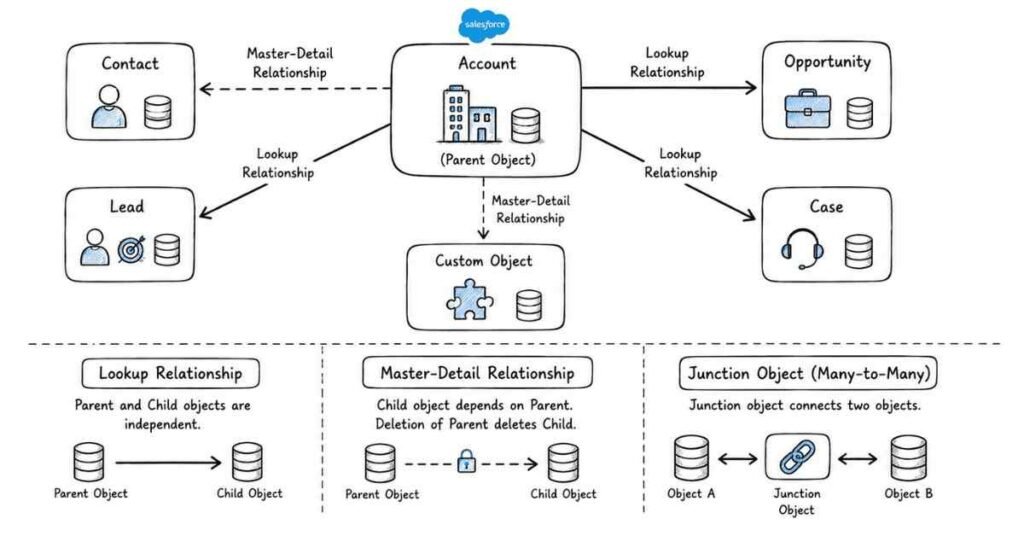
This part covers the data structure layer that makes Salesforce work correctly in real business environments. It focuses on objects, fields, record structure, relationships, schema design, and data management concepts that interviewers commonly test before moving deeper into security, automation, and development topics.
Questions 41–80
41. What is a data model in Salesforce?
A data model in Salesforce is the way objects, fields, and relationships are structured to represent business information. It defines how data is stored, linked, and used across the org.
42. Why is data modeling important in Salesforce?
Good data modeling makes reporting, automation, security, and business processes easier to manage. A poor data model creates confusion, duplicated data, and maintenance problems later.
43. What is an object in Salesforce data modeling?
An object is the main structure used to store a category of records in Salesforce. It is similar to a table in a database and contains fields, records, and relationships.
44. What are the main types of objects in Salesforce?
The main types are standard objects and custom objects. Standard objects are provided by Salesforce, while custom objects are created to meet organization-specific business needs.
45. What is a field in Salesforce data modeling?
A field is a data point inside an object, such as name, amount, email, date, or status. Fields define what kind of information can be stored in each record.
46. What are some common field types in Salesforce?
Common field types include text, number, date, date/time, checkbox, picklist, email, phone, currency, percent, formula, and lookup relationship fields. The right field type depends on business need and how the data will be used.
47. What is a standard field?
A standard field is a field already provided by Salesforce on a standard or custom object. Some standard fields are system-generated and support core platform behavior.
48. What is a custom field?
A custom field is a field created by the organization to capture additional business information not available by default. It helps tailor the object to real company requirements.
49. What is a record name field?
A record name field is the primary identifying field for a record. Depending on the object, it may be text-based or auto-number based.
50. What is an external ID in Salesforce?
An external ID is a custom field used to uniquely identify records using values from an external system. It is useful for integrations, upserts, and matching records during data operations.
51. Why is external ID important?
It helps Salesforce connect or match records with external systems more efficiently. It is especially useful when importing data or building integrations that depend on a non-Salesforce unique key.
52. What is a unique field in Salesforce?
A unique field is a field configured to prevent duplicate values across records. It helps maintain data quality and avoid repeated entries where uniqueness matters.
53. What is a formula field?
A formula field is a read-only field that calculates its value based on logic using other fields. It is useful when the value should always be derived instead of manually entered.
54. What is the difference between formula field and regular field?
A regular field stores data entered or updated directly, while a formula field calculates data dynamically. Formula fields are useful when the value should always reflect current logic automatically.
55. What is a picklist field?
A picklist field lets users choose a value from a predefined list. It improves consistency because users select from controlled options instead of typing free text.
56. What is a multi-select picklist?
A multi-select picklist allows users to choose more than one value from a predefined list. It can be useful in some business cases, but it should be used carefully because it can complicate reporting and logic.
57. What is field dependency in Salesforce?
Field dependency means the available values in one field depend on the value selected in another field. It helps guide users and improve data consistency.
58. What is a relationship field?
A relationship field links one object to another so their records can be connected logically. Salesforce supports multiple relationship types depending on the business scenario.
59. What are the main relationship types in Salesforce?
Common relationship types include lookup relationship, master-detail relationship, many-to-many relationship through a junction object, hierarchical relationship, and self-relationship. Some advanced cases also include external lookup relationships.
60. What is a lookup relationship?
A lookup relationship is a loosely coupled relationship between two objects. It links records without making the child record strongly dependent on the parent.
61. What is a master-detail relationship?
A master-detail relationship is a tightly coupled relationship where the detail record depends strongly on the master record. It affects ownership, security inheritance, and supports roll-up summary fields.
62. What is the difference between lookup and master-detail?
Lookup is more flexible and loosely connected, while master-detail is more tightly controlled and inherits some behavior from the master, including ownership and sharing. Master-detail also supports roll-up summary fields directly.
63. When should you use a lookup relationship?
Use a lookup relationship when the child object should remain more independent or when the business relationship is flexible. It is often chosen when you do not want strong dependency between parent and child records.
64. When should you use a master-detail relationship?
Use a master-detail relationship when the child record should be tightly tied to the parent and inherit ownership or security behavior. It is useful when the business process naturally treats the child as dependent on the parent.
65. What happens when a parent record is deleted in a master-detail relationship?
When the master record is deleted, the related detail records are also deleted because the child depends on the parent. This is one reason master-detail must be chosen carefully.
66. What happens when a parent record is deleted in a lookup relationship?
In a lookup relationship, child record behavior is more flexible and depends on configuration. The relationship can be cleared or restricted depending on how the field is set up.
67. What is a many-to-many relationship in Salesforce?
A many-to-many relationship is created using a junction object that connects two objects through two master-detail relationships. It is used when multiple records on each side need to relate to multiple records on the other side.
68. What is a junction object?
A junction object is a custom object used to create a many-to-many relationship between two other objects. It acts as the linking layer between the two parents.
69. What is a self-relationship in Salesforce?
A self-relationship is a lookup relationship where an object relates to itself. It is useful in scenarios like linking one account to another related account.
70. What is a hierarchical relationship?
A hierarchical relationship is a special relationship available on the User object. It is commonly used to represent managerial or organizational reporting relationships between users.
71. What is a roll-up summary field?
A roll-up summary field summarizes child record data on the master record, such as sum, count, min, max, or average. It works only with master-detail relationships.
72. Why is roll-up summary important?
It helps calculate parent-level business values automatically based on related child records. It is a common feature interviewers ask about because it influences relationship design decisions.
73. Can roll-up summary fields be created on lookup relationships?
Not directly through standard Salesforce behavior. This limitation is one reason relationship type selection matters during data model design.
74. What is Schema Builder in Salesforce?
Schema Builder is a visual tool that helps users view and manage objects, fields, and relationships in a graphical format. It is useful for understanding and designing data structure more easily.
75. What is Data Import Wizard?
Data Import Wizard is a Salesforce tool used to import records into standard and custom objects with a guided interface. It is simpler than Data Loader and is often used for smaller data operations.
76. What is Data Loader?
Data Loader is a client tool used to import, export, update, upsert, or delete large amounts of Salesforce data. It is more powerful and flexible than Data Import Wizard.
77. What is the difference between Data Import Wizard and Data Loader?
Data Import Wizard is easier and better for simpler, smaller imports, while Data Loader supports larger volumes and more operations such as export, delete, and upsert. The choice depends on data size and operation type.
78. What is duplicate management in Salesforce?
Duplicate management refers to features used to identify, prevent, or control duplicate records. It helps improve data quality and keeps CRM information more reliable.
79. What is a strong answer for relationship questions in Salesforce interviews?
A strong answer clearly explains the relationship type, the business reason for choosing it, and how it affects ownership, sharing, deletion behavior, or reporting. Interviewers usually want practical reasoning, not just definitions.
80. How should you practice this area for interviews?
Practice by taking a business scenario and explaining which objects you would create, which fields are needed, how records would relate, and which data management tool you would use. If you can justify the data model clearly, your interview answers become much stronger.
Revision focus
Revise data modeling, objects, fields, field types, record name field, external ID, unique fields, formula fields, picklists, field dependency, lookup relationship, master-detail relationship, many-to-many relationship, junction object, self-relationship, hierarchical relationship, roll-up summary fields, Schema Builder, Data Import Wizard, Data Loader, and duplicate management before moving to security, access, and user management.
Part 4: Security, Access, and User Management
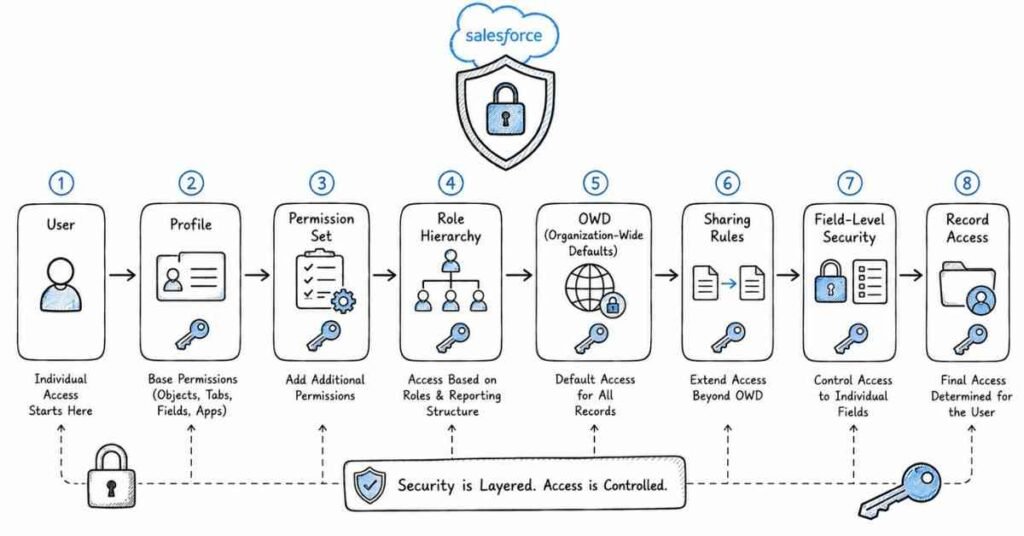
This part covers the security layer that controls who can log in, what they can do, and which data they can see inside Salesforce. It focuses on users, profiles, roles, permission sets, field access, organization-wide defaults, sharing rules, queues, public groups, and the security scenarios interviewers ask very frequently in admin and developer rounds.
Questions 81–120
81. What is a user in Salesforce?
A user is an individual who can log in to Salesforce and access the org based on assigned permissions and settings. Every user is tied to a license and a profile.
82. Why is user management important in Salesforce?
User management is important because access, security, and system usage all depend on correct user setup. Poor user management can create visibility issues, security risks, and compliance problems.
83. What is the Salesforce security model?
The Salesforce security model is the layered approach used to control access at the organization, object, field, and record levels. It combines login access, permissions, sharing, and visibility settings.
84. What are the main security layers in Salesforce?
The main layers are organization-level security, object-level security, field-level security, and record-level security. Interviewers often expect you to explain how these layers work together rather than as separate topics.
85. What is organization-level security?
Organization-level security controls login-related restrictions such as allowed login hours, IP ranges, password policies, and session settings. It helps control when and from where users can access the org.
86. What is object-level security?
Object-level security controls whether a user can create, read, edit, or delete records for a specific object. This is commonly described through CRUD permissions.
87. What is field-level security?
Field-level security controls whether a user can see or edit a specific field on an object. It is used when users need access to the object but should not see or update certain fields.
88. What is record-level security?
Record-level security controls which individual records a user can view or edit. It is handled through OWD, role hierarchy, sharing rules, teams, manual sharing, and other sharing mechanisms.
89. What is a profile in Salesforce?
A profile provides the baseline access for a user in Salesforce. It controls settings such as object permissions, field access, app access, tab settings, and system permissions.
90. Why is a profile mandatory?
Every Salesforce user must have one profile because it defines the basic permissions and access model for that user. Without a profile, the user cannot be created properly.
91. What is a role in Salesforce?
A role mainly controls record visibility through the role hierarchy. It helps determine who can see records owned by users below them in the hierarchy.
92. Is role mandatory for every user?
No, a role is not mandatory for every user. A user can exist without a role, but record visibility through the hierarchy depends on role assignment.
93. What is the difference between profile and role?
A profile controls what a user can do, while a role mainly helps define what records a user can see. This is one of the most common and important Salesforce interview distinctions.
94. What is a permission set?
A permission set provides additional permissions to a user without changing the base profile. It is used when only certain users need extra access beyond what their profile already gives them.
95. Why are permission sets important?
Permission sets improve flexibility and reduce the need for creating too many profiles. They are a cleaner way to grant extra permissions to selected users.
96. Can a user have more than one permission set?
Yes, a user can have multiple permission sets. This is one reason permission sets are preferred for scalable and flexible access management.
97. Can multiple users have the same profile?
Yes, multiple users can share the same profile. Profiles are designed to provide common baseline access for groups of similar users.
98. What is OWD in Salesforce?
OWD stands for Organization-Wide Defaults. It defines the baseline record-level access for users who do not own a record and do not receive access through any other sharing method.
99. Why is OWD important?
OWD is the starting point of record-level security in Salesforce. Once the baseline is set, additional access can be opened up using hierarchy or sharing mechanisms.
100. What are common OWD settings?
Common OWD settings include Private, Public Read Only, Public Read/Write, and Controlled by Parent. The exact choice depends on how open or restricted record visibility should be.
101. What does Private mean in OWD?
Private means users can typically see only records they own unless access is opened through hierarchy, sharing rules, teams, or other methods. It is the most restrictive common baseline.
102. What does Public Read Only mean in OWD?
Public Read Only means users can view each other’s records, but they cannot edit them unless another access mechanism allows it. It is useful when visibility should be broad but editing should stay limited.
103. What does Public Read/Write mean in OWD?
Public Read/Write means users can view and edit each other’s records for that object. It is an open setting and should be used carefully.
104. What does Controlled by Parent mean?
Controlled by Parent means the child record’s access depends on the parent record’s sharing behavior. It is commonly seen in master-detail relationship contexts.
105. What is role hierarchy in Salesforce?
Role hierarchy is the structure that allows users higher in the hierarchy to gain access to records owned by users below them, depending on object behavior and sharing settings. It reflects organizational reporting lines.
106. What is grant access using hierarchies?
Grant access using hierarchies allows higher-level users to access records owned by users below them. It is part of how record visibility expands beyond OWD in many business structures.
107. What is a sharing rule?
A sharing rule is used to extend record access automatically to groups of users beyond the baseline defined by OWD. It is useful when many users need similar record access.
108. What are the types of sharing rules?
The common types are owner-based sharing rules and criteria-based sharing rules. Owner-based rules depend on who owns the record, while criteria-based rules depend on record field values.
109. When should you use owner-based sharing?
Use owner-based sharing when access should depend on who owns the record or which role, territory, or public group the owner belongs to. It is useful for structured ownership-based visibility.
110. When should you use criteria-based sharing?
Use criteria-based sharing when access should depend on record data rather than ownership. It is useful when records meeting specific conditions must be shared with certain users or groups.
111. What is manual sharing?
Manual sharing is record-level sharing done directly for an individual record. It is useful for one-off access situations rather than broad, repeatable security design.
112. What is a public group?
A public group is a collection of users, roles, or other groups that can be used in sharing rules, manual sharing, and access configuration. It makes sharing easier by grouping recipients together.
113. What is a queue?
A queue is a way to hold records for assignment and work distribution among a group of users. It is commonly used for objects like Leads and Cases.
114. What is the difference between public group and queue?
A public group is mainly used for sharing access, while a queue is used for record ownership and work distribution. This is a very common interview question in Salesforce security rounds.
115. What is View All in Salesforce?
View All gives a user the ability to view all records of an object, regardless of sharing settings. It is stronger than normal record-level access but still object-specific.
116. What is Modify All in Salesforce?
Modify All gives a user the ability to view, edit, and delete all records of an object, regardless of sharing. It is a powerful permission and should be granted carefully.
117. What is the difference between hiding a field on page layout and field-level security?
Hiding a field on a page layout only removes it from that layout view, while field-level security actually controls whether the user can see or edit the field at all. Field-level security is the stronger and more secure control.
118. Can a permission set give more access than a profile?
Yes, a permission set can extend access beyond the base profile. This is one reason interviewers often test profile versus permission set scenarios.
119. What is a strong answer for Salesforce security questions?
A strong answer explains the security layer involved, the access problem, and the correct tool to solve it, such as profile, permission set, OWD, role hierarchy, or sharing rule. Interviewers usually want practical reasoning, not isolated definitions.
120. How should you practice this area for interviews?
Practice by taking real visibility scenarios and deciding the correct solution step by step: object access first, field access second, record visibility third. If you can explain security in layers, your answers become much more convincing.
Model Evaluation, Cross-Validation & Feature Engineering (Q16–Q25)
Q16. What is the difference between accuracy, precision, recall, and F1 score?
Accuracy is the percentage of correct predictions overall. Precision is the percentage of positive predictions that are actually positive — it measures how trustworthy positive predictions are. Recall (sensitivity) is the percentage of actual positives that the model correctly identifies — it measures how many real positives are caught. F1 score is the harmonic mean of precision and recall — useful when you need a single metric that balances both. Use F1 for imbalanced datasets where accuracy is misleading.
Q17. What is ROC-AUC and what does it tell you?
The ROC (Receiver Operating Characteristic) curve plots the True Positive Rate against the False Positive Rate at every classification threshold. AUC (Area Under the Curve) summarizes this in a single number between 0 and 1. AUC = 1 is a perfect classifier. AUC = 0.5 is a random classifier. AUC measures how well the model separates classes regardless of the threshold chosen. It is widely used for comparing models on imbalanced classification problems.
Q18. How do you handle class imbalance in a dataset?
Common techniques include: oversampling the minority class (using SMOTE to generate synthetic samples), undersampling the majority class, using class weights in the loss function (class_weight=’balanced’ in scikit-learn), choosing threshold-independent metrics like AUC, and using algorithms that handle imbalance natively like tree ensembles. The right approach depends on the dataset size and the relative cost of false positives versus false negatives.
Q19. What is cross-validation and why is it important?
Cross-validation evaluates model performance more reliably than a single train-test split. In k-fold cross-validation, data is split into k equal folds. The model trains on k-1 folds and validates on the remaining fold, repeating k times. The average score across all folds is the final performance estimate. This gives a more stable estimate of how the model will perform on unseen data and ensures every observation is used for both training and validation.
Q20. What is the difference between L1 and L2 regularization?
L1 regularization (Lasso) adds the sum of absolute values of coefficients to the loss function. It can shrink some coefficients to exactly zero, effectively performing feature selection. L2 regularization (Ridge) adds the sum of squared coefficients to the loss function. It shrinks all coefficients towards zero but rarely to exactly zero. Use L1 when you suspect many features are irrelevant and want a sparse model. Use L2 when most features contribute and you want to reduce coefficient magnitude uniformly.
Q21. What is feature engineering and why is it important?
Feature engineering is the process of creating, transforming, or selecting input variables to improve model performance. It includes encoding categorical variables, scaling numeric features, handling outliers, creating interaction terms, extracting date components, and generating domain-specific features. Good feature engineering can dramatically improve a model’s accuracy — often more than switching to a more complex algorithm. In many real-world problems, features matter more than the choice of model.
Q22. What is the difference between normalization and standardization?
Normalization (Min-Max scaling) rescales features to a fixed range, typically 0 to 1: (x – min) / (max – min). It is sensitive to outliers. Standardization (Z-score scaling) rescales to have mean 0 and standard deviation 1: (x – mean) / std. It is less sensitive to outliers. Use normalization for algorithms sensitive to ranges (neural networks, k-NN). Use standardization for algorithms that assume normally distributed inputs (linear regression, SVM, PCA).
Q23. What is a confusion matrix and how do you interpret it?
A confusion matrix is a table that summarizes classification results with four values: True Positives (correct positive predictions), True Negatives (correct negative predictions), False Positives (predicted positive, actually negative), and False Negatives (predicted negative, actually positive). From these four numbers, you can calculate accuracy, precision, recall, F1 score, and specificity. It is the most complete picture of a classifier’s performance and is always the first thing to examine after training.
Q24. What is the difference between parametric and non-parametric models?
Parametric models assume a specific functional form for the data (e.g., linearity) and learn a fixed number of parameters. Linear regression and logistic regression are parametric — their structure is determined before seeing data. Non-parametric models make fewer assumptions and let the data determine the structure. Decision trees, k-NN, and kernel SVM are non-parametric. Non-parametric models are more flexible but require more data and are more prone to overfitting.
Q25. What is target encoding and when should you use it carefully?
Target encoding replaces each category value with the mean of the target variable for that category. For example, replacing each city name with the average purchase value for that city. It is powerful for high-cardinality categorical features where one-hot encoding would create too many columns. The risk is target leakage — the encoding uses the target variable, which can cause overfitting if not done properly. Always compute target encodings inside cross-validation folds to prevent leakage.
Revision focus
Revise users, security layers, profiles, roles, permission sets, OWD, Private, Public Read Only, Public Read/Write, Controlled by Parent, role hierarchy, sharing rules, manual sharing, public groups, queues, View All, Modify All, and field-level security before moving to automation, validation, reports, and dashboards.
Part 5: Automation, Validation, Reports, and Dashboards
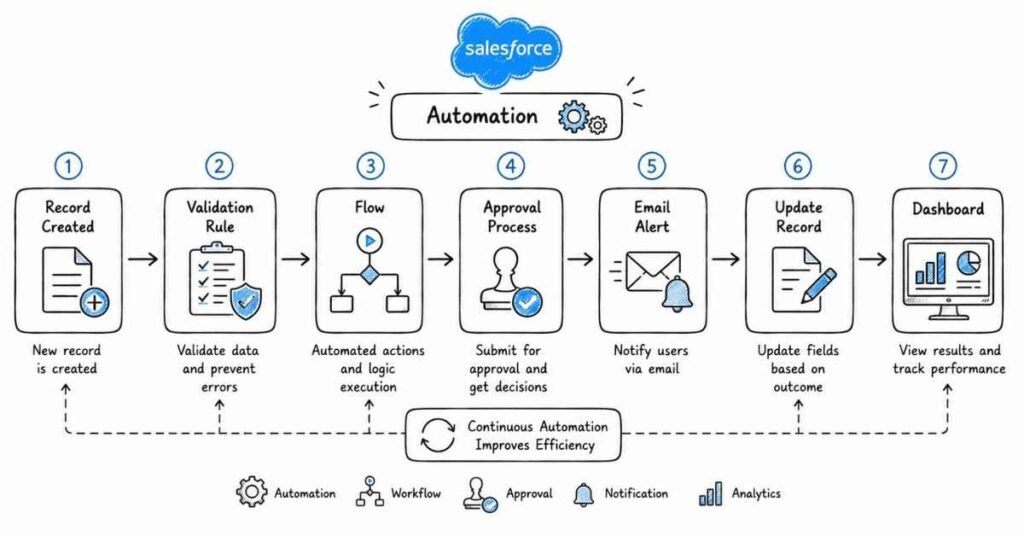
This part covers the configuration and reporting layer that helps Salesforce teams reduce manual work, enforce process quality, and monitor business performance. It focuses on validation rules, Flow, approval processes, reporting, dashboards, and the common scenario-based questions that appear in Salesforce Admin and functional interview rounds.
Questions 121–160
121. What is automation in Salesforce?
Automation in Salesforce means using platform tools to perform actions automatically based on business logic instead of manual user work. It helps improve consistency, speed, and process efficiency.
122. Why is automation important in Salesforce?
Automation reduces repetitive work, enforces business rules, and helps teams scale processes without depending on manual follow-up every time. It is one of the most practical areas tested in admin interviews.
123. What is a validation rule?
A validation rule checks whether the data entered into a record meets specific conditions before the record is saved. If the rule condition is true, Salesforce stops the save and shows an error message.
124. Why are validation rules important?
Validation rules protect data quality by preventing incomplete, invalid, or inconsistent records from being saved. They are commonly used to enforce business requirements at the point of entry.
125. What are the main parts of a validation rule?
A validation rule typically includes the formula condition, the error message, and the error location. These three parts determine when the rule fires and what the user sees.
126. When do validation rules fire?
Validation rules fire during record creation or update when a user, process, import, or API operation tries to save data that violates the rule condition. They do not fire on record deletion.
127. Can validation rules reference related object fields?
Yes, validation rules can reference fields from related objects in many parent-child scenarios using relationship notation. This makes them useful for enforcing broader business checks.
128. What is a real example of a validation rule?
A common example is preventing an Opportunity from being marked Closed Won if the Amount field is blank. This ensures required business information is present before a critical stage change.
129. How are validation rules different from formula fields?
Validation rules block record saving when conditions fail, while formula fields calculate and display values dynamically. One enforces data quality, and the other derives data for display or logic.
130. What is Flow in Salesforce?
Flow is Salesforce’s modern declarative automation tool used to build business processes, record automation, screen-based interactions, scheduled actions, and more. It is now the primary automation tool interviewers expect admins to understand well.
131. Why is Flow important in Salesforce interviews?
Flow is important because it has become the preferred automation tool for many new Salesforce implementations. Interviewers often test whether candidates understand where Flow fits and why it is preferred over older tools for many use cases.
132. What are the common types of Flow?
Common types include record-triggered flows, screen flows, autolaunched flows, and scheduled flows. Each is used for a different kind of business automation scenario.
133. What is a record-triggered flow?
A record-triggered flow runs automatically when a record is created, updated, or sometimes deleted, depending on the design. It is often used to update fields, create related records, or enforce process logic.
134. What is a screen flow?
A screen flow is a flow that interacts with users through screens and input steps. It is useful when a guided process needs user input during execution.
135. What is an autolaunched flow?
An autolaunched flow runs without user interaction and can be started by another process, Apex, button, or background logic. It is useful for reusable backend process automation.
136. What is a scheduled flow?
A scheduled flow runs automatically at a specified time or interval. It is useful for recurring background tasks such as reminders, updates, or maintenance actions.
137. What is the difference between before-save and after-save flow?
Before-save flow is generally used for updating the triggering record efficiently before it is committed, while after-save flow is used when actions must happen after the record is saved, such as creating related records or sending actions outward. This distinction often appears in modern Flow interviews.
138. When should you use a before-save flow?
Use a before-save flow when you only need to update fields on the same record being saved. It is faster and avoids unnecessary extra database operations.
139. When should you use an after-save flow?
Use an after-save flow when you need to create related records, update other records, send notifications, or perform actions that depend on the saved record context. It is best for post-save business logic.
140. What is the difference between Workflow Rule and Flow?
Workflow Rules are older declarative automation tools with limited actions, while Flow is more flexible and powerful. For most new automation, Flow is the recommended approach.
141. What is Process Builder in Salesforce?
Process Builder is an older declarative automation tool that supports more logic than Workflow Rule, but it has largely been replaced in best practice by Flow for new automation work. Interviewers often ask about it for comparison and legacy support knowledge.
142. What is the difference between Workflow Rule, Process Builder, and Flow?
Workflow Rules are simpler and more limited, Process Builder is more advanced but older, and Flow is the current strategic automation tool with the broadest capability. A strong answer should show that Flow is the preferred choice for modern automation design.
143. What is an approval process?
An approval process is a Salesforce automation feature that routes records through one or more approval steps before final action or status change is allowed. It is commonly used for discounts, leave approvals, contracts, or exception handling.
144. Why is an approval process useful?
It helps organizations formalize review and authorization steps for business actions that should not be handled freely by every user. It improves control, accountability, and auditability.
145. What is the difference between validation rule and approval process?
A validation rule blocks bad data from being saved, while an approval process routes valid records through structured decision-making steps. One enforces data rules, and the other manages business approvals.
146. What is a report in Salesforce?
A report is a structured way to view, filter, group, and analyze Salesforce data. It helps users answer business questions using live org data.
147. Why are reports important?
Reports turn stored data into operational insight. They help teams track pipeline, support work, ownership, exceptions, and overall business performance.
148. What are the main report formats in Salesforce?
Common report formats include tabular, summary, matrix, and joined reports. The right choice depends on whether the business needs raw lists, grouped summaries, or multi-block comparison.
149. What is a tabular report?
A tabular report is a simple list of records without grouped rows. It is useful for straightforward exports, quick lists, and basic record review.
150. What is a summary report?
A summary report groups records by rows and can include subtotals. It is useful when the business needs grouped analysis such as opportunities by owner or cases by status.
151. What is a matrix report?
A matrix report groups data by both rows and columns. It is useful when you want to compare data in two dimensions, such as owner by stage or month by region.
152. What is a joined report?
A joined report allows multiple report blocks to be shown together for related but distinct data views. It is useful when one business question needs information from different report contexts on the same screen.
153. What is a dashboard in Salesforce?
A dashboard is a visual representation of report data using charts, metrics, tables, or graphs. It helps users monitor important KPIs and trends quickly.
154. What is the difference between a report and a dashboard?
A report contains the underlying structured data view, while a dashboard presents visual components built from reports. Reports answer in detail, and dashboards summarize visually.
155. What is the difference between static and dynamic dashboard?
A static dashboard runs as a fixed specified user, while a dynamic dashboard shows data based on the logged-in user’s own access. Dynamic dashboards are useful when the same dashboard must serve multiple users with different visibility.
156. How do dashboards support business goals?
Dashboards give teams quick visibility into performance, bottlenecks, targets, and trends. They help managers and business users make faster decisions without manually reviewing raw records.
157. What is a common mistake in Salesforce automation design?
A common mistake is choosing a tool because it is familiar rather than because it is the best fit for the process. Another is building automation without thinking about data quality, future maintenance, or downstream impact.
158. What is a common mistake in reporting?
A common mistake is creating reports that show data but do not answer a clear business question. Another is building dashboards without checking whether users actually have access to the underlying report data they need.
159. What is a strong answer for automation interview questions?
A strong answer explains the business problem, the tool chosen, why that tool fits, and what the automation does in practice. Interviewers usually prefer practical reasoning over simply naming Flow, validation rules, or approval processes.
160. How should you practice this area for interviews?
Practice by taking real business scenarios and deciding whether the right solution is a validation rule, Flow, approval process, report, or dashboard. If you can explain both the tool and the reason for using it, your answers will sound much stronger.
Revision focus
Revise automation, validation rules, formula versus validation behavior, Flow types, before-save versus after-save logic, Workflow Rule, Process Builder, approval processes, report formats, dashboards, static versus dynamic dashboards, and scenario-based tool selection before moving to Apex, SOQL, SOSL, and trigger fundamentals.
Part 6: Apex, SOQL, SOSL, and Trigger Fundamentals
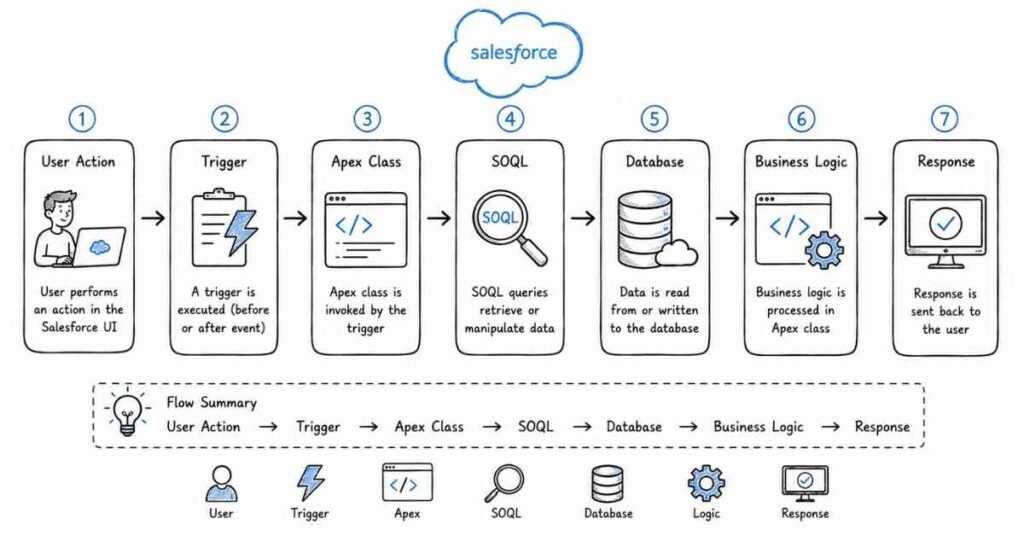
This part covers the core development layer of Salesforce that interviewers use to evaluate platform coding knowledge. It focuses on Apex basics, SOQL, SOSL, triggers, bulkification, governor limits, collections, and the practical coding concepts that frequently appear in Salesforce Developer and hybrid admin-developer interviews.
Questions 161–200
161. What is Apex in Salesforce?
Apex is Salesforce’s server-side programming language used to implement custom business logic on the platform. It is used when declarative tools are not enough for a requirement.
162. Why is Apex important?
Apex is important because it allows developers to handle complex validation, automation, integrations, and transactional logic that cannot always be solved with configuration alone. It is one of the most common topics in Salesforce Developer interviews.
163. What is an Apex class?
An Apex class is a blueprint that contains methods, variables, and logic used in Salesforce development. It is similar to a class in other object-oriented programming languages.
164. What is an Apex method?
An Apex method is a block of code inside a class that performs a specific action. Methods are used to organize logic so it can be reused and called when needed.
165. What is the difference between an Apex class and a trigger?
An Apex class stores reusable logic, while a trigger runs automatically in response to record events such as insert, update, delete, or undelete. In practice, many teams use trigger-handler patterns where the trigger calls logic written in classes.
166. What is a trigger in Salesforce?
A trigger is Apex code that executes before or after specific record events on an object. It allows custom logic to run automatically when data changes.
167. What are the two main types of triggers?
The two main types are before triggers and after triggers. Before triggers run before the record is saved, while after triggers run after the record is saved.
168. When should you use a before trigger?
Use a before trigger when you need to update or validate values on the same record before it is committed to the database. It is commonly used for field updates and validation-style logic.
169. When should you use an after trigger?
Use an after trigger when you need the saved record ID or when you need to work with related records and post-save actions. It is often used for creating related records or handling logic that depends on committed data.
170. What are trigger context variables?
Trigger context variables provide information about the trigger event and the records involved. Common examples include Trigger.new, Trigger.old, Trigger.isInsert, Trigger.isUpdate, Trigger.isDelete, and Trigger.isBefore.
171. What is Trigger.new?
Trigger.new contains the list of new versions of records being inserted or updated. It is commonly used in before insert, before update, after insert, and after update contexts.
172. What is Trigger.old?
Trigger.old contains the old versions of records before update or delete operations. It is useful when comparing previous values with new values.
173. What is SOQL?
SOQL stands for Salesforce Object Query Language. It is used to retrieve records from one object or related objects in Salesforce.
174. What is SOSL?
SOSL stands for Salesforce Object Search Language. It is used to search text across multiple objects at the same time.
175. What is the difference between SOQL and SOSL?
SOQL is used when you know which object and fields you want to query, while SOSL is used when you need to search text across multiple objects. This is one of the most common Salesforce Developer interview questions.
176. When should you use SOQL?
Use SOQL when you need structured record retrieval from specific objects, often with filters, relationships, and selected fields. It is ideal for targeted data access.
177. When should you use SOSL?
Use SOSL when you need to search for a term across multiple objects or text-based fields. It is useful when the exact object or field is not fixed ahead of time.
178. What is a governor limit in Salesforce?
Governor limits are runtime limits enforced by Salesforce to ensure fair resource usage in its multi-tenant environment. They restrict operations like queries, DML statements, CPU time, and heap usage.
179. Why are governor limits important?
Governor limits are important because Salesforce runs many customers on shared infrastructure. Developers must design code that is efficient and scalable within those limits.
180. What are some common governor limits interviewers ask about?
Interviewers commonly ask about SOQL query limits, DML limits, records processed, heap size, callouts, and CPU time. Even when exact numbers are not memorized, you should understand why these limits matter and how to code around them.
181. What is bulkification in Apex?
Bulkification means writing Apex code so it can handle multiple records in one execution instead of assuming only one record at a time. It is essential for avoiding governor limit failures.
182. Why is bulkification important?
Salesforce often processes records in batches, such as during imports, updates, or automation. Code that works for one record but fails for many records is considered poor Apex design.
183. What is a common bulkification best practice?
A key best practice is to avoid SOQL and DML statements inside loops. Instead, collect data first using Lists, Sets, and Maps, then process it in bulk.
184. What are collections in Apex?
Collections are data structures used to work with groups of values or records efficiently. The main collection types are List, Set, and Map.
185. What is a List in Apex?
A List is an ordered collection that can contain duplicate values. It is commonly used when order matters or when working with multiple records returned from queries.
186. What is a Set in Apex?
A Set is an unordered collection of unique values. It is commonly used to remove duplicates or collect unique IDs for queries and logic.
187. What is a Map in Apex?
A Map stores key-value pairs and is useful when you need fast access to records or values using a specific key, such as record ID. Maps are heavily used in trigger and query logic.
188. What is DML in Salesforce?
DML stands for Data Manipulation Language and refers to operations such as insert, update, delete, undelete, and upsert. These are used to change records in Salesforce.
189. What is the difference between insert and upsert?
Insert adds new records only, while upsert can either insert new records or update existing ones depending on whether a matching key such as an ID or external ID is found. Upsert is especially useful in integration scenarios.
190. What is exception handling in Apex?
Exception handling is the process of catching and managing runtime errors so code can fail more gracefully or provide useful feedback. It is typically done using try-catch blocks.
191. Why is exception handling important?
It helps prevent unhandled errors from breaking business processes without explanation. Good exception handling also improves debugging and reliability.
192. What is a test class in Salesforce?
A test class contains code written to test Apex logic and confirm that it behaves correctly. Salesforce requires test coverage before Apex code can be deployed to production.
193. Why do we need 75% test coverage?
Salesforce requires at least 75% Apex code coverage for deployment to production. Beyond the number itself, the real purpose is to improve reliability and reduce production risk.
194. What is Test.startTest() and Test.stopTest()?
These are test methods used to reset governor limits for a focused test section and to ensure asynchronous processes complete during test execution. They are common interview topics in developer rounds.
195. What is with sharing in Apex?
A class declared with sharing respects the current user’s record-sharing rules. It is used when Apex logic should honor the org’s security model for record access.
196. What is without sharing in Apex?
A class declared without sharing does not enforce the current user’s record-sharing rules. It should be used carefully because it can expose data access beyond normal sharing behavior.
197. How do you prevent trigger recursion?
A common approach is to use a static variable or handler-based control logic so the same trigger logic does not re-enter repeatedly during the same transaction. This is a frequent interview question in trigger discussions.
198. What is a strong answer for Apex trigger questions?
A strong answer explains the trigger event, the business goal, the records involved, how bulkification was handled, and how governor limits or recursion were managed. Interviewers want to hear design thinking, not just syntax.
199. What is a common mistake in Apex interviews?
A common mistake is writing logic as if only one record will ever be processed. Another is explaining triggers without mentioning bulkification, governor limits, or best-practice handler patterns.
200. How should you practice this area for interviews?
Practice by explaining one trigger scenario, one SOQL scenario, one SOSL scenario, and one governor-limit-safe design approach out loud. If you can clearly explain why your code is bulk-safe and when to use Apex instead of declarative tools, your interview answers become much stronger.
Revision focus
Revise Apex, classes, methods, triggers, before versus after triggers, trigger context variables, SOQL, SOSL, governor limits, bulkification, Lists, Sets, Maps, DML, upsert, exception handling, test classes, Test.startTest(), Test.stopTest(), with sharing, without sharing, and recursion prevention before moving to Lightning, LWC, integrations, and advanced scenarios.
Part 7: Lightning, LWC, Integrations, and Advanced Scenarios
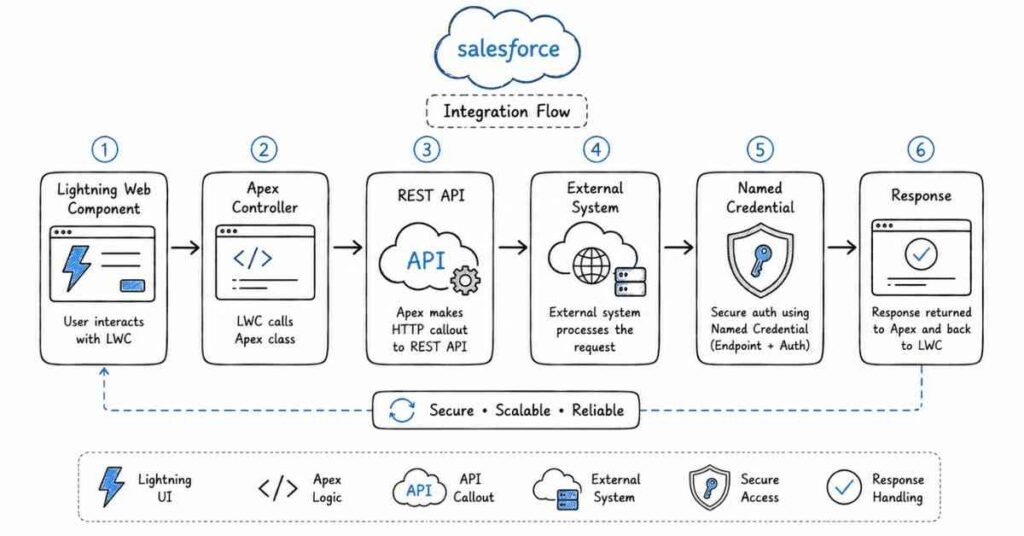
This part covers the modern UI and integration layer of Salesforce that appears often in developer, hybrid, and advanced admin interviews. It focuses on Lightning Experience, Lightning Web Components, Aura comparison, App Builder, APIs, callouts, named credentials, sandboxes, deployments, and scenario-based thinking that tests whether you can work on real Salesforce solutions beyond basic configuration.
Questions 201–240
201. What is Lightning Experience in Salesforce?
Lightning Experience is the modern Salesforce user interface designed to provide a richer, faster, and more component-based user experience than older classic interfaces. It supports modern page design, Lightning components, and enhanced productivity features.
202. Why is Lightning important in Salesforce interviews?
Lightning is important because most modern Salesforce development and customization work happens in the Lightning ecosystem. Interviewers often expect candidates to understand Lightning pages, components, and user experience customization.
203. What is Lightning App Builder?
Lightning App Builder is a drag-and-drop tool used to create and customize Lightning pages for apps, records, and home pages. It allows admins and developers to place standard and custom components on pages.
204. What is LWC?
LWC stands for Lightning Web Components. It is Salesforce’s modern component framework for building reusable UI components using web standards such as JavaScript, HTML, and CSS.
205. Why is LWC important?
LWC is important because it is the preferred modern framework for new Salesforce UI development. It is faster, standards-based, and a very common interview topic for developer roles.
206. What is the difference between Aura and LWC?
Aura is the older Salesforce component framework, while LWC is the newer, standards-based framework built on modern web technologies. In interviews, it is usually good to mention that LWC is generally preferred for new development unless Aura is required for a specific legacy or platform reason.
207. What are the main files in an LWC component?
An LWC component usually includes an HTML file, a JavaScript file, a CSS file, and an XML configuration file. Together, these define the UI, logic, styling, and component exposure settings.
208. What is the purpose of the XML configuration file in LWC?
The XML configuration file controls metadata such as API version, whether the component is exposed, and where it can be used, such as record pages, app pages, or community pages. It is essential for making the component available in the right places.
209. What does isExposed mean in LWC?
isExposed determines whether the component can be made available for use in places like Lightning App Builder. If it is not exposed, the component cannot be added through those page tools.
210. What are targets in LWC configuration?
Targets define where the LWC component can be placed, such as an app page, home page, record page, or Experience Cloud page. They help control the component’s intended usage context.
211. What are decorators in LWC?
Decorators are special annotations used in LWC to control component behavior and data interaction. Common decorators interviewers ask about include @api and @wire.
212. What is @api in LWC?
@api is used to expose a property or method publicly so that parent components can pass data to a child or call child methods. It supports component communication and reusability.
213. What is @wire in LWC?
@wire is used to connect a component to Salesforce data sources or Apex methods reactively. It helps retrieve data in a structured and often declarative way.
214. What is the difference between imperative Apex call and @wire?
An imperative Apex call gives more explicit control over when the method runs, while @wire is reactive and automatically updates based on parameter changes. The right choice depends on how the component should fetch and refresh data.
215. What are lifecycle hooks in LWC?
Lifecycle hooks are methods that run at specific points in a component’s existence, such as when it is created, inserted into the DOM, rendered, or removed. Interviewers often ask about connectedCallback and renderedCallback.
216. What is connectedCallback in LWC?
connectedCallback is a lifecycle hook that runs when the component is inserted into the DOM. It is often used for setup logic that should happen when the component becomes active.
217. What is renderedCallback in LWC?
renderedCallback runs after the component has been rendered in the DOM. It is useful for logic that depends on the component already being displayed.
218. How do parent and child components communicate in LWC?
Parent components commonly pass data to child components using public properties marked with @api. Events are commonly used for child-to-parent communication.
219. How do unrelated components communicate in LWC?
Unrelated components can communicate using Lightning Message Service. This is a common answer in interviews when components do not share a direct parent-child relationship.
220. What is Lightning Message Service?
Lightning Message Service is a framework that allows components across the Lightning page to publish and subscribe to messages. It helps coordinate communication between unrelated components.
221. What is Lightning Data Service?
Lightning Data Service is a Salesforce feature that allows components to work with Salesforce records without always writing custom Apex. It helps with record retrieval, creation, and updates while respecting platform behaviors.
222. Can LWC perform CRUD operations without custom Apex?
Yes, in many cases LWC can use Lightning Data Service and base components to perform standard record operations without custom Apex. This is often a strong point to mention when discussing efficient, low-code-friendly design.
223. What is the role of JavaScript in LWC?
JavaScript handles component logic, state, event handling, data interaction, and dynamic behavior in LWC. A strong interview answer should make it clear that LWC is not only UI markup but also real client-side logic.
224. What is reactive behavior in LWC?
Reactive behavior means the UI updates automatically when tracked or wired data changes. This is a core part of how LWC keeps components synchronized with state and data changes.
225. How do you make an LWC available in App Builder?
You configure the component’s XML file with exposure settings and the correct targets, then deploy it to the org. After that, it can be added to supported Lightning pages through App Builder.
226. Can LWC call Apex?
Yes, LWC can call Apex methods either imperatively or using @wire depending on the use case. This is one of the most common LWC interview topics.
227. Can LWC directly call an external API?
This is often discussed carefully in interviews because direct client-side callouts can be affected by browser security, CSP, and CORS considerations. A safer and more common enterprise answer is that external integrations are typically handled through Apex callouts and then surfaced to LWC.
228. How do you call an external service from LWC in a real project?
A common approach is to call an Apex method from LWC, and then let Apex perform the HTTP callout to the external service. This pattern is commonly discussed in interview guidance because it gives better control over security and integration logic.
229. What is a callout in Salesforce?
A callout is a request sent from Salesforce to an external system, usually over HTTP. It is used for integrations where Salesforce needs to send or receive data from outside platforms.
230. What is a Named Credential?
A Named Credential is a Salesforce feature used to manage endpoint URLs and authentication settings for external callouts in a more secure and maintainable way. It reduces the need to hardcode sensitive connection details.
231. Why are Named Credentials useful?
Named Credentials simplify authentication management and improve security for integrations. Interviewers often like hearing that they are preferred over more manual endpoint handling where appropriate.
232. What is REST API in Salesforce?
REST API is an API style that allows systems to interact with Salesforce using standard HTTP methods and structured data exchange. It is commonly used for integrations because it is flexible and widely supported.
233. What is the difference between REST and SOAP in Salesforce?
REST is typically lighter and more commonly used for modern web-based integrations, while SOAP is more structured and contract-driven. In interviews, it is usually enough to explain the difference at a practical level unless the role is deeply integration-focused.
234. What is a sandbox in Salesforce release work?
A sandbox is a non-production environment used for development, testing, staging, or training. It helps teams validate changes before they are moved into production.
235. What are the common sandbox types?
Common sandbox types include Developer, Developer Pro, Partial Copy, and Full sandbox. They differ mainly in data volume and intended use in the release cycle.
236. What is a change set?
A change set is a Salesforce deployment tool used to move metadata changes between related orgs, such as from sandbox to production. It is a GUI-based deployment option often used in simpler release processes.
237. What are the limitations of change sets?
Change sets are limited for complex release management because they lack strong automation, are harder to version-control, and do not support all deployment scenarios equally well. This is a good point to mention in advanced interviews.
238. Why do interviews include deployment and sandbox questions?
They want to know whether you understand how Salesforce work moves safely from development into testing and production. Good candidates know that building a feature is only part of the job; releasing it safely also matters.
239. What is a strong answer for integration questions?
A strong answer explains the business need, the external system involved, the integration method, and how security, authentication, and maintainability are handled. Interviewers usually value practical architecture thinking more than memorized API terminology.
240. How should you practice this area for interviews?
Practice by explaining one Lightning page customization, one LWC component use case, one Apex-to-external callout flow, and one sandbox-to-production deployment path. If you can explain both the UI side and the integration side clearly, your answers will sound much stronger.
Revision focus
Revise Lightning Experience, Lightning App Builder, LWC, Aura versus LWC, component files, XML configuration, decorators, @api, @wire, lifecycle hooks, component communication, Lightning Message Service, Lightning Data Service, Apex from LWC, external callouts, Named Credentials, REST versus SOAP, sandbox types, change sets, and deployment thinking before moving to the final Salesforce interview Q&A bank.
Part 8: Salesforce Interview Q&A Bank
This part is a mixed question bank designed to simulate the kinds of questions that appear across recruiter screens, admin rounds, developer rounds, scenario-based rounds, and hiring manager discussions. It combines conceptual, practical, and troubleshooting-style questions so you can practice giving short, interview-ready answers instead of only memorizing definitions.
Questions 241–280
241. Tell me about yourself as a Salesforce professional.
A strong answer should briefly cover your background, your Salesforce path, the kind of work you have done, and the type of role you are targeting. Interviewers usually want a focused professional introduction, not a full personal biography.
242. Why do you want to work in Salesforce?
A good answer should connect Salesforce to business impact, cloud technology, process improvement, and your interest in solving structured business problems. Strong answers usually sound more convincing when they are specific rather than generic.
243. Walk me through one Salesforce project you worked on.
Start with the business problem, the object or process involved, your role, the solution you implemented, and the result. Interviewers often use this question to test whether you can explain real work clearly.
244. How do you approach a new requirement in Salesforce?
Start by understanding the business goal, the users, the current process, and the constraints before choosing objects, automation, or code. A strong answer shows that you do not jump straight into configuration without understanding the problem first.
245. How do you decide whether to use configuration or code?
Use configuration when the requirement can be met cleanly with standard Salesforce features, and use code when the logic is too complex, performance-sensitive, or integration-heavy for declarative tools alone. Interviewers usually want balanced reasoning here, not “code everything” or “clicks only.”
246. How do you troubleshoot when a user cannot see a record?
Check object access, field access, OWD, role hierarchy, sharing rules, manual sharing, and whether the user is looking in the correct app or context. This is one of the most common scenario-based Salesforce questions.
247. A user can see a record but cannot edit it. What do you check?
Check whether the user has object-level edit permission, field-level edit access, record ownership or sharing with edit rights, and whether validation rules or approval locks are preventing updates. Good troubleshooting answers move layer by layer.
248. A field is on the page layout but not visible to the user. Why?
A field can be present on the layout but still hidden because of field-level security. This is a classic Salesforce question that tests whether you understand the difference between layout visibility and actual field access.
249. Sales reps should see only their records, but managers should see team records. How would you design this?
A typical solution is to start with Private OWD and then use role hierarchy so managers can see records owned by users below them. Depending on the scenario, sharing rules or teams may also be appropriate.
250. How do you stop duplicate records in Salesforce?
Use duplicate rules, matching rules, validation where appropriate, and better user process design depending on the business need. Strong answers also mention that duplicate prevention should not unnecessarily block valid business operations.
251. Discounts above 30% need approval. How would you implement this?
A strong answer usually includes validation or logic to identify the condition, and an approval process or Flow-based orchestration depending on the process design. The best answer explains both the trigger condition and the approval path.
252. A validation rule is blocking a valid update. What would you do?
Review the error message, identify the exact rule, inspect the formula logic, and determine whether the business condition needs refinement or an exception path. Interviewers usually want to hear structured debugging, not immediate rule removal.
253. A report shows incorrect data. How do you troubleshoot it?
Check filters, report type, row grouping, date range, field values, user access, and whether the source records actually meet the intended criteria. Reporting issues are often caused by setup logic rather than report visuals alone.
254. New picklist values were added but users cannot see them. Why?
A common reason is that the object uses record types and the new picklist values were not made available for the relevant record type. This is a frequent interview scenario because it tests practical admin troubleshooting.
255. An approval process is not triggering. What could be wrong?
Possible issues include entry criteria mismatch, wrong record type, missing permission to submit for approval, or automation updating the record in an unexpected way. A strong answer lists checks in a logical order.
256. How do you explain the difference between profile and permission set in an interview?
A profile gives baseline access required for the user, while permission sets extend access selectively without changing that base. A good answer also explains why permission sets are more scalable for exceptions.
257. How do you explain OWD to a non-technical interviewer?
You can describe OWD as the default record-sharing rule for users before extra sharing is added. It is the starting point for deciding how private or open data visibility should be.
258. How do you choose between Flow and Apex?
Use Flow for standard declarative automation that is maintainable and sufficient for the requirement, and choose Apex for complex logic, heavy processing, advanced integrations, or cases where declarative tools are not enough. This is a very common modern Salesforce interview topic.
259. How would you explain a lookup versus master-detail relationship in a real project?
A strong answer should explain the business dependency between the records, not just the technical definition. If the child must strongly depend on the parent for ownership and roll-up behavior, master-detail is usually more appropriate; otherwise lookup is often better.
260. What would you do if a roll-up summary is needed but the relationship is lookup?
A strong answer should acknowledge that standard roll-up summary fields work on master-detail relationships and then explain alternative approaches such as redesigning the relationship if appropriate or using automation or code to mimic the behavior.
261. How do you troubleshoot a Flow that is not working as expected?
Check entry conditions, record context, decision paths, variable assignments, fault paths, referenced fields, and whether another automation is interfering. A structured debugging answer is more valuable than simply saying you would “review the Flow.”
262. What is one common mistake candidates make in Salesforce interviews?
A common mistake is giving definition-only answers without explaining business use or troubleshooting logic. Modern Salesforce interviews often test how you think through scenarios, not just what you can memorize.
263. How do you answer scenario-based questions well?
Start by clarifying the business problem, then move through the relevant layers such as object design, security, automation, or code, and end with the safest practical solution. This structure usually makes answers sound more mature and client-ready.
264. How would you answer “What happens when a user is deactivated?”
A strong answer should explain that the user can no longer log in, but historical ownership and records may still remain and should be handled according to business needs. This question often tests whether you think operationally, not just technically.
265. How do you approach case assignment automation?
A common answer is to use assignment rules based on case criteria such as origin, priority, or category, with routing to users or queues as needed. The strongest answers explain why the assignment design supports support operations.
266. How do you explain governor limits in a simple way?
Governor limits are platform limits that prevent one transaction from consuming too many shared resources in Salesforce’s multi-tenant environment. A simple answer should also mention that developers must design efficient, bulk-safe code because of them.
267. What should you say if you do not know an exact technical answer?
It is usually better to be honest, explain what you do know, and describe how you would verify or troubleshoot the issue rather than guessing with false confidence. Interviewers often respect structured thinking more than bluffing.
268. How do you describe a Salesforce project on your resume or in an interview?
Describe the business problem, your contribution, the Salesforce features used, the challenge, and the outcome. Strong project descriptions focus on impact and clarity instead of only naming tools.
269. How do you explain your role in a team project?
Be specific about what you owned, what you configured or built, where you collaborated, and what decisions were shared. Vague ownership often weakens otherwise good project answers.
270. How do you talk about a failed or difficult Salesforce implementation?
A strong answer should show honesty, learning, and problem-solving. Explain what went wrong, how you identified it, what changes were made, and what you would do differently next time.
271. What makes a Salesforce candidate stand out in interviews?
Candidates stand out when they can explain platform concepts clearly, troubleshoot logically, connect solutions to business outcomes, and speak confidently about real scenarios. That combination usually matters more than memorizing long lists of terms.
272. How do you prepare for both admin and developer rounds together?
Build a strong common foundation in objects, security, automation, and reporting, then layer Apex, SOQL, triggers, LWC, and integration topics if the role requires them. Hybrid preparation works best when you understand where declarative and coded solutions meet.
273. Why do interviewers ask about real-time scenarios?
They want to know whether you can apply Salesforce knowledge in production-like situations instead of only repeating definitions. Scenario-based rounds are often where stronger candidates separate themselves.
274. What is a good way to practice Salesforce speaking answers?
Take one concept or scenario at a time and explain it out loud in simple business language, as if speaking to an interviewer or stakeholder. This kind of practice usually improves clarity faster than silent reading alone.
275. How do you answer “Why should we hire you?” for a Salesforce role?
A strong answer should connect your Salesforce knowledge, problem-solving ability, learning mindset, and fit for the role’s responsibilities. The answer works best when it sounds specific to the company and position rather than generic.
276. How do you discuss certifications in an interview?
Mention them as proof of structured learning, but support them with practical understanding and examples. Interviewers generally value applied knowledge more than certificates alone.
277. How do you handle pressure or urgent production issues?
A strong answer shows calm troubleshooting, prioritization, communication with stakeholders, impact assessment, and safe resolution steps. Salesforce interviews often reward operational maturity in addition to technical knowledge.
278. What is one good final-round habit in Salesforce interviews?
Before answering, briefly structure your response around problem, platform area, solution, and business impact. This makes even technical answers sound clearer and more professional.
279. How should freshers stand out in Salesforce interviews?
Freshers usually stand out by being clear on fundamentals, practicing spoken explanations, building at least one meaningful org or project, and showing strong learning discipline. Clarity often matters more than trying to sound overly advanced.
280. How should you practice this final Q&A bank?
Practice these questions out loud in short, structured answers and connect them to at least one real or simulated project. The strongest improvement usually comes from repeated speaking practice, scenario drills, and mock interviews.
Revision focus
Revise self-introduction, project explanation, requirement analysis, security troubleshooting, reporting issues, Flow troubleshooting, approval scenarios, duplicate handling, relationship choice, Flow versus Apex reasoning, project storytelling, scenario structure, and spoken-answer practice before moving to behavioral preparation, resume optimization, LinkedIn strategy, salary guidance, and follow-up communication.
Part 9: Behavioral, Resume, LinkedIn & Career Strategy
This final part helps turn Salesforce preparation into actual interview conversion. It covers the STAR method, behavioral questions, AI self-preparation prompts, resume and LinkedIn optimization, project storytelling, salary guidance in India for 2026, thank-you and follow-up emails, and a final checklist for execution.
STAR method
The STAR method stands for Situation, Task, Action, and Result. It is one of the best ways to answer behavioral interview questions because it helps you stay structured, specific, and outcome-focused.
Use STAR like this:
- Situation: Explain the context.
- Task: Explain what you were responsible for.
- Action: Describe what you specifically did.
- Result: End with the outcome, learning, or impact.
A strong behavioral answer usually sounds clear, practical, and honest. Interviewers respond better when you explain your role clearly and mention what changed because of your work.
20 behavioral questions
- Tell me about a time you solved a difficult business problem in Salesforce.
- Tell me about a time you had to troubleshoot a production issue.
- Describe a time you handled conflicting stakeholder requests.
- Tell me about a time you improved a business process using Salesforce.
- Describe a time you made a mistake in a project and corrected it.
- Tell me about a time you had to explain a technical solution to a non-technical person.
- Describe a time you worked under a tight deadline.
- Tell me about a time you had to prioritize multiple Salesforce tasks.
- Describe a time you handled a security or access-related issue.
- Tell me about a time you improved data quality in Salesforce.
- Describe a time you automated a manual process.
- Tell me about a time you worked closely with developers, admins, or consultants.
- Describe a time you dealt with unclear requirements.
- Tell me about a time you received difficult feedback.
- Describe a time you managed a change request.
- Tell me about a time you influenced a decision without direct authority.
- Describe a time you handled a user issue calmly.
- Tell me about a time you improved reporting or dashboard visibility.
- Describe a time you learned a new Salesforce concept quickly for a project.
- Tell me about a time you balanced business need and technical feasibility.
50 AI self-preparation prompts
Use these prompts with AI tools to practice interviews, improve your project storytelling, and sharpen your communication.
- Act as a Salesforce Admin interviewer and ask me 10 questions.
- Act as a Salesforce Developer interviewer and ask me 10 questions.
- Ask me behavioral Salesforce interview questions using the STAR method.
- Improve my answer to “Tell me about yourself” for a Salesforce role.
- Help me explain my Salesforce project in under 2 minutes.
- Help me explain my Salesforce project in under 5 minutes.
- Turn my project notes into an interview-ready STAR answer.
- Ask me scenario-based Salesforce Admin questions one by one.
- Ask me scenario-based Salesforce Developer questions one by one.
- Challenge my answer to a security troubleshooting scenario.
- Challenge my answer to a Flow troubleshooting scenario.
- Challenge my answer to an Apex trigger scenario.
- Help me explain profile vs permission set clearly.
- Help me explain OWD and sharing rules simply.
- Help me explain Flow vs Apex with examples.
- Help me explain lookup vs master-detail using business language.
- Ask me reporting and dashboard interview questions.
- Ask me validation rule and approval process questions.
- Ask me integration interview questions for Salesforce.
- Ask me LWC interview questions.
- Ask me SOQL and SOSL interview questions.
- Ask me trigger and governor limit interview questions.
- Simulate a recruiter screening round for a Salesforce role.
- Simulate a hiring manager round for a Salesforce Admin role.
- Simulate a hiring manager round for a Salesforce Developer role.
- Ask follow-up questions after I explain a project.
- Tell me where my project explanation is weak.
- Rewrite my answer to sound more professional and concise.
- Help me write stronger Salesforce resume bullets.
- Suggest better Salesforce keywords for my resume.
- Help me write a LinkedIn headline for a Salesforce Admin role.
- Help me write a LinkedIn headline for a Salesforce Developer role.
- Help me write my LinkedIn About section for Salesforce jobs.
- Ask me 20 rapid-fire Salesforce fundamentals questions.
- Ask me 10 security scenario questions.
- Ask me 10 automation scenario questions.
- Ask me 10 data model scenario questions.
- Ask me 10 Apex scenario questions.
- Score my answers for clarity and confidence.
- Convert my weak answer into a strong answer format.
- Help me answer “Why should we hire you?” for Salesforce.
- Help me answer “Why Salesforce?” convincingly.
- Help me explain a failed project positively.
- Help me write a thank-you email after a Salesforce interview.
- Help me write a follow-up email after no response.
- Create a 7-day mock interview plan for Salesforce.
- Create a 30-day Salesforce interview revision plan.
- Ask me mixed admin and developer questions for hybrid roles.
- Turn this certification list into a better interview answer.
- Build a complete mock interview using my resume and project details.
Resume optimization
A strong Salesforce resume should show business problem-solving, platform skills, project impact, and clear ownership. It should not read like a list of responsibilities with no context.
Useful Salesforce keywords
- Salesforce Administrator
- Salesforce Developer
- Salesforce Consultant
- Salesforce CRM
- User Management
- Security Model
- Profiles and Roles
- Permission Sets
- OWD and Sharing Rules
- Data Modeling
- Objects and Fields
- Validation Rules
- Flow Builder
- Approval Process
- Reports and Dashboards
- Data Loader
- Apex
- Triggers
- SOQL
- SOSL
- Lightning Experience
- Lightning Web Components
- Integrations
- REST API
- Sandbox and Deployment
- Trailhead
- Cross-functional Collaboration
Resume bullet examples
- Configured objects, fields, page layouts, validation rules, and record types to support business process improvements.
- Managed users, profiles, permission sets, and sharing settings to improve secure access control.
- Built Flow-based automation to reduce manual work and improve operational consistency.
- Created reports and dashboards to improve visibility into sales, service, or business performance.
- Wrote Apex classes, triggers, and SOQL queries to support custom business logic.
- Developed Lightning Web Components to improve user experience and support custom requirements.
- Assisted with sandbox testing, release preparation, and deployment activities.
- Worked with stakeholders to gather requirements and translate them into Salesforce solutions.
Resume summary example
Salesforce professional with hands-on experience in CRM configuration, data modeling, security, automation, reporting, and platform troubleshooting. Strong interest in solving business problems through scalable Salesforce solutions, with a clear understanding of admin fundamentals and practical platform workflows.
LinkedIn optimization
LinkedIn should position you clearly for the Salesforce role you want. It should align with your resume, projects, certifications, and target job title.
Headline examples
Salesforce Administrator | CRM Configuration, Security, Flow, Reports, Dashboards
Salesforce Developer | Apex, Triggers, SOQL, LWC, Integrations
Salesforce Professional | Admin, Automation, Security, Reporting, Business Process Improvement
About section example
Salesforce professional focused on solving business problems through platform configuration, data structure, automation, security, and reporting. I enjoy translating requirements into practical Salesforce solutions, improving process efficiency, and building reliable user experiences across admin and developer workflows. My strengths include structured problem-solving, clear communication, and continuous learning through hands-on project work.
LinkedIn checklist
- Use a clear Salesforce role title in the headline.
- Add certifications, Trailhead, and project links where relevant.
- Keep the About section focused on your strengths and target role.
- Use consistent keywords across LinkedIn, resume, and project descriptions.
- Highlight real Salesforce project work, even if it is practice-based.
Project strategy
Salesforce interviews often depend heavily on how well you explain your project work. Even if your project was academic, self-built, internship-based, or simulated, you should present it clearly and professionally.
What a strong project explanation should include
- Business problem.
- Users involved.
- Salesforce objects or modules used.
- Security and access logic.
- Automation or development used.
- Challenges faced.
- Your role and ownership.
- Outcome, learning, or improvement delivered.
Project explanation structure
Use this flow in interviews:
- What was the business problem?
- What Salesforce setup or customization was needed?
- What did you specifically do?
- What challenges came up?
- What was the result or learning?
Salary guidance in India 2026
Salesforce salaries in India vary by role, company type, city, domain, certification strength, and project depth. Use salary numbers as directional context, not as fixed guarantees.
Directional salary ranges
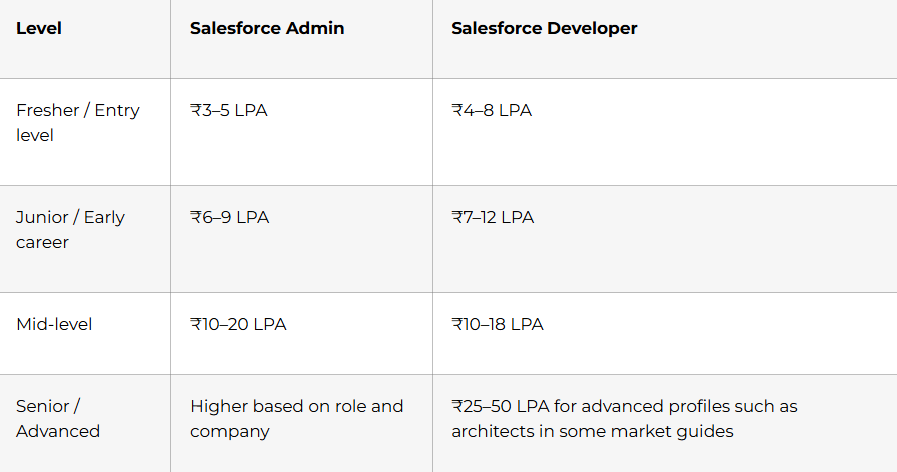
These numbers differ across sources and role definitions, so it is smart to research multiple platforms before salary discussions. Trailhead’s interview strategy guidance also recommends checking multiple salary sources and considering the full benefits package, not just base pay.
Thank-you email templates
A thank-you email should usually be sent the same day as the interview and should be short, professional, and personalized. Salesforce Trailhead specifically recommends a timely, personalized thank-you email that reiterates interest and alignment.
Template 1: After interview
Subject: Thank you for today’s interview
Hi [Interviewer Name],
Thank you for taking the time to speak with me today about the [Role Name] position. I appreciated the opportunity to learn more about the team, the role, and the kind of Salesforce challenges you are solving.
Our conversation increased my interest in the opportunity, especially because of the chance to contribute through [security, automation, reporting, Apex, LWC, or another relevant strength]. I believe my background in [specific strength] would allow me to contribute meaningfully to the role.
Thank you again for your time and consideration.
Best regards,
[Your Name]
Template 2: After final round
Subject: Thank you for the discussion
Hi [Interviewer Name],
Thank you again for the opportunity to meet with the team. I enjoyed learning more about your Salesforce environment, team expectations, and the business problems this role is focused on solving.
The discussion reinforced my excitement about the position, and I would be glad to contribute through my strengths in [relevant strengths]. Thank you for your time and consideration.
Best regards,
[Your Name]
Follow-up email template
If there is no update after a reasonable waiting period, a short follow-up is appropriate.
Subject: Following up on the [Role Name] interview
Hi [Interviewer Name],
I hope you are doing well. I wanted to follow up regarding the [Role Name] interview process and thank you again for the opportunity to speak with the team. I remain very interested in the role and appreciated the chance to learn more about the position.
I would be grateful for any update you can share regarding the hiring timeline.
Best regards,
[Your Name]
Rejection feedback email template
If you are not selected, you can still ask politely for feedback.
Subject: Thank you and feedback request
Hi [Interviewer Name],
Thank you for informing me about the decision. I appreciate the opportunity to interview for the role and learn more about your team.
If you are able to share any feedback on my interview performance, resume, or areas I could improve, I would sincerely appreciate it. I value the opportunity to learn and improve for future roles.
Best regards,
[Your Name]
Salesforce salaries in India vary by role, company type, city, domain, certification strength, and project depth. Use salary numbers as directional context, not as fixed guarantees.
Final 30-day checklist
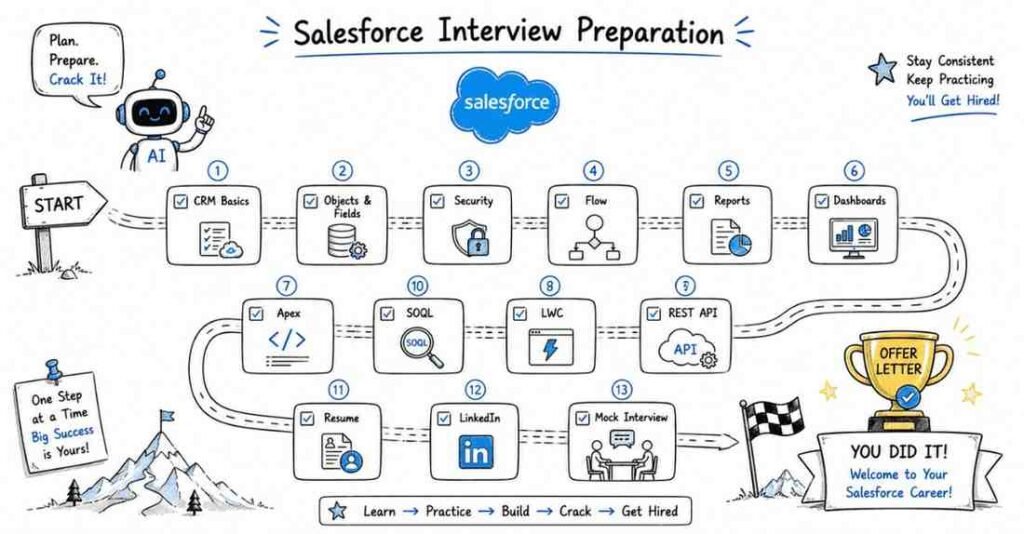
Use this checklist in the last 30 days before Salesforce interviews:
- Finalize at least 1 to 3 Salesforce projects you can explain clearly.
- Prepare a 60-second and 2-minute self-introduction.
- Practice at least 20 behavioral questions using STAR.
- Practice security, automation, reporting, and data model scenarios out loud.
- Review Flow, validation rules, approval process, and reporting logic.
- Review Apex, SOQL, triggers, LWC, and integrations if your role needs them.
- Update resume with Salesforce-specific keywords and impact-driven bullets.
- Update LinkedIn headline, About section, certifications, and project highlights.
- Prepare salary expectations using India 2026 directional benchmarks.
- Draft thank-you and follow-up emails before your interviews begin.
- Do at least 3 mock interviews with spoken answers.
- Practice explaining one project in business language, not only technical language.
Revision focus
Revise the STAR method, 20 behavioral questions, AI mock interview prompts, Salesforce resume keywords, impact-based bullet writing, LinkedIn positioning, project storytelling, salary framing for India in 2026, thank-you emails, follow-up messages, and the final 30-day checklist before publishing the full Salesforce interview guide.