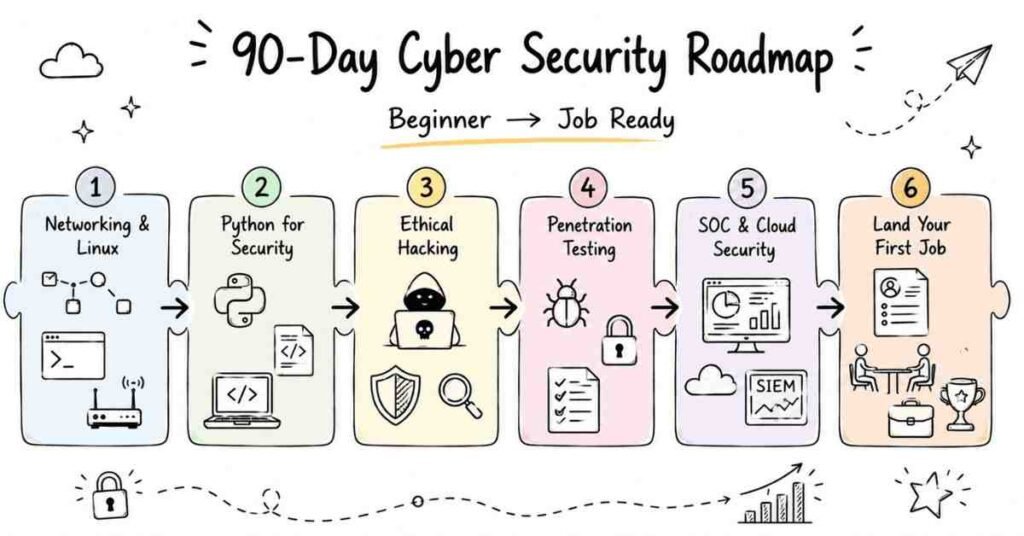
Powered Cybersecurity: Complete 90-Day Career Transformation Roadmap

Picture yourself three months from now – you’re not just another IT graduate. You’re a certified cybersecurity professional who knows how to detect threats, perform penetration testing, and defend organizations from cyberattacks. Companies are actively searching for someone exactly like you, and they’re willing to pay ₹3-8 lakhs annually to start, with clear growth potential to ₹15-40 lakhs as you gain experience.

This transformation isn’t a fantasy. It’s exactly what happens when you commit to this structured 90-day journey at Frontlines Edutech.

🚀 Start your Cybersecurity journey with clear, structured Course for every tech role.
The Cybersecurity Crisis Creating Massive Opportunities

Right now, while you’re reading this, organizations worldwide are facing an unprecedented cybersecurity crisis. The global workforce gap has exploded to 4.8 million unfilled cybersecurity positions – a staggering 19% increase year over year. In India specifically, 83% of organizations experienced at least one cybersecurity incident in the past year, with nearly half suffering 10 or more attacks.

Here’s what this means for you: companies desperately need skilled cybersecurity professionals but can’t find them. Over 67% of organizations report moderate-to-critical skills gaps in their security teams. The average cost of a data breach has reached $4.88 million, and organizations lacking adequate cybersecurity staff face an additional $1.76 million in breach costs.

This isn’t just statistics – it’s opportunity knocking loudly at your door.

cybersecurity 90 days roadmap

 Why Cybersecurity Pays More Than Most Tech Careers

Unlike many IT fields where salary growth takes years, cybersecurity professionals command premium compensation from day one because the work directly protects company assets, customer data, and business continuity.

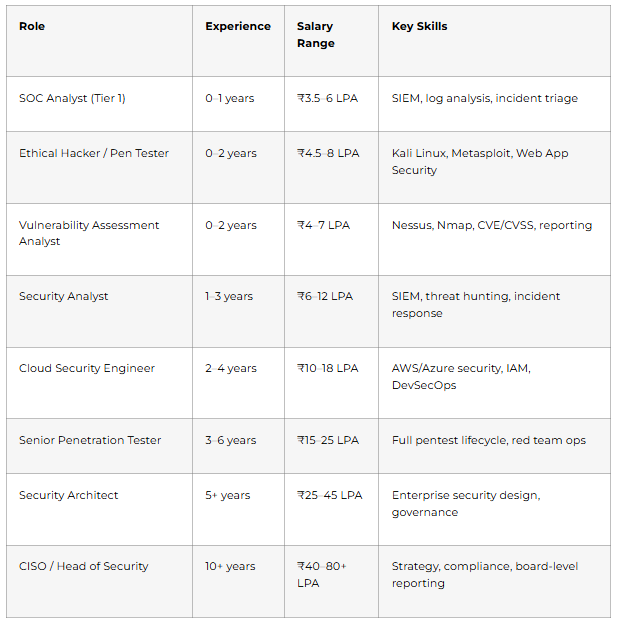
Entry-level positions (0-2 years) start at ₹2.5-6 lakhs annually – already higher than most fresher roles. Mid-level professionals (2-5 years) earn ₹8-15 lakhs per year. Senior specialists (5-10 years) command ₹15-35 lakhs annually. Leadership positions like CISO reach ₹50 lakhs to over ₹1 crore per year.

The demand is so intense that ethical hacker salaries in India are expected to rise by 20-30% over the next few years as cybersecurity threats become more sophisticated. Major companies like Infosys, TCS, Accenture, Wipro, Capgemini, Cognizant, IBM, and KPMG are continuously hiring across cities like Bangalore, Hyderabad, Pune, Mumbai, Chennai, Gurgaon, and Noida.

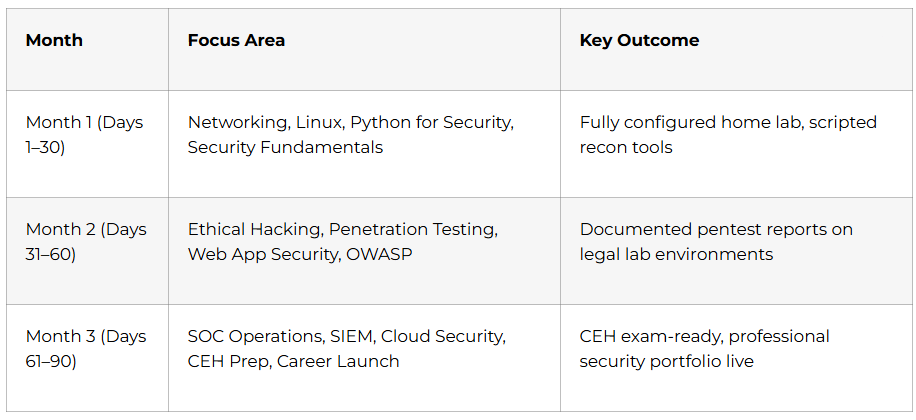
Month 1:Foundation and Core Concepts (Days 1-30)

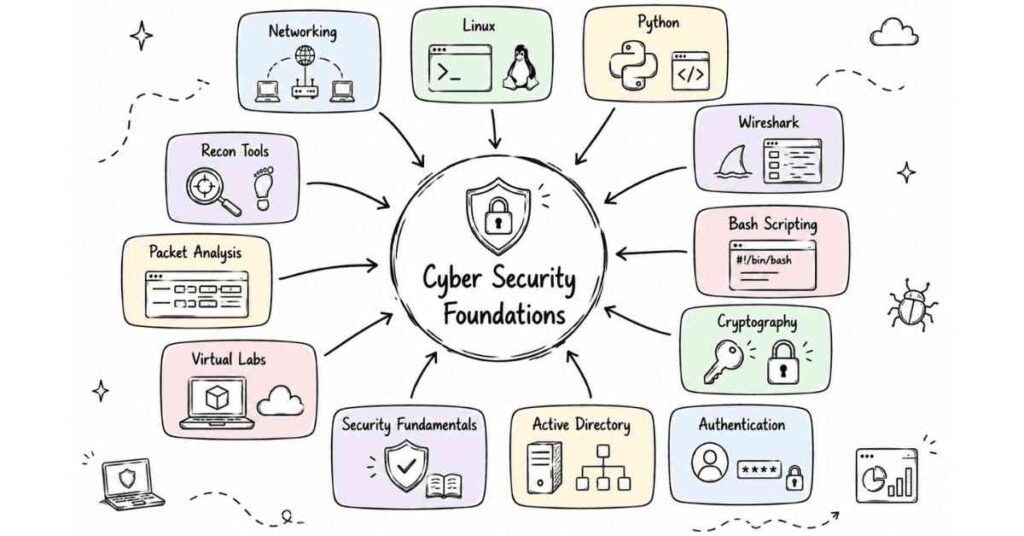
The first month establishes your cybersecurity foundation. You’ll understand how hackers think, how systems get compromised, and how defenders protect infrastructure. Even students from non-IT backgrounds will grasp these concepts because we break down technical jargon into simple, understandable language.

learner exploring the cybersecurity world
Week 1: Cybersecurity Fundamentals (Days 1-7)

Day 1: Welcome to the World of Cybersecurity
Understanding what cybersecurity actually means beyond Hollywood movies. Exploring real-world cyber attacks that made headlines – Equifax breach, WannaCry ransomware, SolarWinds supply chain attack. Learning about the cybersecurity triad (Confidentiality, Integrity, Availability). Understanding why every organization regardless of size needs security professionals.

Day 2: Types of Hackers and Ethical Framework
Learning the difference between white hat (ethical hackers), black hat (malicious hackers), and grey hat hackers. Understanding the legal and ethical boundaries of security testing. Exploring career paths in ethical hacking versus malicious activity. Understanding why companies hire ethical hackers to attack their own systems.

Day 3: Vulnerabilities, Exploits, and Payloads
Breaking down the attack chain from discovery to exploitation. Understanding what vulnerabilities are (weaknesses in systems). Learning how exploits take advantage of these weaknesses. Understanding payloads as the actual malicious code delivered. Examining real-world examples of each component.

Day 4: Red Team vs Blue Team
Understanding offensive security (Red Team) roles focused on attacking systems. Learning defensive security (Blue Team) roles focused on protection and detection. Exploring Purple Team collaboration between offense and defense. Understanding which career path aligns with your interests and strengths.

Day 5: Attack Types Overview
Learning about Denial of Service (DoS) attacks that overwhelm systems. Understanding Buffer Overflow attacks that exploit memory management. Exploring privilege escalation techniques used to gain higher system access. Studying how attackers chain multiple techniques together.

Day 6: Malware Ecosystem
Understanding viruses, worms, trojans, and ransomware differences. Learning how malware spreads across networks and devices. Studying recent ransomware attacks and their financial impact. Understanding the ransomware-as-a-service business model criminals use.

Day 7: First Week Assessment and Career Planning
Reviewing all Week 1 concepts with practical scenarios. Taking your first cybersecurity quiz to measure understanding. Discussing which specialization (penetration testing, SOC analyst, security engineering) interests you most. Setting personalized learning goals for the remaining 83 days.

💡 Start strong—learn core cybersecurity concepts through beginner-friendly How-to Guides
Week 2: Compliance, Regulations, and Risk Management (Days 8-14)

Day 8: Introduction to Cybersecurity Compliance
Understanding why compliance frameworks exist and who enforces them. Learning about GDPR (European data protection), HIPAA (healthcare security), and SOX (financial reporting). Understanding penalties for non-compliance that reach millions of dollars. Exploring how compliance creates job opportunities for security professionals.

Day 9: ISO 27001 and ISO 27002 Standards
Learning the international standard for information security management systems. Understanding the Plan-Do-Check-Act cycle for security controls. Exploring the 14 control domains that cover organizational security. Understanding how ISO certification benefits both companies and your resume.

Day 10: PCI-DSS for Payment Security
Understanding requirements for organizations that handle credit card transactions. Learning the 12 PCI-DSS requirements from firewalls to encryption. Exploring how payment breaches affect businesses and consumers. Understanding career opportunities in payment security auditing.

Day 11: Penetration Testing Standards
Learning OWASP (Open Web Application Security Project) testing methodology. Understanding WASC (Web Application Security Consortium) standards. Exploring SANS Top 25 most dangerous software weaknesses. Learning PTES (Penetration Testing Execution Standard) phases. Understanding OSSTMM (Open Source Security Testing Methodology Manual) approach.

Day 12: Risk Governance and Management
Understanding how to identify, assess, and prioritize security risks. Learning quantitative versus qualitative risk assessment methods. Exploring risk treatment options (accept, avoid, transfer, mitigate). Understanding how security professionals communicate risks to business leadership.

Day 13: Cyber Crime Classification and Laws
Learning about different categories of cybercrime from hacking to identity theft. Understanding India’s IT Act 2000 and amendments related to cybercrime. Exploring international cybercrime laws and jurisdiction challenges. Understanding penalties for various cyber offenses.

Day 14: NIST Framework and Practical Assignment
Learning the NIST Cybersecurity Framework’s five functions (Identify, Protect, Detect, Respond, Recover). Understanding how organizations implement NIST guidelines. Completing your first practical assignment analyzing a company’s security posture. Attempting your first Capture The Flag (CTF) challenge with beginner-level security puzzles.

📘 Download compliance checklists, frameworks, security templates & study notes.
Ethical Hackers types of hackers
Week 3: Building Your Lab Environment (Days 15-21)

Day 15: Lab Setup Introduction and Planning
Understanding why hands-on practice in safe environments is crucial. Learning about virtualization technology that lets you run multiple systems simultaneously. Exploring hardware requirements (minimum 8GB RAM, 100GB free space). Planning your lab architecture with attacker and victim machines.

Day 16: Installing VirtualBox and Kali Linux
Downloading and installing Oracle VirtualBox for creating virtual machines. Obtaining Kali Linux pre-built image from official sources. Installing Kali Linux virtual machine step-by-step. Configuring network settings for communication between virtual machines.

Day 17: Installing Target Machines
Setting up Windows 10 virtual machine as a testing target. Installing Metasploitable (intentionally vulnerable Linux system) for practice. Configuring network connectivity between attacker (Kali) and targets. Understanding why we use intentionally vulnerable systems for learning.

Day 18: Virtual Machine Management
Learning to create snapshots before making system changes. Understanding how to revert machines to clean states after testing. Managing system resources (CPU, RAM, storage) across multiple VMs. Organizing your virtual lab for efficient workflow.

Day 19: Kali Linux Interface Tour
Exploring the Kali Linux desktop environment and menu structure. Understanding where tools are organized by category. Learning basic desktop navigation and customization. Familiarizing yourself with the terminal that you’ll use extensively.

Day 20: Networking Your Lab
Configuring NAT (Network Address Translation) for internet access. Setting up Host-Only networking for isolated testing. Understanding Bridged networking for realistic scenarios. Testing connectivity between all virtual machines using ping commands.

Day 21: Lab Documentation and Weekend Practice
Creating documentation for your lab setup to reference later. Taking screenshots of your working environment. Practicing starting, stopping, and snapshot management. Troubleshooting common virtualization issues with instructor guidance.

🧪 Build your cybersecurity lab faster—access step-by-step setup guides & tools.
Week 4: Linux Essentials for Security (Days 22-30)

Day 22: Linux Terminal Basics
Learning essential commands (ls, cd, pwd, mkdir, rm, cp, mv). Understanding Linux directory structure and navigation. Practicing file operations with hands-on exercises. Understanding why Linux skills are mandatory for cybersecurity professionals.

Day 23: File Permissions and Ownership
Understanding read, write, and execute permissions for users, groups, and others. Learning chmod command to modify permissions numerically and symbolically. Understanding chown for changing file ownership. Exploring real-world scenarios where permissions prevent or enable attacks.

Day 24: Special Permissions (SUID, SGID, Sticky Bit)
Learning Set User ID (SUID) that allows running programs with owner privileges. Understanding Set Group ID (SGID) for group-based permission inheritance. Exploring Sticky Bit that restricts deletion in shared directories. Understanding how attackers exploit misconfigured special permissions.

Day 25: Linux File Structure Deep Dive
Exploring critical directories (/etc for configurations, /var for logs, /home for users). Understanding /bin and /sbin for executables and system binaries. Learning about /tmp for temporary files often exploited by attackers. Understanding where to find evidence during security investigations.

Day 26: User and Group Management
Creating and deleting user accounts with useradd and userdel commands. Managing groups with groupadd and usermod commands. Understanding /etc/passwd file structure that stores user information. Exploring /etc/shadow where hashed passwords are stored securely.

Day 27: Environment Variables and Software Management
Learning about environment variables like PATH, HOME, and USER. Understanding how to modify variables temporarily and permanently. Installing software with apt package manager. Updating system packages for security patches.

Day 28: Automation with Cron Jobs
Understanding scheduled tasks for automating repetitive operations. Creating cron jobs for running scripts at specific times. Learning crontab syntax for scheduling (minute, hour, day, month, weekday). Understanding how attackers abuse cron for persistence.

Day 29: Service and Network Management
Managing Linux services with systemctl (start, stop, restart, enable). Understanding networking commands (ifconfig, ip, netstat, ss). Monitoring active connections and listening ports. Learning to identify suspicious network activity.

Day 30: Linux Skills Assessment and Month 1 Review
Completing comprehensive Linux practical test with real-world scenarios. Reviewing all Month 1 topics from terminology to Linux administration. Taking written assessment to measure conceptual understanding. Receiving feedback on strengths and areas needing more focus before Month 2.

🔥 Master Linux for security—download command cheat sheets & admin practice tasks.
Month 2 : Technical Skills and Offensive Security (Days 31-60)

Month two transforms you from a student into a practitioner. You’ll learn networking fundamentals, cryptography, programming basics, and start performing actual security testing activities. By day 60, you’ll be able to identify vulnerabilities and understand how attacks actually work.

IP protocols
Week 5: Number Systems and Networking Foundations (Days 31-37)

Day 31: Understanding Number Systems
Learning decimal (base-10), binary (base-2), and hexadecimal (base-16) systems. Understanding why computers use binary for all operations. Practicing decimal to binary conversions manually and with tools. Understanding hexadecimal’s role in memory addresses and color codes.

Day 32: Number System Conversions
Converting binary to decimal using positional notation. Transforming hexadecimal to binary using 4-bit groups. Practicing decimal to hexadecimal conversions. Understanding octal (base-8) system used in file permissions.

Day 33: Bitwise Operators and Subnet Calculations
Learning AND, OR, XOR, and NOT bitwise operations. Understanding how subnet masks use bitwise operations. Practicing subnet calculations for network segmentation. Understanding CIDR notation used in networking.

Day 34: Networking Fundamentals – IP Addressing
Understanding IPv4 address structure and classes (A, B, C, D, E). Learning private versus public IP address ranges. Exploring IPv6 basics and why we’re transitioning to it. Understanding MAC addresses as hardware identifiers.

Day 35: Network Devices and Topologies
Learning roles of routers, switches, hubs, and firewalls. Understanding different network topologies (star, bus, ring, mesh). Exploring advantages and disadvantages of each topology. Understanding how network design impacts security.

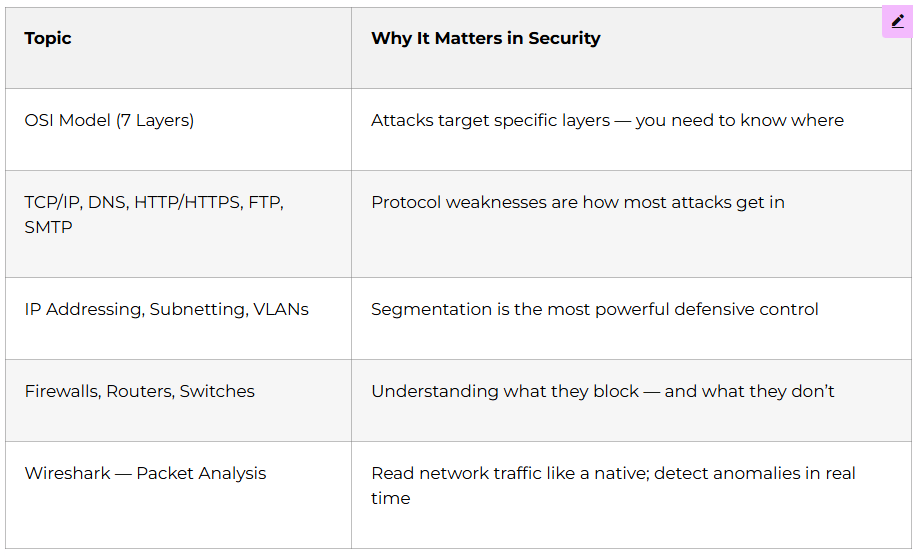
Day 36: OSI and TCP/IP Models
Understanding the 7-layer OSI model from Physical to Application. Learning the 4-layer TCP/IP model used in internet communications. Exploring what happens at each layer during data transmission. Understanding how attackers target different layers.

Day 37: TCP 3-Way Handshake and Protocols
Learning the SYN, SYN-ACK, ACK handshake process. Understanding TCP versus UDP differences and use cases. Exploring common port numbers (80-HTTP, 443-HTTPS, 22-SSH, 21-FTP). Understanding how SYN flood attacks exploit the handshake.

Week 6: Advanced Networking and Protocol Deep Dive (Days 38-44)

Day 38: ARP and DNS Protocols
Understanding Address Resolution Protocol (ARP) mapping IP to MAC addresses. Learning how DNS (Domain Name System) translates domain names to IPs. Exploring ARP cache poisoning attacks. Understanding DNS spoofing and cache poisoning techniques.

Day 39: Network Services (DHCP, SNMP, FTP)
Learning Dynamic Host Configuration Protocol (DHCP) for automatic IP assignment. Understanding Simple Network Management Protocol (SNMP) for device monitoring. Exploring File Transfer Protocol (FTP) for file sharing. Understanding vulnerabilities in these common services.

Day 40: HTTP, HTTPS, and Web Communications
Understanding HyperText Transfer Protocol structure and methods (GET, POST, PUT, DELETE). Learning about HTTPS encryption using TLS/SSL. Exploring HTTP headers and how they leak information. Understanding cookies and session management.

Day 41: Remote Access Protocols (Telnet, SSH)
Understanding Telnet as unencrypted remote access protocol. Learning Secure Shell (SSH) as encrypted alternative. Practicing SSH key-based authentication. Understanding why Telnet should never be used in production.

Day 42: VLANs and Network Segmentation
Learning Virtual Local Area Networks (VLANs) for logical network separation. Understanding how VLANs improve security by isolating traffic. Exploring VLAN hopping attacks. Understanding network segmentation best practices.

Day 43: Packet Analysis with Wireshark
Installing and configuring Wireshark packet capture tool. Learning to capture network traffic from live interfaces. Analyzing packets to understand protocol behaviors. Identifying suspicious traffic patterns indicating attacks.

Day 44: Wireless Networks and Security
Understanding Wi-Fi working principles and 802.11 standards. Learning WEP (Wired Equivalent Privacy) encryption and its weaknesses. Exploring WPA/WPA2/WPA3 improvements and vulnerabilities. Understanding wireless attack vectors like evil twin and deauthentication.

🌐 Boost your network security skills—explore How-to guides for OSI, TCP/IP, and Wireshark.
Week 7: Threat Intelligence and Enterprise Security (Days 45-51)
threat intelligance

Day 45: Introduction to Threat Intelligence
Understanding what threat intelligence means and why it matters. Learning about threat actors (nation-states, cybercriminals, hacktivists). Exploring threat intelligence sources and sharing platforms. Understanding how organizations use intelligence to prevent attacks.

Day 46: Indicators of Compromise (IOC)
Learning to identify IOCs like suspicious file hashes, IP addresses, and domain names. Understanding how IOCs help detect breaches early. Exploring IOC sharing platforms like MISP and ThreatConnect. Practicing IOC analysis with real-world examples.

Day 47: Indicators of Attack (IOA) and Exposure (IOE)
Understanding IOAs as patterns showing attacks in progress. Learning IOEs as security weaknesses exploitable by attackers. Differentiating between IOC, IOA, and IOE in practical scenarios. Understanding how to respond to each indicator type.

Day 48: Threat Hunting Fundamentals
Learning proactive threat hunting versus reactive incident response. Understanding hypothesis-driven hunting methodologies. Exploring common hunting techniques and tools. Practicing basic threat hunting scenarios in your lab.

Day 49: Endpoint Security and EDR
Understanding endpoint protection beyond traditional antivirus. Learning Endpoint Detection and Response (EDR) capabilities. Exploring Extended Detection and Response (XDR) integration. Understanding how endpoints are primary attack targets.

Day 50: Data Loss Prevention (DLP)
Understanding how organizations prevent sensitive data from leaving the network. Learning DLP policies and enforcement mechanisms. Exploring insider threat detection using DLP tools. Understanding classification schemes for different data types.

Day 51: Enterprise Security Week Project
Building a comprehensive security monitoring plan for a fictional company. Identifying what threats to hunt for based on business type. Creating detection rules for common attack patterns. Presenting your security strategy with justifications.

🎯 Practice real SOC tasks—hunt threats using our IOC samples, logs & case files.
Week 8: Cryptography and Python Programming (Days 52-60)
CryptoGraphy Fundamentals

Day 52: Introduction to Cryptography
Understanding cryptography’s role in protecting data confidentiality and integrity. Learning about encryption versus encoding versus hashing. Exploring historical ciphers like Caesar and Vigenère. Understanding modern cryptography importance in everything digital.

Day 53: Symmetric Cryptography
Understanding symmetric encryption using same key for encryption and decryption. Learning block ciphers versus stream ciphers differences. Exploring AES (Advanced Encryption Standard) as modern symmetric algorithm. Understanding DES (Data Encryption Standard) and why it’s deprecated.

Day 54: Asymmetric Cryptography
Learning public-key cryptography using key pairs. Understanding RSA algorithm for encryption and digital signatures. Exploring Elliptic Curve Cryptography (ECC) for efficient security. Understanding Diffie-Hellman key exchange for secure key sharing.

Day 55: Digital Signatures and Hash Functions
Understanding how digital signatures prove authenticity and prevent tampering. Learning hash functions (MD5, SHA-1, SHA-256) for data integrity. Exploring how hashing differs fundamentally from encryption. Understanding collision attacks against weak hash algorithms.

Day 56: Encoding Schemes (Base64, URL)
Understanding Base64 encoding for binary data in text formats. Learning URL encoding for special characters in web addresses. Practicing encoding and decoding with command-line tools. Understanding how attackers use encoding to obfuscate payloads.

Python for Cybersecurity

Day 57: Python Fundamentals for Security

Installing Python and understanding why it’s the cybersecurity language. Learning variables, data types, and basic operators. Writing your first Python scripts for simple automation. Understanding Python’s readability advantage for security tools.

Day 58: Python Data Structures and Control Flow
Learning lists, tuples, and dictionaries for organizing data. Understanding if-else conditionals for decision-making. Exploring loops (for and while) for repetitive tasks. Practicing with security-relevant examples.

Day 59: Python Functions and File Operations
Creating reusable functions for common tasks. Understanding function parameters and return values. Learning to read from and write to files. Exploring error handling with try-except blocks.

Day 60: Month 2 Review and Security Scripting
Writing Python scripts for security tasks (port scanner basics, password validator). Reviewing all Month 2 concepts from networking to cryptography. Taking comprehensive assessment covering technical fundamentals. Preparing mentally for Month 3’s intensive offensive and defensive security training.

Month 3: Advanced Offensive Security and Career Preparation (Days 61-90)

The final month transforms you into a job-ready cybersecurity professional. You’ll perform real penetration testing, analyze web application vulnerabilities, explore Active Directory attacks, understand SOC operations, and leverage AI tools that make you 10x more effective. Most importantly, you’ll prepare your professional profile and interview skills to land your first cybersecurity role.

Week 9: Web Application Security (Days 61-67)
ai powered cyber security tools

Day 61: Web Fundamentals and Architecture
Understanding how URLs work and their different components (protocol, domain, path, parameters). Learning client-server architecture and how browsers communicate with web servers. Exploring HTTP request structure including methods, headers, and body. Understanding HTTP response codes (200, 404, 500) and their meanings.

Day 62: Google Dorking and Reconnaissance
Learning advanced Google search operators for information gathering. Practicing finding exposed files, sensitive information, and vulnerable systems using search engines. Understanding robots.txt files that reveal site structure. Exploring passive reconnaissance techniques that leave no traces.

Day 63: Cookies, Sessions, and Same Origin Policy
Understanding how web applications maintain user sessions. Learning about cookie structure, flags (HttpOnly, Secure), and security implications. Exploring Same Origin Policy that prevents malicious cross-site interactions. Understanding when SOP protections break down.

Day 64: Essential Web Testing Tools
Installing and configuring Burp Suite for intercepting web traffic. Learning OWASP ZAP as an open-source alternative. Understanding Postman for API testing. Exploring browser developer tools for inspecting requests and responses. Practicing intercepting and modifying traffic in your lab.

Day 65: OWASP Top 10 – Part 1 (A01-A05)
Understanding Broken Access Control vulnerabilities including IDOR (Insecure Direct Object References). Learning about Cryptographic Failures with weak or missing encryption. Exploring Injection attacks (SQL Injection, Command Injection, XSS). Understanding Insecure Design flaws in application architecture. Learning about Security Misconfiguration exposing systems.

Day 66: OWASP Top 10 – Part 2 (A06-A10)
Learning about Vulnerable and Outdated Components like unpatched software. Understanding Identification and Authentication Failures including weak passwords. Exploring Software and Data Integrity Failures from insecure deserialization. Understanding Security Logging and Monitoring Failures that hide attacks. Learning Server-Side Request Forgery (SSRF) exploitation.

Day 67: Additional Web Vulnerabilities
Understanding Cross-Site Request Forgery (CSRF) forcing users to perform unwanted actions. Learning Clickjacking attacks using invisible iframes. Exploring Subdomain Takeover when DNS records point to unclaimed resources. Understanding Local File Inclusion (LFI) and Remote File Inclusion (RFI). Practicing identification and exploitation safely in controlled environments.

Week 10: Active Directory Penetration Testing (Days 68-74)
Active Directory Penetration Testing

Day 68: Active Directory Fundamentals
Understanding Active Directory’s role in enterprise Windows networks. Learning about objects (users, computers, groups) and organizational units. Understanding domains, domain controllers, trees, and forests. Exploring trusts between domains and their security implications.

Day 69: AD Lab Setup and LDAP Enumeration
Installing Windows Server and configuring Active Directory. Adding client machines to your AD domain. Understanding LDAP (Lightweight Directory Access Protocol) for AD queries. Practicing manual LDAP enumeration to discover domain information.

Day 70: LLMNR Poisoning and Credential Capture
Understanding Link-Local Multicast Name Resolution (LLMNR) and NBT-NS protocols. Learning how Responder tool captures authentication attempts. Practicing LLMNR poisoning attacks in your lab. Understanding how attackers steal hashed credentials from network traffic.

Day 71: Cracking Hashes and Man-in-the-Middle Attacks
Using Hashcat to crack captured NTLMv2 password hashes. Understanding different attack modes (dictionary, brute-force, hybrid). Learning ARP poisoning for intercepting network traffic. Exploring DNS spoofing and SSL stripping attacks. Understanding how these techniques compromise network security

Day 72: Advanced AD Attacks
Learning Kerberos authentication and AS-REP Roasting attacks. Understanding CrackMapExec for domain enumeration and exploitation. Exploring LDAP domain dumping for gathering information. Understanding LAPS (Local Administrator Password Solution) and its security implications.

Day 73: Post-Exploitation in AD Environments
Using CrackMapExec for lateral movement across domain. Understanding pass-the-hash and pass-the-ticket attacks. Exploring privilege escalation paths in Active Directory. Learning about persistence techniques attackers use.

Day 74: Active Directory Assessment Project
Performing a complete penetration test of your AD lab environment. Documenting vulnerabilities discovered at each stage. Creating an executive summary with findings and remediation recommendations. Practicing professional report writing for real-world engagements.

Week 11: SOC Operations and AI Tools (Days 75-81)
SOC Operations & SIEM Tools
🤖 Supercharge your learning—follow our AI-powered security workflows & automation guides.

Day 75: Introduction to Security Operations Center
Understanding SOC structure and analyst tiers (L1, L2, L3). Learning day-to-day responsibilities including alert triage and incident response. Understanding 24/7 shift models and ticketing systems. Exploring Service Level Agreements (SLAs) and escalation procedures.

Day 76: Log Analysis Fundamentals
Understanding different log types (Windows Event Logs, Linux syslogs, firewall logs, web server logs). Learning to read log formats including Syslog, JSON, and CEF. Exploring log collection methods using agents and forwarders. Practicing with Windows Event Viewer and Linux syslog analysis.

Day 77: SIEM Tools and Threat Detection
Understanding Security Information and Event Management (SIEM) concepts. Learning SIEM use cases for log aggregation, correlation, and alerting. Exploring Splunk, ELK Stack, and Wazuh platforms. Creating detection rules for brute-force attacks, malware infections, and suspicious behavior.

Day 78: Incident Response Basics
Learning the incident lifecycle: Detection, Analysis, Containment, Eradication, Recovery, Lessons Learned. Understanding alert triage and prioritization based on severity. Practicing creating and updating incident tickets. Writing clear incident reports documenting findings and actions taken.

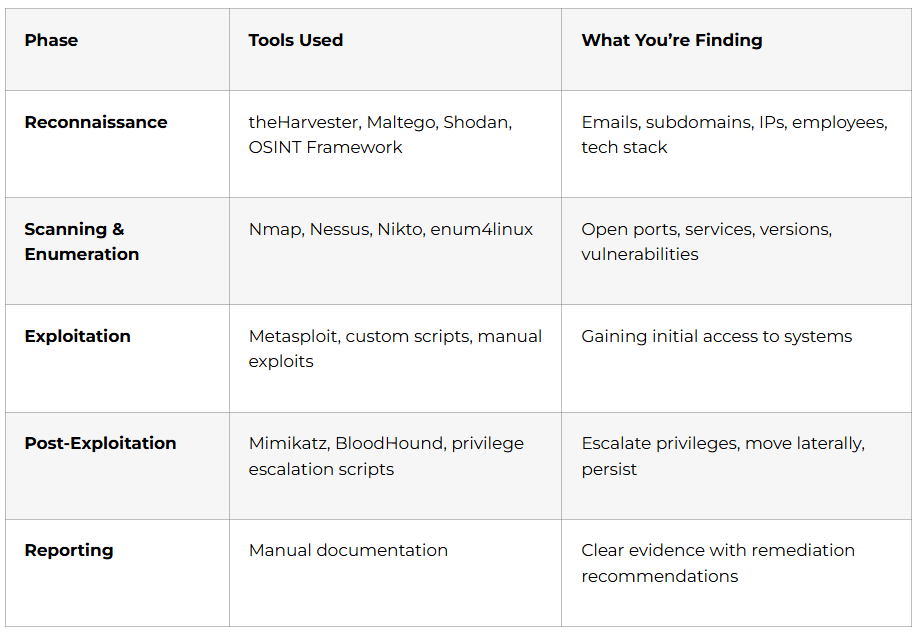
Day 79: AI-Powered Security Tools – PentestGPT and BurpAI
Installing PentestGPT for AI-assisted penetration testing guidance. Learning how PentestGPT suggests reconnaissance, exploitation, and post-exploitation strategies. Exploring BurpAI extension for Burp Suite that analyzes traffic and suggests attack payloads. Understanding how AI accelerates vulnerability discovery.

Day 80: ShellGPT, WhiteRabbitNeo, and Automation
Using ShellGPT as AI CLI assistant for generating and explaining shell commands. Learning WhiteRabbitNeo for AI-powered threat hunting and log analysis. Exploring NotebookLM for quickly understanding security documentation. Understanding N8N workflow automation for repetitive security tasks.

Day 81: Bug Bounty Introduction and Platform Overview
Understanding bug bounty programs where companies pay for vulnerability discoveries. Learning about major platforms (HackerOne, Bugcrowd, Synack, Intigriti). Exploring responsible disclosure practices and legal considerations. Understanding how bug bounties provide real-world practice and income opportunities.

Week 12: Career Preparation and Job Readiness (Days 82-90)

Day 82: Building Your Cybersecurity Portfolio
Selecting your best projects from the 90-day journey to showcase. Documenting penetration testing reports, security assessments, and CTF achievements. Creating a GitHub repository with security scripts and tools you’ve developed. Recording video demonstrations of complex exploits and defenses. Understanding what employers look for when evaluating cybersecurity candidates.

Day 83: Resume Building for Cybersecurity Roles
Crafting achievement-focused bullet points highlighting security skills and projects. Quantifying impact where possible (e.g., “Identified 15 critical vulnerabilities in web application security assessment”). Using cybersecurity-specific action verbs (investigated, assessed, exploited, remediated, hardened). Incorporating relevant certifications, tools, and technologies. Optimizing resume for Applicant Tracking Systems that filter candidates.

Day 84: LinkedIn Profile Optimization for Security Professionals
Creating a compelling headline featuring cybersecurity specialization (e.g., “Cybersecurity Professional | Penetration Testing | Threat Analysis | Certified Ethical Hacker”). Writing an engaging summary telling your transformation story from beginner to certified professional. Adding skills strategically (OWASP Top 10, Burp Suite, Kali Linux, Active Directory, SIEM, Python). Showcasing projects with screenshots and descriptions. Connecting with security professionals and joining relevant groups.

Want to stand out on LinkedIn and attract top cybersecurity recruiters? Access our comprehensive LinkedIn Optimization Guide with proven strategies, profile examples, and keyword optimization techniques specifically for security professionals.

Day 85: Job Platform Mastery for Cybersecurity Careers
Creating profiles on Naukri, LinkedIn Jobs, Indeed, Glassdoor, and specialized cybersecurity job boards. Setting up job alerts for Security Analyst, SOC Analyst, Penetration Tester, and Security Engineer positions. Learning to filter jobs by required experience level, location, and skills. Understanding how to research companies before applying. Exploring cybersecurity-specific platforms like CyberSecJobs.

Ready to maximize your cybersecurity job search? Download our Job Search Strategy Guide covering application tracking, company research techniques, and insider tips for landing interviews in the competitive security field.

Day 86: Technical Interview Preparation
Preparing for common technical questions about OWASP Top 10, network protocols, and security concepts. Practicing explaining complex attacks in simple terms that non-technical interviewers understand. Preparing for hands-on practical tests where you’ll demonstrate vulnerability identification. Learning to discuss your penetration testing methodology step-by-step. Understanding what interviewers assess during technical evaluations.

Day 87: Behavioral Interview Preparation
Crafting your “Tell me about yourself” answer highlighting your cybersecurity journey. Preparing STAR method stories (Situation, Task, Action, Result) about challenging projects. Developing responses about ethical dilemmas in security testing. Learning to discuss failures, lessons learned, and continuous learning commitment. Practicing virtual interview setup and professional presentation.

Master your cybersecurity interviews with confidence! Access our detailed Cybersecurity Interview Preparation Guide featuring 200+ technical questions, hands-on lab scenarios, behavioral examples, and sample answers from industry professionals currently working in leading companies.

Day 88: Salary Negotiation and Offer Evaluation
Researching cybersecurity salary ranges based on role and location (₹4-6 LPA for freshers, ₹8-15 LPA mid-level, ₹15-35 LPA senior). Understanding total compensation including health insurance, training budgets, and certifications. Learning negotiation techniques for first-time job seekers without appearing unreasonable. Evaluating offers based on learning opportunities, mentorship, and career growth potential. Understanding when to accept, negotiate, or decline offers professionally.

Day 89: Final Certification Assessment
Completing comprehensive 90-day assessment covering all modules from terminology to SOC operations. Performing a timed penetration test demonstrating offensive security skills. Writing a professional security assessment report. Receiving personalized feedback on technical skills and areas for continued development. Obtaining your AI-Powered Cybersecurity course completion certificate from Frontlines Edutech.

Day 90: Launch Your Cybersecurity Career
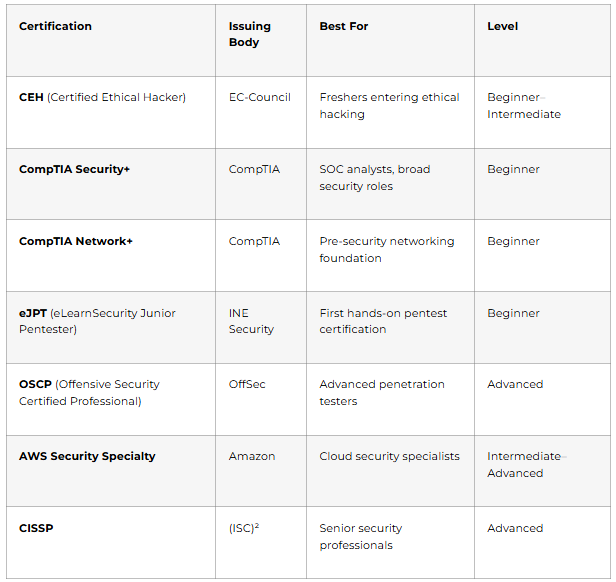
Finalizing and publishing your LinkedIn profile, portfolio, and GitHub repository. Sending targeted applications to entry-level security positions matching your skillset. Joining cybersecurity communities (Reddit r/cybersecurity, Discord servers, local security meetups). Participating in Capture The Flag competitions for continued practice. Planning certification path (CEH, CompTIA Security+, OSCP) for future growth. Celebrating your transformation from absolute beginner to certified cybersecurity professional ready for the job market.

🧠 Ace your cybersecurity interviews—access 200+ technical & behavioral questions.
Career Launch Celebration
Month 4:Career Paths After Course Completion

Your AI-Powered Cybersecurity certification from Frontlines Edutech opens doors to multiple high-growth career paths with exceptional earning potential.    

Entry-Level Positions (0-2 Years Experience)

Security Analyst – Starting salary ₹4-6 LPA. Monitoring security systems, analyzing alerts, investigating incidents, and implementing security controls. This role provides broad exposure across defensive security.

SOC Analyst (L1) – Starting salary ₹4-7 LPA. Working in Security Operations Centers performing 24/7 monitoring, alert triage, and initial incident response. This role builds foundational skills in threat detection and response.

Junior Penetration Tester – Starting salary ₹5-8 LPA. Assisting with security assessments, vulnerability scanning, and basic exploitation under senior guidance. This offensive security role builds practical hacking skills.

Vulnerability Assessment Analyst – Starting salary ₹4-6 LPA. Running vulnerability scans, analyzing results, prioritizing findings, and tracking remediation. This role bridges technical scanning with business risk communication.

Mid-Level Positions (2-5 Years Experience)

Penetration Tester – Salary ₹7-15 LPA. Independently conducting security assessments, identifying complex vulnerabilities, writing professional reports, and advising clients on remediation. This role requires deep technical expertise.

SOC Analyst (L2/L3) – Salary ₹8-14 LPA. Handling escalated incidents, performing deep forensic analysis, developing detection rules, and mentoring junior analysts. Senior SOC roles require strong analytical and investigative skills.

Security Engineer – Salary ₹8-16 LPA. Designing, implementing, and maintaining security infrastructure including firewalls, IDS/IPS, SIEM, and endpoint protection. This role requires both security knowledge and engineering skills.

Threat Intelligence Analyst – Salary ₹9-16 LPA. Researching threat actors, analyzing attack campaigns, creating threat intelligence reports, and proactively hunting threats. This strategic role requires analytical thinking.

Incident Response Specialist – Salary ₹10-18 LPA. Leading incident investigations, containing breaches, performing forensics, and recovering compromised systems. This high-pressure role commands premium compensation.

Senior Positions (5-10 Years Experience)

Senior Penetration Tester / Red Team Lead – Salary ₹15-30 LPA. Leading offensive security teams, conducting advanced persistent threat simulations, and advising organizations on strategic security improvements.

Security Architect – Salary ₹18-35 LPA. Designing enterprise security architecture, selecting security technologies, creating security standards, and ensuring alignment with business objectives.

SOC Manager – Salary ₹15-28 LPA. Managing SOC operations, developing detection capabilities, coordinating incident response, and reporting to executive leadership on security posture.

Cybersecurity Consultant – Salary ₹15-35 LPA. Advising multiple clients on security strategy, compliance, risk management, and technology selection. Consultants command premium rates for specialized expertise.

Leadership Positions (10+ Years Experience)

Chief Information Security Officer (CISO) – Salary ₹40 LPA to ₹1 Crore+. Leading entire cybersecurity function, setting security strategy, managing budgets, reporting to board of directors, and ensuring regulatory compliance.

Industry Demand Across Sectors

Cybersecurity professionals are needed in every sector because digital threats affect all organizations regardless of industry.

Technology Companies (Infosys, TCS, Wipro, Cognizant, Accenture, IBM, Capgemini) have dedicated cybersecurity practices serving clients globally, constantly hiring security consultants, penetration testers, and security engineers.

Financial Services (Banks, NBFCs, Insurance, Payment Companies) face the highest cybersecurity requirements due to regulatory compliance and protection of financial data. These organizations offer premium salaries and invest heavily in security teams.

Healthcare and Pharmaceuticals require security professionals to protect patient data under HIPAA compliance, secure medical devices, and defend against ransomware targeting hospitals.

E-commerce and Retail (Amazon, Flipkart, Walmart) need security expertise to protect customer payment information, prevent fraud, and secure vast digital infrastructure.

Government and Defense organizations have critical infrastructure protection needs, offering stable career opportunities with continuous skill development in classified environments.

Consulting Firms (Deloitte, PwC, EY, KPMG) hire cybersecurity consultants to serve diverse clients across industries, providing exposure to varied security challenges.

Telecommunications companies secure network infrastructure, protect customer data, and defend against sophisticated nation-state attacks on critical communications systems.

Manufacturing and Critical Infrastructure increasingly need cybersecurity professionals to protect industrial control systems (ICS/SCADA) and operational technology from cyber-physical attacks.

Key Cities with Highest Cybersecurity Job Opportunities

Bangalore (Bengaluru) dominates the cybersecurity job market with technology companies, startups, and global cybersecurity firms concentrated in India’s Silicon Valley. Salaries are among the highest nationally.

Hyderabad shows exceptional growth in cybersecurity roles with major IT companies, government cybersecurity initiatives, and emerging security operations centers. The cost of living advantage makes it attractive for career starters.

Pune has strong demand from IT services, automotive cybersecurity, and defense sectors with competitive compensation and quality of life.

Mumbai remains the financial capital requiring security expertise for banks, insurance companies, and fintech startups willing to pay premium salaries.

Gurgaon (Gurugram) and Noida in the NCR region host numerous multinational corporations, consulting firms, and security service providers offering diverse opportunities.

Chennai provides opportunities in manufacturing cybersecurity, IT services, and financial technology with steady job market growth.

The Salary Growth Trajectory

What makes cybersecurity uniquely attractive is the rapid salary progression compared to other IT fields.

Years 0-2: Starting at ₹4-6 LPA as fresher, you’ll gain foundational experience in security operations, vulnerability assessment, or junior penetration testing.

Years 3-5: With certifications (CEH, OSCP, CompTIA Security+) and hands-on experience, salaries jump to ₹8-15 LPA. You’re now handling complex security assessments independently and mentoring junior team members.

Years 5-8: Specialization pays off with salaries reaching ₹15-25 LPA. You’re leading security projects, advising management, and developing organizational security strategy.

Years 8+: Senior positions command ₹25-50 LPA, with CISO roles exceeding ₹1 crore annually at large enterprises. Your expertise shapes entire organizational security postures.

The demand is so intense that professionals with the right certifications can double their salary in just 3-5 years. The global cybersecurity skills shortage means organizations compete aggressively for talent, driving salaries upward by 20-30% annually.

Month 5:Why Choose Frontlines Edutech for Your Cybersecurity Journey?

At Frontlines Edutech, we understand that unemployment and career uncertainty create stress and anxiety. That’s exactly why we’ve designed this AI-Powered Cybersecurity course to transform you from absolute beginner to job-ready professional in 90 days.

What Makes Our Training Different

Industry-Standard Training delivered by cybersecurity professionals currently working in top companies who understand exactly what skills employers require and how to teach them effectively.

Hands-On, Solution-Focused Approach means you’re not memorizing theories – you’re performing actual penetration tests, analyzing real vulnerabilities, and building security solutions from day one.

Results-Driven Methodology with structured assessments, Capture The Flag competitions, and practical projects that prove your competence to employers. Every module ends with validation of your skills.

Beginner-Friendly for Non-IT Students because we explain complex security concepts in simple language anyone can understand. You don’t need prior IT experience to succeed.

Affordable Education with flexible payment options because financial constraints shouldn’t prevent anyone from building a high-paying cybersecurity career. We’ve already helped over 3,000 learners across the state transform their careers.

Transparent Learning Path with clear daily roadmap, defined outcomes, and honest expectations about effort required and results achievable.

Quality with Experience from mentors passionate about helping you succeed, offering support that’s both caring and challenging, making learning enjoyable while demanding excellence.

Complete Support System

From Scratch to Master Level Training progressively structured so you’re never overwhelmed, starting from terminology and building to advanced Active Directory attacks and SOC operations.

Daily Assignments reinforcing learning through hands-on practice with solutions and personalized feedback helping you identify areas needing more attention.

Resume Building Assistance transforming your learning journey into professional credentials that stand out to cybersecurity recruiters and hiring managers.

LinkedIn Profile Building Guidance positioning you as a cybersecurity professional and helping you network with industry experts and recruiters actively hiring.

Interview Guidance including technical mock interviews, behavioral question practice, and strategies for demonstrating your security skills effectively under pressure.

Course Completion Certificate recognized by employers across industries, validating your 90-day transformation from beginner to certified cybersecurity professional.

Q&A Sessions with experienced instructors to clarify doubts, discuss advanced concepts, and receive personalized guidance on your unique learning challenges.

Placement Updates keeping you informed about cybersecurity job opportunities matching your skill level, experience, and career interests.

On-Demand Video Access allowing you to learn at your pace, revisit challenging topics, and balance cybersecurity training with other commitments.

Downloadable Resources including penetration testing checklists, security assessment templates, tool configuration guides, and CTF practice platforms.

Real Success Stories Matter

Thousands of students have trusted Frontlines Edutech to bridge the gap between unemployment and career success. Our cybersecurity graduates have successfully placed in companies like Infosys, TCS, Accenture, Capgemini, Wipro, Cognizant, IBM, and KPMG across Security Analyst, SOC Analyst, and Penetration Tester roles.

They started exactly where you are now – uncertain, inexperienced, but motivated to change their future. Through dedicated learning, hands-on practice, expert mentorship, and structured skill development, they transformed into cybersecurity professionals organizations compete to hire.

Their success stories share common elements: commitment to daily learning, persistence through challenging concepts, practical application of skills, and confidence developed through real-world projects.

What they accomplished in 90 days isn’t magic – it’s the result of proven curriculum, expert instruction, comprehensive support, and their own determination to succeed.

Your Investment in Career Security

This 90-day journey requires genuine commitment. You’ll need to dedicate 3-4 hours daily for learning, lab practice, and assignments. Some concepts will challenge you – penetration testing feels overwhelming initially, Active Directory attacks seem complex, and incident response requires new thinking patterns.

But consider this reality: cybersecurity unemployment is virtually non-existent. While other fields struggle with job scarcity, cybersecurity has 4.8 million unfilled positions globally and 3.5 million in 2025 alone. Organizations are desperate for qualified security professionals and willing to pay premium salaries starting from day one.

Ninety days of focused effort can unlock a career paying ₹4-6 LPA immediately as fresher, growing to ₹15-35 LPA within 5-7 years with certifications and experience. The average cybersecurity professional doubles their salary within 3-5 years.

Compare that investment: 90 days versus decades of stable, well-paid employment protecting organizations from threats that cost millions in damages.

The Cybersecurity Crisis Is Your Golden Opportunity

Right now, while you’re reading this, companies across India are struggling to find qualified cybersecurity professionals. Over 67% of organizations report moderate-to-critical skills gaps in their security teams. Data breaches cost companies an average of $4.88 million, with inadequate security staffing adding another $1.76 million to those costs.

This crisis creates unprecedented opportunity for you. Organizations aren’t just hiring – they’re competing aggressively for talent, offering higher salaries, better benefits, and faster career progression than almost any other IT field.

🌟 Continue your learning journey—Explore How to Guide ResourcesInterview GuidesCourses.