
How to Become a Power BI Developer in 2026: Complete Career Guide
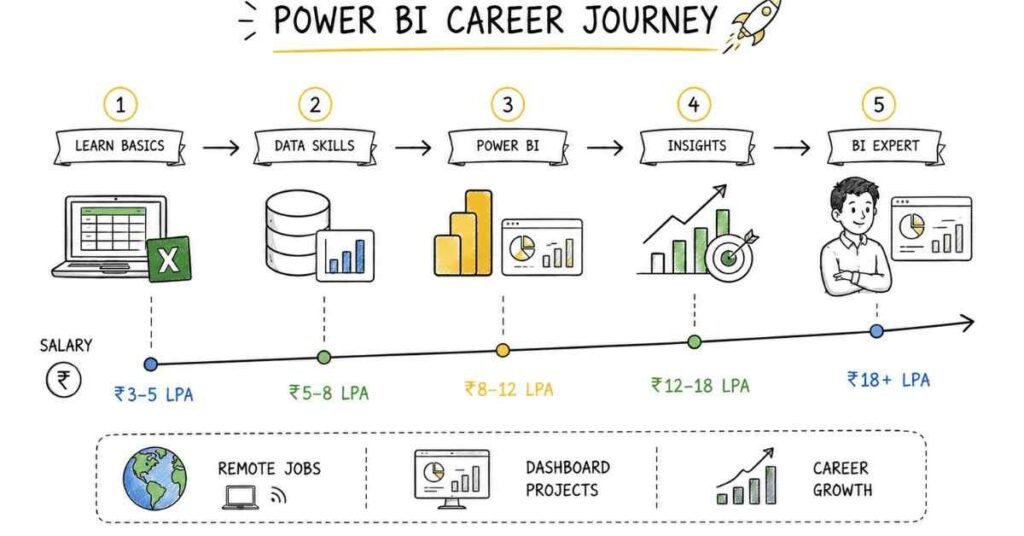
Table of Contents
Power BI developers help businesses turn raw data into interactive dashboards and decision-ready insights, which makes the role valuable across almost every industry. If you can learn Power BI, DAX, Power Query, data modeling, and dashboard design, you can build a strong analytics career in India with good salary growth and practical job opportunities. This guide shows you the exact roadmap to become job-ready in 2026, whether you are a fresher, a working professional, or someone moving into business intelligence.
What a Power BI Developer Does
A Power BI developer creates dashboards, reports, and data models that help teams track performance and make decisions faster. The job is a mix of data preparation, business understanding, and visualization.
In simple terms, a Power BI developer takes messy data, shapes it, connects it, and presents it in a way that managers and teams can easily understand.
Main responsibilities
- Connect data from multiple sources.
- Clean and transform data.
- Build data models.
- Write DAX formulas.
- Design interactive dashboards.
- Apply security rules and filters.
- Publish and maintain reports.
- Support business teams with insights.
Explore Power Bi All Resources
Why Power BI Is a Smart Career
Power BI is a smart career because companies want people who can convert data into useful stories quickly. Microsoft Power BI is widely used in reporting and analytics teams, especially in finance, operations, sales, and management reporting.
The role is also practical for beginners because you can start with Excel or SQL basics and then grow into Power BI development with real projects.
Why students choose it
- Strong demand in business analytics teams.
- Easy entry from Excel or MIS backgrounds.
- Good mix of technical and business work.
- Useful across many industries.
- Strong portfolio potential with dashboards.
Power BI Roles Compared
Power BI has several related career paths, depending on how deep your data and reporting skills are.
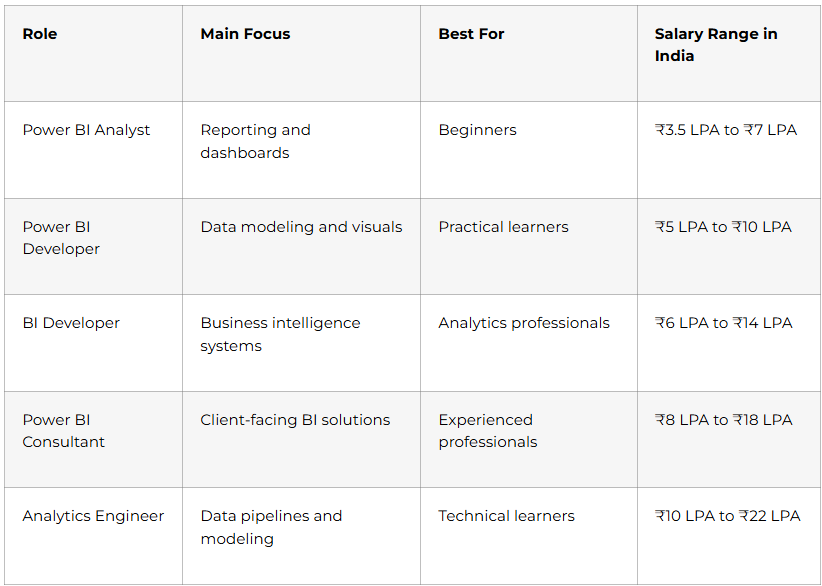
If you are starting out, Power BI development is a strong choice because it gives you quick, visible results and a clear path into analytics.
Learning Power Bi Roadmap →
Complete Learning Roadmap
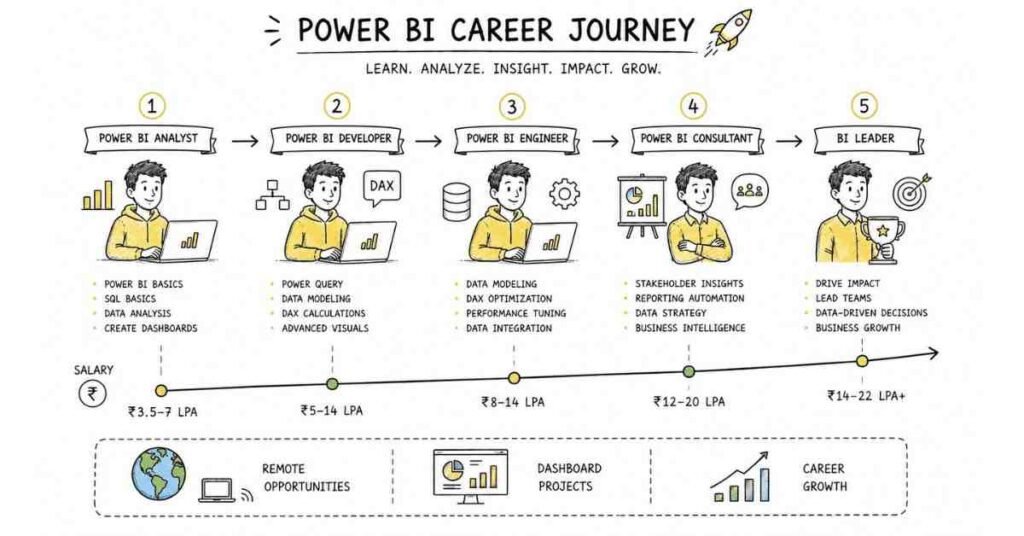
Phase 1: Analytics Foundations
Before learning Power BI tools, you need a solid understanding of data and reporting logic. This foundation helps you create dashboards that actually answer business questions.
Focus on:
- Business metrics and KPIs.
- Data types and structures.
- Basic statistics.
- Data quality concepts.
- Reporting logic.
- Problem solving with data.
- Visual storytelling.
Phase 2: Excel and SQL Basics
Most Power BI roles expect you to understand Excel and SQL. These two skills help you work with data before it reaches the dashboard.
Learn:
- Excel formulas and pivot tables.
- Data cleaning and formatting.
- SQL SELECT queries.
- WHERE, JOIN, GROUP BY, HAVING.
- Aggregations and filters.
- Data extraction logic.
Phase 3: Power BI Core
This is where you learn the actual platform. Power BI has several parts, and you should know how they work together.
Learn:
- Power BI Desktop.
- Power BI Service.
- Data import and connection.
- Report view and model view.
- Visuals and filters.
- Publishing dashboards.
- Workspaces and sharing.
Phase 4: Power Query and Data Modeling
Power Query is used to clean and transform data before it goes into the dashboard. Data modeling is what connects tables correctly so your reports work well.
Learn:
- Importing and shaping data.
- Merging and appending queries.
- Data type changes.
- Relationship building.
- Star schema basics.
- Fact and dimension tables.
- Model optimization.
Phase 5: DAX and Dashboard Logic
DAX is the formula language used in Power BI. It helps you build calculations, KPIs, and dynamic visuals.
Learn:
- Measures and calculated columns.
- SUM, COUNT, CALCULATE.
- Time intelligence.
- Filter context.
- Total and running calculations.
- Percentages and ratios.
- KPI logic.
Phase 6: Security and Deployment
A professional Power BI developer must know how to share reports safely and manage access correctly.
Learn:
- Row-level security.
- Workspace permissions.
- Report sharing.
- Refresh schedules.
- Gateway basics.
- Performance optimization.
- Publishing best practices.
Find Your Analytics Career Path →
DAX, Power Query, and Data Modeling
These are the three most important pillars of Power BI development.
DAX skills to master
- Basic measures.
- Conditional calculations.
- Time-based calculations.
- Percentage metrics.
- Dynamic filtering.
- Rank and comparison formulas.
Power Query skills to master
- Cleaning messy data.
- Changing data types.
- Removing duplicates.
- Combining tables.
- Splitting columns.
- Handling null values.
- Transforming CSV and Excel data.
Data modeling skills to master
- Relationships between tables.
- Star schema design.
- Fact and dimension tables.
- Optimized model structure.
- Better report performance.
Salary Expectations in India

Salary depends on your project experience, DAX knowledge, data modeling ability, and business understanding. People who can build complete BI solutions usually grow faster.
Experience Level | Typical Salary |
Fresher | ₹3.5 LPA to ₹5.5 LPA |
1–3 years | ₹5.5 LPA to ₹9 LPA |
3–5 years | ₹9 LPA to ₹14 LPA |
5+ years | ₹14 LPA to ₹22 LPA+ |
Professionals who combine Power BI with SQL, Excel, and cloud analytics tools often get better opportunities.
Prepare for Power BI Interviews →
Portfolio That Gets Interviews
A strong portfolio is one of the easiest ways to prove your Power BI ability. Employers want to see dashboards that solve real business problems.
What to include
- Sales dashboard.
- Finance KPI dashboard.
- HR attendance dashboard.
- Marketing performance report.
- Operations summary dashboard.
- Power Query transformation example.
- DAX-based metrics project.
Portfolio checklist
- Use clean layout and colors.
- Show the business question.
- Include data model screenshots.
- Explain the DAX measures used.
- Add filters and drill-downs.
- Keep the report interactive.
Job Search Strategy
A Power BI resume should clearly show reporting, dashboarding, and business intelligence skills. Employers want people who can create useful dashboards and explain the numbers.
Resume keywords
- Power BI
- DAX
- Power Query
- Data modeling
- Dashboards
- SQL
- Excel
- KPI reporting
- Row-level security
- Business intelligence
- Data visualization
Where to apply
- LinkedIn Jobs
- Naukri
- Indeed
- company career pages
- analytics teams
- MIS and reporting roles
- business intelligence roles
Interview preparation
Be ready to answer questions like:
- What is the difference between Power BI Desktop and Service?
- How do you use DAX measures?
- What is the purpose of Power Query?
- How do you build a star schema?
- What is row-level security?
- How do you improve dashboard performance?
30-Day Starter Plan
If you want to begin now, follow this simple plan.
Week 1
- Learn Power BI basics.
- Review Excel and SQL basics.
- Understand dashboards and KPIs.
- Explore sample reports.
Week 2
- Learn Power Query.
- Practice cleaning data.
- Build a simple report.
- Try basic visuals and filters.
Week 3
- Learn DAX fundamentals.
- Create measures.
- Build a KPI dashboard.
- Practice data modeling.
Week 4
- Add row-level security basics.
- Finish one portfolio project.
- Update your resume and LinkedIn.
- Start applying for jobs.
Why Learn Power BI at Frontlines Edutech
Frontlines Edutech is a practical choice for students and working professionals who want structured learning, regional support, and career-focused training. The best programs combine Excel, SQL, Power BI, DAX, Power Query, and project-based learning in a way that makes job readiness realistic.
What to look for in training
- Strong Excel and SQL foundation.
- Power Query and DAX practice.
- Dashboard and reporting projects.
- Data modeling exposure.
- Resume and interview support.
- Regional-language explanation if needed.
Frequently Asked Questions
How long does it take to become a Power BI developer?
It usually takes 3 to 6 months of consistent learning to become job-ready, depending on your background and how much practical project work you complete.
Is Power BI a good career in India?
Yes, it is a strong career because every company needs reporting and dashboarding support for decision making.
Which skill should I learn first?
Start with Excel and SQL basics. After that, move into Power BI Desktop, Power Query, and DAX.
Do I need coding to become a Power BI developer?
You do not need advanced coding, but DAX and basic SQL are essential. They help you build better reports and calculations.
What is the best specialization for beginners?
Power BI reporting and dashboarding is the best starting point. It gives you visible, practical results quickly.
Can I get a job without experience?
Yes, if you have practical dashboards, a clean resume, and a good understanding of DAX and Power Query. Internships and portfolio work can help a lot.
Which tools should I learn first?
Start with Excel, SQL, Power BI Desktop, Power Query, and basic DAX. Then move into modeling and performance tuning.
Is Power BI remote-friendly?
Yes, many Power BI and BI roles are remote-friendly because the work is digital and can be shared online.
What kind of projects should I show in interviews?
Show sales, finance, HR, or operations dashboards with clean visuals and DAX measures. Employers want to see that you can turn data into decisions.