Power BI + SQL: Your Complete 90-Day Career Transformation Roadmap

Starting a career in data analytics feels overwhelming when you’re staring at job postings asking for “2+ years of Power BI experience” and you haven’t even opened the software yet. That’s exactly why Frontlines Edutech created this structured 90-day program—to take you from absolute beginner to job-ready professional, no matter your background.

This isn’t just another course that dumps information on you and wishes you good luck. Every single day of these 90 days has been carefully planned by industry experts who understand what companies actually look for when hiring data analysts. Whether you’re a fresh graduate, someone switching careers, or a working professional looking to upskill, this roadmap will guide you step-by-step toward landing your dream data analyst role.

💡 New to data analytics?

Start with beginner-friendly data basics & BI step-by-step guides.
Why Power BI + SQL Skills Are Your Ticket to Career Success

The demand for Power BI professionals has exploded across major Indian cities like Bangalore, Hyderabad, Pune, Mumbai, Chennai, Gurgaon, and Noida. Companies like Infosys, TCS, Accenture, Wipro, Cognizant, Capgemini, IBM, and KPMG are actively hiring data analysts who can transform raw data into actionable business insights.

Here’s the reality: businesses today are drowning in data but starving for insights. They need people who can connect to databases using SQL, pull the right information, clean it up, and then create beautiful, interactive dashboards in Power BI that help executives make million-dollar decisions. That person could be you in just 90 days.

The best part? You don’t need a computer science degree or years of coding experience. This course is specifically designed for beginners and non-IT students who want to break into the data analytics field.

What Makes This 90-Day Program Different?

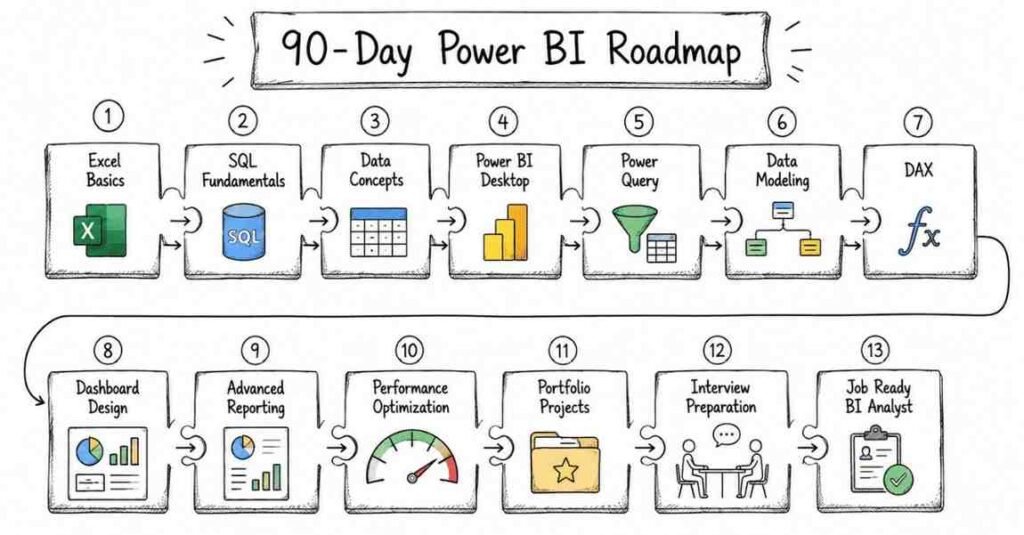
Power bi 90 days roadmap

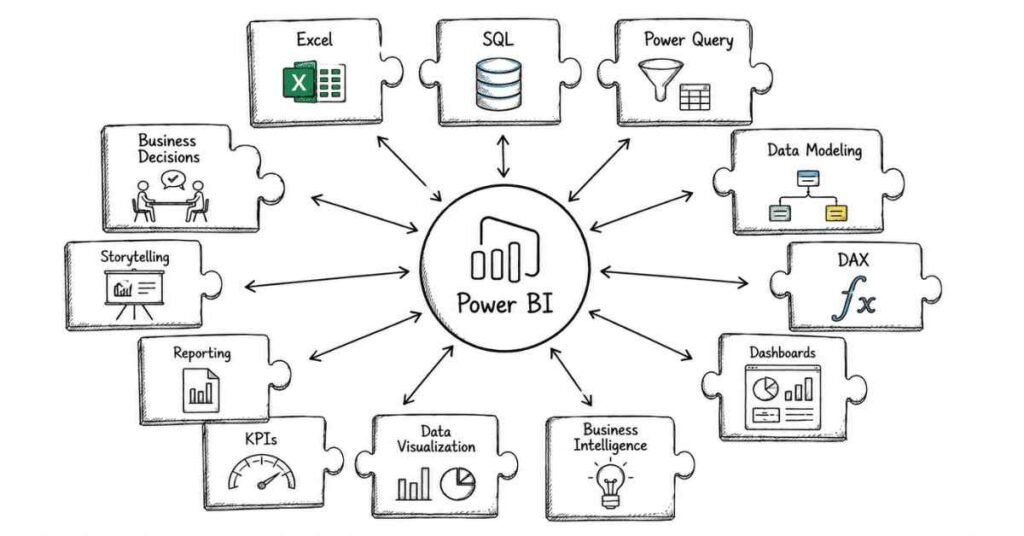
 Most online courses teach you tools in isolation—you learn Power BI in one course, SQL in another, and then you’re left wondering how to actually use them together in real projects. At Frontlines Edutech, the curriculum integrates both technologies from day one, showing you exactly how SQL and Power BI work together in professional settings.

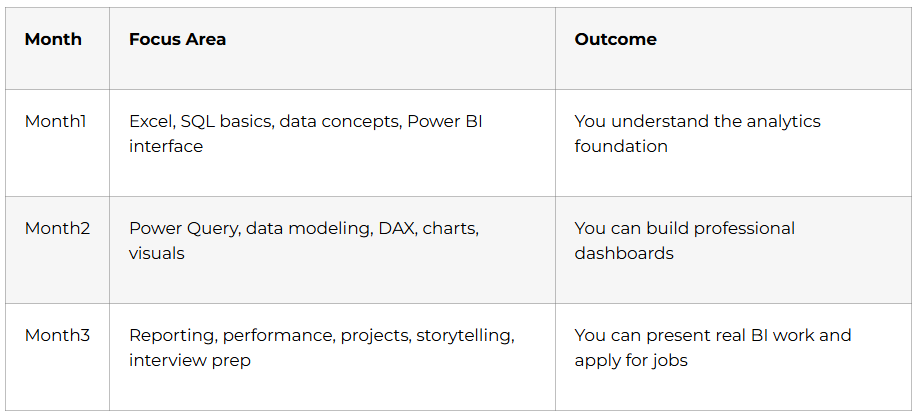
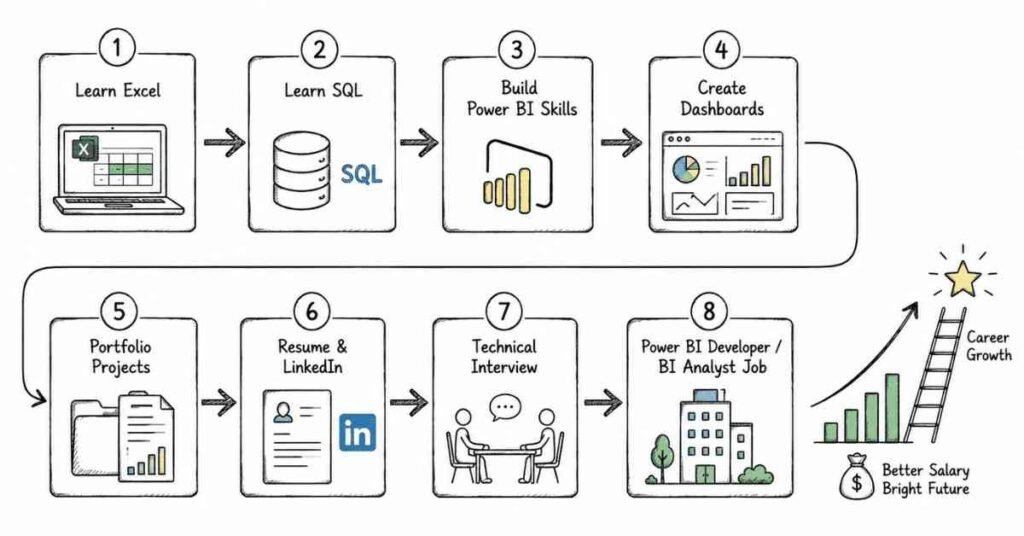
You’ll start with the absolute basics—installing software, understanding terminology, and building your first simple reports. By week 4, you’ll be writing intermediate SQL queries and creating multi-page Power BI dashboards. By week 8, you’ll be working with advanced DAX functions and optimization techniques that even some working professionals don’t know. And by the end of 90 days, you’ll have a portfolio of real-world projects that prove you can do the job.

But technical skills alone won’t land you a job. That’s why this roadmap includes dedicated sections on LinkedIn profile optimization, resume building, job search strategies, and interview preparation. You’ll learn exactly how to position yourself as a strong candidate, even without prior work experience.

🎓 Download checklists, cheat sheets & beginner resources for an easier start.

Phase 1: Foundation Building (Days 1-30)

The first month focuses on establishing a solid foundation in both SQL and Power BI basics. Think of this phase as building the ground floor of your data analytics house—everything else will stand on this foundation.

month 1 foundations in powerbi
Week 1: Getting Started & Environment Setup (Days 1-7)

Day 1: Welcome to the Data Analytics World

  • Understanding what data analysts actually do in companies
  • Overview of the Business Intelligence ecosystem
  • Introduction to Frontlines Edutech’s learning methodology
  • Installing Power BI Desktop (completely free software)
  • Setting up SQL Server Management Studio (SSMS)

Day 2: Your First Power BI Experience

  • Exploring the Power BI Desktop interface
  • Understanding ribbons, panes, and visualization options
  • Power BI terminology: datasets, reports, dashboards, and workspaces
  • Power BI licensing models explained in simple terms
  • Hands-on: Creating your very first visualization (even without data knowledge)

Day 3: Introduction to Databases & SQL

  • What is a database and why do businesses use them?
  • Understanding relational databases in everyday language
  • OLTP vs OLAP: The difference between transaction and analysis databases
  • Data warehouse fundamentals for beginners
  • Creating your first database in SSMS

Day 4: SQL Basics – Your First Queries

  • What is SQL and why is it the language of data?
  • Understanding DDL vs DML commands (without the jargon)
  • SQL data types explained with real-world examples
  • Writing your first SELECT statement
  • Practice: Retrieving data from sample databases

Day 5: Power BI Data Connectivity

  • Connecting Power BI to different data sources
  • Understanding import vs DirectQuery modes
  • Loading your first dataset into Power BI
  • Introduction to Power Query Editor
  • Hands-on: Connecting Power BI to Excel and SQL Server

Day 6: Basic SQL Operations

  • CREATE, ALTER, and DROP table commands
  • INSERT, UPDATE, DELETE statements
  • Understanding WHERE clause for filtering data
  • Practice exercises with sample datasets
  • Daily assignment: Building a simple employee database

Day 7: Week 1 Review & Mini Project

  • Review of all concepts learned in Week 1
  • Guided mini-project: Creating a simple sales report combining SQL and Power BI
  • Q&A session addressing common beginner doubts
  • Setting up your learning journal (tracking progress builds confidence)
📘 Practice hands-on — download sample databases, Power BI PBIX files & SQL scripts.
Week 2: Data Transformation & Cleaning (Days 8-14)
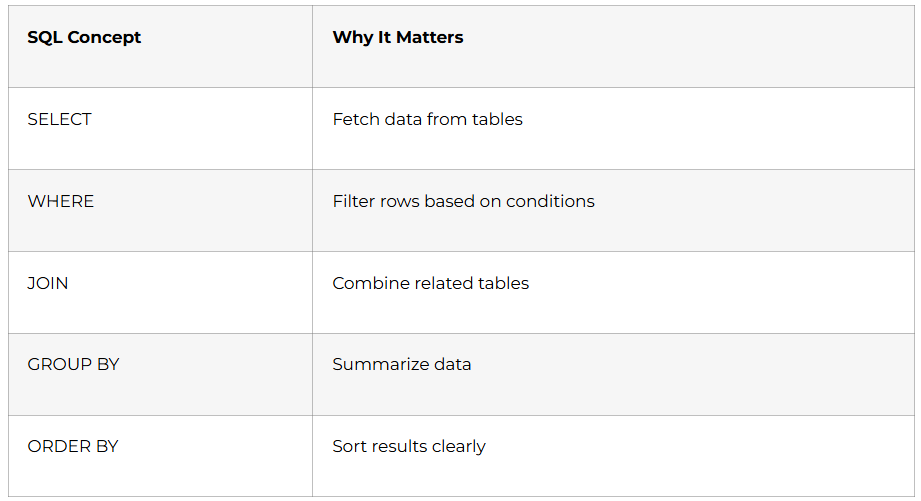
Sql in power bi

Day 8: Power Query Editor Deep Dive

  • Understanding the importance of data cleaning
  • Power Query Editor interface and functionality
  • Removing duplicates and handling blank rows
  • Column operations: splitting, merging, and renaming
  • Hands-on: Cleaning a messy customer dataset

Day 9: SQL Filtering & Sorting Techniques

  • Advanced WHERE clause techniques
  • Using AND, OR, NOT operators effectively
  • BETWEEN, IN, and LIKE operators explained
  • ORDER BY for sorting query results
  • Practice: Writing complex filtering queries

Day 10: Data Type Transformations in Power BI

  • Understanding data types: text, numbers, dates, and boolean
  • Converting data types in Power Query
  • Handling date and time formats
  • Error handling during transformation
  • Assignment: Transforming an unstructured dataset

Day 11: SQL Aggregate Functions

  • COUNT, SUM, AVG, MIN, MAX functions explained
  • GROUP BY clause for summarizing data
  • HAVING clause vs WHERE clause
  • Real-world business use cases for aggregations
  • Practice: Sales analysis queries using aggregations

Day 12: Advanced Power Query Transformations

  • Pivoting and unpivoting data
  • Creating custom columns with simple logic
  • Conditional column creation
  • Replacing values and filling down/up
  • Hands-on: Restructuring a quarterly sales report

Day 13: SQL String Functions

  • CONCAT, SUBSTRING, REPLACE, and LENGTH functions
  • Text manipulation for cleaning data
  • UPPER, LOWER, and TRIM functions
  • Combining string functions with SELECT statements
  • Assignment: Cleaning and standardizing customer names

Day 14: Week 2 Project & Assessment

  • Comprehensive project: E-commerce data cleaning and preparation
  • Using both Power Query and SQL for data transformation
  • Building a clean dataset ready for visualization
  • Self-assessment quiz on Week 1-2 concepts
  • Peer review session (if in group learning)
🧠 Master cleanup techniques quickly with our step-by-step How-to tutorials.
Week 3: Data Modeling & Relationships (Days 15-21)
data modeling with powerbi+sql

Day 15: Introduction to Data Modeling

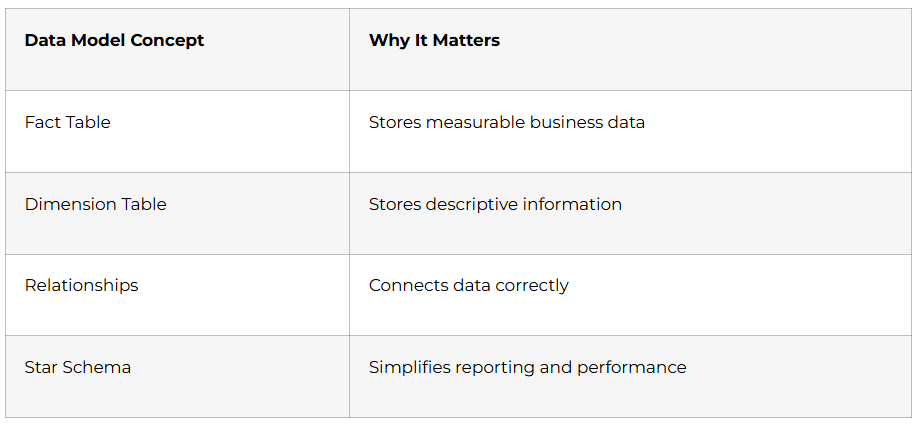
  • What is data modeling and why does it matter?
  • Star schema vs Snowflake schema explained simply
  • Fact tables and dimension tables in real business scenarios
  • Understanding normalization basics
  • Exploring sample data models

Day 16: SQL Joins – Connecting Multiple Tables

  • Understanding why we need joins
  • INNER JOIN explained with practical examples
  • LEFT JOIN and RIGHT JOIN use cases
  • FULL OUTER JOIN scenarios
  • Practice: Joining customer, order, and product tables

Day 17: Creating Relationships in Power BI

  • Building your first data model in Power BI
  • Understanding one-to-many and many-to-many relationships
  • Active vs inactive relationships
  • Cross-filtering direction explained
  • Hands-on: Creating a sales data model

Day 18: Advanced SQL Joins & Set Operations

  • SELF JOIN for hierarchical data
  • UNION and UNION ALL operators
  • INTERSECT and EXCEPT operations
  • Subqueries in SELECT statements
  • Assignment: Complex multi-table join scenarios

Day 19: Data Cardinality & Model Optimization

  • Understanding cardinality in relationships
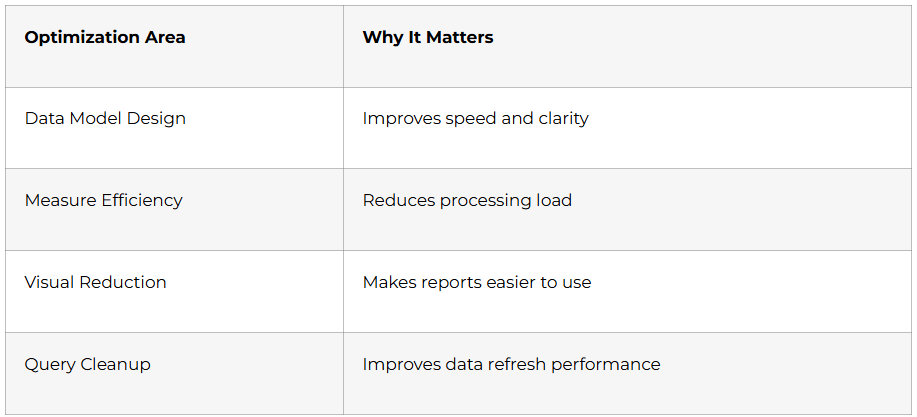
  • Best practices for efficient data models
  • Avoiding circular relationships
  • Hiding columns and organizing tables
  • Performance implications of poor modeling

Day 20: SQL Practice Day

  • Dedicated practice session with 20+ SQL challenges
  • Covering all topics from Weeks 1-3
  • Time-bound exercises simulating interview scenarios
  • Reviewing common mistakes and solutions
  • Building SQL query writing speed

Day 21: Week 3 Project – Building a Complete Data Model

  • Project: Retail store analysis database
  • Writing SQL queries to extract data
  • Creating a comprehensive Power BI data model
  • Establishing all necessary relationships
  • Documentation and best practices
Week 4: Visualization Basics & DAX Introduction (Days 22-30)

Day 22: Introduction to Data Visualization

  • Principles of effective data visualization
  • Choosing the right chart for your data
  • Common visualization mistakes to avoid
  • Power BI visualization types overview
  • Creating your first bar, line, and pie charts

Day 23: Building Your First Power BI Dashboard

  • Designing a simple single-page dashboard
  • Using cards, charts, and tables effectively
  • Formatting visuals for better readability
  • Adding titles, labels, and legends
  • Hands-on: Personal expense tracker dashboard

Day 24: Introduction to DAX (Data Analysis Expressions)

  • What is DAX and why is it powerful?
  • Calculated columns vs measures: the crucial difference
  • Writing your first simple DAX formulas
  • SUM, AVERAGE, COUNT, and COUNTROWS functions
  • Practice: Creating basic calculated measures

Day 25: Slicers, Filters, and Interactivity

  • Adding slicers for data filtering
  • Understanding filter hierarchy: visual, page, and report levels
  • Cross-filtering and cross-highlighting behavior
  • Sync slicers across multiple pages
  • Assignment: Interactive sales dashboard with filters

Day 26: DAX Time Intelligence Functions

  • Working with date tables in Power BI
  • TOTALYTD, TOTALQTD, TOTALMTD functions
  • SAMEPERIODLASTYEAR and date comparison functions
  • Year-over-year and month-over-month calculations
  • Real-world application: Trend analysis dashboard

Day 27: Formatting and Conditional Formatting

  • Color schemes and branding in dashboards
  • Conditional formatting based on rules
  • Data bars, color scales, and icons
  • Custom formatting expressions
  • Creating visually appealing, professional reports

Day 28: Tables and Matrix Visuals

  • When to use tables vs matrix
  • Adding subtotals and grand totals
  • Conditional formatting in tables
  • Column and row hierarchies
  • Hands-on: Financial summary report

Day 29: Comprehensive Review Session

  • Complete review of Days 1-28
  • Identifying knowledge gaps and addressing them
  • Practice quiz covering all topics
  • Q&A session with instructor
  • Setting goals for Phase 2

Day 30: Month 1 Capstone Project

  • Major project: Complete business dashboard from scratch
  • SQL database creation and data extraction
  • Power BI data modeling and relationship building
  • Creating multiple visualizations with DAX measures
  • Presenting your first portfolio-worthy project
  • Feedback and improvement suggestions
🎨 Build stunning dashboards—Download templates, color palettes & visualization kits.
Phase 2: Intermediate Mastery (Days 31-60)

The second month transforms you from a beginner who understands concepts into a practitioner who can solve real business problems independently. This phase introduces advanced SQL techniques, complex DAX formulas, and professional-level dashboard design principles.

Week 5: Advanced DAX & Calculations (Days 31-37)
Visualization Basics & DAX Introduction

Day 31: DAX Filter Context Deep Dive

  • Understanding row context vs filter context (the foundation of DAX mastery)
  • How CALCULATE function changes filter context
  • ALL, ALLSELECTED, and ALLEXCEPT functions explained
  • Creating context-aware measures for dynamic calculations
  • Hands-on: Building year-to-date calculations with proper context

Day 32: Advanced SQL Subqueries

  • Subqueries in WHERE, FROM, and SELECT clauses
  • Correlated vs non-correlated subqueries
  • EXISTS and NOT EXISTS operators
  • ANY and ALL operators with subqueries
  • Practice: Writing nested queries for complex business logic

Day 33: DAX Iterator Functions

  • SUMX, AVERAGEX, COUNTX, and other X-family functions
  • Row-by-row calculations explained simply
  • When to use iterators vs aggregators
  • Performance considerations with iterator functions
  • Assignment: Product margin analysis with SUMX

Day 34: SQL Common Table Expressions (CTEs)

  • What are CTEs and why they make queries readable
  • WITH clause syntax and usage
  • Recursive CTEs for hierarchical data
  • Multiple CTEs in a single query
  • Real-world example: Employee hierarchy queries

Day 35: DAX Table Functions

  • FILTER, CALCULATETABLE, and VALUES functions
  • Creating virtual tables for calculations
  • SUMMARIZE and SUMMARIZECOLUMNS
  • Using table functions with iterator functions
  • Project: Customer segmentation analysis

Day 36: Advanced SQL Window Functions

  • ROW_NUMBER, RANK, and DENSE_RANK explained
  • LEAD and LAG functions for time series analysis
  • Partition by and order by in window functions
  • Running totals and moving averages
  • Practice: Sales ranking and trend analysis queries

Day 37: Week 5 Integration Project

  • Combined project using advanced DAX and SQL
  • Building a profitability dashboard with complex calculations
  • SQL queries pulling transactional data
  • DAX measures for margins, growth rates, and rankings
  • Performance optimization techniques applied
📊 Learn complex concepts easily—Follow advanced DAX & SQL problem-solving guides.
Week 6: Advanced Visualizations & Reporting (Days 38-44)
visualization in power bi

Day 38: Custom Visuals and Marketplace

  • Exploring Power BI AppSource for custom visuals
  • Installing and configuring third-party visuals
  • Popular visuals: Chiclet Slicer, Timeline Slicer, Word Cloud
  • When custom visuals add value vs unnecessary complexity
  • Hands-on: Enhancing your dashboard with custom visuals

Day 39: SQL Views and Stored Procedures

  • Creating and using SQL views for reusability
  • Benefits of views in complex databases
  • Introduction to stored procedures
  • Parameters in stored procedures
  • Assignment: Building reusable database objects

Day 40: Advanced Chart Types in Power BI

  • Waterfall charts for variance analysis
  • Funnel charts for process visualization
  • Scatter plots and bubble charts for correlation analysis
  • Ribbon charts for ranking over time
  • Project: Executive summary dashboard with mixed chart types

Day 41: SQL Indexes and Performance Optimization

  • Understanding clustered vs non-clustered indexes
  • When and how to create indexes
  • Query execution plans explained
  • Identifying and fixing slow queries
  • Best practices for database performance

Day 42: Drill-Through and Tooltip Pages

  • Creating drill-through pages for detailed analysis
  • Configuring drill-through filters and actions
  • Building custom tooltip pages
  • Interactive report design patterns
  • Hands-on: Multi-level drill-down sales report

Day 43: SQL Transactions and Data Integrity

  • Understanding ACID properties
  • BEGIN TRANSACTION, COMMIT, and ROLLBACK
  • Error handling with TRY…CATCH
  • Maintaining data consistency
  • Practice: Transaction-based data operations

Day 44: Week 6 Project – Interactive Analytics Dashboard

  • Comprehensive project: Retail analytics dashboard
  • Multiple pages with drill-through functionality
  • Advanced DAX measures for KPIs
  • SQL stored procedures for data extraction
  • Custom visuals and interactive elements
⚙️ Optimize dashboards like a pro—Access performance tuning checklist & guides.
Week 7: Power BI Service & Collaboration (Days 45-51)
sql data set in power bi

Day 45: Introduction to Power BI Service

  • Power BI Desktop vs Power BI Service differences
  • Publishing your first report to the cloud
  • Workspaces: personal, shared, and app workspaces
  • Understanding Power BI licensing (Free, Pro, Premium)
  • Navigating the Power BI Service interface

Day 46: Advanced SQL – Pivot and Unpivot

  • PIVOT operator for cross-tabulation
  • UNPIVOT for normalizing data
  • Dynamic pivot queries
  • Real-world business reporting scenarios
  • Assignment: Creating pivot tables in SQL

Day 47: Power BI Dashboards Creation

  • Dashboard vs Report: key differences explained
  • Pinning visuals from multiple reports
  • Dashboard tiles and real-time data
  • Mobile layout optimization
  • Creating an executive dashboard from multiple sources

Day 48: SQL Data Import/Export Techniques

  • Bulk insert operations
  • Export data to CSV and Excel
  • SSIS basics (SQL Server Integration Services)
  • Automating data transfer processes
  • Hands-on: Automated data refresh pipeline

Day 49: Sharing and Collaboration in Power BI

  • Sharing reports and dashboards with colleagues
  • Row-level security (RLS) implementation
  • Creating and publishing Power BI Apps
  • Managing permissions and access control
  • Best practices for team collaboration

Day 50: Gateway Configuration and Scheduled Refresh

  • Understanding the Power BI Gateway
  • Installing and configuring personal gateway
  • Setting up scheduled data refresh
  • Troubleshooting refresh failures
  • Maintaining up-to-date dashboards automatically

Day 51: Week 7 Capstone – Enterprise Dashboard

  • Major project: Company-wide KPI dashboard
  • Published to Power BI Service with proper security
  • Scheduled refresh configured
  • Shared with stakeholders through app workspace
  • Documentation and user guide creation
Week 8: Advanced Analytics & Optimization (Days 52-60)

Day 52: Advanced SQL Analytics Functions

  • PERCENT_RANK and CUME_DIST for percentile calculations
  • NTILE for quartile analysis
  • FIRST_VALUE and LAST_VALUE functions
  • Advanced analytical scenarios
  • Practice: Customer lifetime value analysis

Day 53: DAX Variables and Performance

  • Using VAR keyword for readable DAX code
  • Performance benefits of DAX variables
  • Debugging complex DAX formulas
  • Best practices for DAX optimization
  • Refactoring existing measures for efficiency

Day 54: Power BI Performance Analyzer

  • Using Performance Analyzer tool
  • Identifying bottleneck visualizations
  • Query reduction strategies
  • DAX query performance optimization
  • Report-level performance improvements

Day 55: Advanced SQL Programming

  • User-defined functions (UDF) in SQL
  • Triggers for automatic actions
  • Cursors (when and when not to use them)
  • Dynamic SQL statements
  • Assignment: Building advanced database logic

Day 56: Power BI Parameters and What-If Analysis

  • Creating and using parameters
  • What-If parameters for scenario modeling
  • Field parameters for dynamic axis selection
  • Disconnected tables for parameter implementation
  • Project: Sales forecasting with scenarios

Day 57: SQL Security and User Management

  • User roles and permissions
  • GRANT and REVOKE statements
  • Schema-level security
  • Best practices for production databases
  • Hands-on: Implementing database security

Day 58: DAX Studio and External Tools

  • Installing and using DAX Studio
  • Query performance analysis
  • Server timing breakdowns
  • Optimizing DAX with external tools
  • Advanced troubleshooting techniques

Day 59: Comprehensive Review and Q&A

  • Complete review of Phase 2 (Days 31-58)
  • Practice assessment covering all intermediate topics
  • Common mistakes and how to avoid them
  • Deep-dive Q&A addressing student questions
  • Preparing for Phase 3 advanced topics

Day 60: Phase 2 Capstone Project

  • Major milestone project: End-to-end business intelligence solution
  • SQL database design and optimization
  • Complex DAX calculations and KPIs
  • Professional multi-page Power BI report
  • Published to service with security and scheduled refresh
  • Portfolio presentation-ready project
advanced Analytics & Optimization
Phase 3: Advanced Professional Skills(Days 61-90)

The final month transforms you into a job-ready professional. This phase covers advanced Power BI features, real-world project scenarios, and most importantly—career preparation activities that directly lead to job placement.

Week 9: Advanced Techniques & AI Features (Days 61-67)

Day 61: AI-Powered Visuals in Power BI

  • Key Influencers visual for root cause analysis
  • Decomposition Tree for drill-down exploration
  • Q&A visual for natural language queries
  • Anomaly detection in line charts
  • Hands-on: Building intelligent dashboards with AI visuals

Day 62: Advanced SQL Data Modeling

  • Dimensional modeling best practices
  • Slowly Changing Dimensions (SCD Types 1, 2, 3)
  • Fact constellation schemas
  • Data warehouse design patterns
  • Project: Designing a complete data warehouse schema

Day 63: Power BI Composite Models

  • DirectQuery vs Import mode comparison
  • Creating composite models for large datasets
  • Aggregations for performance optimization
  • Best practices for hybrid models
  • Real-world implementation scenarios

Day 64: Advanced Analytical SQL

  • Time series analysis with SQL
  • Cohort analysis queries
  • RFM (Recency, Frequency, Monetary) segmentation
  • Statistical calculations in SQL
  • Practice: Customer behavior analysis

Day 65: Power BI Paginated Reports

  • Introduction to paginated reports (SSRS-style)
  • When to use paginated vs Power BI reports
  • Report Builder basics
  • Creating pixel-perfect invoices and statements
  • Assignment: Invoice template creation

Day 66: Row-Level Security Advanced Implementation

  • Dynamic row-level security with username()
  • Role testing and validation
  • Organization hierarchy security models
  • Troubleshooting RLS issues
  • Hands-on: Multi-level security implementation

Day 67: Week 9 Integration Project

  • Advanced analytics project combining all Week 9 topics
  • Data warehouse connection with proper security
  • AI-powered visuals for predictive insights
  • Composite model for optimal performance
  • Professional presentation-ready dashboard
🤖 AI-powered BI is the future—Learn with guided step-by-step tutorials.
Week 10: Real-World Projects & Portfolio Building (Days 68-74)
power bi portfolio building

Day 68: Industry Project 1 – Retail Analytics

  • Complete retail business scenario
  • Sales performance, inventory management, customer analytics
  • Multiple data sources integration
  • Complex DAX calculations for retail metrics
  • Building a comprehensive retail dashboard

Day 69: Industry Project 2 – Financial Reporting

  • Profit & Loss statement visualization
  • Balance sheet dashboards
  • Cash flow analysis
  • Financial KPIs and variance analysis
  • Creating board-ready financial reports

Day 70: Industry Project 3 – HR Analytics

  • Employee demographics and diversity metrics
  • Attrition analysis and prediction
  • Recruitment funnel visualization
  • Performance management dashboards
  • HR scorecard implementation

Day 71: Industry Project 4 – Marketing Analytics

  • Campaign performance tracking
  • Customer acquisition cost (CAC) analysis
  • Marketing ROI calculations
  • Social media and digital marketing metrics
  • Building marketing attribution dashboards

Day 72: Industry Project 5 – Healthcare Analytics

  • Patient flow and bed occupancy analysis
  • Clinical outcomes visualization
  • Resource utilization dashboards
  • Compliance and quality metrics
  • Healthcare KPI tracking system

Day 73: Portfolio Website Creation

  • Showcasing your Power BI projects online
  • Creating a GitHub repository for SQL scripts
  • Building a simple portfolio website (using free tools)
  • Writing project descriptions that impress recruiters
  • Best practices for displaying your work

Day 74: Project Documentation & Presentation Skills

  • Writing technical documentation for your projects
  • Creating PowerPoint presentations explaining your work
  • Storytelling with data – explaining insights effectively
  • Recording video walkthroughs of your dashboards
  • Preparing for project-based interviews
Week 11: LinkedIn & Resume Optimization (Days 75-81)

Day 75: LinkedIn Profile Transformation

  • Creating a powerful headline for data analysts
  • Writing an achievement-focused summary (not just responsibilities)
  • Adding Power BI and SQL skills with endorsements
  • Showcasing projects with visuals and links
  • Optimizing your profile for recruiter searches

Day 76: Building Your Data Analyst Resume

  • Resume structure for data analyst roles
  • Quantifying achievements with metrics
  • Power BI and SQL skills section
  • Project descriptions that stand out
  • ATS-friendly formatting for applicant tracking systems

Day 77: Creating a Compelling Cover Letter

  • Cover letter template for data analyst positions
  • Customizing for each job application
  • Highlighting relevant projects and skills
  • Demonstrating enthusiasm and cultural fit
  • Common mistakes to avoid

Day 78: Job Search Strategy & Platforms

  • Top job portals: Naukri, LinkedIn Jobs, Indeed, Glassdoor
  • Setting up job alerts effectively
  • Company research and target list creation
  • Networking strategies for job seekers
  • Understanding the hidden job market

Day 79: LinkedIn Content Strategy for Job Seekers

  • Posting about your learning journey
  • Sharing Power BI tips and SQL snippets
  • Engaging with data analytics community
  • Building connections with recruiters and hiring managers
  • Growing your professional network authentically

Day 80: Cold Outreach & Networking

  • Writing effective cold messages to recruiters
  • Connecting with employees at target companies
  • Informational interview requests
  • Following up professionally
  • Building long-term professional relationships

Day 81: Personal Branding as a Data Analyst

  • Establishing yourself as a data professional
  • Consistent online presence across platforms
  • Sharing insights and learnings publicly
  • Building credibility through demonstrations
  • Long-term career positioning
Week 12: Interview Preparation & Job Readiness (Days 82-90)
Power bi interview preparation and job ready ness

Day 82: Technical Interview Preparation – SQL

  • Top 50 SQL interview questions practiced
  • Live coding SQL challenges
  • Explaining query logic to interviewers
  • Time management in technical tests
  • Common SQL interview patterns

Day 83: Technical Interview Preparation – Power BI

  • Top 50 Power BI interview questions
  • Walking through your dashboard projects
  • Explaining DAX formulas clearly
  • Troubleshooting scenarios in interviews
  • Demonstrating problem-solving approach 

Day 84: Behavioral Interview Preparation

  • STAR method for answering behavioral questions
  • Common behavioral questions for data analysts
  • Preparing your professional stories
  • Handling difficult questions about gaps or lack of experience
  • Mock interview practice session

Day 85: Case Study Interview Preparation

  • Business case analysis approach
  • Thinking aloud during problem-solving
  • Asking clarifying questions effectively
  • Structuring your analysis presentation
  • Practice case studies from real companies

Day 86: Live Project Interview & Assignment Preparation

  • Take-home assignment best practices
  • Time management for timed assessments
  • Delivering quality work under pressure
  • Presenting your solution professionally
  • Follow-up communication strategies

Day 87: Salary Negotiation & Offer Evaluation

  • Researching market rates for data analysts
  • Negotiation strategies for freshers
  • Understanding CTC breakup and benefits
  • Evaluating multiple job offers
  • Making informed career decisions

Day 88: Final Technical Assessment

  • Comprehensive technical test covering all topics
  • SQL query writing challenge (20 questions)
  • Power BI dashboard creation from scratch (timed)
  • Performance evaluation and feedback
  • Identifying areas for continued improvement

Day 89: Mock Interviews with Feedback

  • Full mock interview simulation
  • Technical round with SQL and Power BI questions
  • Behavioral round with STAR responses
  • HR round discussion
  • Detailed feedback and improvement suggestions

Day 90: Graduation & Career Launch

  • Course completion celebration
  • Final project presentations
  • Certificate of completion from Frontlines Edutech
  • Job search action plan finalization
  • Ongoing support and alumni network introduction
🧠 Master Power BI + SQL interviews—Explore 150+ interview questions & real scenarios.
Phase 4:Career Support Modules Throughout the 90 Days

Beyond the technical curriculum, Frontlines Edutech provides integrated career support that runs parallel to your learning:

Resume Building Workshops

Starting from Week 2, dedicated sessions help you build an ATS-optimized resume highlighting your growing Power BI and SQL skills. Each project you complete gets added to your resume with quantified achievements and business impact statements.

LinkedIn Profile Optimization

From Week 4 onwards, personalized LinkedIn profile reviews ensure your online presence attracts recruiter attention. Learn how to use keywords effectively, write compelling project descriptions, and build a network in the data analytics community.

Daily Assignments & Practice

Every single day includes hands-on assignments that reinforce learning. These aren’t just academic exercises—they’re real business scenarios similar to what you’ll encounter in interviews and actual jobs.

Interview Guidance Sessions

Weekly Q&A sessions address common interview questions, both technical and behavioral. Mock interviews starting from Week 10 ensure you’re comfortable explaining your work and demonstrating your skills under pressure.

Placement Updates & Job Alerts

Throughout the 90 days, receive regular updates about job openings specifically for Power BI and SQL roles. Frontlines Edutech’s corporate partnerships mean you get access to opportunities not always posted publicly.

Phase 5: Why Frontlines Edutech's Approach Works

Unlike generic online courses that leave you alone after video lectures, Frontlines Edutech provides comprehensive support at every step. Here’s what makes this program unique:

Industry-Relevant Curriculum

The syllabus is designed by professionals currently working in data analytics roles at top companies. Every topic covered has direct relevance to what employers actually need, not just theoretical knowledge.

Hands-On, Project-Based Learning

You don’t just watch demonstrations—you build real projects from day one. By Day 90, your portfolio includes retail analytics, financial reporting, HR dashboards, marketing analytics, and healthcare projects. These aren’t toy datasets; they’re industry-standard scenarios that prove you can handle real work.

Affordable & Transparent Pricing

Quality education shouldn’t cost a fortune. Frontlines Edutech offers this comprehensive 90-day program at a fraction of what other institutions charge, with completely transparent pricing and no hidden fees.

Beginner-Friendly Approach

If you’re worried about your non-technical background, don’t be. The course starts from absolute scratch, assuming zero prior knowledge. Every concept is explained in simple language with real-world examples that anyone can understand.

Certificate of Completion

Upon finishing the 90-day program, you receive a course completion certificate from Frontlines Edutech. More importantly, you have a portfolio of projects and proven skills that demonstrate your capabilities to potential employers.

Post-Course Support

The relationship doesn’t end on Day 90. Alumni continue receiving placement updates, interview opportunities, and ongoing mentorship as they navigate their early career. The Frontlines Edutech community becomes your professional network.

Real-World Career Outcomes: Where You’ll Be After 90 Days

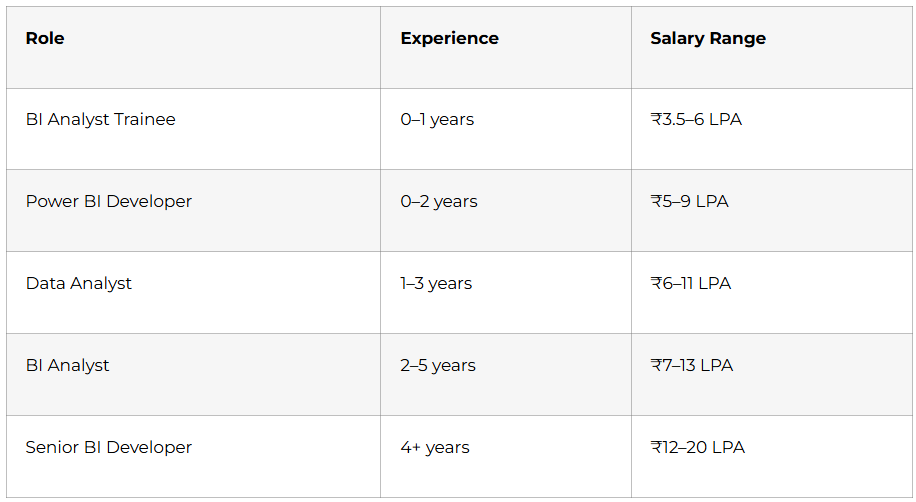
After completing this intensive program, you’ll be qualified for multiple entry-level positions across technology, analytics, consulting, and business sectors:

Data Analyst Roles

Analyze business data, create dashboards, and provide insights to stakeholders using Power BI and SQL. Expected salary range: ₹3-6 LPA for freshers in major metros.

Business Intelligence Analyst

Design and maintain BI solutions, develop reporting frameworks, and support decision-making processes. Companies across sectors actively hire BI analysts with Power BI expertise.

Reporting Analyst

Build and maintain regular business reports, automate reporting processes, and ensure data accuracy. Perfect for those who enjoy creating structured, repeatable analytical solutions.

Junior Power BI Developer

Focus specifically on Power BI development, creating custom visuals, optimizing performance, and implementing advanced features. Specialized role with growth potential into senior developer positions.

SQL Database Analyst

Support database operations, write complex queries, optimize database performance, and maintain data integrity. Companies need skilled SQL professionals across industries.

course completion and placed in high ctc job
🚀 Transform your career with the most practical Power BI + SQL Program.

Your Next Step: Enrolling in Frontlines Edutech’s Power BI + SQL Program

The data analytics field is booming, and companies are desperate for skilled professionals who can turn data into decisions. The question isn’t whether you should learn Power BI and SQL—it’s whether you’ll learn from a structured, supportive program or struggle through scattered resources on your own.

Frontlines Edutech has trained thousands of learners across the state, helping them transition from unemployment to meaningful careers. The company’s mission is simple: bridge the gap between academic learning and industry requirements by providing practical, hands-on training that actually works.

This isn’t just about learning software tools. It’s about transforming your career trajectory, gaining financial independence, and building expertise in one of the most in-demand skill areas of this decade. The 90-day structured roadmap eliminates confusion, the expert instructors provide guidance when you’re stuck, and the community keeps you motivated throughout the journey.

Every single day you delay starting is another day someone else is moving ahead in the data analytics job market. The companies hiring right now—Infosys, TCS, Accenture, Wipro, Cognizant, and hundreds of others—need analysts today, not someday. Your future self will thank you for taking action now rather than waiting for the “perfect moment” that never comes.

Ready to Start Your Data Analytics Career?

Visit www.frontlinesedutech.com to enroll in the Power BI + SQL course and begin your 90-day transformation. Contact the admissions team at +91-83330-77727 or email media.frontlines@gmail.com for personalized guidance on starting your journey.

Follow Frontlines Edutech on LinkedIn and social media for daily tips, success stories from alumni, and insights into the data analytics field. Join the community of learners who chose to invest in themselves and are now building successful careers in one of the most exciting and rewarding fields in technology.

Don’t just consume data—become the person who transforms it into business value. Your 90-day journey starts today.

For comprehensive interview preparation resources specifically tailored for Power BI and SQL roles, check out our detailed Interview Preparation Guide[Link to Frontlines Edutech Interview Prep Resource]

Need help optimizing your LinkedIn profile to attract recruiter attention? Download our free LinkedIn Optimization Checklist for Data Analysts[Link to LinkedIn Guide]

Want to see sample projects and portfolios from successful graduates? Visit our Alumni Showcase[Link to Portfolio Examples]

This 90-day roadmap represents Frontlines Edutech’s commitment to providing structured, practical education that directly leads to career outcomes. Every element has been designed based on real hiring requirements and feedback from industry professionals who regularly recruit data analysts.

🌟 Continue learning with How to GuideResourcesInterview GuidesCourses.