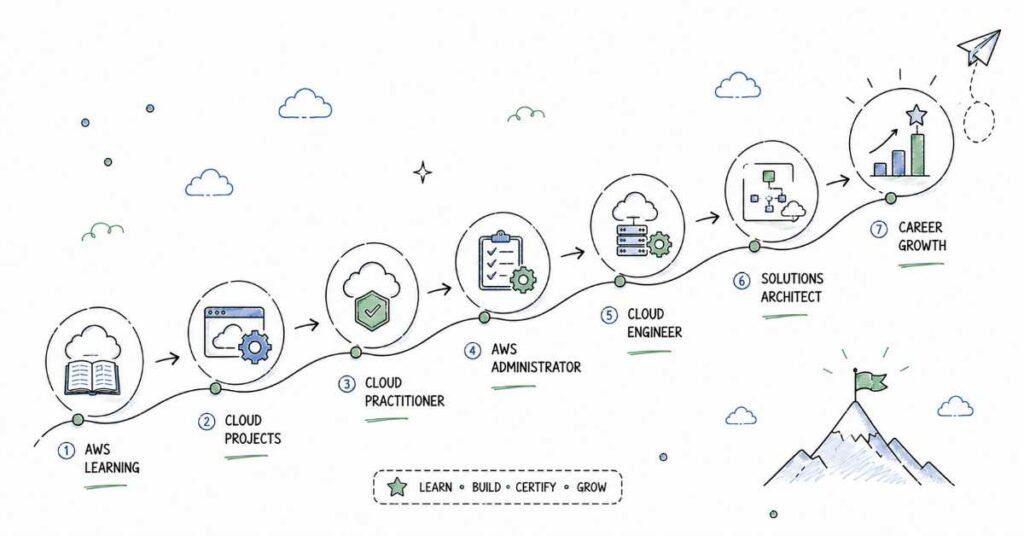
90-Day AWS Course Roadmap
From Beginner to Job-Ready Cloud Professional
Table of Contents
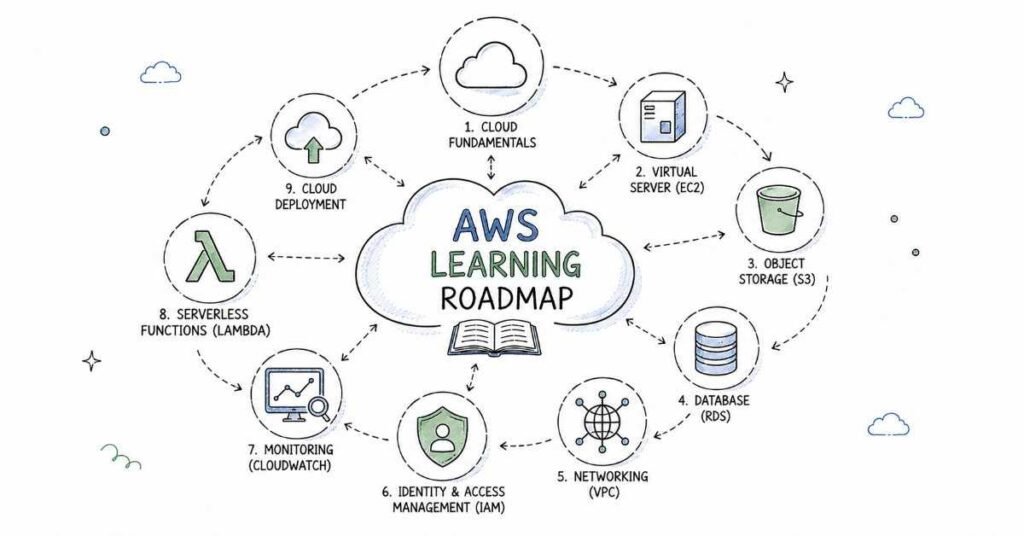
This 90-day AWS roadmap is designed to take you from complete beginner to job-ready cloud professional with a practical, step-by-step plan. You will start with cloud fundamentals and the AWS global infrastructure, then move into core services like EC2, S3, IAM, and VPC before learning Lambda, monitoring, DevOps basics, and certification preparation. The goal is simple: help students in Hyderabad, Telangana, Andhra Pradesh, and across India learn the AWS skills that employers actually ask for. AWS roles are in demand because companies need scalable cloud infrastructure, secure environments, and faster deployment. By the end of 90 days, you should be ready for entry-level cloud jobs with confidence and a solid project portfolio.
🎓 Become job-ready join our AWS Mastery Course with real projects
Why AWS Is a Smart Career Choice
AWS is one of the most valuable career paths in modern tech because nearly every company is moving to the cloud. Businesses need professionals who can set up infrastructure, secure workloads, manage storage, automate deployments, and monitor systems reliably. That is why AWS skills are useful across IT services, startups, product companies, banking, healthcare, e-commerce, and consulting.
This is also a field where practical knowledge matters more than memorizing theory. If you can launch instances, configure access, manage networks, and deploy applications properly, you already have what many employers want. That is why this roadmap focuses on hands-on learning from the beginning.
- AWS powers modern cloud infrastructure.
- It is used across IT services, product companies, startups, and enterprise teams.
- Entry-level candidates can grow quickly with strong project work.
- The skill set is useful for both freshers and working professionals.
- AWS knowledge often leads to strong long-term career growth.
90-Day Learning Plan
Month | Focus Area | Outcome |
Month 1 | Cloud basics, AWS core services, IAM, EC2, S3, networking | You understand the AWS foundation |
Month 2 | Databases, load balancing, autoscaling, monitoring, Lambda, containers | You can build scalable cloud solutions |
Month 3 | DevOps basics, deployment, security, architecture, projects, certification prep | You can present real AWS projects and apply for jobs |
Month 1: AWS Foundations
Month 1 is all about building the base. If you skip the basics, the advanced services will feel confusing later. Cloud concepts, AWS core services, and networking are the everyday language of AWS, so this month gives you the confidence to work in real cloud environments.
Week 1: Cloud Basics
Cloud computing is the idea of using servers, storage, databases, and software over the internet instead of owning everything physically. Learn the difference between IaaS, PaaS, and SaaS, and understand why organizations move to the cloud for flexibility and cost control. You should also learn the AWS global infrastructure and why regions and availability zones matter.
- Learn the meaning of cloud computing.
- Understand IaaS, PaaS, and SaaS.
- Study AWS regions and availability zones.
- Explore shared responsibility in the cloud.
- Practice basic cloud terminology.
Week 2: AWS Core Services
AWS core services are the building blocks of most cloud projects. This week focuses on EC2, S3, IAM, and CloudWatch. EC2 gives you compute power, S3 stores objects, IAM controls access, and CloudWatch helps you monitor activity and performance. These services are used in almost every AWS job role.
AWS Service | Purpose |
EC2 | Run virtual servers in the cloud |
S3 | Store files and objects |
IAM | Manage identities and permissions |
CloudWatch | Monitor logs, metrics, and alarms |
Week 3: Networking Basics in AWS
Networking is one of the most important parts of AWS. Learn VPC, subnets, route tables, internet gateways, security groups, and NACLs. If you understand how traffic moves through AWS, you will be much better at solving real infrastructure problems. Many beginners struggle here, so take your time and practice diagrams.
- Learn what a VPC is.
- Understand public and private subnets.
- Study route tables and internet gateways.
- Compare security groups and NACLs.
- Practice drawing a simple AWS network.
Week 4: Storage, Identity, and Month 1 Review
This week should focus on IAM practice and deeper S3 understanding. Learn bucket policies, access control lists, versioning, lifecycle rules, and encryption basics. Also revise the services you covered so far and make sure you can explain them in simple words. By the end of Month 1, you should be comfortable with AWS fundamentals and the main service categories.
🧩 Learn advanced AWS work flows explore in-depth How-to Guides.
Month 2: Scalable AWS Services
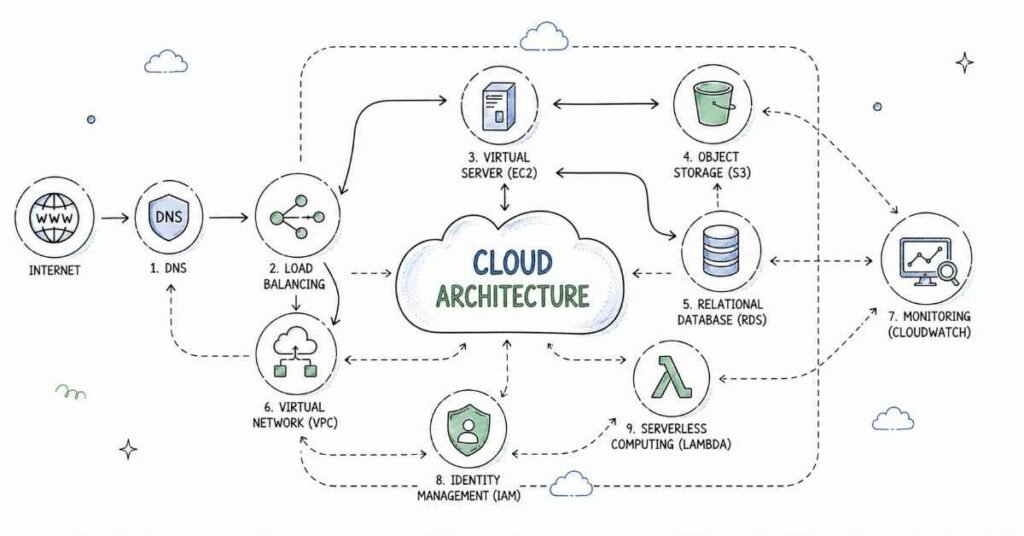
Month 2 is where you begin to build real cloud solutions. You move from basic service usage to scalable architecture, automation, and application deployment. This is the stage where AWS starts feeling like a practical job skill instead of a theory subject.
Week 5: Compute and Load Balancing
Compute is the heart of AWS workloads. Learn more about EC2 instance types, AMIs, key pairs, and user data. Then move into Elastic Load Balancing so you can distribute traffic across multiple instances. This week helps you understand how production systems stay reliable when traffic increases.
- Learn EC2 launch and configuration.
- Understand instance families and pricing basics.
- Practice AMIs and key pairs.
- Explore load balancers.
- Study high availability concepts.
Week 6: Autoscaling and Databases
Autoscaling helps systems handle changing demand automatically. Learn Auto Scaling Groups and how they work with load balancers. Then study AWS database services such as RDS and DynamoDB. The goal is to understand how applications store data and stay responsive even when user load increases.
Service | Use Case |
Auto Scaling | Add or remove servers automatically |
RDS | Managed relational databases |
DynamoDB | Fast NoSQL storage |
ELB | Distribute application traffic |
Week 7: Monitoring and Security
Security is one of the most important parts of cloud work. Learn CloudTrail, CloudWatch alarms, IAM roles, MFA, encryption, and least privilege access. Monitoring and security go together because you need to know what happened and who did it. Employers care a lot about candidates who understand safe cloud operations.
- Learn CloudTrail for activity tracking.
- Use CloudWatch for logs and alerts.
- Understand IAM users, roles, and policies.
- Practice MFA and secure access.
- Study encryption fundamentals.
Week 8: Lambda, Containers, and Automation Basics
This week introduces serverless and container concepts. Learn AWS Lambda for event-driven functions and get a basic understanding of Docker and containerized applications in AWS. Also explore how automation improves cloud operations. By the end of Month 2, you should be able to describe how AWS supports modern app deployment.
Month 3: DevOps, Projects, and Career Readiness
Month 3 focuses on making you job-ready. You will combine the services you learned, practice deployment workflows, and prepare projects that you can show employers. A good AWS portfolio proves that you can build, secure, and monitor cloud infrastructure, not just memorize service names.
Week 9: DevOps Basics on AWS
AWS and DevOps work very closely together. Learn the idea of CI/CD, infrastructure as code, and automated deployment. Understand how cloud teams use code to create repeatable environments. Even a beginner-level understanding of these concepts gives you a major advantage in interviews.
- Learn CI/CD concepts.
- Understand infrastructure as code.
- Explore automated build and deployment flow.
- Review how cloud and DevOps work together.
- Practice reading a simple pipeline design.
Week 10: Architecture and Best Practices
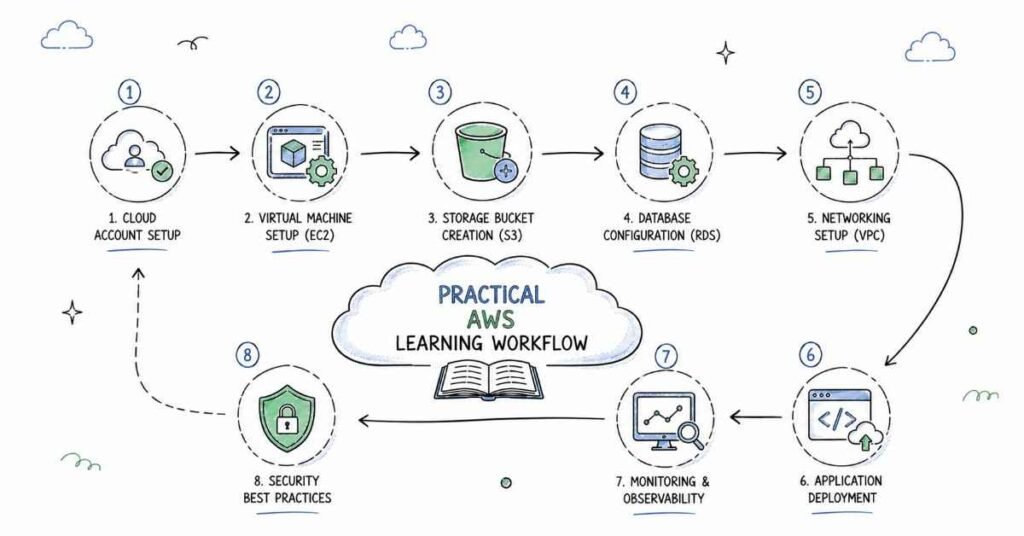
This week is about designing better solutions. Learn the Well-Architected Framework ideas such as reliability, performance, cost optimization, security, and operational excellence. You should also understand how to choose services based on the business problem, not just the technology trend.
Design Principle | Why It Matters |
Reliability | Keeps systems available |
Security | Protects data and access |
Performance | Improves speed and response |
Cost Optimization | Prevents overspending |
Operational Excellence | Improves day-to-day management |
📝 Build enterprise-grade AWS projects access sample architectures & configs.
Week 11: Project Building
Use this week to create portfolio projects that prove your skills. Build a simple web app deployed on EC2, a static website hosted on S3, or a serverless app using Lambda and API Gateway. Make sure each project includes architecture notes, screenshots, and a short explanation of what AWS services you used.
Week 12: Capstone Project and Interview Prep
The final week should be used for resume building, LinkedIn optimization, mock interviews, and AWS certification preparation. Focus on explaining your projects clearly, because interviewers often care more about your reasoning than your memorization. If you are preparing for AWS Cloud Practitioner or Solutions Architect Associate, this week should include final revision and practice questions.
AWS Career Paths and Salary Guide
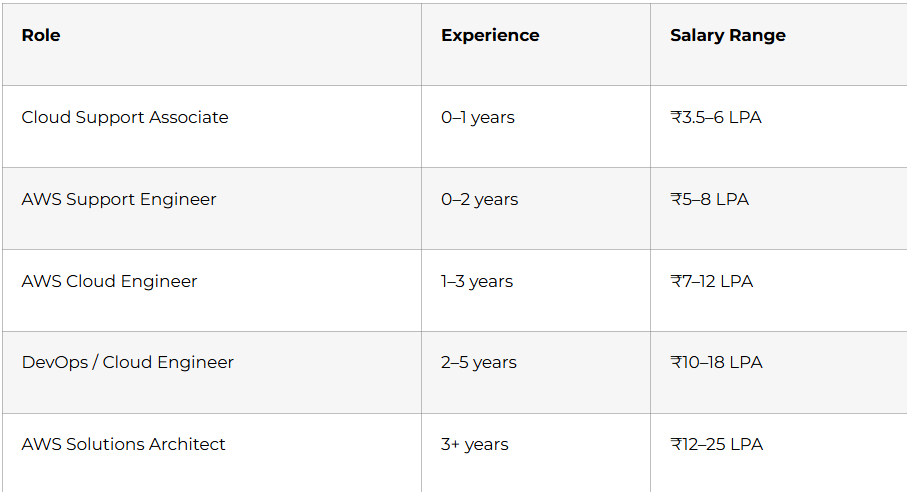
AWS salaries vary by company, city, and certification level, but the field remains one of the strongest entry points into cloud computing. Hyderabad, Bangalore, Pune, Chennai, and Gurgaon are active hiring locations. Candidates who know EC2, S3, IAM, VPC, Lambda, and monitoring basics usually stand out quickly.
Why Choose Frontlines Edutech
Frontlines Edutech helps students learn practical, job-focused skills in a way that feels clear and achievable. The training is designed for beginners who want real cloud understanding, not just theory. Students also benefit from guided learning, interview support, and a roadmap that matches current industry needs.
- Hands-on learning with real projects.
- Beginner-friendly explanations for complex topics.
- Job-focused curriculum with practical outcomes.
- Support for resumes, interviews, and career preparation.
- Training aligned with Indian hiring expectations.
Frequently Asked Questions
🔥 Master core AWS services practice with 100+ Real interview questions.
Q1. Do I need coding experience to learn AWS?
No, you do not need advanced coding experience to start. Basic computer knowledge is enough for the first month, and scripting or automation is introduced gradually.
Q2. What is the salary for an AWS fresher in India?
An AWS fresher in India can typically expect around ₹3.5 to ₹6 LPA, depending on the role, company, and skill level. Candidates with projects and certification can earn more.
Q3. Is AWS a good career for beginners?
Yes, AWS is a strong career option for beginners because companies are moving to cloud infrastructure. It offers good demand, structured roles, and clear growth paths.
Q4. What will I learn in this 90-day AWS roadmap?
You will learn cloud basics, EC2, S3, IAM, VPC, databases, load balancing, autoscaling, Lambda, monitoring, DevOps basics, and certification prep. You will also work on practical projects and interview preparation.
Q5. Can I get a job after learning AWS in 90 days?
Yes, you can become job-ready in 90 days if you practice regularly and build projects. A strong portfolio and interview preparation are important for getting shortlisted.
Q6. Does AWS use Linux heavily?
Yes, Linux is very common in AWS environments. Many cloud servers, automation tasks, and DevOps workflows depend on Linux knowledge.
Q7. What kind of jobs can I apply for after this course?
You can apply for cloud support, AWS support, junior cloud engineer, DevOps support, and cloud operations roles. With more experience, you can grow into AWS engineering and architect roles.
Q8. Is AWS used in real companies?
Yes, AWS is used by startups, product companies, enterprises, and consulting firms to run applications and store data. That is what makes it such a practical career path.
Published by Frontlines Edutech | blog.frontlinesedutech.com
support@frontlinesedutech.com