AWS Interview Preparation Guide
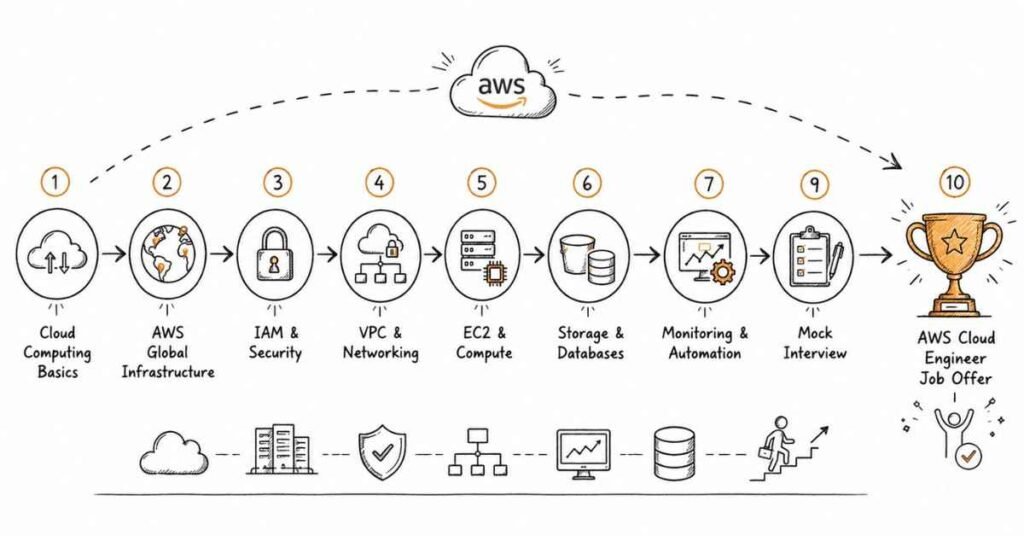
This comprehensive guide contains 210+ interview questions tailored for AWS roles, designed specifically for learners completing the DevOps with Multi-Cloud (AWS+Azure) course at Frontlines Edutech. Each answer reflects real-world scenarios, practical implementation insights, and industry-standard explanations that interviewers expect from candidates.
The questions are organized according to AWS service categories covered in your syllabus, progressing from foundational concepts to advanced implementations.
1.210+ Technical Interview Questions & Answers
- AWS Global Infrastructure (Q1-Q7)
- AWS Management & Tools (Q8-Q14)
- AWS Best Practices & Frameworks (Q15-Q20)
- AWS Governance & Cost Management (Q21-Q25)
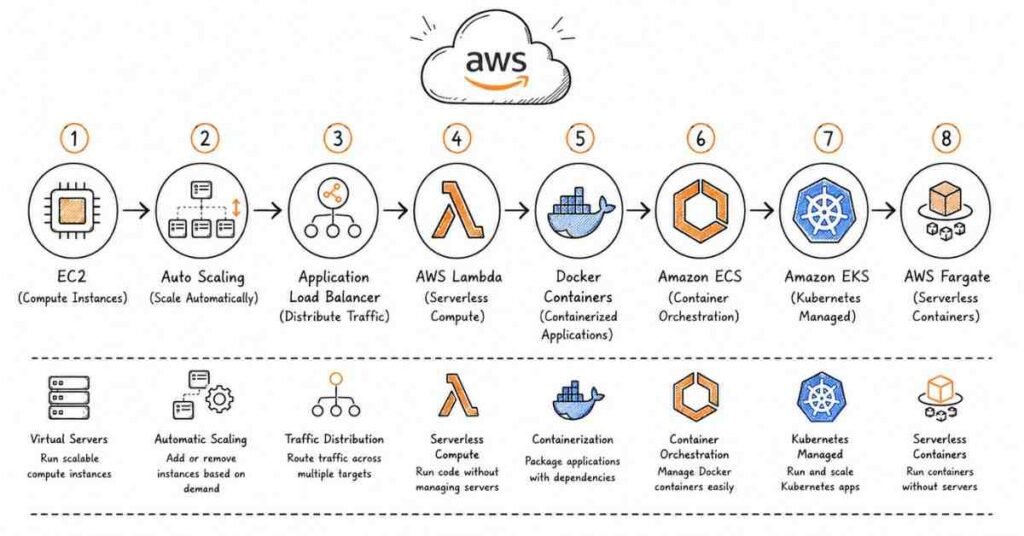
- EC2 Fundamentals (Q26-Q32)
- EC2 Deployment & Configuration (Q33-Q40)
- EC2 Monitoring & Management (Q41-Q48)
- EC2 Advanced Topics (Q49-Q60)
- VPC Fundamentals (Q61-Q68)
- VPC Connectivity & Security (Q69-Q76)
- VPC Advanced Features (Q77-Q85)
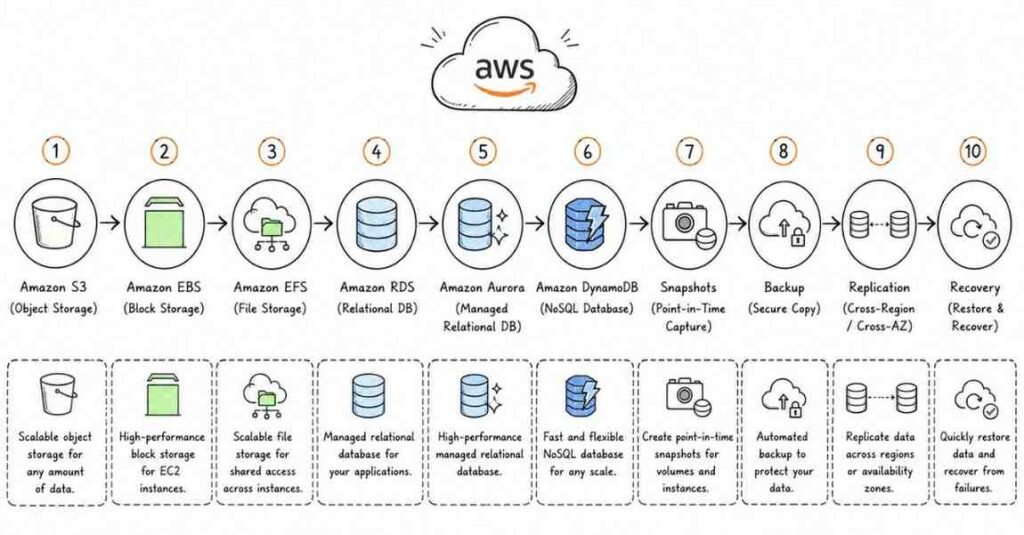
- S3 Fundamentals (Q86-Q92)
- S3 Security & Access Control (Q93-Q99)
- S3 Advanced Features (Q100-Q110)
- EBS Fundamentals (Q111-Q116)
- EBS Advanced Topics (Q117-Q125)
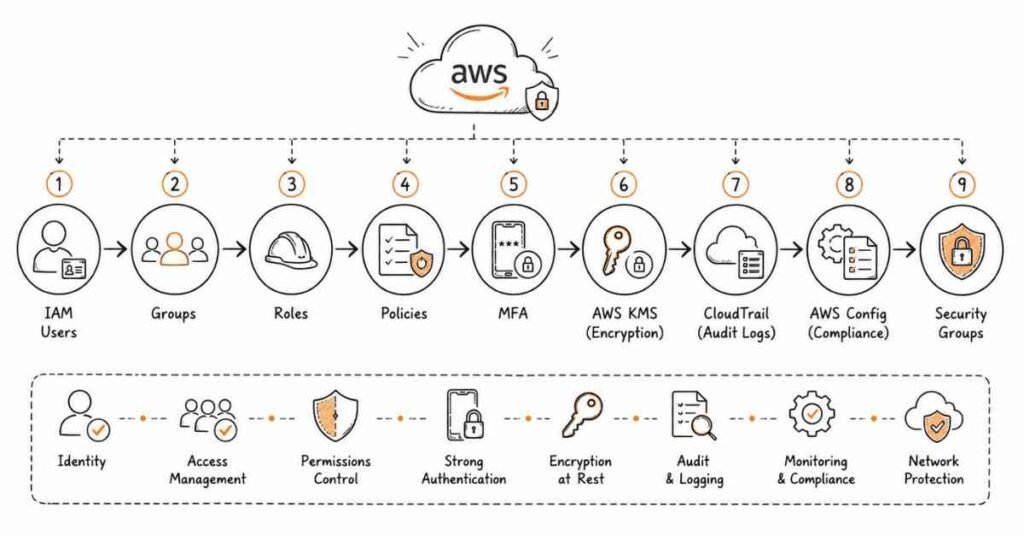
- IAM Fundamentals (Q126-Q133)
- IAM Security & Auditing (Q134-Q141)
- IAM Advanced Topics (Q142-Q150)
- Load Balancing Fundamentals (Q151-Q157)
- Auto Scaling (Q158-Q165)
- RDS Fundamentals (Q166-Q171)
- RDS Operations & Optimization (Q172-Q180)
- Lambda Fundamentals (Q181-Q186)
- Lambda Advanced Topics (Q187-Q195)
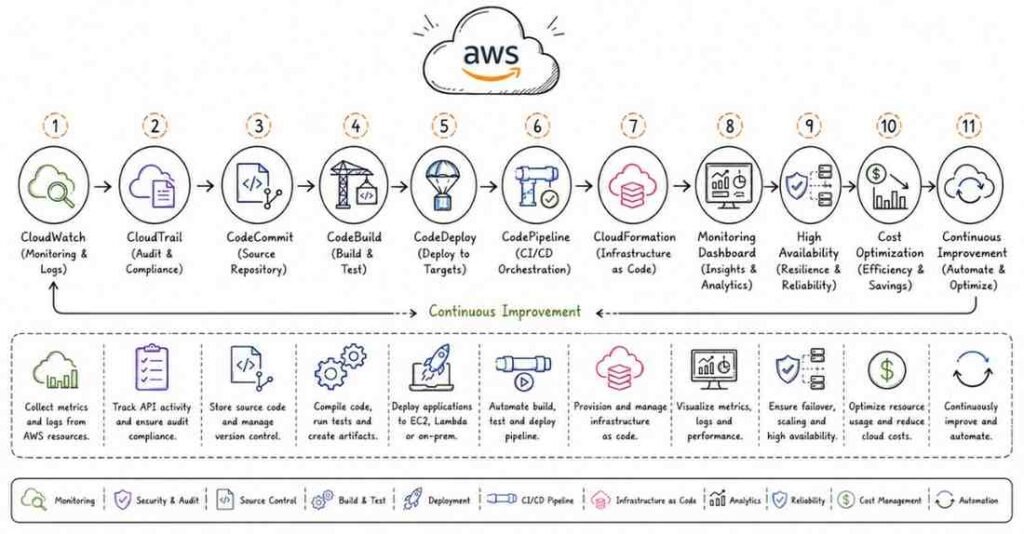
- CloudFormation Fundamentals (Q196-Q203)
- CloudFormation Advanced Topics (Q204-Q210)
Start Your AWS Cloud Journey Today!
Master EC2, S3, Lambda, and IAM through hands-on learning in our AWS Training Course — get certified and career-ready.
Section 1: AWS Fundamentals & Core Concepts (Questions 1-25)
Q1. What is AWS and why has it become the leading cloud service provider?
Answer: Amazon Web Services (AWS) is a comprehensive cloud computing platform offering over 200 fully-featured services from data centers globally. AWS becamIntroduction to Part 1
e the market leader because it pioneered Infrastructure as a Service (IaaS) in 2006, providing businesses with on-demand computing resources without capital expenditure on physical infrastructure. Its pay-as-you-go pricing model, extensive service portfolio, global infrastructure spanning multiple regions, and continuous innovation have made it the preferred choice for startups to Fortune 500 companies.
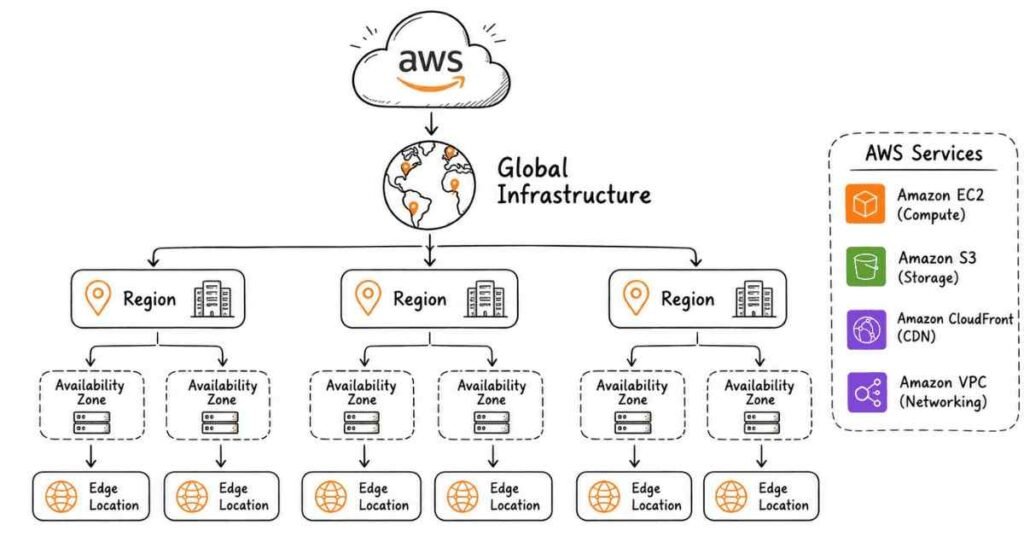
Q2. Explain the AWS global infrastructure architecture.
Answer: AWS infrastructure is built on three core components: Regions, Availability Zones, and Edge Locations. A Region is a physical geographic area containing multiple isolated locations called Availability Zones (AZs). Each AZ consists of one or more discrete data centers with redundant power, networking, and connectivity. Edge Locations are content delivery network (CDN) endpoints used by CloudFront to cache content closer to users. This architecture ensures high availability, fault tolerance, and low-latency access to applications deployed across the globe.
Q3. What are the key benefits of using cloud computing with AWS?
Answer: AWS cloud computing delivers six primary benefits: Cost Optimization – eliminating upfront hardware investments and paying only for consumed resources; Scalability – instantly scaling resources up or down based on demand; Elasticity – automatically adjusting capacity to maintain performance; Reliability – leveraging multiple data centers for backup and disaster recovery; Global Reach – deploying applications in minutes across worldwide regions; and Security – benefiting from AWS’s investment in compliance certifications and security infrastructure. These advantages enable businesses to focus on innovation rather than infrastructure management.
Q4. Differentiate between IaaS, PaaS, and SaaS with AWS examples.
Answer: Infrastructure as a Service (IaaS) provides fundamental computing resources like servers, storage, and networking – AWS EC2, S3, and VPC are classic examples where users manage operating systems and applications. Platform as a Service (PaaS) delivers a complete development environment – AWS Elastic Beanstalk and Lambda represent this model where developers deploy code without managing underlying infrastructure. Software as a Service (SaaS) offers fully-managed applications accessible via browser – while AWS primarily focuses on IaaS and PaaS, services like Amazon WorkSpaces and Chime exemplify SaaS offerings. Understanding these models helps architects choose appropriate services for specific business needs.
Q5. What is the AWS Shared Responsibility Model?
Answer: The AWS Shared Responsibility Model defines security and compliance obligations between AWS and the customer. AWS is responsible for “Security OF the Cloud” – protecting infrastructure including hardware, software, networking, and facilities running AWS services. Customers are responsible for “Security IN the Cloud” – managing guest operating systems, applications, security groups, firewall configurations, identity and access management, and data encryption. For example, while AWS secures the physical EC2 infrastructure, customers must patch their operating systems, configure security groups, and implement encryption. This model clarifies accountability and ensures comprehensive security across the cloud environment.
Q6. Explain the difference between AWS Regions and Availability Zones.
Answer: An AWS Region is a separate geographic area like US-East (Virginia) or Asia Pacific (Mumbai), containing multiple isolated locations. Each Region operates independently with its own resources and services. An Availability Zone (AZ) is one or more discrete data centers within a Region, each with independent power, cooling, and networking. Regions are typically hundreds of miles apart for disaster recovery, while AZs within a Region are tens of miles apart connected by low-latency links. Designing applications across multiple AZs within a Region provides high availability, while multi-Region architectures offer disaster recovery and geographic redundancy.
Q7. What factors should you consider when selecting an AWS Region?
Answer: Four critical factors guide Region selection: Compliance and Data Residency – certain industries require data storage within specific geographic boundaries. Proximity to End Users – choosing Regions closer to users reduces latency and improves application performance. Service Availability – not all AWS services are available in every Region, so verify required services are supported. Pricing Variations – costs differ across Regions due to local operational expenses and taxation. For instance, a healthcare application serving Indian patients would prioritize the Mumbai Region for regulatory compliance and lower latency, while verifying all required services are available there.
Q8. What is AWS CLI and why is it important for DevOps engineers?
Answer: AWS Command Line Interface (CLI) is a unified tool for managing AWS services through terminal commands rather than the web console. For DevOps engineers, CLI is essential for automation – scripting repetitive tasks like instance launches or backup operations; CI/CD integration – incorporating AWS operations into Jenkins pipelines or GitHub Actions; faster execution – running batch operations more efficiently than clicking through console interfaces; and infrastructure as code – managing resources programmatically alongside tools like Terraform. Proficiency in AWS CLI demonstrates automation skills and is considered fundamental knowledge for DevOps roles.
Q9. Explain the AWS Free Tier and its limitations.
Answer: AWS Free Tier provides three types of offerings to help users explore services without cost. Always Free services like Lambda (1 million requests monthly) and DynamoDB (25GB storage) never expire. 12 Months Free starting from account creation includes 750 hours monthly of t2.micro EC2 instances and 5GB S3 storage. Trials offer short-term free access to services like Inspector or Lightsail. Important limitations include automatic charges once usage exceeds free limits, no rollover of unused hours, and specific eligibility for new AWS accounts only. Monitoring usage through AWS Budgets and setting billing alarms prevents unexpected charges during learning phases.
Q10. What is AWS Management Console and what are its alternatives?
Answer: AWS Management Console is the web-based graphical interface for accessing and managing AWS services through browsers. It provides visual dashboards, wizards for resource creation, and monitoring capabilities suitable for manual operations and learning. Three primary alternatives exist: AWS CLI for command-line automation and scripting; AWS SDKs in various programming languages (Python boto3, Java, .NET) for application integration; and AWS CloudFormation/Terraform for infrastructure as code implementations. While the console is ideal for initial exploration and one-time configurations, DevOps professionals primarily use CLI and automation tools for production environments to ensure consistency, repeatability, and version control.
Q11. What are AWS Tags and why are they critical for resource management?
Answer: AWS Tags are metadata labels consisting of key-value pairs assigned to AWS resources for organization and management. They serve multiple critical functions: Cost Allocation – tracking expenses by project, department, or environment (e.g., Environment:Production, Project:WebApp); Automation – scripting operations targeting specific tagged resources; Access Control – implementing IAM policies based on tags; and Resource Organization – filtering and searching resources in complex environments. For example, tagging all development resources with “Environment:Dev” enables automated shutdown scripts to run only on non-production instances, significantly reducing cloud costs. Implementing consistent tagging strategies from project inception is considered an AWS best practice.
Q12. Explain the concept of AWS Service Limits (Quotas).
Answer: AWS Service Limits, now called Service Quotas, are maximum values for resources, actions, and items in AWS accounts. These exist to protect accounts from accidental resource provisioning, prevent abuse, and manage AWS infrastructure capacity. Limits are categorized as soft limits (adjustable through support requests, like EC2 instance count per region) and hard limits (fixed by AWS architecture, like S3 bucket name uniqueness). Common examples include 5 VPCs per region, 20 on-demand EC2 instances per region, and 100 S3 buckets per account. Proactively monitoring Service Quotas through the AWS console and requesting increases before reaching limits prevents application deployment failures in production environments.
Q13. What is AWS Support and describe its different plans.
Answer: AWS Support provides technical assistance and guidance with four tiered plans. Basic (free) includes 24/7 customer service, documentation, whitepapers, and support forums. Developer ($29/month) adds business-hours technical support via email with 12-24 hour response times. Business ($100/month) offers 24/7 phone, email, and chat support with 1-hour response for production issues, full Trusted Advisor checks, and AWS Personal Health Dashboard. Enterprise ($15,000/month) provides 15-minute response times, dedicated Technical Account Manager (TAM), architectural reviews, and Infrastructure Event Management. Startups typically begin with Developer, scale to Business when running production workloads, and consider Enterprise when AWS becomes mission-critical.
Q14. What is AWS Trusted Advisor?
Answer: AWS Trusted Advisor is an automated service providing real-time guidance to optimize AWS environments across five categories. Cost Optimization identifies idle resources and recommends reserved instance purchases. Performance suggests improvements like underutilized EC2 instances. Security flags open security groups, unrestricted S3 buckets, and IAM vulnerabilities. Fault Tolerance checks for single points of failure and missing backups. Service Limits monitors quota usage to prevent service disruptions. While Basic plan provides limited checks, Business and Enterprise support unlocks all recommendations. Regular Trusted Advisor reviews should be part of cloud governance routines, with automated notifications configured for critical findings.
Q15. Explain the AWS Well-Architected Framework.
Answer: The AWS Well-Architected Framework is a set of best practices across six pillars for building secure, high-performing, resilient, and efficient cloud infrastructure. Operational Excellence focuses on running and monitoring systems. Security emphasizes protecting information and systems. Reliability ensures workloads perform intended functions correctly and consistently. Performance Efficiency optimizes resource usage. Cost Optimization eliminates unnecessary expenses. Sustainability minimizes environmental impact. AWS provides the Well-Architected Tool for reviewing architectures against these pillars, generating improvement plans. DevOps engineers reference this framework when designing solutions, conducting architecture reviews, and addressing technical debt.
Q16. What is AWS Personal Health Dashboard?
Answer: AWS Personal Health Dashboard provides personalized alerts and remediation guidance when AWS events impact resources in a specific account. Unlike the Service Health Dashboard showing global AWS service status, Personal Health Dashboard displays relevant information about resources actually being used. It alerts users about scheduled maintenance, service degradations, security notifications, and billing anomalies affecting their infrastructure. For example, if EC2 instances require retirement due to underlying hardware degradation, proactive notifications allow scheduling migrations during maintenance windows. Integration with Amazon EventBridge enables automated responses to health events, making it essential for production environment monitoring.
Q17. What are AWS Reserved Instances and how do they differ from On-Demand instances?
Answer: AWS Reserved Instances (RIs) provide significant discounts (up to 75%) compared to On-Demand pricing in exchange for 1 or 3-year commitments. On-Demand instances offer maximum flexibility with no commitments, paying by the hour, ideal for unpredictable workloads and testing. Reserved Instances require upfront capacity reservation but drastically reduce costs for steady-state applications. Three payment options exist: All Upfront (maximum discount), Partial Upfront, and No Upfront. Standard RIs offer higher discounts but limit instance type changes, while Convertible RIs provide flexibility to change instance families with slightly lower discounts. Cost optimization strategies combine RIs for baseline capacity with On-Demand for variable demand.
Q18. Explain AWS Spot Instances and their use cases.
Answer: AWS Spot Instances leverage unused EC2 capacity at discounts up to 90% compared to On-Demand pricing. AWS can interrupt Spot Instances with two-minute warnings when capacity is needed for On-Demand or Reserved customers. Ideal use cases include batch processing jobs that tolerate interruptions, big data analytics workloads, containerized applications with distributed architectures, CI/CD testing environments, and stateless web servers behind load balancers. Applications requiring high availability or stateful processing aren’t suitable for Spot Instances. Strategies like Spot Fleet (launching multiple instance types) and implementing graceful shutdown handlers maximize cost savings while managing interruption risks.
Q19. What is the difference between Stopping and Terminating an EC2 instance?
Answer: Stopping an EC2 instance is equivalent to shutting down a computer – the instance maintains its instance ID, private IP address, and EBS volumes while ceasing compute charges. The instance can restart with all configurations and data intact, though EBS storage charges continue. Terminating permanently deletes the instance, releasing all associated resources except explicitly configured persistent EBS volumes. Public IP addresses are released, instance IDs become unavailable, and instance store volumes are permanently deleted. Stopping is appropriate for temporary pauses like overnight shutdowns to save costs, while termination suits decommissioning resources or cleaning up test environments.
Q20. Explain the concept of AWS Availability and Durability.
Answer: Availability measures the percentage of time a system remains operational and accessible, typically expressed as “nines” (99.9% = three nines = 8.76 hours downtime annually). Durability measures data resilience against loss or corruption over time. Amazon S3 Standard class provides 99.999999999% (eleven nines) durability, meaning if storing 10 million objects, expect to lose one every 10,000 years statistically. S3 achieves 99.99% availability (52.56 minutes downtime annually). High availability requires multi-AZ deployments with load balancing, while durability demands data replication, versioning, and backup strategies. Understanding these concepts helps architects design systems meeting business requirements for uptime and data protection.
Q21. What is AWS Organizations and why is it important for enterprise environments?
Answer: AWS Organizations enables centralized management of multiple AWS accounts within an enterprise. Key capabilities include consolidated billing across all accounts for volume discounts, hierarchical account organization using Organizational Units (OUs) like Production, Development, and Finance, Service Control Policies (SCPs) enforcing security and compliance guardrails, and automated account creation through APIs. For example, an SCP can prevent all accounts in the Development OU from launching expensive instance types, reducing cost risks. Organizations simplify governance, cost allocation, security enforcement, and resource sharing across complex enterprise environments with hundreds of AWS accounts.
Q22. Explain the AWS pricing calculator and its importance.
Answer: The AWS Pricing Calculator is a web-based tool for estimating monthly AWS costs before deploying resources. Users configure services with specific parameters like instance types, storage volumes, data transfer amounts, and operating systems to generate detailed cost estimates. The calculator supports exporting estimates as PDFs for stakeholder presentations and saving configurations for future reference. It’s essential for budgeting projects accurately, comparing different architecture options, justifying cloud migration costs, and preventing bill shock from unexpected expenses. DevOps engineers should estimate costs during architecture design phases and validate actual spending against estimates monthly.
Q23. What are AWS Savings Plans?
Answer: AWS Savings Plans offer flexible pricing models providing significant savings (up to 72%) in exchange for committing to consistent usage (measured in dollars per hour) for 1 or 3-year terms. Compute Savings Plans provide maximum flexibility, applying to EC2, Lambda, and Fargate usage regardless of region, instance family, or operating system. EC2 Instance Savings Plans offer higher discounts but limit flexibility to specific instance families within chosen regions. Unlike Reserved Instances committed to specific instance types, Savings Plans automatically apply to usage matching the commitment, accommodating workload changes. They’re ideal for organizations with growing or changing infrastructure needs requiring cost optimization without operational rigidity.
Q24. Explain AWS Budgets and Cost Anomaly Detection.
Answer: AWS Budgets enables setting custom cost and usage budgets with alerts when thresholds are exceeded. Budgets can track costs, usage, Reserved Instance utilization, and Savings Plans coverage. Alerts integrate with SNS for email/SMS notifications and can trigger Lambda functions for automated responses. Cost Anomaly Detection uses machine learning to identify unusual spending patterns, automatically alerting when costs deviate significantly from normal behavior. For example, if EC2 costs suddenly spike 200% due to misconfigured auto-scaling, alerts trigger within hours rather than discovering surprises at month-end. Implementing both services is critical for financial governance in cloud environments.
Q25. What is AWS CloudTrail and why is it essential for security and compliance?
Answer: AWS CloudTrail records all API calls made in AWS accounts, creating audit trails for compliance, security analysis, and troubleshooting. Every action – whether through console, CLI, SDK, or other services – generates events logging who performed what action, when, from which IP address, and whether it succeeded. CloudTrail logs enable security investigations after incidents, compliance auditing for regulatory requirements, operational troubleshooting tracking configuration changes, and governance enforcement monitoring policy violations. Logs should be stored in centralized S3 buckets with encryption, integrity validation enabled, and retention policies matching compliance requirements. CloudTrail is foundational for meeting security standards like SOC 2, ISO 27001, and HIPAA.
Section 2: Amazon EC2 (Elastic Compute Cloud) - Questions 26-60
Q26. What is Amazon EC2 and what problem does it solve?
Answer: Amazon Elastic Compute Cloud (EC2) provides resizable virtual servers in the cloud, eliminating the need to purchase, setup, and maintain physical hardware. Before EC2, businesses faced capital expenditure on servers, lengthy procurement cycles, over-provisioning for peak capacity, and hardware becoming obsolete. EC2 solves these problems through elasticity – scaling capacity up or down in minutes, pay-as-you-go pricing eliminating upfront investments, global availability across multiple regions, and variety with hundreds of instance types optimized for different workloads. This revolutionized IT infrastructure, enabling startups to access enterprise-grade computing power and enterprises to optimize costs dramatically.
Q27. Explain EC2 instance types and their use cases.
Answer: EC2 instances are categorized into families optimized for specific workloads. General Purpose (T3, M5) balance compute, memory, and networking for web servers and small databases. Compute Optimized (C5, C6i) provide high-performance processors for batch processing and scientific modeling. Memory Optimized (R5, X1) offer large RAM for in-memory databases and big data analytics. Storage Optimized (I3, D2) deliver high disk throughput for data warehouses and distributed file systems. Accelerated Computing (P3, G4) include GPUs for machine learning and graphics rendering. Choosing appropriate instance types directly impacts application performance and cost efficiency.
Q28. What is the difference between EC2 instance families – T, M, C, R, and I?
Answer: Each EC2 family serves specific performance needs. T family (T2, T3) provides burstable performance for workloads with variable CPU usage, accumulating credits during idle periods for occasional bursts. M family (M5, M6i) offers balanced resources suitable for general-purpose applications. C family (C5, C6g) delivers the highest compute performance per dollar for CPU-intensive tasks. R family (R5, R6g) specializes in memory-intensive applications requiring large RAM. I family (I3, I3en) provides NVMe SSD storage for ultra-low latency database operations. Understanding these distinctions enables right-sizing instances, preventing over-provisioning waste or performance bottlenecks.
Q29. Explain EC2 instance metadata and user data.
Answer: Instance Metadata is information about running EC2 instances accessible from within the instance itself via a special endpoint (http://169.254.169.254/latest/meta-data/). Applications query metadata for instance ID, AMI ID, security groups, public/private IP addresses, and IAM role credentials without hardcoding values. User Data allows running scripts during instance launch, automating configuration tasks like installing software, starting services, and downloading application code. User data executes only once during first boot (cloud-init processes it). Common uses include bootstrapping web servers with application code, joining instances to Active Directory domains, and configuring monitoring agents. Both capabilities are essential for automation and infrastructure as code implementations.
Q30. What are Security Groups in EC2 and how do they work?
Answer: Security Groups function as virtual firewalls controlling inbound and outbound traffic for EC2 instances at the network interface level. They operate using whitelisting – only explicitly allowed traffic is permitted, with all other traffic blocked by default. Security Groups are stateful – if inbound traffic is allowed, the return traffic is automatically permitted regardless of outbound rules. Rules specify protocol (TCP, UDP, ICMP), port ranges, and source/destination (IP addresses, CIDR blocks, or other security groups). Multiple security groups can attach to instances, with all rules aggregated. Best practices include creating separate security groups for different application tiers (web, app, database) and following least-privilege principles.
Q31. How do Security Groups differ from Network ACLs?
Answer: While both control traffic, fundamental differences exist. Security Groups operate at instance level, are stateful (return traffic automatically allowed), support only allow rules, and evaluate all rules before deciding. Network ACLs function at subnet level, are stateless (return traffic must be explicitly allowed), support both allow and deny rules, and process rules in numbered order. Security Groups act as the first defense layer for instances, while NACLs provide subnet-level protection. For example, blocking a specific malicious IP across an entire subnet uses NACLs, while restricting SSH access to specific instances uses Security Groups. Defense-in-depth strategies combine both mechanisms.
Q32. What is an Amazon Machine Image (AMI)?
Answer: An Amazon Machine Image (AMI) is a template containing software configurations (operating system, application server, applications) required to launch EC2 instances. AMIs include the root volume template, launch permissions controlling which accounts can use it, and block device mappings specifying volumes to attach. Three AMI types exist: AWS-provided images maintained by Amazon, Marketplace AMIs from vendors including pre-configured software, and Custom AMIs created by users containing specific configurations. Custom AMIs accelerate deployments by capturing fully-configured instances, ensuring consistency across environments, and enabling disaster recovery. Organizations typically maintain golden AMIs updated monthly with security patches as deployment baselines.
Q33. Explain the EC2 instance launch process step-by-step.
Answer: Launching EC2 instances involves seven key steps. Step 1: Choose AMI – select the operating system and pre-installed software template. Step 2: Select Instance Type – choose CPU, memory, and network capacity appropriate for workload. Step 3: Configure Instance – set network (VPC, subnet), IAM role, monitoring, user data scripts. Step 4: Add Storage – configure root volume size, type (gp3, io1), and additional EBS volumes. Step 5: Add Tags – apply metadata for organization and cost tracking. Step 6: Configure Security Group – define firewall rules for network access. Step 7: Review and Launch – select or create SSH key pairs for authentication. Understanding each step ensures properly configured, secure instances.
Q34. What are EC2 key pairs and how do they ensure secure access?
Answer: EC2 key pairs consist of public and private cryptographic keys used for SSH authentication to Linux instances or decrypting Windows administrator passwords. During instance launch, specify a key pair – AWS stores the public key on the instance, while users download and secure the private key file. Connection requires presenting the private key, which only the holder possesses, eliminating password-based authentication vulnerabilities. Best practices include never sharing private keys, storing them securely (not in version control), using separate key pairs for different environments (production vs. development), and rotating keys periodically. Lost private keys cannot be recovered, requiring alternative access methods like Session Manager or instance snapshot recovery.
Q35. Explain EC2 placement groups and their types.
Answer: Placement groups control how instances are physically positioned within AWS infrastructure to meet specific performance or availability requirements. Cluster Placement Groups pack instances close together within a single Availability Zone, providing low-latency, high-throughput networking (10 Gbps) for HPC applications and distributed analytics. Spread Placement Groups distribute instances across distinct underlying hardware (maximum 7 per AZ), reducing correlated failure risks for critical applications. Partition Placement Groups divide instances into logical partitions, each on separate hardware racks, suitable for distributed systems like Hadoop and Cassandra requiring rack awareness. Selecting appropriate placement groups optimizes performance and fault tolerance.
Q36. What is EC2 Instance Store and how does it differ from EBS?
Answer: Instance Store provides temporary block-level storage physically attached to the host computer, offering extremely low latency and high I/O performance. Critical difference: Instance Store is ephemeral – data persists only during instance lifetime and is lost if the instance stops, terminates, or the underlying hardware fails. EBS volumes provide persistent storage surviving instance lifecycle events. Instance Store suits temporary data like caches, buffers, and scratch data, while EBS handles operating systems, databases, and persistent application data. Instance Store cannot be attached to stopped instances, and backup requires application-level replication. Understanding these differences prevents catastrophic data loss.
Q37. Explain EC2 instance lifecycle states.
Answer: EC2 instances transition through several states during their lifecycle. Pending – instance is launching; billing hasn’t started. Running – instance is fully operational; billing is active. Stopping – instance is shutting down (EBS-backed only). Stopped – instance is shut down; no compute charges but EBS storage continues billing. Shutting Down – instance is preparing for termination. Terminated – instance is deleted; resources are released. Rebooting – instance restarts without changing public IP (for EBS-backed) or losing instance store data temporarily. Monitoring state transitions through CloudWatch and EventBridge enables automation like starting instances on schedules or triggering Lambda functions during state changes.
Q38. What is EC2 hibernation and when would you use it?
Answer: EC2 hibernation saves instance RAM contents to EBS root volume and then stops the instance, enabling faster startups by restoring memory state rather than rebooting. When resuming, instances reload memory from EBS, preserving active processes and application states. Use cases include long-running processes requiring quick resumption, applications with lengthy initialization, and batch processing jobs pausing between executions while maintaining state. Hibernation requirements include supported instance families (M, C, R, T series), encrypted EBS root volumes, and RAM size not exceeding 150 GB. While stopped, only EBS storage incurs charges. Hibernation suits applications where startup time significantly impacts user experience or productivity.
Q39. Explain Elastic IP addresses and their use cases.
Answer: Elastic IP addresses are static, public IPv4 addresses allocated to AWS accounts that can be associated with EC2 instances or network interfaces. Unlike default public IPs that change when instances stop/start, Elastic IPs remain constant, enabling DNS stability for domains pointing to specific IPs, rapid failure recovery by remapping addresses to standby instances, and whitelisting in third-party firewalls requiring fixed IPs. AWS charges for unassociated Elastic IPs to discourage hoarding scarce IPv4 addresses. Best practices include releasing unused Elastic IPs, preferring load balancers with DNS names over Elastic IPs for web applications, and using Route 53 for more flexible DNS management.
Q40. What is EC2 Auto Recovery and how does it work?
Answer: EC2 Auto Recovery automatically restarts instances on new hardware if system status checks fail due to underlying hardware problems or power issues. When CloudWatch detects status check failures, it can trigger recovery actions that migrate the instance to healthy hardware, preserving instance ID, private IP, Elastic IP, EBS volumes, and instance metadata. Auto recovery requires EBS-backed instances in VPCs with instance types supporting the feature (excludes Spot and instance store). Setup involves creating CloudWatch alarms monitoring StatusCheckFailed_System metrics with recovery actions. This provides automatic self-healing for infrastructure failures without manual intervention, improving availability for critical workloads.
Q41. Explain EC2 status checks and their types.
Answer: AWS performs automated checks every minute to identify instance problems. System Status Checks monitor AWS infrastructure including physical host, network connectivity, and power systems – failures typically require AWS intervention or instance migration. Instance Status Checks verify software and network configuration of individual instances including operating system kernel issues, incorrect network settings, memory exhaustion, and corrupted file systems – users must diagnose and fix these issues. Failed system checks trigger auto-recovery or manual instance restart/stop-start, while failed instance checks require troubleshooting within the OS. Monitoring both check types through CloudWatch and configuring alarms ensures rapid detection and response to availability issues.
Q42. What is EC2 Instance Connect and how does it improve security?
Answer: EC2 Instance Connect provides browser-based SSH connectivity to Linux instances without requiring permanent SSH key pairs. AWS temporarily pushes a one-time SSH public key valid for 60 seconds to the instance metadata, enabling secure connection through the AWS console. Benefits include eliminating key management overhead, audit trails through CloudTrail logging all connections, IAM-based access control replacing key-based authentication, and no inbound port 22 exposure when combined with Session Manager. Instance Connect requires Amazon Linux 2 or Ubuntu with the EC2 Instance Connect package installed. This approach aligns with zero-trust security models and simplifies access management in dynamic environments.
Q43. Explain AWS Systems Manager Session Manager.
Answer: Session Manager provides browser-based shell access and session management for EC2 instances without requiring SSH/RDP ports open, bastion hosts, or key pair management. Instances run the SSM Agent and possess IAM roles with appropriate permissions, enabling connectivity through AWS infrastructure. Key advantages include no inbound ports required (security group allows only outbound HTTPS), centralized access control through IAM policies, audit logging recording all commands executed, and session history stored in S3 or CloudWatch Logs. Session Manager eliminates traditional bastion host complexity, reduces attack surface, and provides comprehensive session auditing for compliance. It’s becoming the recommended secure remote access method for AWS instances.
Q44. What is EC2 User Data script and provide practical examples.
Answer: EC2 User Data enables running shell scripts automatically during instance first launch, automating initial configuration. Scripts execute as root user (Linux) or administrator (Windows). Practical examples: Web server setup – installing Apache/Nginx, deploying application code from S3, starting services; Monitoring agents – installing CloudWatch agent, Datadog agent, New Relic with configuration; Configuration management – installing Ansible, Chef client, or Puppet agent and joining control servers; Environment setup – setting environment variables, mounting EFS file systems, attaching EBS volumes. User Data has 16KB size limit and runs once unless configured otherwise. Logs stored in /var/log/cloud-init-output.log help troubleshoot failed scripts.
Q45. Explain Enhanced Networking in EC2.
Answer: Enhanced Networking uses single root I/O virtualization (SR-IOV) to provide high-performance networking capabilities with higher bandwidth, lower latency, and lower jitter compared to traditional networking. Two implementations exist: Elastic Network Adapter (ENA) supporting up to 100 Gbps bandwidth for current-generation instances, and Intel 82599 VF supporting up to 10 Gbps for older instances. Enhanced Networking benefits network-intensive applications like databases, distributed computing, and video processing. Most current-generation instances enable Enhanced Networking by default. Placement groups combined with Enhanced Networking deliver maximum network performance for HPC clusters requiring low-latency, high-throughput communication.
Q46. What are Elastic Network Interfaces (ENI)?
Answer: Elastic Network Interfaces (ENI) are virtual network cards attachable to EC2 instances, each with its own private IP address, Elastic IP, MAC address, and security groups. ENIs persist independently of instances and can be moved between instances in the same Availability Zone. Use cases include multi-homed instances with network interfaces in different subnets, licensing bound to MAC addresses, network and security appliances requiring multiple interfaces, and high availability by rapidly moving ENIs from failed instances to standby instances. Each instance type supports maximum ENI attachments and private IP addresses per ENI. ENIs enable flexible network architectures and simplify network configuration management.
Q47. Explain EC2 instance purchasing options in detail.
Answer: AWS offers five purchasing models balancing cost and flexibility. On-Demand – pay by second with no commitments, suitable for unpredictable workloads. Reserved Instances – 1 or 3-year commitments providing up to 75% savings for steady-state applications. Savings Plans – flexible hourly spend commitments covering EC2, Lambda, Fargate with up to 72% savings. Spot Instances – bid for unused capacity with up to 90% discounts but interruptible with 2-minute notice. Dedicated Hosts – physical servers dedicated to your account for compliance and licensing requirements, most expensive option. Optimal strategies combine options: Reserved/Savings Plans for baseline, On-Demand for variability, Spot for fault-tolerant workloads.
Q48. What are EC2 Dedicated Hosts and when are they necessary?
Answer: Dedicated Hosts are physical EC2 servers fully dedicated to a single customer account, providing visibility and control over instance placement on specific physical servers. Necessary scenarios include software licensing with per-socket or per-core constraints (Oracle, Windows Server), regulatory compliance requiring physical isolation, and BYOL (Bring Your Own License) programs. Dedicated Hosts differ from Dedicated Instances: hosts provide physical server visibility, support BYOL, and enable placement control, while dedicated instances simply guarantee physical isolation without server-level control. Dedicated Hosts are significantly more expensive than shared tenancy but may reduce overall costs when licensing expenses are considered.
Q49. Explain EC2 capacity reservations.
Answer: EC2 Capacity Reservations ensure compute capacity availability in specific Availability Zones for any duration, eliminating risks of insufficient capacity during critical demand periods. Unlike Reserved Instances focused on pricing discounts, Capacity Reservations prioritize availability assurance regardless of usage. They can be created on-demand or scheduled for recurring needs. Use cases include disaster recovery ensuring replacement capacity exists, regulatory requirements mandating specific capacity availability, product launches or marketing campaigns with predictable traffic spikes, and business-critical applications where capacity availability outweighs cost. Capacity Reservations can combine with Savings Plans for both capacity assurance and cost optimization.
Q50. What is EC2 Fleet?
Answer: EC2 Fleet is a single API call launching combinations of instance types, purchasing options, and Availability Zones to meet target capacity requirements. Fleets define target capacity (number of instances or vCPUs/memory units), instance type flexibility (multiple types weighted by capacity), and allocation strategy (lowest price, diversified, capacity-optimized). Benefits include cost optimization by automatically selecting cheapest options, flexibility launching Spot, On-Demand, and Reserved capacity together, and simplified management replacing multiple launch configurations. Common in big data processing where workloads tolerate instance diversity, and DevOps environments optimizing costs across heterogeneous instance types. EC2 Fleet replaced the older Spot Fleet concept.
Q51. Explain T-series burstable performance instances.
Answer: T-series instances (T2, T3, T3a, T4g) provide baseline CPU performance with ability to burst above baseline using CPU credits. Instances earn credits during idle periods and spend credits during bursts. Standard mode runs at baseline after exhausting credits, while Unlimited mode allows sustained high CPU at additional cost. Ideal for workloads with variable CPU – web servers, development environments, small databases, microservices. For example, t3.medium provides 20% baseline with ability to burst to 100% CPU. Monitoring CPU credit balance via CloudWatch prevents performance degradation. Continuous high CPU workloads should use compute-optimized instances instead, avoiding burstable credit exhaustion issues.
Q52. What are EC2 instance families with ARM-based processors?
Answer: AWS Graviton processors are custom-designed ARM-based CPUs providing better price-performance than x86 alternatives. Graviton2 (M6g, C6g, R6g instances) delivers up to 40% better price-performance than equivalent x86 instances. Graviton3 (C7g, M7g) offers even greater improvements with enhanced performance for HPC, ML inference, and video encoding. Graviton instances benefit applications written in interpreted/JIT languages (Java, Python, Node.js) with minimal recompilation. Challenges include binary compatibility – applications compiled for x86 require recompilation for ARM. Cost-conscious organizations increasingly adopt Graviton for containerized workloads where architecture abstraction simplifies migration.
Q53. Explain EC2 Instance Types selection best practices.
Answer: Selecting appropriate instance types requires analyzing five factors. Workload characteristics – identify whether compute, memory, storage, or network intensive. Performance requirements – establish baselines for CPU, memory, IOPS, and network throughput. Scalability patterns – determine if vertical (larger instances) or horizontal (more instances) scaling preferred. Cost optimization – balance performance needs against budget constraints using pricing calculator. Testing – benchmark multiple instance types with realistic workloads before production. Right-sizing methodologies involve starting with general-purpose instances, monitoring CloudWatch metrics for 2-4 weeks, identifying bottlenecks, then optimizing. Regular reviews ensure instance types evolve with application requirements and new AWS offerings.
Q54. What is EC2 Instance Metadata Service (IMDS) v2?
Answer: Instance Metadata Service version 2 (IMDSv2) enhances security by requiring session-oriented requests using PUT method to obtain a token before accessing metadata. This prevents SSRF (Server-Side Request Forgery) attacks where vulnerabilities trick applications into accessing metadata containing sensitive information like IAM credentials. IMDSv1 used simple GET requests (http://169.254.169.254/latest/meta-data/), while IMDSv2 requires first obtaining a token: TOKEN=$(curl -X PUT “http://169.254.169.254/latest/api/token” -H “X-aws-ec2-metadata-token-ttl-seconds: 21600”). AWS recommends enforcing IMDSv2-only through launch templates and instance settings. Migration involves updating application code and scripts to use the token-based approach.
Q55. Explain EC2 instance tenancy options.
Answer: Three tenancy models control physical host sharing. Shared tenancy (default) runs instances on shared hardware, offering best cost efficiency with underlying physical isolation through virtualization. Dedicated Instances run on hardware dedicated to a single account but without visibility into physical server placement. Dedicated Hosts provide physical servers exclusively for one account with visibility into sockets/cores, supporting BYOL and compliance requirements. Tenancy can be set at VPC or instance level, with instance-level settings overriding VPC defaults. While Dedicated options increase costs substantially, they may be necessary for licensing compliance, regulatory requirements, or extreme isolation needs.
Q56. What is EC2 Instance Scheduler?
Answer: EC2 Instance Scheduler is an AWS solution automatically starting and stopping instances based on configured schedules, significantly reducing costs for non-production environments. Deployed via CloudFormation, it uses Lambda functions triggered by CloudWatch Events to manage instance states across multiple accounts and regions. Common schedules: development environments running 8am-6pm weekdays only saves ~75% compute costs; testing environments operating during business hours; batch processing instances running specific windows. The scheduler reads DynamoDB tables defining periods (time ranges) and schedules (combinations of periods) applied through instance tags. Cost savings often justify implementation effort within first month for organizations with numerous development/test instances.
Q57. Explain EC2 resource tagging best practices.
Answer: Effective tagging strategies provide organization, cost allocation, automation, and access control. Implement these mandatory tags: Name (human-readable identifier), Environment (Production/Staging/Development), Owner (team/person responsible), CostCenter (billing allocation), Application (which system), BackupPolicy (retention requirements), and Compliance (regulatory framework). Apply tags consistently using tag policies in AWS Organizations to enforce standards. Automation opportunities include stopping all instances tagged “Environment:Dev” outside business hours, backing up volumes tagged “BackupPolicy:Daily”, or restricting actions based on owner tags. Regular audits identify untagged resources. Mature organizations maintain tagging documentation and train teams on importance.
Q58. What are EC2 Instance Types naming conventions?
Answer: EC2 instance type names follow a pattern: Instance Family + Generation + Additional Capabilities + Size. For example, “m5ad.xlarge” breaks down as: m (general-purpose family), 5 (fifth generation), a (AMD processor), d (NVMe SSD instance store), xlarge (size). Additional capability codes include n (enhanced networking), e (extra RAM), z (high frequency), g (Graviton ARM processor). Size progression typically follows: nano, micro, small, medium, large, xlarge, 2xlarge, 4xlarge… up to metal (bare metal). Understanding naming helps quickly identify instance characteristics and select appropriate types without consulting documentation.
Q59. Explain EC2 Nitro System.
Answer: AWS Nitro System is a collection of custom hardware and hypervisor innovations underlying modern EC2 instances, providing enhanced performance, security, and innovation speed. Nitro offloads virtualization functions (networking, storage, management) to dedicated hardware and software, allowing instances to use nearly 100% of host hardware resources. Benefits include higher performance (enhanced networking, EBS optimization), more instance sizes enabled by flexible resource allocation, enhanced security through hardware root of trust and memory encryption, and faster innovation allowing AWS to release new instance types quickly. Most current-generation instances (C5, M5, R5, and newer) use Nitro. The system represents fundamental AWS infrastructure modernization improving customer experience.
Q60. What monitoring metrics are essential for EC2 instances?
Answer: Comprehensive EC2 monitoring requires tracking multiple metric categories. CloudWatch default metrics (5-minute intervals, 1-minute with detailed monitoring): CPUUtilization, NetworkIn/Out, DiskReadOps/WriteOps, StatusCheckFailed. CloudWatch Agent custom metrics: Memory utilization, disk space usage, swap usage, process counts. Application-level metrics: request latency, error rates, queue depths, database connections. Cost metrics: instance hours, data transfer, EBS volumes. Set alarms for CPU >80%, status check failures, memory >85%, disk space <15%. Create dashboards combining infrastructure and application metrics for holistic visibility. Proper monitoring enables proactive issue resolution, capacity planning, and cost optimization.
Q26. What is Amazon EC2 and what problem does it solve?
Answer: Amazon Elastic Compute Cloud (EC2) provides resizable virtual servers in the cloud, eliminating the need to purchase, setup, and maintain physical hardware. Before EC2, businesses faced capital expenditure on servers, lengthy procurement cycles, over-provisioning for peak capacity, and hardware becoming obsolete. EC2 solves these problems through elasticity – scaling capacity up or down in minutes, pay-as-you-go pricing eliminating upfront investments, global availability across multiple regions, and variety with hundreds of instance types optimized for different workloads. This revolutionized IT infrastructure, enabling startups to access enterprise-grade computing power and enterprises to optimize costs dramatically.
Q27. Explain EC2 instance types and their use cases.
Answer: EC2 instances are categorized into families optimized for specific workloads. General Purpose (T3, M5) balance compute, memory, and networking for web servers and small databases. Compute Optimized (C5, C6i) provide high-performance processors for batch processing and scientific modeling. Memory Optimized (R5, X1) offer large RAM for in-memory databases and big data analytics. Storage Optimized (I3, D2) deliver high disk throughput for data warehouses and distributed file systems. Accelerated Computing (P3, G4) include GPUs for machine learning and graphics rendering. Choosing appropriate instance types directly impacts application performance and cost efficiency.
Q28. What is the difference between EC2 instance families – T, M, C, R, and I?
Answer: Each EC2 family serves specific performance needs. T family (T2, T3) provides burstable performance for workloads with variable CPU usage, accumulating credits during idle periods for occasional bursts. M family (M5, M6i) offers balanced resources suitable for general-purpose applications. C family (C5, C6g) delivers the highest compute performance per dollar for CPU-intensive tasks. R family (R5, R6g) specializes in memory-intensive applications requiring large RAM. I family (I3, I3en) provides NVMe SSD storage for ultra-low latency database operations. Understanding these distinctions enables right-sizing instances, preventing over-provisioning waste or performance bottlenecks.
Q29. Explain EC2 instance metadata and user data.
Answer: Instance Metadata is information about running EC2 instances accessible from within the instance itself via a special endpoint (http://169.254.169.254/latest/meta-data/). Applications query metadata for instance ID, AMI ID, security groups, public/private IP addresses, and IAM role credentials without hardcoding values. User Data allows running scripts during instance launch, automating configuration tasks like installing software, starting services, and downloading application code. User data executes only once during first boot (cloud-init processes it). Common uses include bootstrapping web servers with application code, joining instances to Active Directory domains, and configuring monitoring agents. Both capabilities are essential for automation and infrastructure as code implementations.
Q30. What are Security Groups in EC2 and how do they work?
Answer: Security Groups function as virtual firewalls controlling inbound and outbound traffic for EC2 instances at the network interface level. They operate using whitelisting – only explicitly allowed traffic is permitted, with all other traffic blocked by default. Security Groups are stateful – if inbound traffic is allowed, the return traffic is automatically permitted regardless of outbound rules. Rules specify protocol (TCP, UDP, ICMP), port ranges, and source/destination (IP addresses, CIDR blocks, or other security groups). Multiple security groups can attach to instances, with all rules aggregated. Best practices include creating separate security groups for different application tiers (web, app, database) and following least-privilege principles.
Section 3: Amazon VPC (Virtual Private Cloud) - Questions 61-85
Q61. What is Amazon VPC and why is it fundamental to AWS architecture?
Answer: Amazon Virtual Private Cloud (VPC) enables launching AWS resources in a logically isolated virtual network that users define and control completely. VPC provides network-level isolation for security, complete control over IP address ranges, subnets, route tables, and network gateways, and connectivity options to on-premises infrastructure. Every AWS resource requiring networking (EC2, RDS, Lambda) operates within a VPC. It’s fundamental because it forms the network foundation where security groups, network ACLs, and routing decisions occur, making it essential for production-grade architectures meeting security, compliance, and performance requirements.
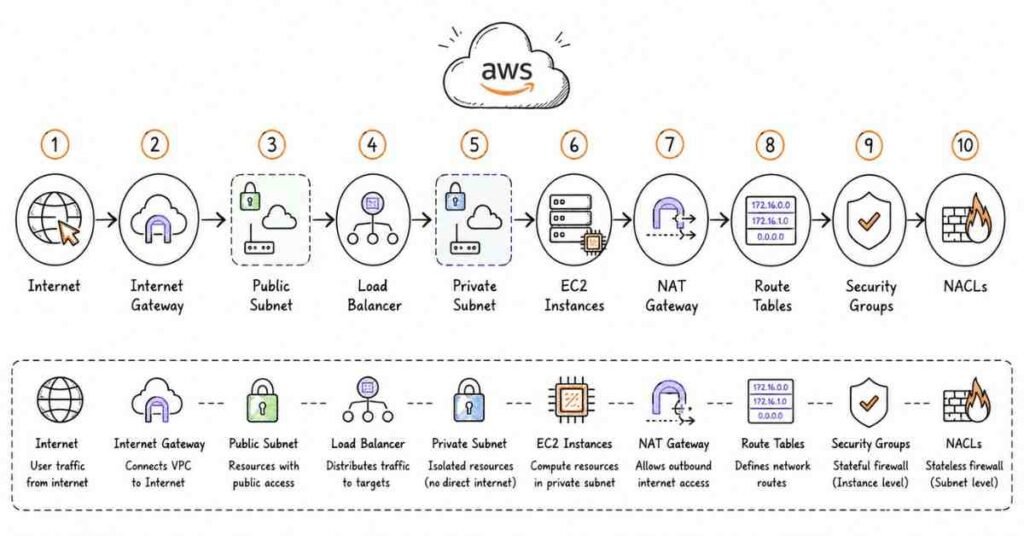
Q62. Explain VPC components and their relationships.
Answer: VPC architecture consists of interconnected components. CIDR Blocks define the IP address range (e.g., 10.0.0.0/16). Subnets divide the VPC into smaller network segments, each mapped to specific Availability Zones. Route Tables control traffic routing between subnets and external networks. Internet Gateways enable internet connectivity for public subnets. NAT Gateways allow private subnet instances to access the internet while remaining unreachable from outside. Security Groups act as instance-level firewalls. Network ACLs provide subnet-level traffic filtering. These components work together to create secure, scalable network architectures.
Q63. What is the difference between public and private subnets?
Answer: Subnets are classified by their routing configuration and internet accessibility. Public subnets have route table entries directing traffic to an Internet Gateway, enabling instances with public IPs to communicate directly with the internet – ideal for web servers, load balancers, and bastion hosts. Private subnets lack Internet Gateway routes, preventing direct internet access – suitable for databases, application servers, and internal services. Private subnet instances can access the internet through NAT Gateways for updates and external API calls while remaining unreachable from outside. Best practice architectures place public-facing resources in public subnets and backend systems in private subnets for defense-in-depth security.
Q64. Explain Internet Gateway and its purpose.
Answer: An Internet Gateway (IGW) is a horizontally scaled, redundant, highly available VPC component allowing communication between VPC resources and the internet. IGW serves two functions: target for internet-routable traffic in route tables and NAT translation for instances with public IPv4 addresses. Each VPC can attach only one IGW, and each IGW can attach to only one VPC. For instances to access the internet, they require: public IP or Elastic IP, route table entry directing 0.0.0.0/0 traffic to IGW, and security groups/NACLs allowing relevant traffic. IGW has no bandwidth constraints and is automatically highly available across Availability Zones.
Q65. What is a NAT Gateway and when should it be used?
Answer: NAT (Network Address Translation) Gateway enables instances in private subnets to connect to the internet or other AWS services while preventing unsolicited inbound connections from the internet. NAT Gateway resides in public subnets with Elastic IPs and handles translation of private IPs to its public IP for outbound traffic. Use cases include software updates for private instances, API calls to external services, downloading dependencies during application deployment, and accessing AWS services over the internet. NAT Gateways are AWS-managed, highly available within an AZ, and scale automatically to 45 Gbps. For high availability, deploy NAT Gateways in multiple AZs with corresponding route table configurations.
Q66. Compare NAT Gateway vs NAT Instance.
Answer: Both enable private subnet internet access but differ significantly. NAT Gateway is AWS-managed, automatically scales to 45 Gbps, highly available within an AZ, requires no patching or management, but more expensive and less flexible. NAT Instance is a self-managed EC2 instance with NAT capability, offers complete control, can serve as bastion host, supports port forwarding, but requires manual scaling, patching, and high-availability configuration. NAT Gateways have become the recommended approach for most use cases due to operational simplicity and built-in scalability. NAT Instances remain relevant for cost-sensitive scenarios with predictable low traffic or when requiring features like DPI or custom routing.
Q67. Explain VPC Peering and its limitations.
Answer: VPC Peering creates networking connections between two VPCs enabling routing traffic using private IP addresses as if they’re within the same network. Peering works across regions and AWS accounts after owner acceptance. Key limitations include: non-transitive routing – VPC A peered with B, and B peered with C doesn’t enable A-C communication; no overlapping CIDR blocks allowed; no edge-to-edge routing through intermediate gateways; and limit of 125 peering connections per VPC. Use cases include shared services architectures, multi-account strategies, and disaster recovery across regions. For complex multi-VPC connectivity, AWS Transit Gateway provides more scalable solutions than mesh peering topologies.
Q68. What is AWS Transit Gateway?
Answer: AWS Transit Gateway acts as a central network hub connecting VPCs, on-premises networks, and AWS services through a single gateway, simplifying complex network architectures. It eliminates the need for mesh VPC peering configurations, scaling effortlessly to thousands of VPCs and VPN connections. Transit Gateway supports inter-region peering for global networks, route propagation from VPNs and Direct Connect, multicast routing, and network segmentation through route table associations. Benefits include centralized management, reduced operational complexity, improved network visibility, and bandwidth efficiency. Common in enterprise environments with 10+ VPCs requiring interconnectivity or hybrid cloud architectures integrating on-premises data centers.
Q69. Explain VPC Endpoints and their types.
Answer: VPC Endpoints enable private connectivity between VPCs and supported AWS services without requiring Internet Gateways, NAT devices, VPN connections, or Direct Connect. Two types exist: Interface Endpoints (powered by AWS PrivateLink) create elastic network interfaces with private IPs in subnets, supporting numerous services like EC2, SNS, CloudWatch. Gateway Endpoints use route table entries targeting S3 and DynamoDB, with no additional charges. Benefits include enhanced security by keeping traffic within AWS network, improved performance through optimized routing, reduced data transfer costs, and simplified compliance for regulated industries. Gateway Endpoints for S3 should be standard in architectures accessing S3 from private subnets.
Q70. What is VPC Flow Logs and what troubleshooting do they enable?
Answer: VPC Flow Logs capture metadata about IP traffic flowing through network interfaces in VPCs, enabling visibility into network communication patterns. Logs can be created at VPC, subnet, or ENI level, publishing to CloudWatch Logs or S3 for analysis. Captured information includes source/destination IPs, ports, protocol, packet/byte counts, action (accept/reject), and timestamps. Troubleshooting capabilities include diagnosing security group rules, investigating suspicious traffic patterns, analyzing application performance, meeting compliance requirements, and optimizing network costs. For example, analyzing rejected flows helps identify misconfigured security groups, while accepted flows reveal which resources communicate most frequently.
Q71. Explain Route Tables and routing in VPC.
Answer: Route Tables contain rules (routes) determining where network traffic from subnets or gateways is directed. Each route specifies a destination CIDR and a target (IGW, NAT Gateway, VPC Peering connection, Transit Gateway, etc.). Every VPC has a Main Route Table assigned to subnets without explicit associations. Custom route tables enable different routing behaviors for different subnets. Most specific routes take precedence (10.0.1.0/24 over 10.0.0.0/16). Local routes enabling VPC-internal communication are added automatically and cannot be deleted. Route priorities follow: longest prefix match, static routes over propagated routes, and specific precedence rules for equal-length prefixes.
Q72. What are Network ACLs and how do they differ from Security Groups?
Answer: Network Access Control Lists (NACLs) are stateless firewalls controlling traffic at the subnet level through numbered allow and deny rules. Key differences from Security Groups: NACLs are stateless requiring explicit inbound and outbound rules for bidirectional communication, support both allow and deny rules, process rules in numerical order (lowest number first), apply at subnet level affecting all instances, and represent the last line of subnet defense. Security Groups are stateful, support only allow rules, evaluate all rules collectively, apply at instance level, and represent first line of instance defense. Best practice uses Security Groups for most access control with NACLs providing additional subnet-level protection or blocking specific IPs.
Q73. Explain VPC Subnet sizing and CIDR block selection.
Answer: Subnet sizing requires planning for current and future capacity needs while considering AWS’s reserved IP addresses. AWS reserves 5 IP addresses in every subnet: first address (network address), second (VPC router), third (DNS), fourth (future use), and last (broadcast address). For example, 10.0.1.0/24 provides 256 total addresses minus 5 reserved equals 251 usable addresses. CIDR selection best practices: use RFC 1918 private ranges (10.0.0.0/8, 172.16.0.0/12, 192.168.0.0/16), avoid overlaps with on-premises networks and peered VPCs, size subnets appropriately (avoid oversized or undersized), and plan for growth by not consuming entire VPC CIDR immediately. Common pattern: /16 VPC with multiple /24 subnets per AZ.
Q74. What is VPC DHCP Options Set?
Answer: DHCP Options Sets control which DNS servers, domain names, NTP servers, and NetBIOS settings EC2 instances receive when launched. By default, VPCs use Amazon-provided DNS (AmazonProvidedDNS) resolving instance hostnames and public DNS names. Custom DHCP Options Sets enable using custom DNS servers (on-premises or third-party), specifying domain names for instance resolution, configuring NTP servers for time synchronization, and setting NetBIOS parameters for Windows environments. Once created, DHCP Options Sets are associated with VPCs and cannot be modified (must create new sets). Changes take effect after instances renew DHCP leases or restart. Common in hybrid architectures requiring integration with corporate DNS infrastructure.
Q75. Explain Bastion Hosts and their security best practices.
Answer: Bastion Hosts (jump boxes) are specially-hardened EC2 instances in public subnets serving as secure entry points for accessing instances in private subnets. Security best practices include: minimal software installed reducing attack surface, restrictive security groups limiting SSH/RDP source IPs to known ranges, key-based authentication with regularly rotated keys, audit logging of all sessions through CloudTrail and OS logs, multi-factor authentication for additional verification, auto-stop outside business hours, and regular security patching. Modern alternatives include AWS Systems Manager Session Manager eliminating bastion host needs entirely by providing browser-based shell access without inbound ports open. Organizations increasingly adopt Session Manager reducing operational overhead and improving security posture.
Q76. What is VPC IPv6 support and its implications?
Answer: VPCs support dual-stack mode enabling both IPv4 and IPv6 addressing simultaneously. Amazon assigns /56 CIDR blocks from its IPv6 pool to VPCs, which subdivide into /64 subnet ranges. All IPv6 addresses are publicly routable by default, eliminating the need for NAT devices. Security groups and NACLs control IPv6 traffic independently of IPv4 rules. Benefits include eliminating NAT Gateway costs for IPv6 traffic, addressing exhaustion prevention, and simplified networking without NAT complexity. Considerations include ensuring applications support IPv6, updating security rules, and understanding all IPv6 addresses are public (security depends on security groups/NACLs). Adoption growing as organizations prepare for IPv4 exhaustion.
Q77. Explain VPN connections to AWS (Site-to-Site VPN).
Answer: AWS Site-to-Site VPN creates encrypted connections between on-premises networks and VPCs over the internet, enabling hybrid cloud architectures. Components include Virtual Private Gateway (VPN endpoint on AWS side), Customer Gateway (representation of on-premises VPN device), and VPN Connection with two IPsec tunnels for redundancy. VPN provides encrypted traffic over public internet, quick setup within hours compared to Direct Connect, and cost-effectiveness for lower bandwidth needs (up to 1.25 Gbps per tunnel). Limitations include internet-dependent reliability, variable latency, and bandwidth constraints. Ideal for testing hybrid scenarios, disaster recovery links, or supplementing Direct Connect for redundancy. AWS accelerates VPNs through Global Accelerator for improved performance.
Q78. What is AWS Direct Connect?
Answer: AWS Direct Connect establishes dedicated, private network connections from on-premises data centers to AWS, bypassing the public internet. Provides consistent network performance with predictable latency, enhanced security through private connectivity, increased bandwidth (1 Gbps or 10 Gbps ports), and reduced data transfer costs for large volumes. Direct Connect supports public VIFs for accessing AWS public services (S3, DynamoDB) and private VIFs for VPC resources. Setup involves selecting Direct Connect locations, provisioning cross-connects through partners, configuring BGP routing. Use cases include large-scale data migrations, real-time data feeds, hybrid cloud architectures requiring consistent performance, and regulated workloads avoiding public internet. Setup takes weeks, making VPN suitable for immediate needs.
Q79. Explain VPC Sharing and its benefits.
Answer: VPC Sharing (part of AWS Resource Access Manager) allows multiple AWS accounts to create resources into shared, centrally-managed VPCs. The owner account creates and manages the VPC, subnets, route tables, and gateways, while participant accounts launch resources into shared subnets. Benefits include cost optimization through shared NAT Gateways and Transit Gateways, simplified networking eliminating VPC peering complexity, centralized governance with consistent network policies, and security group references across accounts. Common in AWS Organizations environments where central networking teams manage infrastructure while application teams retain resource control. Participants cannot view, modify, or delete resources belonging to other accounts, maintaining isolation. This architecture pattern reduces networking operational overhead significantly.
Q80. What is Elastic Network Adapter (ENA) and its performance benefits?
Answer: Elastic Network Adapter (ENA) is a custom network interface developed by AWS providing enhanced networking capabilities for EC2 instances. ENA delivers higher bandwidth (up to 100 Gbps), higher packet-per-second performance, consistently lower latency, and lower jitter compared to traditional networking. Implemented through SR-IOV (Single Root I/O Virtualization), ENA provides near-hardware performance by allowing direct access to network hardware. Most current-generation instances enable ENA by default. Applications benefiting most include high-frequency trading systems, distributed computing clusters, real-time analytics, video streaming, and scientific computing. No additional charges apply; ENA is included with supported instance types.
Q81. Explain VPC Traffic Mirroring and its use cases.
Answer: VPC Traffic Mirroring copies network traffic from elastic network interfaces and sends it to security and monitoring appliances for content inspection, threat monitoring, and troubleshooting. Traffic sources can be ENIs, and targets can be ENIs or Network Load Balancers. Mirroring enables intrusion detection systems (IDS), network performance monitoring, compliance auditing, threat intelligence, and application troubleshooting through packet-level visibility. Filters control which traffic gets mirrored based on direction (ingress/egress), protocol, port ranges, and CIDR blocks. Unlike Flow Logs capturing metadata, Traffic Mirroring captures actual packet contents. Used by security operations centers, compliance teams, and network engineers requiring deep packet inspection without impacting production traffic.
Q82. What is AWS PrivateLink?
Answer: AWS PrivateLink provides private connectivity between VPCs, AWS services, and on-premises applications without exposing traffic to the public internet. It enables service providers to expose services to consumers across accounts and VPCs through interface endpoints. PrivateLink benefits include enhanced security by keeping traffic within AWS network, simplified network architecture eliminating VPC peering and route table management, scalability supporting thousands of consumer VPCs, and compliance meeting data residency requirements. Use cases include SaaS vendors offering private access to products, internal service sharing across AWS Organizations, and third-party integration with vendors supporting PrivateLink. Growing ecosystem with hundreds of services now accessible through PrivateLink.
Q83. Explain Egress-Only Internet Gateway.
Answer: Egress-Only Internet Gateway enables outbound IPv6 communication from VPCs to the internet while preventing inbound IPv6 connections. It functions as IPv6 equivalent of NAT Gateway for IPv4, though implemented differently since IPv6 doesn’t use NAT. Egress-Only IGW achieves security through stateful connection tracking – allowing responses to outbound requests while blocking unsolicited inbound traffic. Required configuration includes creating the gateway, adding route table entry for ::/0 pointing to egress-only IGW, and ensuring security groups allow relevant traffic. Used when instances require IPv6 addresses (all publicly routable) but should not accept inbound internet connections. As IPv6 adoption increases, Egress-Only IGW becomes essential for secure architectures.
Q84. What are VPC Reachability Analyzer capabilities?
Answer: VPC Reachability Analyzer is a network diagnostics tool analyzing and debugging network reachability between source and destination in VPCs without generating actual traffic. It performs static configuration analysis examining route tables, security groups, NACLs, and other network components to determine connectivity paths or identify blockages. Use cases include troubleshooting connectivity failures before application deployment, validating security group configurations, planning network changes understanding impact, and compliance auditing verifying segmentation. The analyzer generates detailed hop-by-hop explanations showing exactly where traffic succeeds or fails, whether due to security group rules, NACL entries, route table gaps, or missing IGW attachments. Significantly reduces troubleshooting time compared to manual trace route approaches.
Q85. Explain VPC security best practices.
Answer: Comprehensive VPC security implements defense-in-depth across multiple layers. Network segmentation – separate public, private, and data subnets across multiple AZs. Security Groups – implement least-privilege access, avoid 0.0.0.0/0 for production resources. NACLs – add subnet-level protection, explicit deny rules for known threats. VPC Flow Logs – enable at VPC level, analyze regularly for anomalies. Private connectivity – use VPC endpoints for AWS services, avoid internet where possible. Bastion alternatives – implement Systems Manager Session Manager. Encryption – use VPN or Direct Connect for hybrid connectivity. Monitoring – integrate GuardDuty, Security Hub, CloudWatch alarms. Compliance – regular architecture reviews against AWS Well-Architected Framework. These practices create robust, compliant network architectures.
Section 4: Amazon S3 (Simple Storage Service) - Questions 86-110
Q86. What is Amazon S3 and what makes it unique?
Answer: Amazon Simple Storage Service (S3) is object storage built to store and retrieve unlimited data from anywhere on the web. S3 stores data as objects (files up to 5TB) within buckets (containers) with unique keys (filenames). Unique characteristics include eleven nines durability (99.999999999%), automatic scaling without capacity planning, pay-per-use pricing with no minimum fees, versioning capabilities, lifecycle management, and multiple storage classes optimizing costs. S3 transformed cloud storage by eliminating traditional storage constraints, enabling use cases from simple backup to data lakes powering big data analytics. It’s the most widely-used AWS service and fundamental building block for thousands of applications.
Q87. Explain S3 storage classes and their use cases.
Answer: S3 offers seven storage classes optimized for different access patterns and cost requirements. S3 Standard provides high durability, availability, and performance for frequently accessed data. S3 Intelligent-Tiering automatically moves objects between access tiers based on usage patterns, eliminating manual management. S3 Standard-IA (Infrequent Access) suits data accessed less frequently but requiring rapid retrieval with lower storage costs and retrieval fees. S3 One Zone-IA stores data in single AZ with 20% lower cost for reproducible data. S3 Glacier Instant Retrieval provides millisecond access to archived data. S3 Glacier Flexible Retrieval offers retrieval in minutes to hours for archives. S3 Glacier Deep Archive delivers lowest-cost storage for long-term retention with 12-hour retrieval. Choosing appropriate classes dramatically reduces storage costs.
Q88. What is S3 bucket naming and why are names globally unique?
Answer: S3 bucket names must be globally unique across all AWS accounts and regions because they form part of the endpoint URL (bucket-name.s3.amazonaws.com) and must comply with DNS naming conventions. Naming rules include: 3-63 characters length, lowercase letters, numbers, hyphens only, cannot start with “xn--“, no IP address format, and no underscores or periods in virtual-hosted style. Once a bucket name is created, no other AWS customer can use that name until it’s deleted, and even then, there may be delays before reuse. Best practices include incorporating company/project identifiers avoiding generic names, using hyphens for readability, considering whether bucket names might be exposed in URLs, and planning carefully since renaming requires creating new buckets and copying data.
Q89. Explain S3 object structure and metadata.
Answer: S3 objects consist of several components providing flexible data management. Key is the unique identifier (filename including path) within a bucket. Value is the actual data content (0 bytes to 5TB). Version ID identifies specific versions when versioning is enabled. Metadata includes system metadata (Content-Type, Last-Modified, Size) and user-defined metadata (custom key-value pairs with x-amz-meta- prefix). Subresources include Access Control Lists and torrent information. Access Control Information determines who can access objects. Metadata is critical for classification, lifecycle policies, and application logic – for example, tagging objects with department:finance enables cost tracking and access policies.
Q90. What is S3 versioning and its benefits?
Answer: S3 versioning maintains multiple variants of objects in buckets, preserving, retrieving, and restoring every version of every object. Once enabled, versioning cannot be disabled (only suspended). Each object receives a unique version ID on creation or modification. Benefits include protection against accidental deletion – deleted objects are marked with delete markers rather than removed, recovery from unintended overwrites, compliance with regulatory requirements for data retention, and audit trails showing object history. Versioning incurs storage costs for all versions, mitigated through lifecycle policies deleting old versions. Critical for production data stores and regulatory compliance scenarios requiring immutable data history.
Q91. Explain S3 lifecycle policies and their cost optimization potential.
Answer: S3 lifecycle policies automatically transition objects between storage classes or delete them based on age, enabling significant cost optimization without manual management. Policies consist of transition actions moving objects to cheaper storage classes after specified periods (e.g., Standard to Standard-IA after 30 days, to Glacier after 90 days) and expiration actions permanently deleting objects after retention periods. Example policy: logs moved to Standard-IA after 30 days, Glacier after 90 days, deleted after 365 days saves 70%+ storage costs. Lifecycle rules apply to object prefixes (specific folders) or entire buckets, support versioned objects, and execute daily. Organizations save millions annually through proper lifecycle management, especially for log archives, backups, and infrequently accessed data.
Q92. What is S3 bucket policy vs IAM policy for access control?
Answer: Both control S3 access but serve different purposes. IAM policies attach to users, groups, or roles defining what actions those identities can perform across AWS, written from identity perspective (“This user can access these buckets”). Bucket policies attach directly to buckets defining who can access bucket contents, written from resource perspective (“This bucket allows these users to access”). Bucket policies support cross-account access without IAM role assumption, public access for website hosting, conditional access based on IP addresses or VPC endpoints, and centralized management of bucket permissions. Access decisions use policy evaluation logic combining IAM, bucket, ACL, and VPC endpoint policies with explicit deny overriding allows. Complex scenarios often require both policy types working together.
Q93. Explain S3 Access Control Lists (ACLs) and current recommendations.
Answer: S3 ACLs are legacy access control mechanisms predating bucket policies and IAM policies, defining which AWS accounts or groups can access buckets and objects with permission types (READ, WRITE, READ_ACP, WRITE_ACP, FULL_CONTROL). AWS now recommends disabling ACLs for new buckets using bucket policies and IAM policies instead, offering more granular control and easier management. ACL use cases that remain valid include object-level permissions differing from bucket-level (rare), cross-account access where bucket policies aren’t viable (increasingly rare), and legacy applications depending on ACLs. S3 introduces Block Public Access settings helping prevent accidental public exposure through ACL misconfiguration. Modern architectures should avoid ACLs, using bucket policies for bucket-level control and IAM policies for user-level control.
Q94. What is S3 Block Public Access and why is it critical?
Answer: S3 Block Public Access provides settings preventing public access to S3 buckets and objects regardless of bucket policies, ACLs, or access points, acting as security guardrails. Four settings control: Block public access granted through new ACLs, Block public access granted through any ACLs, Block public access granted through new public bucket policies, Block public and cross-account access granted through any public bucket policies. These settings apply at account or bucket level, with account-level settings overriding bucket settings. Critical because misconfigured S3 buckets cause countless data breaches annually. Best practice enables Block Public Access at account level by default, selectively disabling only for legitimate use cases like website hosting or public content distribution with documented approval processes.
Q95. Explain S3 encryption options.
Answer: S3 supports encryption protecting data at rest and in transit. Server-Side Encryption (SSE) encrypts objects before storing, with three options: SSE-S3 using AWS-managed keys (AES-256, default), SSE-KMS using AWS Key Management Service for audit trails and key rotation control, and SSE-C using customer-provided keys (AWS doesn’t store keys). Client-Side Encryption encrypts data before uploading, providing maximum control with users managing encryption process. Encryption in transit uses HTTPS/TLS for data moving to/from S3. S3 enables default encryption for buckets, automatically encrypting all new objects. Compliance requirements often mandate SSE-KMS for audit capabilities through CloudTrail logging key usage. Bucket policies can enforce encryption by rejecting uploads without encryption headers.
Q96. What is S3 replication (Cross-Region and Same-Region)?
Answer: S3 replication automatically copies objects from source buckets to destination buckets asynchronously, supporting two types. Cross-Region Replication (CRR) replicates across different AWS regions for disaster recovery, compliance with geographic requirements, latency reduction by placing data closer to users, and operational efficiency for distributed teams. Same-Region Replication (SRR) copies within the same region for log aggregation from multiple buckets, production-test environment sync, or compliance requiring multiple storage copies. Replication requires versioning enabled on source and destination, appropriate IAM permissions, and optional features include replica ownership change, encryption translation, and delete marker replication. Replication rules can filter by prefixes or tags for selective copying.
Q97. Explain S3 Transfer Acceleration.
Answer: S3 Transfer Acceleration enables fast, secure file transfers over long distances between clients and S3 buckets using CloudFront’s globally distributed edge locations. When uploading to acceleration-enabled buckets, data routes through nearest edge location, then transfers to S3 over optimized network paths, achieving 50-500% speed improvements for distant users. Ideal use cases include mobile apps with worldwide users, terabyte-scale uploads, distributed teams accessing centralized S3 storage, and backup solutions requiring fast transfers. Acceleration uses distinct endpoints (bucket-name.s3-accelerate.amazonaws.com), charges per GB transferred, and automatically routes via standard S3 if acceleration provides no benefit. AWS provides a comparison tool testing speed improvements before implementation.
Q98. What is S3 Select and how does it reduce costs?
Answer: S3 Select enables retrieving specific data from objects using SQL expressions without downloading entire objects, dramatically reducing data transfer and processing requirements. It works on CSV, JSON, and Parquet files, supporting standard SQL operations (SELECT, WHERE). Benefits include cost reduction (charged by data scanned, typically 80% less than full retrieval), performance improvement (filtering occurs within S3, returning only relevant data), and simplified application logic. Example: querying specific columns from 100GB CSV returns only needed rows/columns rather than downloading 100GB. Use cases include log analysis extracting errors from large files, data lake queries for exploratory analysis, and serverless architectures where Lambda processes specific object portions. Combined with Glacier Select, enables querying archived data efficiently.
Q99. Explain S3 Object Lock and compliance mode.
Answer: S3 Object Lock implements Write Once Read Many (WORM) model preventing object deletion or modification for specified retention periods, supporting regulatory compliance. Two retention modes exist: Governance mode allows users with special permissions to override retention or delete objects, suitable for testing and most business scenarios. Compliance mode prevents anyone, including root account, from deleting or modifying objects until retention expires, meeting SEC, FINRA, and HIPAA requirements. Legal hold provides indefinite protection independent of retention periods. Object Lock requires versioning and applies to individual object versions. Financial services, healthcare, and government sectors rely on Object Lock for immutable audit trails, preventing data tampering even by privileged users.
Q100. What is S3 Inventory and its operational benefits?
Answer: S3 Inventory generates reports listing objects and metadata for buckets, providing business intelligence, workflow management, and compliance verification. Inventory reports deliver scheduled outputs (daily or weekly) in CSV, ORC, or Parquet format to specified buckets, including object metadata like size, storage class, encryption status, replication status, and tags. Use cases include auditing encryption ensuring all objects use required encryption, verifying replication checking copy status, reporting object counts by storage class for cost analysis, identifying optimization opportunities finding objects suitable for lifecycle transitions, and compliance reporting for data governance. Inventory queries use Athena or Redshift Spectrum for analysis, enabling data-driven storage optimization decisions. More efficient than LIST API calls for large buckets.
Q101. Explain S3 storage cost optimization strategies.
Answer: Comprehensive S3 cost optimization combines multiple approaches. Storage class selection – use Intelligent-Tiering for unknown patterns, Standard-IA for infrequent access. Lifecycle policies – automate transitions to cheaper classes and deletion of unnecessary data. Compression – gzip or other compression before upload reduces storage and transfer costs. Incomplete multipart upload cleanup – delete abandoned uploads consuming storage. Versioning management – limit version retention or delete old versions. Requester Pays – transfer costs to data consumers for shared datasets. S3 Analytics – analyze access patterns recommending lifecycle policies. Reserved capacity – commit to minimum storage levels for discounts (Glacier). Organizations achieving 60-80% cost reductions through systematic optimization tracking costs by bucket tags and implementing continuous improvements.
Q102. What is S3 multipart upload and when is it necessary?
Answer: Multipart upload enables uploading large objects in parts (5MB to 5GB each) independently, improving throughput, resilience, and efficiency. Process involves: initiate multipart upload receiving upload ID, upload parts (potentially in parallel), complete upload instructing S3 to assemble parts. Multipart upload is required for objects exceeding 5GB and recommended for objects over 100MB. Benefits include improved throughput from parallel uploads, quick recovery from network issues (only failed parts retry), pause and resume capability, and begin uploads before knowing final size. Failed multipart uploads continue consuming storage until completed or aborted, necessitating lifecycle policies deleting incomplete uploads after specified days. AWS SDKs and CLI automatically use multipart upload for large files.
Q103. Explain S3 presigned URLs and their security benefits.
Answer: Presigned URLs grant time-limited access to specific S3 objects using requestor’s security credentials without requiring recipients to have AWS credentials. Generated using AWS credentials, presigned URLs embed authentication information in URL parameters, valid for configurable duration (1 second to 7 days). Use cases include temporary file sharing without making objects public, direct uploads from users to S3 bypassing application servers, controlled downloads tracking access, and third-party integrations requiring temporary access. Security benefits include time-limited access automatically expiring, action-specific permissions (GET, PUT, DELETE), no credential exposure to recipients, and audit trails through CloudTrail. Common in SaaS applications enabling users to upload profile pictures or download reports directly to/from S3.
Q104. What is S3 Batch Operations?
Answer: S3 Batch Operations perform large-scale operations on billions of objects with a single request, automating bulk management tasks. Supported operations include copying objects between buckets, restoring archived objects from Glacier, invoking Lambda functions for custom processing, replacing object tags or metadata, applying ACLs or encryption, and deleting objects. Batch Operations work from S3 Inventory reports or CSV manifests listing target objects, providing completion reports detailing success/failure for each object, task prioritization, and retry logic. Use cases include data migrations to different storage classes, metadata enrichment adding tags to millions of objects, encryption enablement for existing data, and compliance remediation at scale. Eliminates writing custom scripts for bulk operations, ensuring consistency and error handling.
Q105. Explain S3 static website hosting capabilities.
Answer: S3 can host static websites consisting of HTML, CSS, JavaScript, images, and other static content without requiring web servers. Configuration involves enabling website hosting on bucket, specifying index document (index.html) and optional error document, and configuring bucket policy allowing public read access. Website endpoints use format bucket-name.s3-website-region.amazonaws.com. Benefits include cost-effectiveness (pennies per month), automatic scaling handling traffic spikes, high availability across multiple AZs, and simple deployment via CLI/SDK uploads. Limitations include no server-side processing (PHP, Python backends require alternative solutions), HTTP only (HTTPS requires CloudFront), and no custom headers. Ideal for documentation sites, single-page applications, and marketing landing pages often combined with CloudFront for HTTPS and caching.
Q106. What are S3 access points and their benefits?
Answer: S3 Access Points simplify managing data access at scale by creating unique hostnames with distinct permissions and network controls for shared datasets. Each access point has its own access point policy independent of bucket policy, network origin controls restricting access to specific VPCs, and unique hostname for application access. Benefits include simplified permissions management – instead of complex bucket policies with conditions, create separate access points per application with specific policies. Network segmentation – different access points restrict access to particular VPCs. Application-specific configurations – analytics team access point with different permissions than data science team. Ideal for data lakes with multiple teams requiring different access patterns, significantly simplifying previously complex bucket policy management.
Q107. Explain S3 Intelligent-Tiering in detail.
Answer: S3 Intelligent-Tiering automatically moves objects between five access tiers based on actual access patterns, optimizing costs without performance impact or operational overhead. Tiers include Frequent Access (default), Infrequent Access (not accessed 30 days), Archive Instant Access (not accessed 90 days), Archive Access (optional, configurable 90-730 days), and Deep Archive Access (optional, configurable 180-730 days). Monitoring fee is $0.0025 per 1,000 objects monthly, economical for objects >128KB stored >30 days. No retrieval fees for frequent, infrequent, or archive instant tiers. Perfect for unpredictable or changing access patterns where manual lifecycle policies are impractical. Objects automatically return to frequent tier when accessed. Increasingly popular as default storage class for workloads without clear access patterns.
Q108. What is Amazon Macie and its S3 security role?
Answer: Amazon Macie is a data security service using machine learning to automatically discover, classify, and protect sensitive data in S3. Macie identifies personally identifiable information (PII), financial data, credentials, intellectual property, and custom data types through regex patterns. Capabilities include automated discovery jobs scanning buckets, sensitive data findings reporting exact locations, security posture assessment identifying encryption gaps and public access, continuous monitoring detecting policy changes, and integration with Security Hub for centralized security management. Use cases include GDPR/CCPA compliance locating personal data, data loss prevention finding exposed credentials, insider threat detection identifying unusual access patterns, and security auditing across thousands of buckets. Essential for organizations with compliance requirements or large S3 estates containing sensitive data.
Q109. Explain S3 event notifications and integration patterns.
Answer: S3 event notifications trigger automated workflows when specific events occur in buckets, enabling event-driven architectures. Supported events include object creation (PUT, POST, COPY, multipart upload completion), deletion, restore from Glacier, replication, and reduced redundancy storage loss. Notifications can trigger Lambda functions for processing, SQS queues for buffering, or SNS topics for fan-out to multiple subscribers. Integration patterns include image thumbnail generation when photos upload, data validation upon file arrival, ETL pipeline triggers for new datasets, virus scanning for uploaded files, and audit logging for deletion events. Event notifications use prefix/suffix filters targeting specific objects and can send multiple notifications per event. EventBridge integration provides additional filtering and routing capabilities for complex scenarios.
Q110. What are S3 performance optimization best practices?
Answer: Optimizing S3 performance requires understanding request patterns and implementing appropriate strategies. Key design – randomize key prefixes distributing I/O load (historical concern, less relevant with S3’s 3,500 PUT and 5,500 GET requests per second per prefix scalability). Multipart upload – parallelize uploads for objects over 100MB. Range GETs – download specific byte ranges for large objects. CloudFront integration – cache frequently accessed content reducing S3 requests. S3 Transfer Acceleration – leverage edge locations for distant users. Connection pooling – reuse HTTPS connections avoiding handshake overhead. Horizontal scaling – increase concurrent threads/connections. Avoid sequential keys for high-throughput scenarios. Applications handling media streaming, big data analytics, or high-transaction workloads benefit significantly from these optimizations, achieving 10x+ throughput improvements.
Section 5: Amazon EBS (Elastic Block Store) - Questions 111-125
Q111. What is Amazon EBS and how does it differ from S3 and Instance Store?
Answer: Amazon Elastic Block Store (EBS) provides block-level storage volumes for EC2 instances, functioning like virtual hard drives. Key differences: EBS offers persistent block storage surviving instance stops/terminations, attaches to single instances (except Multi-Attach), and provides consistent low-latency performance. S3 provides object storage for web-accessible files, supports unlimited scalability, and costs less but with higher latency. Instance Store delivers temporary block storage physically attached to host computers, offering maximum performance but losing data when instances stop. EBS suits operating systems, databases, and applications requiring block-level access. S3 suits archives, media, and static content. Instance Store suits caches and temporary processing. Understanding these distinctions ensures appropriate storage selection.
Q112. Explain EBS volume types and their use cases.
Answer: EBS offers five volume types balancing performance and cost. gp3 (General Purpose SSD) provides cost-effective performance for most workloads with 3,000 IOPS and 125 MB/s baseline (independently tunable to 16,000 IOPS and 1,000 MB/s). gp2 predecess or links IOPS to size (3 IOPS per GB) with burstable performance. io2 Block Express delivers highest performance for mission-critical applications (256,000 IOPS, 4,000 MB/s, sub-millisecond latency). io2 provides 64,000 IOPS with 99.999% durability. st1 (Throughput Optimized HDD) suits frequently accessed sequential workloads (500 IOPS, 500 MB/s) like big data. sc1 (Cold HDD) offers lowest cost for infrequent access (250 IOPS, 250 MB/s). Most applications use gp3 for cost-effective performance, databases use io2, and data warehouses use st1.
Q113. What are EBS snapshots and how do they work?
Answer: EBS snapshots are point-in-time copies of EBS volumes stored in S3, providing backup and disaster recovery capabilities. Snapshots are incremental – first snapshot copies all data, subsequent snapshots copy only changed blocks since the last snapshot, minimizing storage costs and creation time. Volumes can be created from snapshots in any AZ within the region, enabling cross-AZ recovery, volume cloning, and capacity expansion. Snapshots support cross-region copying for disaster recovery and sharing with other AWS accounts. Best practices include consistent snapshots for databases (pause writes or use EBS-optimized snapshot features), automated scheduling through Data Lifecycle Manager, testing restores periodically, and tagging for organization. Snapshots form the foundation of comprehensive backup strategies.
Q114. Explain EBS encryption and key management.
Answer: EBS encryption uses AWS Key Management Service (KMS) to encrypt volumes at rest, snapshots, and data in transit between volumes and instances. Encryption happens transparently using AES-256 algorithm, with no performance impact on modern instance types. Encrypted volumes automatically create encrypted snapshots. Encryption keys can be AWS-managed default keys or customer-managed keys (CMKs) providing rotation control and audit logging. Encryption can be enabled by default for new volumes through account settings. Existing unencrypted volumes can be encrypted by creating snapshots, copying with encryption, and creating new volumes. Compliance requirements often mandate encryption, with healthcare (HIPAA), finance (PCI-DSS), and government sectors requiring customer-managed keys for audit trails. CloudTrail logs all KMS key usage for security monitoring.
Q115. What is EBS Multi-Attach and its use cases?
Answer: EBS Multi-Attach enables attaching a single Provisioned IOPS (io1/io2) volume to multiple EC2 instances within the same Availability Zone, with all instances having read-write access simultaneously. Limited to 16 instances per volume and requires cluster-aware file systems (not standard file systems like ext4 or XFS) to prevent data corruption. Use cases include clustered databases (Oracle RAC) requiring shared storage, high-availability applications with concurrent access needs, and Linux clustering solutions. Multi-Attach requires careful planning around application-level locking, file system compatibility, and fault tolerance design. Most applications don’t require Multi-Attach, using alternatives like EFS for shared file access. Specialized scenarios needing block-level shared access benefit from this capability.
Q116. Explain EBS performance optimization strategies.
Answer: EBS performance optimization combines appropriate volume selection, instance configuration, and workload tuning. Volume type selection – use io2 for IOPS-intensive databases, gp3 for general workloads, st1 for throughput-heavy applications. EBS-optimized instances – ensure instances support EBS optimization providing dedicated bandwidth. RAID configuration – RAID 0 increases performance by striping across multiple volumes (also increases failure risk). Pre-warming – read entire volume or snapshots before production use. I/O size optimization – match application I/O patterns to EBS characteristics. CloudWatch monitoring – track VolumeReadOps, VolumeWriteOps, BurstBalance. Snapshot scheduling – avoid snapshots during peak I/O periods. Properly tuned EBS configurations meet demanding database and application requirements.
Q117. What is EBS Fast Snapshot Restore (FSR)?
Answer: Fast Snapshot Restore (FSR) eliminates latency during initial volume creation from snapshots by fully initializing volumes, enabling immediate full performance. Without FSR, volumes created from snapshots experience I/O latency as blocks are lazily loaded from S3 on first access, potentially impacting production applications. FSR pre-populates volumes in specific Availability Zones, providing instant full performance, ideal for disaster recovery scenarios requiring rapid RTO (Recovery Time Objectives). FSR charges per snapshot per AZ per hour, making it expensive for many snapshots but valuable for critical recovery images. Use cases include database recovery requiring immediate performance, boot volumes needing fast scaling, and critical application backups. Alternative is pre-warming volumes by reading all blocks, taking longer but free.
Q118. Explain EBS Data Lifecycle Manager (DLM).
Answer: EBS Data Lifecycle Manager automates creating, retaining, and deleting EBS snapshots and EBS-backed AMIs, eliminating manual backup management. DLM policies define resource selection through tags, snapshot schedules (hourly, daily, weekly, monthly), retention rules (count or age-based), and cross-region copy for disaster recovery. Benefits include consistent backup schedules, automated retention preventing storage bloat, compliance with data retention policies, cost optimization through automatic deletion, and disaster recovery through cross-region copy. DLM integrates with CloudWatch Events for monitoring and AWS Backup for centralized management. Organizations implement DLM for production volumes, significantly reducing operational overhead while ensuring comprehensive backup coverage. Tag-based policies enable flexible, granular control.
Q119. What are EBS volume limits and quotas?
Answer: EBS enforces various limits affecting architecture design. Volume size: gp2/gp3 (1 GB to 16 TB), io1/io2 (4 GB to 16 TB), io2 Block Express (4 GB to 64 TB), st1/sc1 (125 GB to 16 TB). Performance: gp3 (16,000 IOPS, 1,000 MB/s), io2 Block Express (256,000 IOPS, 4,000 MB/s). Volumes per instance: varies by type (typically 28 but depends on instance). Snapshots per region: 10,000 (increasable). Snapshot copies: 20 concurrent per region. Active Fast Snapshot Restores: 5 per region (increasable). Understanding limits prevents hitting quotas during deployment, with Service Quotas dashboard showing current usage and enabling increase requests. Large-scale deployments require quota planning.
Q120. Explain EBS volume resizing and modification.
Answer: EBS Elastic Volumes allow modifying volume size, type, and IOPS without detaching from instances, enabling dynamic capacity and performance adjustment. Modifications include increasing size (not decreasing – irreversible direction), changing volume type (gp2 to gp3, io1 to io2), and adjusting IOPS (for io volumes). Process involves requesting modification through console/CLI, monitoring optimization status (can take hours for large volumes), then extending file system to recognize additional space. Limitations include once every 6 hours modification frequency per volume and size-dependent IOPS/throughput for some types. Use cases include capacity expansion without downtime, performance tuning for growing workloads, and cost optimization by downsizing volume types. File system extension requires OS-level commands (resize2fs for Linux).
Q121. What is EBS direct APIs (EBS Direct)?
Answer: EBS Direct APIs enable directly reading snapshots and writing snapshot data without creating volumes, supporting backup and disaster recovery workflows. APIs include ListSnapshotBlocks (list blocks in snapshot), ListChangedBlocks (identify differences between snapshots), GetSnapshotBlock (read specific block), and PutSnapshotBlock (write block data). Use cases include incremental backups identifying only changed data, cross-region replication with custom logic, migration tools copying data to on-premises, forensic analysis examining snapshots without launching instances, and custom backup solutions building proprietary tools. EBS Direct enables innovative applications impossible with standard snapshot operations, though most users rely on AWS Backup or DLM rather than building custom solutions. Charges apply per API request and data transferred.
Q122. Explain EBS vs EFS vs S3 storage selection criteria.
Answer: Selecting appropriate storage requires understanding workload characteristics. Use EBS when: single EC2 instance requires block storage, databases need low-latency I/O, high IOPS requirements (io volumes), or boot volumes. Use EFS when: multiple instances require shared file access, scaling storage without capacity planning, Linux-based applications using NFS, or containerized applications needing persistent shared storage. Use S3 when: storing objects/files accessible via API, archiving large datasets, serving static web content, or data shared across services/regions. Performance: EBS offers lowest latency, EFS provides shared access with moderate latency, S3 has higher latency but unlimited scale. Cost: S3 cheapest, EFS most expensive for equivalent capacity, EBS in between. Many architectures combine all three for optimal cost-performance.
Q123. What is Amazon EBS-optimized instances?
Answer: EBS-optimized instances provide dedicated bandwidth for EBS I/O, separate from network traffic, ensuring consistent storage performance. Without optimization, EBS traffic shares bandwidth with network traffic, causing potential contention. Modern instance types (M5, C5, R5, etc.) are EBS-optimized by default at no additional cost. Older generations required enabling optimization for additional hourly fees. EBS-optimized bandwidth varies by instance size – larger instances provide more throughput (e.g., m5.large: 2.88 Gbps, m5.24xlarge: 19 Gbps). Monitoring EBSIOBalance CloudWatch metric shows if instances are throttled. Production workloads should always use EBS-optimized instances to prevent I/O bottlenecks, especially for databases and I/O-intensive applications.
Q124. Explain EBS snapshot sharing and security.
Answer: EBS snapshots can be shared with specific AWS accounts or made public, enabling collaboration and disaster recovery Sharing process involves modifying snapshot permissions to add AWS account IDs. Security considerations include: encrypted snapshots can only be shared if using customer-managed KMS keys (default AWS-managed keys prevent sharing), recipients must have access to the KMS key, shared snapshots allow recipients to create volumes and copy snapshots, and public snapshots should never contain sensitive data. Best practices include verifying recipients before sharing, using separate KMS keys for shareable vs. private snapshots, auditing shared snapshots regularly, and documenting sharing for compliance. Common in multi-account architectures where central teams create golden AMIs from snapshots shared across accounts. Public snapshots support community contributions but require careful sanitization.
Q125. What is Amazon Data Lifecycle Manager (DLM) for AMI management?
Answer: Beyond snapshot management, DLM automates Amazon Machine Image (AMI) lifecycle including creation, deprecation, and deregistration. AMI policies enable scheduled AMI creation from tagged instances, automatic deprecation after specified periods warning users of outdated images, deregistration removing old AMIs, and cross-region copy for disaster recovery. Benefits include consistent golden images for deployments, compliance with image refresh policies, cost control through automatic cleanup, and disaster recovery through cross-region replication. Organizations maintaining standardized AMIs benefit significantly – for example, monthly automated creation of patched base images, automatic deprecation after 90 days, deregistration after 180 days. DLM integrates with AWS Backup for unified data protection policies across EBS and AMIs.
Section 6: AWS IAM (Identity and Access Management) - Questions 126-150
Q126. What is AWS IAM and why is it fundamental to AWS security?
Answer: AWS Identity and Access Management (IAM) controls access to AWS services and resources securely, serving as the cornerstone of AWS security architecture. IAM enables creating and managing users (individuals), groups (collections of users), roles (assumable identities), and policies (permissions documents). IAM is globally scoped (not region-specific), free (no charges), and required for all AWS operations beyond root account usage. Fundamental importance stems from implementing least privilege access, separation of duties, audit trails through CloudTrail, temporary credentials via roles, and identity federation with external systems. Proper IAM configuration prevents unauthorized access, data breaches, and resource misuse – making it the first security concern when architecting AWS solutions.
Q127. Explain IAM Users, Groups, and best practices.
Answer: IAM Users represent individual people or applications requiring AWS access with permanent credentials (password and/or access keys). IAM Groups are collections of users sharing common permissions, simplifying management by attaching policies to groups rather than individual users. Best practices include never using root account for day-to-day operations, enabling MFA for all users especially privileged accounts, creating individual users rather than sharing credentials, using groups for permission management, following least privilege, rotating credentials regularly, removing unnecessary users promptly, and avoiding long-term access keys favoring IAM roles. Example structure: Developers group with EC2 read-only, Administrators group with elevated permissions, each user belonging to appropriate groups. Groups cannot nest (groups within groups).
Q128. What are IAM Policies and their structure?
Answer: IAM Policies are JSON documents defining permissions, specifying what actions are allowed or denied on which resources under what conditions. Policy structure includes: Version (policy language version, use “2012-10-17”), Statement (array of permission statements), Effect (Allow or Deny), Action (AWS service operations like s3:GetObject), Resource (ARNs identifying affected resources), and Condition (optional additional constraints). Two policy types exist: Identity-based policies attach to users, groups, or roles; Resource-based policies attach to resources like S3 buckets. Policies use wildcards (* for any, ? for single character) and variables (${aws:username}). Understanding JSON policy syntax is essential for implementing precise access controls and troubleshooting permission issues.
Q129. Explain IAM Roles and their use cases.
Answer: IAM Roles are assumable identities with permissions policies, providing temporary credentials rather than permanent credentials like users. Roles serve multiple purposes: EC2 instance roles providing credentials to applications running on instances, cross-account access enabling users in one account to access resources in another, service roles allowing AWS services to perform actions on behalf of users, and identity federation mapping external identities to AWS permissions. Key advantages include temporary credentials automatically rotated, no credential storage in code or instances, easier credential management, and precise permission scoping. Example: EC2 instance with role allowing S3 read access – applications use SDK without embedding credentials, significantly improving security posture. Roles represent IAM best practice over long-term access keys.
Q130. What is the difference between IAM Users and IAM Roles?
Answer: While both represent identities, fundamental differences affect usage patterns. IAM Users have permanent credentials (passwords, access keys), are associated with specific individuals or applications, maintain long-term identity, and credentials are manually rotated. IAM Roles provide temporary credentials (automatically rotating), can be assumed by anyone granted permission, have short-term sessions (15 minutes to 12 hours), and no passwords or access keys to manage. Use users for human operators requiring console access and long-running applications outside AWS. Use roles for AWS resources (EC2, Lambda), cross-account access, identity federation, and temporary privilege elevation. Modern architectures strongly favor roles over users where possible for enhanced security.
Q131. Explain IAM Policy evaluation logic.
Answer: AWS evaluates permissions through complex logic combining multiple policy types. Evaluation follows: Default deny – all access denied unless explicitly allowed. Explicit allow – identity or resource policy grants permission. Explicit deny – any policy denying overrides all allows (deny always wins). Evaluation considers: identity-based policies (user, group, role), resource-based policies (S3 bucket, SQS queue), permissions boundaries (maximum permissions), service control policies (AWS Organizations restrictions), and session policies (assumed role limitations). For example, if user policy allows S3:PutObject but bucket policy denies, access is denied. Understanding evaluation logic is critical for troubleshooting “Access Denied” errors and implementing least privilege. Use IAM Policy Simulator for testing.
Q132. What are IAM Permissions Boundaries?
Answer: Permissions Boundaries are advanced IAM features setting maximum permissions that identity-based policies can grant, without providing permissions themselves. They act as guardrails preventing privilege escalation. For example, a permissions boundary allowing only S3 and EC2 actions means even if a user’s policy grants DynamoDB access, effective permissions exclude DynamoDB. Use cases include delegating administration safely – allowing junior admins to create users without granting excessive permissions, regulatory compliance enforcing organizational limits, and preventing privilege escalation in complex environments. Permissions boundaries combine with other policies: effective permissions = intersection of identity policy AND permissions boundary, minus explicit denies. Advanced technique for large organizations with delegation requirements.
Q133. Explain IAM Service Control Policies (SCPs) in AWS Organizations.
Answer: Service Control Policies (SCPs) are organization-level policies defining maximum permissions for accounts within AWS Organizations, functioning as guardrails across entire organizations. SCPs don’t grant permissions but limit what identity-based and resource-based policies can grant. They apply to all users and roles in affected accounts, including root users (exception: management account root is exempt). Use cases include preventing specific services (disabling expensive services in development accounts), enforcing regions (restricting operations to compliant regions), protecting resources (preventing deletion of CloudTrail or Config), and cost control (limiting instance types). SCPs enable centralized governance at scale, ensuring security and compliance policies cannot be circumvented by individual account administrators. Essential for enterprise AWS environments.
Q134. What is IAM Access Analyzer?
Answer: IAM Access Analyzer helps identify resources shared with external entities, providing continuous monitoring and alerting about unintended access. Using automated reasoning (provable security), Access Analyzer examines resource policies for S3 buckets, IAM roles, KMS keys, Lambda functions, SQS queues, and Secrets Manager secrets. Capabilities include external access findings identifying resources accessible outside the organization, policy validation checking policies against best practices, policy generation creating least-privilege policies from CloudTrail logs, and continuous monitoring alerting on new or changed access. Use cases include security auditing before production, compliance reporting for data governance, preventing data leaks through misconfigured policies, and refining permissions to minimal necessary. Access Analyzer represents proactive security rather than reactive incident response.
Q135. Explain IAM Credential Reports and Access Advisor.
Answer: IAM provides two key visibility tools for security auditing. Credential Reports generate account-level reports listing all users and credential status including password age, last password use, MFA status, access key age, and last access key usage. Reports export as CSV for analysis, enabling credential rotation auditing, MFA adoption tracking, unused user identification, and compliance reporting. Access Advisor shows service-level permissions granted to users/roles and when services were last accessed, enabling least privilege refinement by identifying unused permissions, policy optimization removing unnecessary access, and right-sizing roles. Best practice involves monthly credential report reviews identifying credentials over 90 days old and quarterly Access Advisor analysis removing unused permissions. These tools operationalize continuous IAM security improvement.
Q136. What are IAM Policy Variables and examples?
Answer: IAM Policy Variables enable creating dynamic policies adapting to request context, reducing policy proliferation. Common variables include aws:username(IAMusername),{aws:userid} (unique user ID), aws:principaltype(User,Role,etc.),{aws:SourceIp} (request source IP), aws:CurrentTime(requesttimestamp),{aws:SecureTransport} (HTTPS used), and **s3:prefix(S3objectprefix).Example:policyallowingS3accessonlytoprefixmatchingusername−”Resource”:”arn:aws:s3:::bucket−name/{aws:username}/*” enables self-service folder access without individual policies per user. Variables support dynamic home directories, time-based access restrictions, IP-based conditions, and tag-based access control. This approach dramatically simplifies policy management in environments with hundreds of users.
Q137. Explain IAM best practices for production environments.
Answer: Production IAM security requires comprehensive practices beyond basics. Root account – enable MFA, remove access keys, use only for account closure. MFA enforcement – require for privileged operations, consider hardware tokens for critical accounts. Least privilege – start with minimum permissions, expand as needed based on Access Advisor data. Role-based access – use roles over users for applications and services. Regular audits – monthly credential reports, quarterly permission reviews. Automated detection – CloudWatch alarms for root account usage, GuardDuty for anomalies. Policy standardization – central templates, avoid inline policies. Separation of duties – split administrative permissions. Federation – integrate corporate directory over managing IAM users. Organizations achieving IAM excellence reduce security incidents by 90%+.
Q138. What is AWS STS (Security Token Service)?
Answer: AWS Security Token Service (STS) provides temporary, limited-privilege credentials for IAM roles and federated users, enabling secure temporary access. STS operations include AssumeRole (assume role within or across accounts), AssumeRoleWithWebIdentity (federate with web identity providers like Google), AssumeRoleWithSAML (federate with SAML identity providers), GetSessionToken (MFA for long-term credentials), and GetFederationToken (federated access). Temporary credentials consist of access key ID, secret access key, and session token, valid from 15 minutes to 12 hours. Benefits include enhanced security through short-lived credentials, no storage of permanent credentials, automatic rotation, and precise permission scoping. STS underpins cross-account access, identity federation, and EC2 instance roles.
Q139. Explain IAM identity federation options.
Answer: IAM Identity Federation enables users to access AWS using existing corporate credentials rather than creating IAM users. SAML 2.0 Federation integrates with corporate Active Directory or identity providers (Okta, Azure AD) for SSO to AWS console and API. Web Identity Federation allows users to sign in using Amazon, Google, or Facebook credentials, common for mobile and web applications. Amazon Cognito simplifies web identity federation providing user pools and identity pools. Custom Identity Brokers support proprietary authentication systems. AWS SSO (now IAM Identity Center) provides centralized access management across accounts. Federation benefits include centralized identity management, no IAM user proliferation, existing credential reuse, and improved user experience. Enterprises with thousands of employees require federation over managing individual IAM users.
Q140. What is AWS IAM Identity Center (formerly AWS SSO)?
Answer: IAM Identity Center provides single sign-on access to multiple AWS accounts and business applications from centralized portal, replacing complex federation configurations. Capabilities include centralized access management across AWS Organizations, directory integration with Active Directory or built-in directory, pre-integrated applications (Salesforce, Microsoft 365, etc.), permission sets defining AWS access levels, and multi-account access switching between accounts seamlessly. Benefits include simplified user experience with single login, reduced IAM user management, consistent permission models, audit logging of all access, and MFA enforcement. Implementation involves enabling IAM Identity Center, connecting identity source, creating permission sets (predefined like AdministratorAccess or custom), and assigning users/groups to accounts. Becoming standard for multi-account AWS environments.
Q141. Explain IAM role trust policies vs permission policies.
Answer: IAM roles use two distinct policy types controlling different aspects. Trust policies (assume role policies) define who can assume the role – which principals (users, services, accounts) are trusted to use the role. Example: trust policy allowing EC2 service to assume role enables instance profiles. Permission policies define what the role can do – which AWS actions are allowed on which resources after assuming the role. Trust policies answer “who can wear this hat?” while permission policies answer “what can someone wearing this hat do?”. Both must align for successful access: principal must be trusted AND permissions must allow specific actions. Common mistake is correctly configuring permissions but forgetting trust policy, resulting in “cannot assume role” errors.
Q142. What are IAM condition keys and practical examples?
Answer: IAM condition keys add contextual constraints to policies, enabling fine-grained access control. Global condition keys work with all services: aws:SourceIp (restrict to IP ranges), aws:RequestedRegion (limit to specific regions), aws:MultiFactorAuthPresent (require MFA), aws:SecureTransport (enforce HTTPS), aws:CurrentTime (time-based access). Service-specific keys include s3:x-amz-server-side-encryption (enforce encryption), ec2:ResourceTag (tag-based access), dynamodb:LeadingKeys (partition key restrictions). Examples: allow S3 access only from office IP, deny resource creation outside us-east-1 and us-west-2, require MFA for production resource deletion, allow EC2 access only to instances tagged “Team:DevOps”. Conditions implement nuanced security policies impossible with simple allow/deny.
Q143. Explain IAM policy simulation and testing.
Answer: IAM Policy Simulator tests policies before deployment, preventing access issues in production. Accessible via AWS console or CLI, the simulator evaluates whether specific actions on resources would be allowed or denied for users, groups, or roles. Capabilities include policy validation testing new policies before attachment, troubleshooting existing permission issues, impact analysis for policy changes, cross-account scenario testing, and resource policy evaluation. Testing workflow: select principal (user/role), specify action (s3:GetObject), define resource (ARN), add context (source IP, time), review decision (allow/deny with explanation). Simulator considers all applicable policies including identity-based, resource-based, permissions boundaries, and SCPs. Essential tool preventing “worked in dev, broke in prod” permission scenarios.
Q144. What are IAM inline policies vs managed policies?
Answer: IAM offers two policy attachment mechanisms with distinct trade-offs. Managed Policies are standalone policy objects reusable across multiple identities, including AWS-managed (created and maintained by AWS like AdministratorAccess) and customer-managed (created by users). Managed policies support versioning (up to 5 versions), rollback to previous versions, central management, and reusability across users/groups/roles. Inline Policies embed directly into single users, groups, or roles, existing only as part of that identity. Use managed policies as default for reusable permissions and maintainability. Use inline policies only for strict one-to-one relationships ensuring policy is never applied to wrong principal or exception permissions unique to specific identity. AWS recommends managed policies for most scenarios.
Q145. Explain IAM access keys management and rotation.
Answer: IAM access keys (access key ID and secret access key) provide programmatic access to AWS but represent security risks requiring careful management. Best practices include avoid when possible – use IAM roles for EC2/Lambda instead of embedding keys, never commit to code repositories – use secrets management services, rotate regularly – minimum every 90 days, deactivate before deletion – testing period before permanent removal, monitor usage – CloudTrail tracks all actions, use separate keys for different applications, and audit regularly through credential reports. Rotation process: create new key, update applications, test thoroughly, deactivate old key, monitor for errors, delete old key after validation period. Compromised keys require immediate rotation plus reviewing CloudTrail for unauthorized activity. Many organizations ban long-term access keys entirely.
Q146. What is AWS Resource Access Manager (RAM)?
Answer: AWS Resource Access Manager enables sharing AWS resources across accounts and within AWS Organizations without needing to create duplicate resources. Shareable resources include VPC subnets, Transit Gateways, License Manager configurations, Route 53 Resolver rules, dedicated hosts, and App Mesh meshes. Benefits include cost optimization through shared infrastructure (single NAT Gateway, Transit Gateway), simplified management with centralized resource administration, consistent architecture across accounts, and reduced operational overhead. Example: networking team manages VPC and shares subnets with application teams across multiple accounts, avoiding VPC peering complexity. Sharing uses resource shares specifying resources and principals (accounts, OUs), with acceptance required for non-Organizations sharing. Essential for multi-account strategies and centralized shared services.
Q147. Explain IAM policy wildcards and best practices.
Answer: IAM policies support wildcards expanding policy flexibility while requiring careful use. Wildcard types: asterisk (*) matches any combination of characters, question mark (?) matches exactly one character. Examples: “s3:Get*” allows GetObject, GetBucketLocation, etc.; “arn:aws:s3:::my-bucket/” allows all objects in bucket; “arn:aws:ec2:::instance/” allows instances in all regions. Best practices include avoid Action: “*” in production (overly permissive), specific resources over “Resource: ““”, combine with conditions limiting wildcard scope, separate policies for different resource types, document intent explaining wildcard usage. Example anti-pattern: “Action: ““, “Resource”: “*”” grants unlimited access. Wildcards are powerful but reduce policy specificity, potentially violating least privilege.
Q148. What is IAM tag-based access control?
Answer: Tag-based access control uses AWS resource tags for dynamic permissions, enabling scalable access management. Implementation uses IAM condition keys referencing resource tags (ec2:ResourceTag/TagName) or principal tags (aws:PrincipalTag/TagName). Examples: allow users to stop/start only EC2 instances tagged with “Owner” matching their username; allow role to access S3 buckets tagged “Department:Finance”; restrict users to modifying resources tagged “Environment:Dev”. Benefits include attribute-based access control (ABAC) scaling better than traditional role-based access, reduced policies using tags instead of resource lists, dynamic permissions automatically applying to newly tagged resources, and self-service where proper tagging grants access. Requires consistent tagging strategy and tag policies enforcing standards. ABAC represents next evolution beyond RBAC.
Q149. Explain IAM password policies and account security settings.
Answer: IAM password policies enforce security requirements for IAM user passwords, implementing baseline security standards. Configurable settings include minimum password length (8-128 characters), character requirements (uppercase, lowercase, numbers, symbols), password expiration (90 days recommended), password reuse prevention (12 previous passwords), administrator reset requirements, and password aging requiring changes. Additional account settings include MFA enforcement, access key rotation, and credential report monitoring. Best practices enforce: 14+ character minimum, all character types, 90-day expiration, prevent 24 previous passwords, require MFA for privileged operations. AWS managed policies cannot satisfy organization-specific complexity requirements, necessitating custom password policies. Consider passwordless authentication (SSO, federation) eliminating password management entirely.
Q150. What are IAM security best practices for root account?
Answer: The AWS root account has complete unrestricted access requiring exceptional protection measures. Mandatory practices include enable MFA using hardware token for highest security, delete or disable access keys (root shouldn’t have programmatic access), use only for specific tasks requiring root (billing changes, account closure), secure email account associated with root user, complex unique password stored in password manager, CloudTrail monitoring with alerts for any root usage, remove payment methods when possible, delegate daily administration to IAM users/roles, and document root credentials in secure offline location. Tasks requiring root: change account settings, restore IAM permissions if locked out, activate IAM access to Billing, close account, register as seller in Reserved Instance Marketplace. Organizations implement “break glass” procedures for emergency root access with security team notification.
Section 7: Elastic Load Balancing & Auto Scaling - Questions 151-165
Q151. What is Elastic Load Balancing and why is it critical for high availability?
Answer: Elastic Load Balancing (ELB) automatically distributes incoming application traffic across multiple targets (EC2 instances, containers, IP addresses, Lambda functions) in one or more Availability Zones, providing fault tolerance and scaling. ELB is critical because it prevents single points of failure through multi-AZ distribution, enables automatic failover by routing traffic away from unhealthy targets, provides seamless scaling distributing load across growing/shrinking capacity, and improves performance through optimal request routing. Load balancers are fully managed by AWS requiring no infrastructure maintenance, automatically scale to traffic demands, and integrate with Auto Scaling, CloudWatch, Route 53, and WAF. Production applications require load balancers for high availability, making ELB foundational to resilient architectures.
Q152. Explain the differences between ALB, NLB, GLB, and CLB.
Answer: AWS offers four load balancer types for different use cases. Application Load Balancer (ALB) operates at Layer 7 (HTTP/HTTPS), supporting advanced routing based on host headers, paths, query strings, and HTTP methods, ideal for microservices and containers. Network Load Balancer (NLB) operates at Layer 4 (TCP/UDP), providing ultra-low latency and handling millions of requests per second with static IP addresses, suitable for extreme performance requirements and non-HTTP protocols. Gateway Load Balancer (GLB) deploys third-party virtual appliances (firewalls, IDS/IPS) transparently for traffic inspection. Classic Load Balancer (CLB) is legacy supporting both Layer 4 and basic Layer 7, maintained for existing applications but new deployments should use ALB or NLB. Choice depends on protocol requirements, performance needs, and routing complexity.
Q153. Explain ALB (Application Load Balancer) features and routing capabilities.
Answer: Application Load Balancer provides sophisticated Layer 7 load balancing with advanced request routing. Routing capabilities include host-based (example.com vs api.example.com), path-based (/api/* vs /images/*), HTTP header-based, HTTP method-based (GET vs POST), query string-based (sort=price), and source IP-based. Additional features include target groups supporting EC2 instances, IP addresses, Lambda functions, and containers; health checks with custom endpoints; sticky sessions for stateful applications; connection multiplexing improving backend efficiency; native IPv6 support; AWS WAF integration for application firewall; and authentication with Cognito or OIDC providers. ALB suits modern microservices architectures, containerized applications, and complex routing requirements.
Q154. What is NLB (Network Load Balancer) and its use cases?
Answer: Network Load Balancer operates at Layer 4 providing extreme performance with ultra-low latency (microseconds) and handling millions of requests per second. Key characteristics include static IP addresses per AZ (or Elastic IPs), preservation of source IP addresses, support for TCP, UDP, TLS protocols, cross-zone load balancing (optional), and connection-based routing. Use cases include high-performance applications requiring lowest latency, gaming servers maintaining persistent connections, IoT ingestion handling massive connection counts, financial applications with strict latency requirements, VoIP and media applications, legacy applications using non-HTTP protocols, and static IP requirements for firewall whitelisting. NLB provides raw performance without application-layer intelligence of ALB.
Q155. Explain load balancer target groups and health checks.
Answer: Target groups are logical groupings of targets (instances, IPs, Lambda functions) that load balancers route requests to based on rules and health status. Each target group includes target type (instance, IP, Lambda), protocol and port, VPC, health check settings, and attributes like deregistration delay. Health checks determine target availability by sending periodic requests and evaluating responses. Health check configuration includes protocol (HTTP, HTTPS, TCP), path (/health endpoint), interval (5-300 seconds), timeout (2-120 seconds), healthy threshold (consecutive successes required), unhealthy threshold (consecutive failures required), and success codes (HTTP 200-299). Load balancers automatically remove unhealthy targets from rotation and restore when health checks pass. Proper health check tuning prevents false positives during startup and false negatives during transient issues.
Q156. What is cross-zone load balancing?
Answer: Cross-zone load balancing enables load balancers to distribute traffic evenly across all registered targets in all enabled Availability Zones rather than distributing equally across zones. Without cross-zone: if 10 instances exist with 2 in AZ-A and 8 in AZ-B, each AZ receives 50% of traffic, meaning AZ-A instances get 25% each while AZ-B instances get 6.25% each – uneven distribution. With cross-zone: all 10 instances receive 10% regardless of AZ distribution – even distribution. ALB: enabled by default, no charges. NLB: disabled by default, charges for cross-zone data transfer. CLB: disabled by default at creation, no charges when enabled. Cross-zone load balancing improves resource utilization and application performance, recommended for most scenarios despite minor NLB cost implications.
Q157. Explain connection draining and deregistration delay.
Answer: Connection draining (called deregistration delay for target groups) is the period allowing in-flight requests to complete before fully removing a target from load balancer rotation. When targets deregister (instance termination, Auto Scaling scale-in, health check failure), load balancers stop sending new requests but allow existing connections to complete. Deregistration delay ranges from 0 to 3600 seconds (default 300 seconds). Setting appropriate values prevents abrupt connection termination disrupting user experience, allows graceful shutdown of long-polling or WebSocket connections, and provides session completion for stateful applications. Short delays (30-60s) suit stateless APIs with quick request handling. Long delays (300-900s) suit applications with long-running requests, file uploads/downloads, or streaming connections. Zero delay forces immediate termination, rarely appropriate.
Q158. What is AWS Auto Scaling and its benefits?
Answer: AWS Auto Scaling automatically adjusts resource capacity to maintain performance and optimize costs by adding or removing resources based on demand or schedules. Core benefits include cost optimization through running only needed capacity, improved availability by ensuring sufficient resources during demand spikes, performance maintenance preventing degradation from insufficient capacity, operational simplicity eliminating manual capacity management, and multiple resource support including EC2, ECS, DynamoDB, Aurora. Auto Scaling responds to CloudWatch metrics (CPU, network, custom), implements target tracking maintaining specific metric levels, supports predictive scaling using machine learning, and enables scheduled scaling for known patterns. Organizations implementing Auto Scaling achieve 30-70% cost savings while improving application performance and availability.
Q159. Explain EC2 Auto Scaling components and architecture.
Answer: EC2 Auto Scaling consists of three core components working together. Launch Templates (or Launch Configurations, legacy) define instance details including AMI, instance type, security groups, user data, and IAM role – essentially blueprints for launched instances. Auto Scaling Groups (ASGs) specify where and how many instances to maintain, including VPC/subnets, load balancer integration, health check settings, minimum/maximum/desired capacity, and scaling policies. Scaling Policies determine when and how to adjust capacity through target tracking (maintain specific metric), step scaling (incremental changes based on alarm breaches), simple scaling (single adjustment per alarm), or scheduled scaling (time-based). ASGs continuously monitor instance health, replacing unhealthy instances automatically, and adjust capacity based on policies, ensuring applications self-heal and scale dynamically.
Q160. What are Auto Scaling policies and scaling strategies?
Answer: Auto Scaling offers multiple policy types for different scenarios. Target Tracking (simplest, recommended) maintains specific metric value like 50% CPU utilization, automatically calculating required capacity changes. Step Scaling defines multiple steps with different capacity changes based on alarm breach magnitude – add 1 instance for CPU 60-70%, add 2 for 70-80%, add 4 for 80%+. Simple Scaling adds/removes fixed capacity when single alarm triggers, with cooldown preventing repeated actions. Scheduled Scaling adjusts capacity at specific times, perfect for predictable patterns – scale up weekdays 8am, scale down 6pm. Predictive Scaling uses machine learning analyzing historical patterns to forecast demand and proactively scale. Best practice combines target tracking for steady-state scaling with scheduled scaling for known patterns.
Q161. Explain Auto Scaling cooldown periods and warm-up times.
Answer: Cooldown periods and warm-up times prevent rapid successive scaling actions causing instability. Default cooldown (300 seconds) pauses scaling activities after scaling action completes, allowing metrics to stabilize before evaluating scaling policies again. During cooldown, simple scaling actions are blocked but target tracking and step scaling continue. Warm-up time (instance warm-up) specifies how long newly launched instances need before contributing to CloudWatch metrics, preventing premature scale-in of initializing instances. Example: application requires 5-minute initialization – warm-up set to 300 seconds prevents Auto Scaling from viewing high CPU during startup as actionable signal. Proper configuration requires understanding application startup times and metric stabilization periods, typically ranging from 60 seconds for simple apps to 600+ seconds for complex applications with extensive initialization.
Q162. What is predictive scaling and when should it be used?
Answer: Predictive scaling uses machine learning to analyze historical load patterns and forecast future capacity needs, proactively scaling ahead of demand spikes rather than reactively responding. AWS examines up to 14 days of historical data identifying daily and weekly patterns to predict next 48 hours. Modes include forecast-only (generate predictions without scaling), forecast and scale (automatically scale based on predictions), and forecast and scale with Max (cap predictive scaling capacity). Use predictive scaling for recurring patterns like business hours traffic, weekend surges, or seasonal variations; applications requiring lead time where reactive scaling causes temporary performance degradation; and cost optimization through pre-scaling preventing over-compensation with large reactive scale-outs. Best combined with target tracking – predictive handles anticipated patterns while target tracking responds to unexpected spikes. Requires minimum 24 hours historical data before predictions begin.
Q163. Explain Auto Scaling health checks and replacement strategies.
Answer: Auto Scaling monitors instance health through multiple check types ensuring only healthy instances serve traffic. EC2 status checks verify instance and system health from AWS perspective, detecting hardware failures and networking issues. ELB health checks monitor application health through configured endpoints, detecting application-level failures. When using ELB, enabling ELB health checks (in addition to EC2) provides application-aware health monitoring. Health check grace period (default 300 seconds) delays health checks after launch, allowing initialization before evaluation. Upon detecting unhealthy instances, Auto Scaling terminates and replaces them automatically, maintaining desired capacity. Lifecycle hooks enable custom actions during instance launch or termination like application deployment or graceful shutdown. Replacement strategies ensure continuous availability through self-healing infrastructure.
Q164. What are Auto Scaling lifecycle hooks?
Answer: Lifecycle hooks pause Auto Scaling instance launches or terminations at specific points, enabling custom actions before instances enter or leave service. Launch hooks pause after instance starts but before entering InService state, allowing software installation, configuration from external systems, health checks, or registration with monitoring systems. Termination hooks pause before terminating instances, enabling log extraction, data backup, graceful connection draining, or deregistration from services. Hooks have timeout periods (default 1 hour, maximum 48 hours) before automatic continuation or abandonment. Integration with Lambda, SNS, or SQS enables sophisticated workflows – for example, Lambda function triggered by launch hook that installs agents, validates configuration, then completes lifecycle action. Use cases include complex initialization sequences, state management, and graceful shutdowns.
Q165. Explain Auto Scaling termination policies.
Answer: Termination policies determine which instances Auto Scaling terminates during scale-in events, following configurable selection criteria. Default policy follows multi-step process: select AZ with most instances and no scale-in protection, within that AZ select instances using oldest launch configuration/template, if multiple match select instance closest to next billing hour. Custom policies include OldestInstance (terminate oldest), NewestInstance (terminate newest), OldestLaunchConfiguration (replace outdated instances first), ClosestToNextInstanceHour (cost optimization), Default (described above), and AllocationStrategy (optimize Spot Instance costs). Multiple policies can be specified with priority order. Instance protection prevents specific instances from termination during scale-in. Thoughtful termination policies optimize costs, maintain instance health, and support rolling updates.
Section 8: Amazon RDS (Relational Database Service) - Questions 166-180
Q166. What is Amazon RDS and its advantages over self-managed databases?
Answer: Amazon Relational Database Service (RDS) is a managed database service supporting multiple database engines (MySQL, PostgreSQL, MariaDB, Oracle, SQL Server, Amazon Aurora) without requiring infrastructure management. Advantages over self-managed databases include automated backups with point-in-time recovery, automatic software patching for database engines and operating systems, high availability through Multi-AZ deployments, read replicas for performance scaling, automated failover during infrastructure issues, monitoring through CloudWatch integration, security with encryption at rest and in transit, and elastic scaling of compute and storage. Organizations migrate to RDS to focus on application development rather than database administration, reducing operational overhead by 80%+ while improving reliability and performance.
Q167. Explain RDS Multi-AZ deployments and how failover works.
Answer: RDS Multi-AZ deployments create synchronous standby replicas in different Availability Zones, providing high availability and data durability. The primary database replicates data synchronously to standby, ensuring zero data loss during failures. Automatic failover occurs within 1-2 minutes when detecting primary instance failure, Availability Zone disruption, or storage/network failures. During failover, RDS automatically updates DNS endpoint to point to standby, which becomes the new primary – applications reconnect using the same endpoint without configuration changes. Multi-AZ is not for read scaling (standby doesn’t serve traffic) but purely for availability. Use cases include production databases requiring minimal downtime, compliance requiring redundant infrastructure, and mission-critical applications where database unavailability impacts business.
Q168. What are RDS Read Replicas and their use cases?
Answer: RDS Read Replicas are asynchronous copies of primary databases used for read scaling and disaster recovery, supporting up to 15 replicas per primary database. Replicas can be within the same region, cross-region, or promoted to standalone databases. Use cases include read-heavy workloads distributing queries across replicas, analytics and reporting offloading intensive queries from production, geographic performance placing replicas closer to users, disaster recovery with cross-region replicas, and database migrations through replica promotion. Replication is asynchronous with minimal lag (seconds typically), and applications must explicitly route queries to replica endpoints. Read replicas support MySQL, PostgreSQL, MariaDB, and Aurora. Architecture separating reads from writes improves primary performance while enabling horizontal scaling.
Q169. Explain RDS backup strategies including automated and manual snapshots.
Answer: RDS implements two backup mechanisms ensuring data protection. Automated Backups occur daily during maintenance windows, backing up databases and transaction logs enabling point-in-time recovery to any second within retention period (1-35 days). Automated backups are enabled by default, stored in S3, and deleted when deleting database instances unless explicitly retained. Manual Snapshots are user-initiated backups persisting indefinitely until explicitly deleted, ideal for long-term retention before major changes or compliance requirements. Snapshot creation takes minutes but doesn’t impact database performance (slight I/O pause for single-AZ, none for Multi-AZ). Restore process creates new database instances from snapshots, requiring application reconfiguration to new endpoints. Best practice: combine automated backups for recovery objectives with manual snapshots before significant changes.
Q170. What is Amazon Aurora and how does it differ from standard RDS?
Answer: Amazon Aurora is AWS’s proprietary high-performance database engine compatible with MySQL and PostgreSQL, delivering 5x MySQL throughput and 3x PostgreSQL throughput on identical hardware. Architecture differences include distributed storage automatically replicating data six ways across three AZs, continuous backup to S3, self-healing storage automatically detecting and repairing corrupt blocks, faster replication with lag under 10ms for replicas, and Aurora Serverless for variable workloads. Aurora features include up to 15 read replicas (vs 5 for MySQL RDS), automated failover in 30 seconds, backtrack (rewind database without restoring), Global Database for cross-region replication with 1-second lag, and parallel query for analytics. Aurora costs approximately 20% more than standard RDS but delivers significantly better performance, making it ideal for demanding production workloads.
Q171. Explain RDS parameter groups and option groups.
Answer: RDS uses parameter groups and option groups for database engine configuration management. Parameter Groups contain database engine configuration values like max_connections, innodb_buffer_pool_size, or character sets – essentially the database’s configuration file. Parameters are either static (requiring reboot) or dynamic (applied immediately). Creating custom parameter groups enables tailoring configuration for workload requirements while maintaining separate configurations for dev/test/production. Option Groups enable and configure database engine optional features like Oracle Advanced Security, SQL Server native backup, or MySQL memcached interface. Options may have prerequisites or additional costs. Both groups can be modified independently of database instances and shared across multiple instances. Best practice: create custom groups rather than modifying defaults, enabling version control and consistent configurations.
Q172. What is RDS Enhanced Monitoring?
Answer: RDS Enhanced Monitoring provides granular operating system metrics for database instances at intervals down to 1 second, supplementing standard CloudWatch monitoring. While CloudWatch monitors hypervisor level (CPU, network, storage), Enhanced Monitoring captures OS-level metrics including per-process CPU utilization, active memory breakdown, file system utilization, disk I/O by process, and swap usage. Metrics are delivered to CloudWatch Logs enabling analysis, visualization, and alarming. Use cases include troubleshooting performance issues by identifying resource-consuming processes, capacity planning understanding actual resource consumption, baseline establishment for normal operations, and anomaly detection identifying unusual patterns. Enhanced Monitoring charges per instance per monitoring interval, with 60-second intervals providing cost-performance balance. Essential for production databases requiring detailed performance visibility.
Q173. Explain RDS storage types and when to use each.
Answer: RDS offers three storage types balancing performance and cost. General Purpose SSD (gp3) provides cost-effective performance with 3,000 IOPS baseline and 125 MB/s throughput (independently scalable to 16,000 IOPS and 1,000 MB/s), suitable for most workloads including development, small-medium databases, and mixed workloads. Provisioned IOPS SSD (io1) delivers consistent, high-performance I/O for production databases with specific IOPS requirements (up to 80,000 IOPS for SQL Server/Oracle, 64,000 for MySQL/PostgreSQL), ideal for latency-sensitive applications and large databases. Magnetic storage (legacy) offers lowest cost for infrequent access but limited to small databases, not recommended for new deployments. Storage can be scaled up (never down) without downtime through storage autoscaling or manual resizing. Selection depends on IOPS requirements, consistency needs, and budget.
Q174. What is RDS Proxy and its benefits?
Answer: RDS Proxy is a fully managed database proxy pooling and sharing database connections, improving application scalability and resilience. Key capabilities include connection pooling reducing database connection overhead, failover time reduction (up to 66% faster) by maintaining connection pool during failover, IAM authentication eliminating credential management in application code, and automatic scaling based on application demand. Benefits include improved application resilience surviving database failures gracefully, enhanced security through IAM and Secrets Manager integration, reduced database load from connection thrashing, and Lambda function optimization with connection reuse across invocations. Particularly valuable for serverless architectures where Lambda functions create numerous short-lived connections and legacy applications with poor connection management. RDS Proxy supports MySQL, PostgreSQL, and Aurora.
Q175. Explain RDS encryption and security best practices.
Answer: RDS encryption secures data at rest and in transit using industry-standard approaches. Encryption at rest uses AWS KMS with AES-256, encrypting database storage, automated backups, snapshots, and read replicas. Encryption must be enabled at creation (cannot encrypt existing unencrypted databases directly, requiring snapshot copy approach). Encryption in transit uses SSL/TLS certificates, with applications configuring connections to require encryption. Security best practices include enabling encryption for all production databases, using customer-managed keys for compliance and audit requirements, enforcing SSL connections through parameter groups, implementing network isolation via VPC security groups, applying least-privilege IAM for database management, enabling Enhanced Monitoring and audit logs, rotating credentials through Secrets Manager, and regular patching during maintenance windows. Compliance frameworks like HIPAA, PCI-DSS require encryption and audit logging.
Q176. What is RDS Performance Insights?
Answer: RDS Performance Insights is a database performance tuning and monitoring feature providing visibility into database performance, identifying bottlenecks and optimizing queries. It displays database load showing how many active sessions are running and what they’re waiting for, categorized by waits (CPU, I/O, locks), SQL statements, users, or hosts. The dashboard presents 1-hour rolling window with drill-down capabilities, while historical data stores up to 7 days free or 2 years with additional cost. Use cases include identifying problematic queries consuming excessive resources, troubleshooting performance degradation during specific timeframes, capacity planning understanding utilization patterns, and tuning databases based on wait event analysis. Performance Insights integrates with CloudWatch and supports MySQL, PostgreSQL, Aurora, Oracle, SQL Server. Essential for database administrators and developers optimizing application performance.
Q177. Explain RDS maintenance windows and patching.
Answer: RDS maintenance windows are weekly time periods when system maintenance occurs, including database engine patches, operating system updates, and minor version upgrades. Maintenance is categorized as required (security patches, critical fixes applied automatically) or available (optional improvements scheduled by users). During maintenance, Multi-AZ deployments experience minimal impact through failover to standby before patching, while single-AZ experiences brief downtime. Best practices include scheduling maintenance during low-traffic periods (3-4 AM on weekdays for business applications), testing patches in development environments first, monitoring pending maintenance through console or API, enabling Multi-AZ for critical databases minimizing downtime, and planning major version upgrades separately during planned maintenance windows. Users can defer maintenance temporarily but critical security patches are eventually enforced. Proper maintenance planning balances security with availability.
Q178. What are RDS events and event notifications?
Answer: RDS events are notifications about changes to database instances, snapshots, parameter groups, or security groups, enabling operational awareness and automation. Event categories include configuration changes (parameter modifications, security group changes), availability (failover, instance stop/start), backup (snapshot creation, automated backup), deletion (instance or snapshot removal), maintenance (patches, upgrades), and recovery (point-in-time restore). Event subscriptions deliver notifications to SNS topics, enabling email alerts, Lambda function triggers, integration with monitoring systems, or automated remediation workflows. Use cases include alerting on unplanned downtime, notifying about maintenance schedules, triggering backups before major changes, compliance logging of configuration modifications, and automated failover testing. Event subscriptions filter by source type and categories, preventing notification overload.
Q179. Explain RDS scaling options – vertical and horizontal.
Answer: RDS supports multiple scaling approaches for different growth patterns. Vertical scaling (scaling up) involves changing instance class to larger sizes with more CPU, memory, and network capacity. Process requires brief downtime (minutes) for single-AZ or minimal impact for Multi-AZ through failover. Storage scaling expands disk capacity up to 64TB without downtime through storage autoscaling or manual modification. Horizontal scaling (reads) adds read replicas distributing read queries across multiple endpoints, supporting up to 15 replicas. Aurora Serverless provides automatic scaling based on database load, suitable for variable or unpredictable workloads. Scaling strategy depends on bottleneck: CPU-bound workloads need vertical scaling, read-heavy workloads benefit from horizontal scaling, and growing data volumes require storage scaling. Monitoring CloudWatch metrics guides scaling decisions.
Q180. What is Amazon RDS on AWS Outposts?
Answer: RDS on Outposts extends AWS infrastructure and RDS to on-premises facilities, enabling consistent hybrid cloud database deployments. It provides local database instances running on Outposts hardware, automated backups to region, low-latency access from on-premises applications, and consistent AWS experience using same APIs and tools. Use cases include data residency requirements keeping data on-premises for compliance, latency-sensitive applications requiring single-digit millisecond response times, hybrid architectures with on-premises and cloud components, and migration staging gradually transitioning to cloud. Supported engines include MySQL, PostgreSQL, and SQL Server. RDS on Outposts requires Outposts infrastructure and AWS connectivity for management and backup operations. It bridges traditional on-premises databases with cloud operational models.
Section 9: AWS Lambda & Serverless - Questions 181-195
Q181. What is AWS Lambda and serverless computing?
Answer: AWS Lambda is a serverless compute service running code in response to events without provisioning or managing servers, revolutionizing application architecture. Serverless means AWS handles all infrastructure – servers, scaling, patching, availability – while users focus purely on code. Lambda supports multiple languages (Python, Node.js, Java, C#, Go, Ruby) and custom runtimes. Key characteristics include automatic scaling from zero to thousands of concurrent executions, subsecond metering paying only for compute time (100ms increments), event-driven execution from 200+ AWS services and SaaS applications, built-in fault tolerance, and no idle capacity costs. Use cases include real-time file processing, data transformation, API backends, automated infrastructure tasks, stream processing, and scheduled tasks. Lambda enables building applications without infrastructure management, reducing costs and operational complexity.
Q182. Explain Lambda function anatomy and execution model.
Answer: Lambda functions consist of several components working together. Handler function is the entry point receiving event data and context objects. Event object contains triggering event data (S3 object metadata, API Gateway request, etc.). Context object provides runtime information like remaining time, request ID, and log stream. Execution environment includes memory allocation (128MB to 10GB), timeout (15 minutes maximum), ephemeral storage (/tmp up to 10GB), and environment variables. Execution model follows: AWS receives event, locates function, initializes execution environment (cold start ~100-1000ms), runs initialization code outside handler, executes handler function, and optionally reuses warm environment for subsequent invocations. Understanding execution model optimizes performance through initialization code placement and warm environment leverage.
Q183. What are Lambda triggers and event sources?
Answer: Lambda triggers are AWS services or applications that invoke functions, with over 200 supported event sources. Synchronous triggers include API Gateway (REST/HTTP APIs), Application Load Balancer, CloudFront (Lambda@Edge), Step Functions, and SDK invocations, where callers wait for function completion. Asynchronous triggers include S3 (object events), SNS (notifications), SES (email receipt), CloudWatch Events/EventBridge (scheduled or state changes), where Lambda queues events and retries failures. Stream-based triggers include DynamoDB Streams, Kinesis Data Streams, and SQS where Lambda polls streams and processes records in batches. Each trigger type has specific configuration like batch size, retry behavior, and error handling. Understanding trigger types guides architecture decisions and error handling strategies.
Q184. Explain Lambda function versions and aliases.
Answer: Lambda versions and aliases enable safe deployment patterns and traffic management. Versions are immutable snapshots of function code and configuration, automatically numbered sequentially starting from 1, with $LATEST representing current editable version. Publishing creates new version preserving code, dependencies, memory, timeout, and environment variables. Aliases are pointers to specific versions with friendly names (prod, test, dev), supporting weighted traffic splitting between two versions for canary deployments. Use cases include blue-green deployments switching aliases from old to new versions atomically, rollback by redirecting aliases to previous versions, environment management with separate aliases per environment, and gradual rollouts splitting traffic 90% old/10% new. Aliases simplify CI/CD pipelines and enable zero-downtime deployments. Best practice: never reference $LATEST in production, always use versioned aliases.
Q185. What is Lambda cold start and how to minimize it?
Answer: Cold start is the initialization latency occurring when Lambda creates new execution environments, including downloading code, starting runtime, and running initialization code. Cold starts happen when scaling up (new concurrent executions), first invocation, code updates, or idle timeout (10-15 minutes of inactivity). Cold start duration varies: interpreted languages (Python, Node.js) typically 100-300ms, compiled languages (Java, C#) can reach 1-5 seconds, impacted by code package size, VPC configuration (adds 10+ seconds), and memory allocation. Minimization strategies include provisioned concurrency keeping environments warm (costs apply), reducing package size minimizing dependencies, avoiding VPC unless necessary, increasing memory (faster CPU), minimizing initialization code, and keeping functions warm with scheduled invocations. Understanding cold starts guides language and architecture choices for latency-sensitive applications.
Q186. Explain Lambda layers and their benefits.
Answer: Lambda layers are ZIP archives containing libraries, custom runtimes, or dependencies that functions can reference, promoting code reuse and simplifying deployment. Each function can reference up to five layers, with layers extracted to /opt directory in execution environment. Use cases include shared libraries (NumPy, Pandas, custom SDKs) used across multiple functions, custom runtimes enabling unsupported languages, company-wide utilities centralizing common code, secrets management centralizing credential access, and reducing deployment package size keeping function code small. Benefits include faster deployments updating only function code without re-uploading dependencies, version management independent layer and function versioning, sharing across accounts with layer permissions, and separation of concerns between application and dependency management. Best practice: use layers for dependencies exceeding 50MB or shared across 3+ functions.
Q187. What is Lambda Provisioned Concurrency?
Answer: Provisioned Concurrency keeps specified number of execution environments initialized and ready to respond immediately, eliminating cold starts for predictable low-latency requirements. Unlike on-demand scaling starting from zero, provisioned concurrency maintains pre-warmed environments continuously. Configuration options include fixed count (constant number), scheduled scaling (increase during business hours), and Application Auto Scaling integration adjusting based on metrics. Use cases include latency-sensitive APIs requiring consistent response times, high-throughput applications with sustained traffic, VPC-attached functions with significant initialization overhead, and production workloads where user experience depends on speed. Pricing charges for provisioned capacity duration (per hour) plus standard invocation and duration charges. Cost-benefit analysis compares provisioned concurrency costs against cold start impact on user experience and business metrics.
Q188. Explain Lambda execution role and permissions.
Answer: Lambda execution roles are IAM roles defining what AWS services and resources functions can access during execution. The role includes trust policy allowing Lambda service to assume the role and permissions policy granting specific actions. Basic execution role provides CloudWatch Logs permissions for logging (AWSLambdaBasicExecutionRole managed policy). Additional permissions enable S3 access for reading/writing objects, DynamoDB for table operations, SNS/SQS for messaging, VPC for ENI management, and KMS for encryption key usage. Best practices include least privilege granting only required permissions, separate roles per function or application, avoiding wildcards in production, resource-specific permissions (specific bucket ARNs), and temporary credentials (roles over access keys). Common mistake: forgetting VPC permissions (ec2:CreateNetworkInterface, ec2:DescribeNetworkInterfaces, ec2:DeleteNetworkInterface) causing VPC-attached function failures.
Q189. What is Lambda Destinations and how does it improve error handling?
Answer: Lambda Destinations provide declarative configuration for routing function results to AWS services based on success or failure, simplifying asynchronous processing patterns. Destinations support four target types: SQS queues, SNS topics, Lambda functions, and EventBridge. Configuration defines on-success destinations receiving successful execution records and on-failure destinations receiving failure records after all retries exhausted. Benefits include simplified architecture replacing custom error handling code, built-in retry handling, automatic dead letter behavior, detailed execution records containing request ID, status, error messages, and separation of success/failure workflows. Use cases include data pipelines routing processed data to next stage while sending errors to monitoring, event-driven workflows triggering subsequent functions, error aggregation centralizing failures for analysis, and order processing separating successful orders from failed payments. Destinations replace older Dead Letter Queues with more flexible patterns.
Q190. Explain Lambda@Edge and CloudFront Functions.
Answer: Lambda@Edge and CloudFront Functions execute code at CloudFront edge locations, enabling content customization closer to users for improved performance. Lambda@Edge runs Node.js and Python functions at four CloudFront events: viewer request (before checking cache), origin request (cache miss before forwarding), origin response (after receiving from origin), and viewer response (before returning to user). Use cases include A/B testing, user authentication, header manipulation, URL rewriting, bot detection, and dynamic content generation. CloudFront Functions offer lightweight JavaScript execution (sub-millisecond scale) for simple transformations like header injection, URL redirects, and cache key normalization at lower cost. Choice depends on complexity: CloudFront Functions for simple, high-scale operations; Lambda@Edge for complex logic, external network calls, or longer execution needs.
Q191. What is AWS SAM (Serverless Application Model)?
Answer: AWS Serverless Application Model (SAM) is an open-source framework for building serverless applications, extending CloudFormation with simplified syntax for Lambda, API Gateway, and DynamoDB. SAM provides template specification with simplified resource definitions, SAM CLI for local testing and deployment, built-in best practices for IAM roles and API Gateway configuration, and rapid development through local invoke and debugging. Key commands include sam init (create projects from templates), sam build (compile code and dependencies), sam local invoke (test locally), sam local start-api (local API Gateway), and sam deploy (package and deploy). Benefits include faster development through local testing, simplified templates reducing boilerplate, integrated debugging, pre-built templates for common patterns, and CloudFormation compatibility. SAM becomes essential for teams building multiple serverless applications requiring consistent development workflows.
Q192. Explain Lambda environment variables and Secrets Manager integration.
Answer: Lambda environment variables are key-value pairs available to function code at runtime, enabling configuration without code changes. Use cases include API endpoints (database URLs, service endpoints), feature flags, operational parameters (batch sizes, timeouts), and environment indicators (prod, staging, dev). Environment variables support encryption at rest using KMS keys. However, sensitive data (database passwords, API keys) should use AWS Secrets Manager or Parameter Store rather than environment variables for rotation capabilities and audit logging. Integration pattern: store secret ARN in environment variable, retrieve actual secret from Secrets Manager during function execution, cache secret for duration to minimize API calls. Benefits include automatic rotation without redeployment, access controls through IAM, audit trails via CloudTrail, and version management. Best practice: never hardcode credentials in code or unencrypted environment variables.
Q193. What are Lambda concurrent execution limits and reservations?
Answer: Lambda concurrency is the number of function instances executing simultaneously at given moments, with account-level and function-level controls. Account limit defaults to 1,000 concurrent executions per region (increasable via support request). Unreserved concurrency (default) allows functions to scale up to account limit competing with other functions. Reserved concurrency dedicates specific capacity to functions, ensuring availability while limiting maximum concurrency. Provisioned concurrency pre-warms environments eliminating cold starts. Use cases for reservation: protecting critical functions ensuring capacity during load, preventing cost overruns by capping concurrency, isolating workloads preventing one function consuming all capacity. Monitoring CurrentConcurrentExecutions and UnreservedConcurrentExecutions CloudWatch metrics identifies capacity issues. Throttling occurs when hitting limits, returning 429 errors for synchronous invocations or queuing for asynchronous.
Q194. Explain Lambda with VPC and networking considerations.
Answer: Lambda functions can connect to resources in VPCs (RDS databases, ElastiCache, internal APIs) by attaching to subnets through Elastic Network Interfaces (ENIs). Configuration requires specifying subnet IDs (recommend multiple for availability) and security group IDs controlling outbound traffic. VPC considerations include Hyperplane ENIs (modern architecture sharing ENIs across functions reducing cold start from 10+ seconds to sub-second), private subnet requirement with NAT Gateway for internet access, VPC endpoints for AWS service access without NAT, security group configuration allowing outbound traffic to target resources, and execution role permissions for ENI management. VPC attachment impacts include increased cold start time, potential IP address exhaustion (pre-Hyperplane), and complex networking troubleshooting. Avoid VPC attachment unless necessary; use VPC only when accessing resources requiring private connectivity. Public API access doesn’t require VPC.
Q195. What is Lambda SnapStart and performance optimization?
Answer: Lambda SnapStart (Java 11+) improves cold start performance by taking snapshots of initialized execution environments and reusing them for subsequent invocations, reducing Java function startup time by up to 10x. SnapStart captures memory and disk state after initialization code completes, enabling rapid restoration. Performance optimization strategies include increase memory allocation (proportionally increases CPU up to 10GB = 6 vCPUs), minimize package size removing unnecessary dependencies, reduce initialization overhead lazy loading libraries, implement caching of SDK clients and database connections, use layers separating dependencies, enable SnapStart for Java, async where possible not blocking on I/O, batch processing grouping requests, and warm-up strategies scheduled invocations or provisioned concurrency. Monitoring Duration, Init Duration, and Cold Start metrics quantifies optimization impact. Well-optimized Lambda functions achieve p99 latencies under 100ms with minimal cold starts.
Section 10: AWS CloudFormation & Infrastructure as Code - Questions 196-210
Q196. What is AWS CloudFormation and Infrastructure as Code?
Answer: AWS CloudFormation is an Infrastructure as Code (IaC) service enabling declarative definition of AWS resources through JSON or YAML templates, automating infrastructure provisioning and management. Infrastructure as Code means defining infrastructure in version-controlled files rather than manual console clicking, treating infrastructure like application code. CloudFormation benefits include repeatable deployments eliminating configuration drift, version control tracking infrastructure changes over time, automated provisioning reducing deployment time from hours to minutes, disaster recovery recreating entire environments from templates, cost tracking through stack-based tagging, and dependency management automatically ordering resource creation. Templates define resources (EC2, S3, RDS), parameters (user inputs), mappings (lookup tables), conditions (conditional logic), and outputs (return values). CloudFormation revolutionizes infrastructure management enabling DevOps practices and consistent environments.
Q197. Explain CloudFormation stack lifecycle and operations.
Answer: CloudFormation stacks are collections of AWS resources managed as single units, with comprehensive lifecycle operations. Create Stack provisions all resources defined in template, following dependency order and rolling back on failure. Update Stack modifies existing resources through change sets previewing changes before application, with three update behaviors: update with no interruption (parameter changes), update with some interruption (brief downtime), and replacement (delete and recreate). Delete Stack removes all resources unless configured with deletion protection or retention policies. Stack operations include drift detection identifying manual changes, change sets previewing update impacts, stack sets deploying across multiple accounts/regions, and continue update rollback recovering failed stacks. Stack status includes CREATE_IN_PROGRESS, CREATE_COMPLETE, UPDATE_IN_PROGRESS, ROLLBACK_IN_PROGRESS providing visibility into operations.
Q198. What are CloudFormation intrinsic functions?
Answer: CloudFormation intrinsic functions enable dynamic template logic and references, making templates reusable and flexible. Key functions include Ref returning resource IDs or parameter values (!Ref MyParameter), GetAtt accessing resource attributes (!GetAtt EC2Instance.PublicIp), Sub string substitution with variables (!Sub ‘https://${DomainName}’), Join concatenating strings (!Join [‘:’, [a, b, c]]), Select choosing list elements, Split dividing strings, FindInMap looking up mapping values, If conditional logic, Not/And/Or boolean operations, Base64 encoding user data, and Cidr generating CIDR blocks. Example: !Sub ‘${AWS::StackName}-bucket’ creates unique bucket names per stack. Mastering intrinsic functions enables sophisticated template logic, parameter validation, and resource interdependencies. !Sub and !Ref are most commonly used.
Q199. Explain CloudFormation parameters, mappings, and conditions.
Answer: These template sections enable reusable, flexible templates adapting to different scenarios. Parameters accept user inputs during stack creation with types (String, Number, List, AWS-specific types), constraints (AllowedValues, AllowedPattern, MinLength), and defaults. Example: InstanceType parameter lets users choose EC2 size. Mappings are static lookup tables organizing values by keys, commonly for region-specific AMIs or environment configurations. Example: mapping finding correct AMI ID per region. Conditions control resource creation based on parameter values or other conditions using functions like !Equals, !Not, !And, !Or. Example: creating RDS Multi-AZ only in production environment. Combined, these enable single template deploying development (single-AZ, small instances) through production (Multi-AZ, large instances) by changing parameters. This DRY principle reduces template proliferation.
Q200. What are CloudFormation change sets?
Answer: Change sets preview modifications to existing stacks before applying them, enabling review and approval workflows preventing unintended changes. Creating change sets involves submitting updated template, CloudFormation comparing to current stack, generating detailed change report showing additions (resources created), modifications (resources updated), deletions (resources removed), replacement (delete and recreate), and update behavior (no interruption, some interruption, replacement). Change sets display impact analysis: which resources affected, whether causing downtime, and dependencies. After review, execute or delete change sets. Use cases include production updates requiring approval, compliance workflows documenting changes, cost estimation understanding impact, risk assessment identifying dangerous modifications, and rollback planning. Best practice: always use change sets for production stack updates, never direct updates. Change sets eliminate surprise resource replacements causing outages.
Q201. Explain CloudFormation stack policies and termination protection.
Answer: Stack policies and termination protection prevent accidental modifications and deletions. Stack Policies are JSON documents defining update actions (Update:Modify, Update:Replace, Update:Delete) allowed or denied on resources. Default deny-all policy requires explicit allows for updates. Example: policy preventing RDS database deletion or replacement while allowing other resources to update. Stack policies protect critical resources from accidental destruction during updates, enforce change management requiring policy modification for sensitive operations, and implement separation of duties where different roles control policies vs. stacks. Termination Protection prevents stack deletion when enabled, requiring explicit disablement before deletion. Best practices: enable termination protection on all production stacks, implement stack policies for databases and stateful resources, document policy exceptions. These mechanisms provide critical safeguards for production infrastructure.
Q202. What is CloudFormation nested stacks?
Answer: Nested stacks enable breaking large templates into reusable components, improving organization and enabling template modularity. Parent templates include child templates using AWS::CloudFormation::Stack resource type referencing template URLs in S3. Use cases include reusable components (standard VPC, common security groups) shared across applications, logical separation (network layer, application layer, database layer), team collaboration where teams manage separate nested stacks, circumventing limits (200 resource limit per template), and version management updating components independently. Parent stacks pass parameters to nested stacks and receive outputs creating dependencies. Example: application stack nesting VPC stack, security stack, and database stack. Nested stacks are tightly coupled – parent stack updates trigger nested stack updates. Alternative pattern is cross-stack references using exports for looser coupling.
Q203. Explain CloudFormation stack sets for multi-account deployments.
Answer: CloudFormation StackSets deploy stacks across multiple AWS accounts and regions from single template, enabling centralized governance and standardization. StackSets consist of administrator account creating and managing StackSets and target accounts where stack instances are deployed. Deployment options include automatic deployment to Organization OUs (new accounts automatically receive stacks) or manual target specification. Use cases include security baselines deploying CloudTrail, Config, GuardDuty across organization, compliance enforcement implementing required configurations, network foundations standardizing VPC architectures, IAM policies distributing security controls, and shared services deploying common utilities. Operations include stack creation, updates, and deletion propagating across all instances. StackSets enable at-scale governance impossible with individual stack management, essential for enterprises with dozens or hundreds of accounts.
Q204. What is CloudFormation drift detection?
Answer: Drift detection identifies manual changes to stack resources made outside CloudFormation, helping maintain infrastructure consistency and template accuracy. Drift occurs when someone modifies resources via console, CLI, or SDK after CloudFormation creation, causing state divergence between actual resources and template definitions. Running drift detection compares current resource properties against expected template values, identifying drifted resources with specific property changes, in-sync resources, and not-checked resources (unsupported types). Drift reports show exact differences: property name, expected value, actual value. Use cases include troubleshooting failures, compliance auditing, identifying manual changes, template synchronization, and documentation accuracy. Best practices: run drift detection before updates, establish drift remediation policies, investigate causes, and potentially implement Config rules preventing manual changes. Drift detection operationalizes IaC governance.
Q205. Explain CloudFormation helper scripts (cfn-init, cfn-signal, cfn-hup).
Answer: CloudFormation helper scripts simplify EC2 instance configuration and integration with stack lifecycle. cfn-init reads AWS::CloudFormation::Init metadata installing packages, creating files, starting services, and executing commands in controlled order. Structure includes packages (yum, rpm, python), groups (OS groups), users (OS users), sources (download and extract archives), files (create files with content), commands (shell commands), and services (manage daemons). cfn-signal sends success/failure signals to CloudFormation enabling wait conditions that pause stack creation until instances report readiness. cfn-hup monitors metadata changes and reruns cfn-init when updates occur, enabling configuration updates without instance replacement. Combined, these scripts enable declarative configuration management, health-aware provisioning, and rolling updates. Alternative approaches include Ansible, Chef, Puppet integrated with CloudFormation.
Q206. What is CloudFormation registry and modules?
Answer: CloudFormation Registry extends CloudFormation beyond AWS resources, enabling third-party and custom resource types plus template modules. Resource types include AWS native resources, public extensions from AWS Marketplace and community, and private extensions developed for organizations. Examples: Atlassian::Opsgenie::Integration, MongoDB::Atlas::Cluster enabling CloudFormation management of external services. Modules are reusable template snippets published to registry, like best-practice VPC configurations or compliant S3 bucket setups. Benefits include infrastructure standardization through certified modules, third-party integration without custom resources, governance ensuring approved patterns, and reduced boilerplate through reuse. Creating private extensions requires implementing resource handlers in Python/Java/Go following CloudFormation Resource Provider Development Kit. Registry transforms CloudFormation from AWS-only to comprehensive IaC platform.
Q207. Explain CloudFormation best practices for production.
Answer: Production CloudFormation requires disciplined practices beyond template creation. Template organization: modular design using nested stacks or cross-stack references, logical grouping by lifecycle (network, application, data), consistent naming conventions. Version control: store templates in Git with meaningful commit messages, tag releases, implement review processes. Parameters and secrets: minimize hardcoded values, use Secrets Manager/Parameter Store for sensitive data, validate parameter inputs. Change management: always use change sets for updates, enable termination protection, implement stack policies. Testing: validate templates via cfn-lint, test in non-production, automated testing in CI/CD. Documentation: comprehensive comments, maintain README files, document parameters and outputs. Monitoring: CloudWatch alarms for stack operations, drift detection schedules, event notifications. Tagging: consistent tag strategies for cost allocation and organization. These practices prevent outages and enable reliable IaC.
Q208. What are CloudFormation custom resources?
Answer: Custom resources extend CloudFormation functionality, executing arbitrary logic during stack operations by invoking Lambda functions or SNS topics. Use cases include resource types not supported by CloudFormation (third-party SaaS, custom APIs), complex logic requiring computation (generating random passwords, looking up AMIs), cleanup operations (emptying S3 buckets before deletion), external system integration (registering with external services), and validation (checking prerequisites). Implementation involves creating Lambda function handling Create, Update, Delete events, returning success/failure to CloudFormation, and template referencing custom resource with ServiceToken pointing to Lambda ARN. Custom resources receive properties from template and return data to other resources via GetAtt. Example: custom resource emptying S3 bucket enabling stack deletion (CloudFormation won’t delete non-empty buckets). Custom resources bridge CloudFormation gaps enabling comprehensive IaC.
Q209. Explain CloudFormation vs Terraform comparison.
Answer: CloudFormation and Terraform are leading IaC tools with distinct characteristics. CloudFormation advantages: native AWS integration, no additional tooling required, automatic rollback, free service (pay only for resources), deep AWS feature support on day one, drift detection, StackSets for multi-account. CloudFormation disadvantages: AWS-only, verbose JSON/YAML, limited state inspection, no plan preview (requires change sets). Terraform advantages: multi-cloud support (AWS, Azure, GCP, 1000+ providers), HCL language more readable, state file providing clear resource tracking, plan command showing exact changes, larger ecosystem and community, module registry. Terraform disadvantages: requires separate tooling, state management complexity, potential state inconsistencies, commercial features require Terraform Cloud/Enterprise. Choice depends on: multi-cloud needs favor Terraform, AWS-only favor CloudFormation, team expertise, existing tool chains. Many organizations use both.
Q210. What is CloudFormation Resource Import?
Answer: CloudFormation Resource Import brings existing AWS resources under CloudFormation management without recreating them, enabling gradual IaC adoption. Import process involves creating template defining resources with exact current properties, creating change set specifying import operation and resource identifiers (Physical IDs), reviewing change set verifying resources correctly identified, and executing to bring resources under management. Requirements: resources must support import (most AWS resources do), must be in same region and account, must have unique identifiers, and template properties must match current state. Use cases include migrating manually-created resources to IaC, recovering from stack deletion while preserving resources, reorganizing resources across stacks, and brownfield adoption of CloudFormation in existing environments. Imported resources become fully managed, enabling updates and deletions through stacks. Resource Import eliminates “we can’t use CloudFormation, infrastructure already exists” objections.
🗺️ Follow the 90-Day AWS Learning Roadmap
Learn AWS step-by-step — from IAM and EC2 to advanced DevOps integration. Explore our
AWS Learning Roadmap to stay organized and confident.
2. 50 Self-Preparation Prompts Using ChatGPT
Introduction
This section contains 50 carefully crafted ChatGPT prompts designed to help AWS DevOps learners prepare comprehensively for technical interviews. Each prompt is structured to generate detailed explanations, real-world scenarios, practice questions, or project ideas that deepen understanding and interview readiness.
How to Use These Prompts:
- Copy the exact prompt into ChatGPT (GPT-4 recommended for best results)
- Review the generated response thoroughly
- Ask follow-up questions for clarification
- Practice explaining concepts in your own words
- Create notes or flashcards from the responses
- Revisit challenging topics multiple times
Category 1: AWS Fundamentals & Core Concepts (Prompts 1-5)
Prompt 1: AWS Global Infrastructure Deep Dive
Act as an AWS Solutions Architect expert. Explain AWS Global Infrastructure including Regions, Availability Zones, Edge Locations, and Local Zones with real-world examples. Include: (1) How to choose the right region for applications, (2) Multi-AZ vs Single-AZ architecture trade-offs, (3) Disaster recovery strategies using multiple regions, (4) Cost implications of different regional deployments, (5) Five scenario-based questions an interviewer might ask about global infrastructure with detailed answers.
Prompt 2: AWS Pricing Models Mastery
You are an AWS billing expert preparing me for interview questions about AWS pricing and cost optimization. Provide: (1) Detailed explanation of On-Demand, Reserved Instances, Savings Plans, and Spot Instances with use cases, (2) Cost optimization strategies for a startup vs enterprise, (3) Real-world example of reducing AWS bill by 40%, (4) Common cost pitfalls and how to avoid them, (5) Ten interview questions about AWS pricing with comprehensive answers.
Prompt 3: AWS Shared Responsibility Model Scenarios
As a cloud security expert, create a comprehensive guide on AWS Shared Responsibility Model. Include: (1) Five detailed scenarios showing what AWS manages vs what customers manage for EC2, S3, Lambda, RDS, and VPC, (2) Security checklist for each service, (3) Common misconceptions about security responsibilities, (4) Compliance implications (HIPAA, PCI-DSS), (5) Interview questions focusing on security responsibilities with answers demonstrating security awareness.
Prompt 4: AWS Free Tier Strategy and Limitations
I’m learning AWS using Free Tier. Create a complete guide covering: (1) Comprehensive list of always-free, 12-months-free, and trial services with exact limits, (2) Step-by-step project ideas that stay within free tier (example: build a complete web application), (3) How to set up billing alerts to avoid charges, (4) Common mistakes that lead to unexpected bills, (5) Interview questions about demonstrating AWS hands-on experience when using only free tier.
Prompt 5: AWS Well-Architected Framework Application
Act as an AWS Solutions Architect. Explain the AWS Well-Architected Framework’s six pillars with: (1) Detailed explanation of each pillar with real-world examples, (2) How to apply these principles to design a three-tier web application, (3) Trade-offs between pillars (cost vs reliability, performance vs security), (4) Common architectural mistakes and how Well-Architected Framework prevents them, (5) Framework-based interview questions with answers demonstrating architectural thinking.
Category 2: Amazon EC2 & Compute Services (Prompts 6-12)
Prompt 6: EC2 Instance Types Selection Guide
You are an AWS compute specialist. Create a comprehensive EC2 instance types guide: (1) Detailed comparison of T, M, C, R, I, and G instance families with specific use cases, (2) Decision tree for selecting appropriate instance types based on workload characteristics, (3) Real-world scenarios: which instance for WordPress blog, MySQL database, machine learning training, video encoding, and gaming server, (4) Cost-performance analysis, (5) Ten interview questions about instance selection with reasoning that demonstrates cost-optimization awareness.
Prompt 7: EC2 Auto Scaling Practical Scenarios
Act as a DevOps engineer expert in Auto Scaling. Provide: (1) Step-by-step guide to configuring Auto Scaling for a Node.js application handling variable traffic, (2) Comparison of Target Tracking, Step Scaling, and Scheduled Scaling with use cases, (3) Real-world scenario: scaling strategy for e-commerce site expecting Black Friday traffic spike, (4) Common Auto Scaling mistakes and troubleshooting, (5) Interview questions about designing auto-scaling architectures with detailed solutions.
Prompt 8: EC2 Troubleshooting Scenarios
I need to master EC2 troubleshooting for interviews. Create: (1) Ten common EC2 problems (instance won’t start, can’t SSH, high CPU, network issues, etc.) with step-by-step troubleshooting procedures, (2) How to use CloudWatch, Systems Manager, and EC2 console for diagnosis, (3) Interview-style troubleshooting questions where I need to identify root cause, (4) Best practices for preventing common issues, (5) How to articulate troubleshooting approach during interviews.
Prompt 9: EC2 Security Hardening Checklist
Act as a security expert. Create EC2 security hardening guide: (1) Comprehensive security checklist covering security groups, IAM roles, key pairs, encryption, patching, and monitoring, (2) Step-by-step hardening process for production EC2 instances, (3) Security group design patterns for three-tier applications, (4) Compliance requirements (PCI-DSS, HIPAA) for EC2, (5) Security-focused interview questions demonstrating security-first mindset with detailed answers.
Prompt 10: EC2 Networking Deep Dive
You are an AWS networking expert. Explain EC2 networking comprehensively: (1) Detailed explanation of ENIs, public/private IPs, Elastic IPs, Enhanced Networking, and placement groups, (2) Network performance optimization techniques, (3) Scenario: designing network architecture for high-throughput distributed application, (4) Troubleshooting network connectivity issues, (5) Interview questions about EC2 networking with answers showing deep networking understanding.
Prompt 11: AMI Management and Strategy
Create a complete guide on Amazon Machine Images: (1) AMI creation best practices including what to include/exclude, (2) Golden AMI strategy for organizations with examples, (3) AMI lifecycle management (creation, sharing, deprecation, cleanup), (4) Cross-region and cross-account AMI sharing scenarios, (5) Interview questions about AMI management strategies for maintaining consistent infrastructure across environments.
Prompt 12: Spot Instances Cost Optimization
I want to master Spot Instances for interview discussions about cost optimization. Provide: (1) Detailed explanation of Spot Instances, Spot Fleet, and Spot Instance Advisor, (2) Workloads perfect for Spot vs those that shouldn’t use Spot, (3) Real-world case study: using Spot Instances to reduce data processing costs by 70%, (4) Spot interruption handling strategies and graceful shutdown implementation, (5) Interview questions about cost optimization using Spot Instances with calculations showing cost savings.
Category 3: Amazon VPC & Networking (Prompts 13-17)
Prompt 13: VPC Design from Scratch
Act as a network architect. Guide me through designing a production-ready VPC: (1) Step-by-step VPC design for three-tier web application (web, app, database layers) including CIDR planning, (2) Multi-AZ architecture with public and private subnets, (3) NAT Gateway vs NAT Instance decision, (4) Route table configuration, (5) Interview questions asking me to design VPC on whiteboard with best-practice solutions.
Prompt 14: VPC Security Layers
Create comprehensive VPC security guide: (1) Defense-in-depth strategy using Security Groups, NACLs, VPC Flow Logs, and AWS WAF, (2) Differences between Security Groups and NACLs with when to use each, (3) Real-world scenario: securing three-tier application with security group rules at each tier, (4) VPC peering security considerations, (5) Interview questions testing understanding of VPC security with answers demonstrating security layering approach.
Prompt 15: Hybrid Cloud Connectivity
You are a hybrid cloud networking expert. Explain: (1) Detailed comparison of Site-to-Site VPN, Direct Connect, and VPN over Direct Connect with use cases, (2) Step-by-step guide to establishing VPN connection between on-premises data center and AWS VPC, (3) Cost and performance trade-offs, (4) Troubleshooting connectivity issues, (5) Interview questions about hybrid cloud architectures with solutions showing understanding of enterprise requirements.
Prompt 16: VPC Endpoints and PrivateLink
Explain VPC Endpoints comprehensively: (1) Gateway Endpoints vs Interface Endpoints with detailed examples, (2) Cost savings achieved using VPC Endpoints for S3 and DynamoDB, (3) AWS PrivateLink for exposing services privately across accounts, (4) Security and compliance benefits, (5) Interview questions about designing secure, private connectivity between services without internet exposure.
Prompt 17: Advanced VPC Scenarios
Create advanced VPC scenarios for interview preparation: (1) Transit Gateway architecture for connecting 20+ VPCs, (2) VPC peering limitations and when to use Transit Gateway instead, (3) Multi-region VPC architecture for disaster recovery, (4) VPC Flow Logs analysis for security and troubleshooting, (5) Complex interview questions about enterprise-scale VPC architectures with detailed solutions.
💡 Practice real AWS scenarios! Check out our AWS How-to Guides for lab setups, automation scripts, and deployment challenges.
Category 4: Amazon S3 & Storage Services (Prompts 18-22)
Prompt 18: S3 Storage Classes Strategy
Act as a storage optimization expert. Provide: (1) Comprehensive comparison of all S3 storage classes with cost calculations, (2) Decision flowchart for choosing storage class based on access patterns, (3) Real-world scenario: designing lifecycle policies for application logs reducing storage costs by 60%, (4) S3 Intelligent-Tiering vs manual lifecycle policies, (5) Interview questions about storage cost optimization with calculations demonstrating TCO analysis.
Prompt 19: S3 Security and Compliance
Create complete S3 security guide: (1) S3 bucket policies vs IAM policies with examples, (2) Encryption options (SSE-S3, SSE-KMS, SSE-C) with use cases, (3) S3 Block Public Access and preventing data leaks, (4) Versioning, Object Lock, and MFA Delete for compliance, (5) Interview questions about securing sensitive data in S3 with answers demonstrating security and compliance awareness.
Prompt 20: S3 Performance Optimization
You are an S3 performance expert. Explain: (1) S3 performance characteristics and request rate limits, (2) Multipart upload for large files with code examples, (3) Transfer Acceleration for global users, (4) CloudFront integration for content delivery, (5) Interview questions about optimizing S3 performance for high-throughput applications with architectural solutions.
Prompt 21: S3 Data Migration Strategies
Create data migration guide: (1) Strategies for migrating petabytes of data to S3 (online transfer, AWS Snowball, AWS DataSync), (2) Cost and time comparison of different migration methods, (3) Real-world case study: migrating on-premises file server to S3 with minimal downtime, (4) Data validation and integrity verification, (5) Interview questions about planning large-scale data migrations with project management approach.
Prompt 22: S3 Event-Driven Architectures
Explain S3 event-driven patterns: (1) S3 event notifications with Lambda, SQS, and SNS, (2) Real-world architectures: image thumbnail generation, video transcoding, data processing pipelines, (3) EventBridge integration for advanced routing, (4) Error handling and retry strategies, (5) Interview questions about designing serverless event-driven applications triggered by S3 with complete architecture diagrams.
Category 5: Amazon RDS & Database Services (Prompts 23-27)
Prompt 23: RDS vs Self-Managed Database
Act as a database architect. Provide: (1) Detailed comparison of RDS vs EC2-hosted databases covering management, cost, performance, and flexibility, (2) Decision matrix for when to use RDS vs self-managed, (3) Migration path from self-managed MySQL to RDS with minimal downtime, (4) Aurora vs standard RDS engines comparison, (5) Interview questions about database architecture decisions with cost-benefit analysis.
Prompt 24: RDS High Availability and DR
Create comprehensive RDS availability guide: (1) Multi-AZ deployments: how they work, failover process, and RPO/RTO, (2) Read Replicas for scaling and disaster recovery, (3) Cross-region Read Replicas for global applications, (4) Backup and restore strategies, (5) Interview questions about designing highly available database architectures with 99.99% uptime guarantees.
Prompt 25: RDS Performance Tuning
You are a database performance expert. Explain: (1) RDS performance optimization including instance sizing, storage type selection, and parameter tuning, (2) Performance Insights for identifying slow queries, (3) Enhanced Monitoring for OS-level diagnostics, (4) Read Replica strategy for read-heavy workloads, (5) Interview questions about troubleshooting database performance issues with systematic approach.
Prompt 26: RDS Security Best Practices
Create RDS security hardening guide: (1) Encryption at rest and in transit, (2) Network isolation using VPC security groups, (3) IAM database authentication, (4) Secrets Manager integration for credential rotation, (5) Interview questions demonstrating database security expertise with compliance-focused answers (HIPAA, PCI-DSS).
Prompt 27: Amazon Aurora Deep Dive
Explain Amazon Aurora comprehensively: (1) Aurora architecture and how it differs from standard MySQL/PostgreSQL RDS, (2) Performance advantages and cost implications, (3) Aurora Serverless for variable workloads, (4) Global Database for multi-region applications, (5) Interview questions about when to recommend Aurora vs standard RDS with business justification.
Category 6: AWS Lambda & Serverless (Prompts 28-32)
Prompt 28: Lambda Function Design Patterns
Act as a serverless architect. Provide: (1) Common Lambda design patterns: API backends, data processing, scheduled tasks, event handlers, (2) Best practices for Lambda function code structure, error handling, and logging, (3) Cold start optimization techniques, (4) Real-world example: building RESTful API using Lambda and API Gateway, (5) Interview questions about serverless architecture with production-ready solutions.
Prompt 29: Lambda Cost Optimization
Create Lambda cost optimization guide: (1) Understanding Lambda pricing model (invocation + duration), (2) Memory allocation impact on cost and performance, (3) Provisioned Concurrency vs on-demand trade-offs, (4) Real cost comparison: Lambda vs EC2 for different workload patterns, (5) Interview questions about cost-effective serverless architectures with calculations.
Prompt 30: Lambda Event Sources and Integrations
Explain Lambda event sources comprehensively: (1) Synchronous vs asynchronous invocation patterns, (2) Integration with S3, DynamoDB Streams, SQS, SNS, EventBridge, API Gateway, (3) Stream processing with Kinesis and Lambda, (4) Error handling and DLQ strategies for each source type, (5) Interview questions about building event-driven architectures with Lambda.
Prompt 31: Lambda with VPC and Databases
You are an expert in Lambda networking. Provide: (1) Configuring Lambda to access VPC resources (RDS, ElastiCache, internal APIs), (2) VPC networking impact on cold starts and how Hyperplane ENIs solved it, (3) Security group and NAT Gateway configuration, (4) Alternatives to VPC (RDS Proxy, VPC endpoints), (5) Interview questions about Lambda database connectivity with architectural diagrams.
Prompt 32: Serverless Application Development
Create complete guide on building serverless applications: (1) AWS SAM framework for local development and deployment, (2) Project structure and best practices, (3) CI/CD pipeline for serverless applications, (4) Testing strategies for Lambda functions, (5) Interview questions asking me to design complete serverless application with step-by-step implementation approach.
Category 7: IAM & Security (Prompts 33-37)
Prompt 33: IAM Policy Deep Dive
Act as an IAM expert. Explain: (1) IAM policy structure with real-world examples, (2) Difference between identity-based, resource-based, and permission boundaries, (3) Policy evaluation logic and precedence, (4) Common policy mistakes and security risks, (5) Interview questions requiring me to write IAM policies for specific scenarios with least-privilege explanations.
Prompt 34: IAM Roles and Federation
Create comprehensive IAM roles guide: (1) IAM roles vs users: when to use each, (2) Cross-account access patterns, (3) Identity federation with SAML and OIDC, (4) IAM Identity Center (AWS SSO) for multi-account management, (5) Interview questions about enterprise IAM architecture with SSO integration for 1000+ employees.
Prompt 35: IAM Security Best Practices
You are a security expert. Provide: (1) IAM security best practices checklist, (2) MFA enforcement strategies, (3) Access key rotation and alternatives (IAM roles), (4) Least privilege implementation methodology, (5) Interview questions testing security awareness with answers demonstrating defense-in-depth approach.
Prompt 36: IAM Access Analyzer and Auditing
Explain IAM security auditing: (1) IAM Access Analyzer for identifying external access, (2) Credential reports and Access Advisor, (3) CloudTrail for IAM activity logging, (4) Automated compliance checking with AWS Config, (5) Interview questions about implementing continuous IAM security monitoring with automation.
Prompt 37: Tag-Based Access Control (ABAC)
Create guide on attribute-based access control: (1) ABAC vs traditional RBAC comparison, (2) Implementing tag-based access control with examples, (3) Scaling permissions using tags instead of policy proliferation, (4) Tag governance and enforcement, (5) Interview questions about designing scalable access control for growing organizations.
Category 8: Load Balancing & High Availability (Prompts 38-40)
Prompt 38: ELB Types Comparison
Act as a load balancing expert. Provide: (1) Detailed comparison of ALB, NLB, GLB, and CLB with use cases, (2) Decision tree for selecting appropriate load balancer type, (3) Advanced ALB features: host-based routing, path-based routing, Lambda targets, (4) NLB for ultra-low latency requirements, (5) Interview questions about load balancer selection with performance and cost justification.
Prompt 39: Auto Scaling Strategies
Create comprehensive Auto Scaling guide: (1) Scaling policies comparison: target tracking, step, simple, scheduled, predictive, (2) Designing scaling strategy for variable traffic patterns, (3) Health checks and replacement strategies, (4) Lifecycle hooks for custom initialization, (5) Interview questions about designing self-healing, auto-scaling architectures with specific metrics.
Prompt 40: High Availability Architecture
You are a solutions architect. Explain: (1) Principles of high availability in AWS, (2) Multi-AZ architecture for web applications, databases, and message queues, (3) Disaster recovery strategies: backup/restore, pilot light, warm standby, multi-site, (4) RPO and RTO calculations, (5) Interview questions asking me to design 99.99% availability architecture with failure scenario analysis.
Category 9: Monitoring, Logging & Troubleshooting (Prompts 41-43)
Prompt 41: CloudWatch Mastery
Act as a monitoring expert. Provide: (1) CloudWatch metrics, alarms, dashboards, and Insights, (2) Custom metrics for application monitoring, (3) Log aggregation and analysis with CloudWatch Logs, (4) EventBridge for event-driven automation, (5) Interview questions about implementing comprehensive monitoring for production applications with proactive alerting.
Prompt 42: AWS Troubleshooting Methodology
Create systematic troubleshooting guide: (1) Structured approach to diagnosing AWS issues, (2) Common problems across EC2, VPC, IAM, S3, RDS with diagnostic steps, (3) Using CloudWatch, CloudTrail, VPC Flow Logs, and AWS Config for investigation, (4) Real troubleshooting scenarios with step-by-step resolution, (5) Interview questions testing troubleshooting methodology with scenario-based problems.
Prompt 43: Application Performance Optimization
You are a performance optimization expert. Explain: (1) Identifying performance bottlenecks using CloudWatch and X-Ray, (2) Optimizing compute (EC2, Lambda), storage (S3, EBS), database (RDS), and network, (3) Caching strategies using CloudFront, ElastiCache, (4) Real case study: reducing application latency from 2 seconds to 200ms, (5) Interview questions about application performance with data-driven optimization approaches.
Category 10: Infrastructure as Code & DevOps (Prompts 44-48)
Prompt 44: CloudFormation Best Practices
Act as an IaC expert. Provide: (1) CloudFormation template structure and best practices, (2) Nested stacks vs cross-stack references, (3) Parameters, mappings, conditions for flexible templates, (4) Change sets and stack policies for safe updates, (5) Interview questions asking me to design CloudFormation architecture for multi-environment deployment (dev, test, prod).
Prompt 45: CI/CD Pipeline Design
Create comprehensive CI/CD guide: (1) Designing CI/CD pipeline using AWS CodePipeline, CodeBuild, CodeDeploy, (2) Integration with GitHub/GitLab, (3) Blue-green and canary deployment strategies, (4) Automated testing and security scanning in pipeline, (5) Interview questions about implementing end-to-end CI/CD with infrastructure as code.
Prompt 46: Terraform vs CloudFormation
You are a multi-tool IaC expert. Explain: (1) Detailed comparison of Terraform and CloudFormation, (2) When to use each tool, (3) Multi-cloud considerations, (4) State management and team collaboration, (5) Interview questions about IaC tool selection with justification based on organizational needs.
Prompt 47: GitOps and Infrastructure Management
Explain GitOps methodology: (1) GitOps principles and benefits, (2) Implementing GitOps with AWS CodePipeline or third-party tools, (3) Git workflows for infrastructure changes, (4) Automated drift detection and remediation, (5) Interview questions about modern DevOps practices with GitOps implementation examples.
Prompt 48: Container Orchestration on AWS
Act as a container expert. Provide: (1) Comparison of ECS, EKS, and Fargate, (2) When to use containers vs Lambda vs EC2, (3) Designing containerized application deployment, (4) Service mesh and observability, (5) Interview questions about container strategy with architectural trade-offs for different application types.
Category 11: Real-World Scenarios & Case Studies (Prompts 49-50)
Prompt 49: End-to-End Application Architecture
I need to prepare for system design interviews. Create: (1) Complete architecture for scalable e-commerce application handling 100,000 concurrent users, (2) Services involved: compute, database, storage, caching, CDN, (3) High availability and disaster recovery implementation, (4) Security and compliance measures, (5) Cost estimation and optimization strategies. Then provide 5 follow-up questions interviewers might ask about scaling, failures, or cost, with detailed answers.
Prompt 50: Migration Project Scenario
Act as a cloud migration architect. Provide: (1) Complete plan for migrating traditional three-tier application from on-premises to AWS, (2) Assessment phase: application dependencies, database migration strategy, downtime requirements, (3) Migration phases: pilot, production migration, cutover, (4) Risk mitigation and rollback plans, (5) Interview questions about migration projects with project management and technical approach demonstrating end-to-end migration experience.
How to Maximize These Prompts
Study Schedule Recommendation:
- Week 1: Prompts 1-12 (Fundamentals, EC2, Compute)
- Week 2: Prompts 13-22 (VPC, Storage)
- Week 3: Prompts 23-32 (RDS, Lambda, Serverless)
- Week 4: Prompts 33-43 (IAM, Security, Monitoring)
- Week 5: Prompts 44-50 (IaC, DevOps, Real-world scenarios)
- Week 6: Review and practice all concepts
Active Learning Tips:
- Don’t just read: After each ChatGPT response, close it and try explaining the concept in your own words
- Create projects: Build hands-on labs based on the architectural patterns discussed
- Ask follow-ups: Always ask “Can you give me a real-world example?” or “What are common mistakes?”
- Connect concepts: Link related prompts (e.g., VPC security with IAM policies)
- Practice articulation: Record yourself explaining concepts as interview practice
- Document learnings: Maintain a personal wiki or Notion database with key takeaways
Advanced Usage:
- Combine prompts: “Use Prompt 13 (VPC Design) and Prompt 38 (Load Balancing) to design a complete high-availability architecture”
- Create variations: Modify prompts for different industries (healthcare, fintech, e-commerce)
- Depth diving: After getting general answers, ask for deeper dives: “Explain the networking internals of how ALB performs SSL termination”
- Interview simulation: Ask ChatGPT to act as interviewer and quiz you on topics
🚀 Turn AWS Skills Into Certification Success
Join our
AWS Developer Course — get hands-on experience, mentorship, and real-world deployment practice.
3.Communication Skills and Behavioural Interview Preparation
Introduction
Technical expertise alone doesn’t guarantee interview success. This section prepares candidates for the critical soft skills, communication abilities, and behavioural assessments that complement technical knowledge in AWS DevOps interviews. Interviewers evaluate not just what candidates know, but how they think, communicate, collaborate, and handle challenges.
What This Section Covers:
- Professional communication frameworks for technical discussions
- STAR method for behavioural questions
- Common behavioural questions with model answers
- Video interview best practices
- Salary negotiation strategies
- Follow-up and post-interview etiquette
Section 1: Professional Communication Fundamentals
1.1 The Art of Explaining Technical Concepts
Framework: The 3-Level Explanation Method
When explaining AWS concepts, adapt depth based on audience:
Level 1 – Executive Summary (30 seconds)
“Amazon EC2 is a virtual server service that allows businesses to run applications in the cloud without buying physical servers, paying only for what they use.”
Level 2 – Technical Overview (2 minutes)
“EC2 provides resizable compute capacity through virtual machines called instances. Organizations choose instance types optimized for their workload—compute-intensive, memory-intensive, or general-purpose. EC2 integrates with other AWS services like EBS for storage and VPC for networking, enabling complete application infrastructure.”
Level 3 – Deep Technical (5+ minutes)
“EC2 uses the Nitro System hypervisor for near-bare-metal performance, supporting various instance families. The T-series offers burstable performance with CPU credits, while C-series provides sustained high compute. Networking uses Enhanced Networking with SR-IOV for high throughput, and placement groups optimize inter-instance communication…”
Practice Exercise:
Explain these concepts at all three levels:
- VPC Subnets
- Lambda Cold Starts
- RDS Multi-AZ
- S3 Lifecycle Policies
- Auto Scaling Groups
1.2 The PREP Communication Method
PREP = Point, Reason, Example, Point
Question: “Why should we use CloudFormation instead of manual resource creation?”
Point: “CloudFormation enables infrastructure as code, providing consistency, repeatability, and version control.”
Reason: “Manual resource creation leads to configuration drift, human errors, and lack of documentation. CloudFormation templates serve as living documentation while automating deployment.”
Example: “In my recent project with Frontlines Edutech, we managed multiple AWS environments. Initially, manual setup caused inconsistencies between dev and production. After implementing CloudFormation, deployments became identical, errors reduced by 80%, and new environment setup dropped from 4 hours to 15 minutes.”
Point (Reinforcement): “Therefore, CloudFormation is essential for professional, scalable infrastructure management.”
1.3 Active Listening and Clarification
Demonstration of Active Listening:
Poor Response:
Interviewer: “Tell me about a time you optimized AWS costs.”
Candidate: “I used Reserved Instances and Spot Instances.”
Strong Response:
Interviewer: “Tell me about a time you optimized AWS costs.”
Candidate: “Great question. To ensure I address what you’re most interested in, are you asking about cost optimization during architecture design phase, or ongoing cost management for existing infrastructure?”
Clarification Phrases:
- “Just to clarify, are you asking about [X] or [Y]?”
- “That’s an interesting question. Could you provide more context about [specific aspect]?”
- “I want to make sure I understand correctly. You’re asking about [paraphrase question], is that right?”
- “Before I answer, may I confirm the constraints? For example, [relevant factor]?”
1.4 Structuring Technical Answers
The Problem-Solution-Impact Framework
Question: “How would you handle database performance issues in production?”
Problem Identification (20%):
“First, I’d systematically identify the root cause using RDS Performance Insights to analyze wait events, CloudWatch metrics for CPU/memory/IOPS, and Enhanced Monitoring for OS-level diagnostics. I’d determine whether it’s query-related, resource-constrained, or connection-related.”
Solution Implementation (50%):
“Based on findings, solutions might include: optimizing slow queries identified through Performance Insights, scaling instance size vertically if resource-constrained, implementing read replicas for read-heavy workloads, adjusting parameter groups for buffer pool optimization, or enabling query caching. I’d implement changes during maintenance windows with rollback plans.”
Impact Measurement (30%):
“Post-implementation, I’d monitor key metrics: query execution time improvements, resource utilization changes, and application response times. Documentation would include baseline metrics, changes made, and performance improvements, typically achieving 40-60% latency reduction in database bottleneck scenarios.”
Section 2: Behavioural Interview Mastery
2.1 Understanding the STAR Method
STAR Framework Components:
S – Situation: Set the context (who, what, when, where)
T – Task: Explain your responsibility or challenge
A – Action: Describe specific steps you took
R – Result: Share measurable outcomes and learnings
Example Application:
Question: “Tell me about a time you faced a significant technical challenge.”
Situation (15%):
“During my training at Frontlines Edutech, I worked on a project deploying a three-tier web application on AWS. Two days before the demo, the application became unreachable, affecting our presentation timeline.”
Task (15%):
“As the team lead for AWS infrastructure, I was responsible for diagnosing and resolving the issue quickly while coordinating with three team members working on application and database layers.”
Action (50%):
“I systematically approached troubleshooting: First, I checked EC2 instance status—all running. Then I examined security groups and discovered the issue: recent updates had inadvertently removed inbound rules for port 80. I immediately restored the correct security group configuration. To prevent recurrence, I implemented CloudFormation for infrastructure management, adding change sets for production updates, and established a peer review process for all infrastructure modifications. I also documented the incident and created runbooks for common troubleshooting scenarios.”
Result (20%):
“We restored application access within 30 minutes, completed the demo successfully, and prevented similar issues through automated infrastructure management. The incident taught me the importance of infrastructure as code and change management processes. Since implementing these practices, we’ve had zero configuration-related outages across our training projects.”
2.2 Common Behavioural Questions with Model Answers
Category: Problem-Solving and Technical Challenges
Question 1: “Describe a time when you had to learn a new AWS service quickly.”
Model Answer (STAR):
Situation: “During my DevOps with Multi-Cloud training at Frontlines Edutech, our capstone project required implementing serverless architecture, but I had limited Lambda experience at that point.”
Task: “I had one week to learn Lambda, API Gateway, and DynamoDB to build a RESTful API backend for our application, while also mentoring two junior team members.”
Action: “I created a structured learning plan: Days 1-2 covered AWS Lambda documentation and completing hands-on labs. Days 3-4 focused on building a proof-of-concept with API Gateway integration. Days 5-6 involved implementing the actual project with error handling, monitoring, and security. I documented my learning with step-by-step guides that helped team members understand the concepts. I also joined AWS community forums, watched re:Invent sessions on serverless best practices, and utilized ChatGPT for clarifying complex concepts.”
Result: “By day 7, we successfully deployed a production-ready serverless API handling 1000+ requests during testing. The API reduced infrastructure costs by 70% compared to our initial EC2-based design. My documentation became a reference for subsequent batches at Frontlines Edutech. This experience taught me effective rapid learning strategies and the importance of documentation for knowledge transfer.”
Question 2: “Tell me about a time you made a mistake in a project. How did you handle it?”
Model Answer (STAR):
Situation: “While working on AWS infrastructure for a training project, I accidentally deleted a CloudFormation stack without confirming it was the development environment, thinking I was cleaning up unused resources.”
Task: “I immediately realized my error when application endpoints became unavailable. I needed to restore services quickly while informing stakeholders transparently.”
Action: “First, I informed my instructor and team about the mistake within 5 minutes. Second, I checked our backup strategy—fortunately, we had CloudFormation templates in Git and recent RDS automated backups. I redeployed infrastructure using CloudFormation within 20 minutes. For the database, I restored from automated backup with only 30 minutes of data loss. Third, I analyzed why this happened: lack of resource naming conventions and absence of termination protection. I immediately implemented solutions: established clear naming conventions (project-env-resource), enabled CloudFormation termination protection for all stacks, created a pre-deletion checklist, and documented the incident in our lessons-learned repository.”
Result: “We restored full functionality within 45 minutes. More importantly, the improved processes prevented similar incidents across all projects. My transparent communication was appreciated by the team, and the incident led to implementing better safeguards organization-wide. This taught me that mistakes are learning opportunities and that accountability combined with proactive prevention is more valuable than hiding errors.”
Category: Teamwork and Collaboration
Question 3: “Describe a situation where you had to work with a difficult team member.”
Model Answer (STAR):
Situation: “During a group project at Frontlines Edutech, one team member consistently missed deadlines and didn’t communicate progress, causing delays in our AWS infrastructure deployment.”
Task: “As the team coordinator, I needed to address the situation constructively while maintaining team morale and meeting our project deadline in two weeks.”
Action: “I approached the situation professionally: First, I scheduled a one-on-one conversation to understand their perspective. I discovered they were struggling with VPC concepts and felt overwhelmed but hesitant to ask for help. Second, I provided support by pairing them with our strongest networking team member for mentoring and breaking their tasks into smaller, manageable pieces. Third, I established daily 15-minute stand-ups for better visibility and accountability. Fourth, I adjusted task assignments to match everyone’s strengths while ensuring learning opportunities. I also created a shared progress tracker in Notion so everyone could see collective progress.”
Result: “The team member’s performance improved significantly—they completed their VPC configuration tasks successfully and even helped others troubleshoot networking issues later. We completed the project on time with all team members contributing meaningfully. This experience taught me that apparent ‘difficult’ behavior often stems from underlying challenges, and empathetic leadership combined with proper support structures can transform team dynamics. The team member specifically thanked me during our retrospective, noting that they almost quit the program before our conversation.”
Question 4: “Give an example of when you had to explain complex technical concepts to non-technical stakeholders.”
Model Answer (STAR):
Situation: “During my capstone project presentation at Frontlines Edutech, I needed to explain our AWS architecture to a panel including our institute director who had limited technical background, alongside technical instructors.”
Task: “I had to present our three-tier web application architecture, including VPC design, Auto Scaling, load balancing, and RDS Multi-AZ, in a way that both audiences understood and appreciated.”
Action: “I prepared a multi-layered presentation strategy: For the director, I used business analogies—comparing VPC to a secure office building with different floors (subnets) for different departments, load balancers to reception desks distributing visitors, and Auto Scaling to flexible staffing based on workload. I emphasized business benefits: ‘Our architecture ensures 99.9% availability meaning only 43 minutes of downtime per month, compared to hours with traditional setups.’ For technical instructors, I prepared detailed architecture diagrams and discussed specific AWS services, security configurations, and cost optimizations. I used visual aids effectively: simple diagrams for high-level concepts, detailed technical diagrams as appendices. I also prepared a glossary document translating technical terms to business language.”
Result: “The presentation received excellent feedback from both audiences. The director specifically mentioned appreciating the business-value focus and asked insightful questions about cost savings and scalability. Technical instructors praised the architectural decisions and thorough documentation. I was selected to present the architecture to incoming batches as a reference example. This experience reinforced that effective technical communication requires understanding your audience and adapting language and depth accordingly.”
Category: Leadership and Initiative
Question 5: “Tell me about a time you took initiative to improve a process.”
Model Answer (STAR):
Situation: “At Frontlines Edutech, students repeatedly faced the same AWS issues—forgotten IAM permissions, incorrect security group configurations, missing tags—consuming significant troubleshooting time from instructors.”
Task: “Though not formally assigned, I recognized an opportunity to create resources that would help fellow students learn more efficiently and reduce repetitive instructor interventions.”
Action: “I took initiative on multiple fronts: First, I created comprehensive troubleshooting guides for the top 10 AWS issues, documenting symptoms, root causes, and step-by-step resolution procedures with screenshots. Second, I developed CloudFormation templates with best practices baked in—proper tagging, appropriate security groups, IAM roles—that students could use as starting points. Third, I organized weekly peer learning sessions where students shared challenges and solutions. Fourth, I created a Notion-based knowledge base organizing all resources, templates, and guides with a searchable structure. Finally, I presented this initiative to instructors, who officially adopted the knowledge base for the program.”
Result: “Student troubleshooting time decreased by approximately 60% based on instructor feedback. The knowledge base received contributions from 15+ students, evolving into a comprehensive resource. Instructors reported spending less time on repetitive issues and more time on advanced concepts. The initiative was recognized during our graduation ceremony, and I was asked to continue maintaining it for future batches. This experience taught me that taking ownership beyond assigned responsibilities creates value for everyone and demonstrates leadership qualities employers seek.”
Category: Time Management and Priorities
Question 6: “Describe a time when you had to manage multiple competing priorities.”
Model Answer (STAR):
Situation: “During the final month of my DevOps training, I simultaneously faced three major commitments: completing our capstone project AWS deployment with three team members, preparing for AWS certification exam scheduled in two weeks, and job application processes requiring technical assessments and interviews.”
Task: “I needed to excel in all three areas without compromising quality, while managing stress and maintaining work-life balance.”
Action: “I implemented systematic prioritization and time management: First, I created a master schedule in Google Calendar blocking time for each priority—mornings for certification study (when I’m most alert), afternoons for capstone project work, evenings for job applications. Second, I applied the Eisenhower Matrix distinguishing urgent vs. important tasks. Capstone project deadlines were both urgent and important; certification study was important but less urgent; job applications varied. Third, I leveraged team collaboration—I delegated capstone tasks based on team strengths, allowing me to focus on AWS networking components I needed to master for certification anyway. Fourth, I batched similar activities—completing multiple job applications in single sessions. Fifth, I maintained flexibility—when unexpected issues arose in the capstone project, I adjusted by studying during commute time using mobile apps. Finally, I practiced self-care—ensuring 7 hours sleep, brief exercise breaks, and one complete day off per week to prevent burnout.”
Result: “I achieved success across all three areas: Our capstone project received top marks with deployment completed one day ahead of schedule. I passed the AWS Solutions Architect Associate certification with an 870/1000 score. I received three job offers, ultimately accepting a DevOps Engineer position. Team members noted my calm, organized approach helped reduce everyone’s stress. This experience taught me that systematic planning, clear prioritization, delegation, and self-care enable managing multiple high-pressure commitments effectively. The time management systems I developed continue to serve me in professional contexts.”
Category: Handling Failure and Setbacks
Question 7: “Tell me about a time something didn’t go as planned.”
Model Answer (STAR):
Situation: “During my AWS hands-on project, I planned to implement a complete CI/CD pipeline with AWS CodePipeline, CodeBuild, and CodeDeploy, estimating two weeks for completion based on documentation review.”
Task: “I was responsible for delivering the automated deployment pipeline that would enable our team to deploy application updates seamlessly, demonstrating DevOps principles for our final evaluation.”
Action: “I began implementation confidently, but encountered unexpected challenges: First, IAM permission issues took two days to resolve—documentation was outdated for our specific use case. Second, CodeBuild buildspec.yml configuration required multiple iterations due to dependency management issues. Third, CodeDeploy integration with Auto Scaling Groups had edge cases not covered in tutorials. By week two, I was only 40% complete and facing deadline pressure. I made critical decisions: First, I acknowledged the delay to my instructor immediately rather than hiding it, explaining specific blockers. Second, I revised the scope—implementing a simplified pipeline with manual deployment approval rather than full automation, ensuring we had a working solution. Third, I documented all challenges faced and solutions found, creating a comprehensive troubleshooting guide. Fourth, I scheduled extra hours during the final weekend but set realistic goals. Fifth, I reached out to AWS community forums and received helpful guidance from experienced practitioners. Finally, I created a future roadmap showing how to evolve the simplified pipeline to the originally envisioned full automation.”
Result: “I delivered a functional CI/CD pipeline one day after the original deadline, with manual approval gates. While not the fully automated solution I envisioned, it successfully demonstrated core DevOps concepts and reduced deployment time from 2 hours to 20 minutes. My comprehensive documentation helped two subsequent project teams implement CI/CD pipelines in half the time. The instructor appreciated my transparency, problem-solving approach, and detailed documentation, noting that professional project management requires adapting to reality. I learned that underestimating complexity is common, early communication about delays is professional, and delivering a working simplified solution beats an incomplete perfect solution. This experience made me better at estimation and risk assessment for subsequent projects.”
Category: Customer Focus and Impact
Question 8: “Describe a time you went above and beyond for a customer or end-user.”
Model Answer (STAR):
Situation: “During my project work at Frontlines Edutech, I was developing a web application deployed on AWS that fellow students would use for collaborative learning. Initial user testing revealed that students with slow internet connections experienced significant delays.”
Task: “While functional performance met project requirements, I recognized that poor user experience for students with connectivity limitations wasn’t acceptable, especially considering many rural students have limited bandwidth.”
Action: “I took additional initiatives beyond project scope: First, I implemented CloudFront CDN to cache static assets closer to users, reducing load times for distant users by 60%. Second, I optimized images using compression and lazy loading techniques, reducing page sizes from 3MB to 400KB. Third, I implemented progressive web app features enabling offline functionality for previously loaded content. Fourth, I added a lightweight mode toggle allowing users to disable non-essential graphics on slow connections. Fifth, I tested the application on various network speeds using Chrome DevTools throttling to ensure good performance even on 3G connections. Sixth, I created a feedback mechanism within the application allowing users to report performance issues, which helped identify region-specific problems. Finally, I documented all optimization techniques in a guide for other students.”
Result: “Post-optimization, user satisfaction increased dramatically—survey results showed 90% of users rated performance as good or excellent, up from 45% initially. Students from rural areas specifically praised the lightweight mode feature. The application became widely adopted with 100+ active users within one month. Instructors highlighted the project as an exemplar of user-centric design. Most significantly, two students from areas with poor connectivity mentioned the application made participating in collaborative learning viable for the first time. This experience reinforced that technical solutions must prioritize end-user needs, especially for diverse user bases. Going beyond minimum requirements to solve real user problems creates meaningful impact and demonstrates professional excellence.”
2.3 Questions to Ask Interviewers
Asking thoughtful questions demonstrates genuine interest and helps evaluate cultural fit.
Technical Environment Questions:
- “What AWS services does your team currently use, and are there plans to adopt additional services?”
- “How does your team approach infrastructure as code? Are you using CloudFormation, Terraform, or another tool?”
- “Can you describe your CI/CD pipeline and deployment process?”
- “What monitoring and observability tools does the team use?”
- “How does the team balance feature development with technical debt and infrastructure improvements?”
Team and Culture Questions:
- “How is the DevOps team structured, and how do you collaborate with development teams?”
- “What does a typical day look like for someone in this role?”
- “How do you support continuous learning and AWS certification for team members?”
- “What are the biggest technical challenges the team is currently facing?”
- “How does the team handle on-call responsibilities and incident management?”
Growth and Impact Questions:
- “What would success look like in this role after 6 months and 1 year?”
- “What opportunities exist for career growth within the organization?”
- “How does the company approach innovation and experimentation with new technologies?”
- “What projects or initiatives would I potentially work on initially?”
- “How does the team measure and celebrate success?”
Section 3: Interview Formats and Best Practices
3.1 Technical Phone/Video Interviews
Pre-Interview Preparation (Day Before):
- Test video/audio equipment 24 hours in advance
- Prepare backup communication method (phone number)
- Set up professional background (plain wall or blurred background)
- Have AWS documentation, personal notes readily accessible
- Prepare notepad for jotting key points
- Ensure stable internet connection
- Silence phone notifications
During Video Interview Best Practices:
- Join 5 minutes early but wait in waiting room
- Professional attire (dress as for in-person interview)
- Maintain eye contact by looking at camera, not screen
- Use gestures naturally but avoid excessive movement
- Speak clearly with appropriate pace
- Use virtual whiteboard effectively for architecture diagrams
- Acknowledge audio issues immediately if they occur
Technical Screen Preparation:
- Have code editor open (VS Code) for live coding
- Prepare AWS Console access in separate browser
- Have CloudFormation/Terraform examples ready
- Prepare personal project GitHub repository
- Keep resume visible for reference
- Have questions document ready for end of interview
3.2 Whiteboard/System Design Interviews
System Design Framework (30-45 minute format):
Phase 1: Requirements Clarification (5 minutes)
- Functional requirements: What must the system do?
- Non-functional requirements: Scale, performance, availability
- Constraints: Budget, timeline, technology preferences
- Assumptions: User base, traffic patterns, data volume
Example Dialogue:
“Before designing the solution, let me clarify requirements. You mentioned a web application for 10,000 users. Is this 10,000 concurrent users or total registered users? What’s the expected peak traffic pattern? Are there specific availability requirements like 99.9%? What’s our budget constraint? Do we have preferences between serverless vs traditional infrastructure?”
Phase 2: High-Level Design (10 minutes)
- Draw boxes for major components (compute, storage, database, cache)
- Show data flow with arrows
- Identify load balancers, CDN, etc.
- Discuss AWS services for each component
Phase 3: Deep Dive (15 minutes)
- Scale calculations (users → requests → compute needed)
- Database schema and choice (RDS vs DynamoDB)
- Caching strategy (CloudFront, ElastiCache)
- Security (VPC, security groups, IAM)
- Monitoring and alerting
Phase 4: Trade-offs and Optimizations (5 minutes)
- Cost optimization opportunities
- Performance vs cost trade-offs
- Scalability considerations
- Disaster recovery approach
Phase 5: Questions (5 minutes)
- Ask clarifying questions about specific requirements
- Discuss alternative approaches
Whiteboard Tips:
- Use clear labeling and legends
- Draw neatly with organized layout
- Use standard symbols (cylinder for database, cloud for AWS)
- Talk while drawing, explaining thought process
- Leave space for additions/modifications
- Use colors if available for different layers
3.3 Take-Home Assignments
Approach to Take-Home Projects:
Day 1: Understanding & Planning (20%)
- Read requirements thoroughly multiple times
- Identify ambiguities and seek clarification
- Create implementation plan with milestones
- Set up Git repository with clear README
- Design architecture on paper/diagram tool
Day 2-3: Implementation (50%)
- Implement core functionality first
- Commit frequently with meaningful messages
- Write clean, well-documented code
- Follow AWS best practices and security
- Implement error handling and logging
Day 4: Enhancement & Documentation (20%)
- Add comprehensive README with:
- Project overview
- Architecture diagram
- Setup instructions
- AWS services used and why
- Trade-offs and decisions made
- Future improvements
- Clean up code and add comments
- Create deployment guide
Day 5: Testing & Review (10%)
- Test thoroughly in fresh AWS account
- Verify all documentation is accurate
- Record demo video if applicable
- Review code for quality
- Ensure cost-efficiency (use free tier where possible)
Submission Best Practices:
- Submit 24 hours before deadline
- Include cost estimation
- Provide cleanup script to delete resources
- Mention time invested (e.g., “Approximately 15 hours”)
- Express enthusiasm in submission email
Section 4: Body Language and Virtual Presence
4.1 Professional Body Language
Power Poses (Pre-Interview):
- Stand with hands on hips for 2 minutes before interview
- Practice confident posture in mirror
- Deep breathing exercises to reduce anxiety
During Interview: Do:
- Sit upright with shoulders back
- Lean slightly forward showing engagement
- Maintain open posture (arms uncrossed)
- Use hand gestures to emphasize points
- Nod to show active listening
- Smile naturally when appropriate
Avoid:
- Slouching or leaning back excessively
- Crossing arms (appears defensive)
- Touching face repeatedly
- Looking away from camera frequently
- Fidgeting with objects
- Checking phone or other screens
4.2 Voice and Speaking Techniques
Vocal Presence:
- Pace: Speak at measured pace (not too fast from nervousness)
- Pauses: Use strategic pauses after important points
- Volume: Project voice clearly without shouting
- Tone: Vary tone to maintain interest (avoid monotone)
- Filler Words: Minimize “um,” “uh,” “like” through practice
Practice Exercise:
Record yourself answering common questions, then review for:
- Speaking speed (aim for 140-160 words per minute)
- Filler word frequency
- Clarity of articulation
- Energy level (enthusiasm without excessive excitement)
4.3 Managing Interview Anxiety
Pre-Interview Anxiety Management:
- Exercise 2-3 hours before interview (releases endorphins)
- Avoid caffeine 1 hour before (increases nervousness)
- Practice breathing: 4 counts inhale, 7 hold, 8 exhale
- Arrive/log in early to settle nerves
- Review your accomplishments list for confidence
During Interview Anxiety Techniques:
- If mind goes blank: “That’s a great question. Let me think for a moment.” (Take 10 seconds)
- If you don’t know: “I’m not familiar with that specific service, but I’d approach it by [related knowledge].”
- If you make mistake: Acknowledge, correct, move forward
- Reframe nervous as excited: “I’m excited to discuss this opportunity”
Section 5: Salary Negotiation for AWS Roles
5.1 Market Research
Research Compensation Range:
- Glassdoor: Company-specific salary data
- Levels.fyi: Tech industry compensation
- LinkedIn Salary: Role-based averages
- Payscale: Location-adjusted salaries
- AWS Community: r/AWSCertifications salary threads
Indian Market Ranges (2025) for Freshers:
- Cloud Engineer/DevOps Engineer (Entry): ₹4-7 LPA
- AWS Developer (Entry): ₹5-8 LPA
- DevOps Engineer (1-2 years): ₹7-12 LPA
- AWS Solutions Architect (2-3 years): ₹10-18 LPA
5.2 Negotiation Framework
When Recruiter Asks: “What are your salary expectations?”
Strategy 1: Deflect Professionally (Preferred)
“I’m primarily focused on finding the right role where I can contribute and grow. I’m confident that if we find I’m a good fit, we can reach a fair compensation agreement. What’s the budgeted range for this position?”
Strategy 2: Give Range (If Pressed)
“Based on my research for AWS DevOps roles in [city] and my training from Frontlines Edutech, I’m seeing ranges of ₹6-9 LPA. However, I’m open to discussing the complete compensation package including benefits, learning opportunities, and growth potential.”
Strategy 3: Use Offer as Leverage (If Multiple Offers)
“I’m in final stages with another company that’s offering ₹7.5 LPA. I’m more interested in your organization due to [specific reasons], and I’m hoping we can arrive at a competitive package.”
Negotiation Conversation:
Recruiter: “We’d like to offer you ₹5.5 LPA.”
You: “Thank you for the offer! I’m excited about the opportunity. Can you help me understand the complete package including any bonuses, benefits, or certification support?”
(After understanding complete package)
You: “I appreciate the comprehensive benefits. Based on my AWS certifications, training, and the market rate for similar roles, I was hoping for something closer to ₹7 LPA. Is there flexibility in the base salary?”
Recruiter: “We can go up to ₹6 LPA.”
You: “I appreciate you working with me. If we can agree on ₹6.5 LPA, I’m ready to accept today. Additionally, I’d love to discuss support for pursuing AWS Professional certifications within the first year.”
What’s Negotiable Beyond Salary:
- Joining bonus (₹50,000-₹1,00,000)
- Annual performance bonus structure
- AWS certification exam fees and training
- Conference attendance (AWS re:Invent, local meetups)
- Flexible work arrangements (remote days)
- Learning and development budget
- Earlier performance review (6 months vs 1 year)
- Title/designation
5.3 Handling Multiple Offers
Framework for Decision-Making:
Create comparison matrix:
Factor | Company A | Company B | Weight | |
Base Salary | ₹6 LPA | ₹7 LPA | 30% | |
Learning Opportunities | Excellent | Good | 25% | |
Technology Stack | Modern (AWS, K8s) | Legacy + AWS | 20% | |
Work Culture | Startup | Enterprise | 15% | |
Location/Commute | 30 min | 60 min | 10% | |
Total Weighted Score | 8.5/10 | 7.8/10 | 100% |
Communicating Competing Offers:
“I wanted to be transparent—I’ve received another offer, but I’m genuinely more interested in your organization because of [specific reasons: technology, team, growth]. I have until [date] to make a decision. Is it possible to expedite the process?”
Declining Offers Professionally:
“Thank you for the offer and the time invested in the interview process. After careful consideration, I’ve decided to pursue another opportunity that aligns more closely with my career goals. I was impressed by [specific positive], and I hope our paths cross again in the future. I wish the team continued success.”
Section 6: Interview Day Checklist
.1 Pre-Interview Checklist (Day Before)
Technical Preparation:
- [ ] Review company’s technology stack and recent news
- [ ] Review your resume thoroughly (be ready to discuss every line)
- [ ] Prepare 3-5 specific examples using STAR method
- [ ] Review AWS concepts you claim expertise in
- [ ] Prepare 5-7 questions to ask interviewers
- [ ] Review your projects and be ready to demo
Logistics:
- [ ] Test video/audio setup
- [ ] Charge laptop fully
- [ ] Have phone backup ready
- [ ] Plan professional outfit
- [ ] Prepare quiet interview space
- [ ] Print/save copy of job description
Materials Ready:
- [ ] Notepad and pen
- [ ] Water glass
- [ ] Resume copies (for in-person)
- [ ] List of references
- [ ] Portfolio/GitHub links
- [ ] Questions document
6.2 Interview Day Checklist (Same Day)
Morning Routine:
- [ ] Wake up 3 hours before interview (proper alertness)
- [ ] Light breakfast (avoid heavy meals)
- [ ] Review key talking points
- [ ] Arrive/login 10 minutes early
- [ ] Quick breathing exercises
During Interview:
- [ ] Greet enthusiastically
- [ ] Active listening throughout
- [ ] Take brief notes
- [ ] Ask clarifying questions
- [ ] Demonstrate enthusiasm
- [ ] Ask prepared questions
- [ ] Inquire about next steps
- [ ] Thank interviewers
Post-Interview:
- [ ] Send thank-you email within 24 hours
- [ ] Reflect on areas for improvement
- [ ] Document questions asked (for future reference)
- [ ] Follow up if no response in timeline given
Section 7: Post-Interview Follow-Up
7.1 Thank-You Email Template
Subject: Thank you for the AWS DevOps Engineer Interview
Dear [Interviewer Name],
Thank you for taking the time to speak with me today about the AWS DevOps Engineer position at [Company]. I enjoyed learning about [specific project/challenge discussed] and how the team approaches [specific technical aspect].
Our conversation about [specific topic, e.g., “your Kubernetes migration strategy”] particularly resonated with me, and I’m excited about the opportunity to contribute to [specific initiative]. My experience with [relevant AWS service/project] at Frontlines Edutech has prepared me well for the challenges you described.
I’m very enthusiastic about the possibility of joining [Company] and contributing to [specific team goal discussed]. Please don’t hesitate to reach out if you need any additional information.
Thank you again for your time and consideration.
Best regards,
[Your Name]
[Phone Number]
[LinkedIn Profile]
7.2 Handling Different Outcomes
If Offered the Role:
“Thank you for the offer! I’m excited about the opportunity. May I have [2-3 days] to review the complete package and get back to you? I want to make sure I understand all aspects of the role and compensation.”
If Rejected:
“Thank you for considering me for the position. While I’m disappointed, I appreciate the time you invested in the interview process. If possible, I’d welcome any feedback that could help me improve for future opportunities. I’d also love to stay connected—may I reach out if similar positions open in the future?”
If No Response After Timeline:
Wait 1 week after promised timeline, then send:
“Hi [Recruiter Name],
I hope you’re doing well. I wanted to follow up on the AWS DevOps Engineer position I interviewed for on [date]. I remain very interested in the opportunity and would appreciate any updates on the timeline.
Please let me know if you need any additional information from my side.
Thank you,
[Your Name]”
Section 8: Building Long-Term Communication Skills
8.1 Daily Practice Routine
Week 1-4: Fundamentals
- Daily (15 mins): Record yourself explaining one AWS concept
- Weekly (1 hour): Practice 3 behavioural questions using STAR method
- Weekly (1 hour): Mock interview with peer or mentor
Week 5-8: Refinement
- Daily (20 mins): Answer technical question and time yourself
- Twice weekly: Video interview practice with feedback
- Weekly: System design practice on whiteboard/virtual
8.2 Communication Resources
Books:
- “Cracking the Coding Interview” (Gayle Laakmann McDowell) – Behavioral section
- “The Tech Resume Inside Out” – Communication tips
- “Crucial Conversations” – Professional dialogue skills
Online Resources:
- YouTube: “Mock interviews for cloud engineers”
- Pramp: Free mock interview platform
- interviewing.io: Anonymous technical interviews
- Toastmasters: Public speaking practice
Practice Partners:
- Frontlines Edutech alumni network
- LinkedIn AWS groups
- Local AWS meetups
- Study groups
Plan Your AWS Career Growth
Set clear milestones and skill goals with our AWS Career Roadmap — your guide to cloud mastery and interview success.
4.ADDITIONAL PREPARATION ELEMENTS
Introduction
This final section provides comprehensive resources beyond technical and behavioural preparation, covering professional branding, resume optimization, portfolio development, and career planning strategies specific to AWS DevOps roles. These elements transform interview preparation into long-term career success.
What This Section Covers:
- ATS-optimized resume templates for AWS roles
- LinkedIn profile optimization strategies
- GitHub portfolio development
- Mock interview scripts and practice scenarios
- Certification roadmap planning
- Job search strategies specific to AWS DevOps
- First 90 days planning after getting hired
- Continuous learning framework
Section 1: Resume Building for AWS DevOps Roles
1.1 ATS-Optimized Resume Template
Resume Structure (1-2 Pages Maximum):
[FULL NAME]
AWS Certified DevOps Engineer | Cloud Infrastructure Specialist
[Phone] | [Email] | [LinkedIn] | [GitHub] | [Location]
PROFESSIONAL SUMMARY
Results-driven AWS DevOps Engineer with hands-on experience in cloud infrastructure,
CI/CD pipelines, and Infrastructure as Code. Completed intensive DevOps with Multi-Cloud
training at Frontlines Edutech, gaining expertise in EC2, VPC, S3, RDS, Lambda, and
CloudFormation. AWS Certified Solutions Architect Associate with demonstrated ability
to design scalable, cost-optimized cloud architectures. Passionate about automation,
continuous improvement, and collaborative problem-solving.
TECHNICAL SKILLS
Cloud Platforms: AWS (EC2, VPC, S3, RDS, Lambda, CloudFormation, IAM, CloudWatch)
Infrastructure as Code: CloudFormation, Terraform (learning)
CI/CD Tools: AWS CodePipeline, CodeBuild, CodeDeploy, Jenkins (familiar), Git/GitHub
Containerization: Docker, Amazon ECS (hands-on projects)
Programming/Scripting: Python, Bash, YAML, JSON
Databases: MySQL, PostgreSQL, Amazon RDS, DynamoDB
Monitoring: CloudWatch, CloudWatch Logs, AWS X-Ray
Operating Systems: Linux (Ubuntu, Amazon Linux 2), Windows Server
Networking: VPC, Security Groups, NACLs, Load Balancers (ALB/NLB), Route 53
PROFESSIONAL CERTIFICATIONS
AWS Certified Solutions Architect – Associate | Amazon Web Services | [Month Year]
AWS Certified Cloud Practitioner | Amazon Web Services | [Month Year]
EDUCATION
Bachelor of Technology in Computer Science Engineering | [University Name] | [Year]
CGPA: [X.XX]/10 | Relevant Coursework: Cloud Computing, Distributed Systems, Networking
PROFESSIONAL TRAINING
DevOps with Multi-Cloud (AWS + Azure) | Frontlines Edutech | [Duration]
– Completed 400+ hours intensive training covering AWS core services and DevOps practices
– Hands-on labs: Deployed 15+ AWS infrastructure projects from scratch
– Capstone: Designed and implemented three-tier web application with Auto Scaling,
Load Balancing, Multi-AZ RDS, and CloudFront CDN
– Cost optimization: Reduced sample application infrastructure costs by 45% through
Reserved Instances, S3 lifecycle policies, and CloudWatch optimization
TECHNICAL PROJECTS
1. Automated CI/CD Pipeline for Web Application | [Month Year]
– Designed and implemented complete CI/CD pipeline using AWS CodePipeline, CodeBuild,
and CodeDeploy
– Automated application deployment to Auto Scaling EC2 instances behind Application
Load Balancer
– Integrated automated testing and security scanning in pipeline, reducing deployment
time from 2 hours to 15 minutes
– Technologies: AWS CodePipeline, CodeBuild, CodeDeploy, GitHub, Python, CloudFormation
2. Highly Available Three-Tier Web Application | [Month Year]
– Architected and deployed scalable three-tier application across multiple Availability
Zones
– Implemented VPC with public/private subnets, NAT Gateway, and security group isolation
– Configured RDS Multi-AZ for high availability and automated backups
– Integrated CloudFront CDN reducing page load times by 60% for global users
– Technologies: EC2, VPC, RDS MySQL, S3, CloudFront, Route 53, CloudFormation
3. Infrastructure as Code with CloudFormation | [Month Year]
– Developed reusable CloudFormation templates for multi-environment deployments
(dev, test, prod)
– Implemented nested stacks for modular infrastructure management
– Created automated stack deployment pipeline reducing environment setup from 4 hours
to 20 minutes
– Technologies: CloudFormation, AWS CLI, Python scripting, Git
4. Serverless REST API with Lambda and API Gateway | [Month Year]
– Built RESTful API using AWS Lambda, API Gateway, and DynamoDB
– Implemented authentication using Amazon Cognito and JWT tokens
– Achieved 70% cost reduction compared to EC2-based architecture
– Technologies: Lambda (Python), API Gateway, DynamoDB, Cognito, CloudWatch
5. Cost Optimization and Monitoring Dashboard | [Month Year]
– Conducted AWS cost analysis identifying $200+/month savings opportunities
– Implemented automated resource tagging and cost allocation reports
– Created CloudWatch dashboard monitoring key metrics across all services
– Set up proactive alerting for cost anomalies and performance issues
– Technologies: AWS Cost Explorer, CloudWatch, SNS, Lambda, Python
ACHIEVEMENTS & RECOGNITION
– Ranked Top 5% in batch for AWS hands-on project evaluations at Frontlines Edutech
– Led team of 4 in capstone project, delivering 2 days ahead of schedule
– Created comprehensive troubleshooting guide adopted by training program
– Active contributor to AWS community forums with 15+ helpful answers
ADDITIONAL INFORMATION
– GitHub Portfolio: [URL] (15+ AWS projects with detailed documentation)
– AWS Community Builder (Applied – [Status])
– Regular attendee of Hyderabad AWS User Group meetups
– Languages: English (Professional), Telugu (Native), Hindi (Conversational)
– Interests: Cloud architecture, automation, open-source contribution
1.2 Resume Optimization Checklist
ATS Optimization:
- [ ] Use standard section headings (Experience, Education, Skills)
- [ ] Include keywords from job description naturally throughout
- [ ] Avoid tables, columns, headers/footers (ATS can’t parse)
- [ ] Use standard fonts (Arial, Calibri, Times New Roman)
- [ ] Save as .docx or .pdf (check job posting preference)
- [ ] Use bullet points, not paragraphs
- [ ] Include full service names with acronyms: “Amazon EC2 (Elastic Compute Cloud)”
Content Quality:
- [ ] Quantify achievements with numbers/percentages
- [ ] Use action verbs (Architected, Implemented, Optimized, Automated)
- [ ] Tailor for each application (highlight relevant projects/skills)
- [ ] No spelling or grammar errors (use Grammarly)
- [ ] Consistent formatting throughout
- [ ] Include relevant keywords from job description
- [ ] Show progression/growth even in training context
Common Mistakes to Avoid: Generic objective statements: “Seeking challenging role”
Specific summary: “AWS DevOps Engineer with EC2, Lambda, CloudFormation expertise”
Listing duties: “Responsible for AWS deployments”
Showing impact: “Automated deployments reducing release time by 75%”
Outdated skills: Prominent listing of irrelevant technologies
Relevant focus: AWS services and modern DevOps tools
Lack of metrics: “Improved application performance”
Quantified results: “Reduced application latency from 2s to 200ms (90% improvement)”
1.3 Handling Gaps and Limited Experience
For Fresh Graduates/Career Changers:
Instead of “No Experience” Section, Use:
- Projects (as shown in template above)
- Professional Training (highlight intensive programs)
- Certifications (prominently displayed)
- Relevant Coursework (if applicable)
- Open Source Contributions (if any)
- Freelance/Volunteer Work (if applicable)
Converting Training Projects into “Experience”:
Weak:
“Three-tier application project during training”
Strong:
“Architected and deployed production-grade three-tier web application serving 100+ users, implementing AWS best practices for high availability, security, and cost optimization. Collaborated with 3-member team using Agile methodology.”
Section 2: LinkedIn Profile Optimization
2.1 Complete LinkedIn Profile Structure
Profile Photo Guidelines:
- Professional headshot with clear face visibility
- Solid background (preferably plain or professional setting)
- Appropriate attire (business casual minimum)
- Friendly, confident expression
- High resolution (at least 400×400 pixels)
- Recent photo (within last 2 years)
Banner/Background Image:
Use custom banner showing:- AWS services logos (if creating custom)
- “AWS Certified DevOps Engineer”
- Tech stack icons
- Or use professional template from Canva
Headline (220 characters):
Template Options:
Option 1 (Certification Focus):
“AWS Certified Solutions Architect | DevOps Engineer | Cloud Infrastructure Specialist | EC2, Lambda, CloudFormation, CI/CD | Frontlines Edutech Alumni”Option 2 (Skills Focus):
“DevOps Engineer ☁️ AWS | Cloud Infrastructure | Infrastructure as Code | CI/CD Automation | Python | Cost Optimization | Passionate about Cloud Innovation”Option 3 (Achievement Focus):
“AWS DevOps Engineer | Built 15+ Cloud Solutions | Solutions Architect Certified | Infrastructure as Code | Looking to Innovate Cloud Infrastructure”About Section (2,600 characters):
🚀 AWS DevOps Engineer passionate about building scalable, reliable cloud infrastructure
I’m a cloud enthusiast with hands-on expertise in designing and deploying AWS solutions.
Through intensive training at Frontlines Edutech and self-driven learning, I’ve developed
strong capabilities in cloud infrastructure, automation, and DevOps practices.
💼 WHAT I BRING TO THE TABLE:
• Cloud Architecture: Designed 15+ AWS solutions using EC2, VPC, RDS, Lambda, and S3
• Infrastructure as Code: Proficient in CloudFormation with 10+ reusable templates
• CI/CD Automation: Built complete pipelines reducing deployment time by 85%
• Cost Optimization: Implemented strategies saving 40-50% on cloud infrastructure
• Problem-Solving: Systematic troubleshooter with strong analytical skills
🛠️ TECHNICAL TOOLKIT:
Cloud: AWS (EC2, VPC, S3, RDS, Lambda, CloudFormation, IAM, CloudWatch, Route 53)
DevOps: CI/CD, Git, Docker, AWS CodePipeline, Jenkins (familiar)
IaC: CloudFormation (proficient), Terraform (learning)
Programming: Python, Bash, YAML, JSON
Databases: MySQL, PostgreSQL, RDS, DynamoDB
📜 CERTIFICATIONS:
✅ AWS Certified Solutions Architect – Associate
✅ AWS Certified Cloud Practitioner
🎯 Pursuing: AWS Certified DevOps Engineer – Professional
🎓 CONTINUOUS LEARNING:
I believe in staying current with cloud innovations. I regularly:
• Attend AWS User Group meetups in Hyderabad
• Contribute to AWS community forums
• Build hands-on projects (check my GitHub portfolio)
• Share learning through blog posts and LinkedIn content
💡 RECENT HIGHLIGHTS:
• Deployed highly available three-tier application with 99.9% uptime
• Created automated CI/CD pipeline serving 100+ deployments
• Developed comprehensive AWS troubleshooting guide adopted by training program
• Ranked Top 5% in batch for technical project evaluations
🤝 LET’S CONNECT:
I’m actively seeking opportunities to contribute to innovative cloud projects and grow
as a DevOps engineer. Whether you’re hiring, collaborating on projects, or just want
to discuss cloud architecture, I’d love to connect!
📫 Reach out: [email] | 📱 [phone] | 💻 GitHub: [profile]
#AWS #DevOps #CloudComputing #CloudInfrastructure #InfrastructureAsCode #CICD2.2 Experience Section Optimization
For Training Experience:
AWS DevOps Engineer Trainee
Frontlines Edutech Private Limited
[Month Year] – [Month Year] | Hyderabad, India
Completed intensive 6-month DevOps with Multi-Cloud training program, gaining hands-on
expertise in AWS cloud services, Infrastructure as Code, and CI/CD automation.
Key Accomplishments:
• Architected and deployed 15+ AWS infrastructure projects including highly available
three-tier applications, serverless APIs, and automated CI/CD pipelines
• Implemented cost optimization strategies reducing sample application costs by 45%
through Reserved Instances, S3 lifecycle policies, and rightsizing
• Developed Infrastructure as Code templates using CloudFormation, reducing environment
setup time from 4 hours to 20 minutes
• Created comprehensive troubleshooting documentation adopted as official training resource
• Led 4-member team in capstone project, delivering 2 days ahead of schedule
Technical Stack: AWS (EC2, VPC, S3, RDS, Lambda, CloudFormation, CloudWatch), Docker,
Git, Python, Bash, MySQL, Linux
Skills: Cloud Architecture · AWS · DevOps · CI/CD · Infrastructure as Code ·
CloudFormation · Problem Solving · Team CollaborationFor Internships/Freelance Work:
Follow similar structure, emphasizing:- Quantified outcomes
- Technologies used
- Problems solved
- Skills developed
2.3 Skills Section Strategy
Pin Top 3 Skills (Most Important):
- Amazon Web Services (AWS)
- DevOps
- Cloud Computing
Complete Skills List (50 skills maximum):
Cloud & DevOps (Priority):
- Amazon Web Services (AWS)
- DevOps
- Cloud Computing
- Infrastructure as Code (IaC)
- Continuous Integration and Continuous Delivery (CI/CD)
- CloudFormation
- Terraform (add if learning)
- Docker
- Kubernetes (add if learning)
AWS Specific:
- Amazon EC2
- Amazon VPC
- Amazon S3
- Amazon RDS
- AWS Lambda
- AWS IAM
- Amazon CloudWatch
- AWS CloudTrail
- AWS CodePipeline
- AWS CodeBuild
- AWS CodeDeploy
Technical:
- Linux System Administration
- Python
- Bash Scripting
- Git
- MySQL
- PostgreSQL
- YAML
- JSON
- RESTful APIs
Soft Skills:
- Problem Solving
- Team Collaboration
- Communication
- Project Management
- Analytical Skills
- Troubleshooting
- Documentation
Endorsement Strategy:
- Request endorsements from classmates, instructors, project team members
- Endorse others (they often reciprocate)
- Focus on top 10 skills for endorsements
2.4 LinkedIn Activity Strategy
Content Posting Schedule:
- Monday: Share learning insights or tips
- Wednesday: Project showcase or achievement
- Friday: Industry news commentary or article share
Content Ideas (Post 3x per week):
Type 1: Learning Journey Posts
🚀 Just completed my AWS Solutions Architect Associate certification!
Key learnings from this journey:
✅ Well-Architected Framework is essential for production designs
✅ Cost optimization isn’t just about Reserved Instances
✅ Security is built through layers, not single solutions
Next up: DevOps Engineer Professional certification 🎯
What certification are you pursuing? Let’s motivate each other! 💪
#AWS #CloudComputing #ContinuousLearningType 2: Project Showcase
🏗️ Project Spotlight: Highly Available Web Application on AWS
Recently architected a three-tier application demonstrating:
🔹 Multi-AZ deployment across 3 Availability Zones
🔹 Auto Scaling with target tracking for optimal resource utilization
🔹 RDS Multi-AZ for database high availability
🔹 CloudFront CDN reducing global latency by 60%
🔹 Infrastructure as Code using CloudFormation
Architecture diagram and code: [GitHub link]
Biggest learning: Proper VPC design is foundation for everything else!
What’s your biggest cloud architecture learning? Share below! 👇
#AWS #CloudArchitecture #DevOps #InfrastructureAsCodeType 3: Industry Insights
💡 5 AWS Cost Optimization Tips I Wish I Knew Earlier:
1️⃣ Use S3 Intelligent-Tiering for unpredictable access patterns
2️⃣ Enable CloudWatch billing alarms (saved me from $200 surprise)
3️⃣ Delete unused EBS snapshots (they accumulate fast!)
4️⃣ Right-size instances using CloudWatch metrics
5️⃣ Use AWS Cost Explorer regularly
Which tip do you follow? Any additions to this list?
#AWS #CloudCost #CostOptimization #CloudComputingEngagement Strategy:
- Comment thoughtfully on others’ posts (5-10 comments daily)
- Share relevant articles with your insights (not just share button)
- Participate in AWS-related discussions
- Join AWS LinkedIn groups and engage weekly
- Congratulate connections on achievements
ded
Section 3: GitHub Portfolio Development
3.1 GitHub Profile README
Create impressive profile README (repository: username/username):
# Hi there, I’m [Your Name] 👋
## 🚀 AWS DevOps Engineer | Cloud Enthusiast | Automation Advocate
I’m passionate about building scalable cloud infrastructure and automating everything!
Currently seeking opportunities to contribute to innovative cloud projects.
### 🛠️ Technology Stack
**Cloud Platforms**
– 
– 
**Infrastructure as Code**
– 
– 
**DevOps Tools**
– 
– 
– 
**Programming**
– 
– 
### 📚 Featured Projects
1. **[Three-Tier-AWS-Application](https://github.com/username/three-tier-aws)**
– Highly available web application with Auto Scaling and Multi-AZ RDS
– Technologies: EC2, VPC, RDS, CloudFront, Route 53, CloudFormation
2. **[AWS-CICD-Pipeline](https://github.com/username/aws-cicd-pipeline)**
– Complete CI/CD automation using AWS native services
– Technologies: CodePipeline, CodeBuild, CodeDeploy, Lambda
3. **[CloudFormation-Templates](https://github.com/username/cfn-templates)**
– Reusable IaC templates for common AWS patterns
– Technologies: CloudFormation, YAML, best practices
4. **[Serverless-REST-API](https://github.com/username/serverless-api)**
– RESTful API using Lambda, API Gateway, and DynamoDB
– Technologies: Lambda (Python), API Gateway, DynamoDB, Cognito
5. **[AWS-Cost-Optimizer](https://github.com/username/aws-cost-optimizer)**
– Automated cost analysis and optimization recommendations
– Technologies: Lambda, Cost Explorer API, Python, CloudWatch
### 📊 GitHub Stats

### 🏆 Certifications
– ✅ AWS Certified Solutions Architect – Associate ([Badge Link])
– ✅ AWS Certified Cloud Practitioner ([Badge Link])
– 🎯 In Progress: AWS Certified DevOps Engineer – Professional
### 📫 Connect With Me
[](your-linkedin-url)
[](mailto:your-email)
[](your-twitter)
### 📝 Latest Blog Posts
<!– BLOG-POST-LIST:START –>
– [Building Highly Available Applications on AWS]
– [CloudFormation Best Practices from Real Projects]
– [Cost Optimization: My Journey to 45% Savings]
<!– BLOG-POST-LIST:END –>
—
💬 Ask me about AWS, DevOps, Cloud Architecture, or anything cloud-related!
⚡ Fun fact: I automate everything, including my morning coffee routine! ☕️
3.2 Project Repository Standards
Every Project Should Include:
- Comprehensive README.md:
# Project Name
## 📋 Overview
Brief description of what the project does and why it exists.
## 🏗️ Architecture

Detailed explanation of architecture components and data flow.
## 🛠️ Technologies Used
– AWS Services: EC2, VPC, RDS, S3, CloudFront, Route 53
– IaC: CloudFormation
– Languages: Python, Bash
– Database: MySQL
## 🚀 Deployment Instructions
### Prerequisites
– AWS Account with appropriate permissions
– AWS CLI installed and configured
– [List other prerequisites]
### Step-by-Step Deployment
1. Clone the repository
git clone https://github.com/username/project.git
cd project
2.Configure parameters
cp parameters.example.json parameters.json
Edit parameters.json with your values
3.Deploy CloudFormation stack
aws cloudformation create-stack
–stack-name my-stack
–template-body file://infrastructure.yaml
–parameters file://parameters.json
–capabilities CAPABILITY_IAM
4.[Additional steps…]
## Configuration
Detailed explanation of configuration options and environment variables.
## Cost Estimation
Expected monthly costs for running this infrastructure:
– EC2: $XX
– RDS: $XX
– Total: ~$XXX/month
## Testing
How to test the deployment and verify functionality.
## Monitoring
Explanation of monitoring setup (CloudWatch dashboards, alarms).
## Security Considerations
Security best practices implemented:
– Network isolation through VPC
– Encryption at rest and in transit
– IAM roles with least privilege
– Security groups following principle of least access
## Cleanup
Instructions to delete resources and avoid ongoing charges:
aws cloudformation delete-stack –stack-name my-stack
## Lessons Learned
Key learnings and challenges faced during this project.
## Contributing
Contributions welcome! Please open an issue or submit a pull request.
## License
This project is licensed under the MIT License.
## Author
**Your Name**
– LinkedIn: [Profile Link]
– Email: your.email@example.com
– Portfolio: [Website Link]
- Architecture Diagrams:
Use tools like:
- draw.io (free)
- Lucidchart
- AWS Architecture Icons (official)
- Cloudcraft (AWS-specific)
- Well-Commented Code:
# CloudFormation Example
Resources:
# VPC Configuration
# Creates isolated network for application resources
ApplicationVPC:
Type: AWS::EC2::VPC
Properties:
CidrBlock: 10.0.0.0/16
EnableDnsHostnames: true
EnableDnsSupport: true
Tags:
– Key: Name
Value: !Sub ${AWS::StackName}-VPC
– Key: Environment
Value: !Ref Environment
- Examples and Screenshots:
Include screenshots showing:
- Deployed architecture in AWS Console
- Application running
- Monitoring dashboards
- Cost reports
3.3 Portfolio Project Ideas
Beginner Level (Complete These First):
- Static website hosting with S3 and CloudFront
- EC2 instance with automated backups
- Lambda function for automated S3 file processing
- RDS database with automated snapshots
- Simple VPC with public and private subnets
Intermediate Level:
- Three-tier web application with Auto Scaling
- CI/CD pipeline with AWS native services
- Serverless REST API with authentication
- WordPress on AWS with high availability
- Data processing pipeline with Lambda and SQS
Advanced Level:
- Multi-region active-active architecture
- Blue-green deployment automation
- Infrastructure monitoring and alerting system
- Cost optimization automation tool
- Disaster recovery solution with RTO < 1 hour
Section 4: Mock Interview Scripts
4.1 Technical Interview Simulation
Mock Interview Script 1: EC2 and Networking (30 minutes)
Interviewer: “Can you explain how you would design a VPC for a production web application?”
Expected Answer Structure:
- Requirements clarification
- High-level design (CIDR, subnets, AZs)
- Security considerations (security groups, NACLs)
- Internet connectivity (IGW, NAT Gateway)
- High availability approach
Practice: Record yourself answering this in 5-7 minutes
Interviewer: “The application is experiencing slow response times. How would you troubleshoot this?”
Expected Answer Structure:
- Systematic approach (layers: application, database, network, infrastructure)
- CloudWatch metrics to check
- Tools to use (Performance Insights, Enhanced Monitoring, VPC Flow Logs)
- Potential solutions based on findings
Interviewer: “How would you implement cost optimization for this architecture?”
Expected Answer Structure:
- Right-sizing instances
- Reserved Instances vs Savings Plans
- Auto Scaling optimization
- Storage class optimization
- Spot Instances where applicable
4.2 System Design Mock Interview
Problem: “Design a scalable video streaming platform on AWS”
Time: 45 minutes
Phase 1: Requirements (5 mins)
Practice asking:
- How many users? (1M total, 100K concurrent)
- What’s the expected traffic pattern? (Peak evening hours)
- Video quality requirements? (1080p, 720p, 480p)
- Geographic distribution? (Global)
- Budget constraints? (Optimize for cost)
Phase 2: High-Level Design (10 mins)
Draw on whiteboard/paper:
- CloudFront for content delivery
- S3 for video storage
- MediaConvert for transcoding
- API Gateway + Lambda for backend
- DynamoDB for metadata
- Cognito for authentication
Phase 3: Deep Dive (20 mins)
Be ready to discuss:
- Video upload workflow
- Transcoding automation (Lambda + MediaConvert)
- Adaptive bitrate streaming
- CloudFront signed URLs for access control
- Cost optimization (S3 Intelligent-Tiering, CloudFront Reserved Capacity)
- Monitoring and analytics
Phase 4: Trade-offs (10 mins)
Discuss:
- Cost vs quality (storage classes, CDN usage)
- Latency vs cost (edge locations, caching strategies)
- Scalability vs complexity (serverless vs EC2-based)
- Security vs usability (authentication methods)
4.3 Behavioural Interview Practice
Record yourself answering these (2-3 minutes each):
- “Tell me about yourself” (The 30-second and 2-minute versions)
- “Why do you want to work here?” (Research company first)
- “Describe a technical challenge you faced”
- “Tell me about a time you failed”
- “How do you handle tight deadlines?”
- “Describe a conflict with a team member”
- “What’s your greatest achievement?”
- “Where do you see yourself in 5 years?”
- “Why should we hire you?”
- “Tell me about a time you learned something new quickly”
Self-Review Checklist After Recording:
- [ ] Used STAR method?
- [ ] Included specific details and numbers?
- [ ] Showed learning/growth?
- [ ] Spoke clearly and confidently?
- [ ] Stayed within time limit?
- [ ] Demonstrated relevant skills?
Section 5: AWS Certification Roadmap
.1 Recommended Certification Path
Phase 1: Foundation (0-3 months)
AWS Certified Cloud Practitioner (CLF-C02)
├── Difficulty: Beginner
├── Study Time: 40-60 hours
├── Exam Cost: $100 USD
├── Focus: AWS basics, pricing, security
└── Prerequisites: None
Phase 2: Associate Level (3-9 months)
AWS Certified Solutions Architect – Associate (SAA-C03)
├── Difficulty: Intermediate
├── Study Time: 80-120 hours
├── Exam Cost: $150 USD
├── Focus: Architecture design, core services
└── Prerequisites: Cloud Practitioner (recommended)
Phase 3: Specialty/Professional (9-18 months)
Option A: AWS Certified DevOps Engineer – Professional (DOP-C02)
├── Difficulty: Advanced
├── Study Time: 120-160 hours
├── Exam Cost: $300 USD
├── Focus: CI/CD, automation, monitoring
└── Prerequisites: Associate certification + experience
Option B: AWS Certified Developer – Associate (DVA-C02)
├── Then move to DevOps Professional
└── Provides development perspective
5.2 Study Resources
Free Resources:
- AWS Documentation (official)
- AWS Training and Certification portal (free digital training)
- AWS Skill Builder (free tier)
- YouTube: freeCodeCamp AWS courses, Stephane Maarek
- AWS re:Invent sessions on YouTube
- AWS Whitepapers (Well-Architected Framework, etc.)
- Practice exams (AWS official sample questions)
Paid Resources (Recommended):
- Udemy: Stephane Maarek AWS courses (₹500-800 on sale)
- A Cloud Guru / Linux Academy (subscription)
- Tutorials Dojo Practice Exams (highly recommended, ₹1000-1500)
- WhizLabs Practice Tests
- Neal Davis courses
Study Schedule Template (Solutions Architect Associate):
Weeks 1-2: Fundamentals
- Day 1-7: IAM, EC2, EBS
- Day 8-14: VPC, Route 53, CloudFront
Weeks 3-4: Core Services
- Day 15-21: S3, RDS, DynamoDB
- Day 22-28: Lambda, API Gateway, ECS
Weeks 5-6: Advanced Topics
- Day 29-35: CloudFormation, Elastic Beanstalk, CloudWatch
- Day 36-42: Security, Well-Architected Framework, Cost Optimization
Weeks 7-8: Practice & Review
- Day 43-49: Practice exams, identify weak areas
- Day 50-56: Final review, exam simulation
5.3 Exam Day Tips
Week Before Exam:
- Review all practice exam explanations (especially wrong answers)
- Watch cheat sheet videos (YouTube)
- Read AWS FAQs for core services
- Get 8 hours sleep daily
- Avoid learning new topics (focus on review)
Day Before Exam:
- Light review only (cheat sheets)
- Prepare documents (ID, confirmation)
- Test computer/internet for online exam
- Early sleep (8+ hours)
Exam Day:
- Wake up 3 hours before exam
- Light breakfast
- Arrive/login 30 minutes early
- Read questions carefully
- Flag uncertain questions for review
- Manage time (75 questions / 130 minutes = 1.7 min per question)
Section 6: Job Search Strategy
6.1 Job Search Platforms
Primary Platforms (Check Daily):
- LinkedIn: Use job alerts, apply within 24 hours of posting
- Naukri.com: Upload resume, set job alerts
- Indeed: Set up job alerts for “AWS DevOps Engineer”
- AngelList: For startup opportunities
- Instahyre: For direct company approaches
Company Career Pages (Check Weekly):
- AWS Partner Network companies
- Cloud consulting firms (Accenture, Deloitte, TCS, Infosys, Wipro)
- Product companies (Amazon, Microsoft, Google, Razorpay, Swiggy)
- Startups (YourStory job board, HashedIn, Slice)
Networking Platforms:
- Frontlines Edutech alumni network
- AWS User Groups (Hyderabad, Bangalore)
- Meetup.com (AWS meetups)
- Twitter (follow AWS community, engage)
- Reddit: r/aws, r/devops
6.2 Application Strategy
Daily Application Routine (2-3 hours):
Morning (1 hour):
- Check new job postings (LinkedIn, Naukri)
- Apply to 3-5 relevant positions
- Personalize resume for each application
- Write custom cover letter/email
Afternoon (1 hour):
- LinkedIn networking: Connect with 5-10 people
- Engage with content (comment, share)
- Reach out to recruiters
Evening (1 hour):
- Follow up on applications from last week
- Update job search tracker
- Prepare for scheduled interviews
Application Tracker (Use Google Sheets):
Company | Position | Date Applied | Status | Follow-up Date | Notes | |
Company A | DevOps Eng | 13-Oct | Applied | 20-Oct | Via LinkedIn | |
Company B | Cloud Eng | 12-Oct | Interview Scheduled | – | 15-Oct 2PM | |
Company C | AWS Eng | 10-Oct | Rejected | – | Lack of exp |
6.3 Direct Outreach Template
Reaching Out to Hiring Managers on LinkedIn:
Subject: AWS DevOps Engineer – Passionate Cloud Enthusiast
Hi [Name],
I noticed [Company] is hiring for AWS DevOps Engineer positions. I’m really excited
about [specific aspect of company/role].
I recently completed intensive DevOps training at Frontlines Edutech and earned my
AWS Solutions Architect Associate certification. I’ve built 15+ AWS projects including
[specific impressive project relevant to their needs].
What particularly interests me about [Company] is [specific detail showing research –
product, tech stack, mission, recent news].
Would you be open to a brief conversation about how I might contribute to your team?
I’d love to learn more about your cloud infrastructure challenges.
My portfolio: [GitHub link]
Thank you for your time!
Best regards,
[Your Name]
[LinkedIn Profile]
[Phone]
6.4 Leveraging Frontlines Edutech Network
Alumni Network Strategies:
- Join Frontlines Edutech alumni WhatsApp/LinkedIn groups
- Ask for referrals from alumni who got placed
- Share job openings you find with peers (reciprocity)
- Collaborate on projects with alumni to strengthen portfolio
- Request LinkedIn recommendations from instructors
- Attend alumni meetups and networking events
Instructor Recommendations:
- Request recommendations for LinkedIn
- Ask instructors to introduce you to industry contacts
- Seek mentorship for career guidance
- Get endorsements for your skills
Section 7: First 90 Days After Getting Hired
7.1 Week 1-2: Learning Phase
Day 1-5: Onboarding
- Complete HR formalities and documentation
- Set up development environment and access
- Meet team members (schedule 1-on-1s)
- Understand team structure and processes
- Review existing documentation
- Set up communication tools (Slack, Teams, Email)
Day 6-10: Understanding
- Study existing AWS infrastructure
- Review CloudFormation/Terraform code
- Understand CI/CD pipelines
- Learn about monitoring and alerting setup
- Read incident post-mortems
- Ask questions (maintain questions document)
Goals for Week 1-2:
- Understand company’s AWS architecture
- Know where documentation lives
- Identify key team members for different areas
- Complete at least one small task
- Set up 30-60-90 day goals with manager
7.2 Week 3-6: Contributing Phase
Activities:
- Take ownership of smaller tasks
- Start participating in on-call rotation (shadowing)
- Contribute to documentation improvements
- Attend sprint planning and retrospectives
- Suggest small improvements
- Build relationships across teams
Projects to Volunteer For:
- Documentation updates
- CloudWatch dashboard improvements
- Cost optimization analysis
- Automating manual processes
- Creating runbooks
Goals for Week 3-6:
- Complete 5-10 smaller tasks independently
- Make first significant contribution
- Understand full deployment process
- Build trust with team members
7.3 Week 7-12: Value Creation Phase
Activities:
- Take ownership of features/projects
- Participate in architecture discussions
- Mentor newer team members
- Lead smaller initiatives
- Contribute to team processes
90-Day Review Preparation:
- Document accomplishments
- Collect feedback from peers
- Prepare presentation of contributions
- Identify areas for growth
- Set next quarter goals
Checklist for 90-Day Success:
- [ ] Completed onboarding successfully
- [ ] Delivered at least 3 significant contributions
- [ ] Built relationships with key stakeholders
- [ ] Understood company’s AWS architecture thoroughly
- [ ] Received positive feedback from manager
- [ ] Identified growth areas and created learning plan
- [ ] Participated in on-call rotation
- [ ] Contributed to documentation
- [ ] Suggested process improvements
- [ ] Aligned next quarter goals with manager
Section 8: Continuous Learning Framework
8.1 Daily Learning Habits
Morning Routine (30 minutes before work):
- Read AWS What’s New (new service announcements)
- Browse r/aws or AWS blog
- Review one AWS documentation page
- Evening Routine (30-60 minutes):
- Hands-on lab or project work
- Watch one AWS re:Invent session
- Read technical blog post
- Practice one interview question
Weekend Deep Dive (3-4 hours):
- Build one complete mini-project
- Deep dive into one AWS service
- Write blog post about learning
- Contribute to open source
8.2 Learning Resources
Blogs to Follow:
- AWS Blog (official)
- AWS Architecture Blog
- A Cloud Guru Blog
- Last Week in AWS (Corey Quinn)
- Medium: AWS tagged articles
- Dev.to: AWS community
YouTube Channels:
- AWS Online Tech Talks
- AWS Events (re:Invent sessions)
- freeCodeCamp (AWS content)
- Stephane Maarek
- Be A Better Dev
Podcasts (During commute):
- AWS Podcast (official)
- Screaming in the Cloud
- The Cloud Pod
- Cloud Security Podcast
Books (Long-term reading):
- “AWS Certified Solutions Architect Study Guide”
- “The Phoenix Project” (DevOps mindset)
- “Infrastructure as Code” by Kief Morris
- “Site Reliability Engineering” by Google
8.3 Building Personal Brand
Content Creation Strategy:
Month 1-3: Learning in Public
- Share daily learnings on LinkedIn
- Document projects on GitHub
- Write beginner-friendly blog posts
- Engage in AWS community discussions
Month 4-6: Thought Leadership
- Write in-depth technical tutorials
- Create video content (YouTube)
- Speak at local meetups
- Answer questions on Stack Overflow/AWS Forums
Month 7-12: Authority Building
- Guest posts on popular blogs
- Speak at conferences
- Create comprehensive guides
- Mentor others in community
Content Ideas:
- “My Journey from Zero to AWS Certified”
- “Building [Project] on AWS: Complete Guide”
- “5 AWS Mistakes I Made So You Don’t Have To”
- “CloudFormation vs Terraform: My Experience”
- “Cost Optimization: How I Reduced AWS Bill by 45%”
- “DevOps Interview Preparation: Complete Guide”
Section 9: Mental Health and Burnout Prevention
9.1 Job Search Stress Management
Healthy Mindset:
- Rejection is normal (average: 50-100 applications per offer)
- Focus on improvement, not just outcomes
- Celebrate small wins (interview scheduled, positive feedback)
- Learn from each interview (maintain feedback journal)
- Stay physically active (daily exercise/walk)
Signs of Job Search Burnout:
- Applying without enthusiasm
- Avoiding networking
- Feeling hopeless
- Physical exhaustion
- Loss of confidence
Prevention Strategies:
- Set daily limits (max 10 applications per day)
- Take weekends off from job search
- Maintain hobbies and social connections
- Practice gratitude journaling
- Seek support from peers/mentors
- Consider temporary/freelance work if financially needed
9.2 Work-Life Balance Framework
After Getting Job:
- Set boundaries (work hours, response times)
- Take breaks during workday
- Use vacation days
- Separate work and personal time
- Practice saying no to overcommitment
- Maintain physical health (exercise, sleep, nutrition)
- Nurture relationships outside work
- Continue hobbies and interests
Section 10: Success Metrics and Progress Tracking
10.1 Monthly Self-Assessment
Technical Skills (Rate 1-10):
- AWS Core Services (EC2, VPC, S3, RDS): __/10
- Infrastructure as Code (CloudFormation): __/10
- CI/CD (CodePipeline, Jenkins): __/10
- Monitoring (CloudWatch): __/10
- Security (IAM, Security Groups): __/10
- Troubleshooting: __/10
Job Search Metrics:
- Applications submitted: __
- Interviews scheduled: __
- Technical rounds cleared: __
- Offers received: __
- Networking conversations: __
- LinkedIn connections added: __
Learning Metrics:
- Hours studying: __
- Projects completed: __
- Blog posts written: __
- Certifications earned: __
- Meetups attended: __
10.2 Goal Setting Template
3-Month Goals:
- [ ] Complete AWS Solutions Architect Associate certification
- [ ] Build 5 portfolio projects with documentation
- [ ] Apply to 100+ relevant positions
- [ ] Attend 3 AWS meetups/events
- [ ] Get 3 interview opportunities
- [ ] Improve communication skills (record 20 mock interviews)
6-Month Goals:
- [ ] Secure DevOps Engineer position
- [ ] Publish 10 technical blog posts
- [ ] Reach 1000+ LinkedIn connections
- [ ] Start DevOps Engineer Professional certification
- [ ] Speak at one local tech meetup
- [ ] Contribute to 2 open-source projects
12-Month Goals:
- [ ] Excel in new DevOps role (positive performance review)
- [ ] Complete DevOps Engineer Professional certification
- [ ] Build personal brand (5000+ LinkedIn followers)
- [ ] Mentor 5 people in AWS learning journey
- [ ] Speak at major tech conference
- [ ] Consider specialization (Security, Data, ML)
Final Words: Your Journey Ahead
Congratulations on completing this comprehensive AWS Interview Preparation Guide! You now have:
210+ Technical Questions & Answers covering all AWS core services
50 Self-Preparation Prompts for deep learning with ChatGPT
Complete Communication & Behavioural interview frameworks
Professional Branding Strategy (Resume, LinkedIn, GitHub)
Job Search Roadmap with templates and strategies
Career Planning Framework for long-term success
Remember:
- Consistency beats intensity: Daily small efforts compound over time
- Projects over certificates: Hands-on experience matters most
- Network actively: Most opportunities come through connections
- Learn in public: Share your journey, help others
- Stay persistent: Your first job is the hardest; it gets easier
- Keep learning: Cloud technology evolves rapidly
- Celebrate progress: Acknowledge every small win
Your Action Plan Starting Today:
This Week:
- Update resume using template provided
- Optimize LinkedIn profile
- Set up GitHub portfolio with README
- Apply to first 10 jobs
- Schedule mock interview practice
This Month:
- Complete 2 portfolio projects
- Apply to 50+ positions
- Attend 1 AWS meetup
- Post 12 pieces of content on LinkedIn
- Practice 20 interview questions
This Quarter:
- Secure 3+ interview opportunities
- Complete AWS certification
- Build 5 portfolio projects
- Establish daily learning routine
- Get job offer(s)
You’ve invested time in comprehensive preparation through Frontlines Edutech training and this guide. Now it’s time to execute. The cloud industry needs talented engineers like you. Your AWS journey starts now!
Good luck! You’ve got this!
🎯 Your AWS Career Starts Now!
Master AWS Cloud, Automation, and Deployment with Frontlines Edutech. Get trained, get certified, and get hired.