
Azure Data Engineering Interview Preparation Guide : 230 Q&As
Table of Contents
Part 1: Azure Data Engineering Introduction & 30-Day Study Plan
This section is written fresh from scratch in original wording. I can keep plagiarism risk very low, but no tool can honestly guarantee an exact 0% plagiarism score because different checkers use different databases and matching rules.
The structure follows your reference PDF approach: introduction, who the guide is for, what to prepare, a 30-day plan, daily routine, and interview focus.
What This Guide Will Help You Prepare For
Azure Data Engineering interviews usually test more than service definitions.
You may be asked:
“What is Azure Data Factory?”
Then immediately:
“Your pipeline copied only 8 million out of 10 million rows. How would you investigate?”
You may also get questions around:
- Data ingestion
- ETL and ELT
- ADLS Gen2
- Azure Data Factory
- Databricks
- Spark
- PySpark
- Delta Lake
- Synapse Analytics
- Azure SQL
- Incremental loads
- Slowly Changing Dimensions
- Medallion Architecture
- Monitoring
- Security
- Performance
- Real production failures
So this guide will prepare you for both concepts and real project thinking.
What is Azure Data Engineering?
Azure Data Engineering is about collecting data, storing it, cleaning it, transforming it, and making it ready for reporting, analytics, or other applications using Microsoft Azure services.
A simple project may look like this:
SQL Server → Azure Data Factory → ADLS → Databricks → Synapse → Power BI
Each service has a different job.
For example:
- ADF moves and schedules data
- ADLS stores raw and processed files
- Databricks transforms large datasets
- Synapse supports analytics and warehousing
- Power BI uses the prepared data for reports
In an interview, knowing this connection is more useful than memorizing separate service definitions.
What Does an Azure Data Engineer Actually Do?
An Azure Data Engineer usually works with data before it reaches analysts or business users.
Typical work may include:
- Bringing data from different systems
- Building data pipelines
- Storing files in a Data Lake
- Cleaning and transforming data
- Writing SQL and PySpark
- Handling incremental loads
- Removing duplicate records
- Monitoring pipeline failures
- Improving performance
- Securing sensitive data
- Preparing data for reporting
For example, a company may receive sales data every night.
Your job could be to make sure that data:
arrives correctly → gets cleaned → joins with customer data → moves to the reporting layer → becomes available before the morning dashboard refresh
That is a practical data engineering responsibility.
Who Should Use This Guide?
This guide is useful for:
- Freshers
- Data Engineering learners
- SQL developers
- ETL developers
- Data Analysts moving into engineering
- Azure learners
- Working professionals preparing for interviews
You do not need to know every Azure service.
It is better to understand a smaller set of important services properly and explain how they work together.
What Interviewers Usually Check
Azure Data Engineering interviews commonly test four areas.
1. Data Fundamentals
You should understand:
- ETL and ELT
- Batch and streaming
- Structured and semi-structured data
- Data Lake
- Data Warehouse
- File formats
- Partitioning
2. Azure Services
You should be comfortable with:
- Azure Data Factory
- ADLS Gen2
- Azure Databricks
- Azure Synapse Analytics
- Azure SQL
- Key Vault
3. Coding & Transformation
Expect questions on:
- SQL
- PySpark
- Joins
- Window functions
- DataFrames
- Incremental loading
- Deduplication
- Slowly Changing Dimensions
4. Real Project Problems
For example:
“Yesterday’s pipeline failed after loading half the data. What would you do?”
or:
“The Databricks job became slow after the data volume increased. What would you check?”
These questions test how you think, not just what you remember.
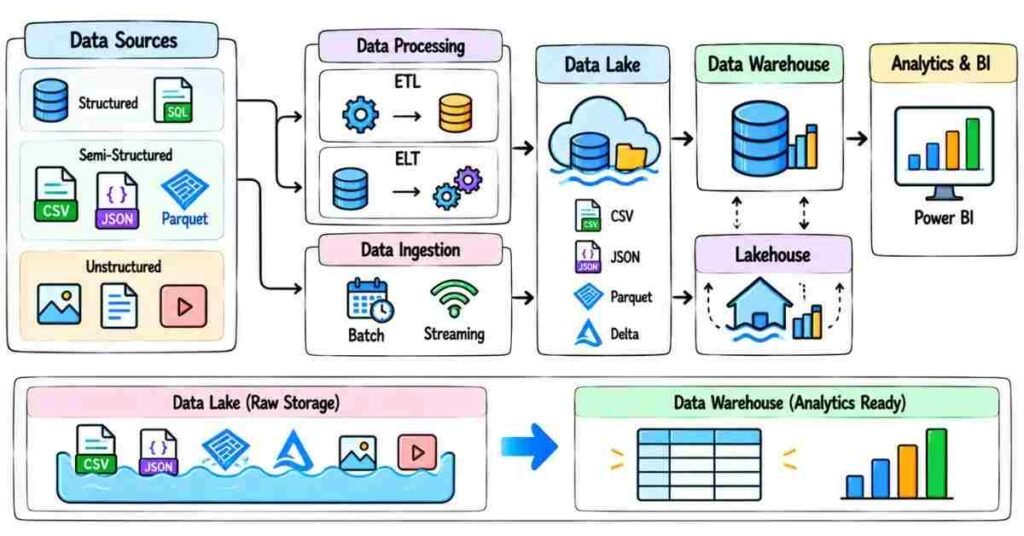
Understand the End-to-End Data Flow
Before learning individual Azure services, understand the full data journey.
Imagine an e-commerce company.
The company has:
- Customer data in SQL Server
- Product files in CSV
- Website logs in JSON
- Sales transactions coming every day
A possible Azure flow could be:
Sources
↓
Azure Data Factory
↓
ADLS Raw Layer
↓
Databricks Transformation
↓
Delta Tables
↓
Synapse / SQL
↓
Power BI
This simple flow will help you understand many later interview questions.
Skills You Should Build
A strong Azure Data Engineering candidate should gradually become comfortable with:
SQL
Because a lot of data work still depends on SQL.
Azure Data Factory
For ingestion and orchestration.
ADLS
For cloud-based data storage.
Databricks
For large-scale transformation.
PySpark
For processing data using Spark.
Delta Lake
For reliable lake-based data processing.
Synapse
For analytics and warehouse-related workloads.
Security
Because production data cannot be treated like practice data.
Troubleshooting
Because pipelines will fail at some point.
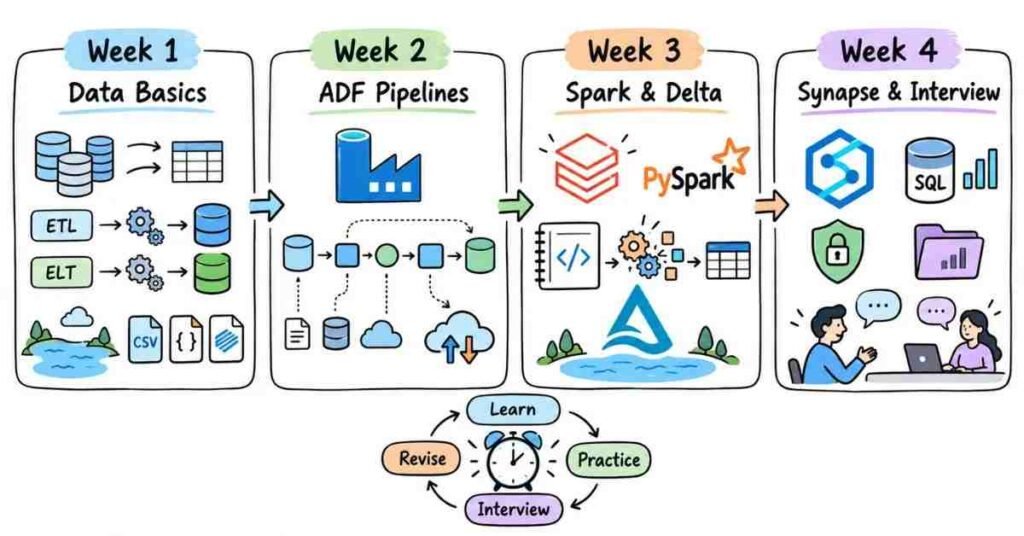
30-Day Azure Data Engineering Study Plan
The reference guide uses a week-by-week study structure so candidates can build skills gradually instead of learning everything at once.
Week 1: Data Engineering Fundamentals
Focus on:
- What Data Engineering is
- ETL vs ELT
- Data Lake vs Data Warehouse
- Batch vs streaming
- Structured data
- Semi-structured data
- CSV
- JSON
- Parquet
- Delta format
- Partitioning
- Azure basics
- ADLS Gen2
At the end of the week, you should be able to explain:
Where data comes from, where it is stored, and why different storage formats are used.
Week 2: Azure Data Factory & Data Ingestion
Focus on:
- ADF
- Pipelines
- Activities
- Linked Services
- Datasets
- Integration Runtime
- Copy Activity
- Parameters
- Variables
- Triggers
- Lookup
- ForEach
- Get Metadata
- Incremental loading
Do not just create pipelines.
Ask yourself:
What happens if the source is unavailable?
How will I load only today’s records?
How will I rerun failed data?
These questions prepare you for real interviews.
Week 3: Databricks, PySpark & Delta Lake
Focus on:
- Databricks
- Spark basics
- DataFrames
- Transformations
- Actions
- Lazy evaluation
- PySpark
- Joins
- Filters
- Aggregations
- Window functions
- Partitioning
- Delta Lake
- MERGE
- Deduplication
- Bronze, Silver, Gold layers
This week should include more hands-on practice than reading.
Take one dataset and actually clean it.
Week 4: Synapse, Projects & Interview Practice
Focus on:
- Azure Synapse
- Data warehouse basics
- Fact and dimension tables
- Star schema
- SCD concepts
- SQL revision
- Security
- Key Vault
- Monitoring
- Pipeline troubleshooting
- End-to-end project explanation
- Scenario-based questions
- Resume preparation
- Mock interviews
During the last week, stop trying to learn every new Azure service.
Spend more time explaining what you already know.
Daily Study Routine
You do not need to study for six hours every day.
A focused 90-minute routine can be more useful.
25 Minutes — Learn One Concept
Example:
Incremental Load
Understand what it means and why it is needed.
30 Minutes — Practise It
Build a small example.
For instance:
Load only records created after the previous pipeline run.
20 Minutes — Interview Practice
Ask yourself:
“Why not reload the full table every day?”
Try answering without notes.
15 Minutes — Review
Write down:
- What you understood
- What confused you
- What you need to revise tomorrow
The reference guide also recommends learning a concept, practising questions, rewriting the idea in your own words, and reviewing weak areas instead of memorizing fixed answers.
How to Prepare Interview Answers
Use this simple format:
What is it? → Why is it used? → Small example
For example:
Weak Answer
“Azure Data Factory is a data integration service.”
Correct, but too basic.
Better Answer
“Azure Data Factory is used to move and orchestrate data between systems. For example, I can use ADF to copy daily sales data from SQL Server into ADLS and then trigger a Databricks notebook for transformation.”
The second answer tells the interviewer that you understand how ADF fits into a real pipeline.
What to Practise Every Week
Do not study only theory.
Try small tasks such as:
- Copy CSV data into ADLS
- Load a SQL table through ADF
- Create a parameterized pipeline
- Read Parquet files using PySpark
- Remove duplicates
- Join two DataFrames
- Create Bronze and Silver layers
- Write a SQL window function
- Design a simple star schema
- Troubleshoot one failed pipeline
Even a small project gives you something real to explain
How to Explain an Azure Project
Keep your project explanation simple.
Start with the problem.
For example:
“The company received daily sales data from multiple sources and needed a clean dataset for reporting.”
Then explain the flow:
Source → ADF → ADLS → Databricks → Delta → Synapse → Power BI
After that, explain what you actually did.
Maybe you:
- Built pipelines
- Created incremental loads
- Wrote PySpark transformations
- Removed duplicates
- Created Delta tables
- Wrote SQL queries
- Monitored failures
Finally, explain one challenge.
For example:
“We had duplicate records because the same source file could arrive twice. I added logic to identify business keys and remove duplicates before loading the Silver layer.”
That makes the project explanation much more believable.
Common Interview Focus Areas
Spend extra preparation time on:
- ADF pipeline flow
- Linked Service vs Dataset
- Integration Runtime
- Incremental loading
- ADLS Gen2
- Parquet vs CSV
- Databricks
- Spark transformations
- Lazy evaluation
- PySpark joins
- Delta Lake
- MERGE
- Medallion Architecture
- Synapse
- SQL joins
- Window functions
- SCD
- Security
- Performance tuning
- Pipeline failures
Final Tip
For every Azure Data Engineering topic, ask yourself four questions:
What does it do?
Why do we need it?
Where does it fit in the pipeline?
What happens if it fails?
If you can answer those four questions clearly, you are already preparing at the right level for interviews.
Part 2: Azure Data Engineering Fundamentals
This section is written fresh from scratch with different sentence patterns and practical examples. I can keep the wording original and reduce plagiarism risk heavily, but an exact 0% plagiarism / 0% AI-detector score cannot be guaranteed because different tools use different databases and detection methods.
The format still follows the reference guide’s approach: numbered interview questions, short answers, practical examples, and a practice section.
Azure Data Engineering Fundamentals — Questions 1–30
Q1. What is Data Engineering?
Data Engineering is the work of getting raw data into a form that other teams can actually use.
A Data Engineer usually collects data, stores it, cleans it, transforms it, and delivers it to systems used for reporting, analytics, or applications.
For example:
Sales Database → Data Pipeline → Data Lake → Transformation → Reporting Table
Q2. What does an Azure Data Engineer do?
An Azure Data Engineer builds and maintains data solutions using Azure services.
Typical work may include:
Moving data from source systems
Building pipelines
Working with Data Lakes
Transforming large datasets
Writing SQL or PySpark
Monitoring failed jobs
Improving performance
The role is not just about moving files. The engineer is responsible for making sure the data is reliable and usable.
Q3. What is a data pipeline?
A data pipeline is a sequence of steps that moves data from one place to another.
For example:
SQL Server → ADF → ADLS → Databricks → Synapse
Some pipelines only copy data. Others also clean, validate, transform, and load it.
Q4. What is structured data?
Structured data follows a clearly defined format.
A database table is a common example.
CustomerID | Name | City |
101 | Ravi | Hyderabad |
102 | Priya | Bengaluru |
The columns and data types are already known.
Q5. What is semi-structured data?
Semi-structured data has some organization, but it does not always follow a fixed table structure.
Examples include:
JSON
XML
Application logs
A JSON record may contain different fields from another record, but the data still has recognizable structure.
Q6. What is unstructured data?
Unstructured data does not naturally fit into rows and columns.
Examples include:
Images
Videos
Audio files
PDFs
Documents
A Data Lake is commonly used when organizations need to store large amounts of different data types.
Q7. What is ETL?
ETL means:
Extract → Transform → Load
First, data is collected from the source.
Then it is cleaned or transformed.
Finally, the processed data is loaded into the target system.
Q8. What is ELT?
ELT means:
Extract → Load → Transform
The raw data is first loaded into the destination environment.
Transformation happens later using the computing power available there.
This approach is common in modern cloud data platforms.
Q9. What is the difference between ETL and ELT?
The main difference is when transformation happens.
In ETL:
Transform before loading into the target.
In ELT:
Load first and transform later.
For example, a company may copy raw data into ADLS first and use Databricks later to clean it.
Q10. When would you use ETL instead of ELT?
ETL can make sense when data must be cleaned or changed before it reaches the target system.
ELT is often useful when the cloud platform can store large amounts of raw data and perform transformation later.
The choice depends on the architecture, data volume, security, and business requirement.
Batch and Streaming
Q11. What is batch processing?
Batch processing handles data in groups at scheduled times.
For example:
A sales pipeline may run every night at 1 AM and load all transactions created during the day.
This works well when the business does not need data immediately.
Q12. What is streaming data?
Streaming processes data as it continuously arrives.
Examples include:
IoT sensor events
Website clicks
Live transactions
Application events
Instead of waiting for the end of the day, the system handles events much closer to real time.
Q13. What is the difference between batch and streaming?
Batch: Process a group of records together.
Streaming: Process continuously arriving data.
For example:
A daily sales report can use batch processing.
A fraud detection system may need streaming because waiting until tomorrow could be too late.
Q14. Is streaming always better than batch?
No.
Streaming usually brings more complexity and cost.
If the business only needs data once every night, a simple batch pipeline may be the better solution.
The technology should match the requirement.
Data Lake and Data Warehouse
Q15. What is a Data Lake?
A Data Lake stores large volumes of data in its original or lightly processed form.
It can contain:
CSV
JSON
Parquet
Logs
Images
Other file types
In Azure, Azure Data Lake Storage Gen2 is commonly used for this purpose.
Q16. What is a Data Warehouse?
A Data Warehouse stores structured, cleaned data that is ready for analytics and reporting.
For example, a business may store:
Sales facts
Customer dimensions
Product dimensions
Date dimensions
This makes analytical queries easier for business users.
Q17. What is the difference between a Data Lake and a Data Warehouse?
A simple way to understand it:
Data Lake: Keeps large amounts of raw and processed data.
Data Warehouse: Keeps organized data prepared for analysis.
A project may use both.
Raw files can live in ADLS, while curated business data can later be made available through a warehouse or analytical system.
Q18. What is a Lakehouse?
A Lakehouse tries to combine useful features of a Data Lake and a Data Warehouse.
It keeps flexible file-based storage while adding capabilities such as:
Reliable tables
Schema control
Transactions
Analytical querying
Delta Lake is commonly used in this type of architecture.
Azure Storage and ADLS
Q19. What is an Azure Storage Account?
A Storage Account is an Azure resource used to hold different types of storage data.
Depending on the service and configuration, it can support data such as:
Blobs
Files
Queues
Tables
For Data Engineering, Blob Storage and ADLS-related storage are especially relevant.
Q20. What is Azure Data Lake Storage Gen2?
ADLS Gen2 is Azure storage designed for large-scale analytics workloads.
It combines cloud storage with features useful for organizing and controlling large data collections.
A Data Engineer may use it to store:
Raw → Cleaned → Curated data
Q21. What is a container in ADLS?
A container is a high-level logical area used to organize data inside the storage account.
For example:
raw
processed
archive
Different projects may organize containers in different ways.
Q22. Why is the hierarchical namespace important in ADLS Gen2?
Hierarchical namespace provides a directory-style structure.
For example:
/sales/2026/09/11/
This makes it easier to manage folders, paths, permissions, and large analytical datasets.
Q23. How would you organize files in a Data Lake?
There is no single folder structure for every company.
A practical design might be:
/raw/sales/
/silver/sales/
/gold/sales/
or date-based:
/sales/year=2026/month=09/day=11/
The structure should make processing and maintenance easier.
File Formats
Q24. What is CSV?
CSV stores data as plain text with values separated by delimiters such as commas.
It is easy to read and exchange, but it is usually not the most efficient format for large analytical workloads.
Q25. What is JSON?
JSON stores information using key-value structures.
Example:
{
“customer_id”: 101,
“name”: “Ravi”,
“city”: “Hyderabad”
}
It is commonly used by APIs, applications, and event systems.
Q26. What is Parquet?
Parquet is a column-oriented file format widely used in Data Engineering.
It is useful for analytics because queries can read only the required columns instead of reading every field in the file.
It also supports compression efficiently.
Q27. Why might Parquet be better than CSV for large analytical data?
Suppose a file contains 50 columns but your query needs only 4.
With Parquet, the processing engine can often read only those required columns.
That can reduce:
Data scanned
Processing time
Storage size
For large analytics workloads, this can make a noticeable difference.
Q28. What is Delta format?
Delta adds table-management features on top of Data Lake files.
It supports capabilities such as:
ACID transactions
Schema enforcement
Schema evolution
Updates
Deletes
MERGE operations
We will cover Delta Lake in more detail later.
Partitioning and Data Design
Q29. What is partitioning?
Partitioning means organizing data into smaller groups based on a useful column.
For example, sales data could be stored as:
year=2026/month=09/day=11
A query looking only for one date may then avoid scanning unrelated dates.
Q30. Does adding more partitions always improve performance?
No.
Too many very small partitions can create problems.
For example, partitioning millions of records by a nearly unique value such as CustomerID may create a huge number of tiny partitions.
A good partition column usually matches common query patterns and creates reasonably sized groups.
Important Topics to Practice
Focus mainly on:
Data Engineering → Data Pipelines → Structured Data → Semi-Structured Data → ETL → ELT → Batch → Streaming → Data Lake → Data Warehouse → ADLS Gen2 → CSV → JSON → Parquet → Delta → Partitioning
Do not try to memorize long definitions.
Try to understand what problem each concept solves.
Practice Strategy
Take one example:
An online shopping company generates sales data every day.
Ask yourself:
Where does the data originate?
Maybe SQL.
How will it reach Azure?
A pipeline can ingest it.
Where will the raw copy stay?
ADLS.
Which format would you use for analytics?
Possibly Parquet or Delta.
How would you organize years of data?
Maybe date-based partitions.
Once you can explain that flow naturally, these fundamentals become much easier to remember.
Part 3: Azure Data Factory Interview Questions & Practical Pipeline Scenarios
This section is written in fresh wording from scratch and kept simple so it reads naturally instead of like copied documentation. I can reduce plagiarism risk heavily, but no tool can honestly guarantee an exact 0% plagiarism or 0% AI-detector score.
Azure Data Factory — Questions 31–60
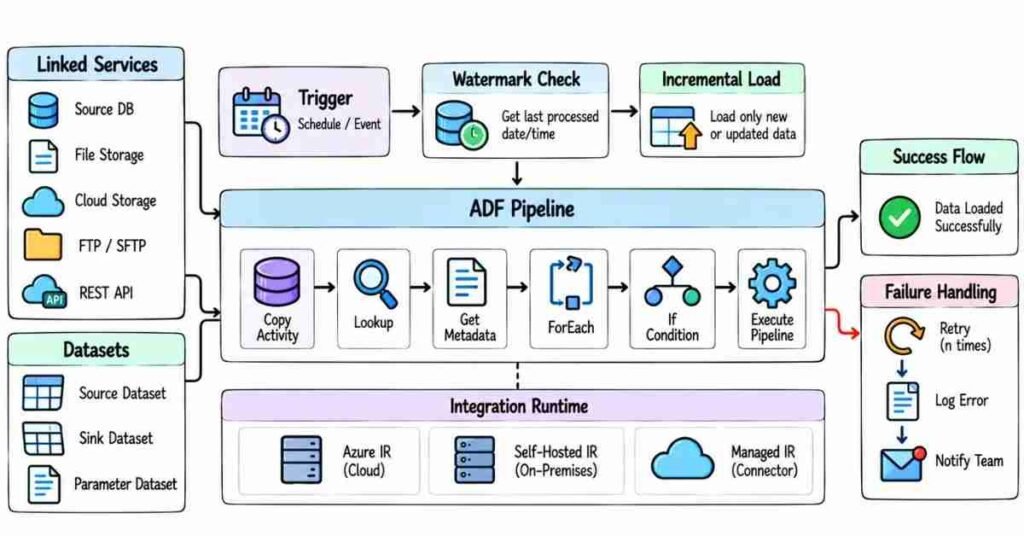
Q31. What is Azure Data Factory?
Azure Data Factory, or ADF, is mainly used to move data and coordinate data-processing steps.
For example, a pipeline can copy sales data from SQL Server into ADLS and then start a Databricks notebook to clean that data.
ADF is often the service controlling the overall flow.
Q32. What is a pipeline in ADF?
A pipeline is a group of activities that work together to complete a data task.
For example:
Copy SQL Data → Run Databricks Notebook → Validate Output → Send Notification
Instead of managing each step separately, the pipeline keeps them in one workflow.
Q33. What is an activity?
An activity is one task inside a pipeline.
Examples include:
Copy Activity
Lookup
ForEach
Get Metadata
If Condition
Execute Pipeline
Databricks Notebook activity
A pipeline can contain one activity or many connected activities.
Q34. What is a Linked Service?
A Linked Service contains the connection information ADF needs to communicate with another service.
For example, you may create Linked Services for:
Azure SQL Database
ADLS Gen2
Azure Databricks
A simple way to remember it:
Linked Service tells ADF where and how to connect.
Q35. What is a Dataset?
A Dataset represents the data that an activity works with.
For example, it may point to:
A SQL table
A CSV file
A Parquet file
A folder in ADLS
The Linked Service handles the connection, while the Dataset describes the data location or structure.
Q36. What is the difference between a Linked Service and a Dataset?
Think of a restaurant.
Linked Service = Restaurant address
Dataset = The specific table inside the restaurant
In Azure terms:
The Linked Service may connect to an ADLS account.
The Dataset may point to:
/sales/2026/09/sales.parquet
Q37. What is Copy Activity?
Copy Activity moves data from a source to a destination.
For example:
SQL Server → ADLS
or:
ADLS → Azure SQL
It is one of the most commonly used activities in ADF.
Q38. What are source and sink in Copy Activity?
The source is where the data comes from.
The sink is where the data goes.
For example:
Source: SQL Server
Sink: ADLS Gen2
Q39. What is Integration Runtime?
Integration Runtime, or IR, is the computing and connectivity layer ADF uses to move data or connect to different environments.
You can think of it as the bridge between ADF and the systems involved in the pipeline.
Q40. What are the common types of Integration Runtime?
Common types include:
Azure Integration Runtime – commonly used for cloud-to-cloud movement.
Self-hosted Integration Runtime – useful when ADF needs to connect to on-premises or private-network systems.
Azure-SSIS Integration Runtime – used when organizations need to run SSIS packages in Azure.
Q41. When would you use Self-hosted Integration Runtime?
Suppose a company has an SQL Server inside its office network and wants to copy that data into Azure.
ADF cannot simply reach every private on-premises system directly.
A Self-hosted Integration Runtime can provide that connection.
Q42. What is a trigger in ADF?
A trigger decides when a pipeline should start.
For example, a pipeline may run:
Every day at 2 AM
or when a supported storage event occurs.
Instead of manually starting the pipeline, the trigger starts it based on the configured rule.
Q43. What is a Schedule Trigger?
A Schedule Trigger runs a pipeline according to a time schedule.
For example:
Every day at 1:00 AM
or:
Every Monday at 6:00 AM
It works well for regular batch jobs.
Q44. What is a Tumbling Window Trigger?
A Tumbling Window Trigger runs pipelines in fixed, consecutive time windows.
For example:
12:00–1:00
1:00–2:00
2:00–3:00
It is useful when processing needs to be tracked by specific time windows.
Q45. What is an Event Trigger?
An Event Trigger can start a pipeline when a supported event happens.
For example, a pipeline may begin when a new file arrives in Azure Storage.
This is useful when the job should start based on file arrival rather than a fixed schedule.
Q46. What is a parameter in ADF?
A parameter lets you pass a value into a pipeline, Dataset, or other supported object.
For example, instead of creating 12 pipelines for 12 months, one pipeline can receive:
month = 09
and use that value dynamically.
Parameters make pipelines reusable.
Q47. What is a variable in ADF?
A variable stores a value while the pipeline is running.
For example, you may keep:
A counter
A file name
A temporary status
Unlike a parameter, a variable can be changed during pipeline execution.
Q48. What is the difference between a parameter and a variable?
A parameter is normally passed into the pipeline and stays fixed during that run.
A variable can be updated while the pipeline is running.
For example:
Parameter: ProcessingDate = 2026-09-11
Variable: FilesProcessed = 0 → 1 → 2 → 3
Q49. What is dynamic content?
Dynamic content lets ADF build values at runtime.
Instead of hardcoding:
/sales/2026/09/11/
you can create the path using pipeline parameters or expressions.
This makes one pipeline usable for different dates, tables, files, or environments.
Q50. What is the Lookup Activity?
Lookup reads a small set of data that can be used by later activities.
For example, a control table may contain:
TableName | LoadEnabled |
Customers | Yes |
Products | Yes |
Orders | No |
Lookup can read that configuration, and the pipeline can decide what to process.
Q51. What is Get Metadata Activity?
Get Metadata checks information about a file, folder, or dataset.
For example, it can help determine:
Whether a file exists
File name
File size
Child items in a folder
Last modified information
This is useful before processing a file.
Q52. What is ForEach Activity?
ForEach repeats the same group of activities for multiple items.
Suppose a folder contains:
customers.csv
products.csv
orders.csv
ForEach can process each file instead of building three separate pipelines.
Q53. What is If Condition Activity?
If Condition lets the pipeline choose between two paths.
For example:
If file exists → Process it
If file does not exist → Log the issue
It is useful when pipeline behavior depends on a condition.
Q54. What is Execute Pipeline Activity?
Execute Pipeline allows one pipeline to call another pipeline.
For example:
A master pipeline may run:
Customer Pipeline
then:
Product Pipeline
then:
Sales Pipeline
This helps keep large workflows easier to manage.
Q55. What is an incremental load?
An incremental load processes only data that is new or changed since the previous successful load.
Suppose a table contains 200 million records but only 50,000 changed today.
Instead of reading all 200 million again, we try to process those 50,000 changes.
Q56. How can you implement an incremental load in ADF?
One common approach is using a watermark value.
Suppose the previous successful load processed data up to:
2026-09-10 23:59:59
The next run can select records newer than that value.
After the load succeeds, the watermark is updated.
The exact design depends on the source system.
Q57. What is a watermark?
A watermark keeps track of how far the previous load successfully processed.
It might be:
Timestamp
Increasing ID
Modified date
For example:
Previous watermark: 5000
The next pipeline may load:
ID > 5000
Q58. What happens if an ADF activity fails?
I would first look at the failed activity and its error message.
Then I would check the part connected to that activity.
For a Copy Activity, that may mean checking:
Source connection
Destination connection
Credentials
Source query
Data types
File path
Permissions
I would avoid rerunning the pipeline repeatedly without knowing why it failed.
Q59. How do you handle errors in an ADF pipeline?
I usually design the pipeline so a failure follows a clear path.
For example:
Main Activity
If successful:
Continue Processing
If failed:
Log Error → Send Notification → Stop or handle failure
Retries may help with temporary problems, but they should not hide a permanent data issue.
Q60. What makes a good ADF pipeline?
A good pipeline should not only work on the perfect day.
It should also handle situations such as:
Missing files
Connection failures
Duplicate loads
Source delays
Bad records
Reruns
Partial failures
I also prefer reusable parameters and clear activity names so someone else can understand the pipeline without opening every activity.
Important Patterns to Practice
Spend extra time on:
Pipeline → Activity → Linked Service → Dataset → Integration Runtime → Copy Activity → Triggers → Parameters → Variables → Dynamic Content → Lookup → Get Metadata → ForEach → If Condition → Execute Pipeline → Incremental Load → Watermark → Error Handling
These topics appear frequently because they are part of everyday ADF work.
Practice Strategy
Build one small pipeline instead of reading ten pages of definitions.
Use a scenario like:
Three source tables need to be copied into different ADLS folders every night.
Try to make the solution reusable.
Then test what happens when:
One table is empty
One source connection fails
The pipeline is rerun
A new fourth table is added
Only today’s data should be loaded
If you can explain how your pipeline handles those situations, your ADF preparation becomes much stronger.
Part 4: Azure Databricks, Apache Spark & PySpark
Databricks, Spark & PySpark — Questions 61–90
This section is written in fresh wording and kept practical. Instead of memorizing Spark definitions, focus on what happens to the data, why you choose a particular operation, and what you would check when performance drops.
Azure Databricks Basics
Q61. What is Azure Databricks?
Azure Databricks is a data and analytics platform commonly used for large-scale data processing.
In an Azure Data Engineering project, it may be used to:
Read data from ADLS
Clean and transform data
Join large datasets
Run PySpark code
Create Delta tables
Prepare data for analytics
For example:
ADF loads raw data → Databricks transforms it → Clean data is stored in Delta tables
Q62. Why would you use Databricks in a data pipeline?
ADF is very useful for orchestration and data movement.
When the transformation becomes more complex or the data volume becomes large, Databricks can handle that processing using Spark.
For example, I might use Databricks for:
Deduplication → Joins → Aggregations → Data-quality checks → Delta Lake writes
Q63. What is a Databricks workspace?
A workspace is the environment where teams organize their Databricks work.
It can contain items such as:
Notebooks
Jobs
Compute resources
Queries
Data-related assets
It gives developers and data engineers one place to build and manage their work.
Q64. What is a notebook in Databricks?
A notebook is an interactive place where we can write and run code.
For Data Engineering, I may use notebooks for:
PySpark transformations
SQL queries
Testing data
Building processing logic
Exploring datasets
A notebook can contain both code and documentation.
Q65. What is compute in Databricks?
Compute provides the processing resources required to run notebooks and jobs.
Without compute, the notebook itself is only code.
The actual processing happens on the configured compute resources.
Q66. What is a Databricks job?
A job is used to run data-processing tasks in a controlled or scheduled way.
For example:
Run Bronze-to-Silver notebook every night at 2 AM
A job may contain one task or multiple dependent tasks.
Apache Spark Fundamentals
Q67. What is Apache Spark?
Apache Spark is a distributed data-processing engine.
Instead of processing a very large dataset on one machine, Spark can divide the work across multiple computing resources.
This makes it useful for large-scale Data Engineering workloads.
Q68. What does distributed processing mean?
Distributed processing means breaking a large task into smaller parts and processing them across multiple workers.
Suppose you have 500 GB of sales data.
Instead of one machine handling the entire dataset, Spark can distribute the data and processing across the available cluster resources.
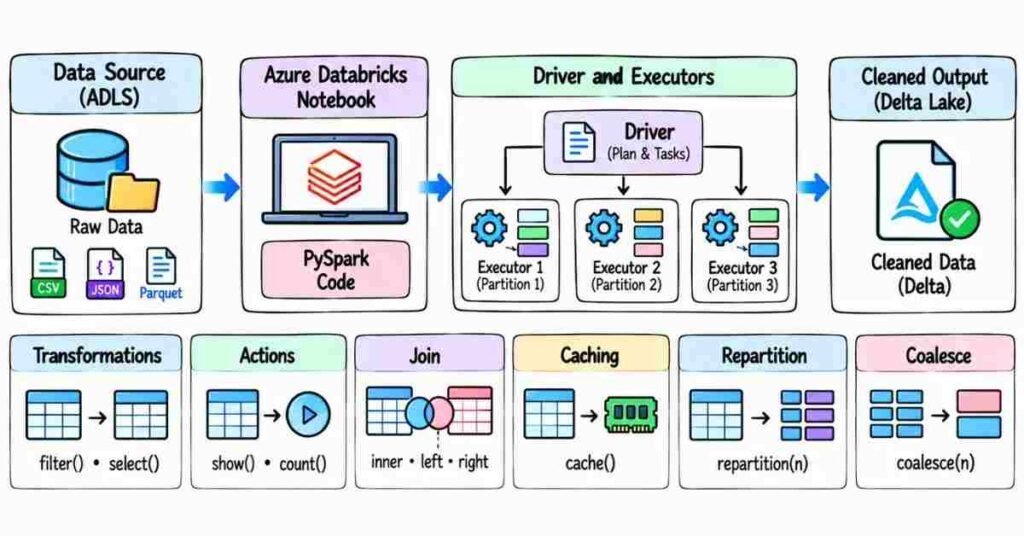
Q69. What is the Driver in Spark?
The Driver coordinates the Spark application.
It handles tasks such as:
Understanding the code
Creating the execution plan
Scheduling work
Coordinating executors
You can think of the Driver as the component organizing the work.
Q70. What is an Executor?
Executors perform the actual data-processing tasks assigned by the Driver.
They process partitions of data and can store intermediate results when needed.
If a workload is distributed, multiple executors may work on different pieces of the data.
Q71. What is a partition in Spark?
A partition is a smaller piece of a dataset that Spark can process separately.
For example, a large DataFrame may be divided into many partitions.
Different executors can work on those partitions in parallel.
Q72. Are more partitions always better?
No.
Too few partitions may not use the cluster efficiently.
Too many tiny partitions can create unnecessary scheduling and processing overhead.
The right number depends on data volume, cluster size, and the type of operation.
PySpark & DataFrames
Q73. What is PySpark?
PySpark is the Python interface for Apache Spark.
It allows Data Engineers to use Python-style code to process distributed data.
For example:
df = spark.read.parquet(“/data/sales”)
The DataFrame can then be filtered, joined, grouped, or written to another location.
Q74. What is a Spark DataFrame?
A DataFrame is a distributed collection of data organized into named columns.
It looks similar to a table.
For example:
OrderID | CustomerID | Amount |
1001 | C101 | 2500 |
1002 | C205 | 1800 |
Spark can process the DataFrame across multiple partitions.
Q75. What is the difference between a Spark DataFrame and a Pandas DataFrame?
A Pandas DataFrame usually works in the memory of one machine.
A Spark DataFrame is designed for distributed processing.
If the dataset is small, Pandas may be perfectly fine.
If the data is too large for one machine or needs distributed processing, Spark becomes more useful.
Q76. What is a transformation in Spark?
A transformation creates a new DataFrame from an existing one.
Examples include:
filter()
select()
withColumn()
join()
groupBy()
Spark usually does not execute the full processing immediately when a transformation is written.
Q77. What is an action in Spark?
An action asks Spark to produce a result or perform the required computation.
Examples include:
count()
collect()
show()
Writing data
An action can cause Spark to execute the transformations that were waiting.
Q78. What is lazy evaluation?
Spark does not immediately execute every transformation when you write it.
Instead, it builds a plan.
When an action requires the result, Spark evaluates the plan and performs the necessary work.
This is called lazy evaluation.
Q79. Why is lazy evaluation useful?
Because Spark can look at the complete chain of operations before executing them.
That gives Spark an opportunity to optimize the work rather than blindly running each line separately.
Common PySpark Operations
Q80. How do you remove duplicate records in PySpark?
A simple method is dropDuplicates().
For example:
clean_df = df.dropDuplicates([“OrderID”])
But in a real project, I would first understand what actually makes a record unique.
Removing duplicates using the wrong column can delete valid data.
Q81. What is a join in PySpark?
A join combines two DataFrames based on a related column.
For example:
Orders
can be joined with:
Customers
using CustomerID.
Common join types include:
Inner
Left
Right
Full
The correct join depends on which records the business needs to keep.
Q82. What is the difference between an inner join and a left join?
An inner join keeps only matching records from both sides.
A left join keeps every record from the left DataFrame, even when there is no match on the right.
For example, if I need every order even when customer details are missing, a left join may be more suitable.
Q83. Why can joins become slow in Spark?
Joins can be expensive because data may need to move between executors.
Common causes include:
Very large tables
Poor partitioning
Data skew
Unnecessary columns
Joining on inefficient keys
I would first understand the size and distribution of both datasets.
Q84. What is a broadcast join?
A broadcast join can be useful when one side of the join is small enough to distribute to the workers.
For example:
500 GB transaction table
joined with:
5 MB country lookup table
Instead of heavily shuffling both datasets, Spark may send the small lookup data to the workers.
I would not broadcast a large table blindly.
Q85. What is shuffle in Spark?
A shuffle happens when Spark has to move data between partitions.
Operations such as joins, aggregations, and repartitioning may cause shuffles.
Shuffles can be expensive because they involve data movement, disk usage, and network activity.
Q86. What is data skew?
Data skew happens when some partitions receive far more data than others.
For example, imagine orders are partitioned by Country, and 80% of all rows belong to one country.
One executor may get a huge amount of work while others finish quickly.
That can make the entire job slow.
Q87. What is caching in Spark?
Caching keeps reusable data available so Spark does not have to recompute it every time.
It can help when the same DataFrame is used repeatedly.
But caching everything can waste memory.
I would use it only when reuse makes it worthwhile.
Q88. What is the difference between repartition and coalesce?
repartition() can increase or decrease partitions and usually redistributes the data.
coalesce() is commonly used to reduce the number of partitions with less redistribution.
For example, after heavy processing I may reduce the number of output partitions if the job is producing too many tiny files.
Q89. How would you improve a slow Spark job?
I would not start by simply increasing the cluster size.
I would first check:
Data volume
Partition sizes
Number of partitions
Expensive joins
Data skew
Unnecessary shuffles
Repeated calculations
Columns being read
File sizes
Then I would fix the actual bottleneck.
Q90. Where does Delta Lake fit with Databricks?
Delta Lake gives Data Lake files more reliable table-like behavior.
With Delta, Data Engineers can work with features such as:
ACID transactions
Schema enforcement
Updates
Deletes
MERGE operations
Version history
A common Azure pipeline may look like:
ADF → ADLS → Databricks → Delta Tables → Synapse or BI
We will cover Delta Lake in more detail in a later section.
Important Topics to Practice
Focus on:
Databricks → Notebooks → Compute → Jobs → Apache Spark → Driver → Executors → Partitions → DataFrames → Transformations → Actions → Lazy Evaluation → Joins → Broadcast Join → Shuffle → Data Skew → Cache → Repartition → Coalesce → Delta Lake
Practice Strategy
Take two datasets:
Orders
and:
Customers
Practise:
- Reading both datasets.
- Selecting only required columns.
- Removing duplicate orders.
- Joining them using CustomerID.
- Filtering invalid records.
- Aggregating sales by city.
- Writing the result as Delta.
Then ask yourself:
What happens if Orders grows from 1 GB to 500 GB?
What if one customer has millions of transactions?
What if the join becomes slow?
What if the output creates too many small files?
Those questions prepare you for actual Databricks interviews better than simply memorizing PySpark syntax.
Part 5: Azure Synapse, SQL & Data Warehousing
This section is written fresh from scratch with practical wording and different sentence patterns. I can keep the content original and reduce plagiarism risk strongly, but no tool can truthfully guarantee an exact 0% plagiarism or 0% AI-detector score.
The same PDF-style flow continues here: numbered questions → short interview-friendly answers → practical scenarios → practice strategy.
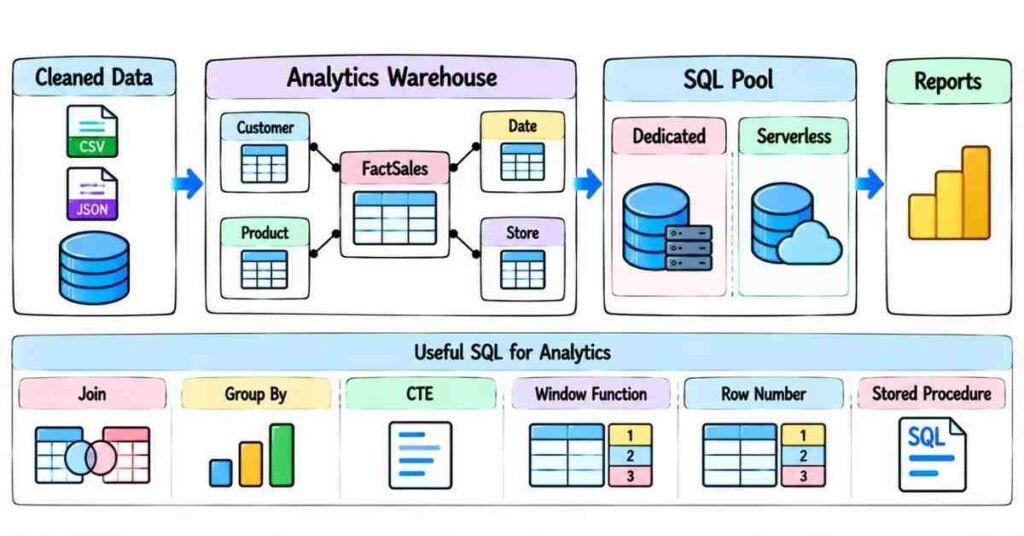
Azure Synapse, SQL & Data Warehousing — Questions 91–120
Q91. What is Azure Synapse Analytics?
Azure Synapse Analytics is used to work with large amounts of data for analytics and reporting.
In a Data Engineering project, Synapse may sit near the end of the pipeline.
For example:
Source → ADF → ADLS → Databricks → Synapse → Power BI
By the time data reaches Synapse, it is usually cleaner and more suitable for analysis.
Q92. Why would a Data Engineer use Synapse?
A Data Engineer may use Synapse when the business needs to query and analyze large datasets using SQL.
For example, cleaned sales and customer data can be prepared in the Data Lake and then made available for reporting through Synapse.
The exact design depends on the project.
Q93. What is a Dedicated SQL Pool?
A Dedicated SQL Pool provides provisioned compute resources for data warehouse workloads.
It is useful when the business needs a more controlled warehouse environment with predictable processing capacity.
It is generally considered for regular analytical workloads rather than occasional file exploration.
Q94. What is a Serverless SQL Pool?
A Serverless SQL Pool allows you to query supported data in the Data Lake using SQL without maintaining dedicated SQL compute for that query workload.
For example, if Parquet files already exist in ADLS, SQL can be used to explore them without first loading every record into a dedicated warehouse table.
Q95. What is the simple difference between Dedicated and Serverless SQL?
Think about how the workload runs.
Dedicated SQL: Compute resources are provisioned for the warehouse workload.
Serverless SQL: Query data when needed without maintaining dedicated SQL compute for those queries.
I would choose based on workload frequency, performance needs, architecture, and cost.
Q96. What is a Data Warehouse?
A Data Warehouse stores data that has been prepared for analysis.
Instead of keeping raw application data exactly as it arrived, warehouse data is usually organized around business questions.
For example:
How much did we sell?
Which product sold the most?
Which region performed best?
Q97. How is a Data Warehouse different from a transactional database?
A transactional system is designed around daily business operations.
For example:
Create Order → Update Customer → Process Payment
A Data Warehouse is designed more for analysis.
For example:
Total sales by month for the last three years
The workloads are different, so the data is often designed differently.
Fact & Dimension Tables
Q98. What is a Fact Table?
A Fact Table usually stores measurable business events.
For a sales system, it may contain:
Order ID
Product Key
Customer Key
Date Key
Quantity
Sales Amount
The numbers we want to analyze commonly live in the Fact Table.
Q99. What is a Dimension Table?
A Dimension Table provides descriptive information around the facts.
Examples include:
Customer Dimension
Product Dimension
Date Dimension
Location Dimension
For example, the Sales Fact may contain ProductKey = 105, while the Product Dimension tells us which product that key represents.
Q100. What is the difference between Fact and Dimension tables?
A simple way to remember it:
Fact = What happened
Dimension = Details around what happened
Example:
Fact: ₹25,000 sale
Dimensions: Customer, Product, Date, Store
Together they make reporting easier.
Q101. What is a Star Schema?
A Star Schema has a central Fact Table connected to multiple Dimension Tables.
For example:
Customer Dimension
↓
Sales Fact ← Product Dimension
↓
Date Dimension
This structure is popular because it is relatively simple for analytics and reporting.
Q102. What is a Snowflake Schema?
A Snowflake Schema further normalizes some dimension data into additional related tables.
For example, instead of keeping every product category detail inside one Product Dimension, category information may be separated.
This can reduce repetition, but it can also make queries more complex.
Q103. Which is better: Star Schema or Snowflake Schema?
There is no universal winner.
For many reporting models, a Star Schema is easier to understand and query.
A Snowflake design may be useful when normalization is important.
I would choose based on the business model rather than using one approach for every project.
Q104. What is a surrogate key?
A surrogate key is a generated key used inside the warehouse instead of relying only on the original source-system key.
For example:
The source may have:
CustomerID = C1008
The warehouse may assign:
CustomerKey = 12543
This becomes especially useful when maintaining historical dimension records.
Slowly Changing Dimensions
Q105. What is a Slowly Changing Dimension?
A Slowly Changing Dimension, or SCD, handles changes in dimension information over time.
For example:
A customer moves from Hyderabad to Bengaluru.
The warehouse needs to decide whether to:
Replace Hyderabad
Keep both Hyderabad and Bengaluru historically
That decision determines the SCD approach.
Q106. What is SCD Type 1?
SCD Type 1 overwrites the old value.
Example:
Old:
City = Hyderabad
New:
City = Bengaluru
After the update, the old city is no longer retained in that dimension record.
Q107. When would you use SCD Type 1?
I would use Type 1 when historical tracking is not required.
For example, correcting a spelling error in a customer’s name may not require keeping the incorrect spelling forever.
Q108. What is SCD Type 2?
SCD Type 2 keeps history by creating a new dimension record when an important value changes.
For example:
Customer | City | Start Date | End Date |
Ravi | Hyderabad | Jan 2024 | Jun 2025 |
Ravi | Bengaluru | Jul 2025 | Current |
Now reports can understand the customer’s historical state.
Q109. When would you use SCD Type 2?
Use it when the business needs historical reporting.
For example:
If a customer changes region, the company may still want last year’s sales to remain associated with the customer’s old region.
That is where Type 2 becomes useful.
SQL Interview Concepts
Q110. What is an INNER JOIN?
An INNER JOIN returns rows that have matching values on both sides.
For example:
If Orders contains a CustomerID, an INNER JOIN with Customers will return orders where a matching customer exists.
Rows without matches are excluded.
Q111. What is a LEFT JOIN?
A LEFT JOIN keeps every row from the left table.
If there is no match on the right side, the right-side columns return null values.
This is useful when you do not want to lose the main dataset just because related information is missing.
Q112. When would you use GROUP BY?
GROUP BY is used when we want to summarize data.
For example:
Total Sales by City
or:
Number of Orders by Customer
Instead of returning every transaction separately, SQL groups related rows and calculates values such as sum or count.
Q113. What is the difference between WHERE and HAVING?
WHERE filters rows before aggregation.
HAVING filters the grouped result.
For example:
WHERE can remove cancelled orders first.
Then:
HAVING can keep only customers whose total sales exceed ₹1,00,000.
Q114. What is a CTE?
CTE stands for Common Table Expression.
It lets us write a temporary named result that can make a complex query easier to read.
For example, I may first calculate customer sales in a CTE and then use that result in the final query.
The main benefit is often readability.
Q115. What is a window function?
A window function calculates something across related rows without collapsing them into a single grouped row.
For example, it can be used to:
Rank employees
Calculate running totals
Find previous values
Find the latest record
Common functions include:
ROW_NUMBER()
RANK()
LAG()
LEAD()
Q116. How would you find the latest record for each customer?
One common approach is to use ROW_NUMBER().
For example:
ROW_NUMBER() OVER (
PARTITION BY CustomerID
ORDER BY ModifiedDate DESC
)
Then I would keep the row where the generated number is 1.
This is useful in Data Engineering when several versions of the same business record arrive.
Q117. What is the difference between RANK and ROW_NUMBER?
ROW_NUMBER() gives every row a unique sequence number.
RANK() can give the same rank to rows with equal ordering values.
For example, if two employees have the same score, RANK() can place them at the same rank.
The choice depends on the business requirement.
Q118. What is a Stored Procedure?
A Stored Procedure is reusable SQL logic stored in the database.
It can be used for tasks such as:
Loading data
Applying transformations
Running multiple SQL statements
Managing warehouse operations
In a data pipeline, ADF may call a Stored Procedure as one step in the process.
Synapse Data Distribution
Q119. What is data distribution in a Dedicated SQL Pool?
Large tables can be distributed across compute distributions so processing can happen in parallel.
The distribution method matters because poor placement can cause unnecessary data movement during joins and aggregations.
Common design options include concepts such as:
Hash distribution
Round-robin distribution
Replicated tables
The right choice depends on the table and query pattern.
Q120. How would you choose a distribution strategy?
I would first look at the table’s purpose and size.
For a large Fact Table that frequently joins using one stable key, a suitable hash-distribution key may help reduce unnecessary movement.
For a small lookup-style table, replication may sometimes make joins easier.
For staging or less predictable data, round-robin distribution can be useful in some designs.
I would not choose a distribution method just because it sounds faster. I would look at how the data is actually queried.
Important Topics to Practice
Focus on:
Synapse → Dedicated SQL → Serverless SQL → Data Warehouse → Fact Tables → Dimension Tables → Star Schema → Surrogate Keys → SCD Type 1 → SCD Type 2 → SQL Joins → GROUP BY → HAVING → CTE → Window Functions → ROW_NUMBER → Stored Procedures → Data Distribution
Practice Strategy
Take one simple e-commerce project.
Create:
FactSales
DimCustomer
DimProduct
DimDate
Then practise questions such as:
Customer changed city. Do I need history?
Product name was corrected. Should I keep the old value?
How do I find the latest customer record?
How do I calculate monthly sales?
Why is my large-table join slow?
Should every table use the same distribution approach?
If you can answer those questions in your own words, your Synapse and warehouse preparation will feel much more natural in an interview.
Part 6: Delta Lake, Medallion Architecture & Data Transformation

Delta Lake & Medallion Architecture — Questions 121–150
This section focuses on how raw data becomes clean, reliable, and reporting-ready data.
In interviews, you may get questions like:
“Why use Delta instead of plain Parquet?”
or:
“Duplicate records entered the Silver layer. How would you fix them?”
The interviewer wants to know whether you understand the actual data flow, not only the terminology.
Delta Lake Fundamentals
Q121. What is Delta Lake?
Delta Lake adds table-management features on top of files stored in a Data Lake.
It gives Data Engineers capabilities such as:
ACID transactions
Updates and deletes
MERGE operations
Schema checking
Version history
This makes lake data easier to manage reliably.
Q122. Why not use only Parquet files?
Parquet is a good storage format for analytics, but plain Parquet files do not provide all the table-management features Delta gives us.
For example, if I need to update existing customer records or safely merge new records, Delta is usually easier to manage.
Q123. Is Delta Lake a database?
Not in the traditional sense.
Delta stores data in files, usually on cloud storage, while maintaining transaction information that helps those files behave more like reliable tables.
Q124. What are ACID transactions?
ACID properties help keep data operations reliable.
In practical terms, if a write fails halfway, we do not want the table left in a broken state with only part of the intended update.
Delta helps manage these transactions more safely.
Q125. Why are ACID transactions useful in Data Engineering?
Imagine a job needs to update one million records.
If the job fails after updating only half, the dataset could become inconsistent.
Transaction support helps prevent partially completed changes from being treated as successful.
Q126. What is a Delta table?
A Delta table is data stored using Delta format along with its transaction information.
We can query it like a table while still keeping the data in Data Lake storage.
Q127. What is schema enforcement?
Schema enforcement checks whether incoming data matches the expected table structure.
Suppose a column is expected to be numeric but the incoming data suddenly contains a completely different structure.
Schema enforcement helps prevent unexpected data from silently damaging the table.
Q128. What is schema evolution?
Schema evolution allows controlled changes to the table structure.
For example, the source system may add a new column:
CustomerCategory
Instead of manually rebuilding everything, the Delta table can support the schema change when the pipeline is designed to allow it.
Q129. Is schema evolution always safe?
No.
A new column may be harmless, but a major change in data type or business meaning needs review.
I would not automatically accept every source schema change in production.
Q130. What is Delta table history?
Delta maintains information about table changes across versions.
That history can help us understand:
What operation happened
When it happened
Which version was created
This is useful when investigating data problems.
Q131. What is Time Travel in Delta Lake?
Time Travel allows us to query an earlier version of a Delta table when that version is still available.
For example, if today’s load caused a problem, we may compare today’s data with an earlier table version.
It is useful for investigation and recovery scenarios.
MERGE, Updates & Deletes
Q132. What is MERGE in Delta Lake?
MERGE lets us compare incoming data with an existing Delta table and decide what to do with matching and new records.
For example:
Existing customer → Update
New customer → Insert
This is commonly called an upsert pattern.
Q133. What is an upsert?
Upsert combines:
Update + Insert
If the record already exists, update it.
If it does not exist, insert it.
This is useful for incremental processing.
Q134. Give a simple MERGE example.
Suppose the target table already contains:
CustomerID = 101, City = Hyderabad
The new file contains:
CustomerID = 101, City = Bengaluru
and:
CustomerID = 102, City = Chennai
The pipeline may:
Update 101
and:
Insert 102
instead of reloading the entire table.
Q135. Can Delta tables be updated and deleted?
Yes.
Delta supports updates and deletes, which is one reason it is useful for managed lakehouse workloads.
But these operations should still follow the business requirement carefully.
Medallion Architecture
Q136. What is Medallion Architecture?
Medallion Architecture organizes data into different quality stages.
A common structure is:
Bronze → Silver → Gold
Each layer has a different purpose.
Q137. What is the Bronze layer?
Bronze usually contains data close to the original source.
The main goal is to preserve what arrived.
For example:
A source CSV file may be stored in Bronze before heavy cleaning starts.
Q138. Why keep raw data in Bronze?
Suppose tomorrow we discover that our transformation logic was wrong.
If the original source data is still available, we can correct the logic and process it again.
Raw data gives us a recovery point.
Q139. What is the Silver layer?
Silver usually contains cleaner, validated data.
Typical work may include:
Removing duplicates
Fixing data types
Handling null values
Standardizing columns
Joining reference data
Applying business rules
Silver is where raw data starts becoming trustworthy.
Q140. What is the Gold layer?
Gold contains data prepared for a specific business or reporting purpose.
For example:
Daily Sales by Region
Customer Revenue Summary
Monthly Product Performance
Gold data is usually easier for analysts and BI tools to consume.
Q141. Does every project need Bronze, Silver, and Gold?
Not necessarily.
The idea is useful, but architecture should fit the project.
A small pipeline may not need three separate physical layers.
The important part is separating raw, cleaned, and business-ready data when that separation adds value.
Data Cleaning & Quality
Q142. How would you remove duplicate records?
First, I would define what makes a record duplicate.
For an Orders dataset, OrderID may be the business key.
If several versions exist, I may use a timestamp to keep the latest one.
Simply calling DISTINCT is not always enough.
Q143. How would you keep the latest record for each business key?
One approach is using a window function.
For example:
Partition by CustomerID
then:
Order by ModifiedDate descending
and keep the first record.
The important part is defining which record should win.
Q144. How do you handle null values?
I would first ask what the null means.
For example:
A missing PhoneNumber may be acceptable.
A missing OrderID may make the record unusable.
Depending on the column, I may:
Keep the null
Replace it
Reject the record
Send it to an error area
There should be a business reason behind the decision.
Q145. What are data-quality checks?
Data-quality checks confirm that incoming data meets basic expectations.
Examples include:
Required fields are present
IDs are valid
Dates are valid
Amounts are within expected ranges
Duplicate records are controlled
The goal is to stop bad data from quietly reaching reports.
Q146. What would you do with bad records?
I would avoid silently deleting them unless that is the agreed business rule.
A better approach may be to separate them into a rejected or quarantine area with the failure reason.
Then valid records can continue while bad records are reviewed.
Incremental Processing
Q147. Why is incremental processing important?
Suppose a Delta table contains two billion records, but only one million changed today.
Reprocessing all two billion every day wastes time and compute.
Incremental processing focuses on the new or changed records.
Q148. How can Delta help with incremental loads?
Delta works well with patterns such as MERGE.
The pipeline can process a smaller incoming dataset and then:
Insert new records
Update changed records
Leave unchanged records alone
This avoids rebuilding the full table every time.
Q149. How would you rerun a failed daily load safely?
I would first identify what was already completed.
Then I would design the pipeline so rerunning the same date does not create duplicate records.
Possible approaches include:
Business-key based MERGE
Partition replacement
Load tracking
Idempotent logic
A rerun should produce the same correct result instead of doubling the data.
Q150. What makes a good Medallion pipeline?
A good pipeline should make the purpose of each layer clear.
For example:
Bronze: Preserve source data.
Silver: Clean and standardize it.
Gold: Shape it for business use.
It should also handle:
Duplicate data
Bad records
Schema changes
Incremental loads
Reruns
Data-quality failures
The goal is not simply creating three folders called Bronze, Silver, and Gold.
The data should actually become more useful as it moves through the layers.
Important Topics to Practice
Focus on:
Delta Lake → Delta Tables → ACID → Schema Enforcement → Schema Evolution → Table History → Time Travel → MERGE → Upsert → Bronze → Silver → Gold → Deduplication → Data Quality → Incremental Processing → Reruns
Practice Strategy
Take one sales dataset.
Imagine that each day:
- New orders arrive
- Some old orders are updated
- Duplicate records may arrive
- A new column may appear
- Some records have missing IDs
- Yesterday’s job may need to be rerun
Then design how the data should move through:
Bronze → Silver → Gold
For every stage, ask:
What should I keep?
What should I clean?
What should happen when a record is bad?
How do I avoid duplicates during reruns?
If you can explain those decisions clearly, you understand Delta and Medallion Architecture at a much better interview level.
Part 7: Security, Monitoring, DevOps & Production Support
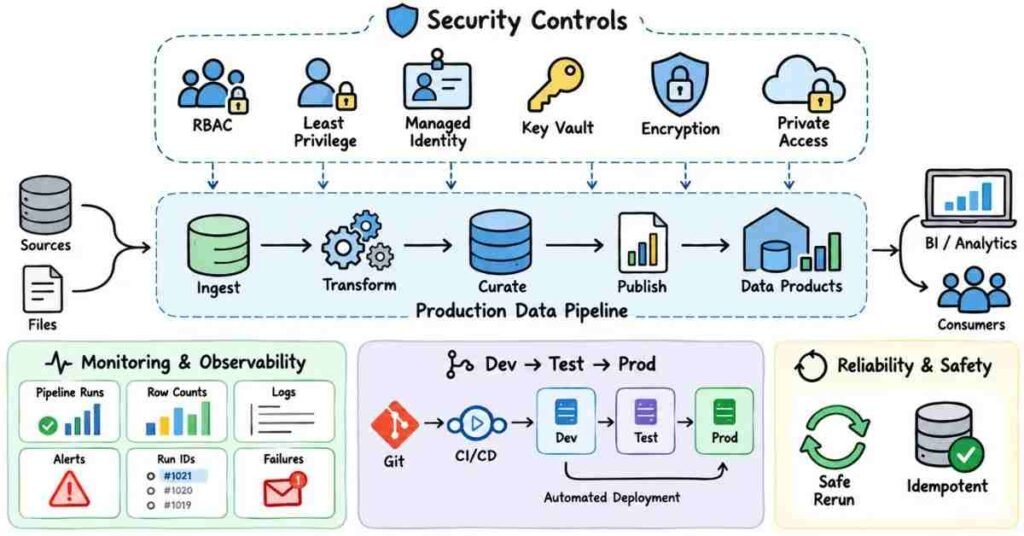
Azure Security, Monitoring & Production Support — Questions 151–180
This section focuses on what happens after the pipeline is built.
In real projects, a pipeline also needs to be secure, monitored, deployed properly, and supported when something breaks.
Interviewers may ask questions like:
“How do you store database passwords securely?”
“A pipeline works in test but fails in production. What would you check?”
“How do you monitor ADF failures?”
The stronger answer is usually the one that connects security, monitoring, deployment, and troubleshooting.
Azure Security
Q151. Why is security important in Data Engineering?
Data pipelines may handle customer, financial, employee, or business-critical information.
So a Data Engineer should think about:
Who can access the data
How credentials are stored
Which service can connect to which resource
Whether sensitive data is exposed
How access is audited
Security should be part of the design, not something added at the end.
Q152. What is Azure RBAC?
RBAC stands for Role-Based Access Control.
It is used to control what a user, group, or service is allowed to do on Azure resources.
For example, one user may only have read access to a Storage Account while another user can manage it.
Q153. Why should you avoid giving everyone Owner access?
Because most users do not need full control.
Giving too much access increases risk.
A better approach is to give only the permissions required for the job.
This is called least privilege.
Q154. What is least privilege?
Least privilege means giving a user or service only the minimum access required.
For example:
If an ADF pipeline only needs to read files from one ADLS container, it should not automatically receive full control over the entire subscription.
Q155. What is Managed Identity?
Managed Identity gives an Azure resource an identity that can be used to access another Azure service without storing a password directly in the application.
For example, ADF can use its Managed Identity to access ADLS when the proper permissions are assigned.
Q156. Why is Managed Identity useful?
It reduces the need to manage passwords or secrets manually.
Instead of storing a storage key inside a pipeline, the Azure service can authenticate using its identity.
That makes credential management safer.
Q157. What is a Service Principal?
A Service Principal is an identity used by an application or automated process to access Azure resources.
For example, a CI/CD process may use a Service Principal to deploy Azure resources.
Its permissions should still be limited to what the application actually needs.
Q158. What is Azure Key Vault?
Azure Key Vault is used to securely store sensitive values such as:
Passwords
Secrets
Keys
Certificates
Instead of hardcoding a database password inside a pipeline, the application can retrieve the secret from Key Vault.
Q159. Why should credentials not be hardcoded?
Hardcoded credentials can easily leak through:
Source code
Screenshots
Git repositories
Configuration files
Shared notebooks
A secure secret store is a better approach.
Q160. How can ADF use Key Vault?
ADF can connect to Azure Key Vault and retrieve secrets needed by Linked Services or other pipeline components.
This allows the pipeline to use credentials without exposing them directly in the pipeline definition.
Q161. How would you secure data in ADLS?
I would think about:
RBAC
Appropriate file or folder permissions
Managed Identities
Encryption
Private network access where required
Avoiding public access
Auditing who can reach sensitive data
Access should match the business requirement.
Q162. What is encryption at rest?
Encryption at rest protects data while it is stored.
For example, files sitting in cloud storage should remain encrypted so the raw stored data is not exposed as plain information.
Q163. What is encryption in transit?
Encryption in transit protects data while it moves between systems.
For example:
Source → ADF → ADLS
The connections should use secure communication protocols so data is protected during transfer.
Monitoring
Q164. Why do data pipelines need monitoring?
A pipeline can technically exist but still fail to deliver useful data.
Monitoring helps us know:
Did the pipeline run?
Did it succeed?
How long did it take?
How much data was processed?
Which activity failed?
Was the data complete?
Without monitoring, problems may be noticed only after a report is wrong.
Q165. How do you monitor an ADF pipeline?
I would check the ADF monitoring area for:
Pipeline runs
Activity runs
Trigger runs
Status
Start and end time
Duration
Error messages
The failed activity is usually the first place I investigate.
Q166. What would you log in a data pipeline?
Useful logging may include:
Pipeline name
Run ID
Start time
End time
Source
Target
Records read
Records written
Status
Error message
This helps when a production issue needs to be traced later.
Q167. Why are row counts useful?
Suppose the source has 10 million records but the target receives only 8 million.
If row counts are being logged, the difference becomes visible quickly.
Row counts are not the only data-quality check, but they are useful for basic validation.
Q168. What is an alert?
An alert notifies the support team when a defined problem occurs.
For example:
Pipeline Failed → Send Email or Notification
The idea is to avoid waiting for a user to report that yesterday’s data is missing.
Q169. Should every pipeline failure send an alert?
Not always in the same way.
A business-critical daily sales pipeline may need immediate notification.
A low-priority development job may not need the same alert level.
Alerts should reflect the impact of the pipeline.
DevOps & Deployment
Q170. Why is Git useful in Data Engineering projects?
Git helps track changes to code and pipeline definitions.
It allows teams to:
Review changes
Work together
Keep version history
Roll back when needed
Avoid editing everything directly in production
Version control is especially useful when several developers work on the same project.
Q171. Why should developers avoid making normal changes directly in production?
Direct production changes are harder to review and can create unexpected failures.
A safer flow is usually:
Development → Test → Production
Changes can be tested before they affect business users.
Q172. What is CI/CD?
CI/CD helps automate the process of moving tested changes through environments.
For example:
Developer commits change → Build/validation happens → Deployment moves approved changes to test or production
The exact process differs across companies.
Q173. What are Dev, Test, and Prod environments?
Dev is where development happens.
Test is where changes are validated.
Prod is the live environment used by the business.
Separating environments reduces the chance that unfinished work affects production data.
Q174. How do you handle different values across environments?
Values such as:
Storage account names
Database names
URLs
Key Vault names
may differ between Dev, Test, and Prod.
I would avoid hardcoding them inside every pipeline.
Parameters, configuration, or deployment settings can make the solution easier to move between environments.
Q175. A pipeline works in Dev but fails in Prod. What would you check?
I would compare the environments.
I would check:
Connections
Permissions
Managed Identity access
Key Vault secrets
File paths
Parameters
Network settings
Production data differences
If the same code works in Dev, the issue may be environment-specific rather than logic-specific.
Production Support
Q176. A scheduled pipeline did not run last night. What would you check?
I would first check whether the trigger fired.
Then I would review:
Trigger status
Pipeline run history
Schedule
Time zone
Whether the trigger was disabled
Any deployment changes
I would find out whether the problem is triggering or execution.
Q177. A pipeline started but failed halfway. What would you do?
I would identify the exact failed activity and read the error.
Then I would check whether earlier activities already wrote data.
Before rerunning, I would make sure the pipeline will not create duplicate records.
A safe rerun strategy is important.
Q178. What is an idempotent pipeline?
An idempotent pipeline can be rerun without creating an incorrect result.
For example, rerunning the same day’s load should not double the sales records.
This is useful because production pipelines sometimes need to be retried.
Q179. A pipeline suddenly takes three hours instead of thirty minutes. What would you investigate?
I would compare the slow run with earlier successful runs.
I would look at:
Data volume
Source performance
Copy throughput
Databricks job duration
Partitioning
File sizes
New joins or transformations
Resource changes
I would first locate which stage became slow.
Q180. What makes a production-ready Azure Data Engineering solution?
It should do more than successfully move data once.
I would expect it to include:
Secure access
Reusable configuration
Monitoring
Logging
Alerts
Error handling
Safe reruns
Data-quality checks
Version control
Tested deployments
A pipeline becomes production-ready when the team can operate and support it reliably, not just when the first test run succeeds.
Important Topics to Practice
Focus on:
RBAC → Least Privilege → Managed Identity → Service Principal → Key Vault → ADLS Security → Encryption → Monitoring → Logging → Alerts → Git → Dev/Test/Prod → CI/CD → Parameters → Production Support → Idempotency → Safe Reruns
Practice Strategy
Take one pipeline:
SQL Server → ADF → ADLS → Databricks → Gold Table
Now imagine:
- ADF cannot access ADLS
- The Key Vault secret expired or changed
- The trigger did not run
- Databricks failed halfway
- Production data volume doubled
- The pipeline was rerun twice
- A new deployment broke the job
For each situation, ask:
Where did the failure happen?
What evidence would I check?
Can I rerun safely?
How do I prevent the same issue next time?
That approach prepares you for production interviews much better than memorizing service definitions.
Part 8: Practical & Scenario-Based Azure Data Engineering Interview Questions
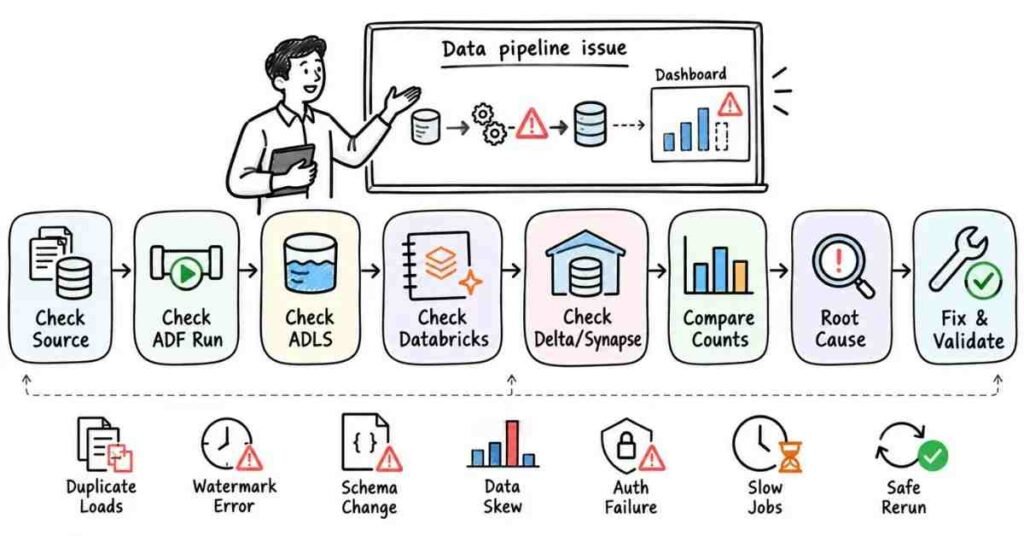
Q181. Yesterday’s data is missing from the dashboard. Where would you start?
I would trace the pipeline from the beginning.
I would check:
Did the source data arrive?
Did the ADF pipeline run?
Was the file written to ADLS?
Did Databricks finish successfully?
Was the Gold or reporting table updated?
Did the reporting layer refresh?
I would first find where the data stopped moving.
Q182. An ADF pipeline failed during Copy Activity. What would you check?
I would start with the activity error message.
Then I would check:
Source connection
Sink connection
Credentials
File path
Source query
Data type issues
Permissions
Network connectivity
I would not rerun it repeatedly before understanding the failure.
Q183. The pipeline succeeded, but fewer rows reached the target. What would you do?
I would compare source and target counts.
Then I would check:
Source query filters
Incremental-load conditions
Transformation logic
Rejected records
Join conditions
Duplicate-removal logic
A green pipeline does not always mean the data is correct.
Q184. A daily pipeline loaded the same data twice. How would you handle it?
First, I would identify what makes each record unique.
Then I would remove or correct the duplicate data.
After that, I would improve the pipeline so the same batch can be rerun safely.
Depending on the design, I might use:
MERGE
Business keys
Batch IDs
Watermarks
Partition replacement
The goal is to make reruns idempotent.
Q185. What would you do if yesterday’s pipeline failed halfway?
I would first find out what had already been written.
I would not automatically restart the entire pipeline.
I would check whether I can:
Restart from the failed stage
or
Reload only the affected partition or batch
Before rerunning, I would make sure completed records are not duplicated.
Q186. An incremental load skipped some records. What would you check?
I would review the watermark logic.
For example, I would check:
Previous watermark value
Current watermark value
Timestamp precision
Time-zone differences
Comparison condition
Late-arriving records
A small mistake such as using > instead of the required boundary logic can cause records to be missed.
Q187. What if the source sends records late?
I would design the incremental process with late-arriving data in mind.
Instead of assuming every record arrives exactly on time, I may use:
A lookback window
Modified timestamps
MERGE logic
Reprocessing rules
The exact approach depends on how the source behaves.
Q188. A source file is missing. Should the pipeline fail?
It depends on the business requirement.
If the file is mandatory, I would normally fail or stop the process and alert the team.
If the file is optional, I may log the absence and continue.
The important thing is to make the behavior intentional.
Q189. A CSV file suddenly contains an extra column. What would you do?
I would first confirm whether the source change is expected.
Then I would check:
Dataset/schema handling
Mapping
Downstream transformations
Target schema
Reporting impact
I would not automatically accept every schema change in production.
Q190. A column that used to contain numbers now contains text values. What would you do?
I would treat it as a data-quality or schema issue.
I would identify the bad records and decide whether to:
Reject them
Quarantine them
Correct them
Convert them safely
I would not silently force invalid values into the target.
Q191. A Databricks job became slow after the data volume increased. What would you check?
I would identify which stage became slow.
Then I would check:
Partition sizes
Number of partitions
Shuffles
Large joins
Data skew
File sizes
Repeated transformations
Unnecessary columns
I would not immediately solve every performance issue by increasing compute.
Q192. One Spark task takes much longer than all the others. What might that indicate?
It may indicate data skew.
For example, if one key contains a huge percentage of the records, one partition may receive far more work than the others.
I would inspect the distribution of the join or grouping keys.
Q193. A large table is joined with a very small lookup table. How might you improve the join?
If the small table is genuinely small enough, I would consider a broadcast join.
That can reduce the need to shuffle the large dataset.
But I would verify the small table size before broadcasting it.
Q194. Spark is creating thousands of tiny files. What would you do?
I would check why the data is being written with so many partitions.
Depending on the workload, I may reduce the output partition count before writing.
I would aim for a reasonable file size rather than simply forcing everything into one file.
Q195. A Delta MERGE is getting slower as the table grows. What would you investigate?
I would check:
Amount of data being merged
Join condition
Target table size
Partitioning strategy
Whether the operation scans too much historical data
File layout and maintenance
I would try to reduce the amount of target data that needs to be considered for each load.
Q196. Duplicate records entered the Silver layer. What would you do?
I would first identify the correct business key.
Then I would determine which record should survive.
For example:
CustomerID + latest ModifiedDate
I would clean the existing data and then fix the ingestion or MERGE logic that allowed the duplicates.
Q197. Bad records are found in Bronze. Should you delete them?
Usually, I would avoid changing the raw layer unnecessarily.
Bronze often exists to preserve what the source actually sent.
I would normally identify bad records during Silver processing and move them to a rejected or quarantine area if required.
Q198. Gold data does not match Silver data. What would you check?
I would review the business transformation between the two layers.
I would check:
Filters
Aggregations
Joins
Date logic
Deduplication
Business rules
I would compare a small set of records from Silver through to Gold to find where the difference begins.
Q199. A report total is wrong even though the pipeline completed successfully. What would you do?
I would validate the business numbers, not just technical status.
For example:
Source total → Silver total → Gold total → Reporting total
If the numbers diverge, I would inspect the transformation at that point.
Data validation should be part of pipeline support.
Q200. A customer changed city. How would you decide between SCD Type 1 and Type 2?
I would ask whether the business needs the old city for historical reporting.
If history is not needed:
Type 1
If reports must preserve the customer’s previous city:
Type 2
The business requirement decides the SCD type.
Q201. An ADF pipeline works in Dev but fails in Prod. What would you check?
I would compare environment-specific settings.
I would check:
Linked Services
Managed Identity
RBAC
Key Vault access
Storage paths
Database names
Networking
Parameters
The problem may be configuration rather than pipeline logic.
Q202. A pipeline suddenly gets an authentication error. What could have changed?
I would investigate:
Expired or changed secrets
Service Principal configuration
Managed Identity permissions
Key Vault access
Database permissions
Storage RBAC
I would first confirm which connection is failing.
Q203. A new deployment caused a production pipeline to fail. What would you do?
I would identify exactly what changed in the deployment.
If business impact is high, I may need to use the approved rollback or recovery process.
Then I would reproduce the issue outside production, fix it, test it, and redeploy through the normal process.
Q204. How would you handle a pipeline that fails only sometimes?
Intermittent failures need evidence.
I would compare successful and failed runs and look for patterns in:
Data volume
Source availability
Network issues
Timeouts
API limits
Cluster availability
Concurrent jobs
I would avoid calling it a random issue before comparing the runs.
Q205. A source system can only handle a small number of requests. What would you change?
I would avoid hitting it with unnecessary parallel calls.
Depending on the pipeline, I may:
Reduce concurrency
Process in controlled batches
Add retry with sensible delay
Coordinate with the source-system limits
Fast ingestion is not useful if it overloads the source.
Q206. A business user asks you to reload the last 30 days. How would you approach it?
I would first understand why the reload is needed.
Then I would identify the affected partitions or date range and design the reload so existing data does not duplicate.
I would validate:
Record counts → Business totals → Target completeness
before considering the reload complete.
Q207. How would you handle data from multiple source systems with different formats?
I would first preserve the raw source data.
Then I would standardize the required fields in the transformation layer.
For example:
One source may use:
Cust_ID
Another:
CustomerNumber
In Silver, both could be mapped to a common business field such as:
CustomerID
Q208. How do you troubleshoot a pipeline you did not build?
I would first understand the architecture.
I would look at:
Source
Pipeline flow
Dependencies
Parameters
Transformations
Logging
Target
Recent successful runs
Then I would trace the failed run one stage at a time.
I would avoid changing unfamiliar code before understanding what it does.
Q209. The business says, “The pipeline is slow.” What questions would you ask?
I would ask:
When did it become slow?
Which stage is slow?
Did data volume change?
Were any transformations added?
Is the source slower?
Did infrastructure or configuration change?
“Pipeline is slow” is only a symptom. I need to find the slow component.
Q210. What makes a strong answer to an Azure Data Engineering scenario question?
A strong answer shows a clear troubleshooting path.
A simple structure is:
Problem → Evidence → Root Cause → Fix → Validation
For example:
“The target is missing records. I would compare source and target counts, then check incremental filters and rejected records. Once I find the missing condition, I would correct the logic, rerun only the affected batch, and validate the final counts.”
That sounds much stronger than listing Azure services without explaining what you would actually do.
Important Topics to Practice
Focus on:
Pipeline Failures → Missing Data → Duplicate Loads → Incremental Loads → Watermarks → Late Data → Schema Changes → Spark Performance → Data Skew → Broadcast Joins → Small Files → Delta MERGE → Medallion Layers → SCD → Security Failures → Environment Issues → Production Reruns → Data Validation
Practice Strategy
Take one end-to-end project:
SQL Server → ADF → ADLS Bronze → Databricks Silver → Delta Gold → Synapse → Power BI
Now create problems yourself:
ADF failed
One file is missing
Duplicates appeared
Silver count is lower
Databricks became slow
Gold totals are wrong
Production authentication failed
Yesterday needs to be reprocessed
For every problem, practise explaining:
Where would I start?
What would I check?
How would I prove the root cause?
How would I fix it safely?
How would I validate the result?
Part 9: Behavioral Questions, Azure Data Engineering Projects, Resume & Career Preparation
Behavioral, Project & Career Questions — 211–230
Technical knowledge is only one part of an Azure Data Engineering interview.
Once the interviewer is comfortable with your knowledge of ADF, ADLS, Databricks, PySpark, Delta Lake, Synapse, and SQL, they may want to understand how you handle projects, failures, deadlines, teamwork, and production issues.
Your answers should sound like your own experience, not like memorized notes.
Q211. Tell me about yourself.
Keep the answer connected to Data Engineering.
A natural fresher answer could be:
“I have been learning Azure Data Engineering with hands-on practice in Azure Data Factory, ADLS Gen2, Databricks, PySpark, Delta Lake, Synapse, and SQL. I have worked on practice projects involving data ingestion, transformations, incremental loading, and Medallion Architecture. I am now looking for an opportunity where I can work on real data pipelines and improve my production-level Data Engineering skills.”
Try to keep it within a minute.
Q212. Why did you choose Azure Data Engineering?
Avoid answers like:
“Azure has good demand.”
A better answer is:
“I enjoy working with data and building the pipelines that make analytics possible. Azure Data Engineering interested me because it combines SQL, cloud services, coding, and problem-solving. I especially like working on the flow from raw source data to clean reporting-ready data.”
That sounds more personal and practical.
Q213. What Azure Data Engineering skills are you most comfortable with?
Mention only what you can explain properly.
For example:
“I am comfortable with ADF pipelines, ADLS Gen2, Databricks, PySpark transformations, Delta Lake, Medallion Architecture, SQL, Synapse basics, incremental loading, and pipeline troubleshooting.”
Do not add every Azure service to make the answer look bigger.
Q214. Explain one Azure Data Engineering project.
Use a simple flow:
Problem → Architecture → Your Work → Challenge → Result
Example:
“The project involved processing daily sales data from SQL Server and flat files. ADF was used for ingestion, ADLS stored the raw data, and Databricks with PySpark handled cleaning and transformations. We stored curated data in Delta format and prepared reporting datasets for analytics. My work included building pipelines, incremental loads, deduplication, and validating the final data.”
This is stronger than only listing tools.
Q215. How would you explain your project architecture?
Start from the source and move step by step.
For example:
SQL Server / CSV Files
↓
Azure Data Factory
↓
ADLS Bronze
↓
Azure Databricks + PySpark
↓
Delta Silver / Gold
↓
Synapse / SQL
↓
Power BI
Then explain why each service was used.
Q216. What was your role in the project?
Be specific.
For example:
“My responsibility was mainly around data ingestion and transformation. I created ADF pipelines, parameterized datasets, worked on incremental loading, wrote PySpark transformations, handled duplicate records, and validated output before loading curated data.”
The interviewer wants to know what you actually handled.
Q217. What was the biggest challenge in your project?
Choose a real technical problem.
For example:
“One challenge was duplicate data during pipeline reruns. The same source file could be processed more than once. I changed the loading approach to use business keys and MERGE logic so rerunning the batch did not create duplicate records.”
A challenge becomes useful when you explain the fix.
Q218. Tell me about a pipeline failure you handled.
A natural answer could be:
“One pipeline failed while copying source data because the source connection became unavailable. I first checked the failed activity and error message, confirmed it was a temporary connectivity issue, and reran the affected load after checking that the earlier partial run had not created duplicate records.”
This shows both troubleshooting and safe rerun thinking.
Q219. How do you handle a data-quality issue?
I first identify whether the problem came from the source or from our transformation.
Then I check:
- Business key
- Required fields
- Data types
- Null values
- Duplicate records
- Transformation rules
I prefer to isolate invalid records rather than silently passing bad data to the reporting layer.
Q220. How do you handle tight project deadlines?
I prioritize the work that affects the final data flow.
For example:
Source connection → Ingestion → Transformation → Validation → Delivery
I would complete the critical pipeline first before spending too much time on optional improvements.
If the deadline is unrealistic, I would communicate the risk early.
Behavioral Questions
Q221. Tell me about a difficult problem you solved.
Use the STAR method:
Situation: What happened?
Task: What were you responsible for?
Action: What did you do?
Result: What improved?
Example:
“A Databricks job that normally finished in 30 minutes started taking over two hours. I checked the Spark stages and found one join was causing heavy shuffle and data skew. I reduced unnecessary columns, reviewed partitioning, and changed the join strategy. After testing, the processing time improved significantly.”
The reference guide also uses the STAR method to keep behavioral answers focused on the candidate’s actual contribution.
Q222. Tell me about a mistake you made.
Do not say you never make mistakes.
A natural example:
“While practising an incremental pipeline, I updated the watermark before confirming the target load had completed. That could have caused records to be skipped after a failure. I corrected the design so the watermark is updated only after the successful load and validation.”
The important part is what changed in your approach afterward.
Q223. How do you work with Data Analysts or BI teams?
I first understand what data they actually need.
I ask:
Which business metrics are required?
At what level of detail?
How fresh should the data be?
Which dimensions are needed?
What data-quality rules matter?
This helps me prepare the right dataset instead of simply sending every source column.
Q224. How do you handle changing requirements?
I first understand what changed and which parts of the pipeline are affected.
For example, a new reporting field may affect:
Source extraction → Silver schema → Gold model → Synapse table → Report
I would check the full impact before changing only one layer.
Q225. What would you do if you do not know the answer in an interview?
I would not guess.
I may say:
“I have not worked on that exact scenario yet, but I would start by checking…”
Then I would explain my troubleshooting approach.
That is more credible than inventing an answer.
Resume & Project Preparation
Q226. What should an Azure Data Engineering resume include?
Keep it easy to scan.
Include:
Short professional summary
Azure Data Engineering skills
SQL and PySpark
Projects
Experience or internships
Education
GitHub or portfolio links, if useful
Your strongest Data Engineering project should be easy to find.
Q227. What skills should I mention?
Mention only skills you can defend in an interview.
Examples:
Azure Data Factory, ADLS Gen2, Azure Databricks, Apache Spark, PySpark, Delta Lake, Azure Synapse Analytics, Azure SQL, SQL, ETL/ELT, Medallion Architecture, Incremental Loading, Git, and Azure Key Vault.
If you list something like Spark optimization, expect questions on shuffle, partitions, joins, and skew.
Q228. How should project points be written on a resume?
Avoid vague lines such as:
“Worked on Azure Data Engineering.”
Use action-based points.
For example:
“Built parameterized Azure Data Factory pipelines to ingest daily SQL and file-based data into ADLS Gen2.”
Another example:
“Developed PySpark transformations for deduplication, joins, data-quality checks, and Delta Lake processing across Bronze and Silver layers.”
The reference guide also recommends writing resume and project bullets around real actions rather than generic responsibilities.
Q229. How should I prepare LinkedIn for Azure Data Engineering roles?
Keep the headline simple.
Example:
Azure Data Engineer | ADF | Databricks | PySpark | ADLS | Synapse | SQL
Your profile can highlight:
Azure projects
GitHub repositories
Data Engineering skills
Certifications, if genuinely completed
Technical posts
Project demos
Do not fill the profile with tools you cannot explain.
The reference guide also includes LinkedIn preparation as part of interview readiness.
Q230. What should I revise before the final interview?
Do not try to learn a completely new Azure service at the last moment.
Review the topics you already prepared:
Data Engineering Basics → ADF → ADLS → Databricks → Spark → PySpark → Delta Lake → Medallion Architecture → Synapse → SQL → Security → Monitoring → Production Scenarios
Most importantly, revise your project.
Be ready to explain:
What was the problem?
What was the architecture?
What did you personally build?
How did you load data?
How did you handle incremental records?
How did you deal with duplicates?
What failed?
How did you fix it?
How to Explain an Azure Data Engineering Project Naturally
Keep the explanation in this order:
- Business Problem
What was the company trying to achieve?
- Data Sources
Where was the data coming from?
- Architecture
How did the data move through Azure?
- Your Responsibility
Which parts did you work on?
- Transformation Logic
What cleaning or business rules did you apply?
- Challenge
What problem occurred?
- Solution
How did you solve it?
- Final Output
Where did the processed data go?
This structure keeps your answer clear without making it sound rehearsed.
Final Preparation Tip
Before answering any Data Engineering interview question, think about the data flow.
Ask yourself:
Where did the data come from?
What happened to it?
Where did it fail?
How would I fix it?
How would I confirm that the final data is correct?
If you can explain those steps clearly, your answers will sound much stronger than memorized service definitions.