
90-Day Azure Data Engineer Roadmap: Beginner to Job-Ready
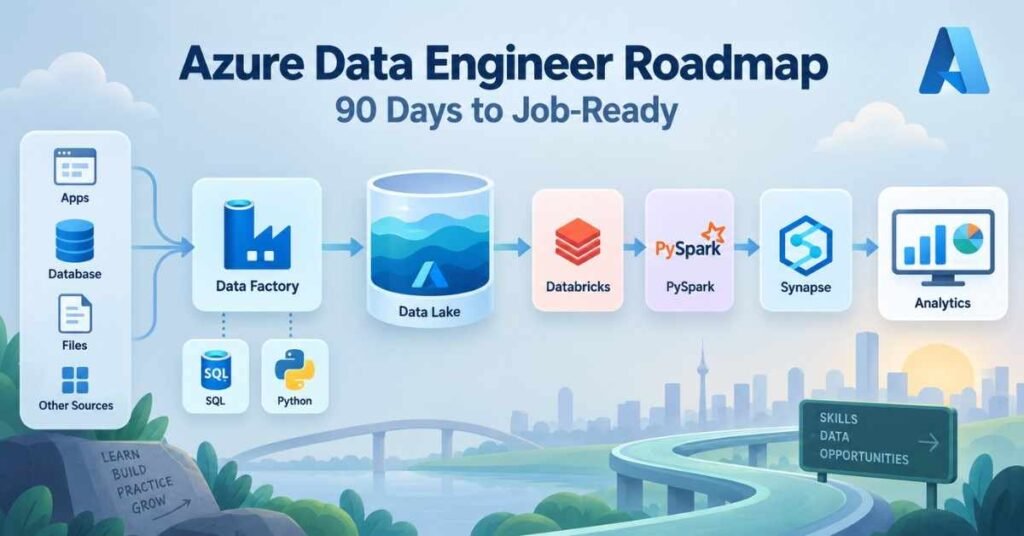
Table of Contents
Modern organisations collect information from applications, websites, databases, sensors and business platforms. This data must be collected, cleaned, transformed and stored before analysts can use it for reporting or decision-making.
An Azure Data Engineer builds and maintains the systems that manage this process. The role requires knowledge of databases, programming, cloud storage, data pipelines, security, and monitoring.
A structured Azure Data Engineer Course in Telugu can help beginners understand these concepts through Telugu explanations and practical demonstrations. Learners can begin with data fundamentals and gradually progress towards building complete Azure solutions.
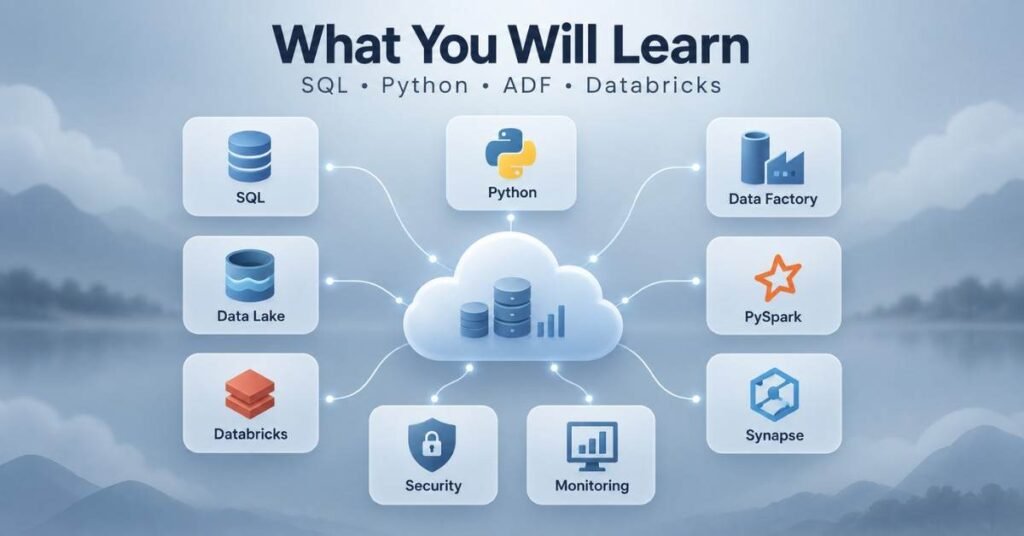
What You Will Learn
- Data-engineering fundamentals
- SQL and database concepts
- Python for data processing
- Azure cloud fundamentals
- Azure Data Lake Storage
- Azure Data Factory
- Azure Databricks
- PySpark
- Azure Synapse Analytics
- Data security and monitoring
- Batch and real-time pipelines
- Portfolio and interview preparation
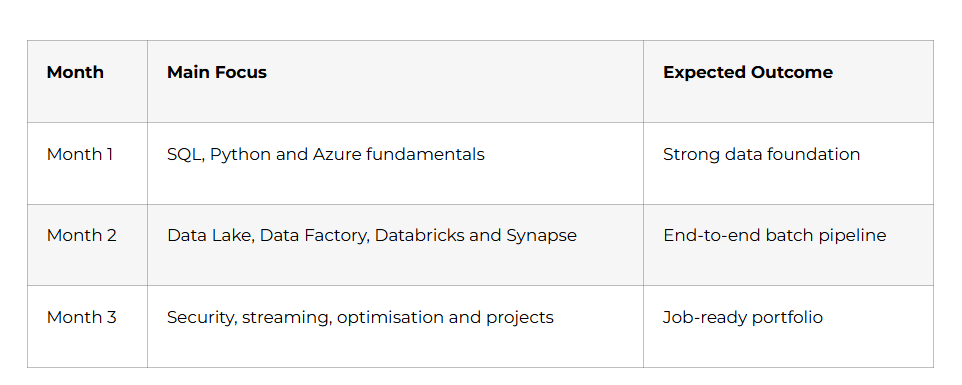
3Month Learning Plan
Build Cloud Data Engineering Skills – Discover the Azure Data Engineer Course in Telugu
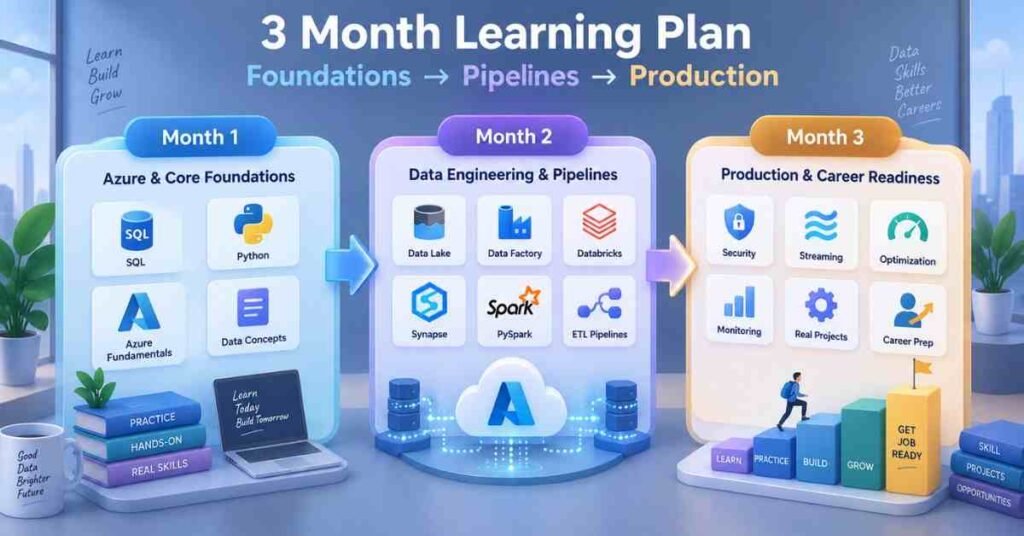
Month 1: Data Engineering Foundations
Week 1: Understanding Data Engineering: Days 1–7
Begin by understanding the complete data lifecycle. Data may move from a source system into storage, pass through cleaning and transformation stages and finally become available for analysis.
Learn the difference between:
- Data Engineer
- Data Analyst
- Data Scientist
- Database Administrator
- Cloud Engineer
Study important concepts:
- Structured and unstructured data
- Batch and streaming data
- ETL and ELT
- Data warehouse
- Data lake
- Data pipeline
- Data partitioning
Week 1 Activity: Draw a simple data flow showing how sales information moves from an application to a business dashboard.
Week 2: SQL Fundamentals: Days 8–14
SQL is an essential skill for accessing and transforming relational data.
Practise:
- SELECT and DISTINCT
- WHERE
- ORDER BY
- GROUP BY
- HAVING
- Aggregate functions
- INNER and LEFT JOIN
- CASE statements
- Subqueries
- Common Table Expressions
Understand primary keys, foreign keys, table relationships, normalisation, indexes and views.
Write queries using a sample retail database. Focus on solving business questions instead of memorising syntax.
Week 2 Project: Analyse orders, customers and products to identify monthly sales, top categories and inactive customers.

Week 3: Python for Data Engineering: Days 15–21
Learn Python concepts required for data processing:
- Variables and data types
- Conditions and loops
- Functions
- Lists and dictionaries
- Exception handling
- File operations
- Modules
- JSON and CSV processing
Begin working with data-manipulation libraries. Practise reading files, correcting missing values, renaming columns, filtering records and exporting processed data.
Week 3 Project: Create a Python program that reads a sales file, removes invalid records and generates a cleaned output file.
Week 4: Microsoft Azure Fundamentals: Days 22–30
Understand cloud computing and the difference between Infrastructure, Platform and Software as a Service.
Learn:
- Azure subscriptions
- Resource groups
- Regions
- Availability
- Azure Portal
- Cost awareness
- Identity and access basics
- Resource naming
Explore the purpose of Azure SQL Database, Storage Accounts, Data Factory, Databricks and Synapse Analytics.
Month 1 Project: Design a basic Azure architecture for collecting sales data, storing it and making it available for reporting.
Month 1 Milestone: You understand SQL, Python, data pipelines and the purpose of major Azure data services.
Month 2: Building Azure Data Pipelines
Grow Your Career in Cloud Data – Unlock the Azure Data Engineer Career Guide
Week 5: Azure Storage and Data Lake: Days 31–37
Learn how Azure Storage supports files, queues and tables. Focus on Azure Data Lake Storage Gen2 for analytical workloads.
Understand:
- Containers
- Folders and files
- Hierarchical namespace
- Access tiers
- File formats
- Partitioning
- Access permissions
Compare commonly used formats such as CSV, JSON, Parquet and Avro. Parquet is often preferred for analytical processing because it stores data in a column-based format.
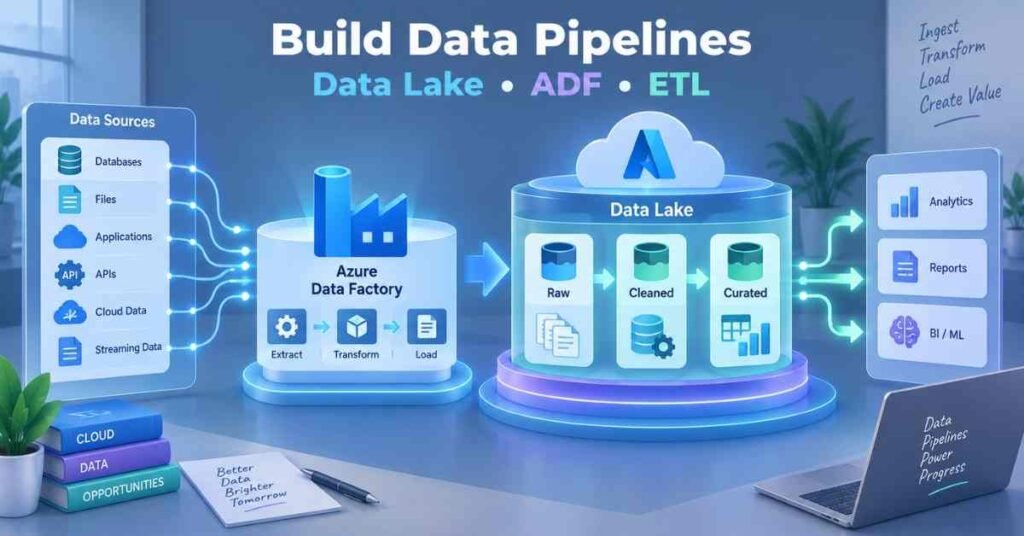
Week 5 Project: Design a Data Lake structure with raw, cleaned and curated layers for an e-commerce dataset.
Week 6: Azure Data Factory: Days 38–44
Azure Data Factory helps create and manage data-movement and transformation workflows.
Learn these components:
- Pipelines
- Activities
- Datasets
- Linked services
- Integration Runtime
- Parameters
- Variables
- Triggers
Practise copying data from a source into Azure Data Lake. Add parameters so the same pipeline can process different files or dates.
Learn how to monitor successful and failed pipeline runs.
Week 6 Project: Build a parameterised pipeline that transfers daily sales data into a date-based Data Lake folder.
Week 7: Azure Databricks and PySpark: Days 45–52
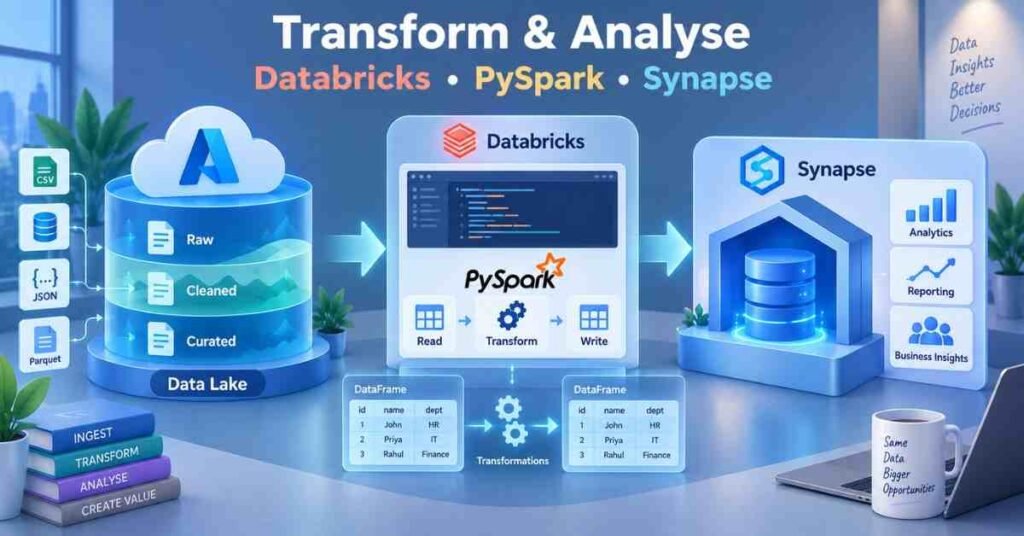
Azure Databricks provides a collaborative environment for large-scale data processing.
Understand:
- Workspace
- Cluster or compute
- Notebook
- Spark DataFrame
- Transformation
- Action
- Lazy evaluation
Practise PySpark operations:
- Reading data
- Selecting columns
- Filtering rows
- Handling null values
- Joining datasets
- Grouping records
- Writing Parquet output
Avoid collecting large datasets into local memory. Use distributed DataFrame operations wherever possible.
Week 7 Project: Use PySpark to clean sales and customer data, join the datasets and save a curated output.
Week 8: Azure Synapse Analytics: Days 53–60
Learn how Azure Synapse supports data warehousing and analytics.
Understand the purpose of:
- Synapse workspace
- Serverless SQL
- Dedicated SQL pools
- External tables
- Data integration
- Data warehouse models
Study fact tables, dimension tables and star schema design. A fact table stores measurable events, while dimension tables provide descriptive information.
Month 2 Project: Build a batch pipeline using Data Factory, Data Lake, Databricks and Synapse. Document the complete flow from source to reporting layer.
Month 2 Milestone: You can design a Data Lake, move data with Data Factory, transform it using PySpark and prepare it for analysis.
Month 3: Production Skills and Career Preparation
Week 9: Security and Governance: Days 61–67
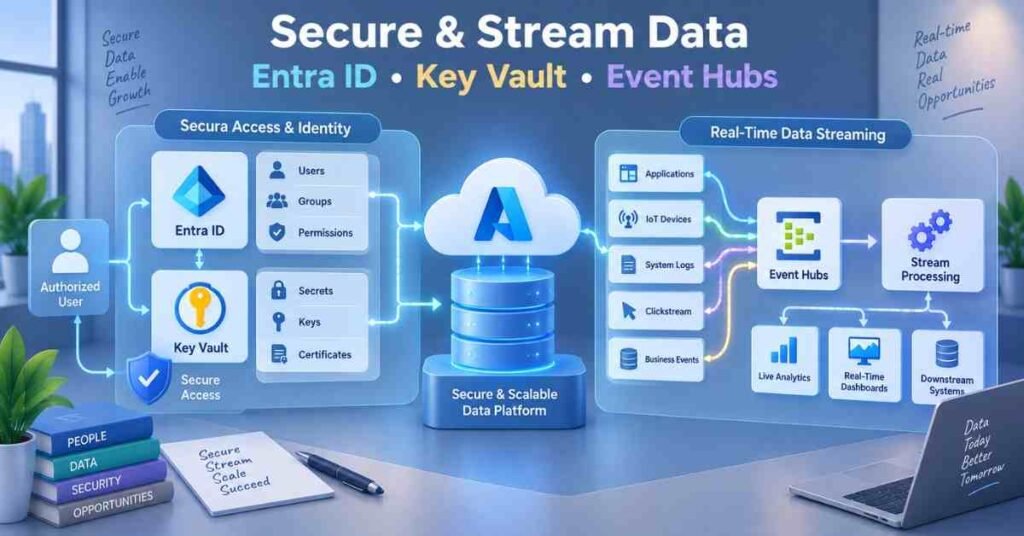
Data platforms must protect information while allowing authorised users and services to complete their work.
Learn:
- Microsoft Entra ID fundamentals
- Role-Based Access Control
- Managed identities
- Azure Key Vault
- Storage permissions
- Encryption
- Network-access concepts
Passwords and connection secrets should not be stored directly inside notebooks or pipeline code. Use approved secret-management practices.
Week 9 Project: Prepare a security plan showing how Data Factory and Databricks can access storage without exposing credentials.
Week 10: Real-Time Data and Monitoring: Days 68–74
Understand the difference between batch and streaming pipelines. Batch systems process collected data at intervals, while streaming systems handle events as they arrive.
Study the purpose of:
- Azure Event Hubs
- Azure Stream Analytics
- Streaming concepts
- Checkpoints
- Event time
- Processing time
Learn how monitoring helps identify pipeline failures, performance problems and unexpected data volumes.
Week 10 Project: Design a real-time architecture for processing application or sensor events.
Week 11: Optimisation and Portfolio: Days 75–83
Learn practical optimisation concepts:
- Selecting suitable file formats
- Partitioning large datasets
- Reducing unnecessary data movement
- Avoiding repeated transformations
- Monitoring pipeline duration
- Controlling compute usage
- Handling failed records
- Maintaining audit information
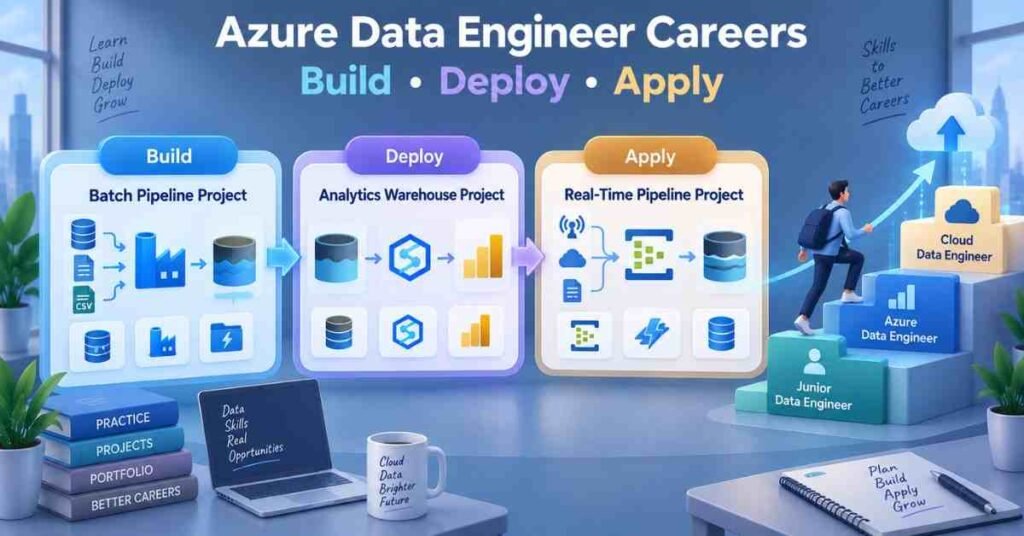
Complete three portfolio projects:
Project 1: Retail Batch Pipeline
Move daily sales data into Data Lake and transform it using Azure Databricks.
Project 2: Customer Analytics Warehouse
Create fact and dimension tables and prepare the data for business reporting.
Project 3: Real-Time Event Pipeline
Design a streaming solution using Event Hubs and an appropriate processing service.
Each project should explain the requirement, architecture, services, transformations, security and monitoring approach.
Week 12: Career Launch: Days 84–90
Prepare a resume that highlights:
- SQL
- Python
- Azure Data Factory
- Azure Data Lake Storage
- Azure Databricks
- PySpark
- Azure Synapse Analytics
- Data modelling
- ETL and ELT
- Security and monitoring
Practise explaining the movement of data from its source to the final reporting layer.
Prepare for roles such as:
Role | Primary Focus |
Junior Data Engineer | Data pipelines and processing |
Azure Data Engineer | Azure-based data platforms |
ETL Developer | Data movement and transformation |
Cloud Data Engineer | Scalable cloud data solutions |
Big Data Engineer | Distributed data processing |
Data Integration Developer | Connecting data sources and platforms |
Day 90 Milestone: You have completed three projects and can explain an end-to-end Azure data architecture.
Prepare for Azure Data Engineering Roles – Azure Data Engineer Interview Guide
Why Choose Frontlines Edutech?
An Azure Data Engineer Course in Telugu can make cloud and data concepts easier to understand through Telugu explanations, guided demonstrations and practical projects.
The learning approach can include:
- SQL and Python
- Azure fundamentals
- Data Lake Storage
- Azure Data Factory
- Azure Databricks
- PySpark
- Azure Synapse Analytics
- Security and monitoring
- Real-time processing
- Portfolio and interview support
Frequently Asked Questions (FAQs)
1. What does an Azure Data Engineer do?
An Azure Data Engineer builds systems that collect, store, transform and deliver data for analytics and reporting.
2. Is coding required?
Basic SQL and Python are important. PySpark knowledge is also useful for large-scale processing.
3. Can freshers learn Azure Data Engineering?
Yes. Freshers can begin with SQL, Python and data fundamentals before learning Azure services.
4. Is advanced mathematics required?
No. Strong logical thinking, data understanding and problem-solving are more important for this role.
5. What is Azure Data Factory?
It is a cloud service used to create and manage data-movement and transformation workflows.
6. What is Azure Data Lake Storage?
It is scalable cloud storage designed to support analytical data workloads.
7. Why is Databricks used?
Azure Databricks supports collaborative and distributed data processing using technologies such as Apache Spark.
8. What is the difference between ETL and ELT?
ETL transforms data before loading it into the destination. ELT loads the data first and performs transformations within the target platform.
9. Which projects should beginners build?
Build a batch pipeline, an analytics warehouse, and a real-time data architecture.
10. How can an Azure Data Engineer Course in Telugu help?
It can explain cloud services, pipelines, and PySpark concepts in Telugu through practical examples and guided projects.