
Video Editing Interview Preparation Guide for Beginners
Table of Contents
Part 1: Introduction & 30-Day Study Plan
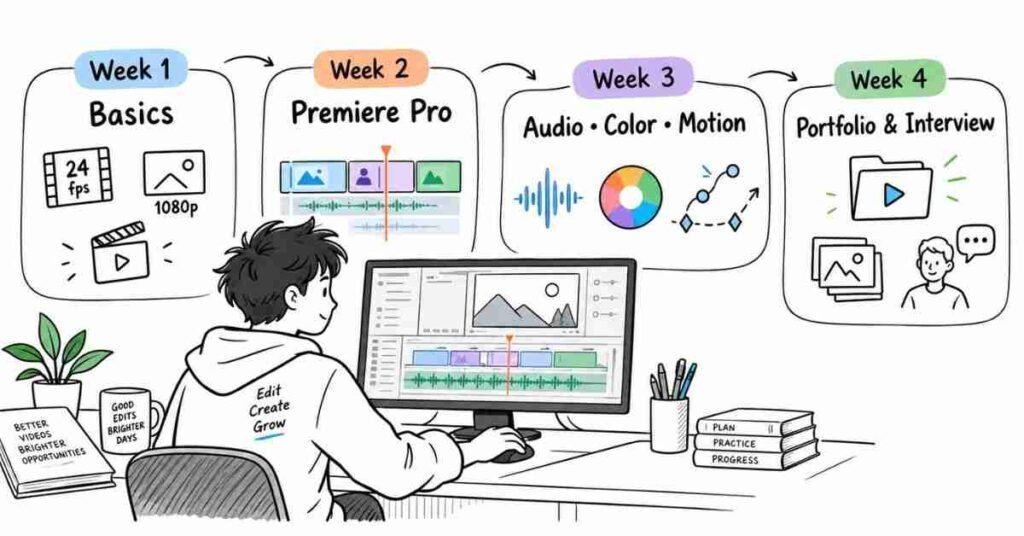
What You Actually Need to Prepare
A video editor is expected to do more than cut clips.
You may be asked how you choose shots, how you fix bad audio, why you used a particular transition, or how you would make a slow video more engaging.
You may also be given a small editing test.
So your preparation should cover both technical knowledge and practical thinking.
The main areas are:
- Editing basics
- Premiere Pro
- After Effects basics
- Audio cleanup
- Color correction
- Storytelling
- B-roll
- Captions
- Social media formats
- Export settings
- Client feedback
- Portfolio discussion
Who This Guide Is For
This guide is mainly useful for people who are trying to get their first proper video editing opportunity.
You may be:
- A student learning video editing
- A fresher applying for editor jobs
- A YouTube editor
- A social media editor
- A freelancer looking for full-time work
- A content creator moving into professional editing
You do not need to be an expert in every software.
It is better to know one editing tool properly and understand why you are making each edit.
What Does a Video Editor Really Do?
Imagine you receive 40 minutes of raw footage.
The final video may only need to be 8 minutes.
Your job is to decide what stays and what goes.
You may remove pauses, fix awkward cuts, add B-roll, improve the sound, place music, add captions, and make sure the video does not feel slow.
That is where editing skill shows.
A good editor does not add effects just because they are available. Every cut, transition, sound, or graphic should have a reason.
Skills Interviewers Usually Notice
Interviewers often look at your work before they ask many technical questions.
They notice things like:
- Are your cuts clean?
- Is the pacing comfortable?
- Is the audio clear?
- Are captions easy to read?
- Is B-roll used naturally?
- Does the video feel too busy?
- Is the color consistent?
- Does the edit suit the platform?
They may not use these exact words, but these are the things they are judging.
Video Editing Career Options
Video editing can take you in different directions.
You can work as a:
Video Editor
Handles general editing, B-roll, audio, color, captions, and delivery.
YouTube Editor
Works more on storytelling, retention, pacing, hooks, and long-form content.
Social Media Editor
Focuses on Reels, Shorts, fast pacing, captions, and vertical formats.
Motion Graphics Editor
Works more with animation, typography, graphics, and After Effects.
Freelance Editor
Works with different clients and usually handles both editing and revisions directly.
With experience, you can move into senior editing, post-production, or creative leadership roles.
30-Day Video Editing Preparation Plan
You do not need to learn everything in one week.
A month of focused practice is enough to improve your confidence.
Week 1: Get the Basics Clear
Spend the first week understanding:
- Frame rate
- Resolution
- Aspect ratio
- Timeline
- Sequence
- Cuts
- Transitions
- Codecs
- Audio basics
Do not just read definitions. Open a project and see how these things actually work.
Week 2: Edit in Premiere Pro
This week should be mostly practical.
Work on:
- Trimming clips
- Ripple edits
- B-roll
- Keyframes
- Captions
- Speed changes
- Audio levels
- Adjustment layers
- Export settings
Try to finish one complete short video.
Week 3: Improve the Look and Sound
Now focus on the details that make an edit feel polished.
Practice:
- Basic color correction
- Audio cleanup
- Music placement
- Sound effects
- Text animation
- Masks
- Simple motion graphics
You do not need advanced VFX. Learn enough to use these tools naturally.
Week 4: Build Interview Confidence
Use the last week for real practice.
Edit:
- One YouTube video
- One Reel or Short
- One promotional video
Then review your portfolio and practise explaining your work.
Be ready to answer questions like:
Why did you make this cut?
Why did you choose this music?
What would you improve if you edited this again?
These questions reveal whether you truly understand your work.
Simple Daily Routine
You do not need a four-hour study schedule.
Around 60–90 focused minutes is enough.
Spend some time learning one concept, edit something small, watch the result again, and notice what feels wrong.
Then practise explaining one editing decision in your own words.
That habit is more useful than watching endless tutorials without editing anything.
The reference guide also recommends learning a concept, practising it, building examples, and reviewing weak areas instead of memorising answers.
Tools Worth Knowing
For most beginner and intermediate roles, these tools are enough to recognise:
- Adobe Premiere Pro
- Adobe After Effects
- DaVinci Resolve
- Adobe Audition
- Media Encoder
- Photoshop
- CapCut
- Canva
You do not need to claim that you know all of them.
If Premiere Pro is your main tool, explain confidently what you use it for.
For example:
“I usually edit in Premiere Pro. I use it for cutting footage, adding B-roll, captions, basic color correction, audio balancing, and final exports.”
That sounds much better than simply saying, “I know Premiere Pro.”
How to Prepare for the Interview
Do not memorise answers line by line.
Take one of your own videos and practise talking about it.
Explain:
- What the video was about
- What footage you received
- What your editing approach was
- What problem you faced
- How you solved it
- What you would improve now
That makes your answers sound natural because you are talking about work you actually understand.
Final Tip
Before calling an edit finished, watch it once without touching the timeline.
Just watch it like a normal viewer.
If you become bored at a certain point, the viewer may feel the same way.
If the music feels too loud, fix it.
If a transition draws more attention than the story, simplify it.
Good editing is often about knowing what to remove, not what else to add.
Part 2: Video Editing Fundamentals
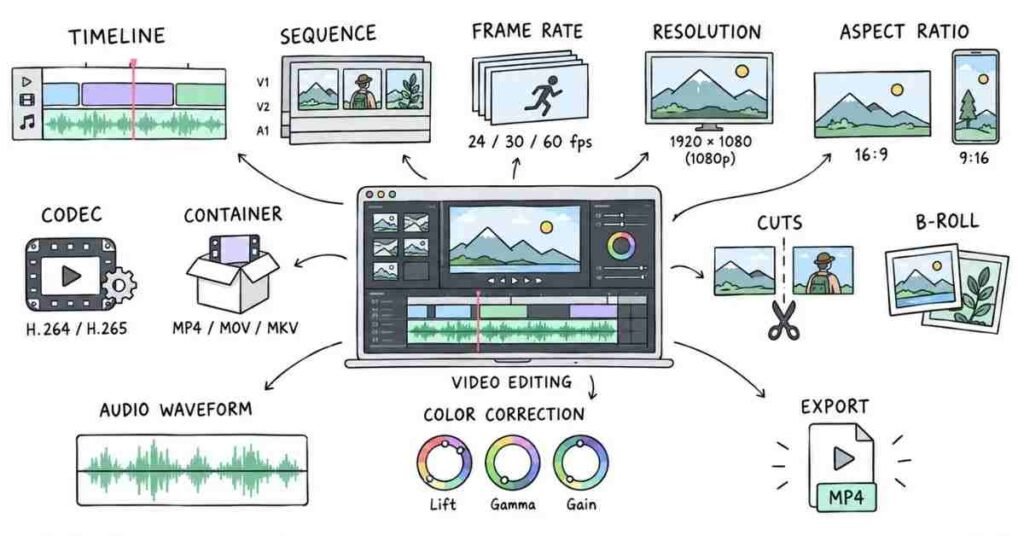
Video Editing Fundamentals — Questions 1–30
This section covers the basics interviewers usually expect before they move into software-specific questions. The goal is not to memorize definitions, but to understand what each concept changes in a real edit.
Q1. What is video editing?
Video editing is the process of taking raw footage and shaping it into a clear final video.
It usually involves selecting clips, removing unwanted parts, arranging shots, improving audio, adding graphics, correcting color, and preparing the final export.
Q2. What is a timeline?
The timeline is the main workspace where video, audio, graphics, and effects are arranged.
Most of the actual editing happens here.
Q3. What is a sequence?
A sequence is the editing timeline with its own settings such as resolution, frame rate, and audio setup.
For example, a vertical Reel and a YouTube video may need different sequence settings.
Q4. What is frame rate?
Frame rate is the number of individual frames shown in one second of video.
Common examples are:
- 24 fps
- 25 fps
- 30 fps
- 50 fps
- 60 fps
Higher frame rates are often useful when smoother motion or slow motion is required.
Q5. What is the difference between 24 fps and 60 fps?
24 fps usually gives a more cinematic feel.
60 fps captures more frames, so movement looks smoother and the footage can be slowed down more cleanly.
The right choice depends on the type of video.
Q6. What is resolution?
Resolution tells us how many pixels make up the video frame.
Common examples include:
- 1280 × 720 – HD
- 1920 × 1080 – Full HD
- 3840 × 2160 – 4K
Higher resolution gives more image detail but also creates larger files.
Q7. What is aspect ratio?
Aspect ratio describes the shape of the video frame.
Common formats are:
- 16:9 – YouTube and landscape videos
- 9:16 – Reels and Shorts
- 1:1 – Square social posts
An editor should always know where the video will be published before choosing the format.
Q8. What is a codec?
A codec is used to compress and decompress video or audio.
Examples include H.264, H.265, and ProRes.
The codec affects file size, quality, compatibility, and editing performance.
Q9. What is a container format?
A container holds video, audio, subtitles, and other information inside one file.
Examples include:
- MP4
- MOV
- MKV
For example, H.264 may be the codec while MP4 is the container.
Q10. What is the difference between codec and container?
A simple way to remember it:
Codec = how the video is compressed
Container = the file that holds everything together
So .mp4 is not automatically the codec.
Cuts and Editing Flow
Q11. What is a cut?
A cut is the point where one shot changes to another.
Most professional editing is built around simple, well-timed cuts rather than heavy transitions.
Q12. What is a jump cut?
A jump cut removes part of a continuous shot and makes the subject appear to jump forward in time.
It is commonly used in:
- YouTube videos
- Interviews
- Tutorials
- Reels
It helps remove pauses and keep the pace moving.
Q13. What is a match cut?
A match cut connects two shots using a similar movement, shape, action, or composition.
When done well, the transition feels natural instead of forced.
Q14. What is a J-cut?
In a J-cut, the audio from the next scene starts before the video changes.
It helps one scene flow smoothly into the next.
Q15. What is an L-cut?
In an L-cut, the audio from the previous shot continues after the video has changed.
This is common in interviews, documentaries, and conversations.
Q16. What is B-roll?
B-roll is supporting footage placed over the main video.
For example, if someone is talking about travelling, you may show airport, road, hotel, or destination shots while their voice continues.
Good B-roll adds context. It should not feel random.
Q17. What is A-roll?
A-roll is usually the main footage carrying the story.
For an interview video, the person speaking to camera would normally be the A-roll.
Q18. Why is pacing important in editing?
Pacing controls how fast or slow the video feels.
If every shot stays too long, the video may feel boring.
If cuts happen too quickly, viewers may struggle to follow the message.
Good pacing depends on the audience, platform, and mood.
Q19. How do you know where to make a cut?
Do not cut only because a certain number of seconds have passed.
A cut can happen when:
- The speaker finishes a thought
- The emotion changes
- New information begins
- A pause feels unnecessary
- B-roll can support the message
The best cut is usually the one that keeps the story moving naturally.
Q20. Should every cut have a transition?
No.
In most cases, a clean cut is enough.
Transitions should have a reason. Using effects between every clip can quickly make a video feel distracting.
Audio and Visual Basics
Q21. Why is audio important in video editing?
People may forgive slightly imperfect visuals, but bad audio can make a video difficult to watch.
Clear dialogue, balanced music, and controlled background noise make a big difference.
Q22. What is audio clipping?
Audio clipping happens when the signal becomes too loud and starts distorting.
Once dialogue sounds harsh or broken, it can be difficult to repair completely.
That is why audio levels should be monitored while editing.
Q23. Why should background music be lower than dialogue?
Music should support the speaker, not compete with them.
If viewers have to struggle to hear the dialogue, the mix needs adjustment.
Q24. What is color correction?
Color correction fixes technical problems in the image.
You may adjust:
- Exposure
- White balance
- Contrast
- Skin tones
The goal is to make the footage look clean and consistent.
Q25. What is color grading?
Color grading comes after correction.
It is used to create a particular visual mood or style.
For example, one project may need a warm lifestyle look, while another may need a cooler dramatic feel.
Q26. What is the difference between color correction and grading?
Color correction: Fix the image.
Color grading: Style the image.
That simple difference is usually enough for an interview answer.
Q27. What is white balance?
White balance controls whether the image looks too warm or too cool.
If skin tones look unnaturally blue or orange, white balance may need correction.
Q28. What is a LUT?
A LUT is a preset transformation that changes the color appearance of footage.
It can speed up the grading process, but applying a LUT does not automatically make footage look good.
You still need to check exposure, contrast, and skin tones.
Export and Delivery
Q29. What should you check before exporting a video?
Before export, watch the video once from beginning to end.
Check:
- Missing clips
- Audio levels
- Spelling in captions
- Black frames
- Wrong transitions
- Color consistency
- Correct aspect ratio
- Final duration
Do not assume the timeline is correct just because the editing is finished.
Q30. What export settings should a video editor understand?
At minimum, understand:
- Resolution
- Frame rate
- Format
- Codec
- Bitrate
- Audio settings
For many online videos, H.264 in MP4 is commonly used because it gives a practical balance between quality and file size.
Important Concepts to Practice
For this section, focus on:
- Frame Rate
- Resolution
- Aspect Ratio
- Codecs
- Containers
- Timeline and Sequences
- J-Cuts and L-Cuts
- B-Roll
- Pacing
- Audio Levels
- Color Correction
- Export Settings
Practice Strategy
Take one of your old videos and watch it again without opening the editing software.
Notice where:
- A shot stays too long
- B-roll could improve the explanation
- Music becomes distracting
- A transition feels unnecessary
- Captions are difficult to read
- Color changes between shots
Then open the project and fix only those problems.
This kind of practice is useful because you are not just learning what an editing term means. You are learning to notice when it matters.
Part 3: Adobe Premiere Pro Interview Questions & Practical Workflow
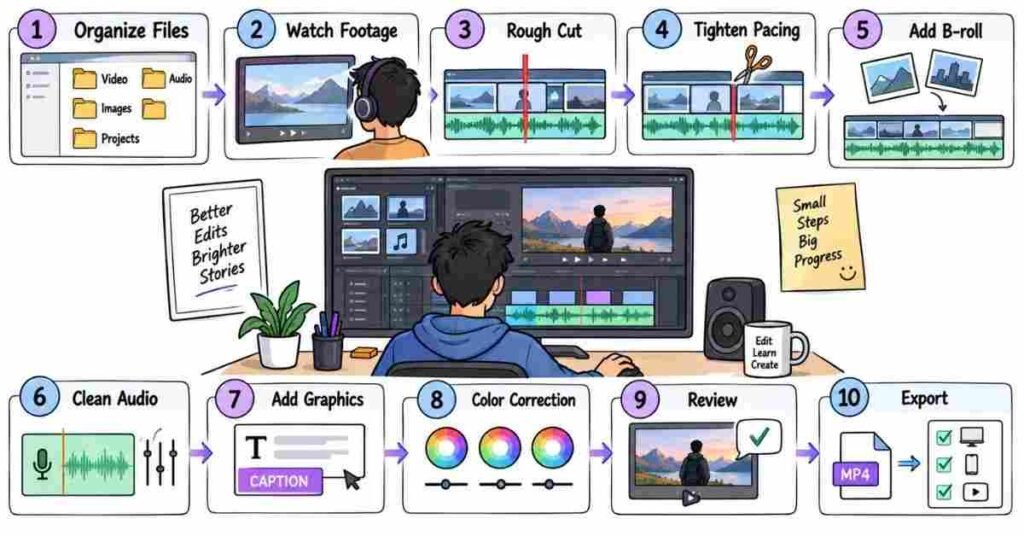
Premiere Pro — Questions 31–60
This section is less about memorizing tool names and more about showing that you know how an actual editing project moves from raw footage to final delivery.
Q31. What do you use Adobe Premiere Pro for?
I mainly use Premiere Pro for arranging footage, trimming clips, adding B-roll, working with audio, creating captions, doing basic color correction, and exporting the final video.
It is usually where the complete edit comes together.
Q32. What is the Project Panel?
The Project Panel is where I keep all the files used in the edit.
That may include:
- Video clips
- Music
- Voice-over
- Images
- Graphics
- Sequences
Keeping this panel clean saves a lot of time later.
Q33. How do you organize a Premiere Pro project?
I normally separate files into bins such as:
Footage, Audio, Music, Graphics, Sequences, and Exports.
For a small project, this may feel unnecessary. But once there are many files and revisions, good organization makes a big difference.
Q34. What is a sequence in Premiere Pro?
A sequence is the timeline where the actual edit is built.
Its settings include things like resolution and frame rate.
For example, I would normally use different sequence dimensions for a YouTube video and an Instagram Reel.
Q35. What is the Source Monitor used for?
The Source Monitor helps me preview a clip before putting it on the timeline.
I can choose only the useful section instead of dropping the entire clip into the sequence.
Q36. What are In and Out points?
In and Out points mark the part of a clip that I actually want to use.
They are useful when the raw footage is long and only a small section is needed.
Q37. What is the difference between Insert and Overwrite editing?
Insert adds the clip and moves existing timeline content forward.
Overwrite places the clip over whatever is already in that position.
Which one I use depends on whether I want the timeline duration to change.
Q38. What is the Razor Tool?
The Razor Tool cuts a clip into separate pieces.
I use it when I need to remove a section or work on different parts of the same clip independently.
Q39. What is Ripple Edit?
Ripple Edit lets me trim a clip and automatically close the gap created on the timeline.
It is very useful when tightening interviews, podcasts, or talking-head videos.
Q40. What is Rolling Edit?
Rolling Edit changes the cut point between two clips.
One clip becomes shorter while the next becomes longer, but the overall sequence duration stays the same.
Q41. What is Slip Edit?
Slip Edit changes the part of the source clip being shown without moving the clip on the timeline.
The clip stays in the same place and keeps the same duration.
Q42. What is Slide Edit?
Slide Edit moves a clip earlier or later while adjusting the clips around it.
The duration of the selected clip itself stays unchanged.
Q43. What is an adjustment layer?
An adjustment layer lets me apply an effect or color treatment to several clips at once.
Instead of adding the same effect to every clip separately, I can place one adjustment layer above them.
Q44. What are keyframes?
Keyframes tell Premiere Pro that a value should change over time.
I use them for things like:
- Position
- Scale
- Opacity
- Audio volume
- Simple animation
For example, I can slowly zoom into a shot using scale keyframes.
Q46. What are proxies?
Proxies are lighter versions of high-resolution footage.
If 4K footage is making the system slow, proxies can make editing much smoother while the original files are still used for the final output.
Q47. When would you use proxies?
I would consider proxies when working with:
- 4K or higher-resolution footage
- Heavy codecs
- Multicam projects
- A slower editing computer
The goal is smoother editing, not lower final quality.
Q48. What is multicam editing?
Multicam editing is useful when the same event is recorded using multiple cameras.
For example, a podcast may have one wide shot and separate cameras for each speaker.
Premiere Pro lets me sync those angles and switch between them while editing.
Q49. How do you sync video and audio?
If both files have usable recorded sound, Premiere Pro can often sync them using the audio waveform.
For some projects, a clap or slate also gives a clear point for manual syncing.
Q50. What do you do when footage is shaky?
First, I check whether stabilization is really needed.
If it is, I may try Warp Stabilizer. But I still review the result because aggressive stabilization can sometimes create strange movement or cropping.
Q51. What is Warp Stabilizer?
Warp Stabilizer is an effect used to reduce unwanted camera shake.
It can help, but it does not fix every bad shot.
Sometimes using another take or keeping a little natural movement looks better.
Q52. How do you create slow motion?
Good slow motion usually starts with footage recorded at a higher frame rate.
For example, footage shot at 60 fps gives more flexibility when slowing it down on a lower-frame-rate timeline.
Simply slowing any clip does not always produce smooth results.
Q53. What is speed ramping?
Speed ramping means changing the speed of a clip gradually rather than using one fixed speed.
It is often used in travel videos, product videos, sports edits, and short-form content.
I use it only when it suits the movement and style.
Q54. How do you work with B-roll in Premiere Pro?
I normally place B-roll on a video track above the main footage.
It should support what the viewer is hearing.
If someone is talking about working on a laptop, showing relevant laptop footage makes sense. Random B-roll does not.
Q55. How do you create captions?
Premiere Pro can generate transcripts and captions, which can save a lot of time.
But I still review:
- Spelling
- Timing
- Names
- Line breaks
Automatic captions should not be published without checking them.
Q56. What is Lumetri Color?
Lumetri Color is Premiere Pro’s main color adjustment workspace.
I use it for basic changes such as exposure, white balance, contrast, saturation, and simple grading.
Q57. How do you improve dialogue audio?
I first listen for the actual problem.
Then I may work on:
- Noise
- Volume
- EQ
- Compression
- Dialogue clarity
The goal is not to make the voice sound heavily processed. It should simply be comfortable to hear.
Q58. How do you handle background music?
I keep music low enough that it never fights with the voice.
I also adjust it based on the scene. A strong music level may work during B-roll, but it usually needs to come down when someone starts speaking.
Q59. What is Media Encoder used for?
Adobe Media Encoder can handle exports outside the main Premiere Pro timeline.
It is useful when I have several versions to export or want Premiere Pro available while encoding continues.
Q60. How do you prepare a final export?
Before exporting, I check:
- Sequence size
- Frame rate
- Audio
- Captions
- Graphics
- Black frames
- Spelling
- Start and end points
Then I choose the format based on where the video will be used.
For many web and social media deliveries, H.264 is a common choice.
A Realistic Premiere Pro Workflow
If I receive raw footage from a client, I would not immediately start adding effects.
I usually work in this order:
Organize files → Watch footage → Build rough cut → Tighten pacing → Add B-roll → Clean audio → Add graphics/captions → Correct color → Review → Export
That order can change from project to project, but it keeps the edit manageable.
What Interviewers May Actually Ask
Instead of asking only, “What is Ripple Edit?”, an interviewer may give you a situation.
For example:
“The speaker pauses for five seconds in the middle of an interview. What would you do?”
A natural answer could be:
“I would remove the unnecessary pause, tighten the dialogue, and check whether the cut feels obvious. If it does, I may cover it with relevant B-roll or adjust the edit so it feels natural.”
That answer shows editing judgement, not just software knowledge.
Practice Strategy
Take one old Premiere Pro project and reopen it.
Check whether you can explain:
- Why you created that sequence
- How you organized the footage
- Why you made certain cuts
- Where you used B-roll
- How you treated the audio
- What color changes you made
- Why you chose those export settings
If you can explain those choices comfortably, you are preparing for the interview in the right way.
Part 4: After Effects & Motion Graphics
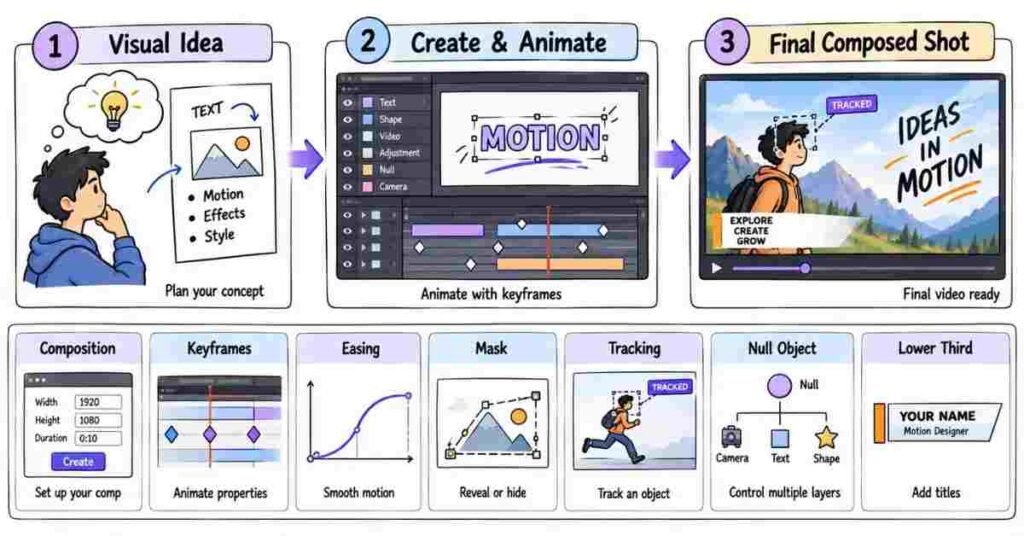
After Effects & Motion Graphics — Questions 61–90
After Effects questions are usually less about memorising effects and more about how you create movement, solve visual problems, and keep the animation clean. For most video editing roles, strong fundamentals are more useful than knowing hundreds of plugins.
Q61. What do you use Adobe After Effects for?
I mainly use After Effects when an edit needs motion graphics, animated text, tracking, masking, compositing, or visual effects.
Premiere Pro handles most of my editing, while After Effects comes in when a shot needs more detailed visual work.
Q62. What is a composition in After Effects?
A composition is the main workspace where layers are arranged and animated.
It has its own resolution, frame rate, and duration, so I normally set those based on the final video before starting.
Q63. What is a layer?
Everything inside a composition appears as a layer.
A video, image, text, shape, adjustment layer, or solid can all sit on separate layers, which makes them easier to control individually.
Q64. What are keyframes?
Keyframes mark where a property starts and where it changes.
For example, if I want a title to move from the left side of the screen to the centre, I can set one position keyframe at the beginning and another at the end.
Q65. Which properties do you animate most often?
The ones I use most are Position, Scale, Rotation, Opacity, and Anchor Point.
These basic properties are enough to create a lot of clean motion without adding complicated effects.
Q66. What is an anchor point?
The anchor point is the point around which a layer rotates or scales.
If it is in the wrong place, even a simple animation can feel strange, so I usually check it before animating.
Q67. What is Easy Ease?
Easy Ease makes movement start and stop more naturally.
Without easing, an object can move at one constant speed and feel mechanical. Small easing changes often make animation feel much more polished.
Q68. What is the Graph Editor?
The Graph Editor lets me control how fast or slow an animation moves between keyframes.
I use it when default keyframes look too stiff and I want the movement to feel smoother or more energetic.
Q69. What is motion blur?
Motion blur adds natural blur to fast-moving objects.
I normally use it when animated text or graphics move quickly, because perfectly sharp movement can sometimes look artificial.
Q70. What is parenting in After Effects?
Parenting links one layer to another.
If I parent text to a moving shape, the text follows that shape automatically. It saves time when several elements need to move together.
Q71. What is a Null Object?
A Null Object is an invisible control layer.
I often use it to control several layers together instead of animating every layer separately.
Q72. What is pre-composing?
Pre-composing groups several layers into another composition.
I use it when the timeline becomes crowded or when multiple elements need to behave like one unit.
Q73. What is masking?
A mask lets me hide or reveal a specific part of a layer.
For example, I might use a mask to make text appear from behind an object or remove an unwanted area from a shot.
Q74. What is mask feathering?
Feathering softens the edge of a mask.
A hard mask edge can look obvious, so a little feathering often helps the effect blend more naturally into the footage.
Q75. What is rotoscoping?
Rotoscoping means separating a person or object from the background frame by frame or with assisted tools.
I would use it when a clean green screen is not available but the subject still needs to be isolated.
Q76. What is the Roto Brush?
Roto Brush helps select and separate a subject from the background.
It can save a lot of time, but I still check the edges carefully because hair, fast motion, and similar background colours can cause problems.
Q77. What is motion tracking?
Motion tracking follows the movement of something inside a shot.
For example, if I want a label to stay beside a moving person, I can track the movement and attach the graphic to that tracking data.
Q78. What is camera tracking?
Camera tracking studies the movement of the camera and creates a 3D representation of the scene.
It is useful when I need text or graphics to look like they actually belong inside the recorded environment.
Q79. What is the difference between motion tracking and camera tracking?
Motion tracking usually follows a particular object or point.
Camera tracking works with the movement of the entire camera, which is more useful when placing elements into a 3D-looking scene.
Q80. What is chroma keying?
Chroma keying removes a specific background colour, usually green or blue.
After removing it, I can place the subject over another background or design.
Q81. What do you check after removing a green screen?
I check the edges first, especially around hair and clothing.
I also look for green spill on the subject because even a clean key can look fake if green light is still visible on the skin or clothes.
Q82. What are shape layers used for?
Shape layers are useful for creating boxes, circles, lines, icons, buttons, and simple graphics directly inside After Effects.
I use them often for lower thirds, callouts, title cards, and social media graphics.
Q83. How do you animate text without making it look overdone?
I usually keep the movement simple and match it to the tone of the video.
A small position, opacity, or scale animation often works better than using several effects at the same time.
Q84. What is a lower third?
A lower third is a graphic usually placed near the bottom of the screen to show information such as a person’s name, role, or location.
It should be clear and readable without pulling attention away from the main subject.
Q85. What is compositing?
Compositing means combining different visual elements so they look like one finished shot.
For example, I might combine recorded footage, a background, text, graphics, and effects into a single scene.
Q86. What is an adjustment layer in After Effects?
An adjustment layer lets an effect influence the layers underneath it.
It is useful when I want several elements to share the same treatment without applying the effect to each layer separately.
Q87. How do you keep an After Effects project organised?
I name important layers clearly and group related files into folders or pre-comps.
Once a project has dozens of layers, good organisation can save more time than any shortcut.
Q88. What do you do when After Effects becomes slow?
I first check what is actually causing the slowdown.
Heavy effects, large files, motion blur, high-resolution footage, or too many active layers can all affect performance. Sometimes lowering preview quality is enough while I work.
Q89. When would you use After Effects instead of Premiere Pro?
If the job is mainly cutting footage, arranging audio, adding B-roll, and building the story, I stay in Premiere Pro.
If the shot needs detailed animation, tracking, masking, compositing, or motion graphics, I move that part into After Effects.
Q90. What makes motion graphics look professional?
Good motion graphics are usually clear, smooth, and consistent with the video.
I pay attention to timing, spacing, easing, font choice, and how much movement is really needed. Adding more effects does not automatically make the animation better.
A Practical After Effects Workflow
When I receive a scene that needs motion graphics, I first decide what the graphic is supposed to communicate. Then I build the simplest version, animate it, adjust the timing, and watch it together with the actual video.
If the animation looks impressive on its own but distracts from the message, I simplify it.
What an Interviewer May Ask
An interviewer might show you a clip and say:
“The client wants a person’s name to follow them while they walk. How would you approach it?”
A natural answer would be:
“I would track a clear point on the subject, apply that tracking data to a Null Object, and attach the name graphic to it. After that, I would check the track manually and fix any places where it slips.”
That answer shows you understand the workflow instead of only knowing the term motion tracking.
Important Topics to Practice
Focus mainly on keyframes, easing, Graph Editor, masks, Roto Brush, motion tracking, camera tracking, green screen, text animation, shape layers, pre-comps, Null Objects, lower thirds, compositing, and basic project organisation.
You do not need an advanced VFX reel for a normal video editor interview. A few clean animations that you can confidently explain are more useful than complicated effects you do not fully understand.
Practice Strategy
Take one short clip and create three simple things with it: an animated title, one tracked graphic, and one masked transition.
After finishing, explain to yourself why you used each technique and what problem it solved. That makes the knowledge much easier to recall in an interview than memorising definitions.
Part 5: Audio, Color & Visual Quality
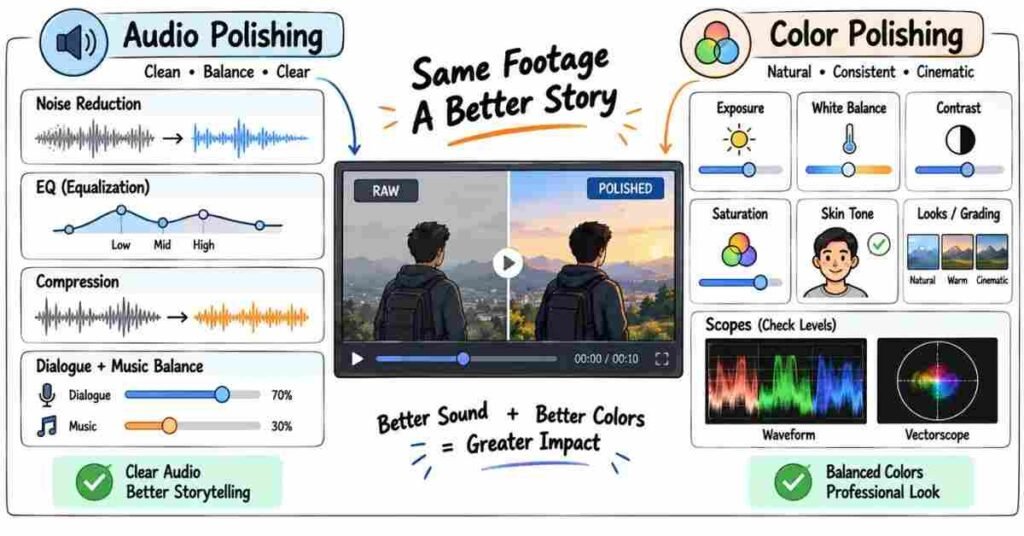
Audio, Color & Visual Quality — Questions 91–120
This part is about the things that make an edit feel finished. A video can have good cuts, but if the voice is hard to hear or the color keeps changing from shot to shot, it still feels unpolished.
Audio Editing
Q91. Why is audio so important in video editing?
People can usually tolerate slightly imperfect visuals, but bad audio becomes distracting very quickly.
Clear dialogue, balanced music, and controlled background sound make the whole video feel more professional.
Q92. What do you check first when cleaning dialogue?
I listen for the main problem before applying effects.
It could be:
- Background noise
- Very low volume
- Echo
- Harsh voice
- Sudden volume changes
I try to fix the actual issue instead of adding too many effects.
Q93. What is noise reduction?
Noise reduction helps reduce unwanted sounds such as AC noise, fan sound, or light background hiss.
I use it carefully because too much reduction can make a voice sound unnatural.
Q94. What is EQ?
EQ lets me control different frequency ranges in the audio.
For dialogue, I may reduce unwanted low frequencies or gently improve clarity, but I avoid making the voice sound overly processed.
Q95. What is compression in audio?
Compression reduces the difference between very loud and very soft parts.
It helps dialogue sound more consistent, especially when a speaker’s volume changes while talking.
Q96. What is audio normalization?
Normalization adjusts the overall level of an audio clip toward a target value.
It can help bring clips closer to a consistent level, but I still listen and adjust the mix manually.
Q97. What is audio clipping?
Clipping happens when the audio level becomes too high and starts distorting.
If the waveform is heavily clipped during recording, it may not be possible to fully repair it later.
Q98. How do you balance dialogue and background music?
Dialogue should always be easy to understand.
I lower the music when someone is speaking and let it rise slightly during B-roll or sections without dialogue.
I judge the mix by listening, not only by looking at meters.
Q99. What is audio ducking?
Audio ducking automatically lowers music when dialogue starts and raises it again when the dialogue ends.
It can save time, but I still check the transitions so they do not sound too sudden.
Q100. What are sound effects used for?
Sound effects can support actions, transitions, or mood.
For example, a subtle click, whoosh, or impact can make an animation feel more connected to the edit.
I avoid adding sound effects to every movement.
Q101. What is room tone?
Room tone is the natural background sound of a location when nobody is speaking.
It helps fill small gaps so audio edits do not suddenly sound empty.
Q102. What would you do if dialogue sounds different between two clips?
I would compare the volume, EQ, noise level, and room tone.
The goal is to make the change between clips feel less noticeable.
Perfect matching is not always possible, but the transition should not distract the viewer.
Color Correction
Q103. What is color correction?
Color correction is the process of fixing the image before giving it a creative look.
I usually check:
- Exposure
- White balance
- Contrast
- Saturation
- Skin tones
The goal is consistency.
Q104. What is color grading?
Color grading is the creative stage.
After the image looks technically correct, I can adjust the colors to support a mood or style.
For example, a warm travel video and a dark dramatic video should not feel the same.
Q105. What is the difference between correction and grading?
A simple way to explain it is:
Correction makes the footage look right.
Grading gives the footage a look.
Q106. What is white balance?
White balance controls whether the image looks too warm or too cool.
I usually check neutral areas and skin tones to see if the shot has an unwanted color cast.
Q107. What is exposure?
Exposure is how bright or dark the image appears.
If the subject is too dark, I may raise the exposure. If highlights are blown out, I try to recover them where possible.
Q108. What is contrast?
Contrast is the difference between the bright and dark areas of an image.
Good contrast can give the image more depth, but too much can remove detail from shadows and highlights.
Q109. What is saturation?
Saturation controls how strong the colors appear.
Too little can make the image look dull. Too much can make skin tones and backgrounds look unnatural.
Q110. Why are skin tones important?
People notice unnatural skin tones quickly.
Even if the rest of the image looks good, strange orange, green, or magenta skin can make the grade feel wrong.
So I usually check faces carefully before finalizing color.
Q111. What are scopes?
Scopes give a more objective view of brightness and color.
Common scopes include:
- Waveform
- Vectorscope
- Parade
They are useful because our eyes can adapt to a screen and sometimes misjudge the image.
Q112. What is a waveform monitor?
A waveform shows the brightness levels across the frame.
It helps me check whether shadows are too crushed or highlights are too bright.
Q113. What is a vectorscope?
A vectorscope shows color information and saturation.
It is especially useful when checking skin tones and whether colors are becoming too strong.
Q114. What is a LUT?
A LUT is a preset color transformation.
It can be useful as a starting point, but I do not treat it as a one-click final grade.
I still adjust the image based on the actual footage.
Q115. Can you apply the same LUT to every video?
Technically, yes. But it may not look good.
Different cameras, lighting conditions, and exposure levels react differently, so a LUT should be adjusted rather than applied blindly.
Visual Quality
Q116. How do you keep color consistent between shots?
I compare shots side by side and try to match:
- Exposure
- White balance
- Contrast
- Saturation
- Skin tones
If two clips were shot in different lighting, I focus on making the change feel natural rather than forcing them to look identical.
Q117. What is overexposed footage?
Overexposed footage is too bright.
Important highlight detail may be lost, especially in areas like windows, skies, or faces.
Once detail is completely clipped, recovery may be limited.
Q118. What is underexposed footage?
Underexposed footage is too dark.
Raising it later can sometimes reveal noise, so getting the exposure right during recording is always better.
Q119. How do you know when a grade is too much?
If skin tones look strange, shadows lose detail, or the viewer notices the color treatment more than the content, I usually pull it back.
Good grading should support the video, not fight for attention.
Q120. What do you check before final delivery?
I usually do one complete watch without stopping.
I check:
- Dialogue clarity
- Music level
- Sudden audio changes
- Color consistency
- Skin tones
- Caption spelling
- Black frames
- Export quality
- Final aspect ratio
If the video is for a client, I also make sure the requested format and resolution are correct.
A Practical Example
Suppose you receive an interview video where one camera looks warm and the other looks slightly blue.
I would not immediately apply a heavy LUT.
First, I would correct white balance and exposure on both shots, compare the skin tones, and bring them closer together. After that, I would add a light creative grade if the project needs one.
The same idea applies to audio. Fix the problem first, then polish it.
Practice Strategy
Take one old project and review only the audio and color.
Ask yourself:
- Can I understand every word clearly?
- Is the music ever too loud?
- Do two clips suddenly sound different?
- Are skin tones natural?
- Does one shot look much brighter than another?
- Is the grade helping the mood or making the video look forced?
This kind of review trains your eye and ear much faster than only watching tutorials.
Part 6: Social Media, YouTube & Content Editing
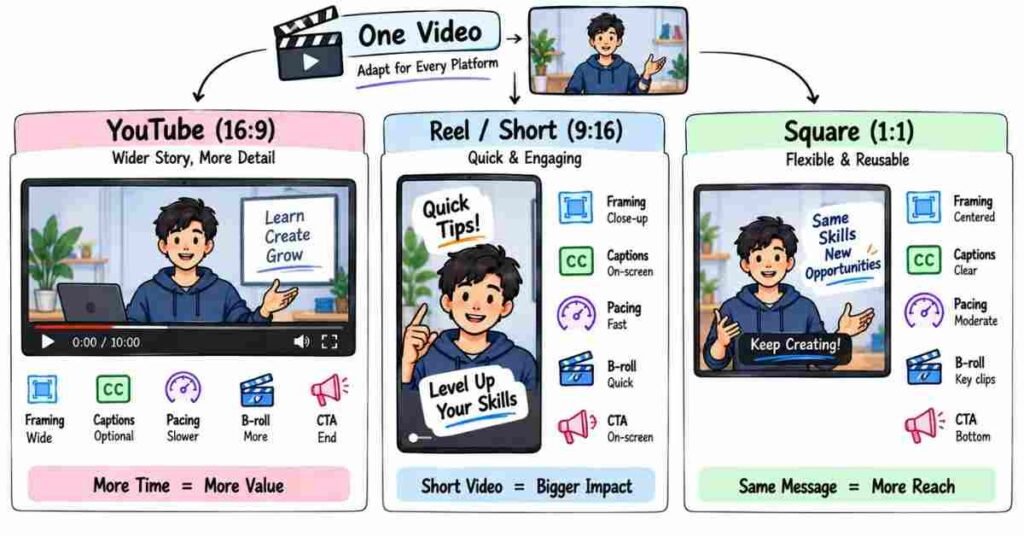
Social Media & Content Editing — Questions 121–150
This section is about how editing changes based on platform, audience, and content style. A YouTube video, Reel, and brand ad may use the same software, but they should not be edited in the same way.
Q121. How is social media editing different from normal video editing?
Social media editing is usually faster and more attention-focused.
You often have only a few seconds to make someone stop scrolling, so pacing, captions, framing, and the opening matter a lot.
Q122. What makes a good Reel or Short?
A good short-form video usually has:
- A strong opening
- Quick but clear pacing
- Easy-to-read captions
- Relevant B-roll
- One clear message
Trying to say too many things in one short video usually makes it weaker.
Q123. Why are the first few seconds important?
People decide very quickly whether they want to continue watching.
If the beginning feels slow or unclear, they may scroll away before reaching the useful part.
Q124. What is a hook in video editing?
A hook is the opening moment that gives the viewer a reason to stay.
It could be:
- An interesting statement
- A question
- A surprising result
- A strong visual
- A quick preview of what is coming
The hook should match the actual video, not feel like clickbait.
Q125. How do you improve a weak opening?
I first check whether the video takes too long to reach the main point.
I may remove greetings, long pauses, repeated sentences, or unnecessary setup and bring the most interesting part closer to the beginning.
Q126. What aspect ratio is commonly used for Reels and Shorts?
Vertical videos normally use 9:16.
A common resolution is:
1080 × 1920
But I still check the final platform requirement before exporting.
Q127. Why are captions important in short-form videos?
Many people watch social media videos without sound.
Captions help them understand the content and can also make important words easier to notice.
Q128. How do you make captions readable?
I keep them:
- Large enough to read
- Away from important UI areas
- Short per line
- High in contrast
- Consistent in style
Fancy captions are not useful if the viewer cannot read them comfortably.
Q129. Should every word be animated?
Not necessarily.
I usually highlight only the words that need extra attention.
If every word moves, the animation can become more distracting than the speaker.
Q130. What is a safe zone in vertical videos?
A safe zone is the part of the frame where important text and graphics are less likely to be covered by platform buttons, captions, or profile information.
I avoid placing important text too close to the top, bottom, or edges.
YouTube Editing
Q131. How is YouTube editing different from Reel editing?
YouTube videos usually have more time to develop an idea.
The pace can breathe a little more, but the video still needs to keep moving.
Reels often demand faster decisions, while YouTube editing needs stronger long-form flow.
Q132. What is audience retention?
Audience retention shows how long viewers continue watching a video.
From an editing point of view, sudden drops can sometimes point to sections that feel slow, repetitive, confusing, or less relevant.
Q133. How can an editor improve retention?
I look for places where the video loses energy.
I may:
- Remove repeated points
- Tighten pauses
- Add relevant B-roll
- Change visual framing
- Use graphics where explanation becomes difficult
- Break long sections into smaller moments
The goal is not constant movement. It is keeping the viewer interested.
Q134. What is a pattern interrupt?
A pattern interrupt is a small visual or audio change that refreshes attention.
It could be:
- A camera angle change
- B-roll
- A graphic
- A zoom
- A sound cue
I use it when the video has stayed visually similar for too long.
Q135. Should you add zooms frequently to talking-head videos?
Only when they help.
A slight punch-in can emphasize a point or hide a cut, but using it every few seconds can start feeling mechanical.
Q136. How do you use B-roll in a YouTube video?
I use B-roll when it helps explain, prove, or visualize what the speaker is saying.
For example, if the speaker talks about editing on a laptop, showing the editing timeline makes more sense than using unrelated stock footage.
Q137. How do you edit long interviews or podcasts?
I first focus on the conversation.
I remove:
- Long silences
- Repeated statements
- Unnecessary filler
- Technical interruptions
After the dialogue feels clean, I work on camera switching, B-roll, titles, and other visual elements.
Q138. How do you choose between camera angles in a podcast?
I normally follow the conversation.
If one person is speaking, I may move to their close-up. If both people are reacting or the conversation becomes more natural, a wider shot may work better.
I avoid switching cameras just because a few seconds have passed.
Brand & Promotional Editing
Q139. What is different about editing an advertisement?
An ad usually has a very clear goal.
It may need the viewer to:
- Notice a product
- Understand a benefit
- Remember a brand
- Click
- Sign up
- Buy
So every shot should support that goal.
Q140. How do you edit a product video?
I first identify what makes the product worth showing.
Then I build the edit around:
Problem → Product → Key benefit → Proof or demonstration → Action
The exact structure can change, but the product should remain easy to understand.
Q141. What is a CTA?
CTA means Call to Action.
It tells the viewer what to do next.
Examples include:
- Buy Now
- Learn More
- Register Now
- Download
- Subscribe
The CTA should feel like a natural next step.
Q142. How do you follow brand guidelines while editing?
Before starting, I check things like:
- Fonts
- Logo usage
- Brand colors
- Text style
- Tone
- Music style
- Previous brand videos
Consistency is important because one video should still feel like it belongs to the same brand.
Q143. What do you do if a client asks for too many effects?
I first try to understand what they actually want.
Sometimes “add more effects” really means the video feels slow or empty.
Instead of adding random transitions, I may suggest better pacing, B-roll, text, or sound design that solves the real problem.
Content Repurposing
Q144. What is content repurposing?
Content repurposing means turning one piece of content into several formats.
For example, one podcast can become:
- A full YouTube video
- Multiple Shorts
- Reels
- Quote clips
- Social posts
It helps get more value from the same recording.
Q145. Can you simply crop a horizontal video into vertical format?
Sometimes, but not always.
A proper vertical edit may need:
- Reframing
- Different captions
- Tighter cuts
- New B-roll
- Repositioned graphics
A good Reel should feel like it was made for vertical viewing.
Q146. How do you choose clips from a long podcast for Shorts?
I look for moments that can stand on their own.
Good clips usually have:
- One clear idea
- A strong opening
- A useful or surprising point
- A natural ending
If the clip needs five minutes of context to understand, it may not work well as a Short.
Real-World Editing Decisions
Q147. What would you do if a Reel feels boring?
I would not immediately add effects.
First, I would check:
- Is the opening weak?
- Are pauses too long?
- Is the message repetitive?
- Is there enough visual change?
- Can B-roll help?
- Are captions easy to follow?
Usually, the problem becomes clear once you watch it like a viewer.
Q148. What if a client wants the same video for YouTube, Instagram, and LinkedIn?
I would create versions based on the platform instead of exporting the exact same edit everywhere.
The aspect ratio, duration, opening, caption style, and pacing may need to change.
Q149. What makes social media editing feel overdone?
Too many:
- Zooms
- Transitions
- Sound effects
- Text animations
- Fast cuts
can make the edit tiring.
Good editing keeps attention without constantly demanding it.
Q150. What makes a strong social media editor?
A strong social media editor understands more than software.
They understand:
- Audience
- Platform
- Pacing
- Hooks
- Captions
- Story flow
- Brand tone
- Retention
The best edit is not always the one with the most effects. It is the one that makes the message easy to watch and remember.
Important Topics to Practice
For this section, focus on:
- Hooks
- Short-form pacing
- 9:16 editing
- Safe zones
- Captions
- YouTube retention
- B-roll
- Podcast editing
- Pattern interrupts
- Brand videos
- CTAs
- Content repurposing
Practice Strategy
Take one 5–10 minute talking-head video.
First edit it as a normal YouTube video.
Then take one strong moment from the same footage and turn it into a 30–45 second vertical Reel.
While editing, notice what changed.
The Reel may need a quicker opening, tighter pauses, larger captions, different framing, and faster visual movement.
That exercise teaches something important: good editing depends on where the video will be watched and who will watch it.
Part 7: Editing Workflow, AI Tools & Real-World Scenarios
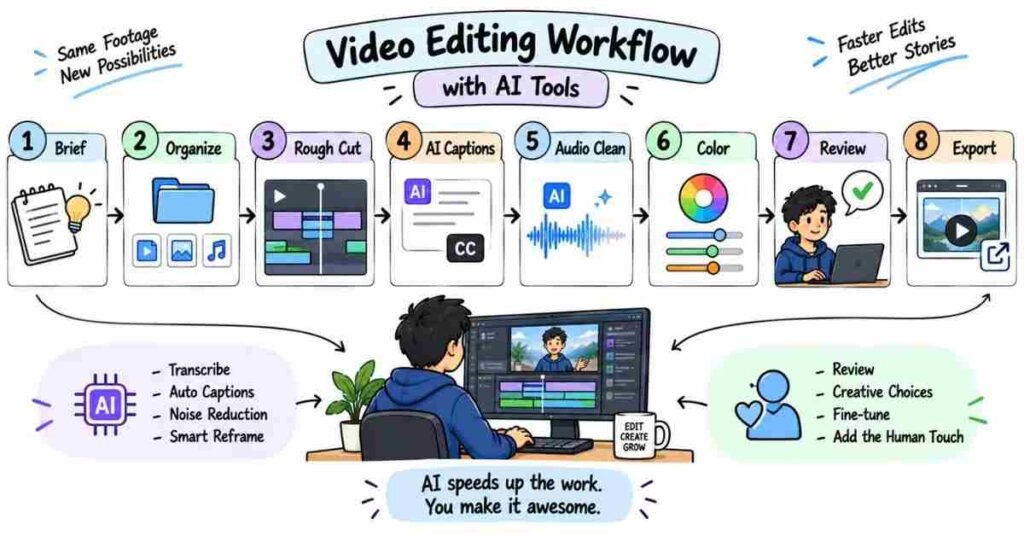
Workflow, AI & Practical Editing — Questions 151–180
This part is about what happens after you know the software. Interviewers may want to see how you organize projects, handle deadlines, take feedback, and use newer tools without depending on them too much.
Editing Workflow
Q151. What do you do before starting an edit?
I first understand the purpose of the video.
I check:
- Who will watch it?
- Where will it be published?
- What is the expected duration?
- What style does the client want?
- What files have been provided?
Starting without understanding the brief usually creates more revisions later.
Q152. How do you organize project files?
I keep footage, audio, music, graphics, project files, and exports in separate folders.
A simple structure saves time when the project becomes bigger or another editor needs to open it.
Q153. Why is file naming important?
Names like:
video1_final_new_last.mp4
become confusing very quickly.
I prefer something clear, such as:
Product_Reel_V03.mp4
Good file names make revisions easier to track.
Q154. How do you manage different versions of an edit?
I save important versions separately.
For example:
- V01 – Rough Cut
- V02 – Client Changes
- V03 – Final Review
- Final – Approved Export
That way, I can go back if the client changes their mind.
Q155. What is a rough cut?
A rough cut is the first proper version of the story.
At this stage, I focus mainly on what stays, what goes, and whether the sequence makes sense.
I do not spend too much time polishing small effects yet.
Q156. What is a fine cut?
The fine cut comes after the rough structure is working.
Here I pay more attention to timing, B-roll, audio, graphics, transitions, and small details.
Q157. Why should you finish the story before adding effects?
Because effects cannot fix a weak edit.
If the pacing and story are not working, adding more transitions usually makes the problem harder to see.
Q158. How do you handle missing media?
I first check whether the original files were moved or renamed.
Then I relink the project to the correct files instead of importing everything again.
Q159. What do you do if the footage is too heavy for your system?
I may use proxies, reduce playback resolution, or temporarily disable heavy effects.
The goal is to make the editing process smoother without affecting final quality.
Q160. Why are backups important?
A project may take days or weeks to complete.
One corrupted drive or deleted folder can remove all that work.
I try to keep project files and important media backed up in more than one location.
Working With Clients & Teams
Q161. What do you ask before editing a client video?
I try to understand:
- Video goal
- Audience
- Reference videos
- Brand style
- Duration
- Platform
- Deadline
- Required deliverables
A clear brief usually means fewer unnecessary changes later.
Q162. How do you handle unclear client feedback?
Instead of guessing, I ask for clarification.
If someone says, “Make it more engaging,” I may ask whether they mean faster pacing, more B-roll, better music, stronger captions, or a different opening.
Q163. What do you do if you disagree with client feedback?
I explain my reason politely.
For example:
“We can add that transition, but I feel a clean cut may keep the product more professional. I can show you both versions.”
The final decision belongs to the client, but I can still give a useful creative opinion.
Q164. How do you handle many revisions?
I keep feedback organized and work through it systematically.
I prefer one clear revision list instead of changing random points from different messages.
Q165. What if two people give conflicting feedback?
I do not choose one person’s version myself.
I ask the team to confirm which direction should be treated as final.
That avoids doing the same section multiple times.
Q166. How do you manage a tight deadline?
I first decide what is essential for the final video.
I finish the story, audio, and important corrections before spending time on small decorative details.
When time is limited, priorities matter.
Q167. What if you know you cannot meet a deadline?
I communicate early.
Waiting until the last hour usually makes the situation worse.
I would explain what is completed, what is pending, and when I can realistically deliver.
Q168. How do you receive creative criticism?
I try not to treat every correction as a personal issue.
If feedback improves the video or better matches the brief, I make the change and learn from it.
The goal is to improve the work.
AI Tools in Video Editing
Q169. How is AI helping video editors?
AI can speed up repetitive tasks such as:
- Transcription
- Captions
- Audio cleanup
- Silence detection
- Searching footage
- Rough-cut assistance
- Reframing
- Content repurposing
It can save time, but the editor still decides what makes the video work.
Q170. Can AI replace a video editor?
Not completely.
AI can automate parts of the workflow, but it does not always understand context, emotion, brand tone, or why one editing choice feels better than another.
The editor still brings judgement.
Q171. How do you use AI without making the edit feel automatic?
I use AI for tasks that save time, then review the result manually.
For example, I may use automatic captions, but I still fix spelling, timing, and line breaks myself.
Q172. What AI feature is useful for long interviews?
Transcription can be very useful.
Instead of watching every minute several times, I can search the transcript for topics, quotes, or sections that may work well in the final video.
Q173. Can AI help with audio?
Yes.
AI-based tools can sometimes reduce background noise, improve speech clarity, or separate voices from unwanted sound.
But I still listen carefully because aggressive processing can make voices sound unnatural.
Q174. Can AI help create Shorts from long videos?
Yes, it can help identify possible clips or automatically reframe content.
But I would still choose the final moments myself because a technically correct clip may not have a strong hook or enough context.
The reference guide takes a similar view of AI: it can speed up execution and repetitive work, but human judgement is still needed for strategy and final quality.
Q175. What is the biggest risk of depending too much on AI?
The work can start feeling generic.
Automatic cuts, captions, effects, or generated visuals may save time, but if everything is accepted without checking, the final video can lose personality.
The source guide also warns that over-reliance on AI can make content generic or repetitive and recommends human review.
Real-World Editing Scenarios
Q176. What would you do if the raw footage is boring?
I would first see whether the useful message is hidden inside long pauses or repeated sections.
Then I might tighten the edit, add relevant B-roll, improve the opening, and use graphics only where they genuinely help.
Q177. What if the client gives low-quality footage?
I would improve what can reasonably be improved.
That may include stabilization, noise reduction, color correction, reframing, or careful shot selection.
But I would also be honest if the source quality limits the final result.
Q178. What if a video feels too long?
I ask one simple question:
“Does this section add something new?”
If a line repeats the same idea, slows the story, or adds no value, I consider removing it.
Q179. What if the export looks different from the timeline?
I would check the export settings first.
Then I would look at:
- Sequence settings
- Codec
- Color settings
- Frame rate
- Effects
- Render issues
I would test a short section before exporting the whole project again.
Q180. How do you know when an edit is finished?
An edit is finished when the story is clear, the audio feels comfortable, the visuals are consistent, and nothing unnecessary is pulling attention away.
At some point, adding more does not improve the video.
Knowing when to stop is also part of editing.
Important Patterns to Practice
Focus on project organization, rough cuts, version management, backups, client feedback, revision handling, deadlines, AI-assisted editing, troubleshooting, and final quality checks.
Practice Strategy
Take one completed project and imagine the interviewer asks:
“Walk me through this project from the moment you received the raw footage until final delivery.”
Try to explain the full process naturally:
Brief → Organize → Rough Cut → Review → B-roll → Audio → Graphics → Color → Revisions → Export
Do not try to make the answer sound complicated. A clear workflow shows that you can handle real projects, not just operate editing software.
Part 8: Practical Editing Tests & Scenario-Based Interview Questions
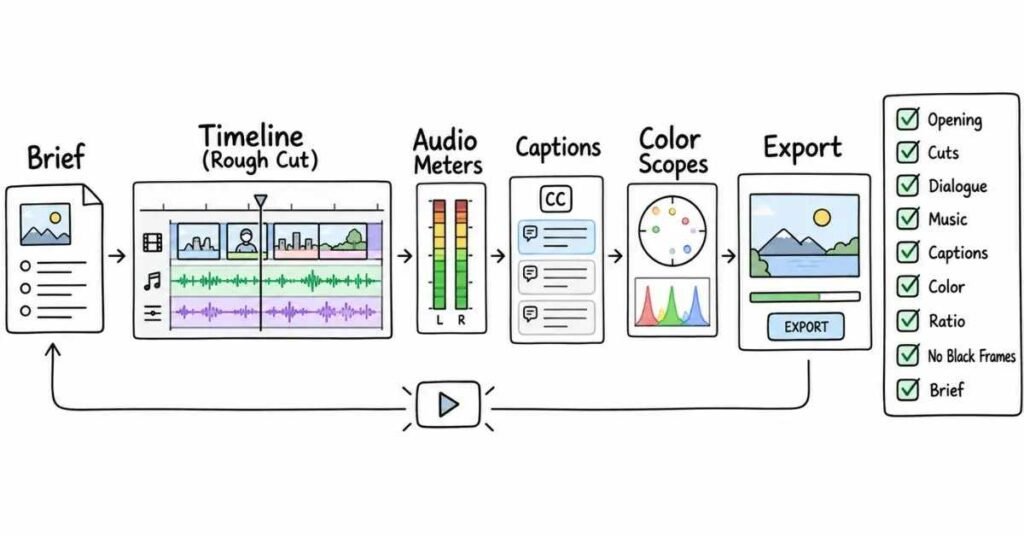
Practical & Scenario-Based Questions — 181–210
This section is closer to what happens in a real video editing interview. Instead of asking only definitions, an interviewer may give you a clip, a brief, or a problem and ask what you would do next.
Q181. What would you do if the raw footage has too many mistakes?
I would first watch everything and mark the usable sections.
Then I would remove repeated takes, long pauses, camera mistakes, and unnecessary parts before worrying about effects or color.
Q182. What if the speaker keeps making jump cuts obvious?
I would try to hide them naturally with:
- B-roll
- Punch-ins
- Cutaways
- Graphics
- A second camera angle
I would avoid covering every cut with a flashy transition.
Q183. What if the video feels slow even after trimming?
I would check whether the problem is really the duration.
Sometimes the issue is weak pacing, repeated information, poor shot variety, or a slow opening. I would fix those before simply making the video shorter.
Q184. How would you edit a 30-minute interview into a 5-minute video?
I would first identify the main message.
Then I would keep only the strongest answers, remove repeated points, connect the useful sections smoothly, and use B-roll where necessary.
The final video should still feel complete, not just shorter.
Q185. What would you do if there is no B-roll?
I would first see whether the main footage can carry the story.
If needed, I may use:
- Crops
- Punch-ins
- Text
- Screenshots
- Graphics
- Simple motion
I would not add unrelated stock footage just to fill the screen.
Q186. What if a client asks for “more engaging editing”?
I would ask what they feel is missing.
“More engaging” can mean:
- Faster pacing
- Better B-roll
- Stronger captions
- Better music
- More visual changes
Understanding the actual problem saves unnecessary revisions.
Q187. What if the client wants a reference video copied exactly?
I would study the reference for pacing, typography, transitions, color, and overall mood.
I would use it as direction, but I would still adapt the edit to the client’s own footage and brand.
Q188. How would you edit a talking-head video?
I would start by cleaning the dialogue.
Then I would tighten pauses, remove repeated lines, add useful B-roll, improve audio, add captions where needed, and keep the visual changes natural.
Q189. How would you edit a Reel from a long interview?
I would look for one moment that works on its own.
Then I would create a stronger opening, remove unnecessary setup, use vertical framing, add readable captions, and keep the clip focused on one idea.
Q190. What would you do if the first 10 seconds are boring?
I would check whether the best moment appears later in the video.
If it does, I may move that idea forward and remove greetings or unnecessary introduction.
The viewer should understand quickly why they should keep watching.
Q191. What if the audio has background noise?
I would first check how serious it is.
For light noise, I may use noise reduction and EQ. If the recording is badly damaged, I would improve it as much as possible and let the client know about the limitation.
Q192. What if the music is overpowering the voice?
I would lower the music and check the dialogue again.
If needed, I would also use keyframes or ducking so the music drops naturally when someone speaks.
Q193. What if two camera angles have different colors?
I would match the technical basics first:
- White balance
- Exposure
- Contrast
- Skin tones
Once they look close, I would apply the creative grade.
Q194. What if one shot is too shaky?
I may test stabilization.
But if stabilization makes the frame look warped or heavily cropped, I would consider using a shorter section, another take, or B-roll instead.
Q195. What if the footage is slightly out of focus?
There is only so much editing can fix.
I may improve sharpness carefully, but I would not promise that badly missed focus can be completely recovered.
Q196. What would you do if the footage was shot horizontally but the client wants a Reel?
I would reframe each important shot for 9:16.
I would also move captions and graphics, because simply cropping the middle may cut off important people or objects.
Q197. What if important text is covered by Instagram buttons?
I would move the text into a safer part of the frame.
This is why I check platform safe zones before final delivery.
Q198. How would you handle a last-minute revision?
I would first understand exactly what needs to change.
Then I would estimate whether the change affects one section or the entire video and handle the most important corrections first.
Q199. What if the client changes the whole direction after the first cut?
I would confirm the new direction clearly before rebuilding the edit.
I would also keep the previous version safe in case they later decide to go back.
Q200. What if the client gives feedback through many messages?
I would collect everything into one clear revision list.
That helps me avoid missing points or making the same change twice.
Q201. How would you handle an editing test during an interview?
I would first read the brief carefully.
Before editing, I would check:
- Required duration
- Aspect ratio
- Brand style
- Deadline
- Required files
- Export format
Then I would focus on a clean story before adding extra polish.
Q202. What should you prioritize in a short editing test?
I would prioritize:
Story → Clean cuts → Audio → Basic color → Text → Final export
If time is limited, I would rather deliver a clean edit than an unfinished video full of complicated effects.
Q203. What if you do not finish the editing test on time?
I would submit the strongest complete version I can.
If allowed, I would briefly explain what I would improve with more time.
Q204. What if the interviewer asks why you made a particular cut?
I would explain the reason behind it.
For example:
“I made that cut because the speaker paused for too long, and the next sentence continued the same idea. Removing the pause kept the pace natural.”
That sounds stronger than saying, “It looked better.”
Q205. What if the interviewer does not like your creative choice?
I would listen first.
Then I would explain my reasoning without becoming defensive. If their direction suits the brief better, I would be comfortable changing it.
Q206. How do you choose music for a video?
I think about the mood, audience, pace, and purpose of the content.
A corporate interview and a fast product Reel should not automatically use the same style of music.
Q207. How do you decide whether a transition is needed?
I ask whether it helps the viewer understand a change in time, place, mood, or section.
If a simple cut works, I usually keep the cut.
Q208. How do you know when B-roll is unnecessary?
If the main shot already communicates the idea clearly, B-roll may not add anything.
Using B-roll only because the screen has stayed the same for a few seconds can sometimes make the edit feel random.
Q209. What would you do if the client says the video “doesn’t feel right”?
I would not start changing everything immediately.
I would ask what feels wrong—pacing, music, color, captions, tone, or structure.
Once the problem is clear, the revision becomes much easier.
Q210. What makes a strong answer in a video editing interview?
A strong answer explains three things:
What you noticed → What you would change → Why you would change it
For example:
“The opening feels slow because the main point starts too late. I would remove the first few lines and bring the strongest statement forward so the viewer understands the value sooner.”
That shows both editing skill and decision-making.
Practical Editing Test Checklist
Before submitting an editing test, check:
- Is the opening clear?
- Are the cuts clean?
- Is the dialogue easy to hear?
- Is the music balanced?
- Are captions correct?
- Is the color consistent?
- Is the aspect ratio right?
- Are there any black frames?
- Does the export play properly?
- Did you follow the brief?
Practice Strategy
Take one of your finished videos and pretend the interviewer asks:
“What would you change if you had to edit this again?”
Try to identify two or three genuine improvements.
Maybe the opening could be shorter. Maybe one B-roll shot is unnecessary. Maybe the music is slightly loud.
Being able to review your own work without defending every decision shows maturity as an editor.
Part 9: Behavioral Questions, Portfolio, Resume & Career Preparation
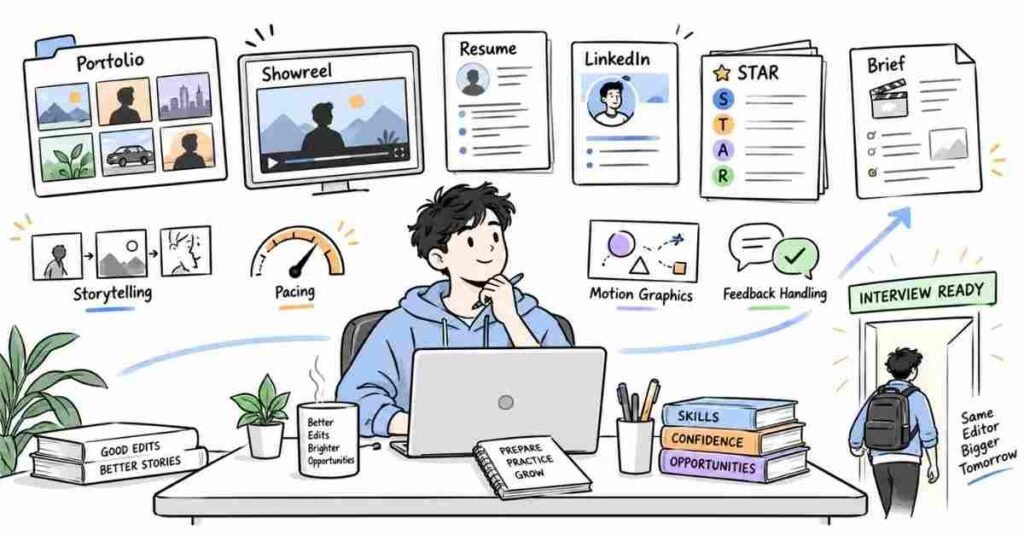
Behavioral & Career Questions — 211–230
A video editing interview is not only about software. Once the technical round is done, the interviewer usually wants to understand how you work with people, handle pressure, take feedback, and talk about your own work.
Q211. Tell me about yourself.
Keep it short and relevant to editing.
A natural answer could be:
“I’m a video editor with hands-on experience in Premiere Pro and After Effects. I enjoy working on social media videos, YouTube content, and promotional edits. I’m comfortable with cutting, B-roll, captions, basic color correction, audio cleanup, and simple motion graphics. I’m now looking for a role where I can work on more real projects and improve as an editor.”
Do not turn this answer into your full life story.
Q212. Why did you choose video editing?
Talk about what actually attracted you to the work.
For example:
“I like the way editing can completely change how a story feels. Even simple things like choosing the right shot, removing a pause, or changing the music can make a big difference. That creative problem-solving is what interested me.”
Q213. What is your biggest strength as an editor?
Pick one strength you can prove.
It could be:
- Storytelling
- Pacing
- Attention to detail
- Fast learning
- Social media editing
- Audio cleanup
- Motion graphics
Then give one small example from your work.
Q214. What is your weakness?
Choose something real but manageable.
For example:
“Earlier, I used to spend too much time polishing small details before the full edit was ready. Now I finish the rough cut first and then come back for polish.”
That sounds more genuine than saying you have no weaknesses.
Q215. How do you handle feedback?
I try to understand why the change is being requested before reacting to it.
If the feedback improves the video or better matches the brief, I make the change. If I have a different creative opinion, I explain it calmly instead of arguing.
Q216. Tell me about a difficult editing project.
Use the STAR method:
- Situation: What was the project?
- Task: What were you responsible for?
- Action: What did you actually do?
- Result: What happened in the end?
The reference guide also uses STAR to keep behavioral answers clear and focused on the candidate’s own contribution.
Q217. What if you make a mistake in a client video?
I would fix it quickly and inform the right person if necessary.
More importantly, I would understand why it happened and add a check so the same mistake does not happen again.
For example, if I exported the wrong version, I might improve my version naming and final export checklist.
Q218. How do you handle tight deadlines?
I break the project into priorities.
First:
Story → Clean cuts → Audio → Essential graphics → Color → Final check
I do not spend an hour perfecting one animation while the main edit is still unfinished.
Q219. How do you work with designers, writers, or content teams?
I prefer to understand the goal before starting.
If I receive a script, design file, or creative brief, I check what the team expects from the edit and clarify missing information early.
Good communication usually prevents unnecessary revisions later.
Q220. What if you disagree with a creative lead?
I explain my thinking with a reason, not just preference.
For example:
“I feel the slower cut works better here because the speaker is making an emotional point. If we make it too fast, that moment may lose impact.”
Portfolio & Showreel
Q221. What should a video editor portfolio include?
A portfolio should show the kind of work you actually want to get hired for.
You can include:
- YouTube edits
- Reels or Shorts
- Promotional videos
- Talking-head edits
- Motion graphics
- Before-and-after examples
Quality matters more than uploading every project you have ever edited.
Q222. How many projects should I show?
A few strong projects are enough.
Around 4–6 good examples usually tell the interviewer more than 20 average edits.
Pick work that shows different strengths.
Q223. What is a showreel?
A showreel is a short collection of your best editing work.
It should give the viewer a quick idea of:
- Your editing style
- Motion graphics ability
- Pacing
- Visual quality
- Type of projects you handle
Do not make it unnecessarily long.
Q224. How should you explain a portfolio project?
Do not only say, “I edited this video.”
Explain:
What the project needed → What you handled → What challenge you faced → What you changed
For example:
“The original interview was around 25 minutes. I reduced it to 8 minutes, removed repeated points, added B-roll, cleaned the dialogue, and created captions for social media versions.”
That gives the interviewer something real to discuss.
Q225. Can personal projects be included?
Yes.
If you are a fresher, personal projects can be very useful.
A well-edited sample project can still show your storytelling, pacing, color, sound, and motion skills even if it was not made for a paying client.
The source guide also encourages freshers to show practical projects and portfolio work rather than relying only on qualifications.
Resume & Profile Preparation
Q226. What should a video editor resume include?
Keep it simple.
Include:
- Short professional summary
- Editing software
- Core editing skills
- Experience or internships
- Projects
- Education
- Portfolio link
Your portfolio should be easy to find.
Q227. What skills should I mention?
Only mention skills you can actually explain.
Useful examples are:
Premiere Pro, After Effects, DaVinci Resolve, Video Editing, Color Correction, Audio Editing, Motion Graphics, B-roll, Short-form Editing, YouTube Editing, Captioning, and Storytelling.
Avoid filling the resume with tools you used once.
Q228. How should project points be written on a resume?
Avoid vague lines like:
“Worked on video editing.”
Write what you actually did.
For example:
“Edited short-form social videos using Premiere Pro, including pacing, B-roll, captions, audio balancing, and platform-ready exports.”
The reference guide also recommends action-based project bullets that show what the candidate actually contributed.
Q229. How should I prepare my LinkedIn profile?
Keep the headline clear.
Example:
Video Editor | Premiere Pro | After Effects | Reels | YouTube Editing | Motion Graphics
Your Featured section can include your:
- Showreel
- Portfolio
- Best projects
- Behance or Drive links
- YouTube work
A recruiter should be able to understand your work quickly.
Q230. What should I do before the final interview?
Review:
- Your resume
- Every project in your portfolio
- Premiere Pro basics
- After Effects basics
- Audio and color concepts
- Social media formats
- 3–5 behavioral stories
- Your showreel
- Questions you want to ask the interviewer
Also be ready to explain one project from start to finish without looking at notes.
Final Interview Checklist
Before the interview, make sure you have:
- Reviewed your best 4–6 projects
- Practiced “Tell me about yourself”
- Prepared 3–5 STAR stories
- Revised Premiere Pro and After Effects basics
- Checked your portfolio links
- Updated your resume and LinkedIn
- Prepared examples of handling feedback and deadlines
- Practiced explaining one complete editing workflow
- Prepared 2–3 questions for the interviewer
- Checked laptop, internet, camera, and audio for an online interview
The reference guide similarly ends with technical readiness, behavioral preparation, profile checks, and interview-day preparation.
Final Practice Section: Mock Interview & Editing Test Prompts
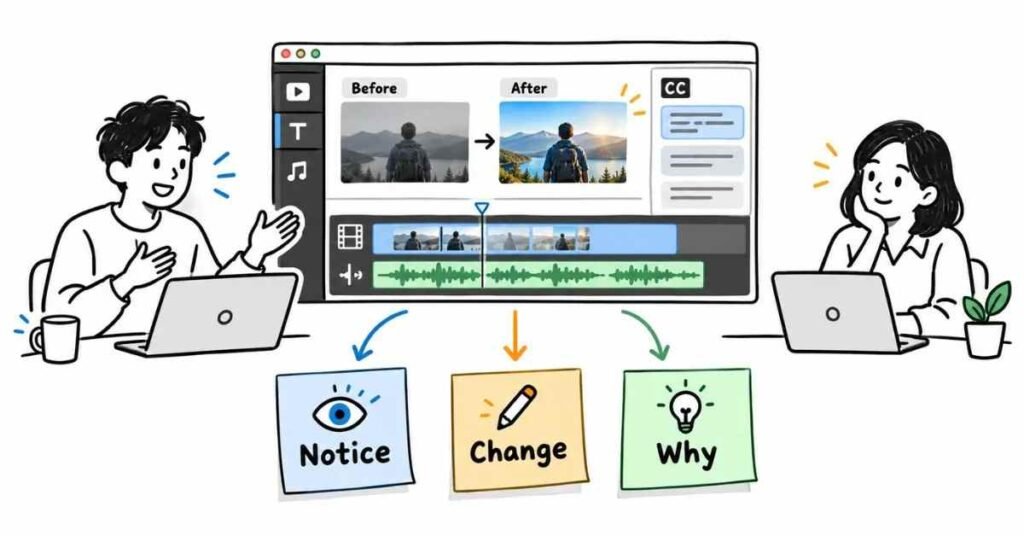
Use these questions for self-practice before an interview.
Technical Practice
- Explain your complete video editing workflow from raw footage to final export.
- What is the difference between frame rate and resolution?
- When would you use Premiere Pro instead of After Effects?
- How do you fix a video with poor audio?
- What is the difference between color correction and color grading?
- How would you make a slow talking-head video more engaging?
- When should you use B-roll?
- How do you handle 4K footage on a slow computer?
- What export settings would you use for a YouTube video?
- How would you convert a horizontal video into a Reel?
Practical Editing Scenarios
- You receive 30 minutes of footage and need a 5-minute final video. How would you approach it?
- A client says, “The video feels boring.” What would you check first?
- Two cameras have different colors. How would you match them?
- The speaker has long pauses. How would you hide the cuts naturally?
- A client asks for too many transitions. How would you handle it?
- You have only one hour to complete an editing test. What would you prioritize?
- The footage is shaky and slightly dark. What would you fix first?
- The music sounds good but covers the dialogue. What would you do?
- A client changes the brief after the first draft. How would you manage the revision?
- Your export looks different from the timeline. What would you check?
Portfolio Practice
Before the interview, choose three of your strongest projects.
For each one, practise explaining:
- What the video was for
- What footage you received
- What part you edited
- What problem you faced
- How you solved it
- Which tools you used
- What you would improve now
Do not prepare a long speech. Around one minute per project is enough.
Final Mock Interview Practice
Ask a friend or teammate to give you a random video editing question.
Do not answer like a textbook.
Try to answer the way you would explain your work to another editor.
For example:
Question: How do you make a Reel more engaging?
Natural Answer:
“I first check the opening because that is usually where viewers decide whether to continue. Then I tighten pauses, remove repeated lines, add B-roll only where it helps, and make sure the captions are easy to follow. I try not to add effects just for the sake of making the video busy.”
That kind of answer feels much more natural in an interview.
Final Preparation Note
The night before the interview, do not try to learn ten new tools.
Review your portfolio, editing workflow, Premiere Pro basics, After Effects basics, audio, color, and a few real project situations.