
ServiceNow Interview Preparation Guide 2026
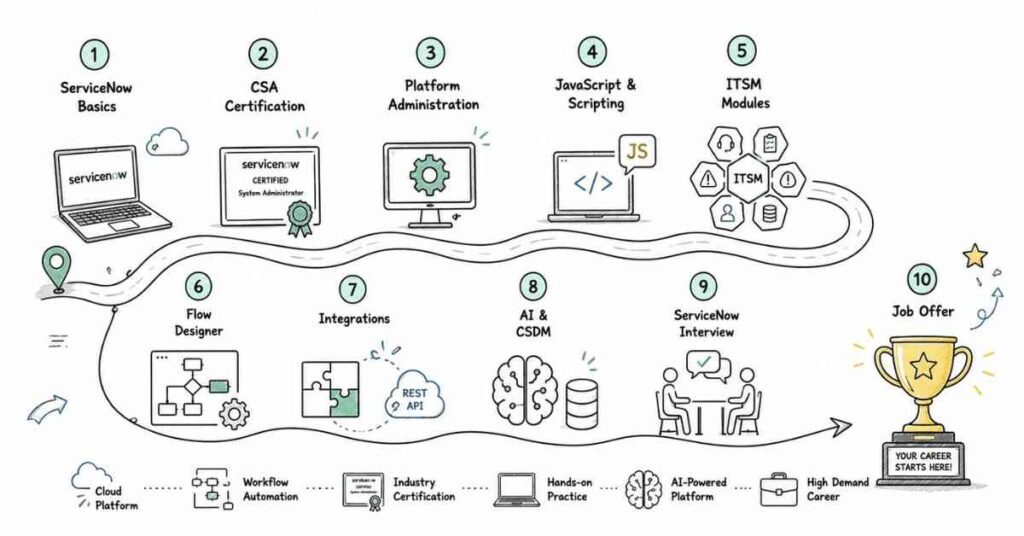
Table of Contents
Part 1: Introduction & 30-Day Study Plan
What This Guide Covers
This guide prepares you for ServiceNow interviews in a structured, interview-focused way. It covers platform basics, architecture, client and server-side scripting, ITSM core modules, Flow Designer and integrations, Service Portal and ACLs, debugging and performance, and modern platform trends like AI and CSDM, before finishing with career and behavioral preparation.
It is built for freshers, ServiceNow administrators, developers, ITSM consultants, and professionals switching from other ITSM tools like Jira or Zendesk who want a step-by-step path from fundamentals to project-style interview confidence.
Who This Guide Is For
This guide is useful if you are:
- A fresher preparing for your first ServiceNow admin or developer role.
- A help desk or support professional moving into ServiceNow administration.
- A developer switching from another platform into ServiceNow scripting and app development.
- An ITSM consultant preparing for implementation-focused interviews.
- An experienced ServiceNow professional who wants a cleaner revision structure.
The content starts with fundamentals and gradually moves toward advanced interview topics and real project thinking.
What ServiceNow Is
ServiceNow is a cloud-based, AI-first workflow platform built on the Now Platform that helps organizations manage IT services, operations, HR, customer service, and more through automated workflows. ServiceNow describes its ITSM product specifically as a way to manage and resolve IT service requests, incidents, problems, and changes through automated workflows aligned with ITIL standards. In simple terms, ServiceNow gives businesses a single system to track, automate, and improve how work gets requested, assigned, and resolved.
Why ServiceNow Still Matters In 2026
ServiceNow remains one of the most in-demand enterprise platforms because organizations continue to consolidate service management, operations, and employee experience tools onto it. In 2026, ServiceNow ITSM is increasingly associated with AI-driven and predictive incident resolution, unified workflows, and deeper automation across IT operations. That means interviewers often expect candidates to understand not just classic ITSM modules, but also how AI features and modern data models like CSDM are reshaping platform expectations.
What ServiceNow Professionals Do
ServiceNow professionals typically fall into a few core role types: administrators who configure the platform and manage users and processes, developers who build custom applications and scripts, and implementation consultants who design and deploy modules like ITSM, CSM, or HRSD for clients. Depending on the role, work can include incident and change process configuration, custom app development using Flow Designer and scripting, integrations with external systems, and CMDB or Discovery-related data management.
In real projects, ServiceNow work rarely stays only technical. It usually involves translating business processes into workflow logic and working closely with IT operations, HR, or customer service teams depending on the module in scope.
Administrator Vs Developer Vs Implementation Consultant
One of the most important basics for interviews is understanding how these ServiceNow role types differ.
- Administrators configure the platform, manage users, groups, roles, and support day-to-day operations, and are described as the most common entry point into ServiceNow.
- Developers build custom applications, write scripts, and are suited for candidates comfortable with JavaScript who want to specialize in platform development.
- Implementation consultants deepen expertise in specific modules such as ITSM, CMDB, CSM, or HRSD, and often work directly with clients to configure and deploy these areas.
In many projects, these roles overlap, and developers or consultants often start their careers as administrators before specializing further.
Career Path In ServiceNow
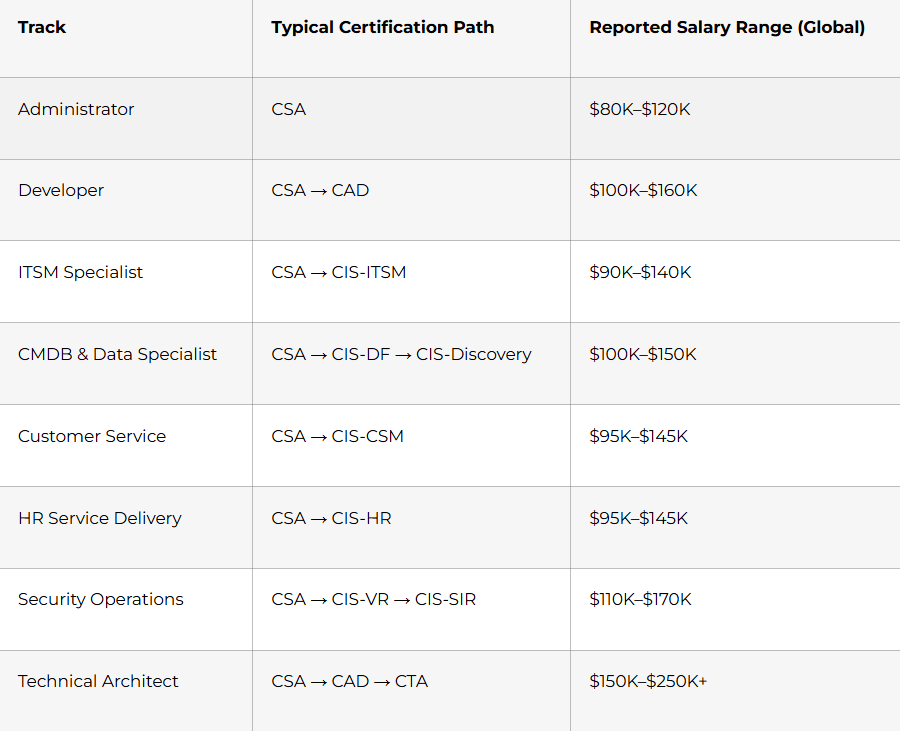
A common ServiceNow path starts with a Certified System Administrator (CSA) foundation, since it is recommended as the first certification for nearly all professionals and is required or recommended for most other certifications. From there, professionals typically branch into the Developer track with the Certified Application Developer (CAD) certification, or into specialist tracks like ITSM, CMDB and Data Foundations, Customer Service Management, HR Service Delivery, or Security Operations through Certified Implementation Specialist (CIS) certifications. At the senior end, experienced professionals can pursue the Certified Technical Architect (CTA) credential, described as the pinnacle certification for designing complex solutions across the platform.
Why Interviewers Ask Foundational Questions
In ServiceNow interviews, even basic questions often test more than memory. Interviewers want to see whether you understand how the platform’s architecture, tables, and roles work together, and whether you can explain concepts like incident management or ACLs clearly in business terms.
That is why simple topics like GlideRecord, business rules, or the incident lifecycle are very important. They are not “small topics” in ServiceNow interviews. They are the base of everything else, including scripting, workflow design, and integrations.
Common ServiceNow Interview Types
You will often see a mix of these interview styles, structured across screening, an online assessment, technical interview, behavioral interview, and HR interview stages:
- Basic conceptual rounds for freshers and CSA-level candidates.
- Technical rounds focused on scripting, tables, and ITSM configuration.
- Scenario-based rounds involving debugging, ACL failures, or integration issues.
- Implementation-focused rounds for CIS-track consultants.
- Managerial or behavioral rounds focused on communication and delivery.
Freshers are usually judged more on clarity, fundamentals, and trainability, while experienced candidates are expected to explain project usage, design choices, and platform best practices.
30-Day Study Plan
Week 1: Platform Basics And Architecture
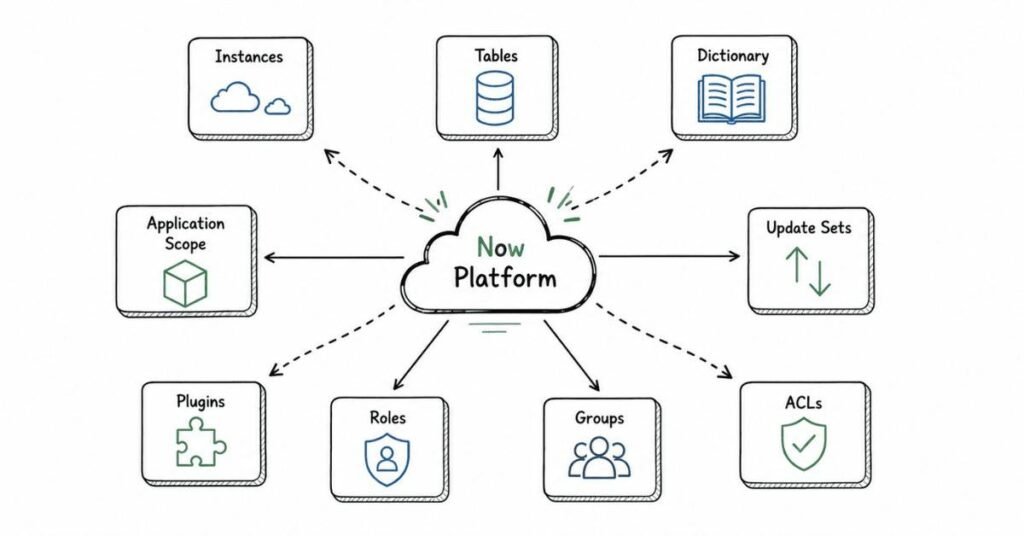
Focus on what ServiceNow is, the Now Platform, instances, tables, fields, application scope, update sets, and basic navigation. This week should build your platform vocabulary and system understanding.
Week 2: Scripting Fundamentals
Study GlideRecord, GlideAjax, client scripts, business rules, script includes, UI actions, and UI policies. This is where ServiceNow starts feeling practical for developer-track interviews.
Week 3: ITSM Modules, Flow Designer, And Integrations
Cover Incident, Problem, Change, and Request management, SLAs, CMDB basics, Flow Designer versus legacy Workflow, and REST/SOAP integration concepts. These are very common in both admin and developer technical rounds.
Week 4: Advanced Topics, Debugging, And Mocks
Study Service Portal widgets, ACL debugging, performance considerations, modern platform trends like AI features and CSDM, and scenario-based interview questions. End the week with revision and mock interviews.
Daily Study Routine
A simple daily routine works well:
- 45 minutes for concept learning.
- 45 minutes for interview question practice.
- 30 minutes for hands-on practice in a Personal Developer Instance (PDI).
If you have access to a PDI or past project experience, spend extra time explaining what you configured or built and why. In ServiceNow interviews, explanation quality matters almost as much as technical correctness.
Core Skills Interviewers Usually Check
Interviewers commonly look for:
- ServiceNow platform and architecture fundamentals.
- Table and dictionary understanding.
- Client and server-side scripting.
- ITSM process knowledge (Incident, Problem, Change, Request).
- CMDB and configuration item relationships.
- Flow Designer and integration basics.
- Service Portal and ACL concepts.
- Debugging and performance awareness.
- Update set and deployment discipline.
- Awareness of modern trends like AI features and CSDM.
Even entry-level interviews often reward candidates who can connect concepts to a realistic use case instead of only giving textbook definitions.
AI And Modern Platform Awareness
You do not need to be an AI or CSDM expert to clear a ServiceNow interview, but basic awareness helps. ServiceNow’s 2026 direction is heavily built around AI-powered and predictive incident resolution, unified workflows across IT operations, and a stronger emphasis on the Common Service Data Model for CMDB maturity. That is why interviewers may ask about Now Assist, generative AI features, or CSDM even when the role is mostly classic ITSM administration.
A smart interview approach is to be strong in fundamentals and honest about the level of your modern platform exposure.
Certifications And Learning Direction
ServiceNow certification helps build credibility, especially for freshers, and CSA is consistently recommended as the first certification because it is the foundation that other certifications build on. Certification alone is usually not enough, though; employers still care a lot about practical scripting comfort, ITSM process understanding, and whether you can explain configuration choices clearly. A strong candidate uses certification as support, not as a substitute for hands-on PDI practice.
Salary Expectations In 2026
Global certification-linked salary data shows wide variation by track, ranging from roughly $80K–$120K for administrators up to $150K–$250K+ for technical architects. In India specifically, reported figures vary significantly by employer and experience level, with entry-level and mid-level ServiceNow developer or administrator roles commonly falling in a broad multi-lakh range depending on company and city. For interview planning, a practical approach is to treat salary as highly role- and certification-dependent, and to anchor expectations around your specific track (admin, developer, ITSM specialist, or architect) rather than a single flat number.
How To Think During ServiceNow Interviews
A strong ServiceNow interview answer usually has three parts:
- What the concept or feature is.
- Where it is used in a real business process.
- Why that configuration or scripting choice matters.
For example, instead of only defining a business rule, explain when you would use a before versus after business rule, why, and in what ITSM scenario. That makes your answer sound like platform thinking instead of memorized theory.
Part 2: ServiceNow Platform Basics & Architecture — Questions 1–40
This section gives you 40 interview-style questions with clear answers on ServiceNow platform fundamentals and architecture. ServiceNow’s cloud deploys separate application logic and database processes for each customer, giving every organization its own unique database and isolated instance rather than sharing infrastructure across customers.
Platform Fundamentals
1) What is ServiceNow?
ServiceNow is a cloud-based, AI-first workflow platform that unifies IT service management, operations, HR, and customer service on a single system. It uses the Now Platform as its underlying foundation to automate business processes through tables, workflows, and low-code tools.
2) What is the Now Platform?
The Now Platform is the underlying technology foundation on which all ServiceNow applications, including ITSM, ITOM, and HRSD, are built. It provides the common infrastructure for tables, workflows, forms, and scripting that every ServiceNow module relies on.
3) What is multi-instance architecture?
Multi-instance architecture gives every ServiceNow customer their own unique database, meaning data cannot be commingled with any other customer’s data. ServiceNow deploys separate application logic and database processes per customer rather than relying on one large centralized database, which allows the cloud to scale horizontally.
4) How is multi-instance different from multi-tenant?
In multi-instance architecture, each customer gets an isolated software stack with its own application logic and database process, unlike some multi-tenant models that share underlying infrastructure more heavily across customers. This isolation supports true data separation, independent maintenance, and customer-driven upgrade schedules.
5) What are the benefits of multi-instance architecture?
ServiceNow states this architecture provides true data isolation, advanced high availability, and the ability to perform actions like upgrades on individual customer instances according to that customer’s own compliance schedule. It also allows issues to be resolved on a customer-by-customer basis without impacting other customers.
6) What is an instance in ServiceNow?
An instance is a unique software stack containing an organization’s data, applications, and customizations. ServiceNow notes that a single organization may have more than one instance, and each instance is isolated from others while still able to communicate when needed.
7) What are the typical instance types in a ServiceNow implementation?
Common instance types are development, test, and production, sometimes with an additional sub-production instance for staging. This structure supports building and validating changes safely before they reach the live production environment.
8) What is a Personal Developer Instance (PDI)?
A PDI is a free personal ServiceNow instance provided for learning, testing, and building hands-on skills outside a company project. It is widely recommended for interview preparation because it lets candidates practice scripting, ITSM configuration, and app development directly.
9) Why might an organization use multiple production instances?
Valid reasons include legal or contractual requirements to store data in a specific country, divisions of a company needing to behave as separate entities, highly restricted data visibility needs, or a planned divestiture. ServiceNow architecture guidance stresses that there should always be a sound business reason before adopting a multi-instance topology, since it increases licensing and integration complexity.
10) What are the risks of a multi-instance approach?
Community architecture guidance highlights that multiple instances can mean duplicated fulfiller licenses, more complex integrations, and risk of incomplete end-to-end data visibility if processes span instances. Best-practice guidance generally favors keeping customers and fulfillers on a single instance unless there is a strong business reason not to.
Tables and Dictionary
11) What is a table in ServiceNow?
A table is the core data structure in ServiceNow that stores records, similar to a database table, and every ServiceNow application is built around tables. Common examples include the Incident table, Problem table, and Change Request table.
12) What is the ServiceNow Dictionary?
The Dictionary defines a table and its fields, and ServiceNow documentation notes that even a base table can have dozens of Dictionary records describing it and its fields. It is the metadata layer that governs field types, labels, and behavior for every table.
13) What is table extension in ServiceNow?
Table extension enables one or more child tables to share fields and records with a parent table. This is a foundational architecture concept because major ITSM tables like Incident and Problem extend the base Task table to inherit common fields.
14) What is the Task table?
The Task table is a widely extended base table that provides common fields like short description, priority, and assignment group to child tables such as Incident, Problem, and Change Request. Understanding this parent-child structure is essential for explaining ITSM data modeling in interviews.
15) Can you change a field’s type on an extended table?
No, ServiceNow community guidance confirms you cannot change the field type on an extended table if it is inherited from the parent table, though you can override certain attributes. If a different type is genuinely needed, the recommended approach is to create a new custom field on the extended table rather than altering the inherited one.
16) What is a dictionary override?
A dictionary override lets you override specific attributes of a field, such as a calculated value, for one extended table without affecting the base table or other tables that extend it. This is commonly used when a child table needs slightly different field behavior than its parent.
17) What are dictionary attributes?
Dictionary attributes alter the behavior of the table or field that a Dictionary record describes, and administrators can add or modify these attributes as needed. They control things like read-only behavior, mandatory fields, and other field-level or table-level rules.
18) What are field types in ServiceNow?
Field types define what kind of data a field can hold, such as string, integer, reference, choice, or HTML, and ServiceNow documentation lists the field types available to administrators when creating or changing fields. Choosing the correct field type affects both data integrity and how the field behaves in forms and reports.
19) What is a reference field?
A reference field links a record in one table to a record in another table, such as an Incident referencing a Configuration Item or Assignment Group. Reference fields are central to how ServiceNow models relationships between different tables.
20) What is a display value for a table?
The display value is the field used to represent a record when it is shown as a reference elsewhere, and only one field can be defined as the display value for a table. Extended tables inherit the parent table’s display value unless a separate one is explicitly set.
Application Scope, Update Sets, and Plugins
21) What is application scope in ServiceNow?
Application scope is a mechanism that isolates custom application tables, scripts, and configuration from other applications on the same instance. It helps prevent naming conflicts and controls what other applications can access.
22) What is a global application versus a scoped application?
A global application has broad access across the instance, while a scoped application is isolated within its own namespace and must explicitly expose anything it wants other applications to use. Interviewers often ask this to test whether you understand ServiceNow’s application isolation model.
23) What is an update set?
An update set is a container used to capture configuration changes made in one instance so they can be moved to another instance, such as from development to test or production. It is the standard mechanism for promoting customizations across ServiceNow environments.
24) Why are update sets important?
Update sets are important because they allow controlled, trackable movement of configuration changes across instances instead of manually recreating changes each time. This supports change control and reduces the risk of configuration drift between environments.
25) What is a plugin in ServiceNow?
A plugin is a packaged set of functionality, such as an application or feature set, that can be activated on an instance to add new capabilities. Examples include ITSM-related plugins, CMDB plugins, and various module-specific plugins that extend baseline platform functionality.
26) What is the difference between an update set and a plugin?
An update set carries custom configuration changes made by developers or admins, while a plugin delivers packaged, vendor-built functionality that gets activated on the instance. In interviews, a simple distinction is that update sets are typically for custom changes, and plugins are for enabling out-of-box modules.
27) What happens if update sets are applied out of order?
Applying update sets out of order can cause conflicts, missing dependencies, or overwritten changes because later customizations may depend on earlier ones. This is why interviewers often ask about update set sequencing and conflict resolution as a scenario-based topic.
28) What is a baseline configuration in ServiceNow?
A baseline configuration refers to the standard, out-of-box setup of tables, forms, and processes before any customization. Understanding baseline versus customized configuration helps in explaining what was changed for a specific business requirement during interviews.
Roles, Groups, and ACLs
29) What is a role in ServiceNow?
A role is a named permission set that grants access to specific functionality, tables, or fields. Roles are assigned to users or groups and are central to controlling what different types of users can see and do in the system.
30) What is a group in ServiceNow?
A group is a collection of users, often organized around a team or function such as an assignment group for a specific IT support team. Groups are commonly used for record assignment, notifications, and approval routing.
31) What is an ACL in ServiceNow?
An ACL, or Access Control List, is a rule that controls read, write, create, or delete access to tables, fields, or records based on conditions like roles or scripted logic. ACLs are one of the most frequently tested security concepts in ServiceNow interviews.
32) How does ServiceNow evaluate ACLs?
ServiceNow evaluates ACLs by checking table-level rules first and then field-level rules, and a user must pass all applicable ACL conditions to gain the requested access. This layered evaluation is why ACL troubleshooting is a common scenario-based interview topic.
33) What is the difference between a table-level ACL and a field-level ACL?
A table-level ACL controls broad access to an entire table, such as who can create or delete Incident records, while a field-level ACL controls access to a specific field on that table, such as a sensitive salary field. Interviewers use this distinction to test understanding of layered security design.
34) What is domain separation?
Domain separation is a ServiceNow feature that partitions data and processes so different domains, such as different business units or clients, only see the data relevant to their own domain within the same instance. It is often discussed in interviews for multi-company or MSP-style ServiceNow implementations.
35) Why is domain separation used instead of multiple instances?
Domain separation lets a single instance support multiple business units or customers with data isolation at the domain level, avoiding the cost, licensing, and integration complexity that come with maintaining multiple full instances. It is often positioned as an alternative to multi-instance strategies when the isolation need is less than a fully separate production instance.
Navigation and Basic UI
36) What is the Application Navigator?
The Application Navigator is the main menu interface in ServiceNow used to access different modules and applications, such as Incident, Problem, or Change Management. It is one of the first things a new administrator or developer learns to use.
37) What is a form in ServiceNow?
A form is the UI layout used to view and edit a single record from a table, displaying fields according to a defined form view. Forms can be customized per table or per view to show different fields to different user groups.
38) What is a list view in ServiceNow?
A list view displays multiple records from a table in a tabular format, allowing filtering, sorting, and grouping. List views are heavily used in day-to-day ServiceNow work for managing queues like open incidents or pending changes.
39) What is a module in ServiceNow?
A module is a navigable link within an application in the Application Navigator that typically opens a specific list, form, or report. Modules are how administrators expose specific functionality to end users based on their roles.
40) Why is understanding platform architecture important before learning scripting?
Understanding architecture concepts like tables, dictionary, scope, and ACLs is important because scripting always operates within this structure, and misunderstanding it leads to broken logic or security gaps. Interviewers commonly test architecture knowledge first because it reveals whether a candidate can reason about where and why a script or configuration change belongs.
Revision focus
For this part, revise multi-instance architecture, table extension and dictionary behavior, update sets versus plugins, and ACL evaluation order. These fundamentals form the base for every later topic in this guide, since scripting, ITSM configuration, and integrations all sit on top of this architectural foundation.
Part 3: Client & Server-Side Scripting — GlideRecord, GlideAjax, Business Rules & Script Includes
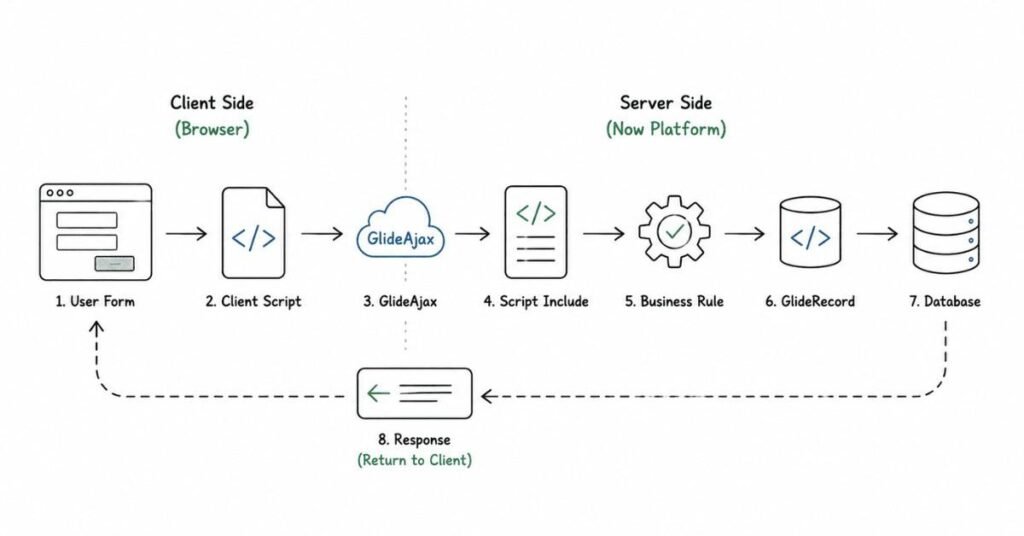
This part covers the scripting layer that sits on top of the platform architecture from Part 2. ServiceNow documentation defines a business rule as a server-side script that runs when a record is displayed, inserted, updated, or deleted, or when a table is queried, and community guides consistently describe four business rule types: before, after, async, and display.
Questions 41–80
41) What is GlideRecord?
GlideRecord is the primary server-side API used to query, insert, update, and delete records in ServiceNow tables. It is one of the most fundamental scripting objects and appears constantly in business rules, script includes, and background scripts.
42) What is the basic pattern for querying with GlideRecord?
The basic pattern is to instantiate a GlideRecord object for a table, add query conditions, call query(), and then loop using next() to process each matching record. This pattern is asked in almost every ServiceNow developer interview as a baseline coding check.
43) What is the difference between get() and query() in GlideRecord?
get() retrieves a single record directly by sys_id or a unique value and returns a boolean, while query() executes a broader search that may return multiple records requiring a next() loop. Interviewers use this question to check whether candidates understand efficient single-record retrieval versus multi-record processing.
44) What does addQuery() do?
addQuery() adds a filter condition to a GlideRecord query, similar to a WHERE clause in SQL. Multiple addQuery() calls are combined with AND logic by default unless addOrCondition() is used.
45) What is addOrCondition() in GlideRecord?
addOrCondition() adds an OR condition to an existing GlideRecord query, allowing more flexible filtering than the default AND-based addQuery() chaining. It is commonly tested to see if candidates understand query logic beyond simple filters.
46) What is the difference between update() and insert() in GlideRecord?
update() saves changes to an existing record that was retrieved via query or get, while insert() creates a brand-new record in the table. Using the wrong method on the wrong record state is a common scripting mistake interviewers ask about.
47) What is deleteRecord() versus deleteMultiple()?
deleteRecord() deletes a single retrieved GlideRecord, while deleteMultiple() deletes all records matching the current query conditions without needing to loop through them individually. deleteMultiple() is powerful but risky if query conditions are not carefully scoped.
48) Why is querying without conditions considered a bad practice?
Querying a large table without any addQuery() conditions can return an enormous result set, causing severe performance issues and potentially locking up the instance. This is one of the most common anti-patterns interviewers ask candidates to identify and fix.
49) What is GlideAjax?
GlideAjax is a class that enables a client script to call server-side code in a script include asynchronously without submitting or reloading the form. ServiceNow documentation outlines general steps to follow when using GlideAjax in a client script to communicate with server-side logic.
50) Why is GlideAjax used instead of direct GlideRecord in client scripts?
GlideAjax is used because client scripts run in the browser and cannot directly execute server-side database operations like GlideRecord safely or efficiently; GlideAjax bridges that gap by calling a script include on the server. Community discussions specifically address moving logic from GlideRecord to GlideAjax within onChange client scripts to follow this best practice.
51) What is a script include?
A script include is a reusable server-side script container that defines functions or classes that can be called from business rules, client scripts via GlideAjax, or other server-side scripts. It supports the DRY principle by centralizing reusable logic in one place.
52) What is the “Client callable” checkbox on a script include?
The “Client callable” setting must be enabled on a script include for it to be invoked through GlideAjax from a client script. Forgetting to enable this setting is a common practical debugging scenario in interviews.
53) What is the general structure of a GlideAjax call?
ServiceNow’s cheat-sheet guidance describes creating a GlideAjax object referencing the script include name, setting the function name to call, adding parameters, and then calling getXML with a callback function to handle the response asynchronously. This asynchronous callback pattern is central to understanding client-server communication in ServiceNow.
54) What is a callback function in GlideAjax?
A callback function is the function executed once the server-side script include finishes processing and returns a response, allowing the client script to then update the form or UI based on that response. It is essential because GlideAjax calls are asynchronous, not synchronous.
55) What is a client script?
A client script is browser-side JavaScript that runs on a form to control UI behavior, such as showing or hiding fields, setting values, or validating input, without needing a full server round trip. Client scripts are a core topic in almost every ServiceNow developer interview.
56) What are the types of client scripts?
The main client script types are onLoad, onChange, onSubmit, and onCellEdit. Each type is triggered by a different user interaction and is chosen based on when the logic needs to run.
57) What is an onLoad client script?
An onLoad client script runs when the form finishes loading, and it is commonly used to set default field states or prepare the form based on existing values. It runs before the user makes any changes to the form.
58) What is an onChange client script?
An onChange client script runs when a specific field’s value changes, making it ideal for dynamic behavior like updating dependent fields or triggering GlideAjax calls based on user input.
59) What is an onSubmit client script?
An onSubmit client script runs when the form is submitted, typically used for final validation before the record is saved. Returning false in this script type prevents the form from submitting.
60) What is an onCellEdit client script?
An onCellEdit client script runs when a cell is edited directly in a list view rather than on a full form. It is less commonly used but tested to check whether candidates understand list-based inline editing scenarios.
61) What is the difference between a client script and a UI policy?
A UI policy is generally recommended for straightforward field behavior like mandatory, read-only, or visible conditions triggered on load or change, while client scripts are used for more complex logic that a UI policy’s simpler condition builder cannot express. Community guidance notes UI policies can also run scripts for true and false conditions, blurring the line somewhat, but the general rule is to prefer UI policies for simple declarative behavior.
62) Which runs first, a UI policy or a client script?
This exact execution order is frequently debated in community forums, and the safe interview answer is that execution order can depend on configuration and should generally not be relied upon; instead, logic should be designed so that order dependency is avoided wherever possible. It is a good scenario question to demonstrate careful, defensive scripting habits.
63) What is a UI policy?
A UI policy is a declarative configuration tool used to dynamically control field states, such as mandatory, read-only, or visible, based on conditions, without necessarily writing custom scripts. It is preferred over client scripts for simple field behavior because it is easier to maintain.
64) What is a UI action?
A UI action defines custom buttons, links, or context menu items on a form or list, such as a custom “Escalate” button on an Incident form. UI actions can run client-side or server-side logic depending on configuration.
65) What is a Data Policy?
A Data Policy enforces field-level rules, such as mandatory or read-only conditions, at the server level regardless of how the data is entered, including through imports or web services. This is different from a UI policy, which only affects the form’s visual behavior in the browser.
66) Why is a Data Policy needed if a UI policy already enforces a rule?
A UI policy only controls behavior within the form UI, so data entered through APIs, imports, or scripts could bypass it, while a Data Policy enforces the rule at a deeper level regardless of entry method. This distinction is a classic interview question testing understanding of client-side versus server-side enforcement.
67) What is a business rule?
ServiceNow documentation defines a business rule as a server-side script that runs when a record is displayed, inserted, updated, or deleted, or when a table is queried. Business rules are commonly used to validate data, set default values, trigger actions, or prepare information for the user interface.
68) What are the four types of business rules?
The four types are before, after, async, and display, and each is distinguished by exactly when it executes relative to the database operation. This four-type breakdown is one of the most frequently asked ServiceNow interview questions across all experience levels.
69) What is a before business rule?
A before business rule runs just before a record is saved, inserted, or updated, making it ideal for data validation or setting default values before the database operation occurs. Community guidance notes this is exactly when to use this type: when you need to control or modify data before it is written to the database.
70) What is an after business rule?
An after business rule runs after the record has been successfully saved to the database, and it is typically used for notifications, integrations, logging, or updating related records. It should be used when logic must happen only after the database operation is fully complete.
71) What is an async business rule?
An async business rule also runs after the record is saved, but it executes in the background outside the user’s immediate transaction, making it ideal for long-running or heavy operations like integrations or large calculations. Because it runs asynchronously, it does not block or slow down the user’s experience, and it is recommended particularly when calling web services.
72) What is a display business rule?
A display business rule runs when the form is loaded, just after data is read from the database but before the user sees the record, and it is mainly used to pass server-side data to the client, usually through the g_scratchpad object. This makes it the standard technique for making server-side data available client-side at form-load time without an extra GlideAjax call.
73) What is g_scratchpad used for?
g_scratchpad is a client-accessible object populated by a display business rule to pass server-side values to client scripts during form load, avoiding an additional GlideAjax round trip. It is a classic technique for efficient display-time server-to-client data transfer.
74) What is the typical execution order of business rules?
Community explanations describe the order as: query business rules run on database interaction, then display business rules run just after data is read, then before business rules run just before the database update, then after business rules run immediately following the update, and finally async business rules run in the background after the after rules. Knowing this sequence in detail is a strong signal of solid ServiceNow scripting fundamentals in interviews.
75) What is a query business rule?
A query business rule runs whenever a table is queried, and it is commonly used to restrict which records a user can see based on conditions, functioning similarly to a security filter layered on top of standard access control. It runs before display business rules in the overall execution sequence.
76) When should you choose an async business rule over an after business rule?
Choose async when the logic is long-running, non-critical to the immediate transaction, or involves external integrations, since it will not delay the user’s save operation, while after rules should be used when the logic must complete before the transaction is considered fully finished. This distinction is frequently tested with scenario questions about slow integrations blocking user saves.
77) What is the “Order” field on a business rule?
The Order field determines the sequence in which multiple business rules of the same type execute on the same table, with lower numbers generally executing first. It becomes critical to manage carefully when several business rules interact with the same fields.
78) What are best practices for writing business rules?
Best practices include keeping logic focused and modular, avoiding heavy GlideRecord operations in before rules where possible, using script includes for reusable logic, and choosing the correct rule type based on when the logic truly needs to run. Interviewers often ask candidates to critique a poorly designed business rule as a practical test of these principles.
79) Can business rules be scoped to run only under certain conditions?
Yes, every business rule has a condition field, and the script only executes if that condition evaluates to true, which helps avoid unnecessary processing and keeps logic targeted. This condition-based filtering is essential for performance and maintainability.
80) Why is scripting knowledge important even for administrator-track candidates?
Scripting knowledge is important because even administrator-focused roles frequently require reading, modifying, or troubleshooting existing business rules, client scripts, and script includes during day-to-day configuration work. Interviewers often include basic scripting questions for administrator roles specifically to confirm the candidate can support developer-built customizations.
Revision focus
For this part, revise GlideRecord query patterns, the GlideAjax client-to-server call pattern, client script types, UI policy versus client script versus Data Policy, and the four business rule types with their execution order. These topics form the scripting backbone tested in nearly every ServiceNow developer and administrator interview.
Part 4: ITSM Core Modules — Incident, Problem, Change, CMDB & SLAs
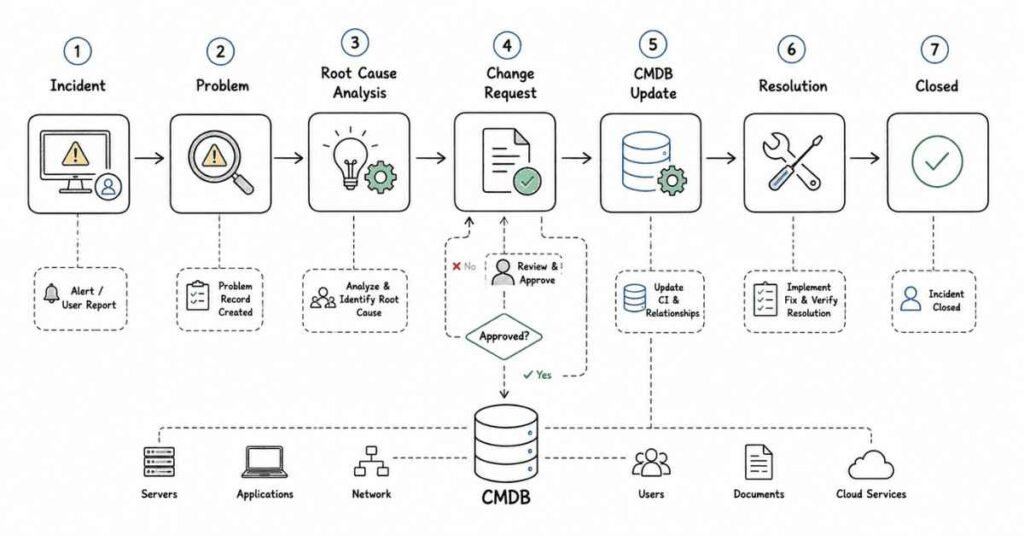
This part covers the ITSM process knowledge that ServiceNow interviews test most heavily. ServiceNow documentation describes Incident Management as responsible for managing the life cycle of incidents from creation to closure through a defined set of states, while Problem Management supports the ITIL process used to find and fix the root cause of issues that result in incidents.
Questions 81–120
81) What is Incident Management in ServiceNow?
Incident Management is responsible for managing the life cycle of incidents, from creation to closure, with the goal of restoring normal service operation while minimizing impact to business operations. It is one of the most widely implemented ITSM processes and a core focus area in nearly every ServiceNow interview.
82) What are the standard Incident states in ServiceNow?
ServiceNow documentation lists the core Incident states as New, In Progress, On Hold, Resolved, Closed, and Canceled. Each state represents a specific point in the incident lifecycle and drives what actions and fields are relevant at that stage.
83) What does the New state mean for an Incident?
New means the incident has been logged but has not yet been investigated. It is the starting state for essentially every incident record created in the system.
84) What does In Progress mean for an Incident?
In Progress means the incident has been assigned and is currently being investigated by the assigned individual or group. This state reflects active work happening on the ticket.
85) What does On Hold mean for an Incident, and what reasons can be selected?
On Hold means responsibility for the incident temporarily shifts to another entity to provide further information, evidence, or resolution, and ServiceNow lists the on-hold reasons as Awaiting Caller, Awaiting Change, Awaiting Problem, and Awaiting Vendor. If the reason is Awaiting Caller, the Additional Comments field becomes mandatory, and the state automatically returns to In Progress once the caller updates the incident.
86) Can an Incident go On Hold more than once?
Yes, ServiceNow documentation explicitly states an incident can be placed in the On Hold state one or more times before it is closed. This reflects real-world scenarios where waiting periods can happen at multiple points during resolution.
87) What does Resolved mean for an Incident?
Resolved means a satisfactory fix has been provided for the incident to ensure it does not occur again. It is an intermediate state before the incident is formally closed.
88) What does Closed mean for an Incident?
Closed means the incident has been in the Resolved state for a specific duration and it has been confirmed the resolution was satisfactory. This built-in delay before final closure allows the reported issue to be reopened if the problem recurs shortly after resolution.
89) What does Canceled mean for an Incident?
Canceled means the incident was triaged but found to be a duplicate, unnecessary, or not actually an incident at all. This state is important for keeping incident metrics accurate by removing tickets that were never valid incidents in the first place.
90) Can the Incident state model be customized?
Yes, ServiceNow community guidance recommends configuring custom incident lifecycles using State Management and State Models rather than relying purely on scripting, which is considered the ServiceNow-recommended approach. Interviewers often ask this to see whether a candidate defaults to scripting or first considers declarative configuration options.
91) What is Problem Management in ServiceNow?
Problem Management is responsible for managing the life cycle of all problems, aiming to find and fix the root cause of issues that result in incidents while also preventing future problems and recurring incidents. It works closely with Incident Management but focuses on root-cause elimination rather than immediate service restoration.
92) What triggers the creation of a Problem record?
A Problem is typically created after resolving a major incident or when recurring incidents point to a common underlying cause. This ensures problems are opened for issues that genuinely need root-cause investigation rather than for every single incident.
93) What is the Problem Management workflow?
ServiceNow documentation outlines the workflow as problem creation, assignment, assessment, root cause analysis, communicating the outcome, fixing the underlying root cause, and reanalyzing if the problem resurfaces. This structured sequence is a strong basis for explaining end-to-end problem handling in interviews.
94) What happens during the “assess the problem” stage?
During assessment, the team can relate additional incidents to the problem and update the Problem Statement, since problems created from an incident often inherit fields that do not specifically describe the broader issue. The team can also confirm they will work on the problem or cancel it, which closes the problem.
95) What is a known error in Problem Management?
A known error article is created after a fix or workaround is identified, and it is primarily made available to help others find information and deflect additional incidents. Agents facing similar incidents can also reference known error articles to resolve issues faster.
96) What happens if there is no permanent fix for a problem?
ServiceNow documentation says the team can accept the risk that the problem cannot be fixed at this time, after which the problem enters the Closed state, though it is good practice to periodically review risk-accepted problems. This reflects real-world constraints where budget or feasibility limits permanent fixes.
97) How does a fix get implemented for a Problem?
If a root cause fix is possible, a change request is created and assigned to the relevant team, and once that change request is completed, the problem is resolved. This shows the direct integration between Problem Management and Change Management in ServiceNow.
98) Can a closed Problem be reopened?
Yes, if the problem manager is not satisfied with the analysis after resolution or closure, or if the problem resurfaces, the problem can be reopened and its state changes to Root Cause Analysis. This reflects Problem Management’s iterative nature when initial fixes prove insufficient.
99) What is the difference between Incident Management and Problem Management?
Incident Management focuses on restoring service quickly with minimum business impact, while Problem Management focuses on finding and permanently fixing the root cause behind one or more incidents. A common interview phrase is “incident management fights symptoms, problem management fights causes.”
100) What is Change Management in ServiceNow?
ServiceNow’s Change Management application provides a systematic approach to control the life cycle of all changes, enabling beneficial changes to be made with minimum disruption to IT services. It ensures that changes to production systems are properly assessed, approved, and tracked before implementation.
101) What are the common types of changes in ServiceNow?
Common change types include standard, normal, and emergency changes, each following a different approval and risk-assessment path depending on urgency and predictability. Standard changes are usually pre-approved and low-risk, while emergency changes bypass some steps due to urgent need.
102) Why does Change Management require approvals?
Approvals ensure that changes are properly reviewed for risk, business impact, and scheduling conflicts before being implemented in production. This structured approval process is central to minimizing disruption while still enabling beneficial changes.
103) What is a Change Advisory Board (CAB)?
A CAB is a group of stakeholders who review and approve significant or higher-risk changes before implementation. It is commonly referenced in interviews when discussing how normal changes move through governance before execution.
104) How does Change Management relate to Problem Management?
A change request is often created directly from a problem when a root-cause fix requires modifying production systems, linking the two processes together. Once that change is successfully completed, the associated problem can be resolved.
105) What is Request Management in ServiceNow?
Request Management handles user-initiated requests for services or items, typically submitted through the Service Catalog, such as requesting new hardware or software access. It is distinct from Incident Management because it deals with planned service delivery rather than unplanned disruptions.
106) What is the Service Catalog?
The Service Catalog is a structured, user-facing list of services and items that employees can request, such as laptops, software licenses, or access requests. It provides a self-service experience backed by defined workflows for fulfillment.
107) What is a Record Producer?
A Record Producer is a Service Catalog item used to create a record in a specific table, such as generating an Incident or a custom request record, through a catalog-style form. It differs from a standard catalog item because it directly creates a task-based record rather than triggering procurement or provisioning fulfillment.
108) What is an SLA in ServiceNow?
An SLA, or Service Level Agreement, defines the expected timeframes for responding to or resolving records like incidents, and it tracks whether those timeframes are met or breached. SLAs are central to measuring service quality against agreed targets.
109) What is an OLA?
An OLA, or Operational Level Agreement, defines internal agreements between different teams supporting an SLA, ensuring internal handoffs happen fast enough to meet the overall external commitment. It is often discussed alongside SLAs in interviews to show layered accountability.
110) What happens when an SLA is breached?
When an SLA is breached, the record is typically flagged, and escalation notifications or workflows may trigger to alert managers or reassign priority. This is a common scenario-based interview topic testing understanding of escalation design.
111) What is the CMDB?
The Configuration Management Database, or CMDB, is a series of connected tables that contain all the assets and business services controlled by a company, along with their configurations. It underpins many ITSM processes by linking incidents, problems, and changes to the actual infrastructure components they affect.
112) What is a Configuration Item (CI)?
A Configuration Item is any component tracked in the CMDB, such as a server, application, or database, that needs to be managed as part of delivering an IT service. CIs form the building blocks of the CMDB schema model.
113) What are the key CMDB tables?
ServiceNow documentation identifies the Base Configuration Item (cmdb) table for non-IT CIs, the core Configuration Item (cmdb_ci) table storing basic attributes of all CIs, and the CI Relationship (cmdb_rel_ci) table defining relationships between CIs. The cmdb_ci table is extended further into more specific tables like Computer, which extends into Server, and then into more specialized server types.
114) How does table extension apply to the CMDB?
ServiceNow documentation explains that the Configuration Item table is extended to more specific tables such as Database and Computer, and the Computer table itself extends into Server, which further extends into more specific types like UNIX Server. This layered extension model allows shared attributes to cascade down while still supporting highly specific CI types.
115) What is a CI relationship?
A CI relationship defines how two configuration items relate to each other, such as one server hosting a specific application, and these relationships are stored in the CI Relationship table. Understanding CI relationships is essential for impact analysis when an incident affects a specific component.
116) How are CI relationships created in ServiceNow?
ServiceNow documentation describes using the relationship editor, accessible from the CI Relations formatter on a CI form, where you can select a relationship type and choose related CIs, either through suggested relationships or manual selection. Relationships can be added as downstream, where the base CI is the parent, or upstream, where the base CI is the child.
117) What is the difference between a parent and child CI relationship?
In a downstream relationship, the base CI acts as the parent and the selected CI becomes the child, while in an upstream relationship, the base CI becomes the child and the selected CI becomes the parent. This directional structure is what allows the CMDB to model dependency chains like an application depending on a database, which depends on a server.
118) Why is CMDB accuracy important for Incident Management?
Accurate CMDB relationships allow support teams to quickly understand what infrastructure a reported incident might be linked to, enabling faster impact analysis and more accurate assignment. Poor CMDB data quality is a frequently cited real-world challenge discussed in scenario-based ServiceNow interviews.
119) What roles are typically required to access CMDB data?
ServiceNow documentation notes that accessing the core Configuration Item table generally requires the admin, itil, or asset user role. This reflects the sensitivity and operational importance of configuration data across the platform.
120) How do Incident, Problem, Change, and CMDB fit together in a real scenario?
A typical flow is: an incident is logged and linked to a specific CI, repeated related incidents lead to a problem being opened for root-cause analysis, and if a permanent fix requires infrastructure changes, a change request is created and linked back to that problem. This end-to-end chain, tied together through CMDB relationships, is exactly the kind of process narrative interviewers want candidates to be able to explain clearly.
Revision focus
For this part, revise the six Incident states with their triggers, the Problem Management workflow from creation through reanalysis, how Change Management supports Problem fixes, and CMDB structure with CI relationships. These ITIL-aligned process flows are the foundation for almost every ITSM scenario question asked in ServiceNow interviews.
Part 5: Flow Designer, Workflow, Integrations, MID Server & Import Sets
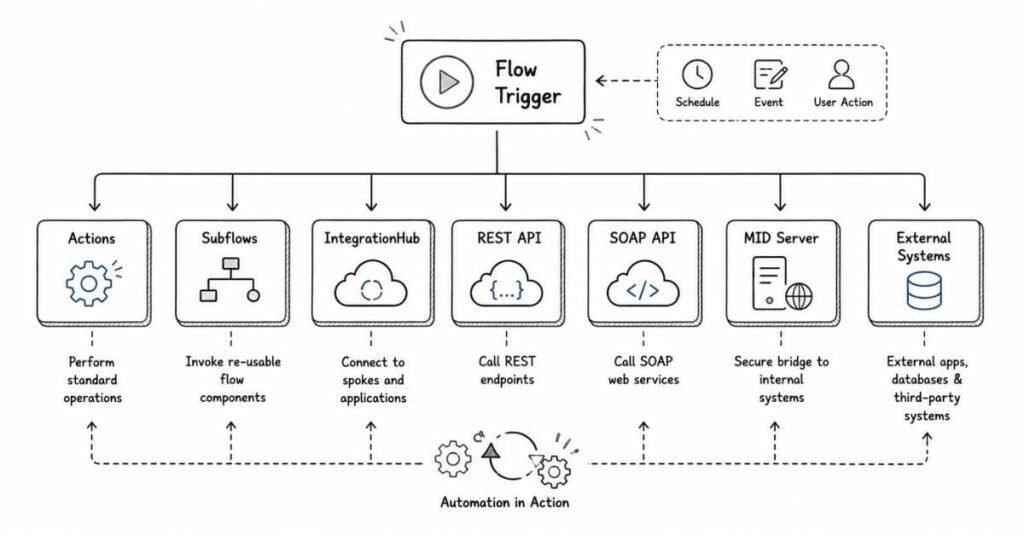
This part covers modern automation and integration concepts in ServiceNow. ServiceNow documentation says Flow Designer is the default process automation builder used to create flows and that it replaces the legacy Workflow graphical editor, while also enabling reusable flows, subflows, and actions without having to code.
Questions 121–160
121) What is Flow Designer?
Flow Designer is a ServiceNow AI Platform feature that enables process owners to automate work by building multi-step flows from reusable components without having to code. ServiceNow also describes it as the default process automation builder on the platform.
122) Why is Flow Designer important in ServiceNow interviews?
It is important because ServiceNow positions Flow Designer as the modern standard for process automation and explicitly says it replaces the legacy Workflow graphical editor. Interviewers often expect candidates to know when to use declarative flow-based automation instead of older workflow or heavy scripting.
123) What is a flow in Flow Designer?
A flow is an automated process made up of a trigger and a sequence of actions or subflows that automate business logic for an application or process. It is the primary automation object created in Flow Designer.
124) What is a trigger in Flow Designer?
A trigger is the event or activity that automatically starts a flow, such as a record being created, a record being updated, or a scheduled time being reached. Without a trigger, the flow does not know when to run.
125) What is an action in Flow Designer?
An action is a single reusable operation performed by the system inside a flow, such as creating a record, sending a notification, or making a REST call. Actions are the execution steps that make the flow actually do work.
126) What is a subflow?
A subflow is a reusable sequence of actions and data inputs that can be started from another flow, subflow, or script. ServiceNow documentation positions subflows as a key way to build reusable automation logic.
127) Why are subflows useful?
Subflows are useful because they let you break complex automation into modular reusable pieces, which reduces duplication and improves maintainability. ServiceNow’s design guidance also recommends reusability as a core design principle in Flow Designer.
128) What are the main content types in Flow Designer?
ServiceNow documentation describes five key content types in Flow Designer: flows, subflows, triggers, actions, and conditions. Understanding these building blocks is essential for explaining Flow Designer architecture in interviews.
129) What is a condition in Flow Designer?
A condition is a statement that determines when or how an action is executed, such as running an action only if a field exceeds a certain value. Conditions help keep flows targeted and efficient.
130) What is the difference between a flow and a workflow?
A flow is built in Flow Designer, which ServiceNow identifies as the default and modern process automation builder, while a workflow refers to the legacy Workflow graphical editor that Flow Designer replaces. In interviews, the concise answer is “workflow is legacy, Flow Designer is the modern standard”.
131) Should new automation be built in Workflow or Flow Designer?
ServiceNow documentation recommends using Flow Designer instead of traditional workflow for almost all new process flow requirements. This makes Flow Designer the preferred answer for nearly every modern automation design question.
132) What are the design principles for Flow Designer?
ServiceNow recommends three main design principles: single purpose, reusability, and clarity. In practice, this means each flow should have one clear goal, reusable pieces should be extracted into subflows, and the flow layout and naming should make each step easy to understand.
133) What does “single purpose” mean in Flow Designer?
Single purpose means each flow should be designed around one clear objective rather than trying to handle multiple unrelated business outcomes. This makes flows easier to test, troubleshoot, and maintain over time.
134) What does “clarity” mean in Flow Designer?
Clarity means the language, naming, and layout of the flow should make the purpose of each action obvious. A well-designed flow should be understandable even by someone who did not originally build it.
135) What does “reusability” mean in Flow Designer?
Reusability means designing automation so common logic is moved into subflows or reusable components instead of being duplicated across many flows. ServiceNow explicitly highlights reusable subflows as a best practice for approvals and similar common patterns.
136) What is IntegrationHub?
IntegrationHub extends Flow Designer so organizations can integrate third-party services and systems into broader workflows and enterprise automation. ServiceNow materials describe it as the integration layer that expands Flow Designer beyond native platform actions.
137) What is a spoke in ServiceNow?
A spoke is a packaged set of reusable integration actions used in Flow Designer and IntegrationHub to connect with external systems or applications. Spokes help standardize and simplify integrations by grouping related actions together.
138) What is the benefit of using prebuilt actions or spokes?
Prebuilt actions and spokes reduce development time, encourage consistency, and often avoid the need to script integrations from scratch. They are especially valuable in interview scenarios where maintainability and speed matter as much as raw technical capability.
139) What is a REST integration in ServiceNow?
A REST integration connects ServiceNow to another system using HTTP-based APIs to send or receive data. It is one of the most common enterprise integration patterns and a standard interview topic for developer and integration roles.
140) What is a SOAP integration in ServiceNow?
A SOAP integration connects ServiceNow to external systems using XML-based SOAP web services. It is older than REST in many environments but still appears frequently in legacy enterprise integrations and interview questions.
141) What is the difference between REST and SOAP in ServiceNow interviews?
A concise interview answer is that REST is typically simpler, lighter, and more common in modern integrations, while SOAP is XML-heavy, more rigid, and still used in older enterprise systems. Interviewers usually want to see that you understand both patterns conceptually, even if most hands-on work today is REST-focused.
142) What is a MID Server?
A MID Server is a lightweight Java application installed within the customer’s network that enables ServiceNow to communicate securely with internal systems and infrastructure behind the firewall. It is essential for use cases like discovery, orchestration, and on-premise integrations.
143) Why is a MID Server used?
A MID Server is used when ServiceNow, which runs in the cloud, needs to reach internal resources that are not directly exposed to the internet, such as internal databases, servers, or enterprise applications. It acts as a secure bridge between the cloud instance and the internal network.
144) In which scenarios is a MID Server commonly required?
Common scenarios include Discovery, Service Mapping, on-premise REST or SOAP integrations, Orchestration, and some import or data collection use cases involving internal systems. Mentioning Discovery and behind-the-firewall integrations is usually enough for an interview answer.
145) What is an import set in ServiceNow?
An import set is a temporary staging area used to bring external data into ServiceNow before mapping it into target tables. This intermediate step allows data to be cleaned, transformed, and validated before final insertion.
146) What is a transform map?
A transform map defines how data from an import set should be mapped and converted into records in a target ServiceNow table. It controls field mapping, coalescing, and any transformation logic applied during the import process.
147) What is coalesce in a transform map?
Coalesce is the transform map setting used to decide whether an incoming row should update an existing target record instead of creating a new one. In interviews, the short answer is that coalesce helps prevent duplicate records during imports.
148) What happens if coalesce is not configured correctly?
If coalesce is misconfigured or missing, repeated imports may create duplicate records instead of updating existing ones. This is one of the most common scenario-based data-import interview questions.
149) What is the difference between a data source and an import set?
A data source defines where imported data comes from, such as a file, JDBC source, or external feed, while the import set is the staging table where that raw imported data lands before transformation. The data source is the origin, and the import set is the temporary landing area.
150) Why use an import set instead of importing directly into the target table?
Import sets allow validation, transformation, and controlled mapping before data reaches the real target table, reducing the risk of dirty or incorrectly structured data entering production records. This staging step is especially important for large or repeated external data imports.
151) What is a transform script?
A transform script is custom logic added within a transform map to manipulate incoming data during the import process, such as reformatting values or applying conditional mapping rules. It is used when simple field mapping is not enough.
152) What is an inbound integration?
An inbound integration means data or requests are coming into ServiceNow from another system, such as receiving incident data from a monitoring tool or importing records from an external file or API. These are common in enterprise platform ecosystems.
153) What is an outbound integration?
An outbound integration means ServiceNow is sending data or triggering actions in another system, such as calling an external REST API when a change is approved. This often appears in Flow Designer, script-based integrations, or webhook-style designs.
154) What is a webhook in integration terms?
A webhook is a mechanism where one system sends an HTTP callback to another system when a specific event occurs. In ServiceNow interviews, it is usually discussed as a lightweight outbound event notification pattern.
155) What is the role of Flow Designer in integrations?
Flow Designer can orchestrate integration logic using actions and IntegrationHub spokes, allowing admins and developers to automate cross-system processes with less custom code. It brings integration steps into the same automation layer as approvals, tasks, and notifications.
156) When would you choose Flow Designer instead of scripting for integration?
You would usually choose Flow Designer when the integration can be built cleanly with available actions, reusable spokes, and manageable logic, especially when maintainability and low-code ownership are priorities. If the requirement is highly custom or complex, deeper scripting may still be appropriate.
157) What is a common real-world integration interview scenario?
A common scenario is: “An incident should automatically create a ticket in another system when priority is high.” A strong answer mentions the trigger, business logic, authentication, REST or Flow Designer integration, error handling, and logging.
158) How do you troubleshoot a failed integration in ServiceNow?
A structured answer includes checking request and response logs, authentication details, endpoint availability, payload format, MID Server status if involved, and whether the trigger logic actually fired. Interviewers value this stepwise troubleshooting approach more than tool-name memorization alone.
159) What are some best practices for Flow Designer and integrations?
Useful best practices include designing single-purpose flows, reusing subflows, documenting actions, testing before publishing, monitoring for bottlenecks, and using IntegrationHub for cleaner third-party integration patterns. These align closely with ServiceNow’s own guidance around reusability, clarity, and maintainability.
160) Why do interviewers ask Flow Designer and integration questions so often?
They ask because modern ServiceNow work increasingly depends on automation and connected systems, and ServiceNow explicitly positions Flow Designer as the default automation builder for the platform. These questions help interviewers assess whether a candidate can think beyond forms and tables and design real business process automation.
Revision focus
For this part, revise Flow Designer fundamentals, the difference between flows and legacy workflows, the five main Flow Designer components, IntegrationHub and spokes, and import set plus transform map concepts. These topics are high-frequency because they connect modern automation, data movement, and external system integration in one interview area.
Part 6: Service Portal, Catalog Items, Record Producers, ACLs & Performance
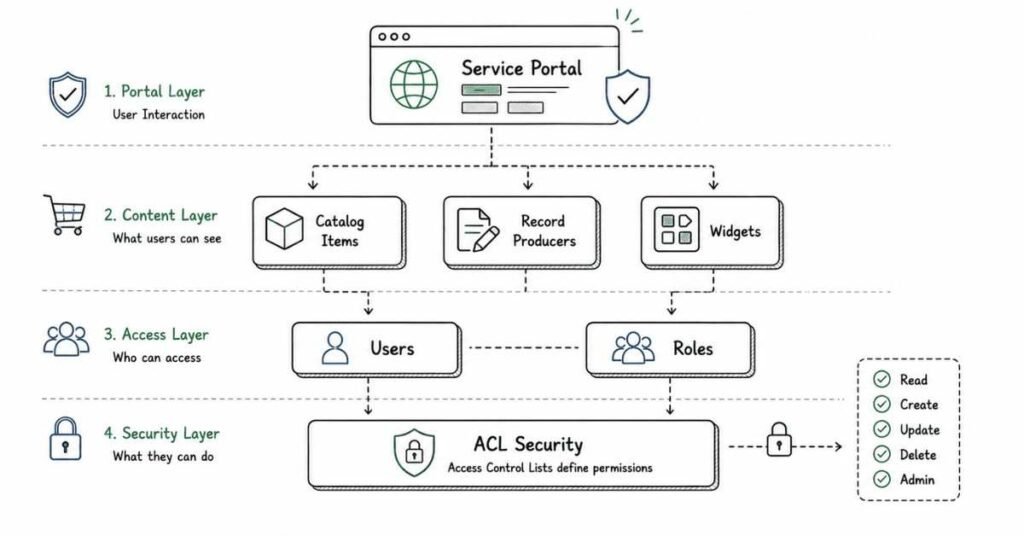
This part covers ServiceNow topics that often separate basic platform familiarity from practical implementation skill. ServiceNow documentation says widgets define the content of portal pages and can be reused, copied, or developed from scratch, while record producers are a specific catalog item type used to create task-based records such as incidents from the service catalog.
Questions 161–200
161) What is Service Portal?
Service Portal is the ServiceNow framework used to build user-facing portal experiences such as self-service, employee, or customer support portals. It gives organizations a more modern front-end than the standard platform UI for specific service experiences.
162) What is a widget in Service Portal?
ServiceNow documentation says widgets define the content of portal pages and can be base system widgets, copied widgets, or fully custom widgets. They are the core building blocks of a portal page’s functionality and display.
163) What is a widget instance?
When you add a widget to a page in the Service Portal Designer, it creates a widget instance, which is a reference to that widget with its own location, properties, and CSS specific to that instance. Multiple instances of the same widget can appear on the same page, and each can behave slightly differently through instance-level configuration.
164) What happens if you edit a widget used on multiple pages?
ServiceNow documentation says all widget instances point to the underlying widget, so if you edit the widget itself, all of its instances receive that change. If you need different behavior without affecting every instance, you should change instance-specific settings or work from a copied widget.
165) Can you modify base system widgets directly?
Base system widgets are read-only so you can benefit from future updates, and ServiceNow says you should copy them if you need to make changes. Once copied, the widget becomes custom and no longer automatically benefits from future updates to the original widget.
166) Why is cloning a widget preferred over editing a base widget?
Cloning is preferred because base widgets are read-only and preserved for future platform updates, while copied widgets let you customize behavior safely. This is a common best-practice question in Service Portal interviews.
167) What are the main parts of a custom widget?
A custom widget typically contains HTML, CSS, client-side script, server-side script, and optional link functions or configuration options. Service Portal documentation and examples show that widget logic is split between the browser and server to create interactive portal experiences.
168) What does the server script in a widget do?
Service Portal documentation explains that a widget’s server script is executed on load and can be used to transfer a data object from the server to the client. This makes it the main server-side data preparation layer for the widget.
169) What does the client script in a widget do?
The client script handles browser-side behavior such as user interactions, rendering logic, and dynamic updates based on the data passed from the server. It is what makes the widget interactive after the page has loaded.
170) What are some common base widgets in Service Portal?
ServiceNow community documentation lists examples such as Approvals, Knowledge Base, My Requests, Carousel, Catalog Content, Popular Questions, and Search as common base widgets. The newer configurable widget library also includes quick links, banners, data lists, FAQs, and object widgets for portal homepages.
171) What role is needed to access widget configuration options from a rendered portal page?
ServiceNow documentation says users need the admin or sp_admin role to see the widget context menu from a rendered portal page. Regular users signed in without those roles cannot see that menu.
172) What is the difference between Service Portal and the platform UI?
The platform UI is the full administrative and operational interface used by internal users, while Service Portal is a tailored front-end experience for requesters, employees, or customers. In interviews, the simple answer is that Service Portal is a role-focused, self-service web experience built on widgets.
173) What is a catalog item?
A catalog item is a requestable service or product in the Service Catalog, such as a laptop request, software request, or access request. It is used to initiate a fulfillment process through the catalog experience.
174) What is a record producer?
ServiceNow documentation defines a record producer as a specific type of catalog item that allows end users to create task-based records, such as incident records, from the service catalog. It is designed to provide a better end-user experience than exposing the regular task form directly.
175) What is the difference between a catalog item and a record producer?
A catalog item creates a requested item and follows standard service catalog fulfillment processes, while a record producer generates a task-based record such as an incident instead of a requested item. ServiceNow explicitly says requested items should be created through catalog items, not record producers.
176) When should you use a record producer?
You should use a record producer when you want a catalog-like experience to create task-based records such as incidents, cases, or custom task records. ServiceNow documentation emphasizes that record producers are intended specifically for task-based record creation.
177) What should you avoid doing in a record producer script?
ServiceNow documentation warns not to call update, setAbortAction, or set the sys_class_name on the current record in a record producer script because this can lead to unexpected behavior. This is a good example of a small but interview-worthy implementation detail.
178) Can a record producer create a requested item?
ServiceNow explicitly says not to create requested item records from record producers and recommends using catalog items instead so standard service catalog processes and workflows behave as expected. This distinction appears often in admin and catalog interviews.
179) What is a variable in a catalog item?
A variable is an input field presented to the user on a catalog item or record producer form, such as requested software name, justification, or delivery location. Variables collect request information before the record or request is created.
180) What is a variable set?
A variable set is a reusable group of variables that can be attached to multiple catalog items or record producers. It helps standardize and reuse common inputs across related request types.
ACLs and Security
181) What is an ACL in ServiceNow?
An ACL, or Access Control List, is a rule that determines whether a user can read, write, create, or delete records or fields. It is one of the most important security mechanisms on the platform and a frequent interview topic.
182) Why are ACLs important?
ACLs are important because they enforce data security by ensuring users only access the records and fields appropriate for their role, group, or conditions. Even correct functionality becomes a security risk if ACLs are not designed properly.
183) What is the difference between a role-based ACL and a script-based ACL?
A role-based ACL grants access based on roles assigned to the user, while a script-based ACL uses logic to dynamically decide access based on the record, field values, or user context. Interviewers often ask this to test whether candidates know when declarative security is enough and when scripting is needed.
184) What happens if a user passes a table ACL but fails a field ACL?
The user may still access the record generally, but the specific field controlled by the field-level ACL will remain hidden or read-only depending on the access type being checked. This is a classic layered-security concept in ServiceNow interviews.
185) What is ACL debugging?
ACL debugging is the process of determining which access control rule granted or denied access to a table or field for a given user. It is commonly used when users report visibility issues that are not explained by roles alone.
186) Why are ACL issues common in projects?
ACL issues are common because access often depends on multiple layers such as roles, field rules, conditions, scope, and domain behavior, and changes in one area can unintentionally affect another. This is why ACL troubleshooting is one of the most common practical interview scenario topics.
Performance and Advanced Configuration
187) Why is performance important in ServiceNow scripting?
Performance matters because inefficient server-side scripts can slow down form loads, list views, background jobs, and integrations across the instance. Interviewers often use performance questions to test whether a candidate can think at instance scale instead of only solving one local scripting problem.
188) What is one of the most important GlideRecord performance best practices?
ServiceNow community guidance says to always try to add a filter to GlideRecord queries, especially on large tables, so the script does not scan far more records than necessary. Querying the entire table without conditions is one of the most common performance anti-patterns.
189) Why should indexed fields be used in queries when possible?
Community performance guidance recommends using indexed fields in GlideRecord queries because indexed conditions help the database retrieve matching records more efficiently. This is a standard optimization point for interview discussions around slow queries.
190) Why should you limit returned rows when possible?
Limiting results reduces memory use, iteration cost, and overall query time, especially when you only need one record or a small subset. Community best-practice discussions also recommend limiting and paginating results to avoid heavy record processing.
191) What is pagination in GlideRecord?
Pagination means retrieving records in manageable chunks instead of loading a very large result set all at once. ServiceNow developer guidance highlights chooseWindow as a method that helps with chunked processing and should be combined with sorting for consistency.
192) What is addEncodedQuery()?
ServiceNow developer guidance says addEncodedQuery can be used to simplify advanced filters and replicate UI filter logic in a compact form. It is especially useful when you want to apply multiple query conditions in one line.
193) What is addJoinQuery()?
ServiceNow developer guidance says addJoinQuery helps retrieve related records efficiently when filters or conditions depend on related data, reducing the need for multiple separate queries. It is one example of optimizing subquery-like scenarios in GlideRecord.
194) What is addExtraFields()?
ServiceNow developer guidance says addExtraFields, introduced in the Washington release, lets you fetch related fields upfront to reduce unnecessary additional lookups on reference records. This can improve performance by cutting down extra database round trips.
195) What is the difference between initialize() and newRecord()?
ServiceNow developer guidance says initialize sets up a GlideRecord object without populating default values, while newRecord includes defaults based on table configuration. This distinction matters when creating records programmatically and is a useful mid-level interview detail.
196) What is a common ServiceNow performance anti-pattern?
A classic anti-pattern is running repeated GlideRecord queries inside loops when the data could be fetched once and reused, similar to N+1 query problems in other platforms. Another is querying large tables without indexed conditions or row limits.
197) How can poor portal design affect performance?
Poor portal design can cause heavy widget server scripts, redundant client calls, and slow page rendering, especially if many widgets each make expensive queries. This is why widget reuse, careful query design, and keeping portal pages focused are important in real projects.
198) What is the difference between platform performance and user experience performance?
Platform performance concerns server load, query cost, transaction efficiency, and backend scalability, while user experience performance is what the end user perceives, such as slow page loads or delayed button actions. Good ServiceNow engineers consider both because a technically correct solution can still feel slow to users.
199) What is a strong answer if asked how to improve a slow ServiceNow script?
A strong answer includes checking whether GlideRecord queries are filtered properly, whether indexed fields are used, whether duplicate queries inside loops can be removed, whether result sets can be limited or paginated, and whether reusable logic should be moved to more efficient server-side structures. This kind of stepwise answer shows practical troubleshooting rather than memorized tips.
200) Why do interviewers ask about Service Portal, ACLs, and performance together?
They ask because these topics combine UI design, security, and scalability, which are exactly where real ServiceNow implementations often succeed or fail. A candidate who understands all three areas usually demonstrates more project readiness than someone who only knows isolated scripting syntax.
Revision focus
For this part, revise widget fundamentals, widget instances, cloning versus base widgets, catalog item versus record producer, ACL layering, and GlideRecord performance practices like filtering, indexing, and limiting results. These topics show whether you can think about front-end experience, security, and instance health at the same time, which is exactly what interviewers often want to test.
Part 7: Debugging, Logs, Update Sets & Scenario-Based Interview Questions
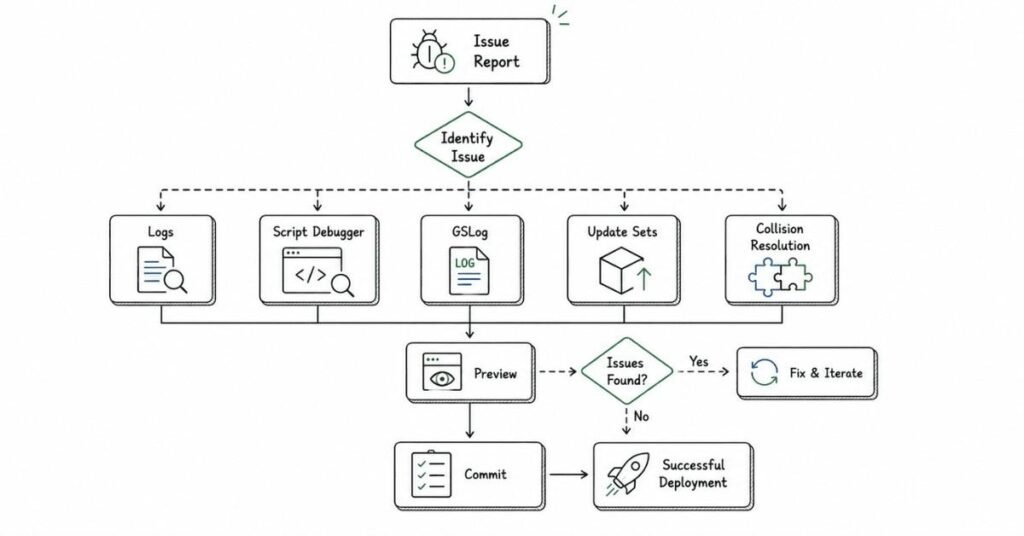
This part covers the troubleshooting side of ServiceNow, which interviewers use to test whether you can support real implementations instead of only building simple features. ServiceNow documentation says the Script Debugger enables users to debug server-side scripts, while GSLog simplifies script logging in System Logs with selectable log levels such as debug, info, warning, and error.
Questions 201–240
201) What is the Script Debugger in ServiceNow?
The Script Debugger is a built-in tool used to debug server-side scripts such as business rules and script includes. It lets you set breakpoints and inspect variable values, call stack, and execution flow during a transaction.
202) What role is needed to use the Script Debugger?
ServiceNow documentation says the Script Debugger is available to users with the script_debugger role. This is one of the small but useful detail questions interviewers may ask to check familiarity with debugging setup.
203) What is a breakpoint in ServiceNow debugging?
A breakpoint is a point in server-side code where execution pauses so you can inspect variables and step through logic line by line. It is one of the most important debugging tools for understanding why a business rule or script include is not behaving as expected.
204) What is the call stack in debugging?
The call stack shows the sequence of code execution that led to the current point in the script. It is useful when one script include, business rule, or UI action indirectly triggers another and you need to understand the execution path.
205) What is Session Log or Session Debug used for?
ServiceNow documentation and support guidance note that Session Log and Session Debug help view logs and errors related to scripts executed in the current user session, including server-side scripts triggered by client-side activity. It is useful when debugging interactions that span both UI actions and server processing.
206) What is GSLog?
GSLog is a script include that simplifies script logging and debugging by implementing selectable levels of log output through sys_properties values, and the logs are written to System Logs. ServiceNow documentation lists levels such as debug, info, notice, warning, err, and crit, with notice as the default logging level.
207) Why is GSLog better than raw gs.log in some cases?
GSLog is better in larger implementations because it supports configurable logging levels and per-caller control through properties, which makes it easier to turn debugging on or off without heavily editing code. Community recommendations also highlight it as a standard approach for cleaner logging practices.
208) Where can you view logs generated by GSLog or gs.log?
ServiceNow documentation states that logs generated through GSLog are written to System Logs, and you can view them under Application Logs, Errors, Script Log Statements, or All logs. Community guidance also specifically recommends checking Script Log Statements for gs.log-based debugging of script includes.
209) What log methods are commonly used in ServiceNow scripting?
Support guidance lists methods such as gs.log(), gs.info(), gs.warn(), and gs.error() for logging details during script execution. These are commonly used for tracing logic, validating parameters, and recording error conditions during debugging.
210) What is a good logging practice when debugging script includes?
Community guidance recommends adding targeted log statements near suspicious lines, such as logging parameters received from a client script or the outcome of a key condition, and then reviewing Script Log Statements in System Logs. This is a practical interview-friendly answer because it shows focused debugging rather than random logging.
211) How do you debug a script include called through GlideAjax?
A good approach is to log the client parameters received in the script include, confirm the client-callable setup, then check Script Log Statements to verify the script include actually ran and what values it processed. Community examples specifically suggest logging this.getParameter(…) values to confirm what the client passed.
212) What tools help debug client-side scripts in ServiceNow?
ServiceNow support guidance recommends browser developer tools, especially the Console and Network tabs, and also suggests using jslog() rather than intrusive alert pop-ups for client-side debugging. This is useful for debugging client scripts, portal widgets, and GlideAjax calls.
213) What is Debug SQL?
Support guidance says Debug SQL can be enabled from System Diagnostics to analyze GlideRecord queries and identify performance bottlenecks. This is especially useful when a script is functionally correct but performs poorly due to inefficient queries.
214) Why is debugging an important interview topic in ServiceNow?
Debugging is important because real ServiceNow work often involves troubleshooting existing scripts, flows, security rules, and integrations rather than building everything from scratch. Interviewers use debugging questions to see whether you can isolate root causes systematically instead of only reciting definitions.
Best practices and anti-patterns
215) What are some common ServiceNow scripting anti-patterns?
Common anti-patterns include unfiltered GlideRecord queries, repeated queries inside loops, heavy logic in synchronous business rules, poor logging, and unnecessary duplication of code instead of using script includes. These patterns create performance issues and make debugging harder.
216) Why should you avoid heavy logic in synchronous transactions?
Heavy synchronous logic can slow form saves and degrade the user experience because the user must wait for the transaction to complete before the action finishes. A better answer often includes moving non-critical work to async business rules or background-style processing where appropriate.
217) Why is reusable logic important for debugging?
Reusable logic placed in script includes is easier to test, trace, and maintain than duplicated code scattered across many business rules or UI actions. Centralized logic reduces the chance that one bug is fixed in one place but remains broken elsewhere.
218) What is a strong debugging mindset in ServiceNow?
A strong mindset is to isolate the problem layer first, such as client-side, server-side, ACL, update set, or integration, then inspect logs and narrow the issue step by step instead of changing code blindly. Interviewers usually prefer a structured debugging process over tool memorization.
Update sets and deployment troubleshooting
219) Why do update sets matter in debugging and interview scenarios?
Update sets matter because many production issues come not from bad logic alone, but from incomplete promotion, collisions, missing dependencies, or target-instance differences. Interviewers often ask update set questions to test whether you understand how customizations actually move across environments.
220) What is update set preview?
ServiceNow documentation says previewing compares an update set retrieved from a remote instance to updates on the local instance to detect potential problems. It is mandatory to preview an update set and address all problems before committing it.
221) Why must you preview an update set before commit?
ServiceNow explicitly states that you must preview an update set and resolve all problems before it can be committed. Preview helps detect collisions, missing dependencies, and conflicting local changes before they affect the target instance.
222) What is an update set collision?
Community guidance explains that a collision means the target instance has a newer local update on an object than the one coming from the remote update set, or the incoming update is older than the local version. This often happens when a hotfix was made directly on the target instance and not synchronized back to the source.
223) How do you resolve an update set collision?
A practical answer is to compare the incoming update with the local version, decide which one should win, and then either accept the remote update or skip it depending on which version is correct. ServiceNow documentation also recommends comparing update sets and resolving all collisions before moving them across instances.
224) What does “Accept remote update” mean?
Community guidance says Accept remote update means the version in the incoming update set will be used in the target instance. This is appropriate when the incoming customization is the one you actually want to keep.
225) What does “Skip remote update” mean?
Community guidance says Skip remote update means the local target-instance version is kept and the incoming change from the update set is ignored. This is used when the target already has the correct or newer change.
226) What is the purpose of comparing update sets?
ServiceNow documentation says local and remote update sets can be compared with one another to identify collisions and ensure the proper changes are committed. This is an important step when multiple developers or parallel changes may have touched the same objects.
227) What happens when you delete an update record during collision resolution?
ServiceNow documentation says deleting the update record removes the record of that customization from the update set, but it does not back out the customization from the instance itself. This is a subtle but very important interview detail because many candidates assume it undoes the actual customization.
228) What are common signs of update set corruption?
Support guidance says symptoms may include blank previews, previews that do not show all expected updates, or inconsistent behavior when trying to preview the set. In such cases, troubleshooting may involve isolating corrupted updates and recapturing them in a new update set.
Scenario-based questions
229) Scenario: A client script is not working on form load. What do you check first?
First verify the script type is actually onLoad and that its condition, UI type, table, and active status are correct. Then use browser developer tools and jslog() or console inspection to check whether any client-side errors are preventing execution.
230) Scenario: A business rule is not updating a field as expected. How do you debug it?
A strong answer is to confirm the rule type, table, condition, and order, then add targeted logging with gs.log() or GSLog, and if needed set breakpoints in the Script Debugger to inspect variable values and execution flow. This shows a practical server-side debugging approach rather than guesswork.
231) Scenario: A script include called from GlideAjax returns no result. What do you check?
Check whether the script include is marked client callable, confirm the function name and parameters match what the client sends, and log the incoming parameters in the script include to see whether the request is arriving correctly. Then verify the callback handles the returned value properly on the client side.
232) Scenario: A user cannot see a field but can open the record. What is the likely issue?
The likely issue is a field-level ACL blocking access while the table-level ACL still allows record access. This is a classic ServiceNow security scenario and a strong interview answer should mention ACL debugging as the next step.
233) Scenario: A portal widget loads slowly. What is your approach?
Check whether the widget’s server script is making heavy queries, whether too many widgets on the page are loading at once, and whether the client is making unnecessary follow-up calls. A strong answer also mentions reducing duplicate queries and keeping portal pages focused for better user experience.
234) Scenario: A flow is not running after a record update. What do you check?
Check whether the flow is published, whether the trigger conditions match the actual record update, and whether the record update happened in the right table or scope. Then inspect flow execution details and any action-level errors to isolate where it failed.
235) Scenario: An imported file created duplicate users. What is the likely cause?
The likely cause is incorrect or missing coalesce settings in the transform map, which allowed each import row to create a new record instead of matching an existing one. This is one of the most common import-set interview scenarios.
236) Scenario: A deployment to test failed during update set preview. What do you do?
Preview the update set, review each problem, compare local and remote versions, and resolve all collisions before commit. If the issue looks like corruption, support guidance suggests isolating bad updates and recapturing them in a new update set.
237) Scenario: A script works in development but fails in test. Why might that happen?
Possible reasons include missing dependencies in the update set, collisions, different data, plugin differences, security rules, or target-instance hotfixes that changed the same object. This kind of answer shows you understand both code and deployment context.
238) Scenario: An integration suddenly stops working. What do you check?
Check logs, endpoint reachability, authentication, payload structure, any recent update set deployments, and MID Server status if the integration relies on internal network access. A good answer also includes determining whether the trigger logic still runs and whether the failure is in request creation or response handling.
239) Scenario: A form save has become very slow after a new customization. What is your likely suspect?
The likely suspects are before or after business rules, synchronous GlideRecord-heavy logic, or scripts triggered on save that do too much work in the user transaction. A strong answer includes reviewing recent customizations and using logs or the Script Debugger to isolate which script now runs during the save.
240) Why do scenario questions matter so much in ServiceNow interviews?
They matter because real ServiceNow jobs are filled with troubleshooting, deployment, security, and process edge cases rather than only greenfield building. Scenario questions help interviewers judge whether you can think through a live issue calmly and logically, which is often more valuable than memorizing definitions.
Revision focus
For this part, revise Script Debugger, Session Debug, GSLog, System Logs, update set preview, collisions, Accept versus Skip remote update, and the 10 scenario questions above. These are high-value topics because they test how you troubleshoot live issues, which is one of the clearest signals of job readiness in ServiceNow interviews.
Part 8: Modern ServiceNow — AI, CSDM, ITOM, Discovery, Service Mapping & App Engine
This part covers the modern platform-awareness topics that increasingly appear in ServiceNow interviews. ServiceNow documentation says Now Assist uses generative AI to enhance productivity through conversational and proactive experiences, while ITOM Visibility consists of Discovery and Service Mapping, which create and relate configuration items in the CMDB within the core CSDM framework.
Questions 241–280
241) What is CSDM in ServiceNow?
CSDM stands for Common Service Data Model, which is the framework ServiceNow uses to organize and standardize how services, applications, and technical components are represented in the CMDB. Interviewers often ask about it because modern CMDB and ITOM work increasingly depends on consistent CSDM-aligned data models.
242) Why is CSDM important?
CSDM is important because it helps organizations structure service and technical data consistently so teams can understand relationships, ownership, and impact more clearly. ServiceNow explicitly frames ITOM Visibility products like Discovery and Service Mapping as working with the core CSDM framework.
243) What is ITOM in ServiceNow?
ITOM stands for IT Operations Management, a ServiceNow capability area focused on managing infrastructure visibility, service health, operations, and related automation. In interview terms, it is the side of ServiceNow that helps organizations understand and operate their technical estate more effectively.
244) What is ITOM Visibility?
ServiceNow documentation says ITOM Visibility consists of two products: Discovery and Service Mapping. These products are responsible for creating CIs in the CMDB and relating them so organizations can understand infrastructure and service dependencies.
245) What is Discovery in ServiceNow?
ServiceNow says Discovery finds computers, servers, printers, a variety of IP-enabled devices, and the applications that run on them, and then updates the CIs in the CMDB with the collected data. Discovery is one of the foundational capabilities behind reliable CMDB population.
246) Why is Discovery important?
Discovery is important because manually maintaining CMDB data is difficult and often inaccurate, while Discovery automates the population and update of infrastructure-related CIs. Accurate discovered data improves downstream processes like incident impact analysis, change planning, and service mapping.
247) What is Service Mapping?
ServiceNow documentation says Service Mapping discovers all application services in the organization and builds a comprehensive map of the devices, applications, and configuration profiles that support associated business services. It maps dependencies based on connections between devices and applications.
248) How is Service Mapping different from Discovery?
Discovery focuses on finding infrastructure components and updating CMDB records, while Service Mapping focuses on understanding and mapping the relationships and dependencies that support business or application services. A good interview answer is that Discovery finds the components and Service Mapping shows how they work together.
249) What is top-down mapping?
ServiceNow documentation describes Service Mapping as using a method called top-down mapping, which helps you see the impact of a problematic object on the rest of the application services. This is valuable for incident and outage analysis because it connects technical failures to service-level consequences.
250) What are some Service Mapping methods?
ServiceNow documentation lists pattern-based, tag-based, traffic-based, and predictive-intelligence-based discovery methods for Service Mapping. Interviewers may ask this more as an awareness check than as a deep implementation question.
251) Why are Discovery and Service Mapping often asked in interviews together?
They are asked together because ServiceNow groups them under ITOM Visibility and explains that both are responsible for creating CIs and relating them within the CMDB and CSDM framework. This makes them tightly connected from both a platform and architecture perspective.
252) What is the relationship between CMDB and CSDM?
The CMDB is the data repository of configuration items and their relationships, while CSDM is the framework that standardizes how those services and technical objects should be modeled and organized. In interviews, a concise answer is that CMDB stores the data and CSDM provides the model for structuring it.
Now Assist and AI
253) What is Now Assist?
ServiceNow documentation says Now Assist uses generative AI to enhance user productivity and efficiency through conversation and proactive experiences. It is the umbrella AI experience across the ServiceNow AI Platform.
254) Why is Now Assist important in 2026 interviews?
It is important because ServiceNow’s current platform direction heavily emphasizes generative AI, AI skills, AI agents, and agentic workflows across many business areas, including ITSM, ITOM, CMDB, App Engine, and Security. Even classic admin or developer roles may now include basic awareness questions about AI capabilities.
255) What business areas support Now Assist?
ServiceNow documentation lists Now Assist products across workflows such as CRM, Employee, Finance and Supply Chain, Technology, Creator, Industry, Security, and others. In the Technology workflow specifically, Now Assist is available for areas including CMDB, ITOM, and ITSM.
256) What are examples of Now Assist capabilities?
Now Assist capabilities include delivering better self-service, recommending actions, generating answers, summarizing content, generating resolution notes, conversational assistance, and AI Search experiences. ServiceNow also documents modular skills such as summarization, content generation, recommendations, and conversational assistance embedded directly in platform workflows.
257) What is the Now Assist panel?
ServiceNow documentation describes the Now Assist panel as a conversational interface where users can summarize a chat, case, or incident, get help, or generate resolution notes to understand context quickly. It represents one of the most visible end-user AI experiences on the platform.
258) What is the Now Assist context menu?
The Now Assist context menu uses generative AI to help agents summarize, create, and edit written content, including generating KB articles, email recommendations, and content improvements. It is an example of AI embedded directly into work screens rather than being a separate standalone tool.
259) What is AI Search with Now Assist?
ServiceNow documentation says Now Assist in AI Search combines search with a large language model to provide actionable AI-generated or AI-selected answers in user searches. This makes search experiences more conversational and answer-oriented rather than purely result-list based.
260) What is the Smart Documents skill?
ServiceNow documentation says the Smart Documents skill provides a concise summary of a document along with interactive Q&A and common questions and answers so users can understand content quickly. This is a good example of generative AI helping reduce cognitive load for users.
261) What is ServiceNow AI Lens?
ServiceNow documentation says AI Lens can scan and extract visual data to auto-fill forms, identify information from handwritten notes or images, search for information from images, and batch process multiple images. This shows that ServiceNow AI is not limited to text-only experiences.
262) Does Now Assist support accessibility-related use cases?
Yes, ServiceNow documentation says Now Assist can reduce cognitive load, provide alternative input methods, and make complex tasks easier for a broad range of users, including through voice input in the Now Assist panel. This is a useful awareness point because it connects AI capability to practical usability outcomes.
263) What are AI agents in ServiceNow?
ServiceNow documentation describes AI agents as part of Now Assist capabilities and explains that they can be interactive or non-interactive, support agentic workflows, and be invoked through background execution channels. In interviews, it is enough to say AI agents are autonomous or semi-autonomous AI-driven workflows that can perform tasks and interact with users when needed.
264) What is the difference between interactive and non-interactive AI agents?
ServiceNow says interactive AI agents can reach out to users for information when fallback occurs, while non-interactive AI agents do not ask the user for input during fallback and instead continue in background-oriented modes. This distinction matters in runtime behavior and execution design.
265) What is agentic workflow awareness in interviews?
Agentic workflow awareness means understanding that ServiceNow’s AI direction now goes beyond simple content generation into workflows where AI agents can help make decisions, execute actions, and coordinate steps across processes. A candidate does not always need deep implementation knowledge, but should understand the direction the platform is moving.
App Engine and low-code
266) What is App Engine in ServiceNow?
App Engine is ServiceNow’s application-development approach for building custom apps and workflows on the platform, often with low-code or no-code capabilities. It is especially relevant for candidates building internal business apps beyond core ITSM.
267) Why is App Engine important?
It is important because many organizations use ServiceNow not only for ITSM but also to build custom workflow applications on the same platform, extending its value far beyond ticketing. This makes ServiceNow developers increasingly application builders, not just ITSM configurators.
268) What is low-code or no-code development in ServiceNow?
Low-code or no-code development means building applications and automations using declarative tools such as Flow Designer, forms, tables, and reusable components rather than writing large amounts of script by hand. This is a major reason ServiceNow appeals to both admins and developers.
269) Can App Engine use AI capabilities?
Yes, ServiceNow documentation describes Now Assist for App Engine as providing AI capabilities that can enhance custom applications, including skills, AI agents, and agentic workflows. This is an increasingly important modern-awareness topic for ServiceNow interviews.
270) Why should admins know about App Engine even if they are not developers?
Admins should know about it because low-code application building is now a normal part of how organizations extend ServiceNow, and administrators often support or configure parts of those apps. Interviewers may ask this to see whether you think of ServiceNow as just ITSM or as a broader workflow platform.
Modern interview awareness
271) Why do interviewers ask about CSDM even for non-ITOM roles?
They ask because CSDM is increasingly important wherever CMDB quality, ownership, service relationships, and platform maturity matter, not only in dedicated ITOM projects. It signals whether a candidate understands modern ServiceNow data modeling direction.
272) Why do interviewers ask about AI features even for admin roles?
They ask because ServiceNow now embeds generative AI features across platform experiences, workflows, search, and productivity tools. Admins are often involved in enabling, configuring, or supporting these features even if they are not designing the underlying AI logic.
273) What is a safe beginner answer for CSDM?
A safe answer is: “CSDM is ServiceNow’s standard framework for organizing services, applications, and technical components in the CMDB so relationships and ownership are modeled consistently”. This is simple, accurate, and interview-friendly.
274) What is a safe beginner answer for Discovery?
A safe answer is: “Discovery finds infrastructure devices and the applications running on them and updates the corresponding CIs in the CMDB automatically”. This aligns directly with ServiceNow documentation.
275) What is a safe beginner answer for Service Mapping?
A safe answer is: “Service Mapping discovers application services and maps the devices, applications, and dependencies that support those services”. This is usually enough for first-level modern platform awareness questions.
276) What is a safe beginner answer for Now Assist?
A safe answer is: “Now Assist is ServiceNow’s generative AI experience that helps users work more efficiently through summarization, recommendations, search, and conversational assistance”. This is concise and aligned with current ServiceNow language.
277) Do freshers need deep knowledge of Discovery, Service Mapping, or AI agents?
Not usually, but basic awareness is increasingly valuable because these areas reflect the current direction of the platform and often appear in interviews as conceptual questions. A good fresher answer is to be clear on definitions and use cases even if hands-on exposure is limited.
278) How should you answer if your practical work is mostly classic ITSM?
A strong answer is to say your main hands-on experience is in core platform and ITSM work, while you also understand the role of CSDM, Discovery, Service Mapping, App Engine, and Now Assist in modern ServiceNow implementations. This shows honesty and growth mindset rather than exaggeration.
279) What does “modern ServiceNow” mean in interviews?
Modern ServiceNow usually means awareness of AI-driven experiences, CSDM-aligned CMDB design, ITOM visibility, low-code application development, and broader enterprise workflow automation rather than only classic incident-ticketing administration. It signals that the candidate understands where the platform is going.
280) Why do these modern-awareness questions matter so much now?
They matter because ServiceNow’s current platform strategy clearly emphasizes generative AI, agentic workflows, better service-data modeling, and broader automation across enterprise workflows. Interviewers use these questions to judge adaptability and future readiness, not just current module exposure.
Revision focus
For this part, revise CSDM, Discovery, Service Mapping, ITOM Visibility, Now Assist, AI agents, AI Search, and App Engine awareness. These are the modern platform-awareness topics most likely to appear in current ServiceNow interviews, especially when the role mentions ITOM, CMDB maturity, AI, or enterprise workflow transformation.
Part 9: Behavioral, Resume, LinkedIn & Career Strategy
This final part focuses on how to present yourself well in ServiceNow interviews and in the job market. Current India salary sources place average ServiceNow developer pay around ₹6.46 lakh per year on Indeed and about ₹6.87 lakh on PayScale, while experience-based ranges rise significantly with specialization, city, and employer type.
STAR method
The STAR method means answering behavioral questions using Situation, Task, Action, and Result so your answers sound structured and believable. It works especially well in ServiceNow interviews because hiring managers often want to hear how you handled a broken workflow, ACL issue, production defect, integration failure, or requirement change in a real project situation.
Use this ServiceNow-friendly STAR structure:
- Situation: Brief context, such as a portal issue, slow business rule, or failed deployment.
- Task: What you were responsible for.
- Action: What you configured, debugged, scripted, or coordinated.
- Result: Outcome, learning, or business impact.
Example:
- Situation: Users reported that high-priority incidents were not triggering the expected notification flow.
- Task: I had to identify the failure and restore the process quickly.
- Action: I checked the trigger conditions, reviewed business rule execution, verified flow publication, and used logs to isolate the issue.
- Result: The notification logic was restored, missed alerts were corrected, and I documented the root cause for future deployments.
20 behavioral questions
Below are 20 common behavioral questions with a framework you can use for each answer.
- Tell me about yourself.
Framework: Present role → past experience → why ServiceNow → target role. - Why do you want to work in ServiceNow?
Framework: Platform interest → workflow automation → long-term growth. - Tell me about a difficult bug you solved.
Framework: Issue → debugging steps → fix → impact. - Describe a time you worked with a business stakeholder.
Framework: Requirement gap → clarification → delivered result. - Tell me about a production issue you handled.
Framework: Severity → analysis → recovery → prevention. - Describe a time requirements changed suddenly.
Framework: Original plan → change → reprioritization → outcome. - Tell me about a mistake you made.
Framework: Honest mistake → ownership → fix → lesson. - How do you handle pressure or deadlines?
Framework: Prioritization → communication → focused execution. - Describe a time you improved performance.
Framework: Slow process → root cause → optimization → measurable improvement. - Tell me about a disagreement with a teammate.
Framework: Issue → discussion → evidence → alignment. - Describe a time you learned a new ServiceNow topic quickly.
Framework: Knowledge gap → learning path → practical use. - Tell me about a time you worked with incomplete requirements.
Framework: Ambiguity → questions → assumptions → result. - Describe a time you handled multiple tasks at once.
Framework: Priority → sequencing → update stakeholders → completion. - Tell me about a time you helped a teammate.
Framework: Problem → support given → team outcome. - Tell me about feedback that improved your work.
Framework: Feedback → acceptance → changed behavior → better result. - Describe a time you prevented a release issue.
Framework: Risk spotted → action taken → issue avoided. - Tell me about a time you explained technical work simply.
Framework: Audience → simplification → business benefit. - Describe a time you worked independently.
Framework: Ownership → execution → outcome. - Tell me about a failure.
Framework: What failed → why → what changed afterward. - Why should we hire you?
Framework: Fundamentals + practical thinking + communication + learning mindset.
Keep most answers around 60–90 seconds unless the interviewer wants deeper detail.
50 AI self-preparation prompts
Use these prompts with an AI tool or for guided self-practice.
- Ask me ServiceNow behavioral questions one by one.
- Evaluate my “Tell me about yourself” answer.
- Rewrite my self-introduction for a ServiceNow admin role.
- Rewrite my self-introduction for a ServiceNow developer role.
- Conduct a mock HR round for ServiceNow.
- Conduct a mock technical-manager round for ServiceNow.
- Ask me ServiceNow scenario questions.
- Ask me client script and business rule questions.
- Ask me Flow Designer and integration questions.
- Ask me ACL and security questions.
- Turn my project into a STAR answer.
- Improve my ServiceNow resume bullet points.
- Convert my support experience into ServiceNow-friendly wording.
- Create a 30-second ServiceNow elevator pitch.
- Create a 60-second ServiceNow elevator pitch.
- Ask me hard follow-up questions after every answer.
- Score my interview answers on clarity and confidence.
- Identify weak areas in my ServiceNow preparation.
- Simulate a panel interview for ServiceNow.
- Simulate a salary negotiation for a ServiceNow role in India.
- Help me explain a ServiceNow project without sharing confidential details.
- Create recruiter-friendly ServiceNow resume keywords.
- Create recruiter-friendly LinkedIn headline options for ServiceNow.
- Improve my LinkedIn About section for ServiceNow.
- Generate 10 strong ServiceNow resume headlines.
- Ask me why I want to move into ServiceNow.
- Ask me why I am changing jobs.
- Ask me questions based on an Incident Management project.
- Ask me questions based on a catalog or request workflow project.
- Ask me questions based on a Service Portal project.
- Ask me questions based on an integration project.
- Ask me questions based on ACL debugging.
- Ask me questions based on Flow Designer.
- Ask me questions based on update sets and deployment.
- Give me feedback on my speaking style.
- Make my answers sound more natural and professional.
- Convert long answers into crisp interview responses.
- Help me answer “What is your weakness?” honestly.
- Help me answer “Where do you see yourself in 3 years?”
- Create 20 likely HR questions for ServiceNow consulting companies.
- Create 20 likely HR questions for product companies hiring ServiceNow talent.
- Ask me questions as if I exaggerated my resume.
- Cross-check whether my project claims sound believable.
- Turn my internship into interview-ready ServiceNow achievements.
- Create a final revision plan from my weak areas.
- Help me practice salary discussion lines.
- Create a thank-you email after a ServiceNow interview.
- Create a recruiter outreach message for a ServiceNow role.
- Create a follow-up email after 5 days of no response.
- Build a 7-day mock interview plan from my resume.
Resume optimization
For ServiceNow roles, your resume should immediately signal whether you are targeting Administrator, Developer, ITSM Consultant, or Platform Engineer roles. Recruiters scan quickly, so your summary, skills, modules, and project bullets should make your ServiceNow fit obvious within seconds.
Use this structure:
- Name and contact details.
- Resume headline.
- 3–4 line professional summary.
- Technical skills.
- ServiceNow project experience.
- Work experience.
- Education.
- Certifications.
- Projects.
- Optional achievements.
Useful keywords to include naturally:
- ServiceNow, ITSM, Incident Management, Problem Management, Change Management, Service Catalog, Record Producer, Client Scripts, Business Rules, Script Includes, GlideRecord, GlideAjax, ACL, Flow Designer, IntegrationHub, REST, SOAP, MID Server, Import Sets, Transform Maps, Service Portal, CMDB, CSDM, Discovery, Service Mapping, Update Sets, PDI, CSA, CAD.
Better bullet style:
- Configured Incident, Problem, and Change workflows aligned with business process requirements.
- Developed client scripts, business rules, and script includes for form behavior and automation.
- Built catalog items and record producers to improve self-service request handling.
- Used Flow Designer and integrations to automate notifications and cross-system processes.
- Debugged ACL, scripting, and deployment issues using logs, script debugging, and update set review.
- Supported data imports using import sets and transform maps with coalesce-based matching.
Avoid these common resume mistakes:
- Writing “worked on ServiceNow” without saying what you configured or built.
- Listing too many modules without proof of usage.
- Copying generic project descriptions from the internet.
- Using long paragraphs instead of achievement bullets.
- Claiming deep AI, CSDM, or ITOM expertise if you only know the basics.
Resume summary example
For fresher:
“Entry-level ServiceNow candidate with strong knowledge of platform fundamentals, ITSM processes, client and server-side scripting, Service Catalog, ACLs, and Flow Designer basics. Hands-on practice in PDI with forms, tables, business rules, and workflow automation. Seeking an opportunity to contribute as a ServiceNow administrator or developer while continuing to build expertise in CMDB, integrations, and modern platform capabilities.”
For experienced candidate:
“ServiceNow professional with experience in platform configuration, ITSM modules, scripting, catalog development, ACL management, and automation using Flow Designer. Comfortable translating business requirements into scalable workflows and troubleshooting production issues across forms, scripts, and integrations. Strong foundation in core ServiceNow development with growing exposure to CMDB, CSDM, and modern AI-enabled platform features.”
LinkedIn profile optimization
Recent 2026 LinkedIn optimization guidance emphasizes using searchable keywords in the headline, a clear About section, aligned experience entries, skill tagging, and an active profile setup so recruiters can find you faster. These guides also stress that headline, summary, skills, and “Open to Work” settings strongly affect recruiter visibility in search results.
Use these upgrades:
- Headline: Do not use only your current title.
- About: Write 3 short paragraphs — who you are, what you do, what role you want.
- Experience: Match your resume titles and dates accurately.
- Skills: Add at least 10 relevant ServiceNow skills.
- Certifications: Add CSA, CAD, CIS, or training programs clearly.
- Projects: Add PDI or real project work with specific modules and outcomes.
- URL: Use a clean custom LinkedIn URL.
- Open to Work: Turn it on for recruiters.
- Activity: Share one learning post or small project insight weekly if possible.
Headline examples
Fresher:
- ServiceNow Trainee | ITSM, Client Scripts, Business Rules, Flow Designer | Seeking Entry-Level Role
Admin-focused:
- ServiceNow Administrator | ITSM, Service Catalog, ACLs, CMDB Basics | CSA Track
Developer-focused:
- ServiceNow Developer | GlideRecord, Business Rules, Integrations, Flow Designer | Service Portal & CMDB Learner
About section template
“I work on ServiceNow platform configuration and workflow automation with a focus on ITSM processes, scripting fundamentals, and practical problem-solving. I enjoy turning business requirements into clean platform solutions that are scalable and easy to support.
My experience and preparation include client scripts, business rules, script includes, Service Catalog, ACLs, Flow Designer, and update set-based deployment practices. I am also building practical awareness in CMDB, CSDM, integrations, and modern ServiceNow AI capabilities.
I am currently targeting ServiceNow roles where I can contribute strongly in platform administration or development while continuing to grow into broader enterprise workflow and solution design work.”
Project and portfolio strategy
For ServiceNow, a portfolio should be simple, credible, and demo-friendly. A good ServiceNow portfolio often comes from PDI work or sanitized internal project summaries rather than polished public apps.
Strong project categories:
- Incident workflow customization project.
- Catalog item or record producer project.
- Client script and business rule automation project.
- ACL and role-based access project.
- Flow Designer integration or approval flow project.
- Import set and transform map project.
- Service Portal widget project.
- CMDB or CSDM awareness project.
For each project, prepare these six points:
- Business need.
- Your role.
- Objects used.
- Technical design.
- Challenge faced.
- Result or learning.
Good project explanation example:
“I built a self-service request solution using a catalog item and Flow Designer. Users submitted a request form, approval was routed automatically, and the fulfillment task was created for the correct support group. I also added client-side validation and server-side logic for data consistency. The project helped me strengthen catalog design, flow automation, and debugging.”
If you do not have company projects, build 2–3 honest PDI projects and clearly present them as self-built learning projects rather than pretending they were production implementations.
Salary guidance in India
Indeed reports an average ServiceNow developer salary in India of ₹6,46,423 per year as of May 2026, while PayScale reports an average of ₹686,872, with early-career pay around ₹595,277 and mid-career pay above ₹15.26 lakh. Indeed also lists higher-paying cities such as Bengaluru at about ₹15.98 lakh, Mumbai at ₹14.93 lakh, Gurgaon at ₹11.72 lakh, and New Delhi at ₹11.29 lakh, reflecting strong location-based variation.
A practical planning range is:
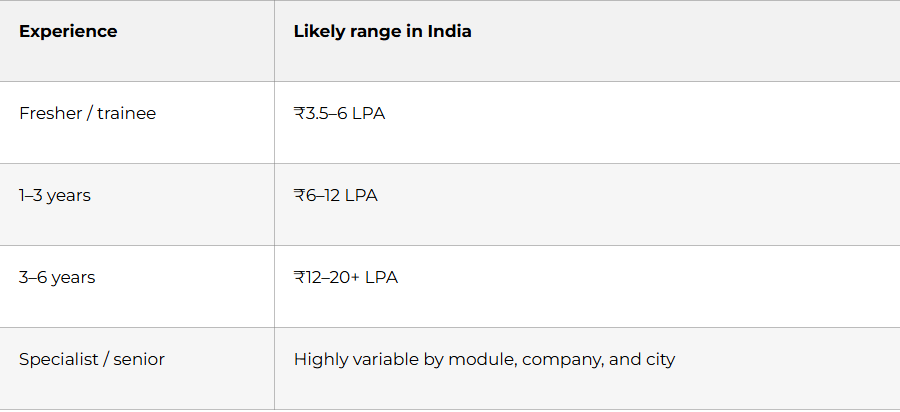
Salary discussion tips:
- Give a range, not one fixed figure.
- Anchor around role, city, certifications, and hands-on scope.
- Be careful with inflated salary sites that mix consulting, specialist, and niche high-end roles.
- If you are a fresher, frame expectations as market-aligned and learning-oriented.
- If you have certification plus hands-on project work, make both visible in the discussion.
Sample line:
“Based on my current ServiceNow skills, project exposure, and market trends for similar roles in India, I am looking for a fair opportunity in the range of X to Y LPA, while staying open to the full role scope and growth path.”
Thank-you and follow-up emails
Thank-you email template
Subject: Thank you — ServiceNow interview
Hello [Interviewer Name],
Thank you for taking the time to speak with me today regarding the ServiceNow role. I enjoyed our discussion, especially the conversation around [ITSM / scripting / Flow Designer / ACLs / platform automation].
The role aligns well with my experience in [ServiceNow administration / scripting / catalog development / debugging / integrations], and I would be excited to contribute to your team.
Thank you again for your time and consideration.
Best regards,
[Your Name]
[Phone Number]
[Email]
Follow-up email after 4–7 days
Subject: Follow-up on ServiceNow interview
Hello [Interviewer Name],
I hope you are doing well. I am writing to follow up on the ServiceNow interview process for the [Role Name] position. I remain very interested in the opportunity and wanted to check whether there are any updates regarding the next steps.
Thank you for your time and consideration.
Best regards,
[Your Name]
Recruiter follow-up after application
Subject: Application for ServiceNow role
Hello [Recruiter Name],
I recently applied for the ServiceNow position and wanted to express my interest directly. My background includes [ITSM / scripting / Flow Designer / ACLs / catalog development / integrations], and I believe my profile aligns well with the role requirements.
I would be glad to share any additional details if needed.
Best regards,
[Your Name]
Final 30-day checklist
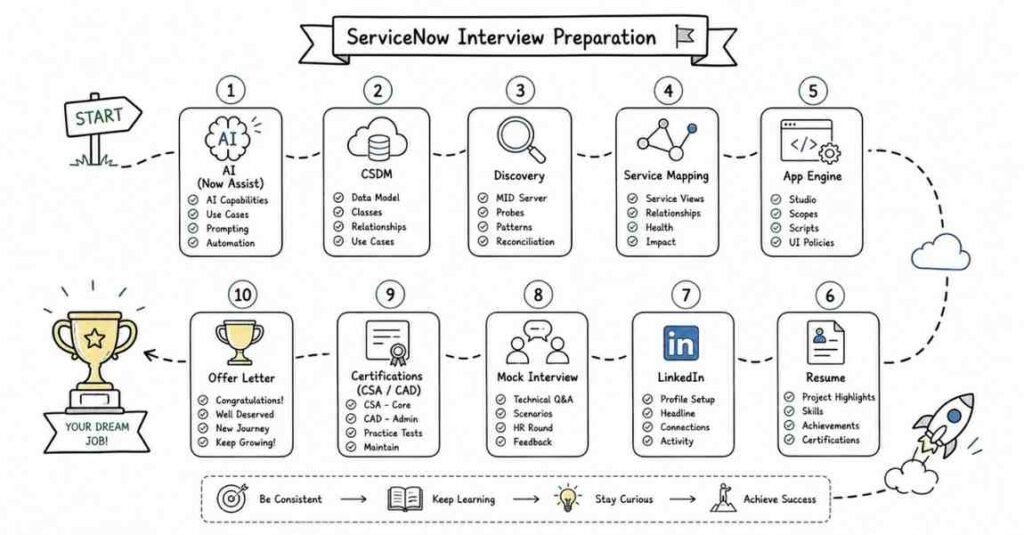
Use this as your last-month execution checklist before interviews.
Week 1
- Review ServiceNow basics, architecture, tables, dictionary, scope, and update sets.
- Memorize key concepts: instance, table extension, ACL, plugin, application scope.
- Practice 40 beginner questions aloud.
- Update resume summary and core skills.
Week 2
- Revise client scripts, business rules, GlideRecord, GlideAjax, script includes, and UI policies.
- Build or review one PDI scripting project.
- Prepare 10 STAR stories from work, training, or practice.
- Update LinkedIn headline, About section, and skills.
Week 3
- Revise Incident, Problem, Change, CMDB, Flow Designer, import sets, integrations, and Service Portal.
- Practice project explanations and scenario questions.
- Prepare salary range and job-change answers.
- Draft thank-you and follow-up emails.
Week 4
- Revise ACLs, debugging, logs, update set collisions, CSDM, Discovery, Service Mapping, and Now Assist basics.
- Practice full interview flow: self-introduction, technical round, HR round.
- Read your resume line by line and prepare proof for every claim.
- Apply consistently and track applications and recruiter responses.
Final 3 days
- Read only your notes, not new topics.
- Practice concise answers, not lectures.
- Sleep properly and keep documents ready.
- Prepare one strong opening introduction and one strong closing statement.