
How to Learn System Design in 90 Days : A Beginner’s Guide to Job-Ready Skills
Table of Contents
If you want to learn system design in a way that actually makes sense, this 90-day guide gives you a simple path from basics to interview-ready confidence. You will start with requirements, scalability, networking, and databases, then move into APIs, caching, queues, security, low-level design, and real case studies. The goal is not to make you memorize terms; it is to help you think like an engineer who can build reliable systems. For students in Hyderabad, Telangana, Andhra Pradesh, and across India, this is a practical roadmap to a high-value software skill.
Why System Design Matters
System design is the skill that helps you understand how software works at scale. Instead of only writing code for one feature, you learn how the full product behaves when users increase, data grows, and failures happen. That is why companies want engineers who can make smart decisions about architecture, performance, availability, and cost.
This skill is especially useful if you want to grow into backend, platform, or full-stack roles. It also helps in interviews because many companies ask candidates to explain trade-offs, choose the right storage, and design systems that can handle real traffic. If you can do that clearly, you stand out fast.
- It helps you build scalable software.
- It improves your architecture thinking.
- It prepares you for backend and product interviews.
- It teaches you how to make trade-offs wisely.
- It adds long-term value to your software career.
How to Start Learning
The best way to learn system design is to begin with concepts that explain why systems fail or succeed. Do not jump straight into advanced microservices or distributed systems without understanding requirements, latency, and data storage. A strong foundation makes everything else easier to learn.
Start with one question: what problem is the system solving, and what happens when many users try to use it at the same time? Once you can answer that, system design starts to feel less abstract. From there, you can move step by step into the major building blocks of modern applications.
Step 1: Learn the basics
- Creative and practical work.
- Strong demand in product and startup companies.
- Good mix of design, psychology, and business.
- Remote and freelance opportunities.
- Easy to build a portfolio with real projects.
Step 2: Learn to ask the right questions
Before designing anything, ask what the system must do, how fast it should respond, and how many users it must support. This habit helps you think like an engineer instead of guessing solutions. Good system designers always begin with clear requirements.
Step 3: Study common building blocks
Learn how databases, caches, APIs, queues, and load balancers fit together. These components appear in almost every design interview. Once you understand them, you can compare options and choose the best one for a given problem.
90-Day Learning Plan
Month | Focus Area | Outcome |
Month 1 | Requirements, scalability, networking, databases | You understand the system design foundation |
Month 2 | APIs, caching, queues, microservices, security | You can compare and explain architecture choices |
Month 3 | Low-level design, observability, cloud basics, case studies | You can present real design solutions in interviews |
Month 1: Build the Foundation
Month 1 is where you build the base. If you skip it, the rest of the course will feel confusing. Your focus should be on understanding why systems need to scale, what makes them slow, and how data moves between users, services, and databases.
Week 1: Requirements and Design Thinking
System design starts with requirements. Learn how to separate functional requirements from non-functional requirements, and practice identifying user needs before choosing any technology. This first week sets the tone for everything that follows.
- Learn what the system should do.
- Understand user and business needs.
- Separate functional and non-functional requirements.
- Practice asking clarifying questions.
- Think about performance and reliability early.
Week 2: Scalability and Reliability
Scalability means a system can handle growth without breaking. Reliability means the system keeps working even when things go wrong. Learn horizontal scaling, vertical scaling, redundancy, and fault tolerance so you can design systems that stay stable under pressure.
Concept | Meaning |
Scalability | Handles more load over time |
Reliability | Stays available and dependable |
Fault Tolerance | Keeps working during failures |
Redundancy | Uses backups to reduce risk |
Week 3: Networking Basics
Networking is the path that data takes from one place to another. Learn DNS, HTTP, HTTPS, load balancing, and latency so you can understand how requests move through a system. This knowledge helps you explain why some applications feel fast and others feel slow.
- Learn how DNS works.
- Understand HTTP vs HTTPS.
- Study load balancers.
- Review latency and response time.
- Practice tracing request flow.
Week 4: Databases and Storage
Databases store the data that powers applications. Learn SQL and NoSQL basics, indexing, replication, and sharding. You should also understand when to use relational databases and when a NoSQL approach makes more sense.
Month 2: Core Architecture Concepts
Month 2 is where your design thinking gets more advanced. You will learn the components that make modern systems fast, flexible, and reliable. This is where most interview questions begin to sound practical instead of theoretical.
Week 5: API Design
APIs help different parts of a system communicate. Learn REST basics, endpoints, request methods, status codes, and versioning. Good API design makes systems easier to use, maintain, and scale.
- Learn GET, POST, PUT, and DELETE.
- Understand request and response formats.
- Study status codes.
- Practice simple endpoint planning.
- Think about versioning and consistency.
Week 6: Caching and Performance
Caching improves performance by storing data that is used often. Learn browser caching, server caching, Redis basics, and CDN concepts. This week shows you how to reduce database load and improve response time.
Caching Type | Why It Helps |
Browser Cache | Speeds up repeated visits |
Server Cache | Reduces backend work |
Redis | Fast in-memory access |
CDN | Delivers content quickly worldwide |
Week 7: Message Queues and Async Work
Not every task should happen immediately. Learn message queues, pub-sub, and asynchronous processing so you can design systems that handle heavy work in the background. This is important for notifications, file processing, payments, and large-scale event handling.
- Learn why async processing matters.
- Understand queues and workers.
- Study pub-sub communication.
- Explore event-driven flow.
- Practice background task thinking.
Week 8: Microservices and Security
Learn the difference between monolithic and microservice architectures, and understand when each approach is useful. Also study authentication, authorization, and basic security planning. These topics help you design systems that are not only scalable but also safe.
Month 3: Low-Level Design and Interviews
Month 3 is about becoming interview-ready. You will combine your knowledge and practice explaining full designs clearly. At this stage, your goal is not just to know the theory; it is to speak about design with confidence.
Week 9: Low-Level Design Basics
Low-level design focuses on classes, objects, interfaces, and relationships. Learn OOP thinking, UML basics, and how to structure code logically. This matters because many companies want engineers who can think at both the architecture level and the code level.
- Learn classes and objects.
- Understand interfaces and abstractions.
- Practice UML diagrams.
- Study object-oriented structure.
- Review code organization principles.
Week 10: Design Patterns
Design patterns help you solve common software problems in a reusable way. Learn singleton, factory, observer, strategy, and adapter patterns at a practical level. You do not need to memorize every pattern; you need to understand when and why to use them.
Pattern | Use Case |
Singleton | One shared instance |
Factory | Create objects flexibly |
Observer | Notify many subscribers |
Strategy | Switch behavior easily |
Adapter | Connect incompatible parts |
Week 11: Monitoring and Cloud Basics
Modern systems need visibility. Learn logging, metrics, alerting, and tracing so you can understand how a system behaves in production. Also study cloud basics like containers, deployment, and infrastructure ideas so you can connect design decisions with real-world operations.
Week 12: Case Studies and Mock Interviews
Use this week to practice complete system design questions. Build designs for a URL shortener, chat application, notification system, file upload platform, or ride-booking flow. Make sure each answer includes requirements, APIs, database choices, caching, scaling, and failure handling..
How to Practice Daily
You will improve faster if you practice a little every day instead of reading too much at once. Try to spend time on one concept, one example, and one design question each day. That keeps your learning active and makes the ideas stick.
- Read one concept and explain it in your own words.
- Draw one architecture diagram.
- Compare two possible design choices.
- Solve one interview-style question.
- Review your answer and improve it.
System Design Projects to Try
Practice works best when you build or sketch real systems. These project ideas will help you connect theory to practical design thinking. Even if you do not code the full systems, designing them on paper is a powerful learning step.
- URL shortener.
- Chat app.
- Notification system.
- Video streaming platform.
- File upload and storage system.
- Ride-booking app.
Career Paths After This Course
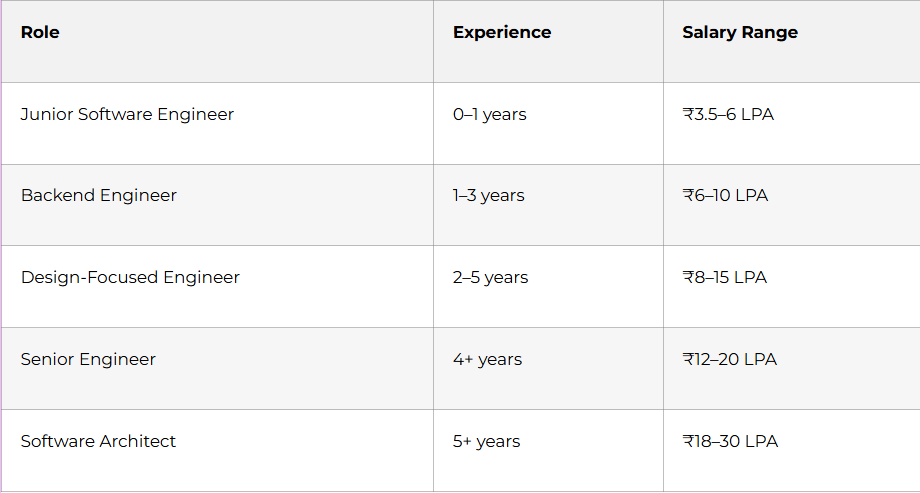
System design is not only for architects. It helps backend developers, full-stack engineers, and senior software roles grow faster. If you understand design well, you can take on more responsibility and solve bigger problems.
Why Choose Frontlines Edutech
Frontlines Edutech helps students learn practical, job-focused skills in a way that feels clear and achievable. The training is designed for beginners who want real engineering understanding, not just theory. Students also benefit from guided learning, interview support, and a roadmap that matches current industry needs.
- Hands-on learning with real projects.
- Beginner-friendly explanations for complex topics.
- Job-focused curriculum with practical outcomes.
- Support for resumes, interviews, and career preparation.
- Training aligned with Indian hiring expectations.
Resume keywords
- UI design
- UX design
- Figma
- Wireframing
- Prototyping
- User research
- Interaction design
- Design systems
- Usability testing
- Information architecture
- Visual design
- Product desig
Where to apply
- LinkedIn Jobs
- Naukri
- Wellfound
- Indeed
- startup career pages
- design communities
Frequently Asked Questions
1. How long does it take to become a UI/UX designer?
It usually takes 3 to 6 months of consistent learning to become job-ready, depending on how much project work and portfolio building you do.
2. Is UI/UX design a good career in India?
Yes, it is a strong career because every digital product needs a good user experience. It is especially good for creative people who enjoy solving user problems.
3. Which skill should I learn first?
Start with design fundamentals, then move into UX thinking, wireframing, and Figma. After that, build prototypes and case studies.
4. Do I need coding to become a UI/UX designer?
No, coding is not required for most UI/UX roles. However, basic knowledge of HTML and CSS can help you work better with developers.
5. What is the best specialization for beginners?
A combined UI/UX path is the best starting point. It gives you both design thinking and visual design skills.
6. Can I get a job without experience?
Yes, if you have a strong portfolio, case studies, and a clear design process. Internships and freelance work can help you enter the field faster.
7. Which tools should I learn first?
Start with Figma, FigJam, and basic research tools. Then move into prototyping and design system practice.
8. Is UI/UX design remote-friendly?
Yes, many UI/UX roles are remote-friendly because the work can be done digitally and shared easily with teams.
9. What kind of projects should I show in interviews?
Show app redesigns, website redesigns, user research studies, wireframes, and prototypes. Employers want to see how you think and solve user problems.