ServiceNow 90-Day Course Roadmap: From Beginner to Job-Ready Professional
☁️ Start Your ServiceNow Career Today
Learn ServiceNow from scratch with hands-on projects and daily practice inside our ServiceNow Course.
Starting a career in ServiceNow isn’t just about learning a platform—it’s about opening doors to one of the fastest-growing technology ecosystems in the world. Companies across India, from startups to giants like Infosys, TCS, Accenture, and Wipro, are actively hunting for ServiceNow professionals, offering salaries ranging from ₹5-7 lakhs for freshers to ₹15-25 lakhs for experienced professionals. This roadmap transforms complete beginners into confident ServiceNow administrators and developers ready to crack interviews and land their dream jobs.
Why ServiceNow Skills Are Your Gateway to High-Paying Tech Careers
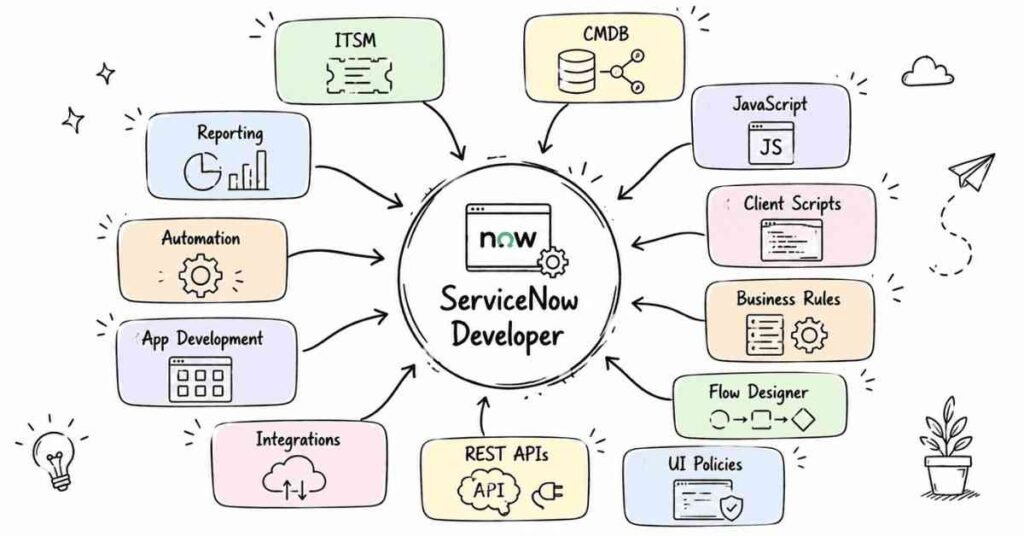
ServiceNow has become the backbone of digital transformation for enterprises worldwide. The platform manages everything from IT services to HR operations, making ServiceNow professionals indispensable in modern organizations. Cities like Bangalore, Hyderabad, Pune, Gurgaon, Mumbai, Chennai, and Noida are experiencing explosive demand for certified ServiceNow experts.
Fresh graduates with ServiceNow skills are landing positions with starting salaries between ₹6-7 lakhs annually, while professionals with 2-3 years of experience command packages reaching ₹15-16 lakhs. The career progression is equally impressive—architects and consultants with 8+ years earn between ₹18-25 lakhs in India. What makes this even more attractive is that ServiceNow doesn’t demand a traditional computer science background; with structured training, anyone willing to learn can master this platform.
Understanding the Complete Learning Journey
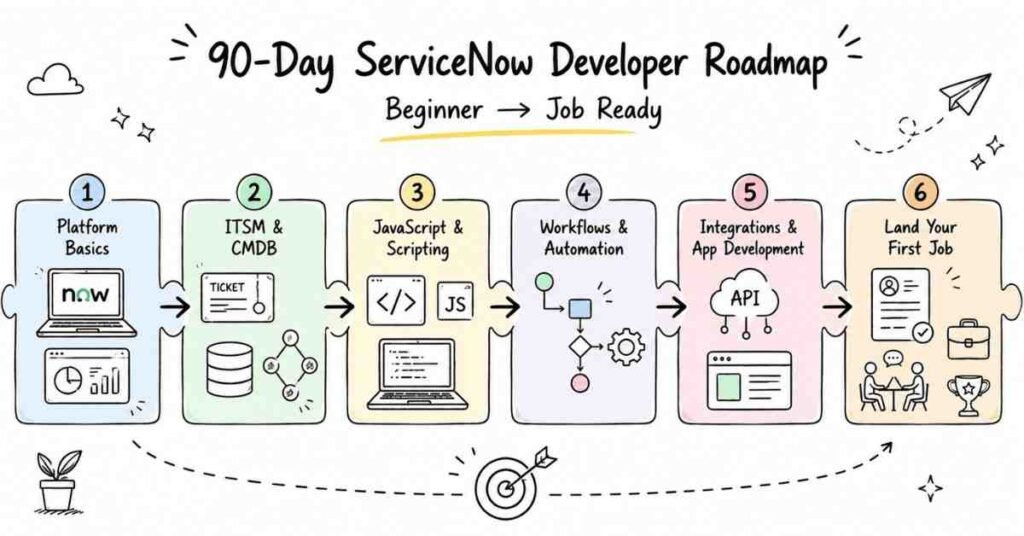
This 90-day roadmap isn’t just another course outline—it’s a carefully structured progression designed specifically for learners who want to transform from absolute beginners to job-ready professionals. The program covers 24 comprehensive modules spread across three months, with each week building upon the previous one to ensure deep understanding rather than surface-level knowledge.
Unlike generic online tutorials, this roadmap combines theoretical knowledge with hands-on practice, daily assignments, and real-world project scenarios that mirror actual workplace challenges. You’ll start with basic platform navigation and progress to advanced integrations, including cutting-edge technologies like ChatGPT and Salesforce connectivity. The journey is specifically designed with non-IT students in mind, breaking down complex concepts into digestible daily lessons that anyone can follow.
Month 1: Building Your ServiceNow Foundation (Days 1-30)
Week 1: Platform Introduction and Core Concepts (Days 1-7)
Day 1: Welcome to the ServiceNow Universe
Understanding what ServiceNow actually is and why global companies invest millions in this platform. You’ll learn about cloud computing fundamentals and how ServiceNow leverages cloud architecture to deliver enterprise solutions. The day ends with creating your first personal developer instance—your own sandbox environment for practice.
Day 2: ITIL Foundation and ServiceNow’s Role
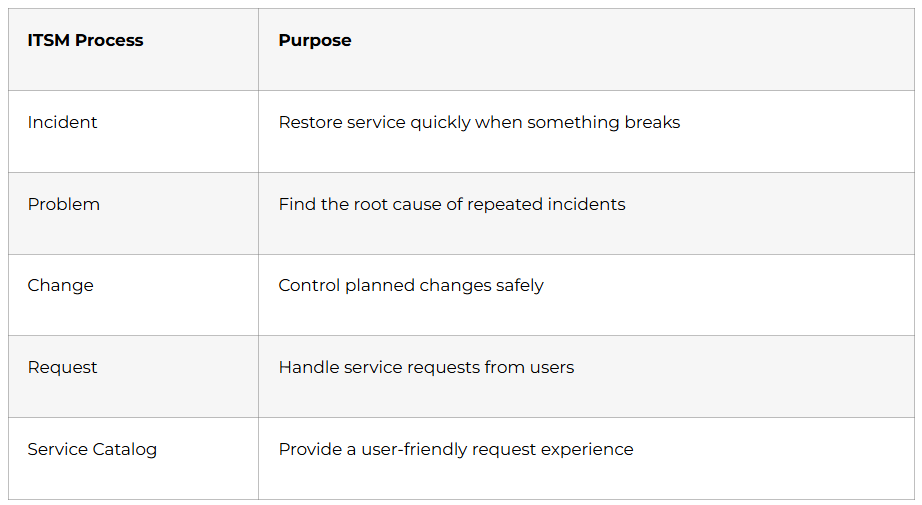
Exploring the Information Technology Infrastructure Library (ITIL) framework that forms the backbone of IT service management. You’ll discover how ServiceNow implements ITIL best practices and why understanding these concepts is crucial for your career. Real-world examples show how organizations use ServiceNow to streamline their IT operations.
Day 3: Navigating the ServiceNow Interface
Hands-on exploration of the ServiceNow user interface, understanding application menus, modules, and navigation patterns. You’ll learn keyboard shortcuts, search functionality, and customization options that make daily work efficient. By day’s end, you’ll navigate ServiceNow as comfortably as browsing your favorite website.
Day 4: Creating Your First Fields and Forms
Diving into field creation, understanding different field types (text, choice, reference, date/time), and when to use each one. You’ll build your first custom form with multiple fields and learn about sections, views, and form layouts. This hands-on practice gives you confidence in platform customization.
Day 5: Dictionary Overrides and Reference Qualifiers
Mastering advanced form configuration techniques including dictionary overrides that modify field behavior. Reference qualifiers become your tool for filtering dropdown options based on user selections or business logic. You’ll create dependent fields that change based on other field values—a critical skill for real projects.
Day 6: Working with Related Lists and Views
Understanding how to connect different tables through related lists, creating powerful data relationships. You’ll configure personalized views that display exactly the information users need without clutter. Practice exercises involve building a complete form with related lists showing hierarchical data.
Day 7: Week 1 Project – Build Your First Application Form
Consolidating everything learned by creating a complete incident management form with custom fields, views, related lists, and reference qualifiers. This project demonstrates your ability to translate business requirements into ServiceNow configurations. You’ll present your work and receive feedback on best practices.
Week 2: Update Sets and User Administration (Days 8-14)
Day 8: Introduction to Update Sets
Learning the crucial concept of update sets—ServiceNow’s version control system for tracking configuration changes. You’ll understand why update sets are essential for moving changes between development, testing, and production environments. Creating and managing local update sets becomes second nature.
Day 9: Retrieved Update Sets and Merging
Mastering the process of retrieving update sets from other instances and applying them to your environment. You’ll learn conflict resolution techniques when update sets contain overlapping changes. Practical exercises involve migrating configurations between instances without breaking existing functionality.
Day 10: Update Set Best Practices and Troubleshooting
Exploring advanced update set management including naming conventions, documentation standards, and preview mechanisms. You’ll learn what to do when update sets fail and how to roll back problematic changes. Real-world scenarios prepare you for production environment challenges.
Day 11: User Creation and Management
Diving into user administration—creating user accounts, understanding user profiles, and managing user preferences. You’ll learn about active/inactive users, password policies, and security best practices. Hands-on practice involves creating different user types for various organizational roles.
Day 12: Group Creation and Role Assignment
Understanding ServiceNow’s powerful security model through groups and roles. You’ll create groups for different departments, assign roles that control access to specific features, and understand role inheritance. Practice scenarios involve designing security structures for fictional companies.
Day 13: User Administration Advanced Concepts
Exploring user impersonation for testing, delegation features, and multi-factor authentication setup. You’ll learn about user properties, localization, and timezone management for global organizations. Advanced exercises involve troubleshooting user access issues.
Day 14: Week 2 Project – Build Complete User Management System
Creating an end-to-end user management solution with multiple user types, groups, and roles properly configured. You’ll implement security controls ensuring users only access appropriate data and functions. This project demonstrates your understanding of ServiceNow’s security architecture.
Week 3: Reports and Service Level Agreements (Days 15-21)
Day 15: Report Creation Fundamentals
Learning to create meaningful reports that transform raw data into actionable insights. You’ll explore bar charts, pie charts, line graphs, and when to use each visualization type. Hands-on exercises involve creating reports from incident and change management data.
Day 16: Advanced Reporting Techniques
Mastering report filters, groupings, and trend analysis that reveal patterns in organizational data. You’ll learn about scheduled reports that automatically deliver insights to stakeholders’ inboxes. Practice involves creating executive dashboards with multiple report types.
Day 17: Homepage Creation and Report Sharing
Building custom homepages that display relevant reports based on user roles and responsibilities. You’ll learn report sharing strategies, permissions management, and embedding reports in portals. Exercises involve designing role-specific homepages for different departments.
Day 18: Introduction to Service Level Agreements (SLAs)
Understanding what SLAs are and why they’re critical for measuring service quality and performance. You’ll learn about response times, resolution times, and how SLAs drive accountability. Real-world examples show how companies use SLAs to maintain service excellence.
Day 19: SLA Configuration and Management
Creating your first SLA definitions with start conditions, pause conditions, and escalation workflows. You’ll configure SLA schedules that account for business hours, holidays, and time zones. Hands-on practice involves building SLAs for ticket resolution scenarios.
Day 20: SLA Advanced Concepts and Troubleshooting
Exploring SLA retroactive calculations, breach predictions, and notification strategies. You’ll learn debugging techniques when SLAs don’t trigger correctly and performance optimization methods. Advanced scenarios prepare you for complex enterprise requirements.
Day 21: Week 3 Project – Complete Reporting and SLA System
Building an integrated system combining reports, dashboards, and SLAs that monitor service performance. Your project includes executive dashboards showing SLA compliance rates and trend analysis. This deliverable showcases your ability to implement performance management systems.
Week 4: Access Controls and Data Management (Days 22-30)
Day 22: Access Control Lists (ACL) Fundamentals
Understanding how ServiceNow secures data through Access Control Lists that govern who can see and modify information. You’ll learn the four basic ACL operations: Create, Read, Write, and Delete. Practical exercises involve creating table-level and field-level security rules.
Day 23: Advanced ACL Configuration
Mastering conditional ACLs that change permissions based on record state, user location, or custom business logic. You’ll explore script-based ACLs for complex security requirements. Real-world scenarios involve implementing multi-level approval security.
Day 24: ACL Troubleshooting and Best Practices
Learning to diagnose why users can’t access expected data and how to fix ACL conflicts. You’ll understand ACL evaluation order and how to optimize for performance. Debug exercises prepare you for production security challenges.
Day 25: Introduction to Import Sets
Discovering how to bring external data into ServiceNow through import sets and staging tables. You’ll learn about CSV, Excel, and JDBC data sources and their configuration. Hands-on practice involves importing user data from spreadsheets.
Day 26: Transform Maps and Data Transformation
Mastering transform maps that convert staged data into ServiceNow tables with proper field mappings. You’ll learn field mapping strategies, data coalescing for updates vs. inserts, and script-based transformations. Practice scenarios involve complex data conversions.
Day 27: Advanced Data Loading Techniques
Exploring scheduled imports, error handling, and data validation strategies that ensure data quality. You’ll learn about relationship mapping when importing hierarchical data. Advanced exercises involve importing configuration items with dependencies.
Day 28: Introduction to Custom Applications
Understanding ServiceNow’s application development framework and when to build custom applications. You’ll explore application scoping, namespacing, and the application portfolio management interface. Initial exercises involve planning a custom application architecture.
Day 29: Building Your First Custom Application
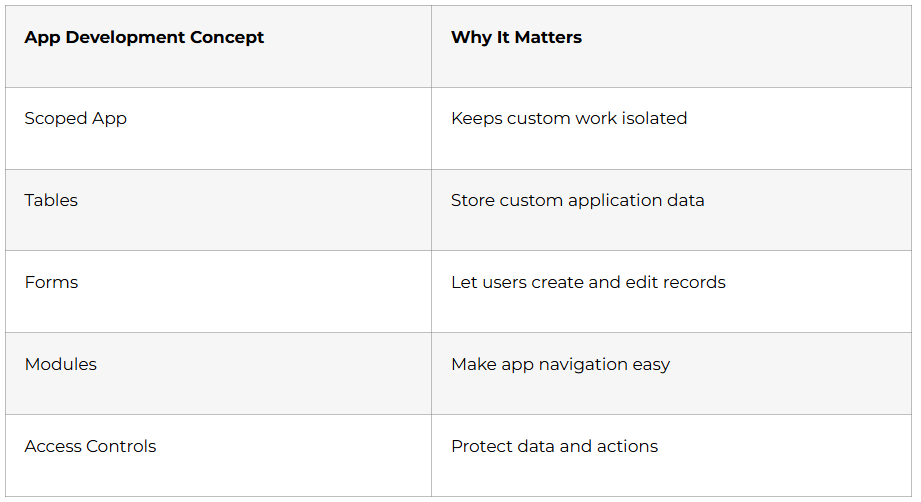
Creating a complete custom application from scratch with tables, forms, and modules. You’ll implement application-specific user roles and access controls. This hands-on project brings together everything learned in Month 1.
Day 30: Month 1 Capstone Project
Developing a comprehensive asset management application that demonstrates all skills acquired during Month 1. Your application includes custom tables, forms with complex fields, reports, SLAs, security controls, and data import capabilities. This portfolio piece proves your foundational ServiceNow competency to potential employers.
💡 Need Hands-On Practice?
Start implementing every topic with step-by-step tutorials inside our ServiceNow How-to Guides.
Month 2:Automation, Scripting, and Advanced Platform Features (Days 31-60)
Week 5: Email Notifications and Client-Side Scripting (Days 31-38)
Day 31: Email Notification Fundamentals
Starting Month 2 with one of the most practical features—automated email notifications that keep stakeholders informed throughout business processes. You’ll learn about notification events, recipients, subject lines, and email body composition using HTML templates. Hands-on practice involves creating notifications for ticket assignments, approvals, and status changes.
Day 32: Advanced Email Notifications and Business Rules Integration
Exploring conditional notifications that trigger only when specific criteria are met, preventing email overload. You’ll integrate business rules with notifications to create intelligent alerting systems. Practice scenarios include escalation notifications and multi-level approval workflows.
Day 33: Email Properties and Notification Troubleshooting
Mastering email configuration settings including SMTP setup, email authentication, and reply-to addresses. You’ll learn debugging techniques when notifications don’t send and how to track email delivery status. Advanced exercises involve customizing email templates with dynamic content.
Day 34: Introduction to Client Scripts
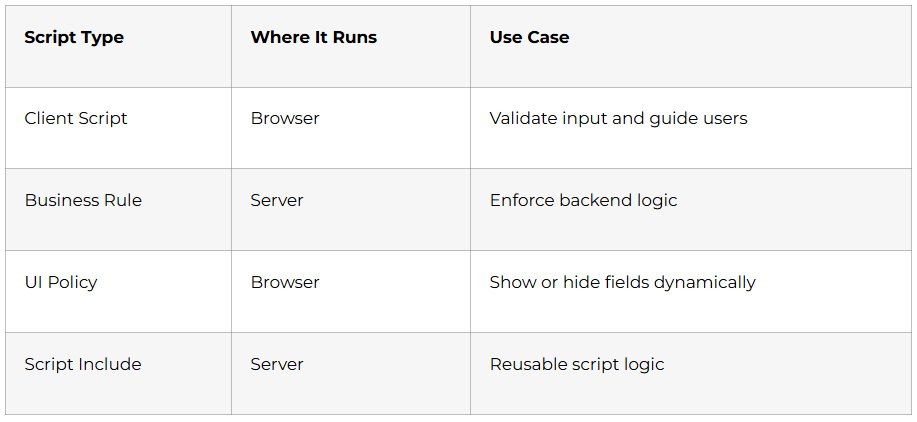
Entering the exciting world of client-side JavaScript that makes forms interactive and user-friendly. You’ll understand the four types of client scripts: onLoad, onChange, onSubmit, and onCellEdit. Initial coding exercises teach you to display messages and validate user inputs.
Day 35: onLoad and onChange Client Scripts
Learning to execute code when forms load using onLoad scripts that set default values or show contextual information. onChange scripts respond to field modifications, enabling dynamic forms that adapt based on user selections. Real-world examples include cascading dropdowns and automatic field calculations.
Day 36: onSubmit and onCellEdit Client Scripts
Mastering form submission validation through onSubmit scripts that prevent data entry errors before records save. OnCellEdit scripts enhance list views by enabling inline editing with immediate validation. Practice exercises build comprehensive form validation systems.
Day 37: Client Script Best Practices and Performance
Understanding client script performance optimization techniques that keep your forms fast and responsive. You’ll learn when to use client scripts versus other automation methods and how to avoid common pitfalls. Debug exercises teach troubleshooting techniques using browser developer tools.
Day 38: Week 5 Project – Interactive Smart Form
Creating a comprehensive incident management form with intelligent client scripts that guide users through proper ticket submission. Your form includes automatic priority calculation, conditional field displays, dynamic dropdown filtering, and comprehensive validation. This project demonstrates your ability to enhance user experience through scripting.
Week 6: UI Policies, Data Policies, and UI Actions (Days 39-45)
Day 39: UI Policies Fundamentals
Discovering declarative alternatives to client scripts through UI Policies that control form behavior without coding. You’ll learn to make fields mandatory, read-only, or hidden based on business conditions. Hands-on exercises demonstrate when UI Policies are preferable to client scripts.
Day 40: Advanced UI Policies and Reverse Logic
Mastering complex UI Policy conditions with multiple criteria and reverse-if-false logic. You’ll create cascading UI Policies where multiple policies work together to control form behavior. Practice scenarios involve building dynamic forms for different user roles.
Day 41: Data Policies and Enforcement
Understanding Data Policies that enforce business rules regardless of how records are created—through forms, imports, or APIs. You’ll learn the critical difference between UI Policies (form-only) and Data Policies (platform-wide). Exercises involve implementing data quality standards across all entry points.
Day 42: Introduction to UI Actions
Learning to create custom buttons and links that extend form functionality beyond standard operations. You’ll understand different UI Action types: form buttons, list buttons, context menu items, and related list actions. Initial projects involve creating approval buttons with custom workflows.
Day 43: Advanced UI Actions and Server-Side Processing
Mastering UI Actions with server-side scripts that perform complex operations when users click custom buttons. You’ll learn to pass parameters, display confirmation dialogs, and provide user feedback. Advanced scenarios include bulk update actions and integration triggers.
Day 44: UI Actions Best Practices and Condition Building
Exploring UI Action visibility conditions that show buttons only when appropriate for user roles and record states. You’ll implement role-based UI Actions that enhance security while improving usability. Practice exercises involve creating complete button sets for custom workflows.
Day 45: Week 6 Project – Complete Form Automation System
Building an integrated system combining UI Policies, Data Policies, and UI Actions that automate an entire business process. Your project includes smart forms that adapt to user input, enforce data quality, and provide custom actions for different workflow stages. This deliverable showcases your automation expertise without complex coding.
Week 7: Business Rules and Service Catalogs (Days 46-52)
Day 46: Business Rules Fundamentals
Entering advanced server-side automation with Business Rules that execute when database records change. You’ll learn the four execution types: before, after, async, and display. Initial coding exercises teach you to automatically populate fields and validate data server-side.
Day 47: Before and After Business Rules
Mastering synchronous business rules that execute before database writes (for validation) and after (for follow-up actions). You’ll understand when to use each type and how they impact transaction performance. Practice scenarios include automatic assignment rules and data enrichment.
Day 48: Async and Display Business Rules
Learning asynchronous business rules that execute in the background without slowing user interactions. Display business rules modify forms before showing them to users without making database changes. Advanced exercises involve creating complex notification systems and calculated fields.
Day 49: Introduction to Service Catalogs
Discovering ServiceNow’s self-service portal system that empowers users to request services without technical knowledge. You’ll learn the catalog hierarchy: categories, catalog items, and the request workflow. Initial projects involve creating simple catalog items for common IT requests.
Day 50: Catalog Items and Variables
Mastering catalog item design with variables that collect user input through intuitive forms. You’ll explore different variable types: text, choice, reference, lookup, and containers. Hands-on practice involves building laptop request forms with automatic approval routing.
Day 51: Record Producers and Order Guides
Learning advanced catalog features including Record Producers that create records directly instead of requests. Order Guides bundle multiple catalog items into single-page checkout experiences. Practice scenarios involve creating new hire onboarding packages and department-specific service bundles.
Day 52: Week 7 Project – Complete Self-Service Portal
Building an enterprise-ready service catalog with multiple categories, diverse catalog items, Record Producers, and Order Guides. Your portal includes hardware requests, software installations, access permissions, and facilities services. This project demonstrates your ability to design user-friendly self-service experiences.
🧠Prepare for ServiceNow Interviews
Boost your confidence with 200+ ServiceNow Admin & Developer interview questions.
Access the full guide here
Week 8: Flow Designer and Modern Automation (Days 53-60)
Day 53: Introduction to Flow Designer
Entering ServiceNow’s modern low-code automation platform that replaces traditional workflows. You’ll learn the visual drag-and-drop interface for creating complex automation without traditional scripting. Initial exercises involve building simple approval flows with email notifications.
Day 54: Flow Components and Triggers
Understanding Flow Designer building blocks: triggers (what starts the flow), actions (what the flow does), and logic (decision points). You’ll create flows triggered by record creation, modification, and scheduled intervals. Practice scenarios include automatic ticket routing based on multiple conditions.
Day 55: Subflows and Reusable Components
Mastering Subflows that encapsulate common automation sequences for reuse across multiple flows. You’ll learn to create modular, maintainable automation by breaking complex processes into manageable pieces. Advanced exercises involve building approval Subflows used across different request types.
Day 56: Actions and Integration Hub
Discovering pre-built Actions that connect ServiceNow to external systems like Slack, Microsoft Teams, and JIRA. You’ll explore creating custom Actions that extend Flow Designer capabilities for unique requirements. Integration scenarios involve posting notifications to chat platforms and syncing data.
Day 57: Scheduled Jobs and Background Scripts
Learning to automate recurring tasks through Scheduled Jobs that run daily, weekly, or custom intervals. Background Scripts provide one-time automation for data cleanup and bulk operations. Practice exercises include automatic ticket closure and data synchronization jobs.
Day 58: Script Includes and Code Reusability
Understanding Script Includes that centralize reusable JavaScript functions accessible across the platform. You’ll learn object-oriented programming principles in ServiceNow context. Advanced coding exercises involve creating utility libraries for common operations.
Day 59: GlideRecord and Database Operations
Mastering GlideRecord—ServiceNow’s API for querying and manipulating database records programmatically. You’ll learn to query, insert, update, and delete records using proper syntax and performance optimization. Extensive coding practice prepares you for real-world scripting scenarios.
Day 60: Month 2 Capstone Project – Automated Department Onboarding System
Creating a comprehensive automation system that orchestrates employee onboarding from request to completion. Your system includes service catalog items, Flow Designer workflows, automatic approvals, account creation, equipment provisioning, and training scheduling. This portfolio piece demonstrates advanced automation capabilities employers seek.
Month 3: Advanced Integrations, Specialization, and Job Readiness (Days 61-90)
Week 9: GlideAjax and Advanced Scripting (Days 61-67)
Day 61: Introduction to GlideAjax
Beginning Week 9 with client-server communication through GlideAjax—the bridge that connects client-side scripts to server-side data securely. You’ll understand when to use GlideAjax instead of direct database queries and how it improves form performance. Initial exercises involve creating simple GlideAjax calls to fetch reference data.
Day 62: Building Script Includes for GlideAjax
Mastering the server-side Script Includes that power GlideAjax functionality with proper structure and security. You’ll learn about client-callable functions, parameter passing, and return value formatting. Practice scenarios include dynamic dropdown population based on user selections.
Day 63: Advanced GlideAjax Patterns and Error Handling
Exploring complex GlideAjax implementations including callbacks, promise handling, and graceful error management. You’ll implement loading indicators and user feedback for asynchronous operations. Advanced projects involve cascading dropdowns with multiple dependency levels.
Day 64: Performance Optimization and Best Practices
Learning to write efficient server-side code that scales under heavy user load without degrading performance. You’ll understand query optimization, caching strategies, and when to avoid synchronous operations. Debug exercises identify and fix performance bottlenecks in existing implementations.
Day 65: Scripting Security and ACL Implementation
Understanding script security contexts, elevated privileges, and how to prevent security vulnerabilities in custom code. You’ll learn about script execution sandboxing and secure coding practices. Real-world scenarios involve implementing row-level security through scripted ACLs.
Day 66: Advanced Business Rule Patterns
Mastering complex business rule implementations including parent-child record automation and cross-table updates. You’ll explore setWorkflow() functionality, g_scratchpad for client script communication, and transaction control. Advanced exercises involve building approval automation that spans multiple related tables.
Day 67: Week 9 Project – Dynamic Multi-Step Form Application
Creating a sophisticated multi-step request form using GlideAjax for dynamic field population, Script Includes for server logic, and advanced client scripts for seamless user experience. Your application includes conditional sections, automatic calculations, real-time validation, and intelligent routing based on form inputs. This project showcases your advanced scripting capabilities to potential employers.
Build Professional Reports, SLAs & Dashboards
Learn end-to-end ServiceNow development with our ServiceNow Developer Course.
Week 10: REST API and External Integrations (Days 68-74)
Day 68: Introduction to REST APIs and Web Services
Entering the world of enterprise integration with REST (Representational State Transfer) APIs that connect ServiceNow to external systems. You’ll understand HTTP methods (GET, POST, PUT, DELETE), authentication mechanisms, and JSON data formatting. Initial exercises involve consuming public APIs from ServiceNow.
Day 69: Postman and API Testing
Mastering Postman—the industry-standard tool for API testing and documentation. You’ll learn to create collections, manage environments, write test scripts, and generate API documentation. Hands-on practice involves testing ServiceNow’s out-of-box REST APIs.
Day 70: Inbound REST APIs – Exposing ServiceNow Data
Learning to create Scripted REST APIs that expose ServiceNow data to external systems securely. You’ll implement custom endpoints with proper authentication, error handling, and response formatting. Practice scenarios involve building APIs for mobile apps and third-party dashboards.
Day 71: Outbound REST Integration
Exploring REST Message configurations that call external APIs from ServiceNow workflows and business rules. You’ll learn about authentication profiles, HTTP headers, query parameters, and response parsing. Integration exercises involve connecting to payment gateways and notification services.
Day 72: ServiceNow Integration with Other ServiceNow Instances
Understanding multi-instance integration patterns for organizations managing development, testing, and production environments. You’ll implement automated data synchronization and configuration promotion workflows. Advanced scenarios involve building centralized reporting dashboards aggregating data from multiple instances.
Day 73: Spoke Integrations and Integration Hub
Discovering ServiceNow’s Integration Hub with pre-built Spokes that accelerate connections to popular enterprise systems. You’ll explore the Spoke framework and how to customize existing Spokes for unique requirements. Practice involves configuring Slack notifications, Teams messages, and JIRA synchronization.
Day 74: Week 10 Capstone – Salesforce Integration Project
Building a complete bidirectional integration between ServiceNow and Salesforce using Scripted REST APIs. Your integration synchronizes customer records, creates ServiceNow incidents from Salesforce cases, and updates both systems automatically. This portfolio piece demonstrates enterprise integration expertise highly valued by employers.
Week 11: Cutting-Edge AI Integration and Advanced Topics (Days 75-81)
Day 75: Introduction to Kafka Integration
Exploring event-driven architecture through Apache Kafka integration for real-time data streaming. You’ll understand pub-sub messaging patterns, topics, and how ServiceNow consumes and produces Kafka messages. Initial exercises involve setting up Kafka connections and processing event streams.
Day 76: ServiceNow ChatGPT Integration – Part 1
Entering the AI revolution by integrating ChatGPT with ServiceNow for intelligent automation. You’ll learn to call OpenAI APIs from ServiceNow and process natural language inputs. Practice scenarios involve building AI-powered chatbots for IT support.
Day 77: ServiceNow ChatGPT Integration – Part 2
Creating advanced AI use cases including automatic ticket categorization, intelligent response suggestions, and knowledge article generation. You’ll implement prompt engineering techniques that improve AI accuracy for business contexts. Advanced projects involve building virtual agents that resolve common issues without human intervention.
Day 78: Order Management Fundamentals
Understanding ServiceNow Order Management for Telecommunications (OMT) framework for complex product ordering workflows. You’ll explore model categories, resource specifications, service specifications, and product specifications. Initial exercises involve configuring product catalogs with characteristics and options.
Day 79: Order Capture and Decomposition Rules
Mastering order capture processes and decomposition rules that break complex orders into fulfillable tasks. You’ll learn specification relationships and how to design product hierarchies for modular ordering. Practice scenarios involve configuring telecom service bundles with dependencies.
Day 80: Fallout Management and Order Orchestration
Implementing fallout management workflows that handle order exceptions and failures gracefully. You’ll design order orchestration flows that coordinate multiple systems for end-to-end fulfillment. Advanced exercises involve building retry mechanisms and escalation procedures.
Day 81: Week 11 Final Technical Project
Creating a comprehensive AI-powered service management system integrating ChatGPT for intelligent ticket handling, Kafka for event processing, and REST APIs for multi-system orchestration. Your capstone includes automated ticket routing using AI classification, real-time system monitoring through event streams, and seamless integration with external platforms. This enterprise-grade project demonstrates cutting-edge skills that set you apart in the job market.
Week 12: Career Acceleration and Interview Mastery (Days 82-90)
Day 82: ServiceNow CSA Certification Preparation
Beginning your final week with focused Certified System Administrator (CSA) exam preparation covering all topics from the 90-day journey. You’ll review exam objectives, practice with sample questions, and understand the exam format and scoring. Study strategies ensure you’re confident for certification success.
Day 83: Building Your ServiceNow Developer Portfolio
Creating a professional portfolio website showcasing your best projects from the 90-day program. You’ll learn to present technical work for non-technical audiences and demonstrate business value. Your portfolio includes project descriptions, architecture diagrams, and demo videos that prove your capabilities.
Day 84: Resume Building for ServiceNow Professionals
Crafting an ATS-optimized resume that highlights ServiceNow skills, projects, and certifications recruiters seek. You’ll learn industry-standard formatting, keyword optimization for ServiceNow administrator and developer roles, and achievement-focused bullet points. Resume reviews ensure your application stands out in competitive markets.
Day 85: LinkedIn Profile Optimization for ServiceNow Careers
Transforming your LinkedIn profile into a powerful personal brand that attracts recruiters from top companies. You’ll optimize your headline for ServiceNow keywords, craft a compelling about section, and showcase projects with rich media. Strategic connection building targets ServiceNow professionals and hiring managers at dream companies.
Day 86: Job Search Strategy and Platform Navigation
Mastering job platforms including LinkedIn Jobs, Naukri, Indeed, and company career pages where ServiceNow positions are posted. You’ll learn advanced search filters, job alert configuration, and application tracking systems. Research identifies high-hiring companies in Bangalore, Hyderabad, Pune, and other IT hubs.
Day 87: Technical Interview Preparation – ServiceNow Concepts
Drilling deep into technical interview questions covering platform architecture, configuration best practices, and scenario-based problem solving. You’ll practice explaining complex technical concepts in clear, business-focused language. Mock interviews with feedback prepare you for real interview pressure.
Day 88: Behavioral Interview Preparation and STAR Method
Mastering behavioral interviews using the STAR (Situation, Task, Action, Result) framework that showcases your problem-solving abilities. You’ll prepare stories demonstrating teamwork, conflict resolution, learning agility, and leadership potential. Practice sessions build confidence for difficult interview questions.
Day 89: Salary Negotiation and Offer Evaluation
Learning professional negotiation strategies that maximize starting salaries without risking offers. You’ll understand market rates for ServiceNow roles at different experience levels and how to evaluate total compensation packages. Mock negotiations prepare you for real salary discussions with confidence.
Day 90: Course Completion and Career Launch
Celebrating your transformation from beginner to job-ready ServiceNow professional with final assessments and certification ceremony. You’ll receive your Frontlines Edutech course completion certificate, personalized career action plan, and ongoing support access. Final networking session connects you with alumni already working in ServiceNow roles who share job-hunting success stories
🛣️ Explore Complete ServiceNow Career Paths
Find your ideal growth roadmap — Admin, Developer, Architect or Integration Specialist inside our
4. ServiceNow Career Opportunities Waiting for You
The ServiceNow job market in India is experiencing explosive growth with opportunities across multiple sectors. Technology companies, consulting firms, banking institutions, healthcare providers, and government organizations are all desperately seeking qualified ServiceNow professionals.
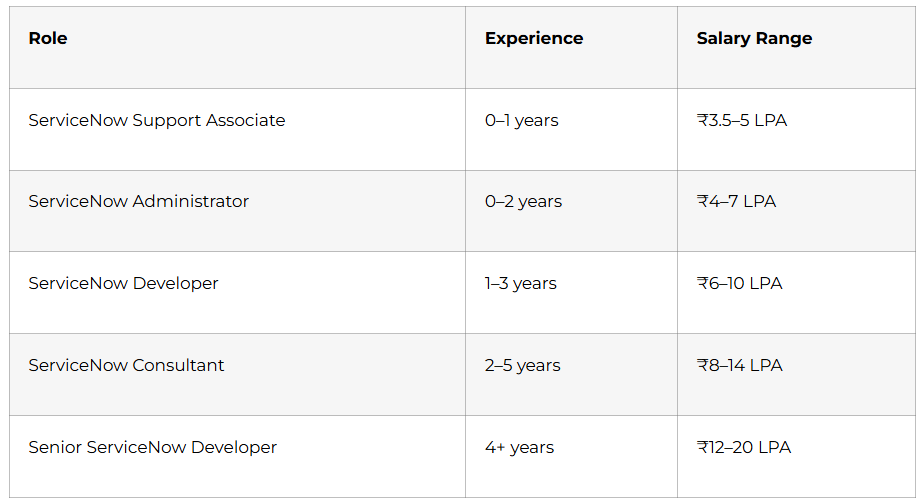
Entry-Level Positions: ServiceNow Administrator roles in Bangalore, Hyderabad, and Pune offer starting salaries between ₹5-7 lakhs for freshers who complete structured training like this 90-day program. These positions provide excellent exposure to enterprise IT operations.
Mid-Level Growth: ServiceNow Developers with 2-3 years experience command packages reaching ₹12-16 lakhs, with professionals reporting dramatic salary increases after mastering integration and automation skills. The career growth trajectory in ServiceNow is steeper than most technology domains.
Senior Opportunities: ServiceNow Architects, Technical Leads, and Consultants with 5+ years experience earn between ₹18-25 lakhs in India’s metro cities. Specialized certifications and niche skills like Order Management or AI integration command premium salaries.
Remote Work Flexibility: ServiceNow skills enable remote work opportunities with international companies offering competitive compensation. The cloud-based nature of the platform makes location-independent work feasible.
5.Why Choose Frontlines Edutech for Your ServiceNow Journey
Frontlines Edutech isn’t just another online training provider—it’s a career transformation partner committed to turning unemployment into opportunity. Since inception, Frontlines has earned trust from thousands of learners across India by delivering industry-standard training that actually prepares students for real jobs. The company understands the pain of unemployment and specifically designs programs to wipe those words from students’ minds permanently.
What Sets Frontlines Edutech Apart
Industry-Expert Instructors: Learn from professionals currently working in top ServiceNow implementations at companies like Infosys, TCS, Accenture, and Wipro. These mentors bring real-world experience, sharing practical insights and best practices that textbooks never cover.
Hands-On Project-Based Learning: Unlike theory-heavy programs, Frontlines emphasizes daily assignments and real-world projects that build your portfolio while you learn. Every module includes practical exercises mirroring actual workplace scenarios.
Comprehensive Career Support: The course includes resume building, LinkedIn profile optimization, interview guidance, and placement support that continues beyond course completion. Frontlines maintains relationships with hiring companies actively recruiting ServiceNow professionals.
Affordable and Transparent Pricing: Quality ServiceNow training accessible to students from all backgrounds without hidden costs or surprise fees. Payment plans make career transformation affordable for everyone.
Non-IT Student Friendly: Special attention to learners from non-technical backgrounds with simplified explanations and additional support ensuring everyone succeeds. The program proves that anyone willing to learn can master ServiceNow.
On-Demand Video Access: Lifetime access to course recordings enables learning at your own pace and revisiting complex topics whenever needed. Downloadable resources provide reference materials for your entire career.
Live Q&A Sessions: Regular doubt-clearing sessions with instructors ensure no student falls behind or struggles alone. Community support connects you with fellow learners facing similar challenges.
Course Completion Certificate: Official certification from Frontlines Edutech validates your training and adds credibility to your resume. This certificate demonstrates commitment to professional development.
Transform Your Career Starting Today
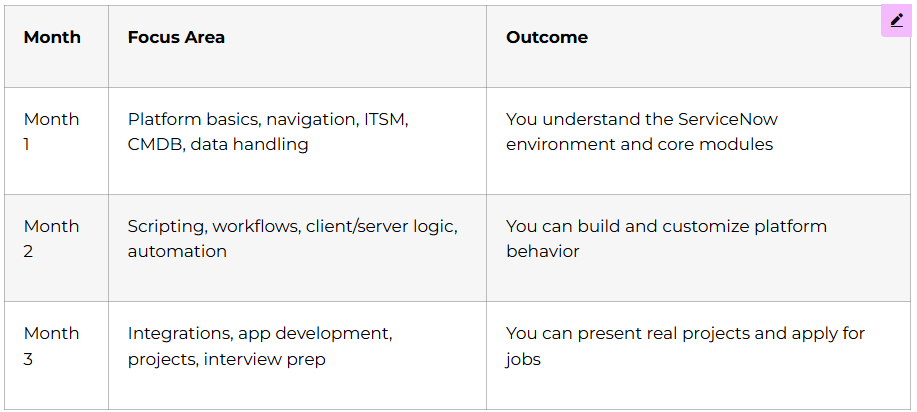
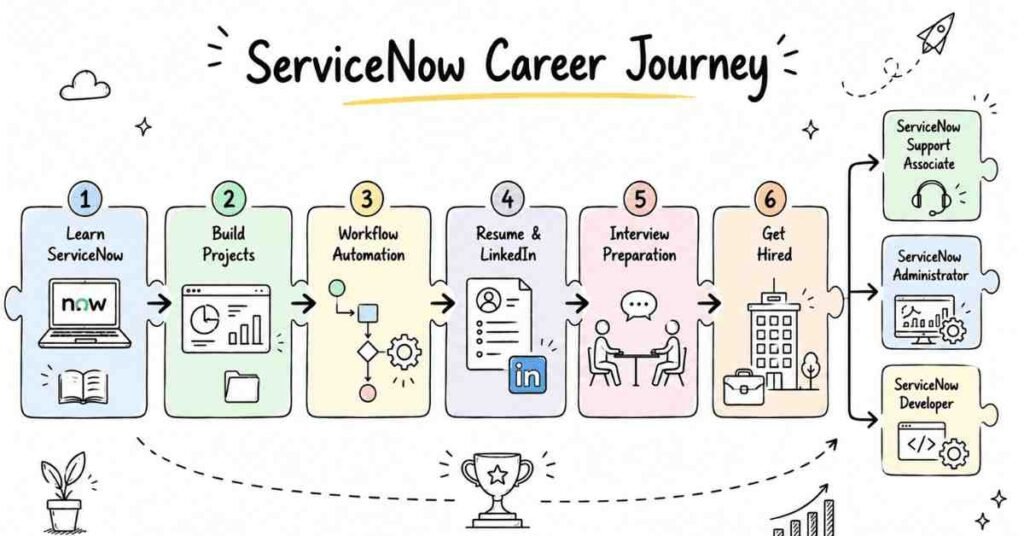
This 90-day roadmap provides everything needed to transition from complete beginner to employable ServiceNow professional. The structured daily plan removes guesswork about what to learn next, while hands-on projects build confidence and portfolio pieces. Month 1 establishes solid foundations, Month 2 develops automation and scripting expertise, and Month 3 adds cutting-edge integration skills plus complete career preparation.
Companies across India are hiring ServiceNow professionals faster than training programs can prepare them, creating unprecedented opportunities for motivated learners. The investment in this 90-day journey pays dividends for your entire career through higher starting salaries, faster promotions, and recession-resistant skills.
Frontlines Edutech has guided thousands of students through successful career transformations, and this comprehensive ServiceNow program continues that legacy. The combination of technical training, practical projects, and career support ensures you’re not just learning concepts but becoming job-ready.
Don’t wait for the perfect moment—the demand for ServiceNow professionals is at an all-time high right now. Enroll today and start your journey toward a high-paying, future-proof career in one of technology’s fastest-growing platforms.
🎯 Ready to Begin Your ServiceNow Career Journey?
Contact Frontlines Edutech:
📞 +91-83330 77727
📧 media.frontlines@gmail.com
🌐 www.frontlinesedutech.com
Follow Frontlines Edutech on Social Media:
🔹 LinkedIn: Frontlines Edutech Private Limited
🔹 Facebook: Frontlines Media
🔹 Instagram: Frontlines Skill Academy
🎯 Your ServiceNow Journey Starts Here
Choose your next step and keep growing with industry-aligned learning.