
Workday HCM Interview Preparation Guide : 230 Q&As
Table of Contents
Part 1: Introduction & 30-Day Study Plan
What This Guide Helps You Prepare For
Workday HCM interviews can include both direct questions and practical situations.
You may be asked:
“What is a Supervisory Organization?”
or:
“A manager cannot see one of their workers. What would you check?”
The first checks your concept.
The second checks whether you can actually think like a Workday consultant.
This guide prepares you for both.
What is Workday HCM?
Workday HCM is a cloud-based Human Capital Management system used to manage employee-related processes.
Organizations can use it for areas such as:
Hiring, employee data, organizations, compensation, absence, reporting, security, and integrations.
But in an interview, simply saying this definition is not enough.
You should also understand how those areas connect.
For example:
A new employee is hired.
That one hire may involve:
Supervisory Organization → Position → Job Profile → Compensation → Business Process → Security → Reporting
That connection is what makes Workday HCM interviews practical.
What Does a Workday HCM Consultant Actually Do?
A Workday HCM consultant does more than enter information into the system.
Depending on the project, the consultant may:
- Understand HR requirements
- Configure organizations
- Support staffing processes
- Configure business processes
- Work with security teams
- Build or support reports
- Load data
- Test configurations
- Investigate production issues
- Work with integration teams
For example, HR may say:
“Managers should approve promotions before HR reviews them.”
The consultant needs to understand that requirement and map it into the correct Workday business process.
That is the kind of thinking interviewers usually value.
Who Should Use This Guide?
This guide is useful even if you do not have live Workday project experience yet.
If you are a fresher, focus on:
Concept → Example → Scenario
For example:
Do not only learn what a Supervisory Organization is.
Also understand:
Why do we need it?
Who manages it?
What happens when a manager changes?
How does it affect workers?
That makes the concept easier to remember.
Skills Interviewers Usually Notice
A Workday HCM candidate should gradually become comfortable with:
Core HCM
Employee and worker information.
Organizations
How the workforce is structured.
Staffing
How positions and jobs are managed.
Business Processes
How transactions move through approvals and other steps.
Security
Who can see or perform specific actions.
Reporting
How business users get useful information.
EIB and Integrations
How information enters or leaves Workday.
Interviewers may not expect a fresher to know every advanced configuration, but they usually expect the basics to be clear.
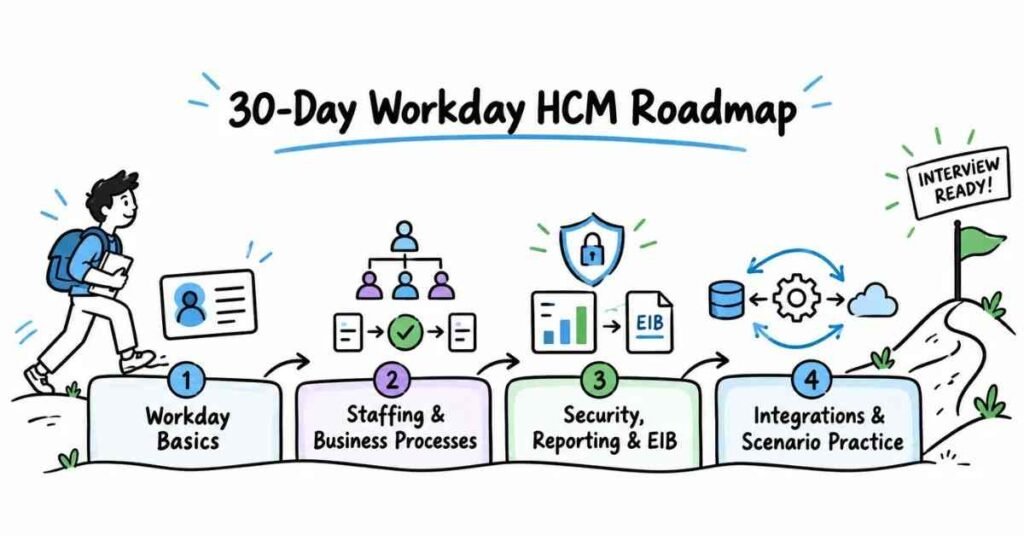
30-Day Workday HCM Study Plan
The reference PDF uses a week-by-week 30-day approach instead of trying to learn everything at once.
Week 1: Workday HCM Basics
Focus on:
- What Workday is
- Workday HCM
- Tenant basics
- Worker
- Employee
- Contingent Worker
- Supervisory Organization
- Company
- Cost Center
- Location
- Job Profile
- Position
At the end of the week, you should be able to explain how a worker is connected to the organization’s structure.
Week 2: Staffing & Business Processes
Focus on:
- Position Management
- Job Management
- Headcount Management
- Hiring restrictions
- Hire process
- Change Job
- Transfer
- Promotion
- Termination
- Business Process Framework
- Approval and review steps
- Condition rules
Do not just memorize business process steps.
Ask yourself:
“Who starts this process?”
“Who approves it?”
“What happens after approval?”
Week 3: Security, Reporting & EIB
Focus on:
- Security groups
- Role-based security
- User-based security
- Domain security
- Business process security
- Custom reports
- Advanced reports
- Data sources
- Business objects
- Calculated fields
- Inbound EIB
- Outbound EIB
This week is important because interviews often combine configuration with troubleshooting.
Week 4: Integrations, Scenarios & Interview Practice
Focus on:
- Integration basics
- Core Connectors
- Cloud Connect
- Web services basics
- Production support
- Requirement gathering
- Testing
- Scenario questions
- Resume preparation
- Project explanation
- Mock interviews
During this week, stop learning only definitions.
Start answering questions like:
“An employee is missing from a report. What would you check?”
“A manager cannot approve a transaction. What could be wrong?”
“An EIB failed for some records. How would you investigate?”
Daily Study Routine
You do not need to study Workday for five hours every day.
Around 60–90 focused minutes can be enough if you practise properly.
A useful routine is:
20 minutes — Learn one concept
Example: Supervisory Organization.
20 minutes — Understand one practical example
Example: A manager has five workers reporting under them.
20 minutes — Answer interview questions
Explain the concept without reading your notes.
10–20 minutes — Review weak areas
Note the questions you could not answer clearly.
The reference guide also recommends combining concept learning, question practice, rewriting answers in your own words, and reviewing weaker areas rather than memorizing answers.
How to Prepare Workday Answers
Use this simple approach:
Definition → Why it is used → Small example
For example:
Weak Answer
“A Supervisory Organization is an organization in Workday.”
Technically, this does not tell the interviewer much.
Better Answer
“A Supervisory Organization represents the management hierarchy in Workday. Workers are grouped under managers, and processes such as staffing, security roles, and approvals can depend on that structure.”
This answer is still short, but it shows understanding.
Common Workday Interview Focus
During preparation, spend extra time on:
- Supervisory Organizations
- Staffing Models
- Job Profiles
- Positions
- Business Processes
- Security
- Hire and Change Job
- Reporting
- Calculated Fields
- EIB
- Integrations
- Production support scenarios
Do not ignore basic questions because you are learning advanced topics.
In many interviews, one weak answer on a basic concept can create more difficulty than not knowing an advanced feature.
Final Tip for Part 1
When you learn a Workday topic, do not stop after asking:
“What is it?”
Also ask:
“Why is it used?”
“Where is it used?”
“What depends on it?”
“What could go wrong?”
That approach will make the later scenario-based questions much easier.
Part 2: Workday HCM Fundamentals
Workday HCM Fundamentals — Questions 1–30
This section covers the concepts you should be comfortable with before moving into staffing models, business processes, security, reporting, and integrations.
Try to understand how the concepts connect instead of memorizing isolated definitions.
Core Workday Concepts
Q1. What is Workday HCM?
Workday HCM is a cloud-based Human Capital Management system used to manage employee and workforce information.
It supports areas such as:
Worker data
Organizations
Staffing
Compensation
Absence
Security
Reporting
A good interview answer should connect HCM to the employee lifecycle, not just call it HR software.
Q2. What is a tenant in Workday?
A tenant is a Workday environment that contains an organization’s configuration and data.
For example, companies may have separate environments for implementation, testing, and production use.
You can think of a tenant as the company’s Workday system environment.
Q3. What is the difference between a production tenant and a test tenant?
A production tenant is the live environment used for actual business operations.
A test or sandbox environment is used to test configuration, integrations, reports, or business processes before making changes in production.
The exact tenant setup depends on the customer’s Workday environment.
Q4. What is a worker in Workday?
A worker is a person connected to the organization through a worker relationship.
A worker may be an:
Employee
Contingent Worker
Many HCM processes and reports are built around worker information.
Q5. What is the difference between an Employee and a Contingent Worker?
An Employee works directly for the organization under an employment relationship.
A Contingent Worker may work for the organization without being a regular employee, such as a contractor or consultant.
Their processes, eligibility, and data requirements can be different.
Q6. What is a Worker Profile?
A Worker Profile brings together information related to a worker.
Depending on security and configuration, it may include information such as:
Job
Organization
Manager
Contact details
Compensation
Career information
Not every user can see every field because Workday security controls access.
Q7. What is effective dating in Workday?
Effective dating means a change can take effect on a specific date.
For example, an employee may receive a promotion today, but the promotion may become effective from the first day of next month.
This allows Workday to maintain changes across time.
Organizations
Q8. What is a Supervisory Organization?
A Supervisory Organization represents the management structure in Workday.
Workers are grouped under managers, and many staffing activities, security assignments, and business processes depend on this structure.
This is one of the most important Workday HCM concepts.
Q9. Why are Supervisory Organizations important?
They help Workday understand:
Who reports to whom
Where workers are placed
Who can perform certain actions
How staffing is managed
How approval routing may work
So a Supervisory Organization is more than just an org chart.
Q10. Who leads a Supervisory Organization?
A Supervisory Organization normally has a manager responsible for that organization.
Workers within the organization report through that management structure.
If the manager changes, the organization may require related staffing or role updates depending on the business setup.
Q11. Can Supervisory Organizations have a hierarchy?
Yes.
A Supervisory Organization can sit below another Supervisory Organization, creating a management hierarchy.
For example:
CEO Organization → Sales Organization → Regional Sales Organization
This helps represent the company’s reporting structure.
Q12. What is a Company organization in Workday?
A Company represents a legal business entity used in areas such as HR, payroll, and financial processing.
A worker can be associated with a company as part of their organizational assignments.
Do not confuse Company with Supervisory Organization.
One represents the legal/business entity, while the other represents management structure.
Q13. What is a Cost Center?
A Cost Center is commonly used to group costs and track financial responsibility.
For example:
Marketing Cost Center
IT Cost Center
HR Cost Center
Workers may be assigned to cost centers depending on the organization’s design.
Q14. What is Location in Workday?
Location tells us where a worker or position is based.
Examples could include:
Hyderabad Office
Bengaluru Office
Remote Location
Location can also influence other business rules depending on configuration.
Q15. Can a worker have multiple organization assignments?
Yes.
A worker can be connected to several organization types.
For example, the same worker may belong to:
Supervisory Organization + Company + Cost Center + Location
Each assignment serves a different business purpose.
Job Architecture
Q16. What is a Job Profile?
A Job Profile describes a type of job.
It may define information such as:
Job title
Job family
Job level
Responsibilities
Qualifications
For example:
Software Engineer can be a Job Profile used by multiple workers.
Q17. Is a Job Profile the same as a worker?
No.
A Job Profile describes the job.
A worker is the person performing that job.
Several workers can share the same Job Profile.
Q18. What is a Job Family?
A Job Family groups related Job Profiles.
For example:
Software Engineering may contain Job Profiles such as:
Software Engineer
Senior Software Engineer
Technical Lead
It helps organize similar types of work.
Q19. What is a Job Family Group?
A Job Family Group is a higher-level grouping of related Job Families.
For example:
Technology may contain Job Families such as:
Software Engineering
Data Engineering
IT Support
It helps create a larger job structure.
Q20. What is a Management Level?
Management Level helps represent a worker’s level within the management structure.
Examples may include levels such as:
Individual Contributor
Manager
Director
Vice President
The exact setup depends on the organization.
Q21. What is a Position in Workday?
A Position represents a specific seat or opening in an organization.
For example:
A company may have a position called:
Senior Java Developer – Hyderabad
A worker can then be hired into that position.
Q22. What is the difference between a Position and a Job Profile?
A Job Profile describes the type of work.
A Position represents a specific opening or seat that can be filled.
For example:
Job Profile: Business Analyst
Position: Business Analyst – Finance Team – Hyderabad
One Job Profile can be used across multiple positions.
Q23. Can a Position exist without a worker?
Yes, depending on the staffing model and configuration.
A position can exist as an open position before someone is hired into it.
That allows the organization to plan hiring before the worker joins.
Worker Job Information
Q24. What is Worker Type?
Worker Type helps identify the kind of worker relationship.
Common examples include:
Employee
Contingent Worker
The actual setup may vary by organization.
Q25. What is Time Type?
Time Type commonly describes whether a worker is full-time or part-time.
For example:
Full Time
Part Time
This can influence eligibility or reporting depending on configuration.
Q26. What is an employee’s primary job?
The primary job is the worker’s main job relationship.
If a worker has more than one job, Workday can distinguish the main job from additional jobs depending on configuration.
This is important in organizations that support multiple jobs.
Q27. What is an additional job?
An additional job is another job relationship held by the same worker alongside the primary job.
For example, a university employee could have one primary role and another teaching assignment.
Multiple-job usage depends on the organization’s business requirements.
Staffing Basics
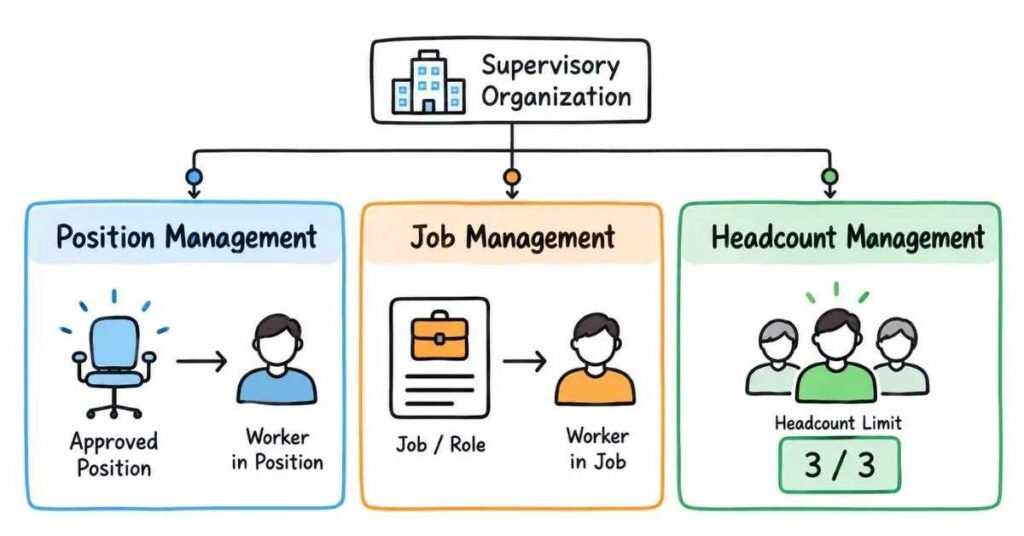
Q28. What is a staffing model in Workday?
A staffing model controls how workers are hired and managed within a Supervisory Organization.
Common staffing approaches include:
Position Management
Job Management
Headcount Management
We will cover these in detail in Part 3.
Q29. Why are staffing models important?
They determine how tightly the organization wants to control hiring.
For example, one company may want a specific position created before a person can be hired.
Another may prefer more flexible hiring without maintaining individual positions.
The staffing model supports that business requirement.
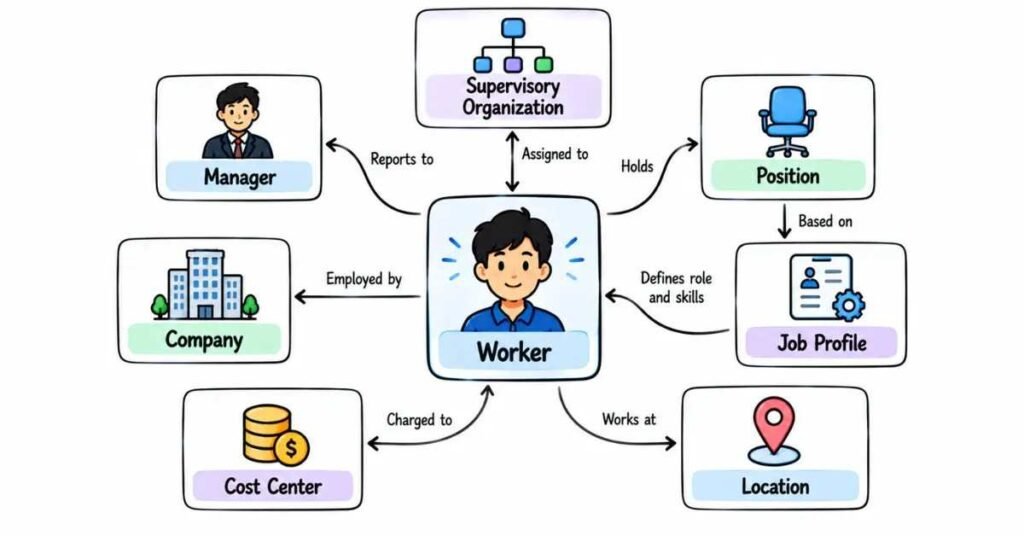
Q30. How are Worker, Supervisory Organization, Position, and Job Profile connected?
A simple example makes this easier.
Suppose Priya joins as a Business Analyst.
She may have:
Worker: Priya
Supervisory Organization: Business Analysis Team
Manager: BA Manager
Position: Business Analyst – Hyderabad
Job Profile: Business Analyst
Company: ABC India Pvt Ltd
Cost Center: Technology
Location: Hyderabad
These objects together describe where she works, what job she performs, who manages her, and how the organization tracks her employment.
That is the kind of relationship you should be able to explain clearly in an interview.
ImportImportant Concepts to Practice ant
Spend extra time on:
- Tenant
- Worker
- Employee vs Contingent Worker
- Effective Dating
- Supervisory Organization
- Company
- Cost Center
- Location
- Job Profile
- Job Family
- Position
- Worker Type
- Time Type
- Staffing Models
Practical Interview Scenario
An interviewer may ask:
“A new employee has been hired, but they appear under the wrong manager. What would you check?”
A natural answer could be:
“I would first check the worker’s Supervisory Organization because that structure controls the management relationship. I would confirm whether the worker was hired into the correct organization and whether the manager assigned to that organization is correct. If either is wrong, I would identify the appropriate worker or organization change process and then validate the worker’s reporting relationship.”
The important part is not jumping directly to a random configuration change.
First understand where the wrong relationship is coming from.
Practice Strategy
Choose one imaginary employee and build their Workday structure.
For example:
Employee → Manager → Supervisory Organization → Position → Job Profile → Company → Cost Center → Location
Then change one item.
For example:
The employee moves from Hyderabad to Bengaluru.
Ask yourself:
- What information changes?
- What might stay the same?
- Does the manager change?
- Does the Supervisory Organization change?
- Does the position change?
This makes the concepts easier to remember than reading definitions repeatedly.
Part 3: Organizations, Staffing Models & Job Management
Workday Organizations & Staffing — Questions 31–60
This section is important because many Workday HCM processes depend on how the organization is structured and how workers are staffed.
In interviews, you may get direct questions such as:
“What is Position Management?”
You may also get a scenario:
“A new hire cannot be processed because no position is available. What would you check?”
The second type shows whether you understand how Workday works in practice.
Supervisory Organizations
Q31. What is a Supervisory Organization?
A Supervisory Organization represents the management hierarchy in Workday.
Workers are grouped under managers, and many staffing activities, security roles, and business processes depend on this structure.
For example:
Sales Director → Sales Manager → Sales Executives
Each level can be represented through Supervisory Organizations.
Q32. Why is a Supervisory Organization important?
It helps Workday understand:
Who manages whom
Where workers belong
Where positions are created
Which roles users receive
How certain business processes are routed
It is one of the main building blocks of Workday HCM.
Q33. Can a Supervisory Organization exist without workers?
Yes.
For example, a new department may be created before employees are hired into it.
The organization can exist first and workers can be added later.
Q34. Can one manager manage more than one Supervisory Organization?
Depending on the company’s configuration, a manager can be associated with more than one Supervisory Organization.
The exact design depends on the organization structure and business requirement.
Q35. What is a superior Supervisory Organization?
A superior Supervisory Organization is the organization sitting above another one in the management hierarchy.
For example:
IT Department
may be the superior organization of:
Application Development Team
This creates the reporting hierarchy.
Q36. What is a subordinate Supervisory Organization?
A subordinate Supervisory Organization sits below another Supervisory Organization.
For example:
Technology
may have:
Development
Testing
Infrastructure
as subordinate organizations.
Q37. What happens when a manager leaves the company?
I would first check what should happen to the Supervisory Organization.
A new manager may need to be assigned, workers may need to move, or the organization may need to be reorganized depending on the business requirement.
I would not assume that terminating the manager automatically solves every organizational change.
Q38. What is reorganization in Workday?
Reorganization means changing the organizational structure.
For example:
Moving a team under another manager
Creating a new organization
Changing the reporting hierarchy
Moving workers between organizations
The exact process depends on the configuration.
Q39. What is an organization assignment?
Organization assignments connect a worker or position with organizational structures such as:
Company
Cost Center
Location
Supervisory Organization
These assignments help define where the worker belongs from both HR and business perspectives.
Q40. Can organization assignments change during employment?
Yes.
For example, an employee may move:
From Hyderabad to Bengaluru
or:
From Sales to Customer Success
That may require changes to location, cost center, Supervisory Organization, or other assignments.
Staffing Models
Q41. What is a staffing model in Workday?
A staffing model defines how an organization controls hiring and staffing.
Common Workday staffing approaches include:
Position Management
Job Management
Headcount Management
Each gives the organization a different level of control.
Q42. What is Position Management?
In Position Management, a specific position is normally created before a worker is hired into it.
For example:
Position: Senior Business Analyst – Hyderabad
The company can create and approve that position first, then hire someone into it.
Q43. When is Position Management useful?
It is useful when an organization wants strong control over:
Approved positions
Vacancies
Headcount
Job details
Hiring restrictions
Large or highly structured organizations often need this level of control.
Q44. Can a position remain open after a worker leaves?
Yes, depending on how the organization handles the position.
The worker may leave while the position remains available for a replacement.
That is one reason Position Management is useful for vacancy planning.
Q45. What is Job Management?
Job Management provides more flexibility.
Instead of maintaining a separate position for every worker, the organization can hire workers directly into jobs within the Supervisory Organization.
It is useful when individual position control is not required.
Q46. What is the main difference between Position Management and Job Management?
With Position Management, the organization manages specific positions.
With Job Management, the focus is more on workers and jobs without maintaining a separate position for every employee.
A simple way to remember it:
Position Management = Manage the seat
Job Management = Manage the worker in the job
Q47. What is Headcount Management?
Headcount Management focuses on controlling the number of workers that can be hired.
Instead of managing every individual position, the organization can manage an approved headcount.
For example:
Approved Headcount: 10
If eight people are already working, two more may still be hired.
Q48. Why would a company use Headcount Management?
It can be useful when the company wants headcount control but does not need a separate position record for every worker.
The business can control how many people may be hired without managing every seat individually.
Q49. Can different Supervisory Organizations use different staffing models?
Yes, depending on the company’s Workday design.
One part of the organization may need strict Position Management, while another may use a more flexible staffing approach.
The choice should match the business requirement.
Q50. How would you choose a staffing model?
I would first understand how the business manages hiring.
I would ask questions such as:
Do they approve positions before hiring?
Do they need vacancy tracking?
Do they mainly control headcount?
How much flexibility do managers need?
How detailed should workforce planning be?
The staffing model should support the process, not make it unnecessarily complicated.
Positions & Hiring Restrictions
Q51. What are hiring restrictions?
Hiring restrictions define what kind of worker can be hired into a position or organization.
They may control details such as:
Job profile
Location
Worker type
Time type
They help maintain consistency during staffing.
Q52. Why are hiring restrictions important?
Without useful restrictions, managers may create or fill positions with incorrect job information.
Hiring restrictions help guide the staffing process and reduce data errors.
Q53. What happens if the candidate does not match the hiring restrictions?
The hiring process may not proceed as expected.
I would check whether:
The position has the correct restrictions
The candidate is being hired into the right position
The business requirement has changed
I would not simply remove the restriction without understanding why it exists.
Q54. What is a frozen position?
A frozen position is temporarily prevented from being used for staffing.
For example, a company may pause hiring for a role while keeping the position in the system.
The position still exists, but hiring may be restricted until it is reopened.
Q55. What is a closed position?
A closed position is no longer intended to be filled.
For example, if the company permanently removes a role, the position may be closed rather than left as an open vacancy.
Q56. What is the difference between an open position and a filled position?
An open position is available for someone to be hired or moved into.
A filled position already has a worker assigned to it.
This distinction is important for workforce planning and recruiting.
Job Management Concepts
Q57. What is the relationship between a Job Profile and a Position?
A Job Profile describes the type of work.
A Position is a specific instance of that work in an organization.
For example:
Job Profile: Data Analyst
Positions could be:
Data Analyst – Finance – Hyderabad
Data Analyst – Operations – Bengaluru
The same Job Profile can support multiple positions.
Q58. Can two workers have the same Job Profile?
Yes.
Many workers can have the same Job Profile.
For example, an organization may have 50 people with the Software Engineer Job Profile.
Their managers, locations, positions, or compensation may still be different.
Q59. What is Change Job in Workday?
Change Job is used when important job-related information changes for an existing worker.
Examples may include:
Promotion
Transfer
Manager change
Job Profile change
Location change
Supervisory Organization change
The exact options depend on configuration and the reason for the change.
Q60. What should you check before moving a worker to another Supervisory Organization?
I would first understand why the worker is moving.
Then I would check whether the move affects:
Manager
Position
Job Profile
Location
Cost Center
Company
Compensation
Security roles
A worker movement can affect more than one field, so I would review the complete business requirement before processing the change.
Practical Interview Scenario
An interviewer may ask:
“A manager wants to hire a new employee, but there is no available position. What would you check?”
A natural answer could be:
“I would first check the staffing model of the Supervisory Organization. If it uses Position Management, I would confirm whether an approved open position exists. If not, a new position may need to be created and approved before hiring. I would also check the position’s hiring restrictions and availability before continuing the hire process.”
That answer shows you understand the connection between organization, staffing model, position, and hiring.
Another Common Scenario
“An employee moved to another manager, but they still appear under the old manager. What would you check?”
A practical answer:
“I would check whether the worker’s Supervisory Organization was actually changed and whether the effective date is correct. I would also verify the manager of the new Supervisory Organization. If the transaction is still pending in a business process, I would check where it is waiting before making another change.”
This is better than immediately saying, “Change the manager.”
The real issue may be the organization or an incomplete transaction.
Important Topics to Practice
Spend extra time on:
- Supervisory Organization
- Superior and Subordinate Organizations
- Reorganization
- Position Management
- Job Management
- Headcount Management
- Hiring Restrictions
- Open Positions
- Filled Positions
- Job Profiles
- Change Job
- Worker Transfers
Practice Strategy
Create a simple example company:
CEO
↓
Technology Manager
↓
Development Team
↓
5 Software Engineers
Now imagine:
- One employee resigns
- One employee is promoted
- A new position is created
- Another worker moves to Testing
- The Development Manager leaves
For every situation, ask yourself:
What changes in the Supervisory Organization?
Does the position remain?
Does the Job Profile change?
Which process might be required?
This kind of practice makes Workday concepts easier to explain during interviews.
Part 4: Workday Business Processes & Security
Business Processes & Security — Questions 61–90
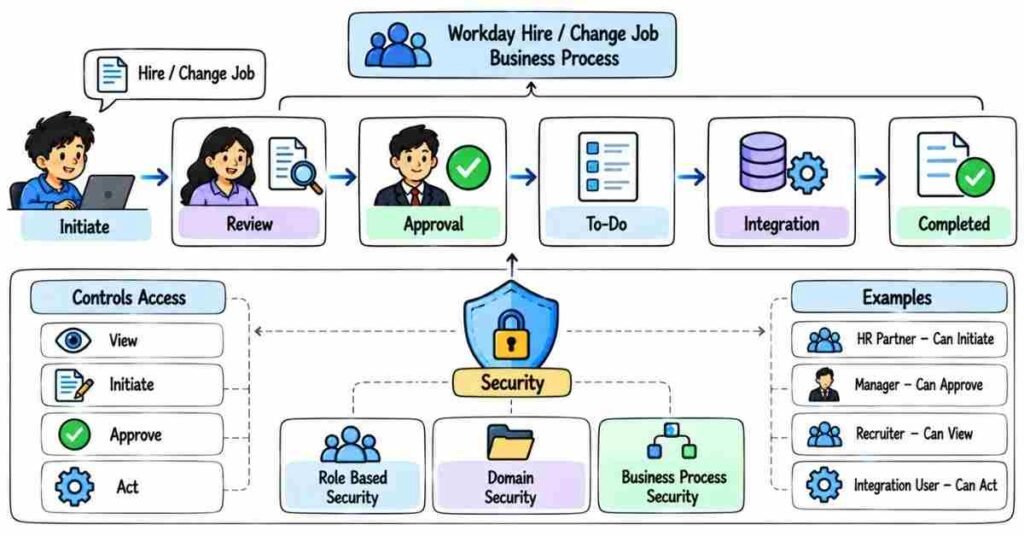
This section is important because Workday is not only about storing worker data.
Most HR transactions move through a Business Process, and security decides who can view, start, approve, or act on that process.
In interviews, these two areas are often connected.
For example:
“The manager cannot approve a promotion. What would you check?”
You should think about both Business Process configuration and Security.
Business Process Fundamentals
Q61. What is a Business Process in Workday?
A Business Process is a sequence of steps used to complete a business transaction.
Examples include:
Hire
Change Job
Termination
Compensation Change
Leave-related processes
Instead of one person completing everything manually, Workday can route the transaction through the required steps.
Q62. What is the Business Process Framework?
The Business Process Framework is the structure Workday uses to manage how transactions move from initiation to completion.
It can control:
Who starts the process
Who approves it
Which steps are required
When conditions apply
What happens after completion
This gives organizations control over their HR workflows.
Q63. Can you give a simple Business Process example?
Take a Hire process.
A simple flow could look like:
HR Starts Hire → Manager Reviews → HR Approves → Additional Steps Complete → Worker Created
The actual steps depend on the customer’s configuration.
Q64. What is an initiation step?
Initiation is where the Business Process begins.
For example, an HR user or manager may start a Hire or Change Job process.
Security controls who is allowed to initiate it.
Q65. What is a Business Process step?
A step is one activity inside the Business Process.
For example:
Manager Approval
can be one step inside a promotion process.
A Business Process can contain several steps before it reaches completion.
Q66. What is an Approval step?
An Approval step requires someone to approve or reject the transaction.
For example:
A manager may approve a compensation change before HR completes the process.
Approval helps make sure important changes do not happen without the right authorization.
Q67. What is a Review step?
A Review step allows someone to look at the transaction and take the required review action.
It is different from a simple approval because the purpose may be to review information or documents rather than only approve or reject.
Q68. What is a To Do step?
A To Do step asks a user to complete an activity that may happen outside the main Workday transaction.
For example:
Upload a required document
or
Complete an external onboarding task
The process may wait until that activity is completed, depending on configuration.
Q69. What is an Integration step?
An Integration step can trigger an integration as part of the Business Process.
For example, after a worker is hired, Workday may need to send information to another system.
This connects the HCM process with external applications.
Q70. What is a condition rule in a Business Process?
A condition rule decides whether a particular step should run.
For example:
If compensation exceeds a certain limit → Additional approval required
If the condition is not met, that step may be skipped.
Q71. Why are condition rules useful?
Not every transaction should follow exactly the same path.
For example:
A normal salary change may need one approval.
A large salary increase may need an additional approval.
Condition rules allow the same Business Process to handle different situations.
Q72. Can different organizations have different Business Process routing?
Yes, depending on configuration.
For example, one business unit may need an extra HR approval while another may use a simpler flow.
The design should match the business requirement.
Q73. What is a Business Process event?
A Business Process event is a specific transaction moving through the configured process.
For example:
The Hire Business Process is the configured workflow.
Hiring Priya on 15 June creates an actual Hire event that moves through that workflow.
Q74. How do you know where a Business Process is currently waiting?
I would review the Business Process history or event details.
I would check:
Current step
Person or role responsible
Pending approval
Condition rules
Security
Any errors
This helps identify why the transaction has not completed.
Q75. Why might a Business Process become stuck?
Possible reasons include:
Approval still pending
Wrong role assignment
Security issue
Condition rule sending it to an unexpected step
Missing required information
Integration failure
User has not completed a required task
I would first find the exact pending step before changing configuration.
Business Process Troubleshooting
Q76. A manager says they cannot approve a Hire. What would you check?
I would check:
Whether the transaction is actually waiting for that manager.
Whether the manager has the correct role.
Whether the Business Process step is routed to the right security group.
Whether the user has the required Business Process security.
I would avoid assuming it is only a login problem.
Q77. What would you check if an approval went to the wrong person?
I would review the routing for that step.
I would check:
Supervisory Organization
Role assignment
Security group
Condition rule
Effective date
The wrong approver may come from an incorrect organizational role rather than the Business Process itself.
Q78. What is the difference between correcting and rescinding a transaction?
A correction changes information on an existing transaction when correction is supported.
A rescind reverses or cancels a completed event when that action is available.
The right option depends on the type of event, its status, security, and the customer’s configuration.
Q79. Why should you be careful before rescinding a Business Process?
A completed event may already have affected:
Worker data
Compensation
Organizations
Reports
Downstream integrations
So I would first understand the impact before reversing it.
Q80. What is delegation in Workday?
Delegation allows certain tasks or approvals to be temporarily handled by another authorized person.
For example, if a manager is on leave, approved tasks may be delegated based on the organization’s rules.
Delegation does not mean giving unlimited access to another user.
Workday Security
Q81. What is Workday Security?
Workday Security controls what users can see and what actions they can perform.
Security can affect:
Worker data
Reports
Business Processes
Compensation information
Organizations
Transactions
A user may be able to see one area while being restricted from another.
Q82. What is a Security Group?
A Security Group is a collection of users or roles that receive specific access.
Instead of assigning every permission directly to every user, Workday can grant access through Security Groups.
Q83. What is a role-based Security Group?
A role-based Security Group gives access based on a role a user holds.
Examples can include roles such as:
Manager
HR Partner
Recruiter
Compensation Partner
The user’s access can depend on where that role is assigned in the organization.
Q84. Why is role-based security useful?
It allows access to follow business responsibility.
For example, an HR Partner may need access to workers in the organizations they support, but not necessarily every employee in the company.
This is more practical than giving the same access to everyone.
Q85. What is a user-based Security Group?
A user-based Security Group is based on specific named users rather than an organizational role.
It can be useful when certain individuals need access regardless of a role assignment.
Its use should still follow the organization’s security design.
Q86. What is Domain Security?
Domain Security controls access to particular areas of Workday data and functionality.
For example, access to certain worker or compensation information may be protected by specific security domains.
A user needs the appropriate security access to view or maintain that information.
Q87. What is a Domain Security Policy?
A Domain Security Policy defines which Security Groups can access a particular security domain and what type of access they receive.
Depending on the domain, that may involve viewing or modifying protected information.
Q88. What is Business Process Security?
Business Process Security controls who can perform actions related to a Business Process.
For example, it may control who can:
Initiate
Approve
Cancel
Correct
Rescind
Take other available actions
The available actions depend on the Business Process.
Q89. What is the difference between Domain Security and Business Process Security?
A simple way to remember it is:
Domain Security = Access to data and functionality
Business Process Security = Access to actions within a process
For example, a user may be able to view worker information but still not have permission to initiate a Change Job transaction.
Q90. How would you troubleshoot a Workday security issue?
I would first understand exactly what the user cannot do.
Then I would check:
User → Security Group → Role Assignment → Domain or Business Process Security → Organization Scope
For example, if an HR Partner can see employees in one organization but not another, I would check whether their role is assigned to the correct organization before changing security globally.
Practical Interview Scenario
An interviewer may ask:
“A manager can see an employee, but cannot start a Change Job process for them. What would you check?”
A natural answer could be:
“Since the manager can already see the worker, I would not assume it is only a data visibility issue. I would check whether the manager has permission to initiate the Change Job Business Process, whether the Business Process Security Policy includes the correct security group, and whether their role is valid for that worker’s organization.”
This shows that you understand the difference between seeing data and performing an action.
Another Common Scenario
“A promotion is waiting for approval, but the expected manager does not receive the task.”
A practical answer:
“I would first open the Business Process event and identify which step is pending. Then I would check the step routing, manager role assignment, Supervisory Organization, condition rules, and security. I would fix the cause only after confirming why the task was routed incorrectly.”
That is stronger than immediately reassigning the task.
Important Topics to Practice
Spend extra time on:
- Business Process Framework
- Initiation
- Approval
- Review
- To Do
- Integration Steps
- Condition Rules
- Business Process History
- Security Groups
- Role-Based Security
- Domain Security
- Business Process Security
- Delegation
- Troubleshooting
Practice Strategy
Take one process such as Change Job.
Imagine this flow:
Manager Initiates → HR Reviews → Compensation Approves → Process Completes
Now change the situation:
The HR approval should happen only for employees in India.
Ask yourself:
Where would the condition be used?
Then imagine:
The manager cannot initiate the process.
Ask:
Is this a role problem, Domain Security problem, or Business Process Security problem?
Thinking through these situations helps you understand Workday much better than memorizing definitions alone.
Part 5: Worker Lifecycle, Compensation, Benefits & Absence
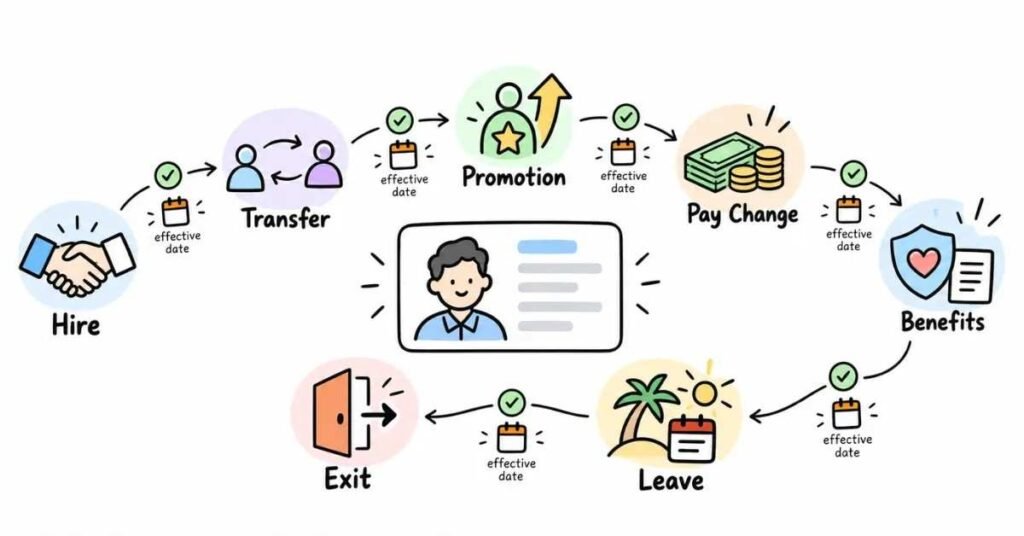
Worker Lifecycle & HCM Processes — Questions 91–120
This section covers what happens to a worker after they enter the organization.
A Workday HCM interview may start with a simple question such as:
“What is a Hire process?”
Then it may move into a real situation:
“An employee was promoted, but the new compensation is not showing. What would you check?”
So the goal is to understand both the process and its impact on worker data.
Worker Lifecycle
Q91. What is the worker lifecycle in Workday?
The worker lifecycle covers the major changes a worker goes through during their time with an organization.
Typical events include:
Hire
Transfer
Promotion
Change Job
Compensation Change
Leave
Termination
Each event can update different parts of the worker’s record.
Q92. What is the Hire process?
The Hire process is used to bring a new worker into the organization.
During hiring, Workday may capture details such as:
Supervisory Organization
Position or Job Profile
Location
Worker Type
Compensation
Start Date
The exact steps depend on the customer’s Business Process configuration.
Q93. What should you check before hiring a worker?
I would first confirm:
Correct Supervisory Organization
Correct staffing model
Available position, if required
Job Profile
Location
Worker Type
Start date
Compensation details
Getting these details right at the beginning prevents downstream corrections.
Q94. What is Change Job in Workday?
Change Job is used when an existing worker’s job-related information changes.
Examples include:
Promotion
Transfer
Manager change
Job Profile change
Location change
Supervisory Organization change
The exact options depend on the configured process.
Q95. What is a transfer?
A transfer usually means moving a worker to a different organization, manager, location, or business area.
For example:
An employee moves from the Hyderabad Sales Team to the Bengaluru Sales Team.
The move may affect more than one organization assignment.
Q96. What is a promotion?
A promotion usually means the worker moves to a higher-level role or increased responsibility.
It may involve changes to:
Job Profile
Position
Management Level
Compensation
Organization
A promotion is not always just a salary increase.
Q97. What is the difference between a transfer and a promotion?
A transfer mainly changes where or under whom the worker works.
A promotion usually represents movement to a higher role or level.
Sometimes a single transaction can involve both.
Q98. What is a manager change?
A manager change means the worker’s reporting relationship changes.
In Workday, this often relates to the worker’s Supervisory Organization.
So I would check the organizational move rather than simply looking for a manager-name field.
Q99. Why is the effective date important in worker changes?
The effective date controls when the change becomes valid.
For example:
A promotion may be approved today but become effective from next month.
Using the wrong effective date can affect reports, compensation, security, and downstream processes.
Q100. What is termination in Workday?
Termination is used when a worker’s relationship with the organization ends.
The process may capture information such as:
Termination date
Reason
Last day
Eligibility details
Related offboarding steps
The exact information depends on configuration.
Q101. What should you check before processing a termination?
I would confirm:
Correct worker
Correct termination date
Correct reason
Whether any future transactions exist
Business Process approvals
Downstream impact
Termination can affect security, payroll, benefits, reporting, and integrations, so the details should be checked carefully.
Q102. Can a completed worker transaction affect other systems?
Yes.
For example, a Hire or Termination may send worker data to:
Payroll
Identity systems
Benefits providers
Other HR applications
That is why changes should be validated before and after completion.
Compensation
Q103. What is compensation in Workday?
Compensation covers the pay-related information associated with a worker or job.
Depending on the organization’s setup, this may include:
Salary
Hourly pay
Allowances
Bonus plans
Commission plans
Other compensation components
Q104. What is a compensation plan?
A compensation plan defines a particular type of compensation.
Examples may include:
Salary Plan
Allowance Plan
Bonus Plan
Different workers may be eligible for different plans.
Q105. What is base pay?
Base pay is the worker’s regular compensation before additional items such as bonuses or allowances.
For example:
A worker may have a base salary plus a separate annual bonus opportunity.
Q106. What is a Compensation Grade?
A Compensation Grade can be used to define a pay structure for a group of jobs or workers.
It may help organizations maintain ranges or guidelines for compensation.
The exact setup depends on the customer’s compensation design.
Q107. Why are compensation ranges useful?
They help the organization understand whether compensation is within the expected range for a role or level.
For example, a company may define a minimum, midpoint, and maximum for a particular grade.
Q108. What is a compensation change?
A compensation change updates a worker’s pay-related information.
It may happen because of:
Promotion
Annual review
Market adjustment
Allowance change
Business decision
The change may go through approvals before becoming effective.
Q109. A worker was promoted but their salary did not change. Is that always an error?
No.
A promotion and a compensation change are related but not always the same thing.
I would check whether compensation was included in the transaction, whether another compensation process is required, and whether the effective date is correct.
Q110. What would you check if compensation is not visible to a user?
I would first determine whether the issue is:
Worker data
Effective date
Eligibility
Business Process status
Security
Compensation information is often protected, so security should always be considered.
Benefits
Q111. What are Benefits in Workday?
Benefits are programs offered to eligible workers.
Depending on the organization, examples may include:
Medical coverage
Insurance
Retirement-related benefits
Other employee benefit plans
Workday can help manage eligibility and enrollment.
Q112. What is benefit eligibility?
Benefit eligibility determines whether a worker qualifies for a particular benefit.
Eligibility may depend on factors such as:
Employee type
Location
Time type
Organization
Other configured rules
Not every employee is automatically eligible for every plan.
Q113. What is Open Enrollment?
Open Enrollment is a period when eligible workers can review and make permitted benefit elections for an upcoming coverage period.
The exact process and available plans depend on the employer’s benefits setup.
Q114. What is a benefit event?
A benefit event is a situation that may allow or require a worker to make benefit elections.
Examples can include:
Hire
Marriage
Birth
Other eligible life events
The actual events depend on company configuration.
Absence
Q115. What is Absence Management in Workday?
Absence Management is used to manage employee time away from work.
It may include:
Time Off
Leave of Absence
Absence plans
Eligibility
Approval workflows
Q116. What is Time Off?
Time Off usually refers to shorter periods away from work.
Examples may include:
Vacation
Sick time
Personal time
The worker may request the time and the appropriate manager or HR role may approve it.
Q117. What is a Leave of Absence?
A Leave of Absence generally covers a longer period away from work.
For example, an employee may take an extended leave based on company policy.
The process may include start date, expected return date, approvals, and related worker status changes.
Q118. What is the difference between Time Off and Leave of Absence?
A simple way to understand it:
Time Off is usually for shorter absences.
Leave of Absence is generally used for longer periods that may affect the worker’s employment status or other HR processes.
The exact treatment depends on company policy and configuration.
Q119. What would you check if an employee cannot request a particular Time Off type?
I would check:
Worker eligibility
Absence plan assignment
Effective dates
Available balance, where relevant
Security
Business Process configuration
I would first find out whether the employee should actually be eligible.
Q120. What would you check if a worker’s leave is approved but reports still show them as active?
I would check the leave’s:
Effective dates
Business Process status
Worker status
Report logic
Data source
The report may also be using a field that does not reflect the leave status the way the business expects.
Practical Interview Scenario
An interviewer may ask:
“An employee was promoted from Senior Analyst to Team Lead, but the worker still appears with the old Job Profile. What would you check?”
A natural answer could be:
“I would first check the Change Job or promotion event and confirm whether the new Job Profile was included. Then I would review the effective date and Business Process status to make sure the transaction completed successfully. If the transaction is complete but the old information still appears in a report, I would check the report’s effective date and data source as well.”
The important point is to identify where the data stopped updating.
Another Common Scenario
“A newly hired employee cannot enroll in a benefit plan.”
A practical answer:
“I would first confirm whether the worker is eligible for that benefit. I would check the worker’s employment details, effective dates, benefit event, and the relevant eligibility configuration. I would also confirm that the required Hire or benefit process has completed before changing anything.”
This is stronger than simply saying:
“Add the employee to the plan.”
Worker Lifecycle Example
Imagine an employee named Arjun.
He joins as:
Software Engineer → Hyderabad → Development Team
After one year:
Promotion → Senior Software Engineer → Compensation Increase
Later:
Transfer → Bengaluru → New Manager
Then:
Leave of Absence → Returns to Work
Finally:
Termination
Each event changes different parts of the worker record.
Understanding that connection is more useful than memorizing each process separately.
Important Topics to Practice
Spend extra time on:
- Hire
- Change Job
- Transfer
- Promotion
- Manager Change
- Effective Dating
- Termination
- Compensation Plans
- Compensation Changes
- Benefits Eligibility
- Benefit Events
- Time Off
- Leave of Absence
Practice Strategy
Choose one imaginary worker and follow them through the full employee lifecycle.
For every event, ask:
What changes?
Which Business Process might run?
Who may need to approve it?
What security or eligibility could affect it?
What downstream system might receive the change?
That makes the concepts much easier to explain in an interview.
Part 6: Workday Reporting, Calculated Fields & EIB
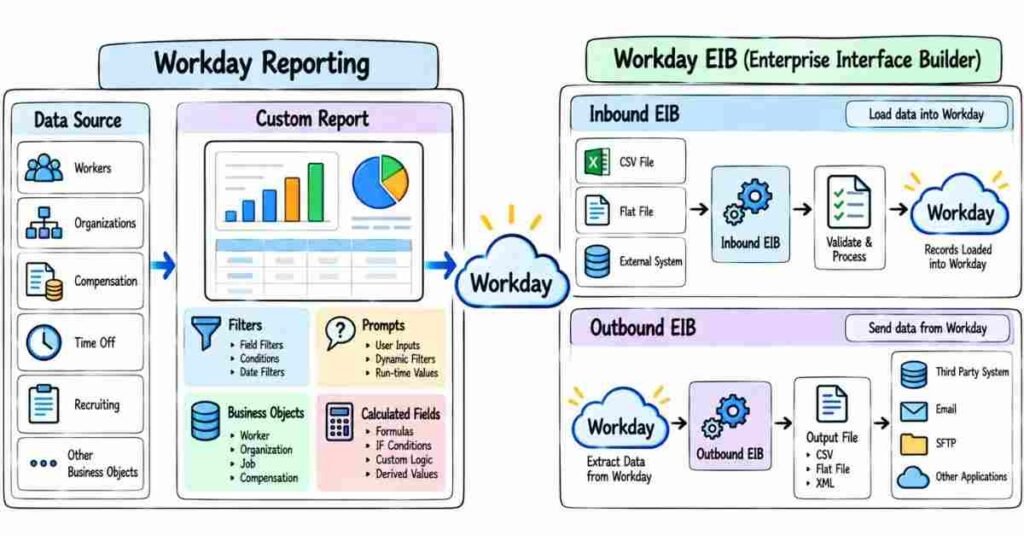
Reporting, Calculated Fields & EIB — Questions 121–150
This section is important because Workday consultants often need to find data, build reports, troubleshoot missing information, and move data into or out of Workday.
In an interview, you may get a simple question such as:
“What is a Calculated Field?”
Then the interviewer may ask:
“The employee exists in Workday, but the report is not showing them. What would you check?”
So do not prepare only definitions. Understand where the data comes from and how the report uses it.
Workday Reporting
Q121. What is Workday Reporting?
Workday Reporting allows users to view and analyze information stored in Workday.
Reports can be used for areas such as:
Worker data
Organizations
Compensation
Staffing
Absence
Business Processes
Access to report data still depends on security.
Q122. What is a standard report?
A standard report is provided by Workday.
It can be used directly when it already meets the business requirement.
Before creating a custom report, I would first check whether an existing report can solve the need.
Q123. What is a custom report?
A custom report is created when the business needs information in a specific format that an existing report does not provide.
For example:
HR may need a report showing:
Employee Name → Manager → Job Profile → Location → Hire Date
A custom report can be built around that requirement.
Q124. What is an Advanced Report?
An Advanced Report is commonly used when we need more control over:
Fields
Filters
Prompts
Sorting
Related data
Calculated Fields
It is useful for many detailed reporting requirements.
Q125. What is a Matrix Report?
A Matrix Report is useful when data needs to be summarized across rows and columns.
For example, the business may want:
Employee Count by Department and Location
Instead of listing every worker separately, the report can show summarized values.
Q126. What is a data source in Workday Reporting?
A data source defines the main set of information the report can access.
For example, if I am building a worker report, I need a data source that provides the required worker information.
Choosing the wrong data source can make the report difficult or incomplete.
Q127. Why is selecting the right data source important?
Because the data source determines what information is available to the report.
If the business asks for active workers and I start with a source that does not match the requirement, I may spend time trying to fix the wrong problem.
I first understand what records should appear, then choose the source.
Q128. What is a Business Object in Workday?
A Business Object represents a type of business information in Workday.
Examples include concepts such as:
Worker
Position
Organization
Job Profile
Business Objects contain fields and can have relationships with other Business Objects.
Q129. What is a Related Business Object?
A Related Business Object allows us to move from one object to related information.
For example, from a Worker, we may need information related to:
Manager
Supervisory Organization
Job Profile
These relationships help reports pull connected information.
Q130. What is a report field?
A field is a specific piece of information displayed or used in a report.
Examples:
Employee Name
Hire Date
Location
Job Profile
Manager
Fields can also be used in filters or calculated logic.
Q131. What is a report filter?
A filter limits which records appear.
For example:
Location = Hyderabad
would limit the report to workers who match that condition.
Filters help users see only the information relevant to the requirement.
Q132. What is a prompt?
A prompt lets the user provide a value when running the report.
For example:
Select Location
Instead of building separate reports for Hyderabad and Bengaluru, one report can ask the user which location they want.
Q133. What is the difference between a filter and a prompt?
A filter controls which records are included.
A prompt allows the person running the report to provide a value that can be used by the report.
For example:
The filter may say:
Location equals the value selected in the Location prompt.
Q134. Why might a worker be missing from a report?
I would not immediately assume the report is broken.
I would check:
Data source
Filters
Effective date
Worker status
Security
Calculated Field logic
Whether the worker actually meets the report conditions
The first step is to understand why that specific worker is being excluded.
Calculated Fields
Q135. What is a Calculated Field in Workday?
A Calculated Field creates information based on existing Workday data.
It is useful when the exact value the business wants is not directly available as a normal field.
For example, a report may need logic based on worker or organization data.
Q136. Why do we use Calculated Fields?
We use them when the business requirement needs additional logic.
For example:
The business may ask:
“Show Yes if the employee belongs to the Sales organization, otherwise show No.”
A Calculated Field can help create that result.
Q137. What is an Extract Single Instance Calculated Field?
Extract Single Instance is useful when a field contains multiple related instances but the report needs one specific value.
The extraction is based on the configured conditions and sort logic.
A practical example could be retrieving one relevant record from several available related records.
Q138. What is an Extract Multi-Instance Calculated Field?
Extract Multi-Instance is used when we need to return multiple matching instances instead of only one.
For example, when the business requirement needs a selected set of related records.
The exact setup depends on the source data and requirement.
Q139. What is a Lookup Related Value Calculated Field?
Lookup Related Value helps retrieve a value through a relationship between Business Objects.
For example:
If I start with a Worker and need information from a related object, this type of Calculated Field can help reach that value.
Q140. What is a True/False Condition Calculated Field?
A True/False Condition returns a Boolean result based on configured logic.
For example:
If Location = Hyderabad → True
Otherwise:
False
This can be useful in filters and other calculations.
Q141. What is an Evaluate Expression Calculated Field?
Evaluate Expression can return different results based on defined conditions.
For example:
If Country = India → “India Employee”
If Country = US → “US Employee”
It is useful when the output depends on more than one condition.
Q142. How would you troubleshoot a Calculated Field that returns the wrong result?
I would check:
Source Business Object
Field being referenced
Conditions
Related objects
Effective date
Whether multiple values exist
I would test the Calculated Field with a few known workers before using it in a large report.
EIB
Q143. What is EIB in Workday?
EIB stands for Enterprise Interface Builder.
It is commonly used to move data into or out of Workday without building a more complex custom integration.
It is useful for straightforward data-loading and data-extraction requirements.
Q144. What is an Inbound EIB?
An Inbound EIB loads data into Workday.
For example, it may be used to load:
Worker-related updates
Organization data
Other supported business information
The exact data depends on the available Workday web service or process being used.
Q145. What is an Outbound EIB?
An Outbound EIB sends data out of Workday.
For example, a report can provide employee information that needs to be sent to another system or business team.
A simple way to remember it:
Inbound = Into Workday
Outbound = Out of Workday
Q146. When would you use EIB?
I would use EIB when the requirement is relatively straightforward and supported by the available Workday functionality.
For example:
A business needs to load a set of records once or periodically without building a large integration.
I would not automatically choose EIB for every integration requirement.
Q147. What should you check before running an Inbound EIB?
I would verify:
Correct template
Required fields
Data format
Reference values
Effective dates
Security
Test results
I would normally test with a small set of records before loading a large file.
Q148. What happens if some EIB records fail?
I would review the error details for the failed records.
I would check whether the issue comes from:
Missing required data
Invalid reference value
Wrong format
Security
Business Process rule
Incorrect effective date
I would correct the cause and reload only the necessary records rather than blindly rerunning everything.
Q149. What is the difference between a report and an Outbound EIB?
A report mainly presents or extracts Workday information.
An Outbound EIB can use report output as part of an interface to deliver data outside Workday.
So the report may provide the data, while the EIB helps move it to the required destination.
Q150. How would you choose between EIB and a more advanced integration?
I would first understand the requirement.
I would ask:
How complex is the data?
Is transformation required?
Is the process one-time or recurring?
What system receives the data?
Are advanced error handling and orchestration needed?
For a simple supported load or extract, EIB may be enough.
For more complex integration requirements, another Workday integration approach may be more appropriate.
Practical Interview Scenario
An interviewer may ask:
“HR says an employee exists in Workday but is missing from a custom report. What would you check?”
A natural answer could be:
“I would first confirm that the employee exists and matches the report requirement. Then I would check the report’s data source, filters, effective date, security, and any Calculated Fields used in the logic. I would compare that employee with another worker who appears correctly to identify what is different.”
That is stronger than immediately rebuilding the report.
Another Common Scenario
“You loaded 500 records through an Inbound EIB. 470 succeeded and 30 failed. What would you do?”
A practical answer:
“I would review the errors for the 30 failed records instead of rerunning all 500. I would look for a common issue such as missing required values, invalid references, incorrect formatting, or effective-date problems. After correcting the source file, I would retest the failed records and validate the results in Workday.”
This shows a controlled troubleshooting approach.
Report Requirement Example
Suppose HR asks:
“Give me all active employees in Hyderabad with Employee Name, Manager, Job Profile, Hire Date, and Cost Center.”
Before building the report, I would break the requirement down:
Population: Active employees
Location: Hyderabad
Fields: Name, Manager, Job Profile, Hire Date, Cost Center
Output: Worker-level details
Then I would choose the suitable data source, add the fields, apply filters, test the results, and confirm security.
This is a better approach than opening the report writer first and adding random fields.
Important Topics to Practice
Spend extra time on:
- Standard Reports
- Custom Reports
- Advanced Reports
- Matrix Reports
- Data Sources
- Business Objects
- Related Business Objects
- Filters
- Prompts
- Calculated Fields
- Extract Single Instance
- Lookup Related Value
- True/False Conditions
- EIB
- Inbound EIB
- Outbound EIB
- Error Handling
Practice Strategy
Take one requirement:
“Show employees hired during a selected month along with their manager and location.”
Ask yourself:
What is my population?
Which fields are required?
Do I need a prompt?
Do I need a Calculated Field?
What security could affect the result?
Then take one EIB situation:
“100 worker records need to be updated.”
Think through:
Prepare → Validate → Test Small Sample → Run → Review Errors → Correct → Validate Results
This type of practice makes reporting and EIB answers much easier to explain during an interview.
Part 7: Workday Integrations & Functional Support
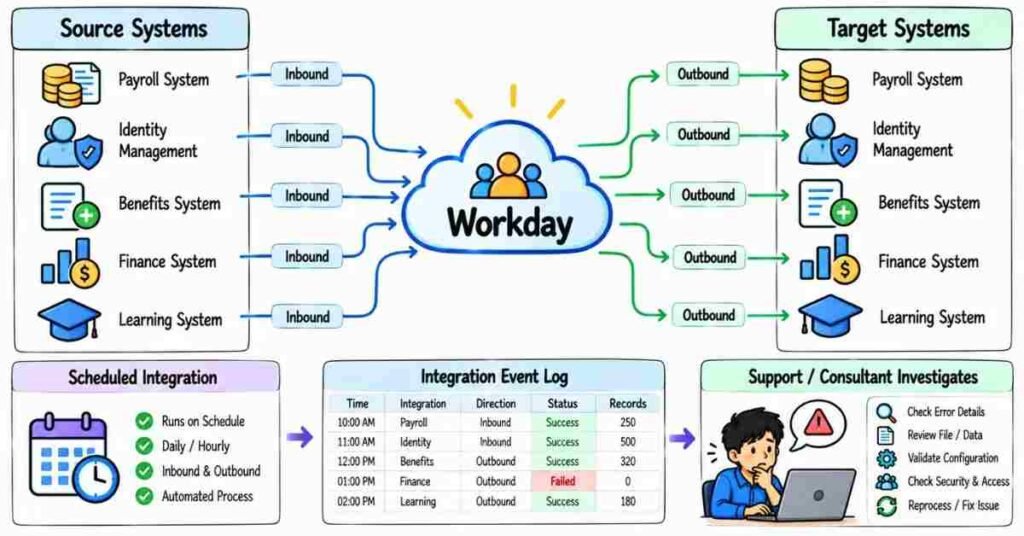
Integrations & Support — Questions 151–180
This section is useful because Workday rarely works alone. Employee data may need to move between Workday and systems used for payroll, benefits, identity access, finance, learning, or other business needs.
For a functional interview, you usually do not need to explain every technical integration detail. But you should understand what type of integration is being used, what data is moving, where the failure happened, and who needs to be involved.
Workday Integration Basics
Q151. What is a Workday integration?
A Workday integration connects Workday with another system so data can move automatically between them.
For example:
Workday → Payroll System
or:
Recruiting System → Workday
The integration may send, receive, or transform data.
Q152. Why are integrations important in Workday?
HR data is often needed outside Workday.
For example, after a new employee is hired, their information may need to reach:
Payroll
Identity systems
Benefits providers
Learning platforms
Other internal applications
Without integrations, teams may have to update those systems manually.
Q153. What is the difference between inbound and outbound integration?
Inbound Integration brings data into Workday.
Outbound Integration sends data out of Workday.
For example:
Inbound: Loading worker updates into Workday.
Outbound: Sending employee data from Workday to a payroll provider.
Q154. What is EIB used for in integrations?
EIB is commonly used for straightforward data movement.
It can support:
Inbound data loads
Outbound data extracts
It is useful when the requirement is simple enough that a more complex integration is not necessary.
Q155. What is a Core Connector?
A Core Connector is a Workday-delivered integration framework used for common business data.
It helps extract information in a structured way for supported areas.
For example, worker-related data may be sent to an external system using an appropriate connector.
Q156. Why would you use a Core Connector instead of building everything from scratch?
Because Workday already provides standard logic for common integration needs.
That can reduce custom development and make the solution easier to maintain.
The final choice still depends on the business requirement.
Q157. What is Cloud Connect?
Cloud Connect provides packaged integration functionality for certain external service providers or common business needs.
It can reduce the amount of custom integration work when the required connection is already supported.
Q158. Is Cloud Connect suitable for every external system?
No.
It depends on whether Workday provides the required packaged integration for that use case.
If not, another integration approach may be needed.
Q159. What are Workday Web Services?
Workday Web Services allow external applications to communicate with Workday programmatically.
They can be used to read or update supported Workday data.
For a functional consultant, understanding why they are used is often more important than writing the technical code.
Q160. What is an API in a Workday context?
An API allows another application to interact with Workday in a controlled way.
For example, an external system may request worker information or send supported updates through an API.
Security is still required.
Integration Flow
Q161. What should you understand before designing an integration?
I would first clarify:
Source system
Target system
Data required
Direction of data
Frequency
File or API format
Security
Error handling
The technology choice should come after the requirement is clear.
Q162. What is a source system?
The source system is where the data comes from.
For example:
If employee information moves from Workday to payroll:
Workday = Source
Payroll = Target
Q163. What is a target system?
The target system is where the data is sent.
In the same example:
Workday → Payroll
Payroll is the target system.
Q164. What is data transformation?
Data transformation means changing data into the format expected by the receiving system.
For example:
Workday may store one value as:
Full Time
while another system expects:
FT
The integration may need to convert it.
Q165. What is an integration event?
An integration event is an actual execution of an integration.
When an integration runs, the event can show information such as status, timing, and errors.
This is useful during troubleshooting.
Q166. What is a scheduled integration?
A scheduled integration runs automatically at a defined time or frequency.
For example:
Every night at 11 PM
or:
Every Monday
This is useful when the business needs regular data movement.
Q167. Can an integration also run because of a business event?
Yes, depending on the integration design.
For example, a completed worker process may trigger data that needs to be sent to another system.
The exact approach depends on the integration and business requirement.
Q168. What is integration security?
Integration security controls what the integration can access or update.
An integration should receive only the permissions needed for its job.
Giving unnecessary access creates additional risk.
Q169. What is an Integration System User?
An Integration System User is a non-human account commonly used by integrations to access Workday.
Its access should be controlled through appropriate security.
It should not be treated like a normal employee login.
Q170. Why is least-privilege access important for integrations?
An integration should have access only to the information it actually needs.
For example, an integration sending basic worker details should not automatically have access to sensitive compensation data unless required.
This reduces security risk.
Troubleshooting Integrations
Q171. An outbound integration completed but the target system did not receive the file. What would you check?
I would check the flow step by step.
First:
Did the Workday integration complete?
Was the output file created?
Was the delivery step successful?
Was the destination correct?
Did the receiving system reject the file?
This helps identify whether the issue is inside Workday or after the file leaves Workday.
Q172. What would you check if an integration fails?
I would review:
Integration event status
Error message
Input data
Security
Mapping
Required fields
External connection
I would first identify the exact failing step rather than rerunning it immediately.
Q173. Why might only some records fail in an integration?
The integration itself may be working, while certain records contain bad data.
For example:
Missing required value
Invalid reference
Unexpected format
Incorrect organization
Invalid effective date
I would compare failed records with successful ones.
Q174. What would you do if an integration suddenly starts failing after working for months?
I would check what changed.
Possible areas include:
Source data
Security
Credentials
Business Process configuration
External endpoint
File format
Recent configuration changes
The fact that it worked earlier is useful information.
Q175. What if an integration sends duplicate worker records?
I would investigate how workers are being selected.
I would check:
Report or data source logic
Filters
Multiple related records
Effective dating
Integration selection criteria
I would not simply remove duplicates from the final file without understanding why they were created.
Functional Support
Q176. What does a Workday HCM functional support consultant do?
A functional support consultant helps business users with Workday-related issues and changes.
Typical work may include:
Investigating tickets
Reviewing Business Processes
Checking worker data
Supporting security issues
Updating configuration
Testing changes
Working with integration or technical teams
The role involves both system knowledge and communication.
Q177. How do you handle a production issue?
I first understand:
What happened?
Then I check:
Who is affected?
When did it start?
What should have happened instead?
After that, I investigate the relevant configuration, data, Business Process, security, report, or integration.
I would avoid changing production configuration before understanding the root cause.
Q178. What is root cause analysis?
Root cause analysis means finding the actual reason the issue happened, not only fixing the visible symptom.
For example:
A manager did not receive an approval.
The visible problem is the missing approval.
The root cause may be an incorrect role assignment.
Fixing the role is more useful than manually reassigning every future approval.
Q179. What is regression testing?
Regression testing checks whether a new change has accidentally affected something that already worked.
For example:
If we change a Hire Business Process, we should test the new requirement but also make sure normal Hire transactions still work.
Q180. What makes a good Workday support consultant?
A strong support consultant should be able to:
Understand the business issue
Ask the right questions
Trace the process
Check configuration and data
Test before changing production
Explain the solution clearly
Document important changes
Knowing where to look is often just as important as knowing the final fix.
Practical Interview Scenario
An interviewer may ask:
“A new employee was successfully hired in Workday, but their account was not created in the external identity system. What would you check?”
A natural answer could be:
“I would first confirm that the Hire process completed successfully. Then I would check whether the relevant outbound integration ran for that worker, whether the worker met the integration selection criteria, and whether the integration event completed successfully. If Workday sent the data correctly, I would then check the delivery or target-system side with the technical team.”
That answer shows you know how to isolate the problem.
Another Common Scenario
“A payroll integration worked successfully, but one employee is missing from the output.”
A practical answer:
“I would compare that employee with another worker who appears correctly. I would check the report or connector selection criteria, worker status, effective dates, organization assignments, and any filters or eligibility rules. If the employee should be included, I would identify which condition is excluding them before changing the integration.”
This is stronger than immediately rerunning the integration.
Functional Support Example Patterns to Practice
Suppose HR raises this ticket:
“A manager cannot see the compensation details of one employee.”
Do not immediately change security.
First check:
Can the manager see other employees?
Is this worker under the manager’s organization?
Is the issue only compensation data?
Did the worker recently move to another organization?
These answers help you decide whether the problem comes from:
Organization → Role Assignment → Domain Security → Worker Data
That is how functional troubleshooting should work.
Important Topics to Practice
Spend extra time on:
- Inbound and Outbound Integrations
- EIB
- Core Connectors
- Cloud Connect
- Web Services
- APIs
- Integration Events
- Scheduling
- Data Transformation
- Integration Security
- Integration System Users
- Error Handling
- Production Support
- Root Cause Analysis
- Regression Testing
Practice Strategy
Take one example:
Workday sends employee information to payroll every night.
Now imagine:
- The integration fails completely
- Only five workers fail
- A worker is missing
- The file is created but not delivered
- Duplicate workers appear
- A new field is required
For each situation, ask:
Where would I start checking?
Is the problem data, configuration, security, integration, or target system?
That kind of thinking will help you answer integration questions naturally in an interview.
Part 8: Practical & Scenario-Based Workday Interview Questions
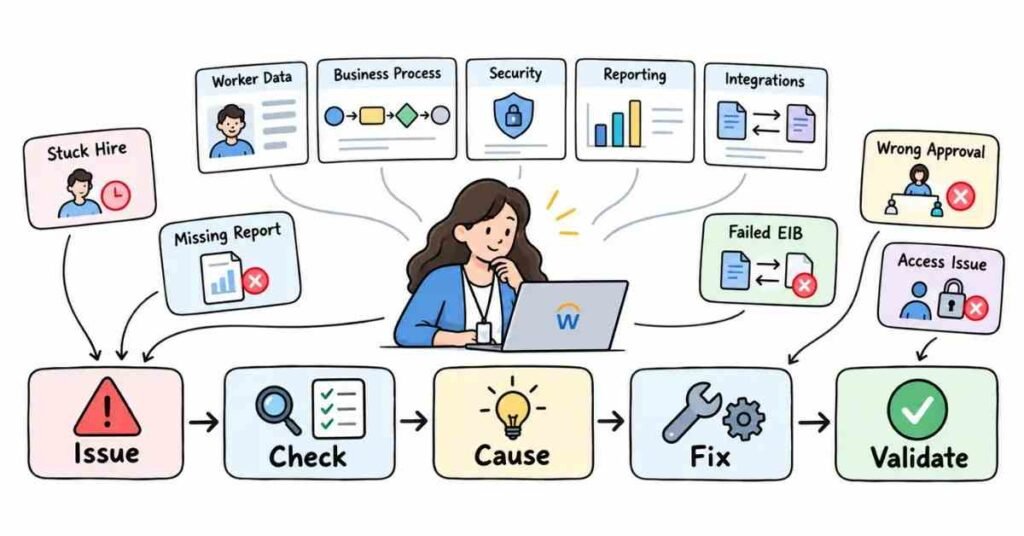
Real-World Workday Scenarios — Questions 181–210
This section is where your preparation becomes more practical.
In a real interview, you may hear questions like:
“A hire is stuck.”
“A manager cannot see an employee.”
“A report is missing workers.”
“An EIB failed for a few records.”
The interviewer usually wants to know how you would investigate the issue, not just whether you remember the definition.
A good way to answer scenario questions is:
Understand the issue → Check the right area → Find the cause → Correct it → Validate
Q181. A Hire Business Process is stuck. What would you check?
I would first open the Business Process and identify the exact pending step.
Then I would check:
Who owns that step
Whether the approver has the correct role
Condition rules
Security
Missing required information
Integration or To Do steps
I would not change the process until I know where it is actually stuck.
Q182. A manager cannot hire a new worker. What would you check?
I would check the Supervisory Organization and staffing model first.
If the organization uses Position Management, I would confirm that:
An open position exists
The position is available
Hiring restrictions are correct
The manager has permission to start the Hire process
The issue may be staffing or security.
Q183. A worker was hired under the wrong manager. What would you do?
I would check the worker’s Supervisory Organization.
If the worker was placed in the wrong organization, I would identify the correct worker movement or Change Job process and fix it using the right effective date.
Then I would validate the new reporting relationship.
Q184. A worker moved to another team, but still appears under the old manager. What would you check?
I would check:
Change Job status
Effective date
New Supervisory Organization
Manager of the new organization
Any pending Business Process
Sometimes the transaction is approved but not yet effective.
Q185. A worker is showing the wrong Job Profile. What would you check?
I would review the worker’s latest job-related transaction.
I would check whether:
The correct Job Profile was selected
The transaction completed
The effective date is correct
A later transaction changed it again
I would also verify whether the issue is only in a report or on the worker record itself.
Q186. A promotion completed, but compensation did not change. What would you check?
I would confirm whether compensation was included in the promotion or Change Job process.
Then I would check:
Compensation step
Effective date
Eligibility
Approval status
Whether a separate compensation change is required
A promotion does not always mean compensation changes automatically.
Q187. A terminated employee still appears as active. What would you check?
I would check:
Termination effective date
Business Process status
Worker status
Whether a future-dated termination was used
Report effective date
If the worker record is correct but the report is wrong, I would then review the report logic.
Q188. An employee cannot request Time Off. What would you check?
I would check:
Eligibility
Absence plan assignment
Time Off type
Effective dates
Available balance, if relevant
Security
Business Process configuration
I would first confirm that the employee is supposed to have access to that Time Off type.
Q189. A worker is eligible for a benefit but cannot enroll. What would you check?
I would review:
Benefit event
Eligibility rules
Worker Type
Time Type
Location
Effective date
Enrollment window
Business Process status
I would also check whether the Hire or life-event process completed correctly.
Q190. A manager can see a worker but cannot start Change Job. What would you check?
Since the worker is visible, I would not immediately focus on Domain Security.
I would check:
Business Process Security
Manager role
Organization scope
Whether the manager is allowed to initiate Change Job
Viewing data and starting a transaction are different permissions.
Q191. A manager cannot see a worker at all. What would you check?
I would first check the worker’s Supervisory Organization.
Then I would review:
Manager assignment
Role assignment
Organization hierarchy
Security scope
Effective dates
If the worker recently moved, I would check whether that move changed the manager’s access.
Q192. An HR Partner can see workers in one organization but not another. What would you check?
I would check the HR Partner role assignment.
The issue may be that the role is assigned only to one organization.
I would validate the scope before changing global security.
Q193. An approval went to the wrong manager. What would you check?
I would review:
Pending Business Process step
Routing configuration
Supervisory Organization
Manager role
Condition rules
Effective dates
The wrong approval may be caused by organization setup rather than the Business Process itself.
Q194. A Business Process skipped an approval step. Why might that happen?
I would check the step’s condition rule.
The approval may only run when certain criteria are met.
I would also check whether:
The step was configured correctly
The transaction met the condition
The correct Business Process definition was used
Q195. A Business Process is routing correctly for most workers but not one worker. What would you check?
I would compare that worker with someone for whom the process works correctly.
I would look at:
Organization
Worker Type
Job Profile
Location
Role assignments
Condition-rule values
A difference in worker data may be changing the routing.
Q196. A worker exists in Workday but is missing from a report. What would you check?
I would check:
Data source
Filters
Worker status
Effective date
Security
Calculated Fields
Prompt values
I would compare the missing worker with a worker who appears correctly.
Q197. A report shows duplicate workers. What could cause that?
The report may be pulling data from a related object that has multiple records.
I would check:
Related Business Objects
Multi-instance fields
Calculated Fields
Filters
Effective-dated records
I would fix the source of duplication instead of simply hiding duplicate rows.
Q198. A Calculated Field returns blank for some workers. What would you check?
I would check:
Source Business Object
Related object path
Whether source data exists
Conditions
Effective date
Multiple-instance logic
A blank result may simply mean the underlying data is missing.
Q199. An Inbound EIB loaded 900 records, but 100 failed. What would you do?
I would review the failed records and group the errors.
For example:
Missing required values
Invalid references
Wrong date format
Incorrect IDs
Security errors
I would correct only the failed data and retest before loading again.
Q200. An EIB completed successfully, but the expected data is not visible. What would you check?
I would confirm:
What records were actually processed
Effective dates
Business Process status
Whether another approval is required
Whether I am viewing the correct worker or object
Security
A successful integration run does not always mean the business transaction is fully complete.
Q201. An outbound integration runs successfully, but one employee is missing. What would you check?
I would compare that worker with a worker included in the output.
I would check:
Selection criteria
Filters
Worker status
Effective dates
Organization assignments
Eligibility rules
The integration may be functioning correctly while that worker does not meet the criteria.
Q202. An integration fails after months of working correctly. What would you check first?
I would ask:
What changed?
Then I would check:
Credentials
Security
Source data
Configuration
External endpoint
File format
Recent updates
A working integration that suddenly fails often points to a recent change.
Q203. A file was generated but not received by the vendor. What would you check?
I would separate generation from delivery.
I would check:
Was the file created?
If yes:
Was the delivery step successful?
Then I would check:
Destination
Credentials
Network or external connection
Vendor rejection
This helps identify where the failure happened.
Q204. A manager leaves the company. What should you think about?
I would not look only at the termination.
I would also check:
Supervisory Organization
Replacement manager
Pending approvals
Role assignments
Workers reporting to that manager
Delegations
A manager’s exit can affect several processes.
Q205. The business wants to move an entire team to a new manager. What would you consider?
I would first understand whether this is an organizational restructure.
Then I would consider:
Supervisory Organization hierarchy
Workers involved
Positions
Manager assignment
Role assignments
Effective date
Pending transactions
I would test the impact before making the change in production.
Q206. HR asks for a new approval step in the Hire process. How would you handle the requirement?
I would first clarify:
Who should approve
When the approval is required
Whether it applies to everyone
Whether any condition is needed
What happens if approval is rejected
Then I would configure and test the change in a non-production environment.
Q207. A client says, “Give this user full access because they cannot see one report.” What would you do?
I would not give broad access immediately.
I would first check:
Which report
Which fields are missing
Which security domain protects the data
User’s Security Groups
Organization scope
Security should be fixed as narrowly as possible.
Q208. A production issue is urgent. Should you change configuration immediately?
Not without understanding the cause.
I would first assess:
Business impact
Number of users affected
Root cause
Available workaround
Risk of the change
If a production change is required, I would follow the organization’s change process and validate the result carefully.
Q209. How would you handle a Workday issue you have never seen before?
I would not guess.
I would break the issue into areas:
Data → Organization → Business Process → Security → Report → Integration
Then I would use the available event history, configuration, error messages, and known working examples to narrow it down.
That approach is more reliable than trying random fixes.
Q210. What makes a strong answer to a Workday scenario question?
A strong answer should show a logical troubleshooting path.
For example:
“I would first confirm whether the worker data is correct. Then I would check whether the Business Process completed. After that, I would review security and reporting logic. Once I identify the cause, I would correct it and validate with the affected user.”
That sounds stronger than listing random Workday features.
Simple Framework for Scenario Questions
Use this structure:
Issue → Check → Cause → Fix → Validate
Example:
Issue: Employee missing from report.
Check: Data source, filters, security, effective date.
Cause: Worker excluded by location filter.
Fix: Correct report logic if the requirement supports it.
Validate: Run the report again and compare results.
This structure keeps your answer clear and interview-friendly.
Practical Mock Interview
Imagine the interviewer asks:
“A new employee has been hired successfully, but the manager cannot see them and they are also missing from one HR report. How would you investigate?”
A natural answer could be:
“I would first validate the worker’s Supervisory Organization and manager relationship. Since both visibility and reporting are affected, I would confirm that the Hire process completed with the correct organization and effective date. For the manager issue, I would check role and security scope. For the report issue, I would check the report’s filters, data source, effective date, and security. I would treat them as related symptoms but verify each layer separately.”
That kind of answer shows practical thinking.
Important Topics to Practice
Focus on:
- Hire issues
- Change Job
- Transfers
- Terminations
- Business Process delays
- Approval routing
- Security
- Organization changes
- Compensation issues
- Benefits eligibility
- Absence
- Reporting errors
- Calculated Fields
- EIB failures
- Integration failures
- Production support
Practice Strategy
Take one imaginary employee and create five problems:
Wrong manager
Missing from report
Cannot request Time Off
Promotion stuck
Missing from outbound integration
For each problem, answer:
Where would I start?
Which Workday area could cause it?
How would I confirm the root cause?
How would I validate the fix?
This kind of practice is much closer to a real Workday interview than memorizing definitions alone.
Part 9: Behavioral Questions, Workday Project Explanation, Resume & Career Preparation
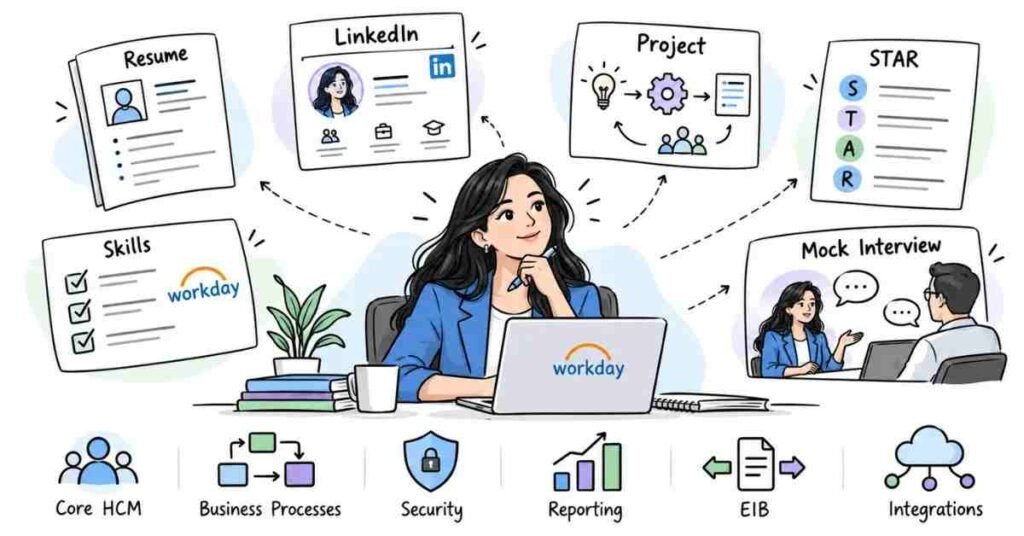
Behavioral, Project & Career Questions — 211–230
Technical knowledge is only one part of a Workday interview.
Once the interviewer understands that you know HCM, Business Processes, Security, Reporting, and Integrations, they may check how you handle clients, production issues, requirements, deadlines, and team communication.
Your answers should sound like your real experience, not memorized definitions.
Q211. Tell me about yourself.
Keep the answer related to Workday and the role.
A natural fresher answer could be:
“I have been learning Workday HCM with a focus on Core HCM, organizations, staffing, Business Processes, security, reporting, EIB, and integration basics. I have also practised common scenarios such as worker transfers, approval issues, report troubleshooting, and EIB errors. I am now looking for an opportunity where I can apply these skills in a real Workday environment and continue learning.”
Keep it around one minute.
Q212. Why did you choose Workday HCM?
Avoid giving an answer like:
“Workday has good demand.”
A better answer is:
“I was interested in Workday because it combines HR processes with technology. I like understanding how business requirements such as hiring, transfers, approvals, security, and reporting are converted into system processes.”
This sounds more personal and practical.
Q213. What Workday areas are you most comfortable with?
Mention only topics you can explain confidently.
For example:
“I am comfortable with Core HCM, Supervisory Organizations, staffing models, worker lifecycle processes, Business Processes, security basics, reporting, Calculated Fields, and EIB.”
If you mention something, be ready for follow-up questions.
Q214. Explain one Workday project you worked on.
Use a simple structure:
Client Requirement → Your Responsibility → Configuration/Work → Testing → Result
For example:
“The requirement was to support employee lifecycle processes such as Hire, Change Job, and Termination. I worked on understanding the existing organization structure, Business Process routing, report requirements, and testing different worker scenarios. I also supported issue validation and documented test results.”
Do not simply list module names.
Q215. How would you explain your project if you are a fresher?
Do not pretend you worked on a live client project if you did not.
You can say:
“I have worked on practice and training scenarios where I configured and studied Core HCM concepts, Business Processes, reporting, EIB, and common support issues. I can explain the complete flow and the scenarios I practised.”
A clear training project explanation is better than fake production experience.
Q216. What was your role in the project?
Be specific.
For example:
“My responsibility was mainly around Core HCM support. I reviewed worker data, tested Hire and Change Job scenarios, checked Business Process routing, supported report validation, and documented issues.”
The interviewer wants to know what you personally handled.
Q217. How do you gather a Workday requirement?
I would first understand the current business process.
Then I would ask:
- What is happening today?
- What should change?
- Who is involved?
- Who should approve?
- Which workers are affected?
- Are there any exceptions?
- What output or report is required?
Only after understanding the requirement would I think about configuration.
Q218. What would you do if the client gives an unclear requirement?
I would ask follow-up questions rather than guessing.
For example, if the client says:
“We need another approval for promotions.”
I would ask:
Who should approve?
Should it apply to every promotion?
Does it depend on country, level, or compensation amount?
Clear requirements reduce unnecessary rework.
Q219. How do you handle a client change request?
I would first understand the reason for the change and its impact.
Then I would check:
- Existing configuration
- Related Business Processes
- Security impact
- Reporting impact
- Integration impact
- Testing required
I would avoid changing one configuration without checking what else depends on it.
Q220. How do you handle feedback from a senior consultant or client?
I first understand why the change is being suggested.
If my configuration or approach can be improved, I make the correction and test it again.
I do not treat feedback as a personal issue.
Behavioral Questions
Q221. Tell me about a difficult issue you handled.
Use the STAR method.
Situation: What happened?
Task: What were you responsible for?
Action: What did you check or change?
Result: What happened after the fix?
Example:
“A manager was not receiving an approval task. I checked the Business Process event and found that the expected manager role was not assigned correctly for that Supervisory Organization. After the role assignment was corrected and the process was tested again, the approval routed correctly.”
The reference guide also uses STAR because it keeps behavioral answers focused on the candidate’s actual actions and results.
Q222. Tell me about a mistake you made.
Choose a real, manageable example.
For example:
“While testing a report, I initially focused only on the filter and missed the effective-date setting. After comparing the missing worker with a correct record, I found the issue. Since then, I include effective dates in my report troubleshooting checklist.”
A good answer shows learning, not perfection.
Q223. How do you handle an urgent production issue?
I first understand the business impact.
Then I identify:
Who is affected → What changed → Where the failure is happening → Whether there is a workaround
I would avoid making an untested production change just because the issue is urgent.
Q224. What if you do not know how to fix an issue?
I would not start changing random configuration.
I would:
Reproduce the issue
Check event history
Review configuration
Compare with a working example
Check available documentation
Discuss with the relevant senior or technical team when needed
Knowing how to investigate is an important support skill.
Q225. How do you manage multiple Workday tickets?
I would prioritize based on:
Business impact
Number of users affected
Deadline
Payroll or compliance impact
Whether a workaround exists
A production blocker usually needs attention before a low-impact enhancement.
Resume & Project Preparation
Q226. What should a Workday HCM resume include?
Keep it simple and easy to scan.
Include:
Professional summary
Workday HCM skills
Project or training experience
Key responsibilities
Relevant tools
Education
Certifications, if applicable
Avoid filling the resume with every Workday term you have heard.
Q227. What Workday skills can I mention?
Mention only skills you can explain.
Examples:
Core HCM, Supervisory Organizations, Staffing Models, Job Profiles, Business Processes, Security, Compensation Basics, Reporting, Calculated Fields, EIB, Integrations, Testing, and Production Support.
If you list Advanced Reporting, expect the interviewer to ask you about data sources, filters, prompts, and Calculated Fields.
Q228. How should Workday project points be written on a resume?
Avoid:
“Worked on Workday HCM.”
Use action-based points.
For example:
“Supported Core HCM processes including Hire, Change Job, worker transfers, and Termination through functional testing and issue validation.”
Another example:
“Built and validated custom reports using filters, prompts, and Calculated Fields for worker and organization data.”
The reference guide also recommends writing resume and project bullets around actual actions and outcomes rather than vague responsibilities.
Q229. How should I prepare LinkedIn for Workday roles?
Keep the headline clear.
Example:
Workday HCM | Core HCM | Business Processes | Reporting | EIB | Functional Consultant
In the profile, highlight:
Workday skills
Training or project work
Relevant HR knowledge
Reporting experience
Functional support exposure
Certifications, if you genuinely have them
Do not add experience you cannot explain in an interview.
The reference guide also includes LinkedIn optimization as part of interview and career preparation.
Q230. What should I revise before the final Workday interview?
Do not try to learn a completely new module the night before.
Review the topics you already prepared:
Core HCM → Organizations → Staffing → Business Processes → Security → Worker Lifecycle → Compensation → Reporting → Calculated Fields → EIB → Integrations → Support Scenarios
Most importantly, revise your own project explanation.
You should be able to explain:
What was the requirement?
What was your role?
What did you configure or test?
What problem did you face?
How did you troubleshoot it?
What was the result?
How to Explain a Workday Project Naturally
A simple project explanation can follow this flow:
Project Background
What type of company or HCM requirement was involved?
Your Role
What were you responsible for?
Workday Areas
Which modules or processes did you work with?
Daily Work
What did you actually do?
Issue
What problem did you face?
Solution
How did you investigate and solve it?
Result
What changed after your work?
Do not spend five minutes explaining the company before reaching your own contribution.
Questions You Can Ask the Interviewer
When the interviewer asks:
“Do you have any questions for us?”
You can ask:
- “Which Workday modules would I mainly support in this role?”
- “Is the role more focused on implementation, support, or enhancements?”
- “How much of the work involves Business Processes, reporting, and security?”
- “Will I work directly with HR business teams?”
- “What would you expect me to handle independently after the first few months?”
The reference guide also encourages candidates to prepare thoughtful questions for the interviewer instead of ending the conversation immediately.
Final Workday HCM Interview Checklist
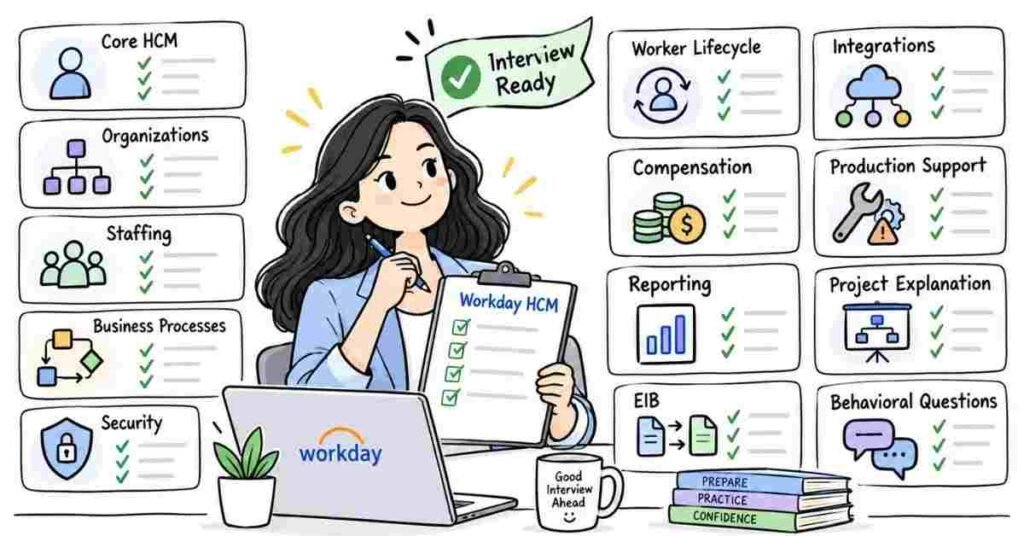
Before the interview, make sure you can explain:
- Workday HCM
- Tenant
- Worker
- Supervisory Organization
- Company and Cost Center
- Job Profile and Position
- Staffing Models
- Hire
- Change Job
- Transfer
- Termination
- Business Process Framework
- Approval and Condition Rules
- Domain Security
- Business Process Security
- Compensation basics
- Benefits and Absence basics
- Custom Reports
- Data Sources
- Calculated Fields
- Inbound and Outbound EIB
- Integration basics
- Production support troubleshooting
Also prepare:
- Tell me about yourself
- Why Workday?
- One complete project explanation
- One difficult issue
- One mistake and what you learned
- One production support scenario
- 2–3 questions for the interviewer
The reference guide similarly closes with technical revision, behavioral preparation, profile checks, and final interview-day readiness.
Final Preparation Tip
For every Workday topic, practise answering three questions:
What is it?
Why is it used?
What would I check if it stops working?
If you can answer those three naturally, your interview preparation is much stronger than simply memorizing definitions.