
AI Mastery Interview Preparation Questions : 230 Q&A Guide
Table of Contents
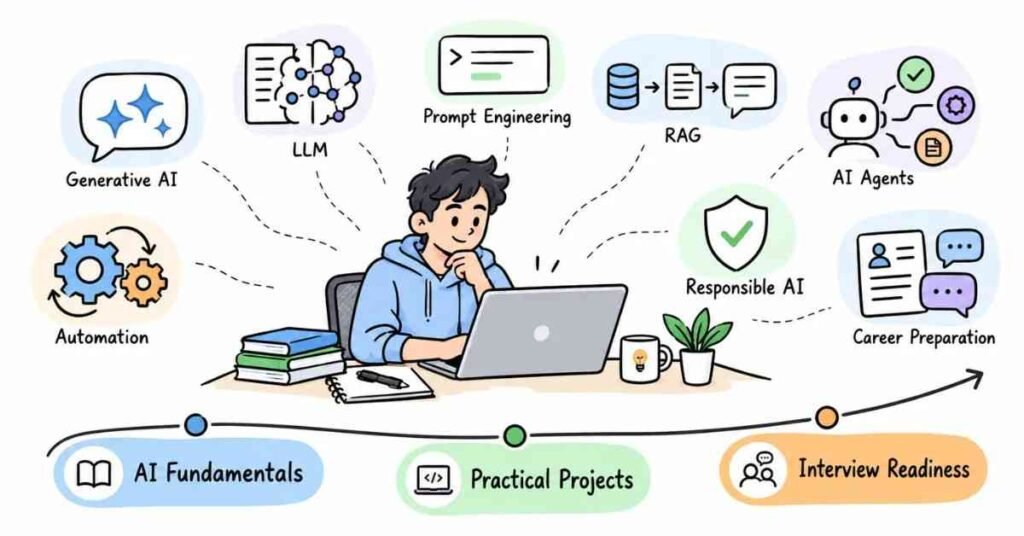
Part 1: Introduction & 30-Day Study Plan
What This Guide Covers
AI interviews are no longer only about definitions.
You may be asked:
- How an LLM works
- How you write a good prompt
- What hallucination means
- When to use RAG
- How AI agents work
- How you would automate a real task
- How you check AI output
- What risks come with AI usage
- How you used AI in a project
So this guide focuses on both concepts and practical thinking.
Who This Guide Is For
This guide is useful if you are:
- A fresher preparing for an AI-related role
- A student learning Generative AI
- A developer exploring AI-powered applications
- A marketer or analyst using AI tools
- A working professional moving into AI-based roles
- Someone building AI projects for interviews
You do not need to be a machine learning researcher.
For many entry-level AI roles, what matters is whether you understand how AI tools work, where they are useful, where they can fail, and how to use them responsibly.
What AI Mastery Really Means
AI mastery does not mean knowing every AI tool in the market.
It means understanding enough to answer questions like:
What problem am I trying to solve?
Is AI actually useful here?
Which model or tool fits the job?
How do I check whether the answer is reliable?
How can I improve the result?
That kind of thinking matters more than memorizing tool names.
What Interviewers Usually Look For
An interviewer may check whether you can:
- Explain AI concepts simply
- Write clear prompts
- Understand LLM limitations
- Use AI tools for real tasks
- Work with APIs or workflows
- Explain RAG and agents
- Handle hallucinations
- Protect sensitive information
- Discuss one AI project clearly
They may also give you a practical situation instead of asking only theory.
For example:
“The AI is giving confident but incorrect answers. What would you do?”
A good answer should explain the problem, possible reason, and practical fix.
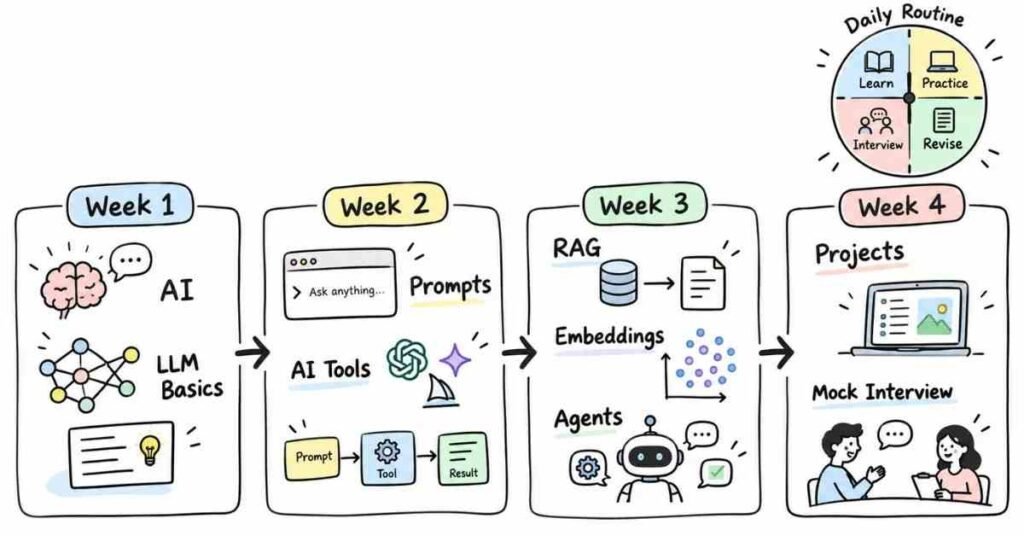
30-Day AI Mastery Study Plan
Week 1: AI Fundamentals
Focus on:
- AI vs Machine Learning
- Generative AI
- LLM basics
- Tokens
- Transformers
- Training vs inference
- Hallucinations
- Context windows
Do not try to learn everything mathematically at first. Understand what each concept means in a real AI application.
Week 2: Prompt Engineering & AI Tools
Practice:
- Clear prompts
- Giving context
- Setting roles
- Adding constraints
- Few-shot examples
- Structured output
- Prompt refinement
- Comparing AI responses
Use one real task every day instead of only reading prompt theory.
Week 3: RAG, Embeddings & Agents
Focus on:
- Embeddings
- Vector search
- RAG
- Chunking
- Retrieval
- AI agents
- Tool calling
- Automation workflows
Try to understand why these approaches are used, not just their definitions.
Week 4: Projects & Interview Practice
Use the last week for:
- One AI chatbot project
- One RAG-based project
- One automation idea
- Scenario-based questions
- Project explanation
- Resume review
- Mock interviews
Spend the final few days reviewing weak areas instead of learning completely new topics.
The reference guide also uses a week-by-week preparation plan and ends with mock practice and revision rather than last-minute theory.
Daily Study Routine
Keep the routine simple.
- 30 minutes: Learn one AI concept
- 30 minutes: Try it practically
- 20 minutes: Ask yourself interview questions
- 10 minutes: Note what you did not understand
Even one focused hour is useful if you practise consistently.
Tools You Should Recognize
You do not need to master all of them.
Useful tools and platforms may include:
- ChatGPT
- Gemini
- Claude
- GitHub Copilot
- Hugging Face
- OpenAI APIs
- Vector databases
- Automation platforms
- AI coding assistants
- AI research tools
In an interview, do not simply say:
“I know ChatGPT, Gemini, and Claude.”
A better answer is:
“I use AI tools for research, drafting, coding support, summarisation, and workflow automation. I also verify important outputs instead of using them directly.”
That sounds more practical.
How to Use This Guide
Do not memorize every answer word for word.
For each topic:
- Understand the idea.
- Try a small example.
- Explain it in your own words.
- Think of one real use case.
- Identify one limitation.
- Review it again after a few days.
Final Tip
When preparing for an AI interview, keep asking yourself:
“Can I explain this concept to someone who is not technical?”
If you can explain something like LLM, RAG, hallucination, embeddings, or AI agents in simple language, you probably understand it better than someone who only memorized the definition.
Part 2: AI & Generative AI Fundamentals
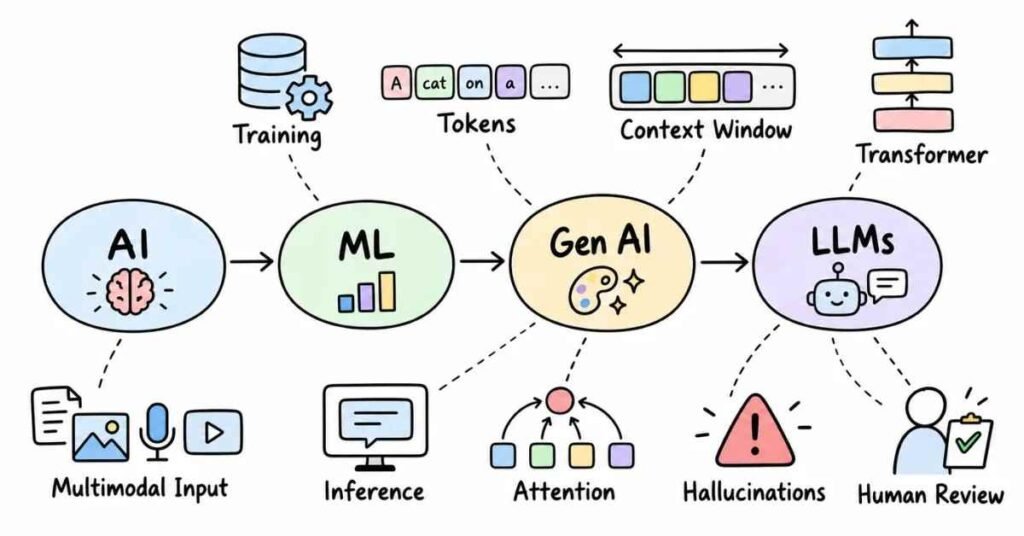
AI & Generative AI — Questions 1–30
This section covers the basic concepts interviewers usually expect before moving into prompting, LLMs, RAG, agents, and automation.
The goal is not to sound technical for the sake of it. You should be able to explain each concept in simple, practical language.
Q1. What is Artificial Intelligence?
Artificial Intelligence, or AI, is the idea of making computers perform tasks that normally need human intelligence.
Examples include:
- Understanding language
- Recognizing images
- Making predictions
- Recommending content
- Generating text or images
A simple way to say it in an interview is:
“AI helps machines perform tasks that normally require human-like decision-making or understanding.”
Q2. What is Machine Learning?
Machine Learning is a part of AI where systems learn patterns from data instead of being told every rule manually.
For example, instead of writing thousands of rules to detect spam emails, a model can learn from examples of spam and non-spam messages.
Q3. What is the difference between AI and Machine Learning?
AI is the broader field.
Machine Learning is one way of building AI systems.
You can think of it like this:
AI = Big field
Machine Learning = One approach inside AI
Q4. What is Generative AI?
Generative AI creates new content based on patterns learned from existing data.
It can generate:
- Text
- Images
- Code
- Audio
- Video
Tools like ChatGPT, Gemini, and Claude are common examples of Generative AI systems.
Q5. How is Generative AI different from traditional AI?
Traditional AI often focuses on prediction, classification, or decision-making.
Generative AI focuses more on creating new output.
For example:
A traditional model may classify an email as spam.
A generative model may write a reply to that email.
Q6. What is an LLM?
LLM stands for Large Language Model.
It is trained on large amounts of text and learns patterns in language.
It can understand prompts and generate responses based on those patterns.
Q7. Why are LLMs called “large”?
They are called large because they are trained using:
- Very large datasets
- Large numbers of parameters
- Significant computing power
The word “large” refers more to model scale than simply response length.
Q8. What is a token?
A token is a small unit of text that a language model processes.
A token may be:
- A full word
- Part of a word
- A punctuation mark
LLMs do not read text exactly the way humans do. They process sequences of tokens.
Q9. Why are tokens important?
Tokens matter because models usually have limits on how much text they can process at once.
They can also affect:
- API cost
- Response length
- Context size
- Processing time
Q10. What is a context window?
A context window is the amount of information a model can consider during one interaction.
If the conversation or document becomes too large, older or extra information may fall outside that usable context.
How LLMs Work
Q11. What does an LLM actually do when it generates text?
At a basic level, it predicts the next likely token based on the tokens that came before it.
It repeats this process again and again until the response is complete.
The result can feel intelligent because the model has learned a huge number of language patterns.
Q12. Does an LLM understand language like a human?
Not in the same way.
It can produce useful and sometimes very strong answers, but it does not think, feel, or understand meaning exactly like a person.
That is why human review still matters.
Q13. What is model training?
Training is the process where a model learns patterns from large amounts of data.
During training, the model adjusts internal parameters so it becomes better at predicting and generating useful output.
Q14. What is inference?
Inference is what happens when we use a trained model.
For example, when you type a prompt into an AI tool and receive a response, the model is performing inference.
Q15. What is the difference between training and inference?
Training: The model learns.
Inference: The trained model is used to generate an answer.
That simple difference is usually enough for an interview answer.
Q16. What are parameters in an AI model?
Parameters are internal values the model learns during training.
They help the model decide how strongly different patterns should influence the final prediction.
You do not usually need to explain the mathematics unless the role is very technical.
Q17. What is a transformer?
A transformer is the model architecture behind many modern LLMs.
It is good at understanding relationships between words or tokens across a sequence.
That makes it useful for language tasks.
Q18. What is attention in a transformer?
Attention helps the model focus on the parts of the input that are most relevant to the current task.
For example, in a long sentence, the model can consider which earlier words matter when generating the next token.
Q19. Why are transformers important?
Transformers made it easier to train powerful language models at scale.
They are now widely used for:
- Text generation
- Translation
- Summarization
- Coding assistance
- Question answering
AI Output & Limitations
Q20. What is an AI hallucination?
A hallucination happens when an AI system gives information that sounds confident but is incorrect or unsupported.
This is one of the most important concepts to understand in AI interviews.
Q21. Why do hallucinations happen?
An LLM generates likely text based on patterns.
It does not automatically know whether every statement is factually correct.
Hallucinations can happen when:
- The prompt is unclear
- The model lacks reliable context
- The question asks for very specific facts
- The model tries to complete missing information
Q22. How do you reduce hallucinations?
I would try to:
- Give better context
- Ask for sources where possible
- Use trusted documents
- Use RAG for knowledge-based questions
- Ask the model to say when it is unsure
- Verify important information manually
The main idea is simple: do not trust important AI output without checking it.
Q23. What is temperature in an LLM?
Temperature controls how predictable or creative the model’s output can be.
Lower temperature usually gives more consistent answers.
Higher temperature can create more varied responses.
Q24. When would you use a lower temperature?
I would prefer a lower temperature for tasks like:
- Factual answers
- Structured extraction
- Technical documentation
- Data processing
- Consistent output
Q25. When might a higher temperature be useful?
A higher setting may help with:
- Brainstorming
- Creative writing
- Idea generation
- Marketing concepts
But more creativity can also mean more variation.
Q26. What is multimodal AI?
Multimodal AI can work with more than one type of input.
For example, a system may understand:
- Text
- Images
- Audio
- Video
A user might upload an image and ask the AI to explain what is happening in it.
Q27. What is fine-tuning?
Fine-tuning means taking an existing model and training it further on a more specific dataset or task.
It can help the model behave better for a particular use case.
Fine-tuning is not always the first solution, though. Sometimes better prompting or RAG is enough.
Q28. What is zero-shot learning?
Zero-shot means asking the model to perform a task without giving it examples.
Example:
“Classify this customer message as positive, negative, or neutral.”
You give the instruction, but no example answers.
Q29. What is few-shot learning?
Few-shot means giving the model a few examples before asking it to perform the task.
For example:
Input: Great service
Output: Positive
Input: Very disappointed
Output: Negative
Then you give a new input.
Examples help the model understand the expected style and format.
Q30. What makes someone strong in AI fundamentals?
A strong candidate does not just repeat definitions.
They should be able to explain:
- What AI can do
- What it cannot do
- Why hallucinations happen
- How an LLM processes text
- When Generative AI is useful
- Why human review is still needed
That shows practical understanding.
Important Topics to Practice
Focus on these concepts:
- Artificial Intelligence
- Machine Learning
- Generative AI
- LLMs
- Tokens
- Context Window
- Transformers
- Attention
- Training
- Inference
- Hallucinations
- Temperature
- Multimodal AI
- Fine-Tuning
- Zero-shot and Few-shot Learning
Practice Strategy
Pick one concept every day and explain it without using complicated language.
For example, try explaining LLM like this:
“An LLM is a language model trained on large amounts of text. It looks at the input, understands the pattern, and predicts what response is most likely to follow.”
Then try explaining the same idea to:
- A student
- A manager
- A technical interviewer
If you can adjust the explanation without changing the meaning, you understand the concept well.
Part 3: Prompt Engineering
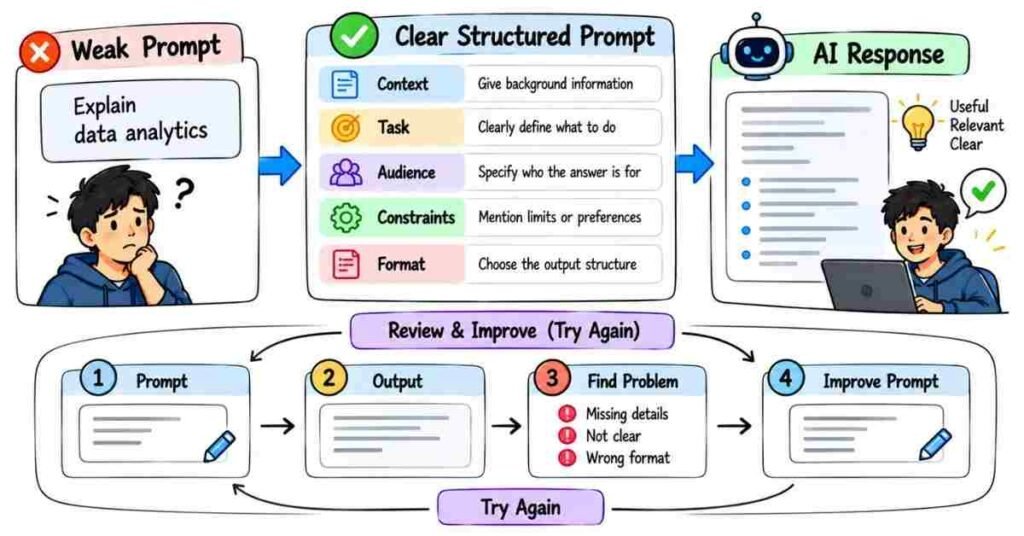
Prompt Engineering — Questions 31–60
Prompt engineering is not about finding one “magic prompt.” It is about giving the AI enough context, direction, and boundaries to get a useful result.
For interviews, you should be able to explain how you improve a weak prompt and why certain instructions make the output better.
Prompt Basics
Q31. What is prompt engineering?
Prompt engineering is the process of giving clear instructions to an AI model so it understands what you want.
A good prompt usually tells the model:
- What the task is
- Who the output is for
- What context matters
- What format you want
- What restrictions it should follow
Q32. Why does prompt quality matter?
AI can only work with the information and instructions you provide.
For example:
Weak prompt:
“Write about AI.”
Better prompt:
“Explain Generative AI to college students in simple English using three practical examples.”
The second prompt gives the model a much clearer direction.
Q33. What are the main parts of a good prompt?
A useful prompt often contains:
Task + Context + Audience + Constraints + Output Format
You do not need all five every time, but adding the right details usually improves the response.
Q34. What is context in a prompt?
Context is the background information the model needs before answering.
For example, instead of saying:
“Write an email.”
You could say:
“I interviewed for a Python developer role yesterday. Write a short thank-you email to the hiring manager.”
Now the AI knows the situation.
Q35. Why should you mention the audience?
The same topic should not be explained the same way to everyone.
An explanation for a beginner should sound different from one written for a data scientist or business leader.
Q36. What is role prompting?
Role prompting means telling the model what perspective to use.
Example:
“Act as a technical recruiter and review this resume.”
The role gives the model a clearer way to approach the task.
Q37. Is role prompting always necessary?
No.
If the task is already clear, adding a role may not improve much.
I use role prompting when a particular perspective or expertise is actually useful.
Zero-Shot & Few-Shot Prompting
Q38. What is zero-shot prompting?
Zero-shot means giving the AI an instruction without showing examples.
Example:
“Classify this customer review as positive, negative, or neutral.”
The model has to understand the task directly from the instruction.
Q39. What is few-shot prompting?
Few-shot prompting means giving a few examples before asking for a new result.
For example:
Review: Great product
Sentiment: Positive
Review: Waste of money
Sentiment: Negative
Then you provide a new review.
The examples show the model exactly what kind of answer you expect.
Q40. When is few-shot prompting useful?
It is useful when you need:
- A specific format
- Consistent labels
- A particular writing style
- Repeated structured outputs
- Clear classification rules
Examples often reduce ambiguity.
Q41. What is one-shot prompting?
One-shot prompting is simply a few-shot prompt with one example.
It can be enough when the task is simple but the expected format needs clarification.
Clear Instructions & Constraints
Q42. What are constraints in a prompt?
Constraints tell the AI what it should or should not do.
Examples:
- Keep it under 100 words
- Use simple English
- Do not use technical jargon
- Return only JSON
- Give exactly five examples
Constraints help control the output.
Q43. Why should prompts be specific?
A vague request leaves more room for the model to guess.
For example:
“Give marketing ideas.”
is much less useful than:
“Give five low-budget Instagram campaign ideas for a local bakery targeting college students.”
Specificity usually improves relevance.
Q44. Can a prompt be too long?
Yes.
Adding unnecessary instructions can make the task harder to follow.
A strong prompt should include useful detail, not random detail.
Q45. What is an output format instruction?
It tells the model how the final answer should look.
For example:
“Return the answer as a table with columns for Tool, Use Case, Benefit, and Limitation.”
This is especially useful when the output will be reused in another workflow.
Q46. Why is structured output useful?
Structured output is easier to:
- Read
- Compare
- Parse
- Store
- Send to another application
For automation, consistent structure is often more important than creative wording.
Improving Prompts
Q47. What do you do when an AI response is too generic?
I add more context.
I may specify:
- Target audience
- Goal
- Industry
- Tone
- Examples
- Restrictions
- Required output
Generic input often leads to generic output.
Q48. What if the AI misunderstands the task?
I would not repeat the same prompt again.
I would identify what was unclear and rewrite that part.
For example:
“Do not summarize the document. Extract only the dates, names, and action items.”
Clear correction works better than simply saying, “Try again.”
Q49. What is prompt iteration?
Prompt iteration means improving the prompt based on the previous result.
The process may look like:
Prompt → Review Output → Find Problem → Improve Prompt → Try Again
Good prompting is often iterative.
Q50. Should you ask AI to explain its answer?
You can ask it to provide a short explanation, assumptions, or supporting steps when that helps you review the result.
For high-stakes information, explanation alone is not proof. Important facts still need verification.
Q51. How can you reduce hallucinations through prompting?
I may tell the model:
- Use only the information provided
- Do not guess missing facts
- Say “I don’t know” when evidence is missing
- Separate facts from assumptions
- Cite the supplied source where possible
That will not remove every error, but it can reduce unsupported answers.
Q52. What is grounding in prompting?
Grounding means giving the model reliable information to base its response on.
For example, instead of asking a model to answer from general memory, you may provide a company policy document and say:
“Answer using only this document.”
That makes the response more controlled.
Practical Prompting
Q53. How would you prompt AI to summarize a long document?
I would tell it exactly what kind of summary I need.
Example:
“Summarize this report in five bullet points. Focus only on revenue, expenses, risks, and next steps. Do not add information that is not in the report.”
Q54. How would you prompt AI to write an email?
I would give:
- Recipient
- Situation
- Purpose
- Tone
- Length
Example:
“Write a short professional email to my manager asking to move tomorrow’s meeting to Friday because of a client call.”
Q55. How would you prompt AI for coding help?
Instead of saying:
“Fix my code.”
I would provide the code, error, expected behavior, and environment.
For example:
“This Python function should remove duplicates while preserving order, but it returns the wrong result. Explain the bug and show the corrected version.”
Q56. How would you prompt AI for data extraction?
I would clearly define the fields and output structure.
Example:
“From the text below, extract Name, Email, Company, and Job Title. Return only a JSON array. Use null if a field is missing.”
This makes the result easier to use programmatically.
Q57. How would you prompt AI for brainstorming?
I would give enough direction without making the prompt too restrictive.
Example:
“Give 10 campaign ideas for an online coding course aimed at final-year engineering students. Keep each idea to one sentence and avoid discount-based concepts.”
Q58. What are common prompt engineering mistakes?
Common mistakes include:
- Giving vague instructions
- Adding too many unrelated requirements
- Not providing enough context
- Forgetting the audience
- Not defining the output format
- Trusting the first response blindly
- Expecting AI to know missing information
Q59. Is there one perfect prompt for every task?
No.
A prompt that works well for summarization may not work for coding, extraction, analysis, or creative writing.
Good prompting depends on the task.
Q60. What makes someone good at prompt engineering?
A strong prompt engineer knows how to:
- Define the real problem
- Give useful context
- Remove ambiguity
- Set clear constraints
- Ask for the right format
- Review the output critically
- Improve the prompt when needed
The most important skill is not writing long prompts. It is communicating clearly with the model.
A Simple Prompt Framework
When you are not sure how to write a prompt, use this structure:
Context: What is happening?
Task: What should the AI do?
Audience: Who is the result for?
Constraints: What rules should it follow?
Format: How should the answer be presented?
Example:
“I am preparing beginner training material for college students. Explain RAG in simple English using one real-world example. Keep it under 150 words and avoid heavy technical terms.”
That prompt is clear without being unnecessarily complicated.
Practice Strategy
Take one weak prompt such as:
“Write about cybersecurity.”
Improve it step by step.
First add the audience:
“Explain cybersecurity to college students.”
Then add the purpose:
“Explain cybersecurity to college students who are considering it as a career.”
Then add the format:
“Explain cybersecurity to college students who are considering it as a career. Cover what it is, three common roles, and the skills needed. Keep it under 250 words.”
That exercise helps you understand what each extra instruction actually changes.
Part 4: LLMs & AI Models
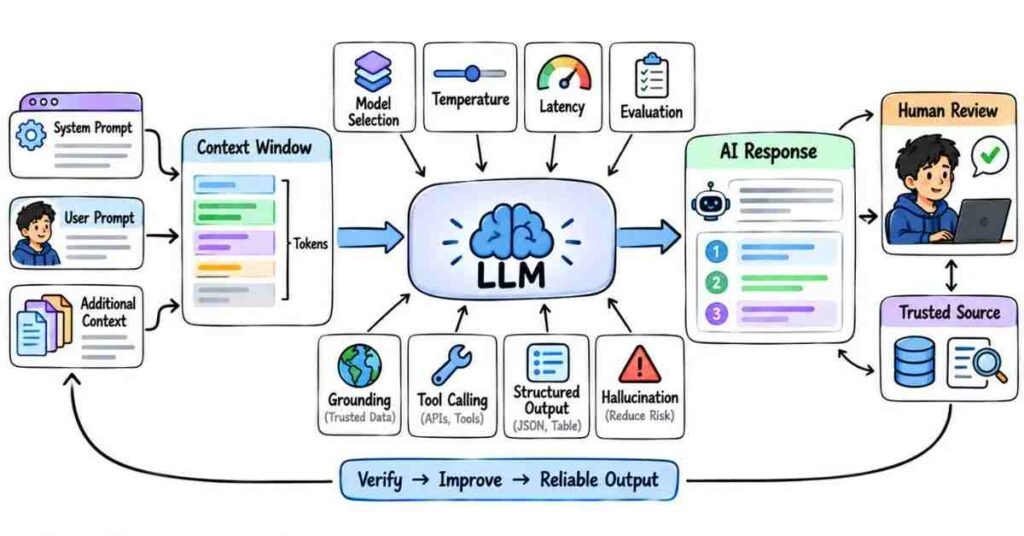
LLMs & Model Behavior — Questions 61–90
This section goes a little deeper into how language models behave in real applications.
You do not need to explain every mathematical detail in an interview. What matters is whether you understand why a model gives a certain response, where it can fail, and how you would choose the right model for a task.
Q61. What is an LLM?
LLM stands for Large Language Model.
It is trained on large amounts of text and learns patterns in language. When we give it a prompt, it generates a response by predicting what text should come next.
Q62. Is an LLM a database?
No.
A database stores information and returns specific records.
An LLM generates responses based on patterns it learned during training. That is why it can sometimes produce an answer that sounds correct but is actually wrong.
Q63. Does an LLM remember everything it was trained on?
Not like a normal storage system.
Training changes the model’s internal parameters, but we cannot treat it like a searchable database containing exact copies of every document.
For reliable company or private information, I would normally provide the data separately.
Q64. What is a base model?
A base model is a model trained mainly to predict text.
It may understand language well, but it is not always optimized to follow user instructions clearly.
Q65. What is an instruction-tuned model?
An instruction-tuned model is further trained to respond better to instructions and conversations.
That is why it is usually more useful for chatbots, assistants, question answering, and business applications.
Q66. What is a system prompt?
A system prompt gives the model its overall behavior or rules.
For example:
“You are a customer support assistant. Answer only from the company policy provided.”
It helps define how the model should behave throughout the interaction.
Q67. What is the difference between a system prompt and a user prompt?
A system prompt sets the broader rules.
A user prompt contains the current request.
For example:
System: Answer as a support assistant.
User: Can I cancel my order?
Both affect the final response.
Q68. Why does context matter so much in an LLM?
The model can only respond based on the information available in its current context plus what it learned during training.
If important details are missing, the answer may become vague or incorrect.
Q69. What happens when the context becomes too large?
Every model has a context limit.
If too much information is sent, you may need to:
- Remove unnecessary text
- Summarize older information
- Retrieve only relevant documents
- Split the task into smaller parts
More context is not always better context.
Q70. What is context management?
Context management means deciding what information the model actually needs for the current task.
For example, a support bot answering a refund question does not need the company’s entire document library. It only needs the relevant policy.
Q71. Why can the same prompt sometimes give different answers?
LLMs generate responses probabilistically.
Depending on the model settings, the same prompt can produce slightly different wording or ideas.
This is useful for creative tasks but can be a problem when consistent output is required.
Q72. What is deterministic output?
A deterministic-style output means we want the model to behave as consistently as possible.
This is useful for:
- Data extraction
- Classification
- Structured responses
- Business workflows
In those cases, I would keep the prompt clear and reduce unnecessary creativity.
Q73. What is temperature?
Temperature influences how varied the model’s output can be.
A lower value usually gives more predictable answers.
A higher value can produce more variety.
I would not simply set it high or low without thinking about the task.
Q74. What is hallucination in an LLM?
A hallucination is when the model produces information that is incorrect, unsupported, or invented, even though the answer may sound confident.
For example, it may create a source, date, or product feature that does not actually exist.
Q75. How would you handle hallucinations in a real application?
I would not rely on one fix.
Depending on the use case, I might:
- Give better source information
- Use RAG
- Ask the model not to guess
- Restrict the answer to supplied documents
- Validate important outputs
- Add human review for high-risk tasks
Q76. Why is confidence in the wording not proof of accuracy?
An LLM can sound very certain while still being wrong.
The writing style does not tell us whether the underlying information is verified.
That is why factual output should be checked when accuracy matters.
Q77. What is grounding?
Grounding means giving the model reliable information to base its answer on.
For example, if I want an AI assistant to answer company policy questions, I would ground it using the actual company documents instead of expecting the model to know them.
Q78. What is structured output?
Structured output means asking the model to respond in a predictable format.
For example:
{
“name”: “Rahul”,
“role”: “Developer”,
“experience”: 2
}
This is useful when the output will be passed to another application.
Q79. Why can structured output fail?
The model may:
- Miss a field
- Change a key name
- Add extra text
- Return invalid JSON
So in production, I would validate the output rather than assuming it is always correct.
Q80. What is tool calling?
Tool calling allows an LLM to request an external action.
For example, instead of guessing today’s weather, the model can call a weather service and use the result in its answer.
This connects language models with real systems.
Q81. Why do LLM applications need external tools?
An LLM alone may not have:
- Current information
- Private company data
- Calculator accuracy
- Database access
- Ability to send an email
- Ability to execute an action
Tools help fill those gaps.
Q82. What is the difference between model knowledge and external data?
Model knowledge comes from training.
External data is supplied at runtime through things like documents, APIs, databases, or search.
For current or private information, external data is usually more reliable.
Q83. What is fine-tuning useful for?
Fine-tuning can be useful when we want a model to consistently learn a particular behavior, style, or task pattern.
For example, a company might fine-tune a model on many examples of how a certain classification task should be handled.
Q84. When would you avoid fine-tuning?
I would not fine-tune just because prompting feels difficult.
First, I would check whether the problem can be solved with:
- Better prompts
- Better examples
- RAG
- Tool calling
- Better workflow design
Fine-tuning adds cost and maintenance, so it should solve a real need.
Q85. What is the difference between fine-tuning and RAG?
Fine-tuning changes the model’s behavior through additional training.
RAG gives the model relevant external information at the time of the question.
A simple way to remember it is:
Fine-tuning changes how the model behaves.
RAG changes what information the model can use for that answer.
Q86. How do you choose an AI model for a project?
I would not automatically pick the biggest model.
I would look at:
- Accuracy
- Cost
- Speed
- Context size
- Privacy needs
- Multimodal support
- Tool use
- Output quality
The best model is the one that fits the actual task.
Q87. Why might a smaller model be better?
A smaller model can be:
- Faster
- Cheaper
- Easier to deploy
- Good enough for simple tasks
For basic classification or extraction, a large expensive model may be unnecessary.
Q88. What is latency?
Latency is how long the user waits for the model to respond.
For a chatbot, even a strong model can create a poor experience if every answer takes too long.
So speed is part of model selection.
Q89. How do you evaluate an LLM application?
I would test it with real examples rather than only a few easy prompts.
Depending on the application, I may check:
- Accuracy
- Relevance
- Hallucinations
- Consistency
- Response time
- Cost
- Safety
- User satisfaction
Evaluation should match the real purpose of the system.
Q90. What makes a good LLM-based solution?
A good solution does not simply connect a model and call it AI.
It should have:
- A clear problem to solve
- The right model
- Good context
- Reliable data
- Output checks
- Reasonable cost
- A fallback when the model fails
The model is only one part of the complete system.
A Practical Interview Scenario
An interviewer may ask:
“We are building an HR assistant, but it sometimes invents leave-policy rules. How would you improve it?”
A natural answer could be:
“I would avoid letting the model answer only from its general knowledge. I would connect it to the approved HR policy documents, retrieve the relevant section for each question, and instruct the model to answer only from that information. If the policy does not contain the answer, it should say that instead of guessing.”
That answer shows that you understand the problem beyond the word hallucination.
Important Topics to Practice
Focus mainly on:
- Base Models
- Instruction-Tuned Models
- System Prompts
- Context Management
- Temperature
- Hallucinations
- Grounding
- Structured Output
- Tool Calling
- Fine-Tuning
- Model Selection
- Latency
- Cost
- Evaluation
Practice Strategy
Pick one real use case, such as a college helpdesk chatbot.
Then ask yourself:
- What information should the model use?
- What information should it never guess?
- Does it need RAG?
- Does it need an external tool?
- Which model size is enough?
- How will I check wrong answers?
- What happens if the model fails?
Thinking this way makes interview answers sound much more practical than memorizing model definitions.
Part 5: RAG, Embeddings & Vector Databases
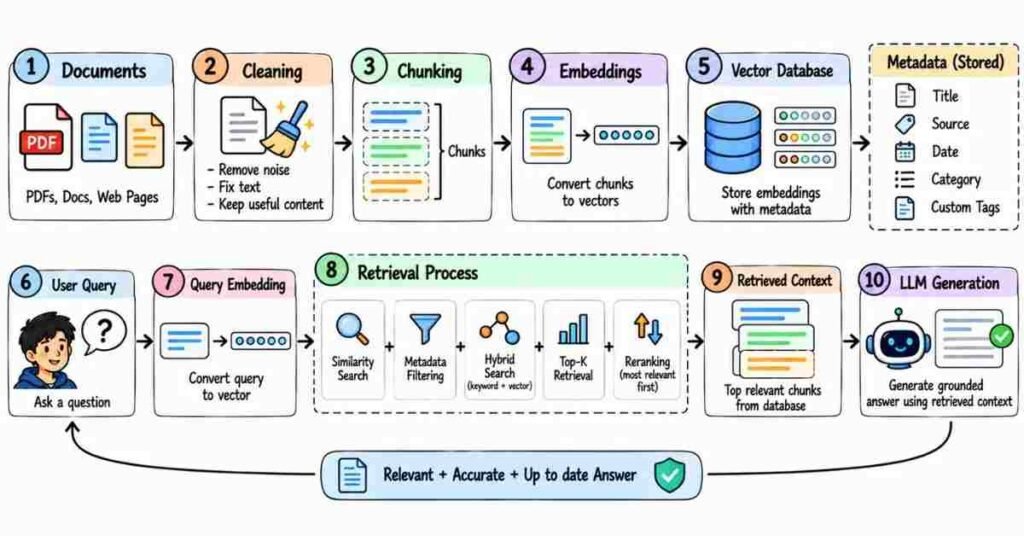
RAG, Embeddings & Vector Search — Questions 91–120
This section is important because many real AI applications need to answer questions from company documents, PDFs, websites, or internal knowledge instead of depending only on what the model learned during training.
The goal here is to understand the flow, not memorize complicated definitions.
Q91. What is RAG?
RAG stands for Retrieval-Augmented Generation.
It helps an AI model answer using relevant information fetched from an external source.
For example, if a user asks about a company leave policy, RAG can first retrieve the correct policy section and then give it to the model before the answer is generated.
Q92. Why do we need RAG?
An LLM may not know:
- Private company data
- Recently updated information
- Internal documents
- Product manuals
- College policies
- Customer-specific data
RAG gives the model access to that information at the time of the question.
Q93. What is the basic RAG flow?
A simple RAG flow looks like this:
User Question → Retrieve Relevant Information → Send Context to LLM → Generate Answer
The important point is that the model gets useful evidence before answering.
Q94. Is RAG the same as training an AI model?
RAG does not retrain the model.
It supplies relevant information during the request.
That makes it useful when the knowledge changes often.
Q95. What is an embedding?
An embedding is a numerical representation of data such as text.
It helps a system compare meaning rather than only exact words.
“How can I cancel my order?”
“I want to stop my purchase.”
Their wording is different, but their meaning is similar. Embeddings help the system recognize that similarity.
Q96. Why are embeddings useful in RAG?
Embeddings help us find documents that are semantically related to the user’s question.
Instead of searching only for exact keyword matches, the system can search by meaning.
Q97. What is semantic search?
Semantic search looks for content based on meaning.
For example, a user may search:
“How many holidays do employees get?”
The document may use the phrase:
“Annual leave entitlement.”
Semantic search can still connect the two.
Q98. What is a vector?
In this context, a vector is a list of numbers representing the meaning of some content.
Embeddings are stored as vectors so they can be compared mathematically.
You usually do not need to explain the full math in a general interview.
Q99. What is a vector database?
A vector database stores embeddings and helps search for similar vectors quickly.
Common use cases include:
- RAG
- Document search
- Recommendation systems
- Semantic search
- AI assistants
Q100. What does a vector database store?
It can store:
- Embedding vectors
- Original text
- Document ID
- Source
- Page number
- Category
- Other metadata
The metadata is useful when we want to filter the search.
Q101. What is similarity search?
Similarity search finds vectors that are closest to the vector created from the user’s question.
Those closest results are treated as the most relevant pieces of information.
Q102. What is cosine similarity?
Cosine similarity is one common way to measure how similar two vectors are.
In simple terms, it helps compare whether two pieces of text have a similar meaning.
For most interviews, understanding the purpose is more important than memorizing the formula.
Q103. What is chunking?
Chunking means splitting a large document into smaller pieces before creating embeddings.
For example, a 100-page PDF should not usually be treated as one giant block.
It may be split into smaller sections or paragraphs.
Q104. Why is chunking important?
If chunks are too large, they may contain too much unrelated information.
If they are too small, useful context may get separated.
Good chunking helps retrieval return the right amount of information.
Q105. What is chunk overlap?
Chunk overlap means allowing some text from one chunk to appear again in the next chunk.
This helps avoid losing meaning when important information sits near the boundary between two chunks.
Q106. Is there one perfect chunk size?
No.
The best chunk size depends on:
- Document type
- Question type
- Model context
- Retrieval method
- Amount of detail needed
A policy document and a source-code repository may need different chunking strategies.
Q107. What happens during document ingestion in RAG?
A common ingestion process is:
Load document → Clean text → Split into chunks → Create embeddings → Store in vector database
This prepares the content for later retrieval.
Q108. What happens when the user asks a question?
The system may:
- Convert the question into an embedding.
- Search the vector database.
- Retrieve the most relevant chunks.
- Add those chunks to the prompt.
- Ask the LLM to generate an answer.
That is the core RAG workflow.
Q109. What does Top-K mean in retrieval?
Top-K means retrieving the top number of most relevant results.
For example:
Top-3 means retrieve the three best matching chunks.
More results are not always better. Too much irrelevant context can confuse the model.
Q110. What is metadata filtering?
Metadata filtering narrows down the search before or during retrieval.
For example, if documents contain:
- Department
- Year
- Product
- Country
you can filter only the relevant group.
A question about HR policy should not accidentally retrieve a sales document.
Q111. What is hybrid search?
Hybrid search combines different search methods.
A common combination is:
Keyword Search + Semantic Search
This can work better when exact names, codes, or technical terms matter along with meaning.
Q112. What is reranking?
Reranking means taking the retrieved results and sorting them again using a stronger relevance check.
The first search may return ten possible chunks.
A reranker can help identify which three are actually the most useful.
Q113. Can RAG completely remove hallucinations?
No.
RAG can reduce hallucinations by giving the model better information, but mistakes are still possible.
The system can still:
- Retrieve the wrong chunk
- Misread the context
- Combine facts incorrectly
- Generate unsupported details
Important outputs still need validation.
Q114. Why might a RAG system give a wrong answer?
The problem may be in different places.
For example:
- Poor document quality
- Bad chunking
- Weak embeddings
- Wrong retrieval
- Too many retrieved chunks
- Weak prompt instructions
- Outdated documents
So I would not immediately blame the language model.
Q115. What is retrieval quality?
Retrieval quality tells us whether the system is finding the right information before generation.
If the correct document never reaches the model, even a strong LLM may give a poor answer.
Q116. How would you improve a weak RAG system?
I would check the pipeline step by step.
I may review:
- Document cleaning
- Chunk size
- Embedding model
- Top-K value
- Metadata filters
- Hybrid search
- Reranking
- Prompt instructions
The best fix depends on where the failure is happening.
Q117. When would you use RAG instead of fine-tuning?
I would prefer RAG when the main problem is giving the model access to changing or private knowledge.
Examples:
- Company policies
- Product documents
- Support articles
- Internal manuals
If the goal is to change model behavior or teach a repeated task pattern, fine-tuning may be more relevant.
Q118. What are common RAG use cases?
RAG is useful for:
- Employee policy assistants
- Customer support bots
- College information chatbots
- Legal document search
- Product documentation assistants
- Internal company knowledge systems
The common idea is simple: answer from a trusted collection of information.
Q119. How would you design a chatbot for college documents?
I would first collect the approved documents.
Then:
Clean documents → Split into chunks → Create embeddings → Store them → Retrieve relevant chunks for each question → Send those chunks to the LLM
I would also ask the system to say when the documents do not contain the answer instead of guessing.
Q120. What makes a good RAG system?
A good RAG system should:
- Retrieve relevant information
- Use reliable sources
- Avoid unnecessary context
- Keep source metadata
- Handle missing answers safely
- Give consistent responses
- Be easy to update when documents change
The goal is not simply to connect a vector database to an LLM. The goal is to make the answer more reliable and useful.
A Practical Interview Scenario
An interviewer may ask:
“We uploaded 500 company documents, but the chatbot still gives unrelated answers. What would you check?”
A natural answer could be:
“I would first check retrieval rather than immediately changing the LLM. I would test whether the correct document chunks are being returned for sample questions. If retrieval is weak, I would review chunking, embeddings, metadata filters, Top-K settings, and possibly add hybrid search or reranking.”
That answer shows that you understand where RAG systems can actually fail.
Important Topics to Practice
Focus mainly on:
- RAG
- Embeddings
- Semantic Search
- Vector Databases
- Chunking
- Chunk Overlap
- Similarity Search
- Top-K Retrieval
- Metadata Filtering
- Hybrid Search
- Reranking
- Retrieval Quality
Practice Strategy
Choose one simple project, such as a college FAQ chatbot using PDF documents.
Then try to explain:
Where does the data come from? → How is it split? → How are embeddings created? → Where are they stored? → How is the right information retrieved? → How does the LLM use it?
If you can explain that complete flow without memorizing technical definitions, you are ready for most basic RAG interview questions.
Part 6: AI Agents, Automation & Workflows
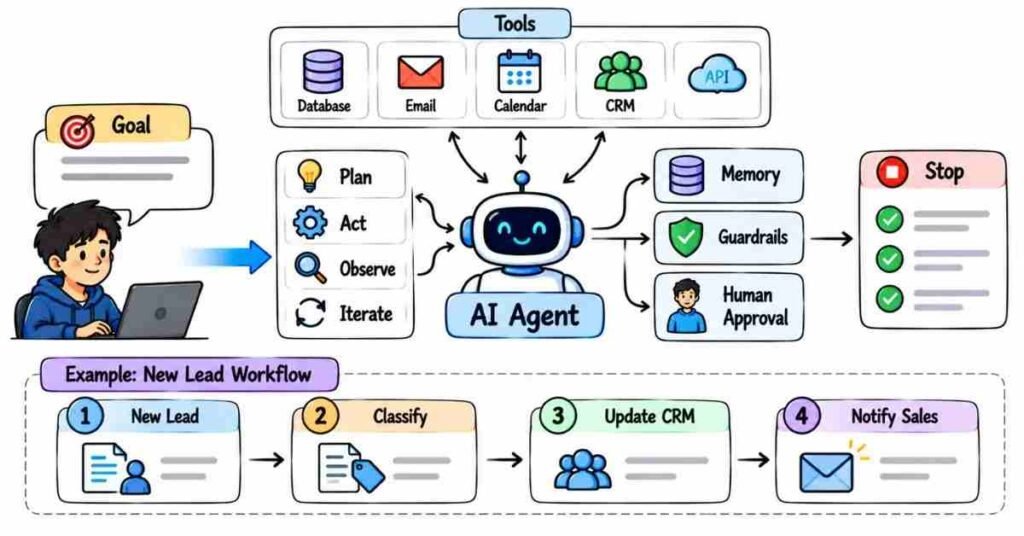
AI Agents, Automation & Workflows — Questions 121–150
This section moves from asking AI questions to getting AI to complete tasks.
In interviews, you may be asked how an AI assistant can use tools, connect with other applications, remember useful context, or automate a business process. The important thing is to explain the workflow clearly instead of making an AI agent sound like magic.
Q121. What is an AI agent?
An AI agent is a system that can understand a goal, decide what needs to happen next, and use available tools to complete the task.
For example, an agent might:
Read an email → Identify the request → Check a database → Prepare a response
The LLM helps with reasoning and language, while tools handle real actions.
Q122. How is an AI agent different from a normal chatbot?
A chatbot mainly responds to messages.
An agent can go a step further and perform tasks.
For example:
A chatbot may tell you how to schedule a meeting.
An agent may check the calendar, find an available slot, and create the meeting.
Q123. What are the basic parts of an AI agent?
A simple agent may have:
- An LLM
- Instructions
- Tools
- Context
- Memory
- A goal
- A way to check results
Not every agent needs all of these in the same way.
Q124. What is tool calling in an AI agent?
Tool calling means the model can request an external function when it needs information or an action.
For example, it may call:
- A weather API
- A database
- A calculator
- An email service
- A calendar
The model decides when the tool is useful, while the external system performs the actual operation.
Q125. Why do agents need tools?
An LLM alone cannot reliably do everything.
It may not have:
- Current data
- Private business information
- Database access
- Calculator precision
- Permission to send messages
- Access to company systems
Tools allow the agent to work with the real world.
Q126. What is an AI workflow?
An AI workflow is a defined sequence of steps where AI handles one or more parts of the process.
For example:
New lead → AI summarizes details → Lead is classified → CRM is updated → Sales team is notified
The steps are usually more controlled than a fully autonomous agent.
Q127. What is the difference between an agent and a workflow?
A workflow normally follows a predefined path.
An agent may decide which step or tool to use based on the situation.
For predictable business processes, a workflow is often enough.
Q128. Does every automation need an AI agent?
No.
If the process is simple and rule-based, normal automation may be better.
For example:
When payment succeeds → Send receipt
does not need complex AI reasoning.
AI becomes useful when the task involves language, classification, summarization, or flexible decisions.
Q129. What is workflow automation?
Workflow automation means letting software complete repetitive steps automatically.
Examples include:
- Updating a CRM
- Sending notifications
- Creating reports
- Moving files
- Assigning leads
- Processing forms
AI can be added when some of those steps require understanding unstructured information.
Q130. What is an API?
An API allows two software systems to communicate.
For example, an AI application may use an API to:
- Send a message
- Read a customer record
- Generate a document
- Check an order
- Call an AI model
You can think of an API as a controlled way for one application to request something from another.
Q131. Why are APIs important in AI applications?
AI becomes much more useful when it can connect to existing systems.
Using APIs, an AI assistant can work with:
- CRM platforms
- Email systems
- Payment services
- Databases
- Cloud applications
Without integrations, the AI may only generate text.
Q132. What is a webhook?
A webhook sends information automatically when an event happens.
For example:
Payment completed → Webhook sends payment details to another system
The receiving system can then continue the workflow.
Q133. What is the difference between an API and a webhook?
With an API, one application usually asks another system for something.
With a webhook, one system automatically notifies another when an event occurs.
A simple way to remember it:
API = Ask
Webhook = Notify
Q134. What is memory in an AI agent?
Memory helps an agent retain useful information across steps or interactions.
For example, a support assistant may remember the customer’s selected product while handling the current conversation.
Memory should still be controlled carefully, especially when personal or sensitive information is involved.
Q135. What is short-term memory?
Short-term memory usually refers to information needed during the current task or conversation.
For example, if a user says:
“My order number is 4521.”
the agent may need that number for the next few steps.
Q136. What is long-term memory?
Long-term memory refers to information saved for future interactions.
It may include preferences, previous decisions, or useful historical context.
This type of memory needs stronger privacy and data-management rules.
Q137. What is planning in an AI agent?
Planning means breaking a larger goal into smaller actions.
For example:
Goal: Prepare a weekly sales report
The agent may need to:
- Get sales data.
- Compare it with last week.
- Find important changes.
- Write a summary.
- Create the report.
Q138. Should an agent be allowed to plan everything by itself?
Not always.
For sensitive or important tasks, it is better to control the available actions and require approval before high-impact steps.
More autonomy can also create more risk.
Q139. What is human-in-the-loop?
Human-in-the-loop means a person reviews or approves part of the AI process.
For example:
AI drafts refund response → Support manager approves → Message is sent
This is useful when mistakes could affect customers, money, or important decisions.
Q140. When is human approval especially important?
I would add human approval for tasks involving:
- Financial transactions
- Legal decisions
- Hiring decisions
- Sensitive customer communication
- Deleting important data
- High-value purchases
Automation should match the level of risk.
Q141. What is a multi-agent system?
A multi-agent system uses more than one specialized agent.
For example:
- One agent researches
- One analyzes
- One writes
- Another reviews
This can be useful for complex tasks, but it also makes the system harder to manage.
Q142. Is a multi-agent system always better?
No.
If one well-designed workflow can solve the problem, adding several agents may only increase cost and complexity.
I would start simple and add agents only when there is a clear benefit.
Q143. What happens if an AI agent chooses the wrong tool?
The application should not blindly trust every agent decision.
Useful safeguards include:
- Tool restrictions
- Input validation
- Permission checks
- Human approval
- Logging
- Error handling
The system should assume that mistakes are possible.
Q144. What are guardrails in an AI workflow?
Guardrails are rules that limit what the AI is allowed to do.
For example:
- Do not send an email without approval
- Do not reveal customer passwords
- Do not process payments above a certain amount
- Use only approved data sources
Guardrails make automation safer.
Q145. What is an agent loop?
An agent loop is the repeated process of:
Understand → Decide → Use Tool → Observe Result → Decide Again
The loop continues until the task is finished or the system reaches a stopping condition.
Q146. Why is a stopping condition important?
Without a clear stopping condition, an agent may keep calling tools or repeating actions unnecessarily.
This can increase:
- Cost
- Time
- API usage
- Risk of errors
The system should know when the task is complete.
Q147. How would you automate customer support using AI?
I might design a workflow like:
Customer Question → Identify Intent → Retrieve Relevant Policy → Generate Draft Answer
For simple questions, the response may be automatic.
For complaints, refunds, or sensitive cases, I would send the draft to a human agent for review.
Q148. How would you automate lead handling with AI?
A simple flow could be:
New Lead → Read Lead Details → Identify Interest → Assign Category → Update CRM → Notify Sales Team
AI could help understand free-text messages, while normal automation handles predictable system updates.
Q149. What should you check before automating a process with AI?
I would ask:
- Is the process repeated often?
- Does AI actually add value?
- What data will it access?
- What can go wrong?
- Does a person need to approve anything?
- How will failures be logged?
- What happens if the AI is unsure?
Automation should make the process safer or faster, not just more complicated.
Q150. What makes a good AI automation solution?
A good solution should be:
- Useful
- Simple enough to maintain
- Secure
- Easy to monitor
- Cost-effective
- Clear about human approval
- Able to handle failure
The goal is not to automate everything.
The goal is to automate the right parts of the process.
A Practical Interview Scenario
An interviewer may ask:
“We want AI to read incoming support emails and respond automatically. How would you design it?”
A natural answer could be:
“I would first classify the email. For common questions, I would retrieve the approved support information and let AI prepare a response. For sensitive issues like refunds or complaints, I would send the AI-generated draft to a support person for approval. I would also log the source information and actions so the process can be reviewed.”
That answer shows you are thinking about both automation and control.
Important Topics to Practice
Focus on:
- AI Agents
- Tool Calling
- AI Workflows
- APIs
- Webhooks
- Memory
- Planning
- Human-in-the-Loop
- Multi-Agent Systems
- Guardrails
- Agent Loops
- Error Handling
- Business Automation
Practice Strategy
Pick one everyday workflow such as lead management.
Try to explain:
What starts the workflow? → Where does AI help? → Which tool is needed? → What action happens next? → Where should a human approve? → What happens if something fails?
Do not make every step an AI step.
A strong interview answer shows that you know when AI is useful and when simple automation is enough.
Part 7: AI Tools, Responsible AI & Real-World Use Cases
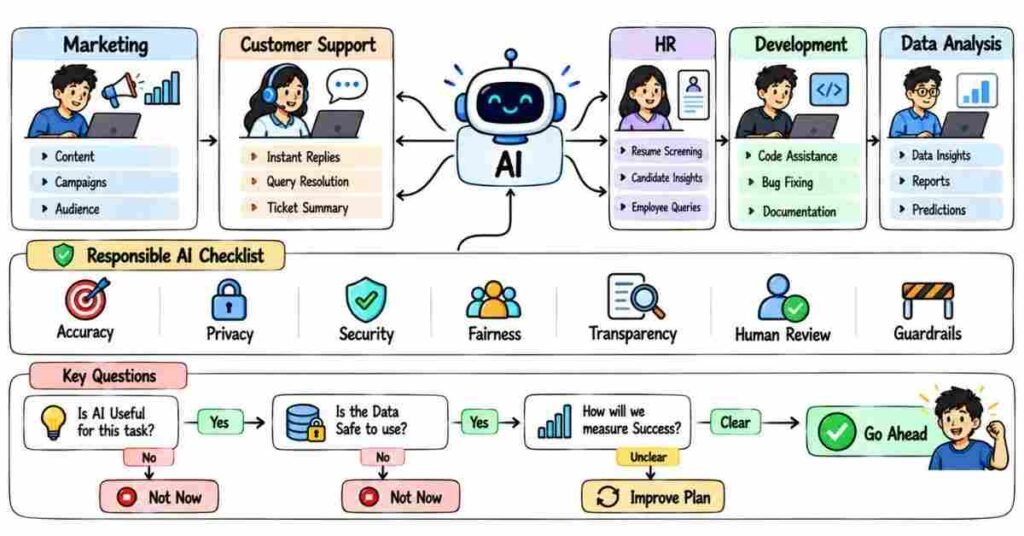
AI Tools, Safety & Practical Applications — Questions 151–180
Knowing AI tools is useful, but interviews usually go one step further.
They may ask:
“Which tool would you use here?”
“Can we trust the output?”
“Is it safe to upload this data?”
“Where should a human review the result?”
The stronger answer is not simply naming tools. It is showing that you understand where AI helps and where caution is needed.
Q151. What are AI tools?
AI tools are applications that use artificial intelligence to help with tasks such as:
- Writing
- Research
- Coding
- Image creation
- Data analysis
- Summarization
- Automation
- Customer support
Different tools are designed for different kinds of work.
Q152. How do you choose the right AI tool?
I start with the task, not the brand name.
I would check:
- What problem needs to be solved
- Type of input
- Expected output
- Privacy requirements
- Accuracy needed
- Cost
- Integration options
The best tool is the one that fits the actual work.
Q153. Can one AI tool handle every task?
No.
One tool may be strong at writing, while another may be better for coding, research, image generation, or automation.
I would not force one tool into every use case.
Q154. What are some common uses of AI in office work?
AI can help with:
- Drafting emails
- Summarizing meetings
- Creating reports
- Organizing information
- Research support
- Document analysis
- Preparing presentations
The final output should still be reviewed before it is used.
Q155. How can AI help developers?
Developers can use AI for:
- Code suggestions
- Debugging support
- Documentation
- Test-case ideas
- Explaining unfamiliar code
- Refactoring suggestions
I would treat generated code as a starting point, not automatically as production-ready code.
Q156. How can AI help marketers?
AI can support tasks such as:
- Content ideas
- Ad-copy variations
- Audience research
- Keyword grouping
- Campaign summaries
- Social media drafts
But the marketer still needs to check brand tone, facts, and whether the content is actually useful.
Q157. How can AI help data analysts?
AI can help explain data, suggest formulas, summarize trends, generate code, or assist with reports.
But the analyst still has to verify the dataset and conclusions.
AI should not replace checking the numbers.
Q158. How can AI help customer support?
- Classify customer questions
- Search knowledge bases
- Draft responses
- Summarize long conversations
- Route tickets
For sensitive or complicated cases, human review is still important.
Q159. How can AI help HR teams?
Possible uses include:
- Drafting job descriptions
- Summarizing candidate information
- Preparing interview questions
- Answering employee FAQs
- Organizing documents
For hiring decisions, AI should support people rather than make important decisions blindly.
Q160. What is Responsible AI?
Responsible AI means designing and using AI in a way that considers:
- Accuracy
- Fairness
- Privacy
- Security
- Transparency
- Human oversight
The question is not only “Can we automate this?”
It is also “Should we automate it this way?”
Q161. Why is human review important?
AI can produce incorrect or incomplete output.
Human review becomes especially important when decisions affect:
- Money
- Jobs
- Health
- Legal matters
- Customers
- Sensitive information
The higher the risk, the stronger the review process should be.
Q162. What is AI bias?
Bias happens when an AI system produces unfair or unbalanced results.
This may come from:
- Training data
- Poor examples
- Biased labels
- System design
- How the output is interpreted
Bias should be tested instead of assuming the model is automatically neutral.
Q163. Can AI completely remove human bias?
No.
AI systems are built using human-created data and decisions.
They may reduce certain manual inconsistencies, but they can also repeat or amplify existing bias.
Q164. What is AI privacy?
AI privacy is about protecting personal or confidential information when using AI systems.
Before entering sensitive data into an external AI tool, I would check the organization’s policy and how that service handles the information.
Q165. What information should you be careful about entering into AI tools?
I would be careful with:
- Passwords
- Customer personal data
- Financial information
- Medical information
- Private contracts
- Internal company documents
- Confidential source code
Just because a tool accepts the information does not mean it should be uploaded.
Q166. What is data leakage in AI?
Data leakage can happen when sensitive information is exposed to a system or person who should not have access to it.
For example, an employee copying confidential customer information into an unapproved AI service may create a data-risk problem.
Q167. How do you use AI safely with company data?
I would follow the company’s approved AI policy.
Depending on the situation, I may:
- Remove sensitive details
- Use approved enterprise tools
- Restrict access
- Avoid unnecessary uploads
- Keep logs
- Get permission before processing confidential information
Q168. What is transparency in AI?
Transparency means being clear about how AI is being used when that information matters.
For example, users may need to know when they are interacting with an automated assistant rather than a person.
Q169. What is explainability?
Explainability is about understanding why an AI system produced a result.
This becomes more important when the output affects important decisions.
For a simple content draft, deep explainability may not be necessary. For high-impact decisions, it matters much more.
Q170. What is an AI guardrail?
A guardrail is a rule or control that limits what an AI system can do.
For example:
“The support bot can explain refund policy, but it cannot issue refunds above ₹5,000 without approval.”
Guardrails reduce risk.
Q171. What should you do if AI gives a wrong answer?
I would first check why it happened.
The issue could be:
- Weak prompt
- Missing context
- Bad source data
- Poor retrieval
- Model limitation
- Incorrect tool output
Then I would fix the actual cause instead of simply asking the same question again.
Q172. What should you do if AI gives different answers each time?
First, I would decide whether variation is actually a problem.
For creative tasks, variation may be useful.
For extraction or business workflows, I would make the instructions and output format more controlled and validate the result.
Q173. How would you use AI for research?
I may use AI to:
- Understand a topic
- Create research questions
- Summarize supplied material
- Organize findings
But I would verify important facts using reliable sources rather than treating an AI response itself as evidence.
Q174. Can AI-generated content be published directly?
I would not make that the default workflow.
I would review:
- Facts
- Tone
- Repetition
- Brand voice
- Copyright concerns
- Usefulness
- Formatting
A quick AI draft may still need significant human editing.
Q175. How would you use AI to summarize a meeting?
A practical workflow could be:
Meeting Transcript → Extract Main Decisions → Identify Action Items → Assign Owners → Review Summary
The most important part is making sure the final summary reflects what was actually discussed.
Q176. How would you use AI in a sales team?
AI could help with:
- Lead summaries
- Call notes
- Follow-up drafts
- Lead classification
- CRM updates
- Identifying common objections
I would avoid letting AI send sensitive or high-value customer communication without suitable controls.
Q177. How would you use AI in education?
AI can support:
- Explaining difficult concepts
- Practice questions
- Feedback
- Study plans
- Content summaries
- Personalized learning support
It should support learning rather than simply give students every answer without understanding.
Q178. What is a bad use case for AI?
A bad use case is one where:
- Simple rules already solve the problem
- The risk is too high
- The data is too sensitive
- Accuracy cannot be checked
- The AI adds complexity without real benefit
Not every problem needs AI.
Q179. How would you measure whether an AI use case is successful?
I would compare it against the original business problem.
Possible measures include:
- Time saved
- Accuracy
- Cost reduction
- Response time
- User satisfaction
- Error rate
- Workload reduction
Using AI itself is not the success metric.
Q180. What makes someone good at using AI in the workplace?
A strong AI user knows how to:
- Choose the right task
- Give clear instructions
- Check the output
- Protect sensitive information
- Recognize limitations
- Add human review when needed
AI mastery is not about using AI for everything.
It is about knowing when it genuinely improves the work.
Practical Interview Scenario
An interviewer may ask:
“Your company wants employees to upload client documents into an AI tool to create summaries. What would you check first?”
A natural answer could be:
“Before uploading anything, I would check whether the tool is approved for confidential data and what the company’s AI policy allows. If the documents contain sensitive information, I would use an approved secure system, remove unnecessary personal data where possible, and make sure access is controlled. I would also review the generated summary before it is shared.”
That answer shows you are thinking beyond productivity.
You are also thinking about privacy, risk, and responsibility.
Important Topics to Practice
Focus mainly on:
- AI Tool Selection
- Workplace AI
- Responsible AI
- Human Review
- Bias
- Privacy
- Data Leakage
- Transparency
- Explainability
- Guardrails
- AI Safety
- Output Verification
- Business Use Cases
Practice Strategy
Choose one department such as HR, Sales, Marketing, Customer Support, or Development.
Then identify:
One task AI can improve → What data it needs → What could go wrong → What a human should check → How success would be measured
This makes your interview answer sound practical instead of giving a long list of AI tools.
Part 8: Practical & Scenario-Based AI Interview Questions
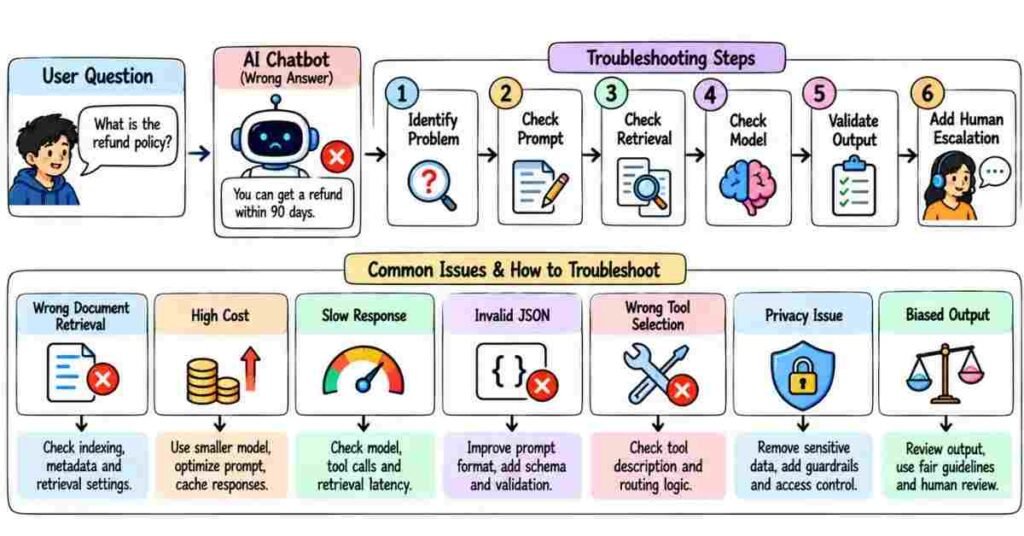
Real-World AI Scenarios — Questions 181–210
This section is less about definitions and more about how you think when something goes wrong.
In an interview, you may get a situation like:
“The chatbot is giving wrong answers.”
“The AI workflow is becoming expensive.”
“Users are uploading sensitive data.”
The interviewer usually wants to hear what you would check first, what you would change, and why.
Q181. The chatbot is giving confident but incorrect answers. What would you do?
I would first check where the answer is coming from.
If the bot is answering from general model knowledge, I may ground it with trusted documents or use RAG.
I would also tell the model not to guess when the required information is missing.
Q182. The AI gives a different answer every time. Is that always a problem?
No.
For brainstorming or creative writing, some variation is fine.
But if I need consistent outputs for classification, extraction, or automation, I would make the prompt more controlled and validate the response format.
Q183. Your prompt works well for five examples but fails on new inputs. What would you check?
I would test whether the prompt is too dependent on those examples.
Then I would try different types of inputs and rewrite the instructions so they describe the task clearly instead of only copying the sample pattern.
Q184. The AI response is too generic. How would you improve it?
I would add useful context.
For example:
Instead of:
“Create a marketing plan.”
I might say:
“Create a 30-day marketing plan for an online Python course targeting final-year engineering students in India. Focus on Instagram, YouTube, and WhatsApp.”
The more clearly I define the situation, the less guessing the model has to do.
Q185. The AI response is too long. What would you change?
I would make the expected output clear.
For example:
“Answer in five bullet points. Keep each point under two sentences.”
I would control the format instead of asking the model to “be shorter.”
Q186. The AI keeps ignoring one important instruction. What would you do?
I would simplify the prompt and make the important rule clearer.
If there are too many instructions mixed together, I may separate them into:
Task → Rules → Output Format
That usually makes the prompt easier to follow.
Q187. A user asks the AI something that is not in the company documents. What should happen?
The AI should not invent an answer.
I would prefer a response like:
“I could not find this information in the available company documents.”
Then the system can direct the user to a human team if needed.
Q188. Your RAG chatbot retrieves the wrong document. What would you check?
I would check retrieval before changing the language model.
Possible areas include:
- Chunking
- Embeddings
- Metadata
- Search method
- Top-K value
- Query quality
- Reranking
If the wrong information reaches the model, the final answer will probably be wrong too.
Q189. The correct document is retrieved, but the final answer is still wrong. What next?
Now I would check the generation stage.
I would review:
- Prompt instructions
- Amount of retrieved context
- Conflicting information
- Model behavior
- Whether the answer is actually supported by the source
This helps identify whether retrieval or generation is the real problem.
Q190. The RAG system is returning too much information. What would you do?
I would reduce unnecessary context.
That might mean:
- Retrieving fewer chunks
- Improving filters
- Using reranking
- Improving chunk quality
Giving the model ten weak chunks is not always better than giving it three strong ones.
Q191. The chatbot has old policy information. How would you fix it?
I would update the source documents and make sure the old versions are removed or clearly marked.
The retrieval system should prefer the latest approved information.
The model itself may not need to be retrained.
Q192. You have a large PDF. Would you send the whole PDF to the LLM?
Usually not.
I would first decide what information is actually needed.
For a knowledge chatbot, I would generally split the document into useful chunks and retrieve only the relevant sections for each question.
Q193. The model is too expensive for your application. What would you do?
I would check where the cost is coming from.
I may:
- Reduce unnecessary context
- Use shorter prompts
- Limit output length
- Cache repeated results
- Use a smaller model for simple tasks
- Use the larger model only when needed
A stronger model is not automatically the best business choice.
Q194. The AI application is too slow. How would you improve it?
I would measure which step is causing the delay.
The issue may come from:
- Model response time
- Document retrieval
- External APIs
- Large context
- Too many tool calls
Once I know the slow step, I can optimize that part instead of guessing.
Q195. A smaller model is faster but slightly less accurate. Would you use it?
It depends on the task.
For a simple internal classification task, the speed and cost savings may be worth it.
For a high-risk use case where accuracy matters more, I may choose the stronger model.
Model selection should match the business requirement.
Q196. The AI returns invalid JSON and breaks your automation. What would you do?
I would not send raw model output directly into the next system.
I would:
- Ask for a strict structure
- Validate the response
- Handle missing fields
- Retry when appropriate
- Stop the workflow if the result is unsafe
Production workflows need validation.
Q197. An AI agent keeps calling the same tool again and again. What could be wrong?
The agent may not know when the task is complete.
I would check:
- Stopping conditions
- Tool results
- Agent instructions
- Error handling
An agent should not continue acting without a reason.
Q198. An AI agent wants to send an email automatically. Would you allow it?
It depends on the type of email.
For low-risk routine messages, automation may be fine.
For complaints, legal issues, payments, or sensitive communication, I would prefer human approval before sending.
Q199. The agent selected the wrong tool. How would you handle that?
I would review how the tools are described and when each one should be used.
I may also restrict tool access or add rules such as:
“Use the payment tool only when the user has confirmed the transaction.”
The agent should have only the permissions it actually needs.
Q200. The company wants AI to approve refunds automatically. What would you suggest?
I would be careful with full automation.
A safer design may be:
AI checks request → Policy is retrieved → Recommendation is created → Human approves high-value or unusual refunds
The amount of automation should match the financial risk.
Q201. An employee pastes confidential customer data into a public AI tool. What is the problem?
The main issue is privacy and data handling.
Sensitive company or customer information should not be uploaded to an external AI system without checking the organization’s rules and the tool’s data policies.
Q202. How would you build AI into a process that contains personal data?
I would first reduce the amount of personal information being used.
Then I would check:
- Access permissions
- Approved tools
- Data storage
- Logging
- Retention
- Human access
- Security requirements
The AI feature should not weaken existing privacy controls.
Q203. The AI gives a biased recommendation. What would you do?
I would not treat the result as an isolated mistake.
I would test the system with different examples and check whether the pattern repeats.
Then I would review the data, instructions, model behavior, and decision process.
For important decisions, human oversight should remain in place.
Q204. A manager says, “We should use AI for everything.” How would you respond?
I would start by identifying actual business problems.
Some tasks need AI.
Some need simple automation.
Some are better handled by people.
The goal should be better results, not adding AI to every process.
Q205. How would you decide whether an AI automation is worth building?
I would look at:
- How often the task happens
- Time currently spent
- Cost of mistakes
- Expected time saved
- Implementation cost
- Accuracy needed
- Maintenance effort
If the process happens once a month and takes ten minutes, building a complicated agent may not make sense.
Q206. Users say the AI chatbot is not useful. What would you investigate?
I would look at real conversations.
I would check:
- What users are actually asking
- Where the bot fails
- Whether retrieval works
- Whether answers are too long
- Whether the bot understands intent
- Whether users can reach a human when needed
User feedback often shows problems that technical testing misses.
Q207. How would you test an AI system before launching it?
I would create realistic test cases.
Not only easy questions.
I would include:
- Normal requests
- Unclear prompts
- Missing information
- Incorrect assumptions
- Sensitive requests
- Edge cases
- Failure situations
Then I would measure how the system behaves.
Q208. What if the AI fails during a real customer interaction?
The application should have a fallback.
Depending on the use case, it could:
- Retry safely
- Show a clear error
- Ask the user for clarification
- Transfer to a human
- Stop the action
Q209. An interviewer asks you to design an AI support chatbot. How would you explain it?
I would keep the design simple.
Customer Question → Identify Intent → Retrieve Approved Support Content → Generate Answer → Validate → Respond
For sensitive cases:
Escalate to Human Support
Then I would explain how I would monitor wrong answers and improve the system over time.
Q210. How do you answer an AI scenario question when you do not know the exact solution?
I would not invent a technical answer.
I would explain how I would investigate it.
For example:
“I haven’t handled that exact issue before. I would first check whether the failure comes from the prompt, retrieval, model, or external tool. Once I identify the failing step, I would test the fix on a small set of examples before changing the production workflow.”
That is usually stronger than pretending to know something you do not.
How to Answer Scenario Questions
A simple structure works well:
Problem → Check → Action → Validation
For example:
Problem: Chatbot gives wrong policy answers.
Check: See whether the correct document is retrieved.
Action: Improve retrieval and restrict answers to approved documents.
Validation: Test with real policy questions before releasing the change.
This keeps your answer practical and easy to follow.
Practical Mock Interview
Imagine the interviewer says:
“We built an AI admissions chatbot for a college. Students complain that it sometimes gives incorrect fee information. What would you do?”
A natural answer could be:
“I would first check whether the chatbot is answering from the official fee documents or from general model knowledge. If RAG is already being used, I would test whether the correct fee section is being retrieved. I would also make the bot mention when it cannot find an answer instead of guessing. Because fees can change, I would make sure only the latest approved documents are available.”
You do not need to use ten technical terms.
A clear answer shows that you understand the problem.
Practice Strategy
Take one AI project you have built or studied.
Then ask yourself:
What could fail?
Do not stop at the happy path.
Think about:
Wrong input → Wrong retrieval → Wrong output → API failure → Privacy issue → Human escalation
If you can explain how you would handle those situations, you will be much more comfortable with practical interview questions.
Part 9: Behavioral Questions, AI Projects, Resume & Career Preparation
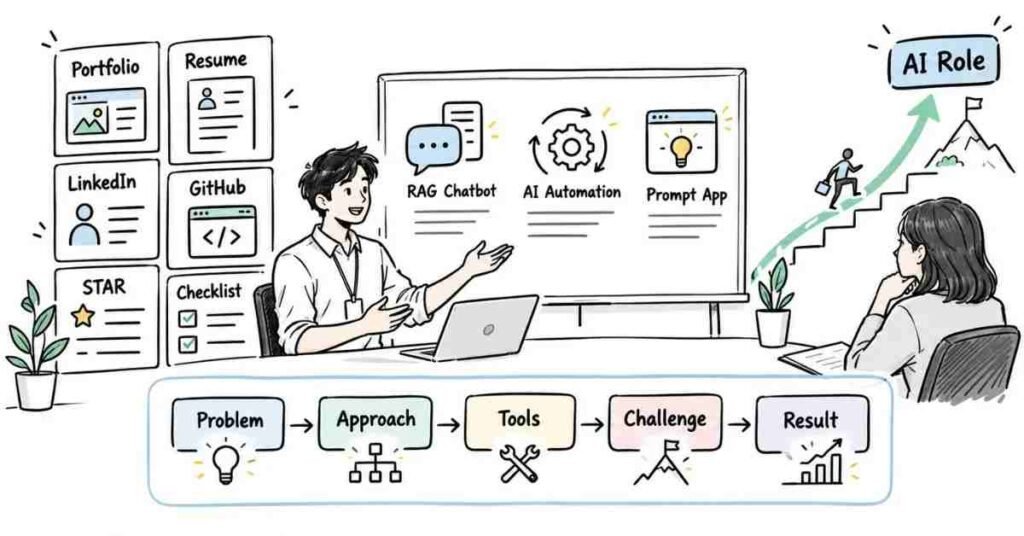
Behavioral, Project & Career Questions — 211–230
Technical knowledge gets you through one part of an AI interview. After that, the interviewer usually wants to understand how you think, how you learn, how you handle mistakes, and whether you can explain your AI work clearly.
You do not need perfect answers. You need answers that sound like your actual experience.
Q211. Tell me about yourself.
Keep the answer connected to the role.
A natural fresher answer could be:
“I have been learning Generative AI, prompt engineering, LLMs, RAG, and AI automation. I have also worked on small projects where I used AI for document-based question answering and workflow automation. I enjoy understanding how AI can solve practical problems, and I am now looking for a role where I can work on real AI applications and improve further.”
Avoid giving your entire personal history.
Q212. Why are you interested in AI?
Do not answer only:
“AI is the future.”
A better answer is:
“I like AI because it combines problem-solving with practical applications. The part I find interesting is not only generating content, but connecting AI with real data, tools, and workflows to solve useful business problems.”
That sounds more personal and practical.
Q213. What AI topics are you most comfortable with?
Mention only topics you can actually explain.
For example:
“I am comfortable with prompt engineering, LLM basics, RAG, embeddings, vector search, AI agents, and workflow automation. I have also worked with AI tools for research, coding support, and content tasks.”
If the interviewer asks deeper questions, you should be ready to support what you claimed.
Q214. Explain one AI project you have worked on.
Use a simple structure:
Problem → Approach → Tools → Challenge → Result
Example:
“I built a document-based chatbot that answered questions from uploaded PDFs. I split the documents into chunks, created embeddings, stored them for retrieval, and sent the relevant context to the language model. One challenge was retrieving unrelated sections, so I improved the chunking and retrieval settings.”
That is much stronger than saying:
“I created a RAG chatbot.”
Q215. What was the hardest part of your AI project?
Choose a real problem.
It could be:
- Poor retrieval
- Hallucinations
- Prompt inconsistency
- API errors
- Slow responses
- High token usage
- Wrong structured output
Then explain what you did about it.
Q216. Tell me about a time something did not work.
Do not hide failures.
A natural answer could be:
“In one project, I initially assumed increasing the number of retrieved chunks would improve the chatbot. Instead, the answers became less focused. I tested smaller retrieval sets and found that better-quality context worked more reliably than simply sending more information.”
The important part is what you learned.
Q217. How do you handle an AI output that looks correct but may be wrong?
I do not judge accuracy based on how confident the writing sounds.
I would check the source, compare it with trusted information, and verify important facts before using the output.
For business-critical tasks, I would add validation or human review.
Q218. What would you do if you did not know the answer in an interview?
I would say what I understand and avoid guessing.
For example:
“I haven’t implemented that directly yet, but based on my understanding, I would start by checking…”
Then I would explain my approach.
That is better than inventing an answer and getting trapped in follow-up questions.
Q219. How do you keep learning when AI changes so quickly?
I focus on concepts first.
Tools may change, but ideas such as prompting, retrieval, model evaluation, APIs, privacy, and automation remain useful.
I also learn by building small projects instead of only watching tutorials.
Q220. How do you handle feedback on your work?
I first understand what the feedback is trying to improve.
If someone points out a weak prompt, poor retrieval, or unnecessary complexity, I test the suggestion instead of defending my first version automatically.
The goal is to improve the solution.
AI Projects & Portfolio
Q221. What projects should an AI fresher build?
A few clear projects are better than many unfinished ones.
Useful project ideas include:
- PDF-based RAG chatbot
- Customer support assistant
- AI resume analyzer
- Meeting-summary workflow
- Lead classification system
- AI research assistant
- FAQ chatbot
- Email automation workflow
Each project should solve a clear problem.
Q222. How many projects should I show?
Around 3–5 strong projects can be enough.
Try to show variety.
For example:
Project 1: Prompt-based application
Project 2: RAG application
Project 3: AI automation or agent workflow
The interviewer should be able to see more than one type of skill.
Q223. What should I explain for every project?
Be ready to answer:
- What problem were you solving?
- Why did you use AI?
- What model or tools did you use?
- Where did the data come from?
- What was difficult?
- What failed?
- How did you test it?
- What would you improve next?
If you cannot explain your own project, adding more tools to it will not help.
Q224. Should I mention AI tools used in the project?
Yes, but do not turn the explanation into a tool list.
Instead of:
“I used Python, OpenAI, LangChain, FAISS, Streamlit and APIs.”
Say:
“I used Python for the application logic, embeddings for document search, a vector store for retrieval, and an LLM to generate answers from the retrieved context.”
First explain what each part did.
Q225. Can I include projects built by following tutorials?
Yes, especially when you are starting.
But change something.
Add your own data, improve the workflow, test edge cases, or solve a different problem.
An interviewer can usually tell when a candidate only copied a tutorial without understanding it.
Resume Preparation
Q226. What should an AI resume include?
Keep it easy to scan.
Include:
- Short professional summary
- Technical skills
- AI/Generative AI skills
- Projects
- Experience or internships
- Education
- GitHub or portfolio links
Put your strongest AI work where recruiters can find it quickly.
Q227. What AI skills can I mention on my resume?
Depending on your actual knowledge, you may include:
Generative AI, Prompt Engineering, LLMs, RAG, Embeddings, Vector Databases, AI Agents, APIs, Automation, Python, Model Evaluation, and Responsible AI.
Do not add a skill simply because you have heard the term.
Q228. How should AI project points be written on a resume?
Avoid vague statements such as:
“Created an AI chatbot.”
A stronger bullet could be:
“Built a document-based question-answering assistant that retrieved relevant PDF content using embeddings and generated responses from the retrieved context.”
Another example:
“Designed an AI-assisted workflow to classify incoming customer requests and route them to the appropriate support category.”
The reference guide similarly recommends writing project and resume points around actions and actual contribution rather than generic descriptions.
Career & Interview Preparation
Q229. How should I prepare my LinkedIn profile for AI roles?
Make the profile clear rather than filling it with every AI keyword.
A headline could look like:
Generative AI Learner | LLMs | RAG | Prompt Engineering | AI Automation | Python
In the Featured section, you can show:
- GitHub projects
- Project demos
- Portfolio
- Technical posts
- Certificates that support your skills
The reference format also includes LinkedIn profile preparation as part of interview readiness.
Q230. What should I do before the final AI interview?
Review your own projects more than random new topics.
Be ready to explain:
- What your project solves
- Why AI was needed
- How the workflow works
- What data was used
- Where the system can fail
- How you reduced hallucinations
- How you checked output
- What you would improve
If you can explain your project clearly from beginning to end, you are already in a much stronger position.
Questions You Can Ask the Interviewer
When the interviewer says, “Do you have any questions for us?”, avoid immediately saying no.
You can ask questions like:
- “What kind of AI projects would I work on in this role?”
- “How does your team evaluate AI output quality?”
- “Are you mainly working with RAG, agents, automation, or other AI applications?”
- “How much of the role involves building versus testing and improving existing AI systems?”
- “What would you expect me to learn in the first few months?”
These questions show genuine interest in the work.
Final AI Interview Checklist
Before the interview, make sure you can comfortably explain:
- AI vs Machine Learning vs Generative AI
- LLMs and tokens
- Prompt engineering
- Hallucinations
- Context windows
- RAG
- Embeddings
- Vector databases
- Chunking
- AI agents
- APIs and webhooks
- Responsible AI
- Privacy and bias
- One complete AI project
- One project failure and what you learned
- Why you want an AI role
Also check your:
- Resume
- GitHub
- Project links
- Demo links
- Internet and laptop for online interviews
The reference guide also closes with technical revision, behavioral preparation, profile checks, and final interview-day readiness.
Final Preparation Tip
Do not try to make every answer sound advanced.
If you understand a concept, explain it simply.
If you built something, explain what you actually did.
If something failed, explain what you learned from it.
AI tools will keep changing. Interviewers are more likely to remember a candidate who can understand a problem, choose a sensible approach, and explain their decisions clearly than someone who only knows a long list of AI terms.