
Cyber Security Interview Preparation Guide
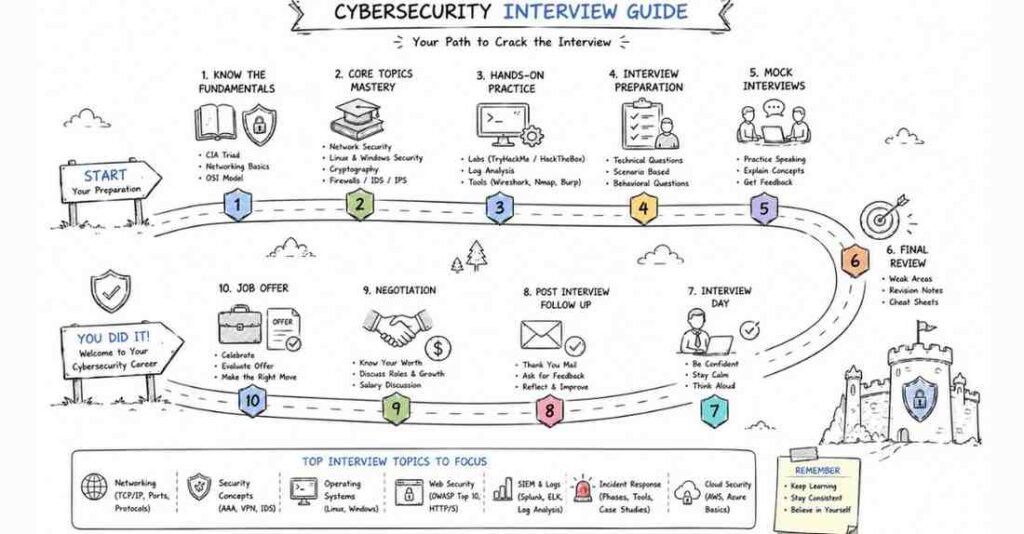
Table of Contents
Why This Guide Matters
Cyber security interviews in 2026 are highly practical and scenario-driven, with hiring managers expecting more than theory. Candidates are increasingly evaluated on incident response, SIEM/SOAR workflows, cloud security controls, threat detection, and the ability to communicate clearly during incidents.
This guide will be designed to help learners move from foundational concepts to real interview readiness, including STAR-based behavioral preparation and a structured 4-week practice plan.
Part 1: Introduction, Role Overview & 30-Day Study Plan
What Is Cybersecurity?
Cybersecurity is the practice of protecting systems, networks, applications, and data from unauthorized access, attacks, damage, or disruption. In interviews, employers expect candidates to understand both the technical side of defense and the practical side of how incidents are detected, investigated, and prevented.
What Cybersecurity Roles Cover
Cybersecurity is a broad field, and interviews often test role-specific thinking. Common roles include:
- SOC Analyst: Monitors alerts, investigates logs, and escalates suspicious activity.
- Security Analyst: Reviews vulnerabilities, policies, and security posture.
- Penetration Tester: Simulates attacks to find weaknesses before real attackers do.
- Cloud Security Engineer: Protects cloud infrastructure, identity, and data.
- GRC Specialist: Focuses on governance, risk, and compliance.
- Incident Responder: Handles security events and coordinates containment and recovery.
What Interviewers Test in 2026
Cybersecurity interviews in 2026 usually focus on practical understanding rather than memorization. Interviewers want to know whether you can explain security concepts clearly, reason through incidents, and make good decisions under pressure.
They commonly test:
- Networking fundamentals.
- Linux and Windows security basics.
- Web application threats.
- Incident response and log analysis.
- Cloud and identity concepts.
- Security tools and real-world scenarios.
- Communication and escalation judgment.
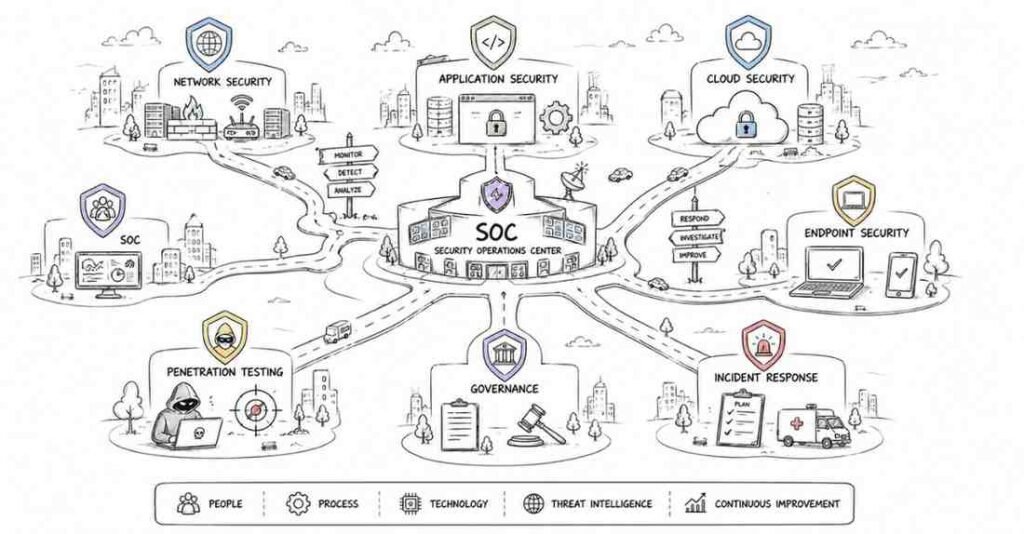
Who This Guide Is For
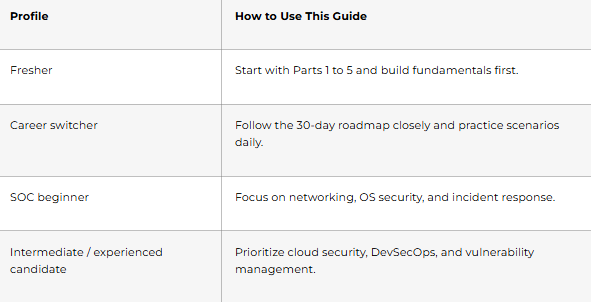
9-Part Table of Contents
- Part 1: Introduction, Role Overview & 30-Day Study Plan
- Part 2: Cybersecurity Fundamentals
- Part 3: Networking & Protocols
- Part 4: Linux, Windows & OS Security
- Part 5: Web Security & OWASP Top 10
- Part 6: Incident Response & SOC Concepts
- Part 7: Penetration Testing & Vulnerability Management
- Part 8: Cloud Security, DevSecOps & Tooling
- Part 9: Behavioral, Communication & Career Strategy
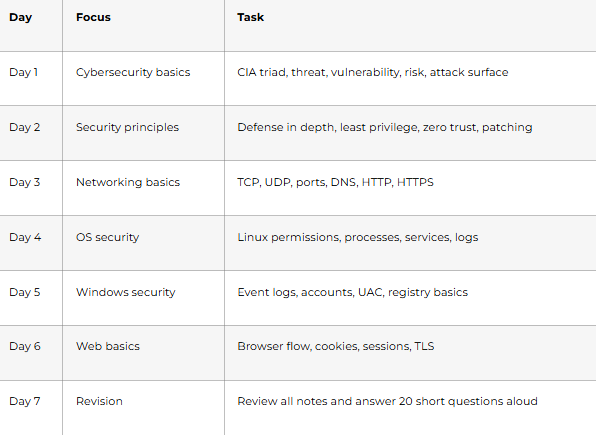
30-Day Study Plan
Week 1: Core Foundations
Goal: Build a strong base in cybersecurity concepts, networking, and operating systems.
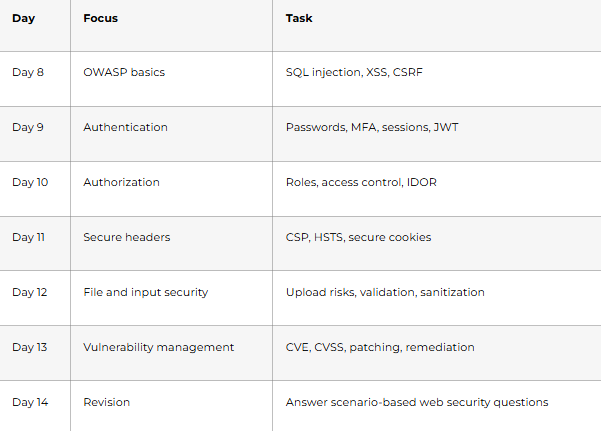
Week 2: Web and Application Security
Goal: Understand common attack types and secure coding principles.
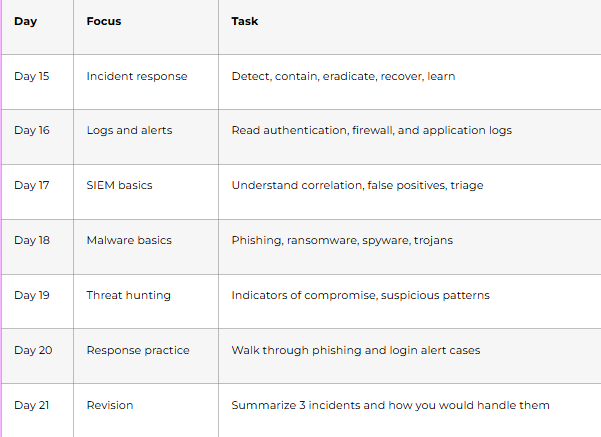
Week 3: SOC, Incident Response & Tooling
Goal: Learn how security teams investigate and respond to alerts.
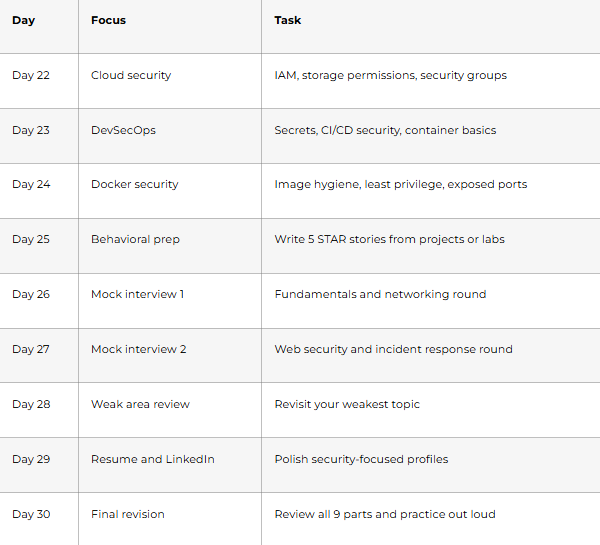
Week 4: Cloud, DevSecOps & Interview Practice
Goal: Prepare for modern security interviews and behavioral rounds.
How To Use This Guide
This guide is best used in layers. Start with the foundational sections, then move into attack techniques and defense topics, and finally finish with career preparation. If you are preparing for a SOC or security analyst role, prioritize logs, incidents, and networking. If you are preparing for cloud security or engineering roles, spend more time on IAM, DevSecOps, and container security.
What You Should Be Able To Do By The End
By the end of this guide, you should be able to:
- Explain common security terms clearly.
- Reason through basic attack and defense scenarios.
- Read logs and identify suspicious behavior.
- Describe incident response steps.
- Talk about secure design decisions with confidence.
- Present your background in a structured interview format.
Part 2: Cybersecurity Fundamentals — 40 Interview Questions & Answers
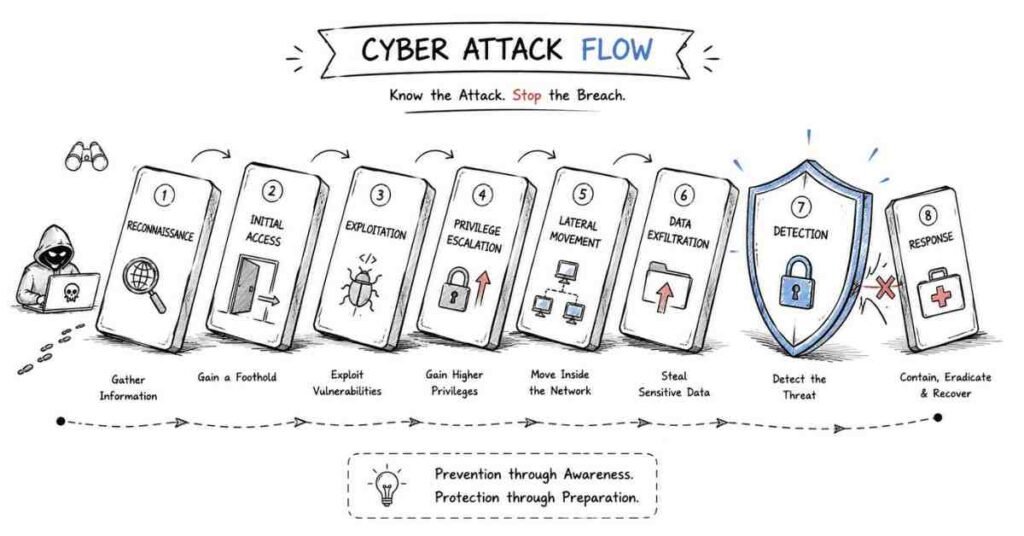
Q1. What is cybersecurity?
Cybersecurity is the practice of protecting systems, networks, applications, and data from unauthorized access, attacks, damage, and disruption. It involves prevention, detection, response, and recovery.
Q2. Why is cybersecurity important?
Cybersecurity is important because organizations rely heavily on digital systems and data. Without proper protection, cyberattacks can lead to financial loss, data theft, downtime, reputational damage, and legal consequences.
Q3. What is the CIA triad?
The CIA triad stands for Confidentiality, Integrity, and Availability. These are the three core principles used to protect information and design secure systems.
Q4. What is confidentiality?
Confidentiality means ensuring that information is accessible only to authorized users. It is protected using controls like encryption, access restrictions, and authentication.
Q5. What is integrity?
Integrity means ensuring that data remains accurate, complete, and unmodified unless changed by an authorized person or process. It helps prevent tampering and unauthorized changes.
Q6. What is availability?
Availability means ensuring that systems and data are accessible when needed by authorized users. It is supported by redundancy, backups, failover systems, and protection against outages or attacks.
Q7. What is the difference between a threat, vulnerability, and risk?
A threat is something that can cause harm, such as a hacker or malware. A vulnerability is a weakness that can be exploited, and risk is the chance that a threat will exploit a vulnerability and cause damage.
Q8. What is an attack surface?
An attack surface is the total number of possible entry points an attacker can use to access a system. It includes software, hardware, users, exposed services, APIs, and misconfigurations.
Q9. What is risk management in cybersecurity?
Risk management is the process of identifying, assessing, prioritizing, and reducing security risks. It helps organizations focus on the most important threats first instead of trying to eliminate every possible issue at once.
Q10. What is defense in depth?
Defense in depth is a security strategy that uses multiple layers of protection instead of relying on a single control. If one layer fails, other layers still help protect the system.
Q11. What is the principle of least privilege?
The principle of least privilege means giving users, applications, or systems only the minimum access needed to perform their tasks. This reduces the impact of misuse, insider threats, and compromised accounts.
Q12. What is zero trust?
Zero trust is a security model based on the idea of “never trust, always verify.” It assumes that no user, device, or network should be trusted automatically, even if it is inside the organization’s environment.
Q13. What is authentication?
Authentication is the process of verifying the identity of a user, device, or system. Common methods include passwords, biometrics, tokens, and one-time codes.
Q14. What is authorization?
Authorization is the process of deciding what an authenticated user is allowed to access or do. It happens after identity has been verified.
Q15. What is the difference between authentication and authorization?
Authentication answers the question who are you, while authorization answers what are you allowed to do. Both are necessary for secure access control.
Q16. What is multifactor authentication (MFA)?
Multifactor authentication is a security method that requires two or more types of verification before access is granted. For example, a password plus a mobile code adds more protection than a password alone.
Q17. Why is MFA important?
MFA is important because even if a password is stolen, the attacker still needs another factor to gain access. It greatly reduces the success rate of account compromise attacks.
Q18. What is a password policy?
A password policy is a set of rules that defines how passwords should be created, used, and managed. It may include length requirements, complexity, expiry rules, reuse restrictions, and lockout settings.
Q19. What is social engineering?
Social engineering is the manipulation of people into revealing sensitive information or performing unsafe actions. It targets human behavior instead of technical weaknesses.
Q20. What is phishing?
Phishing is a type of social engineering attack where attackers send fake emails, messages, or websites to trick users into sharing credentials, financial details, or other sensitive information.
Q21. What is spear phishing?
Spear phishing is a targeted phishing attack aimed at a specific person or organization. It is usually more convincing because the attacker uses personalized information.
Q22. What is malware?
Malware is malicious software designed to damage systems, steal data, disrupt operations, or gain unauthorized access. Common types include viruses, worms, trojans, ransomware, and spyware.
Q23. What is a virus?
A virus is a type of malware that attaches itself to a legitimate file or program and spreads when that file is executed. It often requires user action to activate.
Q24. What is a worm?
A worm is a type of malware that can spread automatically across systems and networks without needing a user to open a file or program. It is often used to spread rapidly and consume network resources.
Q25. What is a trojan?
A trojan is malware that disguises itself as legitimate software. Once installed, it can create backdoors, steal data, or allow attackers to control the system.
Q26. What is ransomware?
Ransomware is malware that encrypts files or locks systems and demands payment to restore access. It can cause major operational and financial damage.
Q27. What is spyware?
Spyware is malware designed to secretly monitor user activity and collect information such as credentials, browsing behavior, or sensitive data without the user’s knowledge.
Q28. What is a firewall?
A firewall is a security control that monitors and filters incoming and outgoing network traffic based on predefined rules. It helps block unauthorized access while allowing legitimate traffic.
Q29. What is the difference between hashing and encryption?
Hashing converts data into a fixed-length value and is generally one-way, meaning it cannot easily be reversed. Encryption transforms data into a protected format that can be reversed with the correct key.
Q30. What is salting in password security?
Salting means adding random data to a password before hashing it. This helps protect against rainbow table attacks and makes identical passwords produce different hash values.
Q31. What is symmetric encryption?
Symmetric encryption uses the same key for both encryption and decryption. It is generally faster and is commonly used for protecting large amounts of data.
Q32. What is asymmetric encryption?
Asymmetric encryption uses a pair of keys: a public key and a private key. It is commonly used for secure key exchange, digital signatures, and certificate-based security.
Q33. What is a digital signature?
A digital signature is a cryptographic method used to verify the authenticity and integrity of a message, file, or document. It proves that the content came from the expected sender and was not altered.
Q34. What is PKI?
PKI stands for Public Key Infrastructure. It is the system used to create, manage, distribute, and validate digital certificates and public keys.
Q35. What is a certificate in cybersecurity?
A certificate is a digital document that binds a public key to an identity, such as a website or organization. It is used to establish trust in secure communications.
Q36. What is the difference between HTTP and HTTPS?
HTTP sends data in plain text, which makes it easier to intercept. HTTPS uses encryption through TLS to protect data in transit between the client and server.
Q37. What is a security policy?
A security policy is a formal set of rules and guidelines that defines how an organization protects its systems, data, and users. It helps ensure consistent security practices.
Q38. What is a security incident?
A security incident is any event that threatens the confidentiality, integrity, or availability of systems or data. Examples include phishing attacks, unauthorized access, malware infections, or data leaks.
Q39. What is a data breach?
A data breach is an incident where sensitive, confidential, or protected data is accessed, exposed, or stolen by unauthorized individuals. Not every incident becomes a breach, but every breach is a serious incident.
Q40. What is security awareness training?
Security awareness training teaches employees how to recognize and avoid common threats such as phishing, weak passwords, unsafe browsing, and social engineering. It is important because people are often a major target in attacks.
Part 3: Networking & Protocols — 40 Interview Questions & Answers
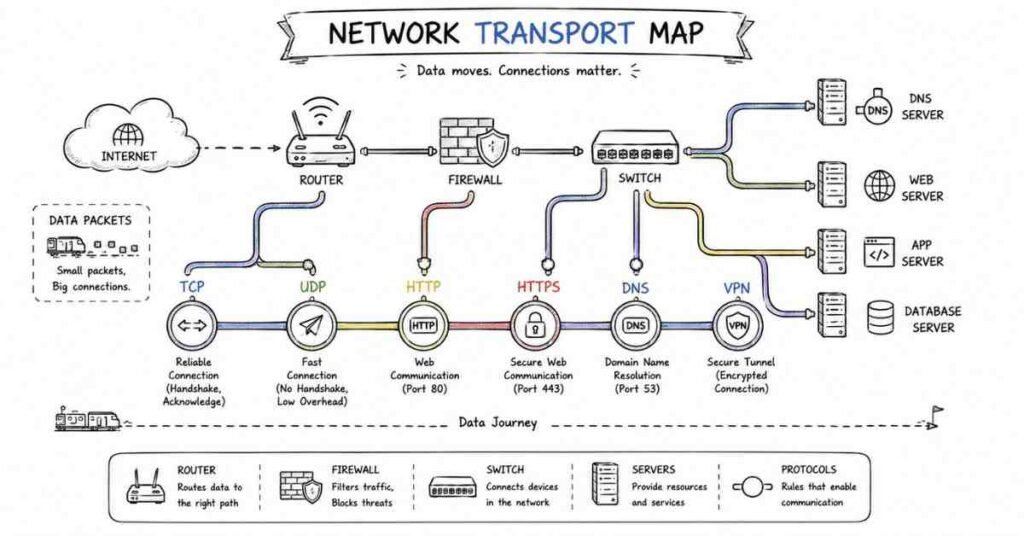
Q1. What is a computer network?
A computer network is a group of connected devices that communicate and share resources such as data, files, and internet access. Networks can be small, like a home network, or large, like an enterprise network.
Q2. Why is networking important in cybersecurity?
Networking is important in cybersecurity because almost all attacks, alerts, and defensive controls involve communication between systems. Understanding how data moves across networks helps analysts detect suspicious behavior and defend systems effectively.
Q3. What is the OSI model?
The OSI model is a conceptual framework that explains how network communication works in seven layers. It helps in understanding, designing, and troubleshooting network systems.
Q4. What are the seven layers of the OSI model?
The seven layers are Physical, Data Link, Network, Transport, Session, Presentation, and Application. Each layer has a specific role in moving data from one system to another.
Q5. What is the TCP/IP model?
The TCP/IP model is a practical networking model used on the internet. It generally has four layers: Link, Internet, Transport, and Application.
Q6. What is the difference between the OSI model and the TCP/IP model?
The OSI model is mainly a conceptual reference model with seven layers, while the TCP/IP model is more practical and widely used in real networks. TCP/IP has fewer layers and is directly tied to internet protocols.
Q7. What is an IP address?
An IP address is a logical address assigned to a device on a network so it can be identified and reached. It allows devices to send and receive data across networks.
Q8. What is the difference between IPv4 and IPv6?
IPv4 uses 32-bit addresses and is the older, more common format, while IPv6 uses 128-bit addresses and provides a much larger address space. IPv6 was introduced to solve address exhaustion and improve scalability.
Q9. What is a MAC address?
A MAC address is a hardware address assigned to a network interface card. It is used at the data link layer for communication within a local network.
Q10. What is the difference between an IP address and a MAC address?
An IP address is used for logical identification and routing across networks, while a MAC address identifies a physical network interface on a local network. IP can change, but a MAC address is generally tied to the device hardware.
Q11. What is a port in networking?
A port is a logical communication endpoint used by network services and applications. It helps a system know which process should receive incoming traffic.
Q12. Why are port numbers important in cybersecurity?
Port numbers help identify exposed services, possible attack paths, and suspicious activity. Security teams often monitor unusual traffic to common or sensitive ports to detect threats.
Q13. What is TCP?
TCP stands for Transmission Control Protocol. It is a connection-oriented protocol that ensures reliable, ordered, and error-checked delivery of data.
Q14. What is UDP?
UDP stands for User Datagram Protocol. It is a connectionless protocol that sends data faster than TCP but without guaranteed delivery or ordering.
Q15. What is the difference between TCP and UDP?
TCP is reliable, connection-oriented, and slower because it checks delivery and order. UDP is faster and simpler but does not guarantee delivery, making it suitable for streaming, voice, and real-time traffic.
Q16. What is the TCP three-way handshake?
The TCP three-way handshake is the process used to establish a TCP connection. It involves SYN, SYN-ACK, and ACK packets, which confirm that both sides are ready to communicate.
Q17. What is DNS?
DNS stands for Domain Name System. It translates human-readable domain names like example.com into IP addresses that computers can use.
Q18. Why is DNS important in cybersecurity?
DNS is important because attackers often abuse it for phishing, malware communication, command-and-control traffic, and redirection attacks. Monitoring DNS activity can reveal suspicious behavior.
Q19. What is DHCP?
DHCP stands for Dynamic Host Configuration Protocol. It automatically assigns IP addresses and other network settings to devices joining a network.
Q20. What is HTTP?
HTTP stands for Hypertext Transfer Protocol. It is the protocol used for communication between web browsers and web servers.
Q21. What is HTTPS?
HTTPS is the secure version of HTTP. It uses TLS encryption to protect data in transit between a client and a server.
Q22. What is the difference between HTTP and HTTPS?
HTTP sends data without encryption, making it easier to intercept. HTTPS encrypts communication, helping protect credentials, sessions, and other sensitive information.
Q23. What is TLS?
TLS stands for Transport Layer Security. It is the protocol used to encrypt data and secure communications over networks, especially on the web.
Q24. What is a subnet?
A subnet is a smaller logical division of a network. Subnetting helps organize networks, reduce broadcast traffic, and improve security and management.
Q25. What is subnetting?
Subnetting is the process of dividing a larger IP network into smaller subnetworks. It helps improve efficiency, performance, and access control.
Q26. What is a router?
A router is a device that forwards data packets between different networks. It determines the best path for traffic to travel based on routing information.
Q27. What is a switch?
A switch is a device that connects devices within the same local network and forwards data based on MAC addresses. It helps local network communication happen more efficiently than a hub.
Q28. What is the difference between a router and a switch?
A router connects different networks and uses IP addresses to forward traffic. A switch connects devices within the same network and uses MAC addresses for local traffic forwarding.
Q29. What is ARP?
ARP stands for Address Resolution Protocol. It is used to map an IP address to a MAC address on a local network.
Q30. What is ARP spoofing?
ARP spoofing is an attack where a malicious system sends fake ARP messages to link its MAC address with another device’s IP address. This can allow traffic interception or man-in-the-middle attacks.
Q31. What is ICMP?
ICMP stands for Internet Control Message Protocol. It is used for network diagnostics and error reporting, such as in ping and traceroute operations.
Q32. What is NAT?
NAT stands for Network Address Translation. It allows multiple private devices to share a single public IP address when communicating with external networks.
Q33. What is a firewall?
A firewall is a security control that monitors and filters network traffic based on defined rules. It can allow legitimate traffic and block unauthorized or suspicious communication.
Q34. What is a VPN?
A VPN, or Virtual Private Network, creates an encrypted tunnel between a user or system and another network. It helps protect traffic from interception and supports secure remote access.
Q35. What is a proxy server?
A proxy server acts as an intermediary between a client and another server. It can be used for filtering, monitoring, caching, anonymity, or security enforcement.
Q36. What is network segmentation?
Network segmentation is the practice of dividing a network into smaller sections to limit access and reduce lateral movement. It improves security by isolating sensitive systems and controlling traffic between segments.
Q37. What is a DMZ in networking?
A DMZ, or demilitarized zone, is a separate network segment used to host public-facing systems such as web servers or mail servers. It adds a buffer between the internet and the internal network.
Q38. What is packet sniffing?
Packet sniffing is the process of capturing and analyzing network traffic. It can be used for troubleshooting and monitoring, but attackers can also use it to intercept sensitive information.
Q39. What is port scanning?
Port scanning is the process of checking which ports on a system are open and what services may be running on them. It is commonly used by both defenders for assessment and attackers for reconnaissance.
Q40. How does networking knowledge help in a cybersecurity interview?
Networking knowledge helps candidates explain attacks, traffic flow, detection logic, firewall behavior, DNS issues, remote access risks, and incident investigation steps clearly. It forms the base for understanding many real-world security problems.
Part 4: Linux, Windows & OS Security — 40 Interview Questions & Answers
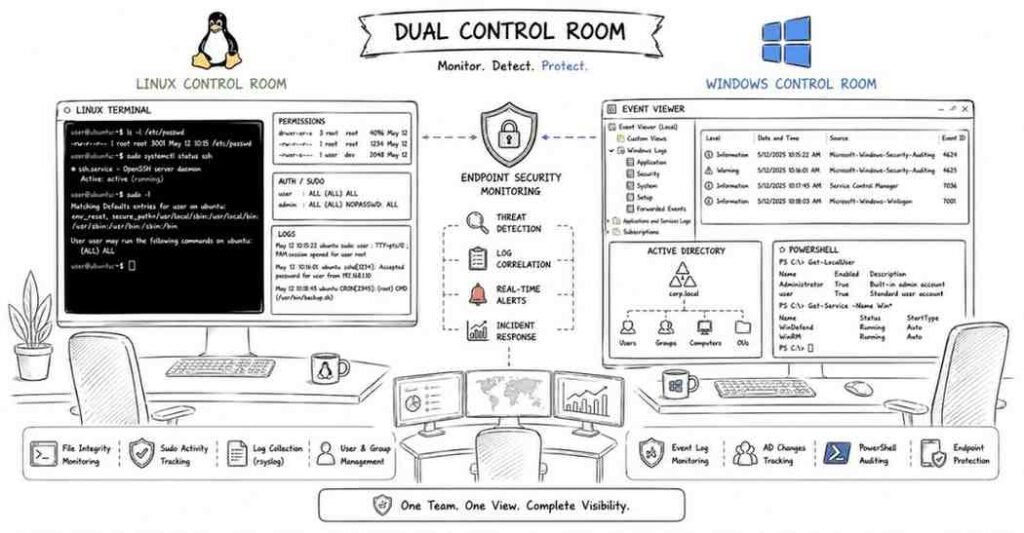
Q1. What is an operating system?
An operating system is the software that manages hardware resources and provides services for applications and users. It acts as the interface between the user, applications, and the underlying hardware.
Q2. Why is operating system knowledge important in cybersecurity?
Operating system knowledge is important because attackers often target OS-level weaknesses such as user accounts, services, processes, permissions, and logs. Security analysts need to understand how systems work to detect misuse and investigate incidents.
Q3. What is the difference between a process and a thread?
A process is an independent program in execution with its own memory space, while a thread is a smaller unit of execution within a process. Multiple threads can run inside the same process and share resources.
Q4. What is a service in an operating system?
A service is a background program that performs specific system or application tasks without direct user interaction. Examples include web servers, database services, logging services, and update services.
Q5. What is a user account in an operating system?
A user account represents an identity used to log in and interact with a system. It is associated with permissions, groups, and access rights.
Q6. What is the difference between a user and a group?
A user is an individual account, while a group is a collection of users that share permissions or access rights. Groups make permission management easier in both Linux and Windows environments.
Q7. What is privilege escalation?
Privilege escalation is when an attacker or unauthorized user gains higher access rights than originally allowed. This can happen because of misconfigurations, software flaws, or weak permission controls.
Q8. What does least privilege mean in OS security?
Least privilege means giving users and processes only the minimum access they need to do their tasks. This reduces the damage that can happen if an account or process is compromised.
Q9. What is patch management?
Patch management is the process of applying software and security updates to systems in a controlled way. It helps fix known vulnerabilities and reduce exposure to attacks.
Q10. What is system hardening?
System hardening is the process of reducing the attack surface of an operating system by disabling unnecessary services, tightening configurations, applying patches, and enforcing security controls.
Linux Security
Q11. What is Linux?
Linux is a widely used open-source operating system known for its stability, flexibility, and strong presence in servers, cloud systems, and security environments. It is heavily used in cybersecurity because many tools and production systems run on Linux.
Q12. What are file permissions in Linux?
File permissions in Linux control who can read, write, or execute a file or directory. They are assigned to the owner, group, and others.
Q13. What do read, write, and execute permissions mean in Linux?
Read allows viewing file contents, write allows modifying the file, and execute allows running a file as a program or script. For directories, these permissions affect listing, creating, and entering directories.
Q14. What is the root user in Linux?
The root user is the highest-privileged account in Linux. It has unrestricted access to the entire system and can perform any administrative task.
Q15. Why is the root account sensitive from a security perspective?
The root account is sensitive because anyone who gains access to it effectively controls the system. Misuse or compromise of root access can lead to full system takeover.
Q16. What is sudo in Linux?
sudo allows a permitted user to run commands with elevated privileges, usually as root. It is safer than logging in directly as root because it provides controlled and auditable privilege use.
Q17. What is /etc/passwd in Linux?
/etc/passwd is a file that stores user account information such as usernames, user IDs, home directories, and default shells. It helps the system identify local user accounts.
Q18. What is /etc/shadow in Linux?
/etc/shadow stores password-related information such as hashed passwords and password policy details. It is more sensitive than /etc/passwd and is restricted to privileged access.
Q19. What is /var/log in Linux?
/var/log is the directory where many system and application log files are stored. Security analysts often review it for authentication events, service errors, and suspicious activity.
Q20. What is auth.log or secure in Linux?
These are log files that commonly record authentication-related events such as SSH logins, failed login attempts, and sudo activity. The exact filename varies by Linux distribution.
Q21. Why are failed login logs important?
Failed login logs help detect brute-force attempts, password spraying, unauthorized access attempts, and suspicious user behavior. They are often one of the first places checked during investigations.
Q22. What is a cron job in Linux?
A cron job is a scheduled task that runs automatically at defined times or intervals. Attackers sometimes misuse cron for persistence, which makes it important during investigations.
Q23. Why are scheduled tasks security-relevant?
Scheduled tasks can be used for automation, but they can also be abused to run malicious scripts, maintain persistence, or execute actions repeatedly without user interaction.
Q24. What is systemctl in Linux?
systemctl is a command used to manage services and system state on systems using systemd. It is commonly used to start, stop, restart, enable, and inspect services.
Q25. What is a Linux daemon?
A daemon is a background service in Linux that runs without direct user interaction. Examples include SSH servers, web servers, and logging services.
Windows Security
Q26. What is Windows Event Viewer?
Windows Event Viewer is a tool used to view system, security, application, and other event logs. It is important in investigations because it records many system and user activities.
Q27. What are Windows Event Logs?
Windows Event Logs are records of system events such as logins, service changes, application errors, and security activity. They help analysts detect attacks, troubleshoot issues, and reconstruct timelines.
Q28. What is the Windows Registry?
The Windows Registry is a hierarchical database that stores system settings, application configurations, and user preferences. Attackers often target it for persistence or configuration changes.
Q29. Why is the Windows Registry important in security investigations?
The Registry can contain evidence of startup persistence, software execution history, user configuration changes, and malicious modifications. It is often reviewed during malware and persistence analysis.
Q30. What is User Account Control (UAC) in Windows?
User Account Control is a Windows security feature that helps prevent unauthorized system changes by prompting for approval or administrator credentials when elevated privileges are needed.
Q31. What is Active Directory in a Windows environment?
Active Directory is Microsoft’s directory service used to manage users, groups, devices, authentication, and policies in a domain environment. It is central to access control in many enterprise networks.
Q32. Why is Active Directory important in cybersecurity?
Active Directory is important because it controls identity and access across many enterprise systems. If compromised, attackers can move laterally, escalate privileges, and take control of large parts of the environment.
Q33. What is PowerShell and why is it security-relevant?
PowerShell is a command-line shell and scripting framework in Windows. It is useful for administration and automation, but attackers also abuse it for execution, reconnaissance, persistence, and evasion.
Q34. What are common Windows logs security teams review?
Security teams often review Security logs, System logs, Application logs, PowerShell logs, and logs related to authentication, process execution, and service activity. These help in detecting abnormal behavior.
Q35. What is a Windows service?
A Windows service is a background program that starts automatically or manually and performs system or application functions. Unauthorized or unusual services can indicate compromise or persistence.
Cross-Platform Security
Q36. What is persistence in endpoint security?
Persistence is a technique used by attackers to maintain access on a system after reboot or logout. It can involve startup folders, scheduled tasks, registry keys, services, cron jobs, or modified login scripts.
Q37. Why are running processes important during an investigation?
Running processes can reveal suspicious programs, unknown parent-child relationships, hidden malware activity, or unauthorized tools. Process review is a key part of endpoint triage.
Q38. Why are system logs important in cybersecurity?
System logs help analysts understand what happened, when it happened, and what system components were involved. They are essential for detection, troubleshooting, incident response, and forensic analysis.
Q39. What are indicators of compromise on an operating system?
Indicators of compromise can include unusual logins, unknown users, suspicious scheduled tasks, unauthorized services, disabled security tools, strange outbound connections, and unexpected file changes.
Q40. How does OS security knowledge help in interviews?
OS security knowledge helps candidates explain endpoint hardening, account misuse, process analysis, privilege escalation, persistence, logging, and incident investigation clearly. It shows practical readiness for real-world cyber security work.
Part 5: Web Security & OWASP Top 10 — 45 Interview Questions & Answers
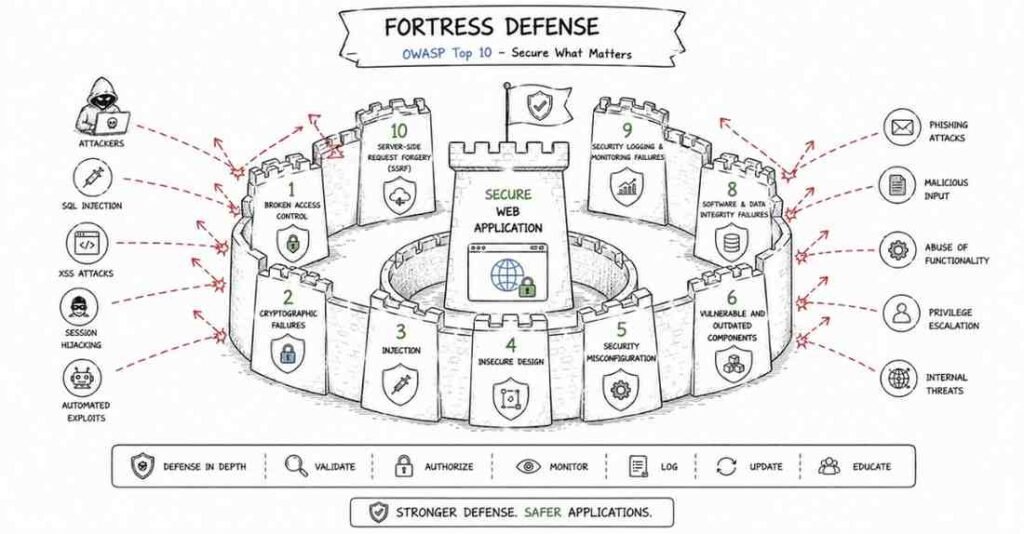
Q1. What is web security?
Web security is the practice of protecting websites, web applications, APIs, and users from attacks such as data theft, unauthorized access, and service disruption. It focuses on vulnerabilities in browsers, servers, application logic, and communication channels.
Q2. Why is web security important in cybersecurity interviews?
Web security is important because many real-world attacks target applications that are exposed to the internet. Interviewers expect candidates to understand common vulnerabilities, how attackers exploit them, and how to defend against them.
Q3. What is OWASP?
OWASP stands for Open Worldwide Application Security Project. It is a well-known community that provides guidance, tools, and educational material for improving application security.
Q4. What is the OWASP Top 10?
The OWASP Top 10 is a widely referenced list of the most critical web application security risks. It helps security professionals and developers focus on common and high-impact vulnerabilities.
Q5. What is Broken Access Control?
Broken Access Control happens when users can access data or actions they should not be allowed to access. This can let attackers view, modify, or delete other users’ information.
Q6. What is an example of Broken Access Control?
A common example is changing a URL parameter such as a user ID and being able to access another user’s account or records. This shows that server-side authorization checks are missing or weak.
Q7. What is cryptographic failure?
Cryptographic failure happens when sensitive data is not properly protected through encryption, key management, or secure transmission. This can expose passwords, personal data, financial information, or session data.
Q8. What is injection?
Injection happens when untrusted input is treated as code or commands by an application. This can allow attackers to manipulate queries, commands, or application behavior.
Q9. What is SQL injection?
SQL injection is a type of injection attack where malicious input changes the structure of a SQL query. It can allow attackers to read, modify, or delete database data and sometimes bypass authentication.
Q10. How can SQL injection be prevented?
SQL injection is prevented by using parameterized queries, prepared statements, proper input handling, and avoiding direct concatenation of user input into SQL commands. Principle-of-least-privilege database accounts also help reduce damage.
Q11. What is Cross-Site Scripting (XSS)?
Cross-Site Scripting is an attack where malicious scripts are injected into a trusted web page and executed in another user’s browser. It can be used to steal sessions, manipulate content, or perform actions as the victim.
Q12. What are the main types of XSS?
The main types are Stored XSS, where malicious input is saved on the server; Reflected XSS, where the payload is reflected immediately in a response; and DOM-based XSS, where the vulnerability exists in client-side JavaScript logic.
Q13. How can XSS be prevented?
XSS can be prevented by output encoding, proper input validation, using secure frameworks, avoiding unsafe DOM manipulation, and applying Content Security Policy where appropriate.
Q14. What is Cross-Site Request Forgery (CSRF)?
CSRF is an attack where a victim’s browser is tricked into making an unwanted request to a site where the victim is already authenticated. This can cause actions like changing passwords or transferring funds without the user’s intent.
Q15. How can CSRF be prevented?
CSRF can be prevented using anti-CSRF tokens, same-site cookie settings, re-authentication for sensitive actions, and checking request origin or referer where appropriate.
Q16. What is insecure design?
Insecure design refers to security weaknesses caused by poor architecture, unsafe assumptions, or missing security controls from the beginning. It is not just a coding bug but a design-level problem.
Q17. What is security misconfiguration?
Security misconfiguration happens when systems are deployed with unsafe settings such as default credentials, debug mode, open storage buckets, unnecessary services, or overly permissive rules.
Q18. What are vulnerable and outdated components?
This refers to the use of software libraries, frameworks, plugins, or systems that contain known vulnerabilities and have not been updated. Attackers often target these because public exploits may already exist.
Q19. What are identification and authentication failures?
These happen when login, session management, password handling, or identity verification is weak. This can lead to credential stuffing, session hijacking, brute-force attacks, or unauthorized access.
Q20. What are software and data integrity failures?
These occur when software updates, dependencies, or critical data are not properly validated or protected. Attackers may exploit this by tampering with build pipelines, update mechanisms, or third-party packages.
Q21. What are security logging and monitoring failures?
These failures happen when important security events are not logged, monitored, or alerted on. As a result, breaches may go undetected for a long time.
Q22. What is SSRF?
SSRF stands for Server-Side Request Forgery. It occurs when an attacker tricks the server into making requests to internal or unintended systems, which can expose internal services or sensitive metadata.
Q23. Why is SSRF dangerous in cloud environments?
SSRF can be especially dangerous in cloud environments because it may allow attackers to reach internal metadata services, retrieve temporary credentials, or access internal resources that are not exposed publicly.
Q24. What is authentication?
Authentication is the process of verifying who a user is, usually through credentials such as passwords, tokens, or multifactor authentication.
Q25. What is authorization?
Authorization determines what an authenticated user is allowed to access or do. Good authorization checks must be enforced on the server side, not just in the user interface.
Q26. What is the difference between authentication and authorization in web applications?
Authentication confirms identity, while authorization controls permissions after identity is confirmed. A user may be logged in successfully but still should not have access to another user’s records or admin-only functions.
Q27. What is session hijacking?
Session hijacking is when an attacker takes over a valid user session by stealing or predicting the session token. This can allow the attacker to act as the victim without knowing their password.
Q28. What is session fixation?
Session fixation is an attack where the attacker forces a victim to use a known session ID and then reuses it after the victim logs in. This can give the attacker access to the authenticated session.
Q29. What makes a session cookie more secure?
A secure session cookie should use attributes such as HttpOnly, Secure, and SameSite. These reduce the risk of theft through scripts, unencrypted transmission, and certain cross-site attacks.
Q30. What is a secure header in web security?
A secure header is an HTTP response header that improves browser-side security behavior. Examples include headers that reduce XSS risk, clickjacking, MIME confusion, and insecure transport.
Q31. What is Content Security Policy (CSP)?
Content Security Policy is a security mechanism that controls which sources of scripts, styles, and other content a page is allowed to load. It helps reduce the impact of XSS attacks.
Q32. What is clickjacking?
Clickjacking is an attack where a user is tricked into clicking on hidden or disguised elements, often inside an invisible frame. It can lead to unwanted actions such as changing settings or authorizing transactions.
Q33. How can clickjacking be prevented?
Clickjacking can be reduced using headers that prevent a page from being embedded in unauthorized frames. Good UI design and sensitive-action protections also help.
Q34. What is input validation?
Input validation is the process of checking whether incoming data matches expected format, length, type, or rules before processing it. It helps reduce the risk of injection and logic abuse.
Q35. What is output encoding?
Output encoding means safely transforming data before displaying it in a browser so it is treated as content instead of executable code. It is one of the main defenses against XSS.
Q36. What is file upload risk in web applications?
File upload risk arises when attackers upload malicious files such as scripts, web shells, or oversized files that can lead to code execution, storage abuse, or denial of service.
Q37. How can file upload vulnerabilities be reduced?
They can be reduced by validating file type, checking content, renaming files safely, limiting size, scanning uploads, and storing them outside directly executable paths.
Q38. What is an API in application security?
An API is an interface that allows systems or applications to communicate with each other. From a security perspective, APIs must be protected just like web applications because they expose business logic and data.
Q39. What are common API security risks?
Common API security risks include broken authorization, weak authentication, excessive data exposure, lack of rate limiting, insecure direct object references, and poor input handling.
Q40. What is rate limiting in API security?
Rate limiting controls how many requests a client can make in a given period. It helps reduce abuse, brute-force attacks, scraping, and denial-of-service style behavior.
Q41. What is CORS?
CORS stands for Cross-Origin Resource Sharing. It is a browser security feature that controls whether a web application from one origin can access resources from another origin.
Q42. Why can poor CORS configuration be dangerous?
Poor CORS configuration can expose sensitive API responses to untrusted origins, especially when credentials are allowed. This can make cross-origin abuse easier.
Q43. What is an IDOR vulnerability?
IDOR stands for Insecure Direct Object Reference. It happens when an application exposes internal object identifiers and fails to verify whether the user is allowed to access the referenced object.
Q44. How do you explain web security well in interviews?
A strong answer should define the vulnerability, describe how an attacker exploits it, explain the risk, and then give clear prevention methods. Interviewers usually value clarity and practical thinking more than memorized definitions.
Q45. Why is OWASP knowledge essential for cyber security roles?
OWASP knowledge is essential because it gives candidates a structured understanding of major application risks. It helps them discuss both offensive and defensive security in a practical and interview-ready way.
Part 6: Incident Response & SOC Concepts — 40 Interview Questions & Answers
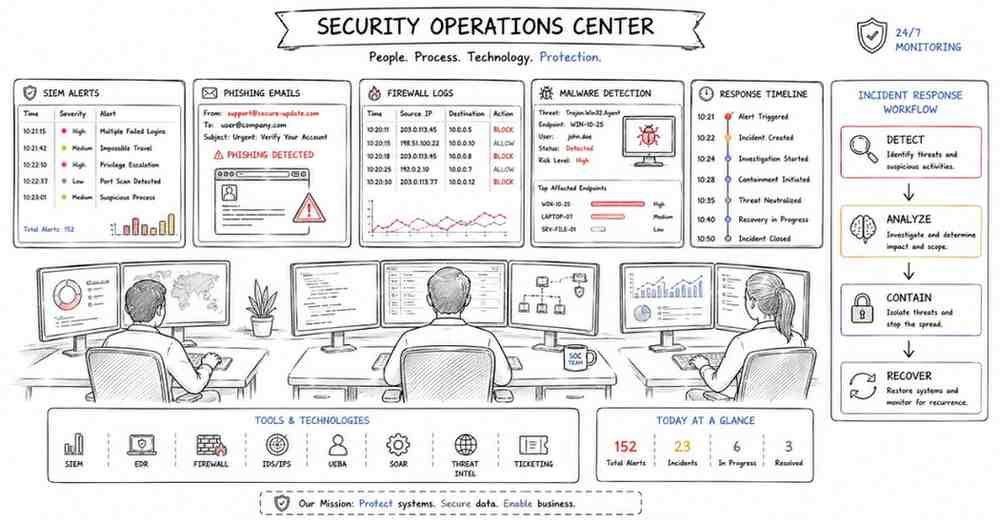
Q1. What is a Security Operations Center (SOC)?
A Security Operations Center is a team or function responsible for continuously monitoring, detecting, analyzing, and responding to security events. It acts as the central point for security visibility and incident handling.
Q2. What does a SOC analyst do?
A SOC analyst monitors alerts, reviews logs, investigates suspicious activity, escalates incidents, and helps contain threats. The exact responsibility depends on the SOC tier and the organization’s maturity.
Q3. What are the common SOC tiers?
SOC roles are often grouped into tiers such as Tier 1 for alert monitoring and triage, Tier 2 for deeper investigation and response, and Tier 3 for advanced threat hunting, detection engineering, and complex incident handling.
Q4. What is an alert in a SOC context?
An alert is a notification generated by a security tool when it detects behavior that matches a rule, pattern, or anomaly. Alerts may indicate real threats, benign activity, or false positives.
Q5. What is triage in incident response?
Triage is the initial process of reviewing an alert or event to determine whether it is real, how serious it is, and what should happen next. It helps prioritize analyst effort.
Q6. What is a false positive?
A false positive is an alert that appears suspicious but turns out to be harmless after investigation. Reducing false positives is important so analysts can focus on real threats.
Q7. What is a false negative?
A false negative happens when a real malicious event is not detected or is incorrectly treated as safe. This is dangerous because an actual threat can go unnoticed.
Q8. What is SIEM?
SIEM stands for Security Information and Event Management. It collects, aggregates, correlates, and analyzes logs from multiple sources to help detect suspicious activity.
Q9. Why is SIEM important in a SOC?
SIEM is important because it brings together data from endpoints, firewalls, servers, identity systems, and applications into one place. This makes monitoring, correlation, investigation, and alerting more effective.
Q10. What is log correlation?
Log correlation is the process of linking related events from different sources to understand a bigger picture. For example, a suspicious login, followed by a PowerShell event, followed by unusual outbound traffic may together show an attack chain.
Q11. What is use-case tuning in a SIEM?
Use-case tuning means improving detection rules to reduce noise and make alerts more meaningful. It may involve changing thresholds, excluding expected behavior, or refining correlation logic.
Q12. What is an incident in cybersecurity?
A security incident is an event that threatens the confidentiality, integrity, or availability of systems or data. It requires investigation and may require a coordinated response.
Q13. What is the incident response lifecycle?
The incident response lifecycle commonly includes preparation, identification, containment, eradication, recovery, and lessons learned. It provides a structured way to handle security incidents.
Q14. What happens in the preparation phase of incident response?
Preparation includes building playbooks, enabling logging, training staff, setting up tools, defining communication paths, and ensuring the organization is ready to handle incidents effectively.
Q15. What happens in the identification phase?
Identification is the phase where suspicious activity is detected, validated, and classified as a possible incident. Analysts gather evidence to determine whether the event is malicious and what systems are affected.
Q16. What is containment in incident response?
Containment is the process of limiting the spread or impact of an incident. This may include isolating a host, disabling an account, blocking an IP, or stopping a malicious process.
Q17. What is eradication?
Eradication means removing the root cause of the incident, such as deleting malware, closing vulnerabilities, removing persistence, or resetting compromised credentials.
Q18. What is recovery?
Recovery is the phase where systems are restored to normal operation and monitored closely to make sure the threat is gone and the environment is stable again.
Q19. What is a post-incident review?
A post-incident review is a discussion after the incident to understand what happened, what worked, what failed, and how the organization can improve detection, response, and prevention.
Q20. What is a playbook in a SOC?
A playbook is a documented set of steps used to respond to a specific type of alert or incident, such as phishing, malware, suspicious login, or ransomware. It helps analysts respond consistently and quickly.
Q21. What is the difference between an event, an alert, and an incident?
An event is any recorded occurrence, such as a login or process execution. An alert is a flagged event or pattern that may indicate a threat, while an incident is a confirmed or high-confidence security problem requiring response.
Q22. What is an IOC?
IOC stands for Indicator of Compromise. It is a piece of evidence that suggests malicious activity, such as a suspicious IP address, file hash, domain, registry key, or process behavior.
Q23. What is a TTP?
TTP stands for Tactics, Techniques, and Procedures. It describes how attackers behave, including their goals, methods, and common operational patterns.
Q24. What is MITRE ATT&CK?
MITRE ATT&CK is a knowledge base of attacker tactics and techniques based on real-world observations. It helps defenders understand, map, detect, and respond to adversary behavior.
Q25. What is the difference between IOC-based detection and behavior-based detection?
IOC-based detection looks for known indicators such as hashes or domains, while behavior-based detection looks for suspicious actions and patterns such as lateral movement, unusual script execution, or credential abuse. Behavior-based detection is often stronger against evolving threats.
Q26. What is threat hunting?
Threat hunting is the proactive search for hidden or undetected threats in an environment. Instead of waiting for alerts, analysts actively look for suspicious patterns and attacker behavior.
Q27. What is a phishing incident?
A phishing incident involves deceptive communication, often email, designed to trick users into clicking malicious links, opening harmful attachments, or revealing credentials. It is one of the most common incident types in organizations.
Q28. How would a SOC analyst handle a phishing alert?
The analyst would review the sender, headers, links, attachments, delivery scope, and user interaction, then determine whether the email is malicious. If confirmed, they would contain it by blocking indicators, removing similar emails, checking impacted users, and escalating if compromise occurred.
Q29. What is malware triage?
Malware triage is the quick initial analysis of a suspicious file or process to determine whether it is malicious, how dangerous it is, and what response actions are needed.
Q30. What is endpoint isolation?
Endpoint isolation is the action of disconnecting a host from the network while keeping it available for investigation. It helps contain threats without immediately shutting down the system.
Q31. What is dwell time?
Dwell time is the amount of time an attacker remains in an environment before being detected. Lower dwell time generally means better detection and faster response.
Q32. Why are logs important in incident response?
Logs provide evidence of what happened, when it happened, and what systems or users were involved. They are critical for detection, timeline reconstruction, and root cause analysis.
Q33. What is timeline reconstruction?
Timeline reconstruction is the process of arranging events in chronological order to understand how an incident started, progressed, and impacted the environment.
Q34. What is root cause analysis in incident response?
Root cause analysis is the process of identifying how and why the incident happened in the first place. It goes beyond symptoms and focuses on the original weakness, action, or failure that allowed the incident to occur.
Q35. What is evidence preservation?
Evidence preservation means collecting and handling logs, files, images, and other artifacts in a way that maintains their integrity and usefulness for investigation or legal review.
Q36. What is chain of custody?
Chain of custody is the documented record of how evidence was collected, transferred, stored, and accessed. It helps prove that evidence has not been tampered with.
Q37. What is a threat intelligence feed?
A threat intelligence feed provides external information about malicious IPs, domains, file hashes, attacker behavior, or active campaigns. It helps enrich investigations and improve detection.
Q38. What is alert fatigue?
Alert fatigue happens when analysts receive too many alerts, especially low-quality ones, and become overwhelmed. It increases the risk of missing important incidents.
Q39. What makes a good SOC analyst answer in an interview?
A good answer is structured, practical, and calm. It should explain how to validate the alert, gather evidence, assess impact, contain the threat, escalate when needed, and document findings clearly.
Q40. Why are Incident Response and SOC concepts heavily tested in cyber security interviews?
They are heavily tested because organizations need people who can think clearly during real attacks, not just define terms. These topics show whether a candidate can monitor, investigate, prioritize, and respond effectively under pressure.
Part 7: Penetration Testing & Vulnerability Management — 40 Interview Questions & Answers
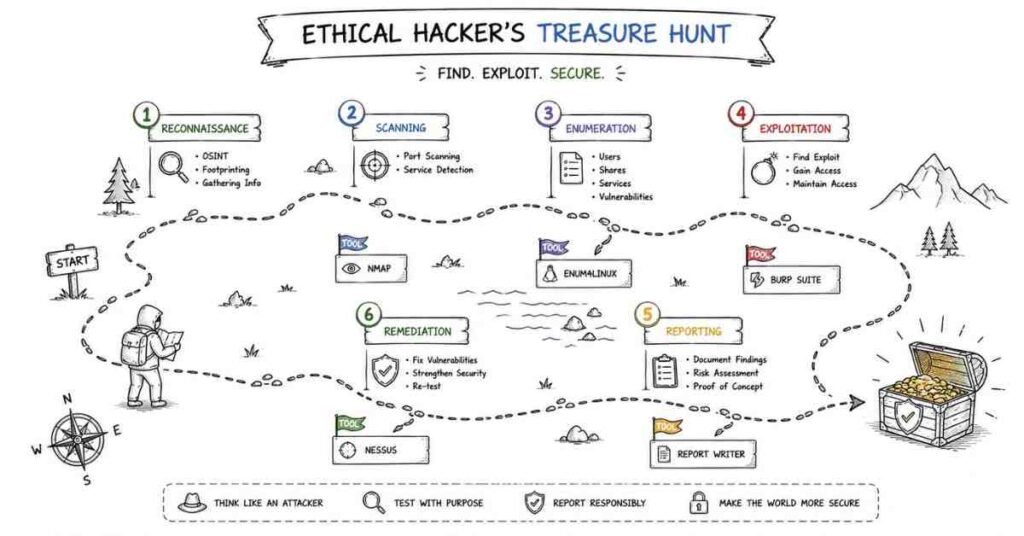
Q1. What is penetration testing?
Penetration testing is the authorized simulation of real-world attacks against systems, applications, or networks to identify exploitable weaknesses. Its goal is to find and demonstrate security issues before malicious attackers do.
Q2. What is the difference between vulnerability assessment and penetration testing?
A vulnerability assessment identifies and lists weaknesses, usually with scanning and analysis. Penetration testing goes further by actively validating and attempting to exploit weaknesses in a controlled and authorized manner.
Q3. What does VAPT stand for?
VAPT stands for Vulnerability Assessment and Penetration Testing. It combines discovery of weaknesses with deeper validation of how those weaknesses can actually be exploited.
Q4. What are the main phases of penetration testing?
The main phases typically include planning and scoping, reconnaissance, scanning and enumeration, exploitation, post-exploitation analysis, and reporting. Some methodologies also include remediation validation afterward.
Q5. What is scoping in penetration testing?
Scoping defines what systems, applications, IP ranges, domains, and environments are in scope for the engagement. It also sets boundaries, rules of engagement, timelines, and testing restrictions.
Q6. Why is authorization important in penetration testing?
Authorization is critical because penetration testing involves actions that may resemble real attacks. Without written approval and clear scope, the activity could be illegal or disruptive.
Q7. What is reconnaissance in penetration testing?
Reconnaissance is the information-gathering phase where the tester collects details about the target. This can include domains, subdomains, IPs, technologies, exposed services, employees, and public attack surface information.
Q8. What is the difference between passive and active reconnaissance?
Passive reconnaissance gathers information without directly interacting with the target systems, such as using public sources. Active reconnaissance involves interacting with the target, such as scanning ports or querying services.
Q9. What is enumeration?
Enumeration is the process of extracting more detailed information from services or systems after initial discovery. It may reveal usernames, shares, software versions, directories, or misconfigurations.
Q10. What is exploitation?
Exploitation is the phase where a tester uses a discovered weakness to demonstrate impact. This may involve gaining access, bypassing controls, or showing how sensitive data could be exposed.
Q11. What is post-exploitation?
Post-exploitation is the phase after initial access where the tester evaluates what an attacker could do next, such as privilege escalation, lateral movement, persistence, or data access, within the approved scope.
Q12. Why is reporting important in penetration testing?
Reporting is important because the value of a pentest is not just finding weaknesses but clearly communicating them. A good report explains the issue, impact, evidence, severity, and remediation guidance.
Q13. What makes a good pentest report?
A good pentest report is clear, accurate, prioritized, and actionable. It should include executive summary, technical findings, severity, risk explanation, proof of concept, and practical recommendations.
Q14. What is a vulnerability?
A vulnerability is a weakness in software, hardware, configuration, or process that can be exploited to compromise security. Not every vulnerability is immediately exploitable, but each represents potential risk.
Q15. What is a CVE?
CVE stands for Common Vulnerabilities and Exposures. It is a standardized identifier assigned to publicly known security vulnerabilities.
Q16. What is CVSS?
CVSS stands for Common Vulnerability Scoring System. It is a framework used to score the severity of vulnerabilities based on factors such as exploitability and impact.
Q17. Why is CVSS not enough by itself to prioritize vulnerabilities?
CVSS gives a general severity score, but real prioritization should also include business impact, exposure, exploit availability, asset criticality, and whether the weakness is actually reachable in the environment.
Q18. What is risk-based vulnerability management?
Risk-based vulnerability management means prioritizing remediation based on actual organizational risk instead of treating every vulnerability equally. It focuses effort on the issues that matter most.
Q19. What is a patch in vulnerability management?
A patch is an update that fixes a software flaw, security vulnerability, or bug. Applying patches is one of the most common ways to reduce risk.
Q20. What is remediation?
Remediation is the process of fixing or reducing a security issue. This may include patching, configuration changes, compensating controls, disabling services, or changing architecture.
Q21. What is a compensating control?
A compensating control is an alternate safeguard used when the ideal fix cannot be applied immediately. For example, if a patch cannot be installed yet, access restrictions or monitoring may temporarily reduce the risk.
Q22. What is a vulnerability scanner?
A vulnerability scanner is a tool that checks systems, applications, or networks for known weaknesses, missing patches, misconfigurations, or insecure settings. It helps automate detection at scale.
Q23. What are the limitations of vulnerability scanners?
Scanners can generate false positives, miss context, and may not fully validate whether a vulnerability is truly exploitable. They are useful for discovery, but human analysis is still necessary.
Q24. What is Nmap used for?
Nmap is commonly used for network discovery, host detection, port scanning, service identification, and basic enumeration. It helps testers and defenders understand exposed services and attack surface.
Q25. What is Burp Suite used for?
Burp Suite is used for testing web application security. It helps intercept traffic, analyze requests and responses, test inputs, and identify issues such as injection, authentication flaws, and access control problems.
Q26. What is Metasploit used for?
Metasploit is a framework used for exploitation, payload delivery, validation of known weaknesses, and security testing. It is useful for demonstrating impact in a controlled and authorized way.
Q27. What is Nessus commonly used for?
Nessus is commonly used for vulnerability scanning and identifying missing patches, known vulnerabilities, and configuration issues across systems and environments.
Q28. What is the difference between a vulnerability scan and exploitation?
A vulnerability scan identifies possible weaknesses based on signatures, versions, or checks. Exploitation attempts to confirm impact by actively using the weakness in a controlled manner.
Q29. What is privilege escalation in a pentest?
Privilege escalation is the process of gaining higher permissions than initially available after access is obtained. It shows how a limited compromise could become a full system or domain compromise.
Q30. What is lateral movement?
Lateral movement is when an attacker moves from one compromised system to other systems in the environment. This often happens after initial access and can increase the impact of an intrusion.
Q31. What is credential harvesting?
Credential harvesting is the collection of usernames, passwords, tokens, or hashes from users or systems. Attackers use it to gain access, escalate privileges, or move laterally.
Q32. What is a zero-day vulnerability?
A zero-day vulnerability is a software flaw that is unknown to the vendor or for which no fix is yet available. It is especially dangerous because defenders may have little or no protection ready.
Q33. What is proof of concept in pentesting?
Proof of concept is a controlled demonstration showing that a vulnerability is real and can be exploited. It helps validate the finding and explain the practical impact to stakeholders.
Q34. Why should penetration tests avoid causing unnecessary damage?
Penetration tests are meant to improve security, not disrupt business operations. Testers must work within agreed rules, avoid unnecessary harm, and balance realism with safety.
Q35. What is re-testing in vulnerability management?
Re-testing is the process of verifying whether a reported issue has actually been fixed after remediation. It helps confirm closure and ensures the vulnerability is no longer exploitable.
Q36. What is exposure management?
Exposure management is the broader process of understanding and reducing the organization’s visible and exploitable attack surface. It includes assets, vulnerabilities, internet exposure, and security posture over time.
Q37. What is the role of business context in vulnerability prioritization?
Business context helps determine whether a weakness affects a critical asset, sensitive data, externally exposed service, or essential business workflow. This often matters more than severity score alone.
Q38. What are common mistakes candidates make when answering pentest interview questions?
Common mistakes include focusing only on tools, ignoring authorization and scoping, giving overly aggressive answers, and failing to explain impact or reporting. Interviewers usually want methodology and judgment, not just tool names.
Q39. What is responsible disclosure?
Responsible disclosure is the process of reporting a vulnerability to the affected organization or vendor in a controlled and ethical way so they have time to fix it before public disclosure.
Q40. Why are penetration testing and vulnerability management both important?
Penetration testing helps validate real attack paths and impact, while vulnerability management helps continuously identify and reduce weaknesses across the environment. Together they support both depth and scale in security improvement.
Part 8: Cloud Security, DevSecOps & Tooling — 40 Interview Questions & Answers
Q1. What is cloud security?
Cloud security is the practice of protecting cloud-based systems, services, workloads, identities, data, and configurations from threats and misuse. It includes controls for access, monitoring, encryption, networking, and compliance.
Q2. Why is cloud security important in cybersecurity interviews?
Cloud security is important because many organizations now run applications and infrastructure in cloud environments. Interviewers expect candidates to understand identity, misconfigurations, logging, and shared responsibility in the cloud.
Q3. What is the shared responsibility model?
The shared responsibility model means the cloud provider secures the underlying cloud infrastructure, while the customer is responsible for securing what they build and configure in the cloud. The exact division depends on the service type being used.
Q4. What is IAM?
IAM stands for Identity and Access Management. It is the system used to control who can access which cloud resources and what actions they are allowed to perform.
Q5. Why is IAM critical in cloud security?
IAM is critical because identity is often the primary control plane in the cloud. Weak permissions, unused accounts, and overly broad access can lead directly to compromise or privilege escalation.
Q6. What is the principle of least privilege in cloud security?
Least privilege means granting only the minimum permissions needed for a user, service, or application to perform its task. This limits the impact if an account or workload is compromised.
Q7. What is the difference between an IAM user and an IAM role?
An IAM user is usually a long-term identity associated with a person or service, while an IAM role provides temporary permissions that can be assumed when needed. Roles are generally safer for workloads because they avoid hardcoded long-term credentials.
Q8. What is MFA in cloud security?
MFA, or multifactor authentication, adds an extra verification step during login, such as a mobile code or hardware token. It significantly improves account security, especially for privileged users.
Q9. What is a cloud misconfiguration?
A cloud misconfiguration is an unsafe or incorrect cloud setting, such as public storage exposure, overly permissive access rules, disabled logging, or open administrative access. Misconfigurations are one of the most common cloud security problems.
Q10. What is a security group or firewall rule in the cloud?
A security group or firewall rule controls inbound and outbound network traffic to cloud resources. If configured too broadly, it may expose services unnecessarily to the internet or other systems.
Q11. What is encryption at rest?
Encryption at rest protects stored data such as files, databases, or disks by encrypting it while it is not being actively transmitted. This helps reduce exposure if storage media or accounts are compromised.
Q12. What is encryption in transit?
Encryption in transit protects data while it moves between systems, services, or users over the network. It helps prevent interception and tampering during communication.
Q13. What is a secret in DevSecOps?
A secret is sensitive information such as a password, API key, access token, certificate, or database credential. Secrets must be stored and managed securely to prevent exposure.
Q14. Why should secrets never be hardcoded?
Hardcoded secrets are risky because they can be leaked through code repositories, logs, backups, screenshots, or accidental sharing. Once exposed, they may allow attackers to access critical systems.
Q15. What is secrets management?
Secrets management is the secure storage, access control, rotation, and auditing of sensitive credentials and keys. It reduces the risk of misuse and makes secret handling more controlled and traceable.
Q16. What is DevSecOps?
DevSecOps is the practice of integrating security into development, operations, and delivery pipelines rather than treating security as a separate final step. It aims to make security continuous and automated across the software lifecycle.
Q17. What does shift-left security mean?
Shift-left security means moving security checks earlier in the development process, such as during coding, pull requests, and build stages. This helps find issues sooner, when they are easier and cheaper to fix.
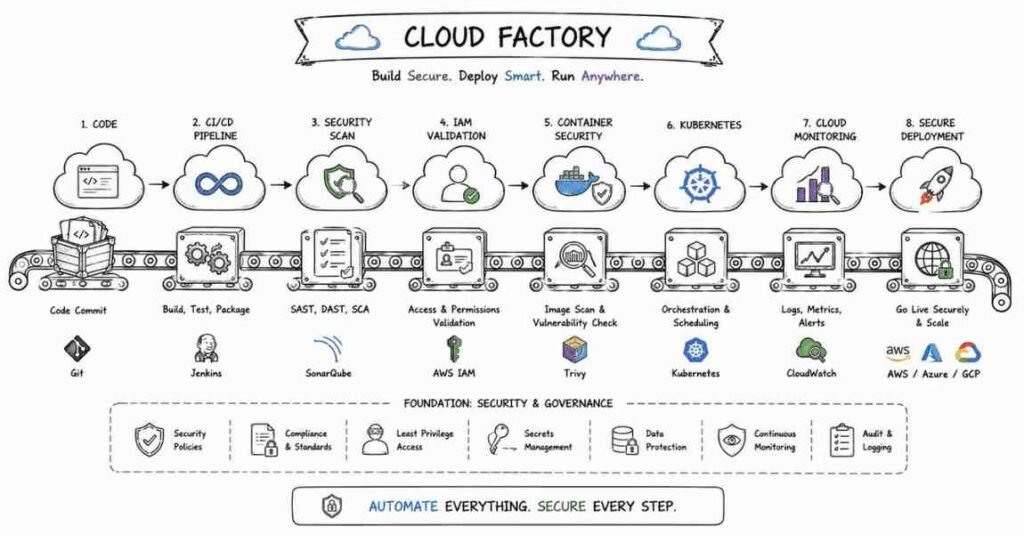
Q18. What is a CI/CD pipeline?
A CI/CD pipeline is an automated workflow that builds, tests, scans, and deploys code. In DevSecOps, it is also used to run security checks before software is released.
Q19. How is security integrated into CI/CD?
Security can be integrated by adding code scanning, dependency scanning, secret detection, container image scanning, infrastructure checks, and policy enforcement into the pipeline. High-risk findings may block the release.
Q20. What is SAST?
SAST stands for Static Application Security Testing. It analyzes source code or compiled code without running the application to identify potential security issues early.
Q21. What is DAST?
DAST stands for Dynamic Application Security Testing. It tests a running application from the outside to identify security weaknesses such as injection or misconfigurations.
Q22. What is SCA?
SCA stands for Software Composition Analysis. It identifies third-party libraries and dependencies in a project and checks whether they contain known vulnerabilities or license risks.
Q23. Why are software dependencies a security concern?
Dependencies are a concern because modern applications rely heavily on third-party packages, and a vulnerable or malicious package can introduce risk even if the main application code is secure.
Q24. What is Infrastructure as Code (IaC)?
Infrastructure as Code is the practice of managing infrastructure using code files instead of manual setup. It improves automation, consistency, version control, and repeatability.
Q25. Why does Infrastructure as Code need security review?
IaC needs security review because insecure templates can automatically deploy risky configurations at scale. A mistake in code can reproduce the same security issue across many environments.
Q26. What is container security?
Container security focuses on protecting container images, runtimes, registries, orchestrators, and the workloads running inside containers. It includes reducing attack surface, scanning images, and enforcing safe execution.
Q27. Why should containers avoid running as root?
Running as root increases the impact of a compromise because the process has higher privileges inside the container and sometimes greater risk of affecting the host or other components.
Q28. What is a container image scan?
A container image scan checks an image for known vulnerabilities, outdated packages, insecure configurations, and sometimes exposed secrets. It helps catch issues before deployment.
Q29. What is Kubernetes?
Kubernetes is a platform used to deploy, manage, and scale containerized applications. It automates orchestration tasks such as scheduling, scaling, restarts, and service exposure.
Q30. Why is Kubernetes security important?
Kubernetes security is important because a misconfigured cluster can expose workloads, secrets, APIs, and internal communication paths. Its flexibility also creates many security control points that must be handled correctly.
Q31. What are common Kubernetes security concerns?
Common concerns include overly permissive RBAC, exposed dashboards, privileged containers, weak network policies, insecure secrets handling, and poor cluster visibility.
Q32. What is RBAC in Kubernetes?
RBAC stands for Role-Based Access Control. It controls which users or service accounts can perform which actions on Kubernetes resources.
Q33. What is a privileged container?
A privileged container runs with elevated access to the host and kernel features. It is risky because it can weaken isolation and increase the impact of compromise.
Q34. What is CSPM?
CSPM stands for Cloud Security Posture Management. It is the practice or tooling used to continuously identify insecure cloud configurations, policy violations, and compliance gaps.
Q35. What is cloud logging and monitoring?
Cloud logging and monitoring involve collecting and analyzing cloud events such as API calls, authentication activity, configuration changes, and network traffic. These logs are essential for detection, response, and audits.
Q36. Why are audit logs important in cloud environments?
Audit logs help teams understand who did what, when it happened, and which resources were affected. They are vital for investigations, compliance, and accountability.
Q37. What is policy as code?
Policy as code means defining security or compliance rules in machine-readable form so they can be enforced automatically in pipelines or cloud environments. This improves consistency and automation.
Q38. What is a security baseline in cloud or DevSecOps?
A security baseline is a minimum approved set of configurations and controls that systems should meet. It helps teams deploy resources in a safer and more standardized way.
Q39. What is tooling in a DevSecOps interview context?
Tooling refers to the practical security and automation tools used in secure development and cloud operations, such as scanners, pipeline tools, container tools, logging platforms, and cloud-native security services. Interviewers usually care more about how and why tools are used than just the names.
Q40. How do you answer cloud security or DevSecOps questions well in interviews?
A strong answer should connect identity, access, logging, automation, secure defaults, and real risk reduction. Interviewers usually prefer practical thinking, clear trade-offs, and safe architecture over memorized buzzwords.
Part 9: Behavioral, Communication & Career Strategy — Complete Interview Guide
The STAR Method: Your Framework for Behavioral Questions
The STAR method is one of the best ways to answer behavioral interview questions in cybersecurity because it keeps your answer clear, structured, and easy to evaluate. STAR stands for Situation, Task, Action, Result, and it helps interviewers understand not just what happened, but how you think, decide, and respond in realistic work situations.
Use this structure when preparing your stories:
- S — Situation: Explain the context briefly, such as a phishing alert, incident triage situation, team deadline, lab project, or access control issue.
- T — Task: Describe your responsibility in that situation.
- A — Action: Explain what you specifically did, how you investigated, communicated, escalated, or solved the problem.
- R — Result: End with the measurable or practical outcome, such as faster resolution, blocked threat, improved process, or reduced risk.
Strong behavioral answers are usually concise, practical, and focused more on your actions than on the general team effort. In cybersecurity interviews, this matters even more because employers want to know how you behave under pressure, how you communicate during incidents, and whether you can follow process without freezing.
20 Behavioral Questions with STAR Answer Frameworks
Q1. Tell me about yourself.
A strong answer should cover your current background, your cybersecurity focus area, the main tools or concepts you know, and one or two relevant projects, labs, internships, or certifications. Keep it under 90 seconds and make it sound like a clear match for the role you are applying for.
Q2. Tell me about a time you handled a security alert.
STAR Framework:
- S: You received or analyzed a suspicious alert such as failed logins, phishing, malware, or unusual traffic
- T: Your responsibility was to validate it and decide whether escalation or action was needed
- A: Explain how you checked logs, correlated evidence, ruled out false positives, and followed process
- R: The issue was confirmed and escalated correctly, or it was safely closed with documented reasoning
Q3. Describe a time you worked under pressure.
STAR Framework:
- S: A live incident, deadline, exam period, lab challenge, or urgent escalation
- T: You had to stay calm and complete the task accurately
- A: Explain how you prioritized, followed a checklist, avoided panic, and communicated clearly
- R: The work was completed successfully without unnecessary mistakes
Q4. Tell me about a time you made a mistake.
STAR Framework:
- S: A mistake in configuration, analysis, communication, or documentation
- T: You had to correct it and reduce impact
- A: Explain how you identified the error, owned it, fixed it, and improved your process
- R: The issue was resolved and you learned a better working method
Q5. Describe a time you had to investigate something unclear.
STAR Framework:
- S: A vague alert, inconsistent behavior, unusual login pattern, or suspicious host activity
- T: You needed to determine whether the issue was real or benign
- A: Explain how you gathered evidence, formed hypotheses, checked logs, and narrowed possibilities
- R: You reached a justified conclusion and documented the reasoning
Q6. Tell me about a time you worked with a team.
STAR Framework:
- S: A project, incident response drill, lab team, or practical assignment
- T: You had a defined responsibility within the group
- A: Explain how you coordinated, shared information, and avoided confusion
- R: The team completed the work effectively and communication stayed smooth
Q7. Describe a time you learned a tool or topic quickly.
STAR Framework:
- S: You needed to learn a SIEM, Linux command set, cloud concept, or security tool in limited time
- T: You needed to become useful quickly
- A: Explain how you used labs, docs, videos, notes, and hands-on practice to ramp up
- R: You became productive enough to use the tool in a practical task or discussion
Q8. Tell me about a time you identified a security weakness.
STAR Framework:
- S: You noticed a misconfiguration, exposed service, weak permission, outdated package, or unsafe user behavior
- T: You needed to assess it and communicate the risk
- A: Explain how you validated the issue, described impact, and suggested remediation
- R: The issue was fixed, reduced, or escalated correctly
Q9. Describe a time you had to explain a technical issue to a non-technical person.
STAR Framework:
- S: You had to explain risk to a manager, teacher, recruiter, user, or stakeholder
- T: You needed to make the issue understandable without too much jargon
- A: Explain how you simplified the explanation and focused on business or practical impact
- R: The person understood the issue and the next step became clear
Q10. Tell me about a time you dealt with a false positive.
STAR Framework:
- S: A suspicious event looked malicious at first
- T: You had to investigate without escalating unnecessarily
- A: Explain how you checked evidence, context, timing, and related activity
- R: You safely ruled it out and documented why it was benign
Q11. Tell me about a time you improved a process.
STAR Framework:
- S: A repeated pain point such as messy notes, weak documentation, poor alert handling, or inconsistent triage
- T: You wanted to make the process more efficient or reliable
- A: Explain what you changed, such as templates, notes, checklists, naming, or workflow
- R: The work became faster, clearer, or more consistent
Q12. Describe a time you had to prioritize multiple tasks.
STAR Framework:
- S: Multiple alerts, deadlines, assignments, or lab tasks came at once
- T: You needed to decide what to handle first
- A: Explain how you ranked by urgency, risk, deadline, or impact
- R: Important work was completed first and lower-priority work was handled properly
Q13. Tell me about a time you received difficult feedback.
STAR Framework:
- S: Feedback on your communication, technical depth, documentation, or speed
- T: You had to respond professionally and improve
- A: Explain how you accepted the feedback, clarified it, and acted on it
- R: Your work quality improved and you became more effective
Q14. Describe a time you showed attention to detail.
STAR Framework:
- S: A log review, packet analysis, permission check, configuration review, or bug fix
- T: You had to notice something small but important
- A: Explain what detail you spotted and how you validated its significance
- R: That detail helped prevent a mistake or identify a meaningful issue
Q15. Tell me about a time you had to document your work clearly.
STAR Framework:
- S: An incident summary, lab report, pentest finding, ticket update, or project handoff
- T: You needed to make the output understandable for someone else
- A: Explain how you structured the documentation and made it useful
- R: Others could act on it easily without confusion
Q16. Why do you want to work in cybersecurity?
A strong answer should connect your interest to problem-solving, defense, investigation, technology, or protecting systems and users. Avoid overly dramatic answers and focus on genuine motivation plus practical effort you have already taken.
Q17. Why do you want to work at this company?
A strong answer should mention the company’s domain, security maturity, product environment, role fit, or learning opportunity. The best answers feel specific, not copied.
Q18. What is your biggest strength?
Pick one real strength such as calm incident thinking, structured analysis, curiosity, documentation, attention to detail, or persistence. Then support it with a short real example.
Q19. What is your biggest weakness?
Choose a real but manageable weakness and show what you are doing to improve it. Good answers sound honest and practical, not artificial.
Q20. Do you have any questions for us?
Always say yes. Good questions include what the first 90 days look like, what tools the team uses, how incidents are escalated, what training support exists, and what success looks like in the role.
40 ChatGPT / AI Self-Preparation Prompts (Cybersecurity Edition)
Use these prompts with AI tools to prepare more effectively.
Technical Practice Prompts (1–15)
- “Ask me 10 cybersecurity interview questions one by one and evaluate my answers.”
- “Quiz me on CIA triad, authentication, authorization, hashing, and encryption.”
- “Ask me networking interview questions for cybersecurity roles.”
- “Test me on Linux security concepts and command-line investigation questions.”
- “Give me 10 OWASP interview questions and check my answers.”
- “Act like a SOC analyst interviewer and ask me alert triage questions.”
- “Ask me SIEM and incident response questions one at a time.”
- “Give me scenario-based phishing investigation questions.”
- “Interview me on vulnerability management and patch prioritization.”
- “Test my knowledge of CVE, CVSS, VAPT, and pentesting methodology.”
- “Ask me cloud security and IAM interview questions.”
- “Quiz me on DevSecOps, secrets management, and CI/CD security.”
- “Ask me 5 questions on containers and Kubernetes security.”
- “Give me a mock interview for a SOC analyst fresher role.”
- “Ask me 5 real-world incident response scenarios and critique my thinking.”
Behavioral Practice Prompts (16–28)
- “Ask me behavioral cybersecurity interview questions using the STAR format.”
- “Improve my answer to ‘Tell me about yourself’ for a SOC analyst role.”
- “Help me prepare 8 STAR stories from labs, projects, internships, or training.”
- “Review my answer to ‘Tell me about a time you handled a difficult alert.'”
- “Role-play a complete HR and manager round for a cybersecurity fresher.”
- “Ask me conflict-resolution questions for a security team setting.”
- “Make my project explanation sound more impact-driven and interview-ready.”
- “Check whether my behavioral answer uses enough ‘I’ instead of only ‘we’.”
- “Help me answer ‘Why do you want to work in cybersecurity?'”
- “Give me 10 tricky behavioral interview questions for SOC and blue-team roles.”
- “Help me create an honest answer for ‘What is your weakness?'”
- “Review my answer to ‘Why should we hire you?’ for a cybersecurity role.”
- “Ask me manager-round questions for a cybersecurity analyst role.”
Career Strategy Prompts (29–40)
- “Rewrite this resume bullet point to sound stronger and more measurable: [paste bullet]”
- “Create a LinkedIn headline for a cybersecurity fresher targeting SOC roles.”
- “Write an About section for LinkedIn for a cybersecurity beginner.”
- “Review my project or lab description and make it recruiter-friendly.”
- “Write a cold outreach message to a SOC analyst or security engineer on LinkedIn.”
- “Write a thank-you email after a cybersecurity interview.”
- “Help me tailor my resume for a SOC analyst role.”
- “What projects should I build to impress cybersecurity recruiters in 2026?”
- “Help me compare two job offers in cybersecurity beyond salary.”
- “Create a salary negotiation message for a cybersecurity role in India.”
- “Review my portfolio and tell me what recruiters will like or dislike.”
- “Build a 30-day mock interview plan for cybersecurity preparation.”
Resume Optimization for Cybersecurity Roles in 2026
The 6 Resume Sections That Matter
Headline / Title
Use a clear title such as Cybersecurity Analyst | SOC | SIEM | Incident Response | Linux | Networking. Avoid vague titles like “passionate learner” or “job seeker.”
Professional Summary
Keep it short and practical. Mention your focus area, your strongest concepts or tools, and one proof point such as a lab project, internship, certification, or hands-on security work.
Skills Section
Group skills by category for easy scanning:
- Core Security: SIEM, Incident Response, IAM, Vulnerability Management, OWASP
- Systems: Linux, Windows, Active Directory
- Networking: TCP/IP, DNS, HTTP/HTTPS, Firewalls, VPN
- Tools: Wireshark, Nmap, Burp Suite, Splunk, Wazuh, Nessus
- Cloud/DevSecOps: AWS basics, IAM, Docker, CI/CD, Secret Management
Experience / Projects / Labs
Even freshers should treat labs and hands-on projects seriously. Every bullet should show action, scope, and result.
Example: “Investigated simulated phishing and brute-force alerts in a SIEM lab and documented triage workflow for repeated incident practice.”
Education & Certifications
Include degree, institution, year, and relevant certifications. Entry-level certifications can help if supported by practical work.
Projects / Home Lab
A home lab, TryHackMe-style project, log analysis exercise, phishing simulation workflow, or cloud security mini-project can strengthen your profile significantly if documented well.
ATS Keywords to Include
Cybersecurity, SOC, SIEM, Incident Response, Threat Detection, Vulnerability Management, Penetration Testing, Linux, Networking, OWASP, IAM, Cloud Security, DevSecOps, Log Analysis, Threat Intelligence, Splunk, Wazuh, Nmap, Wireshark, Burp Suite.
LinkedIn Profile Optimization
Headline:
Use something like:
Cybersecurity Analyst | SOC | SIEM | Incident Response | Linux | Networking
About Section:
Keep it clear and practical. Mention what area of cybersecurity you are targeting, what you are actively learning, and what kinds of labs, projects, or tools you have worked with.
Featured Section:
Add your resume, GitHub, portfolio, lab write-ups, blog posts, or project screenshots. Proof matters more than generic claims.
Experience & Projects:
Write short, action-focused bullets. Mention alerts analyzed, tools used, scenarios practiced, or security improvements identified.
Activity:
Posting small learning notes, incident write-ups, lab takeaways, or tool practice insights can make your profile stronger and more visible.
GitHub / Portfolio Strategy
A cybersecurity GitHub profile does not need dozens of repositories. A few well-documented, practical projects are much more valuable.
Good things to showcase:
- SIEM detection lab notes
- Nmap and Wireshark practice documentation
- Basic malware analysis notes
- OWASP testing reports on labs
- Cloud IAM review mini-projects
- Incident response walkthroughs
- Vulnerability scan analysis and remediation notes
Each good project should include:
- Objective
- Scope
- Tools used
- Steps performed
- Key findings
- Screenshots if appropriate
- Lessons learned
What to avoid:
- Empty or copied repos
- No explanation of what was done
- Random tool dumps without analysis
- Overclaiming offensive work without authorization context
Salary Negotiation in 2026
Cybersecurity salary in India varies significantly by role, city, company type, and depth of practical skill. Reported 2026 ranges for SOC and broader cybersecurity roles show entry-level compensation often starting around ₹3.5–8 LPA for SOC L1 roles, with broader cybersecurity roles commonly cited from roughly ₹4–7 LPA for freshers and rising sharply with experience, specialization, and stronger tool or cloud skills.
Practical discussion range:
- Fresher / entry-level SOC or analyst role: roughly ₹4–7 LPA
- 1–3 years: roughly ₹6–12 LPA
- Strong cloud / detection / IR / specialized roles: can go well beyond that depending on city, certifications, and hands-on skill depth
SOC-specific reported tier ranges in India also show L1 roles commonly around ₹3.5–8 LPA, L2 around ₹6–12 LPA, and L3 around ₹10–25 LPA, though actual offers depend heavily on employer quality and verified practical capability.
Negotiation script:
“Thank you for the offer. I’m genuinely excited about the role and the opportunity to contribute. Based on my cybersecurity preparation, hands-on labs, and alignment with the role requirements, I was expecting something closer to [target number]. Is there flexibility in the compensation?”
Also consider negotiating:
- Joining bonus
- Shift allowance
- Certification reimbursement
- Training budget
- Hybrid or remote flexibility
- Early review cycle
- Internet or equipment allowance
Post-Interview Follow-Up Templates
Thank You Email:
Subject: Thank You — Cybersecurity Interview
Hi [Interviewer Name],
Thank you for taking the time to speak with me today regarding the cybersecurity role. I enjoyed the conversation, especially the discussion around [specific topic].
The discussion increased my interest in the opportunity, particularly because of the team’s work in [SOC operations / cloud security / incident response / vulnerability management]. I believe my background and preparation align well with the role.
Thank you again for your time and consideration.
Best regards,
[Your Name]
Follow-Up Email After 5–7 Business Days:
Subject: Following Up — Cybersecurity Interview
Hi [Recruiter/Interviewer Name],
I hope you are doing well. I wanted to follow up regarding my interview for the cybersecurity role and check whether there are any updates on the hiring timeline.
I remain very interested in the opportunity and appreciate your time.
Best regards,
[Your Name]
Your 30-Day Final Checklist Before Interview Day
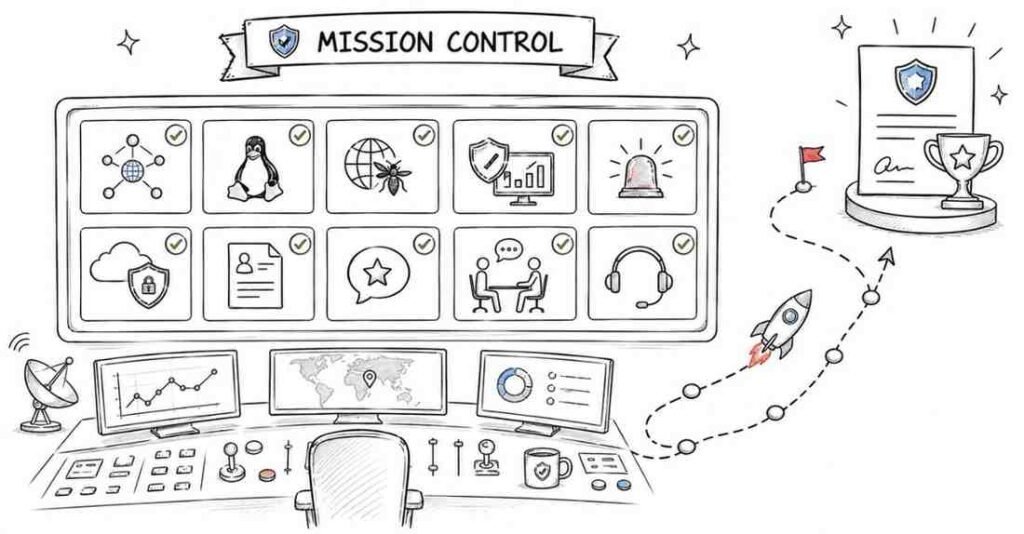
Technical readiness:
- ☐ Completed all 9 parts of this guide
- ☐ Reviewed cybersecurity fundamentals, networking, Linux, Windows, web security, SOC, pentesting, and cloud basics
- ☐ Practiced incident response scenarios
- ☐ Can explain common attacks and defenses clearly
- ☐ Can talk about logs, alerts, and escalation confidently
Behavioral readiness:
- ☐ Prepared 8–10 STAR stories
- ☐ Practiced “Tell me about yourself”
- ☐ Prepared answers for mistakes, pressure, teamwork, conflict, and unclear alerts
- ☐ Prepared 3 thoughtful questions for the interviewer
Career readiness:
- ☐ Resume tailored for the target role
- ☐ LinkedIn updated
- ☐ GitHub or portfolio cleaned up
- ☐ Best project or lab properly documented
- ☐ Salary expectation prepared
Day-before readiness:
- ☐ Interview timing confirmed
- ☐ Internet, camera, mic, and notes ready
- ☐ Resume and project links available
- ☐ Company research completed
- ☐ Slept well and avoided panic revision