
Web Development Interview Preparation Guide 2026
Table of Contents
Part 1: Introduction and 30-Day Study Plan
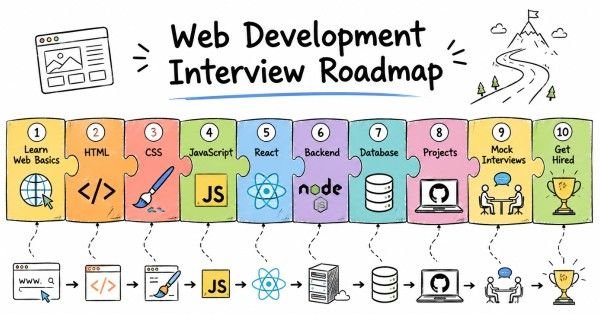
This first part sets the direction for web development interview preparation. It explains what interviewers usually test, where web development fits in real work, and how to build a practical 30-day plan that makes you interview-ready.
What this guide covers
This guide is designed to prepare you for web development interviews in a structured way. It starts with the basics of the web and moves into HTML, CSS, JavaScript, DOM, frontend frameworks, backend concepts, APIs, databases, deployment, and interview strategy. The goal is not just to help you memorize terms, but to help you explain how and why web applications work.
Interviewers usually care as much about your reasoning and project understanding as they do about definitions. A strong candidate can explain a feature, a bug, or a design choice clearly and confidently.
Who this guide is for
This guide is useful if you are a fresher preparing for your first web development interview. It also helps students, bootcamp learners, frontend developers, and full-stack candidates who want a clearer interview structure.
It is especially helpful if you already know the basics but are not fully confident discussing real projects, browser behavior, APIs, or debugging. The structure is meant to help both beginners and job seekers build confidence step by step.
What web development is
Web development is the process of building websites and web applications that run in a browser. It includes everything from creating pages and user interfaces to handling server logic, storing data, and connecting different services.
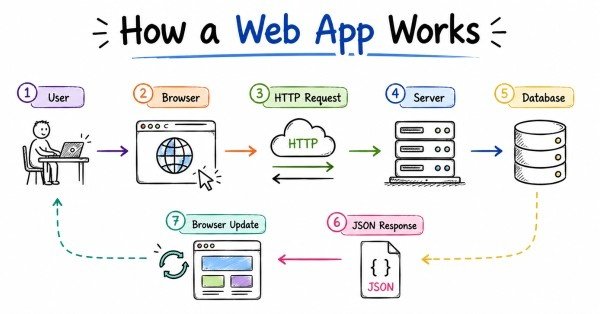
A simple way to think about web development is this: the browser shows the user interface, JavaScript adds behavior, and the backend handles data and business logic. If you understand how these pieces connect, interview questions become much easier to answer.
Where web development fits in real work
In real companies, web development is used for e-commerce sites, dashboards, portals, content platforms, admin panels, SaaS products, and internal business tools. Common tasks include creating responsive pages, building reusable components, calling APIs, handling forms, validating input, and improving performance.
This is why web development interviews test more than just coding syntax. Interviewers often want to see whether you understand user experience, browser behavior, security, accessibility, and how frontend and backend systems work together.
Common web development roles
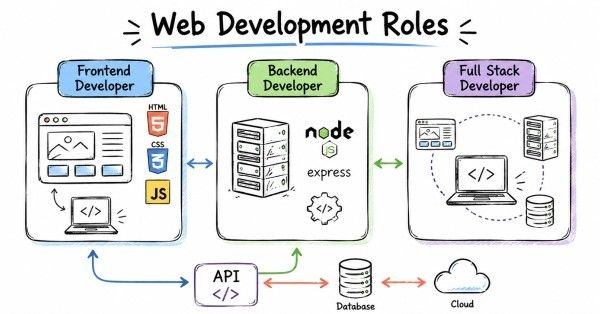
Web development interviews vary depending on the role. Common role types include frontend developer, backend developer, full-stack developer, UI developer, and JavaScript developer.
A frontend role may focus more on HTML, CSS, JavaScript, DOM, responsiveness, and frameworks like React. A backend or full-stack role may focus more on APIs, authentication, databases, server architecture, and deployment. Understanding the role early helps you focus your preparation.
Common interview process
A typical web development interview process often includes HR screening, aptitude or basic coding, HTML/CSS/JavaScript round, framework round, backend or API round, database round, project discussion, and behavioral interview.
In many interviews, web questions are mixed with practical reasoning. You may be asked to explain a project, fix a bug, compare technologies, or design a simple application flow. That is why practical understanding matters more than memorized theory alone.
Core skill areas interviewers usually check
Most web development interviews evaluate some combination of these areas:
- HTML structure and semantics.
- CSS layout, responsiveness, and styling.
- JavaScript fundamentals and browser concepts.
- DOM manipulation and events.
- HTTP, APIs, and REST.
- Framework knowledge, often React or similar.
- Backend basics and databases.
- Authentication, security, and deployment.
- Debugging and project explanation.
These topics appear often because they reflect real web development work. If you are comfortable with them, you can handle most interview rounds with more confidence.
Start Your Web Development Journey with Expert-Led Training
Why project understanding matters
Web development interviews often depend heavily on how well you explain your projects. Even if your project is small, practice app, internship work, or self-built portfolio site, present it clearly and professionally.
A strong project explanation should include:
- What problem the project solves.
- What tools and technologies were used.
- What you personally built or improved.
- How data moves through the application.
- Challenges faced and how you solved them.
- What you learned from the project.
30-day study plan
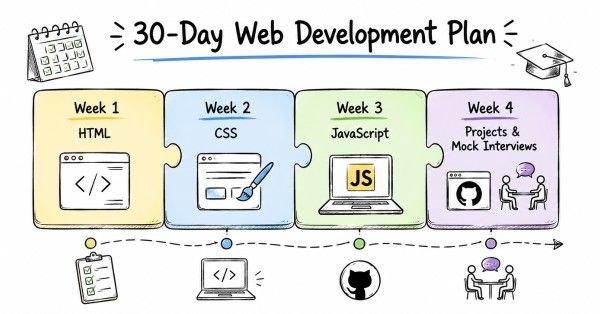
A practical 30-day web development study plan looks like this:
Week 1: Web basics and HTML
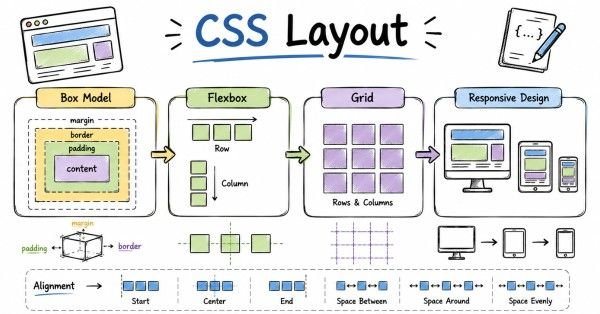
Focus on how the web works, browser basics, HTML structure, semantic tags, forms, tables, media elements, and accessibility fundamentals.
Week 2: CSS and responsive design
Study selectors, box model, positioning, flexbox, grid, responsive design, media queries, and common styling patterns. Practice building layouts from scratch.
Week 3: JavaScript and DOM
Move into variables, functions, arrays, objects, scope, DOM manipulation, events, asynchronous JavaScript, fetch, promises, and basic debugging.
Week 4: APIs, framework basics, projects, and mock interviews
Focus on REST APIs, CRUD, authentication basics, framework concepts, project explanation, resume review, and scenario-based interview practice.
Daily study routine
A practical daily routine looks like this:
- 45 minutes of concept revision.
- 60 minutes of coding or project practice.
- 30 minutes of spoken explanation or mock interview practice.
- 15 minutes of notes, review, or debugging.
If you are a fresher, do not skip speaking practice. Many candidates understand concepts privately but freeze when asked to explain them in real time.
How to prepare effectively
The best way to prepare for web development interviews is to build from basics to CSS, then move into JavaScript, DOM, APIs, and projects. Start simple, then layer complexity gradually.
You should also practice explaining your work out loud. In many interviews, the explanation matters almost as much as the code.
Revision focus
Revise what web development is, where it is used, the common role types, the usual interview format, the core skill areas, and the 30-day study plan before moving to HTML, CSS, and web fundamentals.
Part 2: HTML, CSS, and Web Fundamentals
This part builds the foundation for the rest of the web development guide. It covers the basic web concepts, HTML structure, CSS styling, and terminology interviewers expect you to know before moving into JavaScript, DOM, and frameworks.
Questions 1–40
1. What is web development?
Web development is the process of building websites and web applications that run in a browser. It includes frontend, backend, and full-stack work.
2. What are the main parts of web development?
The main parts are frontend, backend, and database-related work. In some roles, developers focus on one area; in others, they handle all three.
3. What is frontend development?
Frontend development is the part of web development that users see and interact with in the browser. It focuses on layout, design, responsiveness, and interactivity.
4. What is backend development?
Backend development handles server logic, databases, authentication, APIs, and business rules. It powers what happens behind the scenes.
5. What is full-stack development?
Full-stack development combines frontend and backend development. A full-stack developer can work across the entire application flow.
6. What is HTML?
HTML stands for HyperText Markup Language. It is used to structure content on web pages.
7. Why is HTML important?
HTML is important because it forms the foundation of every web page. Without HTML, the browser would not know how to structure the content.
8. What is a tag in HTML?
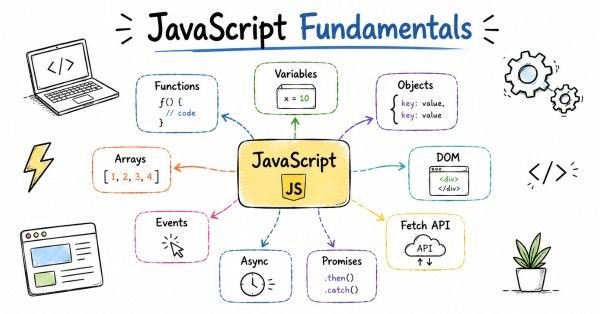
A tag is a markup instruction used to define an element, such as a paragraph, heading, or link. Tags usually come in opening and closing pairs.
9. What is an HTML element?
An HTML element is the complete structure made up of a tag, content, and sometimes attributes. It represents a specific part of a webpage.
10. What is an attribute in HTML?
An attribute provides extra information about an element. For example, href in a link or alt in an image gives the browser more context.
11. What is the difference between a tag and an element?
A tag is the markup itself, while an element includes the tag and its content. In practice, people often use the terms loosely.
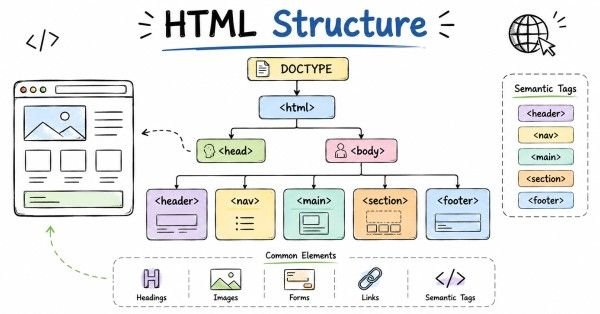
12. What is the purpose of the <!DOCTYPE html> declaration?
It tells the browser to use modern HTML standards. It helps avoid quirks mode and ensures consistent rendering.
13. What is the <html> tag?
The <html> tag is the root element of an HTML document. It wraps the entire page content.
14. What is the <head> section?
The <head> section contains metadata, title, links to stylesheets, scripts, and other information not directly visible on the page. It helps the browser understand the document.
15. What is the <body> section?
The <body> section contains the visible content of the webpage. It includes headings, paragraphs, images, forms, and other elements users interact with.
16. What is metadata in HTML?
Metadata is information about the webpage, such as title, description, character set, and viewport settings. It helps browsers and search engines understand the page.
17. What is the <title> tag?
The <title> tag sets the text shown in the browser tab. It is also important for SEO and bookmarks.
18. What is semantic HTML?
Semantic HTML uses elements that clearly describe their meaning, such as <header>, <nav>, <main>, and <footer>. It improves readability, accessibility, and SEO.
19. Why is semantic HTML important?
Semantic HTML helps developers, browsers, and assistive technologies understand page structure. It makes code more meaningful and maintainable.
20. What are headings in HTML?
Headings are tags from <h1> to <h6> used to define document structure. They help organize content from most important to least important.
21. What is the difference between block and inline elements?
Block elements usually start on a new line and take full width, while inline elements stay within the flow of text. This difference affects layout behavior.
22. What is the <a> tag used for?
The <a> tag is used to create hyperlinks. It connects one page or resource to another.
23. What is the href attribute?
The href attribute specifies the destination of a link. It tells the browser where the link should go.
24. What is the <img> tag used for?
The <img> tag displays images on a webpage. It is a self-closing element.
25. Why is the alt attribute important in images?
The alt attribute provides text for accessibility and fallback purposes. It helps screen readers and appears when an image cannot load.
26. What is a list in HTML?
A list is used to group related items. HTML supports ordered lists, unordered lists, and description lists.
27. What is the difference between ordered and unordered lists?
Ordered lists show items in a numbered sequence, while unordered lists use bullet points. The choice depends on whether order matters.
28. What is a table in HTML?
A table is used to display tabular data in rows and columns. It is useful for structured information.
29. What is a form in HTML?
A form is used to collect user input. It is commonly used for login, registration, search, and contact pages.
30. What are common form elements?
Common form elements include input, textarea, select, checkbox, radio button, and button. They allow users to enter or choose data.
31. What is the difference between GET and POST in forms?
GET sends form data in the URL and is usually used for retrieval, while POST sends data in the request body and is usually used for submission. The choice depends on the use case.
32. What is accessibility in web development?
Accessibility means designing websites so people with disabilities can use them. It includes readable content, keyboard support, and screen reader compatibility.
33. Why is accessibility important?
Accessibility makes websites usable by more people and improves overall user experience. It is also often a professional and legal requirement.
34. What is the viewport meta tag?
The viewport meta tag controls how a page scales on different devices. It is essential for responsive web design.
35. What is responsive design?
Responsive design means a webpage adapts to different screen sizes and devices. It helps pages look good on mobile, tablet, and desktop.
36. Why is mobile-first design popular?
Mobile-first design starts with smaller screens and progressively enhances for larger screens. It helps create cleaner and more flexible layouts.
37. What is the difference between div and span?
div is a block-level container, while span is inline. They are often used as generic layout or styling wrappers.
38. What is SEO in simple terms?
SEO stands for Search Engine Optimization. It is the practice of improving a website so search engines can understand and rank it better.
39. How does HTML support SEO?
HTML supports SEO through proper headings, semantic structure, metadata, alt text, and readable content. Clear structure helps search engines interpret the page.
40. What is a strong answer for HTML and web fundamentals questions?
A strong answer explains the concept clearly and connects it to real webpage behavior. Interviewers like practical understanding more than memorized definitions.
Revision focus
Revise HTML structure, tags, elements, attributes, semantic HTML, headings, block versus inline elements, links, images, lists, tables, forms, accessibility, viewport, responsive design, and basic SEO before moving to CSS and layout concepts.
Part 3: Filtering, Aggregation & Grouping Questions 41–80
This part covers the styling layer that makes web pages visually clear, responsive, and usable. It focuses on CSS basics, layout techniques, positioning, and the concepts interviewers expect before moving into JavaScript and DOM behavior.
Questions 41–80
41. What is CSS?
CSS stands for Cascading Style Sheets. It is used to style HTML elements and control the appearance of web pages.
42. Why is CSS important?
CSS is important because it controls layout, colors, spacing, fonts, and overall visual design. Without CSS, webpages would look plain and hard to use.
43. What does “cascading” mean in CSS?
“Cascading” means that multiple style rules can apply to the same element, and the browser decides which one wins based on priority and specificity. It is part of how CSS resolves conflicts.
44. What is a CSS selector?
A selector targets HTML elements that should receive a style. It tells the browser which elements the rules apply to.
45. What are common types of selectors?
Common selectors include element selectors, class selectors, ID selectors, attribute selectors, pseudo-classes, and pseudo-elements. Each works differently depending on the need.
46. What is the difference between class and ID selectors?
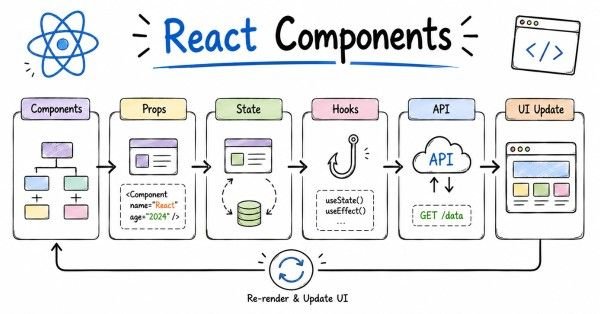
A class can be reused on multiple elements, while an ID should usually be unique on a page. Classes are more commonly used for styling.
47. What is the CSS box model?
The box model describes how an element is structured with content, padding, border, and margin. It is one of the most important CSS concepts.
48. Why is the box model important?
It helps you understand spacing and size behavior in layouts. Many CSS issues become easier once the box model is clear.
49. What is padding?
Padding is the space inside an element, between the content and the border. It increases inner spacing.
50. What is margin?
Margin is the space outside an element, between it and surrounding elements. It controls outer spacing.
51. What is a border?
A border is the line that surrounds the padding and content of an element. It can be styled with width, color, and pattern.
52. What is the CSS display property?
The display property defines how an element behaves in layout. It controls whether the element acts like block, inline, flex, grid, or another type.
53. What is display: block?
Block elements start on a new line and usually take the full available width. They are common for layout containers and structural elements.
54. What is display: inline?
Inline elements flow within text and do not start on a new line. They take only the width they need.
55. What is display: inline-block?
Inline-block behaves like inline positioning but allows width and height to be set. It is useful when you need both flow and box control.
56. What is positioning in CSS?
Positioning controls how an element is placed in relation to normal document flow or other elements. It includes static, relative, absolute, fixed, and sticky positioning.
57. What is position: relative?
Relative positioning keeps the element in the normal flow but allows it to be adjusted from its original place. It is often used as a reference for absolutely positioned children.
58. What is position: absolute?
Absolute positioning removes the element from the normal flow and places it relative to the nearest positioned ancestor. It is useful for overlays and dropdowns.
59. What is position: fixed?
Fixed positioning keeps an element in the same place on the screen even when the page scrolls. It is commonly used for headers and buttons.
60. What is position: sticky?
Sticky positioning behaves like relative until a scroll threshold is reached, then it behaves like fixed. It is useful for section headers and navigation.
61. What is flexbox?
Flexbox is a CSS layout model used to arrange items in one direction, either row or column. It is very useful for alignment and spacing.
62. Why is flexbox useful?
Flexbox makes it easier to center elements, distribute space, and build responsive layouts. It reduces the need for complex float-based layouts.
63. What is the main axis in flexbox?
The main axis is the primary direction in which flex items are laid out. It depends on whether the flex direction is row or column.
64. What is the cross axis in flexbox?
The cross axis is perpendicular to the main axis. Flex alignment properties often work along this axis.
65. What is CSS Grid?
CSS Grid is a layout system for two-dimensional layouts, meaning rows and columns at the same time. It is powerful for page-level structures.
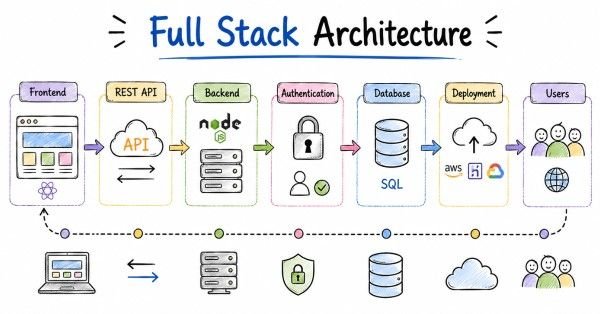
66. Why use CSS Grid instead of flexbox?
Use grid when you need control over both rows and columns together. Use flexbox when you want simpler one-dimensional alignment.
67. What is responsive design in CSS?
Responsive design means styles adapt to different screen sizes and devices. It helps ensure the site works well on mobile, tablet, and desktop.
68. What are media queries?
Media queries allow CSS rules to apply only under certain conditions, such as screen width. They are a core part of responsive design.
69. What is mobile-first design?
Mobile-first design starts with styles for small screens and then adds enhancements for larger screens. It is a common best practice.
70. What is specificity in CSS?
Specificity is the rule that determines which style wins when multiple selectors target the same element. More specific rules override less specific ones.
71. Why does specificity matter?
It matters because conflicting CSS can lead to unexpected results. Understanding specificity helps avoid frustrating style bugs.
72. What is the importance of the !important rule?
!important forces a style to take priority over many other rules. It should be used carefully because it can make CSS harder to maintain.
73. What is the difference between em, rem, px, and %?
px is a fixed unit, em is relative to the element’s font size, rem is relative to the root font size, and % is relative to the parent or context. Each has different scaling behavior.
74. Why are relative units useful?
Relative units improve scalability and responsiveness. They make layouts and typography more adaptable to different devices and user settings.
75. What is a pseudo-class?
A pseudo-class styles an element in a specific state, such as :hover or :focus. It helps create interactive behavior.
76. What is a pseudo-element?
A pseudo-element styles a part of an element or creates a virtual element, such as ::before or ::after. It is often used for decorative effects.
77. What is z-index?
Z-index controls stacking order when elements overlap. It affects which elements appear on top.
78. Why can z-index be confusing?
Because it depends on positioning and stacking contexts, not just a number. Understanding the stacking context is important for correct layering.
79. What is a strong answer for CSS questions?
A strong answer explains the styling concept clearly and connects it to layout or UI behavior. Interviewers want practical understanding, not just property names.
80. How should you practice CSS?
Practice by building real layouts with box model, flexbox, grid, spacing, and responsive breakpoints. Repeating layout work helps CSS concepts become intuitive.
Revision focus
Revise CSS selectors, box model, padding, margin, border, display types, positioning, flexbox, grid, media queries, specificity, units, pseudo-classes, pseudo-elements, and z-index before moving to JavaScript and browser behavior.
Part 4: JavaScript and Browser Behavior
This part builds the foundation for interactive web pages. It covers JavaScript basics, data types, functions, scope, arrays, objects, and the browser concepts interviewers expect before moving into DOM manipulation, asynchronous behavior, and frameworks.
Questions 81–120
81. What is JavaScript?
JavaScript is a programming language used to add interactivity and logic to web pages. It runs in the browser and is also used on the server in some environments.
82. Why is JavaScript important?
JavaScript is important because it makes web pages dynamic and interactive. Without it, most modern websites would be static.
83. What is the difference between HTML, CSS, and JavaScript?
HTML gives structure, CSS gives style, and JavaScript gives behavior. Together they form the core of frontend web development.
84. What is a variable in JavaScript?
A variable is a named container for storing data. It lets you reuse and update values in your code.
85. What are the main ways to declare variables in JavaScript?
The main ways are var, let, and const. Each behaves differently in scope and reassignment.
86. What is the difference between var, let, and const?
var is function-scoped, while let and const are block-scoped. const cannot be reassigned, but the value it stores may still be mutable in some cases.
87. What is a data type?
A data type describes the kind of value a variable holds. Examples include string, number, boolean, object, and undefined.
88. What are primitive data types?
Primitive data types are simple values such as string, number, boolean, null, undefined, symbol, and bigint. They are not objects.
89. What is an object in JavaScript?
An object is a collection of key-value pairs. It is used to store related data and functionality.
90. What is an array?
An array is an ordered list of values. It is used when you need to store multiple items in one variable.
91. What is the difference between an array and an object?
An array is ordered and accessed by index, while an object uses named keys. Arrays are best for lists, and objects are best for structured records.
92. What is a function?
A function is a reusable block of code that performs a task. It can take inputs and return outputs.
93. Why are functions important?
Functions help organize code, avoid repetition, and make logic reusable. They are one of the most important JavaScript concepts.
94. What is a function declaration?
A function declaration defines a named function using the function keyword. It can be called after it is declared in the code.
95. What is a function expression?
A function expression stores a function inside a variable. It is often used for callbacks and anonymous functions.
96. What is an arrow function?
An arrow function is a shorter way to write function expressions. It also handles this differently from regular functions.
97. What is scope?
Scope determines where variables can be accessed in code. It controls visibility and lifetime of variables.
98. What is global scope?
Global scope means the variable is accessible throughout the program. Global variables should be used carefully.
99. What is local scope?
Local scope means the variable is available only within a function or block. It helps reduce naming conflicts.
100. What is block scope?
Block scope means variables declared with let or const are only available inside the block where they are defined. This improves predictability.
101. What is hoisting?
Hoisting is JavaScript behavior where declarations are moved to the top of their scope during execution. It affects variables and functions differently.
102. Why is hoisting important?
It explains why some variables or functions can be used before their declaration. Understanding hoisting helps avoid bugs.
103. What is closure?
A closure is when a function remembers variables from its outer scope even after the outer function has finished. It is a powerful JavaScript feature.
104. Why are closures useful?
Closures are useful for data privacy, callbacks, and maintaining state. They are common in real applications and interviews.
105. What is this in JavaScript?
this refers to the object that is currently executing the function. Its value depends on how the function is called.
106. Why is this confusing?
Because its value changes based on context rather than where the function is written. This makes it one of the trickier JavaScript topics.
107. What is a callback function?
A callback is a function passed into another function to be executed later. It is common in event handling and asynchronous code.
108. What are higher-order functions?
Higher-order functions are functions that take other functions as arguments or return functions. They are common in array methods and functional programming.
109. What are common array methods?
Common array methods include map, filter, reduce, forEach, find, and some. They help process arrays efficiently.
110. What does map do?
map creates a new array by applying a function to each item. It is used when you want to transform every element.
111. What does filter do?
filter creates a new array containing only items that meet a condition. It is used to select values from a list.
112. What does reduce do?
reduce combines array values into a single result. It is often used for totals, grouped data, or complex accumulation.
113. What is recursion?
Recursion is when a function calls itself. It is useful for repeating logic on smaller parts of a problem.
114. What is an event in the browser?
An event is something that happens in the browser, such as a click, keypress, or page load. JavaScript can respond to these events.
115. What is event handling?
Event handling is the process of detecting and responding to browser events. It is a key part of interactive web applications.
116. What is the difference between synchronous and asynchronous code?
Synchronous code runs step by step in order, while asynchronous code allows tasks to happen later without blocking execution. Asynchronous behavior is important for web performance.
117. What is a Promise?
A Promise is an object representing a value that may be available now, later, or never. It is used to handle asynchronous operations.
118. What is async and await?
async and await are syntax for working with Promises in a cleaner way. They make asynchronous code easier to read.
119. What is the browser environment?
The browser environment is the runtime where JavaScript interacts with the webpage, DOM, events, storage, and network APIs. It provides features not found in plain language syntax alone.
120. What is a strong answer for JavaScript questions?
A strong answer explains the concept clearly and connects it to how a webpage behaves. Interviewers want practical understanding, not just syntax memory.
Revision focus
Revise JavaScript basics, variables, data types, functions, arrays, objects, scope, hoisting, closures, this, callbacks, higher-order functions, array methods, events, synchronous versus asynchronous code, promises, async/await, and browser environment concepts before moving to DOM manipulation, forms, and client-side behavior.
Part 5: DOM, Events, Forms, and Client-Side Behavior
This part covers how JavaScript interacts with the page. It focuses on the DOM, events, forms, validation, browser storage, and the client-side concepts interviewers expect before moving into frameworks and APIs.
Questions 121–160
121. What is the DOM?
The DOM, or Document Object Model, is the browser’s representation of an HTML page as a tree structure. JavaScript uses the DOM to read and change page content.
122. Why is the DOM important?
The DOM is important because it allows web pages to become interactive. Without it, JavaScript could not directly modify visible page elements.
123. What is DOM manipulation?
DOM manipulation means changing HTML elements, text, attributes, or styles using JavaScript. It is how dynamic pages update content without reloading.
124. How do you select elements in the DOM?
You can select elements using methods like getElementById, getElementsByClassName, querySelector, and querySelectorAll. The method depends on the selection need.
125. What is the difference between querySelector and querySelectorAll?
querySelector returns the first matching element, while querySelectorAll returns all matching elements. Both use CSS-style selectors.
126. What is an event listener?
An event listener is a function that waits for a specific event and runs when that event occurs. It is commonly used for clicks, input, and form actions.
127. Why are event listeners useful?
They let you make the page respond to user actions. This is one of the main ways JavaScript adds interactivity.
128. What is event bubbling?
Event bubbling is the process where an event starts at the target element and moves up through its parent elements. It is part of the browser’s event model.
129. What is event capturing?
Event capturing is the opposite direction, where the event moves from the outer elements down toward the target. It is less commonly used than bubbling.
130. What is event delegation?
Event delegation is a technique where one parent element handles events for its child elements. It works well for dynamically added elements and improves efficiency.
131. Why is event delegation useful?
It reduces the number of event listeners and makes code easier to manage. It is often used in lists, tables, and dynamic UI components.
132. What is the difference between innerHTML, innerText, and textContent?
innerHTML gets or sets HTML markup, innerText returns visible text, and textContent returns all text content. They behave differently in how they handle formatting and hidden content.
133. What is the classList property?
classList lets you add, remove, toggle, or check CSS classes on an element. It is useful for changing styles dynamically.
134. What is a form in JavaScript context?
A form is an HTML structure that collects user input and can be controlled or validated with JavaScript. It is common in login, search, and registration pages.
135. Why is form validation important?
Form validation ensures users submit correct and complete data. It improves user experience and reduces bad input.
136. What is client-side validation?
Client-side validation happens in the browser before data is sent to the server. It gives fast feedback to the user.
137. What is server-side validation?
Server-side validation happens on the backend after submission. It is essential because client-side checks can be bypassed.
138. Why do we need both client-side and server-side validation?
Client-side validation improves responsiveness, while server-side validation ensures security and correctness. Both are needed for reliable applications.
139. What are browser storage options?
Common browser storage options include cookies, localStorage, and sessionStorage. They are used to store small amounts of data on the client side.
140. What is localStorage?
localStorage stores data in the browser without an expiry time. The data remains even after the browser is closed.
141. What is sessionStorage?
sessionStorage stores data only for the current browser tab session. It is cleared when the tab or browser session ends.
142. What is the difference between localStorage and sessionStorage?
localStorage persists longer, while sessionStorage lasts only for the current session. The choice depends on how long the data should remain available.
143. What are cookies?
Cookies are small pieces of data stored in the browser and sent with requests to the server. They are often used for authentication and session tracking.
144. Why are cookies important?
Cookies help maintain state across requests in stateless HTTP communication. They are widely used in web applications.
145. What is HTTP in simple terms?
HTTP is the protocol used for communication between browser and server. It defines how requests and responses are exchanged.
146. What is the difference between HTTP and HTTPS?
HTTPS is HTTP secured with encryption. It protects data in transit and is the standard for modern websites.
147. What is a request and response?
A request is sent by the client to ask for data or perform an action, and a response is what the server sends back. This is the basis of web communication.
148. What is a status code?
A status code is a number returned by the server to show the result of a request. Examples include 200, 404, and 500.
149. What does 200 mean?
200 means the request was successful. It is a common success status code.
150. What does 404 mean?
404 means the requested resource was not found. It usually appears when a page or file does not exist.
151. What does 500 mean?
500 means the server encountered an internal error. It indicates a problem on the server side.
152. What is JSON?
JSON stands for JavaScript Object Notation. It is a lightweight data format commonly used for sending data between client and server.
153. Why is JSON popular?
JSON is easy to read, easy to generate, and works well with JavaScript. It is the standard format for many APIs.
154. What is an API?
An API is an interface that allows one software system to communicate with another. In web development, APIs are often used to fetch or send data.
155. What is REST?
REST is an architectural style for building APIs using HTTP methods and resources. It is common in web services.
156. What are common HTTP methods?
Common HTTP methods include GET, POST, PUT, PATCH, and DELETE. They represent different actions on data.
157. What is the difference between GET and POST?
GET is used to retrieve data, while POST is used to send data to the server. They serve different purposes in API communication.
158. What is CORS?
CORS stands for Cross-Origin Resource Sharing. It is a browser security mechanism that controls which domains can access resources.
159. Why is CORS important?
CORS is important because it protects browsers from unsafe cross-origin access. It is a common issue in frontend-backend integration.
160. What is a strong answer for DOM and client-side behavior questions?
A strong answer explains how JavaScript interacts with the page and how user actions affect the interface. Interviewers want to see that you understand both behavior and browser flow.
Revision focus
Revise DOM structure, element selection, event listeners, bubbling, capturing, delegation, form handling, validation, browser storage, HTTP, status codes, JSON, APIs, REST, HTTP methods, and CORS before moving to frontend frameworks and application architecture.
Part 6: Frontend Frameworks and Application Architecture
This part covers the layer that turns basic JavaScript knowledge into real-world app development. It focuses on frontend frameworks, component thinking, routing, state, build tools, and the architectural ideas interviewers expect before moving into backend, databases, and deployment.
Questions 161–200
161. What is a frontend framework?
A frontend framework is a tool or library used to build user interfaces more efficiently. It helps organize code into reusable parts and manage UI behavior.
162. Why are frontend frameworks important?
They make it easier to build large, interactive web applications. They also improve maintainability and reuse.
163. What is React?
React is a JavaScript library for building user interfaces using components. It is widely used in modern frontend development.
164. Why is React popular?
React is popular because it supports reusable components, efficient UI updates, and a strong ecosystem. It is common in interviews and production projects.
165. What is a component?
A component is a reusable piece of UI. It can represent a button, form, card, page, or any other part of the interface.
166. Why are components useful?
Components help break a UI into smaller, manageable parts. They make code easier to reuse, test, and maintain.
167. What is JSX?
JSX is a syntax extension that lets you write HTML-like code inside JavaScript. It is commonly used in React.
168. Why is JSX useful?
JSX makes UI code easier to read and structure. It closely matches how the interface is built.
169. What is state in a frontend app?
State is data that can change over time in an application. It affects what the user sees on the screen.
170. What is props?
Props are inputs passed from one component to another. They help components receive data and stay reusable.
171. What is the difference between state and props?
State is owned and changed inside a component, while props are passed in from outside. State is for internal data, and props are for communication between components.
172. What is a virtual DOM?
The virtual DOM is a lightweight copy of the real DOM used by React and similar libraries to improve rendering efficiency. It helps update the UI more efficiently.
173. Why is the virtual DOM useful?
It reduces unnecessary direct DOM updates. This can improve performance in interactive applications.
174. What is a single-page application?
A single-page application is a web app that loads one main page and updates content dynamically without full page reloads. It creates a smoother user experience.
175. What is routing in frontend apps?
Routing is the process of showing different views based on the URL or app state. It helps users move between pages or screens in an app.
176. What is client-side routing?
Client-side routing changes the displayed page without reloading the browser. It is common in single-page applications.
177. What is a hook in React?
A hook is a function that lets components use features like state and lifecycle behavior. Hooks make functional components more powerful.
178. Why are hooks useful?
They simplify component logic and reduce the need for class-based components. They are now the standard approach in React development.
179. What is useState?
useState is a React hook used to manage local component state. It lets the UI update when the state changes.
180. What is useEffect?
useEffect is a React hook used for side effects such as data fetching, subscriptions, or DOM updates. It runs after rendering based on dependencies.
181. What is a side effect in frontend development?
A side effect is any operation that affects something outside the component’s pure rendering logic. Examples include API calls, timers, and event subscriptions.
182. What is lifting state up?
Lifting state up means moving shared state to a common parent component. It helps multiple child components use the same data.
183. What is conditional rendering?
Conditional rendering means showing different UI based on a condition. It is commonly used for loading states, login states, and permissions.
184. What is a controlled component?
A controlled component is a form element whose value is managed by React state. It gives the developer more control over input handling.
185. What is an uncontrolled component?
An uncontrolled component manages its own internal DOM state, and React reads the value when needed. It is simpler in some cases but less controlled.
186. What is a custom hook?
A custom hook is a reusable function that contains hook logic. It helps share behavior across components.
187. What is prop drilling?
Prop drilling happens when data is passed through many component levels just to reach a deeply nested child. It can make code harder to maintain.
188. How do developers handle prop drilling?
They may use context, state management tools, or better component design. The choice depends on app complexity.
189. What is context in frontend apps?
Context is a way to share data across components without passing props manually through every level. It is useful for global or shared values.
190. What is state management?
State management is the process of organizing and controlling application data across components. It becomes important as apps grow larger.
191. What are common frontend build tools?
Common build tools include bundlers and dev servers such as Vite, Webpack, or similar tooling. They help package and optimize frontend code.
192. Why are build tools needed?
They convert modern frontend code into a format the browser can run efficiently. They also support features like module loading and optimization.
193. What is code splitting?
Code splitting means loading only the necessary parts of an application when they are needed. It can improve initial load performance.
194. What is lazy loading?
Lazy loading delays loading resources until they are needed. It helps reduce startup cost and improve speed.
195. What is performance optimization in frontend development?
Performance optimization means making web apps load faster and run smoothly. It includes reducing bundle size, improving rendering, and limiting unnecessary work.
196. What is accessibility in frontend frameworks?
Accessibility means building components and interfaces that work for all users, including those using assistive technologies. Frameworks help, but developers must apply accessible practices.
197. What is server-side rendering?
Server-side rendering means the server generates HTML before it reaches the browser. It can improve initial load and SEO in some applications.
198. What is hydration?
Hydration is the process of attaching JavaScript behavior to server-rendered HTML. It makes the page interactive after the initial render.
199. What is a strong answer for framework questions?
A strong answer explains the concept clearly and connects it to real component behavior or app structure. Interviewers want to know whether you understand how frontend apps are built, not just terminology.
200. How should you practice frontend framework topics?
Practice by building small apps with components, state, props, routing, forms, and API calls. Real project work makes the concepts easier to remember and explain.
Revision focus
Revise frontend frameworks, React basics, components, JSX, state, props, virtual DOM, single-page applications, routing, hooks, useState, useEffect, controlled versus uncontrolled components, context, state management, build tools, code splitting, lazy loading, performance, accessibility, server-side rendering, and hydration before moving to backend fundamentals, APIs, databases, and deployment.
Part 7: Backend Fundamentals, Databases, and Deployment
This part covers the server-side layer that powers web applications. It focuses on backend concepts, databases, APIs, authentication, deployment, and the practical questions interviewers ask to see whether you understand how applications work end to end.
Questions 201–240
201. What is the backend?
The backend is the part of a web application that handles server logic, data processing, authentication, and database interaction. It works behind the scenes and supports the frontend.
202. Why is the backend important?
The backend is important because it manages business rules, stores data, and controls how the application responds to requests. Without it, most web apps would not function properly.
203. What is a server?
A server is a system that receives requests and sends responses. It can be a physical machine or a cloud-hosted application.
204. What is client-server architecture?
Client-server architecture is a model where the client sends requests and the server processes them and sends back responses. It is the basis of most web applications.
205. What is an API?
An API is an interface that allows software systems to communicate with each other. In web development, APIs are commonly used to exchange data between frontend and backend.
206. Why are APIs important?
APIs are important because they allow different systems to work together. They make applications modular and easier to integrate.
207. What is REST?
REST is an architectural style for designing APIs around resources and HTTP methods. It is widely used in web development.
208. What are common HTTP methods in REST APIs?
Common methods include GET, POST, PUT, PATCH, and DELETE. Each one represents a different action on a resource.
209. What does GET do?
GET retrieves data from the server. It is usually used for reading information.
210. What does POST do?
POST sends data to the server to create a new resource or perform an action. It is commonly used in forms and submissions.
211. What does PUT do?
PUT updates an existing resource, usually by replacing it completely. It is used when the full record needs to be sent.
212. What does PATCH do?
PATCH updates part of an existing resource. It is used when only specific fields need to change.
213. What does DELETE do?
DELETE removes a resource from the server. It is used for deletion operations.
214. What is JSON?
JSON stands for JavaScript Object Notation. It is a lightweight format used to send and receive data between systems.
215. Why is JSON used so often?
JSON is easy to read, easy to generate, and works well with JavaScript and APIs. It has become the standard data exchange format for many web services.
216. What is a database?
A database is a system used to store, organize, and retrieve data. Web applications use databases to keep user, product, transaction, and application data.
217. Why are databases important?
Databases are important because they provide persistent data storage. Without them, applications would not be able to remember information reliably.
218. What is the difference between SQL and NoSQL?
SQL databases use structured tables and relational queries, while NoSQL databases use flexible data models such as documents or key-value stores. The choice depends on application needs.
219. What is a relational database?
A relational database stores data in tables with rows and columns. It uses relationships between tables to organize data.
220. What is a primary key?
A primary key is a unique identifier for each row in a table. It ensures each record can be found distinctly.
221. What is a foreign key?
A foreign key is a field that refers to the primary key of another table. It is used to connect related records.
222. What is normalization?
Normalization is the process of organizing data to reduce duplication and improve consistency. It is common in relational database design.
223. What is denormalization?
Denormalization is the practice of adding some duplication to improve read performance or simplify queries. It is sometimes used in analytics or reporting systems.
224. What is a join in SQL?
A join combines rows from two or more tables based on a related column. It is used to retrieve connected data.
225. Why are joins important?
Joins are important because data is often spread across multiple tables. They let you combine that data into meaningful results.
226. What is authentication?
Authentication is the process of verifying who a user is. It usually happens through login credentials, tokens, or identity providers.
227. What is authorization?
Authorization determines what an authenticated user is allowed to do. It controls access to pages, actions, and resources.
228. What is the difference between authentication and authorization?
Authentication confirms identity, while authorization controls permissions. They are related but not the same.
229. What is session-based authentication?
Session-based authentication stores login state on the server and tracks the user with a session ID. It is a traditional approach to login management.
230. What is token-based authentication?
Token-based authentication uses a signed token, often a JWT, to represent the user’s identity and access rights. It is common in modern web apps and APIs.
231. What is a JWT?
JWT stands for JSON Web Token. It is a compact token format used to securely transfer identity information between systems.
232. What is a cookie used for?
A cookie stores small data in the browser and is often used for session tracking or authentication. It is sent with requests to the server.
233. What is deployment?
Deployment is the process of making an application available in a live environment. It moves code from development to production or staging.
234. Why is deployment important?
Deployment is important because users can only access new features after code is deployed. Good deployment practices reduce risk and downtime.
235. What is staging?
Staging is a pre-production environment that looks like production. It is used for testing before release.
236. What is production?
Production is the live environment used by real users. Changes here must be handled carefully.
237. What is CI/CD in web development?
CI/CD stands for Continuous Integration and Continuous Delivery or Deployment. It automates building, testing, and releasing code.
238. Why is CI/CD useful?
CI/CD reduces manual release work, catches problems earlier, and makes delivery faster and more consistent. It is a major part of modern web workflows.
239. What is performance optimization in web apps?
Performance optimization means making an application load and run efficiently. It includes reducing bundle size, optimizing images, caching, and minimizing unnecessary rendering.
240. What is a strong answer for backend and deployment questions?
A strong answer explains the concept clearly and connects it to how data moves, how users log in, and how apps are released. Interviewers want practical understanding of real application flow.
Revision focus
Revise backend basics, server behavior, client-server architecture, APIs, REST, HTTP methods, JSON, databases, SQL versus NoSQL, keys, normalization, joins, authentication, authorization, JWT, cookies, deployment, staging, production, CI/CD, and performance optimization before moving to scenario-based questions, debugging, and system design basics.
Part 8: Scenario-Based Questions, Debugging, and System Design Basics
This part focuses on how to think in real interviews. It covers common problem scenarios, debugging approach, performance questions, and basic system design ideas that help interviewers judge your practical understanding.
Questions 241–280
241. What is a scenario-based interview question?
A scenario-based question asks how you would handle a real problem in a web application. It checks your reasoning, not just your memory.
242. Why are scenario questions important?
They show whether you can apply concepts in practical situations. Web development work is full of real-world issues, so interviewers value this heavily.
243. How should you answer scenario-based questions?
Start by understanding the problem, then explain your thought process, mention likely causes, and describe how you would test or fix the issue. A clear step-by-step answer works best.
244. What should you do if a page is not loading correctly?
Check the browser console, network tab, recent code changes, API responses, and any rendering or routing errors. Then isolate whether the issue is frontend, backend, or data-related.
245. What should you check if an API request fails?
Check the request URL, HTTP method, headers, payload, status code, and server response. Also confirm whether CORS, authentication, or network issues are involved.
246. What should you do if a button click is not working?
Check whether the event listener is attached correctly, whether the element exists, and whether any JavaScript errors are stopping execution. Also inspect whether another layer is blocking the click.
247. What should you do if a form is not submitting?
Check validation rules, button type, event handling, and whether the default form behavior is being prevented. Also confirm the backend endpoint is available.
248. What if CSS changes are not reflecting?
Check whether the file is linked correctly, whether a more specific style is overriding it, and whether the browser cache is causing confusion. Specificity and load order are common causes.
249. What if JavaScript runs but the DOM element is missing?
Make sure the script runs after the DOM is loaded. The element may not exist yet when the code executes.
250. What if a page is slow to load?
Check image sizes, JavaScript bundle size, CSS complexity, unnecessary re-renders, and repeated network calls. Performance problems often come from too many heavy resources.
251. What is debugging?
Debugging is the process of finding and fixing problems in code. It involves observing behavior, isolating the cause, and testing a solution.
252. Why is debugging important?
Debugging helps developers maintain reliable applications. It is one of the most important practical skills in web development.
253. What tools are commonly used for debugging?
Common tools include browser developer tools, console logs, breakpoints, network inspection, and source maps. These tools help trace what the app is doing.
254. What is the browser console used for?
The browser console shows logs, warnings, and errors. It is often the first place developers check during debugging.
255. What is the network tab used for?
The network tab shows requests, responses, timing, status codes, and payloads. It is useful for API and performance debugging.
256. What is a breakpoint?
A breakpoint pauses code execution so you can inspect variables and logic step by step. It is useful when console logs are not enough.
257. What is a runtime error?
A runtime error happens while the program is running. It can stop execution or break part of the application.
258. What is a syntax error?
A syntax error happens when code violates the language rules. The browser cannot interpret the code until it is fixed.
259. What is the difference between an error and a bug?
An error is a specific problem that occurs during execution or parsing, while a bug is a broader defect in the code or behavior. A bug may or may not produce an immediate error.
260. What is basic system design in web development interviews?
Basic system design means explaining how you would structure a simple application, its frontend, backend, data flow, and key features. It is usually at a high level for junior interviews.
261. Why do interviewers ask basic system design questions?
They want to know whether you can think about application structure, scalability, and user flow. It tests practical architecture thinking.
262. What should a simple web app design answer include?
It should include the UI, API layer, database, authentication, and the main data flow. You should also mention how the app handles users and requests.
263. How would you design a simple login system?
A basic answer would describe a login form, backend authentication, session or token creation, protected routes, and logout flow. Security and password handling should be mentioned too.
264. How would you design a simple to-do app?
You could describe the frontend UI, add/edit/delete actions, API calls, database storage, and user-specific task management. Keep the explanation simple and structured.
265. How would you design a simple blog app?
You would mention post creation, reading posts, comments, user accounts, database tables, and API endpoints. A clear data model is important here.
266. What is scalability?
Scalability is the ability of an application to handle more users, data, or traffic as demand increases. It is an important architecture concept.
267. What is performance in system design?
Performance means how quickly and efficiently the app responds to user actions and requests. It affects user experience and reliability.
268. What is caching?
Caching stores frequently used data so it can be accessed faster later. It can reduce repeated work and improve performance.
269. Why is caching useful?
Caching reduces load on the server and database. It often improves response time for users.
270. What is load balancing?
Load balancing distributes requests across multiple servers. It helps improve availability and performance.
271. What is a CDN?
A CDN, or Content Delivery Network, delivers static content from servers closer to the user. It improves speed and reduces load on the origin server.
272. Why are CDNs useful?
They help pages load faster for users in different locations. They are common in modern web applications.
273. What is an edge case?
An edge case is a rare or unusual situation that may not be covered by normal testing. Good developers think about edge cases during design and debugging.
274. Why are edge cases important?
They often cause hidden bugs or unexpected behavior. Thinking about them shows stronger problem-solving ability.
275. What is a strong answer for scenario-based questions?
A strong answer is calm, structured, and practical. It should show how you investigate, isolate, and solve the issue.
276. What is a strong answer for debugging questions?
A strong answer explains your debugging steps and the tools you would use. Interviewers want to see a logical method, not guesswork.
277. What is a strong answer for basic design questions?
A strong answer clearly describes the main components, the request flow, and the trade-offs. You do not need a perfect architecture, just a sensible one.
278. What is the best way to practice these questions?
Practice by taking real bugs or sample app issues and explaining how you would investigate them. Speaking the solution out loud helps build interview confidence.
279. What is a common mistake in these rounds?
A common mistake is jumping straight to a fix without explaining how you identified the problem. Interviewers want to hear your reasoning process.
280. How should you think during an interview?
Think aloud in a structured way, stay practical, and connect your answer to browser behavior, code, data flow, or user impact. That approach makes your answers sound more confident and professional.
Revision focus
Revise scenario-based problem solving, debugging tools, console, network tab, breakpoints, runtime and syntax errors, system design basics, login flow, to-do app flow, blog app flow, scalability, caching, load balancing, CDN, edge cases, and structured interview thinking before moving to behavioral, resume, LinkedIn, and career strategy.
Want to Become a Professional Web Developer?
Part 9: Behavioral, Resume, LinkedIn, and Career Strategy
This final part helps turn web development preparation into interview success. It covers the STAR method, behavioral questions, mock-interview prompts, resume and LinkedIn optimization, salary framing in India, follow-up emails, and a practical closing checklist for job search execution.
STAR method
The STAR method stands for Situation, Task, Action, and Result. It is one of the best ways to answer behavioral interview questions because it keeps your answer structured, specific, and outcome-focused.
Use STAR like this:
- Situation: Explain the context.
- Task: Explain your responsibility.
- Action: Describe what you did.
- Result: Share the outcome, impact, or learning.
A good behavioral answer should sound calm, honest, and clear. Interviewers usually respond well when you show ownership and explain what changed because of your work.
20 behavioral questions
- Tell me about a time you solved a web application issue.
- Tell me about a time you built a feature under pressure.
- Describe a time you worked with a difficult teammate.
- Tell me about a time you improved a user interface.
- Describe a time you made a mistake and fixed it.
- Tell me about a time you explained a technical issue to a non-technical person.
- Describe a time you worked on a deadline.
- Tell me about a time you had multiple tasks and had to prioritize.
- Describe a time you debugged a difficult issue.
- Tell me about a time you improved website performance.
- Describe a time you handled feedback.
- Tell me about a time you worked with a backend or API issue.
- Describe a time requirements were unclear.
- Tell me about a time you learned a new web tool quickly.
- Describe a time you handled a change in requirements.
- Tell me about a time you influenced a decision without authority.
- Describe a time you resolved a user issue quickly.
- Tell me about a time you improved code quality.
- Describe a time you balanced speed and quality.
- Tell me about a time you turned a project idea into a working app.
50 AI self-preparation prompts
Use these prompts with AI tools to rehearse interviews, refine your answers, and tighten your project storytelling.
- Act as a frontend interviewer and ask me 10 questions.
- Act as a JavaScript interviewer and ask me 10 questions.
- Ask me behavioral web development questions using STAR.
- Improve my answer to “Tell me about yourself” for a web developer role.
- Help me explain my web project in under 2 minutes.
- Help me explain my web project in under 5 minutes.
- Turn my project notes into an interview-ready STAR answer.
- Ask me scenario-based frontend questions one by one.
- Challenge my answer to an HTML scenario.
- Challenge my answer to a CSS layout scenario.
- Challenge my answer to a JavaScript debugging scenario.
- Challenge my answer to a DOM event scenario.
- Challenge my answer to a form validation scenario.
- Challenge my answer to an API integration scenario.
- Challenge my answer to an authentication scenario.
- Challenge my answer to a deployment scenario.
- Challenge my answer to a performance issue scenario.
- Challenge my answer to a CORS issue scenario.
- Ask me HTML interview questions.
- Ask me CSS interview questions.
- Ask me JavaScript interview questions.
- Ask me DOM and browser questions.
- Ask me React interview questions.
- Ask me API and REST questions.
- Ask me database interview questions.
- Ask me authentication and security questions.
- Ask me debugging and system design questions.
- Ask me project explanation follow-up questions.
- Tell me where my project explanation is weak.
- Rewrite my answer to sound more professional and concise.
- Help me write stronger web developer resume bullets.
- Suggest better frontend keywords for my resume.
- Help me write a LinkedIn headline for a frontend role.
- Help me write a LinkedIn headline for a full-stack role.
- Help me write my LinkedIn About section for web developer jobs.
- Ask me 20 rapid-fire web development fundamentals questions.
- Ask me 10 HTML and CSS scenario questions.
- Ask me 10 JavaScript and DOM scenario questions.
- Ask me 10 frontend framework scenario questions.
- Ask me 10 backend and API scenario questions.
- Ask me 10 debugging and performance scenario questions.
- Score my answers for clarity and confidence.
- Convert my weak answer into a strong answer format.
- Help me answer “Why should we hire you?” for web development.
- Help me answer “Why web development?” convincingly.
- Help me write a thank-you email after a web developer interview.
- Help me write a follow-up email after no response.
- Create a 7-day mock interview plan for web development.
- Create a 30-day web development interview revision plan.
- Build a complete mock interview using my resume and project details.
Resume optimization
A strong web development resume should show practical delivery, user-focused work, and project impact. It should not read like a generic list of technologies.
Useful web development keywords
- Web Developer
- Frontend Developer
- Full-Stack Developer
- HTML
- CSS
- JavaScript
- DOM Manipulation
- Responsive Design
- React
- Angular
- Vue
- APIs
- REST
- JSON
- Node.js
- Express
- SQL
- Authentication
- Authorization
- Git
- GitHub
- Debugging
- Performance Optimization
- Accessibility
- CI/CD
- Deployment
- UI Development
- Component-Based Development
Resume bullet examples
- Built responsive web pages using HTML, CSS, and JavaScript to improve user experience across devices.
- Developed reusable frontend components to speed up feature delivery and improve code maintainability.
- Integrated REST APIs with frontend interfaces to display dynamic data.
- Implemented form validation and user interaction logic to improve input quality.
- Improved page performance by optimizing assets and reducing unnecessary rendering.
- Worked with backend APIs, authentication flows, and deployment processes.
- Debugged UI and JavaScript issues to improve application reliability.
- Collaborated with design and backend teams to deliver features on time.
Resume summary example
Web development professional with hands-on experience in HTML, CSS, JavaScript, React, APIs, responsive design, and deployment. Strong interest in building user-friendly, performant, and maintainable web applications. Comfortable with project-based development, debugging, and clear communication across teams.
LinkedIn optimization
LinkedIn should clearly position you for the web development role you want. It should match your resume, projects, certifications, and target title.
Headline examples
Frontend Developer | HTML, CSS, JavaScript, React
Web Developer | Responsive UI, APIs, JavaScript, React
Full-Stack Developer | Frontend, Backend, APIs, SQL
JavaScript Developer | UI Development, Web Apps, APIs
About section example
Web developer focused on building responsive, user-friendly, and maintainable applications. I enjoy turning ideas into working interfaces, solving frontend problems, integrating APIs, and improving performance. My strengths include clean coding, debugging, collaboration, and continuous learning through hands-on project work.
LinkedIn checklist
- Use a clear web developer role title in the headline.
- Add certifications, project highlights, and relevant tools.
- Keep the About section focused on strengths and target role.
- Keep resume and LinkedIn keywords aligned.
- Highlight real projects, internships, or portfolio work.
Project strategy
Web development interviews often depend heavily on how well you explain your projects. Even if your project is small, practice app, internship work, or self-built portfolio site, present it clearly and professionally.
What a strong project explanation should include
- Problem statement.
- Technologies used.
- UI or feature flow.
- API or backend integration.
- Validation, state, or routing behavior.
- Challenges faced.
- Your specific contribution.
- Result, learning, or improvement delivered.
Project explanation structure
Use this flow in interviews:
- What was the problem?
- Which tools and technologies were used?
- What did you personally build?
- What challenges came up?
- What was the result?
Salary guidance in India 2026
Web development salary in India varies by role, company type, city, stack, and project experience. Salary data sources differ a lot, so use them as directional guidance rather than exact truth.
Directional ranges
- Fresher or entry level: around 3–6 LPA in many market listings.
- Mid-level: often around 6–15 LPA depending on role and company.
- Senior or specialized roles: can go significantly higher, especially for strong React, backend, performance, or full-stack profiles.
The exact number depends on your practical skills, project depth, interview performance, and ability to explain real work. Strong hands-on development and clear communication usually improve compensation.
Thank-you email templates
A thank-you email should usually be sent within 24 hours and should be short, personalized, and professional.
Template 1: After interview
Subject: Thank you for your time
Hi [Interviewer Name],
Thank you for taking the time to speak with me today about the [Role Name] position. I appreciated learning more about the team and the web development work you are doing.
Our conversation increased my interest in the opportunity, especially around [specific topic discussed]. I believe my experience in [relevant strength] would help me contribute effectively.
Thank you again for your time and consideration.
Best regards,
[Your Name]
Template 2: After final round
Subject: Thank you for the discussion
Hi [Interviewer Name],
Thank you again for the opportunity to meet with the team. I enjoyed learning more about the role, the environment, and the goals behind the position.
The discussion reinforced my interest in the opportunity, and I would be glad to contribute with my experience in [relevant strength].
Best regards,
[Your Name]
Follow-up email template
If you have not heard back after the expected timeline, a short and polite follow-up is appropriate.
Subject: Following up on the [Role Name] interview
Hi [Interviewer Name],
I hope you are doing well. I wanted to follow up regarding the [Role Name] interview and thank you again for the opportunity to speak with the team. I remain very interested in the role.
If there are any updates on the hiring timeline, I would appreciate them.
Best regards,
[Your Name]
Rejection feedback email template
If you are not selected, you can still ask for feedback politely.
Subject: Thank you and feedback request
Hi [Interviewer Name],
Thank you for letting me know about the decision. I appreciate the chance to interview and learn more about your team.
If you are able to share any feedback on my interview performance or areas I could improve, I would sincerely appreciate it. I value the opportunity to learn and grow for future roles.
Best regards,
[Your Name]
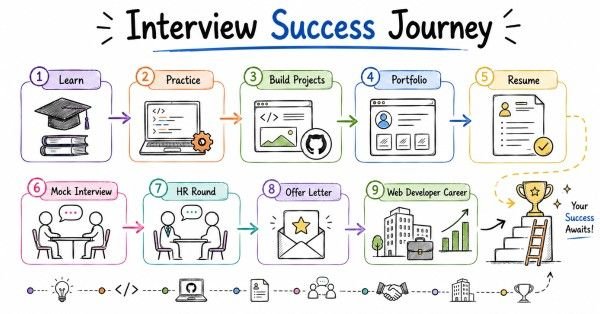
Final 30-day checklist
Week 1
Use this checklist in the last month before web development interviews:
- Finalize 1 to 3 web projects you can explain clearly.
- Prepare a 60-second and 2-minute self-introduction.
- Practice at least 20 behavioral questions using STAR.
- Review HTML, CSS, JavaScript, DOM, React, APIs, databases, and deployment.
- Practice speaking answers out loud, not just reading notes.
- Review scenario questions such as layout bugs, API failures, CORS issues, and form validation.
- Update resume with web development keywords and impact-focused bullets.
- Update LinkedIn headline, About section, certifications, and project highlights.
- Prepare salary expectations using India 2026 directional guidance.
- Draft thank-you and follow-up emails before interviews begin.
- Do at least 3 mock interviews with spoken answers.
- Practice explaining one project in business language, not only technical language.
Revision focus
Revise the STAR method, behavioral questions, AI mock interview prompts, web development resume keywords, impact-based bullet writing, LinkedIn positioning, project storytelling, salary framing for India in 2026, thank-you emails, follow-up messages, and the final 30-day checklist before publishing the full web development interview guide.