
Web Development Interview Preparation Guide

1. 200+ Technical Interview Questions & Answers
- INTERNET FUNDAMENTALS & WEB BASICS (Questions 1-25)
- HTML Basics and Structure (Q26-Q75)
- HTML Forms and Input Elements (Q76-Q100)
- CSS Basics (Q101-Q134)
- Advanced CSS Concepts (Q135-Q175)
- BOOTSTRAP FRAMEWORK (Questions 176-Q200)
- JAVASCRIPT & REACT BASICS (Questions 201-230)
🎓 Become a Job-Ready Web Developer Learn HTML, CSS, JavaScript & React from experts. Enroll in our Full-Stack Web Development Course
Section 1: Internet & Web Fundamentals (15 Questions)
Q1. How does the internet work?
The internet is a global network of computers connected through cables, routers, and servers. When you type a website address, your computer sends a request through your Internet Service Provider (ISP) to the website’s server, which then sends back the data you requested.
Q2. What is the difference between a client and a server?
A client is the device (like your laptop or phone) that requests information, while a server is a powerful computer that stores websites and sends information back to clients when requested.
Q3. Explain the HTTP request and response cycle.
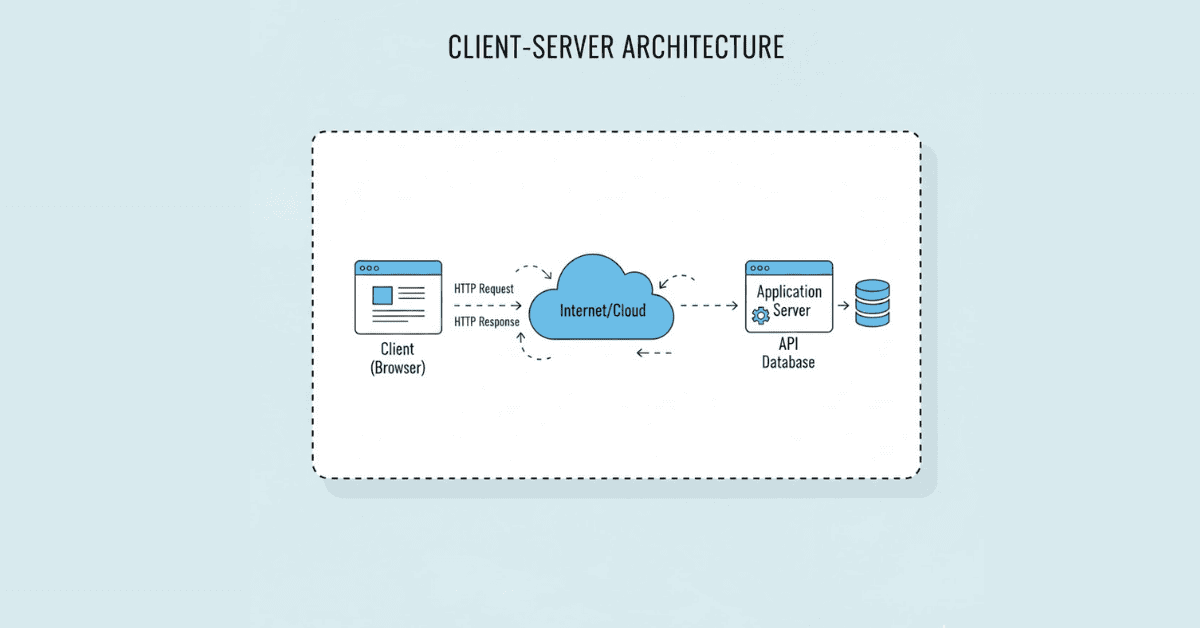
When you visit a website, your browser (client) sends an HTTP request to the server asking for specific content. The server processes this request and sends back an HTTP response containing the webpage data, images, or other resources.
Q4. What is an IP address and how is it different from a domain name?
An IP address is a unique numerical label (like 192.168.1.1) assigned to each device on a network. A domain name (like google.com) is the human-readable version that gets translated to an IP address through DNS.
Q5. What is DNS and why is it important?
DNS (Domain Name System) is like the internet’s phonebook. It translates domain names that humans can remember (like facebook.com) into IP addresses that computers use to communicate with each other.
Q6. Explain the client-server architecture.
Client-server architecture is a computing model where client devices request services and resources from centralized servers. The client makes requests, and the server processes them and sends responses back.
Q7. What happens when you type a URL in your browser and press Enter?
First, DNS translates the domain into an IP address. Then your browser sends an HTTP request to that server. The server processes the request and sends back HTML, CSS, and JavaScript files. Finally, your browser renders these files into the webpage you see.
Q8. What is the difference between frontend and backend?
Frontend is everything users see and interact with directly (HTML, CSS, JavaScript). Backend is the server-side that handles data processing, databases, and business logic that users don’t see.
Q9. What is the difference between a static and dynamic website?
A static website shows the same content to all users and doesn’t change unless manually updated. A dynamic website can change content based on user interactions, database queries, or other factors in real-time.
Q10. What is web hosting?
Web hosting is a service that allows your website to be accessible on the internet. Hosting companies provide server space where your website files are stored and served to visitors.
Q11. What is a MAC address?
A MAC (Media Access Control) address is a unique hardware identifier assigned to network devices. Unlike IP addresses which can change, MAC addresses are permanently assigned to the device’s network card.
Q12. How do ISPs work?
Internet Service Providers (ISPs) are companies that provide internet connectivity to homes and businesses. They connect your device to the broader internet infrastructure through cables, fiber optics, or wireless connections.
Q13. What is the difference between HTTP and HTTPS?
HTTP (Hypertext Transfer Protocol) is the standard protocol for transferring data on the web. HTTPS is the secure version that encrypts data between client and server, protecting sensitive information like passwords and credit card details.
Q14. What is a port number in networking?
A port number is like an apartment number in a building (the IP address). It directs network traffic to specific services running on a server. For example, HTTP uses port 80, and HTTPS uses port 443.
Q15. Explain what a single-page application (SPA) is.
A Single Page Application loads a single HTML page and dynamically updates content as users interact with it, without reloading the entire page. This creates a smoother, faster user experience similar to desktop applications.
Section 2: HTML Fundamentals (40 Questions)
Q16. What is HTML?
HTML (HyperText Markup Language) is the standard language used to create and structure content on web pages. It uses tags to define elements like headings, paragraphs, links, and images.
Q17. What is the basic structure of an HTML document?
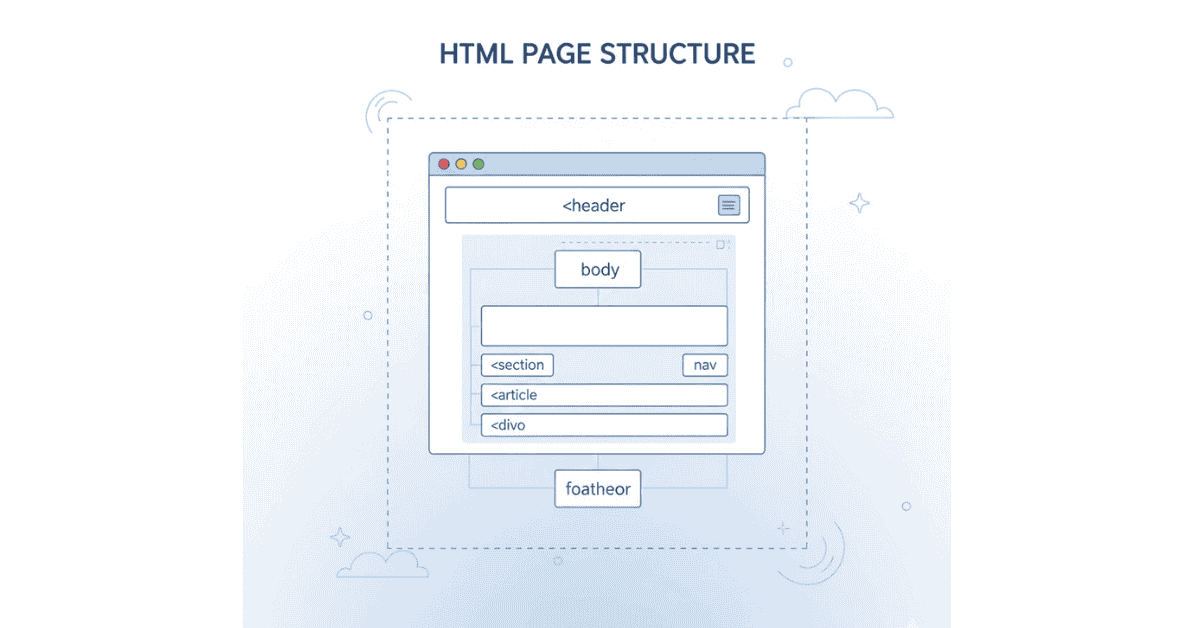
Every HTML document starts with `<!DOCTYPE html>`, followed by `<html>`, which contains `<head>` (metadata) and `<body>` (visible content) sections.[^1][^2]
Q18. What is the difference between HTML tags and HTML elements?
An HTML tag is the code written inside angle brackets (like `<p>`), while an HTML element includes the opening tag, content, and closing tag together (like `<p>Hello</p>`).[^7][^1]
Q19. What are semantic HTML tags and why are they important?
Semantic tags like `<header>`, `<nav>`, `<article>`, `<section>`, and `<footer>` clearly describe their meaning and purpose, making code more readable for developers and improving SEO and accessibility.[^4][^1]
Q20. Explain the difference between <div> and <span> tags.
`<div>` is a block-level element that takes up the full width available and starts on a new line. `<span>` is an inline element that only takes up as much width as necessary and doesn’t start on a new line.[^2][^1]
Q21. What are self-closing tags in HTML? Give examples.
Self-closing tags don’t need a closing tag because they don’t contain content. Examples include `<img>`, `<br>`, `<hr>`, `<input>`, and `<meta>`.[^1][^2]
Q22. What is the purpose of the <head> section in HTML?
The <head> section contains metadata about the document, including the title, character encoding, CSS links, JavaScript references, and other information that doesn’t display directly on the page.
Q23. What are HTML attributes?
Attributes provide additional information about HTML elements. They’re written inside the opening tag as name-value pairs, like <img src=”photo.jpg” alt=”My Photo”>.
Q24. Explain the difference between id and class attributes.
An id is unique and should only be used once per page, while class can be reused multiple times. IDs have higher specificity in CSS styling and are often used for JavaScript targeting.
Q25. What is the purpose of the alt attribute in image tags?
The alt attribute provides alternative text description for images. It’s displayed if the image fails to load and is crucial for screen readers used by visually impaired users.
Q26. What are the different types of lists in HTML?
HTML has three list types: ordered lists (`<ol>`) with numbered items, unordered lists (`<ul>`) with bullet points, and description lists (`<dl>`) with term-definition pairs.[^1][^2]
Q27. How do you create a hyperlink in HTML?
Use the anchor tag: <a href=”https://example.com”>Click Here</a>. The href attribute specifies the destination URL.
Q28. What is the difference between absolute and relative URLs?
Absolute URLs include the complete address (https://website.com/page.html), while relative URLs are paths relative to the current page location (../images/photo.jpg).
Q29. How do you create a table in HTML?
Tables use `<table>` as the wrapper, `<tr>` for rows, `<th>` for header cells, and `<td>` for data cells. Example: `<table><tr><th>Name</th></tr><tr><td>John</td></tr></table>`.[^2]
Q30. What are HTML forms used for?
Forms collect user input through various input fields like text boxes, checkboxes, radio buttons, and submit buttons. The data can be sent to a server for processing.
Q31. Explain the different input types in HTML5.
HTML5 offers many input types: text, email, password, number, date, time, color, file, checkbox, radio, submit, reset, and more. Each validates input differently.
Q32. What is the purpose of the action and method attributes in forms?
The action attribute specifies where to send form data, and method specifies how (GET appends data to URL, POST sends data in request body).
Q33. What is the difference between <b> and <strong> tags?
Both make text bold, but `<strong>` indicates semantic importance (meaningful to screen readers and SEO), while `<b>` is purely visual styling.[^4][^1]
Q34. What is the difference between <i> and <em> tags?
Both italicize text, but `<em>` indicates emphasis with semantic meaning, while `<i>` is just visual styling without semantic importance.[^4][^1]
Q35. How do you add comments in HTML?
HTML comments are written as <!– This is a comment –>. They’re not displayed in the browser but help document your code.
Q36. What is the viewport meta tag and why is it important?
<meta name=”viewport” content=”width=device-width, initial-scale=1.0″> ensures responsive design by controlling page dimensions and scaling on mobile devices.
Q37. What are HTML5 semantic elements? Name at least 5.
HTML5 semantic elements include `<header>`, `<nav>`, `<main>`, `<article>`, `<section>`, `<aside>`, `<footer>`, `<figure>`, and `<figcaption>`.[^4][^1]
Q38. What is the purpose of the <meta charset=”UTF-8″> tag?
It specifies the character encoding for the HTML document, ensuring special characters, symbols, and various languages display correctly.
Q39. How do you embed videos in HTML?
Use the `<video>` tag with attributes like `src`, `controls`, `autoplay`, and `loop`. Example: `<video src=”movie.mp4″ controls></video>`.[^1][^2]
Q40. How do you embed audio in HTML?
Use the `<audio>` tag with similar attributes to video. Example: `<audio src=”song.mp3″ controls></audio>`.[^2][^1]
Q41. What is the purpose of the placeholder attribute?
The placeholder attribute provides hint text inside input fields that disappears when users start typing, helping guide what information to enter.
Q42. What is the difference between <button> and <input type=”button”>?
`<button>` is more flexible, allowing HTML content inside (like images or formatted text), while `<input type=”button”>` only allows text values.[^2]
Q43. How do you make a checkbox or radio button selected by default?
Add the checked attribute: <input type=”checkbox” checked> or <input type=”radio” checked>.
Q44. What is the required attribute in forms?
The required attribute makes an input field mandatory. The form won’t submit until the required field is filled.
Q45. How do you group related form elements?
Use the `<fieldset>` tag to group related inputs, and `<legend>` to provide a caption for the group.[^2]
Q46. What is the purpose of the target attribute in anchor tags?
The target attribute specifies where to open the linked document. Common values are _blank (new tab), _self (same window), _parent, and _top.
Q47. What are data attributes in HTML5?
Data attributes (like data-user-id=”123″) allow storing custom data within HTML elements that can be accessed via JavaScript for dynamic functionality.
Q48. What is the difference between <section> and <div>?
`<section>` is semantic and represents a thematic grouping of content with meaning, while `<div>` is a generic container without semantic meaning.[^4]
Q49. How do you create a dropdown menu in HTML?
Use the <select> tag with <option> elements inside: <select><option>Choice 1</option><option>Choice 2</option></select>.
Q50. What is the defer and async attribute in script tags?
defer loads the script while parsing HTML but executes after parsing completes. async loads and executes the script asynchronously without blocking HTML parsing.
Q51. What is the purpose of the title attribute?
The title attribute provides additional information about an element, typically displayed as a tooltip when hovering over the element.
Q52. How do you create line breaks and horizontal rules?
Use `<br>` for line breaks and `<hr>` for horizontal lines (rules) to separate content visually.[^1][^2]
Q53. What are the <sub> and <sup> tags used for?
`<sub>` creates subscript text (like H₂O), and `<sup>` creates superscript text (like X²).[^1][^2]
Q54. What is the purpose of the disabled attribute?
The disabled attribute prevents users from interacting with form elements. Disabled elements won’t be submitted with the form.
Q55. How do HTML entities work? Give examples.
HTML entities display reserved characters that would otherwise be interpreted as code. Examples: < for <, > for >, & for &, for non-breaking space.
Section 3: CSS Fundamentals (50 Questions)
Q56. What is CSS and what is it used for?
CSS (Cascading Style Sheets) is a styling language used to control the visual presentation of HTML elements, including colors, layouts, fonts, spacing, and responsive design.
Q57. What are the three ways to add CSS to HTML?
Inline CSS (style attribute), internal CSS (style tag in head), and external CSS (separate .css file linked with link tag). External is considered best practice for maintainability.
Q58. What is CSS syntax?
CSS syntax consists of a selector (targeting HTML elements) and declaration block with property-value pairs: selector { property: value; }.
Q59. What are CSS selectors? Name different types.
Selectors target HTML elements for styling. Types include element selectors (p), class selectors (.classname), ID selectors (#idname), attribute selectors, pseudo-classes, and pseudo-elements.
Q60. What is the difference between class and ID selectors?
Class selectors (.) can be used multiple times across elements, while ID selectors (#) should be unique per page. IDs have higher specificity in CSS.
Q61. Explain CSS specificity.
Specificity determines which CSS rule applies when multiple rules target the same element. From highest to lowest: inline styles, IDs, classes/attributes/pseudo-classes, elements.
Q62. What is the CSS box model?
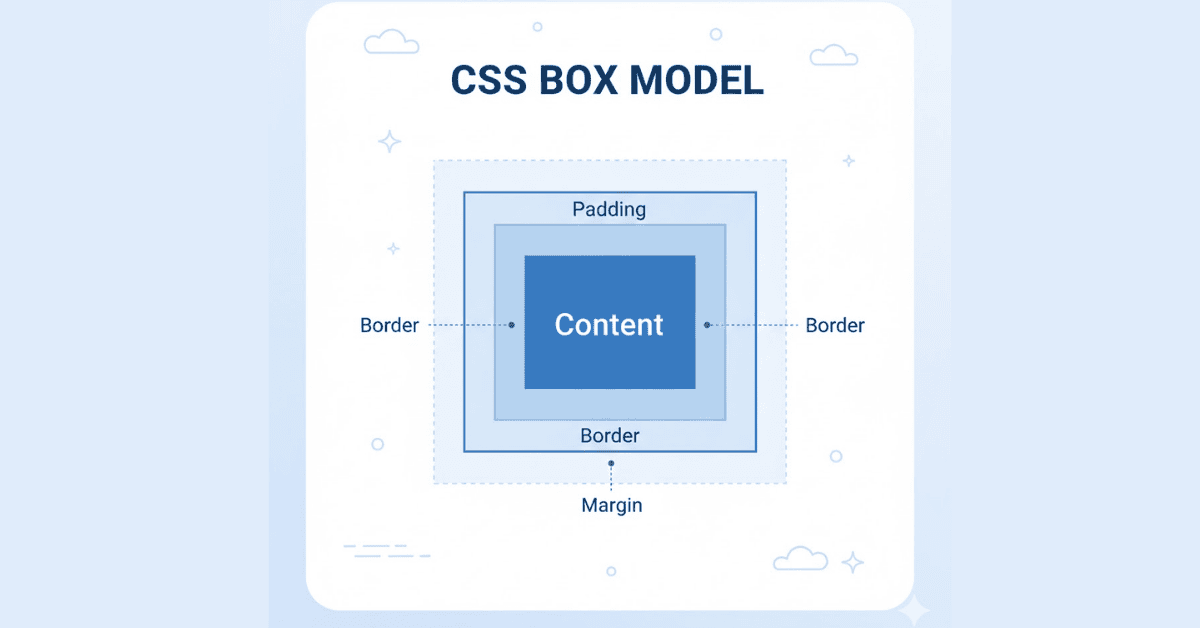
The box model describes how elements are rendered: content (inner text/image), padding (space around content), border (edge around padding), and margin (space outside border).
Q63. What is the difference between padding and margin?
Padding is internal spacing between content and border (inside the element), while margin is external spacing between the element’s border and other elements.
Q64. Explain CSS display properties.
Common display values: block (takes full width, new line), inline (flows with text), inline-block (inline but accepts width/height), none (hidden), flex, grid.
Q65. What is the difference between display: none and visibility: hidden?
display: none removes the element completely from layout flow, while visibility: hidden hides it but still occupies space.
Q66. What are CSS position properties?
Position values: static (default), relative (relative to normal position), absolute (relative to nearest positioned ancestor), fixed (relative to viewport), sticky (switches between relative and fixed).
Q67. What is the z-index property?
Z-index controls the stacking order of positioned elements. Higher values appear in front of lower values. Only works on positioned elements (not static).
Q68. What is Flexbox and when would you use it?
Flexbox is a one-dimensional layout system for arranging items in rows or columns. It’s perfect for creating flexible, responsive layouts with easy alignment and distribution of space.
Q69. Explain the main Flexbox properties.
Container properties: display: flex, flex-direction, justify-content, align-items, flex-wrap. Item properties: flex-grow, flex-shrink, flex-basis, align-self, order.
Q70. What is CSS Grid and how is it different from Flexbox?
CSS Grid is a two-dimensional layout system for rows AND columns simultaneously, ideal for complex layouts. Flexbox is one-dimensional (row OR column), better for component layouts.
Q71. What are CSS units? Explain relative vs absolute units.
Absolute units (px, pt, cm) have fixed sizes. Relative units (%, em, rem, vw, vh) scale based on other values, making them better for responsive design.
Q72. What is the difference between em and rem units?
em is relative to the parent element’s font size, while rem (root em) is relative to the root html element’s font size, providing more predictable sizing.
Q73. What are viewport units (vw, vh)?
vw (viewport width) and vh (viewport height) are percentages of the browser window size. 1vw = 1% of viewport width, 1vh = 1% of viewport height.
Q74. How do you center an element horizontally and vertically?
Multiple methods: Flexbox (display: flex; justify-content: center; align-items: center), Grid (display: grid; place-items: center), or absolute positioning with transform.
Q75. What are pseudo-classes in CSS? Give examples.
Pseudo-classes select elements in specific states: :hover (mouse over), :focus (input focused), :active (being clicked), :first-child, :last-child, :nth-child().
Q76. What are pseudo-elements in CSS? Give examples.
Pseudo-elements style specific parts of elements: ::before (insert before content), ::after (insert after content), ::first-letter, ::first-line, ::selection.
Q77. What is the difference between pseudo-classes and pseudo-elements?
Pseudo-classes select elements in special states (single colon, like :hover), while pseudo-elements select and style parts of elements (double colon, like ::before).
Q78. How do CSS transitions work?
Transitions smoothly animate changes in CSS properties over time. Syntax: transition: property duration timing-function delay;. Example: transition: all 0.3s ease;.
Q79. How do CSS animations work?
Animations use @keyframes to define animation sequences, then apply them with animation properties: animation: name duration timing-function delay iteration-count direction;.
Q80. What is the difference between transitions and animations?
Transitions automatically animate between two states when triggered (like hover). Animations define custom multi-step sequences that can run automatically without triggers.
Q81. What are media queries and how do they work?
Media queries apply different styles based on device characteristics (screen size, orientation, etc.). Syntax: @media (max-width: 768px) { /* styles */ }.
Q82. What is responsive web design?
Responsive design ensures websites adapt and look good on all devices and screen sizes using flexible grids, images, and media queries.
Q83. What is mobile-first design?
Mobile-first means designing for mobile devices first, then progressively enhancing for larger screens using min-width media queries, ensuring better mobile performance.
Q84. Explain CSS overflow property.
Overflow controls what happens when content is too large for its container: visible (default, overflows), hidden (clips content), scroll (adds scrollbars), auto (scrollbars only when needed).
Q85. What are CSS background properties?
Background properties include background-color, background-image, background-size, background-position, background-repeat, background-attachment, and shorthand background.
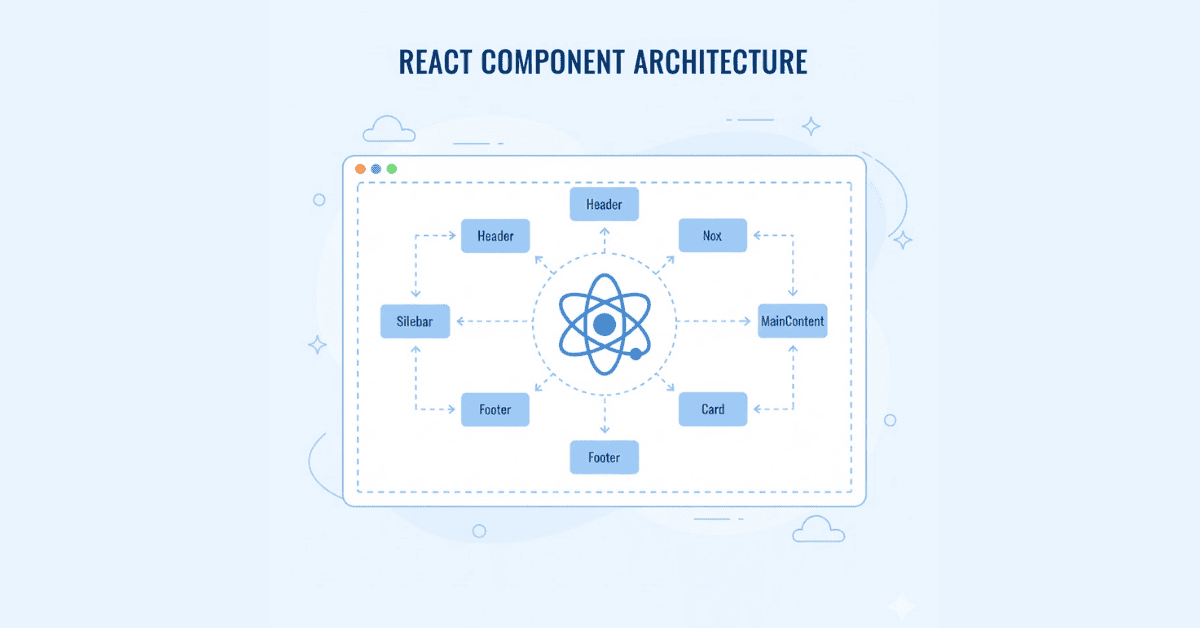
Q86. What is the CSS box-shadow property?
Box-shadow adds shadow effects around elements. Syntax: box-shadow: horizontal vertical blur spread color inset;. Example: box-shadow: 2px 2px 5px rgba(0,0,0,0.3);.
Q87. What is the CSS text-shadow property?
Text-shadow adds shadow to text. Syntax similar to box-shadow: text-shadow: horizontal vertical blur color;.
Q88. What are CSS font properties?
Font properties include font-family, font-size, font-weight, font-style, line-height, letter-spacing, text-transform, and shorthand font.
Q89. What is the difference between font-weight: bold and <b> tag?
CSS font-weight: bold is for styling purposes in stylesheets, while <b> is HTML markup. Using CSS is preferred for maintaining separation of content and presentation.
Q90. How do you import custom fonts in CSS?
Use @font-face to define custom fonts, or link to font services like Google Fonts in HTML. Example: @font-face { font-family: ‘MyFont’; src: url(‘font.woff2’); }.
Q91. What are CSS combinators?
Combinators show relationships between selectors: descendant (space), child (>), adjacent sibling (+), general sibling (~). Example: div > p selects direct paragraph children of divs.
Q92. What is the CSS !important rule and when should you use it?
!important overrides all other declarations, giving a property the highest priority. Use sparingly as it makes debugging and maintenance difficult.
Q93. What are CSS custom properties (variables)?
CSS variables store reusable values. Define with –variable-name: value; and use with var(–variable-name). Example: –primary-color: #007bff;.
Q94. How do you hide an element but keep it accessible to screen readers?
Use: position: absolute; left: -9999px; or clip: rect(0,0,0,0); position: absolute; rather than display: none which hides from screen readers too.
Q95. What is the CSS calc() function?
calc() performs calculations for CSS values. Example: width: calc(100% – 50px); allows mixing units and dynamic sizing.
Q96. What are CSS filters?
Filters apply visual effects to elements: blur(), brightness(), contrast(), grayscale(), hue-rotate(), saturate(), etc. Example: filter: blur(5px);.
Q97. What is the object-fit property?
object-fit controls how images/videos resize within their containers: fill, contain, cover, none, scale-down. Similar to background-size.
Q98. Explain CSS inheritance.
Some CSS properties (like color, font-family) naturally pass from parent to child elements. Others (like margin, padding, border) don’t inherit.
Q99. What is the currentColor keyword?
currentColor refers to the current value of the color property. Useful for creating consistent coloring schemes with borders, shadows, and SVGs.
Q100. What are CSS gradients?
Gradients create smooth transitions between colors: linear-gradient() creates straight line transitions, radial-gradient() creates circular patterns.
Q101. What is the difference between inline and inline-block?
inline elements flow with text and don’t accept width/height. inline-block also flows with text but accepts width/height like block elements.
Q102. What is CSS grid template areas?
Grid template areas name grid regions for intuitive layout definitions. Example: grid-template-areas: “header header” “sidebar main” “footer footer”;.
Q103. What are CSS transforms?
Transforms modify element appearance without affecting layout: translate() (move), rotate() (turn), scale() (resize), skew() (distort).
Q104. What is the will-change property?
will-change hints to browsers which properties will animate, allowing performance optimization. Example: will-change: transform, opacity;.
Q105. What is the CSS :root selector?
:root selects the document root element (html). Commonly used for defining CSS variables that should be available globally.
Section 4: Bootstrap (15 Questions)
Q106. What is Bootstrap and why is it popular?
Bootstrap is a popular CSS framework that provides pre-built components and a responsive grid system, allowing developers to quickly build professional, mobile-friendly websites without writing everything from scratch.
Q107. What is the Bootstrap grid system?
Bootstrap’s grid system divides the page into 12 columns, allowing flexible responsive layouts. Use classes like col-md-6 to specify how many columns an element spans at different screen sizes.
Q108. What are Bootstrap breakpoints?
Breakpoints define responsive behavior at different screen sizes: xs (<576px), sm (≥576px), md (≥768px), lg (≥992px), xl (≥1200px), xxl (≥1400px).
Q109. What are Bootstrap containers?
Containers are the most basic layout element in Bootstrap, providing padding and alignment. .container has max-width, .container-fluid spans full width.
Q110. What are some common Bootstrap components?
Common components include buttons, cards, navbars, modals, alerts, badges, breadcrumbs, carousels, dropdowns, forms, pagination, progress bars, and tooltips.
Q111. How do you create buttons in Bootstrap?
Use button classes: .btn (base class), .btn-primary, .btn-secondary, .btn-success, .btn-danger, .btn-warning, .btn-info, .btn-light, .btn-dark.
Q112. What are Bootstrap utilities?
Utilities are helper classes for common styling needs like spacing (m-, p-), display (d-), colors (text-, bg-), borders, sizing, and positioning.
Q113. How do you create a responsive navbar in Bootstrap?
Use the .navbar class with .navbar-expand-{breakpoint} for collapsible behavior, .navbar-brand for logo, .navbar-nav for links, and .navbar-toggler for mobile menu button.
Q114. What are Bootstrap cards?
Cards are flexible content containers with options for headers, footers, images, and various content types. Built with .card, .card-body, .card-title, .card-text classes.
Q115. How do Bootstrap alerts work?
Alerts provide contextual feedback messages using classes: .alert, .alert-success, .alert-danger, .alert-warning, .alert-info. Add .alert-dismissible for closeable alerts.
Q116. What are Bootstrap badges?
Badges are small count and labeling components using .badge class with contextual classes like .badge-primary, .badge-secondary, perfect for notification counts.
Q117. How do you create forms in Bootstrap?
Bootstrap provides form controls with classes like .form-control for inputs, .form-label for labels, .form-check for checkboxes/radios, and .form-select for dropdowns.
Q118. What are Bootstrap modals?
Modals are dialog boxes/popups that overlay the page, built with .modal, .modal-dialog, .modal-content, .modal-header, .modal-body, and .modal-footer classes.
Q119. How do Bootstrap button groups work?
Button groups cluster buttons together horizontally using .btn-group class, useful for toolbar-like layouts or pagination controls.
Q120. What is the difference between Bootstrap’s row and col classes?
.row creates horizontal groups of columns and handles negative margins. .col-* classes define how many of the 12 grid columns each element spans.
Section 5: JavaScript Fundamentals (60 Questions)
Q121. What is JavaScript and where is it used?
JavaScript is a high-level, interpreted programming language used to make web pages interactive. It runs in browsers (frontend) and servers (backend with Node.js), enabling dynamic content, animations, form validation, and complex web applications.
Q122. What are the different ways to declare variables in JavaScript?
JavaScript has three ways: var (function-scoped, hoisted), let (block-scoped, not hoisted), and const (block-scoped, immutable reference). Modern JavaScript prefers let and const.
Q123. What is the difference between let, const, and var?
var is function-scoped and can be redeclared. let is block-scoped and can be reassigned but not redeclared. const is block-scoped and cannot be reassigned or redeclared.
Q124. What are JavaScript data types?
JavaScript has primitive types (String, Number, Boolean, Undefined, Null, Symbol, BigInt) and reference types (Objects, Arrays, Functions). Primitives store actual values, references store memory addresses.
Q125. What is the difference between == and ===?
== (equality) performs type coercion before comparison, while === (strict equality) checks both value and type without coercion. Always prefer === for precise comparisons.
Q126. What is variable hoisting in JavaScript?
Hoisting is JavaScript’s behavior of moving variable and function declarations to the top of their scope before execution. var declarations are hoisted with undefined, let/const are hoisted but not initialized (temporal dead zone).
Q127. What are template literals in JavaScript?
Template literals use backticks () and allow embedded expressions with${}, multi-line strings, and string interpolation. Example:Hello ${name}, you are ${age} years old`.
Q128. What are JavaScript operators? Name the types.
Operators perform operations on variables and values: Arithmetic (+, -, *, /), Assignment (=, +=, -=), Comparison (==, =, !=, !), Logical (&&, ||, !), Conditional (ternary ? :).
Q129. What is the ternary operator?
A shorthand for if-else statements: condition ? expressionIfTrue : expressionIfFalse. Example: let result = age >= 18 ? ‘Adult’ : ‘Minor’;.
Q130. What are conditional statements in JavaScript?
Conditional statements control program flow: if, else if, else execute code blocks based on conditions. switch statements handle multiple specific condition checks.
Q131. What are loops in JavaScript?
Loops repeat code blocks: for (known iterations), while (condition-based), do-while (executes at least once), for…of (array values), for…in (object properties).
Q132. What is the difference between for…in and for…of?
for…in iterates over enumerable property names (keys) of objects. for…of iterates over iterable values (like array elements, string characters). Use for…of for arrays.
Q133. What are JavaScript functions and why are they important?
Functions are reusable code blocks that perform specific tasks. They accept parameters, process logic, and return values. Functions make code modular, maintainable, and avoid repetition.
Q134. What is the difference between function declaration and function expression?
Function declarations are hoisted and can be called before definition: function greet() {}. Function expressions are assigned to variables and not hoisted: const greet = function() {}.
Q135. What are arrow functions?
Arrow functions provide shorter syntax: const add = (a, b) => a + b;. They don’t have their own this binding and are ideal for callbacks and short functions.
Q136. What is the this keyword in JavaScript?
this refers to the object executing the current function. Its value depends on how the function is called: global object (in global scope), the object itself (in methods), undefined (in strict mode functions).
Q137. What are arrays in JavaScript?
Arrays are ordered, indexed collections that store multiple values of any type. They’re zero-indexed and have built-in methods for manipulation like push, pop, map, filter, and reduce.
Q138. What are common array methods in JavaScript?
Important methods: push(), pop(), shift(), unshift(), slice(), splice(), concat(), map(), filter(), reduce(), find(), findIndex(), includes(), forEach(), sort().
Q139. What is the difference between push() and unshift()?
push() adds elements to the end of an array and returns the new length. unshift() adds elements to the beginning and also returns the new length.
Q140. What is the difference between slice() and splice()?
slice() returns a shallow copy of a portion of an array without modifying the original. splice() changes the original array by adding, removing, or replacing elements.
Q141. What does the map() method do?
map() creates a new array by applying a function to each element of the original array. It doesn’t modify the original array. Example: [^1][^22][^23].map(x => x * 2) returns [^22][^24][^25].
Q142. What does the filter() method do?
filter() creates a new array containing only elements that pass a test function. Example: [^1][^22][^23][^24].filter(x => x > 2) returns [^23][^24].
Q143. What does the reduce() method do?
reduce() executes a reducer function on each array element, resulting in a single output value. Commonly used for summing, finding max/min, or transforming arrays into objects.
Q144. What is the difference between find() and filter()?
find() returns the first element that matches the condition (or undefined). filter() returns an array of all matching elements (or empty array).
Q145. What are JavaScript objects?
Objects are collections of key-value pairs (properties and methods). They store related data and functionality together. Example: {name: ‘John’, age: 30, greet: function() {}}.
Q146. How do you access object properties?
Two ways: Dot notation (object.property) and bracket notation (object[‘property’]). Bracket notation is necessary for dynamic keys or keys with special characters.
Q147. What are object methods?
Methods are functions stored as object properties. They perform actions related to the object. Access with object.method(). The this keyword refers to the object inside methods.
Q148. How do you add or delete properties from objects?
Add: object.newProperty = value or object[‘newProperty’] = value. Delete: delete object.property. Check existence: ‘property’ in object.
Q149. What is object destructuring?
Destructuring extracts properties into variables: const {name, age} = person;. You can also assign default values and rename variables during destructuring.
Q150. What is array destructuring?
Array destructuring extracts array elements into variables: const [first, second] = array;. You can skip elements, use rest operator, and set defaults.
Q151. What is the spread operator (…)?
The spread operator expands arrays or objects. For arrays: […array1, …array2] merges them. For objects: {…obj1, …obj2} combines properties.
Q152. What is the rest parameter?
Rest parameters collect remaining arguments into an array: function sum(…numbers) {}. It allows functions to accept unlimited arguments. Must be the last parameter.
Q153. What is the DOM (Document Object Model)?
The DOM is a programming interface for HTML documents. It represents the page structure as a tree of objects, allowing JavaScript to manipulate content, structure, and styles dynamically.
Q154. How do you select elements in the DOM?
Methods include: getElementById(), getElementsByClassName(), getElementsByTagName(), querySelector() (first match), querySelectorAll() (all matches). Modern code prefers querySelector methods.
Q155. What is the difference between querySelector() and getElementById()?
querySelector() uses CSS selectors and can select any element (more flexible). getElementById() only selects by ID but is slightly faster for simple ID selection.
Q156. How do you change element content in the DOM?
Use innerHTML (sets HTML content), textContent (sets text only, safer), or innerText (considers styling, returns visible text only).
Q157. How do you change element styles in JavaScript?
Access the style property: element.style.color = ‘red’. For multiple styles, use element.style.cssText or add/remove CSS classes with classList.add(), classList.remove(), classList.toggle().
Q158. How do you create and remove DOM elements?
Create: document.createElement(‘div’). Add to DOM: parent.appendChild(child) or parent.insertBefore(). Remove: element.remove() or parent.removeChild(child).
Q159. What is event handling in JavaScript?
Events are actions like clicks, key presses, or mouse movements. Event handlers respond to these actions. Add handlers with addEventListener() or inline attributes (not recommended).
Q160. What is addEventListener() and how does it work?
addEventListener() attaches event handlers to elements: element.addEventListener(‘click’, function). It allows multiple handlers per event and supports options like once, capture.
Q161. What is event bubbling?
Event bubbling is when an event triggers on a child element, then propagates upward through parent elements. Click a button inside a div, both button and div click events fire.
Q162. What is event delegation?
Event delegation attaches a single event listener to a parent element instead of multiple children. It uses event bubbling to handle events from dynamically created elements efficiently.
Q163. What is the preventDefault() method?
preventDefault() stops the default browser behavior for an event. Common uses: preventing form submission, stopping link navigation for custom handling.
Q164. What is local storage?
Local storage is a web API that stores key-value pairs in the browser with no expiration. Data persists even after closing the browser. Use localStorage.setItem(), getItem(), removeItem().
Q165. What is session storage?
Session storage is similar to local storage but data is cleared when the browser tab closes. Use sessionStorage.setItem(), getItem(), removeItem().
Q166. What is the difference between cookies and local storage?
Cookies are sent with every HTTP request (4KB limit), have expiration dates, and work across all browsers. Local storage stores more data (5-10MB), doesn’t auto-send, and is JavaScript-only.
Q167. What is JSON and why is it important?
JSON (JavaScript Object Notation) is a lightweight data format for storing and exchanging data. Use JSON.stringify() to convert objects to JSON strings and JSON.parse() to convert back.
Q168. What is asynchronous JavaScript?
Asynchronous code executes without blocking other operations. JavaScript is single-threaded but handles async operations through callbacks, promises, and async/await for tasks like API calls.
Q169. What is the event loop?
The event loop handles asynchronous operations in JavaScript. It continuously checks the call stack and callback queue, executing callbacks when the stack is empty.
Q170. What are callbacks in JavaScript?
Callbacks are functions passed as arguments to other functions and executed later. Commonly used for async operations. Can lead to “callback hell” with nested callbacks.
Q171. What are Promises in JavaScript?
Promises represent future values from asynchronous operations. They have three states: pending, fulfilled (resolved), or rejected. Use .then() for success and .catch() for errors.
Q172. What is Promise chaining?
Promise chaining links multiple async operations sequentially using .then(). Each .then() returns a new Promise, allowing clean sequential async code without nesting.
Q173. What is async/await?
async/await is modern syntax for handling Promises. async functions return Promises. await pauses execution until a Promise resolves, making async code look synchronous.
Q174. What is the difference between Promises and async/await?
They both handle async operations, but async/await provides cleaner, more readable syntax. async/await is syntactic sugar over Promises, making error handling easier with try-catch.
Q175. How do you handle errors in async/await?
Use try-catch blocks: try { await promise; } catch(error) { handle error }. This is cleaner than Promise .catch() for multiple async operations.
Q176. What are JavaScript classes?
Classes are blueprints for creating objects with shared properties and methods. Introduced in ES6, they provide cleaner syntax for constructor functions and prototypal inheritance.
Q177. What is a constructor in JavaScript?
Constructors are special methods that initialize new objects. In classes, use the constructor() method. It runs automatically when creating instances with new ClassName().
Q178. What is inheritance in JavaScript?
Inheritance allows classes to inherit properties and methods from parent classes using the extends keyword. Child classes can override parent methods or add new functionality.
Q179. What is the super keyword?
super refers to the parent class. Use super() to call the parent constructor and super.method() to call parent methods from child classes.
Q180. What are JavaScript timers?
Timers execute code after delays. setTimeout(function, delay) executes once after delay. setInterval(function, interval) executes repeatedly. Clear with clearTimeout() and clearInterval().
Section 6: React Fundamentals (40 Questions)
Q181. What is React and why is it popular?
React is a JavaScript library for building user interfaces, developed by Facebook. It’s popular for its component-based architecture, virtual DOM for performance, reusable code, and strong community support.
Q182. What is JSX?
JSX (JavaScript XML) is a syntax extension that lets you write HTML-like code in JavaScript. JSX gets compiled to React.createElement() calls, making component creation intuitive.
Q183. What is a component in React?
Components are independent, reusable UI pieces. They accept inputs (props) and return React elements describing what should appear on screen. Components can be functional or class-based.
Q184. What is the difference between functional and class components?
Functional components are simple JavaScript functions that return JSX. Class components use ES6 classes with lifecycle methods. Modern React prefers functional components with Hooks.
Q185. What are props in React?
Props (properties) are read-only data passed from parent to child components. They allow components to be dynamic and reusable. Access props as function parameters or this.props in classes.
Q186. What is state in React?
State is mutable data managed within a component. When state changes, React re-renders the component. Use useState Hook in functional components to manage state.
Q187. What is the difference between state and props?
Props are passed from parent components (immutable by child), while state is managed within the component (mutable). Props flow down, state is internal.
Q188. What is the virtual DOM?
The virtual DOM is a lightweight JavaScript representation of the real DOM. React updates the virtual DOM first, calculates differences (diffing), then efficiently updates only changed parts of the real DOM.
Q189. What are React Hooks?
Hooks are functions that let you use state and lifecycle features in functional components. They “hook into” React features without writing classes. Hooks start with “use” prefix.
Q190. What is the useState Hook?
useState adds state to functional components. It returns an array with the current state value and a setter function: const [count, setCount] = useState(0);.
Q191. What is the useEffect Hook?
useEffect handles side effects like API calls, subscriptions, or DOM manipulation. It runs after render. Control when it runs with a dependency array.
Q192. What is the dependency array in useEffect?
The dependency array controls when useEffect runs: No array (runs every render), empty array [] (runs once), array with values (runs when those values change).
Q193. How do you perform cleanup in useEffect?
Return a cleanup function from useEffect: return () => { cleanup code }. This runs before re-running the effect or when component unmounts, useful for canceling subscriptions or timers.
Q194. What is conditional rendering in React?
Conditional rendering displays different UI based on conditions. Use ternary operators, `&&` logical operator, or if-else statements before the return. Example: `{isLoggedIn ? <Dashboard /> : <Login />}`.[^12][^1]
Q195. How do you render lists in React?
Use `map()` to transform arrays into JSX elements. Always add a unique `key` prop to help React identify which items changed: `{items.map(item => <div key={item.id}>{item.name}</div>)}`.[^12][^1]
Q196. Why are keys important in React lists?
Keys help React identify which list items changed, were added, or removed. They should be stable, unique identifiers (preferably IDs, not array indexes) for optimal performance.
Q197. What is React Router?
React Router is a library for navigation in single-page applications. It enables creating multiple pages/views without full page reloads, using components like BrowserRouter, Route, Link.
Q198. How do you pass parameters in React Router?
Use URL parameters with :paramName in the route path: <Route path=”/user/:id” />. Access parameters with useParams() Hook: const { id } = useParams();.
Q199. What are React events?
React events use camelCase naming (onClick, onChange) and pass functions (not strings). Event handlers receive synthetic events (cross-browser wrappers) instead of native browser events.
Q200. How do you handle forms in React?
Control form inputs by binding their values to state and updating state with onChange handlers. This creates “controlled components” where React manages the form state.
Q201. What is the difference between controlled and uncontrolled components?
Controlled components have form data handled by React state (recommended). Uncontrolled components store data in the DOM, accessed via refs when needed.
Q202. What are CSS Modules in React?
CSS Modules scope CSS locally to components by automatically generating unique class names, preventing style conflicts. Import with import styles from ‘./Component.module.css’.
Q203. What is styled-components?
Styled-components is a CSS-in-JS library that allows writing CSS directly in JavaScript files using tagged template literals, creating styled React components.
Q204. What is component composition in React?
Composition is combining simple components to create complex UIs. React prefers composition over inheritance, using props and children to pass components and content.
Q205. What is prop drilling?
Prop drilling is passing props through multiple component layers to reach deeply nested components. It can make code hard to maintain. Solutions include Context API or state management libraries.
Q206. What is the Context API?
Context API provides a way to share data across the component tree without prop drilling. Create context with createContext(), provide with Provider, consume with useContext Hook.
Q207. What is useRef Hook?
useRef creates a mutable reference that persists across renders without causing re-renders. Common uses: accessing DOM elements, storing mutable values, keeping previous values.
Q208. What is React.Fragment?
Fragment lets you group multiple elements without adding extra DOM nodes. Use <Fragment> or shorthand <>. Useful when you can’t return multiple elements directly.
Q209. What are higher-order components (HOCs)?
HOCs are functions that take a component and return an enhanced component with additional props or behavior. They enable code reuse and component logic abstraction.
Q210. What is the useMemo Hook?
useMemo memoizes expensive computation results, only recalculating when dependencies change. It optimizes performance by avoiding unnecessary calculations on every render.
Q211. What is the useCallback Hook?
useCallback memoizes functions, returning the same function reference between renders unless dependencies change. Useful for optimizing child components that rely on reference equality.
Q212. What is React.memo()?
React.memo() is a higher-order component that prevents re-rendering if props haven’t changed. It performs shallow comparison of props for performance optimization.
Q213. What is lazy loading in React?
Lazy loading defers component loading until needed using React.lazy() and dynamic imports. Combine with Suspense for loading fallbacks: const Component = React.lazy(() => import(‘./Component’));.
Q214. What is the useContext Hook?
useContext accesses Context values without wrapping components in Consumer. Pass the Context object: const value = useContext(MyContext);.
Q215. How do you handle errors in React?
Use Error Boundaries (class components with componentDidCatch or getDerivedStateFromError) to catch errors in component trees and display fallback UI.
Q216. What is the reconciliation process?
Reconciliation is React’s algorithm for updating the DOM efficiently. It compares the new virtual DOM with the previous one (diffing) and applies minimal changes to the real DOM.
Q217. What are synthetic events in React?
Synthetic events are React’s cross-browser wrapper around native browser events. They provide consistent API across browsers and are automatically pooled for performance.
Q218. What is the significance of key prop in React?
Keys uniquely identify elements in lists, helping React efficiently update, reorder, or remove items. Using stable IDs as keys improves performance and prevents bugs.
Q219. How do you optimize React application performance?
Optimization techniques: Use React.memo(), useMemo, useCallback, lazy loading, code splitting, avoid inline functions in render, use production builds, virtualize long lists.
Q220. What are custom Hooks?
Custom Hooks are JavaScript functions starting with “use” that encapsulate reusable logic using other Hooks. They enable sharing stateful logic between components without wrapper components.
Section 7: Vibe Coding & AI Tools (10 Questions)
Q221. What is Vibe Coding?
Vibe Coding is an AI-assisted coding approach that uses tools like Cursor AI to accelerate development. It combines traditional coding with AI prompts to generate code, debug, and build projects faster.
Q222. What is Cursor AI?
Cursor is an AI-powered code editor built on VS Code that integrates Large Language Models (LLMs) to assist with code generation, debugging, refactoring, and understanding codebases through natural language prompts.
Q223. What are the main LLMs used in AI coding assistants?
Popular LLMs include GPT-4 (OpenAI), Claude (Anthropic), and Gemini (Google). Each has strengths in code generation, understanding context, and providing accurate suggestions.
Q224. What are the key features of Cursor?
Key features include AI-powered code completion, natural language code generation, inline editing suggestions, codebase understanding, debugging assistance, and multi-file editing capabilities.
Q225. How do you write effective prompts for AI coding assistants?
Effective prompts are specific, provide context, break complex tasks into steps, specify technologies/frameworks, include examples, mention edge cases, and iterate based on output quality.
Q226. What is the importance of planning before using AI for coding?
Planning helps structure your requirements clearly, choose appropriate technologies, understand project scope, and write better prompts. It prevents generating incorrect or inefficient code.
Q227. How do you debug code using AI assistance?
Describe the error clearly, provide error messages and stack traces, explain expected vs actual behavior, share relevant code context, and ask for explanation of why errors occur.
Q228. What is version control and why is it important in AI-assisted coding?
Version control (like Git) tracks code changes over time. It’s crucial when using AI tools to save working versions, experiment safely, revert mistakes, and collaborate with others.
Q229. What are best practices for using AI coding tools?
Best practices: Review AI-generated code, understand what it does, test thoroughly, maintain consistent coding standards, use AI for learning, keep security in mind, and combine AI with manual expertise.
Q230. How do you manage extensions in Cursor?
Extensions add functionality to Cursor. Install from the extensions marketplace, manage enabled extensions, configure settings, and disable conflicting extensions for optimal performance.
🗺️ Master Web Development Step by Step
Follow our 90-Day Front-End Developer Roadmap to build skills systematically — from HTML basics to React projects.
How to Use These Prompts
Copy and paste these prompts into ChatGPT exactly as written. These prompts will help you practice explaining concepts, solve coding problems, and prepare for different interview scenarios. Take your time with each response and ask follow-up questions whenever you need clarification.
Category A: Concept Explanation Practice (15 Prompts)
These prompts help you practice explaining technical concepts in simple language, which is crucial for interviews.
Prompt 1:
“I’m preparing for a web developer interview. Can you ask me to explain how the internet works, then evaluate my explanation and provide feedback on what I should improve? Please be thorough but encouraging.”
Prompt 2:
“Act as an interviewer and ask me to explain the difference between HTML, CSS, and JavaScript. After I answer, tell me if my explanation was clear enough for a non-technical person to understand.”
Prompt 3:
“I need to explain the CSS Box Model in an interview. Ask me to describe it, then give me feedback on clarity, completeness, and whether I should add any examples.”
Prompt 4:
“Quiz me on the difference between flexbox and CSS grid. After I explain, tell me which use cases I might have missed and provide real-world examples.”
Prompt 5:
“Ask me to explain what responsive web design is and why it matters. Then evaluate if my answer would satisfy a hiring manager looking for practical understanding.”
Prompt 6:
“I want to practice explaining semantic HTML. Ask me about it, then critique my answer and suggest how I could make it more interview-ready.”
Prompt 7:
“Test my understanding of how browsers render web pages. After my explanation, point out any technical inaccuracies and help me correct them.”
Prompt 8:
“Ask me to explain the DOM (Document Object Model) to someone who has never coded before. Then tell me if I used too much jargon or if it was beginner-friendly.”
Prompt 9:
“I need to explain JavaScript event listeners in an interview. Quiz me on this topic, then suggest better ways to phrase my explanation.”
Prompt 10:
“Test my knowledge about HTTP vs HTTPS. After I explain the differences, tell me if I covered the security aspects properly.”
Prompt 11:
“Ask me to explain what Bootstrap is and when developers should use it. Evaluate whether my answer shows practical project experience or just theoretical knowledge.”
Prompt 12:
“I want to practice explaining CSS positioning (relative, absolute, fixed, sticky). Quiz me and then tell me which real-world scenarios I should mention.”
Prompt 13:
“Test my understanding of React components. After I explain, tell me if I demonstrated knowledge of both functional and class components.”
Prompt 14:
“Ask me to explain the difference between GET and POST methods. Then evaluate if my answer covered security considerations.”
Prompt 15:
“I need to explain what media queries are and how they work. Quiz me, then suggest examples I should memorize for interviews.”
Category B: Coding Problem Practice (15 Prompts)
These prompts help you practice solving actual coding challenges you might face in interviews.
Prompt 16:
“Give me a simple HTML structure challenge for a beginner web developer interview. After I solve it, review my code and suggest improvements for best practices.”
Prompt 17:
“Create a CSS styling challenge where I need to center a div both horizontally and vertically. Give me the HTML structure, and I’ll write the CSS. Then critique my solution.”
Prompt 18:
“Give me a real interview question: how to create a responsive navigation menu. Let me describe my approach first, then you tell me if I’m on the right track.”
Prompt 19:
“Challenge me to build a simple card component using HTML and CSS. After I provide the code, tell me what I’m missing and how to make it more professional.”
Prompt 20:
“Ask me to write HTML for a contact form with proper validation attributes. Review my code and point out any accessibility or usability issues.”
Prompt 21:
“Give me a CSS flexbox layout challenge. Provide requirements for a 3-column layout, then evaluate my solution for responsiveness.”
Prompt 22:
“Challenge me to create a CSS grid layout for a photo gallery. After I write the code, suggest modern techniques I might have missed.”
Prompt 23:
“Ask me to write JavaScript code that changes button color on click. Review my code and tell me if there are more efficient approaches.”
Prompt 24:
“Give me a practical problem: create a dropdown menu that shows/hides on button click using JavaScript. Critique my implementation.”
Prompt 25:
“Challenge me to make an image slider using HTML, CSS, and JavaScript. Guide me if I’m stuck, then review my complete solution.”
Prompt 26:
“Ask me to create a responsive table using Bootstrap. After I provide the code, tell me about Bootstrap classes I should know better.”
Prompt 27:
“Give me a form validation challenge using JavaScript. After I solve it, explain better validation techniques I should learn.”
Prompt 28:
“Challenge me to create a modal popup using Bootstrap. Review my implementation and suggest improvements for accessibility.”
Prompt 29:
“Ask me to build a simple accordion component. After my attempt, show me industry-standard ways to implement this feature.”
Prompt 30:
“Give me a problem where I need to use CSS animations. Critique my solution and suggest smoother animation techniques.”
💡Want practical examples to master these prompts? Explore our Web Development How-to Guides for hands-on tutorials and real-world scenarios.
Category C: Project Discussion Practice (10 Prompts)
These prompts help you practice discussing projects and demonstrating your practical experience.
Prompt 31:
“Act as an interviewer asking about a website I built during my training. Help me structure my answer to highlight technical skills, challenges faced, and solutions implemented. Guide me on what interviewers want to hear.”
Prompt 32:
“I’m describing my portfolio website in an interview. Ask me follow-up questions that interviewers typically ask, then coach me on giving impressive answers.”
Prompt 33:
“Help me prepare talking points about a responsive e-commerce landing page project. What technical details should I emphasize? What problems should I mention solving?”
Prompt 34:
“I need to discuss a form validation project. Ask me interview questions about it, then tell me which additional details would make my answers stronger.”
Prompt 35:
“Prepare me to talk about implementing Bootstrap in a project. What should I mention about why I chose it, challenges faced, and lessons learned?”
Prompt 36:
“I want to discuss a React project. Help me create a compelling story about what I built, the problems I solved, and the technologies I used.”
Prompt 37:
“Coach me on explaining my most complex CSS layout project. What technical terminology should I use? How do I sound experienced without exaggerating?”
Prompt 38:
“I need to discuss my GitHub repository in an interview. What questions might they ask about my code organization, commit messages, and README files?”
Prompt 39:
“Help me prepare to discuss website performance optimization I’ve implemented. What metrics should I mention? What improvements should I highlight?”
Prompt 40:
“I want to talk about making a website accessible. Guide me on discussing WCAG guidelines, semantic HTML, and keyboard navigation I’ve implemented.”
Category D: Scenario-Based Problem Solving (10 Prompts)
These prompts help you think through real workplace scenarios and problems.
Prompt 41:
“Present me with a scenario: The client wants their website to look identical on all devices. How should I respond? Evaluate my answer and tell me the professional way to handle this.”
Prompt 42:
“Give me a workplace scenario where a webpage loads slowly. Ask me how I’d diagnose and fix it. Then tell me what other solutions I should have considered.”
Prompt 43:
“Scenario: A client says their contact form isn’t working on mobile devices. Walk me through debugging questions I should ask, then evaluate my troubleshooting approach.”
Prompt 44:
“Present a situation where a team member wrote CSS that conflicts with mine. How should I handle this professionally? Critique my approach.”
Prompt 45:
“Give me a scenario where I need to make an existing website responsive. What’s my step-by-step approach? Tell me if I missed any important considerations.”
Prompt 46:
“Scenario: The client wants to add a new feature that breaks the current design. How do I communicate this issue? Evaluate my communication strategy.”
Prompt 47:
“Present a situation where I need to choose between using Bootstrap or writing custom CSS. Ask me follow-up questions about my decision-making process.”
Prompt 48:
“Give me a browser compatibility issue scenario. How would I identify which browser is causing problems and fix it? Review my debugging strategy.”
Prompt 49:
“Scenario: I’m asked to improve website SEO through better HTML structure. What changes would I implement? Tell me what I’m missing.”
Prompt 50:
“Present a situation where I need to explain technical limitations to a non-technical client. Help me practice communicating clearly without jargon.”
Tips for Using These Prompts Effectively
Practice Schedule
Work through 5-7 prompts daily rather than rushing through all at once. Repetition and reflection build confidence.
Follow-Up Questions
Always ask ChatGPT: “What did I miss?” or “How would a senior developer answer this?” to deepen your learning.
Document Your Learning
Keep a notebook of the best explanations and code solutions you develop through these practice sessions.
Simulate Real Conditions
Set a timer when using coding prompts to practice thinking under pressure, just like in actual interviews.
Voice Practice
After ChatGPT evaluates your written answer, practice explaining the same concept out loud as if in a real interview.
Iterate and Improve
If ChatGPT points out weaknesses, use new prompts to specifically practice those areas until you’re confident.
Combine with Part 1
Use these prompts alongside the technical questions from Part 1 to reinforce your learning through active practice.
Turn Your Preparation into a Career
Get hired faster with our Web Development Course — gain projects, portfolio support, and placement training all in one program!

Section A: Essential Communication Skills for Developers
Why Communication Matters in Tech Interviews
Many talented developers don’t get hired because they struggle to communicate their skills effectively. Interviewers want to know you can explain technical concepts to team members, clients, and non-technical stakeholders. Strong communication sets you apart from other candidates with similar technical abilities.
The STAR Method for Answering Questions
Use this framework to structure your behavioral answers professionally:
S – Situation: Describe the context or background briefly.
T – Task: Explain what needed to be accomplished.
A – Action: Detail the specific steps you took.
R – Result: Share the outcome and what you learned.
Example Application:
Question: Tell me about a challenging project you worked on.
Poor Answer: “I built a website. It was hard but I finished it.”
Strong Answer Using STAR:
“During my training (Situation), I was assigned to create a fully responsive e-commerce landing page within two weeks (Task). I started by wireframing the layout, then built it mobile-first using HTML, CSS, and Bootstrap. When I encountered issues with image optimization slowing load times (Action), I researched image compression techniques and implemented lazy loading. The final website loaded 40% faster and worked perfectly across all devices (Result). This taught me the importance of performance optimization from the start.”
Section B: Common Behavioral Questions with Sample Answers
Self-Introduction Questions
Question 1: Tell me about yourself.
How to Answer:
Keep it professional and relevant to web development. Structure: brief background → training/education → relevant skills → career goals.
Sample Answer:
“I recently completed web development training at Frontlines Edutech where I gained hands-on experience with HTML, CSS, JavaScript, Bootstrap, and React. I’ve built several projects including responsive websites, interactive forms, and a portfolio site showcasing my work. What excites me most about web development is seeing designs come to life and creating smooth user experiences. I’m particularly interested in front-end development and continuing to learn frameworks like React. I’m looking for an opportunity where I can apply my skills while learning from experienced developers.”
What NOT to Say:
Don’t share irrelevant personal details, don’t be too brief (“I’m a web developer”), and don’t read your resume word-for-word.
Question 2: Why did you choose web development as a career?
Sample Answer:
“I’ve always been interested in how websites work and how design impacts user experience. During my college projects, I enjoyed the creative and technical aspects of building web pages. When I discovered I could turn this interest into a career, I enrolled in professional training at Frontlines Edutech. What I love most is the instant feedback—you write code and immediately see the results. The field is constantly evolving, which keeps it interesting. Web development also offers opportunities to work on diverse projects across different industries.”
Key Points to Highlight:
Show genuine interest, mention specific aspects you enjoy, and demonstrate commitment to continuous learning.
Question 3: What are your greatest strengths?
Sample Answer:
“My greatest strength is attention to detail, especially when writing clean, organized code. During my training, instructors often appreciated how I commented my code and structured files logically, making it easy for others to understand. I’m also a quick learner—when I encountered React for the first time, I dedicated extra hours to practice and built three projects within two weeks to solidify my understanding. Finally, I’m persistent with problem-solving. If my code doesn’t work, I systematically debug rather than getting frustrated.”
Pro Tip:
Always provide specific examples that demonstrate your strength in action, not just abstract claims.
Question 4: What is your greatest weakness?
How to Answer:
Choose a real weakness that won’t disqualify you, then explain how you’re actively working to improve it.
Sample Answer:
“I tend to spend too much time perfecting small details, which sometimes affects my productivity. For example, I once spent an extra hour adjusting pixel-perfect spacing on a button when it wasn’t necessary. I’ve learned to balance quality with efficiency by setting time limits for tasks and using frameworks like Bootstrap for standard components. I’m also learning to prioritize core functionality first, then polish details if time permits. This has helped me complete projects faster without sacrificing overall quality.”
What NOT to Say:
Avoid clichés (“I’m a perfectionist” without explanation), dealbreakers (“I hate working with others”), or claiming you have no weaknesses.
Project and Experience Questions
Question 5: Describe a project you’re proud of.
Sample Answer (Using STAR):
“I’m most proud of my portfolio website project (Situation). The goal was to create a professional site showcasing my skills and projects while demonstrating responsive design (Task). I designed it mobile-first using HTML5, CSS3, and JavaScript, with smooth scroll animations and a contact form with validation. I organized my code using semantic HTML and created reusable CSS classes (Action). The website loads in under 2 seconds, works perfectly on all devices, and I’ve received positive feedback from mentors and peers. It’s live on GitHub Pages and has already helped me in networking (Result). This project taught me the importance of planning before coding and testing across multiple devices.”
Question 6: Tell me about a time you faced a difficult coding challenge.
Sample Answer:
“During my training project, I struggled with making a navigation menu collapse properly on mobile devices (Situation). The hamburger menu would open but not close when clicking menu items (Task). I spent hours trying different JavaScript approaches with no success. Instead of giving up, I broke the problem down step by step—I checked event listeners, tested click functions separately, and researched similar issues on Stack Overflow (Action). I discovered my event delegation wasn’t set up correctly for dynamically added elements. After fixing this, the menu worked flawlessly. This experience taught me the value of systematic debugging and seeking help from online communities when stuck (Result).”
Question 7: Have you ever worked on a team project? Describe your role.
Sample Answer:
“Yes, during my training at Frontlines Edutech, I worked with three classmates to build a multi-page website for a mock client (Situation). We had one week to deliver a responsive site with a home page, services page, and contact form (Task). I was responsible for the front-end development of the home page and ensuring consistent styling across all pages using a shared CSS file. I communicated daily with teammates through WhatsApp, shared code via GitHub, and helped resolve merge conflicts when two of us edited the same file (Action). We delivered the project on time with all requirements met. I learned how important clear communication and code documentation are when multiple people work on the same codebase (Result).”
Question 8: What technologies did you use in your recent project?
Sample Answer:
“In my most recent project—a responsive landing page for a training institute—I used HTML5 for semantic structure, CSS3 for styling with flexbox and grid layouts, and JavaScript for interactive elements like form validation and smooth scrolling. I also incorporated Bootstrap 5 for the responsive grid system and pre-built components, which sped up development significantly. I used Git for version control and deployed the site using GitHub Pages. I also optimized images using online compression tools to improve loading speed. This combination allowed me to create a professional, fast-loading website that works perfectly across all devices.”
Problem-Solving and Learning Questions
Question 9: How do you stay updated with new web technologies?
Sample Answer:
“I follow several approaches to stay current. I subscribe to web development YouTube channels like Traversy Media and Web Dev Simplified for tutorials and updates. I regularly check websites like CSS-Tricks and MDN Web Docs for new features and best practices. I’m also active in web development communities on Reddit and Discord where developers discuss emerging technologies. Additionally, I practice new skills by building small projects—when I learned about CSS Grid recently, I immediately rebuilt one of my layouts using it. I believe consistent learning is essential in this field since technologies evolve rapidly.”
Question 10: Describe your typical approach when starting a new web project.
Sample Answer:
“I follow a structured approach for every project. First, I clarify requirements—what features are needed, what devices should be supported, and any design preferences (Planning). Next, I create a basic wireframe or sketch to visualize the layout before writing code (Design). Then I set up my project folder structure with separate directories for HTML, CSS, JavaScript, and images to keep everything organized (Setup). I develop mobile-first, starting with HTML structure using semantic tags, then adding CSS styling, and finally JavaScript functionality (Development). Throughout the process, I test on multiple devices and browsers. Finally, I review my code for optimization opportunities and add comments for clarity before deployment (Review). This systematic approach helps me deliver quality work consistently.”
Question 11: What would you do if you didn’t know how to solve a coding problem?
Sample Answer:
“I follow a systematic troubleshooting process. First, I carefully read the error message or identify exactly what isn’t working as expected (Identify). Then I review my recent changes to see if something I added caused the issue (Retrace). If that doesn’t help, I break the problem into smaller parts and test each section individually (Isolate). I search for solutions on Google, Stack Overflow, or MDN documentation using specific keywords from my error message (Research). If I’m still stuck, I explain the problem to a classmate or mentor—often verbalizing it helps me spot the issue (Collaborate). I also use browser developer tools to inspect elements and debug JavaScript. Throughout this process, I document what I tried so I don’t repeat ineffective solutions. This methodical approach has helped me solve most challenges I’ve faced.”
Question 12: Tell me about a time you had to learn something quickly.
Sample Answer:
“When my instructor assigned a project requiring Bootstrap, I had only two days to learn it from scratch (Situation). I needed to understand the grid system, components, and responsive utilities to complete the assignment on time (Task). I dedicated focused time by watching crash course videos, reading the official Bootstrap documentation, and immediately applying what I learned by building small examples. I started with simple components like buttons and cards, then progressed to more complex layouts using the grid system (Action). By the deadline, I successfully completed the project using Bootstrap effectively, and I’ve since used it in multiple projects. This experience showed me I can learn new technologies quickly when I’m focused and apply knowledge immediately through practice (Result).”
Work Style and Values Questions
Question 13: Do you prefer working independently or in a team?
Sample Answer:
“I’m comfortable with both, and I think each has its advantages. When working independently, I can focus deeply on problem-solving and work at my own pace, which is great for tasks like debugging or writing complex code. However, I also enjoy team collaboration because it exposes me to different perspectives and approaches I might not have considered. During group projects, I’ve learned valuable techniques from teammates and received feedback that improved my code quality. In a professional setting, I think the ideal balance is having focused individual time for coding while maintaining regular communication with the team for feedback and coordination.”
Question 14: How do you handle constructive criticism?
Sample Answer:
“I welcome constructive criticism because it’s one of the fastest ways to improve. During my training, when my instructor pointed out that my CSS wasn’t organized logically, I initially felt defensive. But I realized they were trying to help me develop professional habits. I asked for specific suggestions, learned about CSS methodologies like BEM, and restructured my code. My next project received positive feedback for clean, maintainable styling. I now actively seek feedback on my work because I know it helps me grow faster. I view criticism as free mentorship from more experienced developers.”
Question 15: How do you prioritize tasks when working on multiple projects?
Sample Answer:
“I use a combination of urgency and importance to prioritize. First, I list all tasks and their deadlines. Then I identify which tasks are blocking others—those get top priority. For example, if I need to complete an HTML structure before styling, that comes first. I also consider which tasks are most critical to functionality versus nice-to-have features. I use simple tools like to-do lists or Trello boards to track progress. I break larger tasks into smaller, manageable steps so I can see progress and stay motivated. If I’m truly stuck on something, I’ll temporarily switch to another task rather than wasting hours on one problem. This approach has helped me consistently meet deadlines during training.”
Question 16: What motivates you in your work?
Sample Answer:
“Three things motivate me most. First, seeing my code come to life—watching a design transform from concept to a functioning website is incredibly satisfying. Second, solving challenging problems gives me a sense of accomplishment, especially when I figure out a solution after struggling with it. Third, knowing that the websites I build will be used by real people and can make their experience easier or more enjoyable motivates me to write quality code. I’m also motivated by continuous learning—every project teaches me something new, which keeps the work interesting and helps me grow professionally.”
Company and Role-Specific Questions
Question 17: Why do you want to work for our company?
How to Answer:
Research the company beforehand and mention specific details. Avoid generic answers that could apply to any company.
Sample Answer Template:
“I’m impressed by [specific company achievement or project]. I noticed on your website that you focus on [company specialty or values], which aligns with my interest in [related interest]. I’m particularly excited about [specific aspect of the role] because it would allow me to [how you’d contribute/grow]. As someone starting my career, I’m looking for a company that values [quality they demonstrate], and from what I’ve seen, your company embodies that.”
Customization Example:
“I’m impressed by the innovative e-commerce solutions your company has developed. I noticed you prioritize clean design and seamless user experiences, which aligns with my passion for front-end development. I’m particularly excited about working with modern frameworks and contributing to projects that reach thousands of users daily. As someone starting my career, I’m looking for a company that invests in employee growth, and I’ve read about your mentorship programs for junior developers.”
Question 18: Where do you see yourself in 5 years?
Sample Answer:
“In five years, I see myself as a skilled full-stack developer with strong expertise in front-end technologies. In the short term, I want to master React and modern JavaScript frameworks while building my portfolio with increasingly complex projects. Within two to three years, I’d like to take on more responsibility, possibly mentoring junior developers as I was mentored. I’m also interested in learning back-end technologies to become a well-rounded full-stack developer. Ultimately, I want to be someone the team relies on for solving complex technical challenges and delivering high-quality code. I’m focused on continuous improvement and becoming an expert in this field.”
What to Avoid:
Don’t say you plan to leave development, start your own company immediately, or take their job. Show ambition within the role.
Question 19: What salary are you expecting?
How to Handle:
Research industry standards for entry-level developers in your location. Provide a range rather than a specific number.
Sample Answer:
“Based on my research of entry-level web developer salaries in this area and considering my training and skills, I’m expecting somewhere in the range of [X to Y amount] per month. However, I’m flexible and more focused on finding the right opportunity to learn and grow. I’m open to discussing compensation based on the complete benefits package and growth opportunities you offer.”
Alternative Approach:
“I’m sure your company offers competitive compensation for this role. Could you share the salary range you have in mind? That would help ensure we’re aligned before moving forward.”
Question 20: Do you have any questions for us?
Why This Matters:
Not asking questions signals lack of interest. Always prepare thoughtful questions.
Strong Questions to Ask:
About the Role:
- “What does a typical day look like for someone in this position?”
- “What projects would I be working on initially?”
- “What technologies does your development team primarily use?”
- “How do you measure success for this role in the first 6 months?”
About Learning and Growth:
- “Are there opportunities for professional development or learning new technologies?”
- “Is there a mentorship program for junior developers?”
- “How does the team stay updated with new web development trends?”
About Team and Culture:
- “Can you tell me about the team I’d be working with?”
- “How does your team handle code reviews and feedback?”
- “What do you enjoy most about working here?”
About Next Steps:
- “What are the next steps in the interview process?”
- “When can I expect to hear back about the decision?”
Questions to AVOID:
- Don’t ask about salary in the first interview (unless they bring it up)
- Don’t ask questions already answered on their website
Don’t ask about vacation time or work-from-home in the first interview
Section C: Body Language and Interview Etiquette
Professional Video Interview Tips
Technical Setup:
- Test your camera, microphone, and internet connection 30 minutes before
- Use a neutral, clean background with good lighting
- Position camera at eye level for natural eye contact
- Ensure your face is well-lit and clearly visible
Visual Presence:
- Dress professionally (at least business casual)
- Look at the camera when speaking, not your screen
- Sit up straight and maintain good posture
- Smile naturally and show enthusiasm
Communication:
- Minimize background noise (inform family members, close windows)
- Speak clearly and at a moderate pace
- Don’t interrupt; pause to ensure they’re finished speaking
- Have water nearby in case your throat gets dry
In-Person Interview Tips
Arrival:
- Arrive 10-15 minutes early, not too early (it’s awkward)
- Greet reception staff politely—they may report back
- Turn off your phone completely
First Impression:
- Offer a firm handshake with good eye contact
- Smile genuinely and greet everyone present
- Wait to be offered a seat before sitting
During the Interview:
- Maintain natural eye contact (not staring)
- Keep an open posture (don’t cross arms)
- Use hand gestures naturally when explaining concepts
- Avoid fidgeting, touching your face, or playing with objects
- Nod occasionally to show you’re listening
Closing:
Section D: Handling Difficult Questions
What If You Don’t Know the Answer?
Never:
- Make up answers or pretend to know something you don’t
- Panic or apologize excessively
- Stay silent for too long
Instead:
Approach 1 – Acknowledge and Show Problem-Solving:
“I haven’t encountered that specific technology yet, but based on my understanding of similar concepts, I would approach it by [reasonable guess]. However, I’d definitely research this thoroughly to give you an accurate answer. Could you tell me more about how you use this in your projects?”
Approach 2 – Relate to Something You Know:
“I’m not familiar with that particular framework, but I have experience with [related technology], which I understand has similar principles. I’m a quick learner and would be excited to expand my skills in that area.”
Approach 3 – Express Willingness to Learn:
“That’s not something I’ve worked with yet, but it’s actually something I’ve been meaning to learn. Can you tell me more about how your team uses it? I’d love to understand what I should prioritize in my continued learning.”
Handling Technical Questions You’re Unsure About
Example Scenario:
Interviewer: “Explain how JavaScript closures work.”
You: (Uncertain about the exact definition)
Better Response:
“I know closures relate to how JavaScript handles scope and functions accessing variables from outer functions, but I want to make sure I explain it accurately. Could I describe a practical example I’ve used instead? [Then give an example]. I’d definitely want to review the formal definition to explain it more precisely.”
This shows honesty, practical knowledge, and commitment to accuracy.
Section E: Common Mistakes to Avoid
Communication Mistakes:
- Speaking Too Fast: Take your time; clarity matters more than speed
- Using Too Much Jargon: Explain concepts simply unless specifically asked for technical depth
- Rambling: Keep answers focused and structured (use STAR method)
- Negative Talk: Never badmouth previous instructors, classmates, or companies
- Over-Apologizing: Don’t apologize for being a fresher; focus on enthusiasm and willingness to learn
Behavioral Mistakes:
- Arriving Unprepared: Research the company and role beforehand
- Not Asking Questions: Always prepare questions to show genuine interest
- Checking Phone: Keep it off or on silent and out of sight
- Poor Body Language: Slouching, avoiding eye contact, or crossing arms
- Focusing Only on Salary: Show interest in learning and growth first
Content Mistakes:
Section F: Sample Thank-You Email
Subject: Thank You – Web Developer Interview
Body:
Dear [Interviewer’s Name],
Thank you for taking the time to meet with me today to discuss the Web Developer position at [Company Name]. I enjoyed learning more about the team’s projects, particularly [specific project or detail they mentioned].
Our conversation reinforced my enthusiasm for this opportunity. I’m especially excited about [specific aspect of the role or company] and believe my skills in [relevant skills discussed] would allow me to contribute effectively to your team.
If you need any additional information from me, please don’t hesitate to reach out. I look forward to hearing about the next steps in the process.
Thank you again for your time and consideration.
Best regards,
[Your Name]
[Your Phone Number]
[Your Email]
[LinkedIn Profile – if applicable]
Build Your Career with a Plan
Don’t leave your growth to chance — follow our Web Developer Roadmap to master skills in the right order and land your dream job faster.
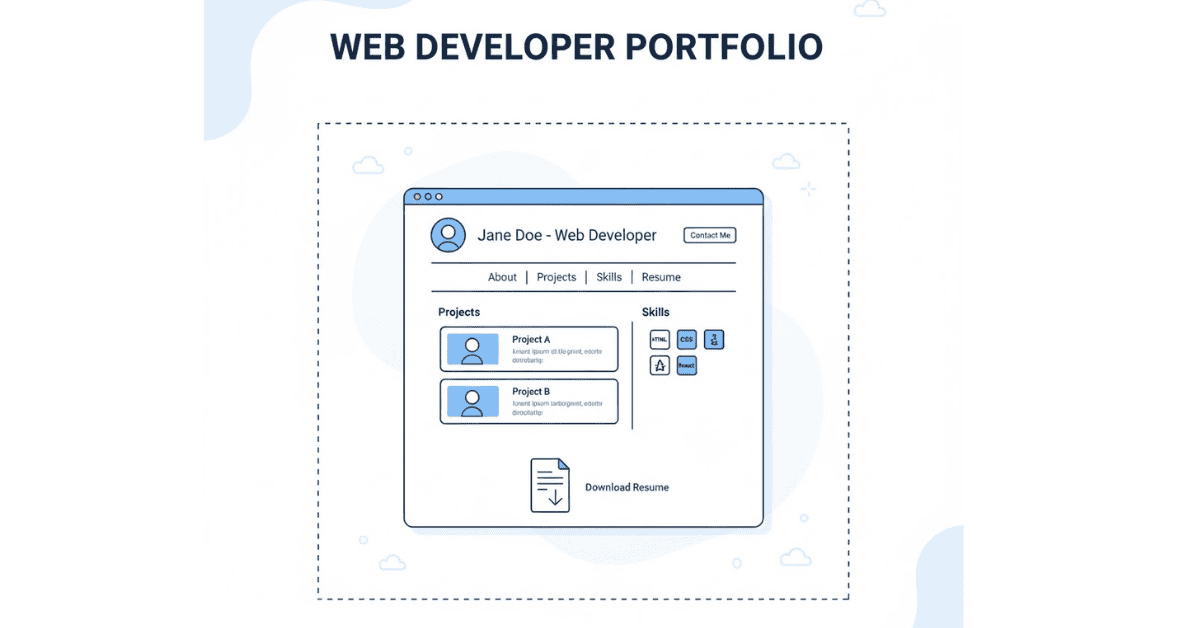
Section A: Building Your Professional Portfolio
Why You Need a Portfolio
Your portfolio is your digital proof of skills. While resumes tell employers what you know, portfolios show them what you can do. A strong portfolio often makes the difference between getting an interview or being overlooked, especially for freshers without work experience.
Essential Portfolio Components
- Professional Homepage
Create a clean landing page introducing yourself with:
- Professional photo (optional but recommended)
- Brief introduction (2-3 sentences about who you are)
- Core skills listed clearly
- Call-to-action buttons (View Projects, Contact Me)
- Links to GitHub, LinkedIn, and resume download
- Projects Showcase
Display 4-6 quality projects with:
- Project title and brief description
- Technologies used (HTML, CSS, JavaScript, Bootstrap, React, etc.)
- Challenges faced and how you solved them
- Live demo link and GitHub repository link
- Screenshots or GIFs showing functionality
- About Section
Share your story:
- Background and what led you to web development
- Training and certifications
- Skills organized by category (Languages, Frameworks, Tools)
- Personal interests (shows you’re human)
- Contact Section
Make it easy for employers to reach you:
- Working contact form with validation
- Email address and phone number
- Social media links (LinkedIn, GitHub, Twitter)
- Professional business hours note (optional)
Project Ideas to Include
Beginner Projects:
- Personal portfolio website (must-have)
- Responsive landing page for a business/service
- Simple calculator or to-do list application
- Restaurant or cafe website with menu
Intermediate Projects:
- Multi-page business website with contact form
- Weather application using API
- Quiz application with score tracking
- E-commerce product landing page
Advanced Projects:
- Full e-commerce website with cart functionality
- Social media dashboard clone
- Blog platform with CRUD operations
- Interactive data visualization dashboard
Portfolio Hosting Options
Free Hosting Platforms:
- GitHub Pages: Perfect for static sites, free custom domain support
- Netlify: Easy deployment, continuous integration with GitHub
- Vercel: Great for React projects, fast deployment
- Render: Supports both static and dynamic sites
Domain Recommendations:
- Use your name if available: yourname.com or yourname.dev
- Keep it professional and easy to remember
- Consider .dev, .tech, or .me domains for tech portfolios
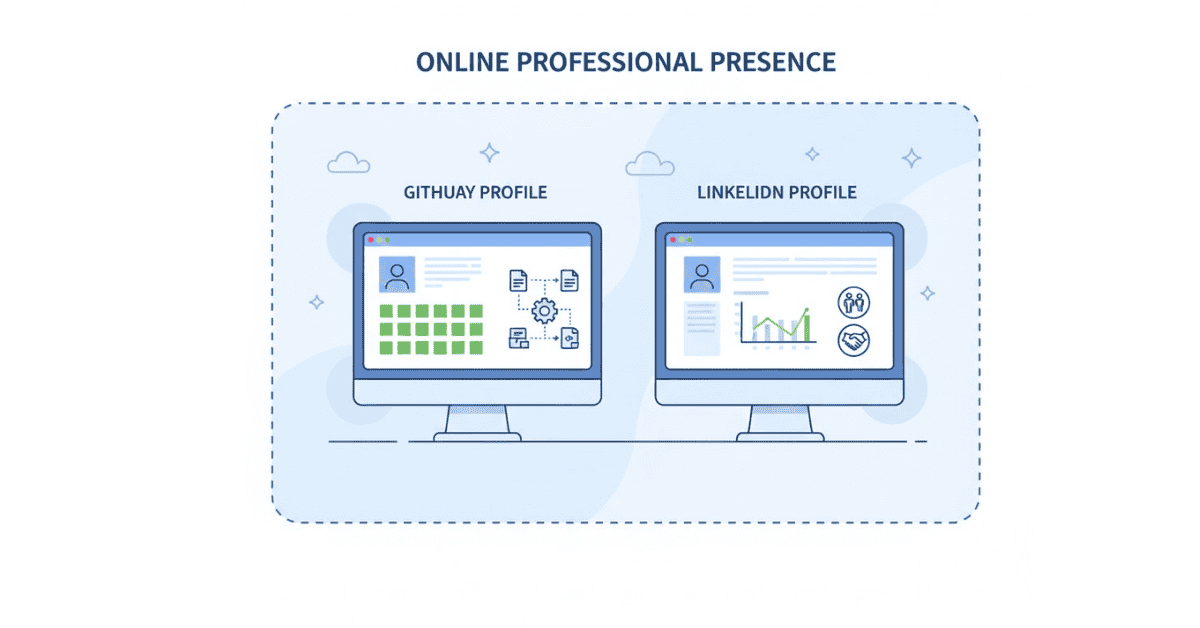
Section B: Resume and LinkedIn Optimization
Web Developer Resume Structure
Header:
- Full name (larger font)
- Phone number | Email | Location (City)
- LinkedIn URL | GitHub URL | Portfolio Website
Professional Summary (3-4 lines):
“Recent Web Development graduate from Frontlines Edutech with hands-on experience in HTML5, CSS3, JavaScript, Bootstrap, and React. Built 6+ responsive websites demonstrating proficiency in front-end development and UI/UX principles. Passionate about creating user-friendly interfaces and continuously learning emerging technologies. Seeking entry-level front-end developer role to contribute clean, maintainable code.”
Technical Skills (Organized by Category):
- Languages: HTML5, CSS3, JavaScript (ES6+)
- Frameworks/Libraries: Bootstrap 5, React.js, jQuery
- Tools & Technologies: Git, GitHub, VS Code, Chrome DevTools, Figma
- Design Skills: Responsive Design, Mobile-First Approach, Flexbox, CSS Grid
- Other: RESTful APIs, JSON, SEO Basics, Web Accessibility (WCAG)
Projects (3-5 Most Impressive):
Project Name | Technologies Used | GitHub | Live Demo
- Brief description highlighting the problem solved and your contribution
- Key features implemented (bullet points)
- Quantifiable results if possible (load time, responsiveness score, etc.)
Example:
E-Commerce Landing Page | HTML, CSS, Bootstrap, JavaScript | [GitHub] | [Live]
- Designed and developed responsive landing page for online retail store
- Implemented product carousel, interactive filtering, and form validation
- Achieved 95+ PageSpeed Insights score and 100% mobile responsiveness
- Reduced page load time to under 2 seconds through image optimization
Education:
Bachelor of Technology in [Your Branch] | [College Name] | [Year]
- Relevant coursework: Data Structures, Web Technologies, Database Management
Certifications & Training:
Web Development with VibeCoding | Frontlines Edutech | [Completion Date]
- Completed intensive training covering HTML, CSS, JavaScript, Bootstrap, React
- Built 6+ hands-on projects demonstrating full front-end development lifecycle
Achievements (Optional but Recommended):
- Successfully completed 10+ coding challenges on [platform]
- Contributed to open-source project [name] on GitHub
- Scored 100% accessibility score on portfolio website
Resume Best Practices
Do:
- Keep it to one page for entry-level positions
- Use clean, professional fonts (Arial, Calibri, or similar)
- Include keywords from job descriptions
- Use action verbs (Developed, Implemented, Designed, Built)
- Quantify achievements when possible (numbers stand out)
- Save as PDF to preserve formatting
- Name file professionally: FirstName_LastName_WebDeveloper.pdf
Don’t:
- Use fancy graphics or colors (unless applying to design roles)
- Include personal information like marital status, age, photo (in India, photo is acceptable)
- List irrelevant work experience
- Use generic objectives (“Seeking a challenging position…”)
- Include skills you don’t actually have
- Make grammar or spelling mistakes (proofread multiple times)
LinkedIn Profile Optimization
Professional Photo:
- Use clear headshot with neutral background
- Dress professionally
- Smile naturally and make eye contact with camera
Headline (Beyond just “Web Developer”):
Examples:
- “Front-End Web Developer | HTML, CSS, JavaScript, React | Building Responsive User Experiences”
- “Junior Web Developer | Passionate about Clean Code & User-Centric Design”
- “Web Developer | Trained at Frontlines Edutech | Specializing in Responsive Web Design”
About Section (Tell Your Story):
Write 3-5 paragraphs in first person:
- Start with a hook about your passion for web development
- Describe your journey and training
- Highlight key skills and what you bring to teams
- Mention what you’re looking for career-wise
- End with a call-to-action (contact info or invitation to connect)
Experience Section:
Even without formal job experience, add:
- Intern/Trainee – Frontlines Edutech (with project descriptions)
- Freelance Projects (if you did any)
- College Projects (if relevant to web development)
Skills Section:
- Add all relevant technical skills
- Prioritize skills listed in job descriptions you’re targeting
- Get endorsements from classmates and mentors
Recommendations:
Request recommendations from:
- Training instructors/mentors
- Classmates who worked with you on projects
- Anyone who can vouch for your technical abilities or work ethic
Activity:
- Share relevant articles about web development
- Post about projects you’re working on
- Engage with content from companies you’d like to work for
- Join web development groups and participate in discussions
Section C: GitHub Profile Best Practices
Why GitHub Matters
Employers review GitHub profiles to assess code quality, consistency, and genuine interest in development. An active, well-organized GitHub profile can be as important as your resume.
Profile Optimization
Profile Picture and Bio:
- Use the same professional photo as LinkedIn for consistency
- Write a brief bio mentioning your role and interests
- Add location and portfolio website link
Pinned Repositories:
Pin your 6 best projects to showcase:
- Variety of skills (different technologies)
- Your most polished, complete work
- Projects that solve real problems
README Files (Critical!):
Every project should have a detailed README with:
- Project Title and Description: What it does and why you built it
- Technologies Used: List all languages, frameworks, tools
- Features: Bullet-point list of main functionality
- Screenshots/GIFs: Visual demonstration of the project
- Installation Instructions: How to run it locally
- Live Demo Link: Hosted version URL
- Challenges and Learnings: What you learned or problems solved
- Future Improvements: Shows you think beyond current implementation
- Contact: Your email or LinkedIn for questions
Profile README (Special Repository):
Create a repository with the same name as your username to display on your profile:
- Introduction and current focus
- Skills with icons/badges
- Projects showcase
- GitHub statistics (using GitHub stats widgets)
- How to reach you
Commit Best Practices:
- Write clear, descriptive commit messages
- Commit regularly (shows consistent activity)
- Use present tense: “Add contact form” not “Added contact form”
- Group related changes into single commits
Code Quality:
- Use consistent indentation and formatting
- Add comments explaining complex logic
- Organize files logically (separate folders for CSS, JS, images)
- Remove commented-out code before pushing
Section D: Technical Interview Preparation
Coding Challenge Platforms
Practice on these platforms to build problem-solving skills:
Beginner-Friendly:
- freeCodeCamp: Structured curriculum with projects
- Codecademy: Interactive lessons and practice
- W3Schools: Quick reference and simple exercises
Challenge-Based:
- Frontend Mentor: Real-world design challenges
- CodePen Challenges: Weekly creative coding challenges
- CSS Battle: CSS-specific puzzles
Advanced (for later):
- LeetCode: Algorithm and data structure problems
- HackerRank: Web development and JavaScript challenges
- Codewars: Gamified coding challenges
Common Technical Test Formats
Take-Home Assignments:
- Build a small project within 24-48 hours
- Follow instructions carefully
- Write clean, well-documented code
- Include README with setup instructions
- Test thoroughly before submitting
Live Coding Sessions:
- Share screen while solving problems
- Think aloud to show your process
- Ask clarifying questions before starting
- Test your solution before declaring it complete
- Don’t panic if stuck; explain your thought process
Code Review Exercises:
- Review provided code for bugs or improvements
- Explain what’s wrong and why
- Suggest specific fixes
- Consider readability, performance, and best practices
Whiteboard/Problem-Solving Approach
Step-by-Step Method:
- Understand the Problem:
- Read carefully and identify requirements
- Ask clarifying questions
- Restate the problem in your own words
- Plan Your Solution:
- Think through the logic before writing code
- Consider edge cases
- Sketch out pseudocode if helpful
- Implement:
- Write clean, readable code
- Use meaningful variable names
- Add comments for complex sections
- Test:
- Walk through your code with example inputs
- Consider edge cases and error scenarios
- Fix bugs as you find them
- Optimize (if time permits):
- Look for ways to improve efficiency
- Consider alternative approaches
- Explain trade-offs in your decisions
Section E: Company Research and Job Search Strategy
Researching Companies
Before applying or interviewing, research:
Company Basics:
- What products/services they offer
- Company size and locations
- Recent news or achievements
- Company culture and values
Technical Stack:
- Technologies they use (check job descriptions)
- Projects they’re known for
- Developer blog or tech talks
Where to Look:
- Company website (especially About and Careers pages)
- LinkedIn company page
- Glassdoor reviews
- TechCrunch or similar tech news sites
- Their engineering blog if available
Job Search Platforms
Indian Job Portals:
- Naukri.com
- Indeed India
- Internshala (for internships)
- Freshersworld.com
- LinkedIn Jobs
- AngelList (for startups)
Company Career Pages:
- Apply directly on company websites
- Often better response rate than job portals
- Shows genuine interest in that specific company
Networking:
- LinkedIn connections (alumni, trainers, industry professionals)
- Web development meetups and events
- Online communities (Discord, Slack groups)
- Referrals from people you know in the industry
Application Strategy
Quality Over Quantity:
- Better to apply to 20 companies with tailored applications than 100 with generic ones
- Customize resume and cover letter for each application
- Follow up if you don’t hear back within a week
Keywords Optimization:
- Read job descriptions carefully
- Include exact keywords they use in your resume
- Many companies use ATS (Applicant Tracking Systems) that scan for keywords
Application Tracking:
Create a spreadsheet tracking:
- Company name
- Position applied for
- Date applied
- Application status
- Contact person (if any)
- Follow-up dates
- Interview dates/notes
Section F: Salary Negotiation and Offer Evaluation
Understanding Entry-Level Salary Ranges
Indian Market (As of 2025):
Entry-level web developer salaries vary by:
- Location: Metro cities (Mumbai, Bangalore, Hyderabad) pay 20-40% more
- Company Type: Product companies generally pay more than service companies
- Company Size: Startups vs. established companies have different ranges
Typical Ranges (Annual):
- Service Companies: ₹2.5-4 lakhs
- Product Companies: ₹3.5-6 lakhs
- Startups: ₹3-5 lakhs (sometimes with equity)
- Large Tech Companies: ₹5-8 lakhs
Note: These are rough estimates and can vary significantly based on your skills, portfolio, and negotiation.
Negotiation Tips
When to Negotiate:
- After receiving a written offer (not during initial screening)
- When you have multiple offers to compare
- If the offer is significantly below market rate
How to Negotiate Professionally:
- Express Enthusiasm First:
“Thank you so much for the offer! I’m really excited about the opportunity to join your team and contribute to [specific project/goal].” - Then Discuss Compensation:
“I’ve been researching market rates for entry-level developers with my skill set in [city], and I was hoping we could discuss the compensation package. Based on my research and the value I bring through [specific skills/projects], I was expecting something in the range of [X-Y]. Is there flexibility in the current offer?” - Be Ready to Justify:
- Reference your projects and skills
- Mention other offers (without naming companies) if applicable
- Emphasize your long-term value to the company
- Consider the Full Package:
Beyond salary, evaluate:
- Learning opportunities and mentorship
- Career growth potential
- Work-life balance
- Health insurance and benefits
- Remote work options
- Training and certification budgets
What Not to Do:
- Don’t be aggressive or make ultimatums
- Don’t lie about other offers
- Don’t focus only on money in first interview
- Don’t accept immediately—ask for 24-48 hours to consider
Evaluating Multiple Offers
Create a Comparison Matrix:
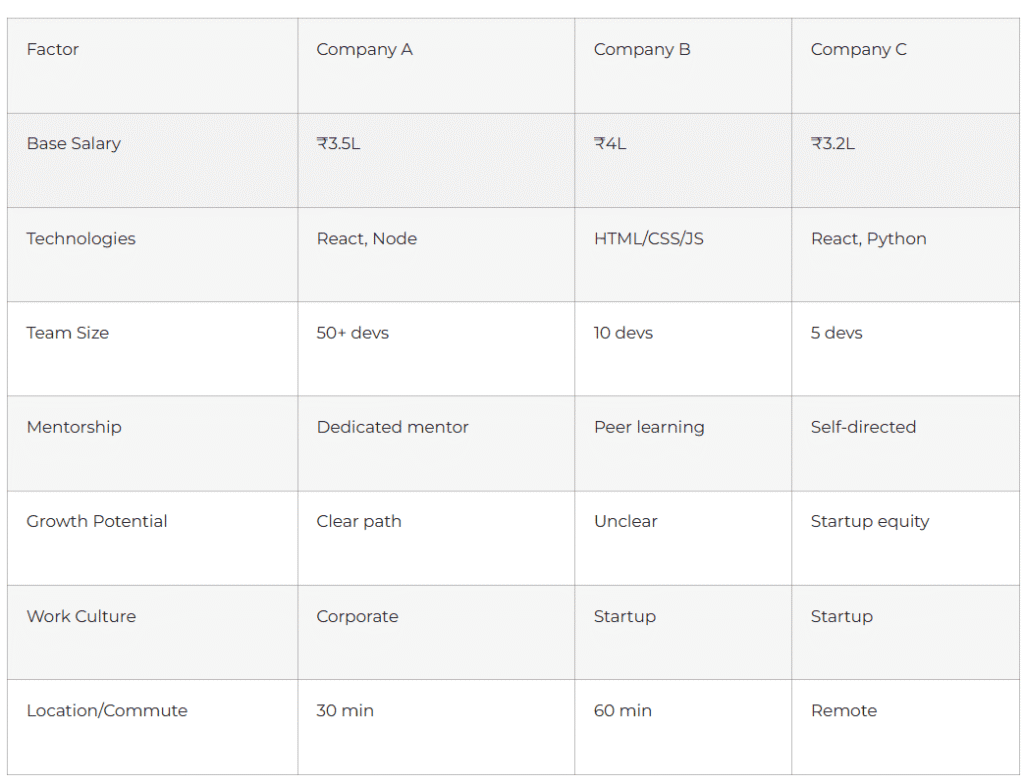
Assign weights to factors based on your priorities, then score each company.
Accepting an Offer Professionally
Written Acceptance:
Send formal email with:
- Expression of gratitude
- Confirmation of position, start date, and salary
- Request for written offer letter if not provided
- Enthusiasm about joining the team
Sample:
“Dear [Hiring Manager],
I am delighted to accept the Web Developer position at [Company Name] with a starting date of [date] and an annual salary of [amount]. Thank you for this wonderful opportunity.
I’m excited to contribute to the team and begin working on [specific project/goal discussed]. Please let me know if you need any documentation from me before my start date.
Looking forward to joining the team!
Best regards,
[Your Name]”
Section G: First 90 Days on the Job
Week 1: Orientation and Setup
Technical Setup:
- Set up development environment (IDE, tools, access)
- Install required software and plugins
- Get access to code repositories and documentation
- Understand version control workflow
Team Integration:
- Introduce yourself to all team members
- Schedule one-on-one meetings with key colleagues
- Understand team structure and roles
- Learn communication channels (Slack, email, meetings)
Learning:
- Review existing codebase
- Read all documentation available
- Understand coding standards and best practices
- Ask questions freely—everyone expects this in week one
Month 1: Foundation Building
Goals:
- Complete assigned onboarding tasks
- Fix simple bugs to understand codebase
- Start contributing to small features
- Establish daily routine and workflows
Best Practices:
- Take detailed notes during meetings
- Create personal documentation of learnings
- Ask for code reviews on everything you write
- Observe how senior developers work
Months 2-3: Gaining Confidence
Goals:
- Take ownership of complete features
- Participate actively in team discussions
- Help with code reviews for peers
- Identify areas for improvement in processes
Professional Development:
- Request regular feedback from your manager
- Identify skills gaps and create learning plan
- Attend team meetings and training sessions
- Build relationships beyond immediate team
Success Indicators
You’re Doing Well If:
- Team trusts you with increasingly complex tasks
- Your code reviews have fewer comments over time
- Colleagues seek your input on decisions
- You feel comfortable asking and answering questions
- You understand the product and business goals
Section H: Continuous Learning Resources
Free Learning Platforms
Comprehensive Courses:
- freeCodeCamp: Full curriculum from basics to advanced
- The Odin Project: Project-based full-stack curriculum
- MDN Web Docs: Official web technology documentation
- W3Schools: Quick reference and tutorials
Video Tutorials:
- Traversy Media (YouTube): Practical project tutorials
- Web Dev Simplified (YouTube): Concept explanations
- Kevin Powell (YouTube): CSS specialist
- Net Ninja (YouTube): Comprehensive series
Interactive Practice:
- Frontend Mentor: Real-world design challenges
- JavaScript30: 30-day vanilla JavaScript challenge
- CSS Grid Garden: Learn grid through games
- Flexbox Froggy: Learn flexbox through games
Blogs and Articles
Must-Follow Blogs:
- CSS-Tricks: CSS techniques and tutorials
- Smashing Magazine: Design and development articles
- Dev.to: Community-driven development content
- Medium (Web Development tag): Various perspectives
Books Worth Reading
Fundamentals:
- “HTML and CSS: Design and Build Websites” by Jon Duckett
- “JavaScript and jQuery” by Jon Duckett
- “Eloquent JavaScript” by Marijn Haverbeke (free online)
Advanced:
- “You Don’t Know JS” series by Kyle Simpson (free online)
- “CSS: The Definitive Guide” by Eric Meyer
Communities to Join
Online Communities:
- Reddit: r/webdev, r/learnprogramming, r/Frontend
- Discord: freeCodeCamp, The Programmer’s Hangout, Frontend Developers
- Stack Overflow: Ask and answer questions
- Dev.to: Write articles and engage with community
Local Communities:
- Meetup.com for local developer meetups
- GDG (Google Developer Groups) in your city
- College coding clubs and hackathons
Section I: Mental Preparation and Interview Psychology
Managing Interview Anxiety
Before the Interview:
- Practice deep breathing exercises
- Review your preparation notes, don’t cram new information
- Visualize yourself succeeding in the interview
- Get good sleep the night before
- Eat a light meal before the interview
During the Interview:
- Remember that interviewers want you to succeed
- Take a moment to think before answering
- If nervous, acknowledge it naturally: “I’m a bit nervous, but excited!”
- Focus on the conversation, not on judging yourself
After the Interview:
- Don’t overthink what you could have said differently
- Write down questions you struggled with for future practice
- Send thank-you email within 24 hours
- Continue applying to other opportunities
Handling Rejection
Perspective:
- Rejection is normal—even experienced developers face it
- Each interview is practice for the next one
- Sometimes it’s about fit, not your skills
- Many successful developers were rejected multiple times
Action Steps:
- Request feedback if possible (politely)
- Identify specific areas to improve
- Practice those areas before next interview
- Stay positive and maintain momentum
- Remember: you only need one “yes”
Building Confidence
Technical Confidence:
- Build projects consistently—every project increases confidence
- Solve one coding challenge daily
- Teach what you learn (blog, help others)
- Celebrate small wins and progress
Interview Confidence:
- Practice with friends or mentors
- Record yourself answering questions
- Start with companies you’re less interested in for practice
- Remember your strengths and achievements
Section J: Final Preparation Checklist
One Week Before Interview
Technical Review:
- [ ] Review all questions from Part 1
- [ ] Practice coding challenges similar to your level
- [ ] Review your portfolio projects thoroughly
- [ ] Test all live demo links to ensure they work
- [ ] Review common algorithms and problem-solving patterns
Materials Preparation:
- [ ] Update resume with latest projects
- [ ] Print 2-3 copies of resume (for in-person)
- [ ] Prepare portfolio presentation (if asked to present)
- [ ] Organize work samples on USB drive as backup
Company Research:
- [ ] Research company background and recent news
- [ ] Understand their products/services
- [ ] Review the job description carefully
- [ ] Prepare questions to ask them
- [ ] Check their tech stack and familiarize yourself
Day Before Interview
Final Preparation:
- [ ] Review your STAR method answers
- [ ] Practice introducing yourself confidently
- [ ] Prepare outfit (business casual, clean and pressed)
- [ ] Test video/audio setup if virtual interview
- [ ] Charge laptop and phone fully
- [ ] Plan route/transportation if in-person
Mental Preparation:
- [ ] Get 7-8 hours of sleep
- [ ] Avoid cramming—light review only
- [ ] Visualize success
- [ ] Prepare mentally for various scenarios
Interview Day
Morning:
- [ ] Eat a healthy breakfast
- [ ] Dress professionally
- [ ] Arrive 10-15 minutes early (not too early)
- [ ] Bring pen, notebook, resume copies
- [ ] Turn off phone or put on silent
During:
- [ ] Greet everyone professionally
- [ ] Listen carefully to questions
- [ ] Take your time to think before answering
- [ ] Ask clarifying questions if needed
- [ ] Show enthusiasm and genuine interest
- [ ] Take notes during the interview
After:
- [ ] Thank everyone for their time
- [ ] Ask about next steps
- [ ] Send thank-you email within 24 hours
- [ ] Note down questions you struggled with
- [ ] Reflect on what went well and what to improve
Conclusion
Remember These Key Points
Technical skills are just one part of getting hired. Employers also look for:
- Communication: Can you explain your work clearly?
- Problem-solving: Do you think logically and systematically?
- Attitude: Are you eager to learn and grow?
- Cultural fit: Will you work well with the team?
- Consistency: Do your portfolio, resume, and interview align?
Your Competitive Advantages
As a Frontlines Edutech graduate, you have:
- Hands-on project experience
- Industry-relevant curriculum
- Portfolio of real work
- Practical problem-solving experience
- Understanding of complete development lifecycle
Success Mindset
Embrace this journey:
- Every interview is a learning opportunity
- Rejection doesn’t define your worth or skills
- Persistence pays off—keep applying and improving
- Your first job is about learning, not just earning
- You’re building a career, not just getting a job
Final Encouragement
You’ve invested time in learning web development. You’ve built projects. You’ve prepared thoroughly with this guide. Now it’s time to showcase your skills confidently. Remember that every successful developer started exactly where you are now. The difference between those who succeed and those who don’t is simply persistence and continuous improvement.
Your preparation is complete. Your skills are real. Your time is now.
Go ace those interviews! 🚀
Quick Reference: Interview Day Mantras
- “I am prepared, and I know my work well.”
- “It’s okay not to know everything—learning attitude matters more.”
- “I will ask clarifying questions when needed.”
- “I will focus on communicating clearly, not just being right.”
- “This is a conversation, not an interrogation.”
- “I bring unique value through my projects and experience.”
- “Even if this doesn’t work out, I’m gaining valuable experience.”
- “I will be genuine, professional, and confident.”
🎯 Your Web Development Career Starts Now!
Take control of your learning journey — build skills, projects, and confidence with Frontlines Edutech.