
90-Day AI-Powered Graphic Design Course Roadmap: From Zero to Job-Ready
Table of Contents
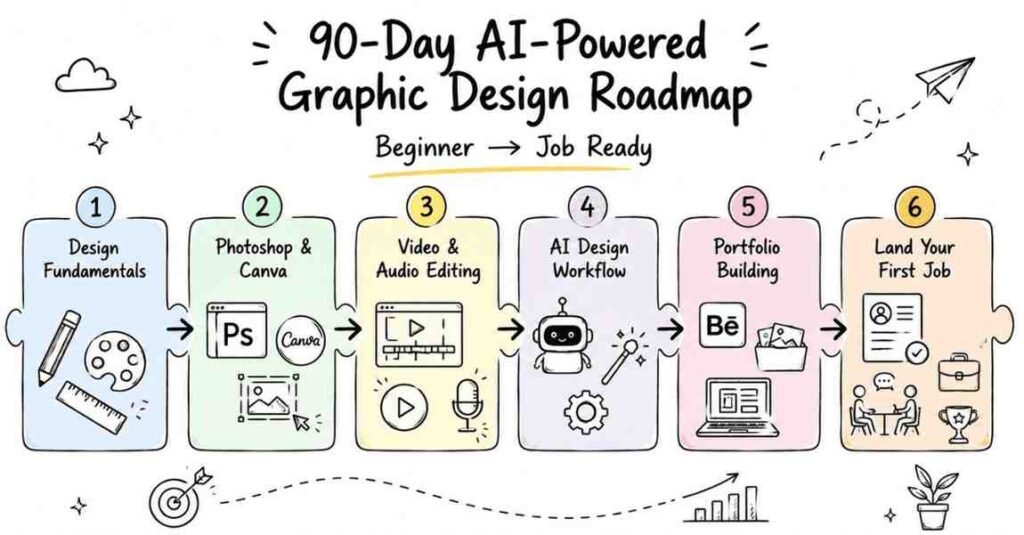
This is a structured, day-by-day 90-day roadmap to become a job-ready graphic designer covering Adobe Photoshop, Canva, Premiere Pro, Adobe Audition, and AI-assisted design workflows. Built on Frontlines Edutech’s Graphic Design course curriculum, this plan is designed for students and creative freshers across India who want to turn their artistic instincts into a professional career with or without prior design experience. India’s graphic design job market is booming: entry-level designers earn ₹3–5 LPA, UI/UX specialists start at ₹5–8 LPA, and experienced creatives command ₹15–25 LPA. By Day 90, you’ll have a professional portfolio of 10+ projects, an optimised Behance profile, and the interview confidence to land roles at agencies, product companies, and top corporates or launch your own freelance business.
Why Graphic Design Is One of the Smartest Career Choices Right Now
Every company from a Hyderabad startup to Infosys needs designers. Content is exploding, and brands can’t keep up with demand for skilled creatives. Here’s why this career path makes sense in 2025:
- Every industry needs designers — IT, e-commerce, healthcare, FMCG, media, edtech, fintech
- Design roles are recession-resistant — companies cut budgets but never stop needing visual content
- Multiple income streams — full-time roles, freelance projects, social media retainers, agency work
- Tools like AI + Canva + Adobe have lowered barriers — the real advantage now is knowing how and when to use each one
- Cities like Hyderabad, Bangalore, Mumbai, Pune, and Chennai are hiring designers at every experience level
You don’t need a fine arts degree. You need 90 days, the right tools, and a real portfolio.
Start Your AI-Powered Graphic Design Journey, Explore Graphic Design Courses →
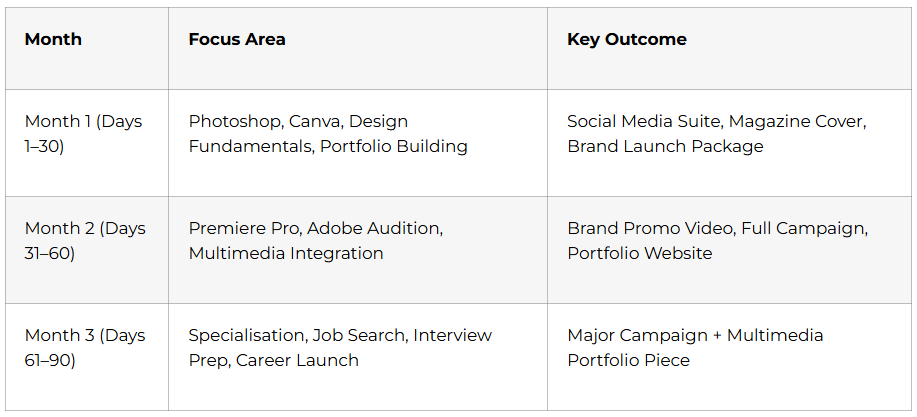
The 3-Month Learning Structure at a Glance
Month 1: Foundation Building (Days 1–30)
The first 30 days build the design instincts and software confidence you’ll use every single day in your career. Don’t rush every principle you learn here compounds in Months 2 and 3.
Week 1: Design Fundamentals & Photoshop Basics (Days 1–7)
- Day 1 — What graphic design really means in 2025, design principles (balance, contrast, alignment, hierarchy), career paths overview, workspace setup
- Day 2 — Photoshop interface: panels, tools, menus, resolution concepts, saving in professional formats
- Day 3 — Selection tools (Marquee, Lasso, Magic Wand, Quick Selection), layers, blending modes, opacity; first composite image
- Day 4 — Cropping, resizing, Transform tools (Scale, Rotate, Skew, Distort) — preparing one image in 5 platform-specific sizes
- Day 5 — Colour correction and adjustment layers: brightness, contrast, hue/saturation, non-destructive editing
- Day 6 — Typography fundamentals: font pairing, hierarchy, spacing, alignment; create a motivational quote poster
- Day 7 — Week 1 Project: Complete social media graphics suite 3 Instagram posts, 1 Facebook cover, 1 Twitter header for a fictional brand
💡 Career Tip: From Day 1, save every project you build even the messy ones. Your portfolio starts here, not on Day 89.
Week 2: Advanced Photoshop Techniques (Days 8–14)
This is the week that separates designers who look amateur from those who look professional.
- Day 8 — Advanced selection and masking: Pen Tool precision, refine edge for hair/fur, layer masks for non-destructive editing
- Day 9 — Photo retouching: spot healing, clone stamp, patch tools, frequency separation for skin with ethical discussion on realistic retouching
- Day 10 — Beauty enhancement: dodge and burn, liquify, professional retouching workflows for consistency across shoots
- Day 11 — Text effects and 3D typography: layer styles, metallic text, neon signs, embossed letters; design a movie poster title
- Day 12 — Photo manipulation and creative effects: blend modes, filters, adjustment layers to composite surreal scenes
- Day 13 — Compositing mastery: lighting consistency, perspective matching, colour harmony, shadow creation, depth-of-field simulation
- Day 14 — Week 2 Capstone: Professional magazine cover advanced selection, retouching, typography, effects, and composition
Week 3: Canva for Rapid Design & Brand Creation (Days 15–21)
Canva is what clients use daily. Knowing both Photoshop and Canva makes you twice as employable.
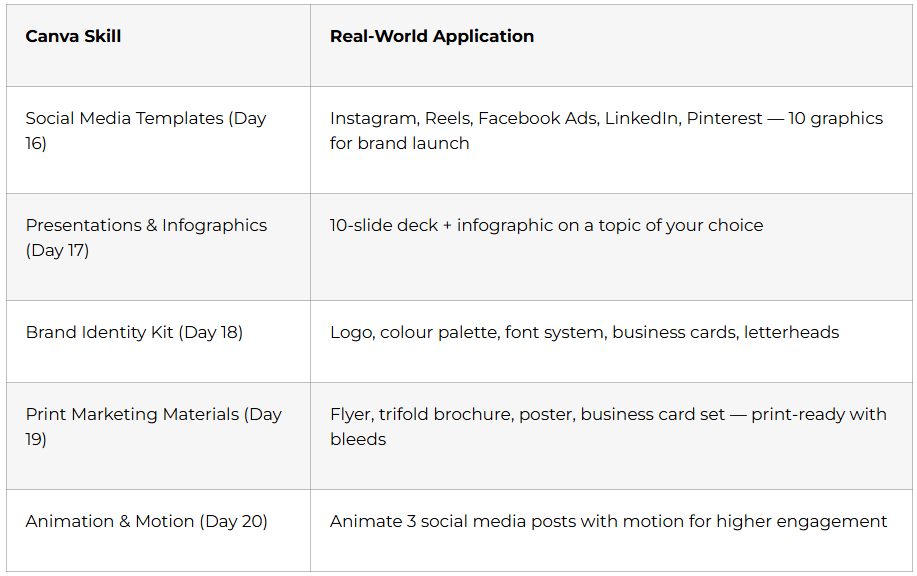
- Day 21 — Week 3 Project: Complete brand launch package logo, business cards, social presence, presentation deck, and promotional flyer for a fictional startup
Week 4: Portfolio Development & Month 1 Review (Days 22–30)
- Day 22 — Portfolio strategy: what to include, how to present work, analysing successful Behance and Dribbble portfolios
- Day 23 — Set up professional Behance profile: case study format, compelling project descriptions, tagging for discoverability
- Day 24 — Asset collection: Unsplash, Pexels, Freepik, Adobe Stock — licensing rules, building your personal asset library (100+ curated)
- Day 25 — Client communication: reading briefs, asking clarifying questions, managing expectations, presenting design rationale
- Day 26 — Feedback and iteration: peer critique session — separate personal attachment from professional work
- Day 27 — Month 1 Assessment: Timed design challenge simulating real-world brief with deadline
- Day 28 — Designer resume + LinkedIn profile optimisation with portfolio samples and skill keywords
- Day 29 — Industry insights: career paths in UI/UX, motion, branding, and marketing design; salary expectations by specialisation
- Day 30 — Portfolio review and feedback — personalised instructor assessment, goal-setting for Month 2
🏆 Month 1 Milestone: You can design professional graphics in Photoshop and Canva. Your portfolio has 5+ projects. You are a designer.
Month 2: Motion & Video Design (Days 31–60)
Designers who can also produce video are the most in-demand creatives in India’s current job market. Month 2 adds the skills that let you charge more and do more.
Week 5: Adobe Premiere Pro Basics (Days 31–37)
- Day 31 — Video editing concepts: resolution standards, frame rates, aspect ratios; why designers with video skills command higher rates
- Day 32 — Premiere Pro interface: timeline, source/program monitors, panels, project organisation
- Day 33 — Basic editing: razor tool, ripple edit, slip and slide; 1-minute edit from provided footage
- Day 34 — Transitions (cross dissolves, wipes, slides) and basic effects: brightness, speed changes, stabilisation
- Day 35 — Animated titles, lower thirds, and graphic overlays — integrating your Photoshop/Canva skills into video
- Day 36 — Audio basics: level management, noise removal, music balance with dialogue, audio transitions
- Day 37 — Week 5 Project: Three social media videos (15–30 seconds each) — Instagram Reels, YouTube Shorts, Facebook Ad
Week 6: Advanced Premiere Pro (Days 38–44)
- Day 38 — Colour correction with Lumetri Color: fix white balance, exposure, and consistency across clips
- Day 39 — Colour grading for mood: cinematic grades, vintage effects, high-contrast styles three different moods from identical footage
- Day 40 — Essential Graphics panel: animated lower thirds, kinetic typography, dynamic title sequences with keyframe animation
- Day 41 — Multi-camera editing: sync multiple angles, angle switching for interviews and events
- Day 42 — Advanced effects and custom transitions: zoom transitions, glitch effects, VHS aesthetics for social media trends
- Day 43 — Exporting for platforms: YouTube, Instagram, TikTok, Facebook, broadcast codec, bitrate, file size optimization
- Day 44 — Week 6 Capstone: Complete brand promotional video (60–90 seconds) footage + graphics + colour grade + audio
Week 7: Audio Production with Adobe Audition (Days 45–51)
Audio is what separates amateur videos from broadcast-quality content. This week adds a skill most designers don’t have.
- Day 45 — Audition interface: waveform vs. multitrack view, sample rates, bit depth, audio file formats
- Day 46 — Noise reduction, hiss removal, audio restoration transform poor-quality recordings into broadcast-ready audio
- Day 47 — Multitrack mixing: volume automation, music beds, sound effects, creating dynamic soundscapes for 2-minute video
- Day 48 — Voice recording and podcast production: microphone basics, clean audio recording, mouth click removal, voice processing
- Day 49 — Audio effects: compression, EQ, reverb, delay design soundscapes for suspenseful, uplifting, energetic, and calm moods
- Day 50 — Dynamic Link and roundtrip workflow: edit audio in Audition while maintaining Premiere Pro timeline sync
- Day 51 — Week 7 Project: Complete audiovisual piece short brand story or documentary with integrated video and advanced audio mix
Week 8: Integration & Month 2 Portfolio (Days 52–60)
- Day 52 — Brand identity through multimedia: style guides spanning static graphics, video, and audio signatures
- Day 53 — Logo animation: reveal techniques, brand motion signatures in 3 different contexts (social, formal, website)
- Day 54 — Social media content calendar: 30-day plan with batch creation, templates, and efficient workflows
- Day 55 — Advanced Integration Project: Complete brand launch campaign logo, graphics suite, videos, and audio assets working together
- Day 56 — Portfolio website development: Wix, Squarespace, or WordPress; domain, hosting, project presentation
- Day 57 — Case study development: document your creative process (problem → concept → iteration → final) for 3 strongest projects
- Day 58 — Month 2 Assessment: Full multimedia brief Photoshop + Premiere Pro + Audition deliverables on a deadline
- Day 59 — Professional tools and workflow optimisation: Figma intro, Trello for project management, Dropbox for file sharing
- Day 60 — Month 2 portfolio review: instructor assessment, specialisation recommendations, Month 3 action plan
🏆 Month 2 Milestone: You can produce complete multimedia campaigns graphics, video, and audio. Your portfolio now has 10+ projects.
Month 3: Career Launch & Specialisation (Days 61–90)
The final month is about becoming hirable choosing your specialisation, dominating job platforms, cracking interviews, and launching your career with real projects.
Read the Complete Career Guide →
Week 9: Specialisation Deep Dive (Days 61–67)
Day 61 — Choose your design path based on job market analysis and your own strengths:
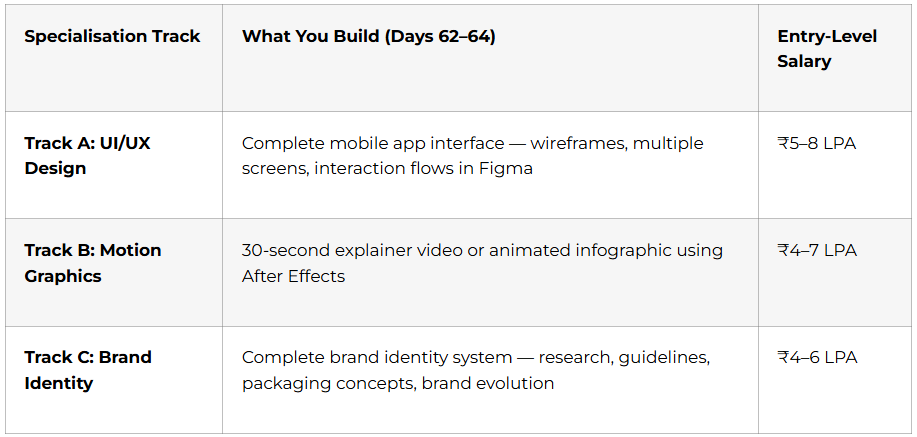
- Day 65 — Portfolio expansion: 2–3 additional projects specifically for your chosen specialisation path
- Day 66 — Specialisation tools: Figma / Adobe XD (UI/UX), After Effects / Cinema 4D (Motion), Illustrator advanced (Brand) one project in new software
- Day 67 — Week 9 Capstone: Major specialisation showcase project the portfolio piece that positions you for premium opportunities
Week 10: Job Search & Profile Optimisation (Days 68–74)
- Day 68 — India’s design job market: company types (product, agency, studio, corporate), salary bands by city and specialisation
- Day 69 — Create profiles on Behance Jobs, Dribbble Jobs, LinkedIn, Internshala, Naukri optimised for search algorithms, job alerts active
- Day 70 — LinkedIn deep optimisation: designer headline, about section with story arc, portfolio samples in featured section, recruiter-searchable keywords
- Day 71 — Behance and Dribbble mastery: case study format for Behance, visual-first shots for Dribbble, engagement and discoverability
- Day 72 — Designer resume + cover letter: ATS-friendly format with visual flair, quantify project impact, tailor per application
- Day 73 — Cold outreach and freelance platforms: Upwork, Fiverr, Freelancer, Total profile creation, pricing strategy, winning proposals
- Day 74 — Build your design network: communities, virtual meetups, Discord channels, design groups — relationships before you need them
Week 11: Interview Preparation (Days 75–81)
Design interviews are different from every other field — your work does half the talking. Prepare accordingly.
- Day 75 — What design interviews actually look like: portfolio presentations, skills tests, design challenges, cultural fit rounds
- Day 76 — Portfolio presentation mastery: tell stories about your process, not just your final output; defend design decisions confidently
- Day 77 — Technical design questions: principles, colour theory, typography, file formats, workflow — explaining concepts to non-designers
- Day 78 — Behavioural questions: STAR method (Situation, Task, Action, Result) stories on teamwork, handling criticism, meeting deadlines
- Day 79 — Design challenge practice: timed briefs (logo, social campaign, app screen, email newsletter) — think aloud, manage time
- Day 80 — Salary negotiation: research market rates by city and specialisation, how to present your value, when to negotiate
- Day 81 — Full Mock Interview Day: Portfolio presentation + technical + behavioural + design challenge — recorded for self-review
Week 12: Major Projects & Career Launch (Days 82–90)
- Days 82–84 — Major Project 1: Social Media Campaign
Full brand or product launch campaign: 10+ social media graphics (Photoshop/Canva), one 30–60 second video ad (Premiere Pro), complete audio mix (Audition) delivered on a real timeline - Days 85–87 — Major Project 2: Multimedia Portfolio Piece
Print-ready brochure or poster (Photoshop/Canva) + 60–90 second promotional video (Premiere Pro) + professionally mixed audio (Audition) your most comprehensive portfolio entry - Day 88 — Portfolio assembly: select strongest pieces, write cohesive case studies, build PDF portfolio for email applications, finalise all platform profiles
- Day 89 — Final Portfolio Presentations — present to classmates, instructors, and industry guests as if in a real interview; peer feedback, final refinements
- Day 90 — Certification & Career Launch — Frontlines Edutech course completion certificate, final career coaching, 30-day post-graduation action plan
🏆 Day 90 Milestone: 10+ portfolio projects. Professional Behance/Dribbble profile. ATS-ready resume. Mock interview completed. Design career begins.
Graphic Design Career Paths & Salary Guide
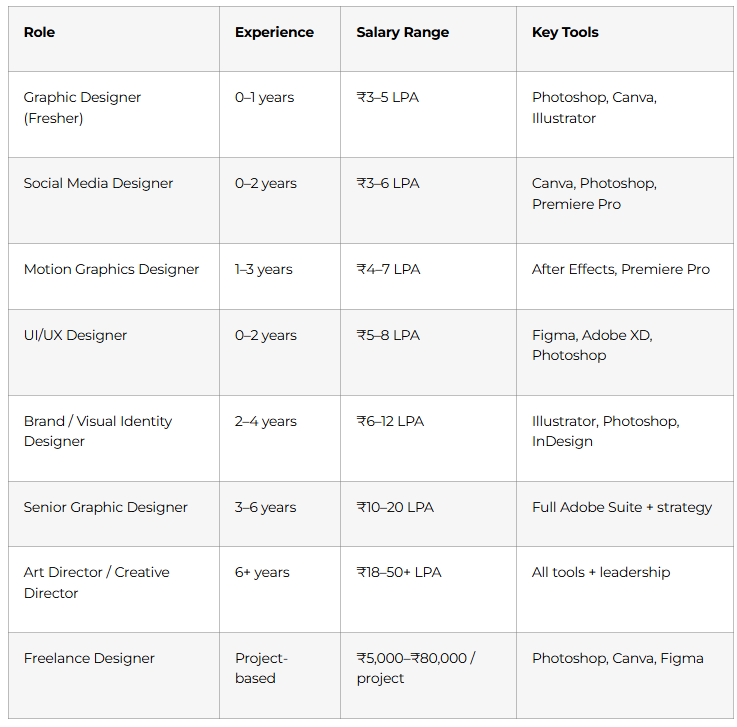
Top hiring cities: Hyderabad, Bangalore, Mumbai, Pune, Chennai, Gurgaon, Noida
Active hirers: Infosys, TCS, Accenture, Wipro, Cognizant, IBM, digital marketing agencies, D2C brands, media companies, and thousands of startups across India
Why Choose Frontlines Edutech for Your Design Career?
Frontlines Edutech is headquartered in Somajiguda, Hyderabad and has empowered thousands of students across the Telugu states to launch creative careers including freshers, arts students, commerce graduates, and IT professionals pivoting to design.
- Curriculum built from real job requirements — based on what companies like Infosys, TCS, and top agencies actually ask for
- 10+ real portfolio projects included in the course not theory-heavy assignments, but pieces you’ll actually show in interviews
- Telugu-friendly teaching — design principles, colour theory, and typography explained in the language you think in
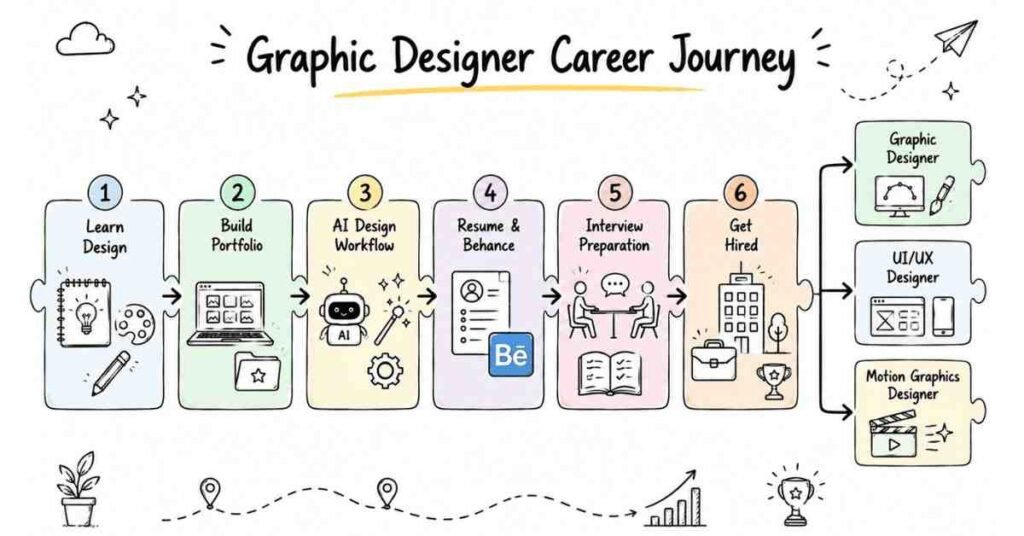
- Three specialisation tracks — choose UI/UX, Motion Graphics, or Brand Identity based on your strengths and market demand
- Complete career support — resume building, LinkedIn optimisation, mock interviews, and placement updates
- Affordable and transparent — quality design training at a fraction of what other institutes charge
Frequently Asked Questions
Q1: Do I need any prior design experience to start this graphic design course?
No prior design or software experience is needed. The course starts from Day 1 basics — design principles, Photoshop interface, and colour theory. It is designed for complete beginners including fresh graduates, arts students, and professionals switching careers.
Q2: What software will I learn in this 90-day graphic design roadmap?
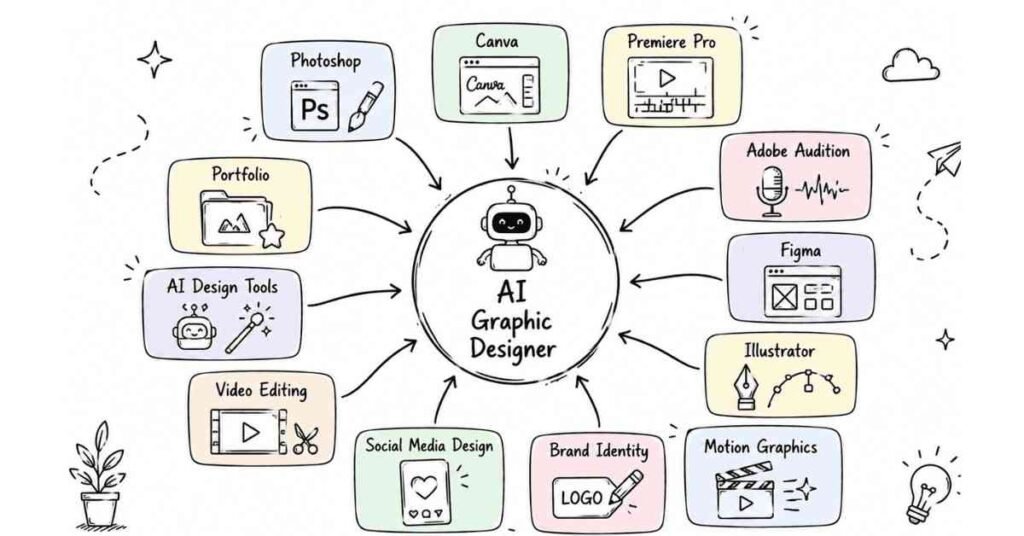
You’ll master Adobe Photoshop (photo editing and compositing), Canva (rapid design and branding), Adobe Premiere Pro (video editing), and Adobe Audition (audio production). Month 3 introduces Figma, After Effects, or Adobe Illustrator based on your chosen specialisation.
Q3: What is the salary for a graphic designer fresher in India?
Entry-level graphic designers earn ₹3–5 LPA in India. Specialisation increases starting salaries — UI/UX designers start at ₹5–8 LPA, motion graphics designers at ₹4–7 LPA. Hyderabad and Bangalore offer the most competitive packages for freshers.
Q4: Will I build a portfolio during this graphic design course?
Yes. Portfolio building starts from Day 7 and continues throughout all 90 days. By graduation, you’ll have 10+ completed projects including a social media graphics suite, magazine cover design, brand identity package, promotional video, multimedia campaign, and specialisation showcase project.
Q5: Can I freelance after completing this graphic design roadmap?
Yes. Week 10 covers freelance platforms including Upwork, Fiverr, Freelancer, and Total including profile creation, pricing strategy, and writing winning proposals. Many Frontlines Edutech graduates start freelancing during Month 3 while still completing the course.
Q6: Is video editing covered in this graphic design course?
Yes. Month 2 is fully dedicated to video: Adobe Premiere Pro basics, advanced colour grading, motion graphics, multi-camera editing, platform-specific exports, and Adobe Audition for audio production and mixing.
Q7: Does Frontlines Edutech provide placement support after the graphic design course?
Yes. Placement support includes resume building, LinkedIn and Behance profile optimisation, mock portfolio presentations, and active placement updates connecting you with hiring agencies, product companies, and startups. Support continues until you land your first role.
Q7: What is the difference between graphic design and UI/UX design?
Graphic design focuses on visual communication creating logos, posters, social media graphics, videos, and brand assets. UI/UX design focuses on digital product interfaces app screens, websites, user flows, and prototypes. This course covers both, with a dedicated UI/UX specialisation track in Month 3 using Figma.
Published by Frontlines Edutech | blog.frontlinesedutech.com
For enrollments: +91-83330 77727 | support@frontlinesedutech.com