Database Admin Interview Preparation Guide
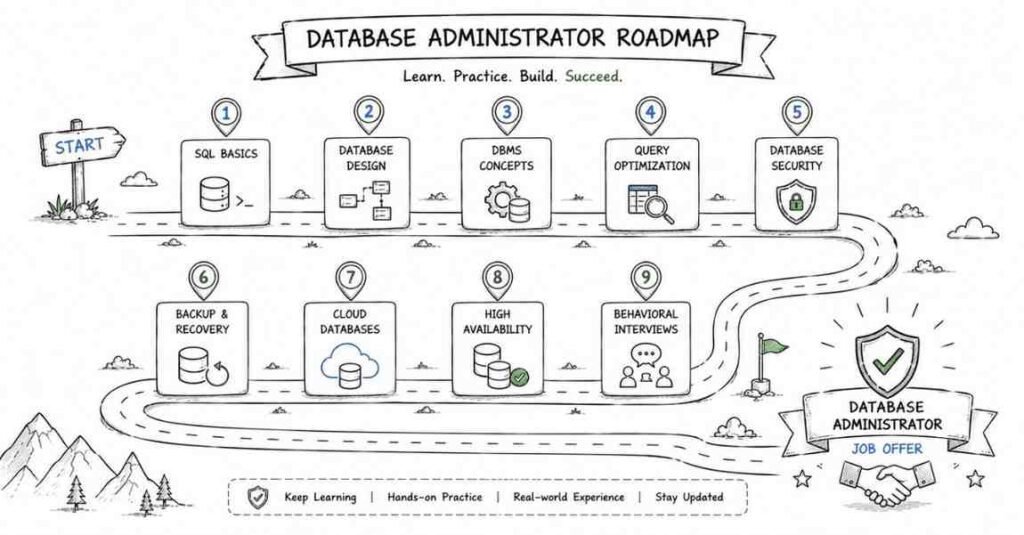
💡 Kickstart Your Database Career with a Step-by-Step Roadmap!
🚀 View Database Roadmap →
1. 245+ Technical Interview Questions & Answers
- Database Interview questions (30 Questions)
- SQL Basics and Advanced Queries (40 Questions)
- Database Performance Optimization (35 Questions)
- Backup and Recovery (30 Questions)
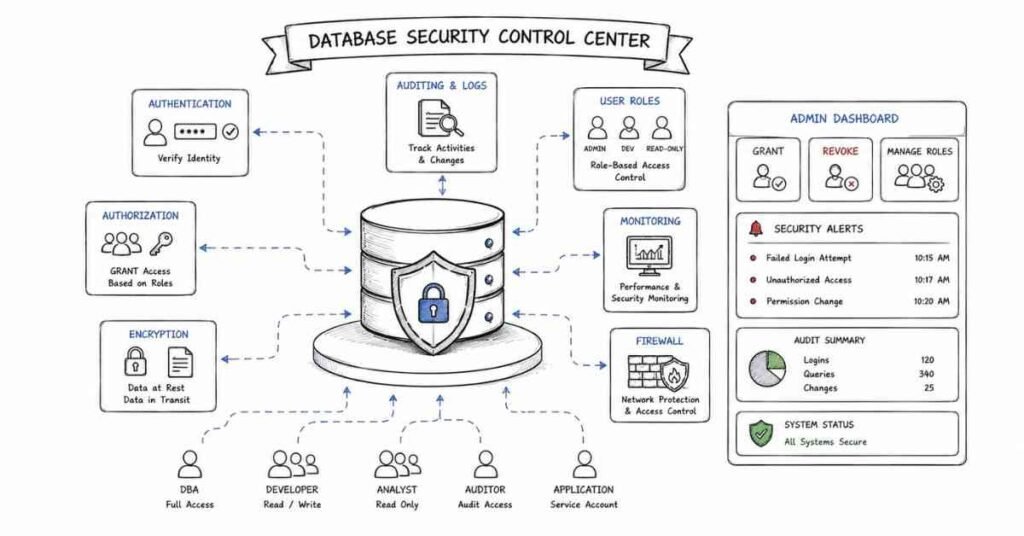
- Security and User Management (25 Questions)
- Platform-Specific Questions (40 Questions)
📚 Looking for more interview prep materials? 👉 Explore All Resources →
Section:1 Understanding Database Management Systems (30 questions)
Q1: What is a Database Management System, and why do we need it?
Think of a DBMS as a smart filing cabinet for your computer. Instead of throwing papers everywhere, you organize them properly so you can find what you need quickly. A DBMS helps store, manage, and retrieve data efficiently. Without it, every application would need to create its own way to save data, leading to chaos and inconsistency.
Q2: What’s the difference between a database and a schema?
A database is like an entire office building, while a schema is like one department inside that building. The database holds everything, but schemas help organize related tables and objects together. For example, in a hospital database, you might have one schema for patient records and another for billing information.
Q3: Explain the difference between DDL, DML, DCL, and TCL commands.
These are different categories of SQL commands:
- DDL (Data Definition Language) builds the structure – CREATE, ALTER, DROP. Think of it as constructing the building.
- DML (Data Manipulation Language) works with actual data – SELECT, INSERT, UPDATE, DELETE. This is like moving furniture inside.
- DCL (Data Control Language) manages permissions – GRANT, REVOKE. Like giving keys to specific people.
- TCL (Transaction Control Language) handles transactions – COMMIT, ROLLBACK. Similar to having save points in a video game.
Q4: What are ACID properties in databases?
ACID ensures your database transactions are reliable:
- Atomicity: All or nothing. If you transfer money between accounts, either both the debit and credit happen, or neither does.
- Consistency: Data always follows the rules you set. No negative bank balances if your rules forbid it.
- Isolation: Multiple transactions don’t interfere with each other. Two people booking the last concert ticket won’t both succeed.
- Durability: Once confirmed, data stays saved even if the system crashes immediately after.
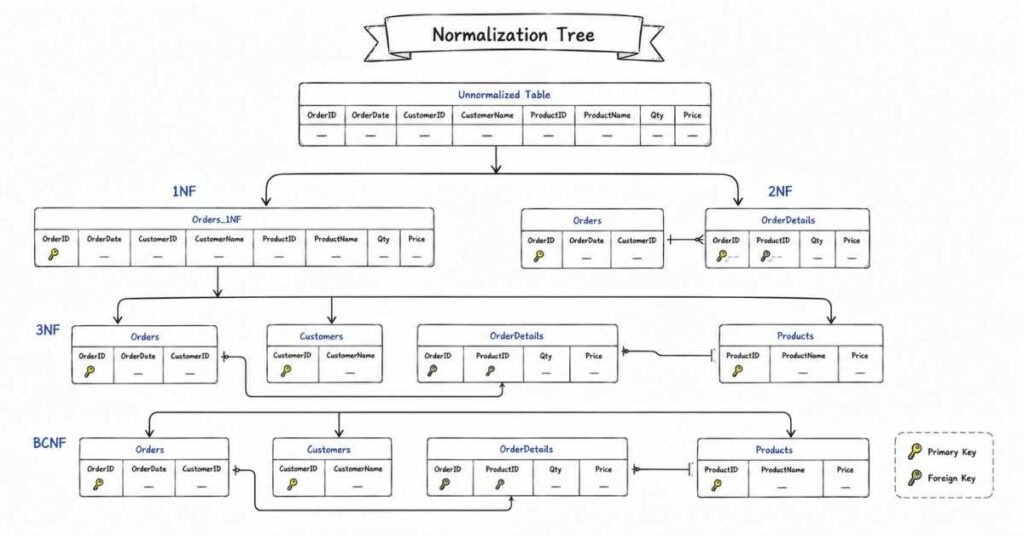
Q5: What is database normalization and why is it important?
Normalization is organizing your data to avoid redundancy. Imagine writing your address on every form in your house versus keeping it in one place and referring to it. Normalized databases save space, prevent inconsistencies, and make updates easier. If your phone number changes, you update it once, not in fifty different places.
Q6: Explain the different normal forms (1NF, 2NF, 3NF, BCNF).
Each normal form removes specific types of redundancy:
- 1NF: Each column has only one value. No storing “John, Mary, Bob” in a single cell.
- 2NF: No partial dependencies. Information depends on the whole primary key, not just part of it.
- 3NF: No transitive dependencies. One non-key column shouldn’t depend on another non-key column.
- BCNF: A stricter version of 3NF where every determinant must be a candidate key.
Q7: When would you denormalize a database?
Sometimes breaking normalization rules improves performance. In a reporting database where you read data constantly but rarely update it, storing some repeated information speeds up queries. It’s like keeping a copy of frequently used documents on your desk instead of walking to the filing cabinet every time.
Q8: What is a primary key?
A primary key uniquely identifies each row in a table, like your social security number identifies you. It cannot be null and must be unique. Every table should have one to maintain data integrity and establish relationships with other tables.
Q9: What’s the difference between a primary key and a unique key?
Both ensure uniqueness, but with differences. A table can have only one primary key but multiple unique keys. Primary keys cannot be null, while unique keys can have one null value. Primary keys are automatically indexed for performance, and they’re the default choice for establishing relationships.
Q10: Explain foreign keys and their purpose.
A foreign key creates relationships between tables. If you have a customers table and an orders table, the customer ID in the orders table is a foreign key pointing to the customers table. It ensures referential integrity – you can’t create an order for a customer that doesn’t exist.
Q11: What are composite keys?
A composite key uses multiple columns together to uniquely identify a row. In a class enrollment system, you might use student ID and course ID together, since a student can take multiple courses and each course has multiple students.
Q12: What is a candidate key?
Any column or combination of columns that could serve as a primary key is a candidate key. In an employee table, both employee ID and email address might uniquely identify employees, making both candidate keys. You choose one as the primary key.
Q13: Explain the concept of a surrogate key.
A surrogate key is an artificial identifier you create, usually an auto-incrementing number, instead of using natural data. Employee ID 12345 is a surrogate key, while using someone’s social security number would be a natural key. Surrogate keys are simpler and more stable than natural keys.
Q14: What is referential integrity?
Referential integrity ensures relationships between tables remain consistent. If a customer record is deleted, what happens to their orders? Referential integrity rules define this behavior – maybe delete the orders too, or prevent the customer deletion, or set order references to null.
Q15: Explain CASCADE, SET NULL, and RESTRICT in foreign key constraints.
These define what happens when you delete or update referenced data:
- CASCADE: Automatically delete or update child records. Delete a customer, their orders vanish too.
- SET NULL: Child records remain but their reference becomes null. The order stays but loses its customer link.
- RESTRICT: Prevents deletion if child records exist. You must delete orders before deleting the customer.
Q16: What are database constraints?
Constraints are rules that protect data quality. They include NOT NULL (must have a value), UNIQUE (no duplicates), CHECK (must meet a condition), PRIMARY KEY, and FOREIGN KEY. They’re like guardrails preventing bad data from entering your database.
Q17: What is a CHECK constraint?
CHECK constraints validate data against specific conditions. For example, ensuring age is positive, salary isn’t below minimum wage, or email contains an @ symbol. They catch errors before bad data enters the database.
Q18: Explain the difference between DELETE and TRUNCATE.
DELETE removes rows one by one and can use WHERE clauses to be selective. It’s logged, can be rolled back, and triggers fire. TRUNCATE removes all rows quickly without logging individual deletions, can’t be rolled back easily, and doesn’t fire triggers. Use DELETE when you need control, TRUNCATE for speed when clearing entire tables.
Q19: What’s the difference between CHAR and VARCHAR?
CHAR stores fixed-length strings, padding with spaces if needed. VARCHAR stores variable-length strings, using only the space needed. CHAR(10) always uses 10 characters whether you store “Hi” or “Hello World”, while VARCHAR(10) adjusts. Use CHAR for consistently sized data like state codes, VARCHAR for variable content like names.
Q20: Explain different data types in SQL.
Common types include:
- Numeric: INT, BIGINT, DECIMAL, FLOAT for numbers
- Character: CHAR, VARCHAR, TEXT for text
- Date/Time: DATE, TIME, DATETIME, TIMESTAMP
- Binary: BLOB for files and images
- Boolean: TRUE/FALSE values
Each database system has variations and additional types.
Q21: What is a NULL value, and how is it different from zero or empty string?
NULL means “unknown” or “not applicable” – it’s the absence of a value. Zero is a specific number, and empty string is a string with no characters. NULL comparisons work differently – you can’t use “= NULL”, you must use “IS NULL”. Adding anything to NULL gives NULL.
Q22: How do you handle NULL values in queries?
Use IS NULL or IS NOT NULL to check for nulls. Functions like COALESCE or IFNULL provide default values when encountering nulls. In calculations, decide whether to exclude nulls or treat them as zero. Always consider how nulls affect your logic.
Q23: What is a view in a database?
A view is a saved query that acts like a virtual table. It doesn’t store data itself but displays results from underlying tables. Views simplify complex queries, enhance security by limiting what users see, and present data in specific ways without duplicating storage.
Q24: What’s the difference between a view and a materialized view?
A regular view recalculates results every time you query it. A materialized view stores the results physically, refreshing periodically. Materialized views are faster for complex calculations but require storage and refresh time. Use regular views for current data, materialized views for reporting on relatively stable data.
Q25: What is a stored procedure?
A stored procedure is pre-compiled SQL code saved in the database that you can execute repeatedly. Think of it as a recipe – instead of giving separate cooking instructions each time, you save the complete recipe and follow it whenever needed. Stored procedures improve performance, security, and code reusability.
Q26: What’s the difference between stored procedures and functions?
Stored procedures perform actions and can have multiple outputs. Functions return a single value and can be used in queries. Procedures are called standalone, functions are used within expressions. Use procedures for complex operations, functions for calculations you need in queries.
Q27: What are triggers?
Triggers are automatic actions that execute when specific events occur – like inserting, updating, or deleting data. Think of them as automated responses. When a new order is placed, a trigger might automatically update inventory. They enforce business rules and maintain audit trails.
Q28: Explain BEFORE and AFTER triggers.
BEFORE triggers execute before the data change, allowing you to validate or modify data before it’s saved. AFTER triggers execute after the change completes, useful for logging or cascading updates. Choose BEFORE to prevent invalid data, AFTER to respond to changes.
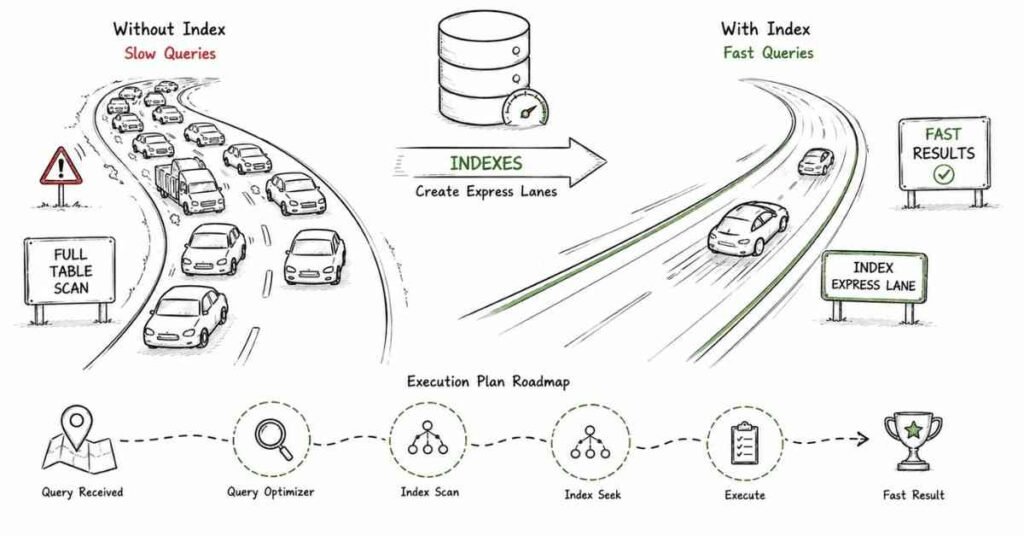
Q29: What is an index, and why is it important?
An index is like a book’s index – it helps find information quickly without reading everything. Database indexes speed up data retrieval but slow down inserts and updates since the index must be maintained. Proper indexing dramatically improves query performance.
Q30: What are the different types of relationships in databases?
Three main types exist:
- One-to-One: Each record in Table A relates to one record in Table B. Like a person and their passport.
- One-to-Many: One record in Table A relates to multiple records in Table B. Like a customer with multiple orders.
- Many-to-Many: Multiple records in both tables relate to each other. Like students and courses – students take multiple courses, courses have multiple students.
🎓 Master DBMS Concepts with Expert-Led Training
Join Database Course →
Section 2: SQL Basics and Advanced Queries (40 Questions)
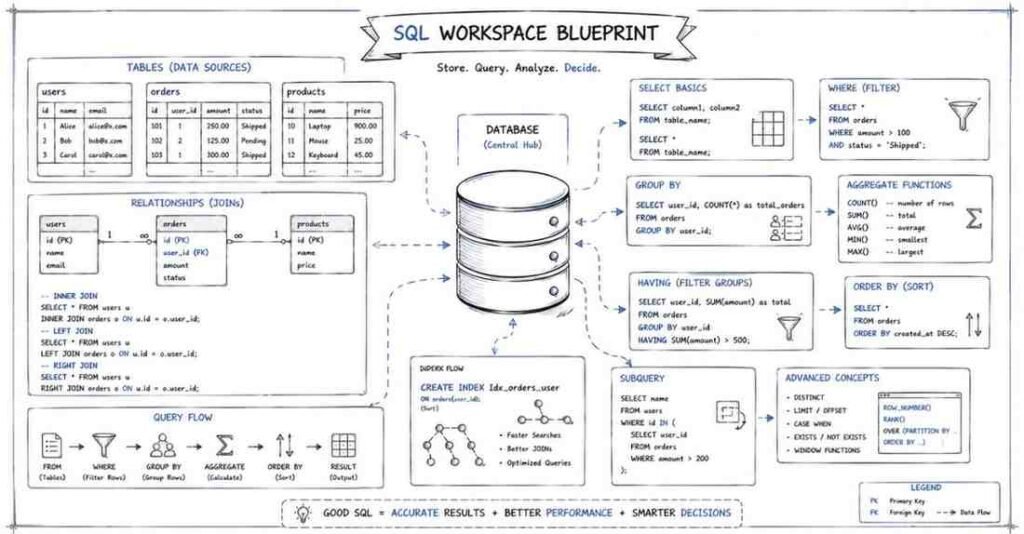
Q31: Write a basic SELECT query to retrieve all columns from a table.
sql
SELECT * FROM employees;
The asterisk means “all columns.” However, in production, specify exact columns you need for better performance and clarity:
sql
SELECT employee_id, first_name, last_name, salary FROM employees;
Q32: How do you select distinct values from a column?
sql
SELECT DISTINCT department FROM employees;
This removes duplicates, showing each department only once. Useful when you want to know what unique values exist in a column.
Q33: How do you filter results using WHERE clause?
sql
SELECT * FROM employees WHERE salary > 50000;
WHERE filters rows based on conditions. You can combine multiple conditions:
sql
SELECT * FROM employees WHERE salary > 50000 AND department = ‘IT’;
Q34: What’s the difference between WHERE and HAVING?
WHERE filters rows before grouping occurs, HAVING filters after grouping. Use WHERE for individual row conditions, HAVING for aggregate conditions:
sql
SELECT department, AVG(salary) FROM employees
GROUP BY department
HAVING AVG(salary) > 60000;
Q35: Explain the ORDER BY clause.
ORDER BY sorts results. Default is ascending:
sql
SELECT * FROM employees ORDER BY salary DESC;
You can sort by multiple columns:
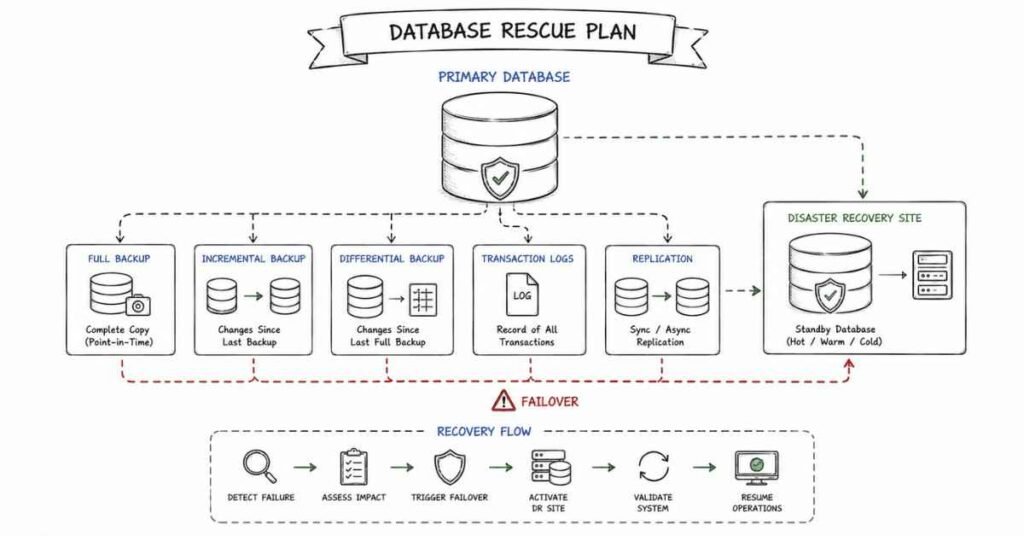
sql
SELECT * FROM employees ORDER BY department ASC, salary DESC;
Q36: How do you limit the number of rows returned?
Different databases use different syntax:
MySQL/PostgreSQL:
sql
SELECT * FROM employees LIMIT 10;
SQL Server:
sql
SELECT TOP 10 * FROM employees;
Oracle:
sql
SELECT * FROM employees WHERE ROWNUM <= 10;
Q37: What are wildcards in SQL, and how do you use them?
Wildcards help match patterns:
- % matches any sequence of characters
- _ matches single character
sql
SELECT * FROM employees WHERE first_name LIKE ‘J%’;
Finds names starting with J.
sql
SELECT * FROM employees WHERE first_name LIKE ‘_ohn’;
Finds John, Kohn, etc.
Q38: Explain the IN operator.
IN checks if a value matches any in a list:
sql
SELECT * FROM employees WHERE department IN (‘IT’, ‘HR’, ‘Sales’);
It’s cleaner than multiple OR conditions.
Q39: What is the BETWEEN operator?
BETWEEN checks if a value falls within a range, inclusive of boundaries:
sql
SELECT * FROM employees WHERE salary BETWEEN 40000 AND 60000;
Equivalent to:
sql
SELECT * FROM employees WHERE salary >= 40000 AND salary <= 60000;
Q40: How do you handle NULL values in WHERE clauses?
Use IS NULL or IS NOT NULL:
sql
SELECT * FROM employees WHERE manager_id IS NULL;
Never use = NULL or != NULL – they won’t work as expected.
JOIN Operations and Types
Q41: Explain INNER JOIN with an example.
INNER JOIN returns only matching rows from both tables:
sql
SELECT e.first_name, d.department_name
FROM employees e
INNER JOIN departments d ON e.department_id = d.department_id;
If an employee has no department or a department has no employees, those won’t appear in results.
Q42: What is a LEFT JOIN (LEFT OUTER JOIN)?
LEFT JOIN returns all rows from the left table and matching rows from the right. Non-matches get NULL values:
sql
SELECT e.first_name, d.department_name
FROM employees e
LEFT JOIN departments d ON e.department_id = d.department_id;
Shows all employees, even those without departments.
Q43: Explain RIGHT JOIN.
RIGHT JOIN is the opposite of LEFT JOIN – all rows from the right table and matches from left:
sql
SELECT e.first_name, d.department_name
FROM employees e
RIGHT JOIN departments d ON e.department_id = d.department_id;
Shows all departments, even those with no employees.
Q44: What is a FULL OUTER JOIN?
FULL OUTER JOIN returns all rows from both tables, with NULLs where there’s no match:
sql
SELECT e.first_name, d.department_name
FROM employees e
FULL OUTER JOIN departments d ON e.department_id = d.department_id;
Shows all employees and all departments, matching where possible.
Q45: Explain CROSS JOIN.
CROSS JOIN creates a Cartesian product – every row from the first table paired with every row from the second:
sql
SELECT * FROM colors CROSS JOIN sizes;
If you have 5 colors and 3 sizes, you get 15 combinations. Useful for generating combinations but use carefully as results grow quickly.
Q46: What is a SELF JOIN?
A table joined with itself, useful for hierarchical data:
sql
SELECT e.first_name AS employee, m.first_name AS manager
FROM employees e
LEFT JOIN employees m ON e.manager_id = m.employee_id;
Shows each employee with their manager’s name.
Q47: How do you join more than two tables?
Chain multiple JOINs:
sql
SELECT e.first_name, d.department_name, l.city
FROM employees e
JOIN departments d ON e.department_id = d.department_id
JOIN locations l ON d.location_id = l.location_id;
Each JOIN builds on previous results.
Q48: What’s the difference between JOIN and UNION?
JOIN combines columns from multiple tables horizontally. UNION stacks rows from multiple queries vertically:
sql
SELECT first_name FROM employees
UNION
SELECT first_name FROM contractors;
UNION removes duplicates; UNION ALL keeps them.
Q49: Explain the concept of JOIN conditions vs WHERE conditions.
JOIN conditions define how tables relate. WHERE conditions filter the combined results:
sql
SELECT e.first_name, d.department_name
FROM employees e
JOIN departments d ON e.department_id = d.department_id
WHERE e.salary > 50000;
Join first, then filter.
Q50: What happens if you don’t specify a JOIN condition?
You get a CROSS JOIN (Cartesian product) by default – every row from table one with every row from table two. Usually unintentional and creates huge result sets.
Subqueries and Nested Queries
Q51: What is a subquery?
A query within another query. The inner query executes first, and its results feed the outer query:
sql
SELECT first_name FROM employees
WHERE salary > (SELECT AVG(salary) FROM employees);
Finds employees earning above average.
Q52: What’s the difference between correlated and non-correlated subqueries?
Non-correlated subqueries run once independently:
sql
SELECT * FROM employees WHERE department_id = (SELECT department_id FROM departments WHERE name = ‘IT’);
Correlated subqueries reference the outer query and run for each row:
sql
SELECT first_name, salary FROM employees e1
WHERE salary > (SELECT AVG(salary) FROM employees e2 WHERE e2.department_id = e1.department_id);
Q53: How do you use subqueries in the FROM clause?
Treat the subquery result as a temporary table:
sql
SELECT avg_sal FROM
(SELECT department_id, AVG(salary) as avg_sal FROM employees GROUP BY department_id) dept_avgs
WHERE avg_sal > 60000;
This creates an inline view.
Q54: Explain the EXISTS operator.
EXISTS checks if a subquery returns any rows:
sql
SELECT first_name FROM employees e
WHERE EXISTS (SELECT 1 FROM orders o WHERE o.employee_id = e.employee_id);
Shows employees who have placed orders. More efficient than IN for large datasets.
Q55: What’s the difference between IN and EXISTS?
IN compares actual values:
sql
WHERE department_id IN (SELECT department_id FROM departments WHERE location = ‘New York’)
EXISTS checks for existence:
sql
WHERE EXISTS (SELECT 1 FROM departments d WHERE d.department_id = e.department_id AND d.location = ‘New York’)
EXISTS often performs better with correlated subqueries.
Q56: How do you use subqueries in SELECT clause?
sql
SELECT first_name,
(SELECT department_name FROM departments d WHERE d.department_id = e.department_id) as dept_name
FROM employees e;
The subquery returns a single value for each row.
Q57: What is the ANY operator?
ANY compares a value to any value returned by the subquery:
sql
SELECT * FROM employees WHERE salary > ANY (SELECT salary FROM employees WHERE department = ‘IT’);
Returns true if salary exceeds at least one IT salary.
Q58: Explain the ALL operator.
ALL compares against all values returned:
sql
SELECT * FROM employees WHERE salary > ALL (SELECT salary FROM employees WHERE department = ‘IT’);
Returns true only if salary exceeds every IT salary.
Q59: Can you use subqueries in UPDATE statements?
Yes:
sql
UPDATE employees
SET salary = salary * 1.1
WHERE department_id = (SELECT department_id FROM departments WHERE name = ‘IT’);
Updates salaries for IT department employees.
Q60: How do you use subqueries in DELETE statements?
sql
DELETE FROM orders
WHERE customer_id IN (SELECT customer_id FROM customers WHERE status = ‘inactive’);
Deletes orders from inactive customers.
Aggregate Functions and GROUP BY
Q61: What are aggregate functions?
Aggregate functions perform calculations on multiple rows and return a single value:
- COUNT: counts rows
- SUM: adds values
- AVG: calculates average
- MAX: finds maximum
- MIN: finds minimum
sql
SELECT COUNT(*), AVG(salary), MAX(salary), MIN(salary) FROM employees;
Q62: Explain the GROUP BY clause.
GROUP BY groups rows with the same values:
sql
SELECT department_id, AVG(salary)
FROM employees
GROUP BY department_id;
Shows average salary per department.
Q63: What’s the difference between COUNT(*) and COUNT(column_name)?
COUNT(*) counts all rows, including those with NULL values. COUNT(column_name) counts only non-NULL values in that column:
sql
SELECT COUNT(*), COUNT(email) FROM employees;
Q64: How do you count distinct values?
sql
SELECT COUNT(DISTINCT department_id) FROM employees;
Counts unique departments, not total employee count.
Q65: Can you use multiple aggregate functions in one query?
Yes:
sql
SELECT department_id,
COUNT(*) as emp_count,
AVG(salary) as avg_salary,
MAX(salary) as max_salary
FROM employees
GROUP BY department_id;
Q66: Explain GROUP BY with multiple columns.
Groups by combinations of values:
sql
SELECT department_id, job_title, COUNT(*)
FROM employees
GROUP BY department_id, job_title;
Shows employee count for each job title within each department.
Q67: What’s the order of execution in a query with GROUP BY and HAVING?
- FROM – identify tables
- WHERE – filter individual rows
- GROUP BY – group filtered rows
- HAVING – filter groups
- SELECT – select columns
- ORDER BY – sort results
- LIMIT – limit output
Q68: How do you find the second highest salary?
Multiple approaches:
Using LIMIT:
sql
SELECT DISTINCT salary FROM employees
ORDER BY salary DESC
LIMIT 1 OFFSET 1;
Using subquery:
sql
SELECT MAX(salary) FROM employees
WHERE salary < (SELECT MAX(salary) FROM employees);
Q69: How do you find duplicate rows in a table?
sql
SELECT email, COUNT(*)
FROM employees
GROUP BY email
HAVING COUNT(*) > 1;
Shows emails appearing more than once.
Q70: Explain the ROLLUP operator.
ROLLUP creates subtotals and grand totals:
sql
SELECT department_id, job_title, SUM(salary)
FROM employees
GROUP BY ROLLUP(department_id, job_title);
Provides department totals, job title totals within departments, and a grand total.
Window Functions and CTEs
Q71: What are window functions?
Window functions perform calculations across rows related to the current row without collapsing results like GROUP BY:
sql
SELECT first_name, salary,
AVG(salary) OVER (PARTITION BY department_id) as dept_avg_salary
FROM employees;
Shows each employee with their department’s average salary.
Q72: Explain the ROW_NUMBER() function.
ROW_NUMBER assigns a unique sequential number to each row:
sql
SELECT first_name, salary,
ROW_NUMBER() OVER (ORDER BY salary DESC) as salary_rank
FROM employees;
Numbers employees by salary, highest to lowest.
Q73: What’s the difference between ROW_NUMBER, RANK, and DENSE_RANK?
All assign rankings:
- ROW_NUMBER: Always unique (1,2,3,4,5)
- RANK: Ties get same rank, next rank skips (1,2,2,4,5)
- DENSE_RANK: Ties get same rank, next rank doesn’t skip (1,2,2,3,4)
sql
SELECT salary,
ROW_NUMBER() OVER (ORDER BY salary DESC) as row_num,
RANK() OVER (ORDER BY salary DESC) as rank,
DENSE_RANK() OVER (ORDER BY salary DESC) as dense_rank
FROM employees;
Q74: Explain the PARTITION BY clause in window functions.
PARTITION BY divides results into groups for calculations:
sql
SELECT first_name, department_id, salary,
RANK() OVER (PARTITION BY department_id ORDER BY salary DESC) as dept_rank
FROM employees;
Ranks employees within their own department.
Q75: What are LEAD and LAG functions?
LEAD accesses the next row’s value, LAG accesses the previous row’s value:
sql
SELECT order_date, total_amount,
LAG(total_amount) OVER (ORDER BY order_date) as previous_amount,
LEAD(total_amount) OVER (ORDER BY order_date) as next_amount
FROM orders;
Useful for comparing sequential data.
Q76: Explain the NTILE function.
NTILE divides rows into specified number of groups:
sql
SELECT first_name, salary,
NTILE(4) OVER (ORDER BY salary) as salary_quartile
FROM employees;
Divides employees into four salary quartiles.
Q77: What is a Common Table Expression (CTE)?
A CTE is a temporary named result set that exists for one query:
sql
WITH high_earners AS (
SELECT * FROM employees WHERE salary > 80000
)
SELECT department_id, COUNT(*)
FROM high_earners
GROUP BY department_id;
More readable than subqueries for complex queries.
Q78: How do you create a recursive CTE?
Recursive CTEs reference themselves, useful for hierarchical data:
sql
WITH RECURSIVE employee_hierarchy AS (
SELECT employee_id, first_name, manager_id, 1 as level
FROM employees WHERE manager_id IS NULL
UNION ALL
SELECT e.employee_id, e.first_name, e.manager_id, eh.level + 1
FROM employees e
JOIN employee_hierarchy eh ON e.manager_id = eh.employee_id
)
SELECT * FROM employee_hierarchy;
Shows organizational hierarchy with levels.
Q79: What’s the difference between CTEs and temporary tables?
CTEs exist only for the duration of one query and aren’t physically stored. Temporary tables are created in tempdb, persist across multiple statements in a session, and require explicit cleanup. Use CTEs for readability in single queries, temp tables for complex multi-step operations.
Q80: Can you use multiple CTEs in one query?
Yes, separate them with commas:
sql
WITH
dept_avg AS (
SELECT department_id, AVG(salary) as avg_sal
FROM employees GROUP BY department_id
),
high_depts AS (
SELECT department_id FROM dept_avg WHERE avg_sal > 60000
)
SELECT e.* FROM employees e
JOIN high_depts h ON e.department_id = h.department_id;
🧭 Practice Real-World SQL Scenarios Step-by-Step
Follow SQL Roadmap →
Section 3: Database Performance Optimization (35 Questions)
Indexing Strategies and Types
Q81: What is an index in a database?
An index is a data structure that improves data retrieval speed. Like a book’s index helps you find topics without reading everything, a database index helps locate rows without scanning the entire table. Indexes speed up SELECT queries but slow down INSERT, UPDATE, and DELETE since the index needs updating.
Q82: Explain clustered vs non-clustered indexes.
A clustered index determines the physical order of data in the table – like a phone book sorted by last name. A table can have only one clustered index. Non-clustered indexes create a separate structure pointing to data locations – like a book’s index at the back. Tables can have multiple non-clustered indexes.
Q83: When should you create an index?
Create indexes on:
- Primary keys and foreign keys
- Columns frequently used in WHERE clauses
- Columns used in JOIN conditions
- Columns used in ORDER BY
- Columns with high selectivity (many unique values)
Avoid indexing:
- Small tables
- Columns frequently updated
- Columns with low selectivity (few unique values like gender)
- Tables with heavy INSERT/UPDATE operations
Q84: What is a composite index?
A composite index includes multiple columns:
sql
CREATE INDEX idx_name_dept ON employees(last_name, department_id);
Most effective when querying both columns together. Column order matters – the index works best when the leftmost column is in the WHERE clause.
Q85: Explain index selectivity.
Selectivity measures how unique values are in a column. High selectivity (many unique values like employee ID) makes good indexes. Low selectivity (few values like gender) makes poor indexes since the index doesn’t narrow down results much.
Q86: What is a covering index?
A covering index includes all columns needed for a query, eliminating the need to access the table:
sql
CREATE INDEX idx_cover ON employees(department_id, last_name, salary);
For this query, the index contains everything needed:
sql
SELECT last_name, salary FROM employees WHERE department_id = 10;
Q87: What are the disadvantages of having too many indexes?
- Slows down INSERT, UPDATE, and DELETE operations
- Increases storage space
- Complicates query optimizer decisions
- Requires maintenance overhead
Balance is key – index wisely, not excessively.
Q88: How do you identify missing indexes?
In SQL Server:
sql
SELECT * FROM sys.dm_db_missing_index_details;
In MySQL, analyze slow query logs. In PostgreSQL, use pg_stat_statements. Most databases provide tools to suggest helpful indexes based on actual query patterns.
Q89: What is index fragmentation?
Over time, as data is inserted, updated, and deleted, indexes become fragmented – data pages aren’t contiguous. This slows queries as the database reads scattered pages. Regular index maintenance (rebuild or reorganize) addresses fragmentation.
Q90: How do you maintain indexes?
Rebuild indexes periodically to eliminate fragmentation:
SQL Server:
sql
ALTER INDEX ALL ON employees REBUILD;
MySQL:
sql
OPTIMIZE TABLE employees;
Schedule maintenance during low-activity periods since rebuilding can lock tables.
Query Optimization Techniques
Q91: How do you identify slow queries?
Enable slow query logging:
MySQL:
sql
SET GLOBAL slow_query_log = ‘ON’;
SET GLOBAL long_query_time = 2;
SQL Server: Use Extended Events or Query Store. PostgreSQL: Check pg_stat_statements. Review logs to find queries exceeding acceptable execution times.
Q92: What is an execution plan?
An execution plan shows how the database executes a query – which indexes it uses, join methods, and estimated costs. Use it to identify bottlenecks:
sql
EXPLAIN SELECT * FROM employees WHERE department_id = 10;
Look for table scans, missing indexes, and expensive operations.
Q93: Explain table scans vs index scans.
Table scan reads every row sequentially – slow for large tables. Index scan uses an index to find relevant rows quickly. If your query causes a table scan on a large table with a WHERE clause, you probably need an index.
Q94: What is query cost?
The database optimizer estimates the computational cost of different execution strategies and chooses the cheapest. Cost considers CPU, I/O, and memory. Understanding costs helps you write efficient queries and create appropriate indexes.
Q95: How does the database optimizer work?
The optimizer analyzes your query, generates multiple execution plans, estimates their costs based on statistics, and selects the most efficient plan. It considers indexes, join orders, and access methods. Statistics must be current for accurate optimization.
Q96: What are database statistics, and why are they important?
Statistics contain information about data distribution, row counts, and value frequencies. The optimizer uses statistics to estimate costs and choose plans. Outdated statistics lead to poor plan choices and slow queries.
Update statistics:
SQL Server:
sql
UPDATE STATISTICS employees;
Oracle:
sql
EXEC DBMS_STATS.GATHER_TABLE_STATS(‘schema’, ’employees’);
Q97: How do you optimize JOIN operations?
- Index foreign key columns
- Join on indexed columns
- Filter early with WHERE clauses
- Consider join order (smaller tables first)
- Use appropriate join types
- Ensure statistics are current
Example optimization:
sql
— Instead of
SELECT * FROM large_table t1 JOIN small_table t2 ON t1.id = t2.id WHERE t2.status = ‘active’;
— Write
SELECT * FROM small_table t2 JOIN large_table t1 ON t1.id = t2.id WHERE t2.status = ‘active’;
Q98: What is query rewriting?
Rewriting queries to equivalent but more efficient forms:
Instead of:
sql
SELECT * FROM employees WHERE YEAR(hire_date) = 2020;
Write:
sql
SELECT * FROM employees WHERE hire_date >= ‘2020-01-01’ AND hire_date < ‘2021-01-01’;
The second version can use an index on hire_date.
Q99: Explain the N+1 query problem.
Occurs when you execute one query to fetch records, then one query per record for related data:
sql
— Gets 100 employees
SELECT * FROM employees;
— Then for each employee (100 more queries!)
SELECT * FROM departments WHERE id = ?;
Solution: Use JOINs or batch loading:
sql
SELECT e.*, d.* FROM employees e JOIN departments d ON e.dept_id = d.id;
Q100: How do you optimize subqueries?
Often, JOINs perform better than subqueries:
Instead of:
sql
SELECT * FROM employees WHERE department_id IN (SELECT department_id FROM departments WHERE location = ‘NYC’);
Use JOIN:
sql
SELECT e.* FROM employees e JOIN departments d ON e.department_id = d.department_id WHERE d.location = ‘NYC’;
Modern optimizers often convert subqueries to joins automatically, but explicit joins give you more control.
Q101: What is query caching?
Some databases cache query results. If the same query runs again with unchanged underlying data, cached results return instantly. Useful for frequently run, infrequently changing data. Not all databases support it – MySQL does, PostgreSQL doesn’t natively.
Q102: How do you handle large result sets efficiently?
- Use pagination with LIMIT and OFFSET
- Implement cursor-based pagination for better performance
- Return only needed columns
- Process in batches
- Consider data warehousing for analytical queries
sql
— Pagination
SELECT * FROM orders ORDER BY order_date LIMIT 50 OFFSET 100;
Q103: What is query parallelization?
Breaking a query into smaller parts that execute simultaneously across multiple CPU cores. Large analytical queries benefit most. Database engines handle this automatically when beneficial, but you can influence it with hints or configuration settings.
Q104: Explain the importance of WHERE clause placement.
Filter as early as possible to reduce data volume:
sql
— Good: Filters before join
SELECT e.name, d.name
FROM (SELECT * FROM employees WHERE active = 1) e
JOIN departments d ON e.dept_id = d.id;
— Better: Even cleaner syntax
SELECT e.name, d.name
FROM employees e
JOIN departments d ON e.dept_id = d.id
WHERE e.active = 1;
Q105: How do you optimize ORDER BY operations?
- Create indexes on ORDER BY columns
- Order in the same direction as the index
- Limit results before sorting when possible
- Consider denormalization for frequently sorted columns
sql
CREATE INDEX idx_salary ON employees(salary DESC);
SELECT * FROM employees ORDER BY salary DESC LIMIT 10;
Execution Plans and Analysis
Q106: How do you read an execution plan?
Execution plans show operations as a tree. Read from inside out and bottom up. Look for:
- Table scans (bad on large tables)
- Index seeks (good) vs scans (depends)
- Join types and order
- Estimated vs actual rows (big differences indicate stale statistics)
- Expensive operations (high cost percentage)
Q107: What is the difference between estimated and actual execution plans?
Estimated plans show what the optimizer thinks will happen without running the query. Actual plans show what really happened, including actual row counts and execution times. Compare both to identify optimizer mistakes.
Q108: What are table hints?
Hints override the optimizer’s decisions:
sql
SELECT * FROM employees WITH (INDEX(idx_department)) WHERE department_id = 10;
Use sparingly – the optimizer usually knows best. Useful when you have specific knowledge the optimizer lacks.
Q109: How do you force index usage?
MySQL:
sql
SELECT * FROM employees FORCE INDEX (idx_name) WHERE last_name = ‘Smith’;
SQL Server:
sql
SELECT * FROM employees WITH (INDEX(idx_name)) WHERE last_name = ‘Smith’;
Only force when you’re certain the optimizer is wrong.
Q110: What is query plan cache?
Databases cache execution plans to avoid recompiling queries. Subsequent executions reuse cached plans, saving time. Parameterized queries maximize cache hits:
sql
PREPARE stmt FROM ‘SELECT * FROM employees WHERE id = ?’;
Q111: How do you clear the query plan cache?
SQL Server:
sql
DBCC FREEPROCCACHE;
MySQL:
sql
RESET QUERY CACHE;
Clear when you suspect bad cached plans, but understand it forces recompilation for all queries.
Q112: What causes plan regressions?
Plan regressions occur when a previously fast query becomes slow due to:
- Outdated statistics
- Parameter sniffing issues
- Data distribution changes
- Index fragmentation
- Schema changes
Q113: Explain parameter sniffing.
The optimizer creates plans based on the first parameter values it sees. If later executions use different values with different data distributions, the cached plan might be inefficient. Solutions include query recompilation, query hints, or optimizing for unknown.
Q114: What is adaptive query processing?
Modern databases adjust execution plans during runtime based on actual data encountered. If the optimizer’s estimates are wrong, adaptive processing can switch strategies mid-execution, improving performance for complex queries.
Q115: How do you compare execution plans?
Most database tools let you compare plans visually. Look for:
- Different join orders
- Different index choices
- Changed operation types
- Cost differences
Identify what changed and why one plan is better.
Partitioning and Sharding
Q116: What is table partitioning?
Partitioning divides a large table into smaller, manageable pieces called partitions, while logically remaining one table. Each partition can be stored, indexed, and maintained independently:
sql
CREATE TABLE orders (
order_id INT,
order_date DATE,
amount DECIMAL
) PARTITION BY RANGE (YEAR(order_date)) (
PARTITION p2021 VALUES LESS THAN (2022),
PARTITION p2022 VALUES LESS THAN (2023),
PARTITION p2023 VALUES LESS THAN (2024)
);
Q117: What are the benefits of partitioning?
- Improved query performance (partition pruning)
- Easier maintenance (archive/delete old partitions)
- Better manageability of large tables
- Parallel query execution per partition
- Faster backup and restore of specific partitions
Q118: Explain different types of partitioning.
- Range partitioning: Based on value ranges (dates, numbers)
- List partitioning: Based on specific value lists (regions, categories)
- Hash partitioning: Based on hash function results (distributes evenly)
- Composite partitioning: Combination of methods
Q119: What is partition pruning?
The optimizer automatically excludates irrelevant partitions from queries:
sql
SELECT * FROM orders WHERE order_date = ‘2023-05-15’;
Only the 2023 partition is scanned, not all years. This dramatically improves performance on partitioned tables.
Q120: What is database sharding?
Sharding distributes data across multiple database servers, with each shard containing a subset of data. Unlike partitioning (one database), sharding uses multiple databases, improving scalability for massive datasets.
Q121: How do you choose a sharding key?
Select a key that:
- Distributes data evenly across shards
- Allows queries to target specific shards
- Avoids hotspots (uneven load)
- Aligns with your access patterns
Common choices: user ID, geographic region, customer ID.
Q122: What are the challenges of sharding?
- Complex queries across shards
- Maintaining referential integrity
- Rebalancing when adding/removing shards
- Increased application complexity
- Cross-shard transactions
- Backup and recovery coordination
Q123: What is horizontal vs vertical partitioning?
Horizontal partitioning (sharding) divides rows across partitions – like splitting customers by region. Vertical partitioning divides columns – frequently accessed columns in one table, rarely accessed in another. Both improve performance differently.
Q124: How do you maintain partitioned tables?
- Add new partitions for future time periods
- Archive or drop old partitions
- Rebuild partition indexes periodically
- Update partition statistics
- Monitor partition size and growth
sql
ALTER TABLE orders ADD PARTITION (PARTITION p2024 VALUES LESS THAN (2025));
Q125: Can you partition indexes?
Yes, indexes can be partitioned the same way as tables:
- Local indexes: Each partition has its own index
- Global indexes: One index across all partitions
Local indexes are easier to maintain, global indexes sometimes offer better query performance.
⚙️ Learn to Optimize Database Performance Like a Pro!
Read How-to Guide →
Section 4: Backup and Recovery (30 Questions)
Backup Types and Strategies
Q126: What is a full backup?
A full backup copies the entire database completely. It’s the foundation of any backup strategy. While it takes the longest time and most storage, full backups allow complete restoration with a single backup file.
Q127: What is an incremental backup?
An incremental backup copies only data changed since the last backup (of any type). It’s fast and storage-efficient but requires all previous backups for restoration. If you lose one incremental backup, you can’t restore fully.
Q128: What is a differential backup?
A differential backup copies all changes since the last full backup. Faster than full backups but slower than incremental. For restoration, you need only the full backup plus the latest differential – simpler recovery than incremental.
Q129: Which backup strategy should you use?
A common approach:
- Full backup weekly (Sunday night)
- Differential backup daily
- Transaction log backups hourly (for point-in-time recovery)
This balances storage, backup time, and recovery complexity. Adjust frequency based on your data change rate and recovery requirements.
Q130: What is a transaction log backup?
Transaction log backups capture all transactions since the last log backup. They enable point-in-time recovery – restoring to a specific moment. Essential for minimizing data loss after failures. Only available when using full recovery model.
Q131: How do you automate database backups?
Use built-in scheduling:
SQL Server: SQL Server Agent jobs
sql
BACKUP DATABASE AdventureWorks TO DISK = ‘D:\Backups\AdventureWorks.bak’;
MySQL: Cron jobs with mysqldump
bash
0 2 * * * mysqldump -u root -p database_name > backup.sql
Oracle: RMAN scripts
PostgreSQL: pg_dump with cron
Q132: What should you verify after taking backups?
- Backup completed successfully
- File size is reasonable
- No corruption in backup file
- Backup can be restored to test environment
- Backup is stored securely offsite
- Retention policies are followed
Never trust backups you haven’t tested restoring.
Q133: What is the 3-2-1 backup rule?
Keep:
- 3 copies of your data
- On 2 different media types
- With 1 copy offsite
This protects against hardware failure, site disasters, and accidental deletion.
Q134: How do you calculate Recovery Time Objective (RTO)?
RTO is the maximum acceptable downtime. Calculate by:
- Time to detect failure
- Time to decide recovery approach
- Time to restore backup
- Time to verify data integrity
- Time to redirect applications
Faster RTO requires better infrastructure and more frequent backups.
Q135: What is Recovery Point Objective (RPO)?
RPO is the maximum acceptable data loss measured in time. If your RPO is 1 hour, you can’t lose more than 1 hour of data. This determines backup frequency – hourly transaction log backups for 1-hour RPO.
Point-in-Time Recovery
Q136: What is point-in-time recovery (PITR)?
PITR restores a database to a specific moment in time, not just when a backup was taken. Useful when you discover problems hours after they occurred:
sql
RESTORE DATABASE AdventureWorks FROM DISK = ‘backup.bak’
WITH STOPAT = ‘2024-10-30 10:30:00’;
Q137: What recovery models does SQL Server support?
- Simple: No point-in-time recovery, minimal logging, automatic transaction log management
- Full: Point-in-time recovery possible, complete logging, requires log backups
- Bulk-Logged: Similar to full but with minimal logging for bulk operations
Choose based on your data criticality and recovery requirements.
Q138: How do you perform a point-in-time recovery?
- Restore the most recent full backup (with NORECOVERY)
- Restore any differential backups (with NORECOVERY)
- Restore transaction log backups in sequence up to the desired point
- Final restore with RECOVERY
sql
RESTORE DATABASE db FROM DISK = ‘full.bak’ WITH NORECOVERY;
RESTORE LOG db FROM DISK = ‘log1.trn’ WITH NORECOVERY;
RESTORE LOG db FROM DISK = ‘log2.trn’ WITH NORECOVERY;
RESTORE DATABASE db WITH RECOVERY;
Q139: What is a tail-log backup?
A tail-log backup captures active transaction log after a failure, before restoring. It prevents data loss from the period between the last scheduled backup and the failure moment.
Q140: How do you recover from accidental data deletion?
If discovered quickly:
- Take a tail-log backup
- Restore to point just before deletion
- Export affected data
- Restore current state
- Reimport recovered data
If using transaction log backups, you can pinpoint the exact moment before deletion.
Q141: What tools help with backup automation?
- SQL Server: Maintenance Plans, Ola Hallengren scripts
- MySQL: MySQL Enterprise Backup, mysqldump with scripts
- Oracle: RMAN (Recovery Manager)
- PostgreSQL: pg_basebackup, Barman
- Third-party: Veeam, Commvault, Rubrik
Q142: How do you compress backups?
SQL Server:
sql
BACKUP DATABASE db TO DISK = ‘backup.bak’ WITH COMPRESSION;
MySQL: Use gzip with mysqldump
bash
mysqldump database | gzip > backup.sql.gz
Compression reduces storage and transfer time but increases CPU usage during backup.
Q143: What is backup encryption?
Encrypting backups protects data if backup media is stolen:
sql
BACKUP DATABASE db TO DISK = ‘backup.bak’
WITH ENCRYPTION (ALGORITHM = AES_256, SERVER CERTIFICATE = BackupCert);
Always encrypt backups containing sensitive data.
Q144: How do you test backup validity?
Regularly restore backups to test environments:
- Restore to non-production server
- Verify database consistency
- Check data integrity
- Run application smoke tests
- Document restore time for RTO planning
Quarterly testing is minimum; critical databases need monthly testing.
Q145: What is a cold backup vs hot backup?
Cold backup: Database is shut down, guaranteeing consistency but requiring downtime.
Hot backup: Database remains online during backup. No downtime but requires special features like snapshot technology or specific backup tools.
Disaster Recovery Planning
Q146: What should a disaster recovery plan include?
- Contact information for DBA team
- Step-by-step recovery procedures
- Backup location details
- Required access credentials
- Hardware/software requirements
- Recovery time estimates
- Testing schedule and results
- Update procedures
Document thoroughly and keep copies offsite.
Q147: What is a disaster recovery site?
An alternate location where you can restore operations after a disaster. Types include:
- Hot site: Fully equipped, ready immediately
- Warm site: Partially equipped, ready in hours/days
- Cold site: Empty space, ready in days/weeks
Choose based on RTO requirements and budget.
Q148: How do you implement database replication for disaster recovery?
Set up replication to a remote site:
SQL Server: Always On Availability Groups
sql
CREATE AVAILABILITY GROUP MyAG FOR DATABASE MyDB
REPLICA ON ‘Primary’ WITH (…),
‘Secondary’ WITH (…);
MySQL: Binary log replication
Oracle: Data Guard
PostgreSQL: Streaming replication
Q149: What is the difference between backup and replication?
Backups are point-in-time copies stored separately. Replication maintains a live copy that updates continuously. Use both – replication for high availability, backups for recovery from logical errors (like accidental deletion, which replicates to the replica).
Q150: How do you handle database corruption?
- Identify corrupted pages/objects
- Attempt automatic repair if available
- Restore from backup if repair fails
- Validate restored data
- Investigate cause to prevent recurrence
sql
— Check for corruption
DBCC CHECKDB (database_name);
— Attempt repair (last resort)
ALTER DATABASE database_name SET SINGLE_USER;
DBCC CHECKDB (database_name, REPAIR_ALLOW_DATA_LOSS);
ALTER DATABASE database_name SET MULTI_USER;
Q151: What is the importance of backup retention policies?
Retention policies define how long to keep backups. Consider:
- Regulatory requirements (often 7 years)
- Storage costs
- Recovery scenarios (long-term audits)
- Database size and change rate
Common approach: Keep daily backups for 30 days, weekly for 6 months, monthly for years.
Q152: How do you restore a database to a different server?
- Copy backup files to target server
- Restore database:
sql
RESTORE DATABASE new_name FROM DISK = ‘backup.bak’
WITH MOVE ‘data_file’ TO ‘D:\new_path\data.mdf’,
MOVE ‘log_file’ TO ‘D:\new_path\log.ldf’;
- Update server-specific settings
- Recreate logins and permissions
- Update connection strings in applications
Q153: What is database mirroring?
An older high-availability solution that maintains an exact copy of a database on another server. Transactions are sent to both principal and mirror. If the principal fails, the mirror takes over. Modern alternatives include Always On Availability Groups.
Q154: How do you backup very large databases efficiently?
- Use compressed backups
- Implement file group backups (backup portions separately)
- Consider snapshot-based backups
- Use backup striping (multiple backup files simultaneously)
- Leverage backup solutions with deduplication
- Schedule during low-activity windows
Q155: What post-recovery steps are critical?
After recovery:
- Verify database consistency (DBCC CHECKDB)
- Update statistics
- Rebuild fragmented indexes
- Test application connectivity
- Verify critical queries work
- Monitor performance
- Communicate restoration completion
- Document what happened and lessons learned
🚀 Want to go from interview prep to mastery? Learn PEGA from industry experts. → [Explore PEGA Course]
Section 5: Security and User Management (25 Questions)
User Authentication and Authorization
Q156: What is the difference between authentication and authorization?
Authentication verifies who you are (username/password). Authorization determines what you can do (permissions). You must be authenticated before being authorized. Think of it like entering a building – your ID badge authenticates you, but your clearance level authorizes which rooms you can enter.
Q157: What authentication methods do databases support?
- SQL authentication: Database manages credentials
- Windows authentication: OS manages credentials (SQL Server)
- LDAP/Active Directory: Centralized directory service
- Certificate-based: Uses digital certificates
- Kerberos: Network authentication protocol
- Multi-factor authentication: Additional security layer
Q158: How do you create database users?
SQL Server:
sql
CREATE LOGIN user_name WITH PASSWORD = ‘StrongPassword123!’;
USE database_name;
CREATE USER user_name FOR LOGIN user_name;
MySQL:
sql
CREATE USER ‘user_name’@’localhost’ IDENTIFIED BY ‘password’;
PostgreSQL:
sql
CREATE USER user_name WITH PASSWORD ‘password’;
Q159: What is the principle of least privilege?
Grant users only the minimum permissions needed to perform their jobs. Don’t give everyone admin rights “just in case.” This limits damage from compromised accounts or insider threats. Review and audit permissions regularly.
Q160: How do you grant permissions to users?
sql
— Grant SELECT on specific table
GRANT SELECT ON employees TO user_name;
— Grant multiple permissions
GRANT SELECT, INSERT, UPDATE ON orders TO user_name;
— Grant all permissions on database
GRANT ALL PRIVILEGES ON database.* TO user_name;
Q161: How do you revoke permissions?
sql
— Revoke specific permission
REVOKE INSERT ON employees FROM user_name;
— Revoke all permissions
REVOKE ALL PRIVILEGES ON database.* FROM user_name;
Q162: What are database roles?
Roles group permissions together for easier management. Instead of granting permissions individually to each user, grant permissions to roles and add users to roles:
sql
CREATE ROLE analyst;
GRANT SELECT ON ALL TABLES IN SCHEMA public TO analyst;
GRANT analyst TO user_name;
Q163: What built-in roles do databases typically have?
SQL Server: sysadmin, db_owner, db_datareader, db_datawriter, db_ddladmin
MySQL: root, several privilege levels (global, database, table)
PostgreSQL: superuser, createdb, createrole, replication
Never use sysadmin/root for applications – create specific accounts with limited permissions.
Q164: How do you implement role-based access control (RBAC)?
- Define roles based on job functions (analyst, developer, manager)
- Grant appropriate permissions to each role
- Assign users to roles
- Review and update periodically
sql
CREATE ROLE sales_team;
GRANT SELECT ON customers, orders TO sales_team;
GRANT INSERT, UPDATE ON orders TO sales_team;
GRANT sales_team TO sales_user1, sales_user2;
Q165: What is row-level security?
Row-level security restricts which rows users can see based on their identity:
sql
CREATE POLICY sales_policy ON orders
FOR SELECT TO sales_users
USING (salesperson_id = current_user_id());
Users only see their own sales records, even though everyone queries the same table.
Data Encryption Methods
Q166: What is Transparent Data Encryption (TDE)?
TDE encrypts database files at rest – the data, log files, and backups. Encryption/decryption happens automatically without application changes. If someone steals the physical hard drive, they can’t read the data without the encryption key.
Q167: How do you enable TDE?
SQL Server:
sql
CREATE MASTER KEY ENCRYPTION BY PASSWORD = ‘StrongPassword!’;
CREATE CERTIFICATE TDE_Cert WITH SUBJECT = ‘TDE Certificate’;
USE database_name;
CREATE DATABASE ENCRYPTION KEY WITH ALGORITHM = AES_256
ENCRYPTION BY SERVER CERTIFICATE TDE_Cert;
ALTER DATABASE database_name SET ENCRYPTION ON;
Q168: What is column-level encryption?
Encrypting specific columns containing sensitive data (credit cards, SSNs). Users without decryption keys see encrypted values:
sql
INSERT INTO customers (name, ssn)
VALUES (‘John Doe’, EncryptByKey(Key_GUID(‘SSN_Key’), ‘123-45-6789’));
SELECT name, CONVERT(varchar, DecryptByKey(ssn)) as ssn FROM customers;
Q169: What is the difference between symmetric and asymmetric encryption?
Symmetric encryption uses the same key for encryption and decryption – faster but requires secure key distribution. Asymmetric encryption uses public/private key pairs – slower but solves key distribution problems. Use symmetric for data at rest, asymmetric for key exchange and digital signatures.
Q170: How do you protect encryption keys?
- Store in hardware security modules (HSM)
- Use key management services (AWS KMS, Azure Key Vault)
- Implement key rotation policies
- Separate key storage from data storage
- Backup keys securely offsite
- Restrict key access to minimal personnel
Never store keys in application code or configuration files.
Q171: What is Always Encrypted?
A SQL Server feature that encrypts data end-to-end. Data is encrypted in the application, transmitted encrypted, stored encrypted, and only decrypted in the client application. The database server never sees plaintext, protecting against DBA access and server compromises.
Q172: How do you implement SSL/TLS for database connections?
Enable encrypted connections between applications and database:
MySQL:
sql
GRANT ALL PRIVILEGES ON *.* TO ‘user’@’%’ REQUIRE SSL;
SQL Server: Force encryption in configuration, use certificates
PostgreSQL: Set ssl = on in postgresql.conf
Always use encrypted connections for sensitive data over networks.
Q173: What is data masking?
Showing modified versions of sensitive data to unauthorized users. Production data remains unchanged, but queries return masked values:
sql
— Create masked column
CREATE TABLE customers (
name VARCHAR(100),
email VARCHAR(100) MASKED WITH (FUNCTION = ’email()’),
ssn VARCHAR(11) MASKED WITH (FUNCTION = ‘default()’)
);
Developers see “xxxx@xxxx.com” instead of real emails.
Q174: How do you audit encryption implementation?
- Verify all sensitive columns are encrypted
- Test decryption permissions
- Confirm backup encryption
- Check network encryption settings
- Review key access logs
- Validate certificate expiration dates
- Test recovery procedures with encrypted backups
Q175: What compliance requirements affect encryption?
- GDPR: Personal data protection
- PCI DSS: Credit card data encryption
- HIPAA: Healthcare data protection
- SOX: Financial data integrity
- Each has specific encryption requirements
Know which regulations apply to your data and implement accordingly.
SQL Injection Prevention
Q176: What is SQL injection?
SQL injection occurs when attackers insert malicious SQL into application inputs, tricking the database into executing unintended commands. Example: username field with admin’ OR ‘1’=’1 bypasses authentication. The most common and dangerous web application vulnerability.
Q177: How do parameterized queries prevent SQL injection?
Parameterized queries separate SQL code from data:
python
# Vulnerable
query = “SELECT * FROM users WHERE username = ‘” + user_input + “‘”
# Safe
query = “SELECT * FROM users WHERE username = ?”
cursor.execute(query, (user_input,))
Parameters are treated as data only, never as code.
Q178: What are prepared statements?
Prepared statements are pre-compiled SQL with placeholders for parameters:
java
PreparedStatement stmt = conn.prepareStatement(“SELECT * FROM users WHERE username = ?”);
stmt.setString(1, userInput);
ResultSet rs = stmt.executeQuery();
The database knows the SQL structure beforehand, preventing code injection.
Q179: How do stored procedures help prevent SQL injection?
Stored procedures with parameterized inputs provide a safe interface:
sql
CREATE PROCEDURE GetUser
@username NVARCHAR(50)
AS
BEGIN
SELECT * FROM users WHERE username = @username;
END
Applications call procedures with parameters, not dynamic SQL.
Q180: What input validation should you implement?
- Whitelist allowed characters
- Reject suspicious patterns (SQL keywords, special characters)
- Limit input length
- Validate data types
- Escape special characters if dynamic SQL is unavoidable
Never trust user input – validate everything.
Audit and Compliance
Q181: What is database auditing?
Tracking and logging database activities including:
- Who accessed what data
- What changes were made
- When activities occurred
- Unsuccessful access attempts
- Permission changes
Essential for security, compliance, and troubleshooting.
Q182: How do you enable database auditing?
SQL Server:
sql
CREATE SERVER AUDIT CompanyAudit TO FILE (FILEPATH = ‘C:\Audits\’);
CREATE DATABASE AUDIT SPECIFICATION audit_spec FOR SERVER AUDIT CompanyAudit
ADD (SELECT ON dbo.employees BY public);
ALTER SERVER AUDIT CompanyAudit WITH (STATE = ON);
Q183: What should you audit?
- Login attempts (success and failure)
- Permission changes
- Schema modifications
- Access to sensitive tables
- Data modifications on critical tables
- Admin activities
- Backup and restore operations
Balance security needs with performance impact.
Q184: How do you detect unusual database activity?
- Monitor failed login attempts
- Track queries from unexpected sources
- Alert on after-hours access to sensitive data
- Watch for bulk data exports
- Flag permission escalations
- Review audit logs regularly
Implement automated alerting for suspicious patterns.
Q185: What is database activity monitoring (DAM)?
Real-time monitoring and analysis of database activity. DAM tools watch for:
- Policy violations
- Anomalous behavior
- Potential attacks
- Compliance violations
They provide alerts and detailed audit trails.
Q186: How do you implement change control for databases?
- Require documented approval for schema changes
- Use version control for database scripts
- Test changes in non-production first
- Implement during maintenance windows
- Maintain rollback procedures
- Document all changes
Never modify production databases manually.
Q187: What is database hardening?
Securing databases by:
- Removing default accounts
- Disabling unnecessary features
- Applying security patches promptly
- Using strong passwords
- Limiting network exposure
- Configuring secure defaults
- Regular security reviews
Follow CIS benchmarks for your database platform.
Q188: How do you maintain compliance with data regulations?
- Know applicable regulations (GDPR, HIPAA, PCI DSS)
- Implement required controls (encryption, access logs)
- Document policies and procedures
- Conduct regular audits
- Train staff on compliance requirements
- Maintain audit evidence
- Review and update regularly
Q189: What is database forensics?
Investigating database security incidents:
- Reviewing audit logs
- Analyzing transaction logs
- Identifying compromised accounts
- Determining data exposure
- Reconstructing attacker actions
- Collecting evidence for legal proceedings
Proper auditing makes forensics possible.
Q190: How do you handle security incidents?
- Detect and confirm the incident
- Contain the threat (disable accounts, block IPs)
- Investigate the scope and impact
- Eradicate the vulnerability
- Recover to normal operations
- Document lessons learned
- Update security measures
Have an incident response plan ready.
🔐 Secure Your Databases with Best Practices Explore Security Guides →
Section 6: Platform-Specific Questions (40 Questions)
MySQL Administration Specifics
Q191: What storage engines does MySQL support?
- InnoDB: Default, ACID-compliant, supports transactions and foreign keys
- MyISAM: Older, faster for read-heavy workloads, no transaction support
- MEMORY: Stores data in RAM, very fast but volatile
- CSV: Data stored as CSV files
- ARCHIVE: Compressed storage for historical data
Always use InnoDB unless you have specific reasons otherwise.
Q192: How do you optimize MySQL configuration?
Key parameters in my.cnf:
text
innodb_buffer_pool_size = 70% of RAM
max_connections = Based on application needs
innodb_log_file_size = 256M or larger
query_cache_size = 0 (disabled in MySQL 8.0+)
tmp_table_size and max_heap_table_size = Match values
Q193: What is the MySQL slow query log?
Logs queries exceeding a time threshold:
sql
SET GLOBAL slow_query_log = ‘ON’;
SET GLOBAL long_query_time = 2;
SET GLOBAL slow_query_log_file = ‘/var/log/mysql/slow.log’;
Review regularly to identify optimization opportunities.
Q194: How do you perform MySQL replication?
- Configure master:
sql
[mysqld]
server-id = 1
log_bin = mysql-bin
binlog_format = ROW
- Create replication user:
sql
CREATE USER ‘repl’@’%’ IDENTIFIED BY ‘password’;
GRANT REPLICATION SLAVE ON *.* TO ‘repl’@’%’;
- Configure slave:
sql
CHANGE MASTER TO MASTER_HOST=‘master_ip’,
MASTER_USER=‘repl’, MASTER_PASSWORD=‘password’,
MASTER_LOG_FILE=‘mysql-bin.000001’, MASTER_LOG_POS=107;
START SLAVE;
Q195: What tools help manage MySQL?
- MySQL Workbench: GUI for design, development, administration
- phpMyAdmin: Web-based administration
- Percona Toolkit: Command-line tools for optimization and troubleshooting
- mysqldump: Backup and migration tool
- mysqlcheck: Table maintenance
Q196: How do you backup MySQL databases?
Logical backup with mysqldump:
bash
mysqldump -u root -p –single-transaction –routines –triggers database_name > backup.sql
Physical backup with MySQL Enterprise Backup or Percona XtraBackup for larger databases.
Q197: What is MySQL partitioning?
Dividing tables into smaller pieces:
sql
CREATE TABLE orders (
order_id INT,
order_date DATE
) PARTITION BY RANGE (YEAR(order_date)) (
PARTITION p2022 VALUES LESS THAN (2023),
PARTITION p2023 VALUES LESS THAN (2024)
);
Improves query performance and management.
Q198: How do you troubleshoot MySQL connection issues?
Check:
- MySQL service is running: systemctl status mysql
- Network connectivity and firewall rules
- User permissions: SELECT user, host FROM mysql.user;
- Connection limit: SHOW VARIABLES LIKE ‘max_connections’;
- Error logs: /var/log/mysql/error.log
Q199: What is the difference between MySQL and MariaDB?
MariaDB is a MySQL fork with:
- Better performance optimizations
- More storage engines
- Enhanced features (window functions, JSON)
- Active open-source development
- Compatible with MySQL
Many organizations use them interchangeably.
Q200: How do you upgrade MySQL versions?
- Backup everything
- Review release notes for breaking changes
- Test on non-production environment
- Run mysql_upgrade utility
- Verify application compatibility
- Monitor performance after upgrade
Never skip major versions – upgrade incrementally.
Oracle Database and PL/SQL
Q201: What is an Oracle instance vs an Oracle database?
Database: Physical files (datafiles, control files, redo logs)
Instance: Memory structures and background processes
Multiple instances can access one database (RAC), or one instance manages one database.
Q202: What are Oracle tablespaces?
Logical storage containers holding database objects. Common tablespaces:
- SYSTEM: Data dictionary
- SYSAUX: Auxiliary system data
- USERS: User data
- TEMP: Temporary operations
- UNDO: Transaction rollback
Q203: How do you create a tablespace?
sql
CREATE TABLESPACE app_data
DATAFILE ‘/u01/oradata/ORCL/app_data01.dbf’ SIZE 100M
AUTOEXTEND ON NEXT 10M MAXSIZE UNLIMITED
EXTENT MANAGEMENT LOCAL
SEGMENT SPACE MANAGEMENT AUTO;
Q204: What is Oracle’s Cost-Based Optimizer?
The CBO uses statistics to choose execution plans. Keep statistics current:
sql
EXEC DBMS_STATS.GATHER_SCHEMA_STATS(‘schema_name’);
The Rule-Based Optimizer is deprecated.
Q205: What are Oracle initialization parameters?
Configuration settings in spfile or pfile:
sql
SHOW PARAMETER memory_target;
ALTER SYSTEM SET memory_target=2G SCOPE=BOTH;
Key parameters: memory_target, processes, sessions, db_cache_size
Q206: How does Oracle handle transactions?
Oracle provides automatic undo management:
- Changes are recorded in undo tablespace
- Uncommitted changes are invisible to other users (read consistency)
- COMMIT makes changes permanent
- ROLLBACK discards changes
sql
BEGIN
UPDATE accounts SET balance = balance – 100 WHERE id = 1;
UPDATE accounts SET balance = balance + 100 WHERE id = 2;
COMMIT;
EXCEPTION
WHEN OTHERS THEN
ROLLBACK;
END;
Q207: What is Oracle RAC?
Real Application Clusters allow multiple instances to access one database simultaneously, providing high availability and scalability. If one node fails, others continue serving requests.
Q208: How do you use Oracle Data Pump?
Export:
bash
expdp username/password DIRECTORY=pump_dir DUMPFILE=export.dmp SCHEMAS=schema_name
Import:
bash
impdp username/password DIRECTORY=pump_dir DUMPFILE=export.dmp SCHEMAS=schema_name
Faster than exp/imp and supports filtering, parallel processing, and network transfers.
Q209: What are Oracle materialized views?
Pre-computed query results stored physically for faster access:
sql
CREATE MATERIALIZED VIEW sales_summary
BUILD IMMEDIATE
REFRESH COMPLETE ON DEMAND
AS
SELECT product_id, SUM(quantity) as total_qty, SUM(amount) as total_amount
FROM sales
GROUP BY product_id;
Refresh options:
- ON DEMAND: Manual refresh
- ON COMMIT: Refresh when underlying data changes
- Scheduled refresh at intervals
Q210: How do you write PL/SQL procedures?
sql
CREATE OR REPLACE PROCEDURE update_salary(
p_emp_id IN NUMBER,
p_increase IN NUMBER
) AS
v_current_salary NUMBER;
BEGIN
SELECT salary INTO v_current_salary
FROM employees
WHERE employee_id = p_emp_id;
UPDATE employees
SET salary = salary + p_increase
WHERE employee_id = p_emp_id;
COMMIT;
EXCEPTION
WHEN NO_DATA_FOUND THEN
DBMS_OUTPUT.PUT_LINE(‘Employee not found’);
WHEN OTHERS THEN
ROLLBACK;
RAISE;
END;
Q211: What are Oracle cursors?
Cursors handle query results row by row:
sql
DECLARE
CURSOR emp_cursor IS SELECT employee_id, first_name FROM employees;
v_emp_id employees.employee_id%TYPE;
v_name employees.first_name%TYPE;
BEGIN
OPEN emp_cursor;
LOOP
FETCH emp_cursor INTO v_emp_id, v_name;
EXIT WHEN emp_cursor%NOTFOUND;
DBMS_OUTPUT.PUT_LINE(v_name);
END LOOP;
CLOSE emp_cursor;
END;
Q212: What is Oracle Automatic Storage Management (ASM)?
ASM simplifies storage management by:
- Automatic load balancing across disks
- Automatic mirroring for redundancy
- Simplified disk group management
- No need for volume managers or file systems
Q213: How do you monitor Oracle performance?
Key views:
- V$SESSION: Current sessions
- V$SQL: SQL statements in cache
- V$SYSSTAT: System statistics
- V$LOCKED_OBJECT: Locked objects
- AWR reports: Performance snapshots
sql
SELECT sql_text, executions, elapsed_time
FROM v$sql
ORDER BY elapsed_time DESC;
Q214: What is Oracle Data Guard?
Disaster recovery solution maintaining standby databases:
- Physical standby: Exact block-by-block copy
- Logical standby: Maintains through SQL apply
- Automatic failover on primary failure
- Can be used for read-only queries
Q215: How do you tune PL/SQL code?
- Use BULK COLLECT for multi-row operations
- Minimize context switches between SQL and PL/SQL
- Use FORALL for bulk DML
- Avoid implicit conversions
- Use PL/SQL profiler to identify bottlenecks
sql
— Instead of row-by-row
DECLARE
TYPE emp_tab IS TABLE OF employees%ROWTYPE;
v_employees emp_tab;
BEGIN
SELECT * BULK COLLECT INTO v_employees FROM employees;
FORALL i IN 1..v_employees.COUNT
UPDATE employees SET salary = salary * 1.1
WHERE employee_id = v_employees(i).employee_id;
END;
PostgreSQL Advanced Features
Q216: What makes PostgreSQL unique?
- Extensive data types (JSON, arrays, ranges, geometric)
- Advanced indexing (GiST, GIN, BRIN)
- Full-text search built-in
- MVCC for high concurrency
- Extensibility through custom functions and extensions
- Strong SQL compliance
Q217: How do you work with JSON data in PostgreSQL?
sql
— Store JSON
CREATE TABLE orders (
id SERIAL,
order_data JSONB
);
INSERT INTO orders (order_data) VALUES
(‘{“customer”: “John”, “items”: [{“product”: “laptop”, “qty”: 1}]}’);
— Query JSON
SELECT order_data->>‘customer’ as customer_name FROM orders;
SELECT * FROM orders WHERE order_data @> ‘{“customer”: “John”}’;
JSONB (binary JSON) is faster for querying than JSON text.
Q218: What are PostgreSQL extensions?
Extensions add functionality:
- pg_stat_statements: Query performance tracking
- PostGIS: Geographic data
- pgcrypto: Encryption functions
- hstore: Key-value storage
- uuid-ossp: UUID generation
sql
CREATE EXTENSION pg_stat_statements;
SELECT query, calls, total_time FROM pg_stat_statements
ORDER BY total_time DESC LIMIT 10;
Q219: How does PostgreSQL handle concurrency?
PostgreSQL uses MVCC (Multi-Version Concurrency Control):
- Readers don’t block writers
- Writers don’t block readers
- Each transaction sees a consistent snapshot
- Old row versions maintained until no longer needed
This provides excellent concurrent performance.
Q220: What is VACUUM in PostgreSQL?
VACUUM reclaims space from dead tuples (old row versions):
sql
— Manual vacuum
VACUUM ANALYZE table_name;
— Aggressive vacuum
VACUUM FULL table_name;
Autovacuum runs automatically but may need tuning for large tables. Regular vacuuming prevents table bloat.
Q221: How do you configure PostgreSQL for performance?
Key parameters in postgresql.conf:
text
shared_buffers = 25% of RAM
effective_cache_size = 50-75% of RAM
work_mem = RAM / max_connections / 2
maintenance_work_mem = 1-2GB
max_connections = Based on application needs
random_page_cost = 1.1 (for SSDs)
Q222: What are PostgreSQL table inheritance and partitioning?
Table inheritance (older approach):
sql
CREATE TABLE employees (id INT, name TEXT);
CREATE TABLE managers (bonus DECIMAL) INHERITS (employees);
Declarative partitioning (modern approach):
sql
CREATE TABLE orders (order_id INT, order_date DATE)
PARTITION BY RANGE (order_date);
CREATE TABLE orders_2023 PARTITION OF orders
FOR VALUES FROM (‘2023-01-01’) TO (‘2024-01-01’);
Q223: How do you implement full-text search in PostgreSQL?
sql
— Create text search vector
ALTER TABLE articles ADD COLUMN tsv tsvector;
UPDATE articles SET tsv = to_tsvector(‘english’, title || ‘ ‘ || content);
CREATE INDEX idx_fts ON articles USING gin(tsv);
— Search
SELECT title FROM articles WHERE tsv @@ to_tsquery(‘database & optimization’);
Q224: What is pg_dump and pg_restore?
Backup tools for PostgreSQL:
bash
# Backup
pg_dump -U username -F c -b -v -f backup.dump database_name
# Restore
pg_restore -U username -d database_name backup.dump
# Backup all databases
pg_dumpall -U username > all_databases.sql
Q225: How do you monitor PostgreSQL?
Query activity:
sql
SELECT * FROM pg_stat_activity WHERE state = ‘active’;
Table statistics:
sql
SELECT * FROM pg_stat_user_tables;
Lock information:
sql
SELECT * FROM pg_locks;
Also use pgAdmin, pgBadger for log analysis, or monitoring extensions.
MS SQL Server Management
Q226: What is SQL Server Agent?
SQL Server Agent automates administrative tasks:
- Job scheduling
- Alert creation
- Automated backups
- Maintenance plans
- Replication management
sql
— Create job
EXEC msdb.dbo.sp_add_job @job_name = ‘DailyBackup’;
EXEC msdb.dbo.sp_add_jobstep @job_name = ‘DailyBackup’,
@step_name = ‘Backup’,
@command = ‘BACKUP DATABASE AdventureWorks TO DISK = ”backup.bak”’;
EXEC msdb.dbo.sp_add_schedule @schedule_name = ‘Daily’,
@freq_type = 4, @active_start_time = 020000;
Q227: What are SQL Server filegroups?
Filegroups logically group data files:
- PRIMARY: Default filegroup
- User-defined: Organize data for performance
- Allows placing indexes on separate drives
sql
ALTER DATABASE db ADD FILEGROUP FG_Data;
ALTER DATABASE db ADD FILE (NAME = ‘data1’, FILENAME = ‘D:\Data\data1.ndf’)
TO FILEGROUP FG_Data;
Q228: How do you implement Always On Availability Groups?
High availability solution with automatic failover:
sql
CREATE AVAILABILITY GROUP MyAG
FOR DATABASE Database1, Database2
REPLICA ON
‘Server1’ WITH (ENDPOINT_URL = ‘TCP://Server1:5022’,
AVAILABILITY_MODE = SYNCHRONOUS_COMMIT,
FAILOVER_MODE = AUTOMATIC),
‘Server2’ WITH (ENDPOINT_URL = ‘TCP://Server2:5022’,
AVAILABILITY_MODE = SYNCHRONOUS_COMMIT,
FAILOVER_MODE = AUTOMATIC);
Q229: What is SQL Server Query Store?
Query Store captures query performance history:
sql
ALTER DATABASE database_name SET QUERY_STORE = ON;
— Find regressed queries
SELECT * FROM sys.query_store_plan
WHERE is_forced_plan = 0
ORDER BY last_execution_time DESC;
Helps identify performance regressions and force good execution plans.
Q230: How do you use Dynamic Management Views (DMVs)?
DMVs provide server state information:
sql
— Current queries
SELECT text, * FROM sys.dm_exec_requests
CROSS APPLY sys.dm_exec_sql_text(sql_handle);
— Index usage
SELECT * FROM sys.dm_db_index_usage_stats;
— Wait statistics
SELECT * FROM sys.dm_os_wait_stats ORDER BY wait_time_ms DESC;
Q231: What is SQL Server Profiler?
Traces database activity for troubleshooting:
- Capture queries and execution times
- Identify slow queries
- Debug application issues
- Audit database access
Newer alternative: Extended Events (lighter weight).
Q232: How do you implement SQL Server replication?
Three types:
- Snapshot: Complete copy at intervals
- Transactional: Real-time transaction replication
- Merge: Bidirectional changes sync
sql
— Setup transactional replication
EXEC sp_adddistributor;
EXEC sp_addpublication @publication = ‘MyPub’;
EXEC sp_addsubscription @publication = ‘MyPub’, @subscriber = ‘Server2’;
Q233: What are SQL Server indexes types?
- Clustered: Determines physical order (one per table)
- Non-clustered: Separate structure (multiple allowed)
- Filtered: Indexes subset of rows
- Columnstore: Columnar storage for analytics
- Full-text: Text search indexes
- XML: Indexes XML data
Q234: How do you read SQL Server execution plans?
Right to left, top to bottom:
- Look for table scans (bad on large tables)
- Check estimated vs actual rows
- Identify expensive operations (high %)
- Look for warnings (yellow exclamation marks)
- Examine index usage
sql
SET SHOWPLAN_XML ON;
— Your query here
SET SHOWPLAN_XML OFF;
Q235: What is SQL Server Resource Governor?
Controls resource allocation to workloads:
sql
CREATE RESOURCE POOL ReportingPool
WITH (MAX_CPU_PERCENT = 25, MAX_MEMORY_PERCENT = 25);
CREATE WORKLOAD GROUP ReportingGroup
USING ReportingPool;
CREATE FUNCTION dbo.ClassifyConnection() RETURNS sysname
WITH SCHEMABINDING
AS BEGIN
IF APP_NAME() = ‘ReportingApp’ RETURN ‘ReportingGroup’
RETURN ‘default’
END;
ALTER RESOURCE GOVERNOR WITH (CLASSIFIER_FUNCTION = dbo.ClassifyConnection);
Database Migration Scenarios
Q236: What are key considerations for database migration?
- Data volume and transfer time
- Downtime tolerance
- Schema compatibility
- Data type mapping
- Application changes required
- Rollback plan
- Testing strategy
- Performance baseline
Q237: How do you migrate data between different database platforms?
Methods:
- ETL tools (Talend, Informatica)
- Native tools (Oracle SQL Developer, AWS DMS)
- Export/import with data transformation
- Replication-based migration
- Application-level dual writes
Test thoroughly in non-production first.
Q238: What is the blue-green deployment strategy for databases?
Maintain two identical environments:
- Blue: Current production
- Green: New version
Deploy to green, test, switch traffic when ready. Rollback is instant if issues arise. Requires double resources but minimizes risk.
Q239: How do you handle schema version control?
Use migration tools:
- Liquibase: Database-independent
- Flyway: Simple versioned migrations
- Alembic: Python-based
- Entity Framework Migrations: .NET
sql
— Version 001
CREATE TABLE employees (id INT, name VARCHAR(100));
— Version 002
ALTER TABLE employees ADD email VARCHAR(100);
Track versions in database, apply incrementally.
Q240: What are zero-downtime migration strategies?
- Parallel running: Old and new systems simultaneously
- Blue-green deployment
- Feature flags: Gradually migrate features
- Read replicas: Promote replica to primary
- Database replication: Sync old to new continuously
Q241: How do you validate data after migration?
- Row count comparison
- Checksum verification
- Sample data testing
- Referential integrity checks
- Business logic validation
- Performance testing
- Application smoke tests
sql
— Compare row counts
SELECT COUNT(*) FROM source.employees;
SELECT COUNT(*) FROM target.employees;
— Compare checksums
SELECT MD5(CONCAT(id, name, email)) FROM employees ORDER BY id;
Q242: What challenges arise in cloud database migrations?
- Network bandwidth limitations
- Security and compliance
- Different feature sets
- Cost optimization
- Performance tuning differences
- Backup and recovery changes
- Monitoring tool differences
AWS DMS, Azure Database Migration Service help with these.
Q243: How do you minimize downtime during migration?
- Use replication to sync continuously
- Perform migration during low-traffic periods
- Implement incremental migrations
- Use read replicas for testing
- Have detailed cutover plan
- Automate as much as possible
- Prepare rollback procedures
Q244: What is database refactoring?
Gradually improving database design without breaking applications:
- Add new columns alongside old
- Create views for backward compatibility
- Deprecate old structures gradually
- Update applications incrementally
- Remove old structures after full migration
Q245: How do you handle data type conversions during migration?
Common conversions:
- VARCHAR to TEXT
- DATE formats between platforms
- BLOB to BYTEA
- Number precision differences
Test edge cases:
sql
— Oracle NUMBER to PostgreSQL
NUMBER(10,2) → NUMERIC(10,2)
— SQL Server DATETIME to PostgreSQL
DATETIME → TIMESTAMP
Document all conversions for troubleshooting.
2. SELF-PREPARATION PROMPTS (50 Prompts Total)
How to Use These Prompts
This section provides ready-to-use prompts you can input into ChatGPT to deepen your understanding and practice database administration concepts. Simply copy any prompt, paste it into ChatGPT, and customize it based on your learning needs.
Section 1: Technical Concept Clarification (10 Prompts)
Prompt 1: Explain Like I’m a Beginner
text
I’m learning database administration and need help understanding [CONCEPT]. Please explain it to me as if I’m a complete beginner, using simple everyday analogies. Break it down step by step and provide a real-world example of where this is used. Then give me a simple scenario where I would implement this.
Example: Replace [CONCEPT] with “database normalization” or “indexing strategies”
Prompt 2: Compare and Contrast
text
I’m confused about the differences between [CONCEPT A] and [CONCEPT B] in database administration. Can you:
- Explain each concept separately in simple terms
- Create a comparison table showing key differences
- Tell me when to use each one
- Provide a practical example for both
- Highlight common mistakes people make when choosing between them
Example: [CONCEPT A] = “Clustered Index” and [CONCEPT B] = “Non-Clustered Index”
Prompt 3: Deep Dive into Specific Technology
text
I need to master [DATABASE TECHNOLOGY] for my upcoming interview. Please provide:
- Overview of what makes it unique
- Five key features I must know
- Common interview questions about it
- Best practices for administration
- Three real-world use cases
Example: [DATABASE TECHNOLOGY] = “PostgreSQL” or “Oracle PL/SQL”
Prompt 4: Understanding Error Messages
text
I encountered this database error: [ERROR MESSAGE]. Can you:
- Explain what this error means in simple language
- List possible causes
- Provide step-by-step troubleshooting approaches
- Show me how to fix it
- Suggest ways to prevent this error in the future
Example: [ERROR MESSAGE] = “Lock wait timeout exceeded”
Prompt 5: SQL Query Optimization Explanation
text
I have this SQL query: [PASTE YOUR QUERY]
Please analyze it and:
- Explain what it does line by line
- Identify any performance issues
- Suggest optimization techniques
- Rewrite an optimized version
- Explain why the optimized version is better
Include execution plan considerations.
Prompt 6: Architecture and Design Concepts
text
Explain the concept of [ARCHITECTURE CONCEPT] in database systems. Include:
- The problem it solves
- How it works internally
- Visual diagram description (describe what a diagram would show)
- Pros and cons
- When to implement it
- Common pitfalls
Example: [ARCHITECTURE CONCEPT] = “database sharding” or “master-slave replication”
Prompt 7: Backup and Recovery Scenarios
text
I need to understand [BACKUP CONCEPT]. Please explain:
- What it is and how it works
- Step-by-step implementation for [MySQL/SQL Server/Oracle/PostgreSQL]
- When to use it vs other backup methods
- How to test if it’s working properly
- Common recovery scenarios using this backup type
- Best practices and scheduling recommendations
Example: [BACKUP CONCEPT] = “incremental backups” or “point-in-time recovery”
Prompt 8: Security Implementation Guide
text
I need to implement [SECURITY FEATURE] in my database. Provide:
- Why this security feature is important
- Step-by-step implementation guide
- Configuration examples for [YOUR DATABASE PLATFORM]
- How to test if it’s properly configured
- Common security vulnerabilities this addresses
- Real-world breach examples that could have been prevented
Example: [SECURITY FEATURE] = “row-level security” or “transparent data encryption”
Prompt 9: Performance Tuning Concepts
text
Explain [PERFORMANCE CONCEPT] in database administration:
- What it is and why it matters
- How to measure it
- Tools to monitor it
- Step-by-step improvement strategies
- Before and after examples
- How to explain the improvement to non-technical stakeholders
Example: [PERFORMANCE CONCEPT] = “query execution plans” or “index fragmentation”
Prompt 10: Version and Platform Differences
text
I’m familiar with [DATABASE VERSION A] but need to work with [DATABASE VERSION B]. Explain:
- Major differences between these versions
- Features added or deprecated
- Breaking changes I should know
- Migration considerations
- Updated best practices
- Common gotchas when switching
Example: [VERSION A] = “MySQL 5.7” and [VERSION B] = “MySQL 8.0”
🧩 Explore MySQL, Oracle & SQL Server Learning Paths
View Full Roadmaps →
Section 2: Hands-On Practice Scenarios (15 Prompts)
Creating Practice Database Scenarios
Prompt 11: Build a Practice Database Schema
text
Create a complete database schema for a [TYPE OF BUSINESS] with realistic tables, relationships, and sample data. Include:
- ER diagram description
- CREATE TABLE statements with appropriate data types
- Primary and foreign key relationships
- At least 5 tables with realistic columns
- Sample INSERT statements (10-15 rows per table)
- Indexes on commonly queried columns
- Constraints for data integrity
Example: [TYPE OF BUSINESS] = “e-commerce store” or “hospital management system”
Prompt 12: Generate Complex Query Practice
text
Using this database schema: [DESCRIBE YOUR SCHEMA or use one from Prompt 11]
Create 10 progressively challenging SQL queries that cover:
- Simple SELECT with WHERE
- Multiple table JOINs
- Aggregate functions with GROUP BY
- Subqueries
- Window functions
- Complex filtering with HAVING
- CTEs (Common Table Expressions)
- Recursive queries
- Pivot/unpivot operations
- Performance-optimized queries
Provide both the query and expected results.
Prompt 13: Database Performance Problem Simulation
text
Create a realistic database performance problem scenario for [DATABASE PLATFORM] including:
- Initial database state and schema
- The performance problem description
- Symptoms users would observe
- Relevant log entries or error messages
- Queries that are slow
- Step-by-step diagnostic process
- Multiple potential solutions
- The optimal solution with explanation
Example: Scenario like “slow reporting queries on large tables”
Prompt 14: Backup and Recovery Drill
text
Create a disaster recovery simulation scenario where:
- The database is [DESCRIBE SIZE AND IMPORTANCE]
- The disaster that occurred is [TYPE OF FAILURE]
- Recovery objectives are RTO: [TIME] and RPO: [TIME]
- Available backups are [LIST BACKUP TYPES]
Provide:
– Step-by-step recovery procedure
– Commands to execute
– Validation steps
– Time estimates for each phase
– Potential complications and solutions
Example: [TYPE OF FAILURE] = “accidental table deletion” or “server crash”
Prompt 15: Index Strategy Exercise
text
Given this query workload on [DATABASE PLATFORM]:
[PASTE 5-10 FREQUENT QUERIES]
Analyze and recommend:
- Which indexes to create
- Index type for each (clustered, non-clustered, composite)
- Column order for composite indexes
- Potential trade-offs
- CREATE INDEX statements
- Before/after performance estimates
- Maintenance considerations
Prompt 16: Security Audit Practice
text
Create a database security audit checklist and practice scenario for [DATABASE PLATFORM]:
- Database user and permission review
- Security configuration assessment
- Encryption status verification
- Audit trail implementation
- SQL injection vulnerability checks
- Common security misconfigurations
Provide specific queries to check each area and remediation steps for findings.
Prompt 17: Migration Planning Exercise
text
I need to migrate a database from [SOURCE PLATFORM] to [TARGET PLATFORM]. Create a detailed migration plan including:
- Pre-migration assessment checklist
- Data type mapping table
- Schema conversion approach
- Data migration strategy
- Testing plan
- Rollback procedures
- Cutover checklist
- Post-migration validation
Include specific commands and tools for each phase.
Prompt 18: Troubleshooting Scenario Practice
text
Create a realistic troubleshooting scenario for [DATABASE PLATFORM]:
Problem: Users report [SPECIFIC SYMPTOM]
Provide:
- Systematic diagnostic approach
- Queries to gather information
- Log files to check
- Tools to use
- Multiple possible root causes
- How to confirm the actual cause
- Resolution steps for each possible cause
- Prevention measures
Example: [SYMPTOM] = “intermittent connection timeouts” or “sudden query slowdown”
Prompt 19: Transaction Management Practice
text
Create transaction scenarios for [DATABASE PLATFORM] covering:
- Simple transaction with COMMIT/ROLLBACK
- Multi-table transaction
- Transaction with error handling
- Deadlock scenario and resolution
- Transaction isolation level examples
- Long-running transaction handling
For each scenario, provide:
– Setup code
– Transaction code
– Potential issues
– Best practices
– Testing methods
Prompt 20: Stored Procedure Development
text
Create a stored procedure development exercise for [DATABASE PLATFORM]:
Business requirement: [DESCRIBE REQUIREMENT]
Provide:
- Complete stored procedure code
- Input parameter validation
- Error handling
- Transaction management
- Logging approach
- Test cases with sample executions
- Performance considerations
- Documentation
Example: [REQUIREMENT] = “process monthly salary increment with audit trail”
Prompt 21: Replication Setup Practice
text
Guide me through setting up database replication for [DATABASE PLATFORM]:
Scenario: [DESCRIBE SETUP – master-slave, multi-master, etc.]
Include:
- Server configuration on both sides
- Step-by-step setup commands
- Testing replication is working
- Monitoring replication lag
- Handling replication failures
- Failover procedures
- Common issues and solutions
Make it detailed enough to follow without prior experience.
Prompt 22: Query Performance Competition
text
Create a query optimization challenge:
Given this slow query: [PASTE QUERY]
Running on this schema: [DESCRIBE SCHEMA]
Provide:
- Current execution plan analysis
- Five different optimization approaches
- Rewritten queries for each approach
- Performance comparison
- When each approach is best
- Explain the optimization techniques used
- Index recommendations
Treat this as a friendly competition to find the fastest solution.
Prompt 23: Database Monitoring Dashboard Design
text
Help me design a database monitoring strategy for [DATABASE PLATFORM]:
- List 10-15 key metrics to monitor
- Provide queries to collect each metric
- Define alert thresholds
- Create sample alerting scenarios
- Suggest visualization approaches
- Include both real-time and historical monitoring
- Provide baseline establishment methodology
Focus on practical, actionable monitoring.
Prompt 24: Data Quality Scenario
text
Create a data quality improvement exercise:
Problem: The [TABLE NAME] has data quality issues including [LIST ISSUES]
Provide:
- Queries to identify all data quality problems
- Analysis of root causes
- Cleanup SQL scripts
- Constraints to prevent future issues
- Validation queries
- Before/after metrics
- Data quality monitoring approach
Example: [ISSUES] = “duplicates, nulls in required fields, invalid formats”
Prompt 25: High Availability Drill
text
Create a high availability testing scenario for [DATABASE PLATFORM]:
Setup: [DESCRIBE HA CONFIGURATION]
Simulate these failures:
- Primary server crash
- Network partition
- Storage failure
- Slow network connection
For each failure:
– Detection method
– Automatic failover behavior
– Manual intervention steps (if needed)
– Recovery procedure
– Verification of data consistency
– Lessons learned
Section 3: Interview Question Practice (10 Prompts)
Generating Additional Practice Questions
Prompt 26: Generate Role-Specific Questions
textPrompt 26: Generate Role-Specific Questions
text
Generate 20 database administrator interview questions for a [JOB LEVEL] position focusing on [DATABASE PLATFORM]. Include:
1. Five conceptual questions
2. Five technical scenario questions
3. Five practical problem-solving questions
4. Five performance optimization questions
For each question, provide:
– The question
– What the interviewer is looking for
– A strong answer
– Follow-up questions they might ask
– Common mistakes to avoid
Example: [JOB LEVEL] = “junior DBA” or “senior DBA”
Prompt 27: Create Scenario-Based Interview Questions
text
Create 10 scenario-based interview questions for database administration where each question:
1. Presents a realistic business situation
2. Requires multi-step thinking
3. Has multiple valid approaches
4. Tests both technical and communication skills
For each scenario provide:
– The complete scenario
– Key points to address
– Multiple solution approaches
– How to structure your answer (using STAR method)
– What impresses interviewers
Prompt 28: Whiteboard Question Practice
text
Generate 5 database design whiteboard questions typically asked in interviews:
For each question:
1. The business requirement
2. Expected deliverables (ER diagram, schema)
3. Key design decisions to explain
4. Trade-offs to discuss
5. Questions to ask the interviewer for clarification
6. Sample solution with explanation
7. How to handle follow-up questions about scaling
Example: “Design a database for a social media platform”
Prompt 29: SQL Query Interview Questions
text
Create 15 SQL query interview questions with varying difficulty (5 easy, 5 medium, 5 hard) for [DATABASE PLATFORM].
For each question:
1. The question and sample data
2. Multiple solution approaches
3. The optimal solution with explanation
4. Common mistakes candidates make
5. How to discuss your approach with interviewer
6. Follow-up optimization questions
Focus on questions commonly asked in actual interviews.
Prompt 30: Behavioral Questions for DBAs
text
Generate 15 behavioral interview questions specific to database administrators covering:
1. Problem-solving under pressure
2. Team collaboration
3. Handling database emergencies
4. Communication with non-technical stakeholders
5. Learning and adaptation
For each question:
– Sample STAR method answer
– Key points to emphasize
– What the interviewer wants to hear
– Red flags to avoid
– How to connect it to database work
Prompt 31: Technical Trivia Rapid Fire
text
Create 50 quick technical trivia questions about [DATABASE PLATFORM] that might come up in rapid-fire rounds:
Include questions about:
– Default settings and configurations
– Command syntax
– Performance tuning facts
– Version differences
– Common error codes
– Best practices
Provide concise answers and brief explanations.
Prompt 32: System Design Interview Questions
text
Generate 5 system design questions involving databases:
For each question:
1. The system requirements
2. Capacity planning considerations
3. Database architecture approach
4. Scalability strategies
5. Technology choices and justification
6. Trade-offs to discuss
7. How to structure your discussion
8. Diagrams to draw (describe them)
Example: “Design the database architecture for Netflix”
Prompt 33: Troubleshooting Interview Questions
text
Create 10 troubleshooting interview questions where you’re given:
– A problem symptom
– Limited information
– Need to ask questions to diagnose
For each scenario:
1. The initial problem statement
2. Questions you should ask
3. Information revealed by each question
4. Diagnostic approach
5. Multiple possible solutions
6. How to explain your thinking process
7. What interviewers evaluate
Make these feel like real production incidents.
Prompt 34: Compare Your Answer
text
I answered this interview question: [PASTE QUESTION]
My answer was: [PASTE YOUR ANSWER]
Please:
1. Evaluate my answer (strengths and weaknesses)
2. Score it out of 10
3. Suggest improvements
4. Provide a better version
5. Identify what I missed
6. Tell me if I would pass this round
7. Give tips for similar questions
Prompt 35: Mock Interview Simulation
text
Conduct a mock database administrator interview for a [JOB LEVEL] position at a [COMPANY TYPE].
Interview format:
1. Ask me one question at a time
2. Wait for my response
3. Provide brief feedback
4. Ask follow-up questions based on my answers
5. Cover technical, scenario-based, and behavioral questions
6. At the end, provide comprehensive feedback
Include 10-12 questions total covering all major DBA topics.
Example: [JOB LEVEL] = “mid-level”, [COMPANY TYPE] = “fintech startup”
Generate 20 database administrator interview questions for a [JOB LEVEL] position focusing on [DATABASE PLATFORM]. Include:
1. Five conceptual questions
2. Five technical scenario questions
3. Five practical problem-solving questions
4. Five performance optimization questions
For each question, provide:
– The question
– What the interviewer is looking for
– A strong answer
– Follow-up questions they might ask
– Common mistakes to avoid
Example: [JOB LEVEL] = “junior DBA” or “senior DBA”
Prompt 27: Create Scenario-Based Interview Questions
text
Create 10 scenario-based interview questions for database administration where each question:
1. Presents a realistic business situation
2. Requires multi-step thinking
3. Has multiple valid approaches
4. Tests both technical and communication skills
For each scenario provide:
– The complete scenario
– Key points to address
– Multiple solution approaches
– How to structure your answer (using STAR method)
– What impresses interviewers
Prompt 28: Whiteboard Question Practice
text
Generate 5 database design whiteboard questions typically asked in interviews:
For each question:
1. The business requirement
2. Expected deliverables (ER diagram, schema)
3. Key design decisions to explain
4. Trade-offs to discuss
5. Questions to ask the interviewer for clarification
6. Sample solution with explanation
7. How to handle follow-up questions about scaling
Example: “Design a database for a social media platform”
Prompt 29: SQL Query Interview Questions
text
Create 15 SQL query interview questions with varying difficulty (5 easy, 5 medium, 5 hard) for [DATABASE PLATFORM].
For each question:
1. The question and sample data
2. Multiple solution approaches
3. The optimal solution with explanation
4. Common mistakes candidates make
5. How to discuss your approach with interviewer
6. Follow-up optimization questions
Focus on questions commonly asked in actual interviews.
Prompt 30: Behavioral Questions for DBAs
text
Generate 15 behavioral interview questions specific to database administrators covering:
1. Problem-solving under pressure
2. Team collaboration
3. Handling database emergencies
4. Communication with non-technical stakeholders
5. Learning and adaptation
For each question:
– Sample STAR method answer
– Key points to emphasize
– What the interviewer wants to hear
– Red flags to avoid
– How to connect it to database work
Prompt 31: Technical Trivia Rapid Fire
text
Create 50 quick technical trivia questions about [DATABASE PLATFORM] that might come up in rapid-fire rounds:
Include questions about:
– Default settings and configurations
– Command syntax
– Performance tuning facts
– Version differences
– Common error codes
– Best practices
Provide concise answers and brief explanations.
Prompt 32: System Design Interview Questions
text
Generate 5 system design questions involving databases:
For each question:
1. The system requirements
2. Capacity planning considerations
3. Database architecture approach
4. Scalability strategies
5. Technology choices and justification
6. Trade-offs to discuss
7. How to structure your discussion
8. Diagrams to draw (describe them)
Example: “Design the database architecture for Netflix”
Prompt 33: Troubleshooting Interview Questions
text
Create 10 troubleshooting interview questions where you’re given:
– A problem symptom
– Limited information
– Need to ask questions to diagnose
For each scenario:
1. The initial problem statement
2. Questions you should ask
3. Information revealed by each question
4. Diagnostic approach
5. Multiple possible solutions
6. How to explain your thinking process
7. What interviewers evaluate
Make these feel like real production incidents.
Prompt 34: Compare Your Answer
text
I answered this interview question: [PASTE QUESTION]
My answer was: [PASTE YOUR ANSWER]
Please:
1. Evaluate my answer (strengths and weaknesses)
2. Score it out of 10
3. Suggest improvements
4. Provide a better version
5. Identify what I missed
6. Tell me if I would pass this round
7. Give tips for similar questions
Prompt 35: Mock Interview Simulation
text
Conduct a mock database administrator interview for a [JOB LEVEL] position at a [COMPANY TYPE].
Interview format:
1. Ask me one question at a time
2. Wait for my response
3. Provide brief feedback
4. Ask follow-up questions based on my answers
5. Cover technical, scenario-based, and behavioral questions
6. At the end, provide comprehensive feedback
Include 10-12 questions total covering all major DBA topics.
Example: [JOB LEVEL] = “mid-level”, [COMPANY TYPE] = “fintech startup”
Section 4: Career Development (10 Prompts)
Understanding Industry Trends and Career Growth
Prompt 36: DBA Career Path Planning
text
I’m currently a [CURRENT ROLE] with [X YEARS] experience. Create a detailed career progression plan including:
- Next logical career steps
- Skills needed for each step
- Certifications to pursue
- Timeline expectations
- Salary progression estimates for India
- Technologies to master
- Portfolio projects to build
- Networking strategies
- When to change jobs vs grow internally
Be specific about database administration career tracks.
Prompt 37: Stay Current with Technology
text
Create a learning plan for staying current with [DATABASE PLATFORM] including:
- Official resources to follow
- Blogs and websites to read regularly
- YouTube channels and podcasts
- Online communities to join
- Hands-on labs and practice platforms
- Conferences to attend (in India and virtual)
- Weekly learning schedule (1-2 hours/day)
- How to practice new features
- Building a portfolio of projects
Make it actionable for someone working full-time.
Prompt 38: Database Certification Guide
text
I want to pursue [CERTIFICATION NAME]. Provide:
- Certification overview and benefits
- Prerequisites and eligibility
- Exam format and topics covered
- Study resources (free and paid)
- 3-month study plan with weekly breakdown
- Practice test resources
- Exam tips and strategies
- Cost in India
- How to list it on resume
- Career impact and ROI
Example: [CERTIFICATION] = “Oracle Certified Professional” or “Microsoft MCSA”
Prompt 39: Build a DBA Portfolio
text
Help me create a database administrator portfolio to showcase in interviews:
- Types of projects to include
- 5 portfolio project ideas with descriptions
- How to document each project
- GitHub repository structure
- What to highlight for recruiters
- How to present technical complexity
- Creating a portfolio website
- LinkedIn optimization for DBAs
- Blog post ideas to demonstrate expertise
Make projects realistic for 1-3 months of weekend work.
Prompt 40: Salary Negotiation for DBAs
text
I have a job offer for Database Administrator position:
Location: [CITY, INDIA]
Experience required: [X YEARS]
Offered salary: [AMOUNT]
Company size: [STARTUP/MID/LARGE]
Provide:
- Salary benchmarks for this role in India
- Whether this offer is fair
- Negotiation talking points
- How to ask for more
- Non-salary benefits to negotiate
- Email templates for negotiation
- When to accept vs decline
- Factors beyond salary to consider
Prompt 41: Understanding Industry Trends
text
Explain current trends in database administration and their career implications:
- Cloud database services (AWS RDS, Azure SQL, etc.)
- Database DevOps and automation
- NoSQL vs SQL trends
- Database as a Service (DBaaS)
- AI/ML integration with databases
- Containerized databases
For each trend:
– What it means for DBAs
– Skills to develop
– Career opportunities
– Should I pivot or adapt?
– Learning resources
– Job market demand in India
Prompt 42: Freelancing as a Database Consultant
text
Guide me to start freelancing as a database consultant:
- Services I can offer
- Pricing strategy for Indian market
- Where to find clients (platforms and networking)
- Creating service packages
- Portfolio and proposals
- Legal considerations
- Managing client relationships
- Time management with full-time job
- Growing from freelance to consulting business
- Common pitfalls to avoid
Include specific examples of service offerings.
Prompt 43: Transition to Database Architect
text
I want to transition from DBA to Database Architect. Help me understand:
- Key differences in roles and responsibilities
- Additional skills required
- Architecture concepts to master
- Design patterns and frameworks
- System thinking and scalability
- Learning path and timeline
- Projects that demonstrate architect-level thinking
- How to discuss this transition in interviews
- Salary expectations
- Certifications that help
Provide a 6-month transition roadmap.
Prompt 44: Work-Life Balance in DBA Roles
text
Address work-life balance challenges for database administrators:
- Managing on-call responsibilities
- Handling emergency incidents
- Preventing burnout
- Automation to reduce manual work
- Setting boundaries with stakeholders
- Stress management techniques
- When to consider changing jobs
- Companies with better DBA work-life balance
- Negotiating reasonable on-call schedules
- Mental health resources
Provide practical strategies for Indian IT environment.
Prompt 45: Building a Professional Network
text
Create a networking strategy for database professionals in India:
- Online communities to join (Slack, Discord, forums)
- LinkedIn networking best practices
- Meetups and conferences in major Indian cities
- How to reach out to senior DBAs
- Contributing to open-source database projects
- Speaking at meetups (topic ideas)
- Writing technical blogs
- Building meaningful connections (not just collecting contacts)
- Leveraging network for career growth
- Giving back to the community
Include specific Indian database communities.
Section 5: Problem-Solving Skills (5 Prompts)
Critical Thinking and Advanced Scenarios
Prompt 46: Complex Multi-Step Problem Solving
text
Present a complex database problem with multiple interdependent issues:
Scenario: A [TYPE OF COMPANY] has a database experiencing:
– Slow query performance
– Growing storage costs
– Occasional connection timeouts
– Data consistency concerns
– Backup taking too long
Challenge me to:
- Prioritize which issues to address first
- Identify relationships between problems
- Develop a comprehensive solution plan
- Consider resource constraints
- Estimate time and effort
- Present solutions to management
- Create a rollback plan
Guide me through systematic problem decomposition.
Prompt 47: Database Architecture Design Challenge
text
Design a database architecture for this business case:
Business: [DESCRIBE BUSINESS]
Requirements:
– [USER COUNT] concurrent users
– [DATA VOLUME] data storage
– [TRANSACTION RATE] transactions/second
– [AVAILABILITY] uptime requirement
– Geographic presence: [LOCATIONS]
– Budget: [CONSTRAINTS]
Provide:
- High-level architecture diagram description
- Technology stack recommendations
- Scalability strategy
- Disaster recovery approach
- Cost estimates
- Phased implementation plan
- Potential bottlenecks and solutions
- How to present this to stakeholders
Example: [BUSINESS] = “food delivery app covering 10 Indian cities”
Prompt 48: Performance Debugging Deep Dive
text
I have a performance issue where [DESCRIBE SYMPTOM]. The database is [DATABASE PLATFORM].
Guide me through an expert-level debugging process:
- Systematic data collection (what to capture)
- Analysis methodology
- Hypothesis generation
- Testing each hypothesis
- Root cause identification
- Solution development
- Validation approach
- Documentation for future reference
Ask me questions to narrow down the issue, simulate a real debugging session.
Prompt 49: Business Case Development
text
Help me build a business case for [DATABASE INITIATIVE]:
Current situation: [DESCRIBE CURRENT STATE]
Proposed solution: [YOUR PROPOSAL]
Create a presentation including:
- Problem statement
- Impact on business (quantified)
- Proposed solution details
- Cost-benefit analysis
- Implementation timeline
- Risk assessment and mitigation
- Success metrics
- ROI calculation
- Alternative approaches considered
- Recommendation
Make it suitable for presenting to non-technical management.
Example: [INITIATIVE] = “migrating to cloud database” or “implementing database sharding”
Prompt 50: Crisis Management Simulation
text
Simulate a database crisis scenario:
Crisis: [CRITICAL DATABASE FAILURE]
Time: [TIME OF DAY]
Business impact: [SEVERITY]
Stakeholder pressure: HIGH
Walk me through:
- Immediate response (first 5 minutes)
- Assessment and diagnosis
- Communication strategy (who to inform, what to say)
- Recovery decision tree
- Executing recovery
- Validation and testing
- Post-incident review
- Prevention measures
Include time pressure, incomplete information, and need for quick decisions. Make it feel like a real high-stakes incident.
Example: [FAILURE] = “Primary database server crashed during peak business hours with last backup 12 hours old”
How to Use These Prompts Effectively
Getting the Most from Your Practice
Customization Tips:
- Replace placeholders like [DATABASE PLATFORM] with your specific technology (MySQL, PostgreSQL, Oracle, SQL Server)
- Adjust complexity based on your experience level
- Combine multiple prompts for comprehensive learning sessions
- Keep a learning journal to track your progress
Practice Schedule:
- Use 1-2 prompts daily for consistent learning
- Mix different sections to cover all aspects
- Revisit challenging topics with different prompts
- Use scenario prompts on weekends for extended practice
Maximizing Learning:
- Don’t just read AI responses – actually implement solutions
- Create your own variations of prompts
- Practice explaining answers out loud as interview preparation
- Join study groups and discuss your prompt-generated scenarios
Building Confidence:
- Start with clarification prompts (Section 1)
- Progress to hands-on scenarios (Section 2)
- Practice interview questions regularly (Section 3)
- Use career development prompts for long-term planning (Section 4)
- Challenge yourself with complex problems (Section 5)
Important Notes:
- Always verify AI-generated code in test environments before production
- Cross-reference critical information with official documentation
- Use prompts as learning tools, not as shortcuts
- Develop understanding, not just memorization
- Practice articulating concepts in your own words for interviews
🎯 Don’t Just Read — Start Learning Practically! Join the Hands-On Course →
3.Communication Skills and Behavioural Interview Preparation
Section 1: Self-Introduction for DBAs (Sample Templates)
Why Your Introduction Matters
Your self-introduction sets the tone for the entire interview. You have 60-90 seconds to make a strong first impression. A good introduction highlights your technical expertise while showing personality and communication skills.
Structure for Effective Introductions
Every strong introduction follows this pattern:
- Who you are – Name and current role/situation
- Your experience – Key accomplishments and technologies
- Why you’re here – Interest in this specific role
- What makes you unique – Your differentiator
Template 1: Fresher DBA Introduction
Scenario: Recent graduate or completing training program
“Good morning. I’m Rahul Sharma, and I recently completed my B.Tech in Computer Science from Mumbai University along with specialized training in database administration from Frontlines Edutech. During my six-month training, I gained hands-on experience with MySQL, PostgreSQL, and SQL Server, focusing on database design, performance optimization, and backup strategies.
I worked on a capstone project where I designed and implemented a complete database system for an e-commerce application, handling over 100,000 records. I optimized slow-running queries, reducing execution time by 60%, and implemented automated backup procedures. I also earned my MySQL Database Administrator certification.
I’m excited about this junior DBA position at your company because I want to work with enterprise-level databases and learn from experienced professionals. Your company’s reputation for handling high-traffic applications aligns perfectly with my goal to master scalable database architectures.
What really drives me is solving complex problems – whether it’s optimizing a slow query or designing efficient data models. I’m eager to bring my fresh perspective, strong foundational knowledge, and willingness to learn to your team.”
Key Elements:
- Mentions education and training
- Highlights specific accomplishments with numbers
- Shows initiative through certification
- Expresses genuine interest in the role
Demonstrates problem-solving mindset
Template 2: Experienced DBA Introduction
Scenario: 3-5 years of experience seeking growth
“Hello, I’m Priya Menon, and I’ve been working as a Database Administrator at TechCorp Solutions in Bangalore for the past four years. I manage multiple production databases supporting over 2 million daily active users across MySQL and PostgreSQL platforms.
In my current role, I’ve achieved some significant milestones. I implemented database sharding that improved query performance by 70% and reduced server costs by 40%. I also designed and executed a zero-downtime migration from on-premise Oracle databases to AWS RDS, managing 5TB of data with complete data integrity. Additionally, I reduced our backup window from 6 hours to 45 minutes through incremental backup strategies and automation.
I’m particularly interested in this senior DBA position at your organization because you’re working with cutting-edge cloud technologies and handling massive scale. The opportunity to work on your data warehouse modernization project really excites me, as I’ve been studying data warehousing architectures and want to apply that knowledge.
What sets me apart is my proactive approach to database management. I don’t just fix problems – I prevent them. I built automated monitoring systems that catch potential issues before they impact users, reducing our critical incidents by 85% over two years. I also mentor two junior DBAs, which taught me the importance of clear documentation and knowledge sharing.”
Key Elements:
- Quantifies achievements with metrics
- Shows career progression and growth
- Demonstrates leadership and mentoring
- Connects past experience to future role
- Balances technical skills with soft skills
Template 3: Career Transition Introduction
Scenario: Transitioning from software development to DBA role
“Good afternoon. I’m Amit Patel, and I’ve spent the last three years as a full-stack developer at WebDynamics, where I built applications handling complex data operations. While I enjoyed development, I realized my real passion lies in database architecture and optimization – the foundation that makes applications perform well.
This realization came when I volunteered to help our DBA team during a critical performance crisis. I dove deep into query optimization, index strategies, and database tuning. That two-week experience was eye-opening. Since then, I’ve been actively transitioning into database administration. I completed Oracle DBA certification, took on database-related tasks in my current role, and built a personal project where I implemented master-slave replication and automated failover mechanisms.
My development background is actually an advantage for database administration. I understand how applications interact with databases, which helps me design better schemas and optimize queries from an application perspective. I’ve written thousands of SQL queries, so I know what makes them efficient or slow.
I’m applying for this DBA position because I want to make database management my full-time focus. Your company’s investment in database infrastructure and the opportunity to work with experienced DBAs would accelerate my transition. I bring a unique combination of application development knowledge and growing database expertise, along with the determination to master this field completely.”
Key Elements:
- Addresses the transition directly and honestly
- Shows commitment through certifications and self-learning
- Frames previous experience as an advantage
- Demonstrates passion and dedication
- Shows awareness of what the role requires
Template 4: Highlighting Technical Strengths Introduction
Scenario: Emphasizing specific technical expertise
“Hello, I’m Sneha Reddy, a Database Administrator specializing in high-availability and disaster recovery systems. Over the past five years, I’ve designed and maintained database infrastructures that guarantee 99.99% uptime for mission-critical applications.
My expertise spans multiple platforms – Oracle, SQL Server, and PostgreSQL – but I’m particularly strong in performance tuning and capacity planning. At my current company, I manage a database cluster handling 50,000 transactions per second during peak hours. I’ve implemented Always On Availability Groups in SQL Server and Oracle Data Guard configurations, ensuring business continuity even during major failures.
One of my proudest achievements was architecting a disaster recovery solution that passed every audit with zero non-compliance issues. When we faced a actual datacenter outage last year, our systems failed over within 90 seconds with zero data loss – exactly as designed. That incident validated all the planning and testing we’d done.
Beyond technical skills, I’m certified in both Microsoft MCSA and Oracle OCP, and I actively contribute to database administration communities. I also conduct internal training sessions on backup strategies and database security best practices.
I’m excited about this role because your organization’s focus on data reliability and security aligns perfectly with my expertise. I’m ready to bring my technical depth, proven track record, and commitment to excellence to your database operations team.”
Key Elements:
- Immediately establishes specialization
- Uses specific technical terms appropriately
- Provides concrete examples of expertise
- Mentions certifications and continuous learning
- Shows thought leadership through teaching
Section 2: Explaining Technical Concepts Simply
Why This Matters for DBAs
As a DBA, you’ll regularly explain technical issues to:
- Developers who need schema guidance
- Managers who want status updates
- Executives making budget decisions
- Support teams handling user issues
Your ability to simplify complex concepts often determines how effectively you can do your job.
The Art of Using Analogies
Analogies bridge the gap between technical complexity and everyday understanding. Here are proven analogies for common database concepts:
Database Tables = Excel Spreadsheets
“Think of a database table like an Excel spreadsheet. Each column is a specific piece of information – like Name, Email, Phone Number. Each row is one complete record, like one person’s details. The difference is our database can handle millions of rows and enforce rules automatically.”
Primary Keys = Aadhaar Numbers
“A primary key is like your Aadhaar number – it uniquely identifies you. No two people can have the same Aadhaar number, just like no two rows in a table can have the same primary key. It’s how we keep track of each individual record.”
Foreign Keys = Reference Numbers
“Imagine you order something online. Your order has a reference to your customer account – that’s a foreign key. It links your order to your customer information without duplicating all your details in every order. It’s a connection between related information.”
Indexes = Book Indexes
“Database indexes work exactly like the index at the back of a textbook. Instead of reading every page to find ‘normalization,’ you check the index, which tells you it’s on page 47. Database indexes let us find data instantly without scanning every row.”
Backups = Photo Backups
“Database backups are like backing up photos to Google Photos. Full backup is like uploading all photos. Incremental backup is like only uploading new photos since yesterday. If your phone breaks, you restore from backup – same with databases when something goes wrong.”
Normalization = Avoiding Repetition
“Normalization is like storing your address once in your phone’s contact card instead of typing it in every message. If you move, you update it once. In databases, we store information once and reference it, avoiding duplication and inconsistency.”
Transactions = ATM Withdrawals
“When you withdraw money from an ATM, either the entire transaction succeeds – money comes out and your balance reduces – or nothing happens at all. You never get money without balance reduction, or vice versa. Database transactions work the same way – all operations succeed together or none do.”
Query Optimization = Route Planning
“Optimizing queries is like Google Maps finding the fastest route. There are many ways to get from your home to office, but Maps considers traffic, distance, and speed limits to find the best path. Query optimizers find the fastest way to get your data.”
Replication = Photocopying Documents
“Database replication is like maintaining photocopies of important documents in different locations. If the original burns in a fire, you still have copies. Master-slave replication means one copy is the original where you make changes, and other copies automatically update.”
Deadlock = Traffic Jam
“A deadlock is like two cars waiting at a narrow bridge from opposite sides – both want to cross, but neither can because the other is blocking. Database deadlocks happen when two transactions wait for each other, blocking progress. The database has to cancel one to let the other proceed.”
Breaking Down Technical Jargon
When explaining technical concepts, follow this structure:
- State What It Is (One Sentence)
“Query optimization is the process of making database queries run faster.” - Explain Why It Matters (Business Impact)
“Slow queries mean users wait longer, which leads to poor experience and lost revenue. A 2-second delay in page loading can reduce conversions by 50%.” - Provide a Simple Example
“Imagine searching for a student by name in a school database. Without optimization, we check every student one by one – with 100,000 students, that’s slow. With an index on names, we jump directly to the right section, like a dictionary.” - Connect to Their Experience
“You’ve probably experienced this yourself – some websites load instantly while others take forever. Often, the difference is database optimization behind the scenes.” - Share What You’re Doing About It
“I’m currently working on optimizing our reporting queries, which will reduce report generation time from 5 minutes to under 30 seconds.”
Sample Explanations for Common Scenarios
Explaining Database Downtime to Management:
“We need to take the database offline for 2 hours this Sunday to perform critical maintenance. Here’s why this matters:
Our database is like a busy highway – it needs regular maintenance to keep running smoothly. Over time, data gets fragmented like potholes forming on roads. This maintenance will reorganize data, making everything run 30% faster afterward.
We chose Sunday 2 AM because that’s when we have the fewest active users – less than 50 compared to 5,000 during business hours. During these 2 hours, users will see a maintenance message instead of errors. We’ve tested this entire process in our staging environment, so we’re confident in the timeline.
The risk of not doing this maintenance is growing slowness and potential system crashes during peak hours, which would be far more disruptive and unplanned. This controlled maintenance prevents emergency problems later.”
Explaining Database Performance Issues to Developers:
“The queries you’re running are slowing down because they’re doing table scans – imagine reading every word in a dictionary to find one definition. Here’s what’s happening and how to fix it:
Your query filters by customer_email, but there’s no index on that column. The database checks all 2 million rows to find matches. This takes about 8 seconds per query, and you’re running it 100 times per page load.
Solution: I’ll add an index on customer_email, which is like adding alphabetical tabs to the dictionary. After this, your query will take 0.02 seconds instead of 8 seconds – a 400x improvement.
Additionally, you’re fetching all columns with SELECT *, but only using three. Fetching only needed columns reduces data transfer. Small change in code, big performance gain.
I’ve prepared a document with optimized query examples and indexing guidelines for your team. Let’s schedule 30 minutes to review them together.”
Explaining Security Breach to Executive Team:
“We detected unauthorized access to our database last night at 11:45 PM. Here’s what happened, what we’ve done, and how we’re preventing future incidents:
What Happened: Someone exploited a vulnerability in our login system to access customer email addresses – about 50,000 records. They couldn’t access passwords, credit cards, or other sensitive data because those are encrypted separately. Think of it like someone breaking into a building but only getting into one unlocked office, not the entire building.
Immediate Response: We blocked the access within 15 minutes of detection, changed all administrative passwords, and patched the vulnerability. Our monitoring systems caught this quickly because of alerts we’d configured.
Customer Impact: Email addresses were exposed, but no financial or highly sensitive data. We’re required to notify affected customers within 72 hours per GDPR compliance. Legal and communications teams are preparing the notification.
Prevention Measures: We’re implementing multi-factor authentication for all administrative access, conducting a full security audit this week, and enhancing our intrusion detection systems. We’re also bringing in a third-party security firm for a comprehensive review.
I take this seriously and I’m committed to ensuring our database security is as strong as it can possibly be.”
Presenting to Non-Technical Audiences
When presenting database projects or issues to non-technical stakeholders:
Use the “So What?” Test
For every technical detail, ask yourself “So what?” If you can’t answer in business terms, leave it out.
Bad: “We’re implementing B-tree indexes on high-cardinality columns.”
Good: “We’re making the search feature 10x faster, reducing user wait time from 5 seconds to 0.5 seconds.”
Lead with Business Impact
Start every explanation with why it matters to the business.
“This database upgrade will reduce our infrastructure costs by 30% annually – that’s ₹18 lakhs in savings – while also improving application performance by 40%.”
Use Visuals and Comparisons
Instead of technical diagrams, use comparative charts showing before/after metrics.
“Current state: Reports take 10 minutes to generate
Future state: Reports ready in under 1 minute
Impact: Sales team can make faster decisions, closing deals quicker”
Avoid Acronyms and Jargon
Replace or explain technical terms:
Instead of: “We need to optimize OLTP workloads and implement MVCC for better concurrency.”
Say: “We need to make the system handle more simultaneous users without slowing down.”
Provide Analogies They Understand
“Our database optimization is like switching from regular roads to a highway system – same destination, much faster journey.”
Section 3: Behavioural Interview Questions (25 Questions)
Behavioral questions assess how you’ve handled situations in the past. Interviewers believe past behavior predicts future performance. Use the STAR method to structure your answers.
The STAR Method Explained
S – Situation: Set the context briefly (1-2 sentences)
T – Task: Explain your responsibility (1 sentence)
A – Action: Describe what you did (3-4 sentences – the most important part)
R – Result: Share the outcome with metrics if possible (1-2 sentences)
Problem-Solving Under Pressure
Question 1: Tell me about a time when you had to troubleshoot a critical database issue under time pressure.
Sample Answer Using STAR:
“In my previous role at TechSolutions, our main production database suddenly started experiencing severe performance degradation during peak business hours – response times went from 200ms to over 15 seconds. This affected 5,000 concurrent users and was escalated as a P1 incident within minutes.
My task was to identify and resolve the issue immediately, as each minute of downtime was costing the company significant revenue and damaging user trust.
I started with a systematic approach rather than panicking. First, I checked the database monitoring dashboard and noticed unusually high CPU usage and disk I/O. I quickly reviewed active sessions and found one query consuming 80% of resources. It was a poorly written reporting query running without proper indexes, and someone had scheduled it to run every 5 minutes during peak hours instead of off-peak.
I immediately killed that session to provide instant relief. Response times returned to normal within 30 seconds. Then I contacted the team that deployed this query to understand the requirement. I rewrote the query with proper joins and filters, added appropriate indexes, and rescheduled it to run during low-traffic hours. I also added monitoring alerts specifically for resource-intensive queries.
As a result, the incident was resolved in 12 minutes total, and we prevented similar issues by implementing a mandatory query review process before deployment. The business team appreciated the quick resolution, and we documented this incident as a case study for the operations team.”
Why This Answer Works:
- Shows calm under pressure
- Demonstrates systematic troubleshooting approach
- Includes specific technical actions
- Quantifies the results
- Shows learning and prevention mindset
Question 2: Describe a situation where you had to make a difficult decision with incomplete information.
Sample Answer:
“Six months ago, we were planning a major database migration from our on-premise data center to AWS cloud. Three days before the scheduled migration, our pilot testing revealed unexpected latency issues that weren’t present in our test environment. We had to decide: proceed with the migration as planned or postpone it.
The challenge was we didn’t have complete data about why latency increased – it could be network configuration, database settings, or application code. But postponing would affect business operations and cost us the reserved downtime window.
I gathered the team and we did a quick risk assessment. We analyzed the latency patterns and realized they only occurred during certain query types. I proposed a hybrid approach – migrate as planned but keep the old system running in parallel for 48 hours as a hot standby. This way, if issues escalated, we could roll back instantly.
We documented known issues, set up enhanced monitoring, and prepared rollback scripts. During migration, we discovered the latency was due to AWS security group settings that weren’t properly configured in production. We fixed it within the 48-hour window.
The migration succeeded with only minor hiccups that users barely noticed. The parallel system approach, though requiring extra effort, gave us the safety net we needed. Management appreciated our risk-balanced decision making, and we’ve since adopted this parallel-running approach as standard practice for major migrations.”
Question 3: Tell me about a time you failed at something related to database management.
Sample Answer:
“During my second year as a DBA, I was tasked with optimizing database backup procedures. I implemented a new incremental backup strategy that reduced backup time from 4 hours to 1 hour – I was quite proud of it.
However, I made a critical mistake. I tested the backup process thoroughly but didn’t test the restore process adequately. Three months later, when we actually needed to restore from backup after a corruption incident, we discovered that some transaction logs weren’t being backed up correctly, creating gaps in our restore chain. We couldn’t do a complete point-in-time recovery.
Fortunately, we hadn’t lost critical data because we still had our old full backups, but we lost about 6 hours worth of transactions. I had to stay overnight coordinating with application teams to manually reconstruct missing data from application logs.
This failure taught me an invaluable lesson: testing recovery is as important as testing backups. Now, I perform complete restore drills monthly in our test environment, documenting every step. I created a checklist that validates not just backup success but restore capability. I also shared this experience with junior DBAs on our team as a cautionary tale.
While it was embarrassing and stressful, it made me a much better DBA. I now approach every change with a ‘what if this fails?’ mindset and always have a tested rollback plan.”
Team Collaboration Experiences
Question 4: Describe how you’ve worked with developers to improve database performance.
Sample Answer:
“At my current company, the development team was frustrated with database performance affecting their new feature release. They blamed the database for being slow, and I needed to collaborate effectively to solve this.
Instead of being defensive, I scheduled a joint session to review their queries together. I showed them the execution plans and explained why certain queries were inefficient. But I also acknowledged that database configuration could be improved.
We established a partnership approach. I created database performance guidelines document explaining indexing, query optimization, and common pitfalls. They appreciated having clear guidance. In return, they shared their planned queries with me during the design phase, so I could suggest optimizations early.
We also set up a weekly 30-minute knowledge-sharing session where they learned database concepts and I learned about their application architecture. This mutual learning improved both our work.
The result was remarkable. Application response time improved by 65%, developers wrote better queries from the start, and we caught potential issues in development rather than production. Our collaboration became a model for other teams, and management highlighted it as an example of effective cross-functional teamwork.”
Question 5: Tell me about a time you had to explain a technical concept to someone non-technical.
Sample Answer:
“Our CFO wanted to understand why we needed to spend ₹25 lakhs on database infrastructure upgrades. He’s financially savvy but not technical, and I needed to justify this investment in terms he’d understand.
I prepared a presentation avoiding all technical jargon. I compared our database to the company’s physical infrastructure – you don’t wait for the building to collapse before maintaining it. I showed growth charts demonstrating we’d hit capacity within 6 months based on user growth trends.
Then I framed it financially. I calculated the cost of system downtime – if our database fails for just 2 hours during business hours, we lose ₹8 lakhs in revenue. The upgrade would reduce that risk by 90% and last us 3 years. So it’s essentially an insurance policy that costs ₹8 lakhs per year but protects against ₹8 lakh losses multiple times.
I also showed how the upgrade would improve customer experience, reducing page load times, which studies show directly impacts sales conversion. A 1-second improvement could increase our conversion rate by 7%, translating to ₹15 lakhs additional revenue annually.
The CFO appreciated the business-focused explanation and approved the budget immediately. He later told me it was one of the clearest technical proposals he’d seen. This experience taught me that translating technical needs into business value is as important as the technical work itself.”
Question 6: Describe a conflict you had with a team member and how you resolved it.
Sample Answer:
“I had a significant disagreement with our senior developer about database design for a new feature. He wanted to denormalize several tables for performance, but I argued this would create data consistency issues. The disagreement became heated during a team meeting, and we weren’t making progress.
I realized we were both focused on being right rather than finding the best solution. I asked for a break and then approached him privately. I acknowledged that his performance concerns were valid and asked if we could explore options together rather than defending our positions.
We whiteboarded different approaches, discussing pros and cons objectively. Through this collaborative analysis, we discovered a middle ground – using a materialized view that gave him the denormalized performance benefits while maintaining normalized source tables for data integrity.
We tested this approach in our staging environment. It delivered the performance he needed while addressing my data consistency concerns. More importantly, we established a better working relationship through this process.
The outcome was better than either original proposal. We documented this pattern for future use, and our improved collaboration became noticeable to the whole team. I learned that stepping back from conflict and focusing on shared goals often reveals solutions neither party initially considered.”
Handling Critical Database Failures
Question 7: Tell me about the most challenging database failure you’ve handled.
Sample Answer:
“The most challenging failure I faced was during Diwali shopping season when our e-commerce database crashed at 8 PM – peak shopping time. We lost the master database server due to hardware failure, and we had thousands of customers actively shopping.
As the on-call DBA, I was responsible for getting us back online as quickly as possible while ensuring no data loss. The pressure was immense – each minute of downtime meant lost sales and angry customers.
I immediately initiated our disaster recovery procedure. We had a standby replica, but it was about 5 minutes behind due to replication lag. I made the critical decision to promote the replica to master despite the small data gap, rather than restoring from backup which would have taken hours.
While promoting the replica, I coordinated with multiple teams. I kept the operations manager updated every 5 minutes, had the development team ready to redirect traffic, and the customer support team prepared with a communication plan for affected customers.
We got the database back online in 22 minutes. Then I worked on the data gap issue – I recovered those 5 minutes of transactions from application logs and reconciled them. It took another 2 hours of careful work, but we recovered 100% of transaction data.
Post-incident, I led a review that resulted in three improvements: upgrading our replication to synchronous mode for zero lag, implementing automated failover, and creating a dedicated war room communication protocol for major incidents. We’ve had two minor incidents since then, and the automated system handled them without manual intervention, with zero downtime.
This experience taught me that technical preparation is only half the battle – clear communication and decisive action under pressure are equally important.”
Question 8: Describe a time when you had to deal with data corruption or data loss.
Sample Answer:
“Three months into my role at FinanceApp, we discovered that a batch job had been corrupting customer transaction data for approximately 48 hours before anyone noticed. The corruption affected around 12,000 transaction records – amounts were being multiplied by 1000 due to a currency conversion bug in the application.
My immediate task was to identify the extent of corruption, fix it, and ensure no financial discrepancies remained – a critical requirement in financial services.
First, I isolated the corrupted data by querying transaction patterns and amounts that fell outside normal ranges. I created a separate backup of corrupted data before making any changes, documenting everything for audit purposes.
Then I worked with the application team to understand the exact corruption logic. Once we knew the pattern, I wrote recovery scripts that reversed the corruption calculation. However, I couldn’t just run this across all identified records because some edge cases needed manual review.
I implemented a multi-phase recovery approach: automatically fixed 95% of records where the pattern was clear, flagged 5% for manual review, and created a validation report showing before and after values for each fixed record. The finance team reviewed this report before we deployed the fix to production.
The entire recovery took 6 hours, working closely with finance and development teams. Every single transaction was accounted for and corrected. We then implemented database triggers to alert on unusual transaction patterns and added data validation at the application layer.
The audit team later reviewed our recovery process and found it thorough and well-documented. This incident reinforced my belief that detailed logging and careful data handling are non-negotiable in database administration.”
Question 9: Tell me about a time you had to work overnight or on weekends to resolve a database issue.
Sample Answer:
“Last December, we planned a major database version upgrade that required an estimated 4-hour maintenance window. We scheduled it for Saturday night, starting at 11 PM to minimize business impact.
The upgrade started smoothly, but about 2 hours in, we encountered an unexpected issue – some of our stored procedures weren’t compatible with the new version due to deprecated syntax. The automated upgrade script failed at that point.
I had to make a decision quickly. We were past the point of easy rollback, but we also couldn’t leave the database in this half-upgraded state. I chose to push forward and fix the compatibility issues on the spot.
I pulled in two senior developers who were on standby. We spent the next 4 hours identifying every incompatible procedure and trigger – there were 47 of them. We rewrote them based on the new syntax, tested each one in our staging environment that we’d kept running in parallel, and deployed them gradually.
By 7 AM Sunday morning, we had everything working. The upgrade that should have taken 4 hours took 8, but we completed it successfully with no data loss and no need to rollback. I stayed an additional 2 hours monitoring the system as users started coming online.
The key lesson was thorough compatibility testing before major upgrades. While we had tested the database itself, we hadn’t comprehensively tested all stored procedures in the new version. After this experience, I created an automated compatibility checker that scans all database objects before any major version upgrade. We’ve used this tool successfully for three subsequent upgrades without compatibility surprises.
Management appreciated our commitment to getting it done right rather than rushing a rollback, and we documented this as a case study for future major upgrades.”
Conflict Resolution
Question 10: Tell me about a time you disagreed with your manager’s decision regarding database management.
Sample Answer:
“My manager once decided to delay implementing database encryption because he felt it would impact performance and add complexity. I disagreed strongly because we were handling sensitive customer data and regulatory requirements were getting stricter.
I knew I needed to present my case effectively rather than just opposing the decision. I prepared a detailed proposal demonstrating that modern encryption methods have minimal performance impact – usually less than 5%. I also researched our compliance requirements and found that we could face significant penalties for not encrypting sensitive data.
I requested a one-on-one meeting with my manager and presented my research. I framed it not as me being right and him being wrong, but as new information that might change the risk calculation. I showed performance benchmarks from our test environment proving encryption wouldn’t noticeably slow us down.
Most importantly, I proposed a phased implementation plan starting with the most sensitive data, which would minimize risk and allow us to monitor impact gradually. This addressed his concerns about complexity and risk.
After reviewing my proposal, my manager agreed to move forward with the phased approach. He appreciated that I had done thorough research and presented a practical solution rather than just criticizing his decision.
The encryption implementation went smoothly, with zero performance issues and full compliance with regulations. Six months later, our industry faced data breach regulations with hefty fines, and we were already compliant.
This experience taught me that disagreeing with management is acceptable when you have solid reasoning, present it respectfully, and offer constructive solutions. It actually strengthened my relationship with my manager because he saw I was thinking strategically about the organization’s interests.”
Time Management and Prioritization
Question 11: How do you prioritize when you have multiple urgent database issues at the same time?
Sample Answer:
“This happens regularly in database administration. Last month, I faced three simultaneous urgent issues: the reporting database was slow affecting the business intelligence team, a production database was throwing occasional errors, and we needed to add a new server to our replication setup for an upcoming product launch.
My prioritization approach is based on business impact assessment. I quickly evaluate three factors: number of users affected, business criticality, and risk of escalation if left unaddressed.
In this case, the production errors – though occasional – posed the highest risk because they affected customer-facing services with thousands of users. Even though the BI team was loudly complaining about slow reports, they had workarounds and the issue affected only 15 internal users.
I immediately assigned the production error investigation to myself as top priority. Simultaneously, I delegated the reporting database slowness to our junior DBA with clear guidance on what to check, staying available for questions. The replication setup, being a planned change with a future deadline, I rescheduled for the next day.
Within 45 minutes, I identified the production issue – a deadlock situation caused by two processes accessing resources in different orders. I coordinated with the development team to adjust the transaction ordering. Meanwhile, our junior DBA found that the reporting slowness was due to missing indexes after a recent schema change – an easy fix.
Both critical issues were resolved within 2 hours, and we set up the new replication server the following day as planned. The key was not letting urgency dictate priority – business impact does. I also made sure to communicate with stakeholders about prioritization rationale and expected timelines, which helped manage expectations.
I’ve developed a simple priority matrix for the team: P0 for customer-facing critical issues, P1 for internal service disruptions, P2 for performance problems with workarounds, P3 for planned work. This shared framework helps the entire team make consistent priority decisions.”
Question 12: Describe a time when you had to balance competing demands from different stakeholders.
Sample Answer:
“During Q4 last year, I faced competing demands that all seemed urgent. The sales team needed me to optimize their CRM database immediately because slowness was affecting deal closures. The finance team needed a new database for year-end reporting with a hard deadline. The development team needed me to review their database design for a major feature launching next month.
Each stakeholder believed their request was the most important, and all had reasonable justifications. I couldn’t do all three simultaneously without compromising quality.
I scheduled a brief meeting with representatives from each team and my manager to discuss priorities together. I presented each request with estimated time requirements and dependencies. This transparent approach let everyone understand the full picture rather than fighting for resources in isolation.
We collectively decided on an approach: the CRM optimization was addressed first because it directly impacted revenue and could be done in 2 days. While doing that, I delegated the database design review to our senior DBA for initial feedback, which I’d then review and finalize. The finance database, though urgent, had a deadline 3 weeks away, so we scheduled it to start after the CRM optimization.
I also identified an opportunity to partially address multiple needs simultaneously – the performance optimization techniques I used for CRM could inform the finance database design, making it faster from the start.
All three projects completed successfully within their required timeframes. More importantly, the transparent prioritization process built trust with stakeholders. They saw that I was managing workload strategically rather than playing favorites, and they were more understanding about timelines when they understood the full context.
This experience reinforced that stakeholder management is often about communication and involving people in decision-making rather than trying to satisfy everyone simultaneously.”
Question 13: Tell me about a time you had to say no to a stakeholder’s request.
Sample Answer:
“The head of marketing once requested direct database access for his team so they could pull customer data for campaigns without waiting for the IT team. He was frustrated with turnaround times and thought this would solve the problem.
I understood his frustration but knew I had to say no – granting direct production database access to non-technical users posed serious risks including accidental data modification, performance impacts from inefficient queries, and security compliance violations.
However, I didn’t just say no. I presented the risks clearly: showing him an example of how one poorly written query could lock tables and affect all users. I also explained that we could be fined for GDPR violations if customer data was mishandled.
Then I offered alternatives. I proposed three solutions: creating a dedicated reporting database updated nightly where they could run queries safely, building a self-service reporting interface with pre-built queries, or committing to 24-hour SLA for custom data requests.
The marketing head appreciated that I understood his pain point and offered constructive alternatives. We implemented the self-service reporting interface with safe, pre-approved queries. His team got the independence they wanted, and I maintained database security and performance.
Three months later, he thanked me for preventing what he now understood would have been a disaster. Someone on his team had already tried writing a query that would have brought down the production database, but the reporting interface prevented it.
This taught me that saying no effectively requires three things: clearly explaining the risks, showing you understand their underlying need, and offering alternative solutions. People are usually reasonable when they understand the full context.”
Question 14: How do you handle situations when you don’t know the answer to a database problem?
Sample Answer:
“Honesty is crucial in database administration – pretending to know something you don’t can lead to disasters. Last year, we encountered a specific Oracle RAC issue I’d never dealt with before. Services were failing over unexpectedly between nodes, and I didn’t immediately know why.
Instead of pretending I knew and potentially making things worse, I was upfront with my manager: ‘I haven’t encountered this specific RAC scenario before, but I know how to troubleshoot it systematically and I know where to find expert help.’
I started with systematic investigation – checking alert logs, reviewing configuration, and testing different scenarios. Simultaneously, I reached out to two sources: the Oracle community forums where I described our issue, and a senior DBA I’d connected with at a conference who specialized in RAC.
The forum community provided several suggestions, and my DBA contact scheduled a 30-minute call to review our configuration. Through this combination of my investigation and external expertise, we identified a networking configuration issue causing the unnecessary failovers.
I documented everything I learned and shared it with the team. That issue never recurred, and I’d gained deep knowledge about RAC failover mechanisms.
The key lesson is that not knowing something isn’t a weakness if you know how to find the answer. I’ve built a network of DBAs I can consult, I participate in database communities, and I maintain documentation of solved problems. When facing an unknown issue, I combine systematic troubleshooting, research, and reaching out to experts.
My manager appreciated my honesty and problem-solving approach more than if I had pretended to know everything. It actually increased his trust in me because he knew I’d never bluff my way through a critical situation.”
Question 15: Describe how you stay calm under pressure.
Sample Answer:
“Staying calm under pressure is essential in database administration because panic leads to mistakes. I’ve developed a mental framework that helps me maintain composure during critical incidents.
During a major outage last year when our primary database crashed during an important product demo to potential investors, I used my pressure management approach. While alarms were going off and people were panicking, I took a deliberate 30-second pause to collect my thoughts.
My framework is simple: First, acknowledge the situation without emotional reaction. ‘The database is down’ rather than ‘This is a disaster.’ Second, identify what I can control right now. I couldn’t change that it happened, but I could control our response. Third, break the problem into immediate steps. ‘Step one: activate standby. Step two: verify data integrity. Step three: communicate status.’
I’ve found that having a checklist for common emergencies helps enormously. I don’t need to think about what to do – I follow the tested procedure. This frees my mind to focus on the specific details of this incident rather than wasting energy on anxiety.
I also practice transparent communication during crises. I set up a status update cadence – ‘I’ll provide updates every 10 minutes’ – which prevents people from constantly interrupting me with questions. Knowing I’ll update them regularly helps everyone else stay calmer too.
The database was back online in 18 minutes, and the demo was rescheduled for later that day. Multiple people commented on how my calm demeanor helped everyone else stay focused.
I also take care of myself outside work – regular exercise and adequate sleep mean I’m mentally resilient when pressure hits. I’ve learned that staying calm isn’t about having no stress – it’s about not letting stress control your actions.”
Section 4: Situational Questions for DBAs (15 Scenarios)
Situational questions present hypothetical scenarios to assess how you’d handle future challenges. Unlike behavioral questions about past experiences, these test your judgment and problem-solving approach.
Database Downtime Scenarios
Scenario 1: You discover a major security vulnerability in your production database, but patching it requires 3 hours of downtime during business hours. What do you do?
Strong Answer Approach:
“Security vulnerabilities require immediate attention, but so does business continuity. Here’s how I’d handle this:
Immediate Assessment: First, I’d assess the vulnerability severity. Is it actively being exploited? What data is at risk? How public is this vulnerability? If it’s critical and actively exploited, downtime becomes necessary despite business impact.
Explore Alternatives: Before deciding on downtime, I’d investigate alternatives. Can we apply the patch with rolling updates using our replication setup? Can we implement temporary security controls while scheduling downtime for off-hours? Can we isolate affected systems?
Risk Communication: I’d prepare a clear briefing for management showing two scenarios: risks of delaying the patch versus impact of immediate downtime. Include specific numbers – X customers affected, Y potential data exposure, Z hours downtime needed.
If Immediate Downtime is Necessary: I’d coordinate with all stakeholders – notify customers with maximum advance notice, prepare customer service for calls, have the operations team ready to communicate status. During the downtime, I’d have the entire team on standby, tested rollback procedures ready, and a validation checklist.
If We Can Delay: Implement immediate mitigation measures – enhanced monitoring, blocking suspicious access patterns, restricting certain functionalities temporarily. Schedule the maintenance for the earliest possible low-traffic window.
The key is balancing security needs with business impact while keeping all stakeholders informed. Security vulnerabilities shouldn’t be delayed unnecessarily, but panic reactions without considering all options can also be damaging.”
What Interviewers Look For:
- Risk assessment ability
- Stakeholder communication
- Creative problem-solving
- Understanding of both security and business needs
- Clear decision-making process
Scenario 2: You’re in the middle of a major database migration when you discover that data is being corrupted. You’re 60% complete. What’s your action plan?
Strong Answer Approach:
“This is a critical decision point that requires immediate action but careful thought.
Immediate Actions:
- Stop the migration immediately to prevent further corruption
- Isolate the corrupted data and unaffected data
- Verify that the source data is still intact
- Check if the issue is systematic or random
Investigation:
- Quickly analyze the corruption pattern. Is it affecting specific table types, data types, or random records?
- Review migration logs to identify when corruption started
- Test the migration process on a small sample to reproduce the issue
Decision Framework:
My decision would depend on two factors:
If the corruption is systematic and fixable: We could potentially fix the migration script and continue from 60%, applying a correction script to the already-migrated data. This works if the source data is intact and we understand the corruption pattern.
If the corruption is random or unknown: Full rollback is safer. The risk of proceeding with uncertain data integrity is too high. I’d rather restart than end up with an unreliable database.
Recovery Plan:
- Document everything that happened
- Fix the root cause in our migration scripts
- Test thoroughly in staging environment
- Reschedule migration with lessons learned
- Implement additional validation checks at each step
Stakeholder Communication:
I’d immediately inform management and stakeholders about the issue, the decision made, and the new timeline. Transparency is crucial – hiding problems only makes them worse.
The cardinal rule in database work is: when in doubt, prioritize data integrity over schedule. A delayed migration is better than corrupted data in production.”
Performance Degradation Cases
Scenario 3: Users report that the application has become 10x slower since yesterday, but nothing changed in the database. How do you investigate?
Strong Answer Approach:
“The phrase ‘nothing changed’ is rarely accurate in IT. Here’s my systematic investigation approach:
Gather Information (5 minutes):
- Exactly when did slowness start?
- Which specific operations are slow?
- Are all users affected or specific ones?
- What’s the baseline performance vs current?
Quick Checks (10 minutes):
- Database resource utilization: CPU, memory, disk I/O
- Active sessions and blocking queries
- Recent query execution plans
- Database locks and deadlocks
- Connection pool status
What Actually Changed:
Even if ‘nothing changed in database,’ I’d check:
- Application deployments: New application version might have inefficient queries
- Data volume: Maybe yesterday a large batch insert happened
- Scheduled jobs: New report or process started
- Infrastructure: Network issues, storage problems
- Other databases: Competing resource usage on shared servers
Common Hidden Culprits:
- Statistics went out of date causing poor query plans
- Indexes became fragmented
- temp db is full
- Connection pool exhausted
- Backup or maintenance job running
- Cache cleared causing increased disk reads
Investigation Process:
I’d start with the monitoring dashboard showing the exact moment performance degraded, looking for correlating events. Then I’d examine the slowest queries since yesterday using query store or execution logs. Often, one badly performing query affects everything else.
Communication:
While investigating, I’d provide regular updates: ‘Investigating, initial findings in 15 minutes.’ This prevents people from constantly interrupting with status requests.
Resolution:
Once the cause is identified – whether it’s a new inefficient query, resource contention, or infrastructure issue – I’d implement the fix and monitor to confirm performance returns to normal. Then conduct a post-mortem to prevent recurrence.
The key is systematic elimination of possibilities rather than random troubleshooting. Having good monitoring and baselines makes this much easier.”
Scenario 4: A critical report that usually takes 2 minutes is now taking 45 minutes. The report must be ready for an executive meeting in 1 hour. What do you do?
Strong Answer Approach:
“This scenario combines performance troubleshooting with time pressure and VIP stakeholders.
Immediate Triage (First 5 minutes):
- Can we use yesterday’s report as a temporary solution? If the data doesn’t change dramatically daily, this might be acceptable.
- Check if there’s a cached version or previous execution result
- See if the underlying data can be pulled differently
Quick Diagnosis (Next 10 minutes):
- Get the query execution plan
- Check for obviously missing indexes
- Look for recent data changes (did table size increase suddenly?)
- Check if statistics are stale
- Verify no blocking or locks
Immediate Fix Attempts (15-20 minutes):
If I identify a clear cause:
- Missing index: Create it immediately if safe
- Stale statistics: Update them
- Bad query plan: Force a better plan with hints if needed
- Blocking: Kill blocking sessions if appropriate
If Quick Fix Isn’t Possible:
- Be transparent with stakeholders: ‘The report will take 45 minutes. We have two options: wait or use yesterday’s report plus highlight what might be different.’
- Start the report generating immediately while continuing investigation
- Prepare explanation of why this happened
Parallel Actions:
While working on the immediate problem, I’d have another team member:
- Investigate root cause for permanent fix
- Check if other reports are affected
- Prepare alternative data extraction if needed
Post-Meeting Actions:
- Implement proper fix (not just quick workaround)
- Add monitoring for this report’s execution time
- Review other critical reports for similar issues
- Document what happened and prevention measures
Communication Style:
I’d keep the stakeholder updated honestly: ‘We’re working on it, but it may not complete in time. As backup, we have yesterday’s report which should be 95% accurate. Which would you prefer?’
The key is balancing the immediate business need with technical problem-solving, while being transparent about constraints.”
Security Breach Responses
Scenario 5: You notice unusual database access patterns at 3 AM on Sunday suggesting unauthorized access. What are your immediate steps?
Strong Answer Approach:
“Security incidents require swift, documented action following an incident response plan.
Immediate Actions (First 5 minutes):
- Don’t panic or make hasty changes that could destroy evidence
- Document the exact unusual patterns I’m seeing (screenshots, logs)
- Check if this could be legitimate activity (scheduled job, authorized user in different timezone)
- Verify I’m seeing an actual security incident, not a false alarm
If Confirmed Security Incident (Next 10-15 minutes):
Contain the Threat:
- Identify the access source (IP address, user account)
- Immediately revoke/disable the compromised account if identified
- Block the source IP at firewall level
- Enable enhanced monitoring to detect further suspicious activity
Assess the Damage:
- Identify what data was accessed
- Check for data modifications or deletions
- Review audit logs to understand full scope
- Determine if this is an ongoing attack or completed
Escalate Appropriately:
- Notify my manager immediately (even at 3 AM for security incidents)
- Alert the security team if available
- Document everything I’m doing and finding
- Follow company’s incident response procedure
Evidence Preservation:
- Capture all relevant logs before they rotate
- Take database snapshots if needed for forensics
- Don’t delete or modify evidence
- Maintain chain of custody documentation
Communication Protocol:
Within the first hour, I’d prepare a brief incident report covering:
- What was detected and when
- Actions taken to contain
- Preliminary assessment of impact
- Next steps and who’s involved
Investigation Phase (After Containment):
- Review all database access from the past 24-48 hours
- Check for similar patterns from other sources
- Identify the attack vector (compromised credentials, SQL injection, etc.)
- Work with security team to determine if systems are compromised
Recovery and Hardening:
- Force password reset for all privileged accounts
- Review and tighten access controls
- Implement additional monitoring for similar patterns
- Consider temporary additional restrictions while investigating
Regulatory Considerations:
- Determine if customer data was exposed
- Understand notification requirements (GDPR, local regulations)
- Work with legal team on compliance obligations
- Prepare customer communication if needed
Post-Incident:
- Complete detailed incident report
- Conduct lessons-learned session
- Implement preventive measures
- Update incident response procedures based on learnings
The critical principle in security incidents is: contain first, investigate second, communicate throughout. Never try to hide security issues – they always get worse when concealed.”
Stakeholder Management
Scenario 6: Your manager asks you to implement a database change that you believe is technically risky. How do you handle this?
Strong Answer Approach:
“This situation requires balancing respect for management with professional responsibility for database integrity.
Understand the Context First:
Before opposing the decision, I’d ensure I fully understand why my manager wants this change. Perhaps there’s business context I’m missing. I’d ask: ‘Can you help me understand the business need driving this change? I want to make sure I’m considering all factors.’
Articulate the Risks Clearly:
I’d prepare a concise risk assessment:
- What specific technical risks exist
- Probability and potential impact of each risk
- What could go wrong and how badly
- Any irreversible consequences
Example: ‘Removing this foreign key constraint to speed up inserts will prevent the database from enforcing data integrity. We risk orphaned records that could corrupt our reporting and violate data consistency rules. The performance gain would be about 15%, but the data quality risk is significant.’
Propose Alternatives:
Rather than just saying no, I’d present alternative approaches that achieve the business goal with less risk:
- ‘Instead of removing constraints, we could optimize insert batching to gain similar performance’
- ‘We could implement this in a controlled phase with additional validation checks’
- ‘What if we do this for non-critical tables first to test the approach?’
Document Everything:
I’d put my concerns in writing – a brief email summarizing the discussion, risks, and alternatives. This protects both me and the organization if issues arise later.
Escalation Path:
If my manager still wants to proceed despite understanding the risks, I’d ask: ‘Should we get input from the architect team or run this by senior management given the potential impact?’ This isn’t going over their head – it’s ensuring the right people are aware of significant risks.
If They Insist:
If after all discussion they want to proceed, I’d:
- Document that I raised concerns
- Implement it as safely as possible with monitoring and rollback plans
- Set up alerting for the problems I anticipate
- Be ready to say ‘I told you so’ constructively if issues arise
Professional Boundary:
There’s a difference between ‘I disagree but will implement’ versus ‘This violates regulations or ethics.’ For the latter, I’d firmly refuse and escalate to HR or compliance. For judgment calls, I implement while documenting my concerns.
The goal is finding the best path forward, not winning an argument. Most managers appreciate DBAs who think critically and push back constructively.”
Scenario 7: A developer is pressuring you to give them production database access ‘just for 5 minutes’ to fix an urgent issue. What do you do?
Strong Answer Approach:
“This scenario tests both technical judgment and ability to handle pressure while maintaining security standards.
Immediate Response:
‘I understand this feels urgent, but direct production access isn’t possible due to our security policies and compliance requirements. Let’s solve this problem together in a compliant way. Tell me exactly what needs to be fixed.’
Assess the Real Need:
Often the request for access is because they don’t know how else to solve the problem. By understanding what they actually need to accomplish, I can help properly:
- Is it data they need to view?
- A query they need to run?
- A record they need to update?
- A configuration they need to change?
Provide Compliant Solutions:
Based on their need:
- ‘I can run this query and share results with you in 2 minutes’
- ‘I can update this record – just tell me the exact change needed’
- ‘We can do this together via screen share so you guide and I execute’
- ‘Let me pull this data into a temporary table you can access’
Explain the Why:
‘I know this feels like bureaucracy, but here’s why it matters: Audit trails show who did what, regulatory compliance requires separation of duties, and accidental production changes have crashed our system before. These policies protect you as much as they protect the company.’
For Truly Urgent Issues:
If it’s genuinely critical:
- Stay online with them while I execute the changes they need
- Document everything that’s done
- Have them validate results immediately
- Follow up with proper change documentation
Alternative Process:
‘For future urgent fixes, here’s our emergency change process: You document the change, get manager approval, and I can implement within 15 minutes during business hours, or page the on-call DBA after hours. The process exists for speed while maintaining controls.’
Stand Firm:
If they continue pressuring: ‘I understand your frustration, but I cannot grant production access. It’s not personal – it’s policy that applies to everyone including me. I’m here to help you solve the problem through proper channels.’
Escalate if Needed:
If they threaten to go over my head: ‘You’re welcome to escalate, and I’m confident management will support this policy. Meanwhile, let’s focus on solving the actual problem you’re facing.’
Post-Incident:
- Document the request and how it was handled
- If it revealed a process gap, work to improve it
- Recognize if our processes are genuinely too slow and address that
The key is being helpful while maintaining boundaries. Security policies aren’t obstacles – they’re protections.”
Migration Project Challenges
Scenario 8: Midway through a cloud migration project, your company announces a hiring freeze, cutting your planned DBA team for the migration. How do you adapt?
Strong Answer Approach:
“Resource constraints require re-planning while maintaining project success.
Immediate Assessment:
- Current project status and remaining work
- Critical path items that absolutely need completion
- Tasks that can be delayed or descoped
- Current team capacity and skills
Reprioritization Strategy:
I’d categorize remaining work into:
- Must-have: Core migration functionality
- Should-have: Important but workable without temporarily
- Nice-to-have: Can defer to post-migration
Example breakdown:
- Must: Data migration, application connectivity, basic monitoring
- Should: Advanced monitoring dashboards, documentation finalization
- Nice: Performance optimization (can do post-migration)
Automation and Efficiency:
With fewer people, work smarter:
- Automate repetitive tasks I planned to do manually
- Use migration tools more extensively
- Script everything for consistency and speed
- Leverage managed cloud services instead of building custom solutions
Stakeholder Communication:
Present updated plan to management:
‘With the team reduction, we can still complete the core migration on schedule, but we’ll need to phase some enhancements. Here’s the revised timeline showing must-haves vs nice-to-haves. The alternative is delaying the entire migration by 3 months.’
Risk Mitigation:
With fewer people, risks increase:
- Build in more testing time to catch issues
- Implement more robust rollback procedures
- Schedule migration during lowest-risk time
- Ensure vendor support is available during cutover
Seek Help Strategically:
- Can we get temporary contractor help for specific phases?
- Can other teams contribute part-time?
- Can we delay non-essential projects to redirect resources?
- Would management fund external consultants for the riskiest parts?
Adjust Methodology:
- Shift from ambitious waterfall to phased migration
- Implement MVP (minimum viable product) approach
- Plan for iterative improvements post-migration
Team Morale:
Address team concerns about increased workload:
- Be transparent about the challenges
- Recognize their increased contributions
- Negotiate for bonuses/recognition if appropriate
- Protect them from unreasonable hours
Documentation Focus:
With limited team, comprehensive documentation becomes critical for knowledge continuity and reducing dependencies on individuals.
Success Metrics:
Redefine success based on new constraints. A simplified migration completed successfully is better than an ambitious plan that fails.
This teaches a valuable lesson: constraints often force creative solutions that end up better than original plans. The hiring freeze might result in a leaner, more automated migration process.”
Scenario 9: You’re three days from go-live on a major database migration when executive stakeholders request significant additional features. How do you respond?
Strong Answer Approach:
“This is a classic scope creep situation that could derail the entire project.
First Response – Buy Time:
‘Thank you for sharing these requirements. They sound valuable. Give me a few hours to assess impact on our go-live timeline and risk profile. I’ll come back with options.’
This prevents immediate ‘yes’ or ‘no’ that I might regret.
Quick Impact Assessment:
- Can new features be added in 3 days safely?
- What’s the complexity and risk?
- What resources would be needed?
- What existing work would be affected?
- Testing implications?
Frame the Discussion:
Present three clear options to stakeholders:
Option 1 – Proceed as Planned:
‘Go live on Friday as scheduled with current scope. Add new features in phase 2, one month after successful migration. This maintains our tested, lower-risk approach.’
Option 2 – Delay Go-Live:
‘Incorporate new features but delay go-live by 3 weeks for proper development, testing, and risk mitigation. This increases risk and extends current system costs.’
Option 3 – Hybrid Approach:
‘Implement simplified versions of new features for go-live, then enhance in phase 2. This is medium risk – gets some of what you want now, refined version later.’
Articulate Risks Clearly:
‘Adding features this close to go-live significantly increases risk of:
- Critical bugs discovered post-launch
- Rollback complications
- Data integrity issues
- User confusion from untested features
- Project team burnout from rushed work’
Use Data:
‘In our last project, scope changes in final week led to launch issues affecting 10,000 users for 3 days. I want to avoid repeating that.’
Understand the Why:
Often there’s a reason for last-minute requests:
- Did they just learn about a competitive threat?
- Is there a regulatory requirement?
- Did they misunderstand the original scope?
Understanding helps find the right solution.
Negotiate:
If they insist on new features:
‘If these are absolutely critical, I need three things: approval to delay go-live 2 weeks, temporary additional developer support, and explicit acceptance that this increases project risk.’
Document Everything:
Send email summarizing the discussion, options presented, risks explained, and decision made. This protects everyone if issues arise.
Stand Firm if Necessary:
If new features risk project failure:
‘As the technical lead, I have to recommend against this. If you choose to proceed anyway, I need that decision documented and risk acceptance signed by senior management. I’ll implement it as safely as possible, but I cannot guarantee success with this timeline.’
Alternative Strategy:
‘What if we launch successfully on Friday, prove the migration works, then roll out phase 2 with these features two weeks later? You’d get faster initial value and lower risk.’
This scenario teaches that protecting project success sometimes means pushing back on stakeholders – respectfully but firmly.”
Data Consistency Concerns
Scenario 10: You discover that your primary and replica databases have been out of sync for an unknown period, potentially days. What’s your response?
Strong Answer Approach:
“Database replication synchronization issues are serious because they affect data integrity and reliability.
Immediate Actions – Stop the Bleeding:
- Don’t panic and make hasty decisions
- Stop any application traffic to the replica if it’s being read from
- Put replica in read-only mode to prevent further divergence
- Document current state (screenshots, logs, metrics)
Assess the Scope:
- When did synchronization break? Review replication lag history
- What data is affected? Use checksums or row counts to identify
- How much data divergence exists?
- Is the primary database still intact and consistent?
Identify the Cause:
Common replication break causes:
- Network interruption
- Disk space issues on replica
- Replication user permission changes
- Long-running transaction
- Bug in replication process
Check logs systematically to find root cause.
Quantify the Impact:
- Is the replica used for production reads? How many users affected?
- Are backups taken from replica? Are they invalid?
- What business operations depended on replica data?
- Any compliance or audit implications?
Recovery Decision:
Based on divergence magnitude:
Small Divergence (hours, limited tables):
- Identify specific missing/different records
- Use replication logs to replay missed transactions
- Validate synchronization with checksums
- Resume replication and monitor closely
Large Divergence (days, extensive):
- Safer to rebuild replica from primary
- Take fresh backup of primary
- Restore to replica
- Re-establish replication
- Thoroughly test before resuming use
Data Validation:
Before declaring success:
- Run integrity checks on both databases
- Compare row counts for all tables
- Validate recent critical transactions
- Check application functionality
Communication:
Immediate notification to:
- Operations team (stop routing reads to replica)
- Application teams (may need to adjust code temporarily)
- Management (situation, impact, resolution plan)
- Business stakeholders if customer-facing impact
Root Cause Fix:
Once synchronized:
- Fix the underlying cause (add monitoring, increase disk, fix network)
- Implement additional safeguards
- Set up lag monitoring with alerts
- Test failover procedures
Post-Incident:
- Complete incident report
- Review why this wasn’t detected sooner
- Improve monitoring and alerting
- Update runbooks with lessons learned
- Consider architecture changes (synchronous replication?)
Long-term Prevention:
- Automated integrity checks between primary and replica
- Real-time lag monitoring with alerting
- Regular failover testing
- Documentation of replication troubleshooting
This scenario emphasizes that data integrity is paramount – take time to fix it properly rather than rushing and potentially making it worse.”
Scenario 11: An application team deployed code that’s generating millions of error-logged records per hour, filling up your database. What do you do?
Strong Answer Approach:
“This is both a technical and a coordination challenge that requires immediate action.
Immediate Crisis Management (First 5-10 minutes):
- Check available disk space – how long until it’s critical?
- Stop the application if space is critically low (coordinate with ops)
- Temporarily increase disk space if possible (cloud auto-scaling)
- Start deleting oldest error logs if absolutely necessary
Root Cause Identification:
- Contact the application team immediately
- Identify what changed (recent deployment mentioned in scenario)
- Understand what’s causing the errors
- Determine if it’s affecting customers or just generating logs
Short-term Containment:
- Application team should roll back the deployment if causing errors
- Or disable the specific feature causing logging storm
- Temporarily reduce application logging level to ERROR only
- Implement log rotation to automatically archive/delete old logs
Database Actions:
- Archive existing error logs to separate storage
- Truncate or purge old error logs (keep minimum for debugging)
- Monitor space usage closely
- Set up alerts for disk space thresholds
Coordination:
This requires multiple teams working together:
- Application team: Fix code or roll back
- Operations: Monitor system health
- DBA: Manage database space
- Management: Decide on business continuity measures
Communication:
Keep all stakeholders updated:
‘We have a log storm from recent deployment. Database is 80% full with 2 hours until critical. Application team is rolling back deployment. We’re archiving logs to external storage. ETA to resolution: 30 minutes.’
Prevention Measures Post-Incident:
- Implement log retention policies (auto-delete after X days)
- Set database space quotas for log tables
- Implement log rate limiting in application
- Better testing before deployments (catch these in staging)
- Monitoring alerts for unusual log growth
- Separate log storage from operational data
Technical Implementation:
sql
- — Emergency log purge (adjust retention as needed)
- DELETE FROM error_logs WHERE log_timestamp < NOW() – INTERVAL ’24 hours’;
- — Set up automatic purging
- CREATE EVENT purge_old_logs
- ON SCHEDULE EVERY 1 HOUR
- DO DELETE FROM error_logs WHERE log_timestamp < NOW() – INTERVAL ‘7 days’;
Follow-up:
- Review all tables that could have unbounded growth
- Implement partitioning for log tables
- Consider external log management (ELK stack, Splunk)
- Document incident response procedure
Key Lessons:
- Logs are important but operational database stability is more important
- Cross-team coordination is essential
- Prevention through proper testing and monitoring
- Having automated cleanup procedures prevents emergencies
This scenario teaches that DBAs must balance multiple priorities and coordinate across teams during incidents.”
Additional Practice Scenarios
Scenario 12: Your database backup has been failing silently for two weeks, and you just discovered it. What do you do?
“First, I’d verify the current database is healthy and immediately take a successful manual backup to have at least one recent recovery point. Then I’d assess the risk – we have backups from before the failure period, so we’re not completely exposed, but we’d lose up to two weeks of data in a disaster. I’d investigate why failures weren’t detected – check notification settings, review monitoring, and understand the failure cause. I’d fix the backup issue immediately and implement better monitoring with multiple layers of alerts. I’d also test that new backups are restorable. Then conduct a post-mortem on why the monitoring failed and implement redundant backup validation. Most importantly, I’d be transparent with management about the gap and new safeguards implemented.”
Scenario 13: You need to delete a large table with 500 million rows without impacting production performance. How do you approach this?
“Deleting 500 million rows in one operation would lock the table and likely crash production. I’d use a batched deletion approach – delete in chunks of 10,000-50,000 rows with small delays between batches. This prevents transaction log overflow and allows other operations to proceed. I’d schedule this during low-traffic hours and monitor system performance throughout. The process might take several hours or days, but it won’t impact users. Alternatively, if the table structure allows, I’d create a new empty table, redirect new inserts there, then drop the old table once verified. For critical tables, I’d test the approach in staging first and have a rollback plan ready.”
Scenario 14: Your database is running out of connection pool capacity during peak hours. Quick fix and long-term solution?
“Quick fix: Increase the connection pool size if server resources allow, but this is just a Band-Aid. I’d immediately investigate why connections aren’t being released – check for connection leaks in application code, long-running queries holding connections, and uncommitted transactions. For long-term solution, I’d work with the development team to implement proper connection management – using connection pooling correctly, closing connections promptly, and implementing connection timeouts. We might need query optimization to reduce execution time, thereby freeing connections faster. I’d also implement connection monitoring to detect and alert on pool exhaustion before it becomes critical. The root cause is usually application-side, so this requires collaborative troubleshooting.”
Scenario 15: A critical stored procedure is taking 10 seconds when it used to take 0.5 seconds, but nothing changed. How do you troubleshoot?
“I’d start by comparing current execution plan with a baseline from when it was fast. Often, the query optimizer chooses a different plan due to outdated statistics or parameter sniffing. I’d update statistics on tables used by the procedure and recompile it. I’d check if data volume increased significantly or if data distribution changed. I’d also look for infrastructure changes – maybe the server is now running other resource-intensive processes, or there’s network latency if querying remote data. I’d examine the wait statistics during procedure execution to identify bottlenecks. If statistics updates don’t help, I might add query hints to force the optimizer to use the known-good plan. I’d also implement logging to capture execution metrics for ongoing monitoring.”
Section 5: Communication Best Practices
Active Listening During Interviews
Why Active Listening Matters:
Many candidates focus so much on their answers that they miss what interviewers are really asking. Active listening ensures you answer the actual question, not the one you hoped they’d ask.
Techniques for Better Listening:
- Pause Before Responding
Take 2-3 seconds after the interviewer finishes speaking. This shows thoughtfulness and gives you time to formulate a clear response. - Clarify Ambiguous Questions
If a question is unclear, ask for clarification:
- “Just to make sure I understand – are you asking about [X] or [Y]?”
- “Would you like me to focus on the technical implementation or the business impact?”
- “Are you interested in how I’d handle this in general, or specifically for [context]?”
- Listen for Clues
Interviewers often hint at what they’re looking for:
- “Tell me about a challenging project” – they want to hear about difficulties and how you overcame them
- “How would you explain this to management” – they’re testing communication skills, not just technical knowledge
- “Walk me through your process” – they want detailed methodology, not just results
- Mirror Their Language
If the interviewer uses specific terms or frameworks, incorporate them in your answer. This shows you’re aligned with their thinking. - Pay Attention to Follow-ups
Follow-up questions reveal what interested them in your answer. If they dig deeper into one aspect, they want more detail there. - Watch for Non-Verbal Cues
- Leaning forward = engaged, give more detail
- Glancing at watch = wrap up and be concise
- Taking notes = they like this point, elaborate
- Looking confused = pause and clarify
Asking Clarifying Questions
Good Clarifying Questions:
“Before I answer, can I ask a few questions to better understand the scenario?”
For technical questions:
- “What database platform are we discussing – Oracle, MySQL, SQL Server?”
- “What’s the scale we’re talking about – thousands or millions of records?”
- “Are there any constraints I should know about – budget, timeline, team size?”
For scenario questions:
- “Is this a customer-facing system or internal application?”
- “What’s the criticality level – can we have some downtime or is this mission-critical?”
- “What’s our recovery time objective for this system?”
Structuring Your Answers (STAR Method)
The STAR Template in Action:
Situation (15-20% of your answer):
- Set the scene briefly
- Provide relevant context
- Keep it concise – don’t spend too long here
“At TechCorp, we were managing a PostgreSQL database supporting 10,000 concurrent users across our e-commerce platform.”
Task (10-15% of your answer):
- Your specific responsibility
- What you were trying to achieve
- Why it mattered
“I was responsible for ensuring 99.9% uptime while implementing a major schema migration that couldn’t afford data loss.”
Action (50-60% of your answer – THIS IS THE MOST IMPORTANT PART):
- What YOU specifically did
- Use “I” not “we” to show your role
- Include technical details
- Explain your decision-making process
- Show your problem-solving approach
“I designed a blue-green deployment strategy. First, I created a replica of the production database and applied the schema changes there. Then I implemented change data capture to keep both databases synchronized. I thoroughly tested the new schema with production-like data and ran performance benchmarks. Once confident, I coordinated a 15-minute traffic cutover during our lowest-usage period. I had rollback scripts ready and monitoring dashboards displayed prominently during the cutover.”
Result (15-20% of your answer):
- Quantifiable outcomes when possible
- Impact on the business
- What you learned
- How it affected your growth
“The migration completed successfully with only 8 minutes of planned downtime instead of the expected 15 minutes. Zero data loss occurred, and application performance actually improved by 20% with the new schema. The business was thrilled – this enabled them to launch a new feature on schedule. I documented the process, which became our standard for future migrations. This experience taught me that thorough preparation and having rollback plans creates confidence in executing risky changes.”
Body Language and Virtual Interview Tips
In-Person Interview Body Language:
Positive Body Language:
- Maintain comfortable eye contact (60-70% of the time)
- Sit up straight but relaxed
- Lean slightly forward to show engagement
- Use hand gestures naturally when explaining technical concepts
- Nod occasionally when listening
- Smile genuinely when greeting and at appropriate moments
- Keep your hands visible on the table
Avoid:
- Crossing arms (appears defensive)
- Fidgeting or playing with objects
- Slouching or leaning back
- Excessive hand movements
- Looking at phone
- Checking watch repeatedly
Virtual Interview Best Practices:
Technical Setup:
- Test technology 30 minutes before
- Ensure strong internet connection (wired is better than WiFi)
- Use quality headphones with mic
- Close all other applications
- Have phone as backup connection
Camera and Lighting:
- Position camera at eye level
- Sit arm’s length from camera
- Ensure good lighting (face the light source, not your back to it)
- Plain, professional background
- Frame yourself from chest up
Virtual Presence:
- Look at the camera when speaking, not the screen
- Minimize movement – more distracting on video
- Mute when not speaking to avoid background noise
- Use virtual backgrounds sparingly (can be glitchy)
- Dress professionally from head to toe (in case you need to stand)
Virtual Communication Tips:
- Speak clearly and slightly slower than normal
- Pause more between thoughts (audio lag can cut people off)
- Use deliberate hand gestures that are visible on camera
- Verbally acknowledge you’re listening (“I see,” “That makes sense”)
- If you lose connection, call back immediately or join via phone
Handling Technical Issues:
- Stay calm if something goes wrong
- Have interviewer’s phone number as backup
- Apologize briefly and move on
- Don’t spend 10 minutes troubleshooting – switch to phone if needed
Follow-Up Communication
Thank You Email Best Practices:
Send Within 24 Hours:
Time it well – later same day or next morning shows enthusiasm without appearing desperate.
Email Template:
text
- Subject: Thank You – Database Administrator Interview
- Dear [Interviewer Name],
- Thank you for taking the time to meet with me today to discuss the Database Administrator position at [Company Name]. I enjoyed learning about your database infrastructure challenges and the upcoming cloud migration project.
- Our conversation about [specific topic discussed] was particularly interesting, especially when you mentioned [specific detail]. It reinforced my enthusiasm for the role, as my experience with [relevant experience] would allow me to contribute immediately to that initiative.
- I’m very excited about the opportunity to bring my [specific skills] to your team and help [specific company goal or project]. The team’s focus on [something you learned about company culture] aligns perfectly with my professional values.
- Please don’t hesitate to reach out if you need any additional information from me. I look forward to hearing about next steps.
- Best regards,
- [Your Name]
- [Phone Number]
- [LinkedIn Profile URL]
Key Elements:
- Personalize it – reference specific conversation topics
- Reiterate your interest
- Add value – mention something relevant you thought of after
- Keep it concise (3-4 short paragraphs)
- Professional but warm tone
- No spelling or grammar errors (proofread multiple times)
Following Up After No Response:
If you haven’t heard back within the timeframe they mentioned:
One Week After Expected Timeline:
text
- Subject: Following Up – Database Administrator Position
- Dear [Hiring Manager],
- I wanted to follow up on my application for the Database Administrator position. I remain very interested in the opportunity and would welcome any updates on your hiring timeline.
- In the meantime, I’ve [mention something relevant – completed a certification, worked on a relevant project, etc.] which has further prepared me for this role.
- I appreciate your time and consideration.
- Best regards,
- [Your Name]
Keep it Brief:
- Don’t demand updates
- Express continued interest
- Mention something new if possible
- Accept that sometimes you won’t hear back
When to Stop Following Up:
- After 2-3 follow-ups with no response
- If they explicitly say they’ll contact you
- If you’ve accepted another offer
Final Communication Tips
During Technical Explanations:
- Start with high-level overview, then dive into details
- Use analogies for complex concepts
- Check for understanding: “Does that make sense?” or “Should I elaborate on any part?”
- Draw diagrams if possible (or describe them virtually)
When You Don’t Know Something:
- Be honest: “I haven’t worked with that specific technology”
- Show willingness to learn: “But I’m familiar with similar concepts”
- Demonstrate problem-solving: “Here’s how I’d approach learning it”
Handling Salary Discussions:
- Research market rates beforehand
- Let them bring it up first if possible
- Give a range rather than specific number
- Consider total compensation, not just salary
- Be prepared to justify your expectations
Expressing Enthusiasm:
- Be genuine – fake enthusiasm is obvious
- Connect to specific aspects of the role
- Show you’ve researched the company
- Don’t overdo it – professional enthusiasm, not desperation
4. ADDITIONAL PREPARATION ELEMENTS
Section 1: Pre-Interview Checklist
Technical Environment Setup
One Week Before Interview:
Test Your Technology (For Virtual Interviews):
- Install and test video conferencing software (Zoom, Teams, Google Meet)
- Check camera quality and positioning
- Test microphone and speakers with a friend
- Ensure stable internet connection (run speed test – minimum 10 Mbps upload)
- Have backup phone number ready
- Charge laptop fully and keep charger nearby
- Close all unnecessary applications
- Turn off notifications on phone and computer
- Set up professional background or use subtle virtual background
- Test screen sharing if they might ask you to share code
Prepare Your Physical Space:
- Clean, quiet room with no interruptions
- Inform family members about interview time
- Good lighting (face the window or light source)
- Water glass nearby
- Notepad and pen for taking notes
- Resume copies printed (even for virtual – good reference)
- Company research notes visible but off-camera
Portfolio Preparation
Create Your DBA Portfolio:
A strong portfolio demonstrates your skills beyond what’s on your resume.
What to Include:
- GitHub Repository Structure:
text
my-dba-portfolio/
├── database-designs/
│ ├── ecommerce-schema/
│ ├── hospital-management/
│ └── README.md (explaining design decisions)
├── optimization-projects/
│ ├── query-performance-improvements/
│ ├── index-strategy-examples/
│ └── before-after-metrics.md
├── automation-scripts/
│ ├── backup-automation/
│ ├── monitoring-scripts/
│ └── maintenance-procedures/
├── migration-case-studies/
│ ├── mysql-to-postgresql/
│ └── lessons-learned.md
└── certifications/
└── certificates-list.md
- Sample Projects to Showcase:
Project 1: E-Commerce Database Design
- Complete schema with normalization
- Sample data generation scripts
- Common queries with execution plans
- Indexing strategy documentation
- Scaling considerations
Project 2: Performance Optimization Case Study
- “Before” state with slow queries
- Analysis and diagnosis
- Optimization steps taken
- “After” results with metrics
- Lessons learned
Project 3: Backup and Recovery System
- Automated backup scripts
- Recovery procedures documented
- Testing documentation
- Disaster recovery plan
Project 4: Monitoring Dashboard
- Database health monitoring queries
- Alert configurations
- Performance metrics tracking
- Custom monitoring solution
- Documentation Standards:
Each project should include:
- Clear README explaining the purpose
- Setup instructions
- Technical decisions and why you made them
- Challenges faced and solutions
- What you learned
- How it could be improved
Example README Template:
text
# E-Commerce Database Design
## Overview
Complete database schema for a multi-vendor e-commerce platform supporting 100K+ products and 50K+ daily active users.
## Technical Stack
– PostgreSQL 15
– Partitioning by date for orders
– Read replicas for analytics
## Key Features
– Normalized schema (3NF) with strategic denormalization
– Efficient product search using full-text indexing
– Order processing with ACID compliance
– Real-time inventory management
## Performance Metrics
– Average query time: 50ms
– Handles 1000 concurrent users
– 99.9% uptime in testing
## Setup Instructions
[Detailed steps…]
## Lessons Learned
– Partitioning significantly improved query performance for date-range reports
– Full-text search indexes require regular maintenance
– Connection pooling crucial for high concurrency
Resume Optimization for DBAs
Resume Structure That Works:
Contact Information:
- Full name and professional title
- Phone number and email
- LinkedIn profile URL
- GitHub portfolio link
- Location (city)
Professional Summary (3-4 lines):
Bad Example:
“Experienced DBA seeking new opportunities. Good with databases and SQL.”
Good Example:
“Database Administrator with 4+ years managing high-availability MySQL and PostgreSQL systems supporting 2M+ daily users. Expertise in performance optimization (achieved 60% query improvement), disaster recovery (99.99% uptime), and database security compliance. Reduced infrastructure costs by 35% through strategic optimization and cloud migration.”
Technical Skills (Organized by Category):
Database Platforms: MySQL 5.7/8.0, PostgreSQL 12-15, SQL Server 2016-2022, Oracle 12c
Cloud Services: AWS RDS, Azure SQL Database, Google Cloud SQL
Backup & Recovery: mysqldump, pg_dump, SQL Server Agent, RMAN, Point-in-time recovery
Performance Tuning: Query optimization, Indexing strategies, Execution plan analysis
Monitoring Tools: Nagios, Prometheus, Grafana, CloudWatch, New Relic
Scripting: Bash, Python, PowerShell
Version Control: Git, GitHub
Additional: Database security, Replication, High availability, Data migration
Work Experience (Use STAR Format):
Database Administrator – TechCorp Solutions
Bangalore, India | June 2021 – Present
- Managed 15+ production databases (MySQL, PostgreSQL) supporting 2M+ daily active users with 99.99% uptime
- Reduced backup window from 6 hours to 45 minutes by implementing incremental backup strategy, saving ₹3L annually in infrastructure costs
- Optimized 200+ slow queries resulting in 60% average performance improvement and 40% reduction in server load
- Designed and executed zero-downtime migration of 5TB data from on-premise to AWS RDS, ensuring complete data integrity
- Implemented automated monitoring system that reduced critical incidents by 85% through proactive issue detection
- Mentored 2 junior DBAs on backup strategies, performance tuning, and database security best practices
Certifications:
- Oracle Certified Professional (OCP) – 2024
- MySQL Database Administrator Certification – 2023
- AWS Certified Database Specialty – 2023
Projects:
- Built automated database health monitoring system using Python and Grafana
- Created comprehensive backup and disaster recovery framework adopted company-wide
- Developed database performance optimization playbook reducing average query time by 50%
Company Research Guidelines
Research Before Every Interview:
Company Background (30 minutes):
- What does the company do?
- What industry are they in?
- Company size and growth trajectory
- Recent news or announcements
- Company culture and values
Technical Environment (20 minutes):
- What technologies do they use? (Check job description, company tech blog)
- What scale do they operate at?
- Any known technical challenges?
- Their data infrastructure approach
- Cloud vs on-premise
Database-Specific Research (15 minutes):
- What databases do they use?
- Any database-related blog posts or talks?
- Known performance requirements
- Data compliance needs (healthcare, finance, etc.)
Prepare Smart Questions (15 minutes):
Based on your research, prepare 5-7 questions showing you’ve done homework:
About Technical Environment:
- “I noticed you’re using MySQL and PostgreSQL. What drives the decision to use both platforms?”
- “Your job description mentions high availability. What’s your current HA setup?”
- “I saw your blog post about migrating to cloud. How far along are you in that journey?”
About Team and Role:
- “What does a typical day look like for DBAs on your team?”
- “What are the biggest database challenges the team is currently facing?”
- “How is the DBA team structured, and who would I be working with most closely?”
About Growth:
- “What opportunities exist for professional development and learning?”
- “What would success look like for this role in the first 6 months?”
- “Are there opportunities to work on different database technologies?”
About Company:
- “I read about your new product launch. How will that impact database requirements?”
- “What excites you most about working here as a DBA?”
Common Interview Format Overview
Understanding Different Interview Stages:
Stage 1: Phone/Initial Screening (30 minutes)
- HR or recruiting team
- Basic qualifications verification
- Salary expectations discussion
- Availability and logistics
- General interest assessment
What to Prepare:
- Clear, concise background summary
- Salary range researched
- Questions about role and company
- Your availability for next rounds
Stage 2: Technical Phone Screen (45-60 minutes)
- With DBA or technical lead
- SQL queries and database concepts
- Past experience discussion
- Technical problem-solving
- May involve coding/queries in shared editor
What to Prepare:
- Review SQL syntax thoroughly
- Practice explaining technical concepts
- Have environment ready for coding if needed
- Prepare technical questions to ask
Stage 3: On-Site/Virtual Panel (2-4 hours)
Multiple interviews covering:
Technical Deep Dive (60-90 minutes):
- Complex SQL queries
- Database design scenarios
- Performance troubleshooting
- Architecture discussions
- Whiteboard/design problems
Behavioral Interview (45-60 minutes):
- STAR method questions
- Team collaboration
- Conflict resolution
- Leadership examples
- Cultural fit
Practical Assessment (60 minutes):
- Live coding/query writing
- Database design exercise
- Troubleshooting scenario
- Take-home assignment review (if applicable)
Manager Interview (30-45 minutes):
- Team dynamics
- Role expectations
- Career goals alignment
- Company vision
- Compensation discussion
Stage 4: Final Round/Offer Discussion
- Senior management or stakeholder
- High-level technical questions
- Cultural fit assessment
- Compensation negotiation
- Start date discussion
Interview Day Checklist:
The Night Before:
- Review your resume and portfolio
- Review company research notes
- Prepare outfit (professional, comfortable)
- Get good sleep (7-8 hours)
- Set multiple alarms
- Prepare route/login details
Morning Of:
- Eat a good breakfast
- Arrive 15 minutes early (or login 10 minutes early)
- Use restroom before interview
- Turn off phone completely
- Final technology check for virtual
- Have water available
- Deep breathing to calm nerves
Materials to Have Ready:
- Multiple copies of resume
- Portfolio/work samples (digital or printed)
- Notepad and pen
- List of references
- Questions for interviewer
- Calculator (for take-home problems)
Section 2: Practical Assignments and Projects
Database Design Projects
Project 1: Hospital Management System
Business Requirements:
Design a database for a multi-specialty hospital managing:
- Patient records and medical history
- Doctor schedules and appointments
- Medicine inventory and prescriptions
- Billing and insurance
- Lab tests and results
Implementation Steps:
Step 1: Entity Identification
- Patients
- Doctors
- Appointments
- Prescriptions
- Medications
- Lab Tests
- Bills
- Insurance
Step 2: Relationship Mapping
- One patient has many appointments
- One doctor handles many appointments
- One prescription contains many medications
- One bill can have multiple lab tests and consultations
Step 3: Schema Design
sql
— Patients Table
CREATE TABLE patients (
patient_id SERIAL PRIMARY KEY,
first_name VARCHAR(100) NOT NULL,
last_name VARCHAR(100) NOT NULL,
date_of_birth DATE NOT NULL,
gender CHAR(1) CHECK (gender IN (‘M’, ‘F’, ‘O’)),
blood_group VARCHAR(5),
phone VARCHAR(15) UNIQUE,
email VARCHAR(100),
address TEXT,
emergency_contact VARCHAR(15),
created_at TIMESTAMP DEFAULT CURRENT_TIMESTAMP,
updated_at TIMESTAMP DEFAULT CURRENT_TIMESTAMP
);
— Doctors Table
CREATE TABLE doctors (
doctor_id SERIAL PRIMARY KEY,
first_name VARCHAR(100) NOT NULL,
last_name VARCHAR(100) NOT NULL,
specialization VARCHAR(100) NOT NULL,
qualification VARCHAR(200),
experience_years INT,
phone VARCHAR(15) UNIQUE,
email VARCHAR(100) UNIQUE,
consultation_fee DECIMAL(10,2),
available_days VARCHAR(50),
created_at TIMESTAMP DEFAULT CURRENT_TIMESTAMP
);
— Appointments Table
CREATE TABLE appointments (
appointment_id SERIAL PRIMARY KEY,
patient_id INT REFERENCES patients(patient_id),
doctor_id INT REFERENCES doctors(doctor_id),
appointment_date DATE NOT NULL,
appointment_time TIME NOT NULL,
status VARCHAR(20) CHECK (status IN (‘Scheduled’, ‘Completed’, ‘Cancelled’, ‘No-Show’)),
symptoms TEXT,
diagnosis TEXT,
notes TEXT,
created_at TIMESTAMP DEFAULT CURRENT_TIMESTAMP,
UNIQUE(doctor_id, appointment_date, appointment_time)
);
— Prescriptions Table
CREATE TABLE prescriptions (
prescription_id SERIAL PRIMARY KEY,
appointment_id INT REFERENCES appointments(appointment_id),
prescribed_date DATE DEFAULT CURRENT_DATE,
notes TEXT
);
— Medications Table
CREATE TABLE medications (
medication_id SERIAL PRIMARY KEY,
name VARCHAR(200) NOT NULL,
manufacturer VARCHAR(200),
category VARCHAR(100),
unit_price DECIMAL(10,2),
stock_quantity INT DEFAULT 0,
reorder_level INT DEFAULT 10
);
— Prescription Items Table
CREATE TABLE prescription_items (
item_id SERIAL PRIMARY KEY,
prescription_id INT REFERENCES prescriptions(prescription_id),
medication_id INT REFERENCES medications(medication_id),
dosage VARCHAR(100),
frequency VARCHAR(100),
duration_days INT,
quantity INT,
instructions TEXT
);
— Lab Tests Table
CREATE TABLE lab_tests (
test_id SERIAL PRIMARY KEY,
test_name VARCHAR(200) NOT NULL,
test_category VARCHAR(100),
normal_range VARCHAR(200),
cost DECIMAL(10,2)
);
— Patient Lab Tests Table
CREATE TABLE patient_lab_tests (
patient_test_id SERIAL PRIMARY KEY,
appointment_id INT REFERENCES appointments(appointment_id),
test_id INT REFERENCES lab_tests(test_id),
test_date DATE DEFAULT CURRENT_DATE,
result VARCHAR(500),
status VARCHAR(20) CHECK (status IN (‘Pending’, ‘Completed’, ‘Cancelled’)),
notes TEXT
);
— Billing Table
CREATE TABLE bills (
bill_id SERIAL PRIMARY KEY,
appointment_id INT REFERENCES appointments(appointment_id),
bill_date DATE DEFAULT CURRENT_DATE,
consultation_charges DECIMAL(10,2),
lab_charges DECIMAL(10,2),
medicine_charges DECIMAL(10,2),
other_charges DECIMAL(10,2),
total_amount DECIMAL(10,2),
payment_status VARCHAR(20) CHECK (payment_status IN (‘Pending’, ‘Partial’, ‘Paid’)),
payment_method VARCHAR(50)
);
— Indexes for Performance
CREATE INDEX idx_appointments_patient ON appointments(patient_id);
CREATE INDEX idx_appointments_doctor ON appointments(doctor_id);
CREATE INDEX idx_appointments_date ON appointments(appointment_date);
CREATE INDEX idx_prescriptions_appointment ON prescriptions(appointment_id);
CREATE INDEX idx_bills_appointment ON bills(appointment_id);
Step 4: Sample Data Generation
sql
— Insert Sample Patients
INSERT INTO patients (first_name, last_name, date_of_birth, gender, blood_group, phone, email) VALUES
(‘Rajesh’, ‘Kumar’, ‘1985-03-15’, ‘M’, ‘O+’, ‘9876543210’, ‘rajesh.k@email.com’),
(‘Priya’, ‘Sharma’, ‘1990-07-22’, ‘F’, ‘A+’, ‘9876543211’, ‘priya.s@email.com’),
(‘Amit’, ‘Patel’, ‘1978-11-30’, ‘M’, ‘B+’, ‘9876543212’, ‘amit.p@email.com’);
— Insert Sample Doctors
INSERT INTO doctors (first_name, last_name, specialization, qualification, experience_years, phone, email, consultation_fee) VALUES
(‘Dr. Suresh’, ‘Reddy’, ‘Cardiology’, ‘MD Cardiology’, 15, ‘9876540001’, ‘dr.suresh@hospital.com’, 800.00),
(‘Dr. Lakshmi’, ‘Iyer’, ‘Pediatrics’, ‘MD Pediatrics’, 10, ‘9876540002’, ‘dr.lakshmi@hospital.com’, 600.00),
(‘Dr. Vinay’, ‘Singh’, ‘Orthopedics’, ‘MS Orthopedics’, 12, ‘9876540003’, ‘dr.vinay@hospital.com’, 700.00);
— Insert Sample Appointments
INSERT INTO appointments (patient_id, doctor_id, appointment_date, appointment_time, status, symptoms) VALUES
(1, 1, ‘2024-11-01’, ’10:00:00′, ‘Completed’, ‘Chest pain and breathlessness’),
(2, 2, ‘2024-11-01’, ’11:00:00′, ‘Completed’, ‘Child fever and cough’),
(3, 3, ‘2024-11-02’, ’09:30:00′, ‘Scheduled’, ‘Knee pain’);
Step 5: Common Queries
sql
— Find all appointments for a patient
SELECT a.appointment_id, a.appointment_date, a.appointment_time,
d.first_name || ‘ ‘ || d.last_name as doctor_name,
d.specialization, a.status
FROM appointments a
JOIN doctors d ON a.doctor_id = d.doctor_id
WHERE a.patient_id = 1
ORDER BY a.appointment_date DESC;
— Doctor’s schedule for today
SELECT a.appointment_time,
p.first_name || ‘ ‘ || p.last_name as patient_name,
p.phone, a.symptoms, a.status
FROM appointments a
JOIN patients p ON a.patient_id = p.patient_id
WHERE a.doctor_id = 1
AND a.appointment_date = CURRENT_DATE
ORDER BY a.appointment_time;
— Medication inventory running low
SELECT medication_id, name, stock_quantity, reorder_level
FROM medications
WHERE stock_quantity <= reorder_level
ORDER BY stock_quantity;
— Monthly revenue report
SELECT
TO_CHAR(bill_date, ‘YYYY-MM’) as month,
COUNT(*) as total_bills,
SUM(total_amount) as total_revenue,
AVG(total_amount) as avg_bill_amount
FROM bills
WHERE payment_status = ‘Paid’
GROUP BY TO_CHAR(bill_date, ‘YYYY-MM’)
ORDER BY month DESC;
— Patient visit history with prescriptions
SELECT
a.appointment_date,
d.first_name || ‘ ‘ || d.last_name as doctor_name,
a.diagnosis,
m.name as medication,
pi.dosage,
pi.duration_days
FROM appointments a
JOIN doctors d ON a.doctor_id = d.doctor_id
LEFT JOIN prescriptions pr ON a.appointment_id = pr.appointment_id
LEFT JOIN prescription_items pi ON pr.prescription_id = pi.prescription_id
LEFT JOIN medications m ON pi.medication_id = m.medication_id
WHERE a.patient_id = 1
ORDER BY a.appointment_date DESC;
Step 6: Performance Optimization
sql
— Add covering index for frequently accessed patient information
CREATE INDEX idx_patients_search ON patients(last_name, first_name, phone);
— Partition appointments by date for better performance
CREATE TABLE appointments_2024_q4 PARTITION OF appointments
FOR VALUES FROM (‘2024-10-01’) TO (‘2025-01-01’);
— Create materialized view for dashboard
CREATE MATERIALIZED VIEW daily_appointments_summary AS
SELECT
appointment_date,
COUNT(*) as total_appointments,
COUNT(CASE WHEN status = ‘Completed’ THEN 1 END) as completed,
COUNT(CASE WHEN status = ‘Cancelled’ THEN 1 END) as cancelled,
SUM(CASE WHEN status = ‘Completed’ THEN 1 ELSE 0 END)::FLOAT / COUNT(*) * 100 as completion_rate
FROM appointments
WHERE appointment_date >= CURRENT_DATE – INTERVAL ’30 days’
GROUP BY appointment_date;
What You Learn:
- Designing normalized schemas
- Handling complex relationships
- Creating appropriate indexes
- Writing efficient queries
- Managing inventory
- Financial calculations
- Reporting and analytics
Performance Tuning Exercises
Exercise 1: Query Optimization Challenge
Scenario: Slow Product Search Query
sql
— Original Slow Query (takes 8 seconds on 1M products)
SELECT p.product_id, p.name, p.price, c.category_name, s.supplier_name
FROM products p
JOIN categories c ON p.category_id = c.category_id
JOIN suppliers s ON p.supplier_id = s.supplier_id
WHERE p.name LIKE ‘%laptop%’
AND p.price BETWEEN 30000 AND 80000
ORDER BY p.price DESC
LIMIT 20;
Analysis:
- LIKE with leading wildcard prevents index usage
- No index on price column
- ORDER BY on unindexed column
Optimization Steps:
sql
— Step 1: Add full-text search index
CREATE INDEX idx_products_name_fts ON products USING gin(to_tsvector(‘english’, name));
— Step 2: Add index on price
CREATE INDEX idx_products_price ON products(price);
— Step 3: Create composite index for common filter
CREATE INDEX idx_products_price_category ON products(price, category_id);
— Step 4: Optimized Query (now takes 0.3 seconds)
SELECT p.product_id, p.name, p.price, c.category_name, s.supplier_name
FROM products p
JOIN categories c ON p.category_id = c.category_id
JOIN suppliers s ON p.supplier_id = s.supplier_id
WHERE to_tsvector(‘english’, p.name) @@ to_tsquery(‘english’, ‘laptop’)
AND p.price BETWEEN 30000 AND 80000
ORDER BY p.price DESC
LIMIT 20;
Results:
- Query time reduced from 8s to 0.3s (96% improvement)
- Uses index scan instead of table scan
- Proper full-text search instead of LIKE
Backup and Recovery Simulations
Exercise 2: Complete Backup and Recovery Drill
Setup: E-commerce Database
sql
— Create test database
CREATE DATABASE ecommerce_test;
— Create sample tables
CREATE TABLE orders (
order_id SERIAL PRIMARY KEY,
customer_id INT,
order_date TIMESTAMP DEFAULT CURRENT_TIMESTAMP,
total_amount DECIMAL(10,2)
);
— Insert sample data
INSERT INTO orders (customer_id, total_amount)
SELECT
(random() * 1000)::INT,
(random() * 10000)::DECIMAL(10,2)
FROM generate_series(1, 10000);
Backup Strategy Implementation:
bash
#!/bin/bash
# Complete Backup Script
BACKUP_DIR=“/var/backups/postgresql”
DATE=$(date +%Y%m%d_%H%M%S)
DB_NAME=“ecommerce_test”
# Full Backup (Weekly – Sunday)
if [ $(date +%u) -eq 7 ]; then
echo “Performing full backup…”
pg_dump -U postgres -F c -b -v -f “$BACKUP_DIR/full_$DB_NAME_$DATE.dump” $DB_NAME
# Verify backup
pg_restore –list “$BACKUP_DIR/full_$DB_NAME_$DATE.dump” > /dev/null
if [ $? -eq 0 ]; then
echo “Full backup successful and verified”
else
echo “Backup verification failed!”
exit 1
fi
fi
# Transaction Log Backup (Hourly)
echo “Backing up transaction logs…”
pg_basebackup -U postgres -D “$BACKUP_DIR/wal_$DATE“ -F t -z -P
# Cleanup old backups (keep 30 days)
find $BACKUP_DIR -type f -mtime +30 -delete
echo “Backup completed: $(date)“
Recovery Scenarios:
Scenario 1: Point-in-Time Recovery (Accidental Deletion)
bash
# Someone deleted orders at 14:30. We need to restore to 14:25.
# Step 1: Stop the database
sudo systemctl stop postgresql
# Step 2: Restore from most recent full backup
pg_restore -U postgres -d ecommerce_test -c /var/backups/postgresql/full_ecommerce_test_20241027.dump
# Step 3: Apply transaction logs up to 14:25
recovery_target_time = ‘2024-10-27 14:25:00’
# Step 4: Start database in recovery mode
sudo systemctl start postgresql
# Step 5: Verify data integrity
psql -U postgres -d ecommerce_test -c “SELECT COUNT(*) FROM orders WHERE order_date < ‘2024-10-27 14:30:00’;”
Scenario 2: Complete Database Recovery
sql
— Full recovery steps documented
— 1. Create new database
CREATE DATABASE ecommerce_recovered;
— 2. Restore full backup
pg_restore -U postgres -d ecommerce_recovered /var/backups/postgresql/full_ecommerce_test_latest.dump
— 3. Verify all tables
\dt
— 4. Check row counts
SELECT ‘orders’ as table_name, COUNT(*) FROM orders
UNION ALL
SELECT ‘customers’, COUNT(*) FROM customers
UNION ALL
SELECT ‘products’, COUNT(*) FROM products;
— 5. Run application smoke tests
— Check critical queries work
— Verify data integrity constraints
— Test application connectivity
— 6. Switch application to recovered database
— Update connection strings
— Restart application servers
— Monitor for issues
Security Implementation Tasks
Exercise 3: Implementing Row-Level Security
Scenario: Multi-tenant SaaS application where customers should only see their own data.
sql
— Enable Row Level Security
CREATE TABLE customer_data (
id SERIAL PRIMARY KEY,
customer_id INT NOT NULL,
data_content TEXT,
created_at TIMESTAMP DEFAULT CURRENT_TIMESTAMP
);
— Enable RLS on table
ALTER TABLE customer_data ENABLE ROW LEVEL SECURITY;
— Create policy: Users only see their own data
CREATE POLICY customer_isolation ON customer_data
FOR ALL
TO public
USING (customer_id = current_setting(‘app.current_customer_id’)::INT);
— Create different user roles
CREATE ROLE customer_user;
GRANT SELECT, INSERT, UPDATE ON customer_data TO customer_user;
— Application sets customer context
— Before each session:
SET app.current_customer_id = ‘12345’;
— Now queries automatically filter by customer
SELECT * FROM customer_data; — Only returns data for customer 12345
Exercise 4: Encryption Implementation
sql
— Column-level encryption for sensitive data
— Install pgcrypto extension
CREATE EXTENSION IF NOT EXISTS pgcrypto;
— Create table with encrypted columns
CREATE TABLE users (
user_id SERIAL PRIMARY KEY,
username VARCHAR(100) NOT NULL,
email VARCHAR(255),
ssn BYTEA, — Encrypted
credit_card BYTEA, — Encrypted
created_at TIMESTAMP DEFAULT CURRENT_TIMESTAMP
);
— Insert with encryption
INSERT INTO users (username, email, ssn, credit_card)
VALUES (
‘john_doe’,
‘john@example.com’,
pgp_sym_encrypt(‘123-45-6789’, ‘encryption_key_here’),
pgp_sym_encrypt(‘4532-1234-5678-9012’, ‘encryption_key_here’)
);
— Query with decryption
SELECT
user_id,
username,
email,
pgp_sym_decrypt(ssn, ‘encryption_key_here’) as ssn,
pgp_sym_decrypt(credit_card, ‘encryption_key_here’) as credit_card
FROM users
WHERE user_id = 1;
— Create view for application use (hides encryption complexity)
CREATE VIEW users_decrypted AS
SELECT
user_id,
username,
email,
pgp_sym_decrypt(ssn, current_setting(‘app.encryption_key’)) as ssn,
pgp_sym_decrypt(credit_card, current_setting(‘app.encryption_key’)) as credit_card
FROM users;
Migration and Upgrade Projects
Exercise 5: Zero-Downtime Migration
Scenario: Migrate from MySQL 5.7 to MySQL 8.0 with zero downtime
bash
#!/bin/bash
# Zero-Downtime Migration Script
# Phase 1: Setup Replication (Day 1)
# On new MySQL 8.0 server
mysql -u root -p << EOF
# Create replication user on MySQL 5.7
CREATE USER ‘repl’@’%’ IDENTIFIED BY ‘replication_password’;
GRANT REPLICATION SLAVE ON *.* TO ‘repl’@’%’;
FLUSH PRIVILEGES;
EOF
# Get master position
mysql -u root -p -e “SHOW MASTER STATUS;”
# Note: File=’mysql-bin.000001′, Position=154
# On MySQL 8.0 server
mysql -u root -p << EOF
CHANGE MASTER TO
MASTER_HOST=’mysql57_host’,
MASTER_USER=’repl’,
MASTER_PASSWORD=’replication_password’,
MASTER_LOG_FILE=’mysql-bin.000001′,
MASTER_LOG_POS=154;
START SLAVE;
SHOW SLAVE STATUS\G
EOF
# Phase 2: Monitor Replication (Days 2-7)
# Automated monitoring script
while true; do
SLAVE_LAG=$(mysql -u root -p -e “SHOW SLAVE STATUS\G” | grep “Seconds_Behind_Master” | awk ‘{print $2}’)
if [ “$SLAVE_LAG“ -gt 60 ]; then
echo “WARNING: Replication lag is $SLAVE_LAG seconds”
else
echo “Replication healthy: $SLAVE_LAG seconds lag”
fi
sleep 300 # Check every 5 minutes
done
# Phase 3: Testing (Week 2)
# Run application tests against MySQL 8.0
# Verify data consistency
mysqldump –all-databases –master-data mysql57_host > mysql57_backup.sql
mysqldump –all-databases mysql80_host > mysql80_backup.sql
diff <(sort mysql57_backup.sql) <(sort mysql80_backup.sql)
# Phase 4: Cutover (Planned maintenance window)
# 1. Stop writes to MySQL 5.7
# 2. Verify replication caught up (lag = 0)
# 3. Stop replication on MySQL 8.0
# 4. Promote MySQL 8.0 to master
# 5. Update application connection strings
# 6. Start applications
# 7. Monitor closely
# Phase 5: Rollback Plan
# Keep MySQL 5.7 running for 24 hours
# Can reverse replication if issues found
# Full backups of both servers before cutover
Section 3: Tools and Technologies Toolkit
Essential DBA Tools
Database Management Tools:
- MySQL Workbench
- Visual database design
- SQL development
- Server administration
- Performance monitoring
- Data modeling
Key Features for DBAs:
- Visual explain plans
- Schema synchronization
- Migration wizard
- Backup management
- pgAdmin (PostgreSQL)
- Complete PostgreSQL management
- Query tool with syntax highlighting
- Graphical explain
- Server monitoring
- Backup and restore
- SQL Server Management Studio (SSMS)
- Complete SQL Server environment
- Query execution and tuning
- Visual execution plans
- Job scheduling
- Database maintenance plans
- Oracle SQL Developer
- Oracle database management
- PL/SQL development
- Database migration
- Performance tuning
- Data modeling
- DBeaver (Universal)
- Supports multiple databases
- Free and open source
- ER diagrams
- Data transfer
- Script execution
Monitoring and Management Software
Real-Time Monitoring:
- Prometheus + Grafana
text
# Sample Prometheus configuration for PostgreSQL monitoring
global:
scrape_interval: 15s
scrape_configs:
– job_name: ‘postgresql’
static_configs:
– targets: [‘localhost:9187’] # PostgreSQL exporter
# Install postgres_exporter
DATA_SOURCE_NAME=”postgresql://user:password@localhost:5432/postgres?sslmode=disable” \
./postgres_exporter
# Grafana dashboards to import:
# – PostgreSQL Database Dashboard (ID: 9628)
# – PostgreSQL Overview (ID: 455)
Key Metrics to Monitor:
- Connection count
- Query performance
- Cache hit ratio
- Disk I/O
- Replication lag
- Lock waits
- Transaction throughput
- Nagios
bash
# Install Nagios PostgreSQL plugin
sudo apt-get install nagios-plugins-contrib
# Configure checks in nagios.cfg
define service{
use generic-service
host_name db-server
service_description PostgreSQL Connections
check_command check_pgsql_connection!5432
}
define service{
use generic-service
host_name db-server
service_description PostgreSQL Query Time
check_command check_pgsql_query_time!WARNING!CRITICAL
}
- New Relic / DataDog
- Cloud-based monitoring
- Application performance monitoring (APM)
- Database query analysis
- Anomaly detection
- Custom dashboards
- Percona Monitoring and Management (PMM)
- Specific for MySQL/PostgreSQL/MongoDB
- Query analytics
- Slow query log analysis
- Free and open source
Scripting and Automation Tools
Python for DBA Tasks:
python
# Automated Database Health Check Script
import psycopg2
import smtplib
from email.mime.text import MIMEText
from datetime import datetime
class DatabaseMonitor:
def __init__(self, host, database, user, password):
self.connection = psycopg2.connect(
host=host,
database=database,
user=user,
password=password
)
def check_connection_count(self):
“””Check current connection count”””
cursor = self.connection.cursor()
cursor.execute(“””
SELECT count(*)
FROM pg_stat_activity
WHERE state = ‘active’;
“””)
active_connections = cursor.fetchone()[0]
cursor.close()
return active_connections
def check_database_size(self):
“””Monitor database growth”””
cursor = self.connection.cursor()
cursor.execute(“””
SELECT pg_database.datname,
pg_size_pretty(pg_database_size(pg_database.datname))
FROM pg_database
WHERE datname = current_database();
“””)
result = cursor.fetchone()
cursor.close()
return result
def check_long_running_queries(self, threshold_minutes=5):
“””Find queries running longer than threshold”””
cursor = self.connection.cursor()
cursor.execute(f”””
SELECT pid,
usename,
application_name,
query_start,
state,
query
FROM pg_stat_activity
WHERE state = ‘active’
AND query_start < NOW() – INTERVAL ‘{threshold_minutes} minutes’
AND query NOT LIKE ‘%pg_stat_activity%’;
“””)
long_queries = cursor.fetchall()
cursor.close()
return long_queries
def check_replication_lag(self):
“””Check replication lag in seconds”””
cursor = self.connection.cursor()
cursor.execute(“””
SELECT EXTRACT(EPOCH FROM (now() – pg_last_xact_replay_timestamp()))::INT;
“””)
lag = cursor.fetchone()[0]
cursor.close()
return lag if lag else 0
def generate_report(self):
“””Generate comprehensive health report”””
report = []
report.append(f”Database Health Report – {datetime.now()}“)
report.append(“=” * 50)
# Connection count
connections = self.check_connection_count()
report.append(f”\nActive Connections: {connections}“)
if connections > 80: # Alert threshold
report.append(” WARNING: High connection count!”)
# Database size
db_name, db_size = self.check_database_size()
report.append(f”\nDatabase Size: {db_size}“)
# Long running queries
long_queries = self.check_long_running_queries()
if long_queries:
report.append(f”\nLong Running Queries: {len(long_queries)}“)
for query in long_queries:
report.append(f” PID {query[0]}: Running since {query[3]}“)
# Replication lag
lag = self.check_replication_lag()
report.append(f”\nReplication Lag: {lag} seconds”)
if lag > 60:
report.append(” WARNING: High replication lag!”)
return “\n”.join(report)
def send_alert(self, report):
“””Send email alert if issues found”””
msg = MIMEText(report)
msg[‘Subject’] = ‘Database Health Alert’
msg[‘From’] = ‘dba@company.com’
msg[‘To’] = ‘team@company.com’
# Send email (configure SMTP settings)
s = smtplib.SMTP(‘smtp.company.com’)
s.send_message(msg)
s.quit()
def close(self):
self.connection.close()
# Usage
if __name__ == “__main__”:
monitor = DatabaseMonitor(
host=‘localhost’,
database=‘production_db’,
user=‘monitor_user’,
password=‘secure_password’
)
report = monitor.generate_report()
print(report)
# Send alert if critical issues found
if “WARNING” in report:
monitor.send_alert(report)
monitor.close()
Bash Scripts for Automation:
bash
#!/bin/bash
# Daily Database Maintenance Script
LOG_FILE=“/var/log/db_maintenance.log”
DATE=$(date +“%Y-%m-%d %H:%M:%S”)
echo “[$DATE] Starting daily maintenance” >> $LOG_FILE
# 1. Update Statistics
echo “Updating statistics…” >> $LOG_FILE
psql -U postgres -d production_db -c “ANALYZE VERBOSE;” >> $LOG_FILE 2>&1
# 2. Vacuum Database
echo “Running vacuum…” >> $LOG_FILE
psql -U postgres -d production_db -c “VACUUM ANALYZE;” >> $LOG_FILE 2>&1
# 3. Reindex Fragmented Indexes
echo “Reindexing…” >> $LOG_FILE
psql -U postgres -d production_db << EOF >> $LOG_FILE 2>&1
DO \$\$
DECLARE
idx RECORD;
BEGIN
FOR idx IN
SELECT indexrelname
FROM pg_stat_user_indexes
WHERE idx_scan < 100
LOOP
EXECUTE ‘REINDEX INDEX ‘ || idx.indexrelname;
END LOOP;
END
\$\$;
EOF
# 4. Check for bloated tables
echo “Checking for bloated tables…” >> $LOG_FILE
psql -U postgres -d production_db -c “
SELECT schemaname, tablename,
pg_size_pretty(pg_total_relation_size(schemaname||’.’||tablename))
FROM pg_tables
WHERE schemaname = ‘public’
ORDER BY pg_total_relation_size(schemaname||’.’||tablename) DESC
LIMIT 10;
“ >> $LOG_FILE 2>&1
# 5. Archive old logs
echo “Archiving old application logs…” >> $LOG_FILE
psql -U postgres -d production_db -c “
DELETE FROM application_logs
WHERE created_at < NOW() – INTERVAL ’90 days’;
“ >> $LOG_FILE 2>&1
# 6. Backup Database
echo “Starting backup…” >> $LOG_FILE
pg_dump -U postgres -F c production_db > /backups/production_db_$(date +%Y%m%d).dump
if [ $? -eq 0 ]; then
echo “Backup completed successfully” >> $LOG_FILE
else
echo “ERROR: Backup failed!” >> $LOG_FILE
# Send alert
echo “Backup failed for production_db” | mail -s “CRITICAL: Backup Failure” dba@company.com
fi
# 7. Cleanup old backups (keep 30 days)
find /backups -name “production_db_*.dump” -mtime +30 -delete
echo “[$DATE] Maintenance completed” >> $LOG_FILE
echo “—————————————-“ >> $LOG_FILE
Cloud Database Platforms
AWS RDS Management:
bash
# AWS CLI commands for RDS management
# Create RDS instance
aws rds create-db-instance \
–db-instance-identifier mydb-instance \
–db-instance-class db.t3.medium \
–engine postgres \
–engine-version 15.3 \
–master-username admin \
–master-user-password SecurePassword123! \
–allocated-storage 100 \
–storage-type gp3 \
–backup-retention-period 7 \
–preferred-backup-window “03:00-04:00” \
–preferred-maintenance-window “mon:04:00-mon:05:00” \
–multi-az \
–publicly-accessible
# Create read replica
aws rds create-db-instance-read-replica \
–db-instance-identifier mydb-replica \
–source-db-instance-identifier mydb-instance \
–db-instance-class db.t3.medium
# Create snapshot
aws rds create-db-snapshot \
–db-instance-identifier mydb-instance \
–db-snapshot-identifier mydb-snapshot-$(date +%Y%m%d)
# Modify instance (scale up)
aws rds modify-db-instance \
–db-instance-identifier mydb-instance \
–db-instance-class db.r5.large \
–apply-immediately
# Monitor performance
aws rds describe-db-instances \
–db-instance-identifier mydb-instance \
–query “DBInstances[0].[DBInstanceStatus,AllocatedStorage,StorageType]”
# Enable enhanced monitoring
aws rds modify-db-instance \
–db-instance-identifier mydb-instance \
–monitoring-interval 60 \
–monitoring-role-arn arn:aws:iam::account:role/rds-monitoring-role
Version Control for Database Objects
Database Schema Version Control:
sql
— migrations/V001__create_users_table.sql
CREATE TABLE users (
user_id SERIAL PRIMARY KEY,
username VARCHAR(100) UNIQUE NOT NULL,
email VARCHAR(255) UNIQUE NOT NULL,
created_at TIMESTAMP DEFAULT CURRENT_TIMESTAMP
);
— migrations/V002__add_users_status.sql
ALTER TABLE users ADD COLUMN status VARCHAR(20) DEFAULT ‘active’;
— migrations/V003__create_orders_table.sql
CREATE TABLE orders (
order_id SERIAL PRIMARY KEY,
user_id INT REFERENCES users(user_id),
order_date TIMESTAMP DEFAULT CURRENT_TIMESTAMP,
total_amount DECIMAL(10,2)
);
Flyway Configuration:
text
# flyway.conf
flyway.url=jdbc:postgresql://localhost:5432/mydb
flyway.user=postgres
flyway.password=password
flyway.locations=filesystem:./migrations
flyway.baselineOnMigrate=true
bash
# Run migrations
flyway migrate
# Check migration status
flyway info
# Validate migrations
flyway validate
# Repair failed migrations
flyway repair
Section 4: Salary Negotiation and Career Growth
Understanding DBA Salary Ranges in India
Salary Benchmarks by Experience (2024-2025):
Tier-1 Cities (Bangalore, Mumbai, Delhi, Hyderabad, Pune):
Fresher DBA (0-2 years):
- Startups: ₹3.5-5.5 LPA
- Mid-size companies: ₹4-6 LPA
- Large companies/MNCs: ₹5-8 LPA
- Top tech companies: ₹8-12 LPA
Junior DBA (2-4 years):
- Startups: ₹5-8 LPA
- Mid-size companies: ₹6-10 LPA
- Large companies/MNCs: ₹8-14 LPA
- Top tech companies: ₹12-18 LPA
Mid-Level DBA (4-7 years):
- Startups: ₹8-15 LPA
- Mid-size companies: ₹10-18 LPA
- Large companies/MNCs: ₹14-25 LPA
- Top tech companies: ₹18-35 LPA
Senior DBA (7-10 years):
- Startups: ₹15-25 LPA
- Mid-size companies: ₹18-30 LPA
- Large companies/MNCs: ₹22-40 LPA
- Top tech companies: ₹30-60 LPA
Lead DBA/Database Architect (10+ years):
- Startups: ₹25-40 LPA
- Mid-size companies: ₹30-50 LPA
- Large companies/MNCs: ₹35-70 LPA
- Top tech companies: ₹50-100+ LPA
Tier-2 Cities (Chennai, Kolkata, Ahmedabad, Jaipur):
Generally 20-30% lower than Tier-1 cities
Factors Affecting Salary:
- Company size and funding
- Database technologies (Oracle DBAs earn 15-25% more)
- Cloud expertise adds 20-30% premium
- Domain (fintech/healthcare pays more)
- Performance tuning expertise
- Certifications (Oracle OCP, AWS Database Specialty add 10-20%)
Negotiation Strategies
Preparation Before Negotiation:
- Research Thoroughly:
text
Resources to check:
– AmbitionBox.com
– Glassdoor.com
– PayScale.com
– LinkedIn Salary Insights
– Talk to peers in similar roles
- Know Your Worth:
Calculate your market value based on:
- Years of experience
- Technical skills (list all databases, tools, cloud platforms)
- Past achievements with metrics
- Certifications
- Domain expertise
- Current market demand
- Understand Total Compensation:
Don’t focus only on base salary. Consider:
- Base salary
- Performance bonus (typically 10-20% of base)
- Stock options/ESOP (if startup)
- Health insurance coverage
- Retirement benefits (PF, gratuity)
- Learning budget
- Work-from-home policy
- Relocation assistance
- Joining bonus
Negotiation Tactics:
When They Ask “What’s Your Expected Salary?”
Deflect Initially:
“I’m more focused on finding the right role where I can contribute meaningfully. I’m confident we can reach a mutually agreeable compensation once we both feel this is the right fit.”
If Pressed, Give a Range:
“Based on my research for database administrators with my experience level in Bangalore, I’m seeing ranges between ₹12-16 lakhs. I’m flexible within the right range based on the total opportunity.”
Range Strategy:
- Make your minimum the market average
- Your maximum should be 20-30% above market average
- This leaves room for negotiation
When They Make an Initial Offer:
Never Accept Immediately:
“Thank you for the offer. I’m excited about this opportunity. Can I have a couple of days to review the complete package?”
Evaluate the Offer:
- Is it at market rate?
- Does it reflect your experience?
- Room for growth?
- Compare with other offers
Counter-Offer Template:
“Thank you for the offer of ₹10 lakhs. I’m really excited about joining the team and contributing to your database infrastructure. Based on my X years of experience, my expertise in [specific skills], and my track record of [specific achievements], I was hoping for something closer to ₹12-13 lakhs. Is there flexibility in the budget?”
Justification Points:
- Specific technical expertise
- Past measurable achievements
- Market rates for your skillset
- Other offers (mention generally, not specifically)
- Value you’ll bring
If They Can’t Meet Your Number:
“I understand budget constraints. Are there other areas where we might find flexibility?”
Alternative Negotiations:
- Higher bonus percentage
- Earlier performance review (6 months instead of 12)
- Additional stock options
- Professional development budget (₹50k-1L annually)
- Extra vacation days
- Remote work flexibility
- Title upgrade (Senior DBA instead of DBA)
- Signing bonus
Email Negotiation Template:
text
Subject: Re: Job Offer – Database Administrator Position
Dear [Hiring Manager],
Thank you for extending the offer for the Database Administrator position. I’m genuinely excited about the opportunity to contribute to [Company Name]’s database infrastructure and work with your talented team.
After careful consideration of the offer package, I’d like to discuss the compensation component. The offered base salary of ₹10 lakhs is below my expectations given my:
– 5 years of hands-on experience with MySQL, PostgreSQL, and Oracle databases
– Proven track record of improving database performance by 60% on average
– Experience managing production databases supporting 2M+ users
– Expertise in cloud platforms (AWS RDS, Azure SQL) which aligns with your migration plans
– Oracle OCP and AWS Database Specialty certifications
Based on market research and comparable positions in Bangalore, I was expecting a range of ₹12-13 lakhs. This would better reflect my experience level and the value I can bring to the team.
I’m flexible and open to discussing the complete compensation package. Could we schedule a call to explore options?
I remain very interested in this role and I’m confident we can reach an agreement that works for both parties.
Thank you for your understanding.
Best regards,
[Your Name]
[Phone]
What NOT to Do:
❌ Lie about other offers
❌ Make ultimatums
❌ Get emotional or aggressive
❌ Negotiate too many times (2-3 rounds max)
❌ Accept then renege later
❌ Discuss salary before they’re interested in you
❌ Share your current salary unless legally required
❌ Apologize for negotiating
What TO Do:
✅ Be professional and respectful
✅ Use data and market research
✅ Highlight your unique value
✅ Be willing to walk away
✅ Have other options
✅ Express enthusiasm for the role
✅ Be flexible on non-salary items
✅ Get everything in writing
Career Progression Paths
Path 1: Technical Specialist Track
Junior DBA (0-2 years)
↓
DBA (2-4 years)
Focus: Master one database platform deeply
↓
Senior DBA (4-7 years)
Focus: Multi-platform expertise, mentoring
↓
Lead DBA/Principal DBA (7-10 years)
Focus: Architecture, complex problem-solving
↓
Database Architect (10+ years)
Focus: Enterprise-wide database strategy
Skills to Develop at Each Level:
Junior to DBA:
- Master SQL deeply
- Learn backup/recovery thoroughly
- Understand performance tuning basics
- Get hands-on with production databases
- Earn first certification
DBA to Senior DBA:
- Master performance optimization
- Learn multiple database platforms
- Develop automation skills (Python, Bash)
- Understand high availability
- Learn cloud databases
- Begin mentoring
Senior to Lead DBA:
- Architect complex database solutions
- Lead database migrations
- Handle escalations and critical incidents
- Design disaster recovery strategies
- Influence technical decisions
Lead to Database Architect:
- Enterprise-wide database strategy
- Evaluate and recommend technologies
- Cost optimization across infrastructure
- Capacity planning
- Vendor management
- Cross-functional leadership
Path 2: Management Track
DBA (2-4 years)
↓
Senior DBA (4-6 years)
Begin leading small projects
↓
DBA Team Lead (6-8 years)
Manage 2-3 DBAs, technical still
↓
Database Manager (8-12 years)
Manage larger team, budget responsibility
↓
Director of Database Operations (12+ years)
Strategic planning, organizational leadership
Path 3: Specialization Track
Options to specialize:
Performance Tuning Specialist:
- Deep expertise in query optimization
- Database internals expert
- Consulting opportunities
- High demand, premium salaries
Security Specialist:
- Database security and compliance
- Audit management
- Encryption expertise
- Critical in regulated industries
Cloud Database Specialist:
- AWS/Azure/GCP database services
- Cloud migration expert
- DevOps integration
- Fastest growing specialty
Data Architect:
- Data modeling expert
- ETL and data warehousing
- Big data integration
- Bridge to data engineering
Path 4: Entrepreneurship Track
Database Consultant (5+ years experience)
- Freelance DBA services
- Hourly rates: ₹2000-5000/hour
- Project-based work
- Multiple clients
Database Consulting Firm (8+ years)
- Build team of DBAs
- Retainer-based services
- Recurring revenue model
- Scale to 5-10 person firm
SaaS Product (10+ years)
- Database monitoring tool
- Automation platform
- Training platform
Exit opportunities
Certification Recommendations
Must-Have Certifications:
For MySQL DBAs:
- MySQL Database Administrator (Oracle)
- Cost: $245 USD
- Duration: 3-4 months preparation
- Value: Industry standard, immediate credibility
- Best for: Freshers to 3 years experience
- Cost: $245 USD
- MySQL 8.0 Database Developer (Oracle)
- Cost: $245 USD
- Complements DBA certification
- Focus: Query optimization, development
- Cost: $245 USD
For PostgreSQL DBAs:
- PostgreSQL 12 Certified Professional (EDB)
- Cost: $200 USD
- Growing recognition
- Best for: Mid-level DBAs
- Cost: $200 USD
- PostgreSQL 12 Associate Certification (EDB)
- Cost: $100 USD
- Entry level
- Good starting point
- Cost: $100 USD
For Oracle DBAs:
- Oracle Certified Associate (OCA) – Database
- Cost: ₹26,000 (exam fees)
- Entry level
- Foundation certification
- Cost: ₹26,000 (exam fees)
- Oracle Certified Professional (OCP) – Database Administrator
- Cost: ₹26,000-40,000 (exam + training)
- Industry gold standard
- Salary premium: 15-25%
- Best investment for Oracle DBAs
- Cost: ₹26,000-40,000 (exam + training)
For SQL Server DBAs:
- Microsoft Certified: Azure Database Administrator Associate
- Cost: $165 USD
- Cloud-focused
- Growing demand
- Exam: DP-300
- Cost: $165 USD
For Cloud DBAs:
- AWS Certified Database – Specialty
- Cost: $300 USD
- Premium certification
- Salary premium: 20-30%
- Best for: 3+ years experience
- Cost: $300 USD
- Google Cloud Professional Database Engineer
- Cost: $200 USD
- Newer certification
- Less common but valuable
- Cost: $200 USD
- Microsoft Certified: Azure Database Administrator Associate
- Cost: $165 USD
- Growing market share
- Cost: $165 USD
Certification ROI Analysis:
High ROI:
- Oracle OCP (if working with Oracle)
- AWS Database Specialty (cloud trend)
- MySQL DBA (most common)
Medium ROI:
- PostgreSQL certifications (growing)
- Azure Database Administrator
- Google Cloud Database Engineer
Lower ROI (But Still Valuable):
- Multiple same-vendor certifications
- Very entry-level certifications if experienced
Certification Strategy:
Year 1-2:
- One database platform certification (MySQL or PostgreSQL)
- Focus on fundamentals
Year 3-4:
- Cloud certification (AWS or Azure)
- Second database platform
Year 5+:
- Specialty certifications
- Architecture certifications
- Consider teaching/mentoring credentials
Study Resources:
Free Resources:
- Official documentation
- YouTube tutorials
- PostgreSQL Tutorial
- MySQL Documentation
- Oracle Learning Library
Paid Resources:
- Udemy courses (₹500-2000)
- Pluralsight/LinkedIn Learning (₹1500/month)
- Official training (₹20,000-50,000)
- Practice exams (₹1000-3000)
Study Plan Template:
3-Month Certification Prep:
Month 1: Theory & Concepts
- Week 1-2: Core concepts, architecture
- Week 3-4: Advanced features, administration
Month 2: Hands-On Practice
- Week 1-2: Lab exercises, installations
- Week 3-4: Real-world scenarios, projects
Month 3: Exam Preparation
- Week 1-2: Practice exams, weak areas
- Week 3: Final review, mock exams
- Week 4: Exam booking and taking
Daily Schedule:
- Weekdays: 1-2 hours study
- Weekends: 3-4 hours practice
- Total: 10-15 hours/week
Building Your Professional Network
Online Communities:
Active DBA Communities:
- Reddit Communities:
- r/Database
- r/PostgreSQL
- r/MySQL
- r/Oracle
- r/SQLServer
- r/Database
- Stack Overflow:
- Answer questions
- Build reputation
- Learn from others
- Answer questions
- DBA Stack Exchange:
- Specialized for DBAs
- High-quality discussions
- Specialized for DBAs
- LinkedIn Groups:
- Database Administrators
- PostgreSQL India
- MySQL Professionals
- Oracle DBA Community India
- Database Administrators
- Slack/Discord:
- PostgreSQL Slack
- MySQL Community
- DevOps India
- PostgreSQL Slack
Indian Database Communities:
- Bangalore PostgreSQL User Group
- Delhi MySQL Meetup
- Mumbai Database Professionals
- Hyderabad Data Platform
Conferences to Attend:
International (Virtual):
- PGConf (PostgreSQL Conference)
- Percona Live (MySQL)
- Oracle OpenWorld (Now Oracle CloudWorld)
- Microsoft Ignite
India Events:
- Data Platform Summit India
- DevOps India Summit
- PostgreSQL Conference India
- Tech conferences in Bangalore/Pune
Networking Strategy:
Online Presence:
- Optimize LinkedIn Profile:
- Professional headshot
- Compelling headline: “Senior Database Administrator | MySQL & PostgreSQL Expert | Cloud Migration Specialist”
- Detailed experience with achievements
- Skills endorsed
- Recommendations from colleagues
- Regular posts about database topics
- Professional headshot
- Start Technical Blogging:
Platforms:
- Medium.com
- Dev.to
- Personal blog
Topics to write about:
- “How I optimized a slow query by 90%”
- “PostgreSQL vs MySQL: When to choose what”
- “Complete guide to database backup strategies”
- “Migrating to AWS RDS: Lessons learned”
Benefits:
- Establishes expertise
- Improves communication skills
- Attracts recruiters
- Helps others (karma!)
- Contribute to Open Source:
- PostgreSQL documentation
- Database tools on GitHub
- Scripts and utilities
- Builds credibility
- PostgreSQL documentation
Offline Networking:
- Attend Meetups:
- Present at local meetups (30-minute talks)
- Help organize events
- Connect with speakers
- Present at local meetups (30-minute talks)
- Join Professional Organizations:
- IOUG (Independent Oracle Users Group)
- MySQL User Groups
- PostgreSQL India
- IOUG (Independent Oracle Users Group)
- Mentor Others:
- College students
- Junior DBAs at company
- Online mentoring platforms
- College students
Building Meaningful Connections:
Quality Over Quantity:
- Don’t just collect LinkedIn connections
- Have actual conversations
- Provide value before asking for favors
- Follow up after meetups
How to Reach Out:
Good Connection Request:
text
Hi [Name],
I came across your profile and noticed you’re working with Oracle RAC at [Company]. I’m currently learning RAC configuration and found your article on [Topic] very insightful.
I’d love to connect and learn from your experience in database administration.
Best regards,
[Your Name]
Bad Connection Request:
“Hi, please accept my connection request.”
Informational Interviews:
Ask senior DBAs for 15-20 minute calls:
- How did you get into database administration?
- What skills were most valuable to develop?
- What do you wish you knew earlier in your career?
- Any advice for someone in my position?
Most people are happy to help if you’re respectful of their time.
Giving Back:
- Answer questions on forums
- Share your knowledge
- Help debug someone’s problem
- Write tutorials
- Mentor juniors
What goes around comes around. The person you help today might refer you to your dream job tomorrow.
Section 5: Post-Interview Actions
Thank You Email Templates
Template 1: After First Interview
text
Subject: Thank You – Database Administrator Interview
Dear [Interviewer Name],
Thank you for taking the time to speak with me today about the Database Administrator position at [Company Name]. I enjoyed our conversation about your database infrastructure and the upcoming cloud migration project.
I was particularly interested in hearing about [specific topic discussed – e.g., “your approach to handling high-availability requirements”]. It aligns well with my experience in [relevant experience], where I [specific achievement].
Our discussion reinforced my enthusiasm for the role. I’m excited about the possibility of contributing to [specific company goal or challenge mentioned] and working with your team to [specific objective].
Please feel free to reach out if you need any additional information. I look forward to the next steps in the process.
Best regards,
[Your Name]
[Phone Number]
[LinkedIn Profile URL]
Template 2: After Technical Interview
text
Subject: Thank You – Technical Interview Follow-up
Dear [Interviewer Name],
Thank you for today’s technical discussion. I enjoyed diving deep into database optimization challenges and working through the performance tuning scenario together.
After our conversation, I did some additional research on [topic discussed] and thought you might find this resource interesting: [article/documentation link]. It covers some advanced techniques we touched upon.
I’m particularly excited about the opportunity to work on [specific project mentioned] as it combines my interests in [relevant skills/technologies].
Thank you again for your time. I’m very interested in joining your team and contributing to your database operations.
Best regards,
[Your Name]
Template 3: After Final Interview
text
Subject: Thank You – Final Interview
Dear [Hiring Manager Name],
Thank you for the opportunity to meet with the team today. After speaking with [names of people], I’m even more excited about the Database Administrator role and the possibility of joining [Company Name].
I was impressed by [specific aspect – team culture, technology stack, company vision]. The team’s approach to [specific topic] resonates with my own philosophy on database management.
I’m confident that my experience with [relevant experience] would allow me to contribute immediately to [specific goal/project]. I’m eager to bring my skills in [key skills] to support your database infrastructure.
Thank you for considering my application. I look forward to hearing about the next steps.
Best regards,
[Your Name]
Handling Multiple Offers
Evaluation Framework:
Create a comparison spreadsheet with these factors:
Compensation (30%):
- Base salary
- Bonus potential
- Stock options value
- Total compensation
Learning & Growth (25%):
- Learning opportunities
- Mentorship availability
- New technologies exposure
- Career progression path
- Training budget
Work-Life Balance (20%):
- Work hours expectations
- On-call frequency
- Remote work policy
- Vacation days
- Commute time
Company & Culture (15%):
- Company stability
- Mission alignment
- Team dynamics
- Work environment
- Values match
Technology & Role (10%):
- Tech stack interest
- Role responsibilities
- Team size
- Impact potential
- Autonomy level
Rate each factor 1-10 and calculate weighted scores.
When to Disclose Other Offers:
During Negotiation:
“I have another offer that I’m considering, but your company is my preferred choice. The other package is at ₹X. Is there any flexibility in your offer?”
Buying Time:
“I’m very interested in your offer. I have another interview process in final stages. Can I have until [specific date] to make my decision?”
Creating Urgency:
“I have an offer with a deadline of [date]. I’m very interested in your position. Is it possible to expedite your decision timeline?”
What NOT to Do:
❌ Play companies against each other aggressively
❌ Lie about other offers
❌ Accept multiple offers then renege
❌ Burn bridges by being unprofessional
Decision Template:
Give yourself 48-72 hours to decide. Consider:
- Which job helps you learn most?
- Which company has best trajectory?
- Where will you be happiest?
- Which aligns with 5-year goals?
- Gut feeling – which feels right?
Declining an Offer Professionally:
text
Subject: Job Offer – Database Administrator Position
Dear [Hiring Manager],
Thank you so much for offering me the Database Administrator position at [Company Name]. I sincerely appreciate the time you and your team invested in the interview process.
After careful consideration, I have decided to pursue another opportunity that better aligns with my current career goals. This was a difficult decision as I was impressed by [specific positive aspect of company/team].
I hope our paths might cross again in the future. Thank you again for your consideration.
Best regards,
[Your Name]
Evaluating Job Opportunities
Red Flags to Watch For:
During Interview:
- Unprepared interviewers (haven’t read your resume)
- Can’t answer basic questions about the role
- Negative talk about previous DBAs
- Unrealistic expectations (one DBA managing 100+ databases)
- Vague job description
- High turnover mentioned casually
- No clear growth path
About Company:
- Frequent DBA turnover (check LinkedIn)
- Negative Glassdoor reviews (especially multiple similar complaints)
- Unstable funding (if startup)
- Outdated technology with no modernization plans
- No investment in tools/training
- 24/7 on-call with no rotation
About Role:
- Unclear responsibilities
- No ownership or decision-making authority
- Expected to maintain legacy systems forever
- No backup or team support
- Reporting structure changes mentioned
- Role keeps getting re-posted
Green Flags (Good Signs):
During Interview:
- Well-prepared interviewers
- Clear role expectations
- Interest in your career goals
- Discussion of growth opportunities
- Meet potential team members
- Technical depth in questions
- Cultural fit assessment
About Company:
- Stable team (low turnover)
- Investment in infrastructure
- Modern technology stack
- Learning budget mentioned
- Clear career paths
- Positive team dynamics visible
About Role:
- Defined responsibilities
- Autonomy and ownership
- Supportive team structure
- On-call rotation (not alone)
- Access to needed tools
- Growth potential clearly outlined
Questions to Ask Yourself:
- Can I see myself here in 2 years?
- Will I learn and grow?
- Do I respect the team I’d work with?
- Is the compensation fair?
- Will I be proud to work here?
- Does this align with my long-term goals?
- Can I maintain work-life balance?
Trust Your Gut:
If something feels off during interviews, it probably is. Don’t ignore red flags just because you need a job.
Onboarding Preparation
Before Your First Day:
Administrative Tasks:
- Complete all paperwork
- Provide documents (PAN, Aadhaar, certificates)
- Set up direct deposit
- Review benefits and make selections
- Complete background check
- Sign offer letter
Technical Preparation:
- Review company’s tech stack
- Read about their products/services
- Study any pre-joining materials sent
- Refresh relevant technical concepts
- Prepare questions for first week
Logistics:
- Plan your commute (if not remote)
- Prepare professional wardrobe
- Get enough rest
- Set up home office (if remote)
First Day Checklist:
- Arrive 15 minutes early (or login early if remote)
- Bring notebook and pen
- Have questions ready
- Positive attitude and energy
- Listen more than you talk
- Take notes on everything
First Week Goals:
- Understand the Environment:
- Database servers and versions
- Monitoring tools used
- Backup procedures
- Documentation location
- Team structure
- Database servers and versions
- Meet the Team:
- Schedule 1-on-1s with each team member
- Understand everyone’s roles
- Learn communication preferences
- Identify mentors
- Schedule 1-on-1s with each team member
- Access and Tools:
- Get all necessary access
- Set up workstation
- Learn ticketing system
- Configure monitoring alerts
- Join relevant channels
- Get all necessary access
- Process Understanding:
- Change management process
- Incident response procedure
- On-call rotation
- Meeting schedules
- Escalation paths
- Change management process
Questions to Ask Early:
- “What are the most critical databases I manage?”
- “What are our SLAs and uptime requirements?”
- “Who are the key stakeholders I’ll work with?”
- “What are the biggest challenges the team is facing?”
- “What does success look like in this role for the first 90 days?”
- “How do you prefer I ask questions – Slack, email, in-person?”
- “What documentation should I read first?”
- “Are there any ongoing critical projects I should know about?”
First 30-60-90 Days Planning
First 30 Days: Learn and Absorb
Week 1-2: Foundation Building
- Complete all onboarding training
- Get access to all systems and databases
- Understand database architecture and topology
- Review existing documentation
- Shadow senior team members
- Attend all team meetings
- Set up your development/testing environment
Week 3-4: Start Contributing
- Take on small tickets and tasks
- Participate in on-call shadowing
- Review backup and recovery procedures
- Understand monitoring and alerting
- Learn the ticketing system workflow
- Start documenting what you learn
Deliverables by Day 30:
- Completed onboarding checklist
- Access to all required systems
- Basic understanding of infrastructure
- First few tickets resolved
- Initial documentation contributions
- Established relationships with team
Success Metrics:
- Can navigate documentation independently
- Understand where to ask questions
- Resolved 5-10 minor tickets
- Comfortable with basic daily tasks
Days 31-60: Build Confidence
Week 5-6: Take Ownership
- Start owning specific databases or applications
- Lead smaller maintenance tasks
- Participate actively in team discussions
- Begin optimization work on non-critical systems
- Shadow on-call rotation
Week 7-8: Add Value
- Identify and implement small improvements
- Contribute to knowledge base
- Start mentoring new joiners if any
- Take on medium complexity tickets
- Participate in project planning
Deliverables by Day 60:
- Ownership of specific database(s)
- 2-3 process improvements implemented
- Updated or created documentation
- Successfully handled on-call shifts
- Completed first small project
Success Metrics:
- Independently handle routine tasks
- Contribute ideas in meetings
- Reduced dependency on senior members
- Positive feedback from team
- On track with performance expectations
Days 61-90: Demonstrate Impact
Week 9-10: Drive Initiatives
- Lead a small to medium project
- Identify and propose larger improvements
- Mentor junior team members
- Optimize critical database performance
- Contribute to team goals
Week 11-12: Strategic Contribution
- Participate in architecture discussions
- Present findings or improvements to team
- Start building relationships cross-functionally
- Take on challenging tickets
- Propose innovations
Deliverables by Day 90:
- Successfully completed first major project
- Measurable performance improvements
- Strong working relationships established
- Comprehensive documentation contributions
- Ready for increased responsibilities
Success Metrics:
- Independently manage critical tasks
- Recognized team contributor
- Positive impact on team metrics
- Clear path for continued growth
- Ready for performance review
90-Day Success Template:
Week 1-2: Observer
“I’m here to learn. Please teach me your ways.”
Week 3-4: Contributor
“I can handle routine tasks. Assign me work.”
Week 5-6: Owner
“I own these databases. I’ve got this.”
Week 7-8: Improver
“I see opportunities to make things better.”
Week 9-12: Leader
“Let me drive this initiative and share results.”
Common New Hire Mistakes to Avoid:
❌ Trying to change everything immediately
❌ Criticizing existing processes without understanding them
❌ Not asking enough questions
❌ Working in isolation instead of collaborating
❌ Missing team meetings or being late
❌ Not taking notes and asking same questions repeatedly
❌ Being afraid to admit you don’t know something
❌ Comparing everything to your previous company
❌ Not reading documentation before asking
❌ Overcommitting and underdelivering
Best Practices for New Hires:
✅ Ask “why” to understand context
✅ Take detailed notes in meetings
✅ Find a mentor early
✅ Deliver small wins consistently
✅ Communicate proactively
✅ Seek feedback regularly
✅ Contribute to documentation
✅ Respect existing practices while suggesting improvements
✅ Be humble and eager to learn
✅ Build relationships across teams
30-60-90 Day Review Template:
Prepare for Your Review:
Document your accomplishments:
30-Day Review:
text
- Accomplishments:
- – Completed onboarding for 15 production databases
- – Resolved 12 tickets with 100% customer satisfaction
- – Created troubleshooting guide for common issues
- – Established relationships with dev team
- Challenges:
- – Learning Oracle PL/SQL (in progress)
- – Understanding legacy system architecture
- Goals for Next 30 Days:
- – Take on-call independently
- – Complete Oracle certification module
- – Lead database upgrade project
60-Day Review:
text
- Accomplishments:
- – Successfully handled 3 on-call shifts
- – Optimized 5 slow queries, improving performance by avg 40%
- – Led PostgreSQL minor version upgrade
- – Mentored new hire during onboarding
- Challenges:
- – Balancing multiple priorities during peak incidents
- – Need more exposure to disaster recovery scenarios
- Goals for Next 30 Days:
- – Complete disaster recovery drill
- – Start cloud migration preparation
- – Propose automation for routine tasks
90-Day Review:
text
- Accomplishments:
- – Led successful database migration with zero downtime
- – Reduced backup window by 50% through optimization
- – Created automated monitoring for critical metrics
- – Established strong relationships across 3 departments
- Challenges Overcome:
- – Managed first critical production incident successfully
- – Learned cloud database administration
- Goals for Next Quarter:
- – Lead major cloud migration project
- – Obtain AWS Database Specialty certification
- – Mentor 2 junior DBAs
- – Contribute to architecture decisions
Building Your Success Foundation:
Documentation Habit:
From day one, maintain a personal journal:
- What you learned today
- Useful commands and scripts
- People who helped you
- Questions that came up
- Answers you found
This becomes your personal knowledge base and helps during reviews.
Relationship Building:
- Schedule coffee chats with team members
- Learn about their roles and challenges
- Understand how your work impacts them
- Build trust through reliability
- Offer help proactively
Continuous Learning:
- Dedicate 30 minutes daily to learning
- Read database blogs and documentation
- Watch conference talks
- Practice new skills in test environment
- Share learnings with team
Feedback Seeking:
Don’t wait for formal reviews:
- “How am I doing so far?”
- “What should I focus on improving?”
- “Am I meeting your expectations?”
- “Any advice for my growth here?”
Weekly or bi-weekly informal check-ins with your manager keep you aligned.
🧭 Map Your Database Learning Journey End-to-End → See the Roadmap
Conclusion: Your Path to DBA Success
You’ve Now Completed:
✅ Part 1: 245 comprehensive technical interview questions covering all major database platforms
✅ Part 2: 50 self-preparation prompts to practice with ChatGPT
✅ Part 3: Communication skills, behavioral questions, and interview best practices
✅ Part 4: Pre-interview preparation, practical projects, salary negotiation, and first 90 days planning
Your Next Steps:
This Week:
- Review your resume using the templates provided
- Set up your portfolio on GitHub
- Choose one practical project to start building
- Join 2-3 database communities online
This Month:
- Complete one hands-on project from Part 2
- Practice 20 technical questions daily
- Record yourself answering behavioral questions
- Schedule mock interviews with peers
- Research target companies thoroughly
Next 3 Months:
- Build complete portfolio with 3-4 projects
- Start technical blogging (write 2-4 articles)
- Begin certification preparation
- Network actively (attend 2 meetups)
- Apply to 5-10 positions weekly
Remember These Key Principles:
Technical Excellence:
- Deep knowledge beats broad surface knowledge
- Hands-on practice is irreplaceable
- Learn from production problems
- Stay current with technology trends
Communication Mastery:
- Simplify complex concepts for any audience
- Listen actively and clarify questions
- Use STAR method for behavioral answers
- Be honest about what you don’t know
Professional Growth:
- Network genuinely and give value first
- Document and share your learning
- Mentor others as you grow
- Build your personal brand
Interview Success:
- Preparation beats nervousness
- Practice makes confident
- Authenticity wins over perfection
- Every interview is learning
Career Strategy:
- Think long-term, not just next job
- Invest in skills that compound
- Build relationships that last
- Choose growth over comfort sometimes
Final Motivation:
Database administration is a challenging but rewarding career. The skills you develop – problem-solving, critical thinking, attention to detail, communication – are valuable far beyond just databases.
Every expert DBA was once a beginner who felt overwhelmed. The difference between those who succeed and those who don’t isn’t talent – it’s consistency, persistence, and willingness to learn.
You’re already ahead by investing time in this comprehensive preparation. Now it’s about taking action:
- Start small: Pick one area to focus on this week
- Be consistent: Daily practice beats weekend cramming
- Stay curious: The best DBAs never stop learning
- Build confidence: Each interview makes you better
- Trust the process: Success comes from preparation meeting opportunity
Your journey as a database administrator starts now. You have the knowledge. You have the resources. You have the preparation. Now go ace those interviews and build an amazing career!
Best of luck! You’ve got this! 🚀
Quick Reference Checklist:
24 Hours Before Interview:
□ Review company research notes
□ Review your resume thoroughly
□ Prepare questions to ask
□ Test technology (if virtual)
□ Choose and prepare outfit
□ Get good sleep
Interview Day:
□ Arrive/login 10-15 minutes early
□ Have water ready
□ Notepad and pen ready
□ Turn off phone notifications
□ Deep breath and smile
□ Be yourself
After Interview:
□ Send thank you email within 24 hours
□ Document interview questions for practice
□ Note what went well and what to improve
□ Follow up if no response in expected timeframe
□ Continue interviewing elsewhere