
90-Day Business Analyst Roadmap: From Beginner to Job-Ready

Table of Contents
A Business Analyst identifies organisational problems, gathers stakeholder requirements and helps teams develop suitable solutions. The role requires analytical thinking, communication, documentation and basic data skills.
A structured Business Analytics Course in Telugu can help beginners understand these concepts through Telugu explanations and practical examples. Programming experience is not compulsory, but learners should be comfortable working with documents, spreadsheets and business information.
This 90-day roadmap takes learners from Business Analysis fundamentals to portfolio and interview preparation.
What You Will Learn

- Business Analysis fundamentals
- Stakeholder management
- Requirement gathering
- BRD and FRD preparation
- Use cases and user stories
- Process modelling
- Excel and SQL
- Power BI dashboards
- Agile, Scrum and Jira
- User Acceptance Testing
- Portfolio and interview preparation
3 Month Learning Plan
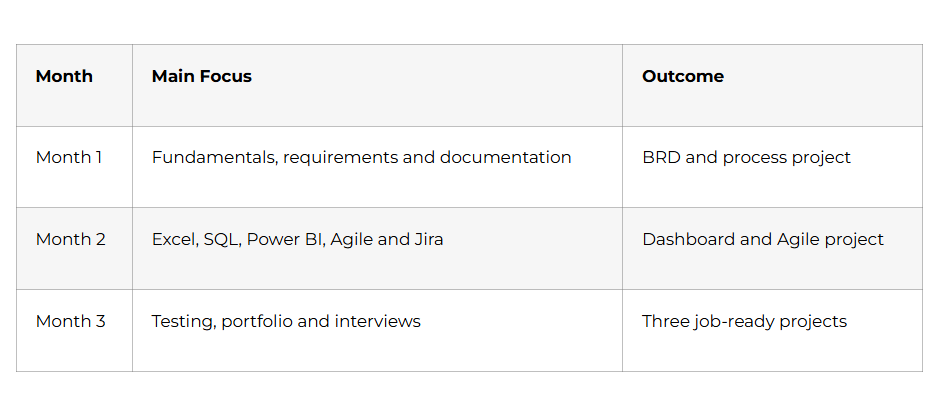
Turn Data into Smarter Decisions – Explore the Business Analytics Course
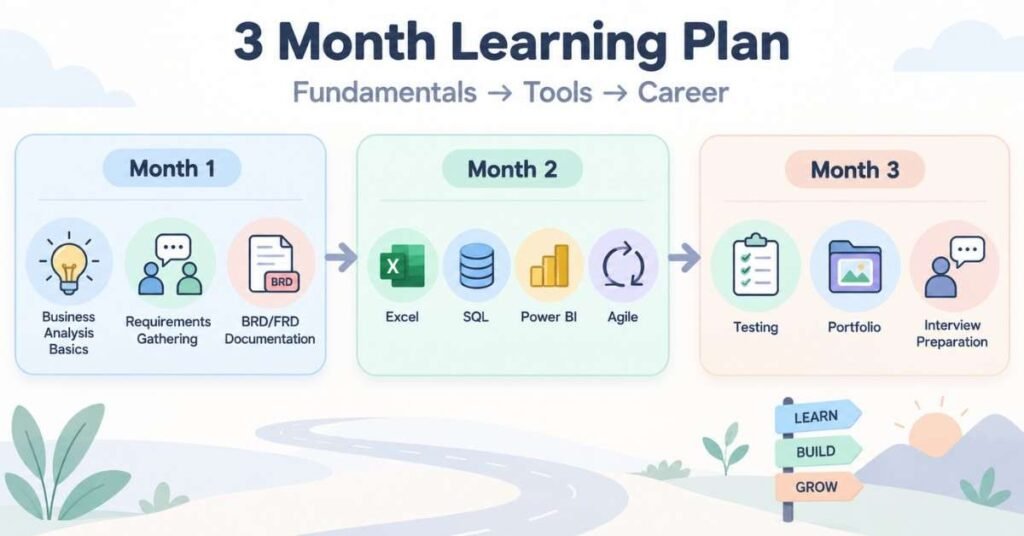
Month 1: Business Analysis Fundamentals
Week 1: Business Analyst Role: Days 1–7
Begin by understanding how a Business Analyst connects stakeholders with development and testing teams. The analyst studies a business need and converts it into clear requirements.
Learn the difference between:
- Business Analyst
- Data Analyst
- Project Manager
- Product Manager
- Quality Analyst
Study common Business Analyst responsibilities:
- Understanding business problems
- Identifying stakeholders
- Conducting meetings
- Gathering requirements
- Preparing documents
- Supporting testing
- Managing requirement changes
Learn problem-solving techniques such as the 5 Whys, SWOT Analysis, Gap Analysis and Root Cause Analysis.
Week 1 Activity: Select a business problem such as delayed customer support. Identify the people affected, possible causes and expected improvement.
Week 2: Requirement Gathering: Days 8–14

Requirement gathering helps the project team understand what the business actually needs.
Learn the main requirement elicitation methods:
- Interviews
- Workshops
- Observation
- Questionnaires
- Brainstorming
- Document analysis
- Prototyping
Understand the difference between business, functional and non-functional requirements.
A functional requirement explains what the system should do. A non-functional requirement defines qualities such as performance, security and availability.
Example:
- Functional: Customers can reset their passwords.
- Non-functional: The password-reset page should load within three seconds.
Every requirement should be clear, complete, feasible and testable.
Week 2 Project: Conduct a sample requirement-gathering session for an online appointment-booking application.
Week 3: Business Documentation: Days 15–21
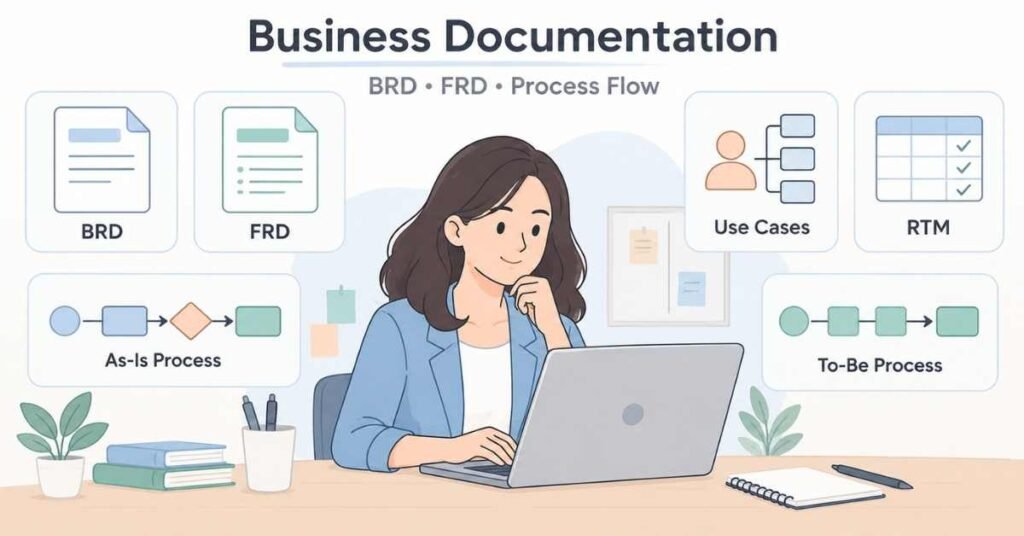
Learn how to prepare a Business Requirements Document. A BRD normally contains:
- Business problem
- Project objective
- Stakeholders
- Project scope
- Requirements
- Assumptions
- Constraints
- Risks
- Success criteria
Study the purpose of a Functional Requirements Document. An FRD describes features, workflows, business rules, validations and system behaviour.
Learn how to prepare use cases with:
- Actor
- Preconditions
- Trigger
- Main flow
- Alternative flow
- Exception flow
- Postconditions
Understand how a Requirements Traceability Matrix connects requirements with development and testing.
Week 3 Project: Prepare a BRD, use case and basic RTM for an employee leave-management system.
Week 4: Process Modelling: Days 22–30
Learn how to document an existing As-Is Process and design an improved To-Be Process.
Practise creating:
- Flowcharts
- Swimlane diagrams
- Activity diagrams
- Basic BPMN diagrams
A good process diagram should show activities, decisions, responsibilities and possible outcomes clearly.
Month 1 Project: Analyse an order-management process and prepare a problem statement, stakeholder list, As-Is process, gap analysis and To-Be process.
Month 1 Milestone: You can understand business problems, gather requirements, prepare documents and create process diagrams.
Discover High-Growth Roles and Opportunities – Business Analytics Career Guide
Month 2: Data and Agile Skills

Week 5: Excel: Days 31–37
Learn spreadsheet fundamentals such as formatting, sorting, filtering, removing duplicates, data validation and conditional formatting.
Practise important functions:
- IF
- SUMIF and SUMIFS
- COUNTIF and COUNTIFS
- XLOOKUP or VLOOKUP
- INDEX and MATCH
- Text and date functions
- PivotTables
- PivotCharts
Week 5 Project: Analyse a sales dataset and prepare a summary of monthly performance, category results and important exceptions.
Week 6: SQL: Days 38–44
Understand databases, tables, rows, columns, primary keys and foreign keys.
Practise:
- SELECT
- WHERE
- ORDER BY
- DISTINCT
- GROUP BY
- HAVING
- Aggregate functions
- INNER JOIN
- LEFT JOIN
- CASE statements
Business Analysts use SQL to validate data and answer business questions without depending completely on technical teams.
Week 6 Project: Use an e-commerce database to identify monthly orders, high-value customers and cancelled transactions.
Week 7: Power BI Days 45–52
Learn how to import data, correct data types, remove errors, create table relationships and prepare a data model.
Build dashboards using:
- KPI cards
- Bar charts
- Line charts
- Tables
- Slicers
- Filters
Every visual should answer a specific business question. Avoid adding charts that do not provide useful information.
Week 7 Project: Create a dashboard showing total performance, monthly trends, category results and three business recommendations.
Week 8: Agile, Scrum and Jira: Days 53–60
Understand Agile concepts such as product backlog, sprint planning, daily Scrum, sprint review and retrospective.
Learn the responsibilities of the Product Owner, Scrum Master and development team.
Practise writing user stories:
As a [user], I want [goal], so that [benefit].
Add clear acceptance criteria to every story. Acceptance criteria define the conditions that must be satisfied before the requirement is approved.
Use Jira to create epics, user stories, tasks and priorities.
Month 2 Project: Prepare a product backlog for an online shopping application with user stories and acceptance criteria.
Month 2 Milestone: You can analyse information using Excel and SQL, build Power BI dashboards and support Agile projects through Jira.
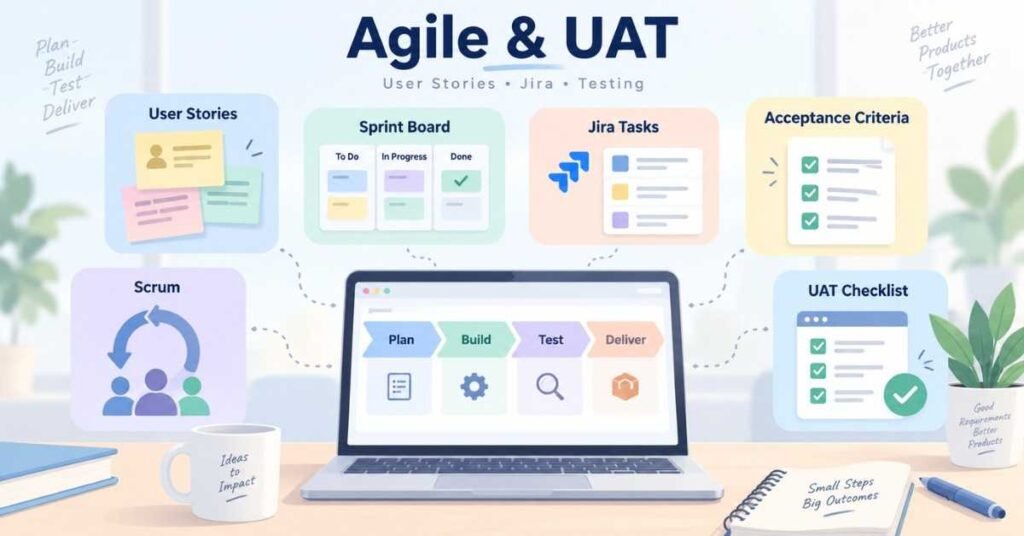
Month 3: Testing, Projects and Career Preparation
Week 9: User Acceptance Testing: Days 61–67
Understand the difference between system testing, regression testing and User Acceptance Testing.
A Business Analyst supports UAT by verifying whether the final solution meets the approved business requirements.
Prepare test cases containing:
- Test-case ID
- Requirement ID
- Preconditions
- Test steps
- Expected result
- Actual result
- Status
Week 9 Project: Create UAT scenarios for submitting, approving, rejecting and cancelling an employee leave request.
Week 10: Change Management: Days 68–74
Requirements may change during a project. A Business Analyst should analyse every change before it is approved.
A change request should explain:
- Requested change
- Business reason
- Affected requirements
- Timeline impact
- Cost impact
- Risks
- Approval status
Practise conducting meetings, preparing minutes, resolving conflicting expectations and escalating issues professionally.
Week 10 Project: Prepare a change-impact analysis for introducing an online payment option into an existing application.
Week 11: Portfolio Projects: Days 75–83
Complete three projects.
Project 1: Process Improvement
Analyse a customer-support process. Prepare stakeholder analysis, As-Is process, root cause and To-Be process.
Project 2: Software Requirements
Create a BRD, use cases, user stories, acceptance criteria, RTM and UAT scenarios for an online application.
Project 3: Business Dashboard
Use Excel, SQL and Power BI to clean data, identify insights and create a management dashboard.
For every project, explain the problem, your approach, documents created and final recommendation
Week 12: Career Preparation: Days 84–90
Prepare a resume highlighting:
- Requirement gathering
- Stakeholder communication
- BRD and FRD
- User stories
- Process modelling
- Excel
- SQL
- Power BI
- Agile
- Jira
- UAT
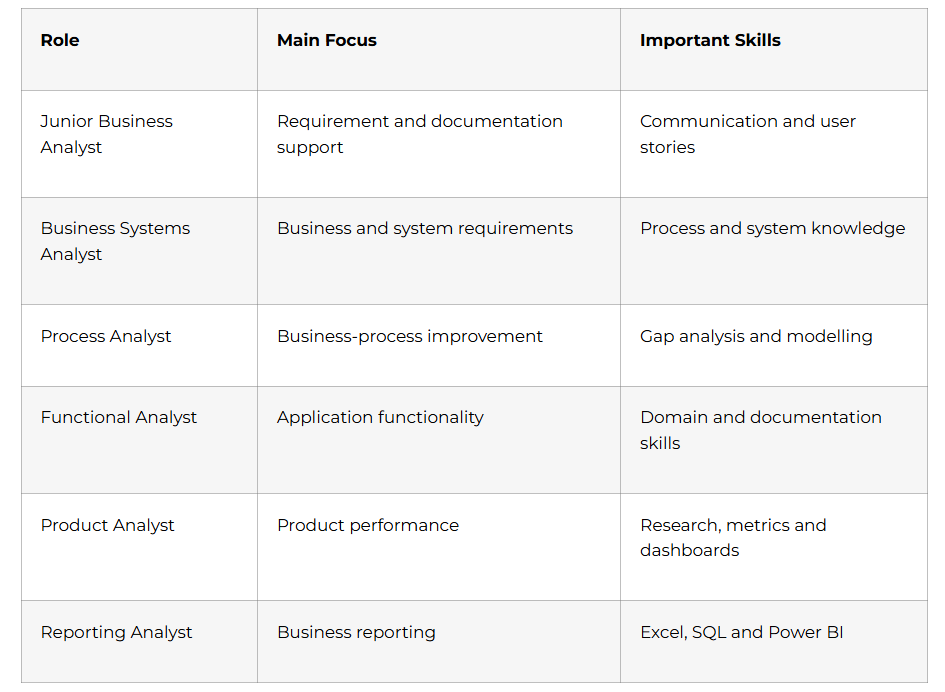
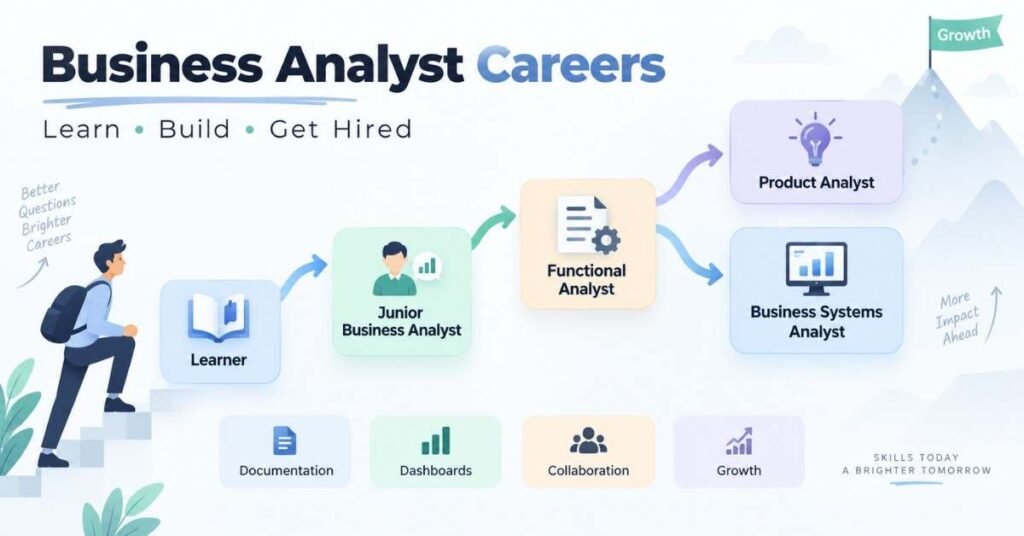
Search for roles such as Junior Business Analyst, Associate Business Analyst, Functional Analyst, Process Analyst and Business Systems Analyst.
Practise common interview questions and prepare a five-minute explanation for each portfolio project.
On Day 90, complete one requirement-gathering activity, one documentation assignment, one SQL test, one dashboard presentation and one mock interview.
Day 90 Milestone: You have practical Business Analysis knowledge, three portfolio projects and the confidence to explain a complete project workflow.
Business Analyst Career Paths
Sharpen Your Preparation for Top Analyst Roles – Business Analytics Interview Guide
Why Choose Frontlines Edutech?
A Business Analytics Course in Telugu can help beginners learn technical and business concepts through Telugu explanations and practical projects.
The learning experience can include:
- Business Analysis fundamentals
- Requirement gathering
- BRD and FRD
- Process modelling
- Excel and SQL
- Power BI
- Agile, Scrum and Jira
- UAT
- Portfolio support
- Interview preparation
Frequently Asked Questions
1. What does a Business Analyst do?
A Business Analyst identifies business needs, gathers requirements, prepares documentation and helps teams deliver a suitable solution.
2. Is coding required?
Advanced coding is not required. Basic SQL, database and system knowledge can be useful.
3. Can non-technical graduates become Business Analysts?
Yes. They can enter this field by developing analytical, documentation, communication and tool-based skills.
4. How is a Business Analyst different from a Data Analyst?
A Business Analyst focuses on requirements and processes. A Data Analyst primarily examines data to identify insights.
5. Which tools should beginners learn?
Excel, SQL, Power BI, Jira and a process-modelling tool are useful starting points.
6. What is the difference between BRD and FRD?
A BRD explains the business need, while an FRD describes the required system behaviour.
7. What is a user story?
A user story describes a requirement from the user’s perspective and explains the expected benefit.
8. Is Power BI compulsory?
It is not compulsory for every role, but reporting and dashboard skills can improve career opportunities.
9. What projects should a portfolio contain?
Include a process-improvement project, a requirement-documentation project and a dashboard project.
10. How does a Business Analytics Course in Telugu help beginners?
It helps learners understand requirements, documentation, SQL, dashboards and Agile concepts through clear Telugu explanations.